YOUR NAME HERE
 This template PowerPoint presentation includes all the relevant
elements you need to cover your film production.
 It is suggested you save this PP in a different name so you
always have a copy – some sections require you to delete the
information on the slide and replace with your own work
 Add more pages to each section where necessary [you should be
doing this!]
 Add visuals as you see necessary
 This document will be added to as you progress through the pre-
production phase.
 Remember, you need to give as much attention to your
sound planning as you do to your visual planning
 Put your form here
 Breakdown your film into it’s basic sections [e.g. via scene
breakdown or similar] and apply broad visual ideas to each
section. You should list the shots required
 You can use this as the master template for your production, then
add more shots to each section when you develop your full visual
plan
 From this you could work on a conventional script if you want, but
using the scene breakdowns should be enough
Act No. Approx timing What happens Visual notes Audio notes
1 25-30
seconds
The
characters
are
introduced,
they find the
phone on the
floor
Show body
language
portraying
anger
Add music
for the
background,
unlink the
audio
recorded
2 25-30
seconds
The victim
runs away
upset, after
doing so the
friends look
at the phone,
Panicked
body
language
Add tense
music to the
background,
unlink the
audio
recorded
Visual Planning
 This section is concerned with the visual planning of your film
 You should use this section to develop the sequencing or your
video, establish the visuals look and sequencing of your film and
create a structure for you to follow when filming
 It is important that you ‘pre-visualise’ the film before you make it; it
will make filming and production a more streamlined process
 The following tasks are part of your visual planning
 Pre-visualisation and concept boards
 Storyboarding
 Shot list
 Tool for exploring the direction and visuals
 Provides inspiration and information for the “look & feel”
 Presents key moments in your video
 A means to sketch/plan ideas
 Information on colour/lighting
 Defining the “mise-en-scene”
 Include as much here as you like, but keep it relevant to the
production, the following slides have been left blank for you to
approach in your own way, add more as you need to
 Suggestion: include your edited short sequence of clips that have
inspired or influenced your video [similar to this:
http://io9.com/5941145/this-directors-video-pitch-for-hunger-games-
might-be-better-than-the-real-movie]
 Your storyboard should bring your idea to life
 Provide an idea of the sequencing of you film
 Provides a basis for production
 Suggested online storyboard creators are:
 https://www.storyboardthat.com
 http://www.pixton.com [very complicated]
 http://www.storyjumper.com [allows you to insert your own images]
 Alternatively, hand draw or photograph your storyboard and scan or
copy to insert it onto your slides
 There are lots of tips collected together on Blackboard!
 Your shot list should contain the sequential breakdown of what
you need to shoot for your film
 It should work in partnership with your storyboard
 It will be your working document when you film
 It should contain the shot number, scene number, shot
description, framing, cast/location info and action you will see
 It should also have information on performers in the scene and
other props, etc
 Shot list template is on Blackboard in the pre-production folder.
Organisational Planning
Names: Roles:
Tommy Lister Acting
Randall Otieno Acting
Aaron Johnson Cameraman
Jude Mcmichan Acting
 Who is going to be in your film, how and why have they been
deemed your best choice? Do you have any backup options?
 The people in my film are going to be my friends, Jude, Randall
and Aaron. I don’t have any backup options and these people are
my best choice as It will be easy to film with people I get on with
and people will feel more comfortable filming with each other, also
mainly as we will be filming in the same location so they are a
good choice for that reason too.
 In terms of location ideally we wanted to film somewhere derelict
or like a forest, however, due to timing issues it is uunlikely we
can outside of college times so now we will have to use our plan
B and use college
 Risk Assess each separate filming location using the provided
form in the pre-production folder on Blackboard and insert into
your powerpoint
 Completing a generic filming assessment would be a start, then
you can add specialist/site specific risks as you progress your
production
 Remember, a Risk Assessment is an ongoing document, you
should evaluate if anything changes in production and when you
put control measures in place
Risk Control Measure
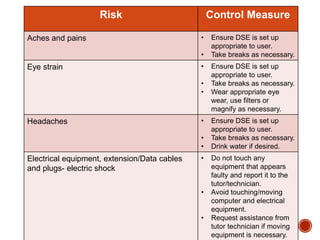
Aches and pains • Ensure DSE is set up
appropriate to user.
• Take breaks as necessary.
Eye strain • Ensure DSE is set up
appropriate to user.
• Take breaks as necessary.
• Wear appropriate eye
wear, use filters or
magnify as necessary.
Headaches • Ensure DSE is set up
appropriate to user.
• Take breaks as necessary.
• Drink water if desired.
Electrical equipment, extension/Data cables
and plugs- electric shock
• Do not touch any
equipment that appears
faulty and report it to the
tutor/technician.
• Avoid touching/moving
computer and electrical
equipment.
• Request assistance from
tutor technician if moving
equipment is necessary.
Risk Control mesaure
Muscular injuries from
incorrectly/inappropriately carrying
heavy items.
• Ensure all heavy loads are carried following correct
lifting postures (Bend your hips and knees to squat
down to your load, keep it close to your body, and
straighten your legs to lift).
• Do not carry/move equipment beyond your comfort
level.
• Request help when transporting equipment/share
amongst crew.
• Go at a pace which is comfortable for you and use
college lifts as necessary.
• Ensure the load is secure before you attempt to
move it.
• Wear appropriate clothing/footwear for transporting
the items.
• Request PPE as required (gloves).
• Check/be aware of the item’s centre of gravity
• Ensure suitable access is available for your egress.
Request help if necessary/too busy in corridors.
Who When Where
Tommy 9:00 AM 14/12/7 Outside 2F66
Jude 9:00 AM 14/12/7 Outside 2F66
Randall 9:00 AM 14/12/7 Outside 2F66
Aaron 9:00 AM 14/12/7 Outside 2F66
 The only props I will need are suitable clothing for the
characters and also a watch and a phone, these will be
acquired by using one that someoneone already owns.
Soundtrack Planning
 Depending on the location and if we use an outside place we will
need a general outside ambience, as well as noises like birds
chirping, this can be created by using a sound recorder. This
could include using a sound recorder to make a bang sound for
when someone hits the floor.
 The Non-Diegetic sounds we will use will be a lot of royalty free
music such as royalty free dramatic music in order to create
tension at certain points. One example of this will be royalty free
generic lift music.

4. pre production

  • 1.
  • 2.
     This templatePowerPoint presentation includes all the relevant elements you need to cover your film production.  It is suggested you save this PP in a different name so you always have a copy – some sections require you to delete the information on the slide and replace with your own work  Add more pages to each section where necessary [you should be doing this!]  Add visuals as you see necessary  This document will be added to as you progress through the pre- production phase.  Remember, you need to give as much attention to your sound planning as you do to your visual planning
  • 5.
     Put yourform here
  • 6.
     Breakdown yourfilm into it’s basic sections [e.g. via scene breakdown or similar] and apply broad visual ideas to each section. You should list the shots required  You can use this as the master template for your production, then add more shots to each section when you develop your full visual plan  From this you could work on a conventional script if you want, but using the scene breakdowns should be enough
  • 7.
    Act No. Approxtiming What happens Visual notes Audio notes 1 25-30 seconds The characters are introduced, they find the phone on the floor Show body language portraying anger Add music for the background, unlink the audio recorded 2 25-30 seconds The victim runs away upset, after doing so the friends look at the phone, Panicked body language Add tense music to the background, unlink the audio recorded
  • 8.
  • 9.
     This sectionis concerned with the visual planning of your film  You should use this section to develop the sequencing or your video, establish the visuals look and sequencing of your film and create a structure for you to follow when filming  It is important that you ‘pre-visualise’ the film before you make it; it will make filming and production a more streamlined process  The following tasks are part of your visual planning  Pre-visualisation and concept boards  Storyboarding  Shot list
  • 10.
     Tool forexploring the direction and visuals  Provides inspiration and information for the “look & feel”  Presents key moments in your video  A means to sketch/plan ideas  Information on colour/lighting  Defining the “mise-en-scene”  Include as much here as you like, but keep it relevant to the production, the following slides have been left blank for you to approach in your own way, add more as you need to  Suggestion: include your edited short sequence of clips that have inspired or influenced your video [similar to this: http://io9.com/5941145/this-directors-video-pitch-for-hunger-games- might-be-better-than-the-real-movie]
  • 12.
     Your storyboardshould bring your idea to life  Provide an idea of the sequencing of you film  Provides a basis for production  Suggested online storyboard creators are:  https://www.storyboardthat.com  http://www.pixton.com [very complicated]  http://www.storyjumper.com [allows you to insert your own images]  Alternatively, hand draw or photograph your storyboard and scan or copy to insert it onto your slides  There are lots of tips collected together on Blackboard!
  • 14.
     Your shotlist should contain the sequential breakdown of what you need to shoot for your film  It should work in partnership with your storyboard  It will be your working document when you film  It should contain the shot number, scene number, shot description, framing, cast/location info and action you will see  It should also have information on performers in the scene and other props, etc  Shot list template is on Blackboard in the pre-production folder.
  • 16.
  • 17.
    Names: Roles: Tommy ListerActing Randall Otieno Acting Aaron Johnson Cameraman Jude Mcmichan Acting
  • 18.
     Who isgoing to be in your film, how and why have they been deemed your best choice? Do you have any backup options?  The people in my film are going to be my friends, Jude, Randall and Aaron. I don’t have any backup options and these people are my best choice as It will be easy to film with people I get on with and people will feel more comfortable filming with each other, also mainly as we will be filming in the same location so they are a good choice for that reason too.
  • 19.
     In termsof location ideally we wanted to film somewhere derelict or like a forest, however, due to timing issues it is uunlikely we can outside of college times so now we will have to use our plan B and use college
  • 20.
     Risk Assesseach separate filming location using the provided form in the pre-production folder on Blackboard and insert into your powerpoint  Completing a generic filming assessment would be a start, then you can add specialist/site specific risks as you progress your production  Remember, a Risk Assessment is an ongoing document, you should evaluate if anything changes in production and when you put control measures in place
  • 21.
    Risk Control Measure Achesand pains • Ensure DSE is set up appropriate to user. • Take breaks as necessary. Eye strain • Ensure DSE is set up appropriate to user. • Take breaks as necessary. • Wear appropriate eye wear, use filters or magnify as necessary. Headaches • Ensure DSE is set up appropriate to user. • Take breaks as necessary. • Drink water if desired. Electrical equipment, extension/Data cables and plugs- electric shock • Do not touch any equipment that appears faulty and report it to the tutor/technician. • Avoid touching/moving computer and electrical equipment. • Request assistance from tutor technician if moving equipment is necessary.
  • 22.
    Risk Control mesaure Muscularinjuries from incorrectly/inappropriately carrying heavy items. • Ensure all heavy loads are carried following correct lifting postures (Bend your hips and knees to squat down to your load, keep it close to your body, and straighten your legs to lift). • Do not carry/move equipment beyond your comfort level. • Request help when transporting equipment/share amongst crew. • Go at a pace which is comfortable for you and use college lifts as necessary. • Ensure the load is secure before you attempt to move it. • Wear appropriate clothing/footwear for transporting the items. • Request PPE as required (gloves). • Check/be aware of the item’s centre of gravity • Ensure suitable access is available for your egress. Request help if necessary/too busy in corridors.
  • 24.
    Who When Where Tommy9:00 AM 14/12/7 Outside 2F66 Jude 9:00 AM 14/12/7 Outside 2F66 Randall 9:00 AM 14/12/7 Outside 2F66 Aaron 9:00 AM 14/12/7 Outside 2F66
  • 26.
     The onlyprops I will need are suitable clothing for the characters and also a watch and a phone, these will be acquired by using one that someoneone already owns.
  • 27.
  • 28.
     Depending onthe location and if we use an outside place we will need a general outside ambience, as well as noises like birds chirping, this can be created by using a sound recorder. This could include using a sound recorder to make a bang sound for when someone hits the floor.
  • 29.
     The Non-Diegeticsounds we will use will be a lot of royalty free music such as royalty free dramatic music in order to create tension at certain points. One example of this will be royalty free generic lift music.