YOUR NAME HERE
 This template PowerPoint presentation includes all the relevant
elements you need to cover your film production.
 It is suggested you save this PP in a different name so you
always have a copy – some sections require you to delete the
information on the slide and replace with your own work
 Add more pages to each section where necessary [you should be
doing this!]
 Add visuals as you see necessary
 This document will be added to as you progress through the pre-
production phase.
 Remember, you need to give as much attention to your
sound planning as you do to your visual planning
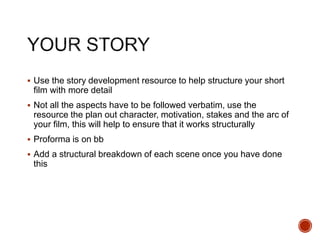
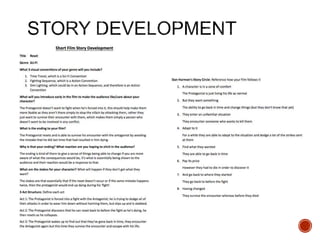
 Use the story development resource to help structure your short
film with more detail
 Not all the aspects have to be followed verbatim, use the
resource the plan out character, motivation, stakes and the arc of
your film, this will help to ensure that it works structurally
 Proforma is on bb
 Add a structural breakdown of each scene once you have done
this
 Breakdown your film into it’s basic sections [e.g. via scene
breakdown or similar] and apply broad visual ideas to each
section. You should list the shots required
 You can use this as the master template for your production, then
add more shots to each section when you develop your full visual
plan
 From this you could work on a conventional script if you want, but
using the scene breakdowns should be enough
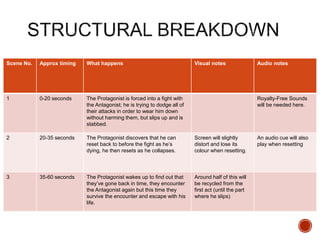
Scene No. Approx timing What happens Visual notes Audio notes
1 0-20 seconds The Protagonist is forced into a fight with
the Antagonist; he is trying to dodge all of
their attacks in order to wear him down
without harming them, but slips up and is
stabbed.
Royalty-Free Sounds
will be needed here.
2 20-35 seconds The Protagonist discovers that he can
reset back to before the fight as he’s
dying, he then resets as he collapses.
Screen will slightly
distort and lose its
colour when resetting.
An audio cue will also
play when resetting
3 35-60 seconds The Protagonist wakes up to find out that
they’ve gone back in time, they encounter
the Antagonist again but this time they
survive the encounter and escape with his
life.
Around half of this will
be recycled from the
first act (until the part
where he slips)
Visual Planning
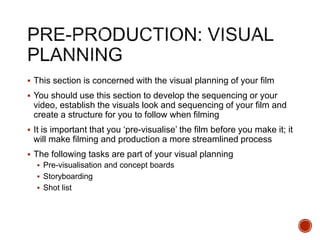
 This section is concerned with the visual planning of your film
 You should use this section to develop the sequencing or your
video, establish the visuals look and sequencing of your film and
create a structure for you to follow when filming
 It is important that you ‘pre-visualise’ the film before you make it; it
will make filming and production a more streamlined process
 The following tasks are part of your visual planning
 Pre-visualisation and concept boards
 Storyboarding
 Shot list
 Tool for exploring the direction and visuals
 Provides inspiration and information for the “look & feel”
 Presents key moments in your video
 A means to sketch/plan ideas
 Information on colour/lighting
 Defining the “mise-en-scene”
 Include as much here as you like, but keep it relevant to the
production, the following slides have been left blank for you to
approach in your own way, add more as you need to
 Suggestion: include your edited short sequence of clips that have
inspired or influenced your video [similar to this:
http://io9.com/5941145/this-directors-video-pitch-for-hunger-games-
might-be-better-than-the-real-movie]
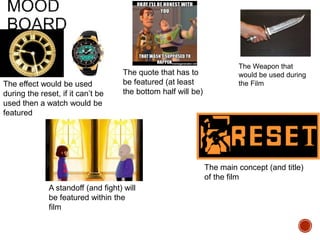
The Weapon that
would be used during
the FilmThe effect would be used
during the reset, if it can’t be
used then a watch would be
featured
The quote that has to
be featured (at least
the bottom half will be)
The main concept (and title)
of the film
A standoff (and fight) will
be featured within the
film
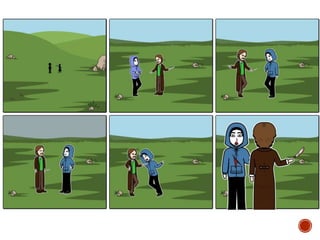
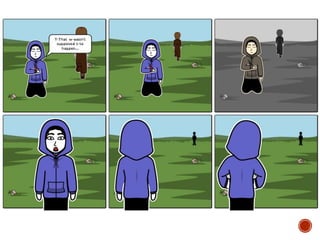
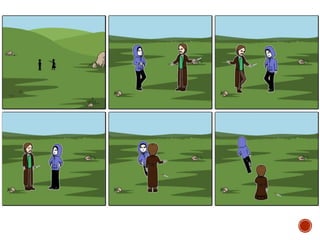
 Your storyboard should bring your idea to life
 Provide an idea of the sequencing of you film
 Provides a basis for production
 Suggested online storyboard creators are:
 https://www.storyboardthat.com
 http://www.pixton.com [very complicated]
 http://www.storyjumper.com [allows you to insert your own images]
 Alternatively, hand draw or photograph your storyboard and scan or
copy to insert it onto your slides
 There are lots of tips collected together on Blackboard!
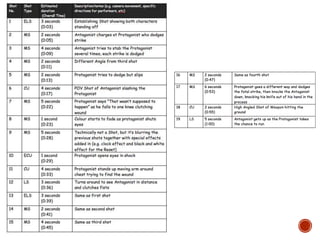
 Your shot list should contain the sequential breakdown of what
you need to shoot for your film
 It should work in partnership with your storyboard
 It will be your working document when you film
 It should contain the shot number, scene number, shot
description, framing, cast/location info and action you will see
 It should also have information on performers in the scene and
other props, etc
 Shot list template is on Blackboard in the pre-production folder.
Organisational Planning
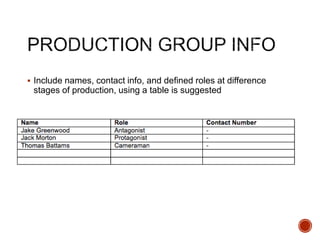
 Include names, contact info, and defined roles at difference
stages of production, using a table is suggested
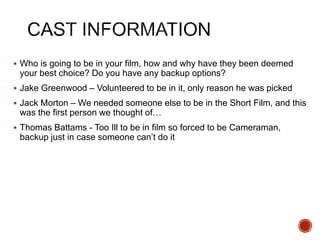
 Who is going to be in your film, how and why have they been deemed
your best choice? Do you have any backup options?
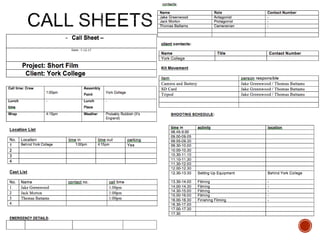
 Jake Greenwood – Volunteered to be in it, only reason he was picked
 Jack Morton – We needed someone else to be in the Short Film, and this
was the first person we thought of…
 Thomas Battams - Too Ill to be in film so forced to be Cameraman,
backup just in case someone can’t do it
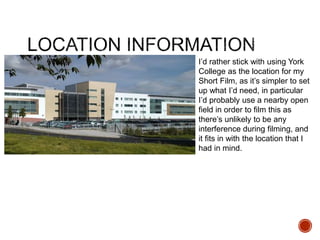
I’d rather stick with using York
College as the location for my
Short Film, as it’s simpler to set
up what I’d need, in particular
I’d probably use a nearby open
field in order to film this as
there’s unlikely to be any
interference during filming, and
it fits in with the location that I
had in mind.
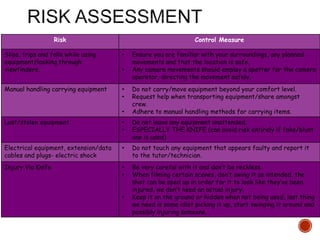
Risk Control Measure
Slips, trips and falls while using
equipment/looking through
viewfinders.
• Ensure you are familiar with your surroundings, any planned
movements and that the location is safe.
• Any camera movements should employ a spotter for the camera
operator, directing the movement safely.
Manual handling carrying equipment • Do not carry/move equipment beyond your comfort level.
• Request help when transporting equipment/share amongst
crew.
• Adhere to manual handling methods for carrying items.
Lost/stolen equipment • Do not leave any equipment unattended.
• ESPECIALLY THE KNIFE (can avoid risk entirely if fake/blunt
one is used)
Electrical equipment, extension/data
cables and plugs- electric shock
• Do not touch any equipment that appears faulty and report it
to the tutor/technician.
Injury Via Knife • Be very careful with it and don’t be reckless.
• When filming certain scenes, don’t swing it as intended, the
shot can be sped up in order for it to look like they’ve been
injured, we don’t need an actual injury.
• Keep it on the ground or hidden when not being used, last thing
we need is some idiot picking it up, start swinging it around and
possibly injuring someone.
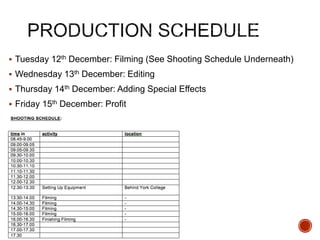
 Tuesday 12th December: Filming (See Shooting Schedule Underneath)
 Wednesday 13th December: Editing
 Thursday 14th December: Adding Special Effects
 Friday 15th December: Profit
 We do need a weapon for the Antagonist to use, and while something like
a Knife would be ideal based on the narrative of the story, for Health and
Safety reasons that wouldn’t be recommended, so instead of that
something less sharp could be used in order to reduce risk of injury, such
as scissors (If the handle can be hidden) or a toy knife so that it can still
look ‘real’ whilst not risking serious injury, these can be brought in from
home so that should be helpful.
 We would also need a clock to show up at some point during the Short
Film, therefore just incase the special effect that I’m planning to try and
implement into the ‘Reset’ doesn’t work I’ll still try to get a Shot with one in
afterwards (probably via watch), this can also be brought in from home.
 .
Soundtrack Planning
 Apart from the quote “That wasn’t supposed to happen” that is required in
the Short Film, we will need some sounds during the fight, as well as a
sound for when the Protagonist is stabbed. Most of the sounds can be
made during the filming, however the ‘stabbing’ sound would need to be a
royalty-free sound found on YouTube, but apart from that everything else
can be made without need to take sounds from the internet.
 If we can’t get the sounds during the filming, then we may need to use a
sound recorder in order to collect the sounds that would be needed that
would reduce the need to use Royalty-Free sounds throughout the film.
 There will be some music that would be played over the Short Film (at
least when they are ‘fighting’), which will have to be Royalty-Free music
found on YouTube.
 There will also need to be a sound cue that will play during the reset to
signify that it is working, this would make it look more appealing than if it
was just a visual effect. This could be made during filming by using
sounds made in a clip that wouldn’t be shown during the Video, however
it would be easier to find something Royalty-Free.

4. pre production sf 2017

  • 1.
  • 2.
     This templatePowerPoint presentation includes all the relevant elements you need to cover your film production.  It is suggested you save this PP in a different name so you always have a copy – some sections require you to delete the information on the slide and replace with your own work  Add more pages to each section where necessary [you should be doing this!]  Add visuals as you see necessary  This document will be added to as you progress through the pre- production phase.  Remember, you need to give as much attention to your sound planning as you do to your visual planning
  • 4.
     Use thestory development resource to help structure your short film with more detail  Not all the aspects have to be followed verbatim, use the resource the plan out character, motivation, stakes and the arc of your film, this will help to ensure that it works structurally  Proforma is on bb  Add a structural breakdown of each scene once you have done this
  • 6.
     Breakdown yourfilm into it’s basic sections [e.g. via scene breakdown or similar] and apply broad visual ideas to each section. You should list the shots required  You can use this as the master template for your production, then add more shots to each section when you develop your full visual plan  From this you could work on a conventional script if you want, but using the scene breakdowns should be enough
  • 7.
    Scene No. Approxtiming What happens Visual notes Audio notes 1 0-20 seconds The Protagonist is forced into a fight with the Antagonist; he is trying to dodge all of their attacks in order to wear him down without harming them, but slips up and is stabbed. Royalty-Free Sounds will be needed here. 2 20-35 seconds The Protagonist discovers that he can reset back to before the fight as he’s dying, he then resets as he collapses. Screen will slightly distort and lose its colour when resetting. An audio cue will also play when resetting 3 35-60 seconds The Protagonist wakes up to find out that they’ve gone back in time, they encounter the Antagonist again but this time they survive the encounter and escape with his life. Around half of this will be recycled from the first act (until the part where he slips)
  • 8.
  • 9.
     This sectionis concerned with the visual planning of your film  You should use this section to develop the sequencing or your video, establish the visuals look and sequencing of your film and create a structure for you to follow when filming  It is important that you ‘pre-visualise’ the film before you make it; it will make filming and production a more streamlined process  The following tasks are part of your visual planning  Pre-visualisation and concept boards  Storyboarding  Shot list
  • 10.
     Tool forexploring the direction and visuals  Provides inspiration and information for the “look & feel”  Presents key moments in your video  A means to sketch/plan ideas  Information on colour/lighting  Defining the “mise-en-scene”  Include as much here as you like, but keep it relevant to the production, the following slides have been left blank for you to approach in your own way, add more as you need to  Suggestion: include your edited short sequence of clips that have inspired or influenced your video [similar to this: http://io9.com/5941145/this-directors-video-pitch-for-hunger-games- might-be-better-than-the-real-movie]
  • 11.
    The Weapon that wouldbe used during the FilmThe effect would be used during the reset, if it can’t be used then a watch would be featured The quote that has to be featured (at least the bottom half will be) The main concept (and title) of the film A standoff (and fight) will be featured within the film
  • 12.
     Your storyboardshould bring your idea to life  Provide an idea of the sequencing of you film  Provides a basis for production  Suggested online storyboard creators are:  https://www.storyboardthat.com  http://www.pixton.com [very complicated]  http://www.storyjumper.com [allows you to insert your own images]  Alternatively, hand draw or photograph your storyboard and scan or copy to insert it onto your slides  There are lots of tips collected together on Blackboard!
  • 16.
     Your shotlist should contain the sequential breakdown of what you need to shoot for your film  It should work in partnership with your storyboard  It will be your working document when you film  It should contain the shot number, scene number, shot description, framing, cast/location info and action you will see  It should also have information on performers in the scene and other props, etc  Shot list template is on Blackboard in the pre-production folder.
  • 18.
  • 19.
     Include names,contact info, and defined roles at difference stages of production, using a table is suggested
  • 20.
     Who isgoing to be in your film, how and why have they been deemed your best choice? Do you have any backup options?  Jake Greenwood – Volunteered to be in it, only reason he was picked  Jack Morton – We needed someone else to be in the Short Film, and this was the first person we thought of…  Thomas Battams - Too Ill to be in film so forced to be Cameraman, backup just in case someone can’t do it
  • 21.
    I’d rather stickwith using York College as the location for my Short Film, as it’s simpler to set up what I’d need, in particular I’d probably use a nearby open field in order to film this as there’s unlikely to be any interference during filming, and it fits in with the location that I had in mind.
  • 22.
    Risk Control Measure Slips,trips and falls while using equipment/looking through viewfinders. • Ensure you are familiar with your surroundings, any planned movements and that the location is safe. • Any camera movements should employ a spotter for the camera operator, directing the movement safely. Manual handling carrying equipment • Do not carry/move equipment beyond your comfort level. • Request help when transporting equipment/share amongst crew. • Adhere to manual handling methods for carrying items. Lost/stolen equipment • Do not leave any equipment unattended. • ESPECIALLY THE KNIFE (can avoid risk entirely if fake/blunt one is used) Electrical equipment, extension/data cables and plugs- electric shock • Do not touch any equipment that appears faulty and report it to the tutor/technician. Injury Via Knife • Be very careful with it and don’t be reckless. • When filming certain scenes, don’t swing it as intended, the shot can be sped up in order for it to look like they’ve been injured, we don’t need an actual injury. • Keep it on the ground or hidden when not being used, last thing we need is some idiot picking it up, start swinging it around and possibly injuring someone.
  • 24.
     Tuesday 12thDecember: Filming (See Shooting Schedule Underneath)  Wednesday 13th December: Editing  Thursday 14th December: Adding Special Effects  Friday 15th December: Profit
  • 26.
     We doneed a weapon for the Antagonist to use, and while something like a Knife would be ideal based on the narrative of the story, for Health and Safety reasons that wouldn’t be recommended, so instead of that something less sharp could be used in order to reduce risk of injury, such as scissors (If the handle can be hidden) or a toy knife so that it can still look ‘real’ whilst not risking serious injury, these can be brought in from home so that should be helpful.  We would also need a clock to show up at some point during the Short Film, therefore just incase the special effect that I’m planning to try and implement into the ‘Reset’ doesn’t work I’ll still try to get a Shot with one in afterwards (probably via watch), this can also be brought in from home.  .
  • 27.
  • 28.
     Apart fromthe quote “That wasn’t supposed to happen” that is required in the Short Film, we will need some sounds during the fight, as well as a sound for when the Protagonist is stabbed. Most of the sounds can be made during the filming, however the ‘stabbing’ sound would need to be a royalty-free sound found on YouTube, but apart from that everything else can be made without need to take sounds from the internet.  If we can’t get the sounds during the filming, then we may need to use a sound recorder in order to collect the sounds that would be needed that would reduce the need to use Royalty-Free sounds throughout the film.
  • 29.
     There willbe some music that would be played over the Short Film (at least when they are ‘fighting’), which will have to be Royalty-Free music found on YouTube.  There will also need to be a sound cue that will play during the reset to signify that it is working, this would make it look more appealing than if it was just a visual effect. This could be made during filming by using sounds made in a clip that wouldn’t be shown during the Video, however it would be easier to find something Royalty-Free.

Editor's Notes

  • #12 Collection of images related to your product/inspirational/visually interesting At least 15 needed