Toni Ann
 This template PowerPoint presentation includes all the relevant
elements you need to cover your film production.
 It is suggested you save this PP in a different name so you
always have a copy – some sections require you to delete the
information on the slide and replace with your own work
 Add more pages to each section where necessary [you should be
doing this!]
 Add visuals as you see necessary
 This document will be added to as you progress through the pre-
production phase.
 Remember, you need to give as much attention to your
sound planning as you do to your visual planning
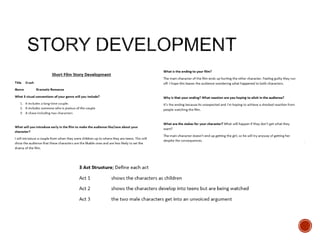
 Use the story development resource to help structure your short
film with more detail
 Not all the aspects have to be followed verbatim, use the
resource the plan out character, motivation, stakes and the arc of
your film, this will help to ensure that it works structurally
 Proforma is on bb
 Add a structural breakdown of each scene once you have done
this
 Breakdown your film into it’s basic sections [e.g. via scene
breakdown or similar] and apply broad visual ideas to each
section. You should list the shots required
 You can use this as the master template for your production, then
add more shots to each section when you develop your full visual
plan
 From this you could work on a conventional script if you want, but
using the scene breakdowns should be enough
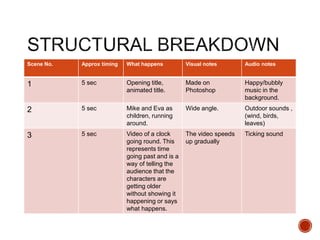
Scene No. Approx timing What happens Visual notes Audio notes
1 5 sec Opening title,
animated title.
Made on
Photoshop
Happy/bubbly
music in the
background.
2 5 sec Mike and Eva as
children, running
around.
Wide angle. Outdoor sounds ,
(wind, birds,
leaves)
3 5 sec Video of a clock
going round. This
represents time
going past and is a
way of telling the
audience that the
characters are
getting older
without showing it
happening or says
what happens.
The video speeds
up gradually
Ticking sound
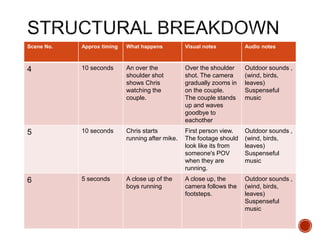
Scene No. Approx timing What happens Visual notes Audio notes
4 10 seconds An over the
shoulder shot
shows Chris
watching the
couple.
Over the shoulder
shot. The camera
gradually zooms in
on the couple.
The couple stands
up and waves
goodbye to
eachother
Outdoor sounds ,
(wind, birds,
leaves)
Suspenseful
music
5 10 seconds Chris starts
running after mike.
First person view.
The footage should
look like its from
someone's POV
when they are
running.
Outdoor sounds ,
(wind, birds,
leaves)
Suspenseful
music
6 5 seconds A close up of the
boys running
A close up, the
camera follows the
footsteps.
Outdoor sounds ,
(wind, birds,
leaves)
Suspenseful
music
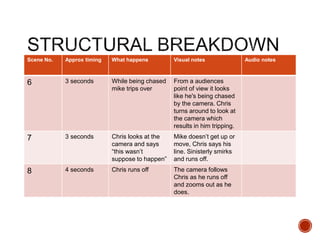
Scene No. Approx timing What happens Visual notes Audio notes
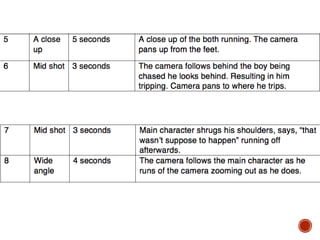
6 3 seconds While being chased
mike trips over
From a audiences
point of view it looks
like he's being chased
by the camera. Chris
turns around to look at
the camera which
results in him tripping.
7 3 seconds Chris looks at the
camera and says
“this wasn’t
suppose to happen”
Mike doesn’t get up or
move, Chris says his
line. Sinisterly smirks
and runs off.
8 4 seconds Chris runs off The camera follows
Chris as he runs off
and zooms out as he
does.
Visual Planning
 This section is concerned with the visual planning of your film
 You should use this section to develop the sequencing or your
video, establish the visuals look and sequencing of your film and
create a structure for you to follow when filming
 It is important that you ‘pre-visualise’ the film before you make it; it
will make filming and production a more streamlined process
 The following tasks are part of your visual planning
 Pre-visualisation and concept boards
 Storyboarding
 Shot list
 Tool for exploring the direction and visuals
 Provides inspiration and information for the “look & feel”
 Presents key moments in your video
 A means to sketch/plan ideas
 Information on colour/lighting
 Defining the “mise-en-scene”
 Include as much here as you like, but keep it relevant to the
production, the following slides have been left blank for you to
approach in your own way, add more as you need to
 Suggestion: include your edited short sequence of clips that have
inspired or influenced your video [similar to this:
http://io9.com/5941145/this-directors-video-pitch-for-hunger-games-
might-be-better-than-the-real-movie]
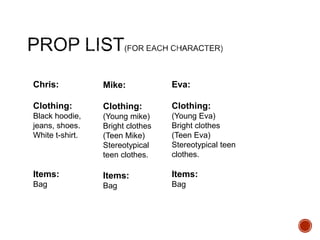
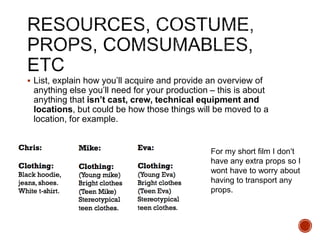
Chris:
Clothing:
Black hoodie,
jeans, shoes.
White t-shirt.
Items:
Bag
Mike:
Clothing:
(Young mike)
Bright clothes
(Teen Mike)
Stereotypical
teen clothes.
Items:
Bag
Eva:
Clothing:
(Young Eva)
Bright clothes
(Teen Eva)
Stereotypical teen
clothes.
Items:
Bag
 Your storyboard should bring your idea to life
 Provide an idea of the sequencing of you film
 Provides a basis for production
 Suggested online storyboard creators are:
 https://www.storyboardthat.com
 http://www.pixton.com [very complicated]
 http://www.storyjumper.com [allows you to insert your own images]
 Alternatively, hand draw or photograph your storyboard and scan or
copy to insert it onto your slides
 There are lots of tips collected together on Blackboard!
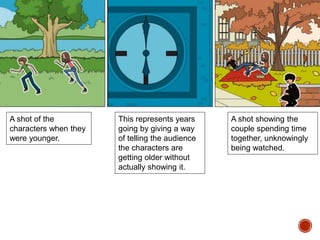
This represents years
going by giving a way
of telling the audience
the characters are
getting older without
actually showing it.
A shot of the
characters when they
were younger.
A shot showing the
couple spending time
together, unknowingly
being watched.
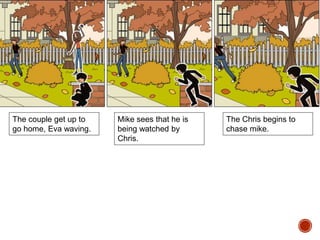
The couple get up to
go home, Eva waving.
Mike sees that he is
being watched by
Chris.
The Chris begins to
chase mike.
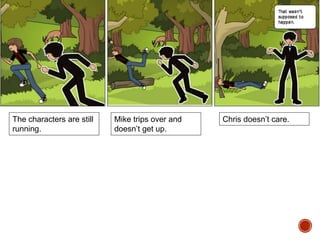
The characters are still
running.
Mike trips over and
doesn’t get up.
Chris doesn’t care.
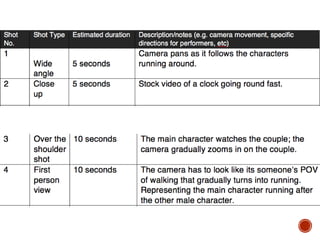
 Your shot list should contain the sequential breakdown of what
you need to shoot for your film
 It should work in partnership with your storyboard
 It will be your working document when you film
 It should contain the shot number, scene number, shot
description, framing, cast/location info and action you will see
 It should also have information on performers in the scene and
other props, etc
 Shot list template is on Blackboard in the pre-production folder.
Organisational Planning
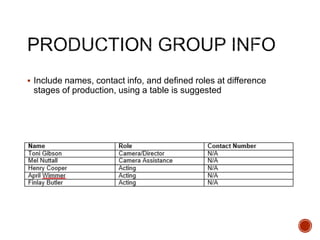
 Include names, contact info, and defined roles at difference
stages of production, using a table is suggested
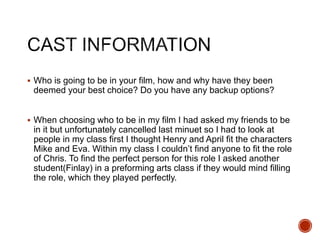
 Who is going to be in your film, how and why have they been
deemed your best choice? Do you have any backup options?
 When choosing who to be in my film I had asked my friends to be
in it but unfortunately cancelled last minuet so I had to look at
people in my class first I thought Henry and April fit the characters
Mike and Eva. Within my class I couldn’t find anyone to fit the role
of Chris. To find the perfect person for this role I asked another
student(Finlay) in a preforming arts class if they would mind filling
the role, which they played perfectly.
 Information and images of your location[s] for filming
 You should have address details, clearance/permissions for
filming, recce photos and floorplans [including camera, equipment
and cast/crew layouts]
 Where possible, have a plan B fallback location option
 Assess each location for any issues and suggest solutions
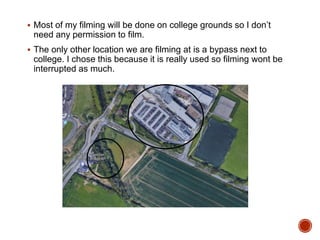
 Most of my filming will be done on college grounds so I don’t
need any permission to film.
 The only other location we are filming at is a bypass next to
college. I chose this because it is really used so filming wont be
interrupted as much.
 Risk Assess each separate filming location using the provided
form in the pre-production folder on Blackboard and insert into
your PowerPoint
 Completing a generic filming assessment would be a start, then
you can add specialist/site specific risks as you progress your
production
 Remember, a Risk Assessment is an ongoing document, you
should evaluate if anything changes in production and when you
put control measures in place
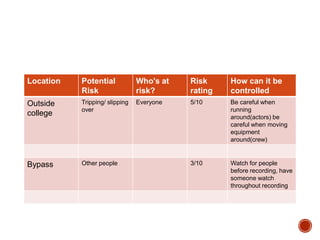
Location Potential
Risk
Who's at
risk?
Risk
rating
How can it be
controlled
Outside
college
Tripping/ slipping
over
Everyone 5/10 Be careful when
running
around(actors) be
careful when moving
equipment
around(crew)
Bypass Other people 3/10 Watch for people
before recording, have
someone watch
throughout recording
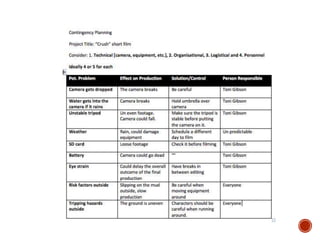
 Things go wrong
 Your contingency plan is there to give you a backup or to
minimize the effect on production
 You should consider the following areas: Technical, Location,
Personnel and Organizational areas [about 5 potential issues for
each]
 Use the form in pre-production folder on Blackboard
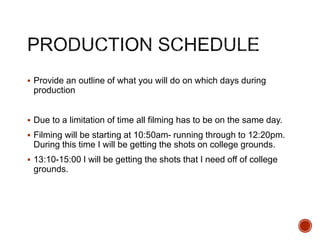
 Provide an outline of what you will do on which days during
production
 Due to a limitation of time all filming has to be on the same day.
 Filming will be starting at 10:50am- running through to 12:20pm.
During this time I will be getting the shots on college grounds.
 13:10-15:00 I will be getting the shots that I need off of college
grounds.
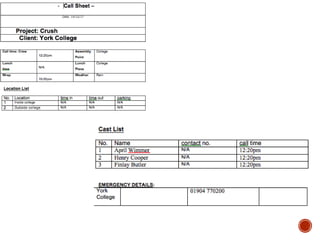
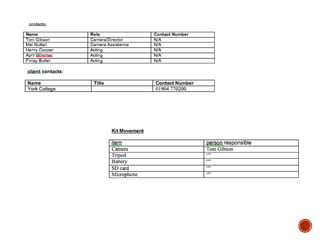
 Complete a call sheet for each production activity
 Forms are on Blackboard
 Insert into PowerPoint here
 List, explain how you’ll acquire and provide an overview of
anything else you’ll need for your production – this is about
anything that isn’t cast, crew, technical equipment and
locations, but could be how those things will be moved to a
location, for example.
For my short film I don’t
have any extra props so I
wont have to worry about
having to transport any
props.
Soundtrack Planning
 I used the background sounds of what I recorded as
environmental sounds throughout my film.
 I repeated a lot of the same sounds throughout the film as just
generic background sound, things including wind, birds, running,
walking and people.
 When the character is being chased music plays to create
suspense for the person watching.
 I did this to show that the moment is dramatic and intriguing.
 Another reason I chose dramatic music is so that the person
watches starts to feel worry for the character being chases.

4. pre production sf 2017

  • 1.
  • 2.
     This templatePowerPoint presentation includes all the relevant elements you need to cover your film production.  It is suggested you save this PP in a different name so you always have a copy – some sections require you to delete the information on the slide and replace with your own work  Add more pages to each section where necessary [you should be doing this!]  Add visuals as you see necessary  This document will be added to as you progress through the pre- production phase.  Remember, you need to give as much attention to your sound planning as you do to your visual planning
  • 4.
     Use thestory development resource to help structure your short film with more detail  Not all the aspects have to be followed verbatim, use the resource the plan out character, motivation, stakes and the arc of your film, this will help to ensure that it works structurally  Proforma is on bb  Add a structural breakdown of each scene once you have done this
  • 7.
     Breakdown yourfilm into it’s basic sections [e.g. via scene breakdown or similar] and apply broad visual ideas to each section. You should list the shots required  You can use this as the master template for your production, then add more shots to each section when you develop your full visual plan  From this you could work on a conventional script if you want, but using the scene breakdowns should be enough
  • 8.
    Scene No. Approxtiming What happens Visual notes Audio notes 1 5 sec Opening title, animated title. Made on Photoshop Happy/bubbly music in the background. 2 5 sec Mike and Eva as children, running around. Wide angle. Outdoor sounds , (wind, birds, leaves) 3 5 sec Video of a clock going round. This represents time going past and is a way of telling the audience that the characters are getting older without showing it happening or says what happens. The video speeds up gradually Ticking sound
  • 9.
    Scene No. Approxtiming What happens Visual notes Audio notes 4 10 seconds An over the shoulder shot shows Chris watching the couple. Over the shoulder shot. The camera gradually zooms in on the couple. The couple stands up and waves goodbye to eachother Outdoor sounds , (wind, birds, leaves) Suspenseful music 5 10 seconds Chris starts running after mike. First person view. The footage should look like its from someone's POV when they are running. Outdoor sounds , (wind, birds, leaves) Suspenseful music 6 5 seconds A close up of the boys running A close up, the camera follows the footsteps. Outdoor sounds , (wind, birds, leaves) Suspenseful music
  • 10.
    Scene No. Approxtiming What happens Visual notes Audio notes 6 3 seconds While being chased mike trips over From a audiences point of view it looks like he's being chased by the camera. Chris turns around to look at the camera which results in him tripping. 7 3 seconds Chris looks at the camera and says “this wasn’t suppose to happen” Mike doesn’t get up or move, Chris says his line. Sinisterly smirks and runs off. 8 4 seconds Chris runs off The camera follows Chris as he runs off and zooms out as he does.
  • 11.
  • 12.
     This sectionis concerned with the visual planning of your film  You should use this section to develop the sequencing or your video, establish the visuals look and sequencing of your film and create a structure for you to follow when filming  It is important that you ‘pre-visualise’ the film before you make it; it will make filming and production a more streamlined process  The following tasks are part of your visual planning  Pre-visualisation and concept boards  Storyboarding  Shot list
  • 13.
     Tool forexploring the direction and visuals  Provides inspiration and information for the “look & feel”  Presents key moments in your video  A means to sketch/plan ideas  Information on colour/lighting  Defining the “mise-en-scene”  Include as much here as you like, but keep it relevant to the production, the following slides have been left blank for you to approach in your own way, add more as you need to  Suggestion: include your edited short sequence of clips that have inspired or influenced your video [similar to this: http://io9.com/5941145/this-directors-video-pitch-for-hunger-games- might-be-better-than-the-real-movie]
  • 14.
    Chris: Clothing: Black hoodie, jeans, shoes. Whitet-shirt. Items: Bag Mike: Clothing: (Young mike) Bright clothes (Teen Mike) Stereotypical teen clothes. Items: Bag Eva: Clothing: (Young Eva) Bright clothes (Teen Eva) Stereotypical teen clothes. Items: Bag
  • 15.
     Your storyboardshould bring your idea to life  Provide an idea of the sequencing of you film  Provides a basis for production  Suggested online storyboard creators are:  https://www.storyboardthat.com  http://www.pixton.com [very complicated]  http://www.storyjumper.com [allows you to insert your own images]  Alternatively, hand draw or photograph your storyboard and scan or copy to insert it onto your slides  There are lots of tips collected together on Blackboard!
  • 16.
    This represents years goingby giving a way of telling the audience the characters are getting older without actually showing it. A shot of the characters when they were younger. A shot showing the couple spending time together, unknowingly being watched.
  • 17.
    The couple getup to go home, Eva waving. Mike sees that he is being watched by Chris. The Chris begins to chase mike.
  • 18.
    The characters arestill running. Mike trips over and doesn’t get up. Chris doesn’t care.
  • 19.
     Your shotlist should contain the sequential breakdown of what you need to shoot for your film  It should work in partnership with your storyboard  It will be your working document when you film  It should contain the shot number, scene number, shot description, framing, cast/location info and action you will see  It should also have information on performers in the scene and other props, etc  Shot list template is on Blackboard in the pre-production folder.
  • 22.
  • 23.
     Include names,contact info, and defined roles at difference stages of production, using a table is suggested
  • 24.
     Who isgoing to be in your film, how and why have they been deemed your best choice? Do you have any backup options?  When choosing who to be in my film I had asked my friends to be in it but unfortunately cancelled last minuet so I had to look at people in my class first I thought Henry and April fit the characters Mike and Eva. Within my class I couldn’t find anyone to fit the role of Chris. To find the perfect person for this role I asked another student(Finlay) in a preforming arts class if they would mind filling the role, which they played perfectly.
  • 25.
     Information andimages of your location[s] for filming  You should have address details, clearance/permissions for filming, recce photos and floorplans [including camera, equipment and cast/crew layouts]  Where possible, have a plan B fallback location option  Assess each location for any issues and suggest solutions
  • 26.
     Most ofmy filming will be done on college grounds so I don’t need any permission to film.  The only other location we are filming at is a bypass next to college. I chose this because it is really used so filming wont be interrupted as much.
  • 27.
     Risk Assesseach separate filming location using the provided form in the pre-production folder on Blackboard and insert into your PowerPoint  Completing a generic filming assessment would be a start, then you can add specialist/site specific risks as you progress your production  Remember, a Risk Assessment is an ongoing document, you should evaluate if anything changes in production and when you put control measures in place
  • 28.
    Location Potential Risk Who's at risk? Risk rating Howcan it be controlled Outside college Tripping/ slipping over Everyone 5/10 Be careful when running around(actors) be careful when moving equipment around(crew) Bypass Other people 3/10 Watch for people before recording, have someone watch throughout recording
  • 29.
     Things gowrong  Your contingency plan is there to give you a backup or to minimize the effect on production  You should consider the following areas: Technical, Location, Personnel and Organizational areas [about 5 potential issues for each]  Use the form in pre-production folder on Blackboard
  • 31.
     Provide anoutline of what you will do on which days during production  Due to a limitation of time all filming has to be on the same day.  Filming will be starting at 10:50am- running through to 12:20pm. During this time I will be getting the shots on college grounds.  13:10-15:00 I will be getting the shots that I need off of college grounds.
  • 32.
     Complete acall sheet for each production activity  Forms are on Blackboard  Insert into PowerPoint here
  • 35.
     List, explainhow you’ll acquire and provide an overview of anything else you’ll need for your production – this is about anything that isn’t cast, crew, technical equipment and locations, but could be how those things will be moved to a location, for example. For my short film I don’t have any extra props so I wont have to worry about having to transport any props.
  • 36.
  • 37.
     I usedthe background sounds of what I recorded as environmental sounds throughout my film.  I repeated a lot of the same sounds throughout the film as just generic background sound, things including wind, birds, running, walking and people.
  • 38.
     When thecharacter is being chased music plays to create suspense for the person watching.  I did this to show that the moment is dramatic and intriguing.  Another reason I chose dramatic music is so that the person watches starts to feel worry for the character being chases.