Fintan Sedgwick
 This template PowerPoint presentation includes all the relevant
elements you need to cover your film production.
 It is suggested you save this PP in a different name so you
always have a copy – some sections require you to delete the
information on the slide and replace with your own work
 Add more pages to each section where necessary [you should be
doing this!]
 Add visuals as you see necessary
 This document will be added to as you progress through the pre-
production phase.
 Remember, you need to give as much attention to your
sound planning as you do to your visual planning
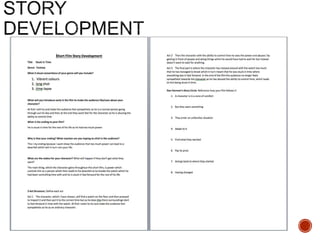
 Use the story development resource to help structure your short
film with more detail
 Not all the aspects have to be followed verbatim, use the
resource the plan out character, motivation, stakes and the arc of
your film, this will help to ensure that it works structurally
 Proforma is on bb
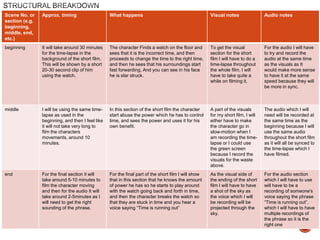
 Add a structural breakdown of each scene once you have done
this
 Put your form here
 Breakdown your film into it’s basic sections [e.g. via scene
breakdown or similar] and apply broad visual ideas to each
section. You should list the shots required
 You can use this as the master template for your production, then
add more shots to each section when you develop your full visual
plan
 From this you could work on a conventional script if you want, but
using the scene breakdowns should be enough
Scene No. or
section (e.g.
beginning,
middle, end,
etc.)
Approx. timing What happens Visual notes Audio notes
beginning It will take around 30 minutes
for the time-lapse in the
background of the short film.
This will be shown by a short
20-30 second clip of him
using the watch.
The character Finds a watch on the floor and
sees that it is the incorrect time, and then
proceeds to change the time to the right time,
and then he sees that his surroundings start
fast forwarding, And you can see in his face
he is star struck.
To get the visual
section for the short
film I will have to do a
time-lapse throughout
the whole film, I will
have to take quite a
while on filming it.
For the audio I will have
to try and record the
audio at the same time
as the visuals as It
would make more sense
to have it at the same
speed because they will
be more in sync.
middle I will be using the same time-
lapse as used in the
beginning, and then I feel like
it will not take very long to
film the characters
movements, around 10
minutes.
In this section of the short film the character
start abuse the power which he has to control
time, and sees the power and uses it for his
own benefit.
A part of the visuals
for my short film, I will
either have to make
the character go in
slow-motion when I
am recording the time-
lapse or I could use
the green screen
because I record the
visuals for the waste
above.
The audio which I will
need will be recorded at
the same time as the
beginning because I will
use the same audio
throughout the short film
as it will all be synced to
the time-lapse which I
have filmed.
end For the final section it will
take around 5-10 minutes to
film the character moving
and then for the audio It will
take around 2-5minutes as I
will need to get the right
sounding of the phrase.
For the final part of the short film I will show
that in this section that he knows the amount
of power he has so he starts to play around
with the watch going back and forth in time,
and then the character breaks the watch so
that they are stuck in time and you hear a
voice saying “Time is running out”
As the visual side of
the ending of the short
film I will have to have
a shot of the sky as
the voice which I will
be recording will be
projected through the
sky.
For the audio section
which I will have to use
will have to be a
recording of someone's
voice saying the phrase
“Time is running out”,
which I will have to have
multiple recordings of
the phrase so it is the
right one
Visual Planning
 This section is concerned with the visual planning of your film
 You should use this section to develop the sequencing or your
video, establish the visuals look and sequencing of your film and
create a structure for you to follow when filming
 It is important that you ‘pre-visualise’ the film before you make it; it
will make filming and production a more streamlined process
 The following tasks are part of your visual planning
 Pre-visualisation and concept boards
 Storyboarding
 Shot list
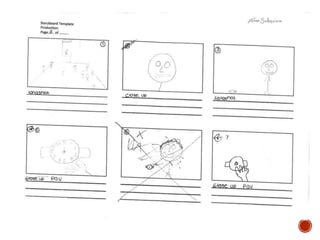
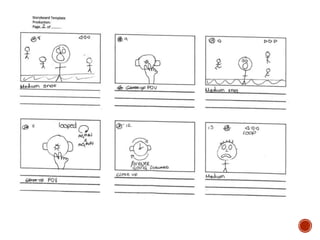
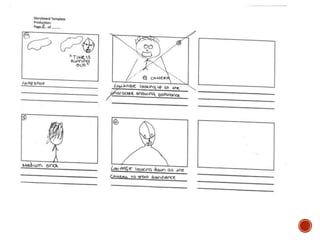
 Your storyboard should bring your idea to life
 Provide an idea of the sequencing of you film
 Provides a basis for production
 Suggested online storyboard creators are:
 https://www.storyboardthat.com
 http://www.pixton.com [very complicated]
 http://www.storyjumper.com [allows you to insert your own images]
 Alternatively, hand draw or photograph your storyboard and scan or
copy to insert it onto your slides
 There are lots of tips collected together on Blackboard!
 Your shot list should contain the sequential breakdown of what
you need to shoot for your film
 It should work in partnership with your storyboard
 It will be your working document when you film
 It should contain the shot number, scene number, shot
description, framing, cast/location info and action you will see
 It should also have information on performers in the scene and
other props, etc
 Shot list template is on Blackboard in the pre-production folder.
Organisational Planning
 Include names, contact info, and defined roles at difference
stages of production, using a table is suggested
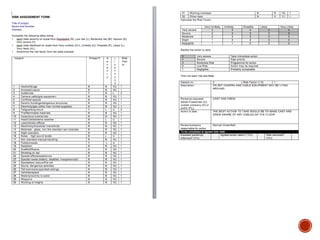
 Who is going to be in your film, how and why have they been deemed your
best choice? Do you have any backup options?
 Luckily I didn’t] need any for backup because everyone that I needed came, but
before hand I didn’t have anyone that could have been backup.
 Information and images of your location[s] for filming
 You should have address details, clearance/premissions for
filming, recce photos and floorplans [including camera, equipment
and cast/crew layouts]
 Where possible, have a plan B fallback location option
 Assess each location for any issues and suggest solutions
 Risk Assess each separate filming location using the provided
form in the pre-production folder on Blackboard and insert into
your powerpoint
 Completing a generic filming assessment would be a start, then
you can add specialist/site specific risks as you progress your
production
 Remember, a Risk Assessment is an ongoing document, you
should evaluate if anything changes in production and when you
put control measures in place
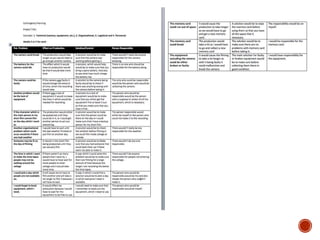
 Things go wrong
 Your contingency plan is there to give you a backup or to
minimise the effect on production
 You should consider the following areas: Technical, Location,
Personnel and Organisational areas [about 5 potential issues for
each]
 Use the form in pre-production folder on Blackboard
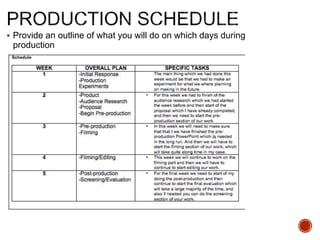
 Provide an outline of what you will do on which days during
production
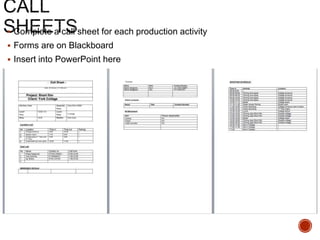
 Complete a call sheet for each production activity
 Forms are on Blackboard
 Insert into PowerPoint here
 Any place you film and anyone you use in the filming of your
video must have a completed form
 Blank forms are on Blackboard for you to complete and insert
here
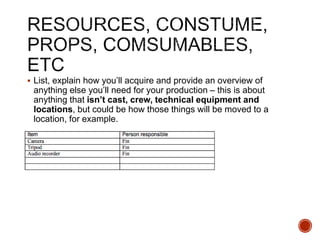
 List, explain how you’ll acquire and provide an overview of
anything else you’ll need for your production – this is about
anything that isn’t cast, crew, technical equipment and
locations, but could be how those things will be moved to a
location, for example.
Soundtrack Planning
 These are sounds in the environment, part of the ‘world’ your
character experiences – these can be recorded on location,
produced afterwards using foley techniques, etc. Some use of
royalty free sounds is permitted, but you must list their sources
and information
 Consider what you might need, how you are going to get it, etc
 You could reference similar productions and the effect of their
sound mix and choices
 These are the sounds/audio that the audience experiences, but
are not part of the ‘world’ of the character[s], this could be music,
sound cues, etc
 Consider where you are going to get these, only royalty free
sources and original content is permitted – please track your
sources
 You could also produce your own soundtrack using garageband

4. pre production sf 2017

  • 1.
  • 2.
     This templatePowerPoint presentation includes all the relevant elements you need to cover your film production.  It is suggested you save this PP in a different name so you always have a copy – some sections require you to delete the information on the slide and replace with your own work  Add more pages to each section where necessary [you should be doing this!]  Add visuals as you see necessary  This document will be added to as you progress through the pre- production phase.  Remember, you need to give as much attention to your sound planning as you do to your visual planning
  • 4.
     Use thestory development resource to help structure your short film with more detail  Not all the aspects have to be followed verbatim, use the resource the plan out character, motivation, stakes and the arc of your film, this will help to ensure that it works structurally  Proforma is on bb  Add a structural breakdown of each scene once you have done this
  • 5.
     Put yourform here
  • 6.
     Breakdown yourfilm into it’s basic sections [e.g. via scene breakdown or similar] and apply broad visual ideas to each section. You should list the shots required  You can use this as the master template for your production, then add more shots to each section when you develop your full visual plan  From this you could work on a conventional script if you want, but using the scene breakdowns should be enough
  • 7.
    Scene No. or section(e.g. beginning, middle, end, etc.) Approx. timing What happens Visual notes Audio notes beginning It will take around 30 minutes for the time-lapse in the background of the short film. This will be shown by a short 20-30 second clip of him using the watch. The character Finds a watch on the floor and sees that it is the incorrect time, and then proceeds to change the time to the right time, and then he sees that his surroundings start fast forwarding, And you can see in his face he is star struck. To get the visual section for the short film I will have to do a time-lapse throughout the whole film, I will have to take quite a while on filming it. For the audio I will have to try and record the audio at the same time as the visuals as It would make more sense to have it at the same speed because they will be more in sync. middle I will be using the same time- lapse as used in the beginning, and then I feel like it will not take very long to film the characters movements, around 10 minutes. In this section of the short film the character start abuse the power which he has to control time, and sees the power and uses it for his own benefit. A part of the visuals for my short film, I will either have to make the character go in slow-motion when I am recording the time- lapse or I could use the green screen because I record the visuals for the waste above. The audio which I will need will be recorded at the same time as the beginning because I will use the same audio throughout the short film as it will all be synced to the time-lapse which I have filmed. end For the final section it will take around 5-10 minutes to film the character moving and then for the audio It will take around 2-5minutes as I will need to get the right sounding of the phrase. For the final part of the short film I will show that in this section that he knows the amount of power he has so he starts to play around with the watch going back and forth in time, and then the character breaks the watch so that they are stuck in time and you hear a voice saying “Time is running out” As the visual side of the ending of the short film I will have to have a shot of the sky as the voice which I will be recording will be projected through the sky. For the audio section which I will have to use will have to be a recording of someone's voice saying the phrase “Time is running out”, which I will have to have multiple recordings of the phrase so it is the right one
  • 8.
  • 9.
     This sectionis concerned with the visual planning of your film  You should use this section to develop the sequencing or your video, establish the visuals look and sequencing of your film and create a structure for you to follow when filming  It is important that you ‘pre-visualise’ the film before you make it; it will make filming and production a more streamlined process  The following tasks are part of your visual planning  Pre-visualisation and concept boards  Storyboarding  Shot list
  • 10.
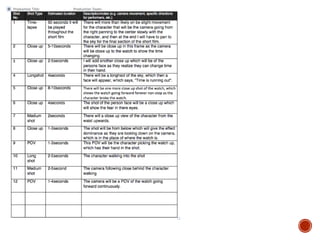
     Your storyboardshould bring your idea to life  Provide an idea of the sequencing of you film  Provides a basis for production  Suggested online storyboard creators are:  https://www.storyboardthat.com  http://www.pixton.com [very complicated]  http://www.storyjumper.com [allows you to insert your own images]  Alternatively, hand draw or photograph your storyboard and scan or copy to insert it onto your slides  There are lots of tips collected together on Blackboard!
  • 14.
     Your shotlist should contain the sequential breakdown of what you need to shoot for your film  It should work in partnership with your storyboard  It will be your working document when you film  It should contain the shot number, scene number, shot description, framing, cast/location info and action you will see  It should also have information on performers in the scene and other props, etc  Shot list template is on Blackboard in the pre-production folder.
  • 16.
  • 17.
     Include names,contact info, and defined roles at difference stages of production, using a table is suggested
  • 18.
     Who isgoing to be in your film, how and why have they been deemed your best choice? Do you have any backup options?  Luckily I didn’t] need any for backup because everyone that I needed came, but before hand I didn’t have anyone that could have been backup.
  • 19.
     Information andimages of your location[s] for filming  You should have address details, clearance/premissions for filming, recce photos and floorplans [including camera, equipment and cast/crew layouts]  Where possible, have a plan B fallback location option  Assess each location for any issues and suggest solutions
  • 20.
     Risk Assesseach separate filming location using the provided form in the pre-production folder on Blackboard and insert into your powerpoint  Completing a generic filming assessment would be a start, then you can add specialist/site specific risks as you progress your production  Remember, a Risk Assessment is an ongoing document, you should evaluate if anything changes in production and when you put control measures in place
  • 22.
     Things gowrong  Your contingency plan is there to give you a backup or to minimise the effect on production  You should consider the following areas: Technical, Location, Personnel and Organisational areas [about 5 potential issues for each]  Use the form in pre-production folder on Blackboard
  • 24.
     Provide anoutline of what you will do on which days during production
  • 25.
     Complete acall sheet for each production activity  Forms are on Blackboard  Insert into PowerPoint here
  • 26.
     Any placeyou film and anyone you use in the filming of your video must have a completed form  Blank forms are on Blackboard for you to complete and insert here
  • 27.
     List, explainhow you’ll acquire and provide an overview of anything else you’ll need for your production – this is about anything that isn’t cast, crew, technical equipment and locations, but could be how those things will be moved to a location, for example.
  • 28.
  • 29.
     These aresounds in the environment, part of the ‘world’ your character experiences – these can be recorded on location, produced afterwards using foley techniques, etc. Some use of royalty free sounds is permitted, but you must list their sources and information  Consider what you might need, how you are going to get it, etc  You could reference similar productions and the effect of their sound mix and choices
  • 30.
     These arethe sounds/audio that the audience experiences, but are not part of the ‘world’ of the character[s], this could be music, sound cues, etc  Consider where you are going to get these, only royalty free sources and original content is permitted – please track your sources  You could also produce your own soundtrack using garageband