YOUR NAME HERE
 This template PowerPoint presentation includes all the relevant
elements you need to cover your film production.
 It is suggested you save this PP in a different name so you
always have a copy – some sections require you to delete the
information on the slide and replace with your own work
 Add more pages to each section where necessary [you should be
doing this!]
 Add visuals as you see necessary
 This document will be added to as you progress through the pre-
production phase.
 Remember, you need to give as much attention to your
sound planning as you do to your visual planning
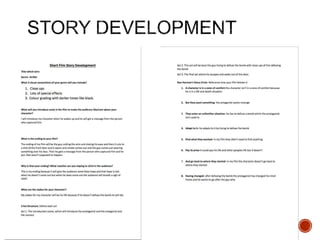
 Use the story development resource to help structure your short
film with more detail
 Not all the aspects have to be followed verbatim, use the
resource the plan out character, motivation, stakes and the arc of
your film, this will help to ensure that it works structurally
 Proforma is on bb
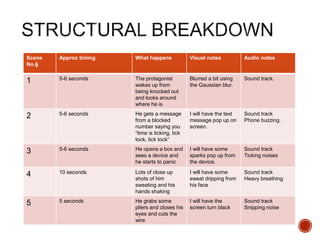
 Add a structural breakdown of each scene once you have done
this
 Breakdown your film into it’s basic sections [e.g. via scene
breakdown or similar] and apply broad visual ideas to each
section. You should list the shots required
 You can use this as the master template for your production, then
add more shots to each section when you develop your full visual
plan
 From this you could work on a conventional script if you want, but
using the scene breakdowns should be enough
Scene
No.§
Approx timing What happens Visual notes Audio notes
1 5-6 seconds The protagonist
wakes up from
being knocked out
and looks around
where he is
Blurred a bit using
the Gaussian blur.
Sound track.
2 5-6 seconds He gets a message
from a blocked
number saying you
“time is ticking, tick
tock, tick tock”
I will have the text
message pop up on
screen.
Sound track
Phone buzzing.
3 5-6 seconds He opens a box and
sees a device and
he starts to panic
I will have some
sparks pop up from
the device.
Sound track
Ticking noises
4 10 seconds Lots of close up
shots of him
sweating and his
hands shaking
I will have some
sweat dripping from
his face
Sound track
Heavy breathing
5 5 seconds He grabs some
pliers and closes his
eyes and cuts the
wire
I will have the
screen turn black
Sound track
Snipping noise
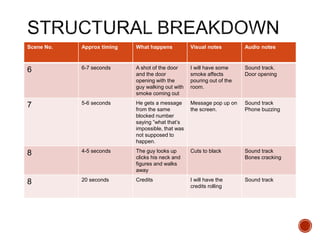
Scene No. Approx timing What happens Visual notes Audio notes
6 6-7 seconds A shot of the door
and the door
opening with the
guy walking out with
smoke coming out
I will have some
smoke affects
pouring out of the
room.
Sound track.
Door opening
7 5-6 seconds He gets a message
from the same
blocked number
saying ”what that’s
impossible, that was
not supposed to
happen.
Message pop up on
the screen.
Sound track
Phone buzzing
8 4-5 seconds The guy looks up
clicks his neck and
figures and walks
away
Cuts to black Sound track
Bones cracking
8 20 seconds Credits I will have the
credits rolling
Sound track
Visual Planning
 This section is concerned with the visual planning of your film
 You should use this section to develop the sequencing or your
video, establish the visuals look and sequencing of your film and
create a structure for you to follow when filming
 It is important that you ‘pre-visualise’ the film before you make it; it
will make filming and production a more streamlined process
 The following tasks are part of your visual planning
 Pre-visualisation and concept boards
 Storyboarding
 Shot list
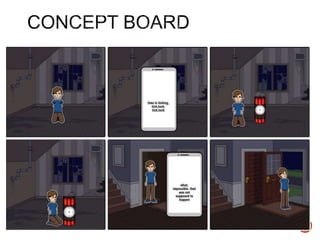
 Tool for exploring the direction and visuals
 Provides inspiration and information for the “look & feel”
 Presents key moments in your video
 A means to sketch/plan ideas
 Information on colour/lighting
 Defining the “mise-en-scene”
 Include as much here as you like, but keep it relevant to the
production, the following slides have been left blank for you to
approach in your own way, add more as you need to
 Suggestion: include your edited short sequence of clips that have
inspired or influenced your video [similar to this:
http://io9.com/5941145/this-directors-video-pitch-for-hunger-games-
might-be-better-than-the-real-movie]
Story board
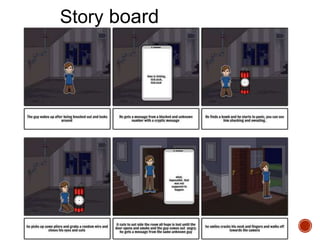
 Your storyboard should bring your idea to life
 Provide an idea of the sequencing of you film
 Provides a basis for production
 Suggested online storyboard creators are:
 https://www.storyboardthat.com
 http://www.pixton.com [very complicated]
 http://www.storyjumper.com [allows you to insert your own images]
 Alternatively, hand draw or photograph your storyboard and scan
or copy to insert it onto your slides
 There are lots of tips collected together on Blackboard!
 Your shot list should contain the sequential breakdown of what
you need to shoot for your film
 It should work in partnership with your storyboard
 It will be your working document when you film
 It should contain the shot number, scene number, shot
description, framing, cast/location info and action you will see
 It should also have information on performers in the scene and
other props, etc
 Shot list template is on Blackboard in the pre-production folder.
Organisational Planning
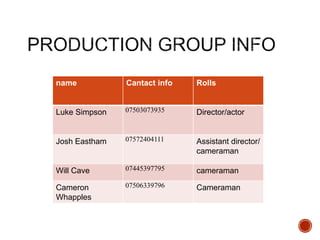
name Cantact info Rolls
Luke Simpson 07503073935 Director/actor
Josh Eastham 07572404111 Assistant director/
cameraman
Will Cave 07445397795 cameraman
Cameron
Whapples
07506339796 Cameraman
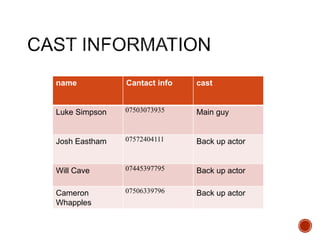
name Cantact info cast
Luke Simpson 07503073935 Main guy
Josh Eastham 07572404111 Back up actor
Will Cave 07445397795 Back up actor
Cameron
Whapples
07506339796 Back up actor
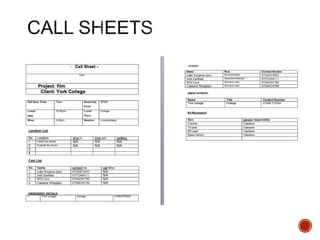
 Information and images of your location[s] for filming
 You should have address details, clearance/premissions for
filming, recce photos and floorplans [including camera, equipment
and cast/crew layouts]
 Where possible, have a plan B fallback location option
 Assess each location for any issues and suggest solutions
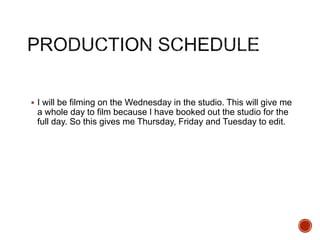
 I will be filming on the Wednesday in the studio. This will give me
a whole day to film because I have booked out the studio for the
full day. So this gives me Thursday, Friday and Tuesday to edit.
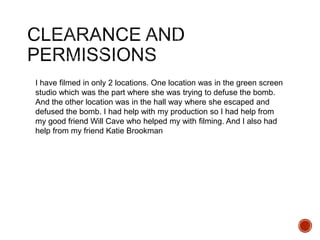
I have filmed in only 2 locations. One location was in the green screen
studio which was the part where she was trying to defuse the bomb.
And the other location was in the hall way where she escaped and
defused the bomb. I had help with my production so I had help from
my good friend Will Cave who helped my with filming. And I also had
help from my friend Katie Brookman
RESOURCES, COSTUMES,
PROPS, COMSUMABLES,
ETC
For my short film I will resources, costumes, props and other stuff
like that. In my film I will mainly need props such as a bomb, which
I made from a lunch box, a phone and a couple of old wires.
Another prop that I have is a phone because that is the main part of
the film and a main part of communications for my film.
The way I will be moving all of my equipment will be by hand
because where I am filming is only a couple of meters away from
the room.
Soundtrack Planning
 I have used some diegetic sound such as someone cracking their
knuckles which I found on a royalty free website which was good
for my film because I needed someone cracking their knuckles.
 I also had used a ticking sound for the clock counting down and I
found that sound on a royalty free website.
 I have used non-diegetic sound. The non-diegetic sounds that I
have used was a background music to add tension in the film
without using and speech.
 You can also have other non-diegetic which is sound que but i
haven't used one in my film.

4. pre production sf 2017

  • 1.
  • 3.
     This templatePowerPoint presentation includes all the relevant elements you need to cover your film production.  It is suggested you save this PP in a different name so you always have a copy – some sections require you to delete the information on the slide and replace with your own work  Add more pages to each section where necessary [you should be doing this!]  Add visuals as you see necessary  This document will be added to as you progress through the pre- production phase.  Remember, you need to give as much attention to your sound planning as you do to your visual planning
  • 5.
     Use thestory development resource to help structure your short film with more detail  Not all the aspects have to be followed verbatim, use the resource the plan out character, motivation, stakes and the arc of your film, this will help to ensure that it works structurally  Proforma is on bb  Add a structural breakdown of each scene once you have done this
  • 7.
     Breakdown yourfilm into it’s basic sections [e.g. via scene breakdown or similar] and apply broad visual ideas to each section. You should list the shots required  You can use this as the master template for your production, then add more shots to each section when you develop your full visual plan  From this you could work on a conventional script if you want, but using the scene breakdowns should be enough
  • 8.
    Scene No.§ Approx timing Whathappens Visual notes Audio notes 1 5-6 seconds The protagonist wakes up from being knocked out and looks around where he is Blurred a bit using the Gaussian blur. Sound track. 2 5-6 seconds He gets a message from a blocked number saying you “time is ticking, tick tock, tick tock” I will have the text message pop up on screen. Sound track Phone buzzing. 3 5-6 seconds He opens a box and sees a device and he starts to panic I will have some sparks pop up from the device. Sound track Ticking noises 4 10 seconds Lots of close up shots of him sweating and his hands shaking I will have some sweat dripping from his face Sound track Heavy breathing 5 5 seconds He grabs some pliers and closes his eyes and cuts the wire I will have the screen turn black Sound track Snipping noise
  • 9.
    Scene No. Approxtiming What happens Visual notes Audio notes 6 6-7 seconds A shot of the door and the door opening with the guy walking out with smoke coming out I will have some smoke affects pouring out of the room. Sound track. Door opening 7 5-6 seconds He gets a message from the same blocked number saying ”what that’s impossible, that was not supposed to happen. Message pop up on the screen. Sound track Phone buzzing 8 4-5 seconds The guy looks up clicks his neck and figures and walks away Cuts to black Sound track Bones cracking 8 20 seconds Credits I will have the credits rolling Sound track
  • 10.
  • 11.
     This sectionis concerned with the visual planning of your film  You should use this section to develop the sequencing or your video, establish the visuals look and sequencing of your film and create a structure for you to follow when filming  It is important that you ‘pre-visualise’ the film before you make it; it will make filming and production a more streamlined process  The following tasks are part of your visual planning  Pre-visualisation and concept boards  Storyboarding  Shot list
  • 12.
     Tool forexploring the direction and visuals  Provides inspiration and information for the “look & feel”  Presents key moments in your video  A means to sketch/plan ideas  Information on colour/lighting  Defining the “mise-en-scene”  Include as much here as you like, but keep it relevant to the production, the following slides have been left blank for you to approach in your own way, add more as you need to  Suggestion: include your edited short sequence of clips that have inspired or influenced your video [similar to this: http://io9.com/5941145/this-directors-video-pitch-for-hunger-games- might-be-better-than-the-real-movie]
  • 14.
  • 15.
     Your storyboardshould bring your idea to life  Provide an idea of the sequencing of you film  Provides a basis for production  Suggested online storyboard creators are:  https://www.storyboardthat.com  http://www.pixton.com [very complicated]  http://www.storyjumper.com [allows you to insert your own images]  Alternatively, hand draw or photograph your storyboard and scan or copy to insert it onto your slides  There are lots of tips collected together on Blackboard!
  • 16.
     Your shotlist should contain the sequential breakdown of what you need to shoot for your film  It should work in partnership with your storyboard  It will be your working document when you film  It should contain the shot number, scene number, shot description, framing, cast/location info and action you will see  It should also have information on performers in the scene and other props, etc  Shot list template is on Blackboard in the pre-production folder.
  • 19.
  • 20.
    name Cantact infoRolls Luke Simpson 07503073935 Director/actor Josh Eastham 07572404111 Assistant director/ cameraman Will Cave 07445397795 cameraman Cameron Whapples 07506339796 Cameraman
  • 21.
    name Cantact infocast Luke Simpson 07503073935 Main guy Josh Eastham 07572404111 Back up actor Will Cave 07445397795 Back up actor Cameron Whapples 07506339796 Back up actor
  • 22.
     Information andimages of your location[s] for filming  You should have address details, clearance/premissions for filming, recce photos and floorplans [including camera, equipment and cast/crew layouts]  Where possible, have a plan B fallback location option  Assess each location for any issues and suggest solutions
  • 29.
     I willbe filming on the Wednesday in the studio. This will give me a whole day to film because I have booked out the studio for the full day. So this gives me Thursday, Friday and Tuesday to edit.
  • 31.
    I have filmedin only 2 locations. One location was in the green screen studio which was the part where she was trying to defuse the bomb. And the other location was in the hall way where she escaped and defused the bomb. I had help with my production so I had help from my good friend Will Cave who helped my with filming. And I also had help from my friend Katie Brookman
  • 32.
    RESOURCES, COSTUMES, PROPS, COMSUMABLES, ETC Formy short film I will resources, costumes, props and other stuff like that. In my film I will mainly need props such as a bomb, which I made from a lunch box, a phone and a couple of old wires. Another prop that I have is a phone because that is the main part of the film and a main part of communications for my film. The way I will be moving all of my equipment will be by hand because where I am filming is only a couple of meters away from the room.
  • 33.
  • 34.
     I haveused some diegetic sound such as someone cracking their knuckles which I found on a royalty free website which was good for my film because I needed someone cracking their knuckles.  I also had used a ticking sound for the clock counting down and I found that sound on a royalty free website.
  • 35.
     I haveused non-diegetic sound. The non-diegetic sounds that I have used was a background music to add tension in the film without using and speech.  You can also have other non-diegetic which is sound que but i haven't used one in my film.