DATABASE DESIGN
   Database design is the process of producing a
    detailed data model of a database.
   This logical data model contains all the needed
    logical and physical design choices and physical
    storage parameters needed to generate a design in
    a Data Definition Language, which can then be
    used to create a database.
    A fully attributed data model contains detailed
    attributes for each entity.
Usually, the designer must:

   Determine the relationships between the different data
    elements.

   Superimpose a logical structure upon the data on the
    basis of these relationships.
THE DESIGN PROCESS


 Determine    the purpose of the
 database - This helps prepare for the
 remaining steps.
   Find and organize the information required -
    Gather all of the types of information to record in
    the database, such as product name and order
    number.
   Divide the information into tables - Divide information
    items into major entities or subjects, such as Products or
    Orders. Each subject then becomes a table.
 Turn information items into columns -
 Decide what information needs to stored
 in each table. Each item becomes a field,
 and is displayed as a column in the table.
 For example, an Employees table might
 include fields such as Last Name and
 Hire Date.
 Specify  primary keys - Choose each
 table’s primary key. The primary key is a
 column that is used to uniquely identify
 each row.
 Setup the table relationships - Look at
 each table and decide how the data in
 one table is related to the data in other
 tables. Add fields to tables or create new
 tables to clarify the relationships, as
 necessary.
   Refine the design - Analyze the design for errors.
    Create tables and add a few records of sample
    data. Check if results come from the tables as
    expected. Make adjustments to the design, as
    needed.
 Apply the normalization rules - Apply
 the data normalization rules to see if
 tables are structured correctly. Make
 adjustments to the tables
THE TABLES
   The core table of the database is Incident. This
    tracks the bulk of information submitting about a
    particular incident. For example, under injuries
    there might be multiple parts of the body that were
    injured. There are several ways to deal with this.
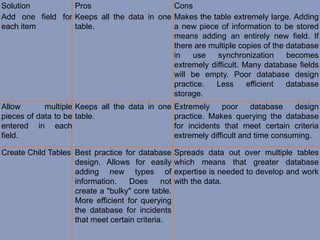
Solution          Pros                      Cons
Add one field for Keeps all the data in one Makes the table extremely large. Adding
each item         table.                    a new piece of information to be stored
                                            means adding an entirely new field. If
                                            there are multiple copies of the database
                                            in    use   synchronization      becomes
                                            extremely difficult. Many database fields
                                            will be empty. Poor database design
                                            practice.  Less       efficient  database
                                            storage.
Allow       multiple Keeps all the data in one Extremely     poor     database   design
pieces of data to be table.                    practice. Makes querying the database
entered in each                                for incidents that meet certain criteria
field.                                         extremely difficult and time consuming.

Create Child Tables Best practice for database      Spreads data out over multiple tables
                    design. Allows for easily       which means that greater database
                    adding new types of             expertise is needed to develop and work
                    information.    Does      not   with the data.
                    create a "bulky" core table.
                    More efficient for querying
                    the database for incidents
                    that meet certain criteria.
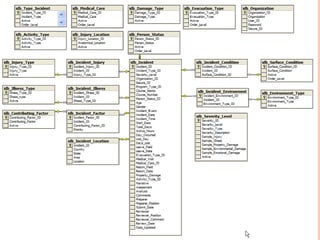
   The recommendation is to create an idb_Incidents
    Table to handle the information that is discrete (that is
    can only have one value such as the date of the
    incident) and create a series of Child tables that store
    information where there may be multiple pieces of
    data.
   This makes the database much more extendable. If
    new information needs to be collected, either a new
    field would be added to the idb_Incidents Table or a
    new Child table could be created.
Importance of database design (1)

Importance of database design (1)

  • 1.
  • 2.
    Database design is the process of producing a detailed data model of a database.
  • 3.
    This logical data model contains all the needed logical and physical design choices and physical storage parameters needed to generate a design in a Data Definition Language, which can then be used to create a database.
  • 4.
    A fully attributed data model contains detailed attributes for each entity.
  • 5.
    Usually, the designermust:  Determine the relationships between the different data elements.  Superimpose a logical structure upon the data on the basis of these relationships.
  • 6.
    THE DESIGN PROCESS Determine the purpose of the database - This helps prepare for the remaining steps.
  • 7.
    Find and organize the information required - Gather all of the types of information to record in the database, such as product name and order number.
  • 8.
    Divide the information into tables - Divide information items into major entities or subjects, such as Products or Orders. Each subject then becomes a table.
  • 9.
     Turn informationitems into columns - Decide what information needs to stored in each table. Each item becomes a field, and is displayed as a column in the table. For example, an Employees table might include fields such as Last Name and Hire Date.
  • 10.
     Specify primary keys - Choose each table’s primary key. The primary key is a column that is used to uniquely identify each row.
  • 11.
     Setup thetable relationships - Look at each table and decide how the data in one table is related to the data in other tables. Add fields to tables or create new tables to clarify the relationships, as necessary.
  • 12.
    Refine the design - Analyze the design for errors. Create tables and add a few records of sample data. Check if results come from the tables as expected. Make adjustments to the design, as needed.
  • 13.
     Apply thenormalization rules - Apply the data normalization rules to see if tables are structured correctly. Make adjustments to the tables
  • 14.
  • 15.
    The core table of the database is Incident. This tracks the bulk of information submitting about a particular incident. For example, under injuries there might be multiple parts of the body that were injured. There are several ways to deal with this.
  • 16.
    Solution Pros Cons Add one field for Keeps all the data in one Makes the table extremely large. Adding each item table. a new piece of information to be stored means adding an entirely new field. If there are multiple copies of the database in use synchronization becomes extremely difficult. Many database fields will be empty. Poor database design practice. Less efficient database storage. Allow multiple Keeps all the data in one Extremely poor database design pieces of data to be table. practice. Makes querying the database entered in each for incidents that meet certain criteria field. extremely difficult and time consuming. Create Child Tables Best practice for database Spreads data out over multiple tables design. Allows for easily which means that greater database adding new types of expertise is needed to develop and work information. Does not with the data. create a "bulky" core table. More efficient for querying the database for incidents that meet certain criteria.
  • 17.
    The recommendation is to create an idb_Incidents Table to handle the information that is discrete (that is can only have one value such as the date of the incident) and create a series of Child tables that store information where there may be multiple pieces of data.
  • 18.
    This makes the database much more extendable. If new information needs to be collected, either a new field would be added to the idb_Incidents Table or a new Child table could be created.