Physical Security and Digital Security
© COPYRIGHT PLN9 SECURITY SERVICES PVT. LTD. ALL RIGHTS RESERVED
PLN9 Security Services Pvt. Ltd.
Complete Security Solution In
Association With Tyco
Physical Security
Description
• Physical security : as the name implies, involves protecting your assets
and information from physical access by unauthorized personnel.
• In other words, you’re trying to protect those items that can be seen,
touched, and stolen.
Physical security
• Lock Door – one of the easiest way to prevent those intent to creating
problems physically entering your environment is to lock your doors and
keep them out.
• Securing physical documents/password/shredding – in high security and
government environment, sensitive papers should be either shredded or
burned.
Physical Security
• Biometrics – physical characteristic to identify the user.(fingerprint, palm,
hand scanner, retina scanner, and soon, possibly, DNA scanner)
• Badges – can be any of form of identification intended to differentiate the
holder from everyone else. e.g.: name badge or photo ID.
Physical security
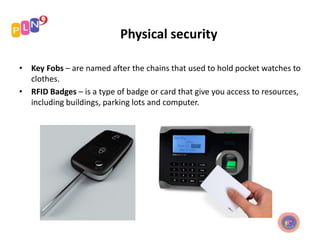
• Key Fobs – are named after the chains that used to hold pocket watches to
clothes.
• RFID Badges – is a type of badge or card that give you access to resources,
including buildings, parking lots and computer.
Physical Security
• RSA token – are anything that user must have on them to access network
resources and are often associated with devices that enables the user to
generate one-time password authenticating their identity.
• Privacy Filters – either film or glass add-ons that are placed over a monitor
or laptop screen to prevent the data on the screen from being readable
when viewed from the sides.
Physical Security
Physical Security
• Retinal – one form of biometric device that can be used to identify user.
– Matches are made based upon identification of the blood vessel in an
individual retina.
– Rather expensive.
• Tailgating – refers being so close to someone when they enter a building
that you are able to come in right behind them without needing use a key,
a card, or any other security device.
Digital Security
Description
Focused on keeping harmful data and malware out as well
as on authorization and permissions.
Focused on:
• antivirus software
• Firewalls
• Antispyware
• User authentication/strong passwords
• Directory permissions
Digital Security
Anti-virus Software
 Operation:
 Run in the background at all time
 Update the virus definition to recognize new malicious software
 Signature-based detection involves searching for known patterns of
data within executable code
 Generic-based signature are being used to detect new virus by looking
for malicious code/slight variants of code in file and will be test in
sandbox to see if it performs any malicious actions.
Digital Security
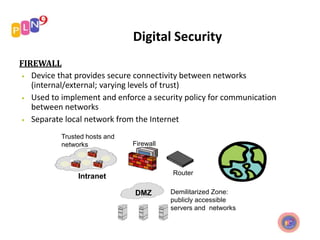
FIREWALL
• Device that provides secure connectivity between networks
(internal/external; varying levels of trust)
• Used to implement and enforce a security policy for communication
between networks
• Separate local network from the Internet
Trusted hosts and
networks Firewall
Router
Intranet
DMZ Demilitarized Zone:
publicly accessible
servers and networks
FUNCTIONS OF FIREWALL
 Restrict incoming and outgoing traffic by IP address, ports, or users
 Block invalid packets
Digital Security
Antispyware
 Just as antivirus seeks out and stops viruses from entering and spreading
 Purpose of antispyware software
 The OS from Microsoft are the one most affected by spyware, and
Microsoft has released Windows Defender and Security Essentials
Digital Security
A strong password is a password that meets the following guidelines:
- Be seven or fourteen characters long, due to the way in which encryption
works. For obvious reasons, fourteen characters are preferable.
- Contain both uppercase and lowercase letters.
- Contain numbers.
- Contain a symbol in the second, third, fourth, fifth or sixth position (due
to the way in which encryption works).
- Not resemble any of your previous passwords.
- Not be your name, your friend's or family member's name, or your login.
- Not be a dictionary word or common name.
Digital Security
Directory permissions
 Can do to improve or change the security of the directory services
deployed.
 Can ensure that they don’t become a tool for an attacker bent on
compromising organization’s security
Thank you

Physical Security and Digital Security

  • 1.
    Physical Security andDigital Security © COPYRIGHT PLN9 SECURITY SERVICES PVT. LTD. ALL RIGHTS RESERVED PLN9 Security Services Pvt. Ltd. Complete Security Solution In Association With Tyco
  • 2.
  • 3.
    Description • Physical security: as the name implies, involves protecting your assets and information from physical access by unauthorized personnel. • In other words, you’re trying to protect those items that can be seen, touched, and stolen.
  • 4.
    Physical security • LockDoor – one of the easiest way to prevent those intent to creating problems physically entering your environment is to lock your doors and keep them out. • Securing physical documents/password/shredding – in high security and government environment, sensitive papers should be either shredded or burned.
  • 5.
    Physical Security • Biometrics– physical characteristic to identify the user.(fingerprint, palm, hand scanner, retina scanner, and soon, possibly, DNA scanner) • Badges – can be any of form of identification intended to differentiate the holder from everyone else. e.g.: name badge or photo ID.
  • 6.
    Physical security • KeyFobs – are named after the chains that used to hold pocket watches to clothes. • RFID Badges – is a type of badge or card that give you access to resources, including buildings, parking lots and computer.
  • 7.
    Physical Security • RSAtoken – are anything that user must have on them to access network resources and are often associated with devices that enables the user to generate one-time password authenticating their identity. • Privacy Filters – either film or glass add-ons that are placed over a monitor or laptop screen to prevent the data on the screen from being readable when viewed from the sides.
  • 8.
  • 9.
    Physical Security • Retinal– one form of biometric device that can be used to identify user. – Matches are made based upon identification of the blood vessel in an individual retina. – Rather expensive. • Tailgating – refers being so close to someone when they enter a building that you are able to come in right behind them without needing use a key, a card, or any other security device.
  • 10.
  • 11.
    Description Focused on keepingharmful data and malware out as well as on authorization and permissions. Focused on: • antivirus software • Firewalls • Antispyware • User authentication/strong passwords • Directory permissions
  • 12.
    Digital Security Anti-virus Software Operation:  Run in the background at all time  Update the virus definition to recognize new malicious software  Signature-based detection involves searching for known patterns of data within executable code  Generic-based signature are being used to detect new virus by looking for malicious code/slight variants of code in file and will be test in sandbox to see if it performs any malicious actions.
  • 13.
    Digital Security FIREWALL • Devicethat provides secure connectivity between networks (internal/external; varying levels of trust) • Used to implement and enforce a security policy for communication between networks • Separate local network from the Internet Trusted hosts and networks Firewall Router Intranet DMZ Demilitarized Zone: publicly accessible servers and networks
  • 14.
    FUNCTIONS OF FIREWALL Restrict incoming and outgoing traffic by IP address, ports, or users  Block invalid packets
  • 15.
    Digital Security Antispyware  Justas antivirus seeks out and stops viruses from entering and spreading  Purpose of antispyware software  The OS from Microsoft are the one most affected by spyware, and Microsoft has released Windows Defender and Security Essentials
  • 16.
    Digital Security A strongpassword is a password that meets the following guidelines: - Be seven or fourteen characters long, due to the way in which encryption works. For obvious reasons, fourteen characters are preferable. - Contain both uppercase and lowercase letters. - Contain numbers. - Contain a symbol in the second, third, fourth, fifth or sixth position (due to the way in which encryption works). - Not resemble any of your previous passwords. - Not be your name, your friend's or family member's name, or your login. - Not be a dictionary word or common name.
  • 17.
    Digital Security Directory permissions Can do to improve or change the security of the directory services deployed.  Can ensure that they don’t become a tool for an attacker bent on compromising organization’s security
  • 18.