



A SIMPLE TEXT-BASED SHOULDER
SURFING
RESISTANT GRAPHICAL PASSWORD
SCHEME
PRESENTED BY-
DEEPAK SUJITH
CONTENTS
What is password and why do we need password ?
Types of Graphical Password
Working of existing Graphical text based Login System
Proposed Login system
Improved solution for Text based Graphical Passwords
Current scope and Future Scope
Details of hardware and software requirements
Advantage’s/Disadvantage's
Do’s and Don’ts for secured password
Conclusion
References
PASSWORD
oThe most commonly used form of User authentication
oVarious types of passwords
oStrength of password
oEvolution of password technique
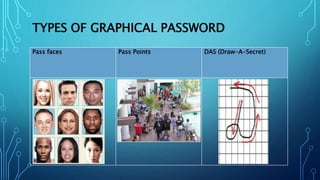
TYPES OF GRAPHICAL PASSWORD
Pass faces Pass Points DAS (Draw-A-Secret)
oPass faces
• Faces are used as a graphical portfolio
• Preference could be a limitation
oPass Points
• Use “a sequence of clicks” as a shared secret
• There are hot spots
oDAS(Draw A Secret)
• Use “a sequence of clicks” as a shared secret
• There are hot spots
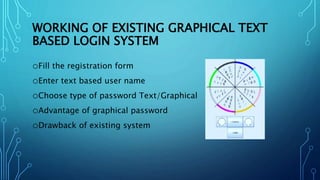
WORKING OF EXISTING GRAPHICAL TEXT
BASED LOGIN SYSTEM
oFill the registration form
oEnter text based user name
oChoose type of password Text/Graphical
oAdvantage of graphical password
oDrawback of existing system
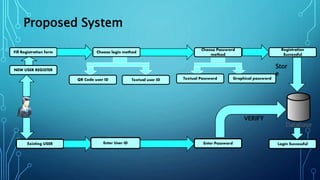
NEW USER REGISTER
Fill Registration form Choose login method
QR Code user ID Textual user ID
Choose Password
method
Textual Password Graphical password
Registration
Successful
Existing USER Enter User ID Enter Password
VERIFY
Login Successful
Stor
e
Proposed System
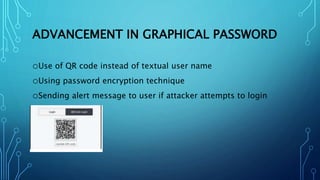
ADVANCEMENT IN GRAPHICAL PASSWORD
oUse of QR code instead of textual user name
oUsing password encryption technique
oSending alert message to user if attacker attempts to login
CURRENT SCOPE
oLocking folder’s
oLock application for smart phones
oSecuring Hard Disk
FUTURE SCOPE
oATM Login System
oWeb based login
DETAILS OF SOFTWARE REQUIREMENTS
oNetBeans IDE 8.02
oJava 1.8
oSql server for database connectivity
DETAILS OF HARDWARE REQUIREMENTS
oMinimum hard disk space required 500GB
oMinimum RAM required 2GB
oProcessor Intel Core i3
oOperating system Windows 7
Advantages
o Easy to remember
o Reduced shoulder surfing attacks
o Alert message on wrong attempt
o Use of QR codes
Disadvantages
o Slightly time consuming
DO’S AND DON’TS FOR SECURED
PASSWORD
Do’s
oUse easy to remember textual based color codes
oEnter minimum 5 characters and maximum of 8 characters
oInclude special Characters to improve complexity
Don'ts
oDo not insert password which are easy to guess
CONCLUSION
oTextual based color passwords are an alternative to Picture
password.
oIt satisfies both conflicting requirements i.e. it is easy to
remember & it is hard to guess.
oBy the solution of the shoulder surfing problem, it becomes
more secure & easier password scheme.
oBy implementing encryption algorithms and hash algorithms
for storing and retrieving points, one can achieve more
security
oTextual based color password is still immature, more research
is required in this field.
REFERENCES
oL. Sobrado and J.C. Birget, “Shoulder-surfing resistant graphical
passwords,” Draft, 2005.
(http://clam.rutgers.edu/~birget/grPssw/srgp.pdf)
oM. Sreelatha, M. Shashi, M. Anirudh, Md. Sultan Ahamer, and V.
Manoj Kumar. “Authentication schemes for session passwords
using color and images,” International Journal of Network
Security & Its Applications, vol. 3, no. 3, May 2011
o M. K. Rao and S. Yalamanchili. “Novel shoulder-surfing resistant
authentication schemes using text-graphical passwords,”
International Journal of Information & Network Security, vol. 1,
THANK YOU

Graphical password ppt

  • 1.
    A SIMPLE TEXT-BASEDSHOULDER SURFING RESISTANT GRAPHICAL PASSWORD SCHEME PRESENTED BY- DEEPAK SUJITH
  • 2.
    CONTENTS What is passwordand why do we need password ? Types of Graphical Password Working of existing Graphical text based Login System Proposed Login system Improved solution for Text based Graphical Passwords Current scope and Future Scope Details of hardware and software requirements Advantage’s/Disadvantage's Do’s and Don’ts for secured password Conclusion References
  • 3.
    PASSWORD oThe most commonlyused form of User authentication oVarious types of passwords oStrength of password oEvolution of password technique
  • 4.
    TYPES OF GRAPHICALPASSWORD Pass faces Pass Points DAS (Draw-A-Secret)
  • 5.
    oPass faces • Facesare used as a graphical portfolio • Preference could be a limitation oPass Points • Use “a sequence of clicks” as a shared secret • There are hot spots oDAS(Draw A Secret) • Use “a sequence of clicks” as a shared secret • There are hot spots
  • 6.
    WORKING OF EXISTINGGRAPHICAL TEXT BASED LOGIN SYSTEM oFill the registration form oEnter text based user name oChoose type of password Text/Graphical oAdvantage of graphical password oDrawback of existing system
  • 7.
    NEW USER REGISTER FillRegistration form Choose login method QR Code user ID Textual user ID Choose Password method Textual Password Graphical password Registration Successful Existing USER Enter User ID Enter Password VERIFY Login Successful Stor e Proposed System
  • 8.
    ADVANCEMENT IN GRAPHICALPASSWORD oUse of QR code instead of textual user name oUsing password encryption technique oSending alert message to user if attacker attempts to login
  • 9.
    CURRENT SCOPE oLocking folder’s oLockapplication for smart phones oSecuring Hard Disk
  • 10.
    FUTURE SCOPE oATM LoginSystem oWeb based login
  • 11.
    DETAILS OF SOFTWAREREQUIREMENTS oNetBeans IDE 8.02 oJava 1.8 oSql server for database connectivity
  • 12.
    DETAILS OF HARDWAREREQUIREMENTS oMinimum hard disk space required 500GB oMinimum RAM required 2GB oProcessor Intel Core i3 oOperating system Windows 7
  • 13.
    Advantages o Easy toremember o Reduced shoulder surfing attacks o Alert message on wrong attempt o Use of QR codes Disadvantages o Slightly time consuming
  • 14.
    DO’S AND DON’TSFOR SECURED PASSWORD Do’s oUse easy to remember textual based color codes oEnter minimum 5 characters and maximum of 8 characters oInclude special Characters to improve complexity Don'ts oDo not insert password which are easy to guess
  • 15.
    CONCLUSION oTextual based colorpasswords are an alternative to Picture password. oIt satisfies both conflicting requirements i.e. it is easy to remember & it is hard to guess. oBy the solution of the shoulder surfing problem, it becomes more secure & easier password scheme. oBy implementing encryption algorithms and hash algorithms for storing and retrieving points, one can achieve more security oTextual based color password is still immature, more research is required in this field.
  • 16.
    REFERENCES oL. Sobrado andJ.C. Birget, “Shoulder-surfing resistant graphical passwords,” Draft, 2005. (http://clam.rutgers.edu/~birget/grPssw/srgp.pdf) oM. Sreelatha, M. Shashi, M. Anirudh, Md. Sultan Ahamer, and V. Manoj Kumar. “Authentication schemes for session passwords using color and images,” International Journal of Network Security & Its Applications, vol. 3, no. 3, May 2011 o M. K. Rao and S. Yalamanchili. “Novel shoulder-surfing resistant authentication schemes using text-graphical passwords,” International Journal of Information & Network Security, vol. 1,
  • 17.