ECE 3004 – Computer
Organization and
Architecture
Module 1: Introduction
to Computing Systems
Dr. J. Florence Gnana Poovathy
Assistant Professor (SG – 1)
SENSE, VIT
Functional Components of a
Computing System
• Three units of a computer
• Input unit – takes input from the user
• CPU – processes that input
• Memory unit – stores data and instructions while
processing
• Digital computer – a programmable machine that
reads the binary data, processes that data and
communicates the binary data as output
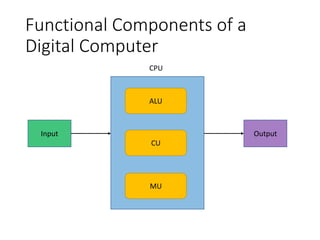
Functional Components of a
Digital Computer
Input Output
ALU
CU
MU
CPU
Input Unit
• Consists of input devices attached to the computer
• Takes input, converts to binary form that the
computer understands
• Ex???
Central Processing Unit (CPU)
• Processes the received input
• Called the brain of the computer because it is the
control center of the computer
• Fetches instructions from memory
• Uses these instructions to perform the jobs given by
the user
• Data is fetched either from input device or from
memory
• Three main components
• Arithmetic and logic unit (ALU)
• Control Unit (CU)
• Memory unit (MU)
Arithmetic and Logic Unit (ALU)
• Perform mathematical calculations
• Takes logical decisions
• Arithmetic operations
• Addition
• Subtraction
• Multiplication
• Division
• Logical operations
• Comparisons
• AND, OR etc.
How ALU works?
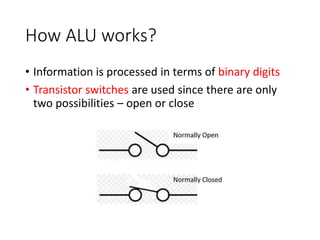
• Information is processed in terms of binary digits
• Transistor switches are used since there are only
two possibilities – open or close
Continued…
• Open transistor – no current flow – 0
• Closed transistor – current flow present – 1
• Operations can be done by connecting multiple
transistors
• One transistor can be programmed to control
another
• Ex. Turn the first transistor ON or OFF according to the
state of the second transistor
• This arrangement is called gate
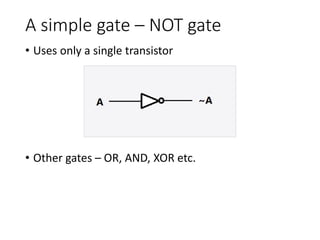
A simple gate – NOT gate
• Uses only a single transistor
• Other gates – OR, AND, XOR etc.
Control Unit
• Controls the data flow in and out of the processor
• It also controls the operations of the ALU, memory
and I/O devices
• It carries out the instructions stored in the memory
• It decodes those instructions, interprets it and
sends control signals to the I/O devices
Memory registers
• Temporary unit of storage in CPU
• Data stored here are directly used by the processor
• Different sizes – 16, 32,64
• Functions of register
• Storing data
• Storing address
• Instruction locations
• User registers can be used to store data and
address by the user
• Accumulator is the main register – it always has an
operand that would be used by the ALU
Memory
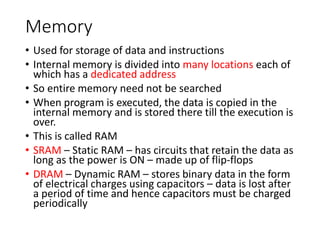
• Used for storage of data and instructions
• Internal memory is divided into many locations each of
which has a dedicated address
• So entire memory need not be searched
• When program is executed, the data is copied in the
internal memory and is stored there till the execution is
over.
• This is called RAM
• SRAM – Static RAM – has circuits that retain the data as
long as the power is ON – made up of flip-flops
• DRAM – Dynamic RAM – stores binary data in the form
of electrical charges using capacitors – data is lost after
a period of time and hence capacitors must be charged
periodically
Output unit
• Consists of output devices attached to the
computer
• Converts binary data from CPU to human-
understandable form
• Ex???

2. Functional Components of Computing System.pptx

  • 1.
    ECE 3004 –Computer Organization and Architecture
  • 2.
    Module 1: Introduction toComputing Systems Dr. J. Florence Gnana Poovathy Assistant Professor (SG – 1) SENSE, VIT
  • 3.
    Functional Components ofa Computing System • Three units of a computer • Input unit – takes input from the user • CPU – processes that input • Memory unit – stores data and instructions while processing • Digital computer – a programmable machine that reads the binary data, processes that data and communicates the binary data as output
  • 4.
    Functional Components ofa Digital Computer Input Output ALU CU MU CPU
  • 5.
    Input Unit • Consistsof input devices attached to the computer • Takes input, converts to binary form that the computer understands • Ex???
  • 6.
    Central Processing Unit(CPU) • Processes the received input • Called the brain of the computer because it is the control center of the computer • Fetches instructions from memory • Uses these instructions to perform the jobs given by the user • Data is fetched either from input device or from memory • Three main components • Arithmetic and logic unit (ALU) • Control Unit (CU) • Memory unit (MU)
  • 7.
    Arithmetic and LogicUnit (ALU) • Perform mathematical calculations • Takes logical decisions • Arithmetic operations • Addition • Subtraction • Multiplication • Division • Logical operations • Comparisons • AND, OR etc.
  • 8.
    How ALU works? •Information is processed in terms of binary digits • Transistor switches are used since there are only two possibilities – open or close
  • 9.
    Continued… • Open transistor– no current flow – 0 • Closed transistor – current flow present – 1 • Operations can be done by connecting multiple transistors • One transistor can be programmed to control another • Ex. Turn the first transistor ON or OFF according to the state of the second transistor • This arrangement is called gate
  • 10.
    A simple gate– NOT gate • Uses only a single transistor • Other gates – OR, AND, XOR etc.
  • 11.
    Control Unit • Controlsthe data flow in and out of the processor • It also controls the operations of the ALU, memory and I/O devices • It carries out the instructions stored in the memory • It decodes those instructions, interprets it and sends control signals to the I/O devices
  • 12.
    Memory registers • Temporaryunit of storage in CPU • Data stored here are directly used by the processor • Different sizes – 16, 32,64 • Functions of register • Storing data • Storing address • Instruction locations • User registers can be used to store data and address by the user • Accumulator is the main register – it always has an operand that would be used by the ALU
  • 13.
    Memory • Used forstorage of data and instructions • Internal memory is divided into many locations each of which has a dedicated address • So entire memory need not be searched • When program is executed, the data is copied in the internal memory and is stored there till the execution is over. • This is called RAM • SRAM – Static RAM – has circuits that retain the data as long as the power is ON – made up of flip-flops • DRAM – Dynamic RAM – stores binary data in the form of electrical charges using capacitors – data is lost after a period of time and hence capacitors must be charged periodically
  • 14.
    Output unit • Consistsof output devices attached to the computer • Converts binary data from CPU to human- understandable form • Ex???