Chapter 1:
Basic Structure of Computers
COMPUTER ORGANIZATION
Mrs.S.SUMATHI,
Assistant Professor, Dept. of IT,
EMG Yadava Women’s College, Madurai – 14
sumathi.emg@gmail.com
Outline…..
 Introduction
 Functional Units of a Computer
 Basic Operational Concepts
 Connection between the Processor and Memory
 Read and Write Operation
 Operating Steps
 Conclusion
Computer
 Computer is an electronic device that receives
input, stores or processes the input as per user
instructions and provides output in desired
format.
Organization
 An Organization is a group of people who work
together and achieving a goal or something.
 It also refer to a system of arrangement or a
structure for classifying things.
Computer Organization
 The computer organization is concerned with the
structure and behaviour of digital computers.
 The main objective of this subject to understand the
overall basic computer hardware structure.
 A computer system is consists of an inter-related set
of components.
 The system is best characterized in terms of
 structure- the way in which they are interconnected
and
 function- operation of individual component.
Components of a Computer
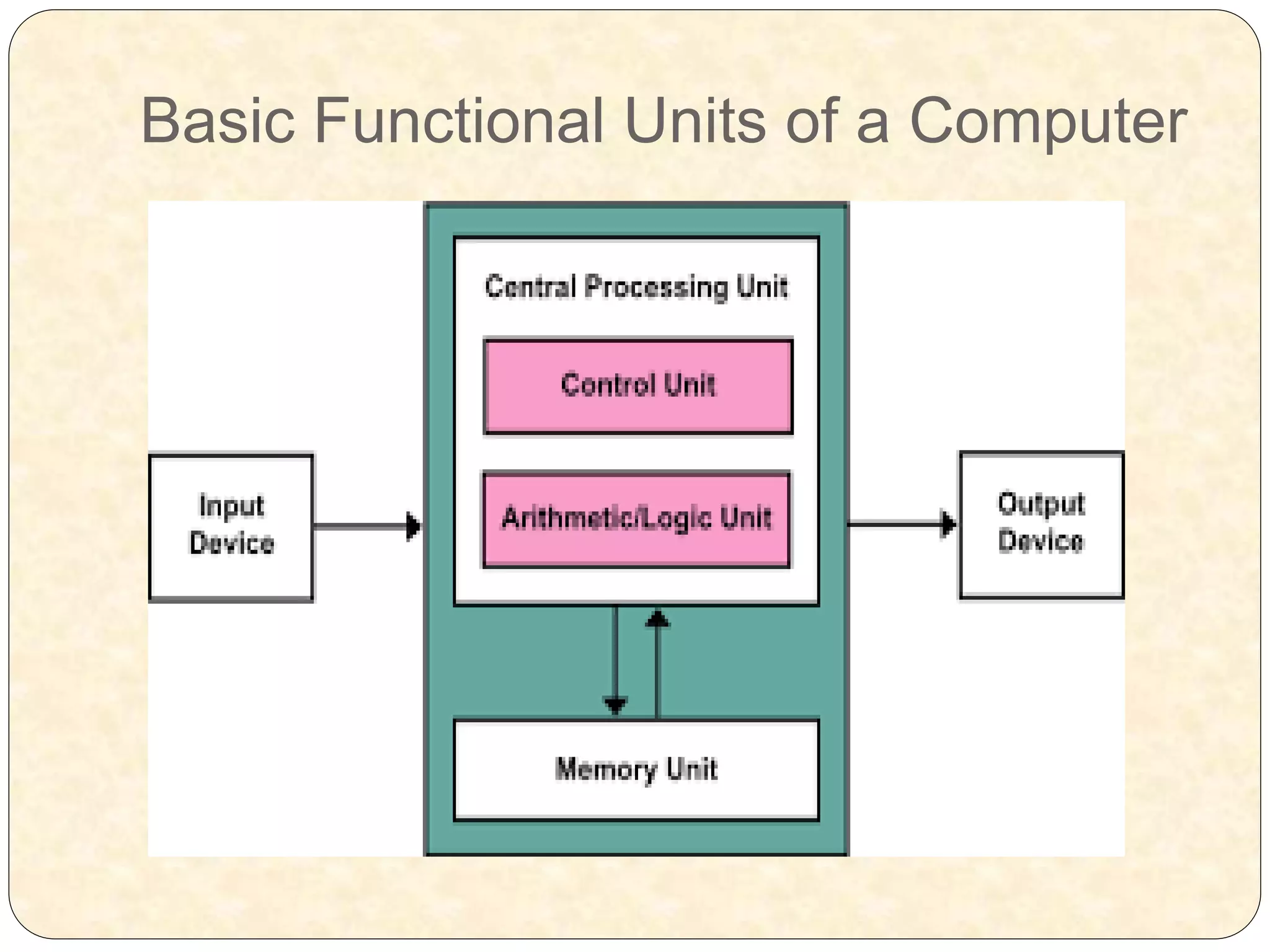
 Control Unit, arithmetic and logic unit and
memory are together called the Central
Processing Unit or CPU.
 Computer devices that we can see and touch are
the hardware components of a computer.
 Set of instructions or programs that make the
computer function using these hardware parts are
called software.
Functions of a Computer
In general terms, there are four main functions of a
computer:
Data processing
Data storage
Data movement
Control
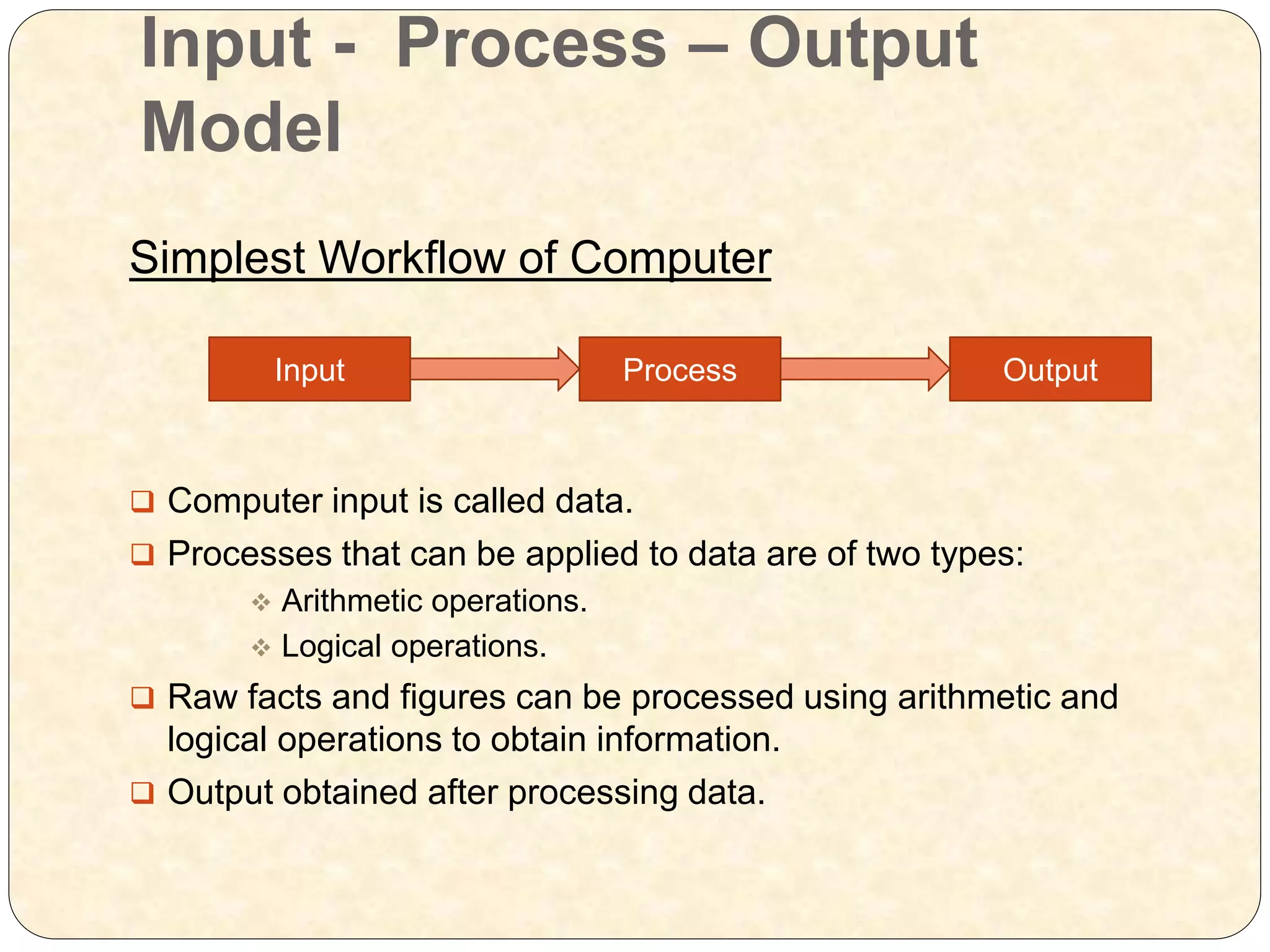
Input - Process – Output
Model
Simplest Workflow of Computer
 Computer input is called data.
 Processes that can be applied to data are of two types:
 Arithmetic operations.
 Logical operations.
 Raw facts and figures can be processed using arithmetic and
logical operations to obtain information.
 Output obtained after processing data.
Input Process Output
Basic Functional Units of a Computer
 Input Unit: Devices used to input data and information.
 Output Unit: Devices used to provide information to the
user in desired format.
 Control Unit: All devices or parts of computer interact
through the control unit.
 ALU: All arithmetic and logical operations take place.
 Memory: All input data, instructions and processes are
stored in the memory.
Basic Operational Concepts
 To perform a given task an appropriate program
consisting of a list of instructions is stored in the
memory.
 Individual instructions are brought from the memory
into the processor, which executes the specified
operations.
 Example:- Add LOC, R0
 This instruction adds the operand at memory
Add LOC, R0
This instruction requires the performance of several
steps,
 1.First the instruction is fetched from the memory
into the processor.
 2.The operand at LOC is fetched and added to
the contents of R0
 3.Finally the resulting sum is stored in the register
R0
Connection between the Processor and the Memory
Connection between the Processor and the
Memory
 The instruction register (IR):-Holds the instructions that is currently
being executed. Its output is available for the control circuits which
generates the timing signals that control the various processing elements
in one execution of instruction.
 The program counter PC:-This is another specialized register that keeps
track of execution of a program. It contains the memory address of the
next instruction to be fetched and executed.
 Besides IR and PC, there are n-general purpose registers R0 through Rn-
1.
 The other two registers which facilitate communication with memory are: -
 1.MAR –(Memory Address Register):-It holds the address of the
location to beaccessed.
 2.MDR –(Memory Data Register):-It contains the data to be written into
or readout of the address location.
Read Operation
Processor Memory
Control
Unit
MAR
MDR
Address - 1000
Read Signal
Data - operand 5
1000 5
Write Operation
Processor Memory
Control
Unit
MAR
MDR
Address - 1000
Write Signal
Data - operand 7
1000 7
Example Program
 Load LOC, R1
 Add R1, R0
Operating steps are
 1.Programs reside in the memory & usually get these through the Input unit.
 2.Execution of the program starts when the PC is set to point at the first
instruction of the program.
 3.Contents of PC are transferred to MAR and a Read Control Signal is sent to
the memory.
 4.After the time required to access the memory elapses, the address word is
read out of the memory and loaded into the MDR.
 5.Now contents of MDR are transferred to the IR & now the instruction is ready to
be decoded and executed.
 6.If the instruction involves an operation by the ALU, it is necessary to obtain the
required operands.
 7.An operand in the memory is fetched by sending its address to MAR & Initiating
a read cycle.
 8.When the operand has been read from the memory to the MDR, it is
transferred from MDR to the ALU.
 9.After one or two such repeated cycles, the ALU can perform the desired
operation.
 10.If the result of this operation is to be stored in the memory, the result is sent to
MDR.
Conclusion
 This presentation covers many aspects of
Computer Structure and operation.
 An overview of some important design and
operating concepts are presented.
THANKING YOU

Computer organization

  • 1.
    Chapter 1: Basic Structureof Computers COMPUTER ORGANIZATION Mrs.S.SUMATHI, Assistant Professor, Dept. of IT, EMG Yadava Women’s College, Madurai – 14 sumathi.emg@gmail.com
  • 2.
    Outline…..  Introduction  FunctionalUnits of a Computer  Basic Operational Concepts  Connection between the Processor and Memory  Read and Write Operation  Operating Steps  Conclusion
  • 3.
    Computer  Computer isan electronic device that receives input, stores or processes the input as per user instructions and provides output in desired format.
  • 4.
    Organization  An Organizationis a group of people who work together and achieving a goal or something.  It also refer to a system of arrangement or a structure for classifying things.
  • 5.
    Computer Organization  Thecomputer organization is concerned with the structure and behaviour of digital computers.  The main objective of this subject to understand the overall basic computer hardware structure.  A computer system is consists of an inter-related set of components.  The system is best characterized in terms of  structure- the way in which they are interconnected and  function- operation of individual component.
  • 6.
    Components of aComputer  Control Unit, arithmetic and logic unit and memory are together called the Central Processing Unit or CPU.  Computer devices that we can see and touch are the hardware components of a computer.  Set of instructions or programs that make the computer function using these hardware parts are called software.
  • 7.
    Functions of aComputer In general terms, there are four main functions of a computer: Data processing Data storage Data movement Control
  • 8.
    Input - Process– Output Model Simplest Workflow of Computer  Computer input is called data.  Processes that can be applied to data are of two types:  Arithmetic operations.  Logical operations.  Raw facts and figures can be processed using arithmetic and logical operations to obtain information.  Output obtained after processing data. Input Process Output
  • 9.
  • 10.
    Basic Functional Unitsof a Computer  Input Unit: Devices used to input data and information.  Output Unit: Devices used to provide information to the user in desired format.  Control Unit: All devices or parts of computer interact through the control unit.  ALU: All arithmetic and logical operations take place.  Memory: All input data, instructions and processes are stored in the memory.
  • 11.
    Basic Operational Concepts To perform a given task an appropriate program consisting of a list of instructions is stored in the memory.  Individual instructions are brought from the memory into the processor, which executes the specified operations.  Example:- Add LOC, R0  This instruction adds the operand at memory
  • 12.
    Add LOC, R0 Thisinstruction requires the performance of several steps,  1.First the instruction is fetched from the memory into the processor.  2.The operand at LOC is fetched and added to the contents of R0  3.Finally the resulting sum is stored in the register R0
  • 13.
    Connection between theProcessor and the Memory
  • 14.
    Connection between theProcessor and the Memory  The instruction register (IR):-Holds the instructions that is currently being executed. Its output is available for the control circuits which generates the timing signals that control the various processing elements in one execution of instruction.  The program counter PC:-This is another specialized register that keeps track of execution of a program. It contains the memory address of the next instruction to be fetched and executed.  Besides IR and PC, there are n-general purpose registers R0 through Rn- 1.  The other two registers which facilitate communication with memory are: -  1.MAR –(Memory Address Register):-It holds the address of the location to beaccessed.  2.MDR –(Memory Data Register):-It contains the data to be written into or readout of the address location.
  • 15.
    Read Operation Processor Memory Control Unit MAR MDR Address- 1000 Read Signal Data - operand 5 1000 5
  • 16.
    Write Operation Processor Memory Control Unit MAR MDR Address- 1000 Write Signal Data - operand 7 1000 7
  • 17.
    Example Program  LoadLOC, R1  Add R1, R0
  • 18.
    Operating steps are 1.Programs reside in the memory & usually get these through the Input unit.  2.Execution of the program starts when the PC is set to point at the first instruction of the program.  3.Contents of PC are transferred to MAR and a Read Control Signal is sent to the memory.  4.After the time required to access the memory elapses, the address word is read out of the memory and loaded into the MDR.  5.Now contents of MDR are transferred to the IR & now the instruction is ready to be decoded and executed.  6.If the instruction involves an operation by the ALU, it is necessary to obtain the required operands.  7.An operand in the memory is fetched by sending its address to MAR & Initiating a read cycle.  8.When the operand has been read from the memory to the MDR, it is transferred from MDR to the ALU.  9.After one or two such repeated cycles, the ALU can perform the desired operation.  10.If the result of this operation is to be stored in the memory, the result is sent to MDR.
  • 19.
    Conclusion  This presentationcovers many aspects of Computer Structure and operation.  An overview of some important design and operating concepts are presented.
  • 20.