Experiments
Your Name
Process
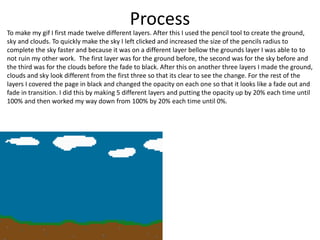
To make my gif I first made twelve different layers. After this I used the pencil tool to create the ground,
sky and clouds. To quickly make the sky I left clicked and increased the size of the pencils radius to
complete the sky faster and because it was on a different layer bellow the grounds layer I was able to to
not ruin my other work. The first layer was for the ground before, the second was for the sky before and
the third was for the clouds before the fade to black. After this on another three layers I made the ground,
clouds and sky look different from the first three so that its clear to see the change. For the rest of the
layers I covered the page in black and changed the opacity on each one so that it looks like a fade out and
fade in transition. I did this by making 5 different layers and putting the opacity up by 20% each time until
100% and then worked my way down from 100% by 20% each time until 0%.
Reflection
• What elements of your experiments will you include in your final product?
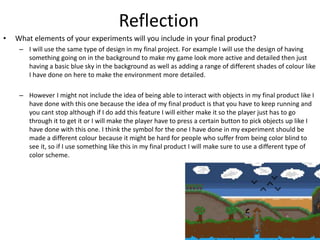
– I will use the same type of design in my final project. For example I will use the design of having
something going on in the background to make my game look more active and detailed then just
having a basic blue sky in the background as well as adding a range of different shades of colour like
I have done on here to make the environment more detailed.
– However I might not include the idea of being able to interact with objects in my final product like I
have done with this one because the idea of my final product is that you have to keep running and
you cant stop although if I do add this feature I will either make it so the player just has to go
through it to get it or I will make the player have to press a certain button to pick objects up like I
have done with this one. I think the symbol for the one I have done in my experiment should be
made a different colour because it might be hard for people who suffer from being color blind to
see it, so if I use something like this in my final product I will make sure to use a different type of
color scheme.
Process
• The first thing I did was focusing on making the background and the environment the character would
be in so that I would have an rough idea of where my character would walk, how big he needs to be and
what he needs to look like. I first made the ground, trees and well with the pencil tool all on one layer
using multiple different shades to make it look more detailed. Once I had done this I moved on to
making the background of the environment. I then made another layer bellow the first so that when
drawing my background I wouldn’t be able to go over any of my main environment. I used the pencil
tool to make my background just like I did the environment however I changed the opacity from 100% to
70% and used different shades of colours to make the hills and beach look like they’re in the distance
rather then right next to the player and to help make the map feel a lot bigger then it actually is in
reality. For example I used different shades of white on the beach in the background to resemble waves
and used different shades of blue for the sea to make it look like it goes on forever in the distance. After
I had done all this I started working on my character and my walking animation for him. I used a range of
different colours and the pencil tool to actually make my character and once I did I used the duplicate
tool on the layer with the character on and slightly changed his feet. I did this around 3 times so that I
had 3 different characters to use each frame to make it look like my character is walking.
Reflection
• What elements of your experiments will you
include in your final product?
Process
Reflection
• What elements of your experiments will you
include in your final product?

1. production experiments (1)

  • 1.
  • 2.
    Process To make mygif I first made twelve different layers. After this I used the pencil tool to create the ground, sky and clouds. To quickly make the sky I left clicked and increased the size of the pencils radius to complete the sky faster and because it was on a different layer bellow the grounds layer I was able to to not ruin my other work. The first layer was for the ground before, the second was for the sky before and the third was for the clouds before the fade to black. After this on another three layers I made the ground, clouds and sky look different from the first three so that its clear to see the change. For the rest of the layers I covered the page in black and changed the opacity on each one so that it looks like a fade out and fade in transition. I did this by making 5 different layers and putting the opacity up by 20% each time until 100% and then worked my way down from 100% by 20% each time until 0%.
  • 3.
    Reflection • What elementsof your experiments will you include in your final product? – I will use the same type of design in my final project. For example I will use the design of having something going on in the background to make my game look more active and detailed then just having a basic blue sky in the background as well as adding a range of different shades of colour like I have done on here to make the environment more detailed. – However I might not include the idea of being able to interact with objects in my final product like I have done with this one because the idea of my final product is that you have to keep running and you cant stop although if I do add this feature I will either make it so the player just has to go through it to get it or I will make the player have to press a certain button to pick objects up like I have done with this one. I think the symbol for the one I have done in my experiment should be made a different colour because it might be hard for people who suffer from being color blind to see it, so if I use something like this in my final product I will make sure to use a different type of color scheme.
  • 4.
    Process • The firstthing I did was focusing on making the background and the environment the character would be in so that I would have an rough idea of where my character would walk, how big he needs to be and what he needs to look like. I first made the ground, trees and well with the pencil tool all on one layer using multiple different shades to make it look more detailed. Once I had done this I moved on to making the background of the environment. I then made another layer bellow the first so that when drawing my background I wouldn’t be able to go over any of my main environment. I used the pencil tool to make my background just like I did the environment however I changed the opacity from 100% to 70% and used different shades of colours to make the hills and beach look like they’re in the distance rather then right next to the player and to help make the map feel a lot bigger then it actually is in reality. For example I used different shades of white on the beach in the background to resemble waves and used different shades of blue for the sea to make it look like it goes on forever in the distance. After I had done all this I started working on my character and my walking animation for him. I used a range of different colours and the pencil tool to actually make my character and once I did I used the duplicate tool on the layer with the character on and slightly changed his feet. I did this around 3 times so that I had 3 different characters to use each frame to make it look like my character is walking.
  • 5.
    Reflection • What elementsof your experiments will you include in your final product?
  • 6.
  • 7.
    Reflection • What elementsof your experiments will you include in your final product?

Editor's Notes

  • #3 Discuss the tools and processes used in your experiments
  • #5 Discuss the tools and processes used in your experiments
  • #7 Discuss the tools and processes used in your experiments