Development Diary: Magazine Advertisement

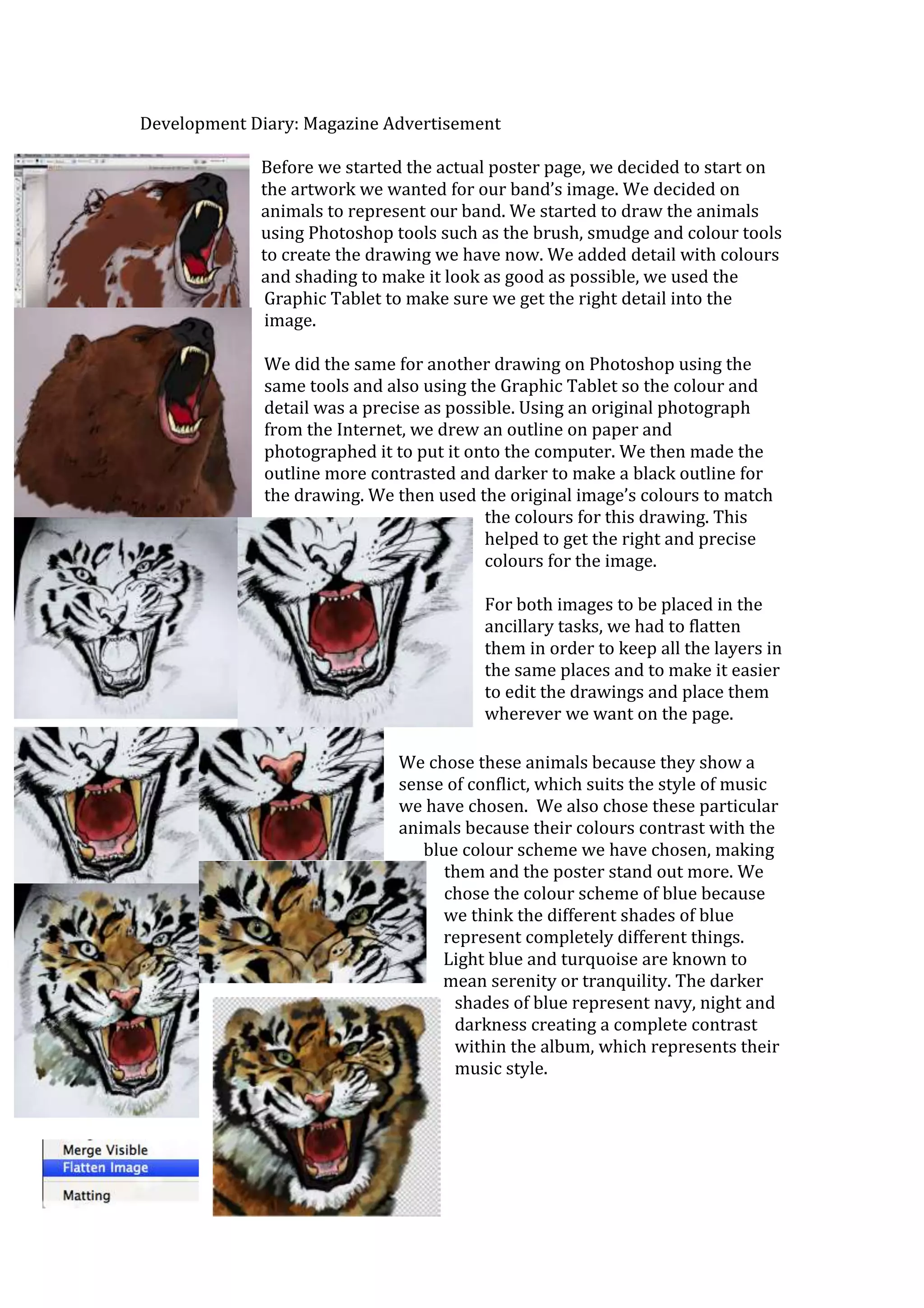
             Before we started the actual poster page, we decided to start on
             the artwork we wanted for our band’s image. We decided on
             animals to represent our band. We started to draw the animals
             using Photoshop tools such as the brush, smudge and colour tools
             to create the drawing we have now. We added detail with colours
             and shading to make it look as good as possible, we used the
              Graphic Tablet to make sure we get the right detail into the
              image.

              We did the same for another drawing on Photoshop using the
              same tools and also using the Graphic Tablet so the colour and
              detail was a precise as possible. Using an original photograph
              from the Internet, we drew an outline on paper and
              photographed it to put it onto the computer. We then made the
              outline more contrasted and darker to make a black outline for
              the drawing. We then used the original image’s colours to match
                                           the colours for this drawing. This
                                           helped to get the right and precise
                                           colours for the image.

                                         For both images to be placed in the
                                         ancillary tasks, we had to flatten
                                         them in order to keep all the layers in
                                         the same places and to make it easier
                                         to edit the drawings and place them
                                         wherever we want on the page.

                              We chose these animals because they show a
                              sense of conflict, which suits the style of music
                              we have chosen. We also chose these particular
                              animals because their colours contrast with the
                                 blue colour scheme we have chosen, making
                                    them and the poster stand out more. We
                                    chose the colour scheme of blue because
                                   we think the different shades of blue
                                   represent completely different things.
                                   Light blue and turquoise are known to
                                   mean serenity or tranquility. The darker
                                     shades of blue represent navy, night and
                                     darkness creating a complete contrast
                                     within the album, which represents their
                                     music style.
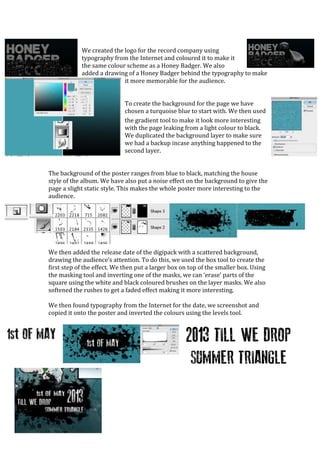
We created the logo for the record company using
            typography from the Internet and coloured it to make it
            the same colour scheme as a Honey Badger. We also
            added a drawing of a Honey Badger behind the typography to make
                           it more memorable for the audience.


                             To create the background for the page we have
                             chosen a turquoise blue to start with. We then used
                             the gradient tool to make it look more interesting
                             with the page leaking from a light colour to black.
                             We duplicated the background layer to make sure
                             we had a backup incase anything happened to the
                             second layer.


The background of the poster ranges from blue to black, matching the house
style of the album. We have also put a noise effect on the background to give the
page a slight static style. This makes the whole poster more interesting to the
audience.


We then added the release date of the digipack with a scattered background,
drawing the audience’s attention. To do this, we used the box tool to create the
first step of the effect. We then put a larger box on top of the smaller box. Using
the masking tool and inverting one of the masks, we can ‘erase’ parts of the
square using the white and black coloured brushes on the layer masks. We also
softened the rushes to get a faded effect making it more interesting.

We then found typography from the Internet for the date, we screenshot and
copied it onto the poster and inverted the colours using the levels tool.
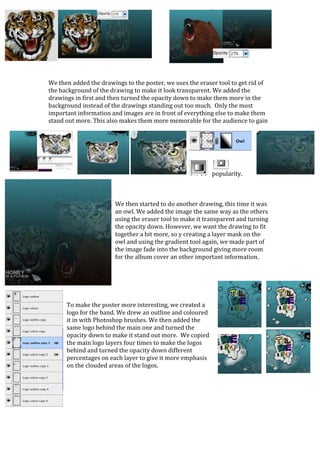
We then added the drawings to the poster, we uses the eraser tool to get rid of
the background of the drawing to make it look transparent. We added the
drawings in first and then turned the opacity down to make them more in the
background instead of the drawings standing out too much. Only the most
important information and images are in front of everything else to make them
stand out more. This also makes them more memorable for the audience to gain


                                                           popularity.


                        We then started to do another drawing, this time it was
                        an owl. We added the image the same way as the others
                        using the eraser tool to make it transparent and turning
                        the opacity down. However, we want the drawing to fit
                        together a bit more, so y creating a layer mask on the
                        owl and using the gradient tool again, we made part of
                        the image fade into the background giving more room
                        for the album cover an other important information.


      To make the poster more interesting, we created a
      logo for the band. We drew an outline and coloured
      it in with Photoshop brushes. We then added the
      same logo behind the main one and turned the
      opacity down to make it stand out more. We copied
      the main logo layers four times to make the logos
      behind and turned the opacity down different
      percentages on each layer to give it more emphasis
      on the clouded areas of the logos.
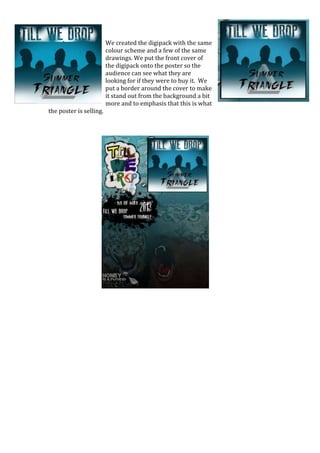
We created the digipack with the same
                         colour scheme and a few of the same
                         drawings. We put the front cover of
                         the digipack onto the poster so the
                         audience can see what they are
                         looking for if they were to buy it. We
                         put a border around the cover to make
                         it stand out from the background a bit
                         more and to emphasis that this is what
the poster is selling.

Development diary poster final

  • 1.
    Development Diary: MagazineAdvertisement Before we started the actual poster page, we decided to start on the artwork we wanted for our band’s image. We decided on animals to represent our band. We started to draw the animals using Photoshop tools such as the brush, smudge and colour tools to create the drawing we have now. We added detail with colours and shading to make it look as good as possible, we used the Graphic Tablet to make sure we get the right detail into the image. We did the same for another drawing on Photoshop using the same tools and also using the Graphic Tablet so the colour and detail was a precise as possible. Using an original photograph from the Internet, we drew an outline on paper and photographed it to put it onto the computer. We then made the outline more contrasted and darker to make a black outline for the drawing. We then used the original image’s colours to match the colours for this drawing. This helped to get the right and precise colours for the image. For both images to be placed in the ancillary tasks, we had to flatten them in order to keep all the layers in the same places and to make it easier to edit the drawings and place them wherever we want on the page. We chose these animals because they show a sense of conflict, which suits the style of music we have chosen. We also chose these particular animals because their colours contrast with the blue colour scheme we have chosen, making them and the poster stand out more. We chose the colour scheme of blue because we think the different shades of blue represent completely different things. Light blue and turquoise are known to mean serenity or tranquility. The darker shades of blue represent navy, night and darkness creating a complete contrast within the album, which represents their music style.
  • 2.
    We created thelogo for the record company using typography from the Internet and coloured it to make it the same colour scheme as a Honey Badger. We also added a drawing of a Honey Badger behind the typography to make it more memorable for the audience. To create the background for the page we have chosen a turquoise blue to start with. We then used the gradient tool to make it look more interesting with the page leaking from a light colour to black. We duplicated the background layer to make sure we had a backup incase anything happened to the second layer. The background of the poster ranges from blue to black, matching the house style of the album. We have also put a noise effect on the background to give the page a slight static style. This makes the whole poster more interesting to the audience. We then added the release date of the digipack with a scattered background, drawing the audience’s attention. To do this, we used the box tool to create the first step of the effect. We then put a larger box on top of the smaller box. Using the masking tool and inverting one of the masks, we can ‘erase’ parts of the square using the white and black coloured brushes on the layer masks. We also softened the rushes to get a faded effect making it more interesting. We then found typography from the Internet for the date, we screenshot and copied it onto the poster and inverted the colours using the levels tool.
  • 3.
    We then addedthe drawings to the poster, we uses the eraser tool to get rid of the background of the drawing to make it look transparent. We added the drawings in first and then turned the opacity down to make them more in the background instead of the drawings standing out too much. Only the most important information and images are in front of everything else to make them stand out more. This also makes them more memorable for the audience to gain popularity. We then started to do another drawing, this time it was an owl. We added the image the same way as the others using the eraser tool to make it transparent and turning the opacity down. However, we want the drawing to fit together a bit more, so y creating a layer mask on the owl and using the gradient tool again, we made part of the image fade into the background giving more room for the album cover an other important information. To make the poster more interesting, we created a logo for the band. We drew an outline and coloured it in with Photoshop brushes. We then added the same logo behind the main one and turned the opacity down to make it stand out more. We copied the main logo layers four times to make the logos behind and turned the opacity down different percentages on each layer to give it more emphasis on the clouded areas of the logos.
  • 4.
    We created thedigipack with the same colour scheme and a few of the same drawings. We put the front cover of the digipack onto the poster so the audience can see what they are looking for if they were to buy it. We put a border around the cover to make it stand out from the background a bit more and to emphasis that this is what the poster is selling.