building a sound schedule in an
enterprise environment using
schedule metric analysis


  Dr Dan Patterson, PMP l CEO & Founder, Acumen
2


Introductions
!      Dr Dan Patterson PMP
        !   Founder, CEO Acumen
        !   20 years project management software
        !   Risk/schedule thought leader
        !   Welcom, Pertmaster, Primavera, Acumen legacy

!      Acumen
        !   Project analytics
        !   World-recognized risk workshops
        !   S1 > S5 schedule maturity
        !   Acumen Fuse project analysis tool

    September 21,
        2011
3


Presentation Overview
!      Importance of a sound basis of schedule
!      The CPM schedule building blocks
!      Introduction to metric analysis
!      Industry standards
!      Your metric toolkit: key metrics
!      Scorecarding
!      Metrics for execution & forensics
!      Results from research on planning quality
!      Q&A
    September 21,
        2011
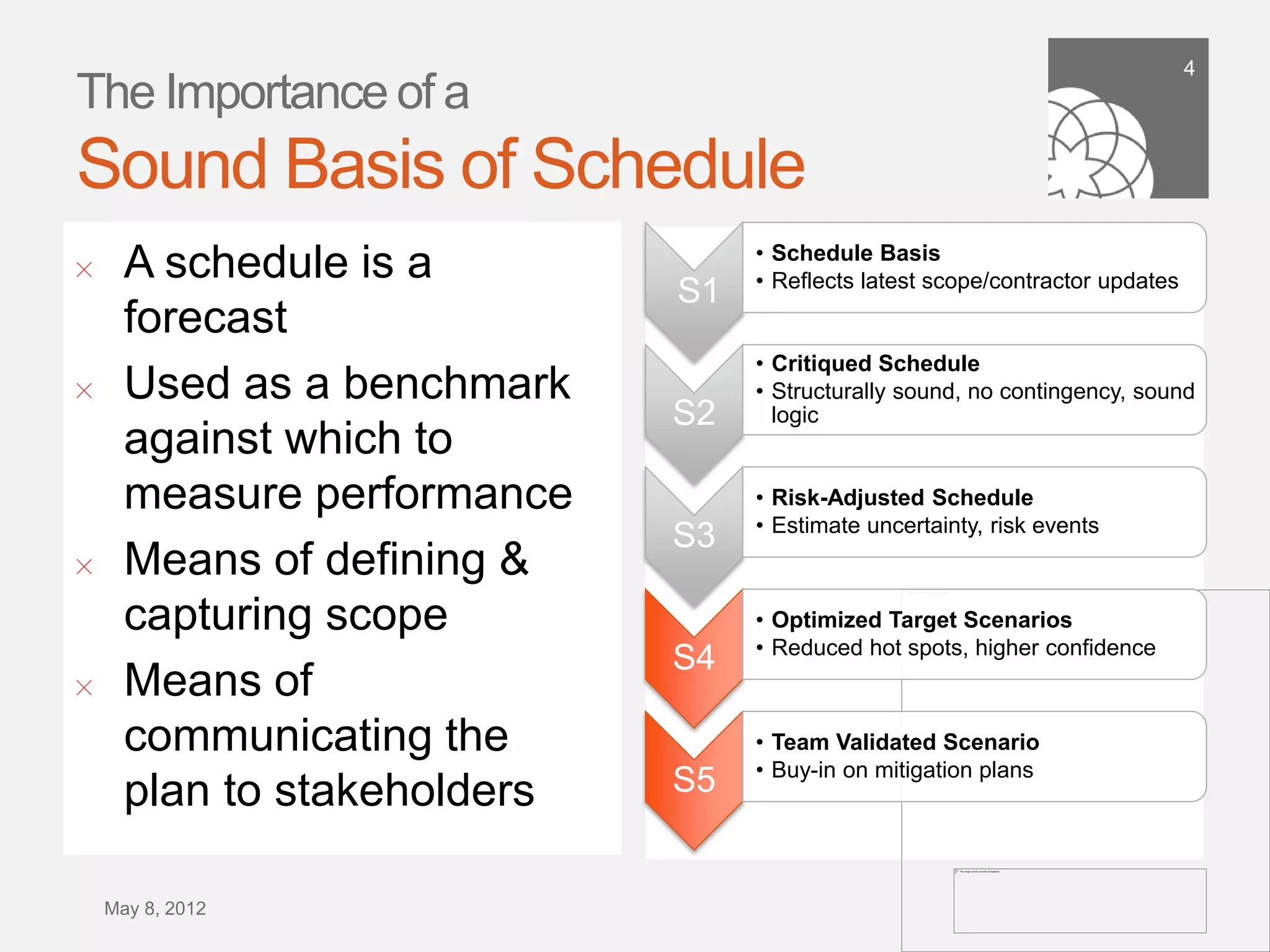
4
The Importance of a
Sound Basis of Schedule
                                   •  Schedule Basis
!      A schedule is a             •  Reflects latest scope/contractor
                              S1      updates
       forecast
                                   •  Critiqued Schedule
!      Used as a benchmark         •  Structurally sound, no contingency,
                              S2      sound logic
       against which to
       measure performance         •  Risk-Adjusted Schedule
                                   •  Estimate uncertainty, risk events
                              S3
!      Means of defining &
       capturing scope             •  Optimized Target Scenarios
                                   •  Reduced hot spots, higher confidence
                              S4
!      Means of
       communicating the           •  Team Validated Scenario
                                   •  Buy-in on mitigation plans
       plan to stakeholders   S5


    September 21,
        2011
5


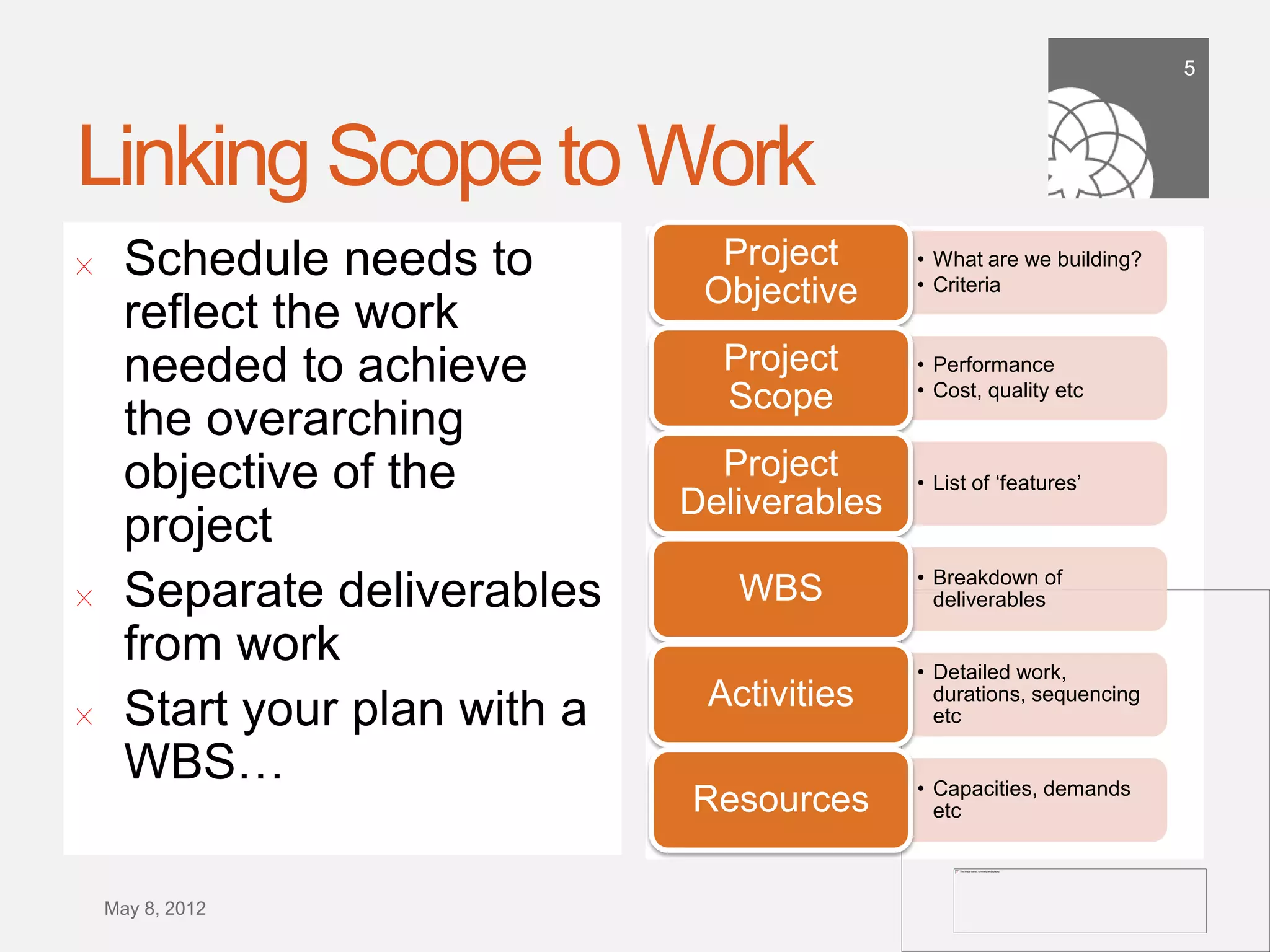
Linking Scope to Work
!      Schedule needs to          Project      • What are we building?
                                 Objective     • Criteria

       reflect the work
       needed to achieve          Project      • Performance
                                  Scope        • Cost, quality etc

       the overarching
       objective of the           Project      • List of ‘features’
                                Deliverables
       project
                                               • Breakdown of
!      Separate deliverables       WBS          deliverables

       from work
                                               • Detailed work, durations,
                                 Activities
!      Start your plan with a                   sequencing etc


       WBS…
                                Resources      • Capacities, demands etc


    September 21,
        2011
6


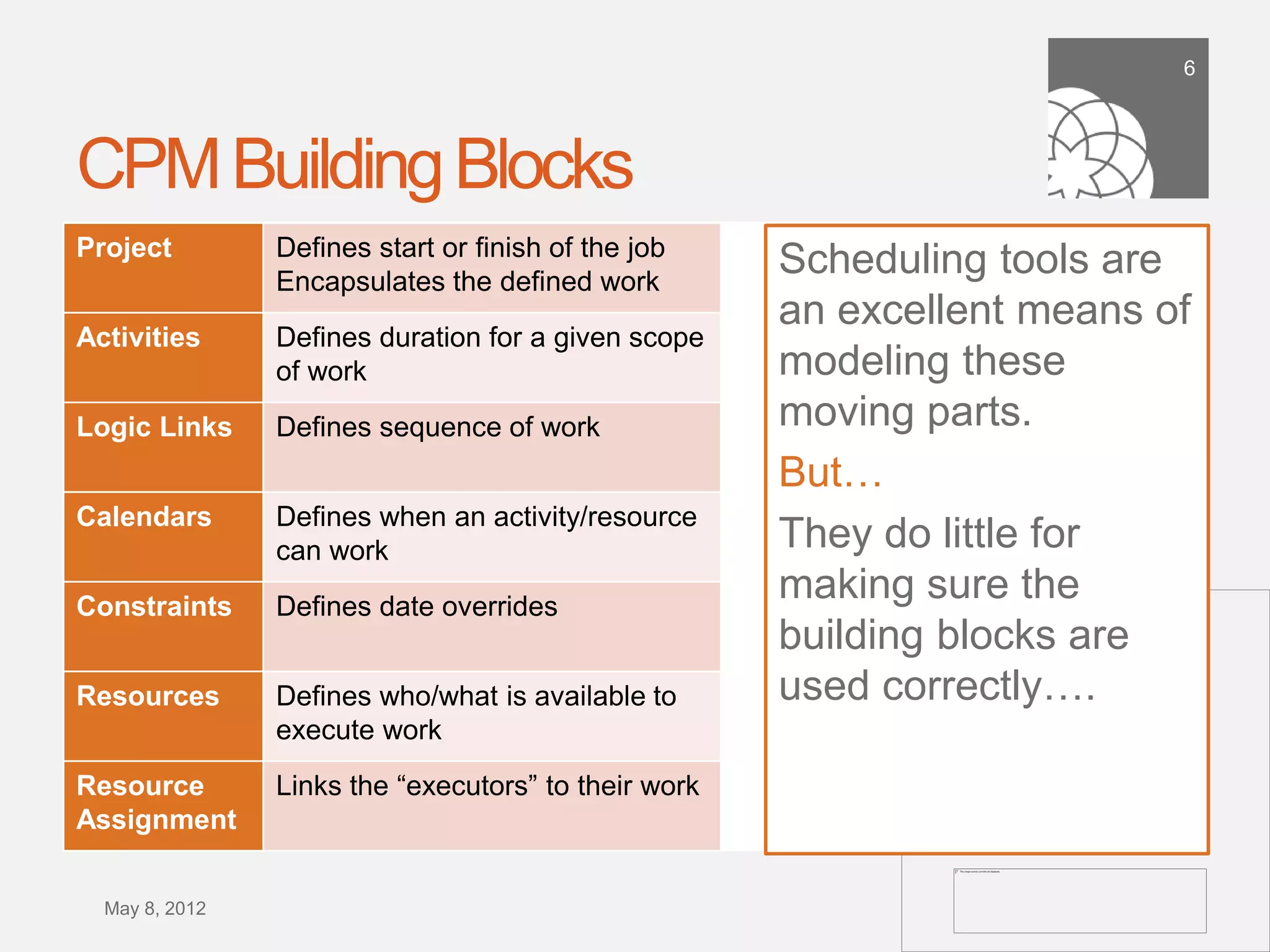
CPM Building Blocks
Project          Defines start or finish of the job
                 Encapsulates the defined work
                                                      Scheduling tools are
                                                      an excellent means
Activities       Defines duration for a given
                 scope of work                        of modeling these
Logic Links      Defines sequence of work             moving parts.
                                                      But…
Calendars        Defines when an activity/
                 resource can work                    They do little for
Constraints      Defines date overrides
                                                      making sure the
                                                      building blocks are
Resources        Defines who/what is available to     used correctly….
                 execute work
Resource         Links the “executors” to their
Assignment       work

 September 21,
     2011
7


The Problem with Gantt Charts…
!      Highly vertical in nature
        !   A row per activity required
        !   Humans like timelines!
!      Logic adds complexity
        !   Difficult to trace
!      Detail lost in summaries
        !   Just shows earliest/latest
!      Activity-centric
        !   Doesn’t show by resource


    September 21,
        2011
8


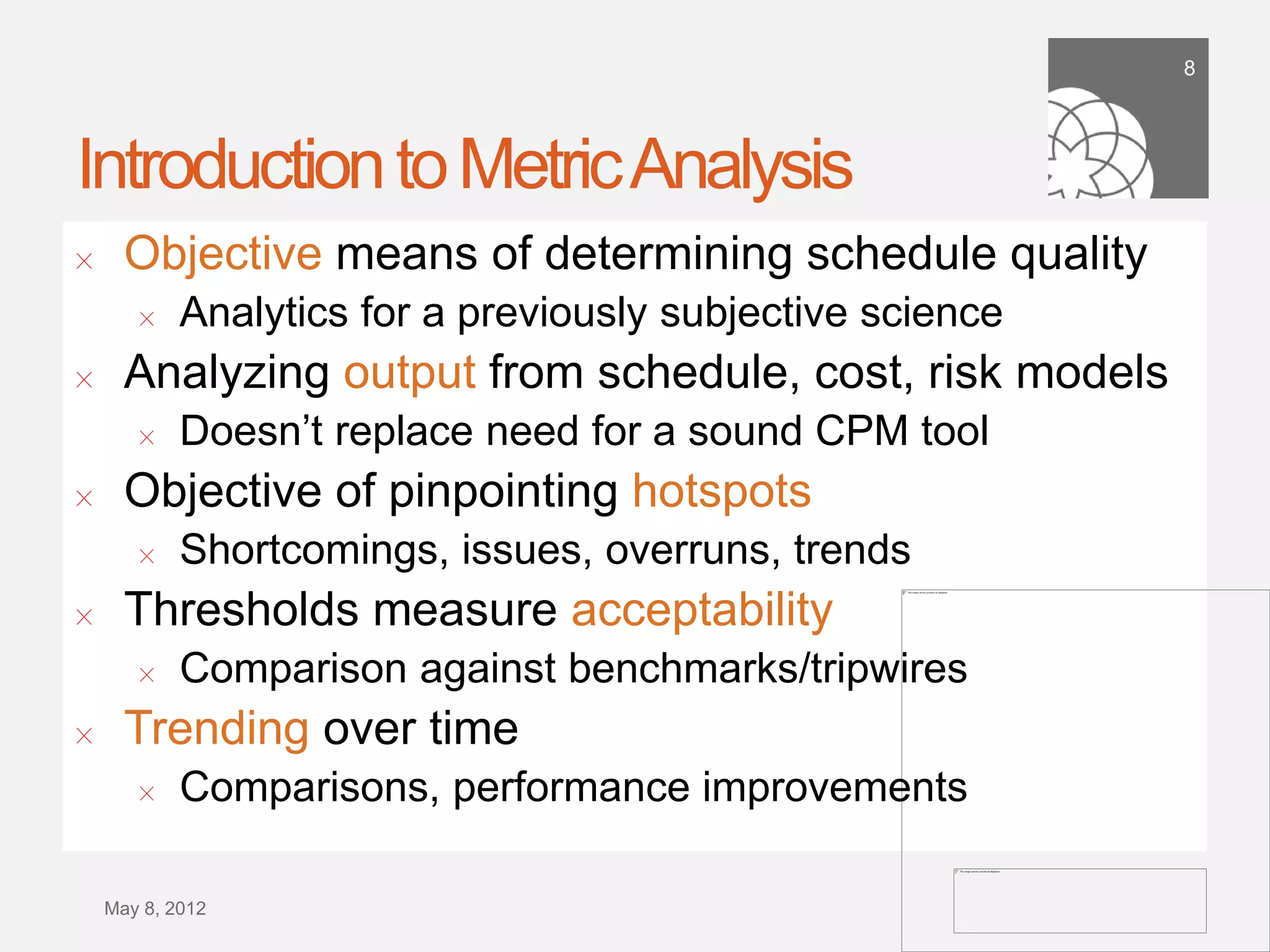
Introduction to Metric Analysis
!     Definition: “Analytics leverage data in a particular functional
      process to enable context-specific insight that is actionable”
!     Objective means of determining schedule quality
        !   Analytics for a previously subjective science
!     Analyzing output from schedule, cost, risk models
        !   Doesn’t replace need for a sound CPM tool
!     Objective of pinpointing hotspots
        !   Shortcomings, issues, overruns, trends
!     Thresholds measure acceptability
        !   Comparison against benchmarks/tripwires
!     Trending over time
        !   Comparisons, performance improvements


    September 21,
        2011
9


Metrics
!     Metric definition
        !   “a measurement used to mathematically gauge a quantity”
!     Metric Score
        !   Typically a count of activities
        !   Can be a summation e.g. cost
!     Metric percentage
        !   Provides context e.g. within a set of activities
!     Threshold or Tripwire
        !   Acceptable bandwidth relative to a given basis


    September 21,
        2011
Sli
                  de
                  10


Metric Examples
11


Industry Standards
!      Government agency (compliance)
        !   Government-wide
        !   Department of Defense (DoD)
        !   NDIA’s Generally Accepted Scheduling Principles
            (GASP)
!      Non-government specific (best practice)
        !    Project Management Institute (PMI)
        !    AACE International
        !    Thought leaders e.g. Acumen
        !    Company-specific
    September 21,
        2011
12


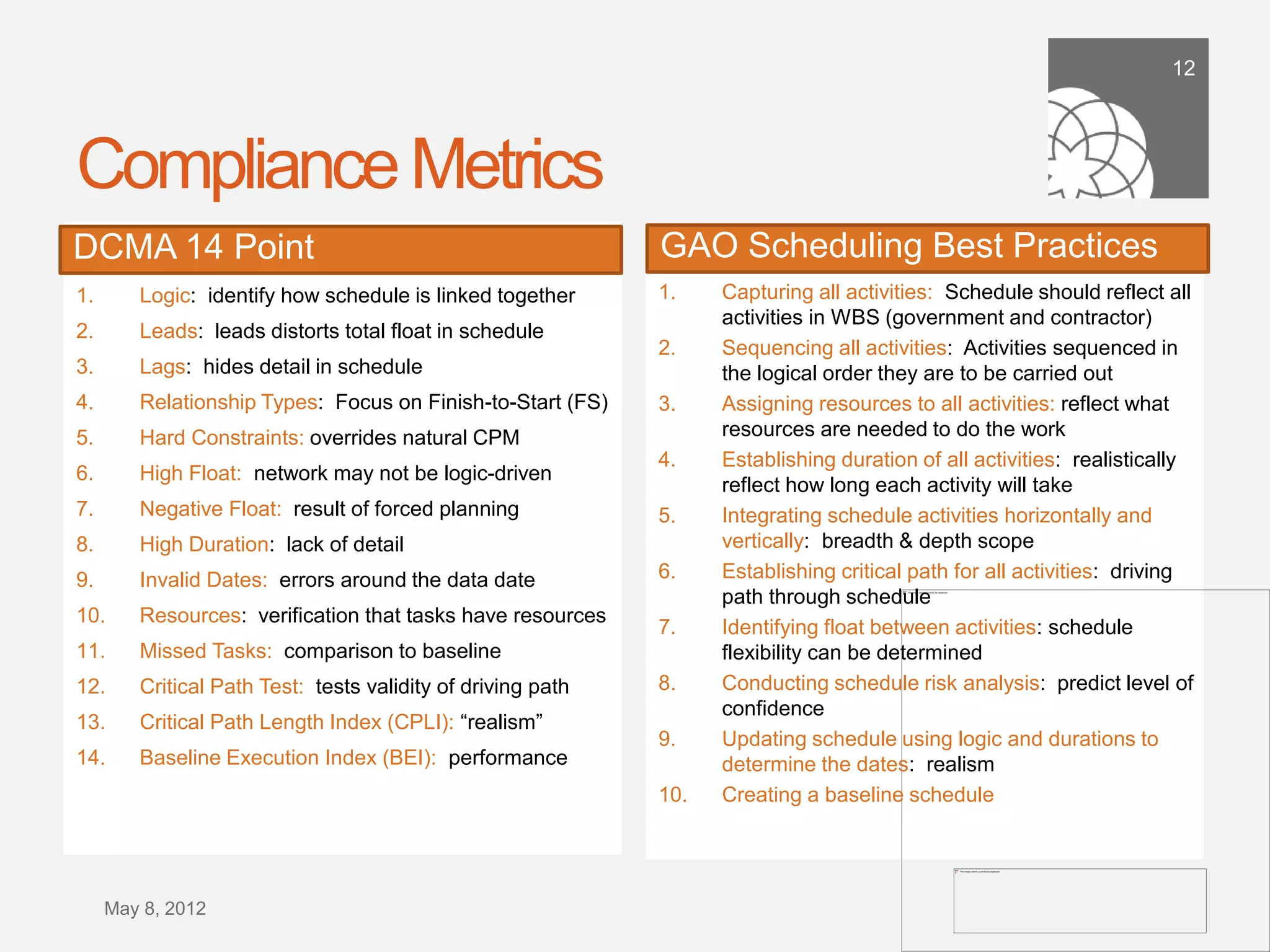
Compliance Metrics
DCMA 14 Point                                               GAO Scheduling Best Practices
1.     Logic: identify how schedule is linked together      1.     Capturing all activities: Schedule should reflect
                                                                   all activities in WBS (government and contractor)
2.     Leads: leads distorts total float in schedule
                                                            2.     Sequencing all activities: Activities sequenced in
3.     Lags: hides detail in schedule                              the logical order they are to be carried out
4.     Relationship Types: Focus on Finish-to-Start (FS)    3.     Assigning resources to all activities: reflect what
5.     Hard Constraints: overrides natural CPM                     resources are needed to do the work
                                                            4.     Establishing duration of all activities: realistically
6.     High Float: network may not be logic-driven
                                                                   reflect how long each activity will take
7.     Negative Float: result of forced planning            5.     Integrating schedule activities horizontally and
8.     High Duration: lack of detail                               vertically: breadth & depth scope
                                                            6.     Establishing critical path for all activities: driving
9.     Invalid Dates: errors around the data date
                                                                   path through schedule
10.    Resources: verification that tasks have resources     7.     Identifying float between activities: schedule
11.    Missed Tasks: comparison to baseline                        flexibility can be determined
12.    Critical Path Test: tests validity of driving path   8.     Conducting schedule risk analysis: predict level
                                                                   of confidence
13.    Critical Path Length Index (CPLI): “realism”
                                                            9.     Updating schedule using logic and durations to
14.    Baseline Execution Index (BEI): performance                 determine the dates: realism
                                                            10.    Creating a baseline schedule


  September 21,
      2011
13


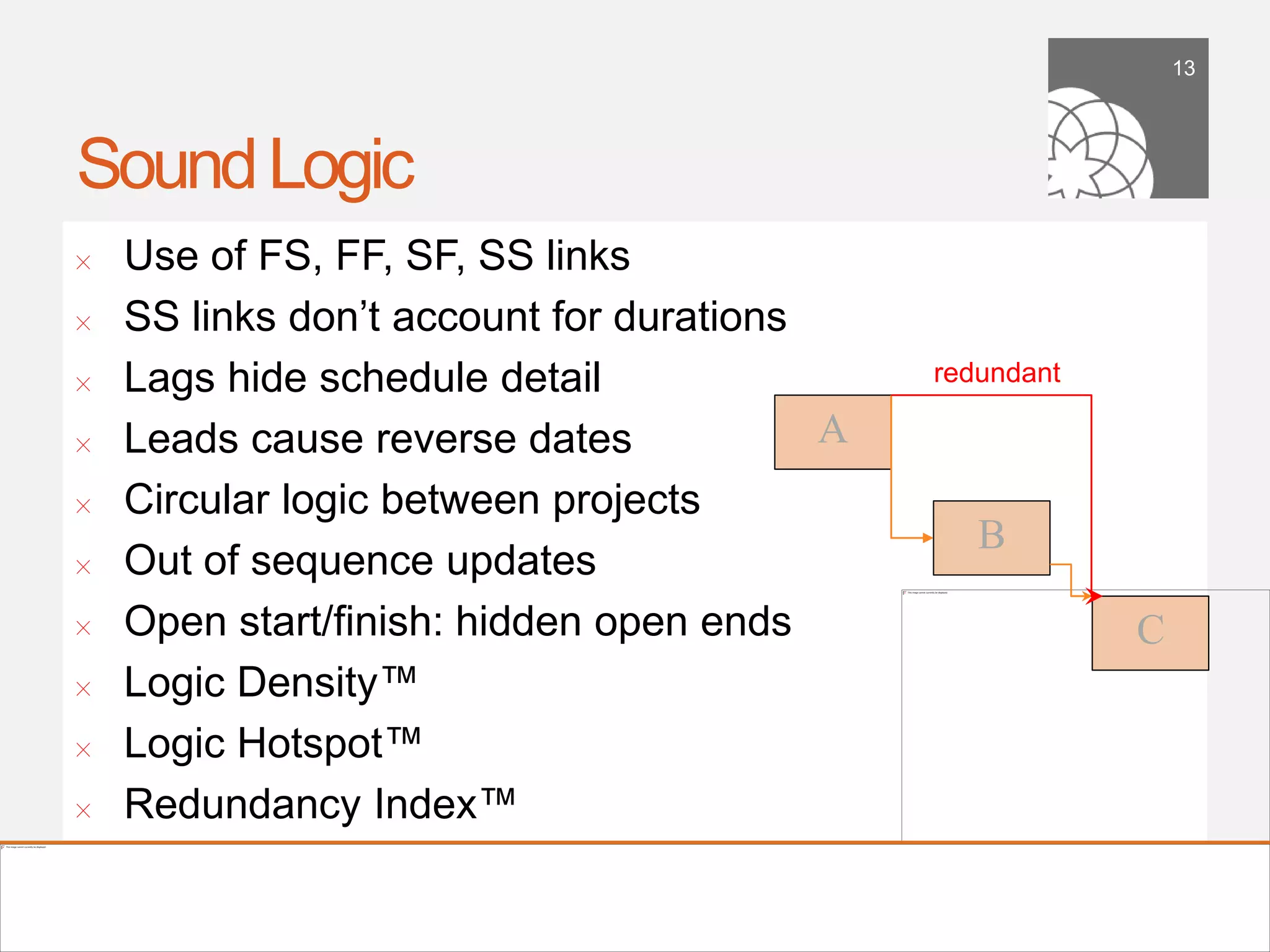
Sound Logic
!      Use of FS, FF, SF, SS links
!      SS links don’t account for durations
!      Lags hide schedule detail                   redundant

!      Leads cause reverse dates            A	

!      Circular logic between projects
                                                      B	

!      Out of sequence updates
!      Open start/finish: hidden open ends                      C	

!      Logic Density™
!      Logic Hotspot™
!      Redundancy Index™

    September 21,
        2011
14


Logic Density™
!      Great measure of complexity
!      Dual-band threshold: 2 to 5…
!      Determine Logic Hotspots™ in your schedule


    September 21,
        2011
15


Redundancy Index™
!      Overly complex, non-necessary logic
!      Negatively impacts a schedule risk analysis
!      Look for less than 15% redundancy in schedule


    September 21,
        2011
16


Appropriate use of Constraints
!      Understand the use of constraints
        !    Delivery dates?
!      Look for open ends with constraints
        !    These are OK
!      Understand float around constraints
        !    Float often artificially generated
!      Avoid hard constraints
        !    They go against the whole premise of CPM!


    September 21,
        2011
17


Calendars
!      Appropriate use of calendars
        !    Use reasonable number of calendars
!      Use reasonable level of detail
        !   Don’t use hourly calendar on a 3 year
            construction project!
!      Be careful about multiple calendars in
       sequences of activities
        !   Logic links inherit either predecessor or
            successor

    September 21,
        2011
18


Durations & Level of Detail
!      Durations define level of detail in schedule
!      Ensure sufficient level of detail to:
        !    Track performance
        !    Publish status
        !    Collaborate the work with the project team
!      Differentiate between critical/non critical
        !    Great indicator as to how risky a project is


    September 21,
        2011
19


Float Analysis
!      Average Float
!      Maximum Float
!      Float ratio (# of days float per day of work)
!      Float Map™


    September 21,
        2011
20


Visualization
!     Means of grouping activities
        !   Against which we can apply metrics
!     Means of quickly changing grouping
        !   Multiple dimension slice and dice
!     Means of also slicing by time period


                                                 Ribbon Visualization

    September 21,
        2011
21


Scorecarding
!      Metrics are useful but don’t give overall picture
!      Scorecarding: group individual metrics into single score
!      Schedule Quality Index™
!      Scores can be either
        !   Activity based: number of activities that fail a test (less detailed,
            higher scores)
        !   Metric based: number of metrics that fail a test (more detailed,
            lower scores)
!      Weight importance of metrics


    September 21,
        2011
22


Tracing Driving Logic
!      Driving Logic trace shows key path(s)
!      Based on:
        !    Forwards only view
        !    Backwards only view
        !    View between any two given activities
        !    Analyze the driving path through metrics


    September 21,
        2011
23
Metrics for Execution
Baseline Compliance™
!      Traditional measures include:
        !    Earned value: heavy time investment to implement
        !    Earned schedule: similar to EV
        !    % complete: what does this really tell us?
        !    Ahead/behind baseline: too granular a scale…
!      Baseline Compliance™
        !   Used to determine how close a schedule is planned
            and executed against it’s baseline
        !   Measure of well the plan is being executed
        !   More than just date comparison
        !   Looks at period-compliance
    September 21,
        2011
Compliance Scenarios
Compliance Metrics
Example
  Baseline Compliance™ Analysis

100%
 80%
 60%
 40%
  20%
   0%
27


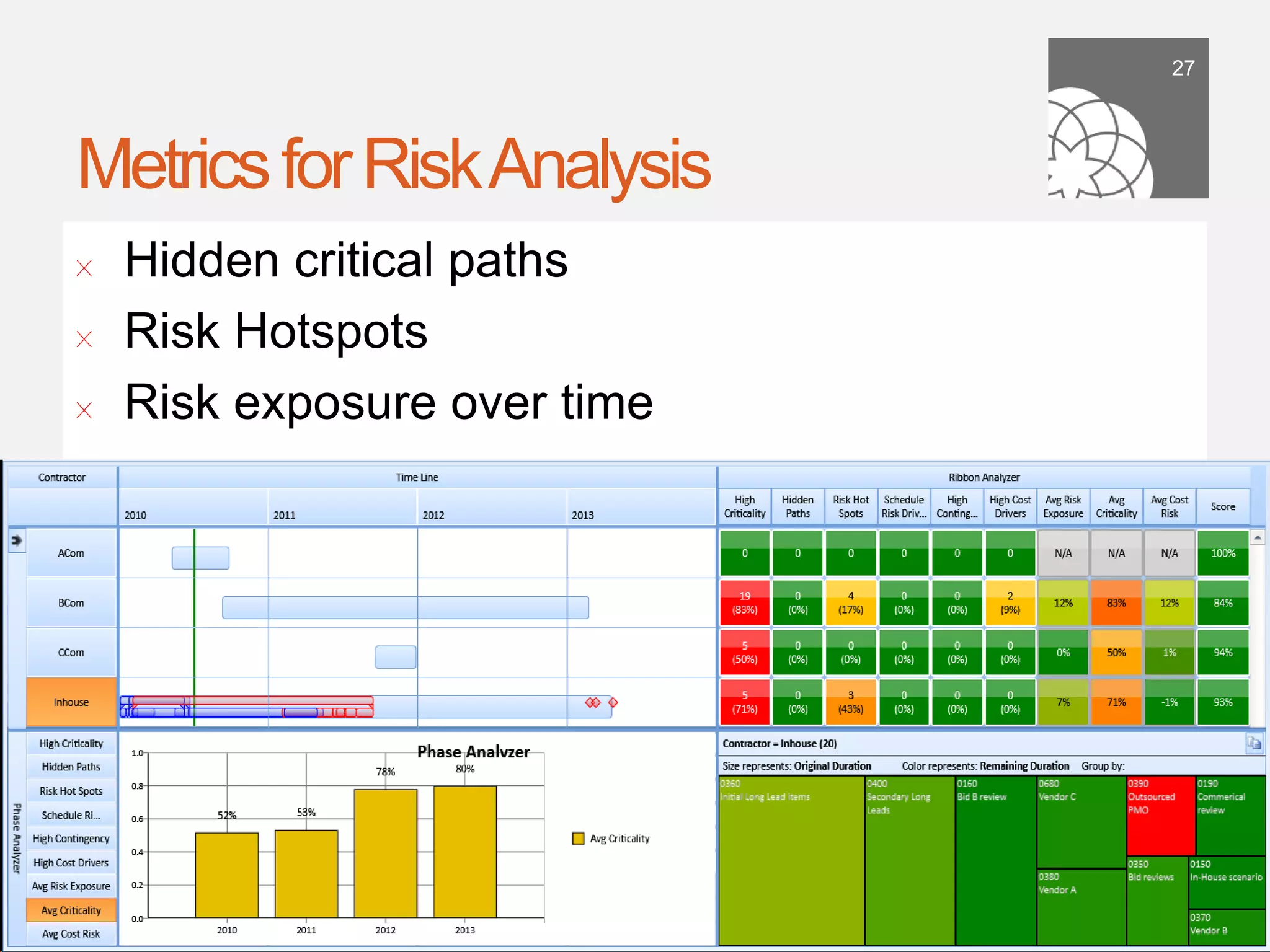
Metrics for Risk Analysis
!      Hidden critical paths
!      Risk Hotspots
!      Risk exposure over time


    September 21,
        2011
28


Metrics for Schedule Forensics
!      Compare multiple updates, iterations etc
!      Means of pinpointing
        !    Changes e.g. duration, logic
!      More importantly, should be:
        !    Insight into impact of changes e.g. float
!      Scorecarding
        !    Use as means of showing improvements


    September 21,
        2011
Sound Planning Equals Project                                                                         29


Success…
                           100%

                           90%                                                           R² = 0.603


                           80%

                           70%
Finish Compliance Index™


                           60%

                           50%

                           40%

                           30%

                           20%

                           10%

                            0%
                                  0%   10%   20%   30%        40%          50%   60%   70%        80%
                                                     Schedule Quality Index™


     September 21,
         2011
30


Conclusions
!      Sound basis of schedule is “king” for all things project
       management…
!      Scheduling tools provide excellent framework for
       developing CPM schedules
!      Yet they do little to help guide scheduling maturity –
       garbage in, garbage out…
!      Metric analysis provides objective measurement
!      Visualization is as important as the analysis
!      Sound planning drives project success…

    September 21,
        2011
31


More Information

                     Dr Dan Patterson PMP
                     !

           !    dpatterson@projectacumen.com

                     !    Acumen Fuse Website
                 !       www.projectacumen.com


September 21,
    2011

PMICOS Webinar: Building a Sound Schedule in an Enterprise Environment

  • 1.
    building a soundschedule in an enterprise environment using schedule metric analysis Dr Dan Patterson, PMP l CEO & Founder, Acumen
  • 2.
    2 Introductions ! Dr Dan Patterson PMP ! Founder, CEO Acumen ! 20 years project management software ! Risk/schedule thought leader ! Welcom, Pertmaster, Primavera, Acumen legacy ! Acumen ! Project analytics ! World-recognized risk workshops ! S1 > S5 schedule maturity ! Acumen Fuse project analysis tool September 21, 2011
  • 3.
    3 Presentation Overview ! Importance of a sound basis of schedule ! The CPM schedule building blocks ! Introduction to metric analysis ! Industry standards ! Your metric toolkit: key metrics ! Scorecarding ! Metrics for execution & forensics ! Results from research on planning quality ! Q&A September 21, 2011
  • 4.
    4 The Importance ofa Sound Basis of Schedule •  Schedule Basis ! A schedule is a •  Reflects latest scope/contractor S1 updates forecast •  Critiqued Schedule ! Used as a benchmark •  Structurally sound, no contingency, S2 sound logic against which to measure performance •  Risk-Adjusted Schedule •  Estimate uncertainty, risk events S3 ! Means of defining & capturing scope •  Optimized Target Scenarios •  Reduced hot spots, higher confidence S4 ! Means of communicating the •  Team Validated Scenario •  Buy-in on mitigation plans plan to stakeholders S5 September 21, 2011
  • 5.
    5 Linking Scope toWork ! Schedule needs to Project • What are we building? Objective • Criteria reflect the work needed to achieve Project • Performance Scope • Cost, quality etc the overarching objective of the Project • List of ‘features’ Deliverables project • Breakdown of ! Separate deliverables WBS deliverables from work • Detailed work, durations, Activities ! Start your plan with a sequencing etc WBS… Resources • Capacities, demands etc September 21, 2011
  • 6.
    6 CPM Building Blocks Project Defines start or finish of the job Encapsulates the defined work Scheduling tools are an excellent means Activities Defines duration for a given scope of work of modeling these Logic Links Defines sequence of work moving parts. But… Calendars Defines when an activity/ resource can work They do little for Constraints Defines date overrides making sure the building blocks are Resources Defines who/what is available to used correctly…. execute work Resource Links the “executors” to their Assignment work September 21, 2011
  • 7.
    7 The Problem withGantt Charts… ! Highly vertical in nature ! A row per activity required ! Humans like timelines! ! Logic adds complexity ! Difficult to trace ! Detail lost in summaries ! Just shows earliest/latest ! Activity-centric ! Doesn’t show by resource September 21, 2011
  • 8.
    8 Introduction to MetricAnalysis ! Definition: “Analytics leverage data in a particular functional process to enable context-specific insight that is actionable” ! Objective means of determining schedule quality ! Analytics for a previously subjective science ! Analyzing output from schedule, cost, risk models ! Doesn’t replace need for a sound CPM tool ! Objective of pinpointing hotspots ! Shortcomings, issues, overruns, trends ! Thresholds measure acceptability ! Comparison against benchmarks/tripwires ! Trending over time ! Comparisons, performance improvements September 21, 2011
  • 9.
    9 Metrics ! Metric definition ! “a measurement used to mathematically gauge a quantity” ! Metric Score ! Typically a count of activities ! Can be a summation e.g. cost ! Metric percentage ! Provides context e.g. within a set of activities ! Threshold or Tripwire ! Acceptable bandwidth relative to a given basis September 21, 2011
  • 10.
    Sli de 10 Metric Examples
  • 11.
    11 Industry Standards ! Government agency (compliance) ! Government-wide ! Department of Defense (DoD) ! NDIA’s Generally Accepted Scheduling Principles (GASP) ! Non-government specific (best practice) ! Project Management Institute (PMI) ! AACE International ! Thought leaders e.g. Acumen ! Company-specific September 21, 2011
  • 12.
    12 Compliance Metrics DCMA 14Point GAO Scheduling Best Practices 1.  Logic: identify how schedule is linked together 1.  Capturing all activities: Schedule should reflect all activities in WBS (government and contractor) 2.  Leads: leads distorts total float in schedule 2.  Sequencing all activities: Activities sequenced in 3.  Lags: hides detail in schedule the logical order they are to be carried out 4.  Relationship Types: Focus on Finish-to-Start (FS) 3.  Assigning resources to all activities: reflect what 5.  Hard Constraints: overrides natural CPM resources are needed to do the work 4.  Establishing duration of all activities: realistically 6.  High Float: network may not be logic-driven reflect how long each activity will take 7.  Negative Float: result of forced planning 5.  Integrating schedule activities horizontally and 8.  High Duration: lack of detail vertically: breadth & depth scope 6.  Establishing critical path for all activities: driving 9.  Invalid Dates: errors around the data date path through schedule 10.  Resources: verification that tasks have resources 7.  Identifying float between activities: schedule 11.  Missed Tasks: comparison to baseline flexibility can be determined 12.  Critical Path Test: tests validity of driving path 8.  Conducting schedule risk analysis: predict level of confidence 13.  Critical Path Length Index (CPLI): “realism” 9.  Updating schedule using logic and durations to 14.  Baseline Execution Index (BEI): performance determine the dates: realism 10.  Creating a baseline schedule September 21, 2011
  • 13.
    13 Sound Logic ! Use of FS, FF, SF, SS links ! SS links don’t account for durations ! Lags hide schedule detail redundant ! Leads cause reverse dates A ! Circular logic between projects B ! Out of sequence updates ! Open start/finish: hidden open ends C ! Logic Density™ ! Logic Hotspot™ ! Redundancy Index™ September 21, 2011
  • 14.
    14 Logic Density™ ! Great measure of complexity ! Dual-band threshold: 2 to 5… ! Determine Logic Hotspots™ in your schedule September 21, 2011
  • 15.
    15 Redundancy Index™ ! Overly complex, non-necessary logic ! Negatively impacts a schedule risk analysis ! Look for less than 15% redundancy in schedule September 21, 2011
  • 16.
    16 Appropriate use ofConstraints ! Understand the use of constraints ! Delivery dates? ! Look for open ends with constraints ! These are OK ! Understand float around constraints ! Float often artificially generated ! Avoid hard constraints ! They go against the whole premise of CPM! September 21, 2011
  • 17.
    17 Calendars ! Appropriate use of calendars ! Use reasonable number of calendars ! Use reasonable level of detail ! Don’t use hourly calendar on a 3 year construction project! ! Be careful about multiple calendars in sequences of activities ! Logic links inherit either predecessor or successor September 21, 2011
  • 18.
    18 Durations & Levelof Detail ! Durations define level of detail in schedule ! Ensure sufficient level of detail to: ! Track performance ! Publish status ! Collaborate the work with the project team ! Differentiate between critical/non critical ! Great indicator as to how risky a project is September 21, 2011
  • 19.
    19 Float Analysis ! Average Float ! Maximum Float ! Float ratio (# of days float per day of work) ! Float Map™ September 21, 2011
  • 20.
    20 Visualization ! Means of grouping activities ! Against which we can apply metrics ! Means of quickly changing grouping ! Multiple dimension slice and dice ! Means of also slicing by time period Ribbon Visualization September 21, 2011
  • 21.
    21 Scorecarding ! Metrics are useful but don’t give overall picture ! Scorecarding: group individual metrics into single score ! Schedule Quality Index™ ! Scores can be either ! Activity based: number of activities that fail a test (less detailed, higher scores) ! Metric based: number of metrics that fail a test (more detailed, lower scores) ! Weight importance of metrics September 21, 2011
  • 22.
    22 Tracing Driving Logic ! Driving Logic trace shows key path(s) ! Based on: ! Forwards only view ! Backwards only view ! View between any two given activities ! Analyze the driving path through metrics September 21, 2011
  • 23.
    23 Metrics for Execution BaselineCompliance™ ! Traditional measures include: ! Earned value: heavy time investment to implement ! Earned schedule: similar to EV ! % complete: what does this really tell us? ! Ahead/behind baseline: too granular a scale… ! Baseline Compliance™ ! Used to determine how close a schedule is planned and executed against it’s baseline ! Measure of well the plan is being executed ! More than just date comparison ! Looks at period-compliance September 21, 2011
  • 24.
  • 25.
  • 26.
    Example BaselineCompliance™ Analysis 100% 80% 60% 40% 20% 0%
  • 27.
    27 Metrics for RiskAnalysis ! Hidden critical paths ! Risk Hotspots ! Risk exposure over time September 21, 2011
  • 28.
    28 Metrics for ScheduleForensics ! Compare multiple updates, iterations etc ! Means of pinpointing ! Changes e.g. duration, logic ! More importantly, should be: ! Insight into impact of changes e.g. float ! Scorecarding ! Use as means of showing improvements September 21, 2011
  • 29.
    Sound Planning EqualsProject 29 Success… 100% 90% R² = 0.603 80% 70% Finish Compliance Index™ 60% 50% 40% 30% 20% 10% 0% 0% 10% 20% 30% 40% 50% 60% 70% 80% Schedule Quality Index™ September 21, 2011
  • 30.
    30 Conclusions ! Sound basis of schedule is “king” for all things project management… ! Scheduling tools provide excellent framework for developing CPM schedules ! Yet they do little to help guide scheduling maturity – garbage in, garbage out… ! Metric analysis provides objective measurement ! Visualization is as important as the analysis ! Sound planning drives project success… September 21, 2011
  • 31.
    31 More Information Dr Dan Patterson PMP ! ! dpatterson@projectacumen.com ! Acumen Fuse Website ! www.projectacumen.com September 21, 2011