Planning and S h d li
           Pl   i     d Scheduling
                   Basics


Jan 2008                         Slide   1
Define a Project

           ● A project is a set of activities and their
             associated information that constitutes a plan
             for creating a product or service. A project
             has a start date and finish date, WBS,
             resource assignments and expenses. It can
             also include risks, work documents and
             project-specific codes and calendars.


Jan 2008                                                 Slide   2
Characteristics of a Project
                               j
     ● 5 Aspects of a Project
        ▪ Schedule Resource Cost, Quality and Risk (HSE)
          Schedule, Resource, Cost
     ● For a Project Management Software, It covers
        ▪ Schedule: Timeline (core)
        ▪ Resource: Man, Material, Plant
        ▪ Cost: Money  y
        ▪ Risk: Identify, classify and quantify
     ● Life Span of a Project
        ▪ Planning: establish baseline when project starts
        ▪ Controlling: monitoring, updating during project
          execution
                 ti
        ▪ Managing: changes, variations and revision
        ▪ Closing Out: Administrative closure documentation
                                        closure,

Jan 2008                                                 Slide   3
Define an Activity
                - In SMART Way
       ● Specific: scope of work to be clearly defined
       ● Measurable: able to measure progress (%),
         resource (MH) and cost ($)
       ● Achievable: realistic based on current
         p
         productivity
                    y
       ● Resource Availability: make ready for man,
         material and plant
       ● Time-bound: have start and finish date

Jan 2008                                             Slide   4
Procedures to Set up a Project
      ● Add a project to EPS and assign one of OBS
      ● Set up project calendar, resource pool cost
                        calendar           pool,
        account, duration type, percent completion type
        – Project environment
      ● Set up project WBS
      ● Add a list of activities
      ● Determine activity’s duration based on volume of
        work, production rate and past work experience
      ● A i a WBS to activity
        Assign           t     ti it
      ● Link activities
      ● All
        Allocate resources t activity f
              t               to ti it from resource pool
                                                        l
      ● Allocate cost to activity
      ● S h d l project, review and establish b
        Schedule       j t       i    d t bli h baseline
                                                     li
Jan 2008                                            Slide   5
When a Project is on the
                   way…
       ● Record progress, manhour and cost and
         update plan
       ● Analyze and report project status using
         earned value method
       ● Revise baseline when there are substantial
         changes and the programme can not reflect
         the actual construction any more
       ● Manage changes
       ● Lean construction (last planner) application

Jan 2008                                                Slide   6
Performance Measurement
       with E
        ith Earned V l
                 d Value Method :
                         M th d
              3 Parameters
      ● Planned Value PV (BCWS Budgeted Cost of
                           (BCWS,
        Work Schedule): Budget x Schedule
        completion % ( of original duration, time
            p        (%       g             ,
        elapsed)
      ● Actual Cost AC (ACWP, Actual Cost of Work
                       (       ,
        Performed): Actual cost up to data date
      ● Earned Value EV (BCWP, Budgeted Cost of
                         (       ,     g
        Work Performed): Budget x Actual completion
        % (PCT)

Jan 2008                                         Slide   7
Performance Measurement
      with Earned Value Method :
          Measurement Index
          M           tI d
       ● Schedule Variance (SV): SV=EV-PV > 0, ahead
         of schedule as of statused date
       ● Cost Variance (CV): CV=EV-AC > 0, spending
         less than planned as of statused date


Jan 2008                                        Slide   8
Performance Measurement
           with Earned Value Method :
                  An Example
   ● Suppose we plan to finish an activity by June 1
     with a b d t of $10 000 (PV or BCWS) It i now
       ith budget f $10,000          BCWS). is
     June 1 (data date, or measurement date), and we
     have spend $9 000 (AC or ACWP) b t only 70%
     h          d $9,000        ACWP), but l
     (PCT) of the work is complete (EV, or
     BCWP=$10,000 70% $7 000) We
     BCWP $10 000 x 70%=$7,000). W are not only   t l
     behind schedule (SV=EV-PV=$7,000-$10,000= -
     $3,000), but
     $3 000) b t over b d t (CV EV AC $7 000
                       budget (CV=EV-AC=$7,000-
     $9,000= - $2,000.

Jan 2008                                         Slide   9
Manage Changes
       ● Record and control b d t changes
         R       d d     t l budget h
       ● Record and track issues
       ● Define and monitor thresholds
       ● Manage risks: identify, categorize and
         prioritize
       ● Catagorise and track activity-related work
         products (deliverables) and documents


Jan 2008                                              Slide   10
Lean Construction Concept
                                  p
    ● It is weekly execution plan
    ● Executed under trade-based production unit
                        trade based
    ● What Jobs to Execute?
        ▪ Constraints removed, resource sufficient, material on hand,
           prerequisite work completed, working area available
    ● Production rate achievable
    ● Who is the last planner?
        ▪ Design team leader; Production unit head; Area superintendent;
           Crew foreman
    ● Job Assignment
        ▪ No overloading. Prefer slightly under-loading to ensure smooth
           work flow from production unit to production unit
                                                        unit.
    ● What if the plan fail?
        ▪ Find out root reasons. Go alternative work from the backlog
           (backlog: incomplete make-ready works from previous period)
Jan 2008                                                            Slide   11
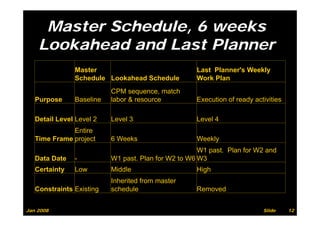
Master Schedule, 6 weeks
    Lookahead and Last Planner
               Master                               Last Planner's Weekly
               Schedule Lookahead Schedule          Work Plan
                          CPM sequence, match
   Purpose     Baseline   labor & resource          Execution of ready activities

   Detail Level Level 2   Level 3                   Level 4
              Entire
   Time Frame project     6 Weeks                   Weekly
                                                     W1 past. Plan for W2 and
   Data Date   -          W1 past. Plan for W2 to W6 W3
   Certainty   Low        Middle                    High
                          Inherited from master
   Constraints Existing   schedule                  Removed


Jan 2008                                                                  Slide     12
About P i
           Ab t Primavera Project
                          P j t
              Management P6


Jan 2008                            Slide   13
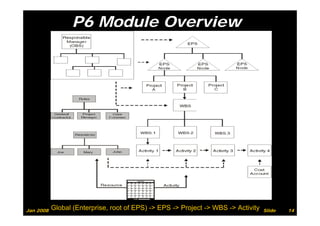
P6 Module Overview


Jan 2008   Global (Enterprise, root of EPS) -> EPS -> Project -> WBS -> Activity   Slide   14
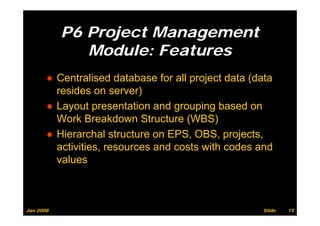
P6 Project Management
              Module: Features
       ● Centralised database for all project data (data
         resides on server)
            id              )
       ● Layout presentation and grouping based on
         Work Breakdown Structure (WBS)
       ● Hierarchal structure on EPS, OBS, projects,
                                      ,     ,p j     ,
         activities, resources and costs with codes and
         values


Jan 2008                                             Slide   15
Before Add a Project,
           Establish the Environment
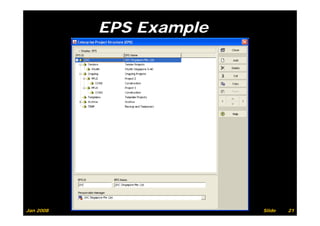
       ●   Enterprise Project Structure (EPS)
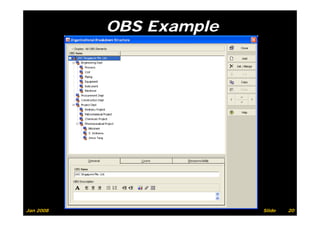
       ●   Organisation Breakdown Structure (OBS)
       ●   Global Calendars
       ●   Resource pool
       ●   Budget st uctu e
            udget structure
       ●   Coding structure like project code and activity
           code (for filtering, grouping and data analysis)
                (            g, g p g                 y )


Jan 2008                                                Slide   16
EPS and OBS
                        d

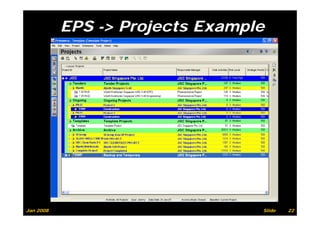
       ● Enterprise Project Structure (EPS)
         ▪ Company-wide hierarchical project
           breakdown Structure
       ● Organisation Breakdown Structure (OBS)
         ▪ Company-wide hierarchical responsible
           Company wide
           managers for the projects


Jan 2008                                           Slide   17
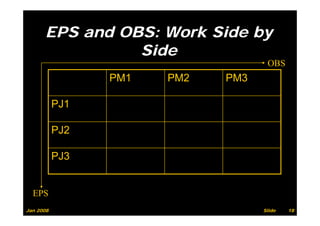
EPS and OBS: Work Side by
                Side
                                    OBS
                 PM1   PM2   PM3

           PJ1

           PJ2

           PJ3


  EPS
Jan 2008                           Slide   18
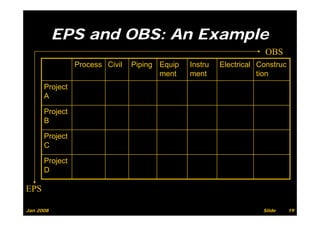
EPS and OBS: An Example
                                                                    OBS
                Process Ci il
                P       Civil   Piping E i
                                Pi i   Equip   Instru
                                               I        Electrical C
                                                        El    i l Construc
                                       ment    ment                tion
      Project
      A

      Project
      B

      Project
        oject
      C

      Project
         j
      D

EPS

Jan 2008                                                           Slide     19
OBS Example


Jan 2008                 Slide   20
EPS Example


Jan 2008                 Slide   21
EPS -> Projects Example


Jan 2008                         Slide   22
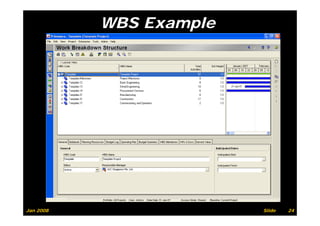
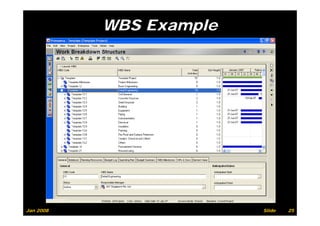
Work Breakdown Structure
                (WBS)
           ● Deliverable-oriented hierarchy
           ● Continuation from EPS with project the
                                  EPS,
             highest level, followed by strings of
             deliverables and decomposing to the bottom
             level of work package
           ● Company wide standard WBS template Vs
             Company-wide                             Vs.
             customised project-specific WBS
           ● Pl an essential role i P6 It can b
             Play            ti l l in P6.         be
             assigned OBS, resource, budget and tracked
             by
             b earned value f th progress
                       d l for the
Jan 2008                                               Slide   23
WBS Example


Jan 2008                 Slide   24
WBS Example


Jan 2008                 Slide   25
Calendars

           ●   Global
           ●   Project specific
           ●          p
               WBS specific
           ●   Resource specific


Jan 2008                           Slide   26
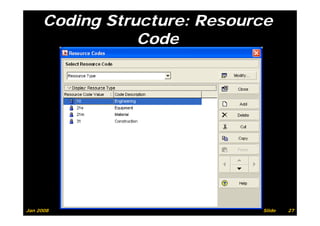
Coding Structure: Resource
                 Code


Jan 2008                      Slide   27
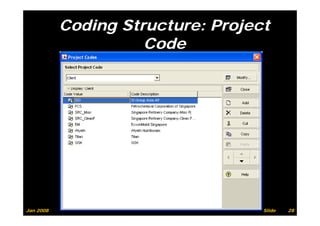
Coding Structure: Project
                     Code


Jan 2008                           Slide   28
Resource and Role
           ● Resource includes
             ▪ People
             ▪ Material
             ▪ Plant
           ● Role
             ▪ Required personnel skill and proficiency
                                                  f
               level -> Job title and function
           ●RResource calendar
                          l d
           ● Resource limit (availability) (MH / day)
           ● Resource cost ($ / MH)


Jan 2008                                                  Slide   29
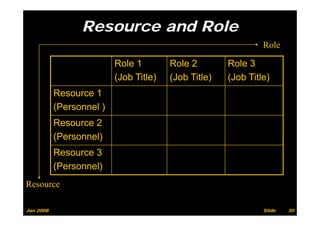
Resource and Role
                                                               Role

                          Role 1        Role 2        Role 3
                          (Job Title)   (Job Title)   (Job Title)
           Resource 1
           (Personnel )
           Resource 2
           (Personnel)
           Resource 3
           (Personnel)
Resource

Jan 2008                                                       Slide   30
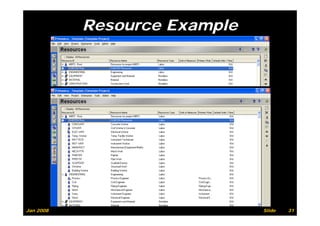
Resource Example


Jan 2008                      Slide   31
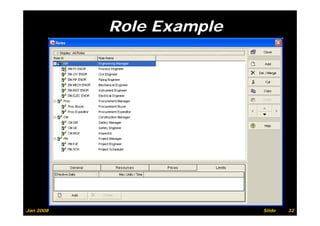
Role Example


Jan 2008                  Slide   32
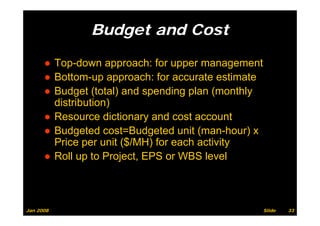
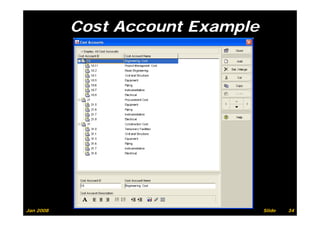
Budget and Cost
                  g

      ● Top down approach: for upper management
        Top-down
      ● Bottom-up approach: for accurate estimate
      ● B d t (total) and spending plan (
        Budget (t t l) d         di    l (monthly
                                               thl
        distribution)
      ●RResource di ti
                   dictionary and cost account
                                 d   t       t
      ● Budgeted cost=Budgeted unit (man-hour) x
        Price
        P i per unit ($/MH) f each activity
                      it       for   h ti it
      ● Roll up to Project, EPS or WBS level


Jan 2008                                             Slide   33
Cost Account Example


Jan 2008                          Slide   34
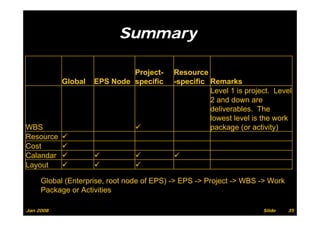
Summary

                             Project-      Resource
           Global   EPS Node specific      -specific Remarks
                                                     Level 1 is project. Level
                                                     2 and down are
                                                     deliverables. The
                                                     lowest level is the work
WBS                                                  package (or activity)
Resource
Cost
Calandar
Layout

     Global (Enterprise, root node of EPS) -> EPS -> Project -> WBS -> Work
     Package or Activities

Jan 2008                                                             Slide    35
P3 Vs. P6


Jan 2008               Slide   36
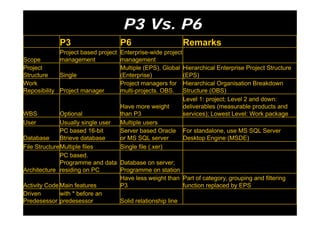
P3 Vs. P6
             P3                     P6                     Remarks
              Project based project Enterprise-wide project
Scope         management
                a age e             management
                                      a age e
Project                             Multiple (EPS), Global Hierarchical Enterprise Project Structure
Structure     Single                (Enterprise)            (EPS)
Work                                Project managers for Hierarchical Organisation Breakdown
Reposibility Project manager        multi-projects. OBS. Structure (OBS)
                                                            Level 1: project; Level 2 and down:
                                    Have more weight        deliverables (measurable products and
WBS           Optional              than P3                 services); Lowest Level: Work package
User          Usually single user   Multiple users
              PC based 16-bit       Server based Oracle For standalone, use MS SQL Server
Database      Btrieve database      or MS SQL server        Desktop Engine (MSDE)
File StructureMultiple files        Single file (.xer)
              PC based.
              Programme and data Database on server;
Architecture residing on PC         Programme on station
                                    Have less weight than Part of category, grouping and filtering
Activity Code Main features         P3                      function replaced by EPS
Driven        with * before an
Predesessor predesessor             Solid relationship line

P6 brief

  • 1.
    Planning and Sh d li Pl i d Scheduling Basics Jan 2008 Slide 1
  • 2.
    Define a Project ● A project is a set of activities and their associated information that constitutes a plan for creating a product or service. A project has a start date and finish date, WBS, resource assignments and expenses. It can also include risks, work documents and project-specific codes and calendars. Jan 2008 Slide 2
  • 3.
    Characteristics of aProject j ● 5 Aspects of a Project ▪ Schedule Resource Cost, Quality and Risk (HSE) Schedule, Resource, Cost ● For a Project Management Software, It covers ▪ Schedule: Timeline (core) ▪ Resource: Man, Material, Plant ▪ Cost: Money y ▪ Risk: Identify, classify and quantify ● Life Span of a Project ▪ Planning: establish baseline when project starts ▪ Controlling: monitoring, updating during project execution ti ▪ Managing: changes, variations and revision ▪ Closing Out: Administrative closure documentation closure, Jan 2008 Slide 3
  • 4.
    Define an Activity - In SMART Way ● Specific: scope of work to be clearly defined ● Measurable: able to measure progress (%), resource (MH) and cost ($) ● Achievable: realistic based on current p productivity y ● Resource Availability: make ready for man, material and plant ● Time-bound: have start and finish date Jan 2008 Slide 4
  • 5.
    Procedures to Setup a Project ● Add a project to EPS and assign one of OBS ● Set up project calendar, resource pool cost calendar pool, account, duration type, percent completion type – Project environment ● Set up project WBS ● Add a list of activities ● Determine activity’s duration based on volume of work, production rate and past work experience ● A i a WBS to activity Assign t ti it ● Link activities ● All Allocate resources t activity f t to ti it from resource pool l ● Allocate cost to activity ● S h d l project, review and establish b Schedule j t i d t bli h baseline li Jan 2008 Slide 5
  • 6.
    When a Projectis on the way… ● Record progress, manhour and cost and update plan ● Analyze and report project status using earned value method ● Revise baseline when there are substantial changes and the programme can not reflect the actual construction any more ● Manage changes ● Lean construction (last planner) application Jan 2008 Slide 6
  • 7.
    Performance Measurement with E ith Earned V l d Value Method : M th d 3 Parameters ● Planned Value PV (BCWS Budgeted Cost of (BCWS, Work Schedule): Budget x Schedule completion % ( of original duration, time p (% g , elapsed) ● Actual Cost AC (ACWP, Actual Cost of Work ( , Performed): Actual cost up to data date ● Earned Value EV (BCWP, Budgeted Cost of ( , g Work Performed): Budget x Actual completion % (PCT) Jan 2008 Slide 7
  • 8.
    Performance Measurement with Earned Value Method : Measurement Index M tI d ● Schedule Variance (SV): SV=EV-PV > 0, ahead of schedule as of statused date ● Cost Variance (CV): CV=EV-AC > 0, spending less than planned as of statused date Jan 2008 Slide 8
  • 9.
    Performance Measurement with Earned Value Method : An Example ● Suppose we plan to finish an activity by June 1 with a b d t of $10 000 (PV or BCWS) It i now ith budget f $10,000 BCWS). is June 1 (data date, or measurement date), and we have spend $9 000 (AC or ACWP) b t only 70% h d $9,000 ACWP), but l (PCT) of the work is complete (EV, or BCWP=$10,000 70% $7 000) We BCWP $10 000 x 70%=$7,000). W are not only t l behind schedule (SV=EV-PV=$7,000-$10,000= - $3,000), but $3 000) b t over b d t (CV EV AC $7 000 budget (CV=EV-AC=$7,000- $9,000= - $2,000. Jan 2008 Slide 9
  • 10.
    Manage Changes ● Record and control b d t changes R d d t l budget h ● Record and track issues ● Define and monitor thresholds ● Manage risks: identify, categorize and prioritize ● Catagorise and track activity-related work products (deliverables) and documents Jan 2008 Slide 10
  • 11.
    Lean Construction Concept p ● It is weekly execution plan ● Executed under trade-based production unit trade based ● What Jobs to Execute? ▪ Constraints removed, resource sufficient, material on hand, prerequisite work completed, working area available ● Production rate achievable ● Who is the last planner? ▪ Design team leader; Production unit head; Area superintendent; Crew foreman ● Job Assignment ▪ No overloading. Prefer slightly under-loading to ensure smooth work flow from production unit to production unit unit. ● What if the plan fail? ▪ Find out root reasons. Go alternative work from the backlog (backlog: incomplete make-ready works from previous period) Jan 2008 Slide 11
  • 12.
    Master Schedule, 6weeks Lookahead and Last Planner Master Last Planner's Weekly Schedule Lookahead Schedule Work Plan CPM sequence, match Purpose Baseline labor & resource Execution of ready activities Detail Level Level 2 Level 3 Level 4 Entire Time Frame project 6 Weeks Weekly W1 past. Plan for W2 and Data Date - W1 past. Plan for W2 to W6 W3 Certainty Low Middle High Inherited from master Constraints Existing schedule Removed Jan 2008 Slide 12
  • 13.
    About P i Ab t Primavera Project P j t Management P6 Jan 2008 Slide 13
  • 14.
    P6 Module Overview Jan2008 Global (Enterprise, root of EPS) -> EPS -> Project -> WBS -> Activity Slide 14
  • 15.
    P6 Project Management Module: Features ● Centralised database for all project data (data resides on server) id ) ● Layout presentation and grouping based on Work Breakdown Structure (WBS) ● Hierarchal structure on EPS, OBS, projects, , ,p j , activities, resources and costs with codes and values Jan 2008 Slide 15
  • 16.
    Before Add aProject, Establish the Environment ● Enterprise Project Structure (EPS) ● Organisation Breakdown Structure (OBS) ● Global Calendars ● Resource pool ● Budget st uctu e udget structure ● Coding structure like project code and activity code (for filtering, grouping and data analysis) ( g, g p g y ) Jan 2008 Slide 16
  • 17.
    EPS and OBS d ● Enterprise Project Structure (EPS) ▪ Company-wide hierarchical project breakdown Structure ● Organisation Breakdown Structure (OBS) ▪ Company-wide hierarchical responsible Company wide managers for the projects Jan 2008 Slide 17
  • 18.
    EPS and OBS:Work Side by Side OBS PM1 PM2 PM3 PJ1 PJ2 PJ3 EPS Jan 2008 Slide 18
  • 19.
    EPS and OBS:An Example OBS Process Ci il P Civil Piping E i Pi i Equip Instru I Electrical C El i l Construc ment ment tion Project A Project B Project oject C Project j D EPS Jan 2008 Slide 19
  • 20.
  • 21.
  • 22.
    EPS -> ProjectsExample Jan 2008 Slide 22
  • 23.
    Work Breakdown Structure (WBS) ● Deliverable-oriented hierarchy ● Continuation from EPS with project the EPS, highest level, followed by strings of deliverables and decomposing to the bottom level of work package ● Company wide standard WBS template Vs Company-wide Vs. customised project-specific WBS ● Pl an essential role i P6 It can b Play ti l l in P6. be assigned OBS, resource, budget and tracked by b earned value f th progress d l for the Jan 2008 Slide 23
  • 24.
  • 25.
  • 26.
    Calendars ● Global ● Project specific ● p WBS specific ● Resource specific Jan 2008 Slide 26
  • 27.
    Coding Structure: Resource Code Jan 2008 Slide 27
  • 28.
    Coding Structure: Project Code Jan 2008 Slide 28
  • 29.
    Resource and Role ● Resource includes ▪ People ▪ Material ▪ Plant ● Role ▪ Required personnel skill and proficiency f level -> Job title and function ●RResource calendar l d ● Resource limit (availability) (MH / day) ● Resource cost ($ / MH) Jan 2008 Slide 29
  • 30.
    Resource and Role Role Role 1 Role 2 Role 3 (Job Title) (Job Title) (Job Title) Resource 1 (Personnel ) Resource 2 (Personnel) Resource 3 (Personnel) Resource Jan 2008 Slide 30
  • 31.
  • 32.
  • 33.
    Budget and Cost g ● Top down approach: for upper management Top-down ● Bottom-up approach: for accurate estimate ● B d t (total) and spending plan ( Budget (t t l) d di l (monthly thl distribution) ●RResource di ti dictionary and cost account d t t ● Budgeted cost=Budgeted unit (man-hour) x Price P i per unit ($/MH) f each activity it for h ti it ● Roll up to Project, EPS or WBS level Jan 2008 Slide 33
  • 34.
  • 35.
    Summary Project- Resource Global EPS Node specific -specific Remarks Level 1 is project. Level 2 and down are deliverables. The lowest level is the work WBS package (or activity) Resource Cost Calandar Layout Global (Enterprise, root node of EPS) -> EPS -> Project -> WBS -> Work Package or Activities Jan 2008 Slide 35
  • 36.
    P3 Vs. P6 Jan2008 Slide 36
  • 37.
    P3 Vs. P6 P3 P6 Remarks Project based project Enterprise-wide project Scope management a age e management a age e Project Multiple (EPS), Global Hierarchical Enterprise Project Structure Structure Single (Enterprise) (EPS) Work Project managers for Hierarchical Organisation Breakdown Reposibility Project manager multi-projects. OBS. Structure (OBS) Level 1: project; Level 2 and down: Have more weight deliverables (measurable products and WBS Optional than P3 services); Lowest Level: Work package User Usually single user Multiple users PC based 16-bit Server based Oracle For standalone, use MS SQL Server Database Btrieve database or MS SQL server Desktop Engine (MSDE) File StructureMultiple files Single file (.xer) PC based. Programme and data Database on server; Architecture residing on PC Programme on station Have less weight than Part of category, grouping and filtering Activity Code Main features P3 function replaced by EPS Driven with * before an Predesessor predesessor Solid relationship line