
Pascual Pérez-Paredes
María Sánchez Tornel
Universidad de Murcia, Spain
CorpusCALL: Using pedagogic corpora in ELT
EUROCALL 2013 - University of Évora, Portugal
20 years of EUROCALL:
Learning from the Past, Looking to the Future
Using pedagogic corpora in ELT
EuroCALL Conference, 2013
1. The potential of language corpora in ELT
2. Introducing pedagogic corpora
3. Annotating pedagogy
4. Functions of the pedagogic search tool in SACODEYL & BACKBONE
5. Using the search tool for language learning: Integrating activities in
ELT (Secondary Ed. & CLIL)
6. An overview of the tools to create your own corpora (corpus
compilation, annotation and pedagogical enrichment)
7. Questions and feedback
1. The potential of language corpora in ELT
Using pedagogic corpora in ELT
EuroCALL Conference, 2013
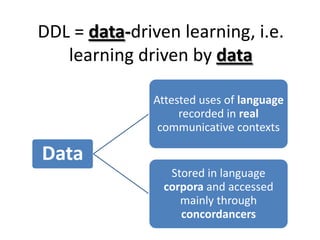
DDL = data-driven learning, i.e.
learning driven by data
Data
Attested uses of language
recorded in real
communicative contexts
Stored in language
corpora and accessed
mainly through
concordancers
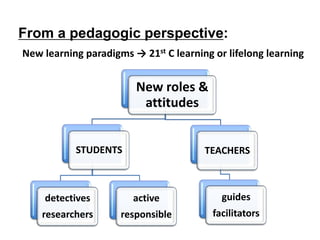
From a pedagogic perspective:
New learning paradigms → 21st C learning or lifelong learning
New roles &
attitudes
STUDENTS
detectives
researchers
active
responsible
TEACHERS
guides
facilitators
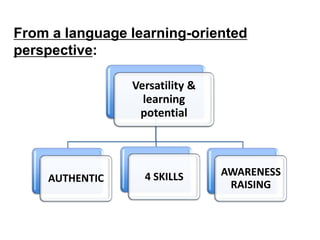
From a language learning-oriented
perspective:
Versatility &
learning
potential
AUTHENTIC 4 SKILLS AWARENESS
RAISING
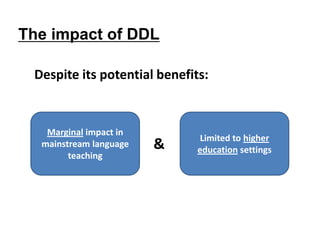
The impact of DDL
Despite its potential benefits:
&
Marginal impact in
mainstream language
teaching
Limited to higher
education settings
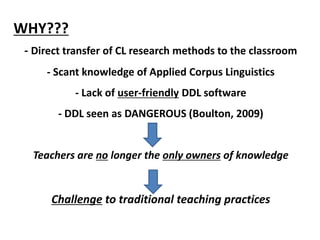
WHY???
- Direct transfer of CL research methods to the classroom
- Scant knowledge of Applied Corpus Linguistics
- Lack of user-friendly DDL software
- DDL seen as DANGEROUS (Boulton, 2009)
Teachers are no longer the only owners of knowledge
Challenge to traditional teaching practices
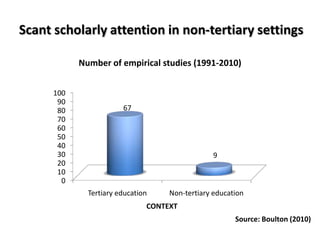
0
10
20
30
40
50
60
70
80
90
100
Tertiary education Non-tertiary education
67
9
CONTEXT
Number of empirical studies (1991-2010)
Source: Boulton (2010)
Scant scholarly attention in non-tertiary settings
CAUTION!
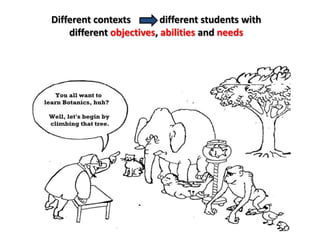
Different contexts different students with
different objectives, abilities and needs
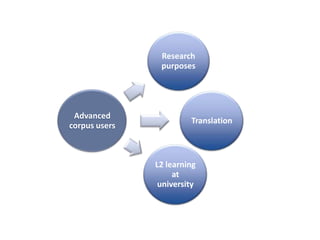
Advanced
corpus users
Research
purposes
Translation
L2 learning
at
university
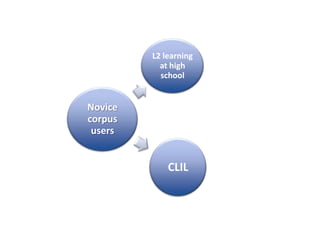
Novice
corpus
users
L2 learning
at high
school
CLIL
2. Introducing pedagogic corpora
Using pedagogic corpora in ELT
EuroCALL Conference, 2013
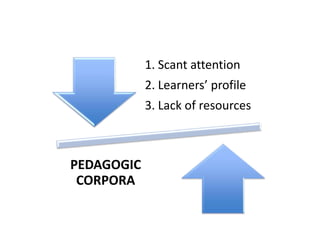
1. Scant attention
2. Learners’ profile
3. Lack of resources
PEDAGOGIC
CORPORA
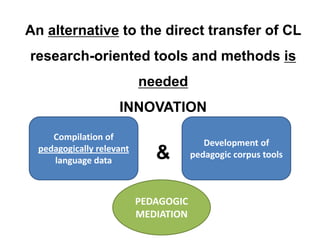
An alternative to the direct transfer of CL
research-oriented tools and methods is
needed
INNOVATION
&
Compilation of
pedagogically relevant
language data
Development of
pedagogic corpus tools
PEDAGOGIC
MEDIATION
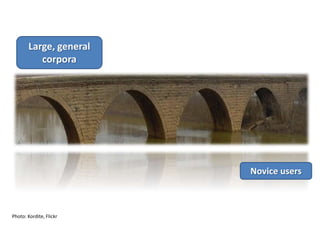
Why
pedagogic?
Photo: Kordite, Flickr
Homogeneous and systematic
Thematic relevance
Recontextualisation  Authentication
Easy to use query tools and search options
Braun (2006)
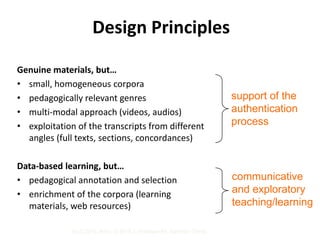
Design Principles
Genuine materials, but…
• small, homogeneous corpora
• pedagogically relevant genres
• multi-modal approach (videos, audios)
• exploitation of the transcripts from different
angles (full texts, sections, concordances)
Data-based learning, but…
• pedagogical annotation and selection
• enrichment of the corpora (learning
materials, web resources)
support of the
authentication
process
communicative
and exploratory
teaching/learning
TaLC 2010, Brno, © 2010 J. Widmann/M. Sánchez-Tornel
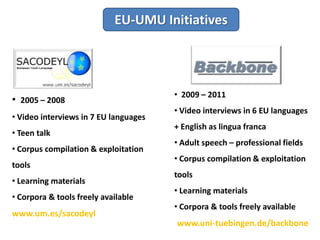
EU-UMU Initiatives
• 2005 – 2008
• Video interviews in 7 EU languages
• Teen talk
• Corpus compilation & exploitation
tools
• Learning materials
• Corpora & tools freely available
www.um.es/sacodeyl
• 2009 – 2011
• Video interviews in 6 EU languages
+ English as lingua franca
• Adult speech – professional fields
• Corpus compilation & exploitation
tools
• Learning materials
• Corpora & tools freely available
www.uni-tuebingen.de/backbone
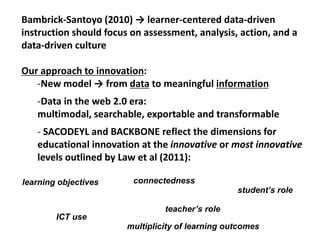
Bambrick-Santoyo (2010) → learner-centered data-driven
instruction should focus on assessment, analysis, action, and a
data-driven culture
Our approach to innovation:
-New model → from data to meaningful information
-Data in the web 2.0 era:
multimodal, searchable, exportable and transformable
- SACODEYL and BACKBONE reflect the dimensions for
educational innovation at the innovative or most innovative
levels outlined by Law et al (2011):
learning objectives
student’s role
teacher’s role
ICT use
connectedness
multiplicity of learning outcomes
3. Annotating pedagogy
Using pedagogic corpora in ELT
EuroCALL Conference, 2013
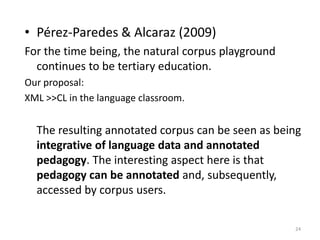
• Pérez-Paredes & Alcaraz (2009)
For the time being, the natural corpus playground
continues to be tertiary education.
Our proposal:
XML >>CL in the language classroom.
The resulting annotated corpus can be seen as being
integrative of language data and annotated
pedagogy. The interesting aspect here is that
pedagogy can be annotated and, subsequently,
accessed by corpus users.
24
25
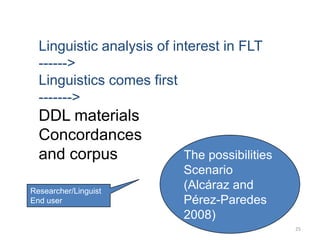
Linguistic analysis of interest in FLT
------>
Linguistics comes first
------->
DDL materials
Concordances
and corpus
Researcher/Linguist
End user
The possibilities
Scenario
(Alcáraz and
Pérez-Paredes
2008)
26
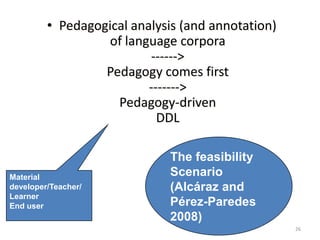
• Pedagogical analysis (and annotation)
of language corpora
------>
Pedagogy comes first
------->
Pedagogy-driven
DDL
Material
developer/Teacher/
Learner
End user
The feasibility
Scenario
(Alcáraz and
Pérez-Paredes
2008)
27
It is certainly possible to use language corpora and CL
methodology in the language classroom.
This possibilities scenario (Alcaraz and Pérez-Paredes, 2008)
takes the research tools and methodology of the CL research
paradigm straightaway to the language classroom. In other
words, in the specific contexts of the language learning it
seemed appropriate to do so. However, other considerations
affecting pedagogic issues were simply neglected. The
methodological transfer from the CL research area to the
applied ring of language learning and teacher underwent no
adaptation, and thus learners were presented with the same
tools, corpora and analytical tasks as well-trained and
professional linguists.
Pérez-Paredes, P. (2010). Corpus Linguistics and Language Education
in Perspective: Appropriation and the Possibilities Scenario. In T. Harris
& M. Moreno Jaén (Eds.), Corpus Linguistics in Language Teaching (pp.
53-73). Peter Lang.
29
• What is BACKBONE/ SACODEYL Annotator?
• How can I install BACKBONE/ SACODEYL
Annotator?
• Overview
– Corpus Management
– Category Management
– Annotation Management
– Metadata Management
30
What is SACODEYL Annotator?
• SACODEYL Annotator …
• Is a free and open source tool for annotating texts
• Has been developed from the pedagogical perspective
(not morpho-sintactic tagging oriented)
• Offers support for pedagogical annotation in texts
• Supports the customization of the annotated tags
according to the necessities of the teacher.
31
Annotation Aim
• Why are you annotating?
• What is the purpose of your annotation?
• What use are you giving to your annotation?
We assume you are annotating a text for your
own students’ language learning
purposes
32
What is the output of SACODEYL Annotator?
• A corpus stored in XML TEI format that
contains:
– Texts (one text in our case)
– Annotations over the text
– The category tree (shared by all the texts)
– Resources linked to the texts
– Metadata associated to texts
33
What is XML TEI format?
– TEI  Text Encoding Initiative
– This is a format for storing corpora
– Has been promoted by OTA
(Oxford Text Archive)
– Is a continuously growing format (more than 50
versions released yet, currently TEI P5)
– Is rapidly spreading among the available tools
34
TEI Tools (Research)
• TeiPublisher
“This tool is a XML-based repository that
allows the publication of TEI corpora to the
public community and offers a search tool.”
• Dexter
“This is other annotator tool that used TEI as
the format for the annotated files.”
35
TEI Tools (Research)
• Oxygen XML Editor and XMLSpy
“These are XML Editors that allows the modification
of the TEI files without any limitation”
(These are complex for non-advanced users)
36
TEI Tools (Research)
• TAPoR (http://portal.tapor.ca/)
“The Text Analysis Portal for Research
(TAPoR) is a gateway to tools for sophisticated
analysis and retrieval, along with representative
texts for experimentation.”
37
TEI Tools (Research)
• WordHoard http://wordhoard.northwestern.edu/userman/index.html
“Is a tool for annotating or tagging texts by
morphological, lexical, prosodic, and narratological
criteria and for determining frequency information”
38
TEI Tools (Research)
• XAIRA
XAIRA (XML Aware Information Retrieval
Architecture) is an open source tool for
constructing high-quality linguistically-
motivated search interfaces to large
collections of XML documents.
39
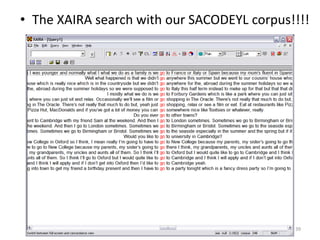
• The XAIRA search with our SACODEYL corpus!!!!
40
Discussion and debate
• Pedagogical annotation vs. Morphological
tagging paradigm
• Learner-centered vs. Researcher-oriented
• Indirect applications of language corpora vs.
Direct applications
• Constraints of traditional CL in the language
classroom
41
Discussion and debate
• Cognitive demands of traditional CL in the language
classroom: learner as a reseacher and as a traveller
• Is CL an extra hassle in language classrooms?
(Mauranen 2004)
• Customization of language corpus/collection of texts
• Mediation role of corpus-based resources in the FLT
classroom
• Authenticity issues (Widdowson)
4. Functions of the pedagogic search tool in
SACODEYL & BACKBONE
Using pedagogic corpora in ELT
EuroCALL Conference, 2013
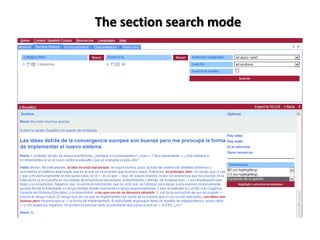
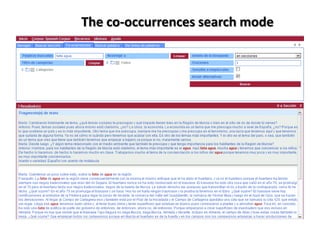
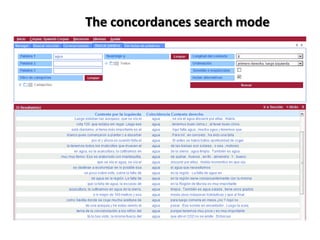
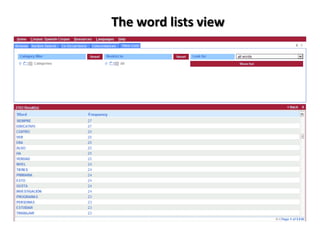
The main learning space
Access to corpora + learning materials
Four search modes:
- Browse
- Section search
- Concordances
-Co-occurrences
Wordlists
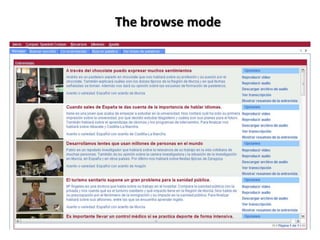
The browse mode
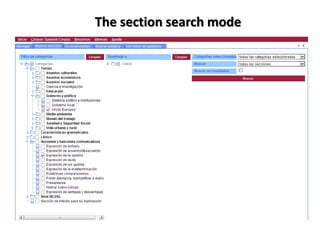
The section search mode
The co-occurrences search mode
The concordances search mode
The word lists view
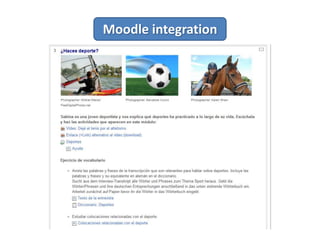
Moodle integration
5. Using the search tool for language learning:
Integrating activities in ELT (Secondary Ed. &
CLIL)
Using pedagogic corpora in ELT
EuroCALL Conference, 2013
-Learning packages
http://sacodeyl.inf.um.es/sacodeyl-
search2/faces/corpora/resources/EnglishCorpus_packages.html
-Exploratory activities
http://sacodeyl.inf.um.es/sacodeyl-
search2/faces/corpora/resources/EnglishCorpus_exploratory.html
6. An overview of the tools to create your own
corpora (corpus compilation, annotation and
pedagogical enrichment)
Using pedagogic corpora in ELT
EuroCALL Conference, 2013
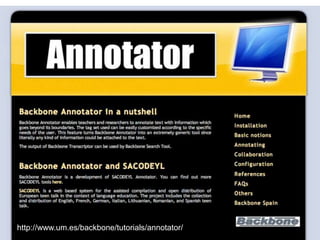
http://www.um.es/backbone/tutorials/annotator/
55
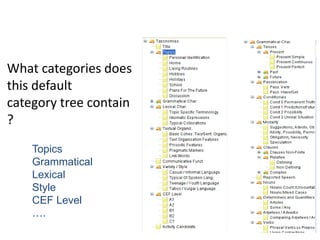
What categories does
this default
category tree contain
?
Topics
Grammatical
Lexical
Style
CEF Level
….
56
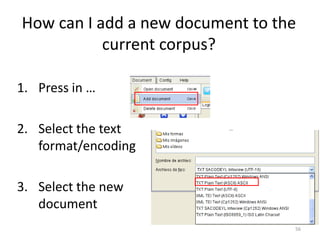
How can I add a new document to the
current corpus?
1. Press in …
2. Select the text
format/encoding
3. Select the new
document
57
What does the text format mean?
• This is the manner in which the text is laid out in
the file.
• Mainly 3 text formats are supported:
– Plain text (written) .txt
– Oral text in SACODEYL Transcriptor format
– XML text in TEI standard format
(text in special XML files)
58
This is the form in which the text is stored
(related to the Multilanguage).
(In Windows ANSI by default)
What does the text encoding mean?
59
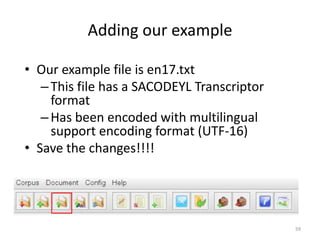
Adding our example
• Our example file is en17.txt
–This file has a SACODEYL Transcriptor
format
–Has been encoded with multilingual
support encoding format (UTF-16)
• Save the changes!!!!
60
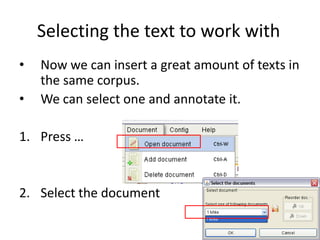
Selecting the text to work with
• Now we can insert a great amount of texts in
the same corpus.
• We can select one and annotate it.
1. Press …
2. Select the document
61
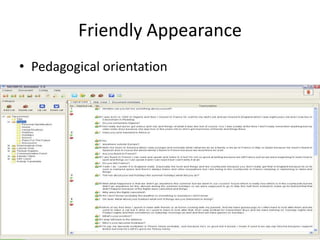
Friendly Appearance
• Pedagogical orientation
62
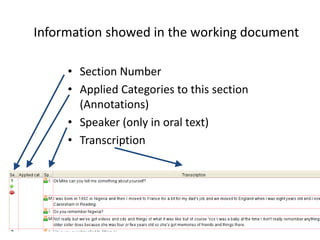
Information showed in the working document
• Section Number
• Applied Categories to this section
(Annotations)
• Speaker (only in oral text)
• Transcription
63
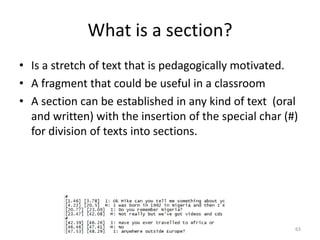
What is a section?
• Is a stretch of text that is pedagogically motivated.
• A fragment that could be useful in a classroom
• A section can be established in any kind of text (oral
and written) with the insertion of the special char (#)
for division of texts into sections.
64
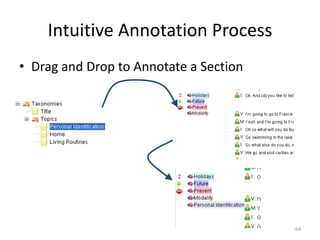
Intuitive Annotation Process
• Drag and Drop to Annotate a Section
65
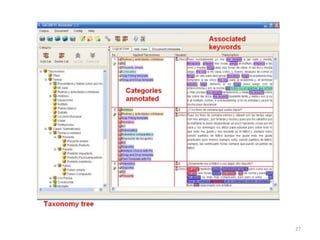
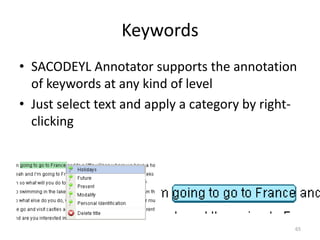
Keywords
• SACODEYL Annotator supports the annotation
of keywords at any kind of level
• Just select text and apply a category by right-
clicking
66
What is a Keyword?
• “… [a] keyword is a stretch of language (a
word, more than one word or a whole
paragraph) that the annotator associates to a
category…”
Pérez-Paredes and Alcaraz, ReCALL, Jan. 2009
Vol 21. (1) (Forthcoming)
67
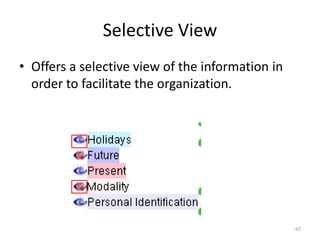
Selective View
• Offers a selective view of the information in
order to facilitate the organization.
68
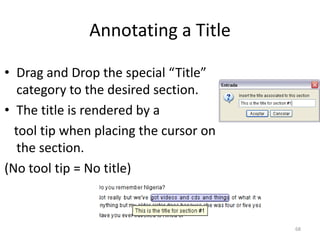
Annotating a Title
• Drag and Drop the special “Title”
category to the desired section.
• The title is rendered by a
tool tip when placing the cursor on
the section.
(No tool tip = No title)
69
Multilanguage
• Supports a real multilingual annotation
• May use texts in any language
70
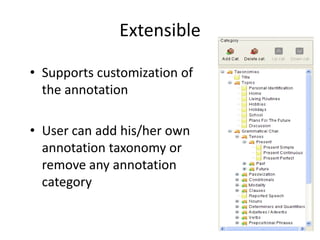
Extensible
• Supports customization of
the annotation
• User can add his/her own
annotation taxonomy or
remove any annotation
category
71
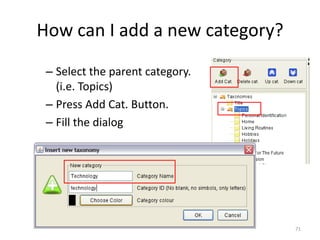
How can I add a new category?
– Select the parent category.
(i.e. Topics)
– Press Add Cat. Button.
– Fill the dialog
72
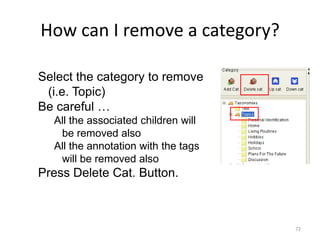
How can I remove a category?
Select the category to remove
(i.e. Topic)
Be careful …
All the associated children will
be removed also
All the annotation with the tags
will be removed also
Press Delete Cat. Button.
73
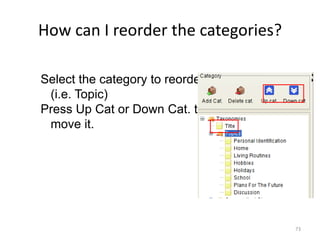
How can I reorder the categories?
Select the category to reorder
(i.e. Topic)
Press Up Cat or Down Cat. to
move it.
74
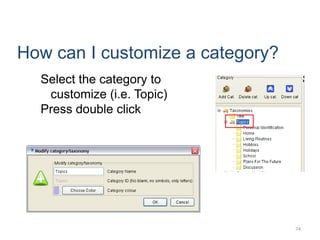
How can I customize a category?
Select the category to
customize (i.e. Topic)
Press double click
75
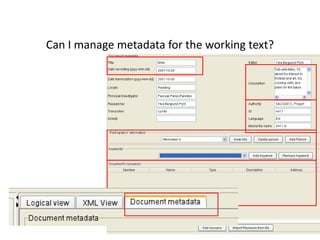
Can I manage metadata for the working text?
76
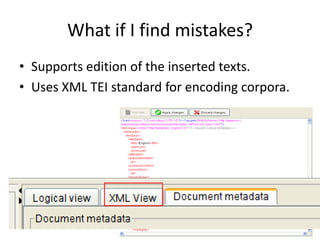
What if I find mistakes?
• Supports edition of the inserted texts.
• Uses XML TEI standard for encoding corpora.
77
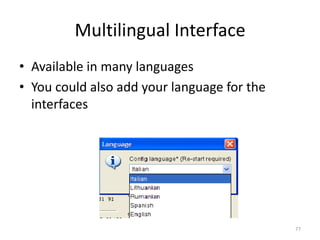
Multilingual Interface
• Available in many languages
• You could also add your language for the
interfaces
78
Integration
• SACODEYL Annotator has been integrated
with:
– SACODEYL Transcriptor
– SACODEYL Search
– SACODEYL VRP
79
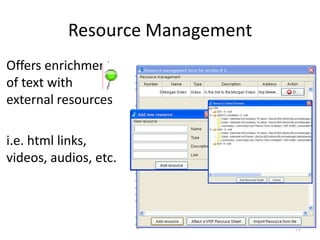
Resource Management
Offers enrichment
of text with
external resources
i.e. html links,
videos, audios, etc.
80
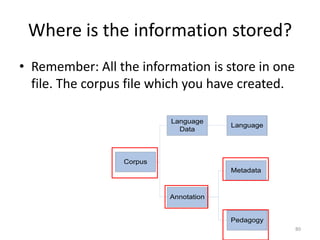
Where is the information stored?
• Remember: All the information is store in one
file. The corpus file which you have created.
Corpus
Language
Data
Annotation
Language
Metadata
Pedagogy
Pascual Pérez-Paredes pascualf@um.es
María Sánchez Tornel mariasst@um.es
Universidad de Murcia, Spain
CorpusCALL: Using pedagogic corpora in ELT
EUROCALL 2013 - University of Évora, Portugal
20 years of EUROCALL:
Learning from the Past, Looking to the Future

Using pedagogic corpora in ELT

  • 1.
    Pascual Pérez-Paredes María SánchezTornel Universidad de Murcia, Spain CorpusCALL: Using pedagogic corpora in ELT EUROCALL 2013 - University of Évora, Portugal 20 years of EUROCALL: Learning from the Past, Looking to the Future
  • 2.
    Using pedagogic corporain ELT EuroCALL Conference, 2013 1. The potential of language corpora in ELT 2. Introducing pedagogic corpora 3. Annotating pedagogy 4. Functions of the pedagogic search tool in SACODEYL & BACKBONE 5. Using the search tool for language learning: Integrating activities in ELT (Secondary Ed. & CLIL) 6. An overview of the tools to create your own corpora (corpus compilation, annotation and pedagogical enrichment) 7. Questions and feedback
  • 3.
    1. The potentialof language corpora in ELT Using pedagogic corpora in ELT EuroCALL Conference, 2013
  • 4.
    DDL = data-drivenlearning, i.e. learning driven by data Data Attested uses of language recorded in real communicative contexts Stored in language corpora and accessed mainly through concordancers
  • 5.
    From a pedagogicperspective: New learning paradigms → 21st C learning or lifelong learning New roles & attitudes STUDENTS detectives researchers active responsible TEACHERS guides facilitators
  • 6.
    From a languagelearning-oriented perspective: Versatility & learning potential AUTHENTIC 4 SKILLS AWARENESS RAISING
  • 7.
    The impact ofDDL Despite its potential benefits: & Marginal impact in mainstream language teaching Limited to higher education settings
  • 8.
    WHY??? - Direct transferof CL research methods to the classroom - Scant knowledge of Applied Corpus Linguistics - Lack of user-friendly DDL software - DDL seen as DANGEROUS (Boulton, 2009) Teachers are no longer the only owners of knowledge Challenge to traditional teaching practices
  • 9.
    0 10 20 30 40 50 60 70 80 90 100 Tertiary education Non-tertiaryeducation 67 9 CONTEXT Number of empirical studies (1991-2010) Source: Boulton (2010) Scant scholarly attention in non-tertiary settings
  • 10.
  • 11.
    Different contexts differentstudents with different objectives, abilities and needs
  • 12.
  • 13.
  • 14.
    2. Introducing pedagogiccorpora Using pedagogic corpora in ELT EuroCALL Conference, 2013
  • 15.
    1. Scant attention 2.Learners’ profile 3. Lack of resources PEDAGOGIC CORPORA
  • 16.
    An alternative tothe direct transfer of CL research-oriented tools and methods is needed INNOVATION & Compilation of pedagogically relevant language data Development of pedagogic corpus tools PEDAGOGIC MEDIATION
  • 17.
  • 18.
  • 19.
    Homogeneous and systematic Thematicrelevance Recontextualisation  Authentication Easy to use query tools and search options Braun (2006)
  • 20.
    Design Principles Genuine materials,but… • small, homogeneous corpora • pedagogically relevant genres • multi-modal approach (videos, audios) • exploitation of the transcripts from different angles (full texts, sections, concordances) Data-based learning, but… • pedagogical annotation and selection • enrichment of the corpora (learning materials, web resources) support of the authentication process communicative and exploratory teaching/learning TaLC 2010, Brno, © 2010 J. Widmann/M. Sánchez-Tornel
  • 21.
    EU-UMU Initiatives • 2005– 2008 • Video interviews in 7 EU languages • Teen talk • Corpus compilation & exploitation tools • Learning materials • Corpora & tools freely available www.um.es/sacodeyl • 2009 – 2011 • Video interviews in 6 EU languages + English as lingua franca • Adult speech – professional fields • Corpus compilation & exploitation tools • Learning materials • Corpora & tools freely available www.uni-tuebingen.de/backbone
  • 22.
    Bambrick-Santoyo (2010) →learner-centered data-driven instruction should focus on assessment, analysis, action, and a data-driven culture Our approach to innovation: -New model → from data to meaningful information -Data in the web 2.0 era: multimodal, searchable, exportable and transformable - SACODEYL and BACKBONE reflect the dimensions for educational innovation at the innovative or most innovative levels outlined by Law et al (2011): learning objectives student’s role teacher’s role ICT use connectedness multiplicity of learning outcomes
  • 23.
    3. Annotating pedagogy Usingpedagogic corpora in ELT EuroCALL Conference, 2013
  • 24.
    • Pérez-Paredes &Alcaraz (2009) For the time being, the natural corpus playground continues to be tertiary education. Our proposal: XML >>CL in the language classroom. The resulting annotated corpus can be seen as being integrative of language data and annotated pedagogy. The interesting aspect here is that pedagogy can be annotated and, subsequently, accessed by corpus users. 24
  • 25.
    25 Linguistic analysis ofinterest in FLT ------> Linguistics comes first -------> DDL materials Concordances and corpus Researcher/Linguist End user The possibilities Scenario (Alcáraz and Pérez-Paredes 2008)
  • 26.
    26 • Pedagogical analysis(and annotation) of language corpora ------> Pedagogy comes first -------> Pedagogy-driven DDL Material developer/Teacher/ Learner End user The feasibility Scenario (Alcáraz and Pérez-Paredes 2008)
  • 27.
  • 28.
    It is certainlypossible to use language corpora and CL methodology in the language classroom. This possibilities scenario (Alcaraz and Pérez-Paredes, 2008) takes the research tools and methodology of the CL research paradigm straightaway to the language classroom. In other words, in the specific contexts of the language learning it seemed appropriate to do so. However, other considerations affecting pedagogic issues were simply neglected. The methodological transfer from the CL research area to the applied ring of language learning and teacher underwent no adaptation, and thus learners were presented with the same tools, corpora and analytical tasks as well-trained and professional linguists. Pérez-Paredes, P. (2010). Corpus Linguistics and Language Education in Perspective: Appropriation and the Possibilities Scenario. In T. Harris & M. Moreno Jaén (Eds.), Corpus Linguistics in Language Teaching (pp. 53-73). Peter Lang.
  • 29.
    29 • What isBACKBONE/ SACODEYL Annotator? • How can I install BACKBONE/ SACODEYL Annotator? • Overview – Corpus Management – Category Management – Annotation Management – Metadata Management
  • 30.
    30 What is SACODEYLAnnotator? • SACODEYL Annotator … • Is a free and open source tool for annotating texts • Has been developed from the pedagogical perspective (not morpho-sintactic tagging oriented) • Offers support for pedagogical annotation in texts • Supports the customization of the annotated tags according to the necessities of the teacher.
  • 31.
    31 Annotation Aim • Whyare you annotating? • What is the purpose of your annotation? • What use are you giving to your annotation? We assume you are annotating a text for your own students’ language learning purposes
  • 32.
    32 What is theoutput of SACODEYL Annotator? • A corpus stored in XML TEI format that contains: – Texts (one text in our case) – Annotations over the text – The category tree (shared by all the texts) – Resources linked to the texts – Metadata associated to texts
  • 33.
    33 What is XMLTEI format? – TEI  Text Encoding Initiative – This is a format for storing corpora – Has been promoted by OTA (Oxford Text Archive) – Is a continuously growing format (more than 50 versions released yet, currently TEI P5) – Is rapidly spreading among the available tools
  • 34.
    34 TEI Tools (Research) •TeiPublisher “This tool is a XML-based repository that allows the publication of TEI corpora to the public community and offers a search tool.” • Dexter “This is other annotator tool that used TEI as the format for the annotated files.”
  • 35.
    35 TEI Tools (Research) •Oxygen XML Editor and XMLSpy “These are XML Editors that allows the modification of the TEI files without any limitation” (These are complex for non-advanced users)
  • 36.
    36 TEI Tools (Research) •TAPoR (http://portal.tapor.ca/) “The Text Analysis Portal for Research (TAPoR) is a gateway to tools for sophisticated analysis and retrieval, along with representative texts for experimentation.”
  • 37.
    37 TEI Tools (Research) •WordHoard http://wordhoard.northwestern.edu/userman/index.html “Is a tool for annotating or tagging texts by morphological, lexical, prosodic, and narratological criteria and for determining frequency information”
  • 38.
    38 TEI Tools (Research) •XAIRA XAIRA (XML Aware Information Retrieval Architecture) is an open source tool for constructing high-quality linguistically- motivated search interfaces to large collections of XML documents.
  • 39.
    39 • The XAIRAsearch with our SACODEYL corpus!!!!
  • 40.
    40 Discussion and debate •Pedagogical annotation vs. Morphological tagging paradigm • Learner-centered vs. Researcher-oriented • Indirect applications of language corpora vs. Direct applications • Constraints of traditional CL in the language classroom
  • 41.
    41 Discussion and debate •Cognitive demands of traditional CL in the language classroom: learner as a reseacher and as a traveller • Is CL an extra hassle in language classrooms? (Mauranen 2004) • Customization of language corpus/collection of texts • Mediation role of corpus-based resources in the FLT classroom • Authenticity issues (Widdowson)
  • 42.
    4. Functions ofthe pedagogic search tool in SACODEYL & BACKBONE Using pedagogic corpora in ELT EuroCALL Conference, 2013
  • 43.
    The main learningspace Access to corpora + learning materials Four search modes: - Browse - Section search - Concordances -Co-occurrences Wordlists
  • 44.
  • 45.
  • 46.
  • 47.
  • 48.
  • 49.
  • 50.
  • 51.
    5. Using thesearch tool for language learning: Integrating activities in ELT (Secondary Ed. & CLIL) Using pedagogic corpora in ELT EuroCALL Conference, 2013
  • 52.
  • 53.
    6. An overviewof the tools to create your own corpora (corpus compilation, annotation and pedagogical enrichment) Using pedagogic corpora in ELT EuroCALL Conference, 2013
  • 54.
  • 55.
    55 What categories does thisdefault category tree contain ? Topics Grammatical Lexical Style CEF Level ….
  • 56.
    56 How can Iadd a new document to the current corpus? 1. Press in … 2. Select the text format/encoding 3. Select the new document
  • 57.
    57 What does thetext format mean? • This is the manner in which the text is laid out in the file. • Mainly 3 text formats are supported: – Plain text (written) .txt – Oral text in SACODEYL Transcriptor format – XML text in TEI standard format (text in special XML files)
  • 58.
    58 This is theform in which the text is stored (related to the Multilanguage). (In Windows ANSI by default) What does the text encoding mean?
  • 59.
    59 Adding our example •Our example file is en17.txt –This file has a SACODEYL Transcriptor format –Has been encoded with multilingual support encoding format (UTF-16) • Save the changes!!!!
  • 60.
    60 Selecting the textto work with • Now we can insert a great amount of texts in the same corpus. • We can select one and annotate it. 1. Press … 2. Select the document
  • 61.
  • 62.
    62 Information showed inthe working document • Section Number • Applied Categories to this section (Annotations) • Speaker (only in oral text) • Transcription
  • 63.
    63 What is asection? • Is a stretch of text that is pedagogically motivated. • A fragment that could be useful in a classroom • A section can be established in any kind of text (oral and written) with the insertion of the special char (#) for division of texts into sections.
  • 64.
    64 Intuitive Annotation Process •Drag and Drop to Annotate a Section
  • 65.
    65 Keywords • SACODEYL Annotatorsupports the annotation of keywords at any kind of level • Just select text and apply a category by right- clicking
  • 66.
    66 What is aKeyword? • “… [a] keyword is a stretch of language (a word, more than one word or a whole paragraph) that the annotator associates to a category…” Pérez-Paredes and Alcaraz, ReCALL, Jan. 2009 Vol 21. (1) (Forthcoming)
  • 67.
    67 Selective View • Offersa selective view of the information in order to facilitate the organization.
  • 68.
    68 Annotating a Title •Drag and Drop the special “Title” category to the desired section. • The title is rendered by a tool tip when placing the cursor on the section. (No tool tip = No title)
  • 69.
    69 Multilanguage • Supports areal multilingual annotation • May use texts in any language
  • 70.
    70 Extensible • Supports customizationof the annotation • User can add his/her own annotation taxonomy or remove any annotation category
  • 71.
    71 How can Iadd a new category? – Select the parent category. (i.e. Topics) – Press Add Cat. Button. – Fill the dialog
  • 72.
    72 How can Iremove a category? Select the category to remove (i.e. Topic) Be careful … All the associated children will be removed also All the annotation with the tags will be removed also Press Delete Cat. Button.
  • 73.
    73 How can Ireorder the categories? Select the category to reorder (i.e. Topic) Press Up Cat or Down Cat. to move it.
  • 74.
    74 How can Icustomize a category? Select the category to customize (i.e. Topic) Press double click
  • 75.
    75 Can I managemetadata for the working text?
  • 76.
    76 What if Ifind mistakes? • Supports edition of the inserted texts. • Uses XML TEI standard for encoding corpora.
  • 77.
    77 Multilingual Interface • Availablein many languages • You could also add your language for the interfaces
  • 78.
    78 Integration • SACODEYL Annotatorhas been integrated with: – SACODEYL Transcriptor – SACODEYL Search – SACODEYL VRP
  • 79.
    79 Resource Management Offers enrichment oftext with external resources i.e. html links, videos, audios, etc.
  • 80.
    80 Where is theinformation stored? • Remember: All the information is store in one file. The corpus file which you have created. Corpus Language Data Annotation Language Metadata Pedagogy
  • 81.
    Pascual Pérez-Paredes pascualf@um.es MaríaSánchez Tornel mariasst@um.es Universidad de Murcia, Spain CorpusCALL: Using pedagogic corpora in ELT EUROCALL 2013 - University of Évora, Portugal 20 years of EUROCALL: Learning from the Past, Looking to the Future