Sub topic   : Web Browser Architecture


                                         1
Objectives

 After completion of this period you would be able
 to understand about

    • Reference web browser

    • Reference web browser architecture

    • Various elements

    • Different browsers and their architectures

                                                     2
Web Browser Architecture

• The architecture of different browsers are different

• But they are similar in some respects

• Therefore a generic or reference architecture is
  explained here, followed by specific architectures
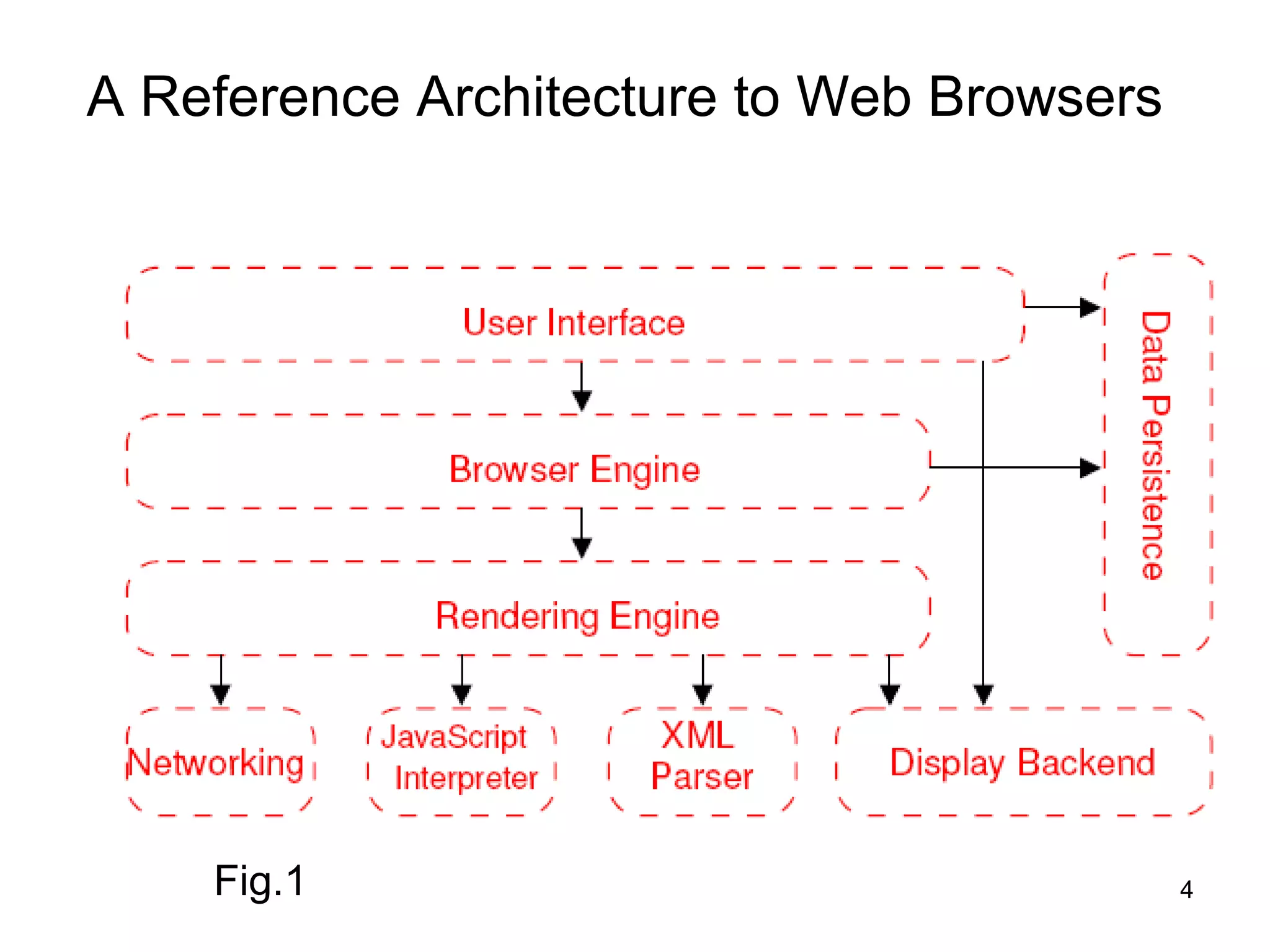
A Reference Architecture to Web Browsers


    Fig.1                                  4
A Reference Architecture to Web Browsers
•     The reference architecture shown in the Figure 1
      comprises eight major subsystems. They are
      explained as follows
•     User Interface
     – The User Interface subsystem is the layer between
        the user and the Browser Engine
     – It provides features such as toolbars, visual page-
        load progress, smart download handling,
        preferences, and printing
     – It may be integrated with the desktop environment
        to provide browser session management or
        communication with other desktop applications
The Reference Architecture
•   Browser Engine
    –   It is an embeddable component that provides a
        high-level interface to the Rendering Engine
    –   It loads a given URI and supports primitive
        browsing actions such as forward, back, and reload
    –   It provides hooks for viewing various aspects of the
        browsing session such as current page load
        progress and JavaScript alerts
    –   It also allows the querying and manipulation of
        Rendering Engine settings
The Reference Architecture contd…
•     Rendering Engine
     – The Rendering Engine subsystem produces a visual
        representation for a given URI
     – It is capable of displaying HTML and Extensible
        Markup Language (XML) documents, optionally
        styled with CSS, as well as embedded content such
        as images
     – It calculates the exact page layout and may use
        “reflow” algorithms to incrementally adjust the
        position of elements on the page
     – This subsystem also includes the HTML parser
The Reference Architecture contd…

•    Networking subsystem

–    The Networking subsystem implements file transfer
     protocols such as HTTP and FTP

–    It translates between different character sets, and
     resolves MIME media types for files

–    It may implement a cache of recently retrieved
     resources
The Reference Architecture contd…
•    JavaScript Interpreter

–    The JavaScript Interpreter evaluates JavaScript (also
     known as ECMAScript) code, which may be
     embedded in web pages

–    JavaScript is an object-oriented scripting language
     developed by Netscape

–     Certain Java- Script functionality, such as the opening
     of pop-up windows, may be disabled by the Browser
     Engine or Rendering Engine for security purposes
The Reference Architecture contd…
• XML Parser

– The XML Parser subsystem parses XML documents into
  a Document Object Model (DOM) tree

– This is one of the most reusable subsystems in the
  architecture

– In fact, almost all browser implementations leverage an
  existing XML Parser rather than creating their own from
  scratch
The Reference Architecture contd…
• Display Backend subsystem

– The Display Backend subsystem provides drawing and
  windowing primitives, a set of user interface widgets, and
  a set of fonts

– It may be tied closely with the operating system
The Reference Architecture contd…
• Data Persistence subsystem

– The Data Persistence subsystem stores various data
  associated with the browsing session on disk

– This may be high-level data such as bookmarks or toolbar
  settings, or it may be low-level data such as cookies,
  security certificates, or cache
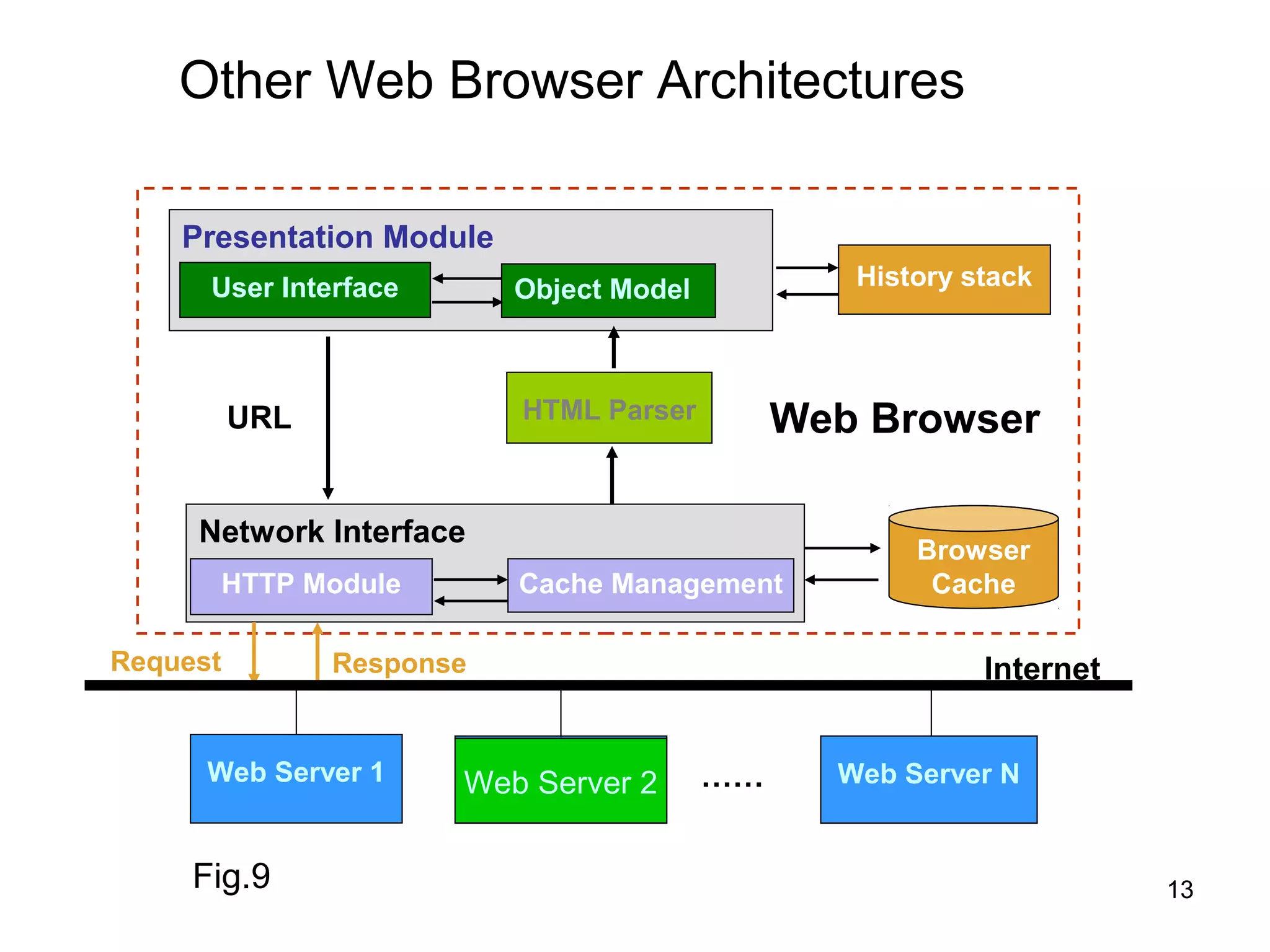
Other Web Browser Architectures

    Presentation Module
      User Interface       Object Model           History stack


          URL              HTML Parser         Web Browser

     Network Interface
                                                      Browser
          HTTP Module      Cache Management            Cache

Request         Response                                   Internet


      Web Server 1      Web Server 2
                        Web Server 2      ……     Web Server N


     Fig.9                                                            13
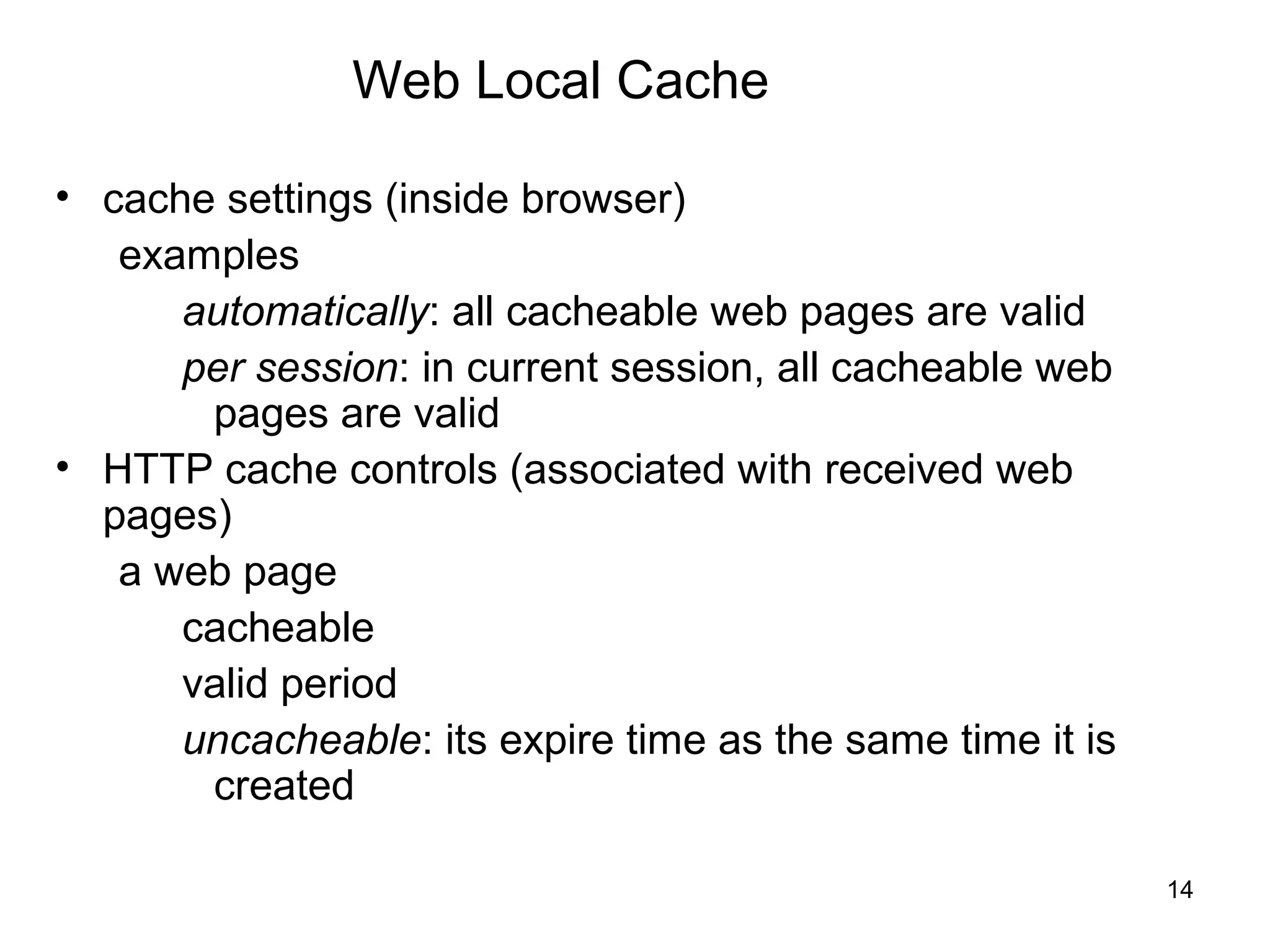
Web Local Cache

• cache settings (inside browser)
   examples
      automatically: all cacheable web pages are valid
      per session: in current session, all cacheable web
       pages are valid
• HTTP cache controls (associated with received web
  pages)
   a web page
      cacheable
      valid period
      uncacheable: its expire time as the same time it is
       created

                                                            14
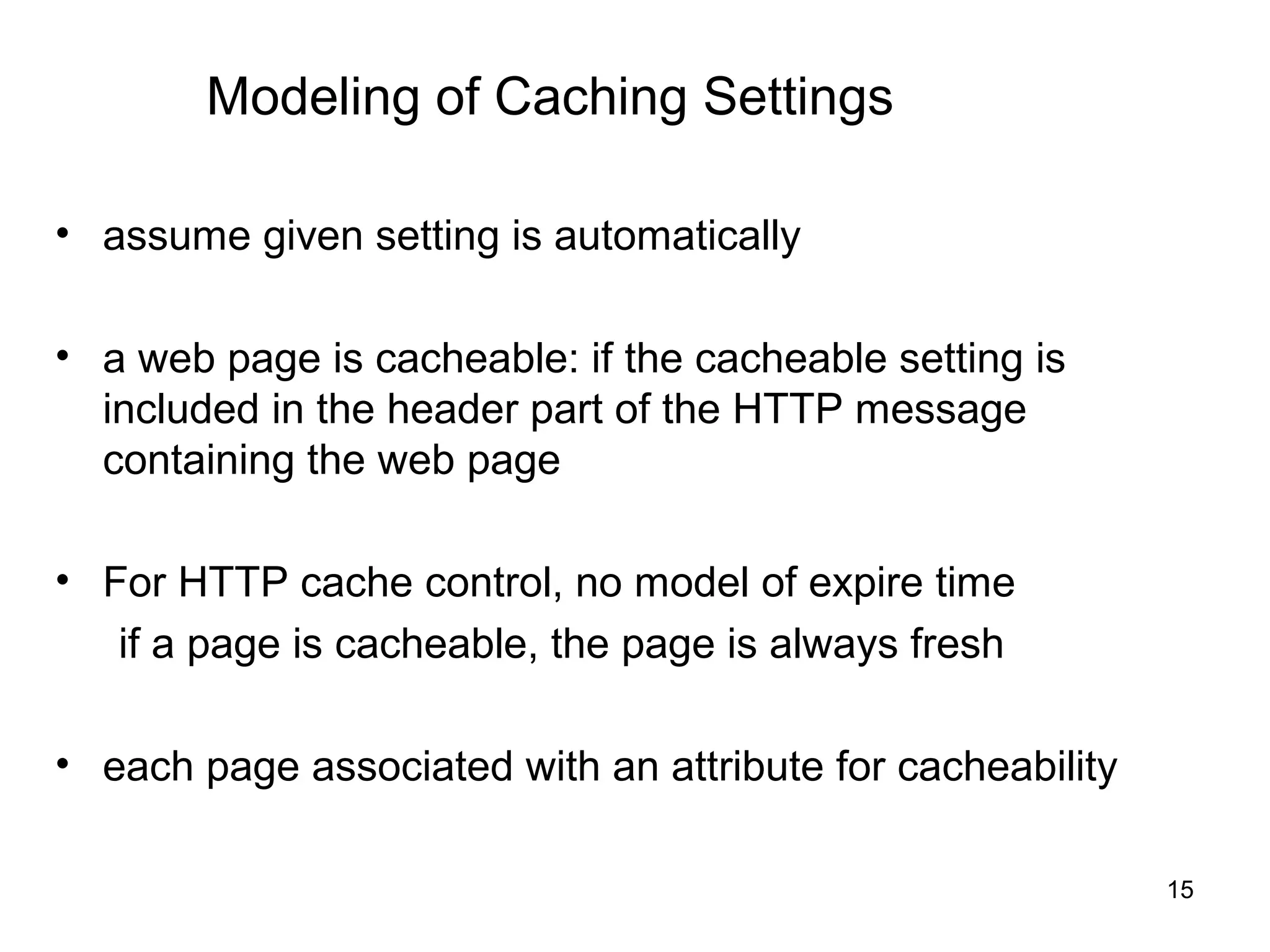
Modeling of Caching Settings

• assume given setting is automatically

• a web page is cacheable: if the cacheable setting is
  included in the header part of the HTTP message
  containing the web page

• For HTTP cache control, no model of expire time
   if a page is cacheable, the page is always fresh

• each page associated with an attribute for cacheability

                                                            15
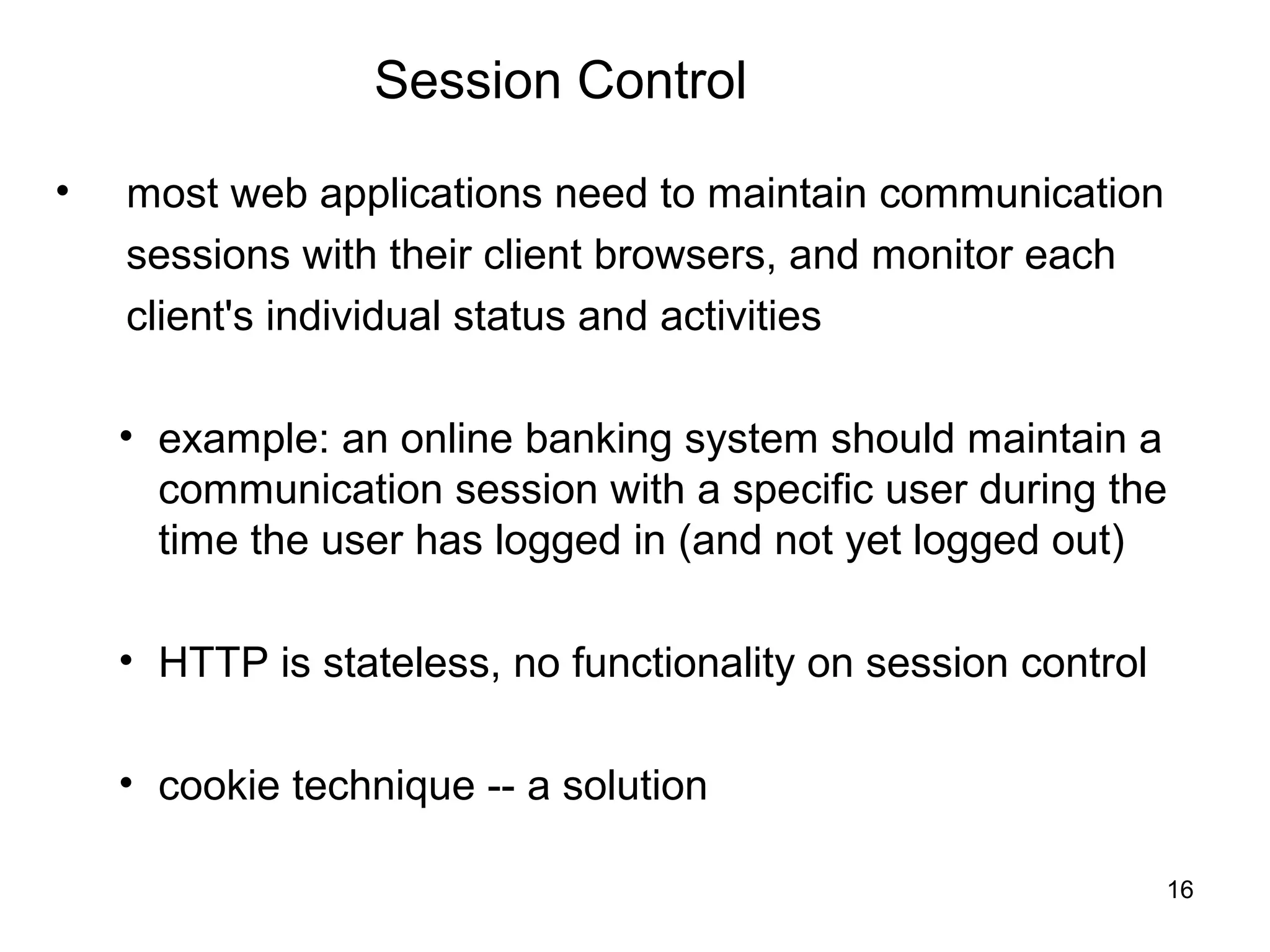
Session Control

•   most web applications need to maintain communication
    sessions with their client browsers, and monitor each
    client's individual status and activities

    • example: an online banking system should maintain a
      communication session with a specific user during the
      time the user has logged in (and not yet logged out)

    • HTTP is stateless, no functionality on session control

    • cookie technique -- a solution

                                                               16
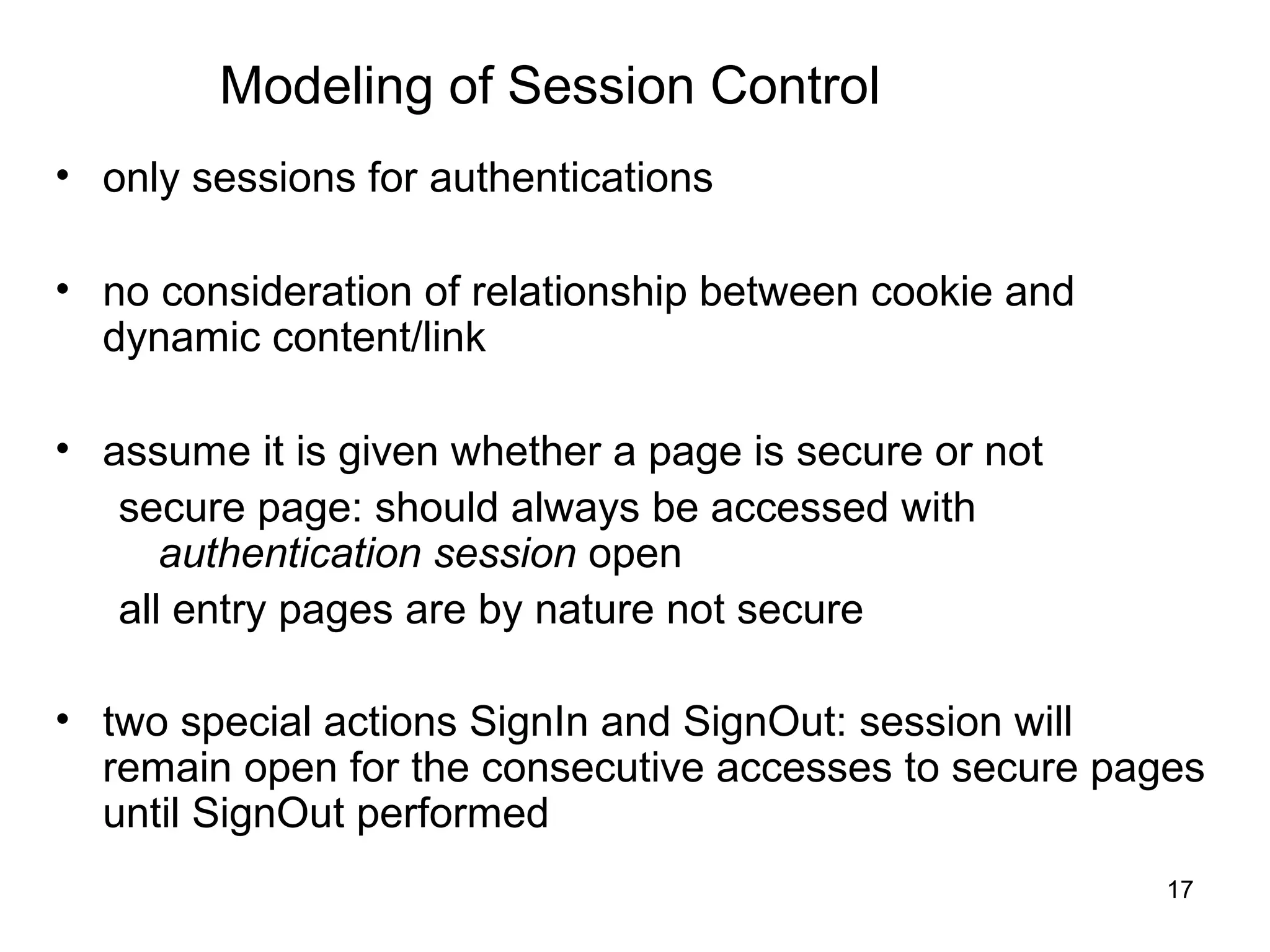
Modeling of Session Control
• only sessions for authentications

• no consideration of relationship between cookie and
  dynamic content/link

• assume it is given whether a page is secure or not
   secure page: should always be accessed with
      authentication session open
   all entry pages are by nature not secure

• two special actions SignIn and SignOut: session will
  remain open for the consecutive accesses to secure pages
  until SignOut performed
                                                        17
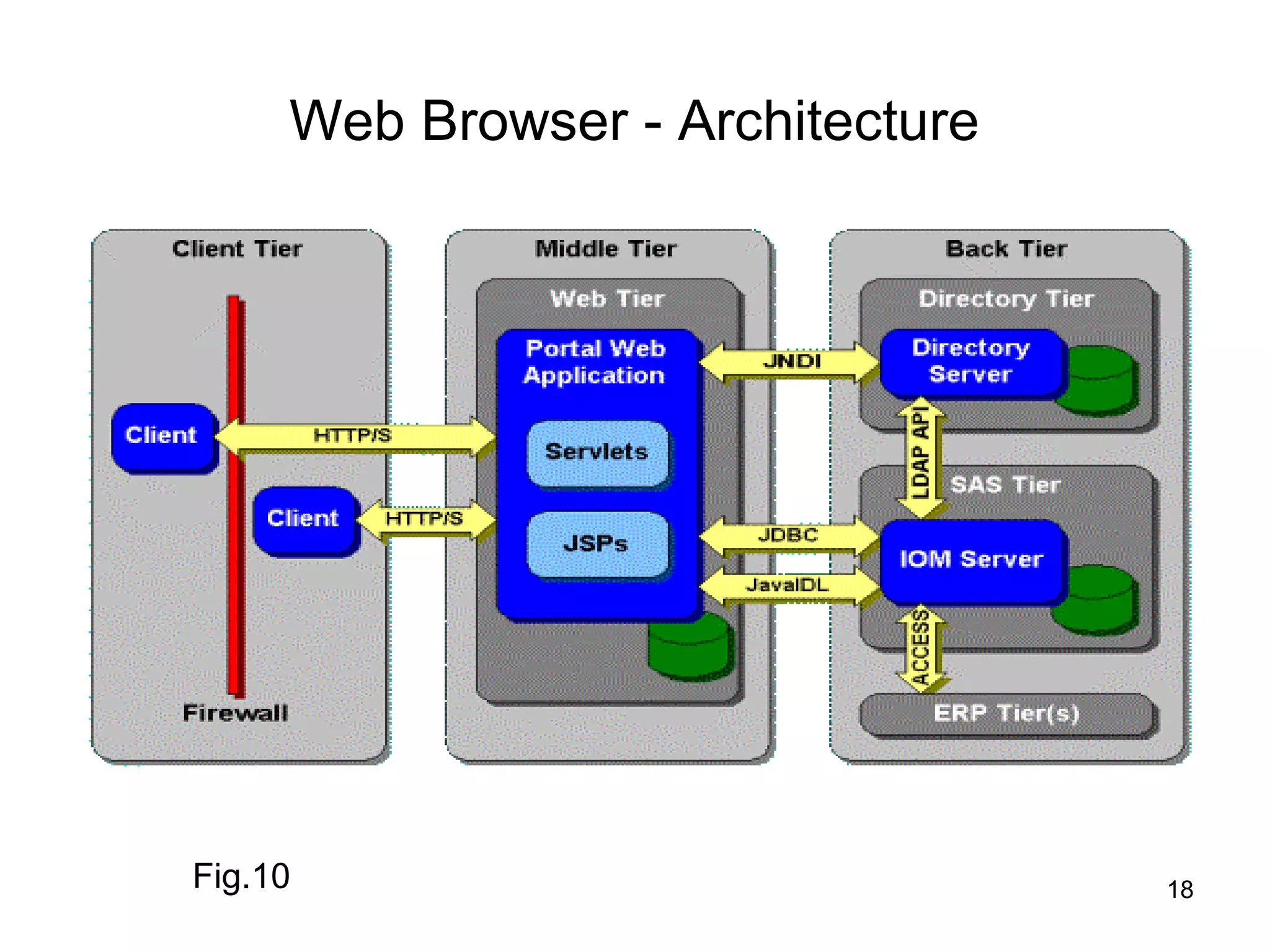
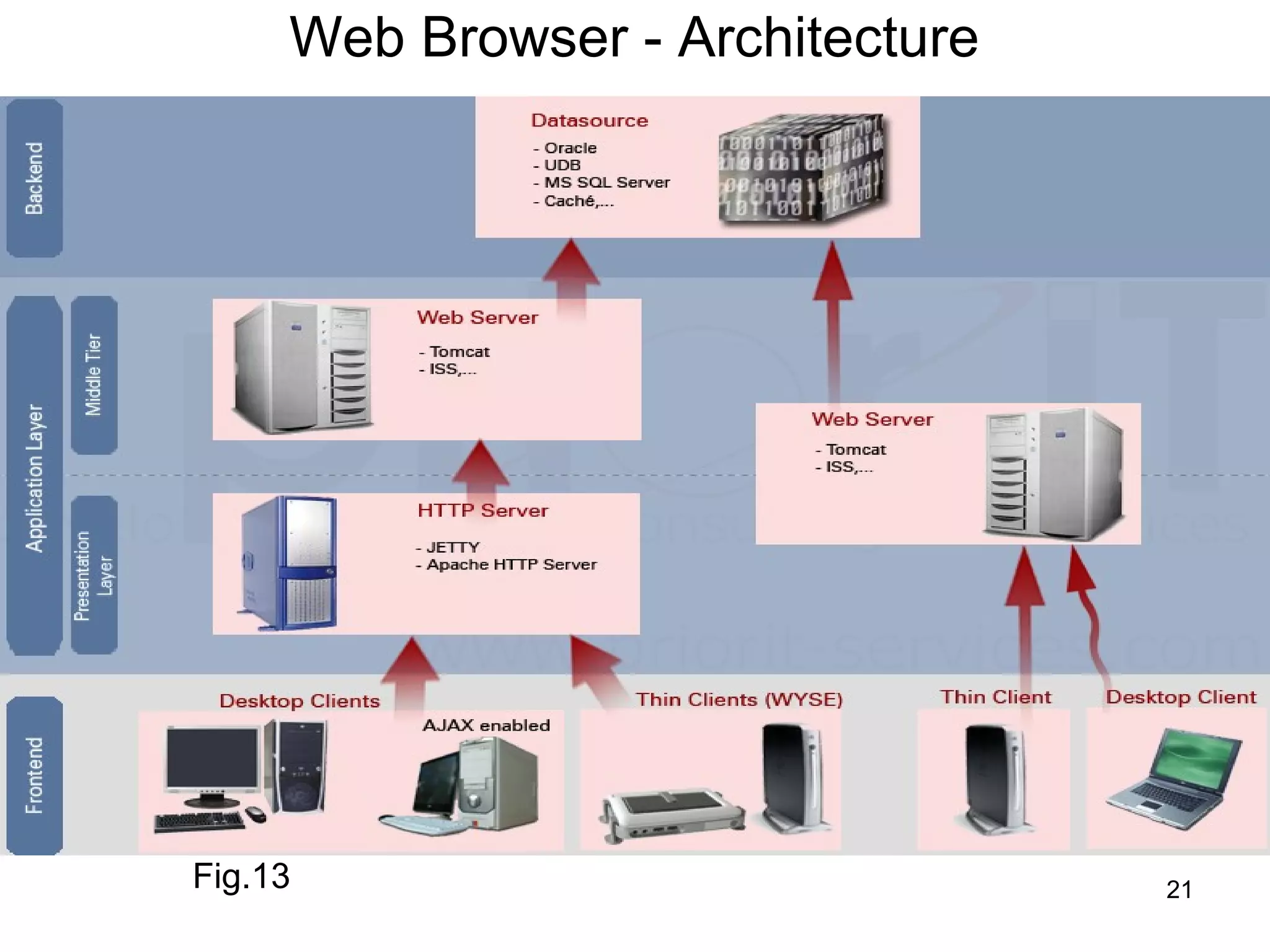
Web Browser - Architecture


Fig.10                            18
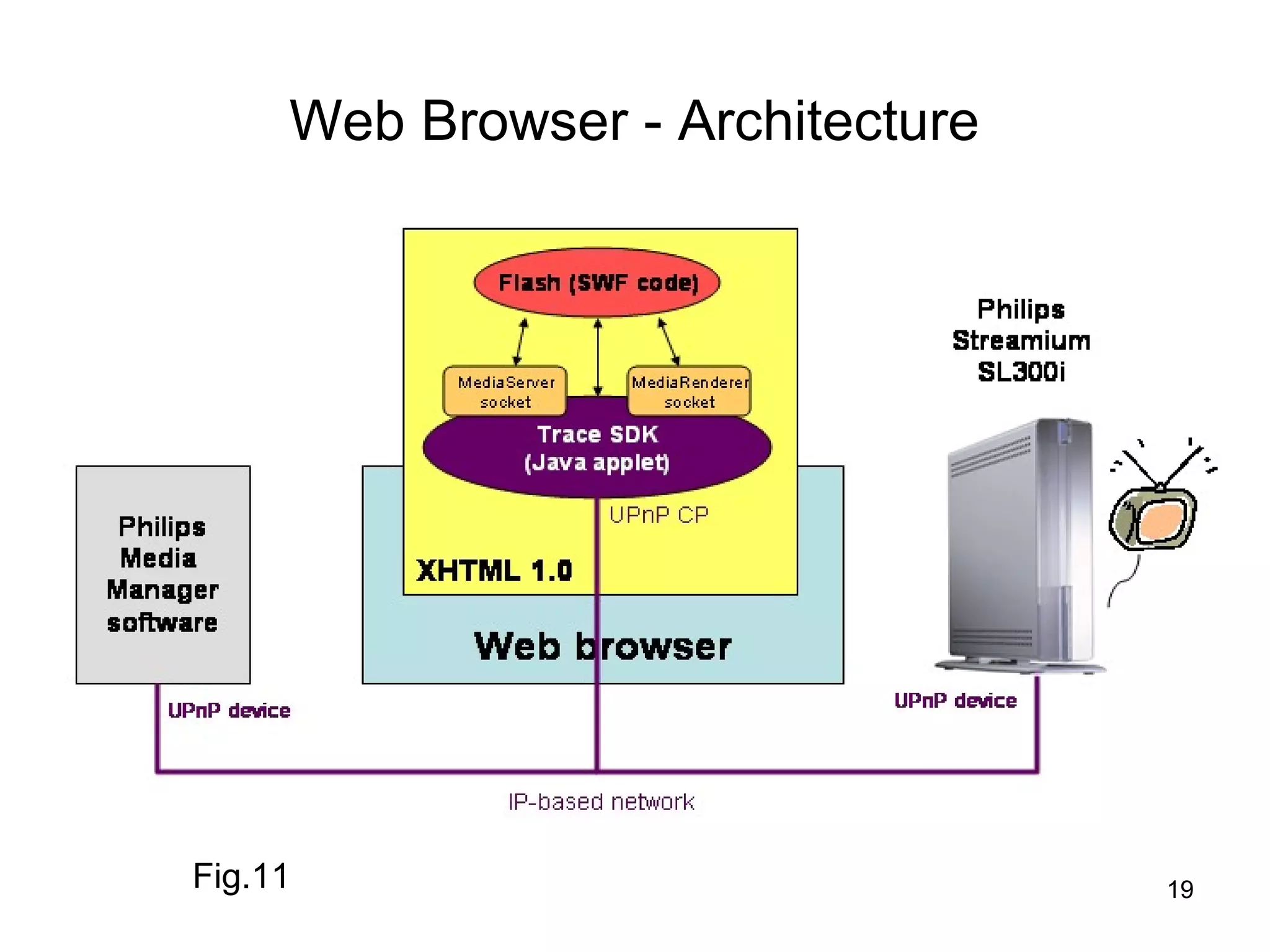
Web Browser - Architecture


Fig.11                            19
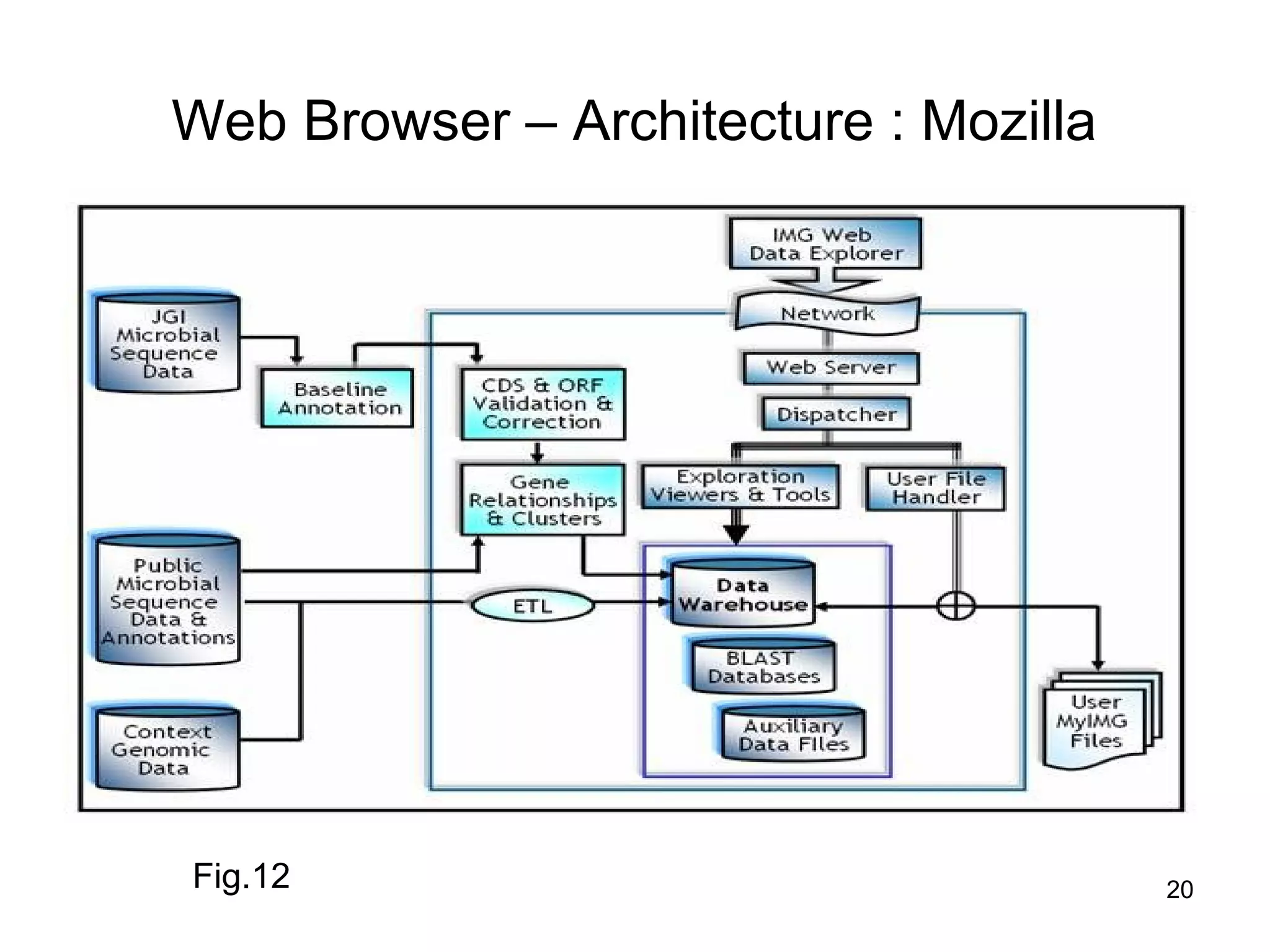
Web Browser – Architecture : Mozilla


Fig.12                                 20
Web Browser - Architecture


Fig.13                            21
Summary

 In this class, you have learnt about

• Web Browser Introduction

• Web Browser Architecture

• Session, Navigation Control

• Different Browser Examples


                                        22
Frequently Asked Questions

1.   Explain in detail about Web browser architecture

2. List few famous Web browsers

3    List few applications of Web browsers


                            home                        23

Web browser architecture.87 to 88

  • 1.
    Sub topic : Web Browser Architecture 1
  • 2.
    Objectives After completionof this period you would be able to understand about • Reference web browser • Reference web browser architecture • Various elements • Different browsers and their architectures 2
  • 3.
    Web Browser Architecture •The architecture of different browsers are different • But they are similar in some respects • Therefore a generic or reference architecture is explained here, followed by specific architectures
  • 4.
    A Reference Architectureto Web Browsers Fig.1 4
  • 5.
    A Reference Architectureto Web Browsers • The reference architecture shown in the Figure 1 comprises eight major subsystems. They are explained as follows • User Interface – The User Interface subsystem is the layer between the user and the Browser Engine – It provides features such as toolbars, visual page- load progress, smart download handling, preferences, and printing – It may be integrated with the desktop environment to provide browser session management or communication with other desktop applications
  • 6.
    The Reference Architecture • Browser Engine – It is an embeddable component that provides a high-level interface to the Rendering Engine – It loads a given URI and supports primitive browsing actions such as forward, back, and reload – It provides hooks for viewing various aspects of the browsing session such as current page load progress and JavaScript alerts – It also allows the querying and manipulation of Rendering Engine settings
  • 7.
    The Reference Architecturecontd… • Rendering Engine – The Rendering Engine subsystem produces a visual representation for a given URI – It is capable of displaying HTML and Extensible Markup Language (XML) documents, optionally styled with CSS, as well as embedded content such as images – It calculates the exact page layout and may use “reflow” algorithms to incrementally adjust the position of elements on the page – This subsystem also includes the HTML parser
  • 8.
    The Reference Architecturecontd… • Networking subsystem – The Networking subsystem implements file transfer protocols such as HTTP and FTP – It translates between different character sets, and resolves MIME media types for files – It may implement a cache of recently retrieved resources
  • 9.
    The Reference Architecturecontd… • JavaScript Interpreter – The JavaScript Interpreter evaluates JavaScript (also known as ECMAScript) code, which may be embedded in web pages – JavaScript is an object-oriented scripting language developed by Netscape – Certain Java- Script functionality, such as the opening of pop-up windows, may be disabled by the Browser Engine or Rendering Engine for security purposes
  • 10.
    The Reference Architecturecontd… • XML Parser – The XML Parser subsystem parses XML documents into a Document Object Model (DOM) tree – This is one of the most reusable subsystems in the architecture – In fact, almost all browser implementations leverage an existing XML Parser rather than creating their own from scratch
  • 11.
    The Reference Architecturecontd… • Display Backend subsystem – The Display Backend subsystem provides drawing and windowing primitives, a set of user interface widgets, and a set of fonts – It may be tied closely with the operating system
  • 12.
    The Reference Architecturecontd… • Data Persistence subsystem – The Data Persistence subsystem stores various data associated with the browsing session on disk – This may be high-level data such as bookmarks or toolbar settings, or it may be low-level data such as cookies, security certificates, or cache
  • 13.
    Other Web BrowserArchitectures Presentation Module User Interface Object Model History stack URL HTML Parser Web Browser Network Interface Browser HTTP Module Cache Management Cache Request Response Internet Web Server 1 Web Server 2 Web Server 2 …… Web Server N Fig.9 13
  • 14.
    Web Local Cache •cache settings (inside browser) examples automatically: all cacheable web pages are valid per session: in current session, all cacheable web pages are valid • HTTP cache controls (associated with received web pages) a web page cacheable valid period uncacheable: its expire time as the same time it is created 14
  • 15.
    Modeling of CachingSettings • assume given setting is automatically • a web page is cacheable: if the cacheable setting is included in the header part of the HTTP message containing the web page • For HTTP cache control, no model of expire time if a page is cacheable, the page is always fresh • each page associated with an attribute for cacheability 15
  • 16.
    Session Control • most web applications need to maintain communication sessions with their client browsers, and monitor each client's individual status and activities • example: an online banking system should maintain a communication session with a specific user during the time the user has logged in (and not yet logged out) • HTTP is stateless, no functionality on session control • cookie technique -- a solution 16
  • 17.
    Modeling of SessionControl • only sessions for authentications • no consideration of relationship between cookie and dynamic content/link • assume it is given whether a page is secure or not secure page: should always be accessed with authentication session open all entry pages are by nature not secure • two special actions SignIn and SignOut: session will remain open for the consecutive accesses to secure pages until SignOut performed 17
  • 18.
    Web Browser -Architecture Fig.10 18
  • 19.
    Web Browser -Architecture Fig.11 19
  • 20.
    Web Browser –Architecture : Mozilla Fig.12 20
  • 21.
    Web Browser -Architecture Fig.13 21
  • 22.
    Summary In thisclass, you have learnt about • Web Browser Introduction • Web Browser Architecture • Session, Navigation Control • Different Browser Examples 22
  • 23.
    Frequently Asked Questions 1. Explain in detail about Web browser architecture 2. List few famous Web browsers 3 List few applications of Web browsers home 23

Editor's Notes

  • #14 Our abstract model of web browsers are based on the interfaces of and some existing documents on two major web browsers, Netscape Navigator and Internet Explorer presentation module: responsible for presenting a web page, and processing user navigation events. network interface module: maintains communications between browser and all web servers. generates HTTP request messages and sends to designated web servers. retrieves web pages embedded in response messages and performs operations on its local cache HTML parser: parses HTML web pages, and constructs an object model for each web page. history stack and local cache: maintained for reloading previously visited URLs and web pages
  • #15 The use of the browser's local cache depends on both cache settings and HTTP cache controls.
  • #16 automatically: widely used and which is the most complicated setting to model.