Browser’s Workflow
Behind the scenes of web browsers
( Not including script Interpretation )
jghj
if ( Learn the internal browser operation ) {
(Development Best Practices) ++;
}
jghj
Content
● Browser
● Available-Browsers
● Statistics
● Browser-Structure
● Browser’s Components
● Rendering Engine and flow
● Webkit v/s Gecko
jghj
Browser
● Present web-resources.
● Display content according to HTML and CSS
specification. (W3C Specification)
● Today, mostly browser do not follow all w3c
specification.
jghj
HTML(4 or 5 ) specification does not
define UI element. A browser must
have, like file-type input variable.
jghj
Available-Browsers
Desktop :
Chrome, FireFox, Safari , IE, Opera etc
Mobile and Tablet :
Android Browser, iPhone, Opera Mini, Opera-Mobile, UC
browser, Nokia S40/S60, Chrome, Firefox etc
jghj
Statistics
jghj
Statistics
jghj
Statistics
jghj
Statistics
(According to state counter global state)
Desktop Usage :
{Chrome, FireFox, Safari } = 71%
Mobile and Tablet Usage :
{Android Browser, iPhone, Chrome} = 54 %
jghj
Chrome is a freeware but not open
source. Chrome is derived from
Chromium.
jghj
Browser’s high level structure
jghj
Browser’s Component
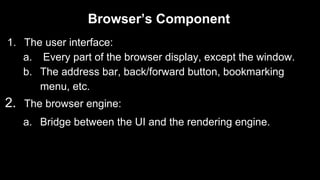
1. The user interface:
a. Every part of the browser display, except the window.
b. The address bar, back/forward button, bookmarking
menu, etc.
2. The browser engine:
a. Bridge between the UI and the rendering engine.
jghj
Browser’s Component
3. The rendering engine :
a. Parse HTML and CSS.
b. Display parsed content on the screen
4. Networking
a. Network calls such as HTTP requests
b. Platform-dependent
jghj
Browser’s Component
5. UI backend:
a. Drawing basic widgets like combo boxes and windows.
b. not platform specific but use operating system user
interface methods.
jghj
Browser’s Component
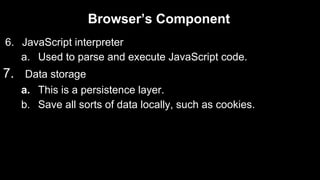
6. JavaScript interpreter
a. Used to parse and execute JavaScript code.
7. Data storage
a. This is a persistence layer.
b. Save all sorts of data locally, such as cookies.
jghj
Chrome : Each tab runs in a separate
process. (multiple instances of the
rendering engine)
jghj
Rendering Engine
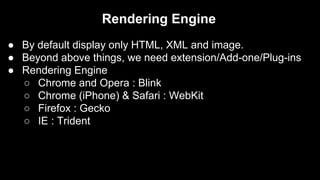
● By default display only HTML, XML and image.
● Beyond above things, we need extension/Add-one/Plug-ins
● Rendering Engine
○ Chrome and Opera : Blink
○ Chrome (iPhone) & Safari : WebKit
○ Firefox : Gecko
○ IE : Trident
jghj
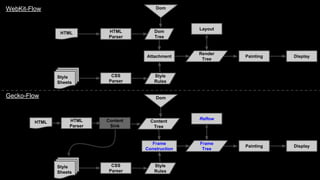
Rendering Engine Main Flow..
Build Dom Tree
# Get data from network Layer.
# Parse HTML.
# Create DOM nodes (Build by Elements).
# Content Tree/ Dom Tree.
# Resource(CSS) loading during parsing
Build Render Tree
# Parse CSS (Inline +External).
# Dom Nodes + Parsed CSS Info.
# Build Render Tree.
# Display start on Browse-Window.
Painting
# Each node Painted.
# Use UI backend Component.
Layout Process
# Given coordinate to each node where they will
appear.
# Always start from root node(0,0).
# Recursive process.
jghj
HTML
Style
Sheets
HTML
Parser
CSS
Parser
Dom
Tree
Style
Rules
Attachment
Dom
Render
Tree
Painting
Layout
Display
HTML
Style
Sheets
HTML
Parser
CSS
Parser
Content
Tree
Style
Rules
Frame
Construction
Dom
Frame
Tree
Painting
Reflow
Display
WebKit-Flow
Gecko-Flow
Content
Sink
jghj
● Execute script immediately when parser reach at
<script> tag.
● If the script is external then first, the resource must be
fetched from the network.
● In both the above cases, Parser will be on hold until
script is executed.
jghj
Resource
● HTML5 Rocks
● Tali Garsiel's site

How browser work