Web-Browser Architecture
2015.05
1
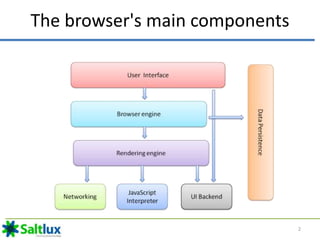
The browser's main components
2
The browser's main components
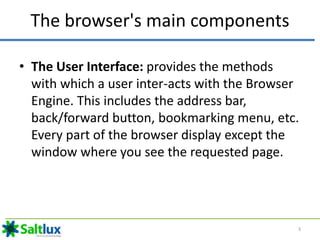
• The User Interface: provides the methods
with which a user inter-acts with the Browser
Engine. This includes the address bar,
back/forward button, bookmarking menu, etc.
Every part of the browser display except the
window where you see the requested page.
3
The browser's main components
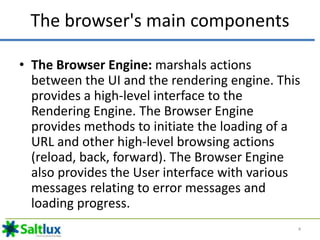
• The Browser Engine: marshals actions
between the UI and the rendering engine. This
provides a high-level interface to the
Rendering Engine. The Browser Engine
provides methods to initiate the loading of a
URL and other high-level browsing actions
(reload, back, forward). The Browser Engine
also provides the User interface with various
messages relating to error messages and
loading progress.
4
The browser's main components
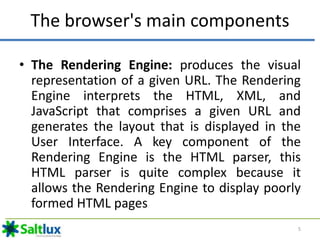
• The Rendering Engine: produces the visual
representation of a given URL. The Rendering
Engine interprets the HTML, XML, and
JavaScript that comprises a given URL and
generates the layout that is displayed in the
User Interface. A key component of the
Rendering Engine is the HTML parser, this
HTML parser is quite complex because it
allows the Rendering Engine to display poorly
formed HTML pages
5
The browser's main components
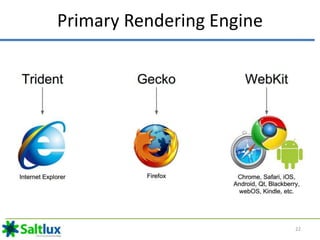
• The Rendering Engine: Different browsers use
different rendering engines: Internet Explorer
uses Trident, Firefox uses Gecko, Safari uses
WebKit. Chrome and Opera uses WebKit
(before is Blink).
6
The browser's main components
• The Networking: provides functionality to
handle retrieve URLs using the common
Internet protocols of HTTP and FTP. The
Networking components handles all aspects of
Internet communication and security,
character set translations and MIME type
resolution. The Network component may
implement a cache of retrieved documents to
minimize network traffic.
7
The browser's main components
• The JavaScript Interpreter: component
executes the JavaScript code that is embedded
in a website. Results of the execution a passed
to the Rendering Engine for display. The
Rendering Engine may disable various actions
based on user defined properties.
8
The browser's main components
• The UI Backend:
– Used for drawing basic widgets like combo boxes
and windows
– Underneath it uses operating system user
interface methods.
9
The browser's main components
• The Data Storage: manages user data such as
bookmarks, cookies and preferences. The new
HTML specification (HTML5) defines 'web
database' which is a complete (although light)
database in the browser.
10
The browser's main components
It is important to note that browsers such as
Chrome run multiple instances of the rendering
engine: one for each tab. Each tab runs in a
separate process.
11
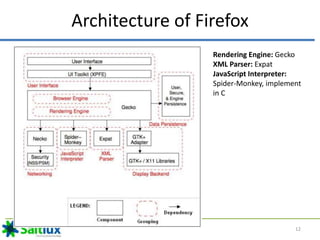
Architecture of Firefox
Rendering Engine: Gecko
XML Parser: Expat
JavaScript Interpreter:
Spider-Monkey, implement
in C
12
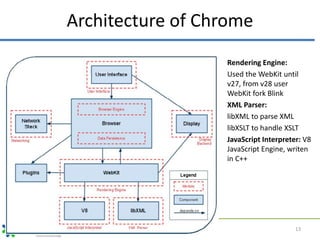
Architecture of Chrome
Rendering Engine:
Used the WebKit until
v27, from v28 user
WebKit fork Blink
XML Parser:
libXML to parse XML
libXSLT to handle XSLT
JavaScript Interpreter: V8
JavaScript Engine, writen
in C++
13
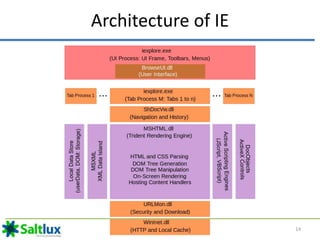
Architecture of IE
14
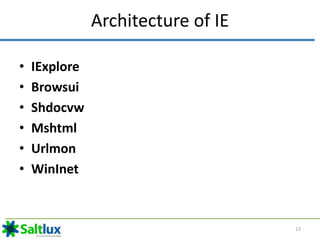
Architecture of IE
• IExplore
• Browsui
• Shdocvw
• Mshtml
• Urlmon
• WinInet
15
Rendering Engine
16
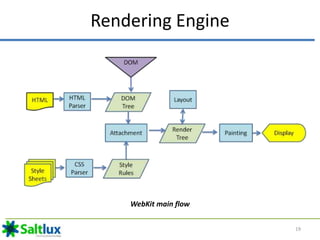
Rendering Engine – Basic flow
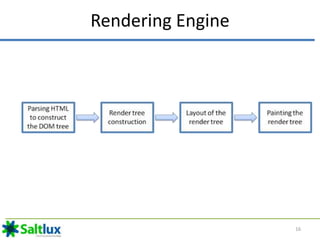
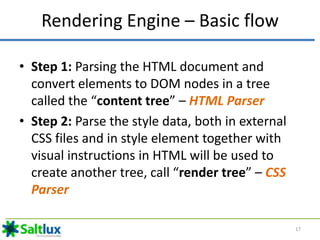
• Step 1: Parsing the HTML document and
convert elements to DOM nodes in a tree
called the “content tree” – HTML Parser
• Step 2: Parse the style data, both in external
CSS files and in style element together with
visual instructions in HTML will be used to
create another tree, call “render tree” – CSS
Parser
17
Rendering Engine – Basic flow
• Step 3: After the construction of the render
tree it goes through a “layout" process. This
means giving each node the exact coordinates
where it should appear on the screen
• Step 4: The next stage is painting–the render
tree will be traversed and each node will be
painted using the UI backend layer - Painting.
18
Rendering Engine
WebKit main flow
19
Rendering Engine
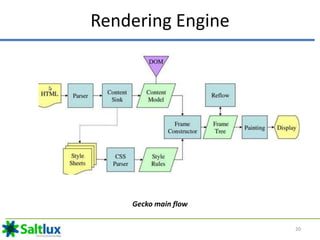
Gecko main flow
20
Rendering Engine Keys
• HTML Parser: The job of the HTML parser is to
parse the HTML markup into a parse tree.
• DOM: The output tree (the "parse tree") is a
tree of DOM element and attribute nodes.
• CSS Parsing: CSS is a context free grammar
and can be parsed using the types of parsers
described in the introduction. In fact the CSS
specification defines CSS lexical and syntax
grammar.
21
Primary Rendering Engine
22
WebKit Rendering Engine
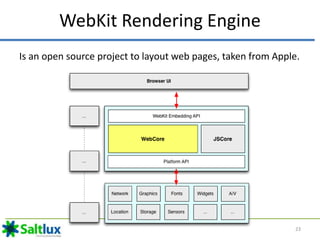
Is an open source project to layout web pages, taken from Apple.
23
WebKit Rendering Engine
• WebKit embedding API: interface between
rendering engine and Browser UI
• WebCore: is application logic: loading, parsing,
layout, style resolution, painting, event handling,
editing, javascript bindings
• JSCore (JavaScript Engine): V8 or JavaScriptCore,
parses and executes page logic allows DOM
manipulation
• Platform API: Network stack, Graphics library, Font
engine, Native widgets …
24
Five ports of WebKit
Chrome
(OS X)
Safari
(OS X)
QtWebKit
Android
Browser
Chrome for
iOS
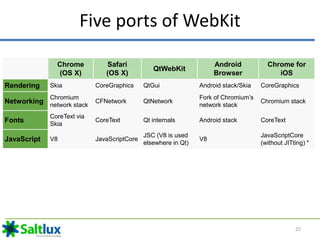
Rendering Skia CoreGraphics QtGui Android stack/Skia CoreGraphics
Networking
Chromium
network stack
CFNetwork QtNetwork
Fork of Chromium’s
network stack
Chromium stack
Fonts
CoreText via
Skia
CoreText Qt internals Android stack CoreText
JavaScript V8 JavaScriptCore
JSC (V8 is used
elsewhere in Qt)
V8
JavaScriptCore
(without JITting) *
25
Gecko Rendering Engine
26
Gecko Components
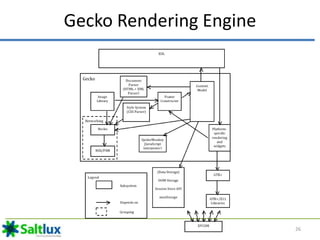
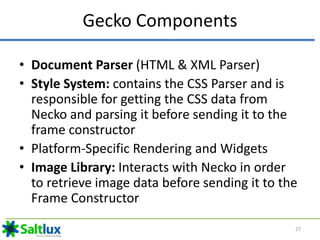
• Document Parser (HTML & XML Parser)
• Style System: contains the CSS Parser and is
responsible for getting the CSS data from
Necko and parsing it before sending it to the
frame constructor
• Platform-Specific Rendering and Widgets
• Image Library: Interacts with Necko in order
to retrieve image data before sending it to the
Frame Constructor
27
Gecko Components
• Content Model: Interacts with the various
components of Gecko, DOM Storage to gather
all the data needed before sending it to the
frame constructor
• Frame Constructor: Carries out the task of
piece together all the information and actually
from the rendered web page before sending it
back to the UI through the Platform-Specific
Rendering subsystem
28
Fork (software development)
In software engineering, a project fork happens when
developers take a copy of source code from one
software package and start independent development
on it, creating a distinct and separate piece of software.
The term often implies not merely a development
branch, but a split in the developer community, a form
of schism
29
Blink (layout engine)
• Blink is a web browser engine developed as part of
the Chromium project by Google with contributions
from Opera Software ASA, Intel, Samsung and others
• It was first announced in April 2013
• It is a fork of the WebCore component of WebKit
and is used in Chrome starting at version 28, Opera
(15+), Amazon Silk and other Chromium based
browsers as well as Android's (4.4+) WebView and
Qt's WebEngine
30
Comparison
• http://en.wikipedia.org/wiki/Comparison_of_layout_engines_(HTML)
• http://en.wikipedia.org/wiki/Comparison_of_web_browser_engines
31
Resource
• https://blogs.library.duke.edu/digital-collections/2009/02/13/on-the-trident-project-part-1-
architecture/
• http://rakshasingh.weebly.com/working-of-browser-engine.html
• http://www.html5rocks.com/en/tutorials/internals/howbrowserswork/
• http://www.smashingmagazine.com/2015/01/26/inside-microsofts-new-rendering-engine-
project-spartan/
• http://techcrunch.com/2013/04/03/google-forks-webkit-and-launches-blink-its-own-
rendering-engine-that-will-soon-power-chrome-and-chromeos/
• http://www.sitepoint.com/microsoft-drop-trident-from-internet-explorer/
• https://books.google.com.vn/books?id=D-
5eDyiUQDQC&pg=PA269&lpg=PA269&dq=internet+explorer+8+%26+9+development+pdf&s
ource=bl&ots=Is1gnQScSW&sig=qpf25cDzPyOtDofnY47o_VS1pXI&hl=vi&sa=X&ei=XqJdVeX_
DcmA8gX6ioDYAQ&redir_esc=y#v=onepage&q=internet%20explorer%208%20%26%209%20
development%20pdf&f=false
32

Web browser architecture

  • 1.
  • 2.
    The browser's maincomponents 2
  • 3.
    The browser's maincomponents • The User Interface: provides the methods with which a user inter-acts with the Browser Engine. This includes the address bar, back/forward button, bookmarking menu, etc. Every part of the browser display except the window where you see the requested page. 3
  • 4.
    The browser's maincomponents • The Browser Engine: marshals actions between the UI and the rendering engine. This provides a high-level interface to the Rendering Engine. The Browser Engine provides methods to initiate the loading of a URL and other high-level browsing actions (reload, back, forward). The Browser Engine also provides the User interface with various messages relating to error messages and loading progress. 4
  • 5.
    The browser's maincomponents • The Rendering Engine: produces the visual representation of a given URL. The Rendering Engine interprets the HTML, XML, and JavaScript that comprises a given URL and generates the layout that is displayed in the User Interface. A key component of the Rendering Engine is the HTML parser, this HTML parser is quite complex because it allows the Rendering Engine to display poorly formed HTML pages 5
  • 6.
    The browser's maincomponents • The Rendering Engine: Different browsers use different rendering engines: Internet Explorer uses Trident, Firefox uses Gecko, Safari uses WebKit. Chrome and Opera uses WebKit (before is Blink). 6
  • 7.
    The browser's maincomponents • The Networking: provides functionality to handle retrieve URLs using the common Internet protocols of HTTP and FTP. The Networking components handles all aspects of Internet communication and security, character set translations and MIME type resolution. The Network component may implement a cache of retrieved documents to minimize network traffic. 7
  • 8.
    The browser's maincomponents • The JavaScript Interpreter: component executes the JavaScript code that is embedded in a website. Results of the execution a passed to the Rendering Engine for display. The Rendering Engine may disable various actions based on user defined properties. 8
  • 9.
    The browser's maincomponents • The UI Backend: – Used for drawing basic widgets like combo boxes and windows – Underneath it uses operating system user interface methods. 9
  • 10.
    The browser's maincomponents • The Data Storage: manages user data such as bookmarks, cookies and preferences. The new HTML specification (HTML5) defines 'web database' which is a complete (although light) database in the browser. 10
  • 11.
    The browser's maincomponents It is important to note that browsers such as Chrome run multiple instances of the rendering engine: one for each tab. Each tab runs in a separate process. 11
  • 12.
    Architecture of Firefox RenderingEngine: Gecko XML Parser: Expat JavaScript Interpreter: Spider-Monkey, implement in C 12
  • 13.
    Architecture of Chrome RenderingEngine: Used the WebKit until v27, from v28 user WebKit fork Blink XML Parser: libXML to parse XML libXSLT to handle XSLT JavaScript Interpreter: V8 JavaScript Engine, writen in C++ 13
  • 14.
  • 15.
    Architecture of IE •IExplore • Browsui • Shdocvw • Mshtml • Urlmon • WinInet 15
  • 16.
  • 17.
    Rendering Engine –Basic flow • Step 1: Parsing the HTML document and convert elements to DOM nodes in a tree called the “content tree” – HTML Parser • Step 2: Parse the style data, both in external CSS files and in style element together with visual instructions in HTML will be used to create another tree, call “render tree” – CSS Parser 17
  • 18.
    Rendering Engine –Basic flow • Step 3: After the construction of the render tree it goes through a “layout" process. This means giving each node the exact coordinates where it should appear on the screen • Step 4: The next stage is painting–the render tree will be traversed and each node will be painted using the UI backend layer - Painting. 18
  • 19.
  • 20.
  • 21.
    Rendering Engine Keys •HTML Parser: The job of the HTML parser is to parse the HTML markup into a parse tree. • DOM: The output tree (the "parse tree") is a tree of DOM element and attribute nodes. • CSS Parsing: CSS is a context free grammar and can be parsed using the types of parsers described in the introduction. In fact the CSS specification defines CSS lexical and syntax grammar. 21
  • 22.
  • 23.
    WebKit Rendering Engine Isan open source project to layout web pages, taken from Apple. 23
  • 24.
    WebKit Rendering Engine •WebKit embedding API: interface between rendering engine and Browser UI • WebCore: is application logic: loading, parsing, layout, style resolution, painting, event handling, editing, javascript bindings • JSCore (JavaScript Engine): V8 or JavaScriptCore, parses and executes page logic allows DOM manipulation • Platform API: Network stack, Graphics library, Font engine, Native widgets … 24
  • 25.
    Five ports ofWebKit Chrome (OS X) Safari (OS X) QtWebKit Android Browser Chrome for iOS Rendering Skia CoreGraphics QtGui Android stack/Skia CoreGraphics Networking Chromium network stack CFNetwork QtNetwork Fork of Chromium’s network stack Chromium stack Fonts CoreText via Skia CoreText Qt internals Android stack CoreText JavaScript V8 JavaScriptCore JSC (V8 is used elsewhere in Qt) V8 JavaScriptCore (without JITting) * 25
  • 26.
  • 27.
    Gecko Components • DocumentParser (HTML & XML Parser) • Style System: contains the CSS Parser and is responsible for getting the CSS data from Necko and parsing it before sending it to the frame constructor • Platform-Specific Rendering and Widgets • Image Library: Interacts with Necko in order to retrieve image data before sending it to the Frame Constructor 27
  • 28.
    Gecko Components • ContentModel: Interacts with the various components of Gecko, DOM Storage to gather all the data needed before sending it to the frame constructor • Frame Constructor: Carries out the task of piece together all the information and actually from the rendered web page before sending it back to the UI through the Platform-Specific Rendering subsystem 28
  • 29.
    Fork (software development) Insoftware engineering, a project fork happens when developers take a copy of source code from one software package and start independent development on it, creating a distinct and separate piece of software. The term often implies not merely a development branch, but a split in the developer community, a form of schism 29
  • 30.
    Blink (layout engine) •Blink is a web browser engine developed as part of the Chromium project by Google with contributions from Opera Software ASA, Intel, Samsung and others • It was first announced in April 2013 • It is a fork of the WebCore component of WebKit and is used in Chrome starting at version 28, Opera (15+), Amazon Silk and other Chromium based browsers as well as Android's (4.4+) WebView and Qt's WebEngine 30
  • 31.
  • 32.
    Resource • https://blogs.library.duke.edu/digital-collections/2009/02/13/on-the-trident-project-part-1- architecture/ • http://rakshasingh.weebly.com/working-of-browser-engine.html •http://www.html5rocks.com/en/tutorials/internals/howbrowserswork/ • http://www.smashingmagazine.com/2015/01/26/inside-microsofts-new-rendering-engine- project-spartan/ • http://techcrunch.com/2013/04/03/google-forks-webkit-and-launches-blink-its-own- rendering-engine-that-will-soon-power-chrome-and-chromeos/ • http://www.sitepoint.com/microsoft-drop-trident-from-internet-explorer/ • https://books.google.com.vn/books?id=D- 5eDyiUQDQC&pg=PA269&lpg=PA269&dq=internet+explorer+8+%26+9+development+pdf&s ource=bl&ots=Is1gnQScSW&sig=qpf25cDzPyOtDofnY47o_VS1pXI&hl=vi&sa=X&ei=XqJdVeX_ DcmA8gX6ioDYAQ&redir_esc=y#v=onepage&q=internet%20explorer%208%20%26%209%20 development%20pdf&f=false 32