Maurice de Beijer
Agenda
 Why HTML5?
 How about different browsers?
 Different parts of HTML5
    Whatever you would like to see 
Who am I
 Maurice de Beijer.
 The Problem Solver.
 Microsoft CSD MVP.
 DevelopMentor instructor.
 Twitter:   @mauricedb of @HTML5SupportNL
 Blog:      http://msmvps.com/blogs/theproblemsolver/
 Web:       http://www.HTML5Support.nl
 E-mail:    mauricedb@computer.org
Why HTML5
 HTML is the most used UI technology
    But differences in browser implementation make it
     hard to work with
 Companies need to support a wide range of devices
    Bring your own hardware
    Smartphones and tablets don’t support plugins
 Users want richer applications
    Animations
    Communication
    etc.
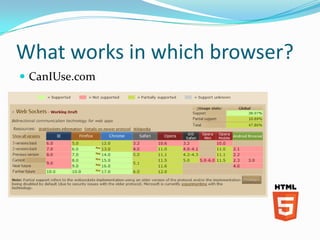
What works in which browser?
 CanIUse.com
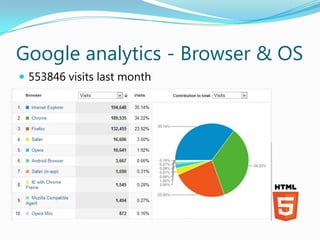
Google analytics - Browser & OS
 553846 visits last month
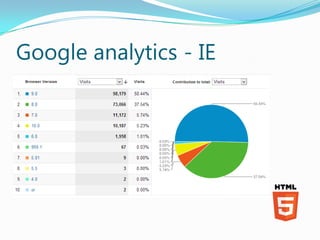
Google analytics - IE
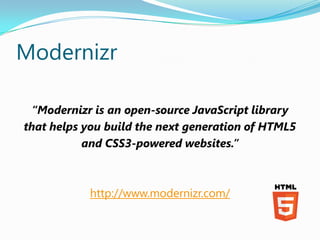
Modernizr

 “Modernizr is an open-source JavaScript library
that helps you build the next generation of HTML5
           and CSS3-powered websites.”


           http://www.modernizr.com/
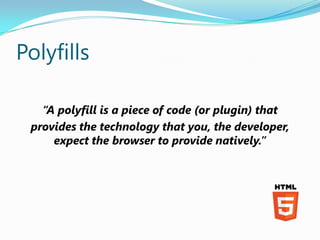
Polyfills

   “A polyfill is a piece of code (or plugin) that
 provides the technology that you, the developer,
     expect the browser to provide natively.”
Google Chrome Frame
 Use Google Chrome inside of Internet Explorer
   Works with IE 6 and later
 Only activated for pages that explicitly request it
     <meta http-equiv="X-UA-Compatible" content="chrome=1">


 The meta tag is ignored if Chrome Frame isn´t
  installed
HTML5 subjects
   Semantic markup
   Input elements
   CSS3
   Video & Audio
   Canvas & SGV
   Local storage
   Drag-Drop & File IO
   Geolocation
   Web Workers
   Offline Web applications
   Server Sent Events & WebSockets
Semantic markup
 The most commonly used CSS classes for <div>
 elements
   <div class=“nav”>
   <div class=“section”>
   <div class=“header”>
   <div class=“footer”>
   <div class=“article”>
   <div class=“aside”>
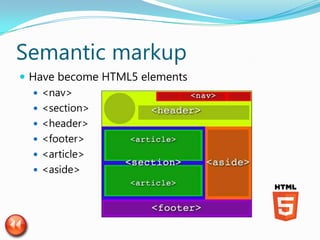
Semantic markup
 Have become HTML5 elements
    <nav>
    <section>
    <header>
    <footer>
    <article>
    <aside>
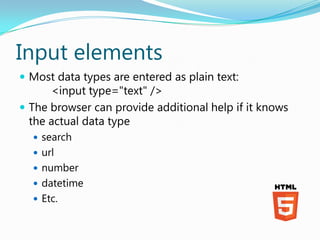
Input elements
 Most data types are entered as plain text:
      <input type="text" />
 The browser can provide additional help if it knows
  the actual data type
   search
   url
   number
   datetime
   Etc.
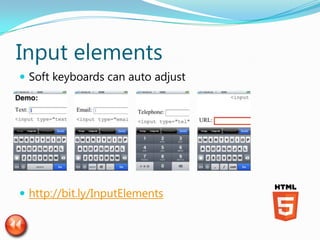
Input elements
 Soft keyboards can auto adjust


 http://bit.ly/InputElements
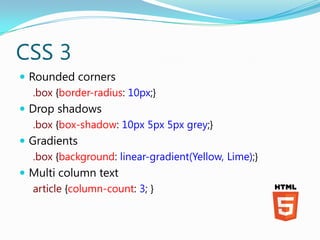
CSS 3
 Rounded corners
   .box {border-radius: 10px;}
 Drop shadows
   .box {box-shadow: 10px 5px 5px grey;}
 Gradients
   .box {background: linear-gradient(Yellow, Lime);}
 Multi column text
   article {column-count: 3; }
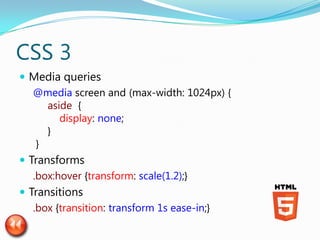
CSS 3
 Media queries
   @media screen and (max-width: 1024px) {
      aside {
         display: none;
      }
    }
 Transforms
   .box:hover {transform: scale(1.2);}
 Transitions
   .box {transition: transform 1s ease-in;}
Video & Audio
 HTML5 includes a <video> and <audio> element
 There is no standard encoding 
    OGV
    WEBM
    MP4
 Add multiple <source> elements
    The browser will use the first it supports
 See Wikipedia for browser support
Canvas
 A simple drawing surface
    Currently only a 2D context
    But 3D is in the works
 Uses drawing primitives
    Lines
    Rectangles
    Arcs
    Curves
    Images
    Paths
Canvas
 The entire API is JavaScript based
    There are no drawing markup elements
 Very powerful but tedious to work with
    Tooling support is limited
       Adobe® Illustrator® plugin
       Leonardo Sketch
 Used to create a HTML version of Angry Birds
    http://chrome.angrybirds.com/
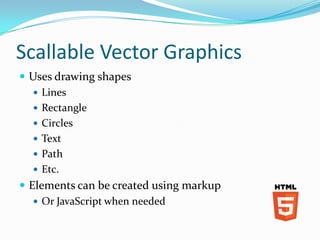
Scallable Vector Graphics
 Use retained mode
    There is an object model we can manipulate
    The Canvas uses imediate mode
 Browser support is about the same as with Canvas
    Tooling support is much better
Scallable Vector Graphics
 Uses drawing shapes
    Lines
    Rectangle
    Circles
    Text
    Path
    Etc.
 Elements can be created using markup
    Or JavaScript when needed
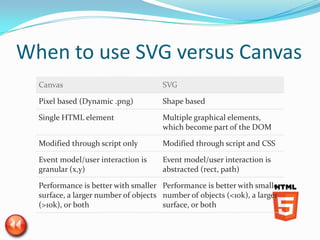
When to use SVG versus Canvas
  Canvas                             SVG

  Pixel based (Dynamic .png)         Shape based

  Single HTML element                Multiple graphical elements,
                                     which become part of the DOM

  Modified through script only       Modified through script and CSS

  Event model/user interaction is    Event model/user interaction is
  granular (x,y)                     abstracted (rect, path)

  Performance is better with smaller Performance is better with smaller
  surface, a larger number of objects number of objects (<10k), a larger
  (>10k), or both                     surface, or both
Local storage - Web Storage
 Name – Value pair storage
    Storage is per site
    The standard recommends 5Mb storage space per site
 sessionStorage
    Valid for the duration of a browser session
 localStorage
    Valid for longer periods
 The value stored must be a string!
   sessionStorage['data'] = JSON.stringify({ value: 1 });
   data = JSON.parse(sessionStorage['data']);
Local storage - IndexedDB
 An object or NoSQL store in the database
    Only supported in Chrome en Firefox
    See demo
 There was a Web SQL Database
    It’s deprecated and replaced by the IndexedDB
    Still functional in Webkit browsers (iOS)
    Apple pushed this standard
Drag-Drop
 Move elements in the browser
    Drag files from the Windows Explorer to an HTML
     element
 Events fire for
    dragstart
    dragenter
    dragover
    drop
 The argument contain a dataTransfer object
File IO
 File IO can be done using a FileReader object
 File can be read in different ways
    readAsArrayBuffer()
    readAsBinaryString()
    readAsDataURL()
    readAsText()
 Once the file content have been read the onload
 event fires
   The result property contains the file contents
File IO
 Some file are to large to read in one action
 A Blob is a part of a file
    Use file.slice() to create a blob
 A FileReader object can work with a blob as if it is a
 file
Geolocation
 Where is the user?
    For example to do a location based search
 Always requires the users consent
 Works both on desktop and mobile browsers
    Accuracy can vary widely
 Use the navigator object
    navigator.geolocation.getCurrentPosition()
 The options support enableHighAccuracy: true
Geolocation
 The resulting Position contains at least
    latitude
    longitude
    accuracy
Web Workers
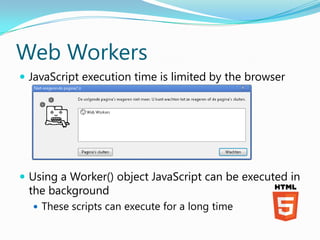
 JavaScript execution time is limited by the browser


 Using a Worker() object JavaScript can be executed in
 the background
   These scripts can execute for a long time
Web Workers
 Web Workers are limited in what they can do
    No interactions with the DOM
 They can do IO
    XMLHttpRequest
    FileReader
    importScripts()
 The Document can exchange messages with the worker
    postMessage()
    onmessage callback function is called
 All data is cloned
    Never passed by reference
Offline Web Applications
 A web application can load and execute without a
  network connection
 The cache manifest determines what resources are
  available offline
 The cached resources are always loaded from the cache
   The manifest is used to update the cache
   This is done after the page is loaded
   And only happens if the content of the cache is
    changed
Offline Web Applications
 Manifest contains sections for:
    Cache (default)
    Network
    Fallback
 The manifest must be served with the correct mime type
   text/cache-manifest
   Otherwise it’s ignored
Server Sent Events
 Push communication from the Server to the browser
    Uses standard HTTP techniques to transfer data
 Everything is just HTTP traffic
    A formalization of long polling techniques
    Be careful with connection that remain open for to long
     (30 seconds to max 2 minutes)
Server Sent Events
 EventSource object
    Functions:
       close()
   Events
       onmessage
       onopen
       onerror
         Also used when the connection is closed
WebSockets
 Full duplex communication between the browser and
  the server
 No longer HTTP traffic
   Starts as an HTTP request
   The server upgrades to WS by returning a “101 Switching
    Protocols” response
 Support is still limited
    Only Chrome and Firefox
WebSockets
 WebSocket object
   Functions:
       send() to transfer data
          Can also be binary data!

       close()
   Events
       onmessage
       onopen
       onclose
       onerror
Conclusion
 HTML 5 has a big future
    Its the only platform independent UI technology
    Even used for Windows 8 development
 Different browsers offer support for features
    Use feature detection to check what works
    Use polyfills in case of missing features
 No need to wait until it´s a standard
    Large parts are usable today

HTML5

  • 1.
  • 2.
    Agenda  Why HTML5? How about different browsers?  Different parts of HTML5  Whatever you would like to see 
  • 3.
    Who am I Maurice de Beijer.  The Problem Solver.  Microsoft CSD MVP.  DevelopMentor instructor.  Twitter: @mauricedb of @HTML5SupportNL  Blog: http://msmvps.com/blogs/theproblemsolver/  Web: http://www.HTML5Support.nl  E-mail: mauricedb@computer.org
  • 4.
    Why HTML5  HTMLis the most used UI technology  But differences in browser implementation make it hard to work with  Companies need to support a wide range of devices  Bring your own hardware  Smartphones and tablets don’t support plugins  Users want richer applications  Animations  Communication  etc.
  • 5.
    What works inwhich browser?  CanIUse.com
  • 6.
    Google analytics -Browser & OS  553846 visits last month
  • 7.
  • 8.
    Modernizr “Modernizr isan open-source JavaScript library that helps you build the next generation of HTML5 and CSS3-powered websites.” http://www.modernizr.com/
  • 9.
    Polyfills “A polyfill is a piece of code (or plugin) that provides the technology that you, the developer, expect the browser to provide natively.”
  • 10.
    Google Chrome Frame Use Google Chrome inside of Internet Explorer  Works with IE 6 and later  Only activated for pages that explicitly request it <meta http-equiv="X-UA-Compatible" content="chrome=1">  The meta tag is ignored if Chrome Frame isn´t installed
  • 11.
    HTML5 subjects  Semantic markup  Input elements  CSS3  Video & Audio  Canvas & SGV  Local storage  Drag-Drop & File IO  Geolocation  Web Workers  Offline Web applications  Server Sent Events & WebSockets
  • 12.
    Semantic markup  Themost commonly used CSS classes for <div> elements  <div class=“nav”>  <div class=“section”>  <div class=“header”>  <div class=“footer”>  <div class=“article”>  <div class=“aside”>
  • 13.
    Semantic markup  Havebecome HTML5 elements  <nav>  <section>  <header>  <footer>  <article>  <aside>
  • 14.
    Input elements  Mostdata types are entered as plain text: <input type="text" />  The browser can provide additional help if it knows the actual data type  search  url  number  datetime  Etc.
  • 15.
    Input elements  Softkeyboards can auto adjust  http://bit.ly/InputElements
  • 16.
    CSS 3  Roundedcorners .box {border-radius: 10px;}  Drop shadows .box {box-shadow: 10px 5px 5px grey;}  Gradients .box {background: linear-gradient(Yellow, Lime);}  Multi column text article {column-count: 3; }
  • 17.
    CSS 3  Mediaqueries @media screen and (max-width: 1024px) { aside { display: none; } }  Transforms .box:hover {transform: scale(1.2);}  Transitions .box {transition: transform 1s ease-in;}
  • 18.
    Video & Audio HTML5 includes a <video> and <audio> element  There is no standard encoding   OGV  WEBM  MP4  Add multiple <source> elements  The browser will use the first it supports  See Wikipedia for browser support
  • 19.
    Canvas  A simpledrawing surface  Currently only a 2D context  But 3D is in the works  Uses drawing primitives  Lines  Rectangles  Arcs  Curves  Images  Paths
  • 20.
    Canvas  The entireAPI is JavaScript based  There are no drawing markup elements  Very powerful but tedious to work with  Tooling support is limited  Adobe® Illustrator® plugin  Leonardo Sketch  Used to create a HTML version of Angry Birds  http://chrome.angrybirds.com/
  • 21.
    Scallable Vector Graphics Use retained mode  There is an object model we can manipulate  The Canvas uses imediate mode  Browser support is about the same as with Canvas  Tooling support is much better
  • 22.
    Scallable Vector Graphics Uses drawing shapes  Lines  Rectangle  Circles  Text  Path  Etc.  Elements can be created using markup  Or JavaScript when needed
  • 23.
    When to useSVG versus Canvas Canvas SVG Pixel based (Dynamic .png) Shape based Single HTML element Multiple graphical elements, which become part of the DOM Modified through script only Modified through script and CSS Event model/user interaction is Event model/user interaction is granular (x,y) abstracted (rect, path) Performance is better with smaller Performance is better with smaller surface, a larger number of objects number of objects (<10k), a larger (>10k), or both surface, or both
  • 24.
    Local storage -Web Storage  Name – Value pair storage  Storage is per site  The standard recommends 5Mb storage space per site  sessionStorage  Valid for the duration of a browser session  localStorage  Valid for longer periods  The value stored must be a string! sessionStorage['data'] = JSON.stringify({ value: 1 }); data = JSON.parse(sessionStorage['data']);
  • 25.
    Local storage -IndexedDB  An object or NoSQL store in the database  Only supported in Chrome en Firefox  See demo  There was a Web SQL Database  It’s deprecated and replaced by the IndexedDB  Still functional in Webkit browsers (iOS)  Apple pushed this standard
  • 26.
    Drag-Drop  Move elementsin the browser  Drag files from the Windows Explorer to an HTML element  Events fire for  dragstart  dragenter  dragover  drop  The argument contain a dataTransfer object
  • 27.
    File IO  FileIO can be done using a FileReader object  File can be read in different ways  readAsArrayBuffer()  readAsBinaryString()  readAsDataURL()  readAsText()  Once the file content have been read the onload event fires  The result property contains the file contents
  • 28.
    File IO  Somefile are to large to read in one action  A Blob is a part of a file  Use file.slice() to create a blob  A FileReader object can work with a blob as if it is a file
  • 29.
    Geolocation  Where isthe user?  For example to do a location based search  Always requires the users consent  Works both on desktop and mobile browsers  Accuracy can vary widely  Use the navigator object  navigator.geolocation.getCurrentPosition()  The options support enableHighAccuracy: true
  • 30.
    Geolocation  The resultingPosition contains at least  latitude  longitude  accuracy
  • 31.
    Web Workers  JavaScriptexecution time is limited by the browser  Using a Worker() object JavaScript can be executed in the background  These scripts can execute for a long time
  • 32.
    Web Workers  WebWorkers are limited in what they can do  No interactions with the DOM  They can do IO  XMLHttpRequest  FileReader  importScripts()  The Document can exchange messages with the worker  postMessage()  onmessage callback function is called  All data is cloned  Never passed by reference
  • 33.
    Offline Web Applications A web application can load and execute without a network connection  The cache manifest determines what resources are available offline  The cached resources are always loaded from the cache  The manifest is used to update the cache  This is done after the page is loaded  And only happens if the content of the cache is changed
  • 34.
    Offline Web Applications Manifest contains sections for:  Cache (default)  Network  Fallback  The manifest must be served with the correct mime type  text/cache-manifest  Otherwise it’s ignored
  • 35.
    Server Sent Events Push communication from the Server to the browser  Uses standard HTTP techniques to transfer data  Everything is just HTTP traffic  A formalization of long polling techniques  Be careful with connection that remain open for to long (30 seconds to max 2 minutes)
  • 36.
    Server Sent Events EventSource object  Functions:  close()  Events  onmessage  onopen  onerror  Also used when the connection is closed
  • 37.
    WebSockets  Full duplexcommunication between the browser and the server  No longer HTTP traffic  Starts as an HTTP request  The server upgrades to WS by returning a “101 Switching Protocols” response  Support is still limited  Only Chrome and Firefox
  • 38.
    WebSockets  WebSocket object  Functions:  send() to transfer data  Can also be binary data!  close()  Events  onmessage  onopen  onclose  onerror
  • 39.
    Conclusion  HTML 5has a big future  Its the only platform independent UI technology  Even used for Windows 8 development  Different browsers offer support for features  Use feature detection to check what works  Use polyfills in case of missing features  No need to wait until it´s a standard  Large parts are usable today