WEB BROWSERS
Submitted by:
Shivalika
14MCA006
CONTENTS
 INTRODUCTION
ARCHITECTURE
HOW IT WORKS
HISTORY
SOME POPULAR WEB BROWSERS
TOP 5 WEB BROWSERS
Advantages
Disadvantages
COMPARISON
BROWSER MARKET SHARE
WEB BROWSER
Act as an interface between the user and web server
Software application that reside on a computer and is
used to locate and display pages
It accesses information provided by web servers
Retrieve, presents and traverse information
resources on the world wide web
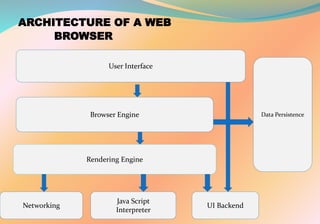
ARCHITECTURE OF A WEB
BROWSER
User Interface
Browser Engine
Rendering Engine
Networking
Java Script
Interpreter
UI Backend
Data Persistence
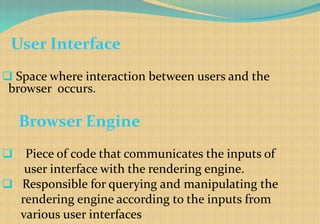
User Interface
 Space where interaction between users and the
browser occurs.
Browser Engine
 Piece of code that communicates the inputs of
user interface with the rendering engine.
 Responsible for querying and manipulating the
rendering engine according to the inputs from
various user interfaces
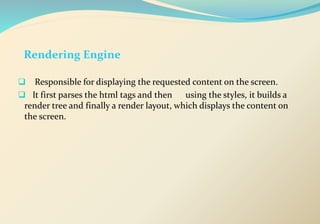
Rendering Engine
 Responsible for displaying the requested content on the screen.
 It first parses the html tags and then using the styles, it builds a
render tree and finally a render layout, which displays the content on
the screen.
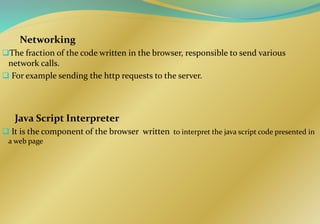
Networking
The fraction of the code written in the browser, responsible to send various
network calls.
 For example sending the http requests to the server.

Java Script Interpreter
 It is the component of the browser written to interpret the java script code presented in
a web page
UI Backend
 This draws basic widgets on the browser like combo boxes, windows, etc.
Data Storage
 It is small database created on the local drive of the computer where the browser is installed.
This database stores various files like cache, cookies, etc.
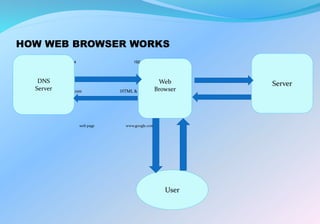
HOW WEB BROWSER WORKS
192.168.1.4 192.168.1.4
www.google.com HTML & other files
web page www.google.com
DNS
Server
Web
Browser
Server
User
HISTORY
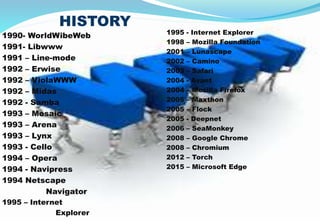
1990- WorldWibeWeb
1991- Libwww
1991 – Line-mode
1992 – Erwise
1992 – ViolaWWW
1992 – Midas
1992 - Samba
1993 – Mosaic
1993 – Arena
1993 – Lynx
1993 - Cello
1994 – Opera
1994 - Navipress
1994 Netscape
Navigator
1995 – Internet
Explorer
1995 - Internet Explorer
1998 – Mozilla Foundation
2001 – Lunascape
2002 – Camino
2003 – Safari
2004 - Avant
2004 – Mozilla Firefox
2005 – Maxthon
2005 – Flock
2005 - Deepnet
2006 – SeaMonkey
2008 – Google Chrome
2008 – Chromium
2012 – Torch
2015 – Microsoft Edge
HISTORY
 World’s first web browser
WorldWideWeb
 Developed by Tim Berner Lee
the inventer of web
Renamed to Nexus
TIM berners
lee
Inventor of web $ first web browser
Berners-lee and a
student at CERN ported the
WorldWideWeb to the
common C language in
1991 and 1992 calling the
new web browser Libwww
HISTORY
The next web browser was Line-mode
Wrote by a math student, Nicola pellow interning at CERN
 Work at any device , even teletype
World’s first graphical
point and click browser
was Erwise, developed
by four students at the
Helsinki University of
Technology.
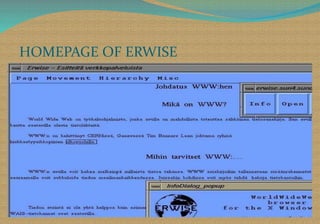
HOMEPAGE OF ERWISE
HISTORY
next web browser was ViolaWWW was launched in May 1992. It was written by Pie-
Yuan Wei, student of California University.
 Another browser was Midas, released in November of 1992,developed by Tony
Johnson at SLAC.
HISTORY
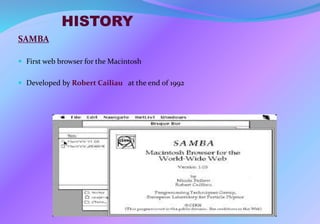
SAMBA
 First web browser for the Macintosh
 Developed by Robert Cailiau at the end of 1992
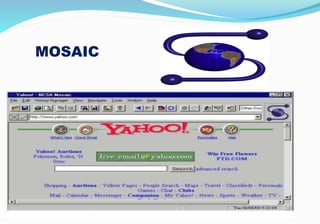
MOSAIC
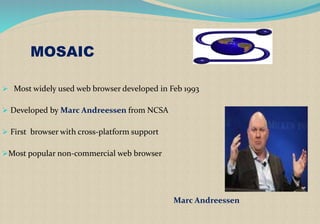
MOSAIC
 Most widely used web browser developed in Feb 1993
 Developed by Marc Andreessen from NCSA
 First browser with cross-platform support
Most popular non-commercial web browser
Marc Andreessen
HISTORYARENA
 Released in 1993
 Developed by Dave Raggett at Hewlett-
Packard in Bristol, England .
 Powerful features for graphics
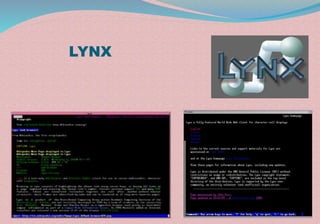
LYNX
 University of Kansaas had written this browser ,
used to distribute campus information
 Released in 1993
 A student named Lou Montulli added an Internet interface to program and released web
browser Lynx 2.0 in March 1993

LYNX
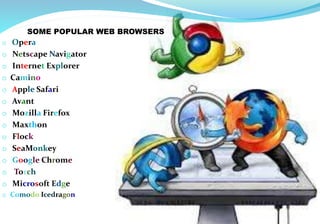
SOME POPULAR WEB BROWSERS
o Opera
o Netscape Navigator
o Internet Explorer
o Camino
o Apple Safari
o Avant
o Mozilla Firefox
o Maxthon
o Flock
o SeaMonkey
o Google Chrome
o Torch
o Microsoft Edge
o Comodo Icedragon
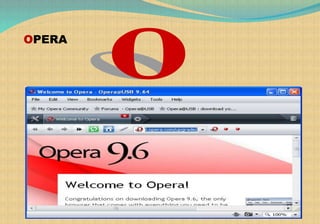
OPERA
OPERA
Developer – Opera Software
Year - First version 2.0 in 1996 for Microsoft windows
 - Opera 4.0, released in 2000,included a new cross- Platform
core that facilitated creation of editions of Opera
for multiple operating systems and platforms[
Runs On – Microsoft window, Linux,
Mac, Android ,Window
Mobile
Written in – C++
Website Link – www.opera.com
Latest Version – 35.0.2066.68 for windows,
Linux and Mac
- released in Feb 15,2016
FEATURES
• Powerful web browser for Mobiles
• Opera web browser began in 1994 when it was started as a research project
at Telenor, the largest Norwegian telecommunications company
• In 1995, the project branched out into a separate company named Opera Software
ASA
• Usability, Accessibility, Privacy, Security, Fast
• Duplicate this tab
• Go to URL
• Reload every 30 seconds .
• Fit to window width
• Rewind
• Tab closing
• Crash recovery
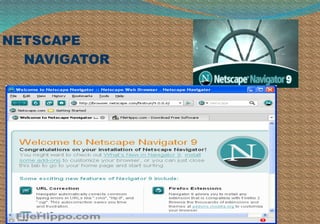
NETSCAPE
NAVIGATOR
NETSCAPE NAVIGATOR
Developer – Netscape Communication
Corporation
Inventor – Marc Andreessen
Year - December 15,1994
Runs on – Microsoft window, Mac
Written in – C++, Java script and CSS
Website - archive.netscape.com
Latest Version - 9.0.0.6
for windows and Mac
- released in Feb 22,2008
FEATURES
 best browser in early days of net surfing
 Improved greatly on mosaic browser
 Made the internet colorful place
 Based on Mosaic browser
 Faster and secure browser
INTERNET EXPLORER
ALSO CALLED
IE
INTERNET EXPLORER
 Developed by – Microsoft
 Year - August 16,1995
 Runs on – Microsoft Windows, Solaris,
OS X
 Written in – CSS, JavaScript, SVG,
XHTML, C++
 Website – microsoft.com/ie
 Latest version – IE 11
FEATURE
o Internet Explorer Browser known as Chakra
o IE9 is the most energy-efficient browser
o Mostly used throughout the world
o Hardware acceleration
o Performance
o Fast installation
o Performance and Speed
o This browser is integrated with the Window Operating System
since become standard browser from Microsoft
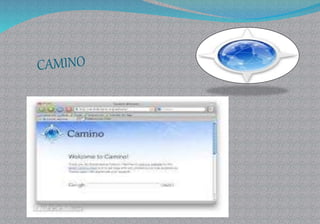
CAMINO
 Developer – The Camino Project
 Year - Feb 13,2002
 Runs on – OS X
 Written in – Objective –C Cocoa
 Website Link – caminobrowser.org
 Latest version – 2.1.2 released in
March 14,2012
FEATURES
• Location Bar Autocomplete
• Tab Overview
• Phishing & Malware Protection
• Annoyance Blocking
• Keychain Support
• Tabbed Browsing
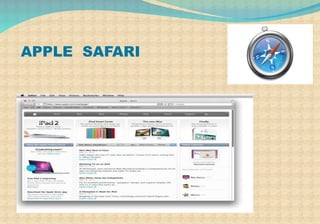
APPLE SAFARI
APPLE SAFARI
 Developer - Steve Jobs
- Apple Inc. in Jan 2003
 Runs on – Window XP, window vista,
Mac OS
 Written in – C++
 Website Link - www.apple.com/safari
 Latest version – 9.0.3(Mac OS) released in Jan
15,2016
- 5.1.7(windows) released in May 9,2013
FEATURES
 Speed
 Ease of use
 URL Path Navigation
 Web Inspector
 Activity Window
 Inline Dictionary
 Selection to Speech
 Quick Notes
 Email Page Link
 Page-load times impressive
 Provides all of security features
 Cleans up unnecessary junk
 Great for Mac users and free to
download
 Speed compatibility
 Extremely Fast to download for Mac
users
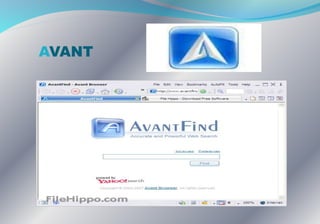
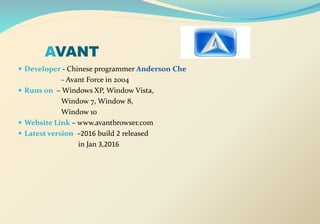
AVANT
AVANT
 Developer - Chinese programmer Anderson Che
- Avant Force in 2004
 Runs on – Windows XP, Window Vista,
Window 7, Window 8,
Window 10
 Website Link – www.avantbrowser.com
 Latest version –2016 build 2 released
in Jan 3,2016
FEATURES
 Faster, Secure and supported many operating system.
 No ADs, No Malwares!
 Multi-Processing
 Lowest Memory Usage Web Browser
 Video Sniffer
 Download Accelerator
 Private Browsing
 No Memory Leak
 Fast, Low CPU usage
 Web Form Auto-Filler / Startup Login
 AD/Popup Blocker Multi-Document Interface
 Multi-Document Interface
 Online Bookmarks
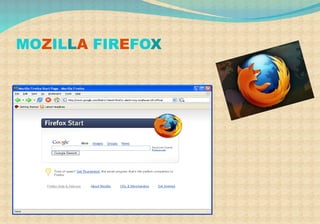
MOZILLA FIREFOX
MOZILLA FIREFOX
Developer - Mozilla corporation
Year - September 23, 2002
Runs on – Microsoft Window, Unix,
Mac OS X, Android, Solaris
Written in – C/C++, JavaScript, CSS,
XUL, XBL
Website Link - www.firefox.com
Latest version – 44.0.2 for desktop
and Android released in
Feb 11,2016
FEATURES
 Original older name Phoenix,
 Then changed to Mozilla Firebird.
 In Feb 2004,Its name becomes Mozilla Firefox
 Privacy, Security and faster
 “Remember password” handling
 Smart Location Bar learns how you browse
 Open Source
 Add-ons
 Tab Management
 Strong Security System
 For business downloaded, the browser is also okay because
it integrates with Internet Download Manager (IDM)
MAXTHON
MAXTHON
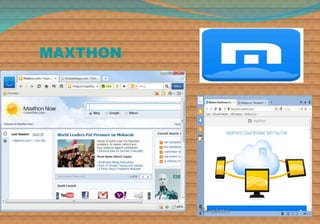
Developer - Maxthon International Limited
Year – 2005
Runs on – Microsoft window, Android,
window phone , Linux
Written in – JavaScript, C++,HTML
Website Link – www.maxthon.com
Latest Version – 4.9.1.100 released in
Feb 18,2016
FEATURES
Originally known as MyIE2
Developed in china
 Winner of Web ware 100 award in 2008 and 2009
 First Web browser to offer cloud based service
 Based on MyIE
Saves open tabs in case of program shutdown or system crash
RSS reader
Automatic updates
Undo for any tabs accidentally close
Tabbed document interface
 Blocks pop-up ads,
Groups – the ability to bookmark & open multiple pages simultaneously
URL aliases – open URLs by just typing a word in the address bar
DEEPNET
EXPLORER
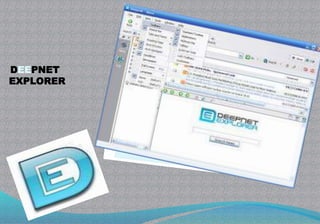
DEEPNET EXPLORER
Developer- Deepnet Security
Release - 2005
Runs on - windows
Website link – deepnet explorer.com
Latest version - 1.5.3 Beta 3
in Feb 19,2007
FEATURES
World’s first browser with
 RSS news reader,P2P client
 Integration and phishing alarm
web +P2P+news
Tabbed browsing
 Multistate Page
Content Filter
Cookie Manager
Auto Login
Form Filler
Direct Search
Super Drag & Drop
File Sharing
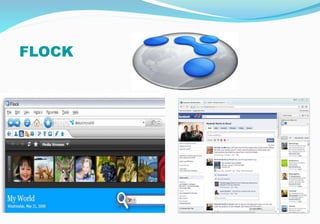
FLOCK
FLOCK
 Developer – Flock Inc.
Year- April 11,2005
Runs on – Windows, Free BSD, Linux,
Mac OS X
Written in – C++, XBL, XUL, JavaScript
Feature - Media services including
MySpace, Yahoo, YouTube,
Twitter, Blogger, Gmail
Website Link – www.flockcommunications.com
FEATURES
Flock is technically a separate browser with an
emphasis on Face book, Twitter, and other social
functions on the Web
 Media services including MySpace, Yahoo, YouTube,
Twitter, Blogger, Gmail
The idea of Flock was to encourage users to share what they consume on the Web and
watch what others are doing
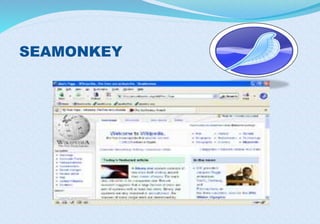
SEAMONKEY
SEAMONKEY
•Developer – SeaMonkey Council
•Year- Jan 30,2006
•Runs on – Windows, OS X, Linux
•Written in – C++, XUL ,XBL,
JavaScript
•Website- www.seamonkeyproject.org
• Latest version – 2.39 released in
Nov 8,2015
FEATURES
SeaMonkey's unique Data Manager serves as a central
management interface for all kinds of site-specific data,
including cookies, permissions (e.g. image blocking),
preferences, passwords and form data.
Popup blocker lets you surf the web without
interruption from annoying ads.
Safe Mode can help you solve problems that might occur,
e.g. with incompatible add-ons
Lightweight themes
Smart location bar, popup blocker
For newsgroup, E-mail, Feeds
GOOGLE CHROME
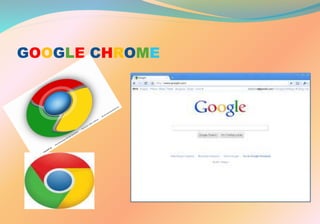
GOOGLE CHROME
 Developer – Google Inc.
Year – September 2,2008
Runs on – Microsoft window,
Linux, Mac OS X
Written in –C++, Python,
JavaScript, Assembly
Feature –Secure, fast and stable
faster than other web browser
Website Link – www.goole.com/chrome
GOOGLE CHROME
Latest Versions
 Windows, OS X, Linux - 48.0.2564.116 released in February 18, 2016
 Android - 48.0.2564.95 released in January 27, 2016
 iOS - 48.0.2564.87 released in January 27, 2016
FEATURE
• Secure, fast and stable faster than other web browser
• A separate process for each tab
• Create Application Shortcuts For Your Favorite Websites
• Synchronize Bookmarks Across Browsers
• Task Manager for Your Chrome Browser
• Check Memory Used By Different Browsers
• Chrome “Pin Tab” Feature More control over your tabs
• More dynamic home page for common used search
• engines and bookmarks
• More speed and won’t slow down on your browsing through internet
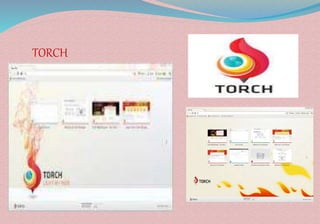
TORCH
TORCH
• Developer – Torch Media Inc.
• Year – June 18,2012
• Runs on – Window XP SP2, Mac OS X
• Written in – C++
• Website link - www.torchbrowser.com
• Latest version – 42.0.0.10802 released in
Dec 11,2015 for windows
FEATURES
• Built-in torrents
•Accelerating downloads
•Easy sharing
• Grabbing online media
MICROSOFT EDGE
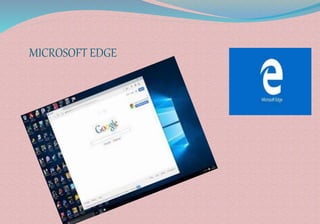
MICROSOFT EDGE
 Developer - Microsoft
 Runs on – windows 10, window 10
 mobile, windows server
 2016, Xbox one
 Written in – C++
 Website link –www.browserfordoing.com
 Latest version – 31.14271.1000 for window 10
released in Feb 24,2016
- 31.14267.1004 for window 10
mobile released in Feb 24,2016
MICROSOFT EDGE
 In December 2014, Mary Jo Foley reported that Microsoft was developing a new web browser
codenamed "Spartan" for Windows 10. She claimed that "Spartan" would be treated as a new
product separate from Internet Explorer, with Internet Explorer 11.
 In early January 2015, The Verge obtained further details surrounding "Spartan" from sources
close to Microsoft, including reports that it would replace Internet Explorer on both the desktop
and mobile versions of Windows 10.Microsoft officially unveiled "Spartan" during a Windows 10-
focused keynote on January 21, 2015
 Spartan" was first made publicly available as the default browser of Windows 10 Technical
Preview build 10049, released on March 30, 2015.The new engine used by "Spartan" was available
in Windows 10 builds as part of Internet Explorer 11
 On April 29, 2015, during the Build Conference keynote, it was announced that "Spartan" would
officially be known as Microsoft Edge. The browser's logo and branding was designed to
maintain continuity with the branding of Internet Explorer
FEATURES
 Doodle Directly on a Web Page
 Get Rid of Distractions
 Lightweight design
 Create a Sophisticated Reading List
 Instant answers
 Sharing via Integrated Share Panel
 Pin Web Pages to the Start Menu
 Analyze Your Site’s Performance
 Be Safe from Troublesome Extensions
 Dig Up Internet Explorer
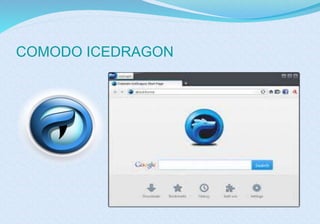
COMODO ICEDRAGON
COMODO ICEDRAGON
Developer – Comodo group
Runs on – Windows
Release – December 4,2015
Engine – Firefox
Website – icedragon.comodo.com
FEATURE
 Based on Firefox 40.1.1.18
 SiteInspector malware detection system
 Allows one to check whether a web page is malicious before they actually visit that
page
 Offers Comodo's Secure DNS Service to users
 Produce faster page loads and safer browsing
 Real-time block list of harmful websites
 Social media integration
 Portable
TOP 5 WEB BROWSER IN WORLD
oGOOGLE CHROME
oFIREFOX
oINTERNET EXPLORER
oSAFARI
oOPERA
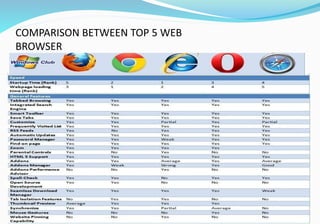
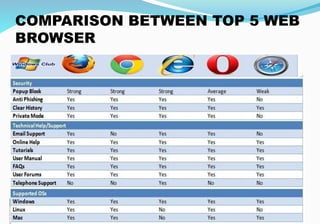
COMPARISON BETWEEN TOP 5 WEB
BROWSER
COMPARISON BETWEEN TOP 5 WEB
BROWSER
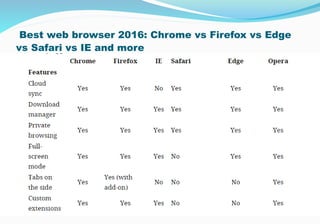
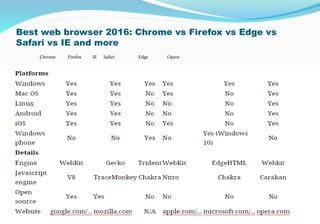
Best web browser 2016: Chrome vs Firefox vs Edge
vs Safari vs IE and more
Best web browser 2016: Chrome vs Firefox vs Edge vs
Safari vs IE and more
Chrome Firefox IE Safari Edge Opera
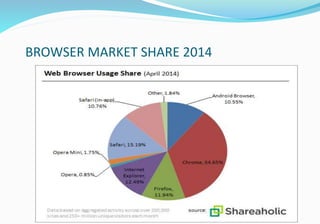
BROWSER MARKET SHARE 2014
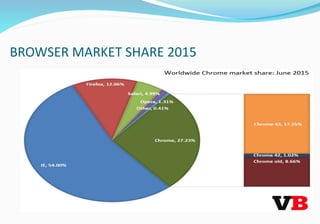
BROWSER MARKET SHARE 2015
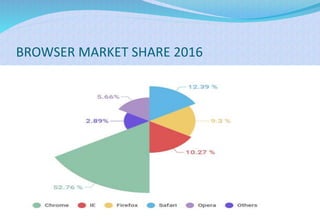
BROWSER MARKET SHARE 2016
web browser ppt
web browser ppt
web browser ppt

web browser ppt

  • 1.
  • 2.
    CONTENTS  INTRODUCTION ARCHITECTURE HOW ITWORKS HISTORY SOME POPULAR WEB BROWSERS TOP 5 WEB BROWSERS Advantages Disadvantages COMPARISON BROWSER MARKET SHARE
  • 3.
    WEB BROWSER Act asan interface between the user and web server Software application that reside on a computer and is used to locate and display pages It accesses information provided by web servers Retrieve, presents and traverse information resources on the world wide web
  • 4.
    ARCHITECTURE OF AWEB BROWSER User Interface Browser Engine Rendering Engine Networking Java Script Interpreter UI Backend Data Persistence
  • 5.
    User Interface  Spacewhere interaction between users and the browser occurs. Browser Engine  Piece of code that communicates the inputs of user interface with the rendering engine.  Responsible for querying and manipulating the rendering engine according to the inputs from various user interfaces
  • 6.
    Rendering Engine  Responsiblefor displaying the requested content on the screen.  It first parses the html tags and then using the styles, it builds a render tree and finally a render layout, which displays the content on the screen.
  • 7.
    Networking The fraction ofthe code written in the browser, responsible to send various network calls.  For example sending the http requests to the server. Java Script Interpreter  It is the component of the browser written to interpret the java script code presented in a web page
  • 8.
    UI Backend  Thisdraws basic widgets on the browser like combo boxes, windows, etc. Data Storage  It is small database created on the local drive of the computer where the browser is installed. This database stores various files like cache, cookies, etc.
  • 9.
    HOW WEB BROWSERWORKS 192.168.1.4 192.168.1.4 www.google.com HTML & other files web page www.google.com DNS Server Web Browser Server User
  • 10.
    HISTORY 1990- WorldWibeWeb 1991- Libwww 1991– Line-mode 1992 – Erwise 1992 – ViolaWWW 1992 – Midas 1992 - Samba 1993 – Mosaic 1993 – Arena 1993 – Lynx 1993 - Cello 1994 – Opera 1994 - Navipress 1994 Netscape Navigator 1995 – Internet Explorer 1995 - Internet Explorer 1998 – Mozilla Foundation 2001 – Lunascape 2002 – Camino 2003 – Safari 2004 - Avant 2004 – Mozilla Firefox 2005 – Maxthon 2005 – Flock 2005 - Deepnet 2006 – SeaMonkey 2008 – Google Chrome 2008 – Chromium 2012 – Torch 2015 – Microsoft Edge
  • 11.
    HISTORY  World’s firstweb browser WorldWideWeb  Developed by Tim Berner Lee the inventer of web Renamed to Nexus
  • 12.
    TIM berners lee Inventor ofweb $ first web browser
  • 13.
    Berners-lee and a studentat CERN ported the WorldWideWeb to the common C language in 1991 and 1992 calling the new web browser Libwww
  • 14.
    HISTORY The next webbrowser was Line-mode Wrote by a math student, Nicola pellow interning at CERN  Work at any device , even teletype
  • 15.
    World’s first graphical pointand click browser was Erwise, developed by four students at the Helsinki University of Technology.
  • 16.
  • 17.
    HISTORY next web browserwas ViolaWWW was launched in May 1992. It was written by Pie- Yuan Wei, student of California University.  Another browser was Midas, released in November of 1992,developed by Tony Johnson at SLAC.
  • 18.
    HISTORY SAMBA  First webbrowser for the Macintosh  Developed by Robert Cailiau at the end of 1992
  • 19.
  • 20.
    MOSAIC  Most widelyused web browser developed in Feb 1993  Developed by Marc Andreessen from NCSA  First browser with cross-platform support Most popular non-commercial web browser Marc Andreessen
  • 21.
    HISTORYARENA  Released in1993  Developed by Dave Raggett at Hewlett- Packard in Bristol, England .  Powerful features for graphics LYNX  University of Kansaas had written this browser , used to distribute campus information  Released in 1993  A student named Lou Montulli added an Internet interface to program and released web browser Lynx 2.0 in March 1993 
  • 22.
  • 23.
    SOME POPULAR WEBBROWSERS o Opera o Netscape Navigator o Internet Explorer o Camino o Apple Safari o Avant o Mozilla Firefox o Maxthon o Flock o SeaMonkey o Google Chrome o Torch o Microsoft Edge o Comodo Icedragon
  • 24.
  • 25.
    OPERA Developer – OperaSoftware Year - First version 2.0 in 1996 for Microsoft windows  - Opera 4.0, released in 2000,included a new cross- Platform core that facilitated creation of editions of Opera for multiple operating systems and platforms[ Runs On – Microsoft window, Linux, Mac, Android ,Window Mobile Written in – C++ Website Link – www.opera.com Latest Version – 35.0.2066.68 for windows, Linux and Mac - released in Feb 15,2016
  • 26.
    FEATURES • Powerful webbrowser for Mobiles • Opera web browser began in 1994 when it was started as a research project at Telenor, the largest Norwegian telecommunications company • In 1995, the project branched out into a separate company named Opera Software ASA • Usability, Accessibility, Privacy, Security, Fast • Duplicate this tab • Go to URL • Reload every 30 seconds . • Fit to window width • Rewind • Tab closing • Crash recovery
  • 27.
  • 28.
    NETSCAPE NAVIGATOR Developer –Netscape Communication Corporation Inventor – Marc Andreessen Year - December 15,1994 Runs on – Microsoft window, Mac Written in – C++, Java script and CSS Website - archive.netscape.com Latest Version - 9.0.0.6 for windows and Mac - released in Feb 22,2008
  • 29.
    FEATURES  best browserin early days of net surfing  Improved greatly on mosaic browser  Made the internet colorful place  Based on Mosaic browser  Faster and secure browser
  • 30.
  • 32.
    INTERNET EXPLORER  Developedby – Microsoft  Year - August 16,1995  Runs on – Microsoft Windows, Solaris, OS X  Written in – CSS, JavaScript, SVG, XHTML, C++  Website – microsoft.com/ie  Latest version – IE 11
  • 33.
    FEATURE o Internet ExplorerBrowser known as Chakra o IE9 is the most energy-efficient browser o Mostly used throughout the world o Hardware acceleration o Performance o Fast installation o Performance and Speed o This browser is integrated with the Window Operating System since become standard browser from Microsoft
  • 35.
    CAMINO  Developer –The Camino Project  Year - Feb 13,2002  Runs on – OS X  Written in – Objective –C Cocoa  Website Link – caminobrowser.org  Latest version – 2.1.2 released in March 14,2012
  • 36.
    FEATURES • Location BarAutocomplete • Tab Overview • Phishing & Malware Protection • Annoyance Blocking • Keychain Support • Tabbed Browsing
  • 37.
  • 39.
    APPLE SAFARI  Developer- Steve Jobs - Apple Inc. in Jan 2003  Runs on – Window XP, window vista, Mac OS  Written in – C++  Website Link - www.apple.com/safari  Latest version – 9.0.3(Mac OS) released in Jan 15,2016 - 5.1.7(windows) released in May 9,2013
  • 40.
    FEATURES  Speed  Easeof use  URL Path Navigation  Web Inspector  Activity Window  Inline Dictionary  Selection to Speech  Quick Notes  Email Page Link  Page-load times impressive  Provides all of security features  Cleans up unnecessary junk  Great for Mac users and free to download  Speed compatibility  Extremely Fast to download for Mac users
  • 41.
  • 42.
    AVANT  Developer -Chinese programmer Anderson Che - Avant Force in 2004  Runs on – Windows XP, Window Vista, Window 7, Window 8, Window 10  Website Link – www.avantbrowser.com  Latest version –2016 build 2 released in Jan 3,2016
  • 44.
    FEATURES  Faster, Secureand supported many operating system.  No ADs, No Malwares!  Multi-Processing  Lowest Memory Usage Web Browser  Video Sniffer  Download Accelerator  Private Browsing  No Memory Leak  Fast, Low CPU usage  Web Form Auto-Filler / Startup Login  AD/Popup Blocker Multi-Document Interface  Multi-Document Interface  Online Bookmarks
  • 45.
  • 46.
    MOZILLA FIREFOX Developer -Mozilla corporation Year - September 23, 2002 Runs on – Microsoft Window, Unix, Mac OS X, Android, Solaris Written in – C/C++, JavaScript, CSS, XUL, XBL Website Link - www.firefox.com Latest version – 44.0.2 for desktop and Android released in Feb 11,2016
  • 47.
    FEATURES  Original oldername Phoenix,  Then changed to Mozilla Firebird.  In Feb 2004,Its name becomes Mozilla Firefox  Privacy, Security and faster  “Remember password” handling  Smart Location Bar learns how you browse  Open Source  Add-ons  Tab Management  Strong Security System  For business downloaded, the browser is also okay because it integrates with Internet Download Manager (IDM)
  • 48.
  • 49.
    MAXTHON Developer - MaxthonInternational Limited Year – 2005 Runs on – Microsoft window, Android, window phone , Linux Written in – JavaScript, C++,HTML Website Link – www.maxthon.com Latest Version – 4.9.1.100 released in Feb 18,2016
  • 50.
    FEATURES Originally known asMyIE2 Developed in china  Winner of Web ware 100 award in 2008 and 2009  First Web browser to offer cloud based service  Based on MyIE Saves open tabs in case of program shutdown or system crash RSS reader Automatic updates Undo for any tabs accidentally close Tabbed document interface  Blocks pop-up ads, Groups – the ability to bookmark & open multiple pages simultaneously URL aliases – open URLs by just typing a word in the address bar
  • 51.
  • 52.
    DEEPNET EXPLORER Developer- DeepnetSecurity Release - 2005 Runs on - windows Website link – deepnet explorer.com Latest version - 1.5.3 Beta 3 in Feb 19,2007
  • 53.
    FEATURES World’s first browserwith  RSS news reader,P2P client  Integration and phishing alarm web +P2P+news Tabbed browsing  Multistate Page Content Filter Cookie Manager Auto Login Form Filler Direct Search Super Drag & Drop File Sharing
  • 54.
  • 55.
    FLOCK  Developer –Flock Inc. Year- April 11,2005 Runs on – Windows, Free BSD, Linux, Mac OS X Written in – C++, XBL, XUL, JavaScript Feature - Media services including MySpace, Yahoo, YouTube, Twitter, Blogger, Gmail Website Link – www.flockcommunications.com
  • 56.
    FEATURES Flock is technicallya separate browser with an emphasis on Face book, Twitter, and other social functions on the Web  Media services including MySpace, Yahoo, YouTube, Twitter, Blogger, Gmail The idea of Flock was to encourage users to share what they consume on the Web and watch what others are doing
  • 57.
  • 58.
    SEAMONKEY •Developer – SeaMonkeyCouncil •Year- Jan 30,2006 •Runs on – Windows, OS X, Linux •Written in – C++, XUL ,XBL, JavaScript •Website- www.seamonkeyproject.org • Latest version – 2.39 released in Nov 8,2015
  • 59.
    FEATURES SeaMonkey's unique DataManager serves as a central management interface for all kinds of site-specific data, including cookies, permissions (e.g. image blocking), preferences, passwords and form data. Popup blocker lets you surf the web without interruption from annoying ads. Safe Mode can help you solve problems that might occur, e.g. with incompatible add-ons Lightweight themes Smart location bar, popup blocker For newsgroup, E-mail, Feeds
  • 60.
  • 61.
    GOOGLE CHROME  Developer– Google Inc. Year – September 2,2008 Runs on – Microsoft window, Linux, Mac OS X Written in –C++, Python, JavaScript, Assembly Feature –Secure, fast and stable faster than other web browser Website Link – www.goole.com/chrome
  • 62.
    GOOGLE CHROME Latest Versions Windows, OS X, Linux - 48.0.2564.116 released in February 18, 2016  Android - 48.0.2564.95 released in January 27, 2016  iOS - 48.0.2564.87 released in January 27, 2016
  • 63.
    FEATURE • Secure, fastand stable faster than other web browser • A separate process for each tab • Create Application Shortcuts For Your Favorite Websites • Synchronize Bookmarks Across Browsers • Task Manager for Your Chrome Browser • Check Memory Used By Different Browsers • Chrome “Pin Tab” Feature More control over your tabs • More dynamic home page for common used search • engines and bookmarks • More speed and won’t slow down on your browsing through internet
  • 64.
  • 65.
    TORCH • Developer –Torch Media Inc. • Year – June 18,2012 • Runs on – Window XP SP2, Mac OS X • Written in – C++ • Website link - www.torchbrowser.com • Latest version – 42.0.0.10802 released in Dec 11,2015 for windows
  • 66.
    FEATURES • Built-in torrents •Acceleratingdownloads •Easy sharing • Grabbing online media
  • 67.
  • 68.
    MICROSOFT EDGE  Developer- Microsoft  Runs on – windows 10, window 10  mobile, windows server  2016, Xbox one  Written in – C++  Website link –www.browserfordoing.com  Latest version – 31.14271.1000 for window 10 released in Feb 24,2016 - 31.14267.1004 for window 10 mobile released in Feb 24,2016
  • 69.
    MICROSOFT EDGE  InDecember 2014, Mary Jo Foley reported that Microsoft was developing a new web browser codenamed "Spartan" for Windows 10. She claimed that "Spartan" would be treated as a new product separate from Internet Explorer, with Internet Explorer 11.  In early January 2015, The Verge obtained further details surrounding "Spartan" from sources close to Microsoft, including reports that it would replace Internet Explorer on both the desktop and mobile versions of Windows 10.Microsoft officially unveiled "Spartan" during a Windows 10- focused keynote on January 21, 2015  Spartan" was first made publicly available as the default browser of Windows 10 Technical Preview build 10049, released on March 30, 2015.The new engine used by "Spartan" was available in Windows 10 builds as part of Internet Explorer 11  On April 29, 2015, during the Build Conference keynote, it was announced that "Spartan" would officially be known as Microsoft Edge. The browser's logo and branding was designed to maintain continuity with the branding of Internet Explorer
  • 70.
    FEATURES  Doodle Directlyon a Web Page  Get Rid of Distractions  Lightweight design  Create a Sophisticated Reading List  Instant answers  Sharing via Integrated Share Panel  Pin Web Pages to the Start Menu  Analyze Your Site’s Performance  Be Safe from Troublesome Extensions  Dig Up Internet Explorer
  • 71.
  • 72.
    COMODO ICEDRAGON Developer –Comodo group Runs on – Windows Release – December 4,2015 Engine – Firefox Website – icedragon.comodo.com
  • 73.
    FEATURE  Based onFirefox 40.1.1.18  SiteInspector malware detection system  Allows one to check whether a web page is malicious before they actually visit that page  Offers Comodo's Secure DNS Service to users  Produce faster page loads and safer browsing  Real-time block list of harmful websites  Social media integration  Portable
  • 74.
    TOP 5 WEBBROWSER IN WORLD oGOOGLE CHROME oFIREFOX oINTERNET EXPLORER oSAFARI oOPERA
  • 75.
  • 76.
  • 77.
    Best web browser2016: Chrome vs Firefox vs Edge vs Safari vs IE and more
  • 78.
    Best web browser2016: Chrome vs Firefox vs Edge vs Safari vs IE and more Chrome Firefox IE Safari Edge Opera
  • 79.
  • 80.
  • 81.