IPv4 Address Classes 
The IPv4 address space can be subdivided into 5 classes - Class A, B, C, D 
and E. Each class consists of a contiguous subset of the overall IPv4 
address range. 
With a few special exceptions explained further below, the values of the 
leftmost four bits of an IPv4 address determine its class as follows: 
Class Leftmost bits Start address Finish address 
A 0xxx 0.0.0.0 127.255.255.255 
B 10xx 128.0.0.0 191.255.255.255 
C 110x 192.0.0.0 223.255.255.255 
D 1110 224.0.0.0 239.255.255.255 
E 1111 240.0.0.0 255.255.255.255 
All Class C addresses, for example, have the leftmost three bits set to '110', 
but each of the remaining 29 bits may be set to either '0' or '1' 
independently (as represented by an x in these bit positions): 
110xxxxx xxxxxxxx xxxxxxxx xxxxxxxx 
Converting the above to dotted decimal notation, it follows that all Class C 
addresses fall in the range from 192.0.0.0 through 223.255.255.255.
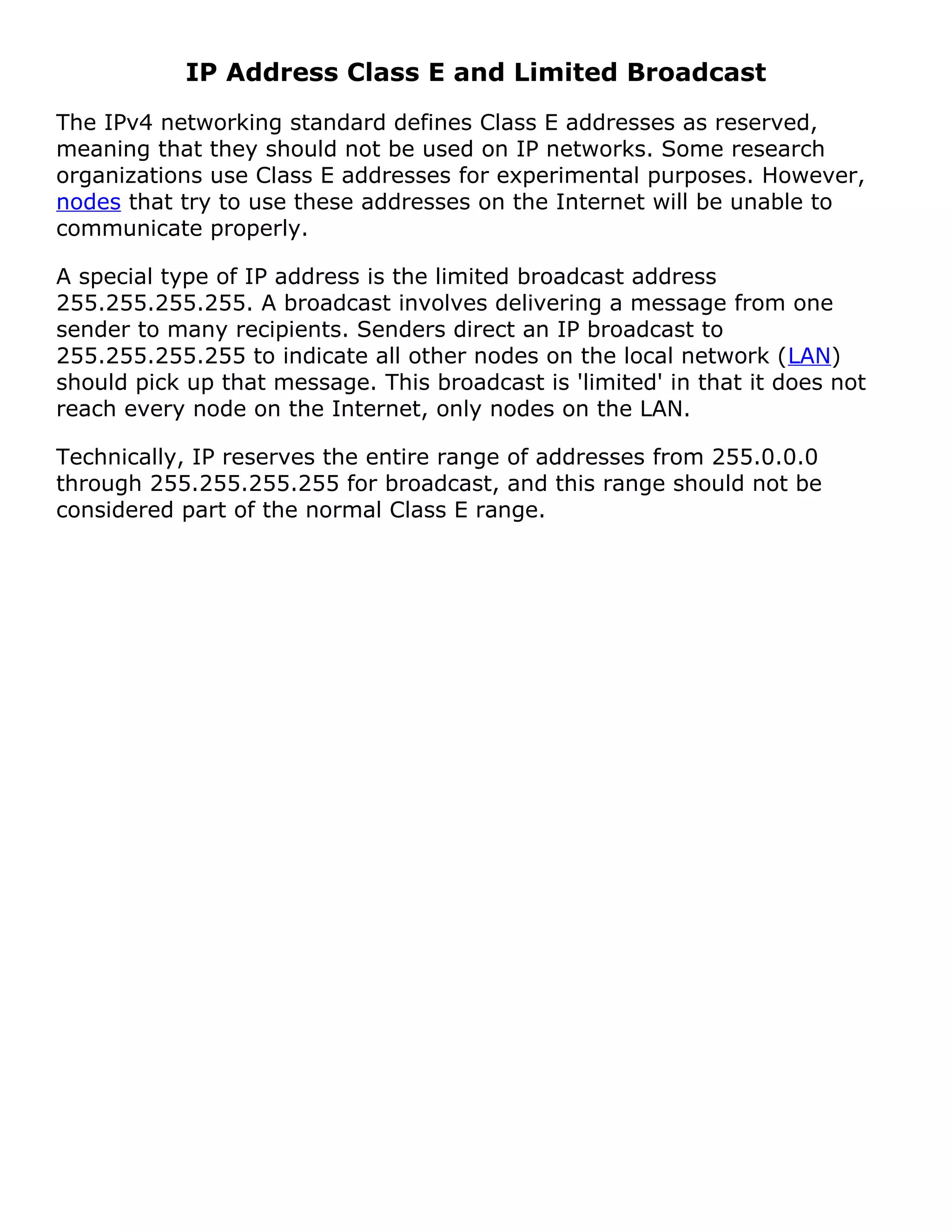
IP Address Class E and Limited Broadcast 
The IPv4 networking standard defines Class E addresses as reserved, 
meaning that they should not be used on IP networks. Some research 
organizations use Class E addresses for experimental purposes. However, 
nodes that try to use these addresses on the Internet will be unable to 
communicate properly. 
A special type of IP address is the limited broadcast address 
255.255.255.255. A broadcast involves delivering a message from one 
sender to many recipients. Senders direct an IP broadcast to 
255.255.255.255 to indicate all other nodes on the local network (LAN) 
should pick up that message. This broadcast is 'limited' in that it does not 
reach every node on the Internet, only nodes on the LAN. 
Technically, IP reserves the entire range of addresses from 255.0.0.0 
through 255.255.255.255 for broadcast, and this range should not be 
considered part of the normal Class E range.
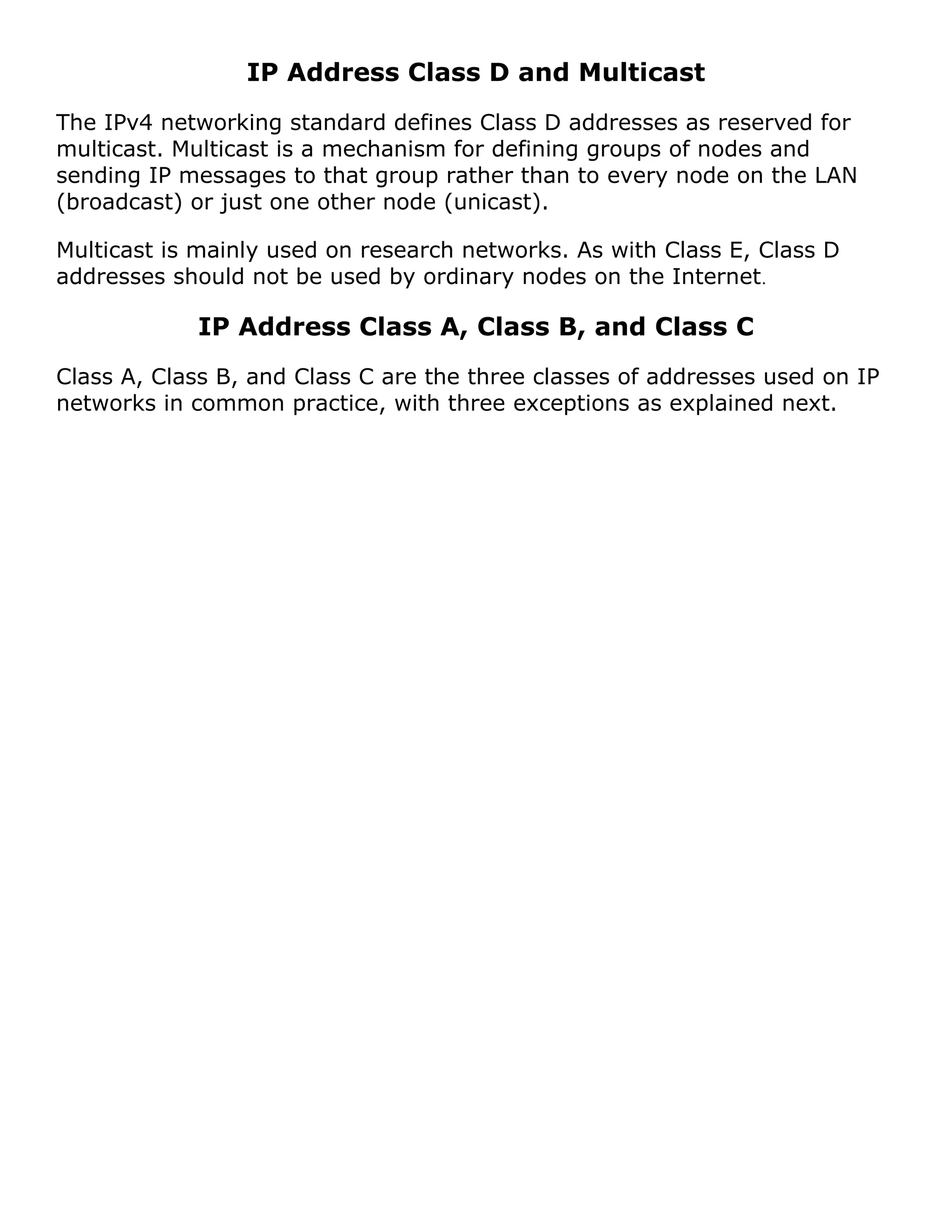
IP Address Class D and Multicast 
The IPv4 networking standard defines Class D addresses as reserved for 
multicast. Multicast is a mechanism for defining groups of nodes and 
sending IP messages to that group rather than to every node on the LAN 
(broadcast) or just one other node (unicast). 
Multicast is mainly used on research networks. As with Class E, Class D 
addresses should not be used by ordinary nodes on the Internet. 
IP Address Class A, Class B, and Class C 
Class A, Class B, and Class C are the three classes of addresses used on IP 
networks in common practice, with three exceptions as explained next.
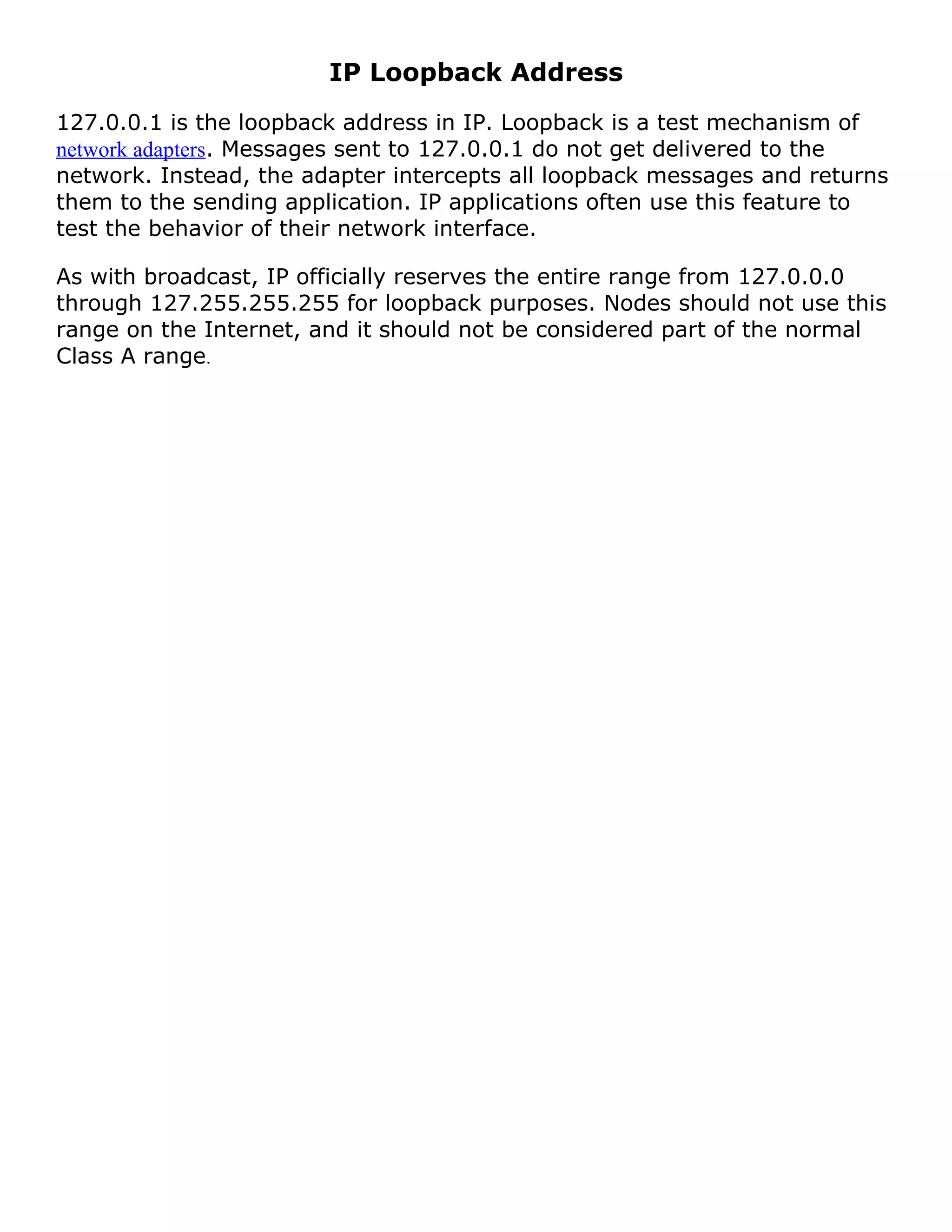
IP Loopback Address 
127.0.0.1 is the loopback address in IP. Loopback is a test mechanism of 
network adapters. Messages sent to 127.0.0.1 do not get delivered to the 
network. Instead, the adapter intercepts all loopback messages and returns 
them to the sending application. IP applications often use this feature to 
test the behavior of their network interface. 
As with broadcast, IP officially reserves the entire range from 127.0.0.0 
through 127.255.255.255 for loopback purposes. Nodes should not use this 
range on the Internet, and it should not be considered part of the normal 
Class A range.
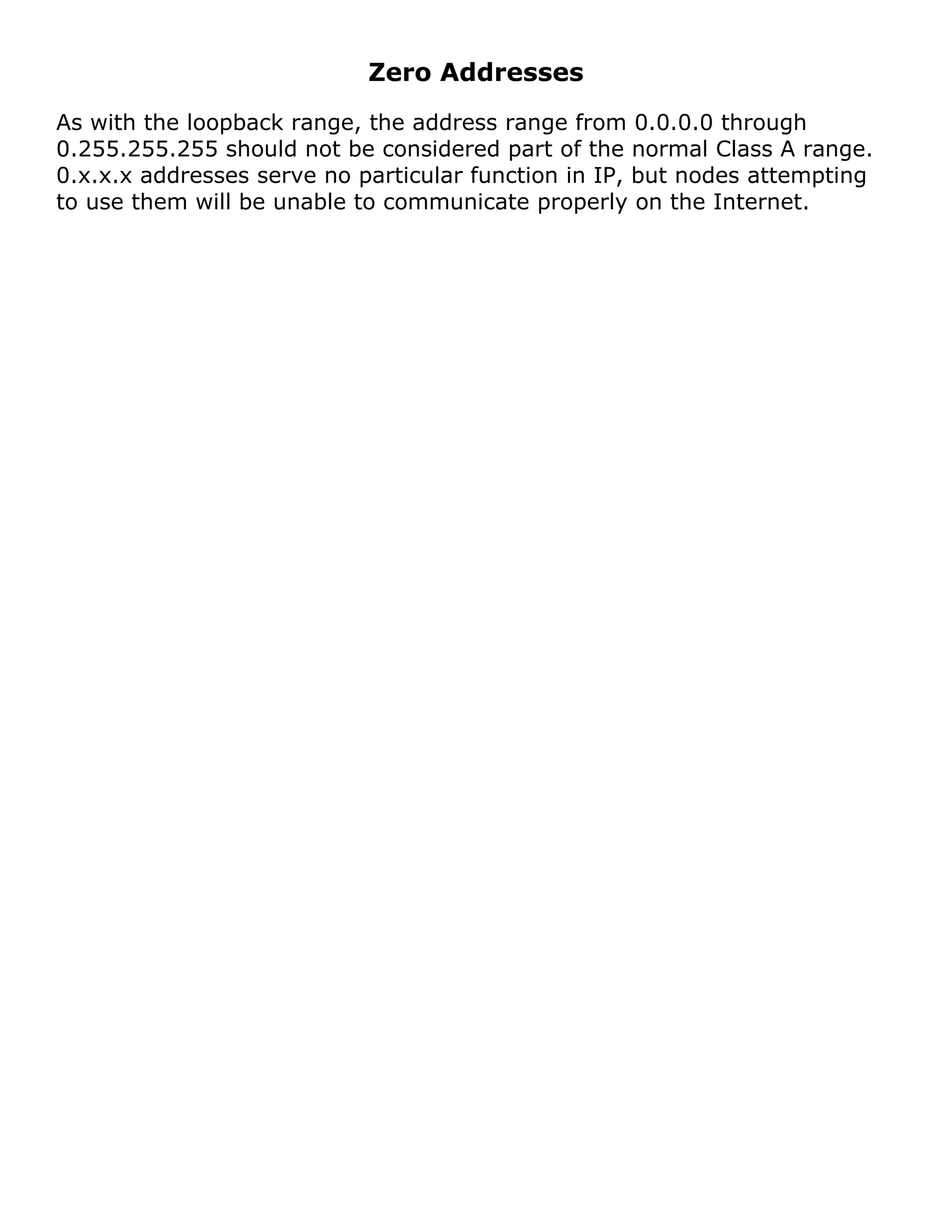
Zero Addresses 
As with the loopback range, the address range from 0.0.0.0 through 
0.255.255.255 should not be considered part of the normal Class A range. 
0.x.x.x addresses serve no particular function in IP, but nodes attempting 
to use them will be unable to communicate properly on the Internet.
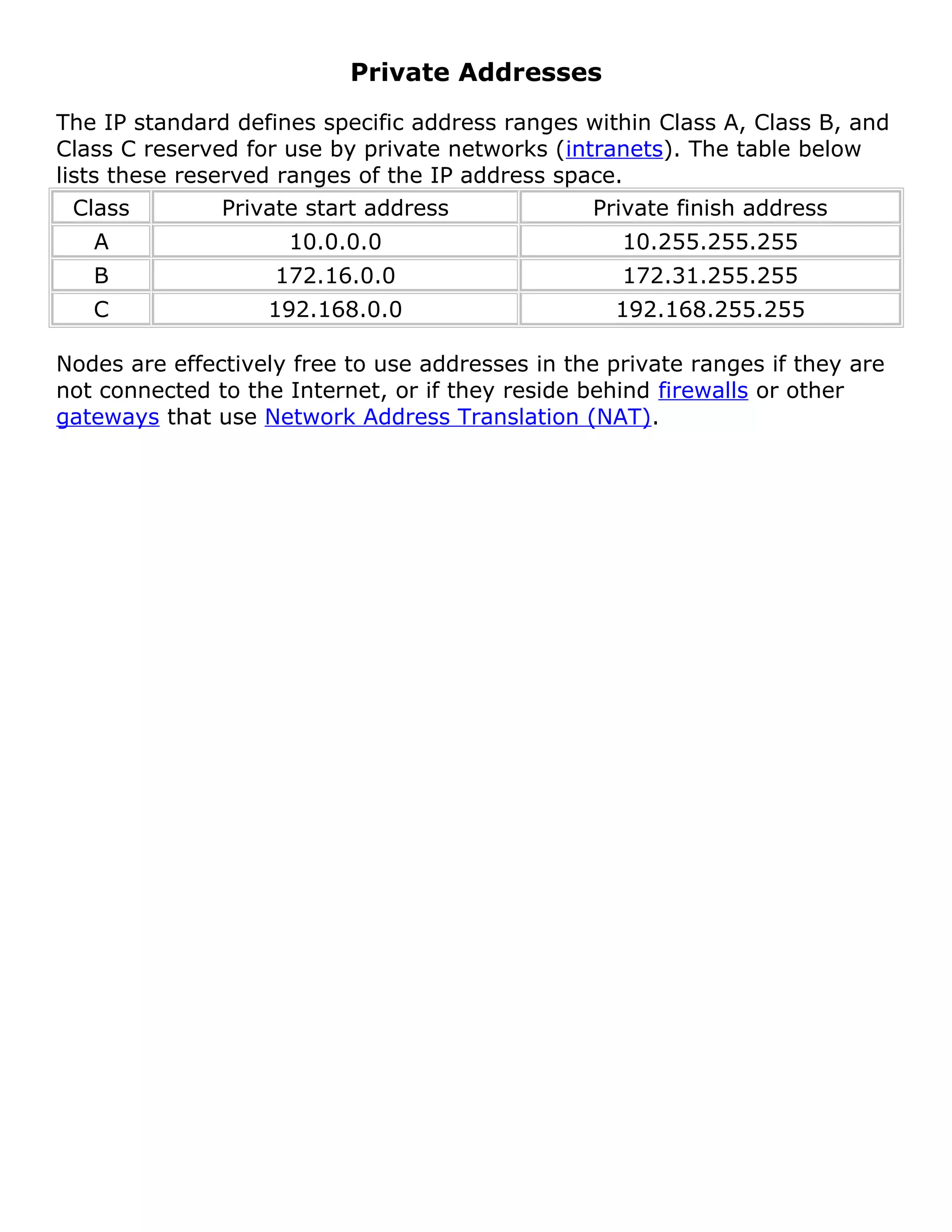
Private Addresses 
The IP standard defines specific address ranges within Class A, Class B, and 
Class C reserved for use by private networks (intranets). The table below 
lists these reserved ranges of the IP address space. 
Class Private start address Private finish address 
A 10.0.0.0 10.255.255.255 
B 172.16.0.0 172.31.255.255 
C 192.168.0.0 192.168.255.255 
Nodes are effectively free to use addresses in the private ranges if they are 
not connected to the Internet, or if they reside behind firewalls or other 
gateways that use Network Address Translation (NAT).
CIDR - Classless Inter-Domain Routing 
IPv4 TCP/IP Subnet Table 
While subnetting might be easy enough to grasp as a concept, it can be a 
bit involved, and even mind-boggling in part due to the required 
manipulations of binary numbers. Many people understand the ideas behind 
subnetting, but find it hard to follow the actual steps required to subnet a 
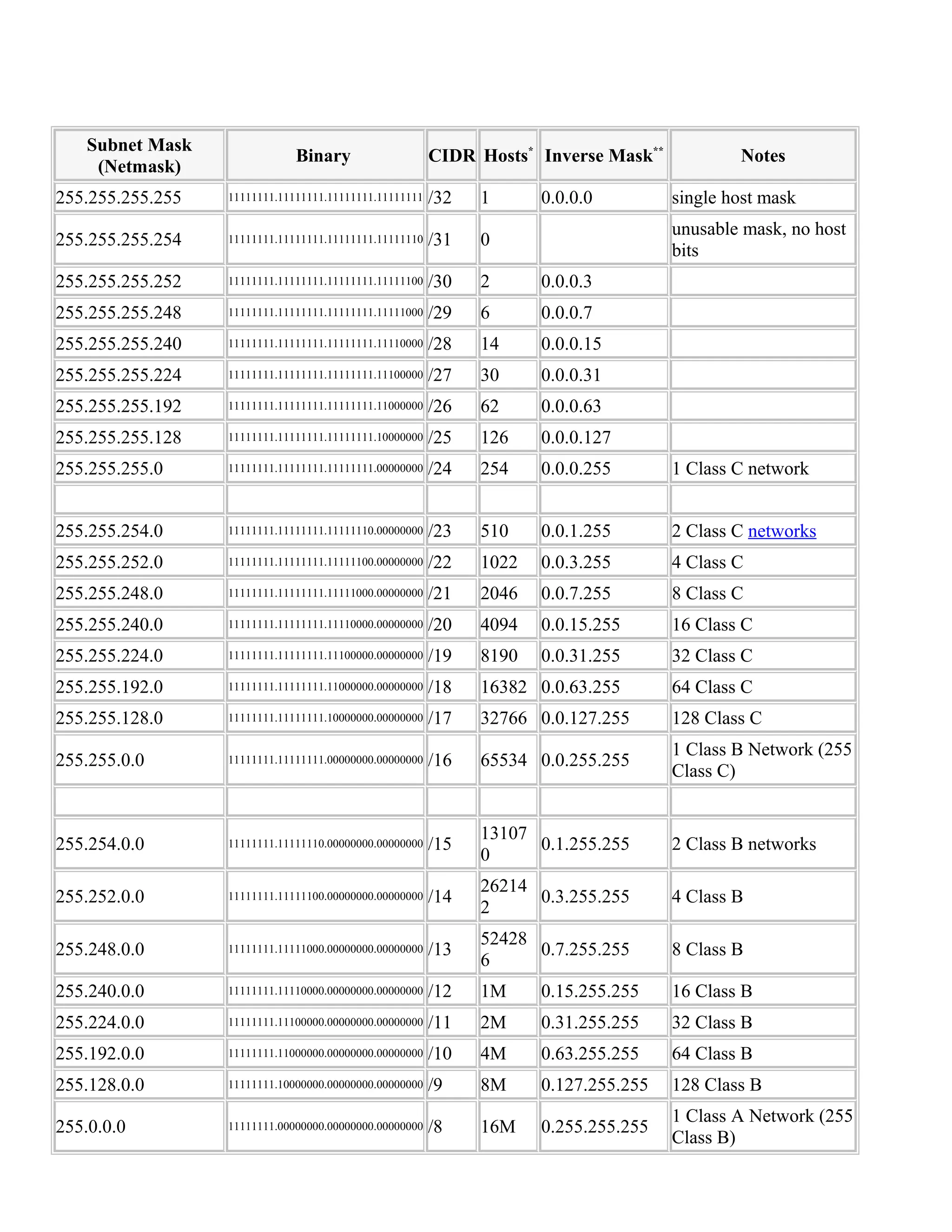
network. The table below is intended as a quick reference and a fairly 
complete example of IPv4 subnetting.
Subnet Mask 
(Netmask) Binary CIDR Hosts* Inverse Mask** Notes 
255.255.255.255 11111111.11111111.11111111.11111111 /32 1 0.0.0.0 single host mask 
255.255.255.254 11111111.11111111.11111111.11111110 /31 0 unusable mask, no host 
bits 
255.255.255.252 11111111.11111111.11111111.11111100 /30 2 0.0.0.3 
255.255.255.248 11111111.11111111.11111111.11111000 /29 6 0.0.0.7 
255.255.255.240 11111111.11111111.11111111.11110000 /28 14 0.0.0.15 
255.255.255.224 11111111.11111111.11111111.11100000 /27 30 0.0.0.31 
255.255.255.192 11111111.11111111.11111111.11000000 /26 62 0.0.0.63 
255.255.255.128 11111111.11111111.11111111.10000000 /25 126 0.0.0.127 
255.255.255.0 11111111.11111111.11111111.00000000 /24 254 0.0.0.255 1 Class C network 
255.255.254.0 11111111.11111111.11111110.00000000 /23 510 0.0.1.255 2 Class C networks 
255.255.252.0 11111111.11111111.11111100.00000000 /22 1022 0.0.3.255 4 Class C 
255.255.248.0 11111111.11111111.11111000.00000000 /21 2046 0.0.7.255 8 Class C 
255.255.240.0 11111111.11111111.11110000.00000000 /20 4094 0.0.15.255 16 Class C 
255.255.224.0 11111111.11111111.11100000.00000000 /19 8190 0.0.31.255 32 Class C 
255.255.192.0 11111111.11111111.11000000.00000000 /18 16382 0.0.63.255 64 Class C 
255.255.128.0 11111111.11111111.10000000.00000000 /17 32766 0.0.127.255 128 Class C 
255.255.0.0 11111111.11111111.00000000.00000000 /16 65534 0.0.255.255 1 Class B Network (255 
Class C) 
255.254.0.0 11111111.11111110.00000000.00000000 /15 13107 
0 0.1.255.255 2 Class B networks 
255.252.0.0 11111111.11111100.00000000.00000000 /14 26214 
2 0.3.255.255 4 Class B 
255.248.0.0 11111111.11111000.00000000.00000000 /13 52428 
6 0.7.255.255 8 Class B 
255.240.0.0 11111111.11110000.00000000.00000000 /12 1M 0.15.255.255 16 Class B 
255.224.0.0 11111111.11100000.00000000.00000000 /11 2M 0.31.255.255 32 Class B 
255.192.0.0 11111111.11000000.00000000.00000000 /10 4M 0.63.255.255 64 Class B 
255.128.0.0 11111111.10000000.00000000.00000000 /9 8M 0.127.255.255 128 Class B 
255.0.0.0 11111111.00000000.00000000.00000000 /8 16M 0.255.255.255 1 Class A Network (255 
Class B)
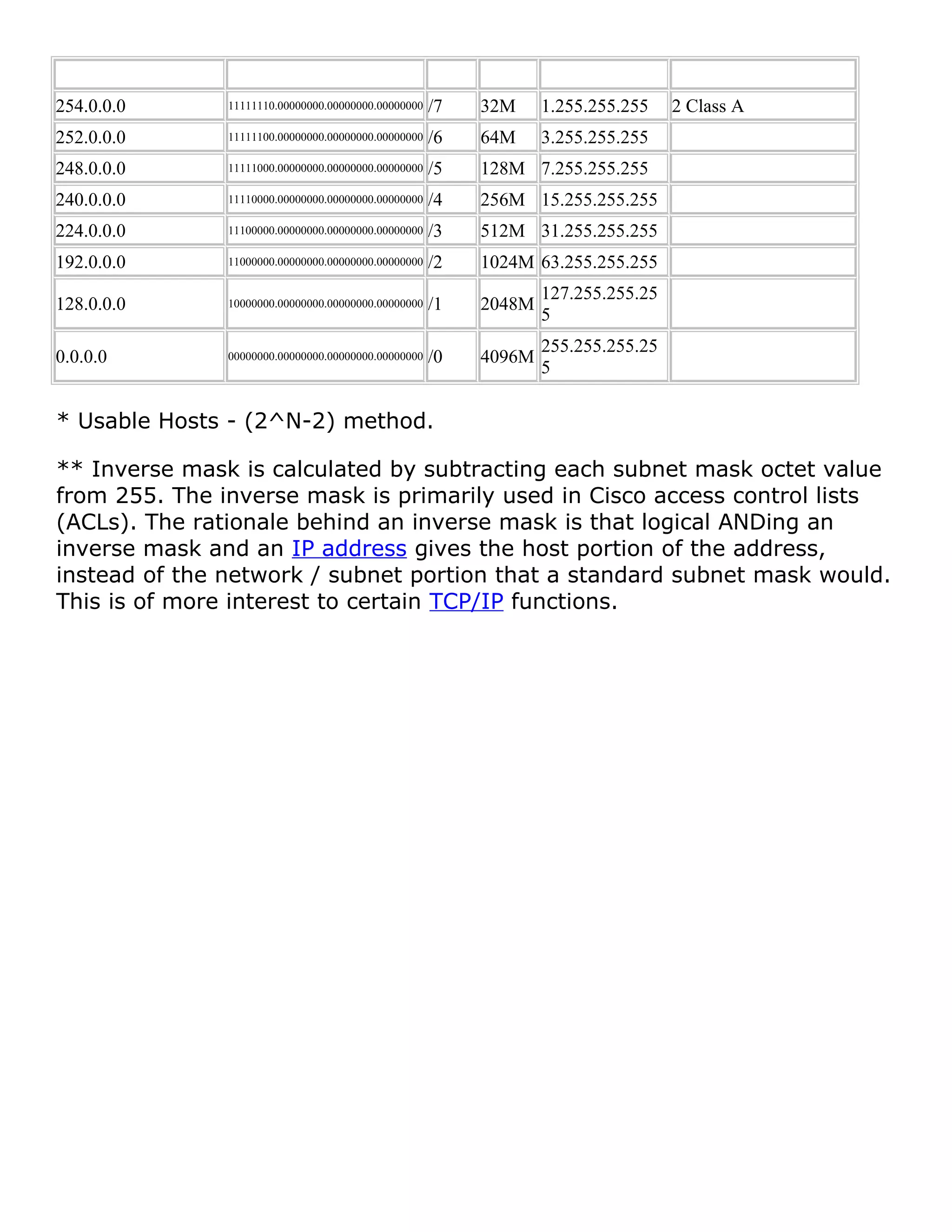
254.0.0.0 11111110.00000000.00000000.00000000 /7 32M 1.255.255.255 2 Class A 
252.0.0.0 11111100.00000000.00000000.00000000 /6 64M 3.255.255.255 
248.0.0.0 11111000.00000000.00000000.00000000 /5 128M 7.255.255.255 
240.0.0.0 11110000.00000000.00000000.00000000 /4 256M 15.255.255.255 
224.0.0.0 11100000.00000000.00000000.00000000 /3 512M 31.255.255.255 
192.0.0.0 11000000.00000000.00000000.00000000 /2 1024M 63.255.255.255 
128.0.0.0 10000000.00000000.00000000.00000000 /1 2048M 127.255.255.25 
5 
0.0.0.0 00000000.00000000.00000000.00000000 /0 4096M 255.255.255.25 
5 
* Usable Hosts - (2^N-2) method. 
** Inverse mask is calculated by subtracting each subnet mask octet value 
from 255. The inverse mask is primarily used in Cisco access control lists 
(ACLs). The rationale behind an inverse mask is that logical ANDing an 
inverse mask and an IP address gives the host portion of the address, 
instead of the network / subnet portion that a standard subnet mask would. 
This is of more interest to certain TCP/IP functions.
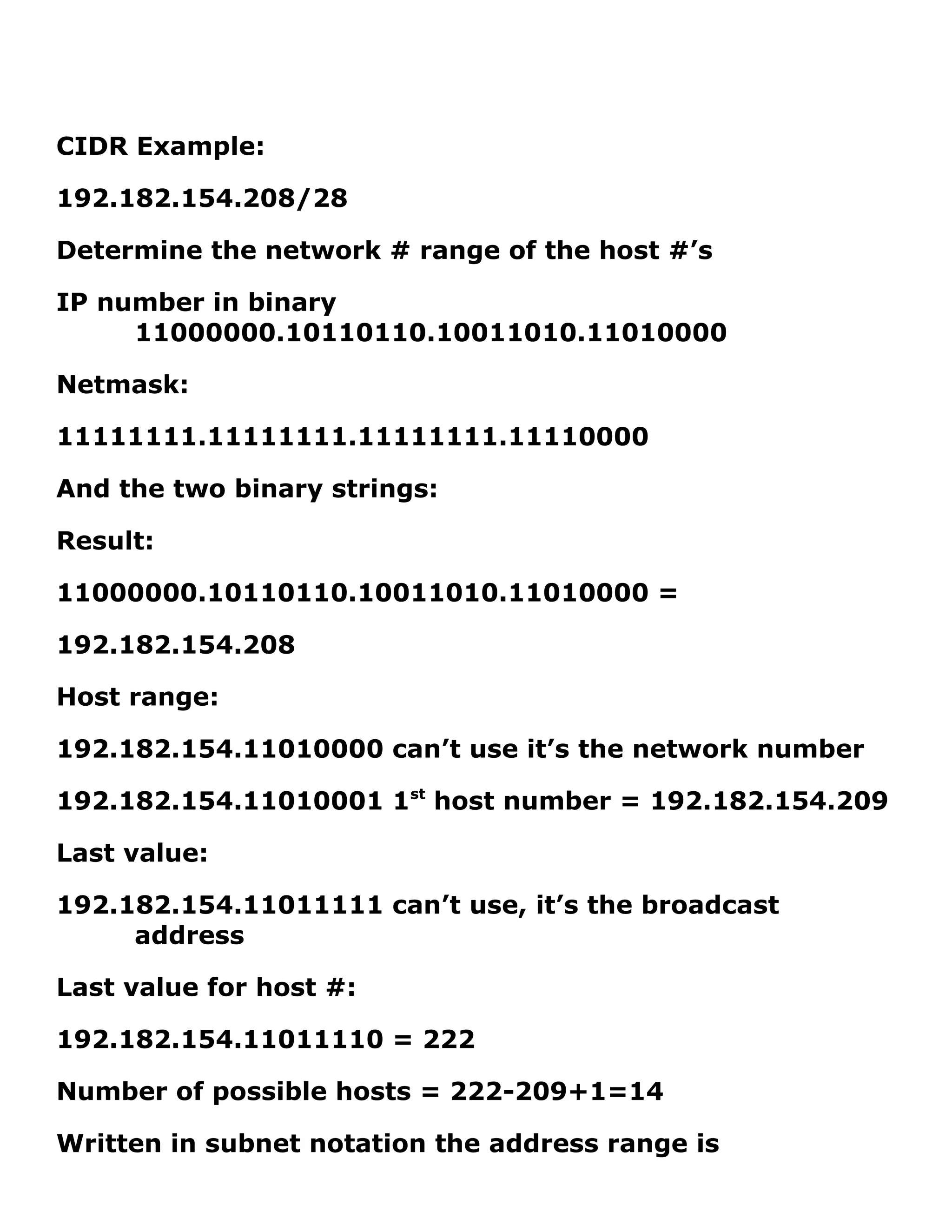
CIDR Example: 
192.182.154.208/28 
Determine the network # range of the host #’s 
IP number in binary 
11000000.10110110.10011010.11010000 
Netmask: 
11111111.11111111.11111111.11110000 
And the two binary strings: 
Result: 
11000000.10110110.10011010.11010000 = 
192.182.154.208 
Host range: 
192.182.154.11010000 can’t use it’s the network number 
192.182.154.11010001 1st host number = 192.182.154.209 
Last value: 
192.182.154.11011111 can’t use, it’s the broadcast 
address 
Last value for host #: 
192.182.154.11011110 = 222 
Number of possible hosts = 222-209+1=14 
Written in subnet notation the address range is
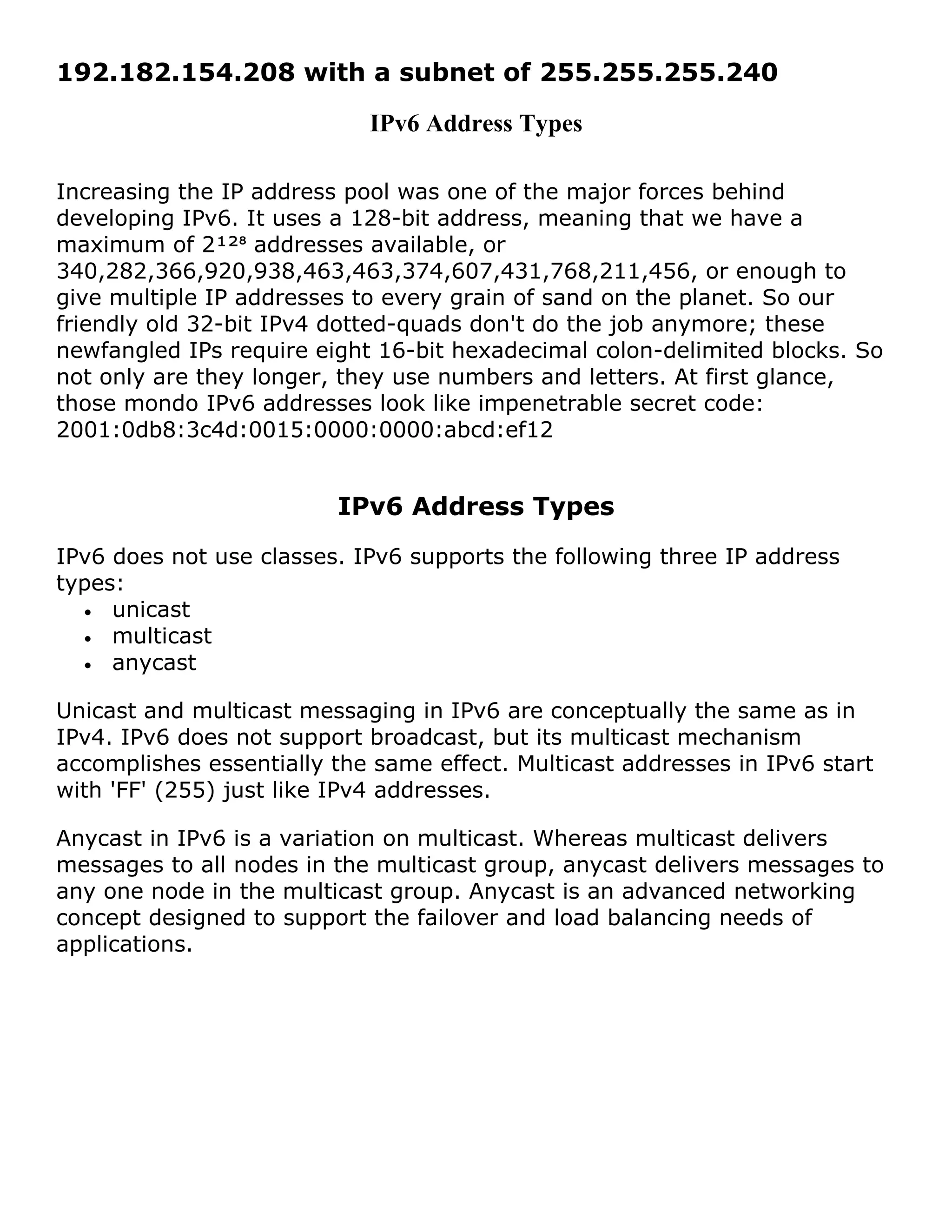
192.182.154.208 with a subnet of 255.255.255.240 
IPv6 Address Types 
Increasing the IP address pool was one of the major forces behind 
developing IPv6. It uses a 128-bit address, meaning that we have a 
maximum of 2¹²⁸ addresses available, or 
340,282,366,920,938,463,463,374,607,431,768,211,456, or enough to 
give multiple IP addresses to every grain of sand on the planet. So our 
friendly old 32-bit IPv4 dotted-quads don't do the job anymore; these 
newfangled IPs require eight 16-bit hexadecimal colon-delimited blocks. So 
not only are they longer, they use numbers and letters. At first glance, 
those mondo IPv6 addresses look like impenetrable secret code: 
2001:0db8:3c4d:0015:0000:0000:abcd:ef12 
IPv6 Address Types 
IPv6 does not use classes. IPv6 supports the following three IP address 
types: 
· unicast 
· multicast 
· anycast 
Unicast and multicast messaging in IPv6 are conceptually the same as in 
IPv4. IPv6 does not support broadcast, but its multicast mechanism 
accomplishes essentially the same effect. Multicast addresses in IPv6 start 
with 'FF' (255) just like IPv4 addresses. 
Anycast in IPv6 is a variation on multicast. Whereas multicast delivers 
messages to all nodes in the multicast group, anycast delivers messages to 
any one node in the multicast group. Anycast is an advanced networking 
concept designed to support the failover and load balancing needs of 
applications.
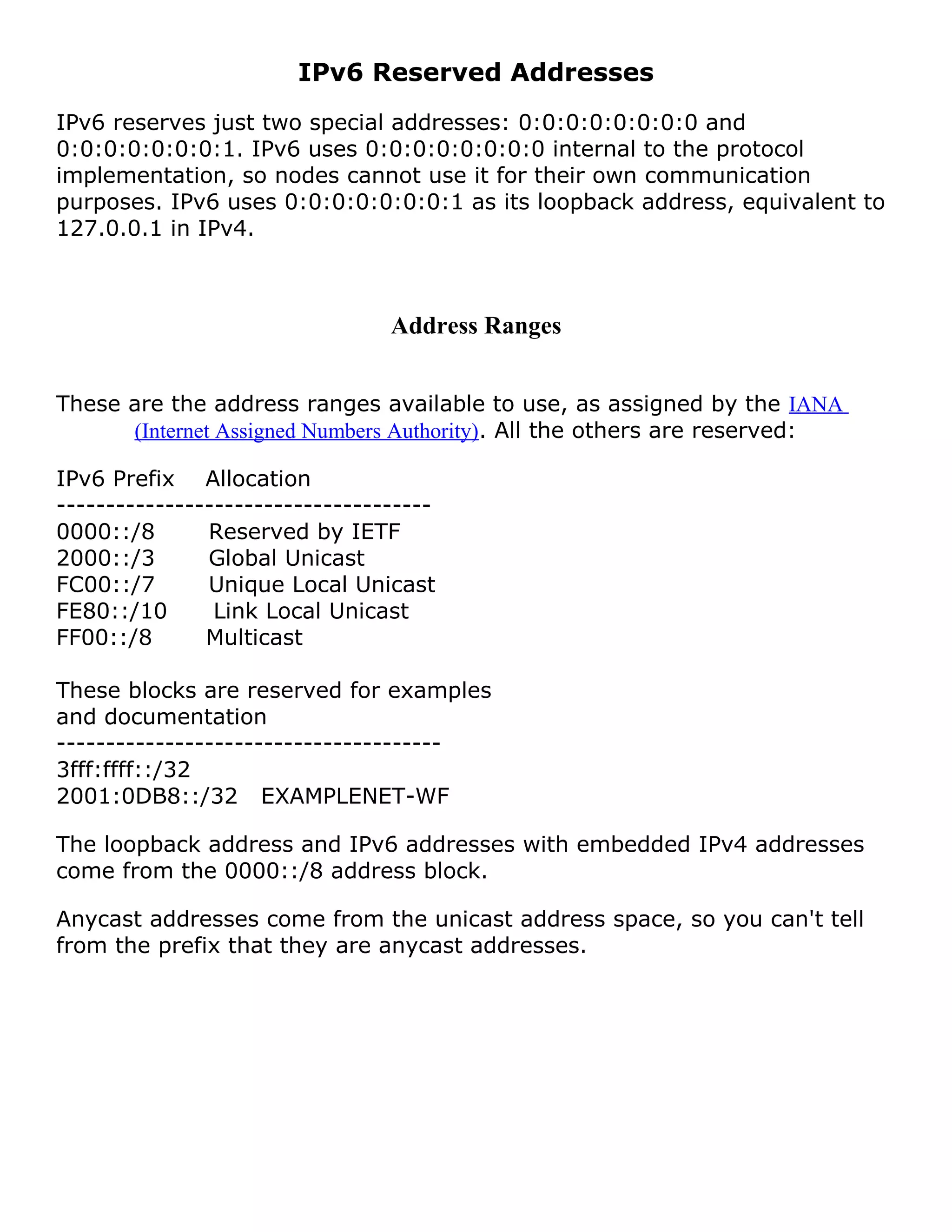
IPv6 Reserved Addresses 
IPv6 reserves just two special addresses: 0:0:0:0:0:0:0:0 and 
0:0:0:0:0:0:0:1. IPv6 uses 0:0:0:0:0:0:0:0 internal to the protocol 
implementation, so nodes cannot use it for their own communication 
purposes. IPv6 uses 0:0:0:0:0:0:0:1 as its loopback address, equivalent to 
127.0.0.1 in IPv4. 
Address Ranges 
These are the address ranges available to use, as assigned by the IANA 
(Internet Assigned Numbers Authority). All the others are reserved: 
IPv6 Prefix Allocation 
-------------------------------------- 
0000::/8 Reserved by IETF 
2000::/3 Global Unicast 
FC00::/7 Unique Local Unicast 
FE80::/10 Link Local Unicast 
FF00::/8 Multicast 
These blocks are reserved for examples 
and documentation 
--------------------------------------- 
3fff:ffff::/32 
2001:0DB8::/32 EXAMPLENET-WF 
The loopback address and IPv6 addresses with embedded IPv4 addresses 
come from the 0000::/8 address block. 
Anycast addresses come from the unicast address space, so you can't tell 
from the prefix that they are anycast addresses.
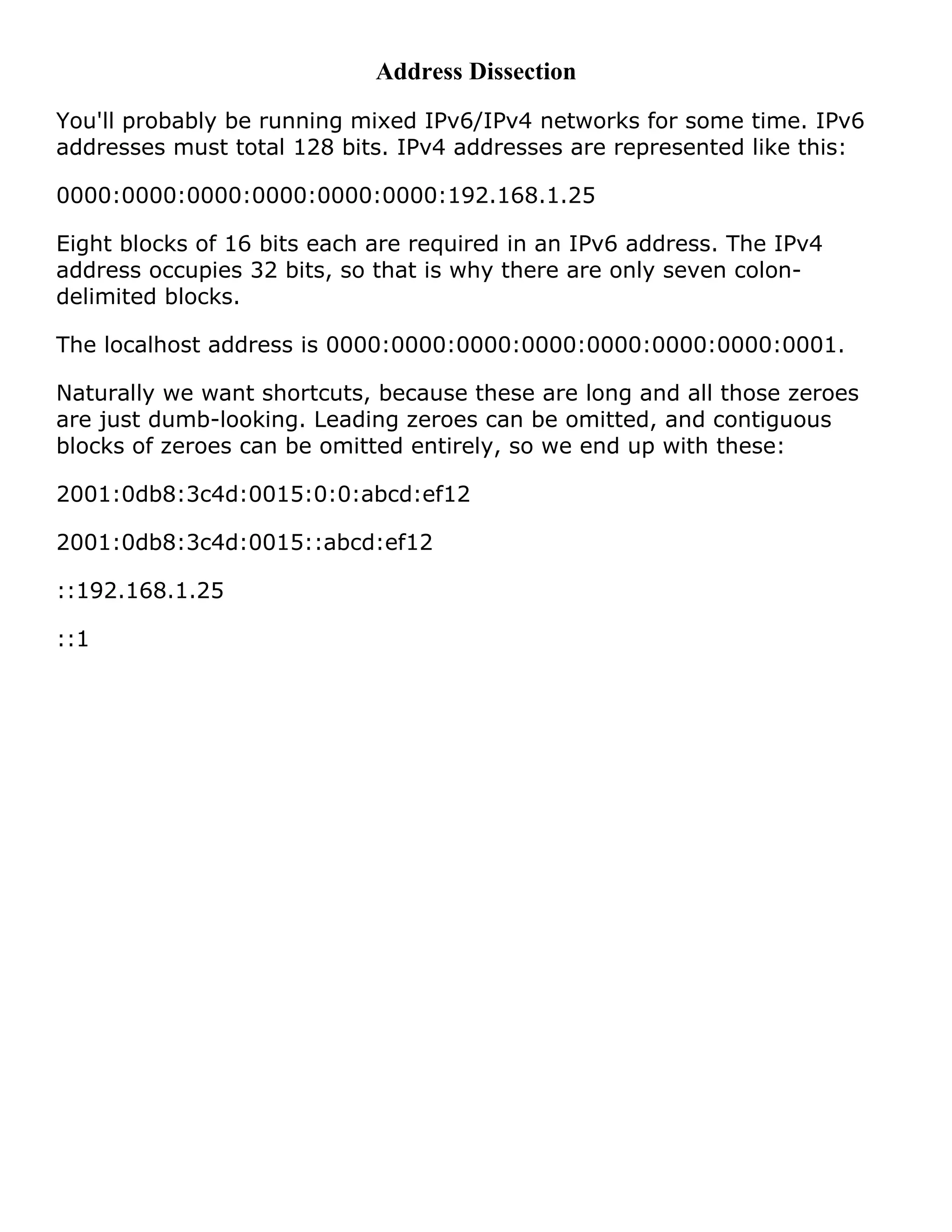
Address Dissection 
You'll probably be running mixed IPv6/IPv4 networks for some time. IPv6 
addresses must total 128 bits. IPv4 addresses are represented like this: 
0000:0000:0000:0000:0000:0000:192.168.1.25 
Eight blocks of 16 bits each are required in an IPv6 address. The IPv4 
address occupies 32 bits, so that is why there are only seven colon-delimited 
blocks. 
The localhost address is 0000:0000:0000:0000:0000:0000:0000:0001. 
Naturally we want shortcuts, because these are long and all those zeroes 
are just dumb-looking. Leading zeroes can be omitted, and contiguous 
blocks of zeroes can be omitted entirely, so we end up with these: 
2001:0db8:3c4d:0015:0:0:abcd:ef12 
2001:0db8:3c4d:0015::abcd:ef12 
::192.168.1.25 
::1

I pv4 address classes

  • 1.
    IPv4 Address Classes The IPv4 address space can be subdivided into 5 classes - Class A, B, C, D and E. Each class consists of a contiguous subset of the overall IPv4 address range. With a few special exceptions explained further below, the values of the leftmost four bits of an IPv4 address determine its class as follows: Class Leftmost bits Start address Finish address A 0xxx 0.0.0.0 127.255.255.255 B 10xx 128.0.0.0 191.255.255.255 C 110x 192.0.0.0 223.255.255.255 D 1110 224.0.0.0 239.255.255.255 E 1111 240.0.0.0 255.255.255.255 All Class C addresses, for example, have the leftmost three bits set to '110', but each of the remaining 29 bits may be set to either '0' or '1' independently (as represented by an x in these bit positions): 110xxxxx xxxxxxxx xxxxxxxx xxxxxxxx Converting the above to dotted decimal notation, it follows that all Class C addresses fall in the range from 192.0.0.0 through 223.255.255.255.
  • 2.
    IP Address ClassE and Limited Broadcast The IPv4 networking standard defines Class E addresses as reserved, meaning that they should not be used on IP networks. Some research organizations use Class E addresses for experimental purposes. However, nodes that try to use these addresses on the Internet will be unable to communicate properly. A special type of IP address is the limited broadcast address 255.255.255.255. A broadcast involves delivering a message from one sender to many recipients. Senders direct an IP broadcast to 255.255.255.255 to indicate all other nodes on the local network (LAN) should pick up that message. This broadcast is 'limited' in that it does not reach every node on the Internet, only nodes on the LAN. Technically, IP reserves the entire range of addresses from 255.0.0.0 through 255.255.255.255 for broadcast, and this range should not be considered part of the normal Class E range.
  • 3.
    IP Address ClassD and Multicast The IPv4 networking standard defines Class D addresses as reserved for multicast. Multicast is a mechanism for defining groups of nodes and sending IP messages to that group rather than to every node on the LAN (broadcast) or just one other node (unicast). Multicast is mainly used on research networks. As with Class E, Class D addresses should not be used by ordinary nodes on the Internet. IP Address Class A, Class B, and Class C Class A, Class B, and Class C are the three classes of addresses used on IP networks in common practice, with three exceptions as explained next.
  • 4.
    IP Loopback Address 127.0.0.1 is the loopback address in IP. Loopback is a test mechanism of network adapters. Messages sent to 127.0.0.1 do not get delivered to the network. Instead, the adapter intercepts all loopback messages and returns them to the sending application. IP applications often use this feature to test the behavior of their network interface. As with broadcast, IP officially reserves the entire range from 127.0.0.0 through 127.255.255.255 for loopback purposes. Nodes should not use this range on the Internet, and it should not be considered part of the normal Class A range.
  • 5.
    Zero Addresses Aswith the loopback range, the address range from 0.0.0.0 through 0.255.255.255 should not be considered part of the normal Class A range. 0.x.x.x addresses serve no particular function in IP, but nodes attempting to use them will be unable to communicate properly on the Internet.
  • 6.
    Private Addresses TheIP standard defines specific address ranges within Class A, Class B, and Class C reserved for use by private networks (intranets). The table below lists these reserved ranges of the IP address space. Class Private start address Private finish address A 10.0.0.0 10.255.255.255 B 172.16.0.0 172.31.255.255 C 192.168.0.0 192.168.255.255 Nodes are effectively free to use addresses in the private ranges if they are not connected to the Internet, or if they reside behind firewalls or other gateways that use Network Address Translation (NAT).
  • 7.
    CIDR - ClasslessInter-Domain Routing IPv4 TCP/IP Subnet Table While subnetting might be easy enough to grasp as a concept, it can be a bit involved, and even mind-boggling in part due to the required manipulations of binary numbers. Many people understand the ideas behind subnetting, but find it hard to follow the actual steps required to subnet a network. The table below is intended as a quick reference and a fairly complete example of IPv4 subnetting.
  • 8.
    Subnet Mask (Netmask)Binary CIDR Hosts* Inverse Mask** Notes 255.255.255.255 11111111.11111111.11111111.11111111 /32 1 0.0.0.0 single host mask 255.255.255.254 11111111.11111111.11111111.11111110 /31 0 unusable mask, no host bits 255.255.255.252 11111111.11111111.11111111.11111100 /30 2 0.0.0.3 255.255.255.248 11111111.11111111.11111111.11111000 /29 6 0.0.0.7 255.255.255.240 11111111.11111111.11111111.11110000 /28 14 0.0.0.15 255.255.255.224 11111111.11111111.11111111.11100000 /27 30 0.0.0.31 255.255.255.192 11111111.11111111.11111111.11000000 /26 62 0.0.0.63 255.255.255.128 11111111.11111111.11111111.10000000 /25 126 0.0.0.127 255.255.255.0 11111111.11111111.11111111.00000000 /24 254 0.0.0.255 1 Class C network 255.255.254.0 11111111.11111111.11111110.00000000 /23 510 0.0.1.255 2 Class C networks 255.255.252.0 11111111.11111111.11111100.00000000 /22 1022 0.0.3.255 4 Class C 255.255.248.0 11111111.11111111.11111000.00000000 /21 2046 0.0.7.255 8 Class C 255.255.240.0 11111111.11111111.11110000.00000000 /20 4094 0.0.15.255 16 Class C 255.255.224.0 11111111.11111111.11100000.00000000 /19 8190 0.0.31.255 32 Class C 255.255.192.0 11111111.11111111.11000000.00000000 /18 16382 0.0.63.255 64 Class C 255.255.128.0 11111111.11111111.10000000.00000000 /17 32766 0.0.127.255 128 Class C 255.255.0.0 11111111.11111111.00000000.00000000 /16 65534 0.0.255.255 1 Class B Network (255 Class C) 255.254.0.0 11111111.11111110.00000000.00000000 /15 13107 0 0.1.255.255 2 Class B networks 255.252.0.0 11111111.11111100.00000000.00000000 /14 26214 2 0.3.255.255 4 Class B 255.248.0.0 11111111.11111000.00000000.00000000 /13 52428 6 0.7.255.255 8 Class B 255.240.0.0 11111111.11110000.00000000.00000000 /12 1M 0.15.255.255 16 Class B 255.224.0.0 11111111.11100000.00000000.00000000 /11 2M 0.31.255.255 32 Class B 255.192.0.0 11111111.11000000.00000000.00000000 /10 4M 0.63.255.255 64 Class B 255.128.0.0 11111111.10000000.00000000.00000000 /9 8M 0.127.255.255 128 Class B 255.0.0.0 11111111.00000000.00000000.00000000 /8 16M 0.255.255.255 1 Class A Network (255 Class B)
  • 9.
    254.0.0.0 11111110.00000000.00000000.00000000 /732M 1.255.255.255 2 Class A 252.0.0.0 11111100.00000000.00000000.00000000 /6 64M 3.255.255.255 248.0.0.0 11111000.00000000.00000000.00000000 /5 128M 7.255.255.255 240.0.0.0 11110000.00000000.00000000.00000000 /4 256M 15.255.255.255 224.0.0.0 11100000.00000000.00000000.00000000 /3 512M 31.255.255.255 192.0.0.0 11000000.00000000.00000000.00000000 /2 1024M 63.255.255.255 128.0.0.0 10000000.00000000.00000000.00000000 /1 2048M 127.255.255.25 5 0.0.0.0 00000000.00000000.00000000.00000000 /0 4096M 255.255.255.25 5 * Usable Hosts - (2^N-2) method. ** Inverse mask is calculated by subtracting each subnet mask octet value from 255. The inverse mask is primarily used in Cisco access control lists (ACLs). The rationale behind an inverse mask is that logical ANDing an inverse mask and an IP address gives the host portion of the address, instead of the network / subnet portion that a standard subnet mask would. This is of more interest to certain TCP/IP functions.
  • 10.
    CIDR Example: 192.182.154.208/28 Determine the network # range of the host #’s IP number in binary 11000000.10110110.10011010.11010000 Netmask: 11111111.11111111.11111111.11110000 And the two binary strings: Result: 11000000.10110110.10011010.11010000 = 192.182.154.208 Host range: 192.182.154.11010000 can’t use it’s the network number 192.182.154.11010001 1st host number = 192.182.154.209 Last value: 192.182.154.11011111 can’t use, it’s the broadcast address Last value for host #: 192.182.154.11011110 = 222 Number of possible hosts = 222-209+1=14 Written in subnet notation the address range is
  • 11.
    192.182.154.208 with asubnet of 255.255.255.240 IPv6 Address Types Increasing the IP address pool was one of the major forces behind developing IPv6. It uses a 128-bit address, meaning that we have a maximum of 2¹²⁸ addresses available, or 340,282,366,920,938,463,463,374,607,431,768,211,456, or enough to give multiple IP addresses to every grain of sand on the planet. So our friendly old 32-bit IPv4 dotted-quads don't do the job anymore; these newfangled IPs require eight 16-bit hexadecimal colon-delimited blocks. So not only are they longer, they use numbers and letters. At first glance, those mondo IPv6 addresses look like impenetrable secret code: 2001:0db8:3c4d:0015:0000:0000:abcd:ef12 IPv6 Address Types IPv6 does not use classes. IPv6 supports the following three IP address types: · unicast · multicast · anycast Unicast and multicast messaging in IPv6 are conceptually the same as in IPv4. IPv6 does not support broadcast, but its multicast mechanism accomplishes essentially the same effect. Multicast addresses in IPv6 start with 'FF' (255) just like IPv4 addresses. Anycast in IPv6 is a variation on multicast. Whereas multicast delivers messages to all nodes in the multicast group, anycast delivers messages to any one node in the multicast group. Anycast is an advanced networking concept designed to support the failover and load balancing needs of applications.
  • 12.
    IPv6 Reserved Addresses IPv6 reserves just two special addresses: 0:0:0:0:0:0:0:0 and 0:0:0:0:0:0:0:1. IPv6 uses 0:0:0:0:0:0:0:0 internal to the protocol implementation, so nodes cannot use it for their own communication purposes. IPv6 uses 0:0:0:0:0:0:0:1 as its loopback address, equivalent to 127.0.0.1 in IPv4. Address Ranges These are the address ranges available to use, as assigned by the IANA (Internet Assigned Numbers Authority). All the others are reserved: IPv6 Prefix Allocation -------------------------------------- 0000::/8 Reserved by IETF 2000::/3 Global Unicast FC00::/7 Unique Local Unicast FE80::/10 Link Local Unicast FF00::/8 Multicast These blocks are reserved for examples and documentation --------------------------------------- 3fff:ffff::/32 2001:0DB8::/32 EXAMPLENET-WF The loopback address and IPv6 addresses with embedded IPv4 addresses come from the 0000::/8 address block. Anycast addresses come from the unicast address space, so you can't tell from the prefix that they are anycast addresses.
  • 13.
    Address Dissection You'llprobably be running mixed IPv6/IPv4 networks for some time. IPv6 addresses must total 128 bits. IPv4 addresses are represented like this: 0000:0000:0000:0000:0000:0000:192.168.1.25 Eight blocks of 16 bits each are required in an IPv6 address. The IPv4 address occupies 32 bits, so that is why there are only seven colon-delimited blocks. The localhost address is 0000:0000:0000:0000:0000:0000:0000:0001. Naturally we want shortcuts, because these are long and all those zeroes are just dumb-looking. Leading zeroes can be omitted, and contiguous blocks of zeroes can be omitted entirely, so we end up with these: 2001:0db8:3c4d:0015:0:0:abcd:ef12 2001:0db8:3c4d:0015::abcd:ef12 ::192.168.1.25 ::1