HOW DO HUMAN SENSORS
       WORK?
- UNDERSTANDING HUMAN SENSORS
AND COMPARING THEM WITH THOSE
         IN A ROBOT

         (50 MINUTES)
PRE/POST- ASSESSMENT SHEET
  HOW DO HUMAN SENSORS WORK?

   1. What sensors or senses do we humans have?


   2. Describe how any two of the sensors you listed
    above work.


   3. Give examples of sensors in robots that are similar to
    human senses.


                                                                2

Computational Neurobiology Center, University of Missouri
PRE/POST- ASSESSMENT SHEET
  HOW DO HUMAN SENSORS WORK?
   1. What sensors or senses do we humans have ?
    Eyes, Ears, Nose, Skin, Tongue, (other sensors include temperature sensors, sensors
    detecting body position, balance sensors, blood acidity sensors, …)
   2. Describe how any two of the sensors you listed above work.
    Eye – takes in light from the surroundings and relays that to nerve cells that send images
    to the brain
    Ear – takes in sound waves from air and vibrates, sending the vibrations through inner ear
    to hair cells that send signals to the brain
    Nose – particles are inhaled into the nose and nerve cells contact particles and send signals
    to the brain
    Skin- sensors all over skin are activated and send signals to the brain through nervous
    system
    Tongue- taste buds are made up of small cells that have little hairs that are activated by
    particles in food. These hairs send signals through nerves to the brain.
   3. Give examples of sensors in robots that are similar to
    human senses.
    Eyes     – light sensor, ultrasonic sensor
    Ear      – sound sensor
    Skin     – touch sensor                                                                         3

Computational Neurobiology Center, University of Missouri
WHAT IS A SENSOR?
   Device that measures a physical quantity such as temperature and
    sends the information to a device such as a computer
      Two types
             Some detect presence of a stimulus (Type I). Can you think of an example?
             Some detect quantity/value of a stimulus (Type II). Example?
   What are the sensors that exist on the robot?
   What are some examples of sensors in real life?

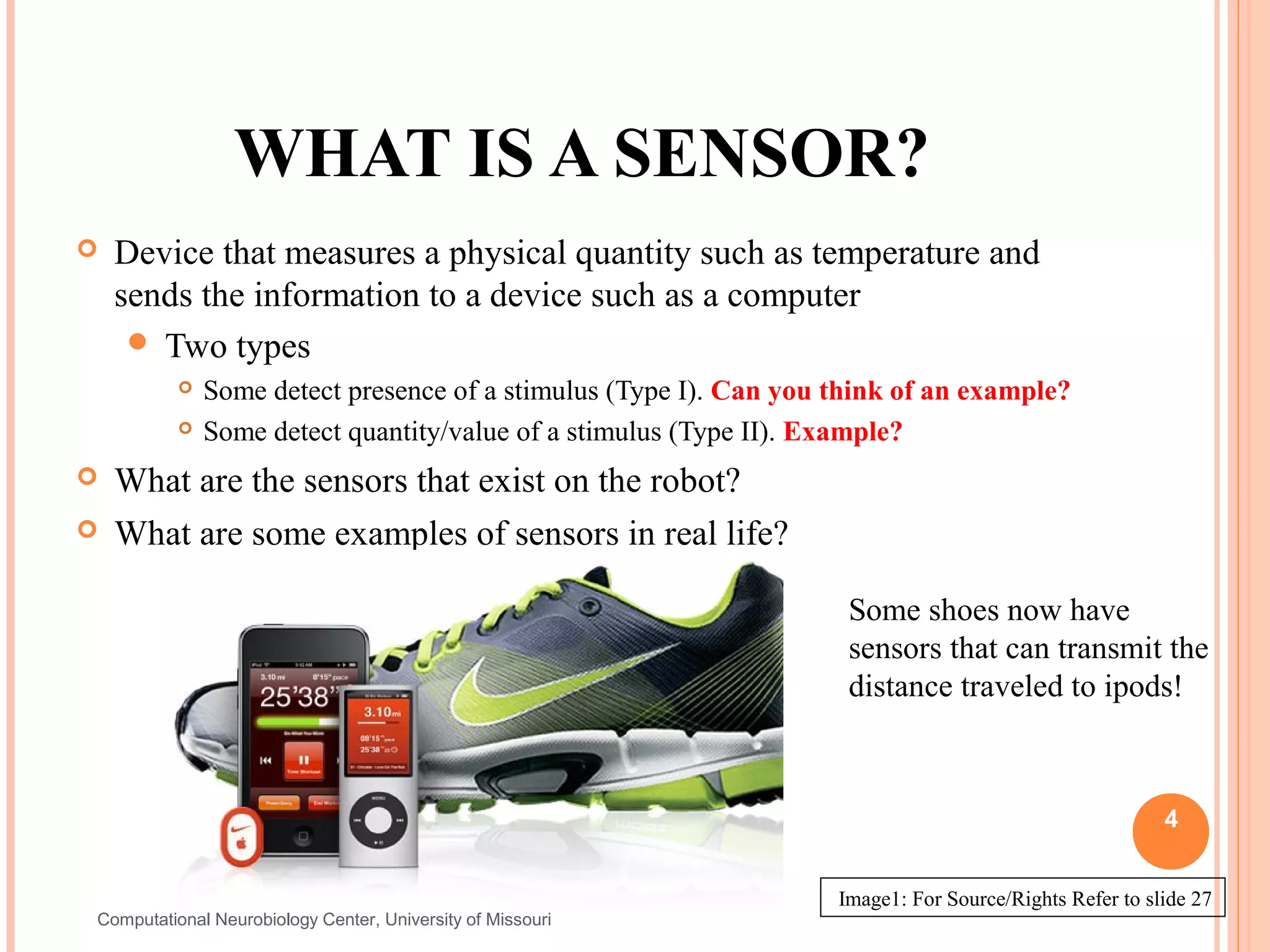
                                                                    Some shoes now have
                                                                    sensors that can transmit the
                                                                    distance traveled to ipods!


                                                                                                        4


                                                                   Image1: For Source/Rights Refer to slide 27
Computational Neurobiology Center, University of Missouri
WHAT IS A SENSOR?
       A sensor  is a device that measures a physical quantity
        (stimulus) and transmits this measurement so that a
        computer, instrument, or observer can read it.
       Some sensors simply detect the presence of a stimulus. These
        are called Type I sensors.
               Example: A sound sensor that detects the presence of a sound.
       Other    sensors can actually discern relative values of a
           stimulus. These are called Type II sensors.
               Example: A sound sensor that detects the number of decibels in a sound.
       Sensors     are used in everyday objects such as garage doors
           that won’t shut if a kid/person is in its way – do you know
           how that works? Other applications that use sensors include
                                                                       5
           cars, airplanes, robots, and medical equipment.
Computational Neurobiology Center, University of Missouri
HUMAN SENSORS
   Your sensory organs (eyes, ears, nose and skin) provide information to your
    brain so that it can make decisions. They work in a manner very similar to the
    working of sensors of an robot. Your brain uses the information that it receives
    from your sensory organs continuously and make your body work.

    There are five senses in humans:
                              Your eyes allow you to see the world
                              Your ears allow you to hear sounds
                              Your skin lets you feel objects through touch
                              Your nose lets you smell the many scents present in the world
                              Your tongue lets you taste

    …and several other sensors in the body that you don’t notice directly
                              Sensors in the inner ear give the brain information about balance
                              Sensors in our muscles that let the brain know our body position
                              Sensors throughout your body that sense temperature                 6


    Computational Neurobiology Center, University of Missouri
HUMAN SENSORS – SIGNAL
                               TRANSMISSION
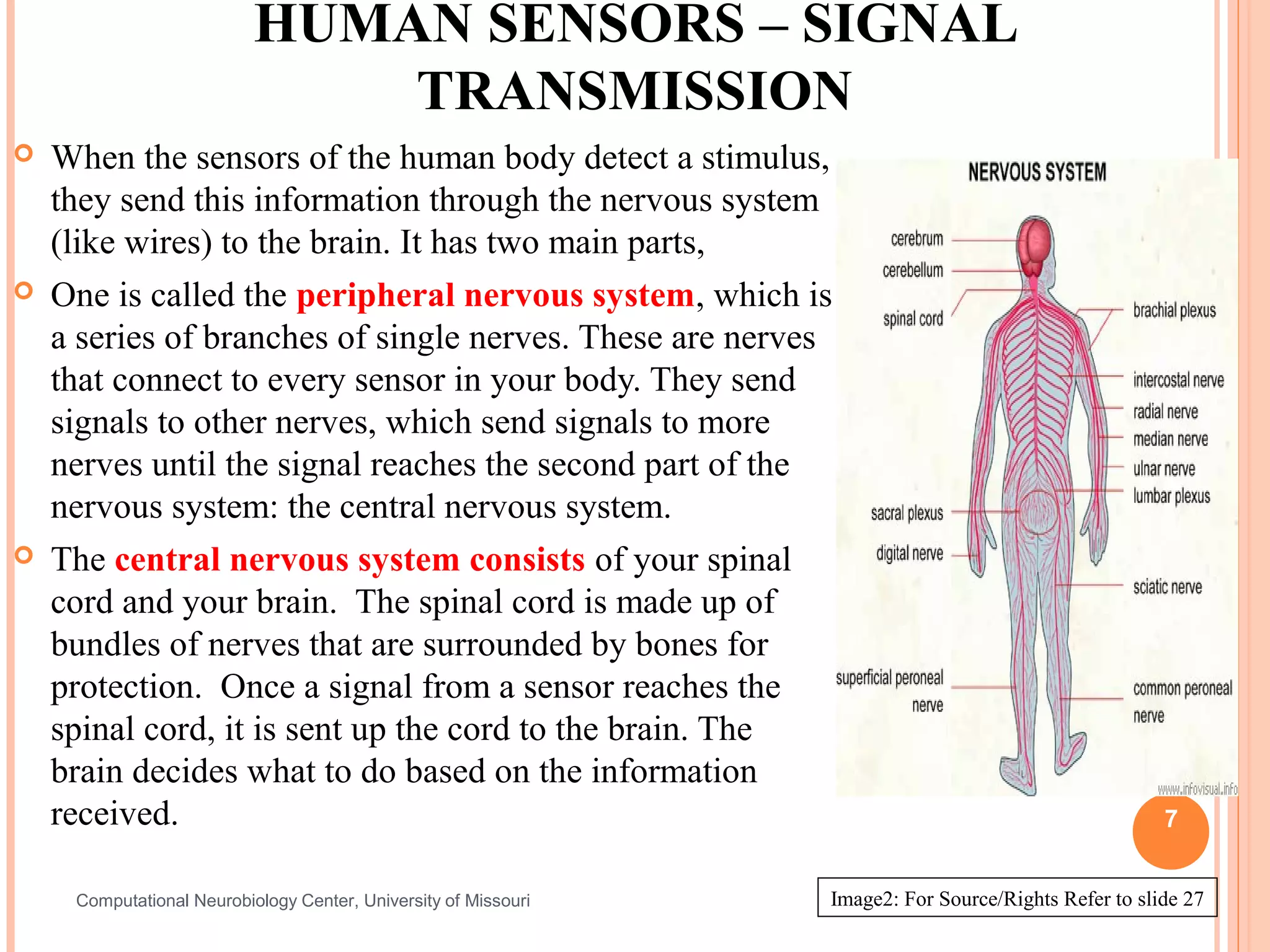
   When the sensors of the human body detect a stimulus,
    they send this information through the nervous system
    (like wires) to the brain. It has two main parts,
   One is called the peripheral nervous system, which is
    a series of branches of single nerves. These are nerves
    that connect to every sensor in your body. They send
    signals to other nerves, which send signals to more
    nerves until the signal reaches the second part of the
    nervous system: the central nervous system.
   The central nervous system consists of your spinal
    cord and your brain. The spinal cord is made up of
    bundles of nerves that are surrounded by bones for
    protection. Once a signal from a sensor reaches the
    spinal cord, it is sent up the cord to the brain. The
    brain decides what to do based on the information
    received.                                                                                          7


     Computational Neurobiology Center, University of Missouri   Image2: For Source/Rights Refer to slide 27
TOUCH: HOW DO WE FEEL USING OUR
               SKIN?
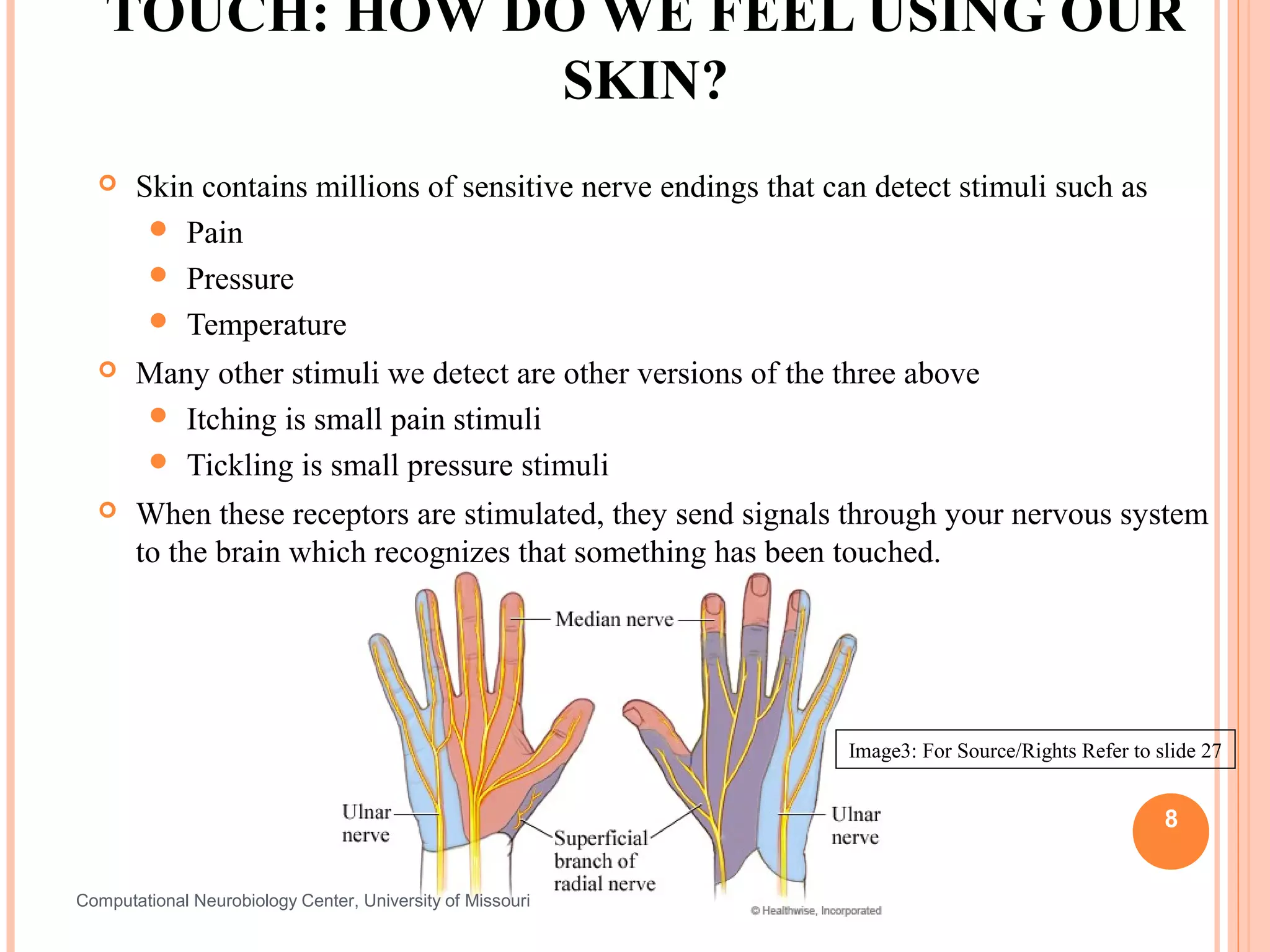
      Skin contains millions of sensitive nerve endings that can detect stimuli such as
         Pain
         Pressure
         Temperature
      Many other stimuli we detect are other versions of the three above
        Itching is small pain stimuli
        Tickling is small pressure stimuli
      When these receptors are stimulated, they send signals through your nervous system
       to the brain which recognizes that something has been touched.


                                                                Image3: For Source/Rights Refer to slide 27


                                                                                                    8


Computational Neurobiology Center, University of Missouri
TOUCH SENSORS ACTIVITY
   Activity:
       Each  person pick a partner
       Each group of two should have two pencils
       One partner close his/her eyes and extends his/her hand to the
        other partner
       Second partner pokes the first partner’s hand with either one
        or two pencils, and have them guess whether one or two
        pencils were used. Try different distances apart when using
        two pencils at a time.
       Attempt this at various locations on the hand, starting at the
        palm and ending at the back of the forearm and discuss
        results.
       Switch roles. Discuss findings as a group.
                                                                         9


Computational Neurobiology Center, University of Missouri
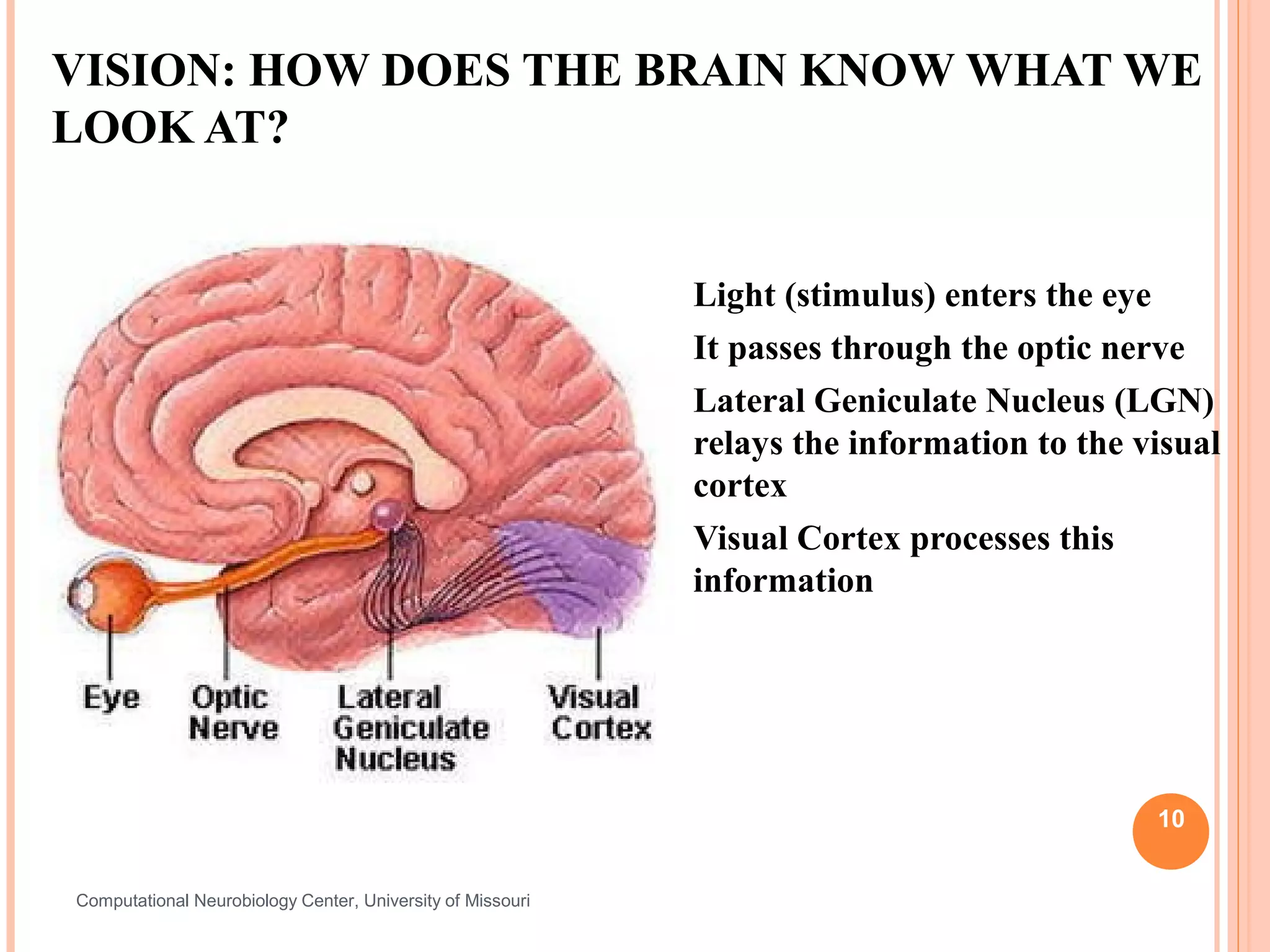
VISION: HOW DOES THE BRAIN KNOW WHAT WE
LOOK AT?


                                                               Light (stimulus) enters the eye
                                                               It passes through the optic nerve
                                                               Lateral Geniculate Nucleus (LGN)
                                                                relays the information to the visual
                                                                cortex
                                                               Visual Cortex processes this
                                                                information


                                                                                               10


Computational Neurobiology Center, University of Missouri
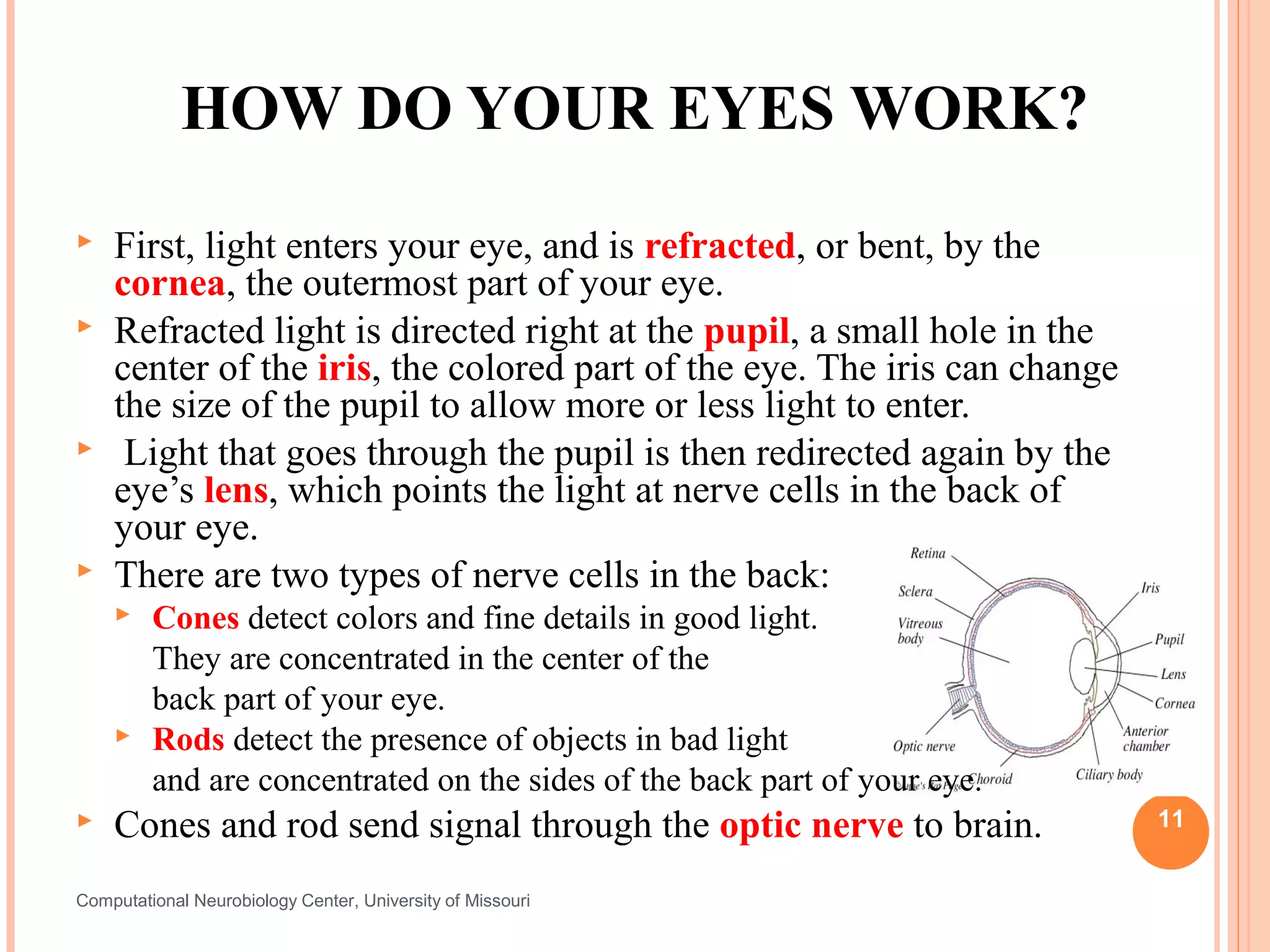
HOW DO YOUR EYES WORK?
   First, light enters your eye, and is refracted, or bent, by the
    cornea, the outermost part of your eye.
   Refracted light is directed right at the pupil, a small hole in the
    center of the iris, the colored part of the eye. The iris can change
    the size of the pupil to allow more or less light to enter.
    Light that goes through the pupil is then redirected again by the
    eye’s lens, which points the light at nerve cells in the back of
    your eye.
   There are two types of nerve cells in the back:
        Cones detect colors and fine details in good light.
         They are concentrated in the center of the
         back part of your eye.
        Rods detect the presence of objects in bad light
         and are concentrated on the sides of the back part of your eye.
   Cones and rod send signal through the optic nerve to brain.            11


Computational Neurobiology Center, University of Missouri
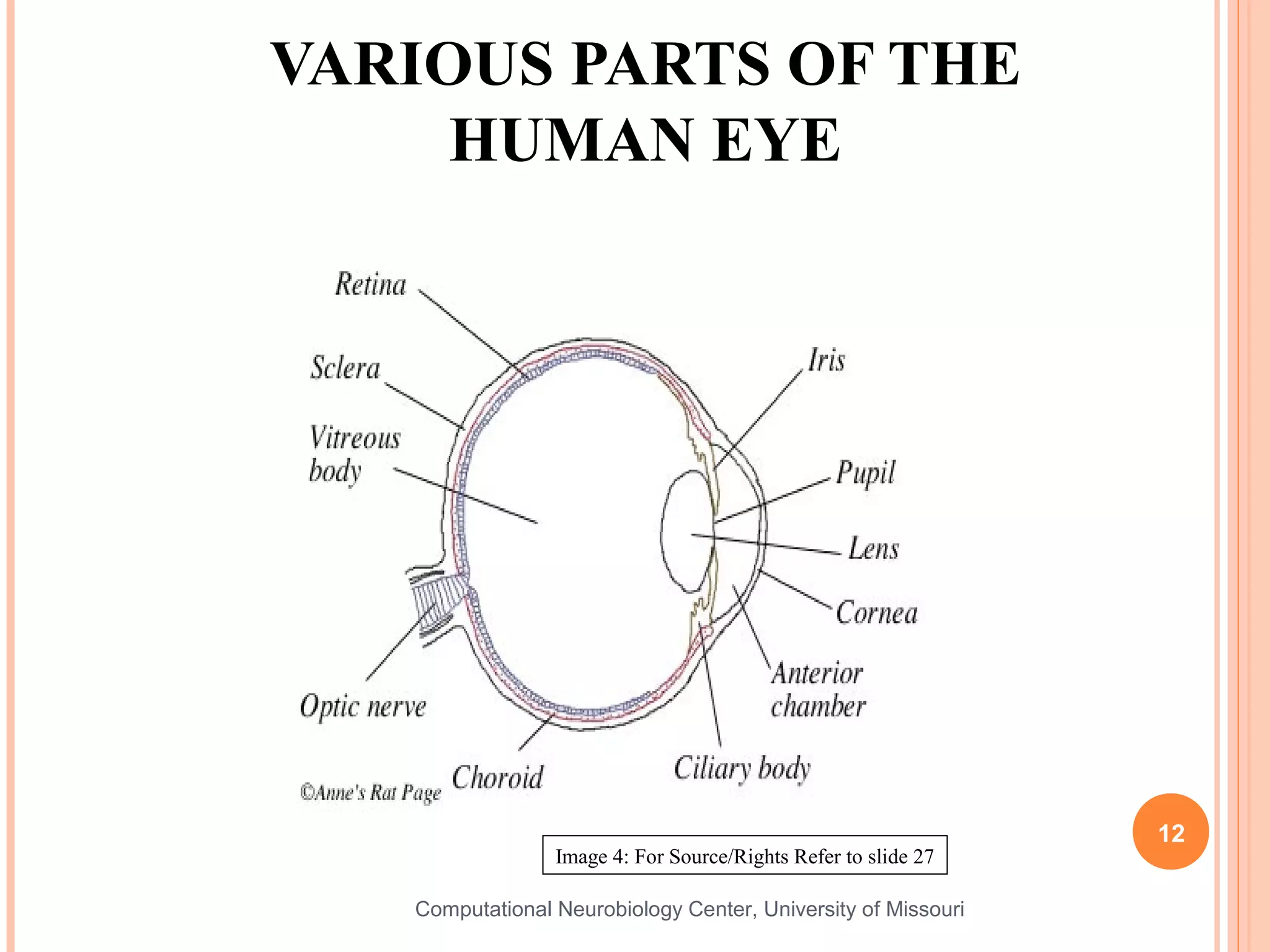
VARIOUS PARTS OF THE
     HUMAN EYE


                                                                12
                 Image 4: For Source/Rights Refer to slide 27

   Computational Neurobiology Center, University of Missouri
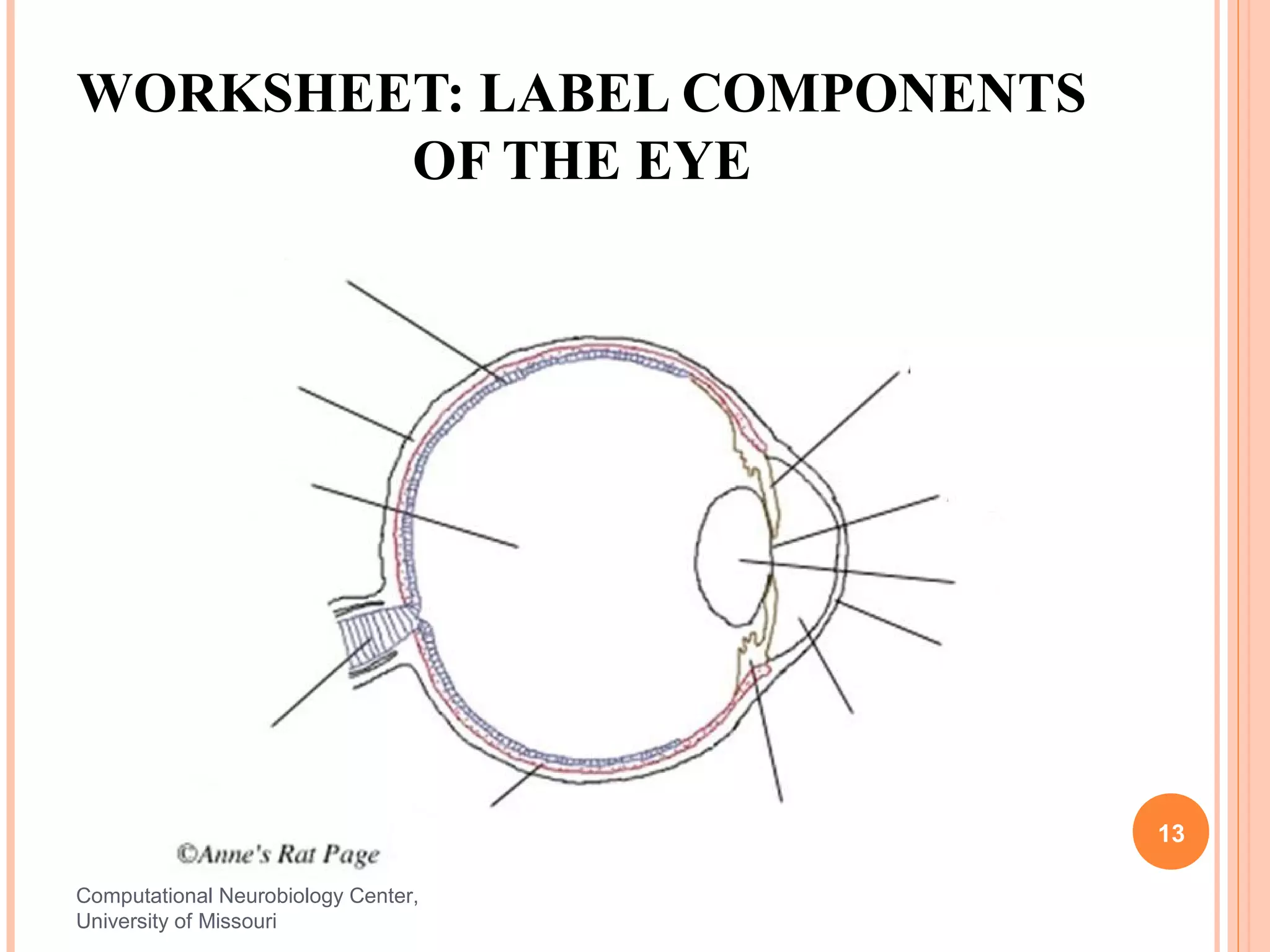
WORKSHEET: LABEL COMPONENTS
        OF THE EYE


                                     13

Computational Neurobiology Center,
University of Missouri
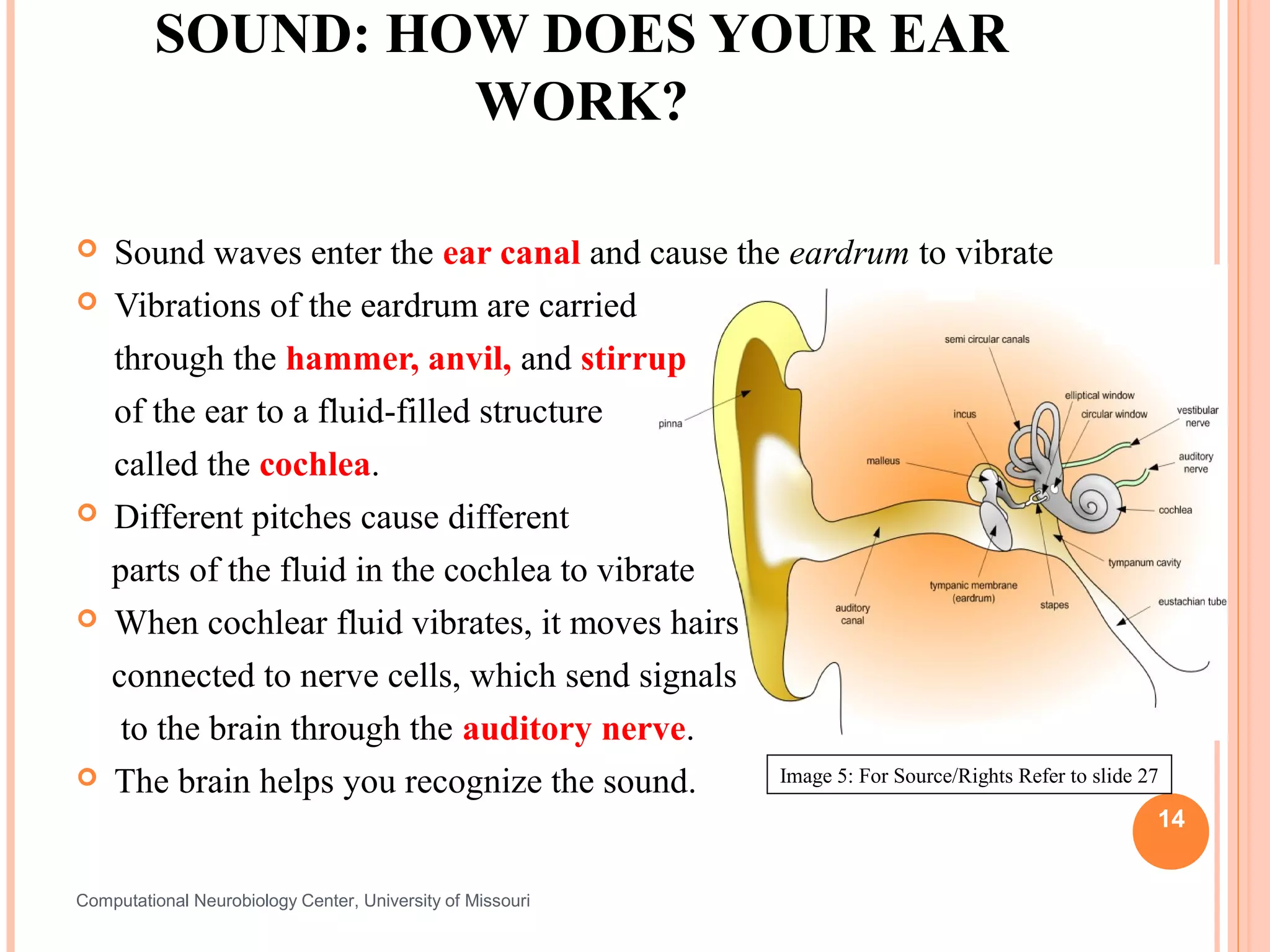
SOUND: HOW DOES YOUR EAR
                  WORK?

   Sound waves enter the ear canal and cause the eardrum to vibrate
   Vibrations of the eardrum are carried
    through the hammer, anvil, and stirrup
    of the ear to a fluid-filled structure
    called the cochlea.
   Different pitches cause different
    parts of the fluid in the cochlea to vibrate
   When cochlear fluid vibrates, it moves hairs
    connected to nerve cells, which send signals
     to the brain through the auditory nerve.
   The brain helps you recognize the sound.     Image 5: For Source/Rights Refer to slide 27

                                                                                            14


Computational Neurobiology Center, University of Missouri
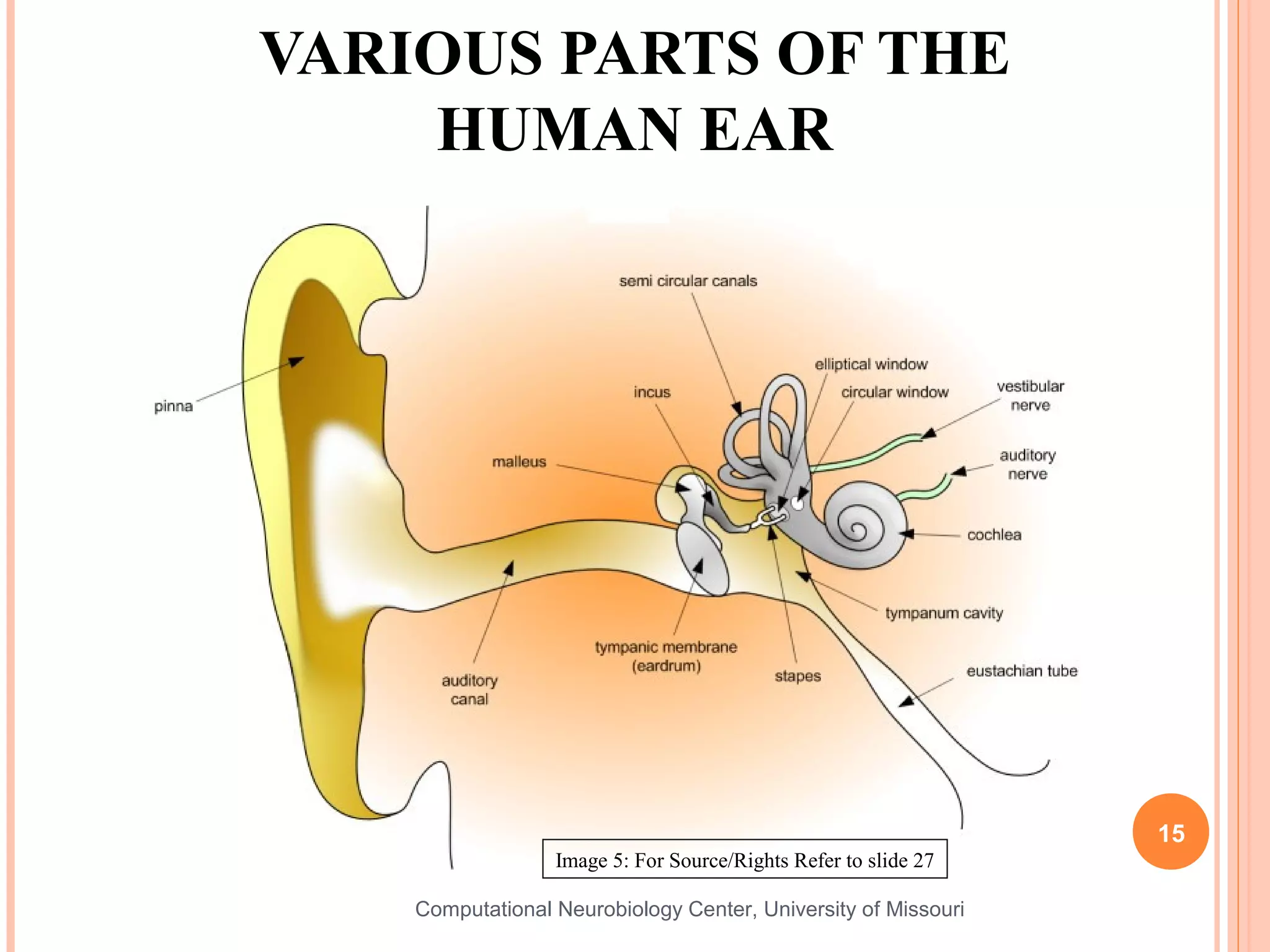
VARIOUS PARTS OF THE
    HUMAN EAR


                                                                 15
                  Image 5: For Source/Rights Refer to slide 27

    Computational Neurobiology Center, University of Missouri
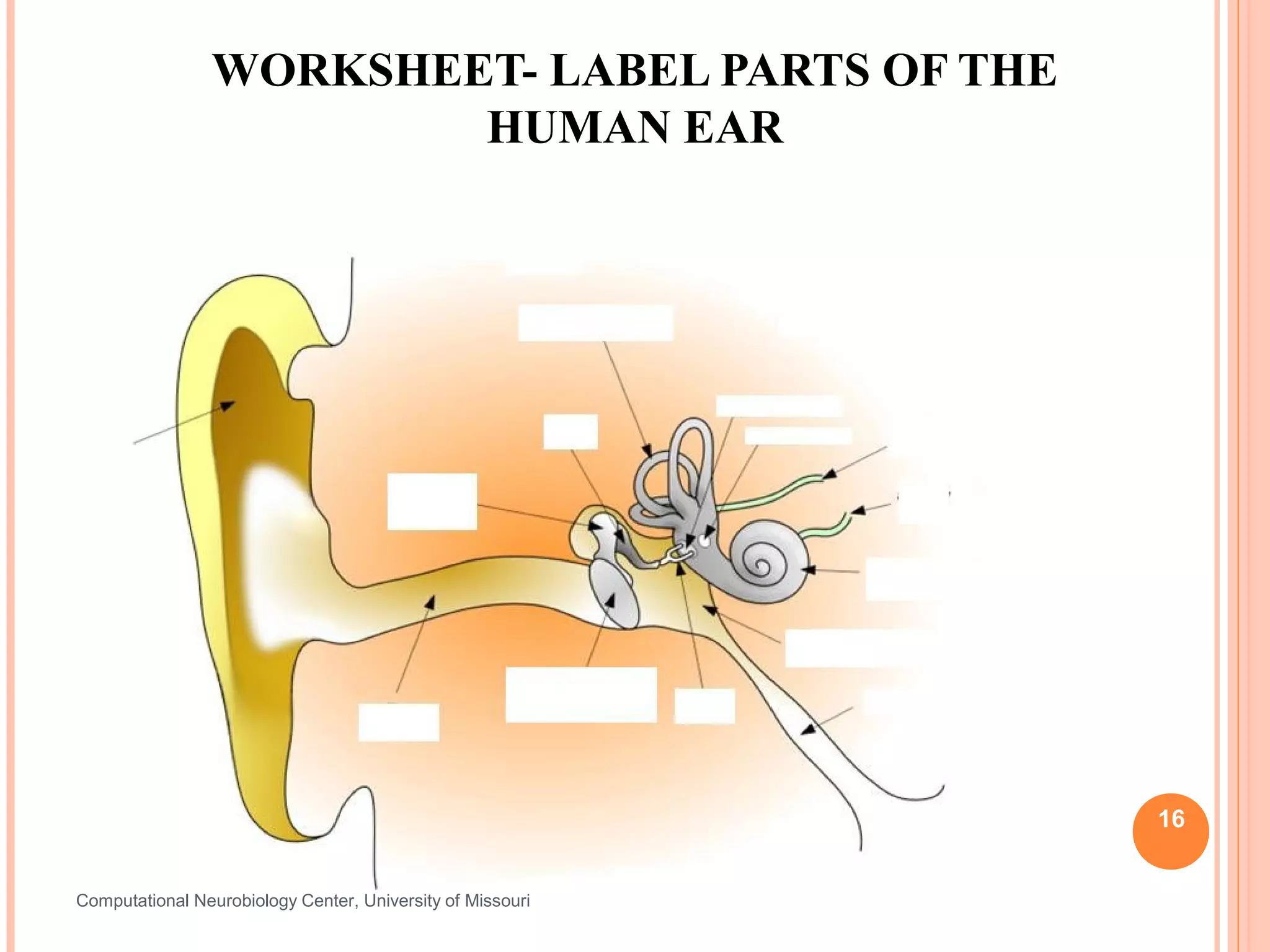
WORKSHEET- LABEL PARTS OF THE
                        HUMAN EAR


                                                            16


Computational Neurobiology Center, University of Missouri
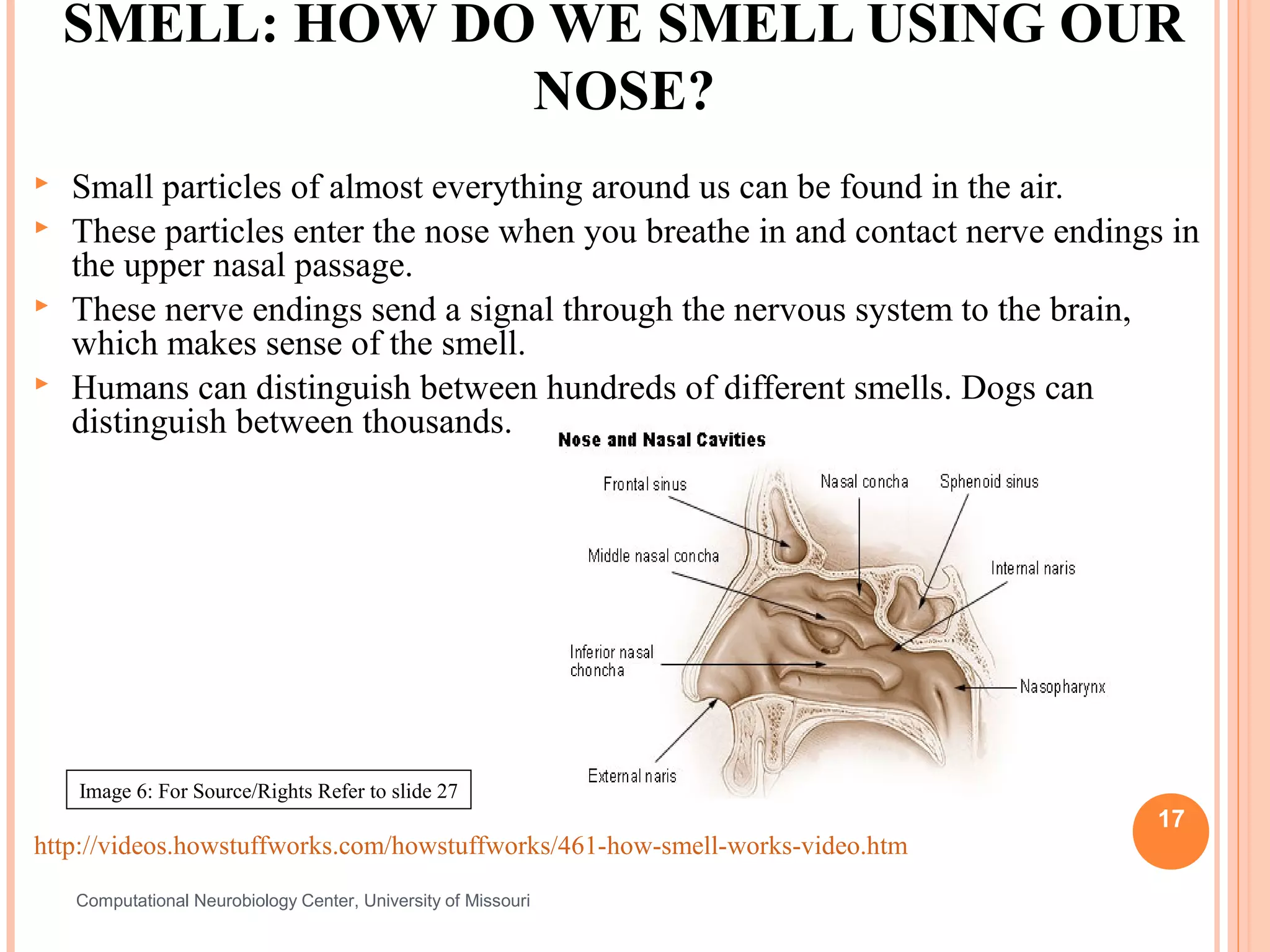
SMELL: HOW DO WE SMELL USING OUR
                 NOSE?
   Small particles of almost everything around us can be found in the air.
   These particles enter the nose when you breathe in and contact nerve endings in
    the upper nasal passage.
   These nerve endings send a signal through the nervous system to the brain,
    which makes sense of the smell.
   Humans can distinguish between hundreds of different smells. Dogs can
    distinguish between thousands.


    Image 6: For Source/Rights Refer to slide 27
                                                                                17
http://videos.howstuffworks.com/howstuffworks/461-how-smell-works-video.htm
    Computational Neurobiology Center, University of Missouri
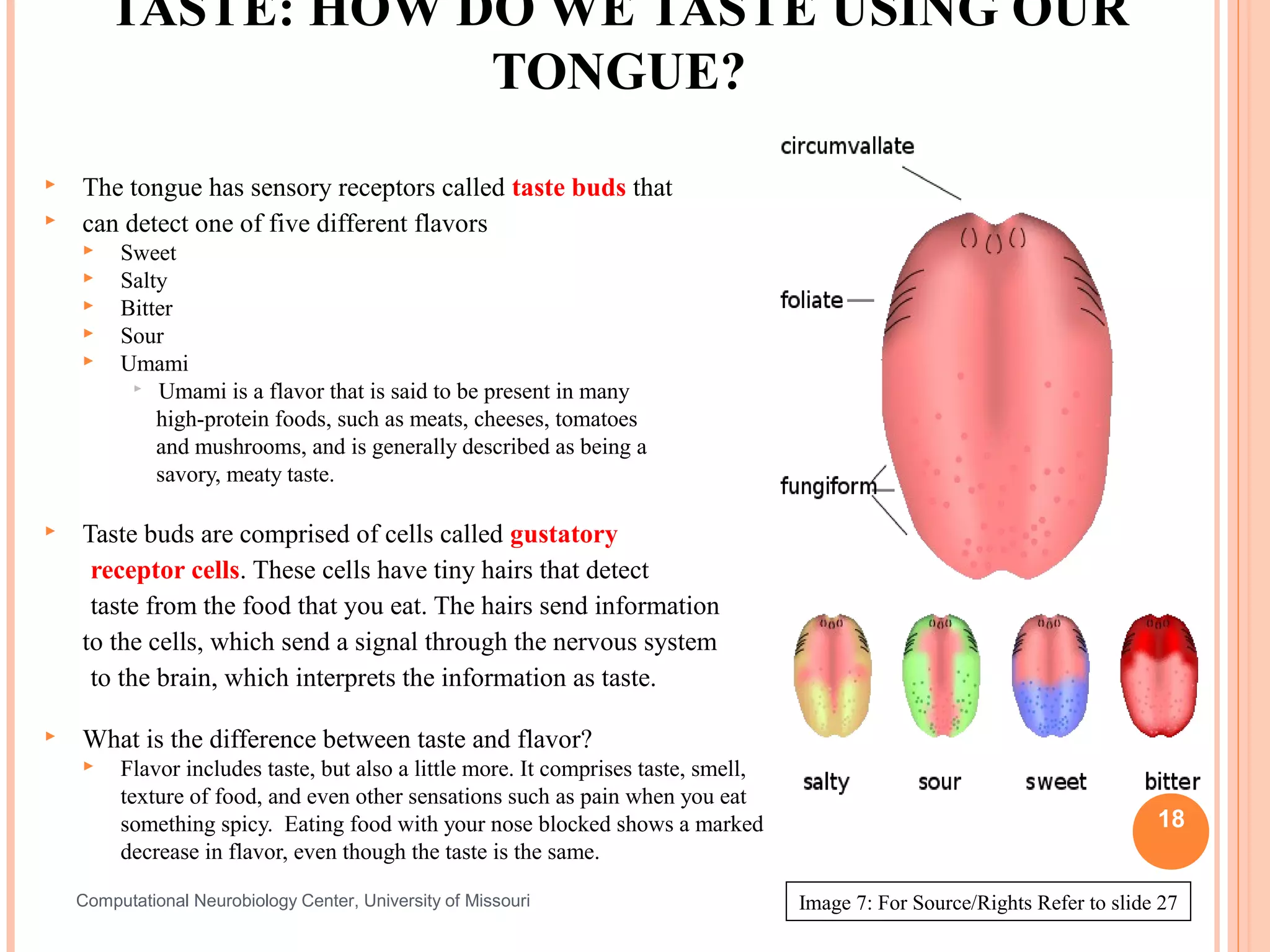
TASTE: HOW DO WE TASTE USING OUR
                    TONGUE?
   The tongue has sensory receptors called taste buds that
   can detect one of five different flavors
        Sweet
        Salty
        Bitter
        Sour
        Umami
           Umami is a flavor that is said to be present in many

             high-protein foods, such as meats, cheeses, tomatoes
             and mushrooms, and is generally described as being a
             savory, meaty taste.

   Taste buds are comprised of cells called gustatory
     receptor cells. These cells have tiny hairs that detect
     taste from the food that you eat. The hairs send information
    to the cells, which send a signal through the nervous system
     to the brain, which interprets the information as taste.

   What is the difference between taste and flavor?
        Flavor includes taste, but also a little more. It comprises taste, smell,
         texture of food, and even other sensations such as pain when you eat
         something spicy. Eating food with your nose blocked shows a marked                                                   18
         decrease in flavor, even though the taste is the same.

    Computational Neurobiology Center, University of Missouri                        Image 7: For Source/Rights Refer to slide 27
TASTE ACTIVITY
   Activity requiring Starburst (or other) flavored candy:
       Pair  students in groups of two
       Each student get two pieces of Starburst candy - the other student
        should not know the flavors that his/her partner has.
       One partner should close his/her eyes and close his/her nose
        while the other partner unwraps and gives him/her one piece of
        candy. The taster should then guess the flavor of the candy.
       Then, the taster should wipe their tongue dry with a paper towel,
        close their eyes, and be given the other piece of candy and guess
        its flavor.
       Switch roles.
       Discuss findings as a group after all the groups are done.
                                                                             19


Computational Neurobiology Center, University of Missouri
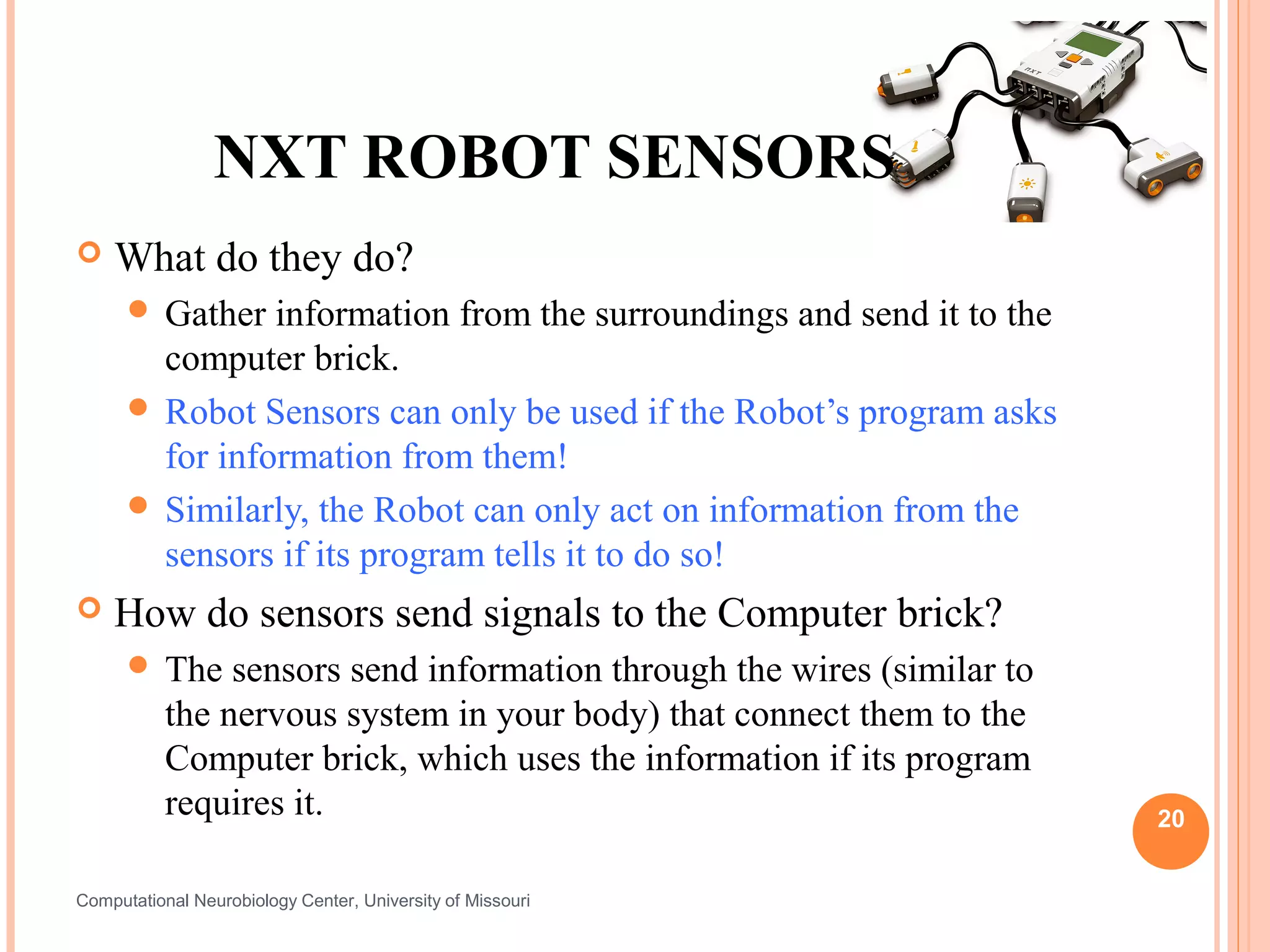
NXT ROBOT SENSORS
   What do they do?
       Gather  information from the surroundings and send it to the
        computer brick.
       Robot Sensors can only be used if the Robot’s program asks
        for information from them!
       Similarly, the Robot can only act on information from the
        sensors if its program tells it to do so!
   How do sensors send signals to the Computer brick?
       The     sensors send information through the wires (similar to
           the nervous system in your body) that connect them to the
           Computer brick, which uses the information if its program
           requires it.                                                  20


Computational Neurobiology Center, University of Missouri
HOW DO ROBOT SENSORS
WORK?
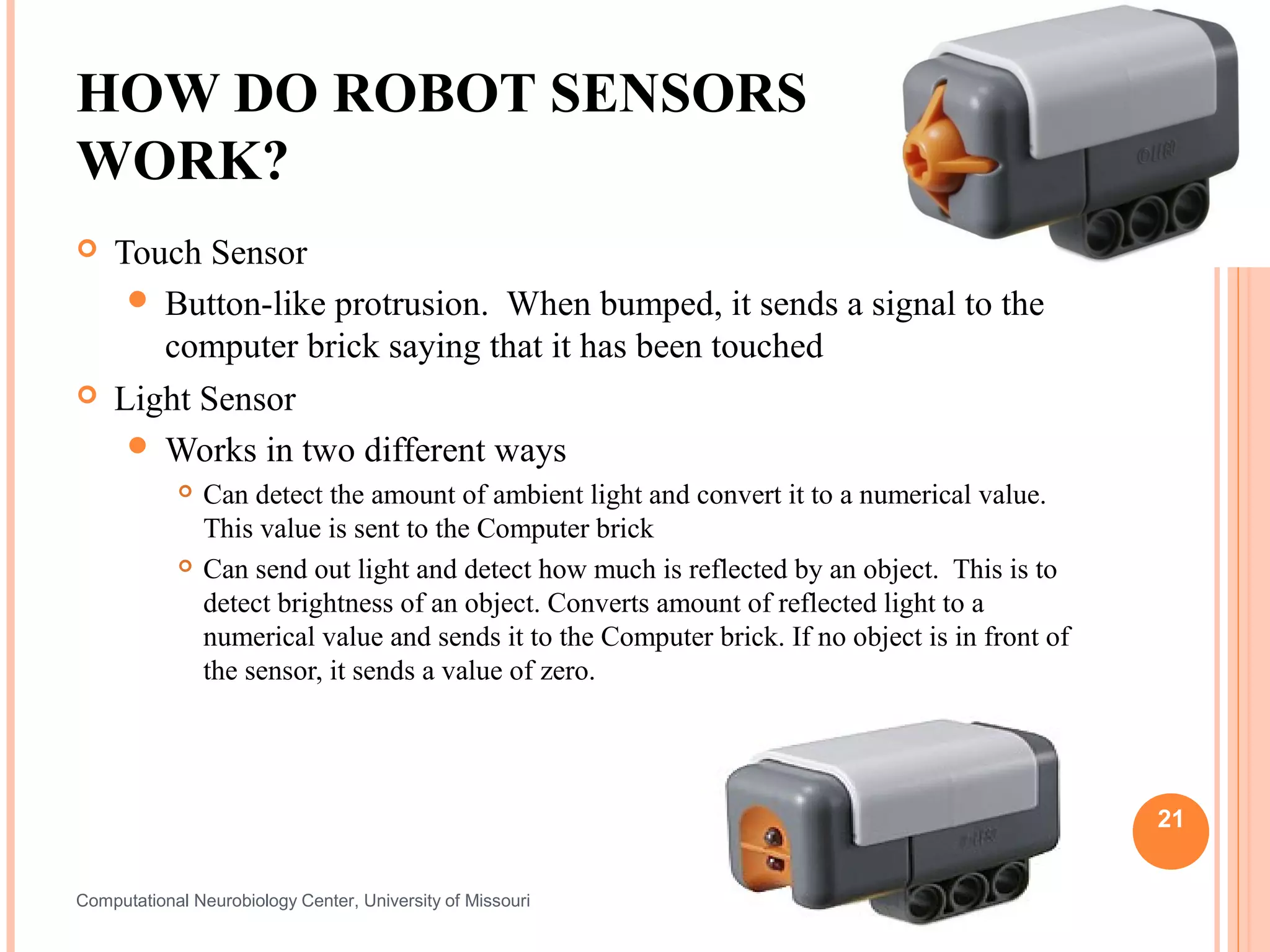
   Touch Sensor
      Button-like protrusion. When bumped, it sends a signal to the
       computer brick saying that it has been touched
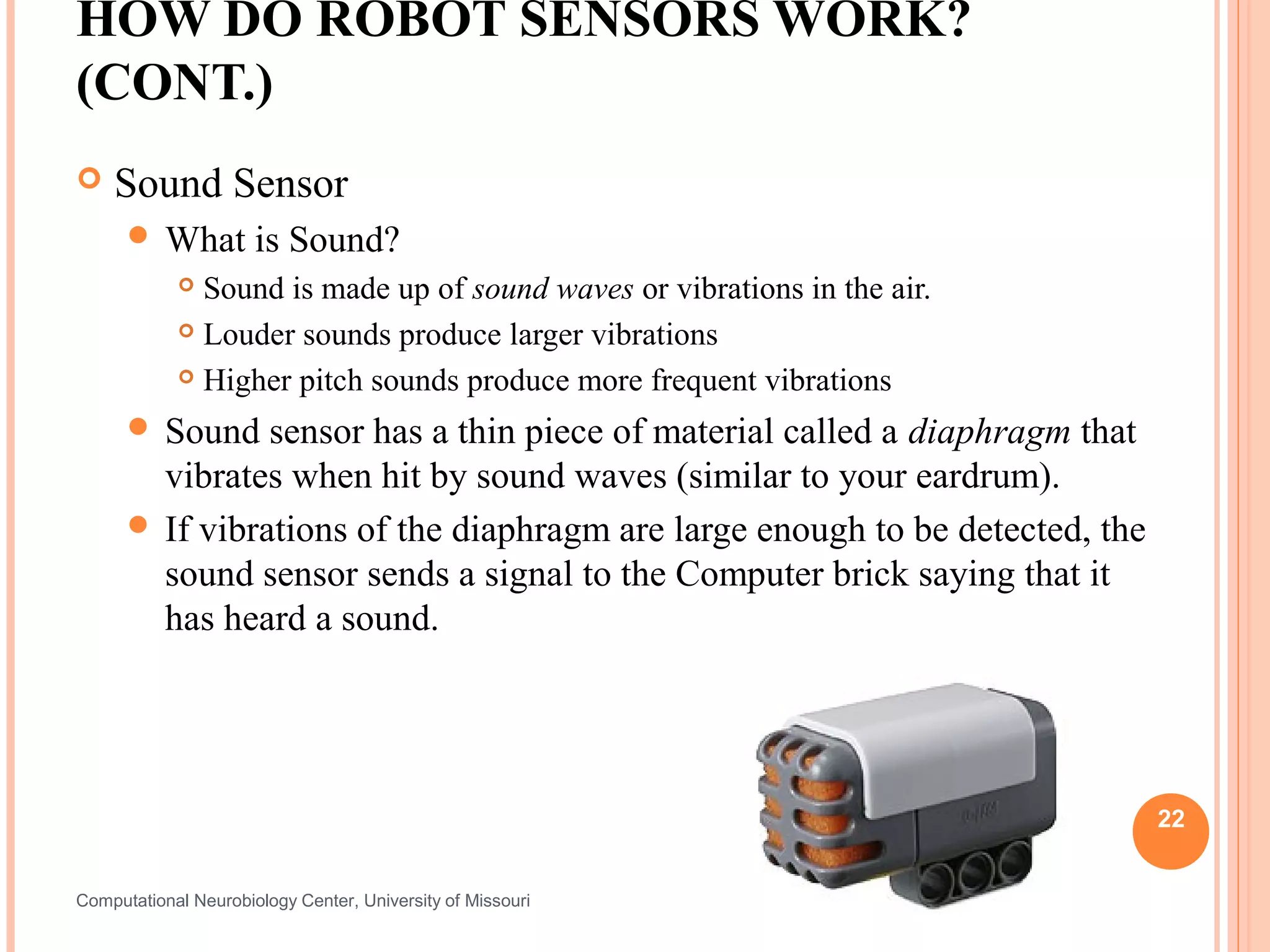
   Light Sensor
      Works in two different ways
               Can detect the amount of ambient light and convert it to a numerical value.
                This value is sent to the Computer brick
               Can send out light and detect how much is reflected by an object. This is to
                detect brightness of an object. Converts amount of reflected light to a
                numerical value and sends it to the Computer brick. If no object is in front of
                the sensor, it sends a value of zero.


                                                                                                  21


Computational Neurobiology Center, University of Missouri
HOW DO ROBOT SENSORS WORK?
(CONT.)
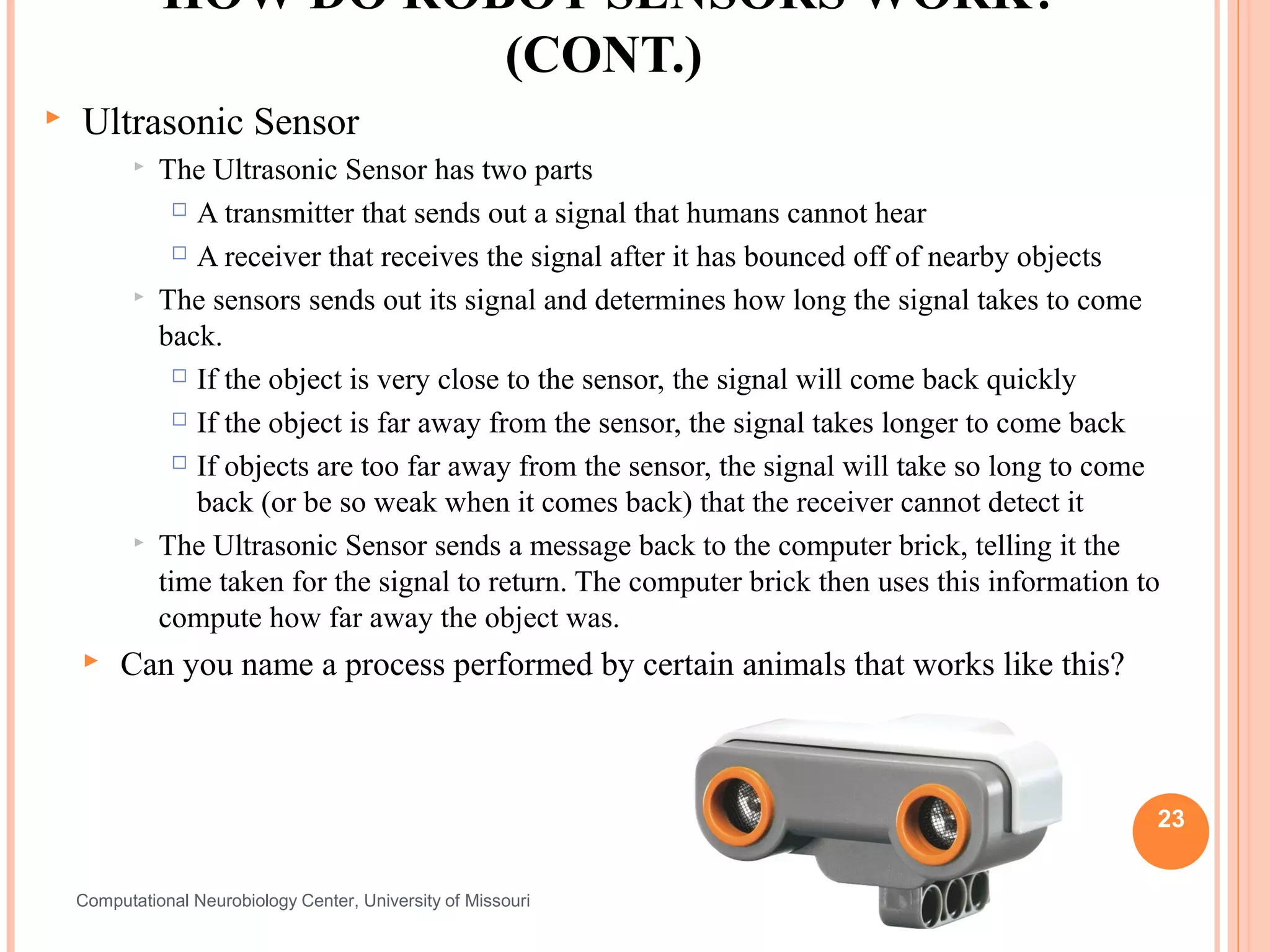
   Sound Sensor
       What          is Sound?
             Sound is made up of sound waves or vibrations in the air.
             Louder sounds produce larger vibrations

             Higher pitch sounds produce more frequent vibrations

       Sound   sensor has a thin piece of material called a diaphragm that
        vibrates when hit by sound waves (similar to your eardrum).
       If vibrations of the diaphragm are large enough to be detected, the
        sound sensor sends a signal to the Computer brick saying that it
        has heard a sound.


                                                                              22


Computational Neurobiology Center, University of Missouri
HOW DO ROBOT SENSORS WORK?
                         (CONT.)
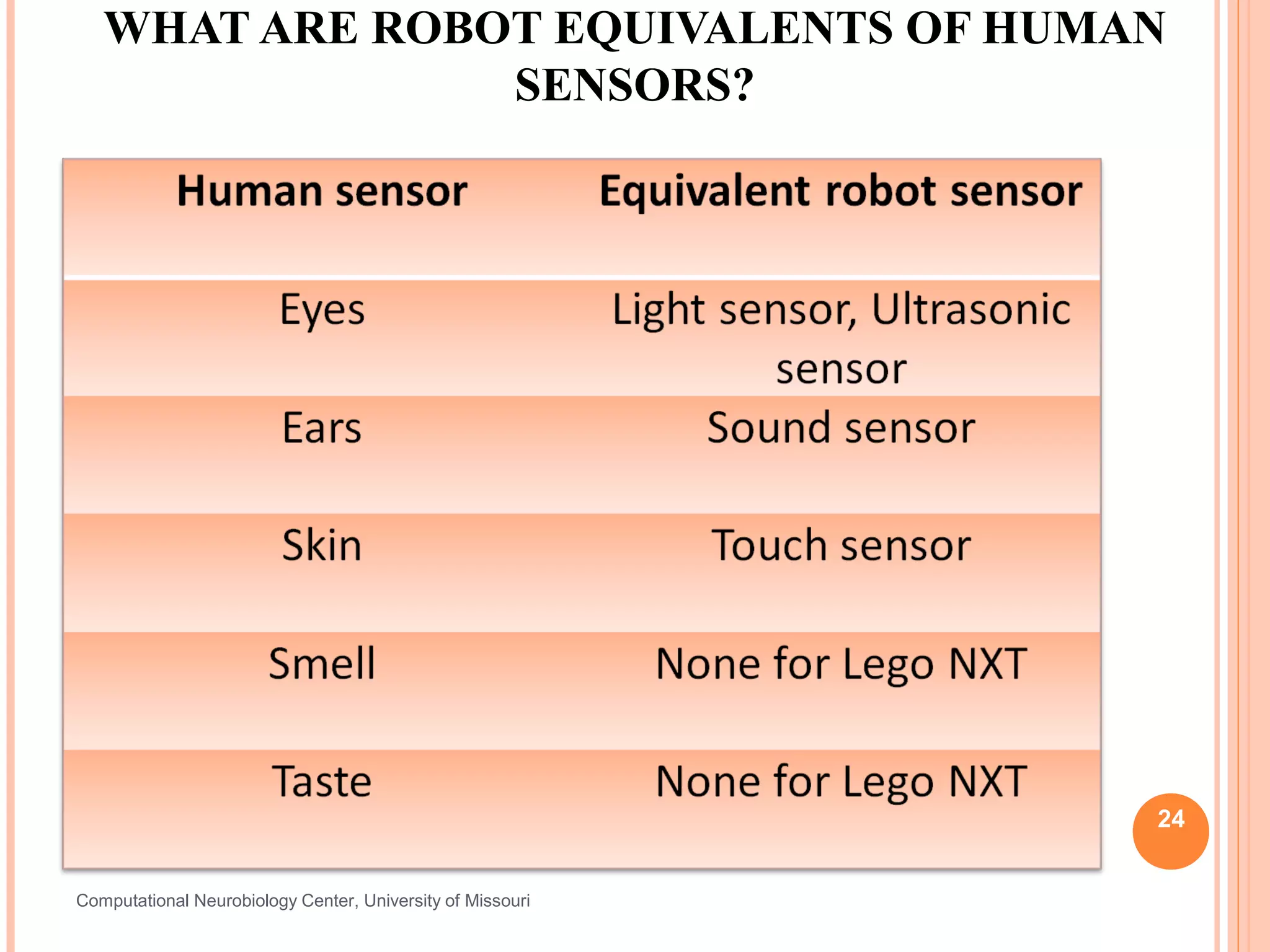
   Ultrasonic Sensor
              The Ultrasonic Sensor has two parts
                  A transmitter that sends out a signal that humans cannot hear

                  A receiver that receives the signal after it has bounced off of nearby objects

              The sensors sends out its signal and determines how long the signal takes to come
               back.
                  If the object is very close to the sensor, the signal will come back quickly

                  If the object is far away from the sensor, the signal takes longer to come back

                  If objects are too far away from the sensor, the signal will take so long to come

                   back (or be so weak when it comes back) that the receiver cannot detect it
              The Ultrasonic Sensor sends a message back to the computer brick, telling it the
               time taken for the signal to return. The computer brick then uses this information to
               compute how far away the object was.
        Can you name a process performed by certain animals that works like this?


                                                                                                   23


    Computational Neurobiology Center, University of Missouri
WHAT ARE ROBOT EQUIVALENTS OF HUMAN
                SENSORS?


                                                            24


Computational Neurobiology Center, University of Missouri
PRE/POST- ASSESSMENT SHEET
  HOW DO HUMAN SENSORS WORK?

   1. What sensors or senses do we humans have?


   2. Describe how any two of the sensors you listed
    above work.


   3. Give examples of sensors in robots that are similar to
    human senses.


                                                                25

Computational Neurobiology Center, University of Missouri
PRE/POST- ASSESSMENT SHEET
  HOW DO HUMAN SENSORS WORK?
   1. What sensors or senses do we humans have ?
    Eyes, Ears, Nose, Skin, Tongue, (other sensors include temperature sensors, sensors
    detecting body position, balance sensors, blood acidity sensors, …)
   2. Describe how any two of the sensors you listed above work.
    Eye – takes in light from the surroundings and relays that to nerve cells that send images
    to the brain
    Ear – takes in sound waves from air and vibrates, sending the vibrations through inner ear
    to hair cells that send signals to the brain
    Nose – particles are inhaled into the nose and nerve cells contact particles and send signals
    to the brain
    Skin- sensors all over skin are activated and send signals to the brain through nervous
    system
    Tongue- taste buds are made up of small cells that have little hairs that are activated by
    particles in food. These hairs send signals through nerves to the brain.
   3. Give examples of sensors in robots that are similar to
    human senses.
    Eyes     – light sensor, ultrasonic sensor
    Ear      – sound sensor
    Skin     – touch sensor                                                                         26

Computational Neurobiology Center, University of Missouri
IMAGE SOURCE/RIGHTS
Image 1:ADA Description: Shoe with ipod embedded in it.
Image file name: shoe design
Source/Rights: http://www.gadgetsharp.com/20091123/9-creative-and-high-tech-shoes-designs/


Image 2:ADA Description: Human Nervous System.
Image file name: Nervous System
Source/Rights: http://www.infovisual.info/03/038_en.html


Image 3:ADA Description: Nerves in human hand.
Image file name: battery.jif
Source/Rights: static.howstuffworks.com/gif/battery.gif


Image 4:ADA Description: Human Eye.
Image file name: Human eye.jpg
Source/Rights: http://www.ratbehavior.org/Eyes.htm


Image 5:ADA Description: Human Ear anatomy.
Image file name: HumanEar.jpg
Source/Rights: www.commons.wikimedia.org
                                                                                             27
Computational Neurobiology Center,
College of Engineering, University of
Missouri, Columbia MO 65211
IMAGE SOURCE/RIGHTS
   Image 6:ADA Description: Human Nose Anatomy.
   Image file name: Illu_nose_nasal_cavities.jpg
   Source/Rights: commons.wikimedia.org

   Image 7:ADA Description: Taste buds on human tongue.
   Image file name: Kieli_kaikki_en.svg
   Source/Rights: http//commons.wikimedia.org/wiki/


                                                          28
Computational Neurobiology Center,
College of Engineering, University of
Missouri, Columbia MO 65211

Human Sensors

  • 1.
    HOW DO HUMANSENSORS WORK? - UNDERSTANDING HUMAN SENSORS AND COMPARING THEM WITH THOSE IN A ROBOT (50 MINUTES)
  • 2.
    PRE/POST- ASSESSMENT SHEET HOW DO HUMAN SENSORS WORK?  1. What sensors or senses do we humans have?  2. Describe how any two of the sensors you listed above work.  3. Give examples of sensors in robots that are similar to human senses. 2 Computational Neurobiology Center, University of Missouri
  • 3.
    PRE/POST- ASSESSMENT SHEET HOW DO HUMAN SENSORS WORK?  1. What sensors or senses do we humans have ? Eyes, Ears, Nose, Skin, Tongue, (other sensors include temperature sensors, sensors detecting body position, balance sensors, blood acidity sensors, …)  2. Describe how any two of the sensors you listed above work. Eye – takes in light from the surroundings and relays that to nerve cells that send images to the brain Ear – takes in sound waves from air and vibrates, sending the vibrations through inner ear to hair cells that send signals to the brain Nose – particles are inhaled into the nose and nerve cells contact particles and send signals to the brain Skin- sensors all over skin are activated and send signals to the brain through nervous system Tongue- taste buds are made up of small cells that have little hairs that are activated by particles in food. These hairs send signals through nerves to the brain.  3. Give examples of sensors in robots that are similar to human senses. Eyes – light sensor, ultrasonic sensor Ear – sound sensor Skin – touch sensor 3 Computational Neurobiology Center, University of Missouri
  • 4.
    WHAT IS ASENSOR?  Device that measures a physical quantity such as temperature and sends the information to a device such as a computer  Two types  Some detect presence of a stimulus (Type I). Can you think of an example?  Some detect quantity/value of a stimulus (Type II). Example?  What are the sensors that exist on the robot?  What are some examples of sensors in real life? Some shoes now have sensors that can transmit the distance traveled to ipods! 4 Image1: For Source/Rights Refer to slide 27 Computational Neurobiology Center, University of Missouri
  • 5.
    WHAT IS ASENSOR?  A sensor is a device that measures a physical quantity (stimulus) and transmits this measurement so that a computer, instrument, or observer can read it.  Some sensors simply detect the presence of a stimulus. These are called Type I sensors.  Example: A sound sensor that detects the presence of a sound.  Other sensors can actually discern relative values of a stimulus. These are called Type II sensors.  Example: A sound sensor that detects the number of decibels in a sound.  Sensors are used in everyday objects such as garage doors that won’t shut if a kid/person is in its way – do you know how that works? Other applications that use sensors include 5 cars, airplanes, robots, and medical equipment. Computational Neurobiology Center, University of Missouri
  • 6.
    HUMAN SENSORS  Your sensory organs (eyes, ears, nose and skin) provide information to your brain so that it can make decisions. They work in a manner very similar to the working of sensors of an robot. Your brain uses the information that it receives from your sensory organs continuously and make your body work.  There are five senses in humans:  Your eyes allow you to see the world  Your ears allow you to hear sounds  Your skin lets you feel objects through touch  Your nose lets you smell the many scents present in the world  Your tongue lets you taste  …and several other sensors in the body that you don’t notice directly  Sensors in the inner ear give the brain information about balance  Sensors in our muscles that let the brain know our body position  Sensors throughout your body that sense temperature 6 Computational Neurobiology Center, University of Missouri
  • 7.
    HUMAN SENSORS –SIGNAL TRANSMISSION  When the sensors of the human body detect a stimulus, they send this information through the nervous system (like wires) to the brain. It has two main parts,  One is called the peripheral nervous system, which is a series of branches of single nerves. These are nerves that connect to every sensor in your body. They send signals to other nerves, which send signals to more nerves until the signal reaches the second part of the nervous system: the central nervous system.  The central nervous system consists of your spinal cord and your brain. The spinal cord is made up of bundles of nerves that are surrounded by bones for protection. Once a signal from a sensor reaches the spinal cord, it is sent up the cord to the brain. The brain decides what to do based on the information received. 7 Computational Neurobiology Center, University of Missouri Image2: For Source/Rights Refer to slide 27
  • 8.
    TOUCH: HOW DOWE FEEL USING OUR SKIN?  Skin contains millions of sensitive nerve endings that can detect stimuli such as  Pain  Pressure  Temperature  Many other stimuli we detect are other versions of the three above  Itching is small pain stimuli  Tickling is small pressure stimuli  When these receptors are stimulated, they send signals through your nervous system to the brain which recognizes that something has been touched. Image3: For Source/Rights Refer to slide 27 8 Computational Neurobiology Center, University of Missouri
  • 9.
    TOUCH SENSORS ACTIVITY  Activity:  Each person pick a partner  Each group of two should have two pencils  One partner close his/her eyes and extends his/her hand to the other partner  Second partner pokes the first partner’s hand with either one or two pencils, and have them guess whether one or two pencils were used. Try different distances apart when using two pencils at a time.  Attempt this at various locations on the hand, starting at the palm and ending at the back of the forearm and discuss results.  Switch roles. Discuss findings as a group. 9 Computational Neurobiology Center, University of Missouri
  • 10.
    VISION: HOW DOESTHE BRAIN KNOW WHAT WE LOOK AT?  Light (stimulus) enters the eye  It passes through the optic nerve  Lateral Geniculate Nucleus (LGN) relays the information to the visual cortex  Visual Cortex processes this information 10 Computational Neurobiology Center, University of Missouri
  • 11.
    HOW DO YOUREYES WORK?  First, light enters your eye, and is refracted, or bent, by the cornea, the outermost part of your eye.  Refracted light is directed right at the pupil, a small hole in the center of the iris, the colored part of the eye. The iris can change the size of the pupil to allow more or less light to enter.  Light that goes through the pupil is then redirected again by the eye’s lens, which points the light at nerve cells in the back of your eye.  There are two types of nerve cells in the back:  Cones detect colors and fine details in good light. They are concentrated in the center of the back part of your eye.  Rods detect the presence of objects in bad light and are concentrated on the sides of the back part of your eye.  Cones and rod send signal through the optic nerve to brain. 11 Computational Neurobiology Center, University of Missouri
  • 12.
    VARIOUS PARTS OFTHE HUMAN EYE 12 Image 4: For Source/Rights Refer to slide 27 Computational Neurobiology Center, University of Missouri
  • 13.
    WORKSHEET: LABEL COMPONENTS OF THE EYE 13 Computational Neurobiology Center, University of Missouri
  • 14.
    SOUND: HOW DOESYOUR EAR WORK?  Sound waves enter the ear canal and cause the eardrum to vibrate  Vibrations of the eardrum are carried through the hammer, anvil, and stirrup of the ear to a fluid-filled structure called the cochlea.  Different pitches cause different parts of the fluid in the cochlea to vibrate  When cochlear fluid vibrates, it moves hairs connected to nerve cells, which send signals to the brain through the auditory nerve.  The brain helps you recognize the sound. Image 5: For Source/Rights Refer to slide 27 14 Computational Neurobiology Center, University of Missouri
  • 15.
    VARIOUS PARTS OFTHE HUMAN EAR 15 Image 5: For Source/Rights Refer to slide 27 Computational Neurobiology Center, University of Missouri
  • 16.
    WORKSHEET- LABEL PARTSOF THE HUMAN EAR 16 Computational Neurobiology Center, University of Missouri
  • 17.
    SMELL: HOW DOWE SMELL USING OUR NOSE?  Small particles of almost everything around us can be found in the air.  These particles enter the nose when you breathe in and contact nerve endings in the upper nasal passage.  These nerve endings send a signal through the nervous system to the brain, which makes sense of the smell.  Humans can distinguish between hundreds of different smells. Dogs can distinguish between thousands. Image 6: For Source/Rights Refer to slide 27 17 http://videos.howstuffworks.com/howstuffworks/461-how-smell-works-video.htm Computational Neurobiology Center, University of Missouri
  • 18.
    TASTE: HOW DOWE TASTE USING OUR TONGUE?  The tongue has sensory receptors called taste buds that  can detect one of five different flavors  Sweet  Salty  Bitter  Sour  Umami  Umami is a flavor that is said to be present in many high-protein foods, such as meats, cheeses, tomatoes and mushrooms, and is generally described as being a savory, meaty taste.  Taste buds are comprised of cells called gustatory receptor cells. These cells have tiny hairs that detect taste from the food that you eat. The hairs send information to the cells, which send a signal through the nervous system to the brain, which interprets the information as taste.  What is the difference between taste and flavor?  Flavor includes taste, but also a little more. It comprises taste, smell, texture of food, and even other sensations such as pain when you eat something spicy. Eating food with your nose blocked shows a marked 18 decrease in flavor, even though the taste is the same. Computational Neurobiology Center, University of Missouri Image 7: For Source/Rights Refer to slide 27
  • 19.
    TASTE ACTIVITY  Activity requiring Starburst (or other) flavored candy:  Pair students in groups of two  Each student get two pieces of Starburst candy - the other student should not know the flavors that his/her partner has.  One partner should close his/her eyes and close his/her nose while the other partner unwraps and gives him/her one piece of candy. The taster should then guess the flavor of the candy.  Then, the taster should wipe their tongue dry with a paper towel, close their eyes, and be given the other piece of candy and guess its flavor.  Switch roles.  Discuss findings as a group after all the groups are done. 19 Computational Neurobiology Center, University of Missouri
  • 20.
    NXT ROBOT SENSORS  What do they do?  Gather information from the surroundings and send it to the computer brick.  Robot Sensors can only be used if the Robot’s program asks for information from them!  Similarly, the Robot can only act on information from the sensors if its program tells it to do so!  How do sensors send signals to the Computer brick?  The sensors send information through the wires (similar to the nervous system in your body) that connect them to the Computer brick, which uses the information if its program requires it. 20 Computational Neurobiology Center, University of Missouri
  • 21.
    HOW DO ROBOTSENSORS WORK?  Touch Sensor  Button-like protrusion. When bumped, it sends a signal to the computer brick saying that it has been touched  Light Sensor  Works in two different ways  Can detect the amount of ambient light and convert it to a numerical value. This value is sent to the Computer brick  Can send out light and detect how much is reflected by an object. This is to detect brightness of an object. Converts amount of reflected light to a numerical value and sends it to the Computer brick. If no object is in front of the sensor, it sends a value of zero. 21 Computational Neurobiology Center, University of Missouri
  • 22.
    HOW DO ROBOTSENSORS WORK? (CONT.)  Sound Sensor  What is Sound?  Sound is made up of sound waves or vibrations in the air.  Louder sounds produce larger vibrations  Higher pitch sounds produce more frequent vibrations  Sound sensor has a thin piece of material called a diaphragm that vibrates when hit by sound waves (similar to your eardrum).  If vibrations of the diaphragm are large enough to be detected, the sound sensor sends a signal to the Computer brick saying that it has heard a sound. 22 Computational Neurobiology Center, University of Missouri
  • 23.
    HOW DO ROBOTSENSORS WORK? (CONT.)  Ultrasonic Sensor  The Ultrasonic Sensor has two parts  A transmitter that sends out a signal that humans cannot hear  A receiver that receives the signal after it has bounced off of nearby objects  The sensors sends out its signal and determines how long the signal takes to come back.  If the object is very close to the sensor, the signal will come back quickly  If the object is far away from the sensor, the signal takes longer to come back  If objects are too far away from the sensor, the signal will take so long to come back (or be so weak when it comes back) that the receiver cannot detect it  The Ultrasonic Sensor sends a message back to the computer brick, telling it the time taken for the signal to return. The computer brick then uses this information to compute how far away the object was.  Can you name a process performed by certain animals that works like this? 23 Computational Neurobiology Center, University of Missouri
  • 24.
    WHAT ARE ROBOTEQUIVALENTS OF HUMAN SENSORS? 24 Computational Neurobiology Center, University of Missouri
  • 25.
    PRE/POST- ASSESSMENT SHEET HOW DO HUMAN SENSORS WORK?  1. What sensors or senses do we humans have?  2. Describe how any two of the sensors you listed above work.  3. Give examples of sensors in robots that are similar to human senses. 25 Computational Neurobiology Center, University of Missouri
  • 26.
    PRE/POST- ASSESSMENT SHEET HOW DO HUMAN SENSORS WORK?  1. What sensors or senses do we humans have ? Eyes, Ears, Nose, Skin, Tongue, (other sensors include temperature sensors, sensors detecting body position, balance sensors, blood acidity sensors, …)  2. Describe how any two of the sensors you listed above work. Eye – takes in light from the surroundings and relays that to nerve cells that send images to the brain Ear – takes in sound waves from air and vibrates, sending the vibrations through inner ear to hair cells that send signals to the brain Nose – particles are inhaled into the nose and nerve cells contact particles and send signals to the brain Skin- sensors all over skin are activated and send signals to the brain through nervous system Tongue- taste buds are made up of small cells that have little hairs that are activated by particles in food. These hairs send signals through nerves to the brain.  3. Give examples of sensors in robots that are similar to human senses. Eyes – light sensor, ultrasonic sensor Ear – sound sensor Skin – touch sensor 26 Computational Neurobiology Center, University of Missouri
  • 27.
    IMAGE SOURCE/RIGHTS Image 1:ADADescription: Shoe with ipod embedded in it. Image file name: shoe design Source/Rights: http://www.gadgetsharp.com/20091123/9-creative-and-high-tech-shoes-designs/ Image 2:ADA Description: Human Nervous System. Image file name: Nervous System Source/Rights: http://www.infovisual.info/03/038_en.html Image 3:ADA Description: Nerves in human hand. Image file name: battery.jif Source/Rights: static.howstuffworks.com/gif/battery.gif Image 4:ADA Description: Human Eye. Image file name: Human eye.jpg Source/Rights: http://www.ratbehavior.org/Eyes.htm Image 5:ADA Description: Human Ear anatomy. Image file name: HumanEar.jpg Source/Rights: www.commons.wikimedia.org 27 Computational Neurobiology Center, College of Engineering, University of Missouri, Columbia MO 65211
  • 28.
    IMAGE SOURCE/RIGHTS Image 6:ADA Description: Human Nose Anatomy. Image file name: Illu_nose_nasal_cavities.jpg Source/Rights: commons.wikimedia.org Image 7:ADA Description: Taste buds on human tongue. Image file name: Kieli_kaikki_en.svg Source/Rights: http//commons.wikimedia.org/wiki/ 28 Computational Neurobiology Center, College of Engineering, University of Missouri, Columbia MO 65211

Editor's Notes

  • #10 The touch sensor activity is approx. 7 min. Teacher to lead discussion of all student findings (Discussion: 5 min)
  • #14 Teacher to make copies of the worksheet. Filling out this worksheet should take 5 min.
  • #17 Teacher to make copies of the worksheet. Filling out this worksheet should take 5 min.
  • #18 Teacher to show video to the class
  • #20 The touch sensor activity is approx. 7 min. Teacher to lead discussion of all student findings (Discussion: 5 min)