Social Distancing
Detection Using Arduino
SUPERVISOR:
DR. KIRTI PAL
(ASS. PROFESSOR)
PRESENTED BY:
SHUBHAM KUMAR
17/IEE/033
CONTENT
1. Introduction.
2. Overview.
3. Circuit Diagram.
4. Apparatus required.
5. Work Plan.
6. Software Required.
7. ARDUINO IDE.
8. Programming Languages Used.
9. Application.
10. Future Plan.
11. Conclusion.
12. References.
Introduction
 Aims to decrease or interrupt transmission of COVID-19 in a population by
minimizing contact between potentially infected individuals and healthy
individuals, or between population groups with high rates of transmission
and population groups with no or low levels of transmission.
Overview
 Our PM Narendra Modi has spoken about keeping social distance to
fight against COVID 19.
 So I thought why not make such a gadget to track social
distancing even more.
 We will make a social distancing alarm using Arduino. You can also call
it a social distancing alarm.
 Then you need to maintain the 1 meter distance at the stores and
etc. this is social distance detecting tag.
Continued….
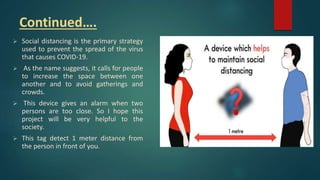
 Social distancing is the primary strategy
used to prevent the spread of the virus
that causes COVID-19.
 As the name suggests, it calls for people
to increase the space between one
another and to avoid gatherings and
crowds.
 This device gives an alarm when two
persons are too close. So I hope this
project will be very helpful to the
society.
 This tag detect 1 meter distance from
the person in front of you.
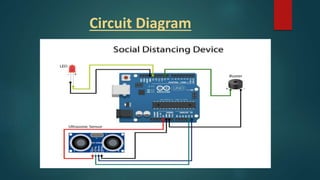
Circuit Diagram
For Social Distancing Detection Using
Arduino we need apparatus like:
 ULTRASONIC SENSOR
 BATTERY
 Piezo Buzzer
 Jumper wires
 Microcontroller (Arduino uno)
 LED
ULTRASONIC SENSOR
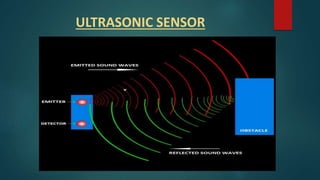
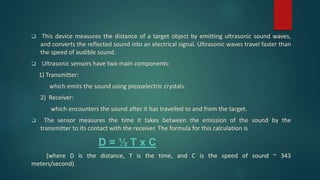
 This device measures the distance of a target object by emitting ultrasonic sound waves,
and converts the reflected sound into an electrical signal. Ultrasonic waves travel faster than
the speed of audible sound.
 Ultrasonic sensors have two main components:
1) Transmitter:
which emits the sound using piezoelectric crystals.
2) Receiver:
which encounters the sound after it has travelled to and from the target.
 The sensor measures the time it takes between the emission of the sound by the
transmitter to its contact with the receiver. The formula for this calculation is
D = ½ T x C
(where D is the distance, T is the time, and C is the speed of sound ~ 343
meters/second).
BATTERY
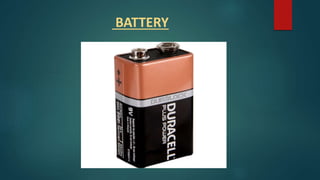
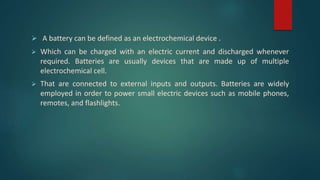
 A battery can be defined as an electrochemical device .
 Which can be charged with an electric current and discharged whenever
required. Batteries are usually devices that are made up of multiple
electrochemical cell.
 That are connected to external inputs and outputs. Batteries are widely
employed in order to power small electric devices such as mobile phones,
remotes, and flashlights.
Piezo Buzzer
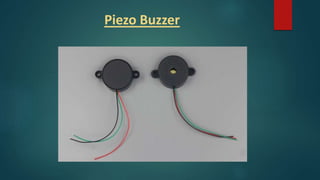
 The buzzer is a sounding device that can convert audio signals into
sound signals.
 It is usually powered by DC voltage.
 The piezoelectric buzzer uses the piezoelectric effect of the piezoelectric
ceramics and uses the pulse current to drive the vibration of the metal
plate to generate sound.
 Some of the piezoelectric buzzers are also equipped with light-emitting
diodes.
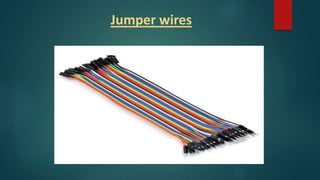
Jumper wires
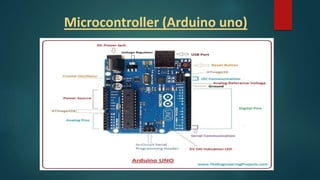
Microcontroller (Arduino uno)
• The Arduino Uno is an open-source microcontroller board based on
the Microchip ATmega328P microcontroller and developed by Arduino.cc.
• The board has 14 digital I/O pins (six capable of PWM output), 6 analog I/O pins, and is
programmable with the Arduino IDE (Integrated Development Environment), via a type B USB
cable.
• Arduino Software (IDE) includes a serial monitor which allows simple textual data to be sent to
and from the board.
• This board can be directly connected to the computer through USB cable that is used to
transfer the code to the controller using IDE (Integrated Development Environment) software,
mainly developed to program Arduino. IDE is equally compatible with Windows, MAC or Linux
Systems, however, Windows is preferable to use.
LED
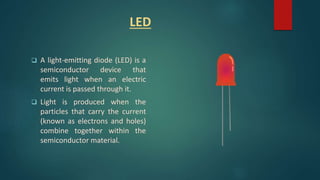
 A light-emitting diode (LED) is a
semiconductor device that
emits light when an electric
current is passed through it.
 Light is produced when the
particles that carry the current
(known as electrons and holes)
combine together within the
semiconductor material.
Work Plan
 The project we made is a social distancing device by seeing
daily movement of a man .
 Whenever a person goes too close to another person it
automatically gives alarm and we maintain distancing.
 Keeping all in mind we planned to work on this project to save
lives and minimizing the spread of corona virus.
SOFTWARE REQUIRED
 Arduino IDE
ARDUINO IDE
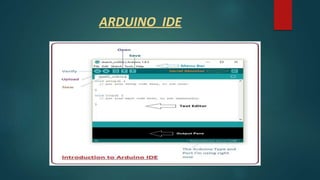
 The Arduino Integrated Development Environment (IDE) is a cross-
platform application (for Windows, macOS, Linux) that is written in functions
from C and C++.
 It is used to write and upload programs to Arduino compatible boards, but
also, with the help of third-party cores, other vendor development boards.
 The Arduino IDE supplies a software library from the Wiring project, which
provides many common input and output procedures.
Programming Languages Used..
 Embedded C/C++
 The microcontroller Arduino uno is programmed in such a way
that whenever a person comes too close to ultrasonic sensor
it activates the buzzer.
Applications
 Stop shaking hands with others.
 Avoid non-essential meetings.
 Hold essential meetings in the open air.
 Provide alcohol-based sanitizer for all staff.
 Regularly clean and disinfect surfaces used by humans.
 Limit food handling and promote strict hygiene in food handling.
 Avoid non-essential travel.
SOCIAL DISTANCING GUIDELINES
1. Avoid in person meetings. Use online conferencing. email or the phone
when possible, even when people are in the same building.
2. Avoid public transportation (walk, cycle, drive a car) or go early or late
to avoid rush-hour crowding on public transportation.
3. Unavoidable in-person meeting should be short, in a large meeting
room where people can sit at least six feet each others; avoid hand
shaking.
4. Bring lunch and eat at your desk or away from others (avoid lunchroom
and crowded restaurants).
Future Plan
o As we know the project is made of automated system so this
type of project may help the world in minimizing the spread
of corona virus.
o If I came to Pandemic again in future, these kinds of devices
could save us and prevent us from spreading.
Conclusion
 We tried our best to incorporate preplanned idea into our project to
fulfill the required of a social distancing device.
 We also observed that our model has been able to dispense its task
effectively and properly.
 This project help people in maintaining social distancing in this
pandemic world of CORONA VIRUS.
 Thus we hope our project will draw attention of many people.
References
 https://www.cdc.gov/coronavirus/2019-ncov/prevent-getting-
sick/social-distancing.html.
 https://arduino.cc/usa/arduino-uno-rev3
 https://www.fierceelectronics.com/sensors/what-ultrasonic-sensor
 https://components101.com/misc/buzzer-pinout-working-
datasheet
 https://www.theengineeringprojects.com/2018/06/introduction-to-
arduino-uno.html/amp
THANK YOU

Social distancing detection using arduino 1

  • 1.
    Social Distancing Detection UsingArduino SUPERVISOR: DR. KIRTI PAL (ASS. PROFESSOR) PRESENTED BY: SHUBHAM KUMAR 17/IEE/033
  • 2.
    CONTENT 1. Introduction. 2. Overview. 3.Circuit Diagram. 4. Apparatus required. 5. Work Plan. 6. Software Required. 7. ARDUINO IDE. 8. Programming Languages Used. 9. Application. 10. Future Plan. 11. Conclusion. 12. References.
  • 3.
    Introduction  Aims todecrease or interrupt transmission of COVID-19 in a population by minimizing contact between potentially infected individuals and healthy individuals, or between population groups with high rates of transmission and population groups with no or low levels of transmission.
  • 4.
    Overview  Our PMNarendra Modi has spoken about keeping social distance to fight against COVID 19.  So I thought why not make such a gadget to track social distancing even more.  We will make a social distancing alarm using Arduino. You can also call it a social distancing alarm.  Then you need to maintain the 1 meter distance at the stores and etc. this is social distance detecting tag.
  • 5.
    Continued….  Social distancingis the primary strategy used to prevent the spread of the virus that causes COVID-19.  As the name suggests, it calls for people to increase the space between one another and to avoid gatherings and crowds.  This device gives an alarm when two persons are too close. So I hope this project will be very helpful to the society.  This tag detect 1 meter distance from the person in front of you.
  • 6.
  • 7.
    For Social DistancingDetection Using Arduino we need apparatus like:  ULTRASONIC SENSOR  BATTERY  Piezo Buzzer  Jumper wires  Microcontroller (Arduino uno)  LED
  • 8.
  • 9.
     This devicemeasures the distance of a target object by emitting ultrasonic sound waves, and converts the reflected sound into an electrical signal. Ultrasonic waves travel faster than the speed of audible sound.  Ultrasonic sensors have two main components: 1) Transmitter: which emits the sound using piezoelectric crystals. 2) Receiver: which encounters the sound after it has travelled to and from the target.  The sensor measures the time it takes between the emission of the sound by the transmitter to its contact with the receiver. The formula for this calculation is D = ½ T x C (where D is the distance, T is the time, and C is the speed of sound ~ 343 meters/second).
  • 10.
  • 11.
     A batterycan be defined as an electrochemical device .  Which can be charged with an electric current and discharged whenever required. Batteries are usually devices that are made up of multiple electrochemical cell.  That are connected to external inputs and outputs. Batteries are widely employed in order to power small electric devices such as mobile phones, remotes, and flashlights.
  • 12.
  • 13.
     The buzzeris a sounding device that can convert audio signals into sound signals.  It is usually powered by DC voltage.  The piezoelectric buzzer uses the piezoelectric effect of the piezoelectric ceramics and uses the pulse current to drive the vibration of the metal plate to generate sound.  Some of the piezoelectric buzzers are also equipped with light-emitting diodes.
  • 14.
  • 15.
  • 16.
    • The ArduinoUno is an open-source microcontroller board based on the Microchip ATmega328P microcontroller and developed by Arduino.cc. • The board has 14 digital I/O pins (six capable of PWM output), 6 analog I/O pins, and is programmable with the Arduino IDE (Integrated Development Environment), via a type B USB cable. • Arduino Software (IDE) includes a serial monitor which allows simple textual data to be sent to and from the board. • This board can be directly connected to the computer through USB cable that is used to transfer the code to the controller using IDE (Integrated Development Environment) software, mainly developed to program Arduino. IDE is equally compatible with Windows, MAC or Linux Systems, however, Windows is preferable to use.
  • 17.
    LED  A light-emittingdiode (LED) is a semiconductor device that emits light when an electric current is passed through it.  Light is produced when the particles that carry the current (known as electrons and holes) combine together within the semiconductor material.
  • 18.
    Work Plan  Theproject we made is a social distancing device by seeing daily movement of a man .  Whenever a person goes too close to another person it automatically gives alarm and we maintain distancing.  Keeping all in mind we planned to work on this project to save lives and minimizing the spread of corona virus.
  • 19.
  • 20.
  • 21.
     The ArduinoIntegrated Development Environment (IDE) is a cross- platform application (for Windows, macOS, Linux) that is written in functions from C and C++.  It is used to write and upload programs to Arduino compatible boards, but also, with the help of third-party cores, other vendor development boards.  The Arduino IDE supplies a software library from the Wiring project, which provides many common input and output procedures.
  • 22.
    Programming Languages Used.. Embedded C/C++  The microcontroller Arduino uno is programmed in such a way that whenever a person comes too close to ultrasonic sensor it activates the buzzer.
  • 23.
    Applications  Stop shakinghands with others.  Avoid non-essential meetings.  Hold essential meetings in the open air.  Provide alcohol-based sanitizer for all staff.  Regularly clean and disinfect surfaces used by humans.  Limit food handling and promote strict hygiene in food handling.  Avoid non-essential travel.
  • 24.
    SOCIAL DISTANCING GUIDELINES 1.Avoid in person meetings. Use online conferencing. email or the phone when possible, even when people are in the same building. 2. Avoid public transportation (walk, cycle, drive a car) or go early or late to avoid rush-hour crowding on public transportation. 3. Unavoidable in-person meeting should be short, in a large meeting room where people can sit at least six feet each others; avoid hand shaking. 4. Bring lunch and eat at your desk or away from others (avoid lunchroom and crowded restaurants).
  • 25.
    Future Plan o Aswe know the project is made of automated system so this type of project may help the world in minimizing the spread of corona virus. o If I came to Pandemic again in future, these kinds of devices could save us and prevent us from spreading.
  • 26.
    Conclusion  We triedour best to incorporate preplanned idea into our project to fulfill the required of a social distancing device.  We also observed that our model has been able to dispense its task effectively and properly.  This project help people in maintaining social distancing in this pandemic world of CORONA VIRUS.  Thus we hope our project will draw attention of many people.
  • 27.
    References  https://www.cdc.gov/coronavirus/2019-ncov/prevent-getting- sick/social-distancing.html.  https://arduino.cc/usa/arduino-uno-rev3 https://www.fierceelectronics.com/sensors/what-ultrasonic-sensor  https://components101.com/misc/buzzer-pinout-working- datasheet  https://www.theengineeringprojects.com/2018/06/introduction-to- arduino-uno.html/amp
  • 28.