Advanced	
  
Segmenta-on	
  	
  
June,	
  2013	
  
What is Advance Segmentation?
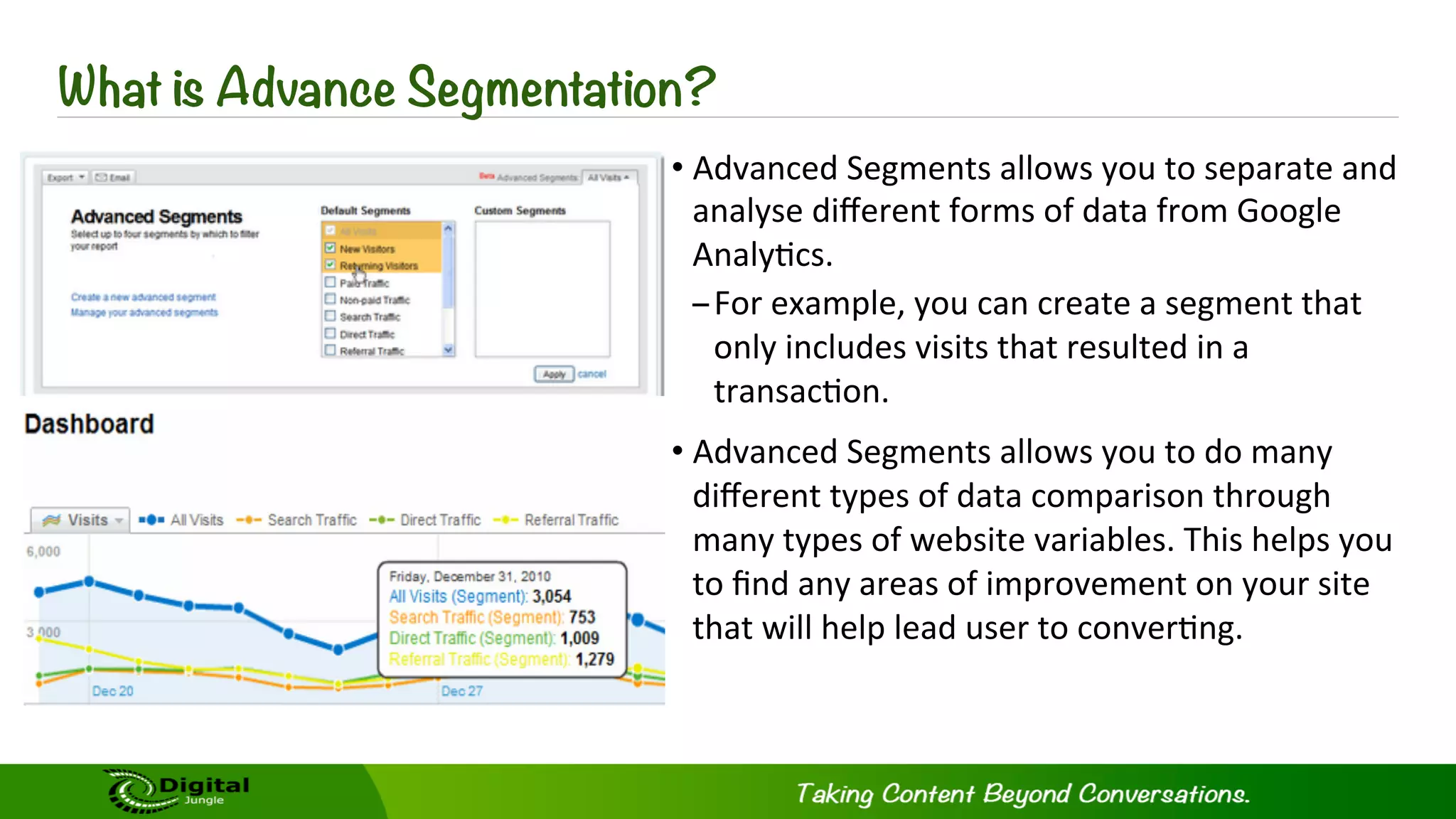
• Advanced	
  Segments	
  allows	
  you	
  to	
  separate	
  and	
  
analyse	
  different	
  forms	
  of	
  data	
  from	
  Google	
  
Analy?cs.	
  	
  
– For	
  example,	
  you	
  can	
  create	
  a	
  segment	
  that	
  
only	
  includes	
  visits	
  that	
  resulted	
  in	
  a	
  
transac?on.	
  
• Advanced	
  Segments	
  allows	
  you	
  to	
  do	
  many	
  
different	
  types	
  of	
  data	
  comparison	
  through	
  
many	
  types	
  of	
  website	
  variables.	
  This	
  helps	
  you	
  
to	
  find	
  any	
  areas	
  of	
  improvement	
  on	
  your	
  site	
  
that	
  will	
  help	
  lead	
  user	
  to	
  conver?ng.	
  	
  
Difference Between Advanced Segmentation and Filters
What’s	
  the	
  difference	
  between	
  advanced	
  segments	
  and	
  filters?	
  
Well,	
  They	
  act	
  in	
  similar	
  ways,	
  but	
  there	
  are	
  some	
  clear	
  differences	
  
between	
  the	
  two:	
  
– With	
  Advanced	
  Segments	
  you	
  can	
  view	
  data	
  from	
  the	
  past.	
  
– With	
  Filters	
  you	
  can	
  only	
  view	
  data	
  from	
  when	
  you	
  start	
  the	
  filter.	
  
You	
  can	
  see	
  and	
  compare	
  mul?ple	
  Segments	
  at	
  the	
  same	
  ?me,	
  where	
  in	
  
Filters	
  you	
  can	
  only	
  view	
  one	
  at	
  a	
  ?me.	
  
So	
  why	
  use	
  Advanced	
  Segmenta-on?	
  
It	
  helps	
  you	
  beKer	
  analyse	
  different	
  data	
  ranges	
  that	
  simple	
  filters	
  
aren't	
  capable	
  of	
  segmen?ng.	
  
How To Setup Advanced Segmentation?
•  Sign	
  into	
  your	
  Analy?cs	
  account	
  
•  Go	
  to	
  the	
  upper	
  right	
  of	
  the	
  dashboard	
  
•  Click	
  the	
  Advanced	
  Segment	
  buKon	
  
•  Create	
  a	
  new	
  custom	
  segment	
  
•  Click	
  on	
  the	
  type	
  of	
  segments	
  you	
  want	
  to	
  create	
  
•  Define	
  the	
  Segment	
  
v  Include/Exclude	
  
v  Dimension/Metric	
  List	
  
v  Containing/Exactly	
  Matching/Begins	
  With/Ends	
  With	
  
v  Text	
  Field	
  
v  Combina-ons	
  Restric-ve	
  and	
  Inclusive	
  	
  
•  Click	
  on	
  the	
  create	
  new	
  advanced	
  segment	
  buKon	
  to	
  start	
  the	
  
segmenta?on.	
  
Benefits of Advanced Segmentation
Bounced	
  Visits	
  
– To	
  single	
  out	
  what	
  type	
  of	
  users	
  have	
  the	
  highest	
  bounce	
  rate,	
  and	
  what	
  pages	
  they	
  visited.	
  
Non-­‐bounce	
  Visits	
  
– See	
  what	
  the	
  users	
  that	
  stay	
  on	
  your	
  site	
  visited	
  and	
  compare	
  it	
  to	
  those	
  who	
  bounced	
  from	
  the	
  
site	
  
Visits	
  with	
  conversions	
  
– See	
  what	
  parts	
  of	
  your	
  site	
  lead	
  to	
  conversions	
  
Visits	
  that	
  dropped	
  out	
  of	
  the	
  funnel	
  
– With	
  this	
  you	
  can	
  set	
  up	
  funnels	
  and	
  see	
  where	
  users	
  dropped	
  out	
  of	
  the	
  conversion	
  process,	
  
and	
  what	
  page	
  they	
  go	
  back	
  to.	
  	
  
Brand	
  keyword	
  visits	
  
– This	
  can	
  help	
  you	
  understand	
  how	
  users	
  who	
  search	
  for	
  your	
  brand	
  are	
  using	
  your	
  site.	
  
Non-­‐brand	
  keyword	
  visits	
  	
  
– 	
  With	
  this	
  you	
  can	
  see	
  the	
  behaviour	
  of	
  users	
  who	
  come	
  to	
  the	
  site	
  through	
  non-­‐
branded	
  keywords	
  act	
  and	
  compare	
  that	
  to	
  users	
  that	
  came	
  through	
  branded	
  
keywords.	
  	
  
Visitors	
  from	
  Country	
  X	
  	
  
– 	
  This	
  segmenta?on	
  allows	
  you	
  to	
  see	
  how	
  users	
  from	
  different	
  countries	
  use	
  your	
  site.	
  
First-­‐-me	
  buy	
  visits	
  
– You	
  can	
  see	
  what	
  paths	
  first	
  ?me	
  users	
  take	
  before	
  making	
  there	
  purchase.	
  
Return	
  visit	
  buys	
  
– This	
  feature	
  allows	
  for	
  you	
  to	
  view	
  the	
  behaviour	
  of	
  returning	
  users	
  and	
  what	
  paths	
  
they	
  take	
  that	
  lead	
  to	
  conversions.	
  
Benefits of Advanced Segmentation
Advanced Segmentation with Event Tracking
This	
  can	
  only	
  be	
  used	
  if	
  you	
  are	
  tracking	
  events	
  on	
  your	
  site.	
  
̶  You	
  can	
  create	
  an	
  event	
  for	
  any	
  ac?on	
  on	
  your	
  site.	
  
̶  For	
  example	
  an	
  event	
  can	
  be	
  videos	
  being	
  played	
  on	
  your	
  site.	
  
• Once	
  you	
  have	
  started	
  tracking	
  certain	
  events	
  on	
  your	
  site,	
  you	
  can	
  segment	
  them.	
  
• ASer	
  you	
  have	
  defined	
  events	
  on	
  your	
  site	
  you	
  can	
  use	
  the	
  segments	
  to	
  observe	
  user	
  
behaviour	
  and	
  find	
  areas	
  of	
  improvement	
  that	
  will	
  lead	
  to	
  higher	
  conversion	
  rates.	
  
Need Help Using and Understanding Google Analytics
Google	
  Analy?cs	
  is	
  not	
  the	
  easiest	
  soSware	
  to	
  use	
  and	
  understand.	
  If	
  you	
  don’t	
  know	
  
what	
  you	
  are	
  looking	
  at,	
  it	
  can	
  be	
  confusing	
  and	
  that	
  means	
  it	
  loses	
  value	
  to	
  you	
  and	
  
your	
  site.	


What	
  can	
  Digital	
  Jungle	
  do	
  for	
  you:	
  
– 	
  We	
  will	
  analyse	
  the	
  data	
  for	
  you	
  from	
  Google	
  Analy?cs	
  &	
  DJ	
  Reports.	
  
– 	
  We	
  will	
  advise	
  you	
  on	
  op?mizing	
  your	
  site	
  to	
  gain	
  the	
  most	
  performance	
  from	
  your	
  
users.	
  
– 	
  We	
  will	
  setup	
  advanced	
  segments,	
  filters,	
  events	
  and	
  the	
  rest	
  of	
  the	
  enhanced	
  
features	
  for	
  your	
  site	
  to	
  have	
  a	
  full	
  detailed	
  outlook	
  on	
  your	
  sites	
  performance	
  and	
  
how	
  to	
  improve	
  it.	
  	
  
Come	
  and	
  talk	
  with	
  one	
  of	
  Digital	
  Jungle’s	
  many	
  trusted	
  consultants	
  and	
  see	
  what	
  we	
  
can	
  do	
  for	
  you	
  today!	
  
Contact Us
@digitaljunglecn	
  
plus.google.com/digitaljungle	
  
www.dmic.asia	
  
weibo.com/digitaljungle	
  
facebook.com/digitaljunglecn	
  
pinterest.com/digitaljungle	
  
slideshare.net/digitaljungle	
  	
  
info@digitaljungle.com.cn	
  

Google Analytics - Advanced Segmentation

  • 1.
    Advanced   Segmenta-on     June,  2013  
  • 2.
    What is AdvanceSegmentation? • Advanced  Segments  allows  you  to  separate  and   analyse  different  forms  of  data  from  Google   Analy?cs.     – For  example,  you  can  create  a  segment  that   only  includes  visits  that  resulted  in  a   transac?on.   • Advanced  Segments  allows  you  to  do  many   different  types  of  data  comparison  through   many  types  of  website  variables.  This  helps  you   to  find  any  areas  of  improvement  on  your  site   that  will  help  lead  user  to  conver?ng.    
  • 3.
    Difference Between AdvancedSegmentation and Filters What’s  the  difference  between  advanced  segments  and  filters?   Well,  They  act  in  similar  ways,  but  there  are  some  clear  differences   between  the  two:   – With  Advanced  Segments  you  can  view  data  from  the  past.   – With  Filters  you  can  only  view  data  from  when  you  start  the  filter.   You  can  see  and  compare  mul?ple  Segments  at  the  same  ?me,  where  in   Filters  you  can  only  view  one  at  a  ?me.   So  why  use  Advanced  Segmenta-on?   It  helps  you  beKer  analyse  different  data  ranges  that  simple  filters   aren't  capable  of  segmen?ng.  
  • 4.
    How To SetupAdvanced Segmentation? •  Sign  into  your  Analy?cs  account   •  Go  to  the  upper  right  of  the  dashboard   •  Click  the  Advanced  Segment  buKon   •  Create  a  new  custom  segment   •  Click  on  the  type  of  segments  you  want  to  create   •  Define  the  Segment   v  Include/Exclude   v  Dimension/Metric  List   v  Containing/Exactly  Matching/Begins  With/Ends  With   v  Text  Field   v  Combina-ons  Restric-ve  and  Inclusive     •  Click  on  the  create  new  advanced  segment  buKon  to  start  the   segmenta?on.  
  • 5.
    Benefits of AdvancedSegmentation Bounced  Visits   – To  single  out  what  type  of  users  have  the  highest  bounce  rate,  and  what  pages  they  visited.   Non-­‐bounce  Visits   – See  what  the  users  that  stay  on  your  site  visited  and  compare  it  to  those  who  bounced  from  the   site   Visits  with  conversions   – See  what  parts  of  your  site  lead  to  conversions   Visits  that  dropped  out  of  the  funnel   – With  this  you  can  set  up  funnels  and  see  where  users  dropped  out  of  the  conversion  process,   and  what  page  they  go  back  to.     Brand  keyword  visits   – This  can  help  you  understand  how  users  who  search  for  your  brand  are  using  your  site.  
  • 6.
    Non-­‐brand  keyword  visits     –   With  this  you  can  see  the  behaviour  of  users  who  come  to  the  site  through  non-­‐ branded  keywords  act  and  compare  that  to  users  that  came  through  branded   keywords.     Visitors  from  Country  X     –   This  segmenta?on  allows  you  to  see  how  users  from  different  countries  use  your  site.   First-­‐-me  buy  visits   – You  can  see  what  paths  first  ?me  users  take  before  making  there  purchase.   Return  visit  buys   – This  feature  allows  for  you  to  view  the  behaviour  of  returning  users  and  what  paths   they  take  that  lead  to  conversions.   Benefits of Advanced Segmentation
  • 7.
    Advanced Segmentation withEvent Tracking This  can  only  be  used  if  you  are  tracking  events  on  your  site.   ̶  You  can  create  an  event  for  any  ac?on  on  your  site.   ̶  For  example  an  event  can  be  videos  being  played  on  your  site.   • Once  you  have  started  tracking  certain  events  on  your  site,  you  can  segment  them.   • ASer  you  have  defined  events  on  your  site  you  can  use  the  segments  to  observe  user   behaviour  and  find  areas  of  improvement  that  will  lead  to  higher  conversion  rates.  
  • 8.
    Need Help Usingand Understanding Google Analytics Google  Analy?cs  is  not  the  easiest  soSware  to  use  and  understand.  If  you  don’t  know   what  you  are  looking  at,  it  can  be  confusing  and  that  means  it  loses  value  to  you  and   your  site.       What  can  Digital  Jungle  do  for  you:   –   We  will  analyse  the  data  for  you  from  Google  Analy?cs  &  DJ  Reports.   –   We  will  advise  you  on  op?mizing  your  site  to  gain  the  most  performance  from  your   users.   –   We  will  setup  advanced  segments,  filters,  events  and  the  rest  of  the  enhanced   features  for  your  site  to  have  a  full  detailed  outlook  on  your  sites  performance  and   how  to  improve  it.     Come  and  talk  with  one  of  Digital  Jungle’s  many  trusted  consultants  and  see  what  we   can  do  for  you  today!  
  • 9.
    Contact Us @digitaljunglecn   plus.google.com/digitaljungle   www.dmic.asia   weibo.com/digitaljungle   facebook.com/digitaljunglecn   pinterest.com/digitaljungle   slideshare.net/digitaljungle     info@digitaljungle.com.cn