AdWords Features


DIMENSIONS TAB FEATURES IN ADWORDS

     PREPARED BY BABURAJ DEVI
     BABURAJDEVI.BLOGSPOT.COM
The Dimensions tab lets you view and segment your
        performance by the dimension of your choice
       across an ad group, a campaign, or your entire
                         account.


http://www.baburajdevi.blogspot.com
Time

 Day of the Week – This feature allows to view the performance of your
   campaign on particular Day of the week. E.g. 1st Monday v/s 2nd Monday of
   the month etc.
 Day – This feature allows to view the performance of your campaign on
   daily basis
 Week - This feature allows to view the performance of your campaign
   week over week
 Month – This feature enables Month over Month Performance report
 Quarter – By using this feature Quarter by Quarter performance report
   will be generated
 Year – yearly performance
 Hour of Day – The Stats shows Hour by Hour performance of the Day .
   This feature is used very commonly to see the trend in 24 hours of the day


http://www.baburajdevi.blogspot.com
Conversions


   Conversion Tracking Purpose & Conversion Action Name

     Conversion action name" is a segment that enables us to see how many
     times each conversion type has been completed .

     This feature enable report of the “conversion type” which are original
     defined under “Tools and analysis tab  conversions - All conversions
     types”. The conversion type triggered when you select conversion
     tracking purpose and Conversion Action


http://www.baburajdevi.blogspot.com
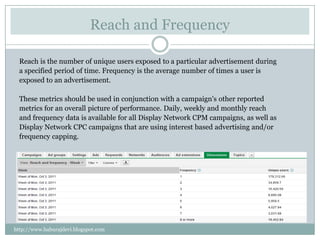
Reach and Frequency

  Reach is the number of unique users exposed to a particular advertisement during
  a specified period of time. Frequency is the average number of times a user is
  exposed to an advertisement.

  These metrics should be used in conjunction with a campaign's other reported
  metrics for an overall picture of performance. Daily, weekly and monthly reach
  and frequency data is available for all Display Network CPM campaigns, as well as
  Display Network CPC campaigns that are using interest based advertising and/or
  frequency capping.


http://www.baburajdevi.blogspot.com
Other features in Dimension Tab

 Destination URL                     - URL report
 Demographics                 –      Demographic report like age, Gender etc

 Geographic   – Geo Report
   Search term – Search Query report
   Automatic Placements – This report gives URLs where our display ads
    shown.
 Call Details - Track the call details


http://www.baburajdevi.blogspot.com
Free Clicks

   The free clicks report helps you measure interactions that take place before a
   click through for video ads, display ads built with the Display Ad Builder,
   Product extensions, location extensions, and ads that feature the +1 button.
   Knowing how customers interact with your ads can help give additional
   insight into how they research and buy online. It also helps you learn what
   content keeps their attention and prompts their interactions with your ads.
   User interactions The following are interactions users may take with or
   around your ads. You will not be charged for these interactions, although you
   will be charged for a click through to your website landing page.
   Product plus box expansion
     Measure how often users click the product extension plus box in your product ads.
   Display ad mouse over (1 second)
      See instances where users place their cursor over your display ad for 1 second or more. This can
      help highlight ads that may keep customers’ attention without an actual click through to your
      website. This usually demonstrates an ad that needs a stronger call-to-action for the user.


http://www.baburajdevi.blogspot.com
Thank you


http://www.baburajdevi.blogspot.com

Advanced Google Adwords techniques - Dimension tabs adwords

  • 1.
    AdWords Features DIMENSIONS TABFEATURES IN ADWORDS PREPARED BY BABURAJ DEVI BABURAJDEVI.BLOGSPOT.COM
  • 2.
    The Dimensions tablets you view and segment your performance by the dimension of your choice across an ad group, a campaign, or your entire account. http://www.baburajdevi.blogspot.com
  • 3.
    Time  Day ofthe Week – This feature allows to view the performance of your campaign on particular Day of the week. E.g. 1st Monday v/s 2nd Monday of the month etc.  Day – This feature allows to view the performance of your campaign on daily basis  Week - This feature allows to view the performance of your campaign week over week  Month – This feature enables Month over Month Performance report  Quarter – By using this feature Quarter by Quarter performance report will be generated  Year – yearly performance  Hour of Day – The Stats shows Hour by Hour performance of the Day . This feature is used very commonly to see the trend in 24 hours of the day http://www.baburajdevi.blogspot.com
  • 4.
    Conversions Conversion Tracking Purpose & Conversion Action Name Conversion action name" is a segment that enables us to see how many times each conversion type has been completed . This feature enable report of the “conversion type” which are original defined under “Tools and analysis tab  conversions - All conversions types”. The conversion type triggered when you select conversion tracking purpose and Conversion Action http://www.baburajdevi.blogspot.com
  • 5.
    Reach and Frequency Reach is the number of unique users exposed to a particular advertisement during a specified period of time. Frequency is the average number of times a user is exposed to an advertisement. These metrics should be used in conjunction with a campaign's other reported metrics for an overall picture of performance. Daily, weekly and monthly reach and frequency data is available for all Display Network CPM campaigns, as well as Display Network CPC campaigns that are using interest based advertising and/or frequency capping. http://www.baburajdevi.blogspot.com
  • 6.
    Other features inDimension Tab  Destination URL - URL report  Demographics – Demographic report like age, Gender etc  Geographic – Geo Report  Search term – Search Query report  Automatic Placements – This report gives URLs where our display ads shown.  Call Details - Track the call details http://www.baburajdevi.blogspot.com
  • 7.
    Free Clicks The free clicks report helps you measure interactions that take place before a click through for video ads, display ads built with the Display Ad Builder, Product extensions, location extensions, and ads that feature the +1 button. Knowing how customers interact with your ads can help give additional insight into how they research and buy online. It also helps you learn what content keeps their attention and prompts their interactions with your ads. User interactions The following are interactions users may take with or around your ads. You will not be charged for these interactions, although you will be charged for a click through to your website landing page. Product plus box expansion Measure how often users click the product extension plus box in your product ads. Display ad mouse over (1 second) See instances where users place their cursor over your display ad for 1 second or more. This can help highlight ads that may keep customers’ attention without an actual click through to your website. This usually demonstrates an ad that needs a stronger call-to-action for the user. http://www.baburajdevi.blogspot.com
  • 8.