How	
  to	
  Master	
  
Google	
  Adwords	
  
Custom	
  Filters	
  
Tutorial	
  By	
  Digital	
  Jungle	
  
What can I do with Custom filters
ü  Campaign	
  Filters	
  (Conversions,	
  conversion	
  
value,	
  invalid	
  clicks)	
  
ü  Adgroup	
  Filters	
  (lack	
  of	
  impressions,	
  lack	
  of	
  
traffic,	
  high	
  cost,	
  low	
  conversions,	
  Low	
  
average	
  posiAon,	
  specific	
  ad	
  groups)	
  
ü  Keyword	
  Filters	
  (low	
  search	
  volume,	
  below	
  
first	
  page	
  bid,	
  keywords	
  excluded	
  due	
  to	
  
negaAves,	
  quality	
  score)	
  
ü  Ad	
  text	
  filters	
  (approval	
  status,	
  ad	
  text	
  
containing	
  certain	
  phrases,	
  desAnaAon	
  url)	
  
ü  Avoid	
  guess	
  work	
  
ü  Target	
  specific	
  areas	
  of	
  your	
  marke@ng	
  
ü  Find	
  weak	
  and	
  strong	
  points	
  quicker	
  in	
  your	
  
campaigns	


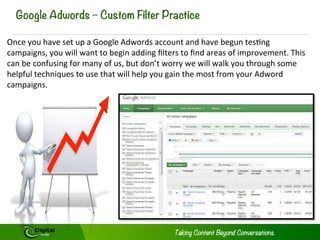
Google Adwords – Custom Filter Practice
Once	
  you	
  have	
  set	
  up	
  a	
  Google	
  Adwords	
  account	
  and	
  have	
  begun	
  tesAng	
  
campaigns,	
  you	
  will	
  want	
  to	
  begin	
  adding	
  filters	
  to	
  find	
  areas	
  of	
  improvement.	
  This	
  
can	
  be	
  confusing	
  for	
  many	
  of	
  us,	
  but	
  don’t	
  worry	
  we	
  will	
  walk	
  you	
  through	
  some	
  
helpful	
  techniques	
  to	
  use	
  that	
  will	
  help	
  you	
  gain	
  the	
  most	
  from	
  your	
  Adword	
  
campaigns.	
  
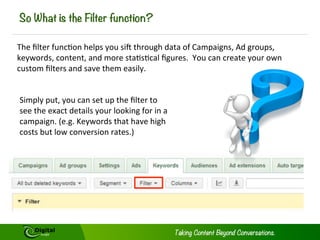
So What is the Filter function?
The	
  filter	
  funcAon	
  helps	
  you	
  siK	
  through	
  data	
  of	
  Campaigns,	
  Ad	
  groups,	
  
keywords,	
  content,	
  and	
  more	
  staAsAcal	
  figures.	
  	
  You	
  can	
  create	
  your	
  own	
  
custom	
  filters	
  and	
  save	
  them	
  easily.	
  	
  
Simply	
  put,	
  you	
  can	
  set	
  up	
  the	
  filter	
  to	
  
see	
  the	
  exact	
  details	
  your	
  looking	
  for	
  in	
  a	
  
campaign.	
  (e.g.	
  Keywords	
  that	
  have	
  high	
  
costs	
  but	
  low	
  conversion	
  rates.)	
  
How Do I Apply A Custom Filter?
Google	
  makes	
  this	
  feature	
  very	
  easy	
  to	
  use:	
  All	
  you	
  need	
  to	
  do	
  is:	


1.  Login	
  to	
  your	
  Google	
  AdWords	
  Account	
  
2.  Select	
  the	
  column	
  you	
  wish	
  to	
  filter	
  (campaign,	
  ad	
  group,	
  keyword	
  or	
  ads)	
  
3.  Click	
  on	
  the	
  Filter	
  menu	
  which	
  you	
  can	
  find	
  siAng	
  above	
  your	
  staAsAcs	
  table	
  
4.  Click	
  Create	
  Filter	
  
5.  Select	
  the	
  parameters	
  you	
  would	
  like	
  to	
  filter	
  	
  
6.  When	
  you	
  have	
  finished	
  selecAng	
  your	
  parameters,	
  simply	
  click	
  Apply.	
  
7.  Finished.	
  

Lets	
  try	
  one	
  together	
  
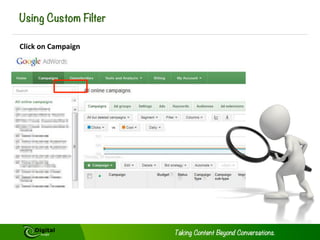
Using Custom Filter
Click	
  on	
  Campaign	
  
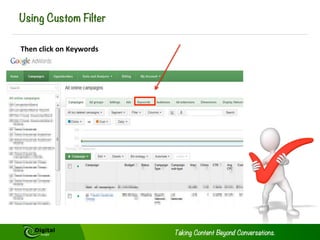
Using Custom Filter
Then	
  click	
  on	
  Keywords	
  
Using Custom Filter
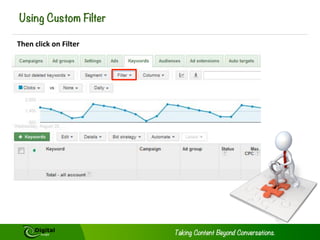
Then	
  click	
  on	
  Filter	
  
Using Custom Filter
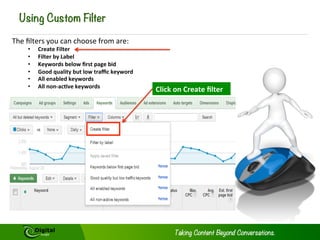
The	
  filters	
  you	
  can	
  choose	
  from	
  are:	
  
• 
• 
• 
• 
• 
• 

Create	
  Filter	
  
Filter	
  by	
  Label	
  
Keywords	
  below	
  first	
  page	
  bid	
  
Good	
  quality	
  but	
  low	
  traffic	
  keyword	
  
All	
  enabled	
  keywords	
  
All	
  non-­‐ac@ve	
  keywords	
  

Click	
  on	
  Create	
  filter	
  
Using Custom Filter
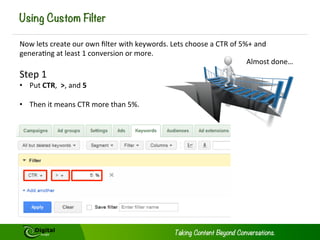
Now	
  lets	
  create	
  our	
  own	
  filter	
  with	
  keywords.	
  Lets	
  choose	
  a	
  CTR	
  of	
  5%+	
  and	
  
generaAng	
  at	
  least	
  1	
  conversion	
  or	
  more.	
  
Almost	
  done…	


Step	
  1	
  

•  Put	
  CTR,	
  	
  >,	
  and	
  5	


•  Then	
  it	
  means	
  CTR	
  more	
  than	
  5%.	


Using Custom Filter
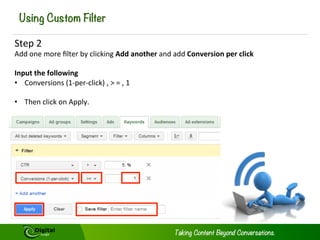
Step	
  2	
  

Add	
  one	
  more	
  filter	
  by	
  clicking	
  Add	
  another	
  and	
  add	
  Conversion	
  per	
  click	


Input	
  the	
  following	
  
•  Conversions	
  (1-­‐per-­‐click)	
  ,	
  >	
  =	
  ,	
  1	


•  Then	
  click	
  on	
  Apply.	
  	
  
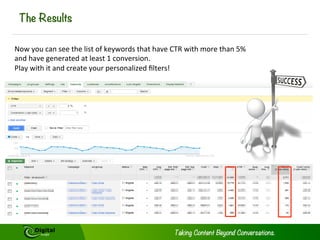
The Results

Now	
  you	
  can	
  see	
  the	
  list	
  of	
  keywords	
  that	
  have	
  CTR	
  with	
  more	
  than	
  5%	
  
and	
  have	
  generated	
  at	
  least	
  1	
  conversion.	
  	
  
Play	
  with	
  it	
  and	
  create	
  your	
  personalized	
  filters!	
  	
  
Conclusion
Now	
  that	
  you	
  know	
  how	
  to	
  setup	
  filters.	
  Experiment	
  with	
  your	
  campaigns	
  and	
  
filters	
  to	
  find	
  new	
  areas	
  of	
  improvement	
  and	
  setup	
  new	
  goals	
  to	
  improve	
  your	
  
SEM	
  campaigns.	
  
Still Confused?
SAll	
  having	
  trouble	
  opAmizing	
  your	
  SEM	
  campaigns?	


Contact	
  Digital	
  Jungle	
  Today	
  and	
  get	
  your	
  SEM	
  campaigns	
  
opAmized.	


Digital	
  Jungle	
  offers:	
  

ü  Expert	
  SEM	
  Setup	
  and	
  sustaining	
  services	
  
ü  Daily	
  monitoring	
  and	
  repor@ng	
  	
  
ü  Keyword	
  Research	
  and	
  implementa@on	
  
ü  Op@mized	
  ad’s	
  with	
  call	
  to	
  ac@ons	
  
ü  Bidding	
  strategies	
  to	
  gain	
  the	
  most	
  traffic	
  
from	
  the	
  targeted	
  Audience	
  
ü  Constant	
  tes@ng	
  and	
  analysis	
  to	
  improve	
  
campaigns	
  based	
  off	
  the	
  ever	
  changing	
  
search	
  trends	
  
ü  Partnership	
  between	
  SEO	
  and	
  SEM	
  
campaigns	
  to	
  capture	
  the	
  en@re	
  targeted	
  
market	
  
Contact Us
info@digitaljungle.com.cn	
  
pinterest.com/digitaljungle	
  
facebook.com/digitaljunglecn	
  
plus.google.com/digitaljungle	
  
@digitaljunglecn	
  
weibo.com/digitaljungle	
  
www.dmic.asia	
  
slideshare.net/digitaljungle	


www.digitaljungle.com.cn	
  
Who is Digital Jungle?

social influence markeAng	
  agency	
  specializing	
  in	


Digital	
  Jungle	
  is	
  a	
  leading	
  

Chinese	
  &	
  Asian	
  content	
  markeAng	
  soluAons.	


ideas,	
  nurture	
  content	
  and	
  measure	
  performance.	
  

We	
  create	
  

branded stories,	
  

This	
  holisAc	
  approach	
  produces	
  capAvaAng	
  

social programs and	
  world-­‐class	
  search marketing	
  iniAaAves.	
  

compelling	


|	
  	
  	
  16	
  

Tutorial: How to Master Google Adwords Custom Filters

  • 1.
    How  to  Master   Google  Adwords   Custom  Filters   Tutorial  By  Digital  Jungle  
  • 2.
    What can Ido with Custom filters ü  Campaign  Filters  (Conversions,  conversion   value,  invalid  clicks)   ü  Adgroup  Filters  (lack  of  impressions,  lack  of   traffic,  high  cost,  low  conversions,  Low   average  posiAon,  specific  ad  groups)   ü  Keyword  Filters  (low  search  volume,  below   first  page  bid,  keywords  excluded  due  to   negaAves,  quality  score)   ü  Ad  text  filters  (approval  status,  ad  text   containing  certain  phrases,  desAnaAon  url)   ü  Avoid  guess  work   ü  Target  specific  areas  of  your  marke@ng   ü  Find  weak  and  strong  points  quicker  in  your   campaigns    
  • 3.
    Google Adwords –Custom Filter Practice Once  you  have  set  up  a  Google  Adwords  account  and  have  begun  tesAng   campaigns,  you  will  want  to  begin  adding  filters  to  find  areas  of  improvement.  This   can  be  confusing  for  many  of  us,  but  don’t  worry  we  will  walk  you  through  some   helpful  techniques  to  use  that  will  help  you  gain  the  most  from  your  Adword   campaigns.  
  • 4.
    So What isthe Filter function? The  filter  funcAon  helps  you  siK  through  data  of  Campaigns,  Ad  groups,   keywords,  content,  and  more  staAsAcal  figures.    You  can  create  your  own   custom  filters  and  save  them  easily.     Simply  put,  you  can  set  up  the  filter  to   see  the  exact  details  your  looking  for  in  a   campaign.  (e.g.  Keywords  that  have  high   costs  but  low  conversion  rates.)  
  • 5.
    How Do IApply A Custom Filter? Google  makes  this  feature  very  easy  to  use:  All  you  need  to  do  is:     1.  Login  to  your  Google  AdWords  Account   2.  Select  the  column  you  wish  to  filter  (campaign,  ad  group,  keyword  or  ads)   3.  Click  on  the  Filter  menu  which  you  can  find  siAng  above  your  staAsAcs  table   4.  Click  Create  Filter   5.  Select  the  parameters  you  would  like  to  filter     6.  When  you  have  finished  selecAng  your  parameters,  simply  click  Apply.   7.  Finished.   Lets  try  one  together  
  • 6.
    Using Custom Filter Click  on  Campaign  
  • 7.
    Using Custom Filter Then  click  on  Keywords  
  • 8.
    Using Custom Filter Then  click  on  Filter  
  • 9.
    Using Custom Filter The  filters  you  can  choose  from  are:   •  •  •  •  •  •  Create  Filter   Filter  by  Label   Keywords  below  first  page  bid   Good  quality  but  low  traffic  keyword   All  enabled  keywords   All  non-­‐ac@ve  keywords   Click  on  Create  filter  
  • 10.
    Using Custom Filter Now  lets  create  our  own  filter  with  keywords.  Lets  choose  a  CTR  of  5%+  and   generaAng  at  least  1  conversion  or  more.   Almost  done…     Step  1   •  Put  CTR,    >,  and  5     •  Then  it  means  CTR  more  than  5%.          
  • 11.
    Using Custom Filter Step  2   Add  one  more  filter  by  clicking  Add  another  and  add  Conversion  per  click       Input  the  following   •  Conversions  (1-­‐per-­‐click)  ,  >  =  ,  1     •  Then  click  on  Apply.    
  • 12.
    The Results Now  you  can  see  the  list  of  keywords  that  have  CTR  with  more  than  5%   and  have  generated  at  least  1  conversion.     Play  with  it  and  create  your  personalized  filters!    
  • 13.
    Conclusion Now  that  you  know  how  to  setup  filters.  Experiment  with  your  campaigns  and   filters  to  find  new  areas  of  improvement  and  setup  new  goals  to  improve  your   SEM  campaigns.  
  • 14.
    Still Confused? SAll  having  trouble  opAmizing  your  SEM  campaigns?       Contact  Digital  Jungle  Today  and  get  your  SEM  campaigns   opAmized.     Digital  Jungle  offers:   ü  Expert  SEM  Setup  and  sustaining  services   ü  Daily  monitoring  and  repor@ng     ü  Keyword  Research  and  implementa@on   ü  Op@mized  ad’s  with  call  to  ac@ons   ü  Bidding  strategies  to  gain  the  most  traffic   from  the  targeted  Audience   ü  Constant  tes@ng  and  analysis  to  improve   campaigns  based  off  the  ever  changing   search  trends   ü  Partnership  between  SEO  and  SEM   campaigns  to  capture  the  en@re  targeted   market  
  • 15.
    Contact Us info@digitaljungle.com.cn   pinterest.com/digitaljungle   facebook.com/digitaljunglecn   plus.google.com/digitaljungle   @digitaljunglecn   weibo.com/digitaljungle   www.dmic.asia   slideshare.net/digitaljungle     www.digitaljungle.com.cn  
  • 16.
    Who is DigitalJungle? social influence markeAng  agency  specializing  in     Digital  Jungle  is  a  leading   Chinese  &  Asian  content  markeAng  soluAons.     ideas,  nurture  content  and  measure  performance.   We  create   branded stories,   This  holisAc  approach  produces  capAvaAng   social programs and  world-­‐class  search marketing  iniAaAves.   compelling     |      16