Algorithm and Flowchart
Bali Thorat
Algorithm
• The word “algorithm” relates to the name of the mathematician Al-
khowarizmi, which means a procedure or a technique. Software
Engineer commonly uses an algorithm for planning and solving the
problems. An algorithm is a sequence of steps to solve a particular
problem or algorithm is an ordered set of unambiguous steps that
produces a result and terminates in a finite time
Bali Thorat
Characteristics of Algorithm
• Input: An algorithm may or may not require input
• Output: Each algorithm is expected to produce at least one result
• Definiteness: Each instruction must be clear and unambiguous.
• Finiteness: If the instructions of an algorithm are executed, the
algorithm should terminate after finite number of steps
Bali Thorat
Advantages of algorithm
• It is a step-wise representation of a solution to a given problem,
which makes it easy to understand.
• An algorithm uses a definite procedure.
• It is not dependent on any programming language, so it is easy to
understand for anyone even without programming knowledge.
• Every step in an algorithm has its own logical sequence so it is easy to
debug.
Bali Thorat
Disdvantages of Algorithms
• Alogorithms is Time consuming.
• Difficult to show Branching and Looping in Algorithms.
• Big tasks are difficult to put in Algorithms.
Bali Thorat
Flowchart
• The first design of flowchart goes back to 1945 which was designed
by John Von Neumann. Unlike an algorithm, Flowchart uses different
symbols to design a solution to a problem. It is another commonly
used programming tool. By looking at a Flowchart one can
understand the operations and sequence of operations performed in
a system. Flowchart is often considered as a blueprint of a design
used for solving a specific problem.
Bali Thorat
Advantages
• Flowchart is an excellent way of communicating the logic of a
program.
• Easy and efficient to analyze problem using flowchart.
• During program development cycle, the flowchart plays the role of a
blueprint, which makes program development process easier.
• After successful development of a program, it needs continuous
timely maintenance during the course of its operation. The flowchart
makes program or system maintenance easier.
• It is easy to convert the flowchart into any programming language
code.
Bali Thorat
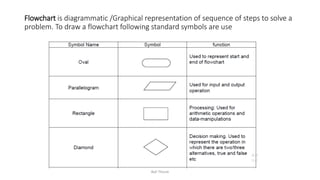
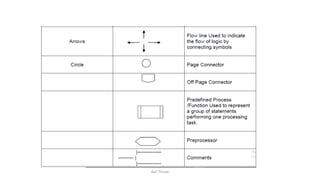
Flowchart is diagrammatic /Graphical representation of sequence of steps to solve a
problem. To draw a flowchart following standard symbols are use
Bali Thorat
Bali Thorat
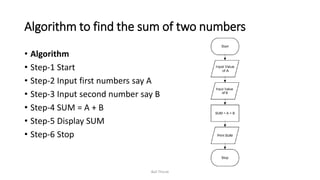
Algorithm to find the sum of two numbers
• Algorithm
• Step-1 Start
• Step-2 Input first numbers say A
• Step-3 Input second number say B
• Step-4 SUM = A + B
• Step-5 Display SUM
• Step-6 Stop
Bali Thorat
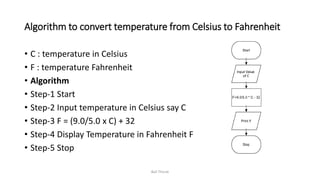
Algorithm to convert temperature from Celsius to Fahrenheit
• C : temperature in Celsius
• F : temperature Fahrenheit
• Algorithm
• Step-1 Start
• Step-2 Input temperature in Celsius say C
• Step-3 F = (9.0/5.0 x C) + 32
• Step-4 Display Temperature in Fahrenheit F
• Step-5 Stop
Bali Thorat
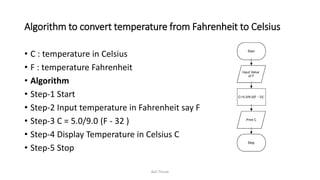
Algorithm to convert temperature from Fahrenheit to Celsius
• C : temperature in Celsius
• F : temperature Fahrenheit
• Algorithm
• Step-1 Start
• Step-2 Input temperature in Fahrenheit say F
• Step-3 C = 5.0/9.0 (F - 32 )
• Step-4 Display Temperature in Celsius C
• Step-5 Stop
Bali Thorat
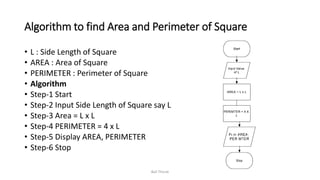
Algorithm to find Area and Perimeter of Square
• L : Side Length of Square
• AREA : Area of Square
• PERIMETER : Perimeter of Square
• Algorithm
• Step-1 Start
• Step-2 Input Side Length of Square say L
• Step-3 Area = L x L
• Step-4 PERIMETER = 4 x L
• Step-5 Display AREA, PERIMETER
• Step-6 Stop
Bali Thorat
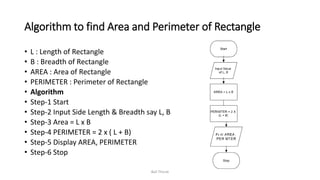
Algorithm to find Area and Perimeter of Rectangle
• L : Length of Rectangle
• B : Breadth of Rectangle
• AREA : Area of Rectangle
• PERIMETER : Perimeter of Rectangle
• Algorithm
• Step-1 Start
• Step-2 Input Side Length & Breadth say L, B
• Step-3 Area = L x B
• Step-4 PERIMETER = 2 x ( L + B)
• Step-5 Display AREA, PERIMETER
• Step-6 Stop
Bali Thorat
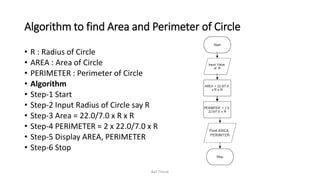
Algorithm to find Area and Perimeter of Circle
• R : Radius of Circle
• AREA : Area of Circle
• PERIMETER : Perimeter of Circle
• Algorithm
• Step-1 Start
• Step-2 Input Radius of Circle say R
• Step-3 Area = 22.0/7.0 x R x R
• Step-4 PERIMETER = 2 x 22.0/7.0 x R
• Step-5 Display AREA, PERIMETER
• Step-6 Stop
Bali Thorat
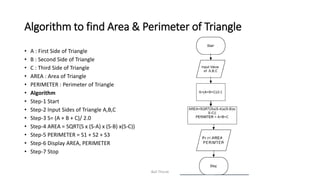
Algorithm to find Area & Perimeter of Triangle
• A : First Side of Triangle
• B : Second Side of Triangle
• C : Third Side of Triangle
• AREA : Area of Triangle
• PERIMETER : Perimeter of Triangle
• Algorithm
• Step-1 Start
• Step-2 Input Sides of Triangle A,B,C
• Step-3 S= (A + B + C)/ 2.0
• Step-4 AREA = SQRT(S x (S-A) x (S-B) x(S-C))
• Step-5 PERIMETER = S1 + S2 + S3
• Step-6 Display AREA, PERIMETER
• Step-7 Stop
Bali Thorat
Algorithm to Swap Two Numbers using Temporary Variable
• Algorithm
• Step-1 Start
• Step-2 Input Two Numbers Say NUM1,NUM2
• Step-3 Display Before Swap Values NUM1, NUM2
• Step-4 TEMP = NUM1
• Step-5 NUM1 = NUM2
• Step-6 NUM2 = TEMP
• Step-7 Display After Swap Values NUM1,NUM
• Step-8 Stop
Bali Thorat
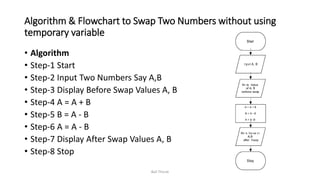
Algorithm & Flowchart to Swap Two Numbers without using
temporary variable
• Algorithm
• Step-1 Start
• Step-2 Input Two Numbers Say A,B
• Step-3 Display Before Swap Values A, B
• Step-4 A = A + B
• Step-5 B = A - B
• Step-6 A = A - B
• Step-7 Display After Swap Values A, B
• Step-8 Stop
Bali Thorat
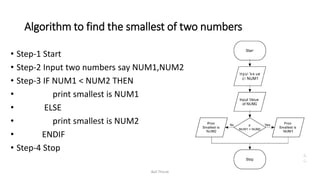
Algorithm to find the smallest of two numbers
• Step-1 Start
• Step-2 Input two numbers say NUM1,NUM2
• Step-3 IF NUM1 < NUM2 THEN
• print smallest is NUM1
• ELSE
• print smallest is NUM2
• ENDIF
• Step-4 Stop
Bali Thorat

Algorithm and flowchart

  • 1.
  • 2.
    Algorithm • The word“algorithm” relates to the name of the mathematician Al- khowarizmi, which means a procedure or a technique. Software Engineer commonly uses an algorithm for planning and solving the problems. An algorithm is a sequence of steps to solve a particular problem or algorithm is an ordered set of unambiguous steps that produces a result and terminates in a finite time Bali Thorat
  • 3.
    Characteristics of Algorithm •Input: An algorithm may or may not require input • Output: Each algorithm is expected to produce at least one result • Definiteness: Each instruction must be clear and unambiguous. • Finiteness: If the instructions of an algorithm are executed, the algorithm should terminate after finite number of steps Bali Thorat
  • 4.
    Advantages of algorithm •It is a step-wise representation of a solution to a given problem, which makes it easy to understand. • An algorithm uses a definite procedure. • It is not dependent on any programming language, so it is easy to understand for anyone even without programming knowledge. • Every step in an algorithm has its own logical sequence so it is easy to debug. Bali Thorat
  • 5.
    Disdvantages of Algorithms •Alogorithms is Time consuming. • Difficult to show Branching and Looping in Algorithms. • Big tasks are difficult to put in Algorithms. Bali Thorat
  • 6.
    Flowchart • The firstdesign of flowchart goes back to 1945 which was designed by John Von Neumann. Unlike an algorithm, Flowchart uses different symbols to design a solution to a problem. It is another commonly used programming tool. By looking at a Flowchart one can understand the operations and sequence of operations performed in a system. Flowchart is often considered as a blueprint of a design used for solving a specific problem. Bali Thorat
  • 7.
    Advantages • Flowchart isan excellent way of communicating the logic of a program. • Easy and efficient to analyze problem using flowchart. • During program development cycle, the flowchart plays the role of a blueprint, which makes program development process easier. • After successful development of a program, it needs continuous timely maintenance during the course of its operation. The flowchart makes program or system maintenance easier. • It is easy to convert the flowchart into any programming language code. Bali Thorat
  • 8.
    Flowchart is diagrammatic/Graphical representation of sequence of steps to solve a problem. To draw a flowchart following standard symbols are use Bali Thorat
  • 9.
  • 10.
    Algorithm to findthe sum of two numbers • Algorithm • Step-1 Start • Step-2 Input first numbers say A • Step-3 Input second number say B • Step-4 SUM = A + B • Step-5 Display SUM • Step-6 Stop Bali Thorat
  • 11.
    Algorithm to converttemperature from Celsius to Fahrenheit • C : temperature in Celsius • F : temperature Fahrenheit • Algorithm • Step-1 Start • Step-2 Input temperature in Celsius say C • Step-3 F = (9.0/5.0 x C) + 32 • Step-4 Display Temperature in Fahrenheit F • Step-5 Stop Bali Thorat
  • 12.
    Algorithm to converttemperature from Fahrenheit to Celsius • C : temperature in Celsius • F : temperature Fahrenheit • Algorithm • Step-1 Start • Step-2 Input temperature in Fahrenheit say F • Step-3 C = 5.0/9.0 (F - 32 ) • Step-4 Display Temperature in Celsius C • Step-5 Stop Bali Thorat
  • 13.
    Algorithm to findArea and Perimeter of Square • L : Side Length of Square • AREA : Area of Square • PERIMETER : Perimeter of Square • Algorithm • Step-1 Start • Step-2 Input Side Length of Square say L • Step-3 Area = L x L • Step-4 PERIMETER = 4 x L • Step-5 Display AREA, PERIMETER • Step-6 Stop Bali Thorat
  • 14.
    Algorithm to findArea and Perimeter of Rectangle • L : Length of Rectangle • B : Breadth of Rectangle • AREA : Area of Rectangle • PERIMETER : Perimeter of Rectangle • Algorithm • Step-1 Start • Step-2 Input Side Length & Breadth say L, B • Step-3 Area = L x B • Step-4 PERIMETER = 2 x ( L + B) • Step-5 Display AREA, PERIMETER • Step-6 Stop Bali Thorat
  • 15.
    Algorithm to findArea and Perimeter of Circle • R : Radius of Circle • AREA : Area of Circle • PERIMETER : Perimeter of Circle • Algorithm • Step-1 Start • Step-2 Input Radius of Circle say R • Step-3 Area = 22.0/7.0 x R x R • Step-4 PERIMETER = 2 x 22.0/7.0 x R • Step-5 Display AREA, PERIMETER • Step-6 Stop Bali Thorat
  • 16.
    Algorithm to findArea & Perimeter of Triangle • A : First Side of Triangle • B : Second Side of Triangle • C : Third Side of Triangle • AREA : Area of Triangle • PERIMETER : Perimeter of Triangle • Algorithm • Step-1 Start • Step-2 Input Sides of Triangle A,B,C • Step-3 S= (A + B + C)/ 2.0 • Step-4 AREA = SQRT(S x (S-A) x (S-B) x(S-C)) • Step-5 PERIMETER = S1 + S2 + S3 • Step-6 Display AREA, PERIMETER • Step-7 Stop Bali Thorat
  • 17.
    Algorithm to SwapTwo Numbers using Temporary Variable • Algorithm • Step-1 Start • Step-2 Input Two Numbers Say NUM1,NUM2 • Step-3 Display Before Swap Values NUM1, NUM2 • Step-4 TEMP = NUM1 • Step-5 NUM1 = NUM2 • Step-6 NUM2 = TEMP • Step-7 Display After Swap Values NUM1,NUM • Step-8 Stop Bali Thorat
  • 18.
    Algorithm & Flowchartto Swap Two Numbers without using temporary variable • Algorithm • Step-1 Start • Step-2 Input Two Numbers Say A,B • Step-3 Display Before Swap Values A, B • Step-4 A = A + B • Step-5 B = A - B • Step-6 A = A - B • Step-7 Display After Swap Values A, B • Step-8 Stop Bali Thorat
  • 19.
    Algorithm to findthe smallest of two numbers • Step-1 Start • Step-2 Input two numbers say NUM1,NUM2 • Step-3 IF NUM1 < NUM2 THEN • print smallest is NUM1 • ELSE • print smallest is NUM2 • ENDIF • Step-4 Stop Bali Thorat