1
Engineering Surveying
TOTAL STATION Practical (4)
Prepared by
Asst. Prof. Salar k Hussein
Asst. Lecturer. Kamal Yaseen
TOTAL STATION
2019-2020
Surveying
Contents
Report No. 6
Name: To Measure Coordinate, REM, and Area
Object:
1. Coordinate Measurement
Ø Changing the Starting Point
2. Remote Elevation Measurement
Ø REM
3. Surface Area Calculation
Ø Surface Area Calculation by Observing Points.
Apparatus:
1. Total station Instrument 1 No.
2. Tripod 1 No.
3. Reflector (Prism) 1. No.
4. Pins 5 Nos.
2
NOTE:
Ø Number of specified coordinate points: 3 or more, 50 or less
Ø Surface area is calculated by observing the points on a line enclosing an area in order or
reading in the previously registered coordinates in order.
Ø If two or less points are used to measure an area, an error will occur.
Ø Be sure to observe (or recall) points on an enclosed area in a clockwise or counter
clockwise direction. For example, the area specified by entering (or recalling) point
names 1, 2, 3, 4, 5 or 5, 4, 3, 2, 1 implies the same shape. However, if points are not
entered in numerical order, the surface area will not be calculated correctly.
3
Surface Area Calculation:
You can calculate the area of land (slope area and horizontal area) enclosed by three or more known
points on a line by inputting the coordinates of the points.
Input:
Coordinates : P1 (Ni, El, Z1) P5 (N5, E5, Z5)
Output:
Surface area: S (slope area and horizontal area)
Surface Area Calculation by Observing Points
Procedure:
1- Set up the instrument and enter the
instrument station data (NEZ)
2-In the second OBS mode screen, press [MENU],
then select "Area calc."
3-Select "Area calculation" in <Area calculation>.
4-Sight the first point on the line enclosing the
area, and press [OBS].
4
5-Press [MEAS] to begin observation.
The measured values are displayed.
6-Press [OK] to enter the value of the first point in "01".
• Press [REC] in the second screen of step 5 to record code,target height,
and point name. The point name recorded here will be displayed in "01".
7-epeat steps 4 to 6 until all points have been measured. Points on an
enclosed area are observed in a clockwise or counter-clockwise direction.
For example, the area specified by entering point
names 1, 2, 3, 4, 5 or 5, 4, 3, 2, 1 implies the same shape.
After observing all necessary known points calculate the surface area for points
that have been observed, [CALC] is displayed.
8- Press [CALC] to display the calculated area.
PT: number of set points
S area: slope area
H area: horizontal area
9-Press [REC] in the screen of step 8 to record results and return to <Menu>.
Press [OK] to return to <Menu> without recording results. 5
6
2/27/22 Surveying Engineering
2/27/22 Surveying Engineering 7
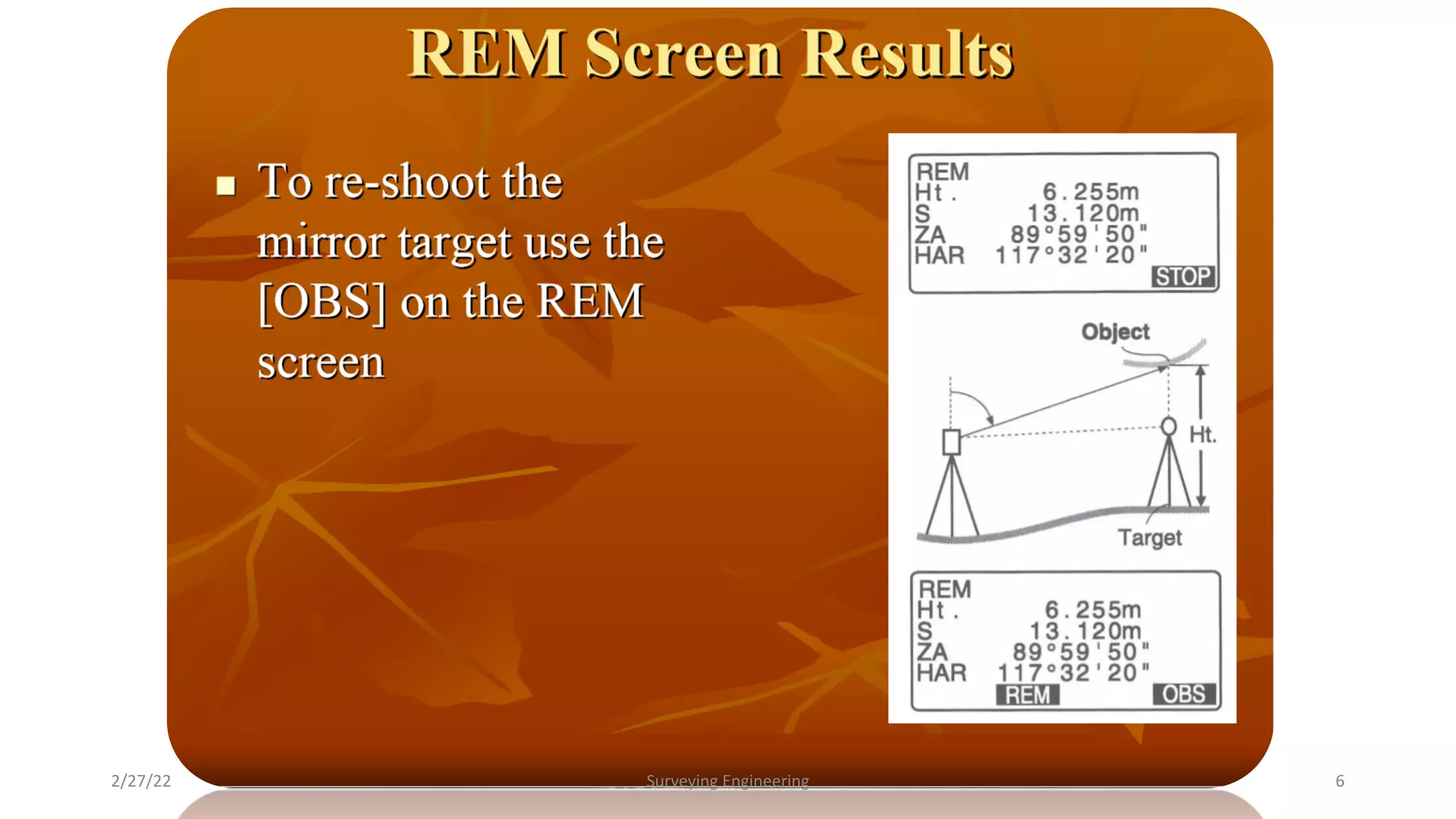
Remote Elevation Measurement (REM):
REM Measurement
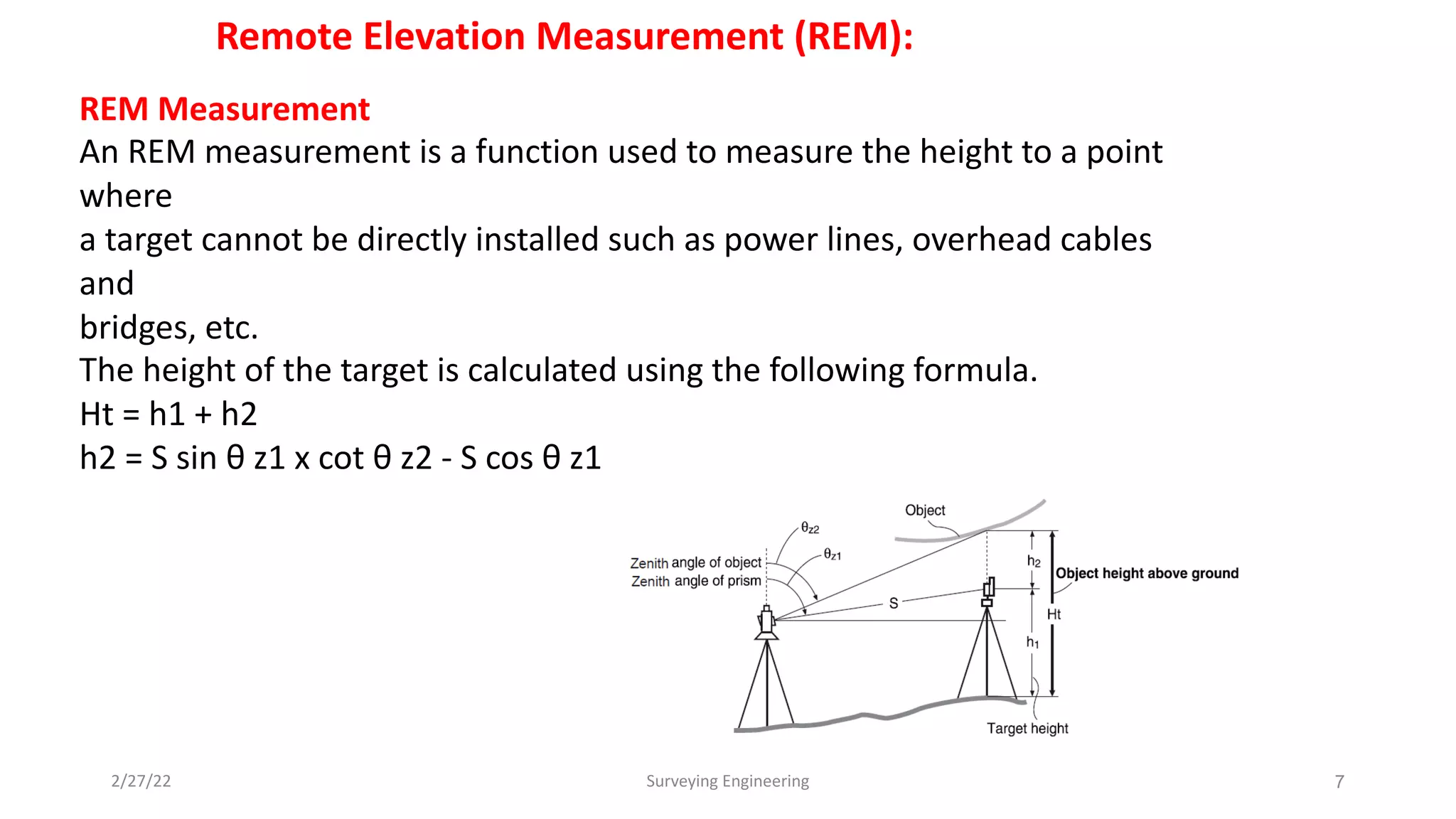
An REM measurement is a function used to measure the height to a point
where
a target cannot be directly installed such as power lines, overhead cables
and
bridges, etc.
The height of the target is calculated using the following formula.
Ht = h1 + h2
h2 = S sin θ z1 x cot θ z2 - S cos θ z1
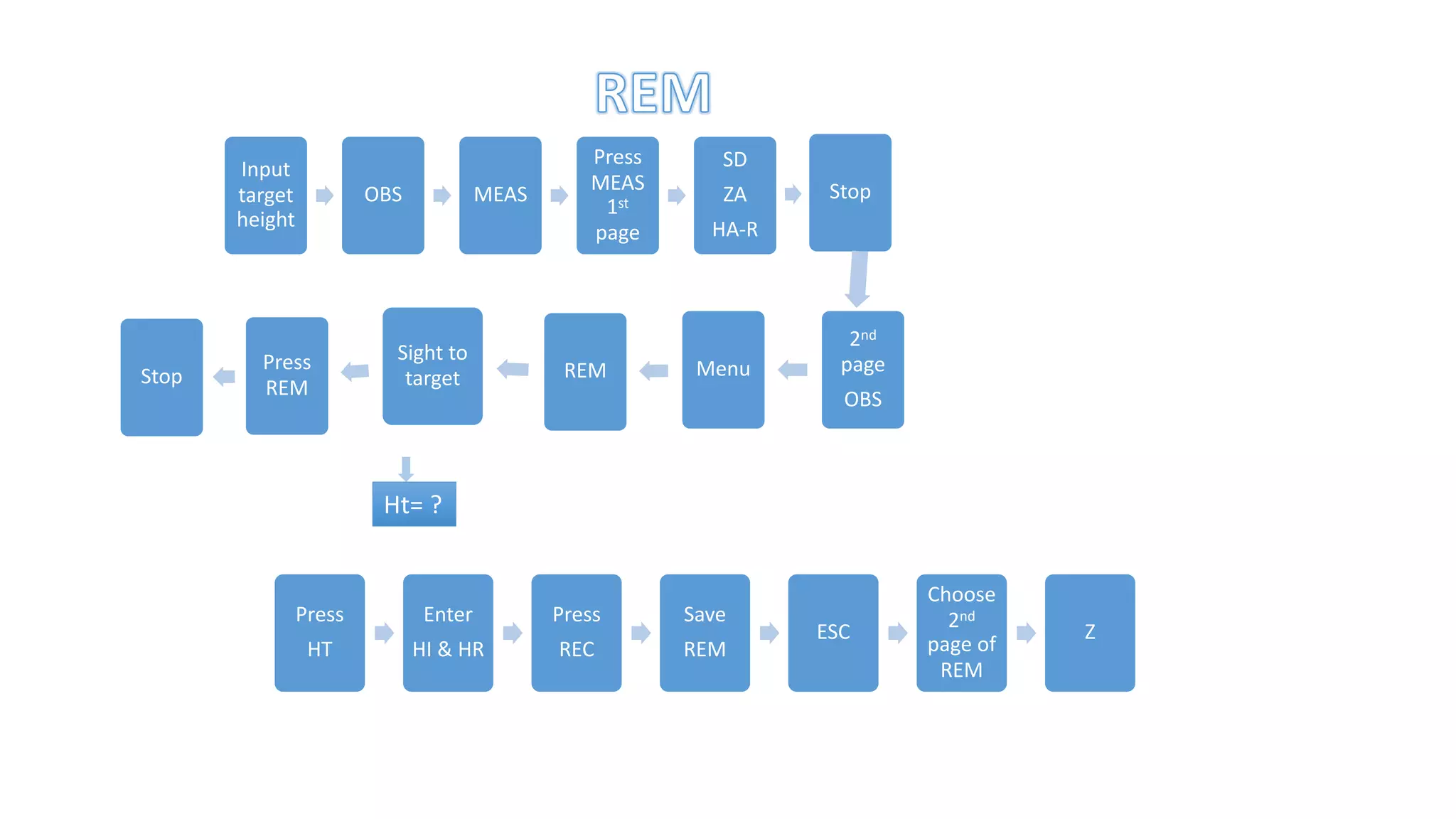
Input
target
height
OBS MEAS
Press
MEAS
1st
page
SD
ZA
HA-R
Stop
2nd
page
OBS
Menu
REM
Sight to
target
Press
REM
Stop
Ht= ?
Press
HT
Enter
HI & HR
Press
REC
Save
REM
ESC
Choose
2nd
page of
REM
Z
9
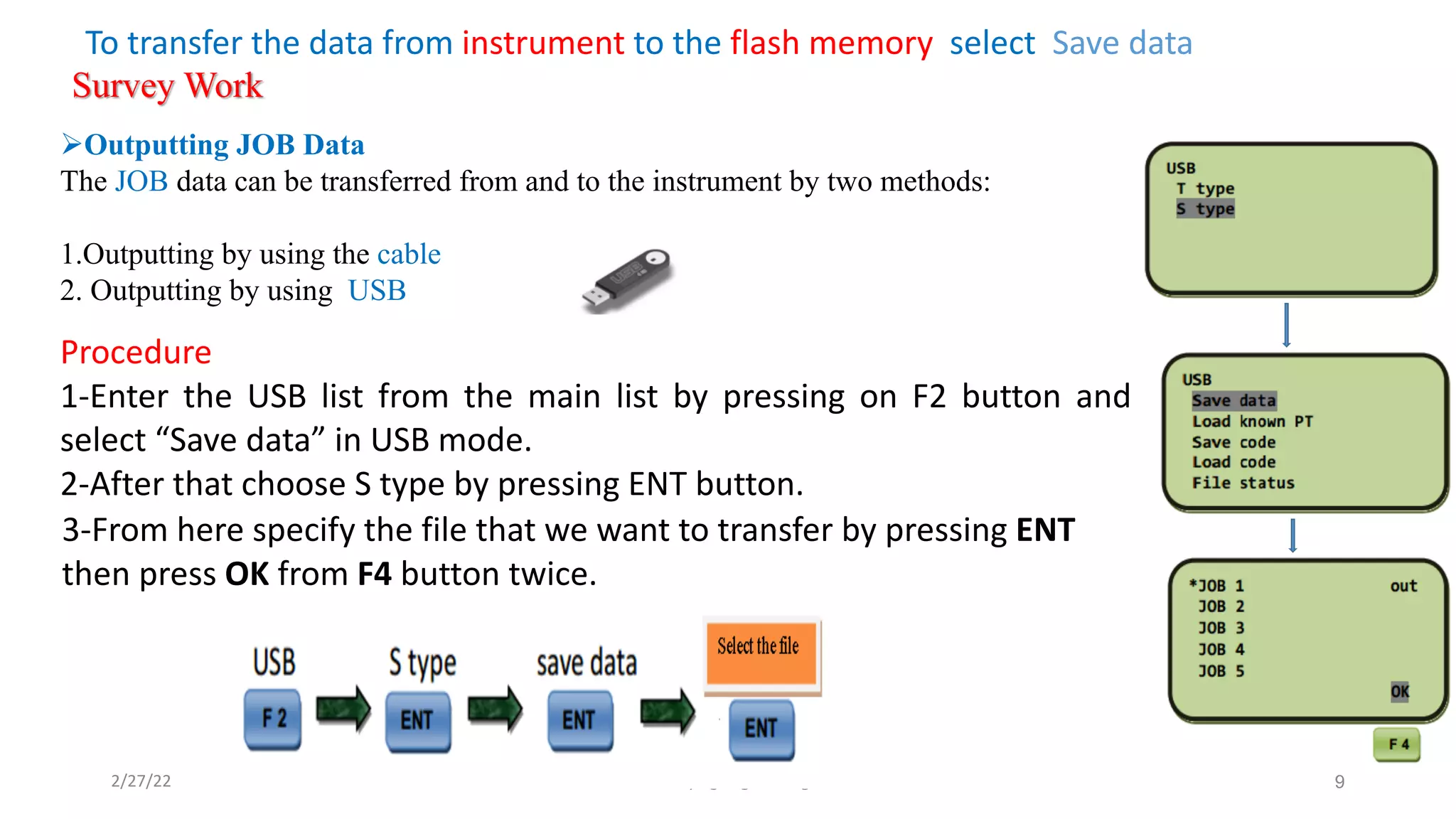
Procedure
1-Enter the USB list from the main list by pressing on F2 button and
select “Save data” in USB mode.
2-After that choose S type by pressing ENT button.
2/27/22 Surveying Engineering
3-From here specify the file that we want to transfer by pressing ENT
then press OK from F4 button twice.
To transfer the data from instrument to the flash memory select Save data
Survey Work
ØOutputting JOB Data
The JOB data can be transferred from and to the instrument by two methods:
1.Outputting by using the cable
2. Outputting by using USB
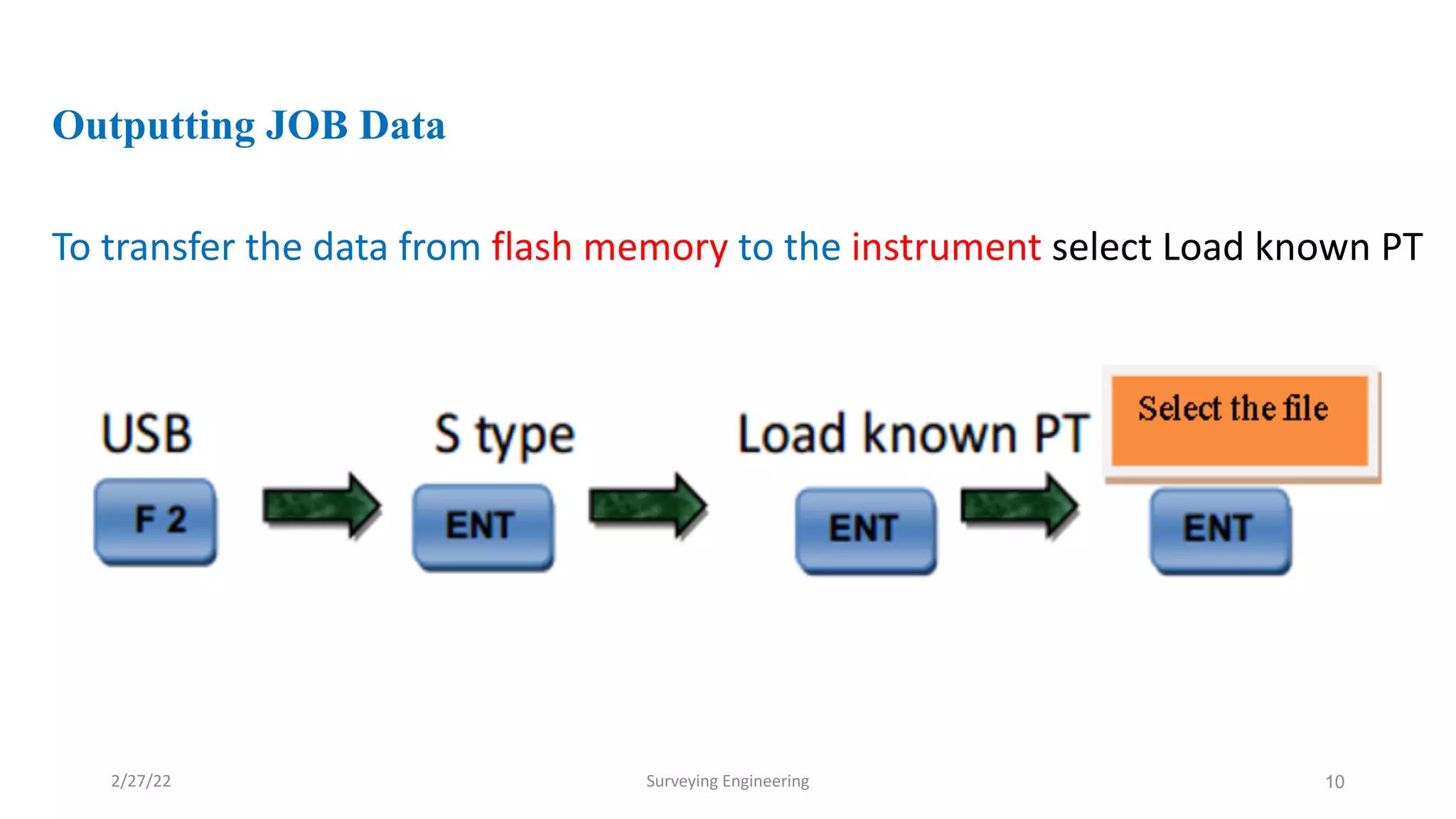
Outputting JOB Data
To transfer the data from flash memory to the instrument select Load known PT
10
2/27/22 Surveying Engineering

Lecture_(4)_R.E.M and Area Calculation

  • 1.
    1 Engineering Surveying TOTAL STATIONPractical (4) Prepared by Asst. Prof. Salar k Hussein Asst. Lecturer. Kamal Yaseen TOTAL STATION 2019-2020 Surveying
  • 2.
    Contents Report No. 6 Name:To Measure Coordinate, REM, and Area Object: 1. Coordinate Measurement Ø Changing the Starting Point 2. Remote Elevation Measurement Ø REM 3. Surface Area Calculation Ø Surface Area Calculation by Observing Points. Apparatus: 1. Total station Instrument 1 No. 2. Tripod 1 No. 3. Reflector (Prism) 1. No. 4. Pins 5 Nos. 2
  • 3.
    NOTE: Ø Number ofspecified coordinate points: 3 or more, 50 or less Ø Surface area is calculated by observing the points on a line enclosing an area in order or reading in the previously registered coordinates in order. Ø If two or less points are used to measure an area, an error will occur. Ø Be sure to observe (or recall) points on an enclosed area in a clockwise or counter clockwise direction. For example, the area specified by entering (or recalling) point names 1, 2, 3, 4, 5 or 5, 4, 3, 2, 1 implies the same shape. However, if points are not entered in numerical order, the surface area will not be calculated correctly. 3
  • 4.
    Surface Area Calculation: Youcan calculate the area of land (slope area and horizontal area) enclosed by three or more known points on a line by inputting the coordinates of the points. Input: Coordinates : P1 (Ni, El, Z1) P5 (N5, E5, Z5) Output: Surface area: S (slope area and horizontal area) Surface Area Calculation by Observing Points Procedure: 1- Set up the instrument and enter the instrument station data (NEZ) 2-In the second OBS mode screen, press [MENU], then select "Area calc." 3-Select "Area calculation" in <Area calculation>. 4-Sight the first point on the line enclosing the area, and press [OBS]. 4
  • 5.
    5-Press [MEAS] tobegin observation. The measured values are displayed. 6-Press [OK] to enter the value of the first point in "01". • Press [REC] in the second screen of step 5 to record code,target height, and point name. The point name recorded here will be displayed in "01". 7-epeat steps 4 to 6 until all points have been measured. Points on an enclosed area are observed in a clockwise or counter-clockwise direction. For example, the area specified by entering point names 1, 2, 3, 4, 5 or 5, 4, 3, 2, 1 implies the same shape. After observing all necessary known points calculate the surface area for points that have been observed, [CALC] is displayed. 8- Press [CALC] to display the calculated area. PT: number of set points S area: slope area H area: horizontal area 9-Press [REC] in the screen of step 8 to record results and return to <Menu>. Press [OK] to return to <Menu> without recording results. 5
  • 6.
  • 7.
    2/27/22 Surveying Engineering7 Remote Elevation Measurement (REM): REM Measurement An REM measurement is a function used to measure the height to a point where a target cannot be directly installed such as power lines, overhead cables and bridges, etc. The height of the target is calculated using the following formula. Ht = h1 + h2 h2 = S sin θ z1 x cot θ z2 - S cos θ z1
  • 8.
  • 9.
    9 Procedure 1-Enter the USBlist from the main list by pressing on F2 button and select “Save data” in USB mode. 2-After that choose S type by pressing ENT button. 2/27/22 Surveying Engineering 3-From here specify the file that we want to transfer by pressing ENT then press OK from F4 button twice. To transfer the data from instrument to the flash memory select Save data Survey Work ØOutputting JOB Data The JOB data can be transferred from and to the instrument by two methods: 1.Outputting by using the cable 2. Outputting by using USB
  • 10.
    Outputting JOB Data Totransfer the data from flash memory to the instrument select Load known PT 10 2/27/22 Surveying Engineering