
AUTOMATIC ROOM LIGHTS CONTROLLER USING ARDUINO AND PIR SENSOR
by:
ANKIT KUMAR CHAUDHARY
(15/IEE/055)
Under The Guidance Of
Dr. M.A. ANSARI
Department of Electrical Engineering
School of Engineering
Gautam Buddha University
Gautam Budh Nagar UP, India
Table of Contents
• Overview
• Circuit Diagram of Automatic Room Lights controller using Arduino and
PIR Sensor
• Components Required for Automatic Room Lights controller using
Arduino and PIR Sensor
• Component Description
• PIR Sensor
• Relay Module
• Circuit Design
• Working of the Project
• Applications
• References
Overview
• Automatic Room Lights System using Arduino is a very useful project
as you need not worry about turning on and off the switches every
time you want to turn on the lights. The main components of the
Automatic Room Lights project are Arduino, PIR Sensor and the Relay
Module.
• Out of the three components, the PIR Sensor is the one in focus as it
is the main device that helps in detecting humans and human motion.
• In fact, the Automatic Room Lights project can be considered as one
major application of the PIR Sensor. A similar concept is being already
implemented in automatic toilet flush valves, hand dryers, etc.
Circuit Diagram of Automatic Room Lights controller using
Arduino and PIR Sensor
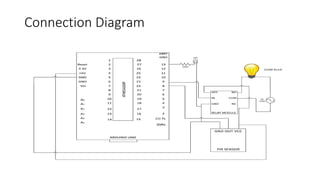
The following image shows the circuit diagram of the project implemented
using Arduino UNO, PIR Sensor and a Relay Module.
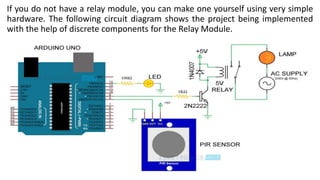
If you do not have a relay module, you can make one yourself using very simple
hardware. The following circuit diagram shows the project being implemented
with the help of discrete components for the Relay Module.
Connection Diagram
Components Required for Automatic Room Lights
controller using Arduino and PIR Sensors
• Arduino UNO
• PIR Sensor
• 5V Relay Module (Relay Board)
• LED
• 100Ω Resistor (1/4 Watt)
• Connecting Wires
• Breadboard
• Power Supply
If we do not have a Relay Module, use the following components:
• 5V Relay
• 2N2222 (or BC547) NPN Transistor
• 1N4007 PN Junction Diode
• 1KΩ Resistor (1/4 Watt)
Component Description
PIR Sensor
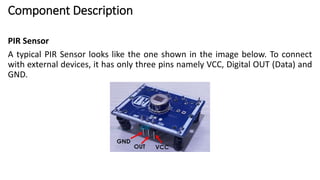
A typical PIR Sensor looks like the one shown in the image below. To connect
with external devices, it has only three pins namely VCC, Digital OUT (Data) and
GND.
Relay Module
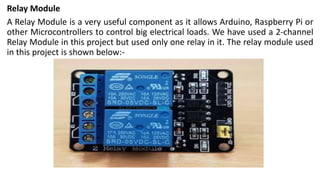
A Relay Module is a very useful component as it allows Arduino, Raspberry Pi or
other Microcontrollers to control big electrical loads. We have used a 2-channel
Relay Module in this project but used only one relay in it. The relay module used
in this project is shown below:-
Circuit Design
• PIR Sensor’s Data OUT Pin is connected to Arduino’s Digital I/O Pin 8. An LED is
connected to pin 13 of Arduino to indicate whether the light is turned ON or
OFF.
• The IN1 pin of the Relay Module is connected to Pin 9 of Arduino. A bulb is
connected to mains supply through relay. One terminal of the bulb is
connected to one wire of the mains supply. The other terminal of the bulb is
connected to the NO (Normally Open) contact of the Relay Module.
• COM (Common) contact of the Relay is connected to the other wire of the
mains supply. Be careful when connecting this part of the project.
Working of the Project
• The Automatic Room Lights using Arduino and PIR Sensor is a simple project, where
the lights in the room will automatically turn on upon detecting a human motion and
stay turned on until the person has left or there is no motion.
• Working of this project is very simple and is explained here.
• Initially, when there is no human movement, the PIR Sensor doesn’t detect any
person and its OUT pin stays LOW. As the person enters the room, the change in
infrared radiation in the room is detected by the PIR Sensor.
• As a result, the output of the PIR Sensor becomes HIGH. Since the Data OUT of the
PIR Sensor is connected to Digital Pin 8 of Arduino, whenever it becomes HIGH,
Arduino will activate the relay by making the relay pin LOW (as the relay module is an
active LOW module).
• This will turn the Light ON. The light stays turned ON as long as there is movement in
front of the sensor.
• If the person takes a nap or leaves the room, the IR Radiation will become stable
(there will be no change) and hence, the Data OUT of the PIR Sensor will become
LOW. This in turn will make the Arduino to turn OFF the relay (make the relay pin
HIGH) and the room light will be turned OFF.
Applications
• Garage Lights
• Bathroom Lights
• Hand Dryers
• Toilet Flushers
• Security Lights
REFERENCES
• [1] Vibhuti and Shimi S.L., “Implementation of Smart Class Room Using WAGO PLC”,
Proceedings of the Second International Conference on Inventive Systems and Control
(ICISC) 2018, Coimbatore, pp. 807-812.
• [2] A. Maslekar, K. Aparna, K. Mamatha and T.Shivakumara, “Smart Lighting System using
Raspberry Pi”,International Journal of Innovative Research in Science and Technology,
Vol.4(7), 2015, pp.5113-5121I.
• [3] Suresh S, H.N.S.Anusha, T.Rajath, P.Soundarya and S.V,PrathyushaVudatha. “Automatic
Lighting And Control System For Classroom” 2016 International Conference on ICT in
Business Industry & Government (ICTBIG).
• [4] Vahid Hassanpour, Sedighe Rajabi, Zeinab Shayan, Zahra Hafezi, Mohammad Mehdi
Arefi , “Low-Cost Home Automation Using Arduino and Modbus Protocol”, 5th
International Conference on Control, Instrumentation and Automation (ICCIA), Shiraz,
2017, pp. 284-289.
• [5] https://components101.com/microcontrollers/arduino-Uno
Automatic Room Light Controller Using Arduinom & PIR Sensor

Automatic Room Light Controller Using Arduinom & PIR Sensor

  • 1.
    AUTOMATIC ROOM LIGHTSCONTROLLER USING ARDUINO AND PIR SENSOR by: ANKIT KUMAR CHAUDHARY (15/IEE/055) Under The Guidance Of Dr. M.A. ANSARI Department of Electrical Engineering School of Engineering Gautam Buddha University Gautam Budh Nagar UP, India
  • 2.
    Table of Contents •Overview • Circuit Diagram of Automatic Room Lights controller using Arduino and PIR Sensor • Components Required for Automatic Room Lights controller using Arduino and PIR Sensor • Component Description • PIR Sensor • Relay Module • Circuit Design • Working of the Project • Applications • References
  • 3.
    Overview • Automatic RoomLights System using Arduino is a very useful project as you need not worry about turning on and off the switches every time you want to turn on the lights. The main components of the Automatic Room Lights project are Arduino, PIR Sensor and the Relay Module. • Out of the three components, the PIR Sensor is the one in focus as it is the main device that helps in detecting humans and human motion. • In fact, the Automatic Room Lights project can be considered as one major application of the PIR Sensor. A similar concept is being already implemented in automatic toilet flush valves, hand dryers, etc.
  • 4.
    Circuit Diagram ofAutomatic Room Lights controller using Arduino and PIR Sensor The following image shows the circuit diagram of the project implemented using Arduino UNO, PIR Sensor and a Relay Module.
  • 5.
    If you donot have a relay module, you can make one yourself using very simple hardware. The following circuit diagram shows the project being implemented with the help of discrete components for the Relay Module.
  • 6.
  • 7.
    Components Required forAutomatic Room Lights controller using Arduino and PIR Sensors • Arduino UNO • PIR Sensor • 5V Relay Module (Relay Board) • LED • 100Ω Resistor (1/4 Watt) • Connecting Wires • Breadboard • Power Supply If we do not have a Relay Module, use the following components: • 5V Relay • 2N2222 (or BC547) NPN Transistor • 1N4007 PN Junction Diode • 1KΩ Resistor (1/4 Watt)
  • 8.
    Component Description PIR Sensor Atypical PIR Sensor looks like the one shown in the image below. To connect with external devices, it has only three pins namely VCC, Digital OUT (Data) and GND.
  • 9.
    Relay Module A RelayModule is a very useful component as it allows Arduino, Raspberry Pi or other Microcontrollers to control big electrical loads. We have used a 2-channel Relay Module in this project but used only one relay in it. The relay module used in this project is shown below:-
  • 10.
    Circuit Design • PIRSensor’s Data OUT Pin is connected to Arduino’s Digital I/O Pin 8. An LED is connected to pin 13 of Arduino to indicate whether the light is turned ON or OFF. • The IN1 pin of the Relay Module is connected to Pin 9 of Arduino. A bulb is connected to mains supply through relay. One terminal of the bulb is connected to one wire of the mains supply. The other terminal of the bulb is connected to the NO (Normally Open) contact of the Relay Module. • COM (Common) contact of the Relay is connected to the other wire of the mains supply. Be careful when connecting this part of the project.
  • 11.
    Working of theProject • The Automatic Room Lights using Arduino and PIR Sensor is a simple project, where the lights in the room will automatically turn on upon detecting a human motion and stay turned on until the person has left or there is no motion. • Working of this project is very simple and is explained here. • Initially, when there is no human movement, the PIR Sensor doesn’t detect any person and its OUT pin stays LOW. As the person enters the room, the change in infrared radiation in the room is detected by the PIR Sensor. • As a result, the output of the PIR Sensor becomes HIGH. Since the Data OUT of the PIR Sensor is connected to Digital Pin 8 of Arduino, whenever it becomes HIGH, Arduino will activate the relay by making the relay pin LOW (as the relay module is an active LOW module). • This will turn the Light ON. The light stays turned ON as long as there is movement in front of the sensor. • If the person takes a nap or leaves the room, the IR Radiation will become stable (there will be no change) and hence, the Data OUT of the PIR Sensor will become LOW. This in turn will make the Arduino to turn OFF the relay (make the relay pin HIGH) and the room light will be turned OFF.
  • 12.
    Applications • Garage Lights •Bathroom Lights • Hand Dryers • Toilet Flushers • Security Lights
  • 13.
    REFERENCES • [1] Vibhutiand Shimi S.L., “Implementation of Smart Class Room Using WAGO PLC”, Proceedings of the Second International Conference on Inventive Systems and Control (ICISC) 2018, Coimbatore, pp. 807-812. • [2] A. Maslekar, K. Aparna, K. Mamatha and T.Shivakumara, “Smart Lighting System using Raspberry Pi”,International Journal of Innovative Research in Science and Technology, Vol.4(7), 2015, pp.5113-5121I. • [3] Suresh S, H.N.S.Anusha, T.Rajath, P.Soundarya and S.V,PrathyushaVudatha. “Automatic Lighting And Control System For Classroom” 2016 International Conference on ICT in Business Industry & Government (ICTBIG). • [4] Vahid Hassanpour, Sedighe Rajabi, Zeinab Shayan, Zahra Hafezi, Mohammad Mehdi Arefi , “Low-Cost Home Automation Using Arduino and Modbus Protocol”, 5th International Conference on Control, Instrumentation and Automation (ICCIA), Shiraz, 2017, pp. 284-289. • [5] https://components101.com/microcontrollers/arduino-Uno