International Journal of Engineering Research and Development
e-ISSN: 2278-067X, p-ISSN: 2278-800X, www.ijerd.com
Volume 10, Issue 2 (February 2014), PP. 29-36
29
Automatic Lighting Controller
Sibu Skaria, Manu John, Bybin Paul
Assistant Professor, Department of Computer Application,
M A College of Engineering, Kothamangalam, Kerala, India1
Assistant Professor, Department of Computer Application,
M A College of Engineering, Kothamangalam, Kerala, India 2
Assistant Professor, Department of Civil Engineering,
M A College of Engineering, Kothamangalam, Kerala, India 3
Abstract:- In the present day scenario, where the energy crisis is a major concern, energy conservation is one
big step for solving the problem of energy demand. As a part of energy conservation, we have come up with a
way to reduce the wastage.
I. INTRODUCTION
Based on the paper title, “AUTOMATIC LIGHTING CONTROLLER”, controls the amount of
lighting in a room by constantly monitoring the level of luminance in a room. Lights are then controlled such
that required illumination is available in the room. It can be applied effectively in commercial buildings, homes,
colleges etc.
E.g) On a normal day when there is a bright sun the lights will be OFF. And on a cloudy day the illumination
levels will be low the controller calculates the required lighting by checking the illumination level and turns ON
the lights.
Thus we can reduce the unnecessary wastage of energy.
II. COMPONENTS
Main Components used are :
a) Development Board – Arduino Dumilanove
b) LED (representing lamps)
c) LDR
d) LCD
2.1 Arduino Duemilanove Board (Atmega 328)
Arduino is a tool for making computers that can sense and control more of the physical world than your
desktop computer. It's an open-source physical computing platform based on a simple microcontroller board,
and a development environment for writing software for the board. Arduino can be used to develop interactive
objects, taking inputs from a variety of switches or sensors, and controlling a variety of lights, motors, and other
physical outputs. Arduino projects can be stand-alone, or they can be communicating with software running on
your computer (e.g. Flash, Processing, MaxMSP.) The boards can be assembled by hand or purchased
preassembled; the open-source IDE can be downloaded for free. The Arduino programming language is an
implementation of Wiring, a similar physical computing platform, which is based on the Processing multimedia
programming environment.
Automatic Lighting Controller
30
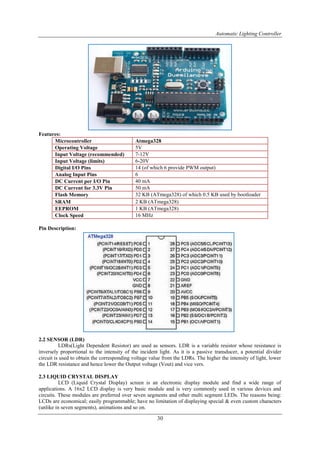
Features:
Microcontroller Atmega328
Operating Voltage 5V
Input Voltage (recommended) 7-12V
Input Voltage (limits) 6-20V
Digital I/O Pins 14 (of which 6 provide PWM output)
Analog Input Pins 6
DC Current per I/O Pin 40 mA
DC Current for 3.3V Pin 50 mA
Flash Memory 32 KB (ATmega328) of which 0.5 KB used by bootloader
SRAM 2 KB (ATmega328)
EEPROM 1 KB (ATmega328)
Clock Speed 16 MHz
Pin Description:
2.2 SENSOR (LDR)
LDRs(Light Dependent Resistor) are used as sensors. LDR is a variable resistor whose resistance is
inversely proportional to the intensity of the incident light. As it is a passive transducer, a potential divider
circuit is used to obtain the corresponding voltage value from the LDRs. The higher the intensity of light, lower
the LDR resistance and hence lower the Output voltage (Vout) and vice vers.
2.3 LIQUID CRYSTAL DISPLAY
LCD (Liquid Crystal Display) screen is an electronic display module and find a wide range of
applications. A 16x2 LCD display is very basic module and is very commonly used in various devices and
circuits. These modules are preferred over seven segments and other multi segment LEDs. The reasons being:
LCDs are economical; easily programmable; have no limitation of displaying special & even custom characters
(unlike in seven segments), animations and so on.
Automatic Lighting Controller
31
A 16x2 LCD means it can display 16 characters per line and there are 2 such lines. In this LCD each
character is displayed in 5x7 pixel matrix. This LCD has two registers, namely, Command and Data.
The command register stores the command instructions given to the LCD. A command is an instruction
given to LCD to do a predefined task like initializing it, clearing its screen, setting the cursor position,
controlling display etc. The data register stores the data to be displayed on the LCD. The data is the ASCII value
of the character to be displayed on the LCD. Click to learn more about internal structure of a LCD.
III. PIN DESCRIPTION
Atmega 328 in Detail
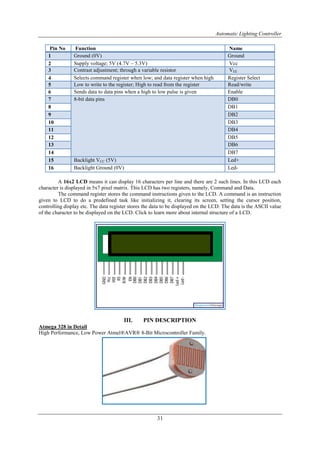
High Performance, Low Power Atmel®AVR® 8-Bit Microcontroller Family.
Pin No Function Name
1 Ground (0V) Ground
2 Supply voltage; 5V (4.7V – 5.3V) Vcc
3 Contrast adjustment; through a variable resistor VEE
4 Selects command register when low; and data register when high Register Select
5 Low to write to the register; High to read from the register Read/write
6 Sends data to data pins when a high to low pulse is given Enable
7 8-bit data pins DB0
8 DB1
9 DB2
10 DB3
11 DB4
12 DB5
13 DB6
14 DB7
15 Backlight VCC (5V) Led+
16 Backlight Ground (0V) Led-
Automatic Lighting Controller
32
• Advanced RISC Architecture:
– 131 Powerful Instructions – Most Single Clock Cycle Execution.
– 32 x 8 General Purpose Working Registers.
– Fully Static Operation.
– Up to 20 MIPS Throughput at 20MHz.
– On-chip 2-cycle Multiplier.
• High Endurance Non-volatile Memory Segments:
– 4/8/16/32KBytes of In-System Self-Programmable Flash program memory.
– 256/512/512/1KBytes EEPROM.
– 512/1K/1K/2KBytes Internal SRAM.
– Write/Erase Cycles: 10,000 Flash/100,000 EEPROM.
– Data retention: 20 years at 85C/100 years at 25C.
– Optional Boot Code Section with Independent Lock Bits.
 In-System Programming by On-chip Boot Program:
– True Read-While-Write Operation.
– Programming Lock for Software Security.
• Atmel® Q-Touch® library support:
– Capacitive touch buttons, sliders and wheels.
– QTouch and QMatrix® acquisition.
– Up to 64 sense channels.
• Peripheral Features:
– Two 8-bit Timer/Counters with Separate Prescaler and Compare Mode.
– One 16-bit Timer/Counter with Separate Prescaler, Compare Mode, and Capture Mode.
– Real Time Counter with Separate Oscillator.
– Six PWM Channels.
– 8-channel 10-bit ADC in TQFP and QFN/MLF package.
 Temperature Measurement:
– 6-channel 10-bit ADC in PDIP Package.
 Temperature Measurement:
– Programmable Serial USART.
– Master/Slave SPI Serial Interface.
– Byte-oriented 2-wire Serial Interface (Philips I2C compatible).
– Programmable Watchdog Timer with Separate On-chip Oscillator.
– On-chip Analog Comparator.
– Interrupt and Wake-up on Pin Change.
• Special Microcontroller Features:
– Power-on Reset and Programmable Brown-out Detection.
– Internal Calibrated Oscillator.
– External and Internal Interrupt Sources.
– Six Sleep Modes: Idle, ADC Noise Reduction, Power-save, Power-down, Standby, and Extended Standby.
• I/O and Packages:
– 23 Programmable I/O Lines.
– 28-pin PDIP, 32-lead TQFP, 28-pad QFN/MLF and 32-pad QFN/MLF.
• Operating Voltage:
– 1.8 - 5.5V
• Temperature Range:
– -40C to 85C
• Speed Grade:
– 0 - 4MHz@1.8 - 5.5V, 0 - 10MHz@2.7 - 5.5.V, 0 - 20MHz @ 4.5 - 5.5V
• Power Consumption at 1MHz, 1.8V, 25C:
Automatic Lighting Controller
33
– Active Mode: 0.2mA.
– Power-down Mode: 0.1μA.
– Power-save Mode: 0.75μA (Including 32kHz RTC).
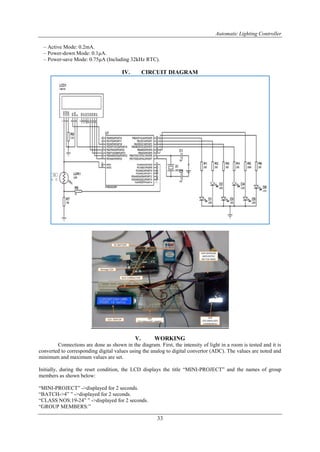
IV. CIRCUIT DIAGRAM
V. WORKING
Connections are done as shown in the diagram. First, the intensity of light in a room is tested and it is
converted to corresponding digital values using the analog to digital convertor (ADC). The values are noted and
minimum and maximum values are set.
Initially, during the reset condition, the LCD displays the title “MINI-PROJECT” and the names of group
members as shown below:
“MINI-PROJECT” ->displayed for 2 seconds.
“BATCH->4” ” ->displayed for 2 seconds.
“CLASS NOS:19-24” ” ->displayed for 2 seconds.
“GROUP MEMBERS:”
Automatic Lighting Controller
34
The names of 6 group members CELUS, DELLA, DINA, ELIENA, FARZEEN, FATHIMA.
This is displayed repeatedly until interrupt is given. (Interrupt here is the light intensity).
The value of light intensity is read by the Light Detecting Resistor (LDR) and gives out corresponding
voltage value, which is fed to analog port (A0) of arduino platform. The value is then processed and then
converted to percentage (minimum set value corresponds to 0% and maximum set value corresponds to 100%).
The number of LED to be lit is pre-programmed and is set as follows:
If LUMINANCE = 100 %, number of LEDs to be lit = 0.
If LUMINANCE < 90%, number of LEDs to be lit = 1.
If LUMINANCE < 70%, number of LEDs to be lit = 2.
If LUMINANCE < 50%, number of LEDs to be lit = 3.
If LUMINANCE < 30%, number of LEDs to be lit = 4.
If LUMINANCE < 10%, number of LEDs to be lit = 5.
If LUMINANCE = 0%, number of LEDs to be lit = 6.
The energy consumed is also monitored by counting the number of bulbs lit. Wattage of the bulbs connected can
be pre set.
lcd.print(lum*10); //Here the wattage per lamp is set to 10W.
In this way, the necessary number of bulbs to be lit in a room is controlled by the light intensity in the room.
Hence, energy conservation can be effectively carried out in this present scenario of energy crisis.
VI. PROGRAM CODE
#include<LiquidCrystal.h> //Header file for including lcd functions.
LiquidCrystal lcd(7,6,5,4,3,2); //Assigning ports to connect lcd.
int minlum=150; //Setting up lumination limits.
int maxlum=950; //Setting up lumination limits.
/*Function for setting up I/O ports, start up display etc...*/
void setup()
{
int l,n;
char name[]={' ',' ',' ',' ',' ',' ',' ',' ',' ',' ',' ',' ',' ',' ',' ',' ','C','E','L','U','S',',',' ','D','E','L','L','A',',',' ','D','I','N','A',',','
','E','L','I','E','N','A',',',' ','F','A','R','Z','E','E','N',',',' ','F','A','T','H','I','M','A','.','.','.',' ',' ',' ',' ',' ',' ',' ',' ',' ',' ',' ',' ',' ',' ',' ','
'};
for(int j=8;j<14;j++)
pinMode(j,OUTPUT); //Setting pins 8 to 13 as outputs.
lcd.begin(16,2); //Initializing lcd display.
Serial.begin(9600);
//Setting baud rate for serial communication.
/*Loop for initial display*/
do
{
Automatic Lighting Controller
35
lcd.clear();
lcd.print(" MINI-PROJECT "); //Print to lcd screen.
delay(2000); //Delay for 2sec.
lcd.setCursor(0,1);
lcd.print(" BATCH->4 ");
delay(2000);
lcd.setCursor(0,1);
lcd.print("CLASS NOS: 19-24");
delay(2000);
lcd.clear();
lcd.print("GROUP MEMBERS:");
lcd.setCursor(0,1);
n=0;
do
{
lcd.setCursor(0,1);
for(int i=n;i<n+17;i++)
lcd.print(name[i]);
delay(250);
n++;
l=analogRead(A0);
}while(n<64&&l<500); //Continue display loop untill interrupt.
}while(l<500); //Continue display loop untill interrupt.
}
/*Execution function, main function for continuous executuion.*/
void loop()
{
int lum=analogRead(A0); //Read the analog value.
lum=constrain(lum,minlum,maxlum); //Constrain the value to avoid noise.
int lumper=map(lum,minlum,maxlum,0,100); //Convert the analog to percentage.
Serial.print("Value = "); //Send value to computer.
Serial.println(lum);
lum=(10-(lumper/10))/2; //Calculating the number of lamps to be lit.
/*printing the values to LCD*/
lcd.clear();
lcd.print("LUMINATION:");
lcd.print(lumper);
lcd.print("%");
/*Controling the lamps*/
for(int i=0;i<6;i++)
{
if(i<lum)
{
digitalWrite(i+8,HIGH); //Turn lamps ON
}
else
{
digitalWrite(i+8,LOW); //Turn lamps OFF
}
/*Turning all lamps ON when 0 light intensity*/
if(lumper==0)
for(int k=8;k<14;k++)
digitalWrite(k,HIGH);
}
if(lumper==0)
lum=6;
/*Display to LCD*/
Automatic Lighting Controller
36
lcd.setCursor(0,1);
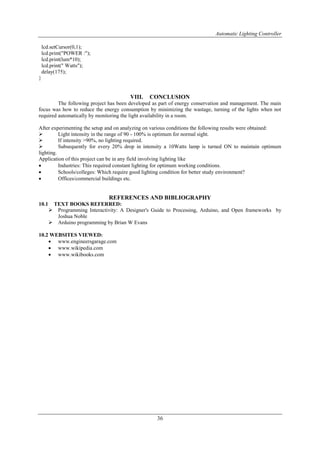
lcd.print("POWER :");
lcd.print(lum*10);
lcd.print(" Watts");
delay(175);
}
VIII. CONCLUSION
The following project has been developed as part of energy conservation and management. The main
focus was how to reduce the energy consumption by minimizing the wastage, turning of the lights when not
required automatically by monitoring the light availability in a room.
After experimenting the setup and on analyzing on various conditions the following results were obtained:
 Light intensity in the range of 90 - 100% is optimum for normal sight.
 If intensity >90%, no lighting required.
 Subsequently for every 20% drop in intensity a 10Watts lamp is turned ON to maintain optimum
lighting.
Application of this project can be in any field involving lighting like
 Industries: This required constant lighting for optimum working conditions.
 Schools/colleges: Which require good lighting condition for better study environment?
 Offices/commercial buildings etc.
REFERENCES AND BIBLIOGRAPHY
10.1 TEXT BOOKS REFERRED:
 Programming Interactivity: A Designer's Guide to Processing, Arduino, and Open frameworks by
Joshua Noble
 Arduino programming by Brian W Evans
10.2 WEBSITES VIEWED:
 www.engineersgarage.com
 www.wikipedia.com
 www.wikibooks.com

International Journal of Engineering Research and Development

  • 1.
    International Journal ofEngineering Research and Development e-ISSN: 2278-067X, p-ISSN: 2278-800X, www.ijerd.com Volume 10, Issue 2 (February 2014), PP. 29-36 29 Automatic Lighting Controller Sibu Skaria, Manu John, Bybin Paul Assistant Professor, Department of Computer Application, M A College of Engineering, Kothamangalam, Kerala, India1 Assistant Professor, Department of Computer Application, M A College of Engineering, Kothamangalam, Kerala, India 2 Assistant Professor, Department of Civil Engineering, M A College of Engineering, Kothamangalam, Kerala, India 3 Abstract:- In the present day scenario, where the energy crisis is a major concern, energy conservation is one big step for solving the problem of energy demand. As a part of energy conservation, we have come up with a way to reduce the wastage. I. INTRODUCTION Based on the paper title, “AUTOMATIC LIGHTING CONTROLLER”, controls the amount of lighting in a room by constantly monitoring the level of luminance in a room. Lights are then controlled such that required illumination is available in the room. It can be applied effectively in commercial buildings, homes, colleges etc. E.g) On a normal day when there is a bright sun the lights will be OFF. And on a cloudy day the illumination levels will be low the controller calculates the required lighting by checking the illumination level and turns ON the lights. Thus we can reduce the unnecessary wastage of energy. II. COMPONENTS Main Components used are : a) Development Board – Arduino Dumilanove b) LED (representing lamps) c) LDR d) LCD 2.1 Arduino Duemilanove Board (Atmega 328) Arduino is a tool for making computers that can sense and control more of the physical world than your desktop computer. It's an open-source physical computing platform based on a simple microcontroller board, and a development environment for writing software for the board. Arduino can be used to develop interactive objects, taking inputs from a variety of switches or sensors, and controlling a variety of lights, motors, and other physical outputs. Arduino projects can be stand-alone, or they can be communicating with software running on your computer (e.g. Flash, Processing, MaxMSP.) The boards can be assembled by hand or purchased preassembled; the open-source IDE can be downloaded for free. The Arduino programming language is an implementation of Wiring, a similar physical computing platform, which is based on the Processing multimedia programming environment.
  • 2.
    Automatic Lighting Controller 30 Features: MicrocontrollerAtmega328 Operating Voltage 5V Input Voltage (recommended) 7-12V Input Voltage (limits) 6-20V Digital I/O Pins 14 (of which 6 provide PWM output) Analog Input Pins 6 DC Current per I/O Pin 40 mA DC Current for 3.3V Pin 50 mA Flash Memory 32 KB (ATmega328) of which 0.5 KB used by bootloader SRAM 2 KB (ATmega328) EEPROM 1 KB (ATmega328) Clock Speed 16 MHz Pin Description: 2.2 SENSOR (LDR) LDRs(Light Dependent Resistor) are used as sensors. LDR is a variable resistor whose resistance is inversely proportional to the intensity of the incident light. As it is a passive transducer, a potential divider circuit is used to obtain the corresponding voltage value from the LDRs. The higher the intensity of light, lower the LDR resistance and hence lower the Output voltage (Vout) and vice vers. 2.3 LIQUID CRYSTAL DISPLAY LCD (Liquid Crystal Display) screen is an electronic display module and find a wide range of applications. A 16x2 LCD display is very basic module and is very commonly used in various devices and circuits. These modules are preferred over seven segments and other multi segment LEDs. The reasons being: LCDs are economical; easily programmable; have no limitation of displaying special & even custom characters (unlike in seven segments), animations and so on.
  • 3.
    Automatic Lighting Controller 31 A16x2 LCD means it can display 16 characters per line and there are 2 such lines. In this LCD each character is displayed in 5x7 pixel matrix. This LCD has two registers, namely, Command and Data. The command register stores the command instructions given to the LCD. A command is an instruction given to LCD to do a predefined task like initializing it, clearing its screen, setting the cursor position, controlling display etc. The data register stores the data to be displayed on the LCD. The data is the ASCII value of the character to be displayed on the LCD. Click to learn more about internal structure of a LCD. III. PIN DESCRIPTION Atmega 328 in Detail High Performance, Low Power Atmel®AVR® 8-Bit Microcontroller Family. Pin No Function Name 1 Ground (0V) Ground 2 Supply voltage; 5V (4.7V – 5.3V) Vcc 3 Contrast adjustment; through a variable resistor VEE 4 Selects command register when low; and data register when high Register Select 5 Low to write to the register; High to read from the register Read/write 6 Sends data to data pins when a high to low pulse is given Enable 7 8-bit data pins DB0 8 DB1 9 DB2 10 DB3 11 DB4 12 DB5 13 DB6 14 DB7 15 Backlight VCC (5V) Led+ 16 Backlight Ground (0V) Led-
  • 4.
    Automatic Lighting Controller 32 •Advanced RISC Architecture: – 131 Powerful Instructions – Most Single Clock Cycle Execution. – 32 x 8 General Purpose Working Registers. – Fully Static Operation. – Up to 20 MIPS Throughput at 20MHz. – On-chip 2-cycle Multiplier. • High Endurance Non-volatile Memory Segments: – 4/8/16/32KBytes of In-System Self-Programmable Flash program memory. – 256/512/512/1KBytes EEPROM. – 512/1K/1K/2KBytes Internal SRAM. – Write/Erase Cycles: 10,000 Flash/100,000 EEPROM. – Data retention: 20 years at 85C/100 years at 25C. – Optional Boot Code Section with Independent Lock Bits.  In-System Programming by On-chip Boot Program: – True Read-While-Write Operation. – Programming Lock for Software Security. • Atmel® Q-Touch® library support: – Capacitive touch buttons, sliders and wheels. – QTouch and QMatrix® acquisition. – Up to 64 sense channels. • Peripheral Features: – Two 8-bit Timer/Counters with Separate Prescaler and Compare Mode. – One 16-bit Timer/Counter with Separate Prescaler, Compare Mode, and Capture Mode. – Real Time Counter with Separate Oscillator. – Six PWM Channels. – 8-channel 10-bit ADC in TQFP and QFN/MLF package.  Temperature Measurement: – 6-channel 10-bit ADC in PDIP Package.  Temperature Measurement: – Programmable Serial USART. – Master/Slave SPI Serial Interface. – Byte-oriented 2-wire Serial Interface (Philips I2C compatible). – Programmable Watchdog Timer with Separate On-chip Oscillator. – On-chip Analog Comparator. – Interrupt and Wake-up on Pin Change. • Special Microcontroller Features: – Power-on Reset and Programmable Brown-out Detection. – Internal Calibrated Oscillator. – External and Internal Interrupt Sources. – Six Sleep Modes: Idle, ADC Noise Reduction, Power-save, Power-down, Standby, and Extended Standby. • I/O and Packages: – 23 Programmable I/O Lines. – 28-pin PDIP, 32-lead TQFP, 28-pad QFN/MLF and 32-pad QFN/MLF. • Operating Voltage: – 1.8 - 5.5V • Temperature Range: – -40C to 85C • Speed Grade: – 0 - 4MHz@1.8 - 5.5V, 0 - 10MHz@2.7 - 5.5.V, 0 - 20MHz @ 4.5 - 5.5V • Power Consumption at 1MHz, 1.8V, 25C:
  • 5.
    Automatic Lighting Controller 33 –Active Mode: 0.2mA. – Power-down Mode: 0.1μA. – Power-save Mode: 0.75μA (Including 32kHz RTC). IV. CIRCUIT DIAGRAM V. WORKING Connections are done as shown in the diagram. First, the intensity of light in a room is tested and it is converted to corresponding digital values using the analog to digital convertor (ADC). The values are noted and minimum and maximum values are set. Initially, during the reset condition, the LCD displays the title “MINI-PROJECT” and the names of group members as shown below: “MINI-PROJECT” ->displayed for 2 seconds. “BATCH->4” ” ->displayed for 2 seconds. “CLASS NOS:19-24” ” ->displayed for 2 seconds. “GROUP MEMBERS:”
  • 6.
    Automatic Lighting Controller 34 Thenames of 6 group members CELUS, DELLA, DINA, ELIENA, FARZEEN, FATHIMA. This is displayed repeatedly until interrupt is given. (Interrupt here is the light intensity). The value of light intensity is read by the Light Detecting Resistor (LDR) and gives out corresponding voltage value, which is fed to analog port (A0) of arduino platform. The value is then processed and then converted to percentage (minimum set value corresponds to 0% and maximum set value corresponds to 100%). The number of LED to be lit is pre-programmed and is set as follows: If LUMINANCE = 100 %, number of LEDs to be lit = 0. If LUMINANCE < 90%, number of LEDs to be lit = 1. If LUMINANCE < 70%, number of LEDs to be lit = 2. If LUMINANCE < 50%, number of LEDs to be lit = 3. If LUMINANCE < 30%, number of LEDs to be lit = 4. If LUMINANCE < 10%, number of LEDs to be lit = 5. If LUMINANCE = 0%, number of LEDs to be lit = 6. The energy consumed is also monitored by counting the number of bulbs lit. Wattage of the bulbs connected can be pre set. lcd.print(lum*10); //Here the wattage per lamp is set to 10W. In this way, the necessary number of bulbs to be lit in a room is controlled by the light intensity in the room. Hence, energy conservation can be effectively carried out in this present scenario of energy crisis. VI. PROGRAM CODE #include<LiquidCrystal.h> //Header file for including lcd functions. LiquidCrystal lcd(7,6,5,4,3,2); //Assigning ports to connect lcd. int minlum=150; //Setting up lumination limits. int maxlum=950; //Setting up lumination limits. /*Function for setting up I/O ports, start up display etc...*/ void setup() { int l,n; char name[]={' ',' ',' ',' ',' ',' ',' ',' ',' ',' ',' ',' ',' ',' ',' ',' ','C','E','L','U','S',',',' ','D','E','L','L','A',',',' ','D','I','N','A',',',' ','E','L','I','E','N','A',',',' ','F','A','R','Z','E','E','N',',',' ','F','A','T','H','I','M','A','.','.','.',' ',' ',' ',' ',' ',' ',' ',' ',' ',' ',' ',' ',' ',' ',' ',' '}; for(int j=8;j<14;j++) pinMode(j,OUTPUT); //Setting pins 8 to 13 as outputs. lcd.begin(16,2); //Initializing lcd display. Serial.begin(9600); //Setting baud rate for serial communication. /*Loop for initial display*/ do {
  • 7.
    Automatic Lighting Controller 35 lcd.clear(); lcd.print("MINI-PROJECT "); //Print to lcd screen. delay(2000); //Delay for 2sec. lcd.setCursor(0,1); lcd.print(" BATCH->4 "); delay(2000); lcd.setCursor(0,1); lcd.print("CLASS NOS: 19-24"); delay(2000); lcd.clear(); lcd.print("GROUP MEMBERS:"); lcd.setCursor(0,1); n=0; do { lcd.setCursor(0,1); for(int i=n;i<n+17;i++) lcd.print(name[i]); delay(250); n++; l=analogRead(A0); }while(n<64&&l<500); //Continue display loop untill interrupt. }while(l<500); //Continue display loop untill interrupt. } /*Execution function, main function for continuous executuion.*/ void loop() { int lum=analogRead(A0); //Read the analog value. lum=constrain(lum,minlum,maxlum); //Constrain the value to avoid noise. int lumper=map(lum,minlum,maxlum,0,100); //Convert the analog to percentage. Serial.print("Value = "); //Send value to computer. Serial.println(lum); lum=(10-(lumper/10))/2; //Calculating the number of lamps to be lit. /*printing the values to LCD*/ lcd.clear(); lcd.print("LUMINATION:"); lcd.print(lumper); lcd.print("%"); /*Controling the lamps*/ for(int i=0;i<6;i++) { if(i<lum) { digitalWrite(i+8,HIGH); //Turn lamps ON } else { digitalWrite(i+8,LOW); //Turn lamps OFF } /*Turning all lamps ON when 0 light intensity*/ if(lumper==0) for(int k=8;k<14;k++) digitalWrite(k,HIGH); } if(lumper==0) lum=6; /*Display to LCD*/
  • 8.
    Automatic Lighting Controller 36 lcd.setCursor(0,1); lcd.print("POWER:"); lcd.print(lum*10); lcd.print(" Watts"); delay(175); } VIII. CONCLUSION The following project has been developed as part of energy conservation and management. The main focus was how to reduce the energy consumption by minimizing the wastage, turning of the lights when not required automatically by monitoring the light availability in a room. After experimenting the setup and on analyzing on various conditions the following results were obtained:  Light intensity in the range of 90 - 100% is optimum for normal sight.  If intensity >90%, no lighting required.  Subsequently for every 20% drop in intensity a 10Watts lamp is turned ON to maintain optimum lighting. Application of this project can be in any field involving lighting like  Industries: This required constant lighting for optimum working conditions.  Schools/colleges: Which require good lighting condition for better study environment?  Offices/commercial buildings etc. REFERENCES AND BIBLIOGRAPHY 10.1 TEXT BOOKS REFERRED:  Programming Interactivity: A Designer's Guide to Processing, Arduino, and Open frameworks by Joshua Noble  Arduino programming by Brian W Evans 10.2 WEBSITES VIEWED:  www.engineersgarage.com  www.wikipedia.com  www.wikibooks.com