Building	
  a	
  Real-­‐-me,	
  Solr-­‐powered	
  
             Recommenda-on	
  Engine	
  

                                  Trey	
  Grainger	
  
                  Manager,	
  Search	
  Technology	
  Development	
  
                                                          @	


Lucene	
  Revolu-on	
  2012	
  	
  -­‐	
  	
  Boston	


Overview	
  
•  Overview	
  of	
  Search	
  &	
  Matching	
  Concepts	
  
•  Recommenda@on	
  Approaches	
  in	
  Solr:	
  
    •  ACribute-­‐based	
  
    •  Hierarchical	
  Classifica@on	
  
    •  Concept-­‐based	
  
    •  More-­‐like-­‐this	
  
    •  Collabora@ve	
  Filtering	
  
    •  Hybrid	
  Approaches	
  
•  Important	
  Considera@ons	
  	
  &	
  Advanced	
  	
  Capabili@es	
  
   @	
  CareerBuilder	
  
My	
  Background	
  
Trey	
  Grainger	
  
     •  Manager,	
  Search	
  Technology	
  Development	
  
          	
  @	
  CareerBuilder.com	


Relevant	
  Background	
  
     •  Search	
  &	
  Recommenda@ons	
  
     •  High-­‐volume,	
  N-­‐@er	
  Architectures	
  
     •  NLP,	
  Relevancy	
  Tuning,	
  user	
  group	
  tes@ng,	
  &	
  machine	
  learning	
  

Fun	
  Side	
  Projects	
  
     •  Founder	
  and	
  Chief	
  Engineer	
  @	


  .com

     •  Currently	
  co-­‐authoring	
  	
  Solr	
  in	
  Ac*on	
  book…	
  keep	
  your	
  eyes	
  out	
  for	
  
        the	
  early	
  access	
  release	
  from	
  Manning	
  Publica@ons	
  
About	
  Search	
  @CareerBuilder	
  
•  Over	
  1	
  million	
  new	
  jobs	
  each	
  month	
  	
  
•  Over	
  45	
  million	
  ac@vely	
  searchable	
  resumes	
  
•  ~250	
  globally	
  distributed	
  search	
  servers	
  (in	
  
   the	
  U.S.,	
  Europe,	
  &	
  Asia)	
  	
  
•  Thousands	
  of	
  unique,	
  dynamically	
  generated	
  
   indexes	
  
•  Hundreds	
  of	
  millions	
  of	
  search	
  documents	
  
•  Over	
  1	
  million	
  searches	
  an	
  hour	
  
Search	
  Products	
  @	
  	
  
Redefining	
  “Search	
  Engine”	
  
•  “Lucene	
  is	
  a	
  high-­‐performance,	
  full-­‐featured	
  
   text	
  search	
  engine	
  library…”	
  
  Yes,	
  but	
  really…	
  

•  	
  Lucene	
  is	
  a	
  high-­‐performance,	
  fully-­‐featured	
  
   token	
  matching	
  and	
  scoring	
  library…	
  which	
  
   can	
  perform	
  full-­‐text	
  searching.	
  
Redefining	
  “Search	
  Engine”	
  

 or,	
  in	
  machine	
  learning	
  speak:	
  

•  A	
  Lucene	
  index	
  is	
  a	
  mul@-­‐dimensional	
  	
  
   sparse	
  matrix…	
  with	
  very	
  fast	
  and	
  powerful	
  
   lookup	
  capabili@es.	
  

•  Think	
  of	
  each	
  field	
  as	
  a	
  matrix	
  containing	
  each	
  
   term	
  mapped	
  to	
  each	
  document	
  
The	
  Lucene	
  Inverted	
  Index	
  	
  
                      (tradi@onal	
  text	
  example)	
  
                                                                        How	
  the	
  content	
  is	
  INDEXED	
  into	
  
What	
  you	
  SEND	
  to	
  Lucene/Solr:	
                             Lucene/Solr	
  (conceptually):	
  

Document	
           Content	
  Field	
                                  Term	
                   Documents	
  
doc1	
  	
           once	
  upon	
  a	
  @me,	
  in	
  a	
  land	
      a	
                      doc1	
  [2x]	
  
                     far,	
  far	
  away	
                               brown	
                  doc3	
  [1x]	
  ,	
  doc5	
  [1x]	
  
doc2	
               the	
  cow	
  jumped	
  over	
  the	
               cat	
                    doc4	
  [1x]	
  
                     moon.	
  
                                                                         cow	
                    doc2	
  [1x]	
  ,	
  doc5	
  [1x]	
  
doc3	
  	
           the	
  quick	
  brown	
  fox	
  
                     jumped	
  over	
  the	
  lazy	
  dog.	
             …	
                      ...	


doc4	
               the	
  cat	
  in	
  the	
  hat	
                    once	
                   doc1	
  [1x],	
  doc5	
  [1x]	
  

doc5	
               The	
  brown	
  cow	
  said	
  “moo”	
              over	
                   doc2	
  [1x],	
  doc3	
  [1x]	
  
                     once.	
                                             the	
                    doc2	
  [2x],	
  doc3	
  [2x],	
  
                                                                                                  doc4[2x],	
  doc5	
  [1x]	
  
…	
                  …	
  
                                                                         …	
                      …	
  
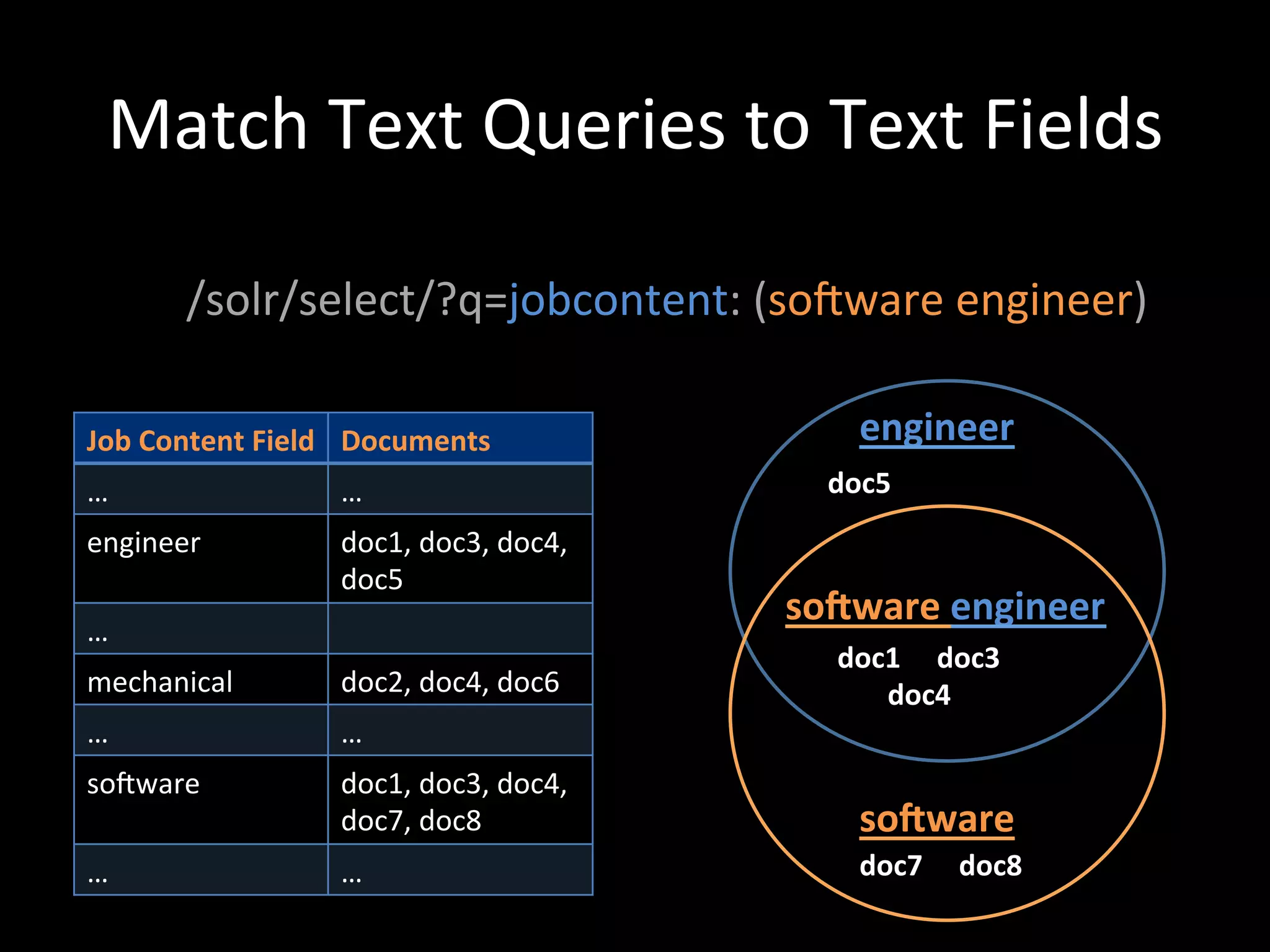
Match	
  Text	
  Queries	
  to	
  Text	
  Fields	


         /solr/select/?q=jobcontent:	
  (soiware	
  engineer)	
  

Job	
  Content	
  Field	
   Documents	
                        engineer	
  
…	
                      …	
                             doc5	
  
engineer	
               doc1,	
  doc3,	
  doc4,	
  
                         doc5	
  
                                                       soWware	
  engineer	
  
…	
  
                                                          doc1	


  doc3	


mechanical	
             doc2,	
  doc4,	
  doc6	


  doc4	
  
…	
                      …	
  
soiware	
                doc1,	
  doc3,	
  doc4,	
  
                         doc7,	
  doc8	
                       soWware	
  
…	
                      …	
                                   doc7	


  doc8	
  
Beyond	
  Text	
  Searching	
  
•  Lucene/Solr	
  is	
  a	
  text	
  search	
  matching	
  engine	
  

•  When	
  Lucene/Solr	
  search	
  text,	
  they	
  are	
  matching	
  
   tokens	
  in	
  the	
  query	
  with	
  tokens	
  in	
  index	
  

•  Anything	
  that	
  can	
  be	
  searched	
  upon	
  can	
  form	
  the	
  
   basis	
  of	
  matching	
  and	
  scoring:	
  
    –  text,	
  aCributes,	
  loca@ons,	
  results	
  of	
  func@ons,	
  user	
  
       behavior,	
  classifica@ons,	
  etc.	
  	
  
Business	
  Case	
  for	
  Recommenda@ons	
  

•  For	
  companies	
  like	
  CareerBuilder,	
  recommenda@ons	
  
     can	
  provide	
  as	
  much	
  or	
  even	
  greater	
  business	
  value	
  
     (i.e.	
  views,	
  sales,	
  job	
  applica@ons)	
  than	
  user-­‐driven	
  
     search	
  capabili@es.	


•  Recommenda@ons	
  create	
  s@ckiness	
  to	
  pull	
  users	
  
     back	
  to	
  your	
  company’s	
  website,	
  app,	
  etc.	


•  What	
  are	
  recommenda@ons?	
  
         	
  …	
  searches	
  of	
  relevant	
  content	
  for	
  a	
  user	
  
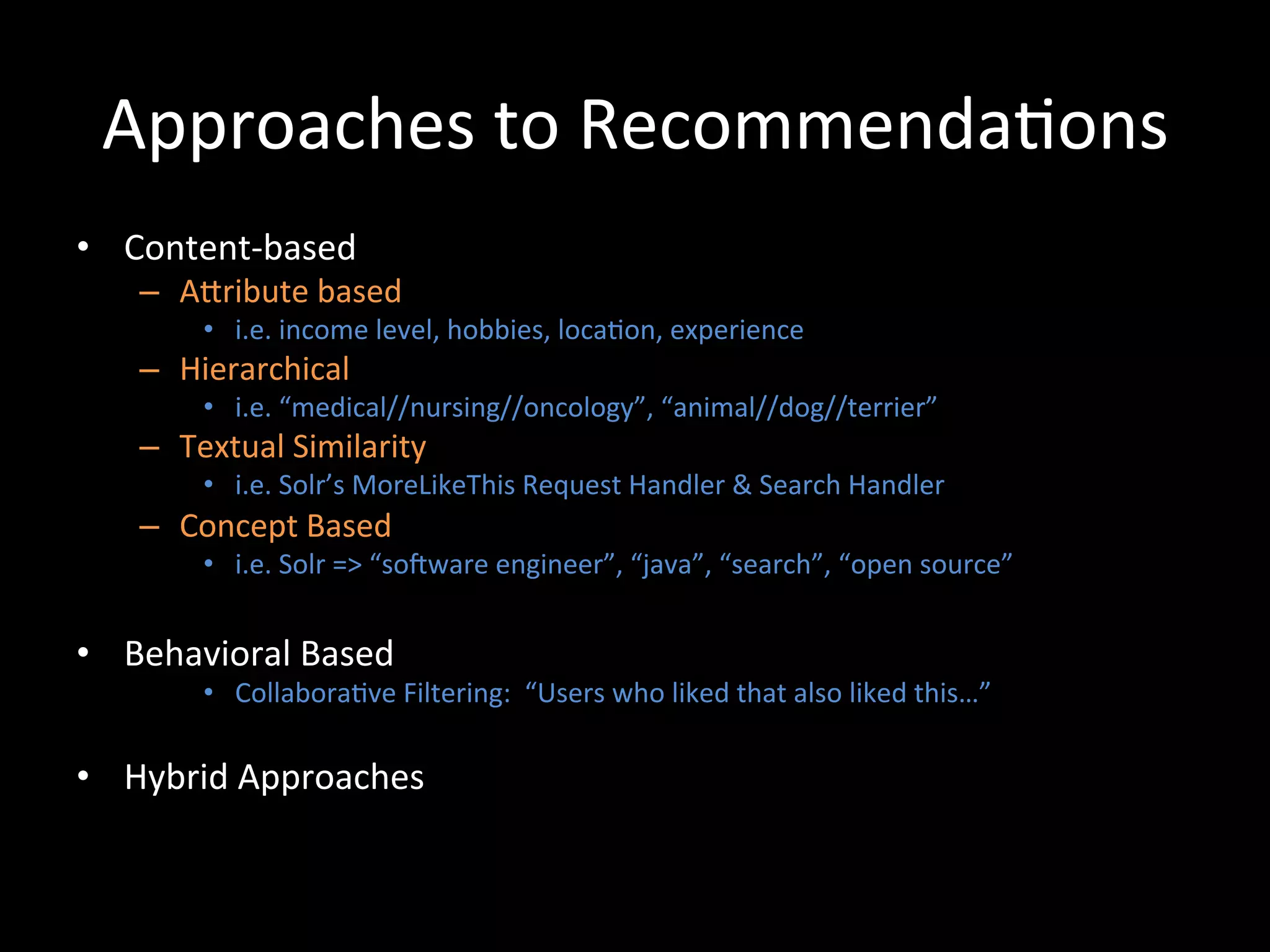
Approaches	
  to	
  Recommenda@ons	
  
•  Content-­‐based	
  
     –  ACribute	
  based	
  
           •  i.e.	
  income	
  level,	
  hobbies,	
  loca@on,	
  experience	
  
     –  Hierarchical	
  
           •  i.e.	
  “medical//nursing//oncology”,	
  “animal//dog//terrier”	
  
     –  Textual	
  Similarity	
  
           •  i.e.	
  Solr’s	
  MoreLikeThis	
  Request	
  Handler	
  &	
  Search	
  Handler	
  
     –  Concept	
  Based	
  
           •  i.e.	
  Solr	
  =>	
  “soiware	
  engineer”,	
  “java”,	
  “search”,	
  “open	
  source”	


•  Behavioral	
  Based	
  	
  
           •  Collabora@ve	
  Filtering:	
  	
  “Users	
  who	
  liked	
  that	
  also	
  liked	
  this…”	
  

•  Hybrid	
  Approaches	
  
Content-­‐based	
  Recommenda@on	
  Approaches	
  
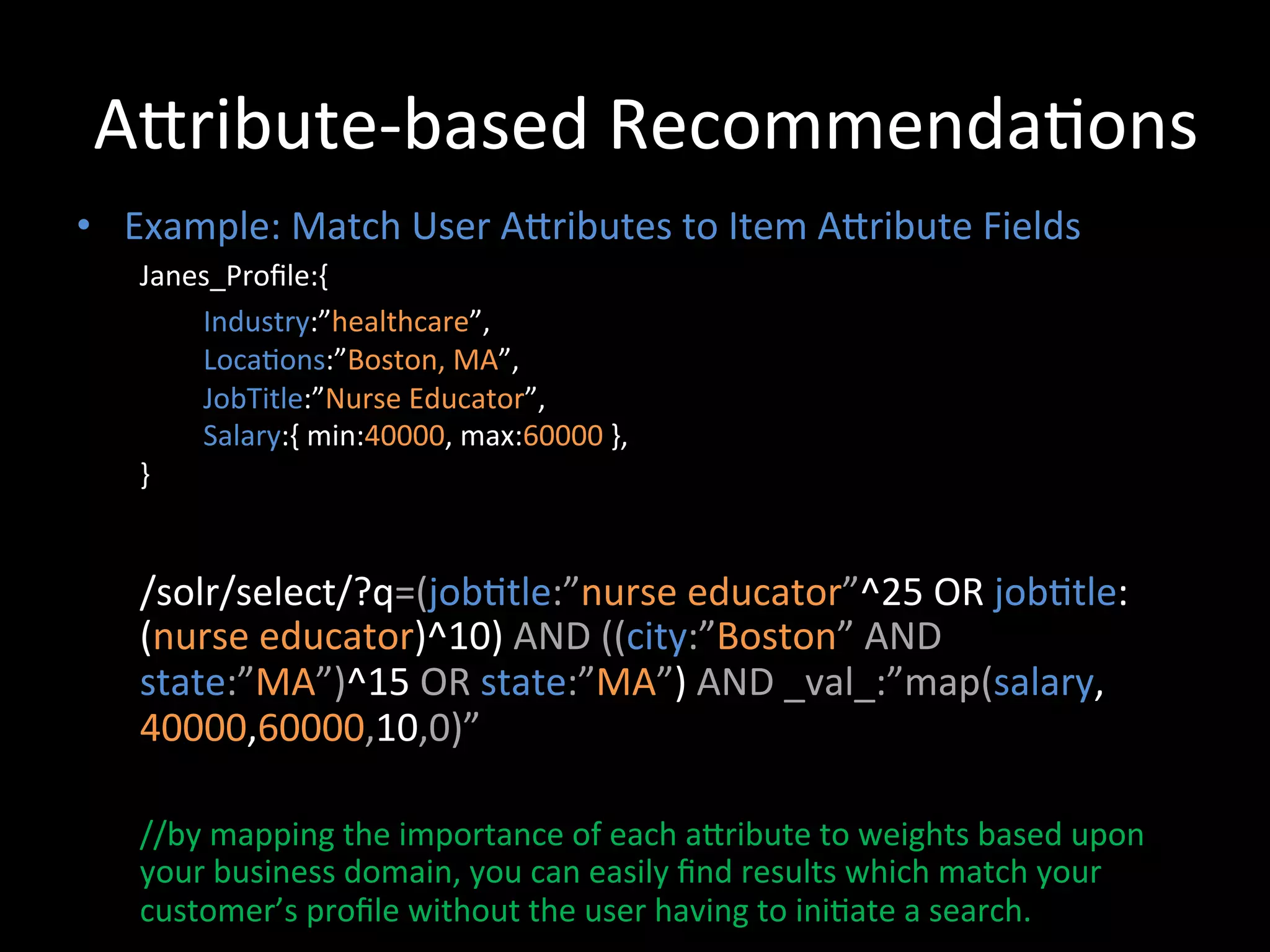
ACribute-­‐based	
  Recommenda@ons	
  
•  Example:	
  Match	
  User	
  ACributes	
  to	
  Item	
  ACribute	
  Fields	
  
     Janes_Profile:{	
  
           	
  Industry:”healthcare”,	


  Loca@ons:”Boston,	
  MA”,	


  JobTitle:”Nurse	
  Educator”,	


  Salary:{	
  min:40000,	
  max:60000	
  },	
  
     }	


     /solr/select/?q=(job@tle:”nurse	
  educator”^25	
  OR	
  job@tle:
     (nurse	
  educator)^10)	
  AND	
  ((city:”Boston”	
  AND	
  
     state:”MA”)^15	
  OR	
  state:”MA”)	
  AND	
  _val_:”map(salary,
     40000,60000,10,0)”	


     //by	
  mapping	
  the	
  importance	
  of	
  each	
  aCribute	
  to	
  weights	
  based	
  upon	
  
     your	
  business	
  domain,	
  you	
  can	
  easily	
  find	
  results	
  which	
  match	
  your	
  
     customer’s	
  profile	
  without	
  the	
  user	
  having	
  to	
  ini@ate	
  a	
  search.	
  
Hierarchical	
  Recommenda@ons	
  
•  Example:	
  Match	
  User	
  ACributes	
  to	
  Item	
  ACribute	
  Fields	
  
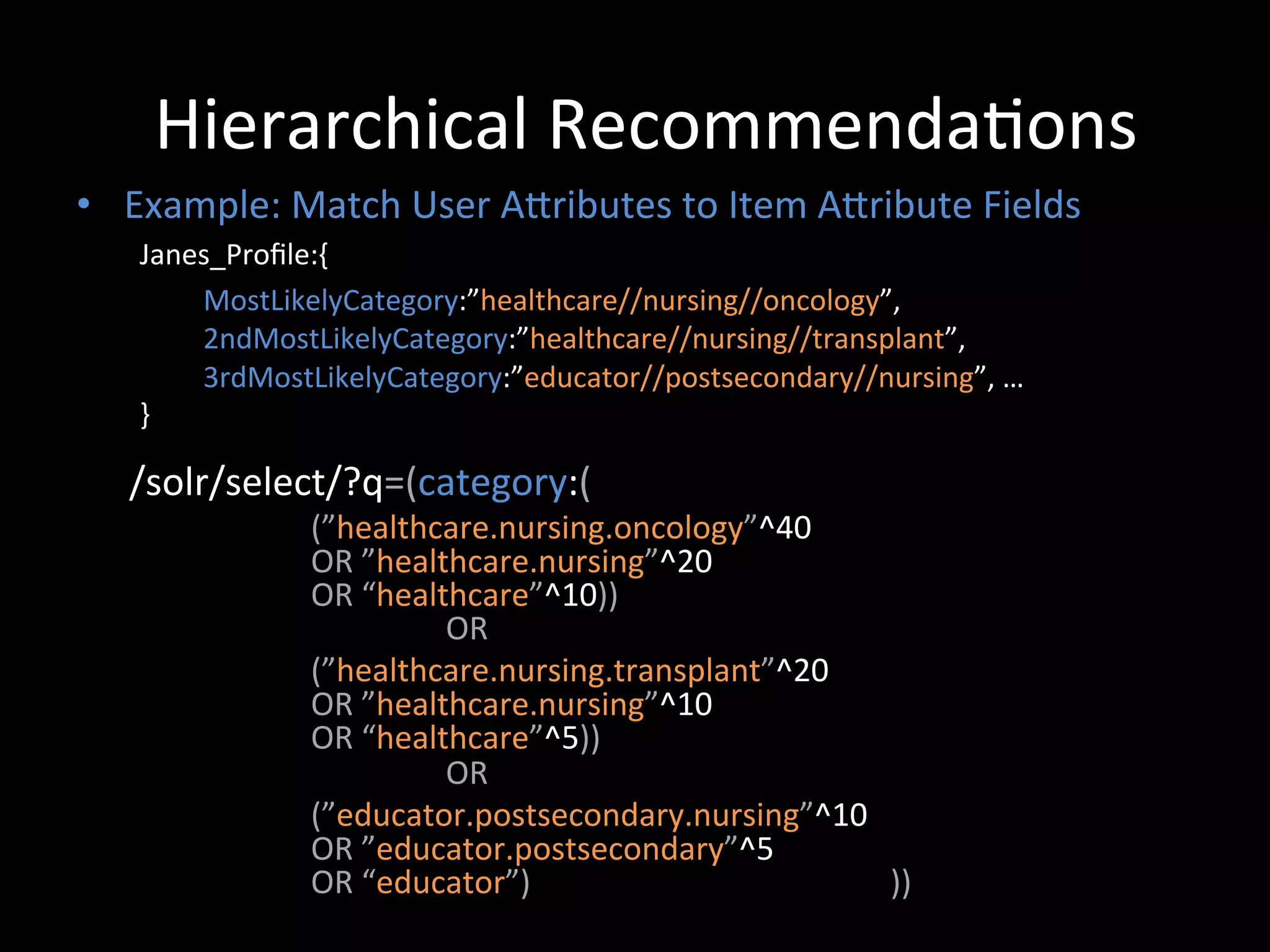
           Janes_Profile:{	
  
                 	
  MostLikelyCategory:”healthcare//nursing//oncology”,	


  2ndMostLikelyCategory:”healthcare//nursing//transplant”,	


  3rdMostLikelyCategory:”educator//postsecondary//nursing”,	
  …	
  
           }	


    /solr/select/?q=(category:(	
  
                         (”healthcare.nursing.oncology”^40	
  	
  
                         OR	
  ”healthcare.nursing”^20	
  	
  
                         OR	
  “healthcare”^10))	


  OR	
  	
  
                         (”healthcare.nursing.transplant”^20	
  	
  
                         OR	
  ”healthcare.nursing”^10	
  	
  
                         OR	
  “healthcare”^5))	


  OR	
  	
  
                         (”educator.postsecondary.nursing”^10	
  	
  
                         OR	
  ”educator.postsecondary”^5	
  	
  
                         OR	
  “educator”)	


  ))	


Textual	
  Similarity-­‐based	
  Recommenda@ons	
  
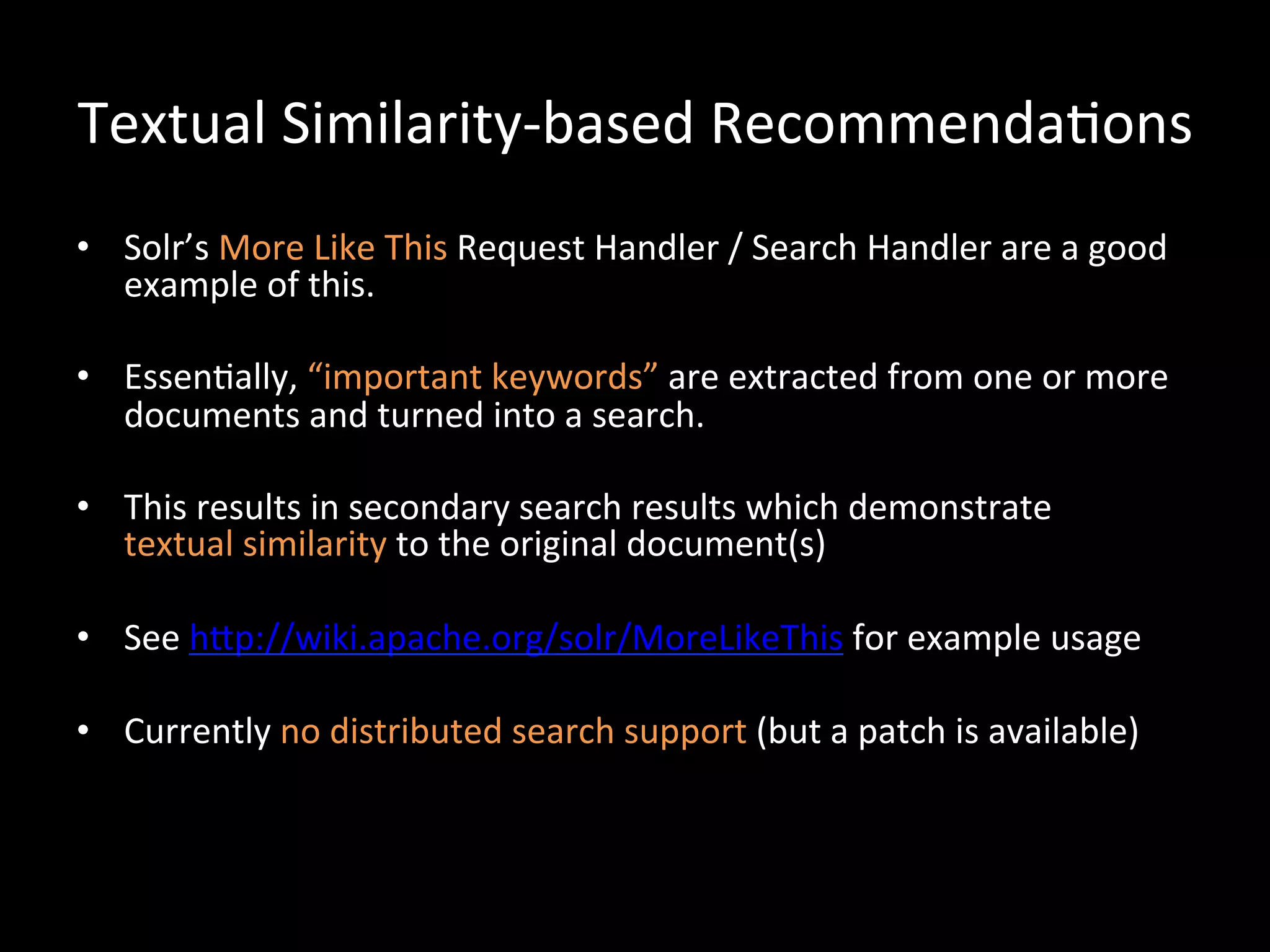
•  Solr’s	
  More	
  Like	
  This	
  Request	
  Handler	
  /	
  Search	
  Handler	
  are	
  a	
  good	
  
   example	
  of	
  this.	
  

•  Essen@ally,	
  “important	
  keywords”	
  are	
  extracted	
  from	
  one	
  or	
  more	
  
   documents	
  and	
  turned	
  into	
  a	
  search.	
  

•  This	
  results	
  in	
  secondary	
  search	
  results	
  which	
  demonstrate	
  	
  
   textual	
  similarity	
  to	
  the	
  original	
  document(s)	
  

•  See	
  hCp://wiki.apache.org/solr/MoreLikeThis	
  for	
  example	
  usage	
  

•  Currently	
  no	
  distributed	
  search	
  support	
  (but	
  a	
  patch	
  is	
  available)	
  
Concept	
  Based	
  Recommenda@ons	
  
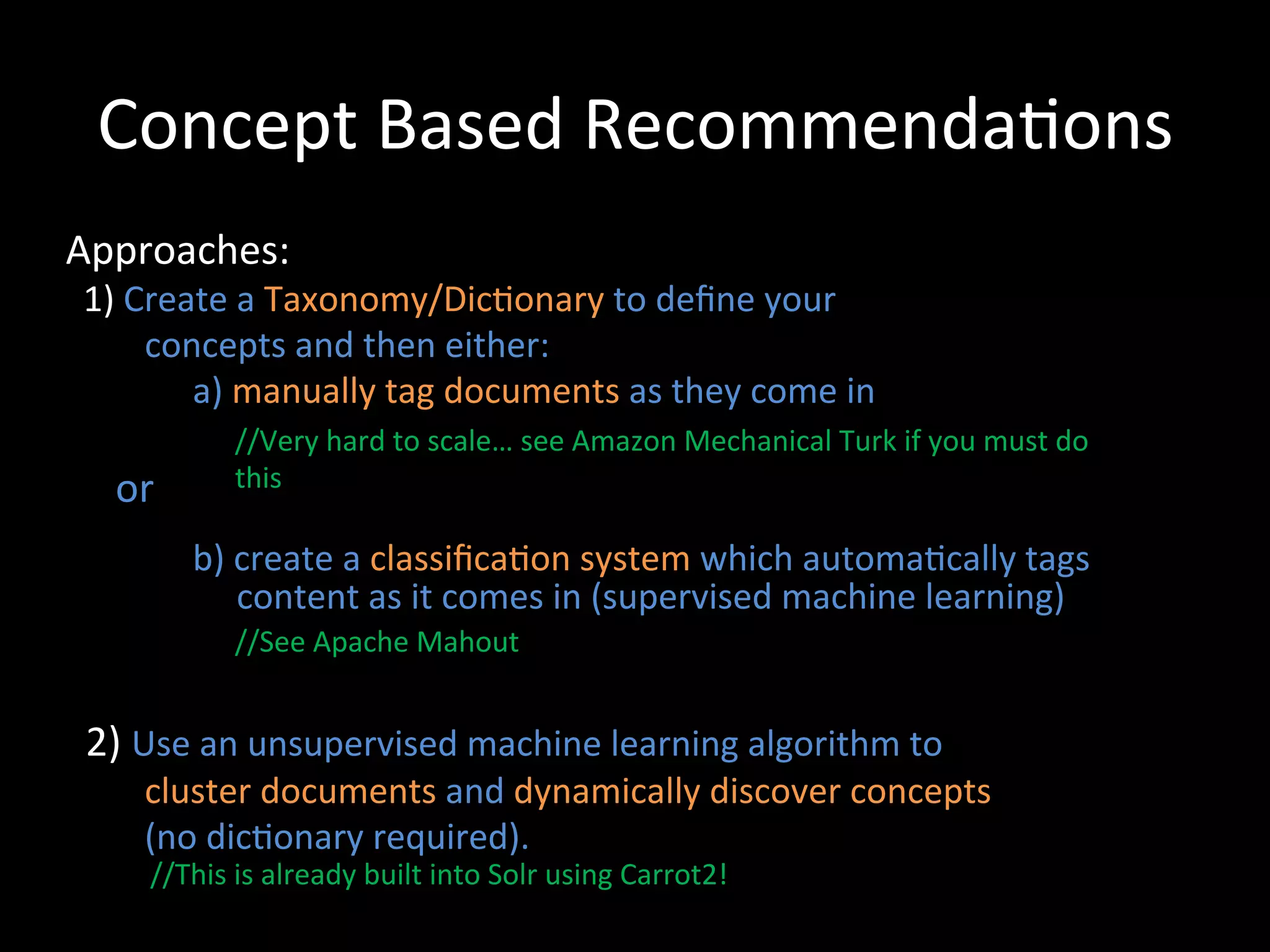
Approaches:	


  1)	
  Create	
  a	
  Taxonomy/Dic@onary	
  to	
  define	
  your	


  concepts	
  and	
  then	
  either:	


  a)	
  manually	
  tag	
  documents	
  as	
  they	
  come	
  in	
  
                             	
                 //Very	
  hard	
  to	
  scale…	
  see	
  Amazon	
  Mechanical	
  Turk	
  if	
  you	
  must	
  do	


  or	
  
                                    this	


  b)	
  create	
  a	
  classifica@on	
  system	
  which	
  automa@cally	
  tags	


  content	
  as	
  it	
  comes	
  in	
  (supervised	
  machine	
  learning)	
  
	
                     //See	
  Apache	
  Mahout	


  2)	
  Use	
  an	
  unsupervised	
  machine	
  learning	
  algorithm	
  to	


  cluster	
  documents	
  and	
  dynamically	
  discover	
  concepts	


  (no	
  dic@onary	
  required).	
  
                      //This	
  is	
  already	
  built	
  into	
  Solr	
  using	
  Carrot2!	
  
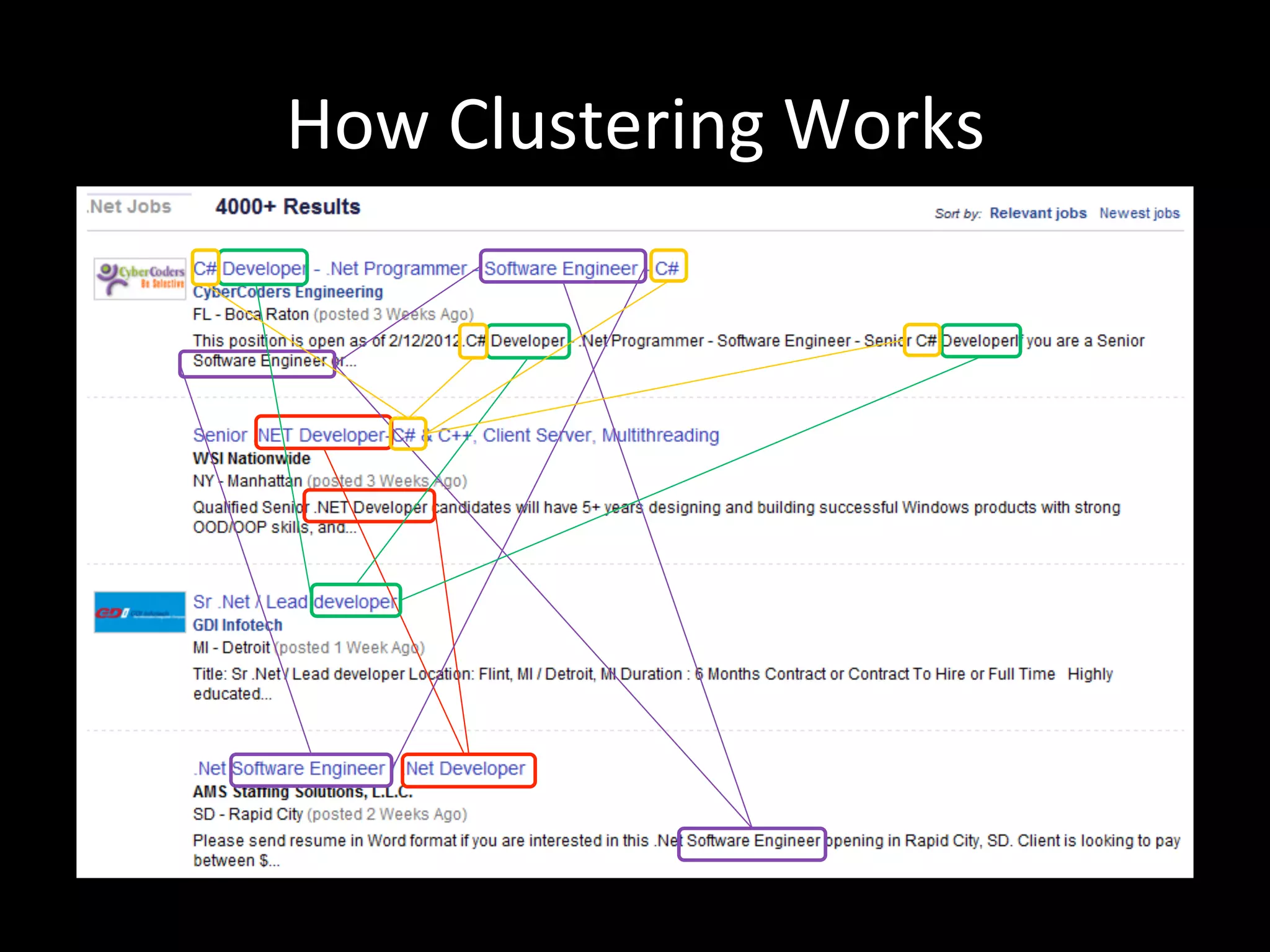
How	
  Clustering	
  Works	
  
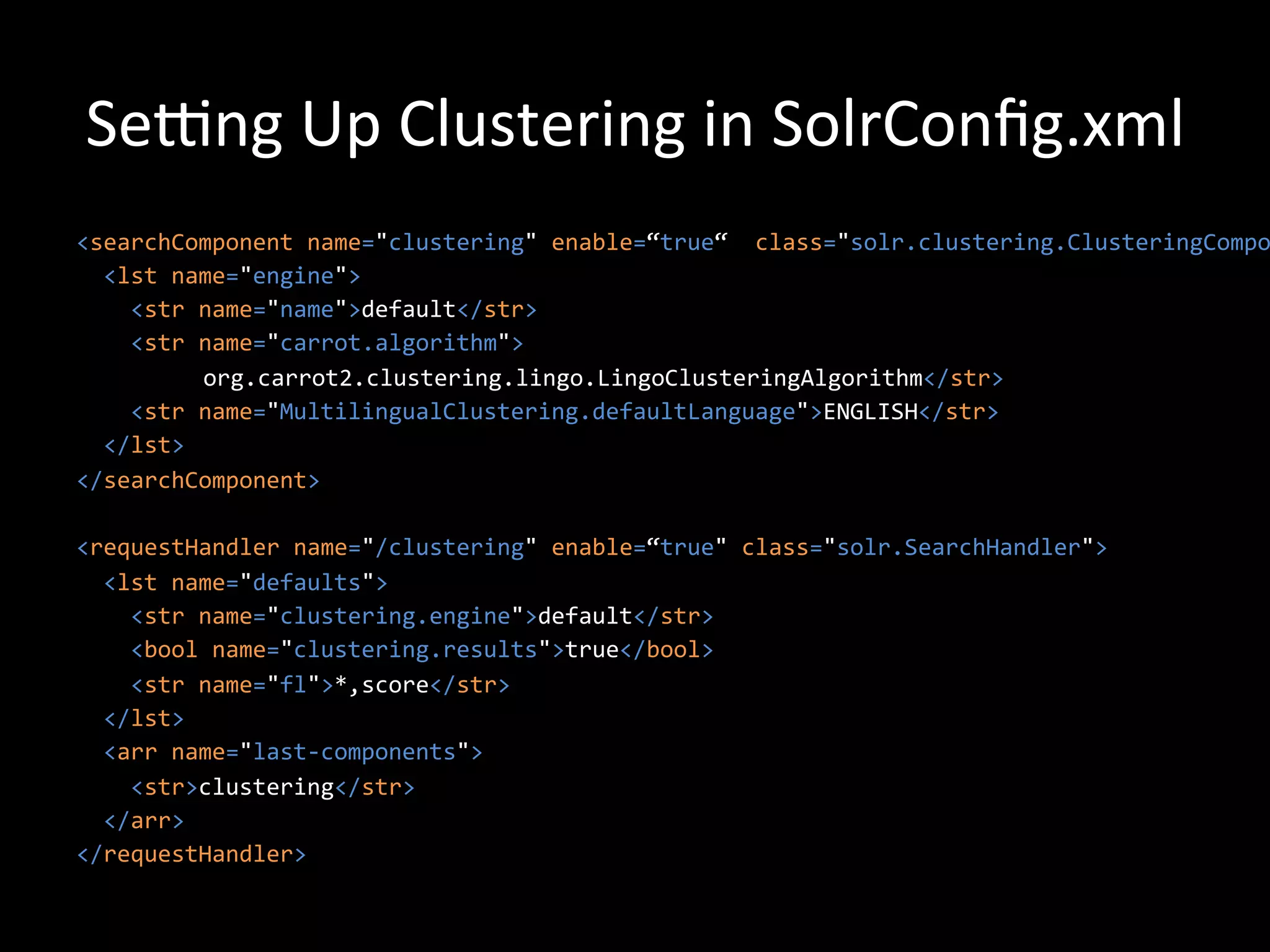
Sewng	
  Up	
  Clustering	
  in	
  SolrConfig.xml	
  
<searchComponent	
  name="clustering"	
  enable=“true“	
  	
  class="solr.clustering.ClusteringCompo
	
  	
  <lst	
  name="engine">	


  <str	
  name="name">default</str>	


  <str	
  name="carrot.algorithm">	
  
                     	
  org.carrot2.clustering.lingo.LingoClusteringAlgorithm</str>	


  <str	
  name="MultilingualClustering.defaultLanguage">ENGLISH</str>	


  </lst>	
  
</searchComponent>	


<requestHandler	
  name="/clustering"	
  enable=“true"	
  class="solr.SearchHandler">	


  <lst	
  name="defaults">	


  <str	
  name="clustering.engine">default</str>	


  <bool	
  name="clustering.results">true</bool>	


  <str	
  name="fl">*,score</str>	


  </lst>	


  <arr	
  name="last-­‐components">	


  <str>clustering</str>	


  </arr>	
  
</requestHandler>	
  
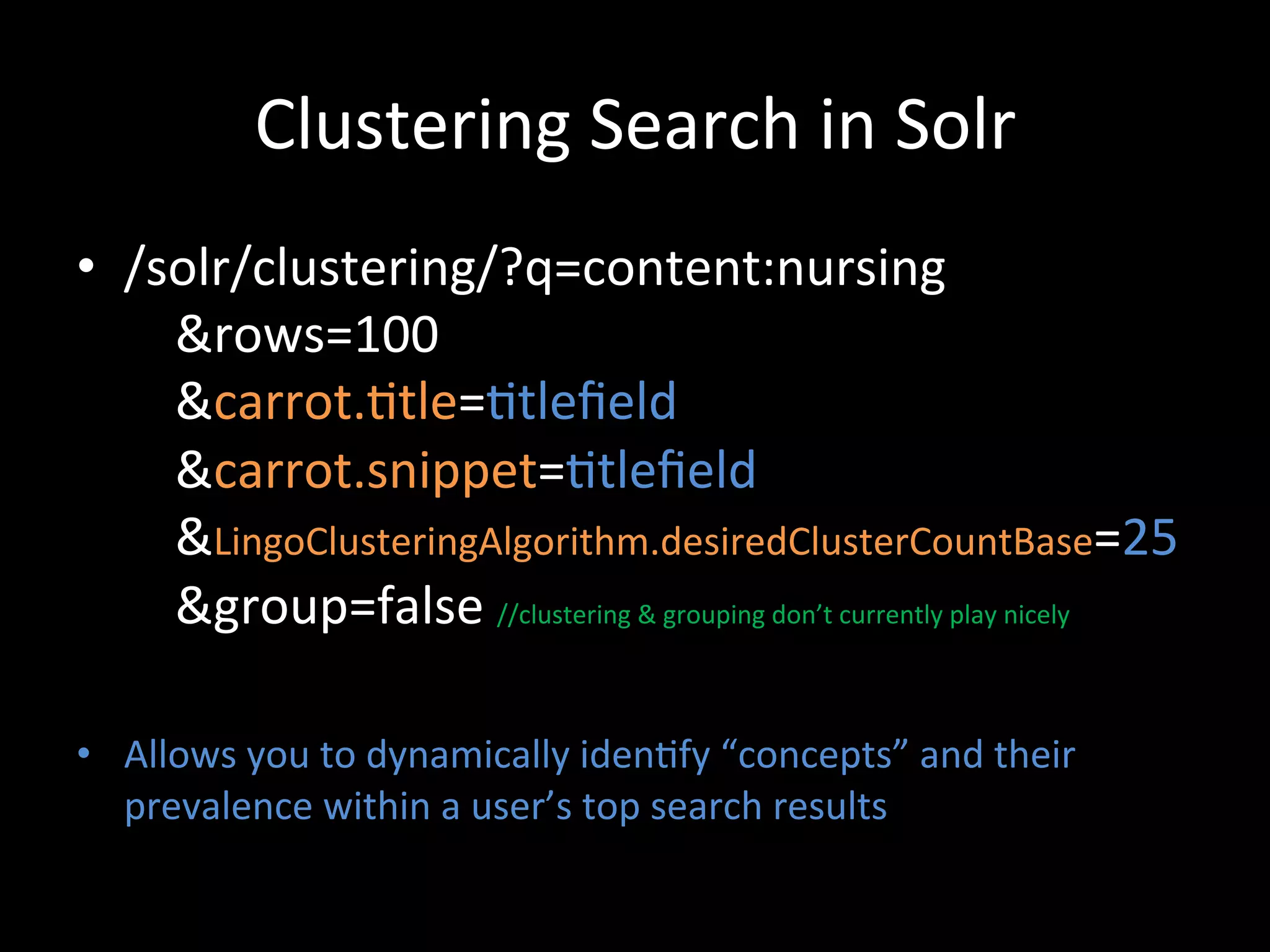
Clustering	
  Search	
  in	
  Solr	
  
•  /solr/clustering/?q=content:nursing	


  &rows=100	


  &carrot.@tle=@tlefield	


  &carrot.snippet=@tlefield	


  &LingoClusteringAlgorithm.desiredClusterCountBase=25	


  &group=false	
  //clustering	
  &	
  grouping	
  don’t	
  currently	
  play	
  nicely	
  

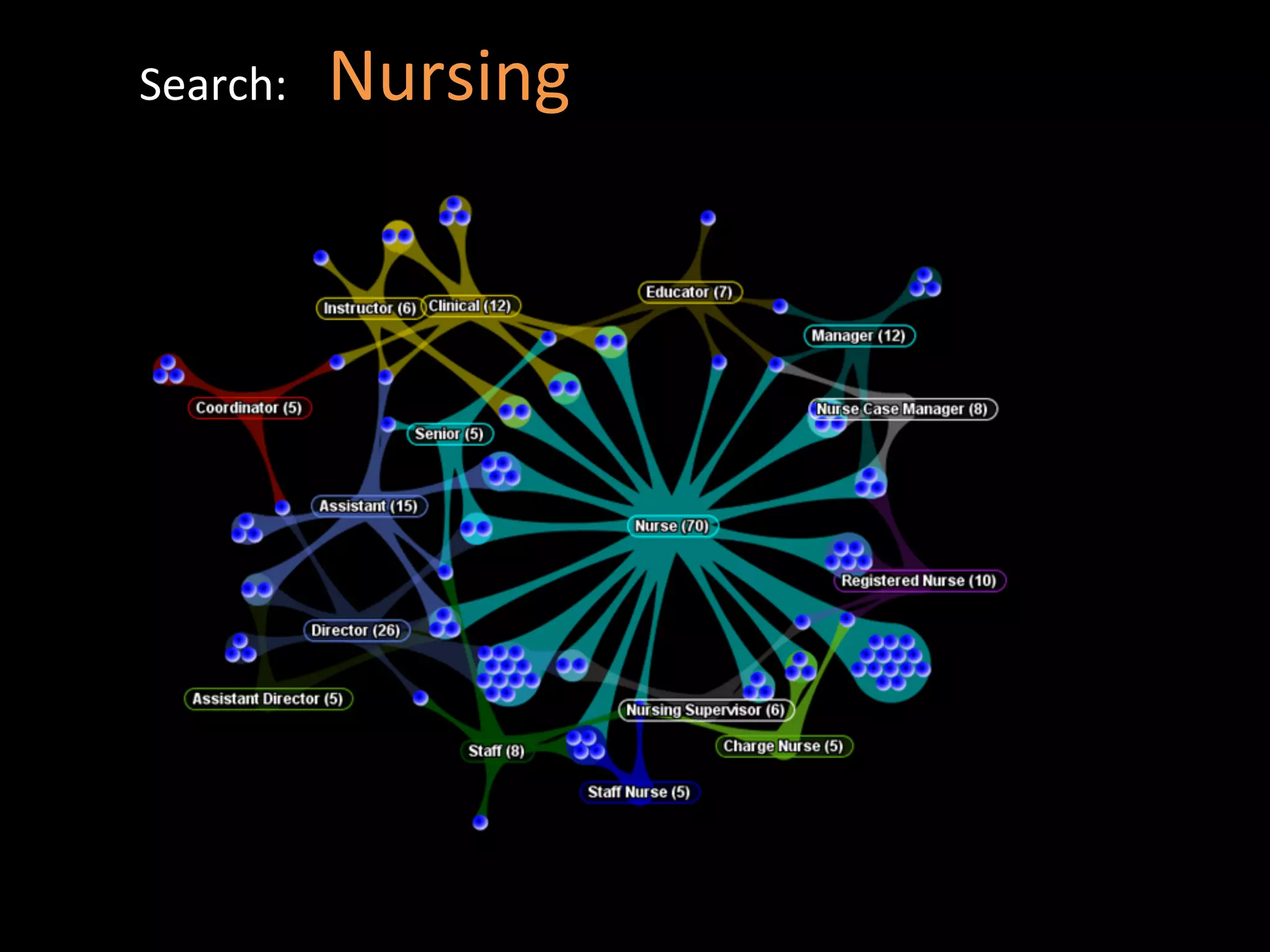
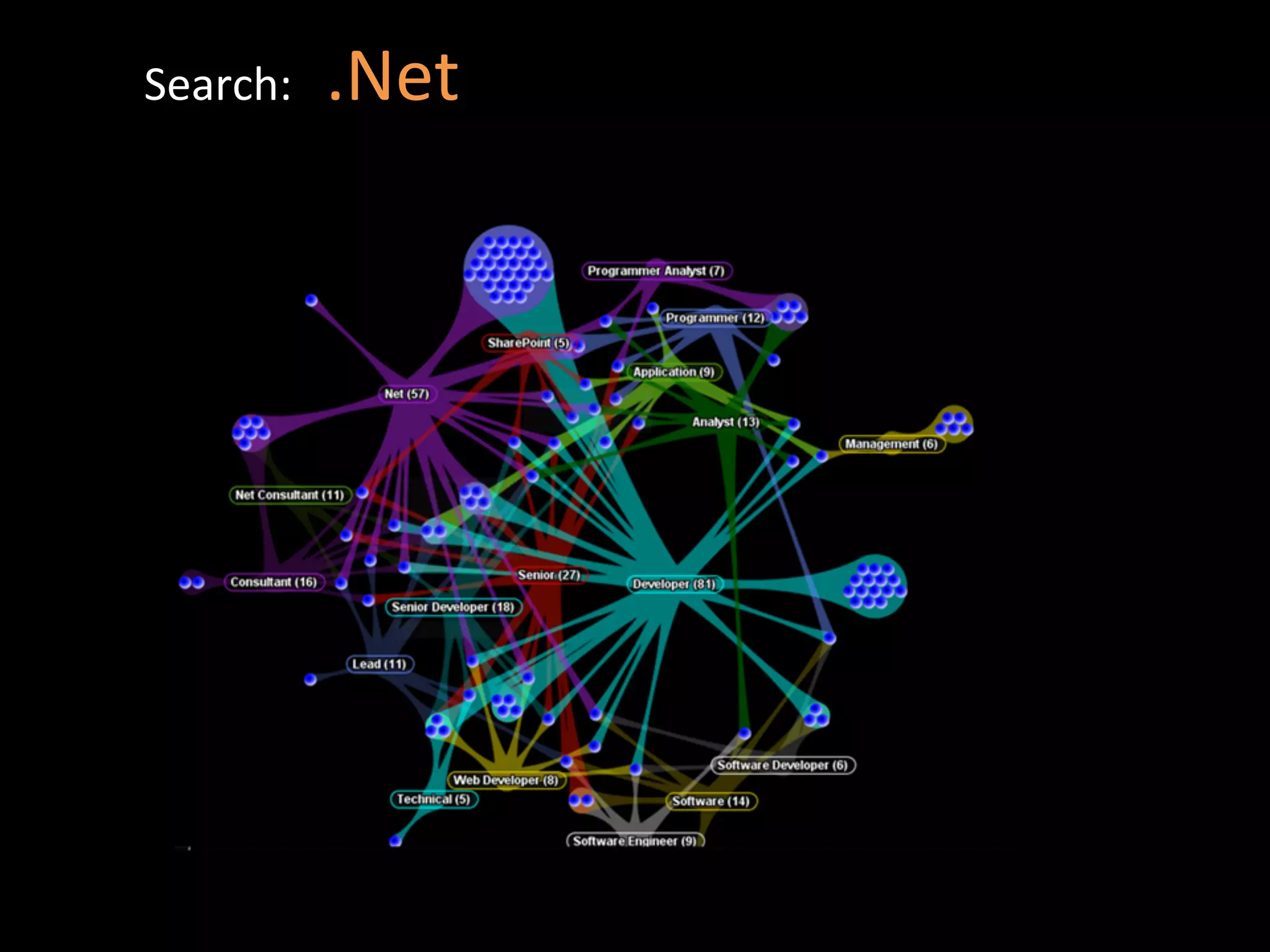
•  Allows	
  you	
  to	
  dynamically	
  iden@fy	
  “concepts”	
  and	
  their	
  
   prevalence	
  within	
  a	
  user’s	
  top	
  search	
  results	
  
Search:	
  	
  	
  Nursing	
  
Search:	
  	
  	
  .Net	
  
Example	
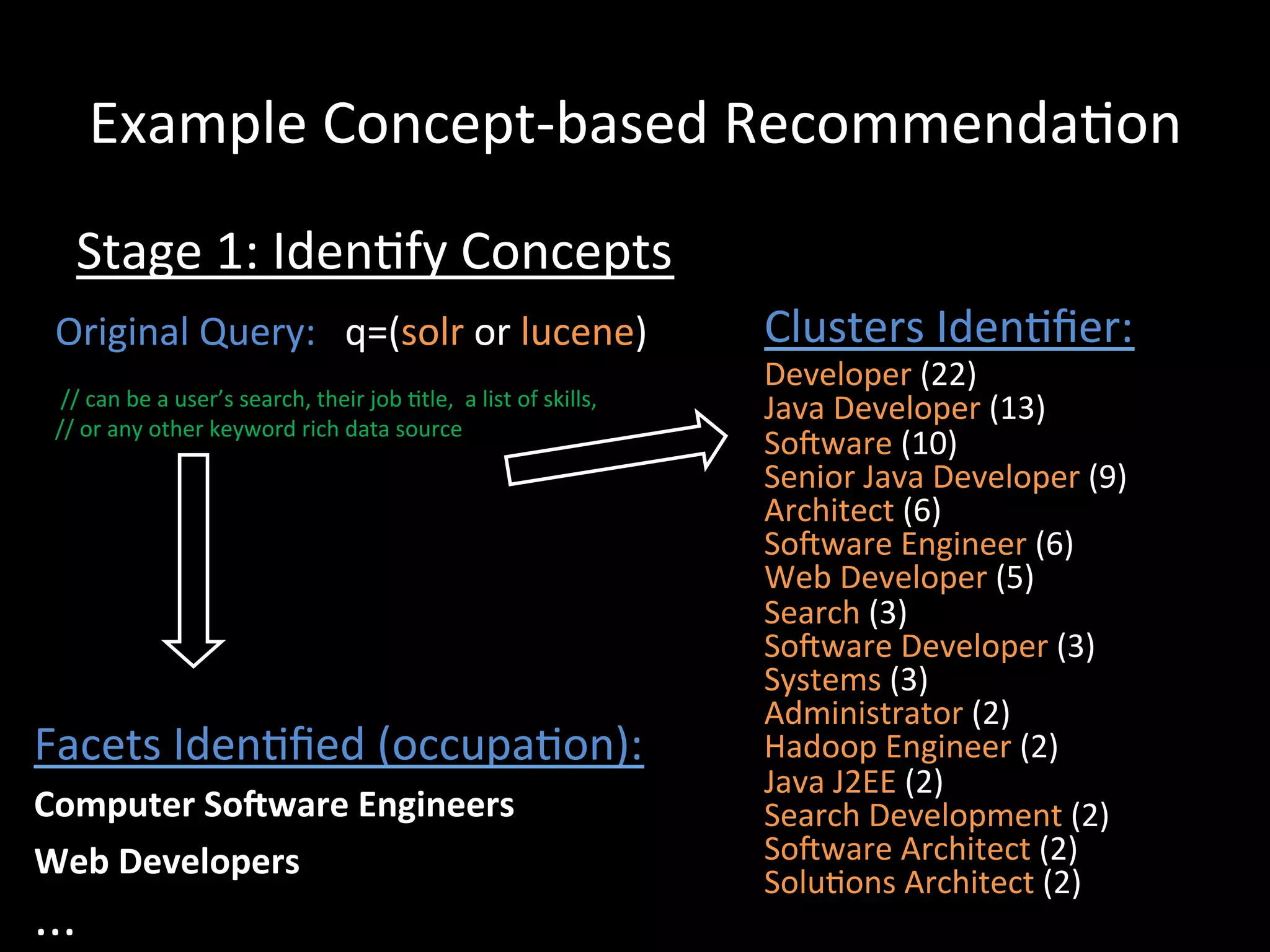
  Concept-­‐based	
  Recommenda@on	
  
      Stage	
  1:	
  Iden@fy	
  Concepts	
  
  Original	
  Query:	
  	
  	
  q=(solr	
  or	
  lucene)	


                                                  Clusters	
  Iden@fier:	
  
  	
                                                                                                                    Developer	
  (22)	


  //	
  can	
  be	
  a	
  user’s	
  search,	
  their	
  job	
  @tle,	
  	
  a	
  list	
  of	
  skills,	
     	
     Java	
  Developer	
  (13)	


  //	
  or	
  any	
  other	
  keyword	
  rich	
  data	
  source	
  
                                                                                                                        Soiware	
  (10)	
  	
  
                                                                                                                        Senior	
  Java	
  Developer	
  (9)	
  	
  
                                                                                                                        Architect	
  (6)	
  	
  
                                                                                                                        Soiware	
  Engineer	
  (6)	
  	
  
                                                                                                                        Web	
  Developer	
  (5)	
  	
  
                                                                                                                        Search	
  (3)	
  	
  
                                                                                                                        Soiware	
  Developer	
  (3)	
  	
  
                                                                                                                        Systems	
  (3)	
  	
  
                                                                                                                        Administrator	
  (2)	
  	
  
Facets	
  Iden@fied	
  (occupa@on):	
                                                                                    Hadoop	
  Engineer	
  (2)	
  	
  
                                                                                                                        Java	
  J2EE	
  (2)	
  	
  
Computer	
  SoWware	
  Engineers	
                                                                                      Search	
  Development	
  (2)	
  	
  
Web	
  Developers	
                                                                                                     Soiware	
  Architect	
  (2)	
  	
  
                                                                                                                        Solu@ons	
  Architect	
  (2)	
  	
  
...	
  
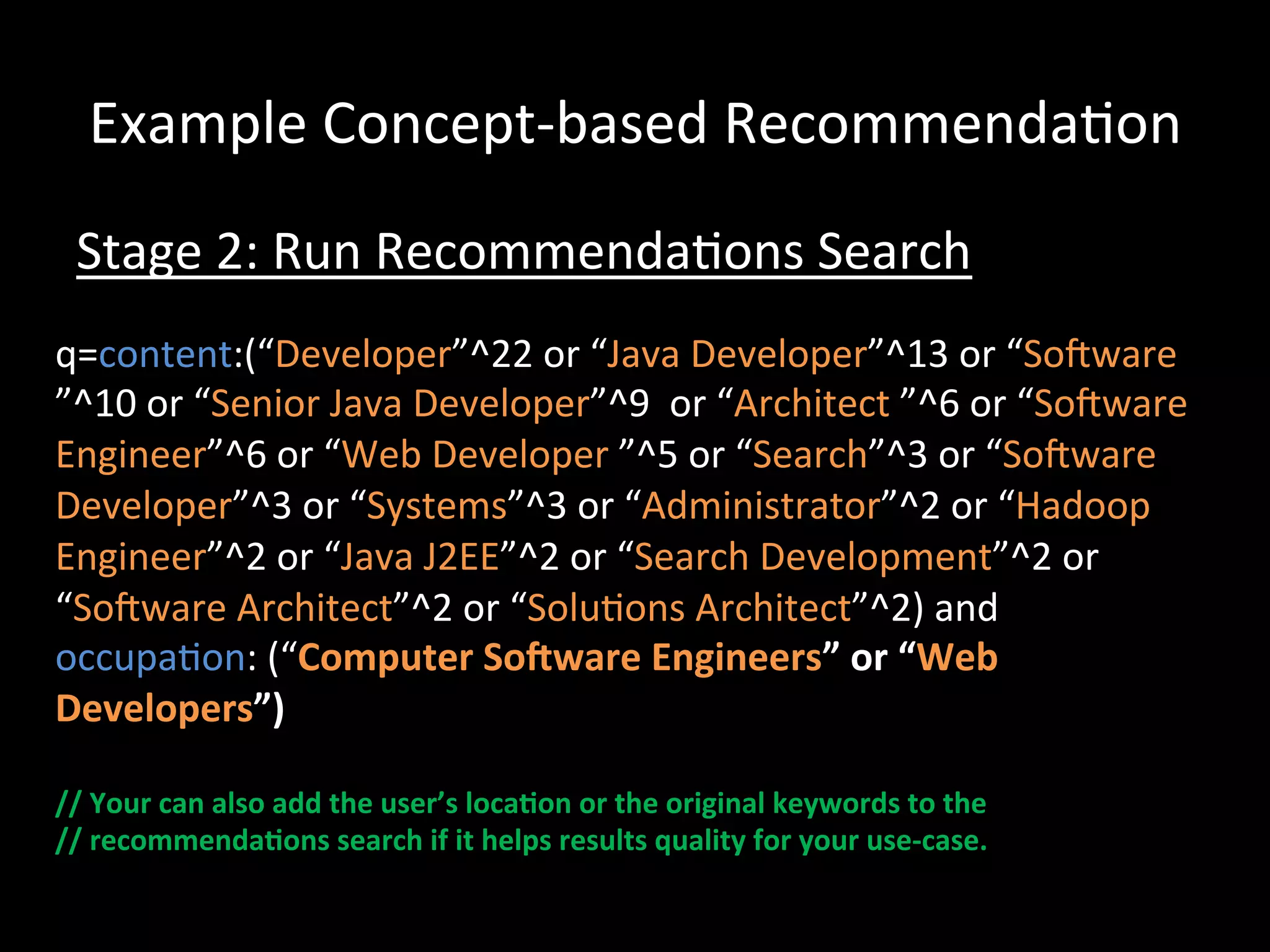
Example	
  Concept-­‐based	
  Recommenda@on	
  
  Stage	
  2:	
  Run	
  Recommenda@ons	
  Search	
  
q=content:(“Developer”^22	
  or	
  “Java	
  Developer”^13	
  or	
  “Soiware	
  
”^10	
  or	
  “Senior	
  Java	
  Developer”^9	
  	
  or	
  “Architect	
  ”^6	
  or	
  “Soiware	
  
Engineer”^6	
  or	
  “Web	
  Developer	
  ”^5	
  or	
  “Search”^3	
  or	
  “Soiware	
  
Developer”^3	
  or	
  “Systems”^3	
  or	
  “Administrator”^2	
  or	
  “Hadoop	
  
Engineer”^2	
  or	
  “Java	
  J2EE”^2	
  or	
  “Search	
  Development”^2	
  or	
  
“Soiware	
  Architect”^2	
  or	
  “Solu@ons	
  Architect”^2)	
  and	
  
occupa@on:	
  (“Computer	
  SoWware	
  Engineers”	
  or	
  “Web	
  
Developers”)	


//	
  Your	
  can	
  also	
  add	
  the	
  user’s	
  loca-on	
  or	
  the	
  original	
  keywords	
  to	
  the	
  	
  
//	
  recommenda-ons	
  search	
  if	
  it	
  helps	
  results	
  quality	
  for	
  your	
  use-­‐case.	
  
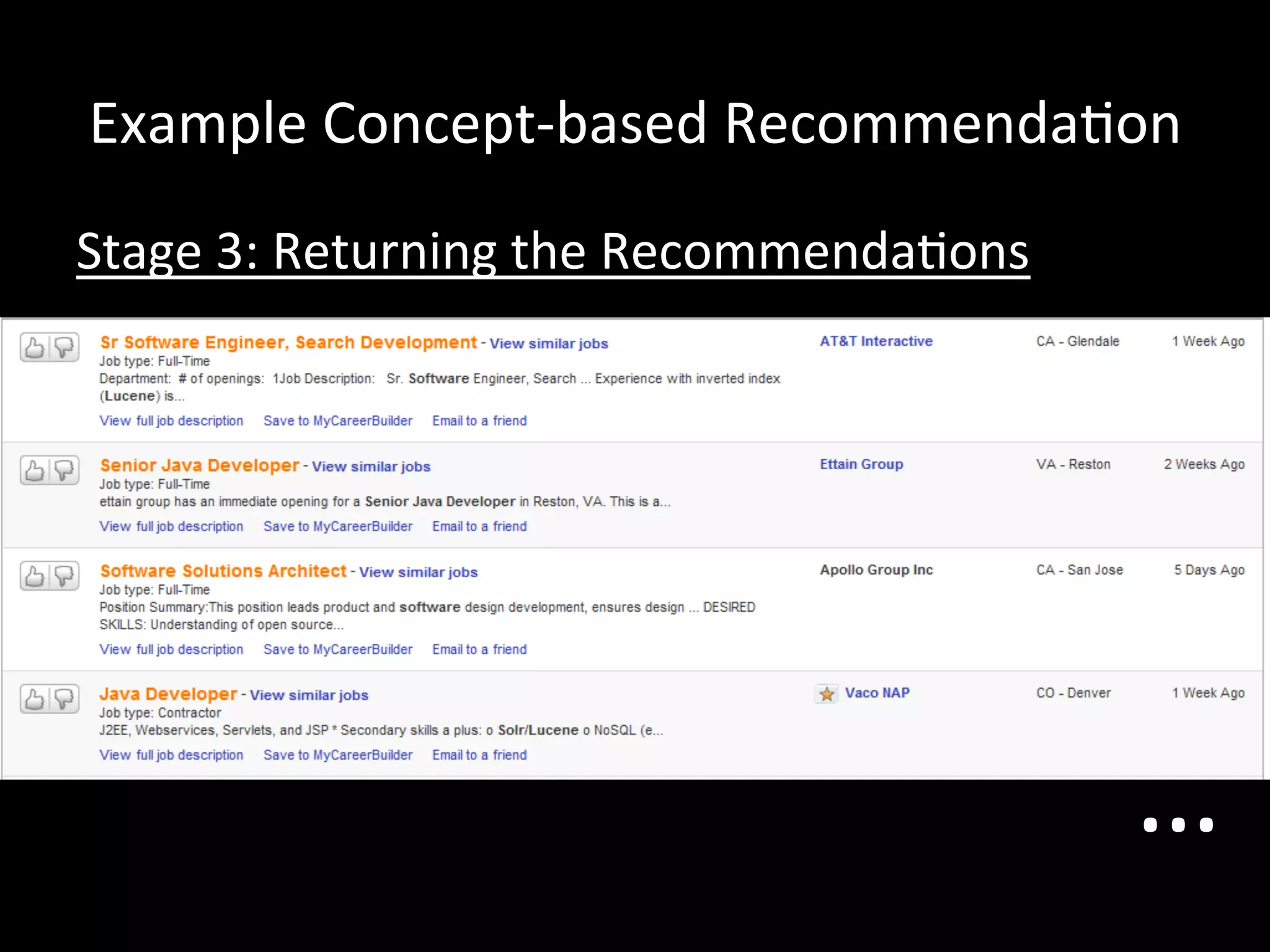
Example	
  Concept-­‐based	
  Recommenda@on	
  
Stage	
  3:	
  Returning	
  the	
  Recommenda@ons	


                                                        …	
  
Important	
  Side-­‐bar:	
  Geography	
  
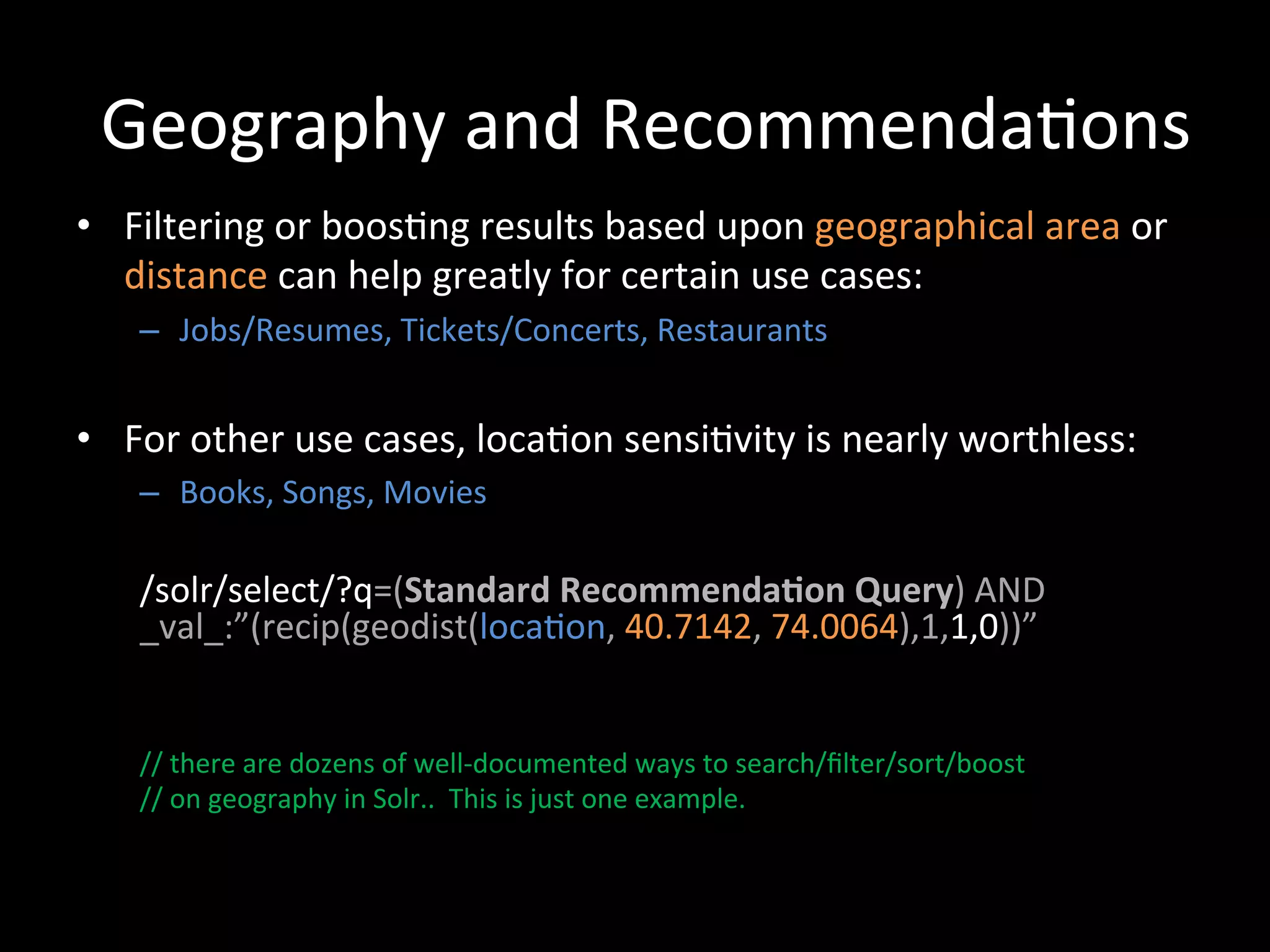
Geography	
  and	
  Recommenda@ons	
  
•  Filtering	
  or	
  boos@ng	
  results	
  based	
  upon	
  geographical	
  area	
  or	
  
   distance	
  can	
  help	
  greatly	
  for	
  certain	
  use	
  cases:	
  
     –  Jobs/Resumes,	
  Tickets/Concerts,	
  Restaurants	


•  For	
  other	
  use	
  cases,	
  loca@on	
  sensi@vity	
  is	
  nearly	
  worthless:	
  
     –  Books,	
  Songs,	
  Movies	


     /solr/select/?q=(Standard	
  Recommenda-on	
  Query)	
  AND	
  
     _val_:”(recip(geodist(loca@on,	
  40.7142,	
  74.0064),1,1,0))”	


     //	
  there	
  are	
  dozens	
  of	
  well-­‐documented	
  ways	
  to	
  search/filter/sort/boost	
  	
  
     //	
  on	
  geography	
  in	
  Solr..	
  	
  This	
  is	
  just	
  one	
  example.	


Behavior-­‐based	
  Recommenda@on	
  Approaches	
  
            (Collabora@ve	
  Filtering)	
  
The	
  Lucene	
  Inverted	
  Index	
  	
  
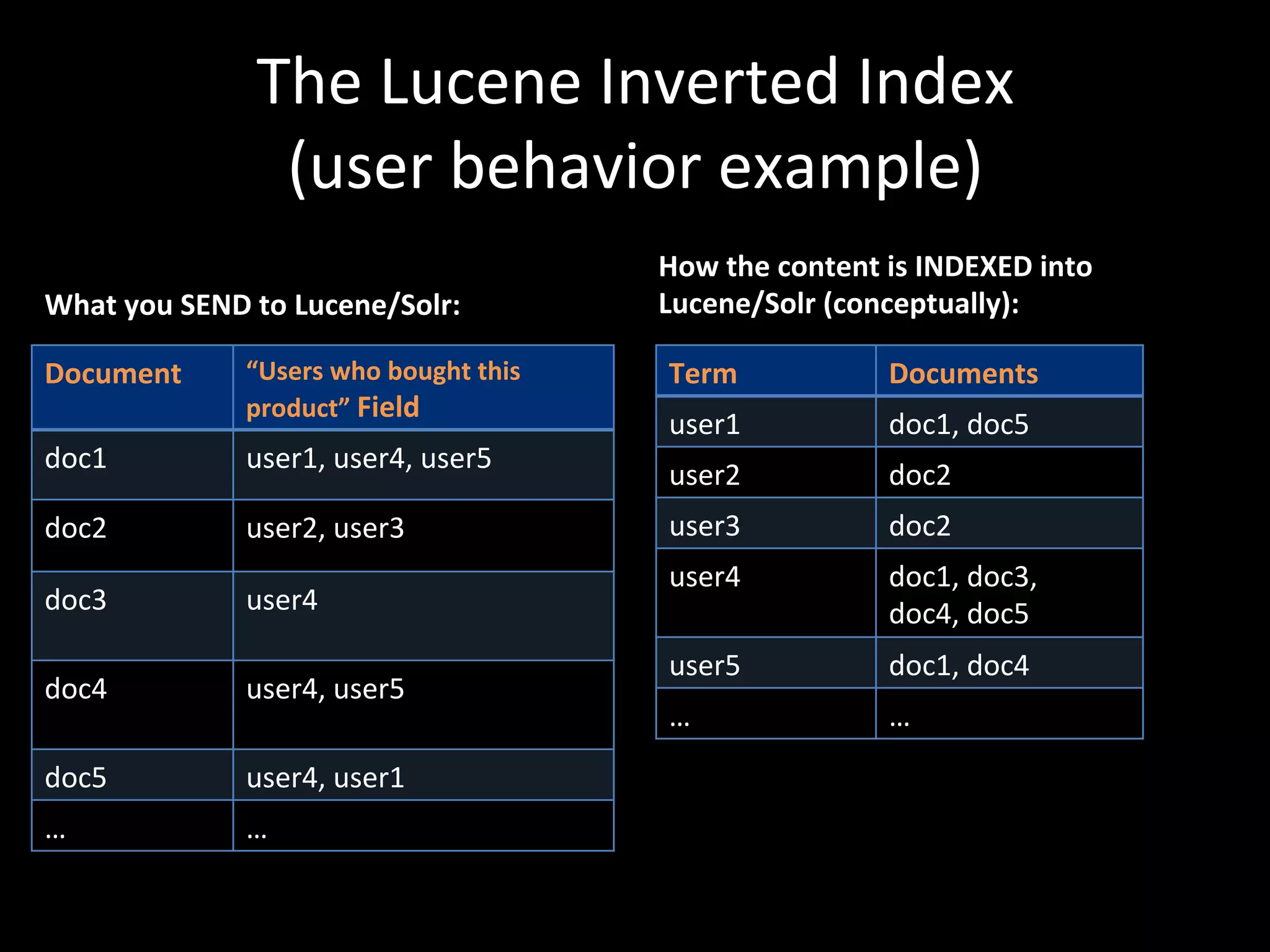
                       (user	
  behavior	
  example)	
  
                                                           How	
  the	
  content	
  is	
  INDEXED	
  into	
  
What	
  you	
  SEND	
  to	
  Lucene/Solr:	
                Lucene/Solr	
  (conceptually):	
  

Document	
           “Users	
  who	
  bought	
  this	
      Term	
                   Documents	
  
                     product”	
  Field	
  
                                                            user1	
                  doc1,	
  doc5	
  
doc1	
  	
           user1,	
  user4,	
  user5	
  
                                                            user2	
                  doc2	
  
doc2	
               user2,	
  user3	
                      user3	
                  doc2	
  
                                                            user4	
                  doc1,	
  doc3,	
  	
  
doc3	
  	
           user4	
                                                         doc4,	
  doc5	


                                                            user5	
                  doc1,	
  doc4	
  
doc4	
               user4,	
  user5	
  
                     	
                                     …	
                      …	
  
doc5	
               user4,	
  user1	
  
…	
                  …	
  
Collabora@ve	
  Filtering	
  
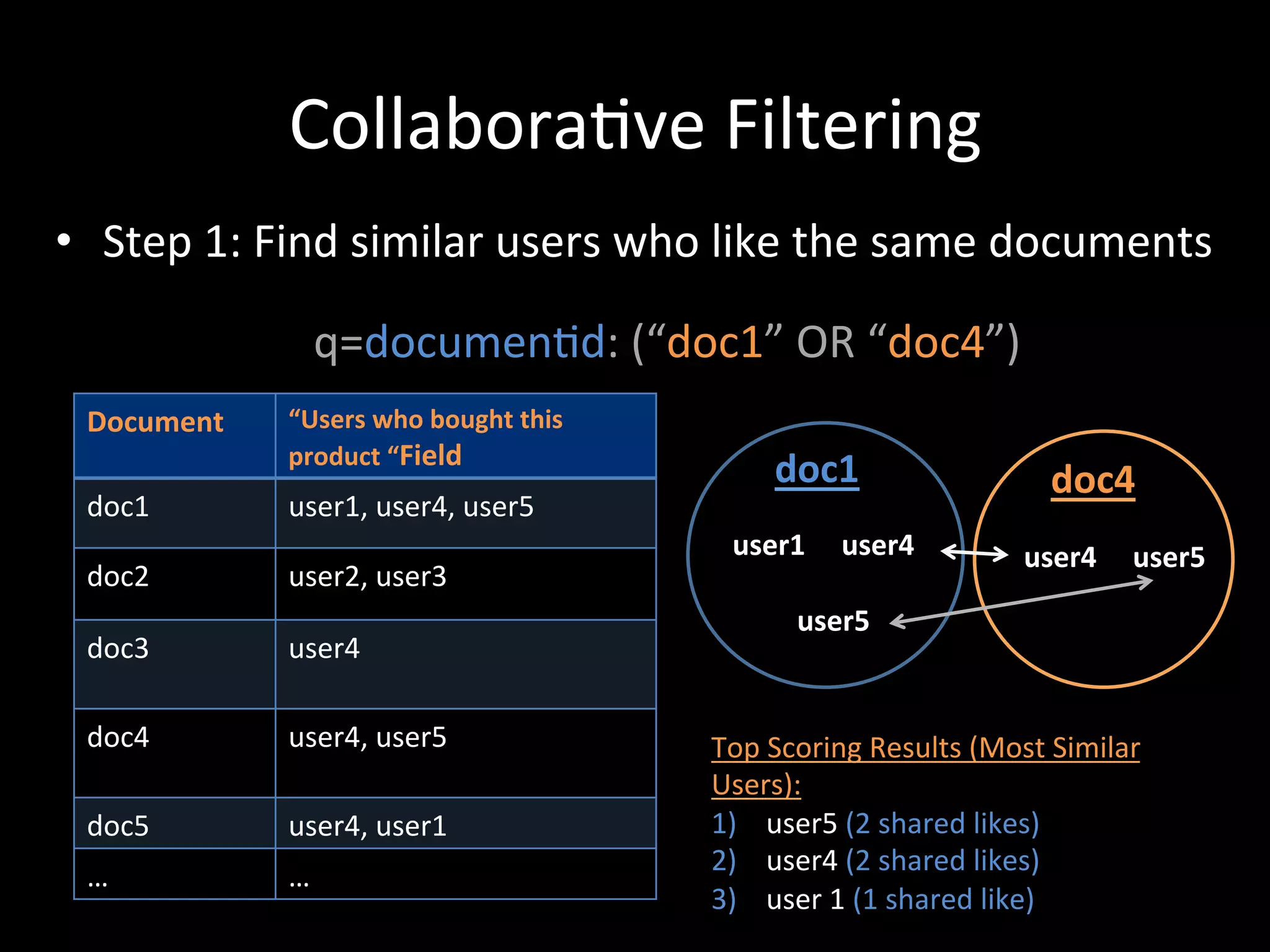
•  Step	
  1:	
  Find	
  similar	
  users	
  who	
  like	
  the	
  same	
  documents	


                     q=documen@d:	
  (“doc1”	
  OR	
  “doc4”)	
  
  Document	
     “Users	
  who	
  bought	
  this	
  
                 product	
  “Field	
  
                                                                         doc1	
                                           doc4	
  
  doc1	
  	
     user1,	
  user4,	
  user5	
  
                                                                user1	


  user4	


  user4	


  user5	
  
  doc2	
         user2,	
  user3	


  user5	
  
  doc3	
  	
     user4	


  doc4	
         user4,	
  user5	
                            Top	
  Scoring	
  Results	
  (Most	
  Similar	
  
                 	
                                           Users):	
  
  doc5	
         user4,	
  user1	
                            1)  	
  user5	
  (2	
  shared	
  likes)	
  	
  
                                                              2)  	
  user4	
  (2	
  shared	
  likes)	
  
  …	
            …	
  
                                                              3)  	
  user	
  1	
  (1	
  shared	
  like)	
  
Collabora@ve	
  Filtering	
  
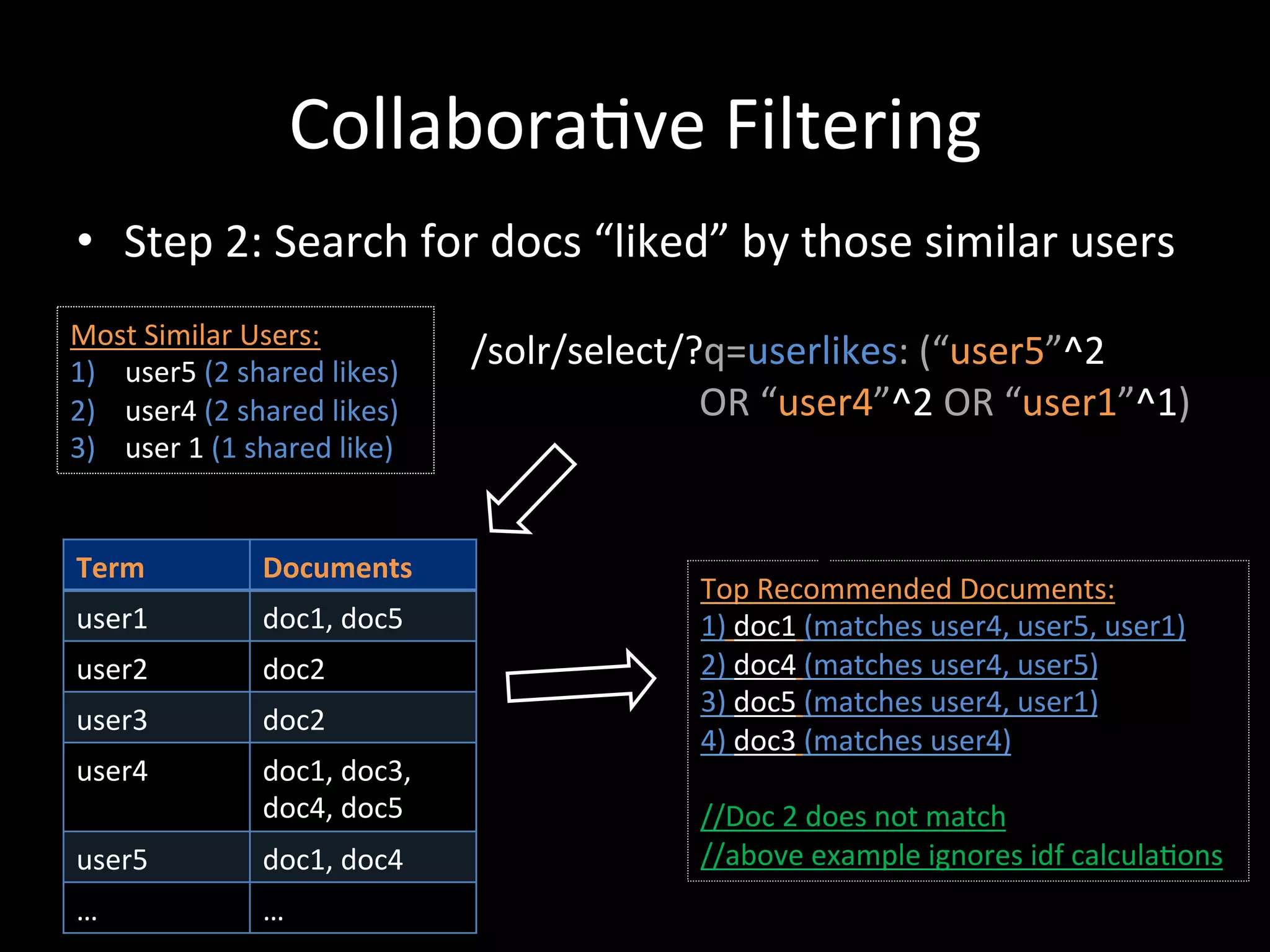
 •  Step	
  2:	
  Search	
  for	
  docs	
  “liked”	
  by	
  those	
  similar	
  users	


Most	
  Similar	
  Users:	


  /solr/select/?q=userlikes:	
  (“user5”^2	
  	
  
1)  	
  user5	
  (2	
  shared	
  likes)	
  
2)  	
  user4	
  (2	
  shared	
  likes)	


  OR	
  “user4”^2	
  OR	
  “user1”^1)	
  
3)  	
  user	
  1	
  (1	
  shared	
  like)	


 Term	
                                               Documents	
  
                                                                                                                                                                                Top	
  Recommended	
  Documents:	
  
 user1	
                                              doc1,	
  doc5	
                                                                                                           1)	
  doc1	
  (matches	
  user4,	
  user5,	
  user1)	
  
 user2	
                                              doc2	
                                                                                                                    2)	
  doc4	
  (matches	
  user4,	
  user5)	
  
                                                                                                                                                                                3)	
  doc5	
  (matches	
  user4,	
  user1)	
  
 user3	
                                              doc2	
  
                                                                                                                                                                                4)	
  doc3	
  (matches	
  user4)	
  
 user4	
                                              doc1,	
  doc3,	


                                                      doc4,	
  doc5	
                                                                                                           //Doc	
  2	
  does	
  not	
  match	
  
 user5	
                                              doc1,	
  doc4	
                                                                                                           //above	
  example	
  ignores	
  idf	
  calcula@ons	
  
 …	
                                                  …	
  
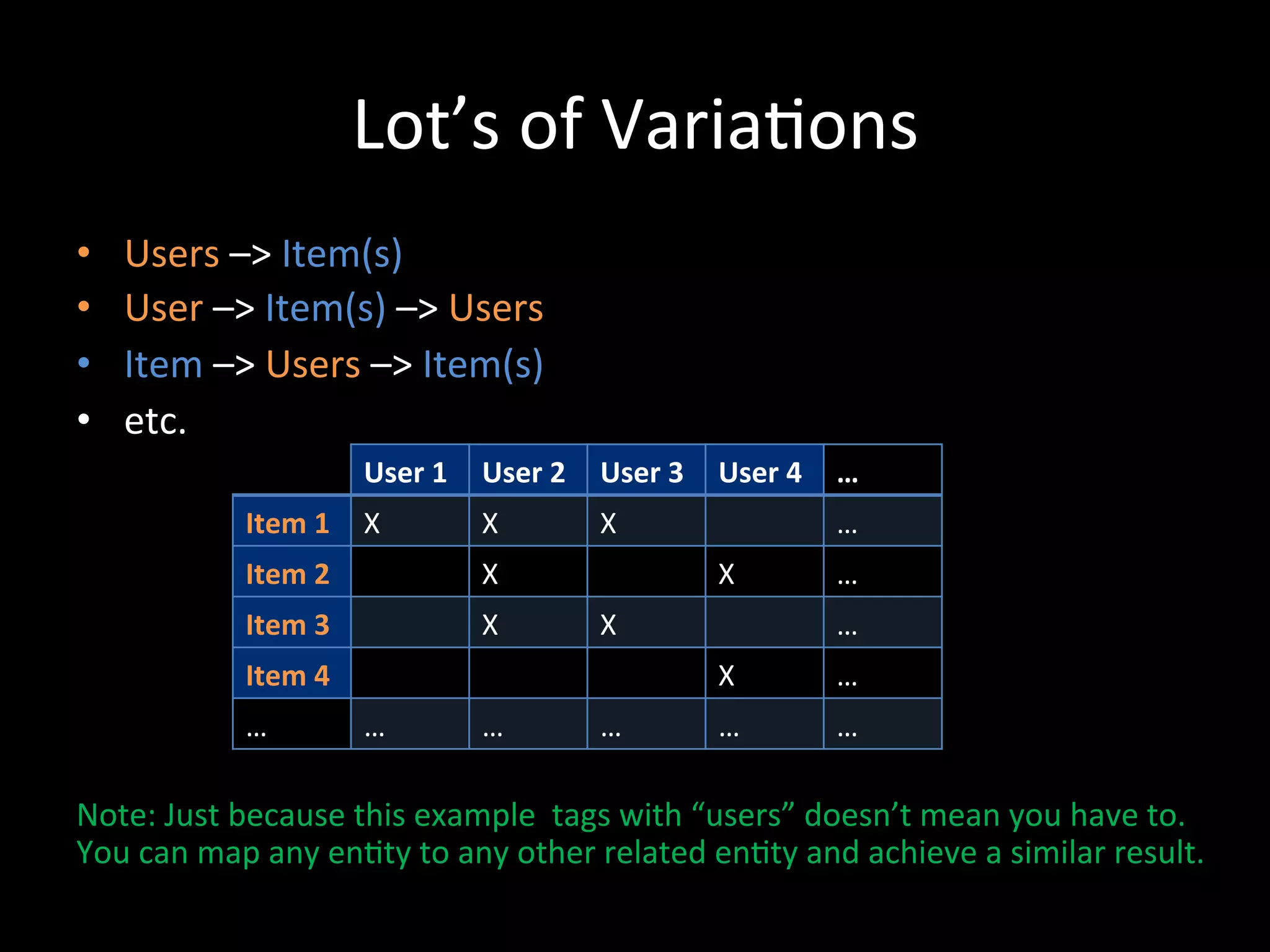
Lot’s	
  of	
  Varia@ons	
  
•      Users	
  –>	
  Item(s)	
  
•      User	
  –>	
  Item(s)	
  –>	
  Users	
  
•      Item	
  –>	
  Users	
  –>	
  Item(s)	
  
•      etc.	
  
                                  User	
  1	
   User	
  2	
   User	
  3	
   User	
  4	
   …	
  
                  Item	
  1	
   X	
             X	
           X	
                          …	
  
                  Item	
  2	
                   X	
                          X	
           …	
  
                  Item	
  3	
                   X	
           X	
                          …	
  
                  Item	
  4	
                                                X	
           …	
  
                  …	
             …	
           …	
           …	
            …	
           …	


Note:	
  Just	
  because	
  this	
  example	
  	
  tags	
  with	
  “users”	
  doesn’t	
  mean	
  you	
  have	
  to.	
  	
  
You	
  can	
  map	
  any	
  en@ty	
  to	
  any	
  other	
  related	
  en@ty	
  and	
  achieve	
  a	
  similar	
  result.	


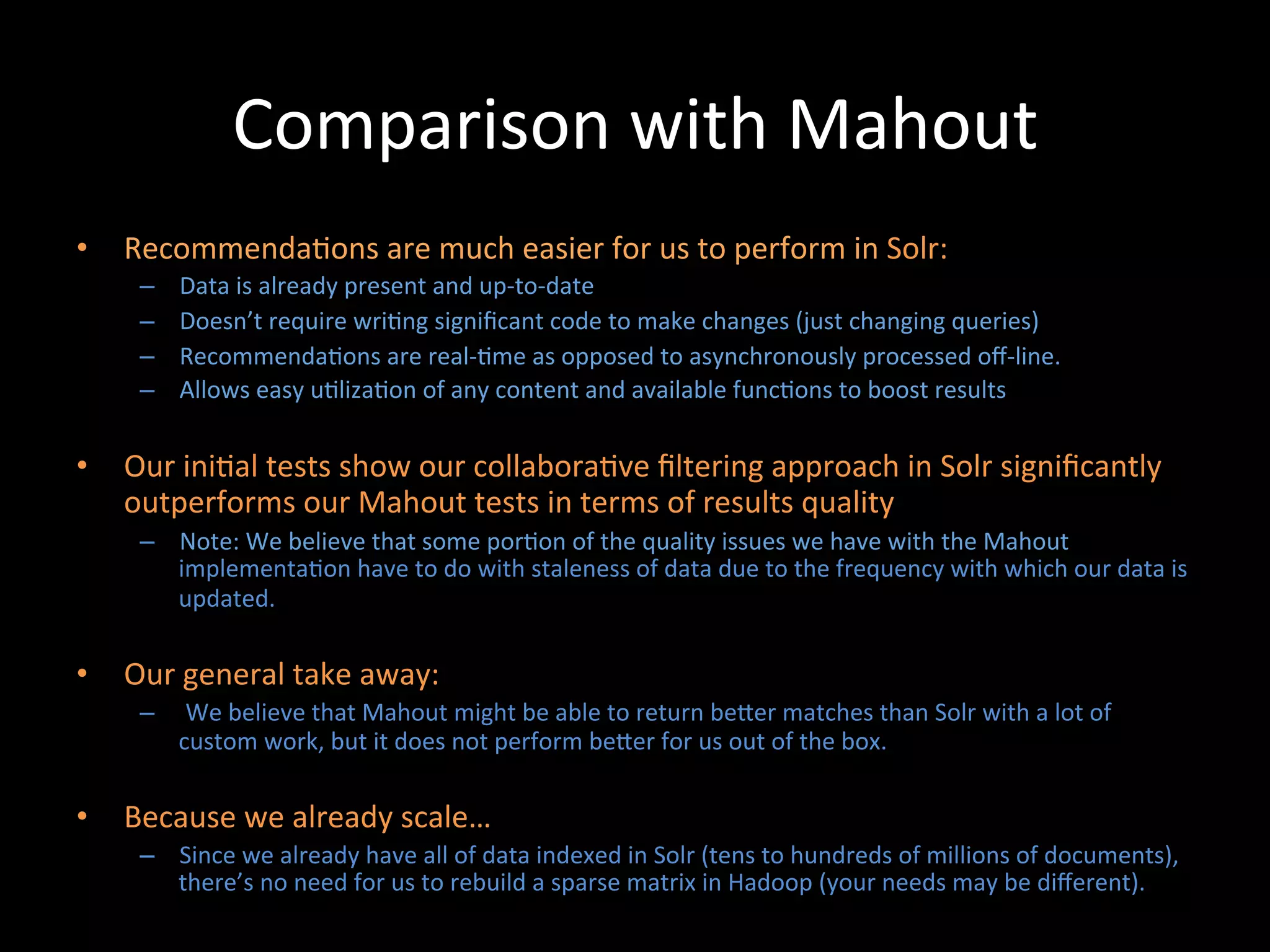
Comparison	
  with	
  Mahout	
  
•  Recommenda@ons	
  are	
  much	
  easier	
  for	
  us	
  to	
  perform	
  in	
  Solr:	
  
      –    Data	
  is	
  already	
  present	
  and	
  up-­‐to-­‐date	
  
      –    Doesn’t	
  require	
  wri@ng	
  significant	
  code	
  to	
  make	
  changes	
  (just	
  changing	
  queries)	
  
      –    Recommenda@ons	
  are	
  real-­‐@me	
  as	
  opposed	
  to	
  asynchronously	
  processed	
  off-­‐line.	
  
      –    Allows	
  easy	
  u@liza@on	
  of	
  any	
  content	
  and	
  available	
  func@ons	
  to	
  boost	
  results	
  

•  Our	
  ini@al	
  tests	
  show	
  our	
  collabora@ve	
  filtering	
  approach	
  in	
  Solr	
  significantly	
  
   outperforms	
  our	
  Mahout	
  tests	
  in	
  terms	
  of	
  results	
  quality	
  
      –  Note:	
  We	
  believe	
  that	
  some	
  por@on	
  of	
  the	
  quality	
  issues	
  we	
  have	
  with	
  the	
  Mahout	
  
         implementa@on	
  have	
  to	
  do	
  with	
  staleness	
  of	
  data	
  due	
  to	
  the	
  frequency	
  with	
  which	
  our	
  data	
  is	
  
         updated.	
  

•  Our	
  general	
  take	
  away:	
  
      –  	
  We	
  believe	
  that	
  Mahout	
  might	
  be	
  able	
  to	
  return	
  beCer	
  matches	
  than	
  Solr	
  with	
  a	
  lot	
  of	
  
         custom	
  work,	
  but	
  it	
  does	
  not	
  perform	
  beCer	
  for	
  us	
  out	
  of	
  the	
  box.	
  

•  Because	
  we	
  already	
  scale…	
  
      –  Since	
  we	
  already	
  have	
  all	
  of	
  data	
  indexed	
  in	
  Solr	
  (tens	
  to	
  hundreds	
  of	
  millions	
  of	
  documents),	
  
         there’s	
  no	
  need	
  for	
  us	
  to	
  rebuild	
  a	
  sparse	
  matrix	
  in	
  Hadoop	
  (your	
  needs	
  may	
  be	
  different).	
  	
  
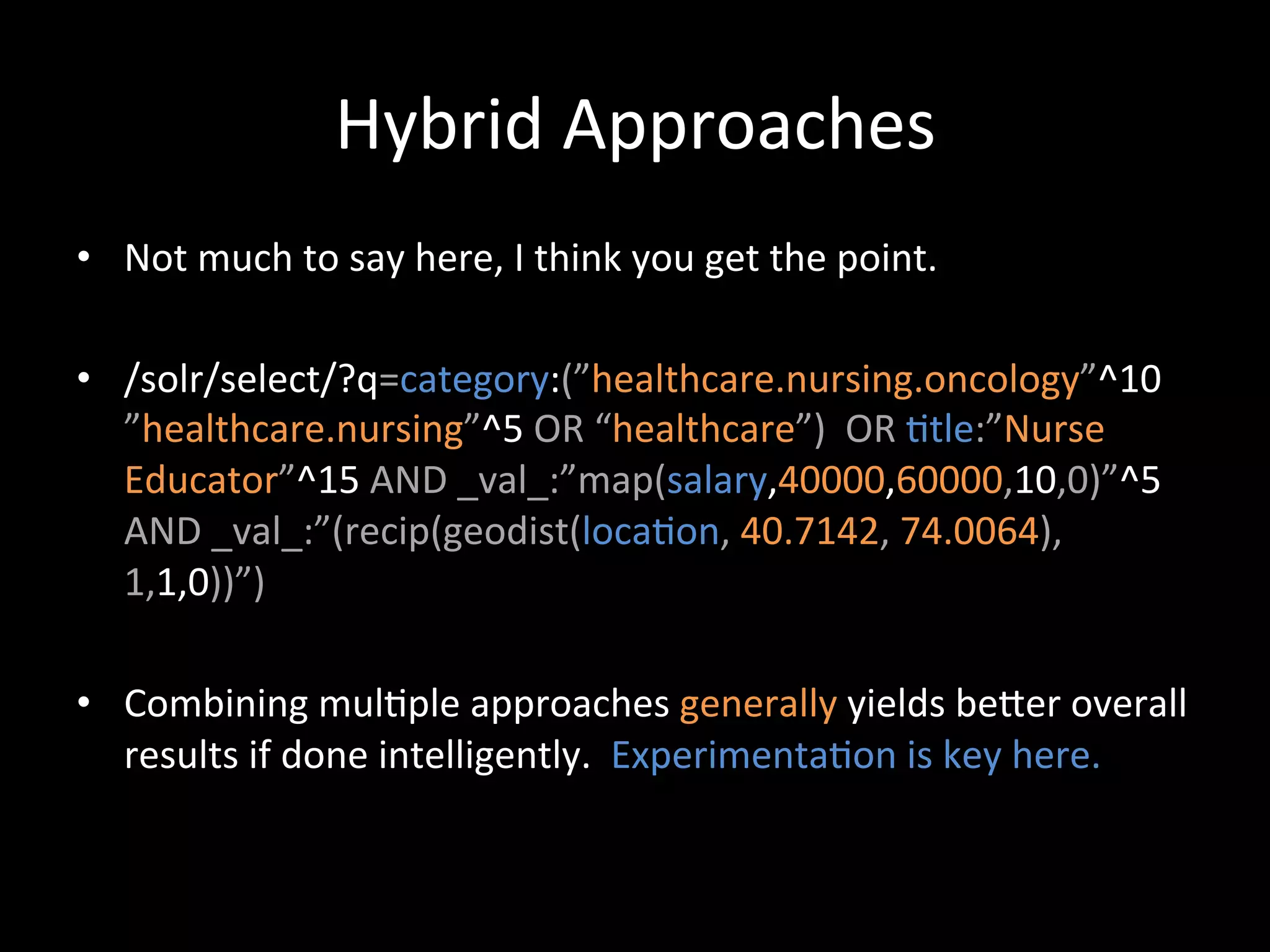
Hybrid	
  Recommenda@on	
  Approaches	
  
Hybrid	
  Approaches	
  
•  Not	
  much	
  to	
  say	
  here,	
  I	
  think	
  you	
  get	
  the	
  point.	
  

•  /solr/select/?q=category:(”healthcare.nursing.oncology”^10	
  
   ”healthcare.nursing”^5	
  OR	
  “healthcare”)	
  	
  OR	
  @tle:”Nurse	
  
   Educator”^15	
  AND	
  _val_:”map(salary,40000,60000,10,0)”^5	
  
   AND	
  _val_:”(recip(geodist(loca@on,	
  40.7142,	
  74.0064),
   1,1,0))”)	
  

•  Combining	
  mul@ple	
  approaches	
  generally	
  yields	
  beCer	
  overall	
  
   results	
  if	
  done	
  intelligently.	
  	
  Experimenta@on	
  is	
  key	
  here.	
  
Important	
  Considera@ons	
  &	
  	
  
 Advanced	
  Capabili@es	
  @	
  
      CareerBuilder	
  
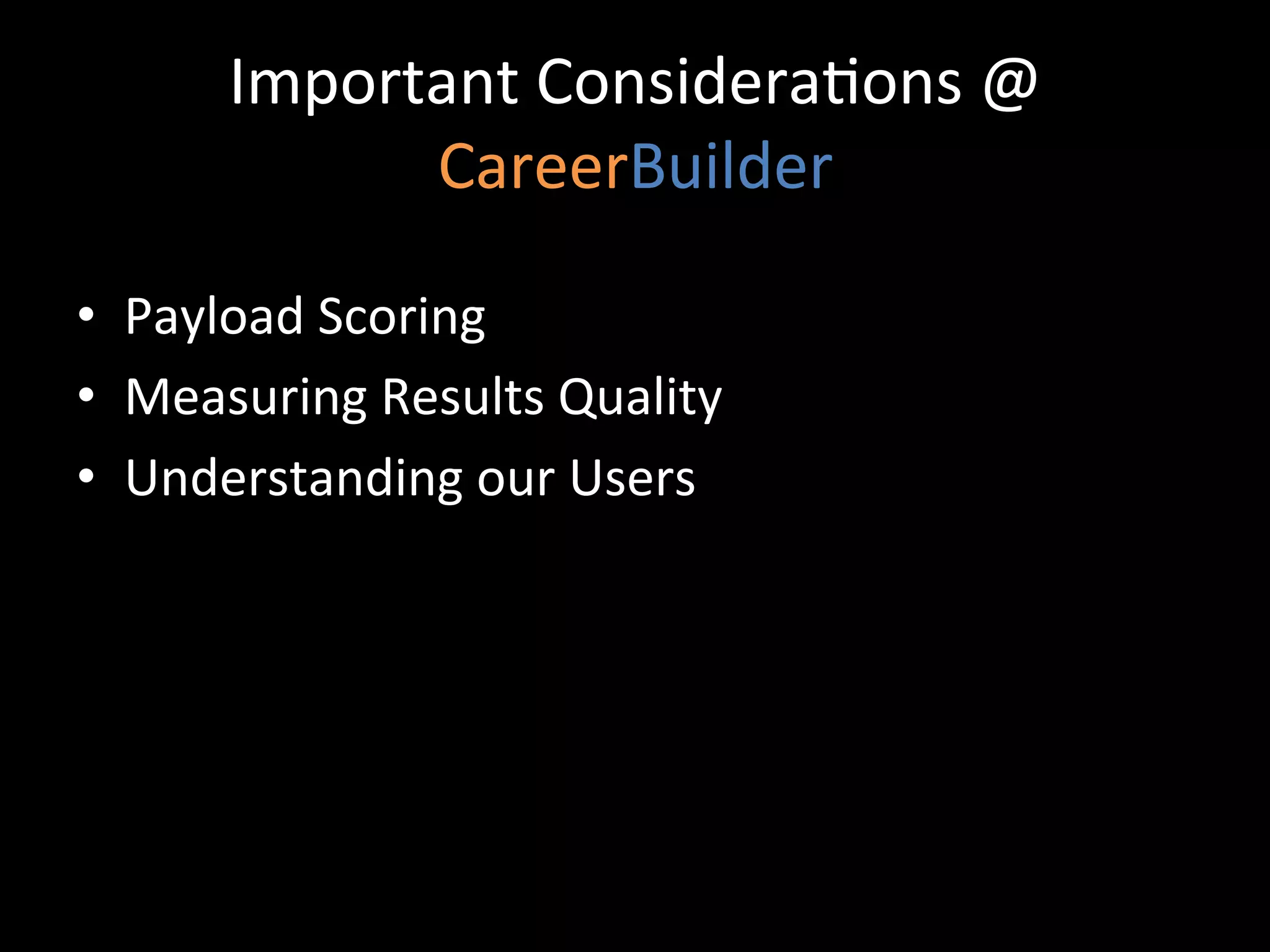
Important	
  Considera@ons	
  @	
  
              CareerBuilder	
  

•  Payload	
  Scoring	
  
•  Measuring	
  Results	
  Quality	
  
•  Understanding	
  our	
  Users	
  
Custom	
  Scoring	
  with	
  Payloads	
  
•    In	
  addi@on	
  to	
  boos@ng	
  search	
  terms	
  and	
  fields,	
  content	
  within	
  the	
  same	
  field	
  can	
  also	
  
     be	
  boosted	
  differently	
  using	
  Payloads	
  (requires	
  a	
  custom	
  scoring	
  implementa@on):	


•    Content	
  Field:	
  
                     design	
  [1]	
  /	
  engineer	
  [1]	
  /	
  really	
  [	
  ]	
  /	
  great	
  [	
  ]	
  /	
  job	
  [	
  ]	
  /	
  ten[3]	
  /	
  years[3]	
  /	
  
                     experience[3]	
  /	
  careerbuilder	
  [2]	
  /	
  design	
  [2],	
  …	


          Payload	
  Bucket	
  Mappings:                                 	
  	
  
          job@tle:	
  bucket=[1]	
  boost=10;	
  company:	
  bucket=[2]	
  boost=4;	
  	
  
                   jobdescrip@on:	
  bucket=[]	
  weight=1;	
  experience:	
  bucket=[3]	
  weight=1.5	


          We	
  can	
  pass	
  in	
  a	
  parameter	
  to	
  solr	
  at	
  query	
  @me	
  specifying	
  the	
  boost	
  to	
  apply	
  to	
  each	
  
          bucket	
  	
  	
  i.e.	
  	
  …&bucketWeights=1:10;2:4;3:1.5;default:1;	


•    This	
  allows	
  us	
  to	
  map	
  many	
  relevancy	
  buckets	
  to	
  search	
  terms	
  at	
  index	
  @me	
  and	
  adjust	
  
     the	
  weigh@ng	
  at	
  query	
  @me	
  without	
  having	
  to	
  search	
  across	
  hundreds	
  of	
  fields.	
  

•    By	
  making	
  all	
  scoring	
  parameters	
  overridable	
  at	
  query	
  @me,	
  we	
  are	
  able	
  to	
  do	
  A	
  /	
  B	
  
     tes@ng	
  to	
  consistently	
  improve	
  our	
  relevancy	
  model	
  
Measuring	
  Results	
  Quality	
  
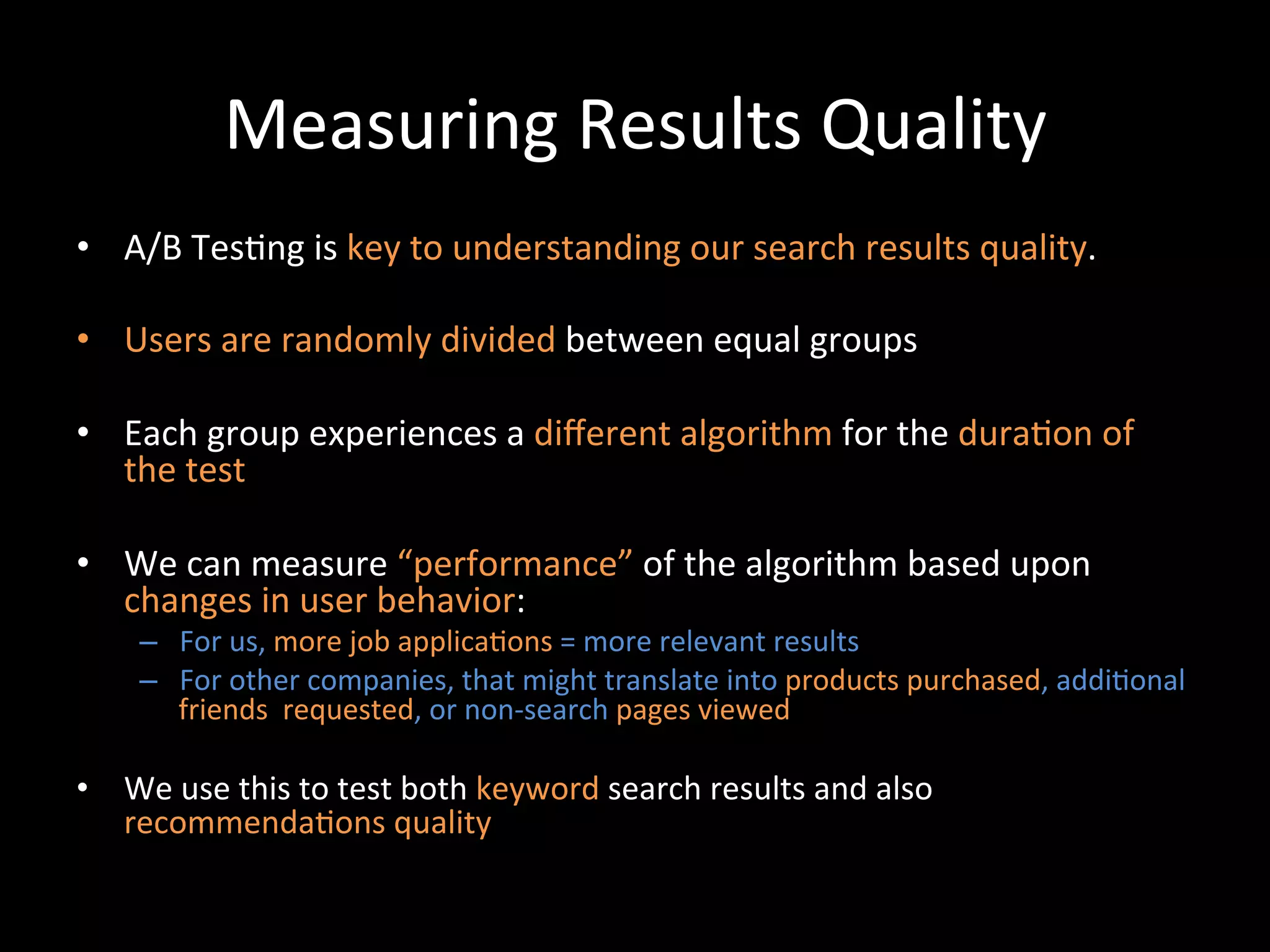
•  A/B	
  Tes@ng	
  is	
  key	
  to	
  understanding	
  our	
  search	
  results	
  quality.	
  

•  Users	
  are	
  randomly	
  divided	
  between	
  equal	
  groups	
  

•  Each	
  group	
  experiences	
  a	
  different	
  algorithm	
  for	
  the	
  dura@on	
  of	
  
   the	
  test	
  

•  We	
  can	
  measure	
  “performance”	
  of	
  the	
  algorithm	
  based	
  upon	
  
   changes	
  in	
  user	
  behavior:	
  
      –  For	
  us,	
  more	
  job	
  applica@ons	
  =	
  more	
  relevant	
  results	
  
      –  For	
  other	
  companies,	
  that	
  might	
  translate	
  into	
  products	
  purchased,	
  addi@onal	
  
         friends	
  	
  requested,	
  or	
  non-­‐search	
  pages	
  viewed	


•  We	
  use	
  this	
  to	
  test	
  both	
  keyword	
  search	
  results	
  and	
  also	
  
   recommenda@ons	
  quality	
  	
  
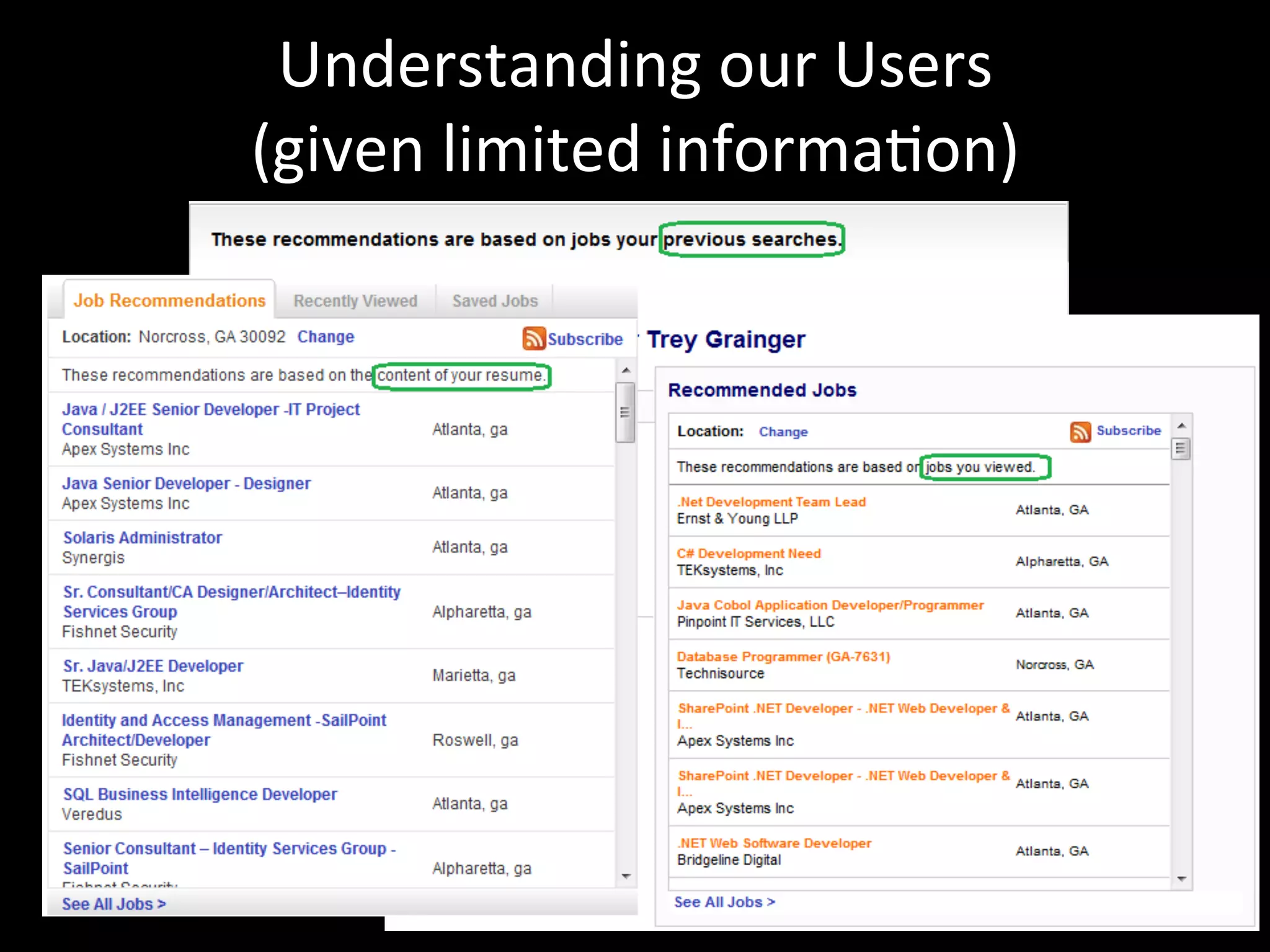
Understanding	
  our	
  Users	
  	
  
(given	
  limited	
  informa@on)	
  
Understanding	
  Our	
  Users	
  
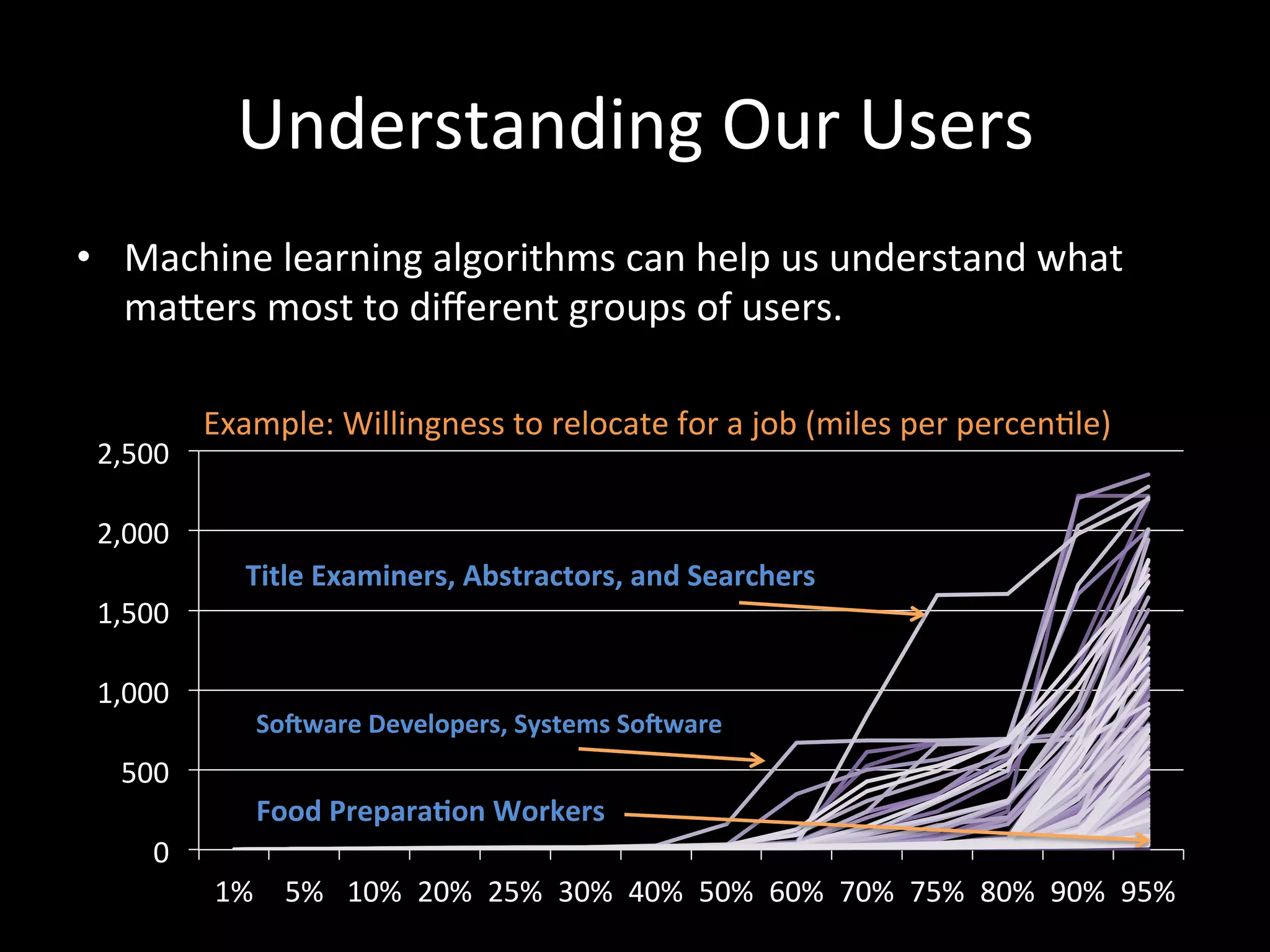
•  Machine	
  learning	
  algorithms	
  can	
  help	
  us	
  understand	
  what	
  
   maCers	
  most	
  to	
  different	
  groups	
  of	
  users.	


  Example:	
  Willingness	
  to	
  relocate	
  for	
  a	
  job	
  (miles	
  per	
  percen@le)	
  
       2,500	
  

       2,000	
  
                          Title	
  Examiners,	
  Abstractors,	
  and	
  Searchers	
  
       1,500	


       1,000	
  
                           SoWware	
  Developers,	
  Systems	
  SoWware	
  
         500	
  
                           Food	
  Prepara-on	
  Workers	
  
             0	
  
                       1%	
   5%	
   10%	
   20%	
   25%	
   30%	
   40%	
   50%	
   60%	
   70%	
   75%	
   80%	
   90%	
   95%	
  
Key	
  Takeaways	
  
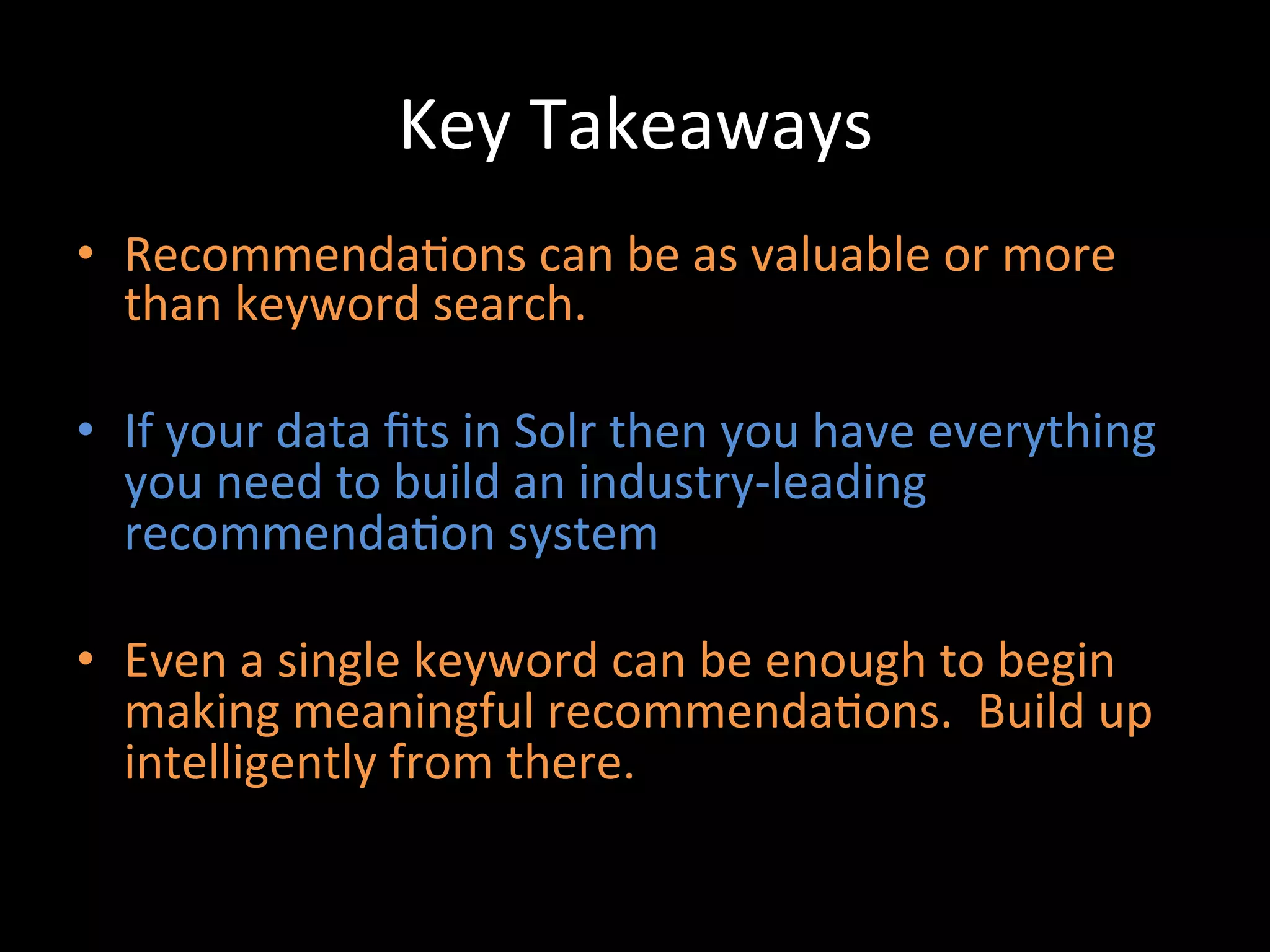
•  Recommenda@ons	
  can	
  be	
  as	
  valuable	
  or	
  more	
  
   than	
  keyword	
  search.	
  

•  If	
  your	
  data	
  fits	
  in	
  Solr	
  then	
  you	
  have	
  everything	
  
   you	
  need	
  to	
  build	
  an	
  industry-­‐leading	
  
   recommenda@on	
  system	
  

•  Even	
  a	
  single	
  keyword	
  can	
  be	
  enough	
  to	
  begin	
  
   making	
  meaningful	
  recommenda@ons.	
  	
  Build	
  up	
  
   intelligently	
  from	
  there.	
  
Contact	
  Info	
  
    §  Trey	
  Grainger	
  
                           trey.grainger@careerbuilder.com	
  
                           hep://www.careerbuilder.com	
  
                           @treygrainger	


And	
  yes,	
  we	
  are	
  hiring	
  –	
  come	
  chat	
  with	
  me	
  if	
  you	
  are	
  interested.	
  

Building a Real-time Solr-powered Recommendation Engine

  • 1.
    Building  a  Real-­‐-me,  Solr-­‐powered   Recommenda-on  Engine   Trey  Grainger   Manager,  Search  Technology  Development   @   Lucene  Revolu-on  2012    -­‐    Boston      
  • 2.
    Overview   •  Overview  of  Search  &  Matching  Concepts   •  Recommenda@on  Approaches  in  Solr:   •  ACribute-­‐based   •  Hierarchical  Classifica@on   •  Concept-­‐based   •  More-­‐like-­‐this   •  Collabora@ve  Filtering   •  Hybrid  Approaches   •  Important  Considera@ons    &  Advanced    Capabili@es   @  CareerBuilder  
  • 3.
    My  Background   Trey  Grainger   •  Manager,  Search  Technology  Development    @  CareerBuilder.com     Relevant  Background   •  Search  &  Recommenda@ons   •  High-­‐volume,  N-­‐@er  Architectures   •  NLP,  Relevancy  Tuning,  user  group  tes@ng,  &  machine  learning   Fun  Side  Projects   •  Founder  and  Chief  Engineer  @                                                .com •  Currently  co-­‐authoring    Solr  in  Ac*on  book…  keep  your  eyes  out  for   the  early  access  release  from  Manning  Publica@ons  
  • 4.
    About  Search  @CareerBuilder   •  Over  1  million  new  jobs  each  month     •  Over  45  million  ac@vely  searchable  resumes   •  ~250  globally  distributed  search  servers  (in   the  U.S.,  Europe,  &  Asia)     •  Thousands  of  unique,  dynamically  generated   indexes   •  Hundreds  of  millions  of  search  documents   •  Over  1  million  searches  an  hour  
  • 5.
  • 6.
    Redefining  “Search  Engine”   •  “Lucene  is  a  high-­‐performance,  full-­‐featured   text  search  engine  library…”   Yes,  but  really…   •   Lucene  is  a  high-­‐performance,  fully-­‐featured   token  matching  and  scoring  library…  which   can  perform  full-­‐text  searching.  
  • 7.
    Redefining  “Search  Engine”   or,  in  machine  learning  speak:   •  A  Lucene  index  is  a  mul@-­‐dimensional     sparse  matrix…  with  very  fast  and  powerful   lookup  capabili@es.   •  Think  of  each  field  as  a  matrix  containing  each   term  mapped  to  each  document  
  • 8.
    The  Lucene  Inverted  Index     (tradi@onal  text  example)   How  the  content  is  INDEXED  into   What  you  SEND  to  Lucene/Solr:   Lucene/Solr  (conceptually):   Document   Content  Field   Term   Documents   doc1     once  upon  a  @me,  in  a  land   a   doc1  [2x]   far,  far  away   brown   doc3  [1x]  ,  doc5  [1x]   doc2   the  cow  jumped  over  the   cat   doc4  [1x]   moon.   cow   doc2  [1x]  ,  doc5  [1x]   doc3     the  quick  brown  fox   jumped  over  the  lazy  dog.   …   ...   doc4   the  cat  in  the  hat   once   doc1  [1x],  doc5  [1x]   doc5   The  brown  cow  said  “moo”   over   doc2  [1x],  doc3  [1x]   once.   the   doc2  [2x],  doc3  [2x],   doc4[2x],  doc5  [1x]   …   …   …   …  
  • 9.
    Match  Text  Queries  to  Text  Fields     /solr/select/?q=jobcontent:  (soiware  engineer)   Job  Content  Field   Documents   engineer   …   …   doc5   engineer   doc1,  doc3,  doc4,   doc5   soWware  engineer   …   doc1          doc3         mechanical   doc2,  doc4,  doc6                doc4   …   …   soiware   doc1,  doc3,  doc4,   doc7,  doc8   soWware   …   …   doc7          doc8  
  • 10.
    Beyond  Text  Searching   •  Lucene/Solr  is  a  text  search  matching  engine   •  When  Lucene/Solr  search  text,  they  are  matching   tokens  in  the  query  with  tokens  in  index   •  Anything  that  can  be  searched  upon  can  form  the   basis  of  matching  and  scoring:   –  text,  aCributes,  loca@ons,  results  of  func@ons,  user   behavior,  classifica@ons,  etc.    
  • 11.
    Business  Case  for  Recommenda@ons   •  For  companies  like  CareerBuilder,  recommenda@ons   can  provide  as  much  or  even  greater  business  value   (i.e.  views,  sales,  job  applica@ons)  than  user-­‐driven   search  capabili@es.     •  Recommenda@ons  create  s@ckiness  to  pull  users   back  to  your  company’s  website,  app,  etc.     •  What  are  recommenda@ons?    …  searches  of  relevant  content  for  a  user  
  • 12.
    Approaches  to  Recommenda@ons   •  Content-­‐based   –  ACribute  based   •  i.e.  income  level,  hobbies,  loca@on,  experience   –  Hierarchical   •  i.e.  “medical//nursing//oncology”,  “animal//dog//terrier”   –  Textual  Similarity   •  i.e.  Solr’s  MoreLikeThis  Request  Handler  &  Search  Handler   –  Concept  Based   •  i.e.  Solr  =>  “soiware  engineer”,  “java”,  “search”,  “open  source”   •  Behavioral  Based     •  Collabora@ve  Filtering:    “Users  who  liked  that  also  liked  this…”   •  Hybrid  Approaches  
  • 13.
  • 14.
    ACribute-­‐based  Recommenda@ons   • Example:  Match  User  ACributes  to  Item  ACribute  Fields   Janes_Profile:{    Industry:”healthcare”,      Loca@ons:”Boston,  MA”,      JobTitle:”Nurse  Educator”,      Salary:{  min:40000,  max:60000  },   }     /solr/select/?q=(job@tle:”nurse  educator”^25  OR  job@tle: (nurse  educator)^10)  AND  ((city:”Boston”  AND   state:”MA”)^15  OR  state:”MA”)  AND  _val_:”map(salary, 40000,60000,10,0)”     //by  mapping  the  importance  of  each  aCribute  to  weights  based  upon   your  business  domain,  you  can  easily  find  results  which  match  your   customer’s  profile  without  the  user  having  to  ini@ate  a  search.  
  • 15.
    Hierarchical  Recommenda@ons   • Example:  Match  User  ACributes  to  Item  ACribute  Fields   Janes_Profile:{    MostLikelyCategory:”healthcare//nursing//oncology”,      2ndMostLikelyCategory:”healthcare//nursing//transplant”,      3rdMostLikelyCategory:”educator//postsecondary//nursing”,  …   }     /solr/select/?q=(category:(   (”healthcare.nursing.oncology”^40     OR  ”healthcare.nursing”^20     OR  “healthcare”^10))      OR     (”healthcare.nursing.transplant”^20     OR  ”healthcare.nursing”^10     OR  “healthcare”^5))      OR     (”educator.postsecondary.nursing”^10     OR  ”educator.postsecondary”^5     OR  “educator”)                                                                                          ))    
  • 16.
    Textual  Similarity-­‐based  Recommenda@ons   •  Solr’s  More  Like  This  Request  Handler  /  Search  Handler  are  a  good   example  of  this.   •  Essen@ally,  “important  keywords”  are  extracted  from  one  or  more   documents  and  turned  into  a  search.   •  This  results  in  secondary  search  results  which  demonstrate     textual  similarity  to  the  original  document(s)   •  See  hCp://wiki.apache.org/solr/MoreLikeThis  for  example  usage   •  Currently  no  distributed  search  support  (but  a  patch  is  available)  
  • 17.
    Concept  Based  Recommenda@ons   Approaches:      1)  Create  a  Taxonomy/Dic@onary  to  define  your                        concepts  and  then  either:      a)  manually  tag  documents  as  they  come  in     //Very  hard  to  scale…  see  Amazon  Mechanical  Turk  if  you  must  do            or   this      b)  create  a  classifica@on  system  which  automa@cally  tags              content  as  it  comes  in  (supervised  machine  learning)     //See  Apache  Mahout        2)  Use  an  unsupervised  machine  learning  algorithm  to                      cluster  documents  and  dynamically  discover  concepts                        (no  dic@onary  required).   //This  is  already  built  into  Solr  using  Carrot2!  
  • 18.
  • 19.
    Sewng  Up  Clustering  in  SolrConfig.xml   <searchComponent  name="clustering"  enable=“true“    class="solr.clustering.ClusteringCompo    <lst  name="engine">          <str  name="name">default</str>          <str  name="carrot.algorithm">    org.carrot2.clustering.lingo.LingoClusteringAlgorithm</str>          <str  name="MultilingualClustering.defaultLanguage">ENGLISH</str>      </lst>   </searchComponent>       <requestHandler  name="/clustering"  enable=“true"  class="solr.SearchHandler">      <lst  name="defaults">          <str  name="clustering.engine">default</str>          <bool  name="clustering.results">true</bool>          <str  name="fl">*,score</str>      </lst>      <arr  name="last-­‐components">          <str>clustering</str>      </arr>   </requestHandler>  
  • 20.
    Clustering  Search  in  Solr   •  /solr/clustering/?q=content:nursing          &rows=100          &carrot.@tle=@tlefield          &carrot.snippet=@tlefield            &LingoClusteringAlgorithm.desiredClusterCountBase=25          &group=false  //clustering  &  grouping  don’t  currently  play  nicely   •  Allows  you  to  dynamically  iden@fy  “concepts”  and  their   prevalence  within  a  user’s  top  search  results  
  • 21.
    Search:      Nursing  
  • 22.
    Search:      .Net  
  • 23.
    Example  Concept-­‐based  Recommenda@on   Stage  1:  Iden@fy  Concepts   Original  Query:      q=(solr  or  lucene)         Clusters  Iden@fier:     Developer  (22)      //  can  be  a  user’s  search,  their  job  @tle,    a  list  of  skills,     Java  Developer  (13)                                                 //  or  any  other  keyword  rich  data  source   Soiware  (10)     Senior  Java  Developer  (9)     Architect  (6)     Soiware  Engineer  (6)     Web  Developer  (5)     Search  (3)     Soiware  Developer  (3)     Systems  (3)     Administrator  (2)     Facets  Iden@fied  (occupa@on):   Hadoop  Engineer  (2)     Java  J2EE  (2)     Computer  SoWware  Engineers   Search  Development  (2)     Web  Developers   Soiware  Architect  (2)     Solu@ons  Architect  (2)     ...  
  • 24.
    Example  Concept-­‐based  Recommenda@on   Stage  2:  Run  Recommenda@ons  Search   q=content:(“Developer”^22  or  “Java  Developer”^13  or  “Soiware   ”^10  or  “Senior  Java  Developer”^9    or  “Architect  ”^6  or  “Soiware   Engineer”^6  or  “Web  Developer  ”^5  or  “Search”^3  or  “Soiware   Developer”^3  or  “Systems”^3  or  “Administrator”^2  or  “Hadoop   Engineer”^2  or  “Java  J2EE”^2  or  “Search  Development”^2  or   “Soiware  Architect”^2  or  “Solu@ons  Architect”^2)  and   occupa@on:  (“Computer  SoWware  Engineers”  or  “Web   Developers”)     //  Your  can  also  add  the  user’s  loca-on  or  the  original  keywords  to  the     //  recommenda-ons  search  if  it  helps  results  quality  for  your  use-­‐case.  
  • 25.
    Example  Concept-­‐based  Recommenda@on   Stage  3:  Returning  the  Recommenda@ons   …  
  • 26.
  • 27.
    Geography  and  Recommenda@ons   •  Filtering  or  boos@ng  results  based  upon  geographical  area  or   distance  can  help  greatly  for  certain  use  cases:   –  Jobs/Resumes,  Tickets/Concerts,  Restaurants   •  For  other  use  cases,  loca@on  sensi@vity  is  nearly  worthless:   –  Books,  Songs,  Movies           /solr/select/?q=(Standard  Recommenda-on  Query)  AND   _val_:”(recip(geodist(loca@on,  40.7142,  74.0064),1,1,0))”         //  there  are  dozens  of  well-­‐documented  ways  to  search/filter/sort/boost     //  on  geography  in  Solr..    This  is  just  one  example.          
  • 28.
    Behavior-­‐based  Recommenda@on  Approaches   (Collabora@ve  Filtering)  
  • 29.
    The  Lucene  Inverted  Index     (user  behavior  example)   How  the  content  is  INDEXED  into   What  you  SEND  to  Lucene/Solr:   Lucene/Solr  (conceptually):   Document   “Users  who  bought  this   Term   Documents   product”  Field   user1   doc1,  doc5   doc1     user1,  user4,  user5   user2   doc2   doc2   user2,  user3   user3   doc2   user4   doc1,  doc3,     doc3     user4   doc4,  doc5     user5   doc1,  doc4   doc4   user4,  user5     …   …   doc5   user4,  user1   …   …  
  • 30.
    Collabora@ve  Filtering   • Step  1:  Find  similar  users  who  like  the  same  documents     q=documen@d:  (“doc1”  OR  “doc4”)   Document   “Users  who  bought  this   product  “Field   doc1   doc4   doc1     user1,  user4,  user5   user1          user4          user4          user5   doc2   user2,  user3                            user5   doc3     user4     doc4   user4,  user5   Top  Scoring  Results  (Most  Similar     Users):   doc5   user4,  user1   1)   user5  (2  shared  likes)     2)   user4  (2  shared  likes)   …   …   3)   user  1  (1  shared  like)  
  • 31.
    Collabora@ve  Filtering   •  Step  2:  Search  for  docs  “liked”  by  those  similar  users         Most  Similar  Users:                                                                                                                /solr/select/?q=userlikes:  (“user5”^2     1)   user5  (2  shared  likes)   2)   user4  (2  shared  likes)                                  OR  “user4”^2  OR  “user1”^1)   3)   user  1  (1  shared  like)   Term   Documents   Top  Recommended  Documents:   user1   doc1,  doc5   1)  doc1  (matches  user4,  user5,  user1)   user2   doc2   2)  doc4  (matches  user4,  user5)   3)  doc5  (matches  user4,  user1)   user3   doc2   4)  doc3  (matches  user4)   user4   doc1,  doc3,       doc4,  doc5   //Doc  2  does  not  match   user5   doc1,  doc4   //above  example  ignores  idf  calcula@ons   …   …  
  • 32.
    Lot’s  of  Varia@ons   •  Users  –>  Item(s)   •  User  –>  Item(s)  –>  Users   •  Item  –>  Users  –>  Item(s)   •  etc.   User  1   User  2   User  3   User  4   …   Item  1   X   X   X   …   Item  2   X   X   …   Item  3   X   X   …   Item  4   X   …   …   …   …   …   …   …     Note:  Just  because  this  example    tags  with  “users”  doesn’t  mean  you  have  to.     You  can  map  any  en@ty  to  any  other  related  en@ty  and  achieve  a  similar  result.    
  • 33.
    Comparison  with  Mahout   •  Recommenda@ons  are  much  easier  for  us  to  perform  in  Solr:   –  Data  is  already  present  and  up-­‐to-­‐date   –  Doesn’t  require  wri@ng  significant  code  to  make  changes  (just  changing  queries)   –  Recommenda@ons  are  real-­‐@me  as  opposed  to  asynchronously  processed  off-­‐line.   –  Allows  easy  u@liza@on  of  any  content  and  available  func@ons  to  boost  results   •  Our  ini@al  tests  show  our  collabora@ve  filtering  approach  in  Solr  significantly   outperforms  our  Mahout  tests  in  terms  of  results  quality   –  Note:  We  believe  that  some  por@on  of  the  quality  issues  we  have  with  the  Mahout   implementa@on  have  to  do  with  staleness  of  data  due  to  the  frequency  with  which  our  data  is   updated.   •  Our  general  take  away:   –   We  believe  that  Mahout  might  be  able  to  return  beCer  matches  than  Solr  with  a  lot  of   custom  work,  but  it  does  not  perform  beCer  for  us  out  of  the  box.   •  Because  we  already  scale…   –  Since  we  already  have  all  of  data  indexed  in  Solr  (tens  to  hundreds  of  millions  of  documents),   there’s  no  need  for  us  to  rebuild  a  sparse  matrix  in  Hadoop  (your  needs  may  be  different).    
  • 34.
  • 35.
    Hybrid  Approaches   • Not  much  to  say  here,  I  think  you  get  the  point.   •  /solr/select/?q=category:(”healthcare.nursing.oncology”^10   ”healthcare.nursing”^5  OR  “healthcare”)    OR  @tle:”Nurse   Educator”^15  AND  _val_:”map(salary,40000,60000,10,0)”^5   AND  _val_:”(recip(geodist(loca@on,  40.7142,  74.0064), 1,1,0))”)   •  Combining  mul@ple  approaches  generally  yields  beCer  overall   results  if  done  intelligently.    Experimenta@on  is  key  here.  
  • 36.
    Important  Considera@ons  &     Advanced  Capabili@es  @   CareerBuilder  
  • 37.
    Important  Considera@ons  @   CareerBuilder   •  Payload  Scoring   •  Measuring  Results  Quality   •  Understanding  our  Users  
  • 38.
    Custom  Scoring  with  Payloads   •  In  addi@on  to  boos@ng  search  terms  and  fields,  content  within  the  same  field  can  also   be  boosted  differently  using  Payloads  (requires  a  custom  scoring  implementa@on):     •  Content  Field:   design  [1]  /  engineer  [1]  /  really  [  ]  /  great  [  ]  /  job  [  ]  /  ten[3]  /  years[3]  /   experience[3]  /  careerbuilder  [2]  /  design  [2],  …     Payload  Bucket  Mappings:     job@tle:  bucket=[1]  boost=10;  company:  bucket=[2]  boost=4;     jobdescrip@on:  bucket=[]  weight=1;  experience:  bucket=[3]  weight=1.5     We  can  pass  in  a  parameter  to  solr  at  query  @me  specifying  the  boost  to  apply  to  each   bucket      i.e.    …&bucketWeights=1:10;2:4;3:1.5;default:1;       •  This  allows  us  to  map  many  relevancy  buckets  to  search  terms  at  index  @me  and  adjust   the  weigh@ng  at  query  @me  without  having  to  search  across  hundreds  of  fields.   •  By  making  all  scoring  parameters  overridable  at  query  @me,  we  are  able  to  do  A  /  B   tes@ng  to  consistently  improve  our  relevancy  model  
  • 39.
    Measuring  Results  Quality   •  A/B  Tes@ng  is  key  to  understanding  our  search  results  quality.   •  Users  are  randomly  divided  between  equal  groups   •  Each  group  experiences  a  different  algorithm  for  the  dura@on  of   the  test   •  We  can  measure  “performance”  of  the  algorithm  based  upon   changes  in  user  behavior:   –  For  us,  more  job  applica@ons  =  more  relevant  results   –  For  other  companies,  that  might  translate  into  products  purchased,  addi@onal   friends    requested,  or  non-­‐search  pages  viewed     •  We  use  this  to  test  both  keyword  search  results  and  also   recommenda@ons  quality    
  • 40.
    Understanding  our  Users     (given  limited  informa@on)  
  • 41.
    Understanding  Our  Users   •  Machine  learning  algorithms  can  help  us  understand  what   maCers  most  to  different  groups  of  users.    Example:  Willingness  to  relocate  for  a  job  (miles  per  percen@le)   2,500   2,000   Title  Examiners,  Abstractors,  and  Searchers   1,500     1,000   SoWware  Developers,  Systems  SoWware   500   Food  Prepara-on  Workers   0   1%   5%   10%   20%   25%   30%   40%   50%   60%   70%   75%   80%   90%   95%  
  • 42.
    Key  Takeaways   • Recommenda@ons  can  be  as  valuable  or  more   than  keyword  search.   •  If  your  data  fits  in  Solr  then  you  have  everything   you  need  to  build  an  industry-­‐leading   recommenda@on  system   •  Even  a  single  keyword  can  be  enough  to  begin   making  meaningful  recommenda@ons.    Build  up   intelligently  from  there.  
  • 43.
    Contact  Info   §  Trey  Grainger   trey.grainger@careerbuilder.com   hep://www.careerbuilder.com   @treygrainger   And  yes,  we  are  hiring  –  come  chat  with  me  if  you  are  interested.