Dublin, IE
2013.11.07

Trey Grainger

ENHANCING RELEVANCY THROUGH
PERSONALIZATION & SEMANTIC SEARCH

Search Technology Development Manager

@	
  
My Background

Trey	
  Grainger	
  

Search	
  Technology	
  Development	
  Manager	


  @CareerBuilder.com	


Relevant	
  Background	
  
•  Search	
  &	
  Recommenda>ons	
  
•  High-­‐volume,	
  Distributed	
  Systems	
  
•  NLP,	
  Relevancy	
  Tuning,	
  User	
  Group	
  Tes>ng,	
  &	
  Machine	
  Learning	


  Other	
  Projects	
  

•  Co-­‐author:	
  	
  Solr	
  in	
  Ac*on	
  
•  Founder	
  and	
  Chief	
  Engineer	
  @	


  .com	
  
Roadmap
• 
• 
• 

I. How we use Solr @ CareerBuilder
II. Traditional Relevancy Scoring
III. Advanced Relevancy through functions
–  Factors as a linear function
–  Context-aware relevancy parameter weighting

• 

III. Personalization & Recommendations
–  Profile and Behavior-based
–  Solr as a recommendation engine
–  Collaborative Filtering

• 

IV. Semantic Search
– 
– 
– 
– 
– 

Mining user-behavior for synonyms
Uncovering meaning through clustering
Latent Semantic Indexing overview
Document-based searching
Foreground vs. Background analysis
How	
  we	
  use	
  Solr	
  @	
  CareerBuilder	
  
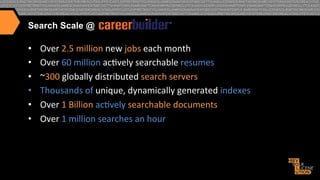
Search Scale @

• 
• 
• 
• 
• 
• 

Over	
  2.5	
  million	
  new	
  jobs	
  each	
  month	
  	
  
Over	
  60	
  million	
  ac>vely	
  searchable	
  resumes	
  
~300	
  globally	
  distributed	
  search	
  servers	
  	
  
Thousands	
  of	
  unique,	
  dynamically	
  generated	
  indexes	
  
Over	
  1	
  Billion	
  ac>vely	
  searchable	
  documents	
  
Over	
  1	
  million	
  searches	
  an	
  hour	
  
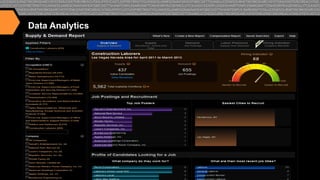
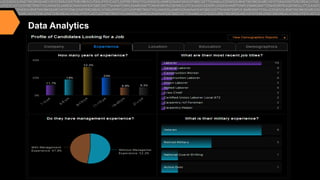
Data Analytics
Data Analytics
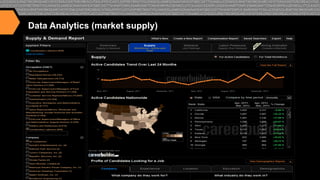
Data Analytics (market supply)
Data Analytics (market demand)
Data Analytics (labor pressure: supply/demand)
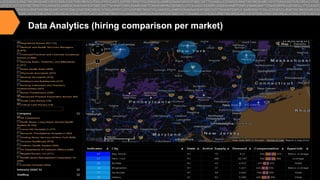
Data Analytics (hiring comparison per market)
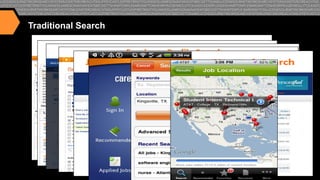
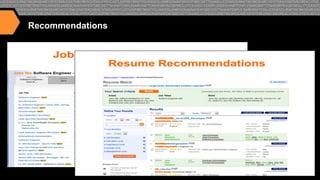
Traditional Search
Recommendations
Tradi>onal	
  Relevancy	
  Scoring	
  
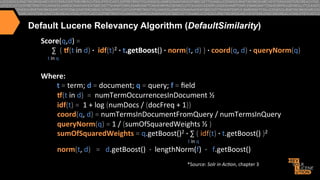
Default Lucene Relevancy Algorithm (DefaultSimilarity)
Score(q,d)	
  =	


  ∑	
  	
  (	
  -(t	
  in	
  d)	
  ·∙	
  	
  idf(t)2	
  ·∙	
  t.getBoost()	
  ·∙	
  norm(t,	
  d)	
  )	
  ·∙	
  coord(q,	
  d)	
  ·∙	
  queryNorm(q)


  t	
  in	
  q	


Where:	


  t	
  =	
  term;	
  d	
  =	
  document;	
  q	
  =	
  query;	
  f	
  =	
  field	


  -(t	
  in	
  d)	
  	
  =	
  	
  numTermOccurrencesInDocument	
  ½	


  idf(t)	
  =	
  	
  1	
  +	
  log	
  (numDocs	
  /	
  (docFreq	
  +	
  1))	


  coord(q,	
  d)	
  =	
  numTermsInDocumentFromQuery	
  /	
  numTermsInQuery	


  queryNorm(q)	
  =	
  1	
  /	
  (sumOfSquaredWeights	
  ½	
  )	


  sumOfSquaredWeights	
  =	
  q.getBoost()2	
  ·∙	
  ∑	
  (	
  idf(t)	
  ·∙	
  t.getBoost()	
  )2	


  t	
  in	
  q	


  norm(t,	
  d)	
  	
  	
  =	
  	
  	
  d.getBoost()	
  	
  ·∙	
  	
  lengthNorm(f)	
  	
  ·∙	
  	
  	
  f.getBoost()	
  
*Source:	
  Solr	
  in	
  Ac*on,	
  chapter	
  3	


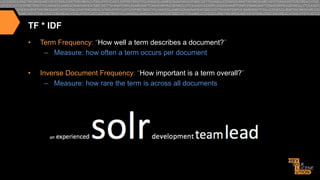
TF * IDF
• 

Term Frequency: “How well a term describes a document?”
–  Measure: how often a term occurs per document

• 

Inverse Document Frequency: “How important is a term overall?”
–  Measure: how rare the term is across all documents
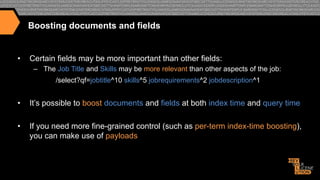
Boosting documents and fields

• 

Certain fields may be more important than other fields:
–  The Job Title and Skills may be more relevant than other aspects of the job:
/select?qf=jobtitle^10 skills^5 jobrequirements^2 jobdescription^1

• 

It’s possible to boost documents and fields at both index time and query time

• 

If you need more fine-grained control (such as per-term index-time boosting),
you can make use of payloads
Custom scoring with Payloads
• 

In addition to boosting search terms and fields, content within Fields can also be
boosted differently using Payloads (requires a custom scoring implementation):
design [1] / engineer [1] / really [ ] / great [ ] / job [ ] / ten[3] / years[3] /
experience[3] / careerbuilder [2] / design [2], …
jobtitle: bucket=[1] boost=10; company: bucket=[2] boost=4;
jobdescription: bucket=[ ] weight=1; experience: bucket=[3] weight=1.5
We can pass in a parameter to solr at query time specifying the boost to apply to each
bucket i.e. …&bucketWeights=1:10;2:4;3:1.5;default:1;

• 

This allows us to map many relevancy buckets to search terms at index time and adjust
the weighting at query time without having to search across hundreds of fields.

• 

By making all scoring parameters overridable at query time, we are able to do A / B
testing to consistently improve our relevancy model
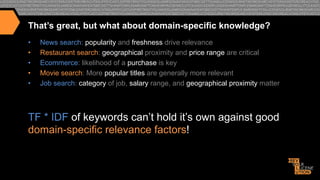
That’s great, but what about domain-specific knowledge?
• 
• 
• 
• 
• 

News search: popularity and freshness drive relevance
Restaurant search: geographical proximity and price range are critical
Ecommerce: likelihood of a purchase is key
Movie search: More popular titles are generally more relevant
Job search: category of job, salary range, and geographical proximity matter

TF * IDF of keywords can’t hold it’s own against good
domain-specific relevance factors!
Advanced	
  Relevancy	
  through	
  Func>ons	
  
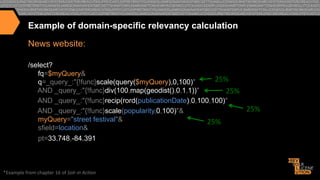
Example of domain-specific relevancy calculation
News website:
/select?
fq=$myQuery&
25%	
  
q=_query_:"{!func}scale(query($myQuery),0,100)"
AND _query_:"{!func}div(100,map(geodist(),0,1,1))"
25%	
  
AND _query_:"{!func}recip(rord(publicationDate),0,100,100)"
25%	
  
AND _query_:"{!func}scale(popularity,0,100)"&
myQuery="street festival"&
25%	
  
sfield=location&
pt=33.748,-84.391

*Example	
  from	
  chapter	
  16	
  of	
  Solr	
  in	
  Ac*on	
  
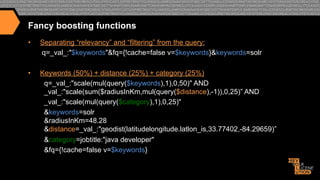
Fancy boosting functions
• 

Separating “relevancy” and “filtering” from the query:
q=_val_:"$keywords"&fq={!cache=false v=$keywords}&keywords=solr

• 

Keywords (50%) + distance (25%) + category (25%)
q=_val_:"scale(mul(query($keywords),1),0,50)" AND
_val_:"scale(sum($radiusInKm,mul(query($distance),-1)),0,25)” AND
_val_:"scale(mul(query($category),1),0,25)"
&keywords=solr
&radiusInKm=48.28
&distance=_val_:"geodist(latitudelongitude.latlon_is,33.77402,-84.29659)”
&category=jobtitle:"java developer"
&fq={!cache=false v=$keywords}
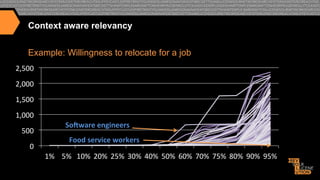
Context aware relevancy
Example: Willingness to relocate for a job
2,500	
  
2,000	
  
1,500	
  
1,000	
  
500	
  
0	
  

So>ware	
  engineers	
  
Food	
  service	
  workers	
  
1%	
   5%	
   10%	
   20%	
   25%	
   30%	
   40%	
   50%	
   60%	
   70%	
   75%	
   80%	
   90%	
   95%	
  
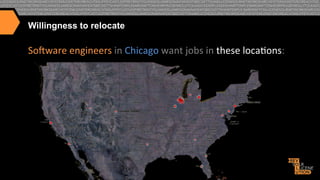
Willingness to relocate

Somware	
  engineers	
  in	
  Chicago	
  want	
  jobs	
  in	
  these	
  loca>ons:	
  
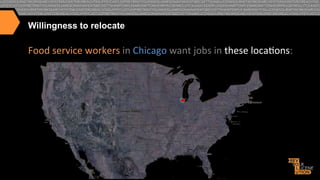
Willingness to relocate

Food	
  service	
  workers	
  in	
  Chicago	
  want	
  jobs	
  in	
  these	
  loca>ons:	
  
Personaliza>on	
  &	
  Recommenda>ons	
  
Beyond domain knowledge… consider per-user knowledge
• 

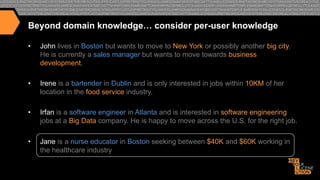
John lives in Boston but wants to move to New York or possibly another big city.
He is currently a sales manager but wants to move towards business
development.

• 

Irene is a bartender in Dublin and is only interested in jobs within 10KM of her
location in the food service industry.

• 

Irfan is a software engineer in Atlanta and is interested in software engineering
jobs at a Big Data company. He is happy to move across the U.S. for the right job.

• 

Jane is a nurse educator in Boston seeking between $40K and $60K working in
the healthcare industry
Query for Jane
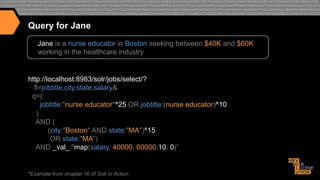
Jane is a nurse educator in Boston seeking between $40K and $60K
working in the healthcare industry

http://localhost:8983/solr/jobs/select/?
fl=jobtitle,city,state,salary&
q=(
jobtitle:"nurse educator"^25 OR jobtitle:(nurse educator)^10
)
AND (
(city:"Boston" AND state:"MA")^15
OR state:"MA”)
AND _val_:"map(salary, 40000, 60000,10, 0)”

*Example from chapter 16 of Solr in Action
Search Results for Jane
{ ...
"response":{"numFound":22,"start":0,"docs":[
{"jobtitle":"Clinical Educator
(New England/ Boston)",
"city":"Boston",
"state":"MA",
"salary":41503},

{"jobtitle":"Nurse Educator",
"city":"Braintree",
"state":"MA",
"salary":56183},

{"jobtitle":"Nurse Educator",
"city":"Brighton",
"state":"MA",
"salary":71359}

…]}}

*Example documents available @ http://github.com/treygrainger/solr-in-action/


What did we just do?
• 

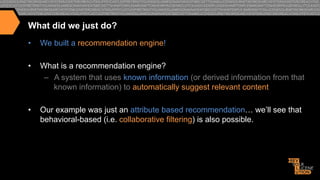
We built a recommendation engine!

• 

What is a recommendation engine?
–  A system that uses known information (or derived information from that
known information) to automatically suggest relevant content

• 

Our example was just an attribute based recommendation… we’ll see that
behavioral-based (i.e. collaborative filtering) is also possible.
Redefining “Search Engine”

•  “Lucene is a high-performance, full-featured
text search engine library…”
Yes,	
  but	
  really…	
  
•  	
  Lucene	
  is	
  a	
  high-­‐performance,	
  fully-­‐featured	
  
token	
  matching	
  and	
  scoring	
  library…	
  which	
  
can	
  perform	
  full-­‐text	
  searching.	
  
Redefining “Search Engine”

or,	
  in	
  machine	
  learning	
  speak:	
  
•  A	
  Lucene	
  index	
  is	
  mul>-­‐dimensional	
  	
  
sparse	
  matrix…	
  with	
  very	
  fast	
  and	
  powerful	
  lookup	
  
capabili>es.	
  
•  Think	
  of	
  each	
  field	
  as	
  a	
  matrix	
  containing	
  each	
  term	
  
mapped	
  to	
  each	
  document	
  
The Lucene Inverted Index (traditional text example)

What	
  you	
  SEND	
  to	
  Lucene/Solr:	
  

How	
  the	
  content	
  is	
  INDEXED	
  into	
  
Lucene/Solr	
  (conceptually):	
  

Document	
  

Content	
  Field	
  

Term	
  

Documents	
  

doc1	


once	
  upon	
  a	
  >me,	
  in	
  a	
  land	
  far,	
  far	
  
away	
  

a	
  

doc1	
  [2x]	
  

brown	
  

doc2	
  

the	
  cow	
  jumped	
  over	
  the	
  moon.	
  

doc3	
  [1x]	
  ,	
  doc5	
  [1x]	
  

cat	
  

doc4	
  [1x]	
  

doc3	


the	
  quick	
  brown	
  fox	
  jumped	
  over	
  
the	
  lazy	
  dog.	
  

cow	
  

doc2	
  [1x]	
  ,	
  doc5	
  [1x]	
  

…	
  

...	
  

doc4	
  

the	
  cat	
  in	
  the	
  hat	
  

once	
  

doc1	
  [1x],	
  doc5	
  [1x]	
  

doc5	
  

The	
  brown	
  cow	
  said	
  “moo”	
  once.	
  

over	
  

doc2	
  [1x],	
  doc3	
  [1x]	
  

the	
  

…	
  

…	
  

doc2	
  [2x],	
  doc3	
  [2x],	
  
doc4[2x],	
  doc5	
  [1x]	
  

…	
  

…	
  
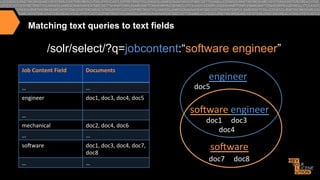
Matching text queries to text fields

/solr/select/?q=jobcontent:“software engineer”
Job	
  Content	
  Field	
  

Documents	
  

…	
  

…	
  

engineer	
  

doc1,	
  doc3,	
  doc4,	
  doc5	
  

engineer	
  

doc5	
  

somware	
  engineer	
  

…	
  
mechanical	
  

doc2,	
  doc4,	
  doc6	
  

…	
  

…	
  

somware	
  

doc1,	
  doc3,	
  doc4,	
  doc7,	
  
doc8	
  

…	
  

…	
  

doc1	


  doc3	


  doc4	
  

somware	
  
doc7	


  doc8	
  
Beyond Text Searching

•  Lucene/Solr	
  is	
  a	
  search	
  matching	
  engine	
  
•  When	
  Lucene/Solr	
  search	
  text,	
  they	
  are	
  matching	
  
tokens	
  in	
  the	
  query	
  with	
  tokens	
  in	
  index	
  
•  Anything	
  that	
  can	
  be	
  searched	
  upon	
  can	
  form	
  the	
  
basis	
  of	
  matching	
  and	
  scoring:	
  
–  text,	
  atributes,	
  loca>ons,	
  results	
  of	
  func>ons,	
  user	
  
behavior,	
  classifica>ons,	
  etc.	
  	
  
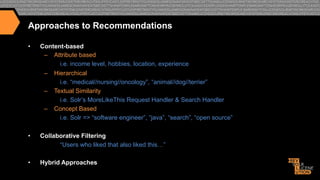
Approaches to Recommendations
• 

Content-based
–  Attribute based
i.e. income level, hobbies, location, experience
–  Hierarchical
i.e. “medical//nursing//oncology”, “animal//dog//terrier”
–  Textual Similarity
i.e. Solr’s MoreLikeThis Request Handler & Search Handler
–  Concept Based
i.e. Solr => “software engineer”, “java”, “search”, “open source”

• 

Collaborative Filtering
“Users who liked that also liked this…”

• 

Hybrid Approaches
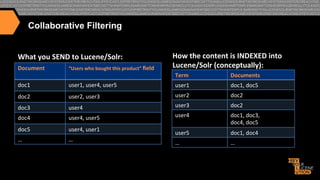
Collaborative Filtering
What	
  you	
  SEND	
  to	
  Lucene/Solr:	
  
Document	
  

“Users	
  who	
  bought	
  this	
  product”	
  field	
  

doc1	


How	
  the	
  content	
  is	
  INDEXED	
  into	
  
Lucene/Solr	
  (conceptually):	
  
Term	
  

Documents	
  

user1,	
  user4,	
  user5	
  

user1	
  

doc1,	
  doc5	
  

doc2	
  

user2,	
  user3	
  

user2	
  

doc2	
  

doc3	


user4	
  

user3	
  

doc2	
  

doc4	
  

user4,	
  user5	
  

user4	
  

doc5	
  

user4,	
  user1	
  

doc1,	
  doc3,	
  	
  
doc4,	
  doc5	
  

…	
  

…	
  

user5	
  

doc1,	
  doc4	
  

…	
  

…	
  
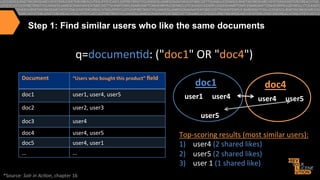
Step 1: Find similar users who like the same documents

q=documen>d:	
  ("doc1"	
  OR	
  "doc4")	
  
Document	
  

“Users	
  who	
  bought	
  this	
  product”	
  field	
  

doc1	


user1,	
  user4,	
  user5	
  

doc2	
  

user2,	
  user3	
  

doc3	


user4	
  

doc4	
  

user4,	
  user5	
  

doc5	
  

user4,	
  user1	
  

…	
  

…	
  

*Source:	
  Solr	
  in	
  Ac*on,	
  chapter	
  16	
  

doc1	
  
user1	


  user4	


  user5	
  

doc4	


  user4	


  user5	
  

Top-­‐scoring	
  results	
  (most	
  similar	
  users):	
  
1)  	
  user4	
  (2	
  shared	
  likes)	
  
2)  	
  user5	
  (2	
  shared	
  likes)	
  
3)  	
  user	
  1	
  (1	
  shared	
  like)	


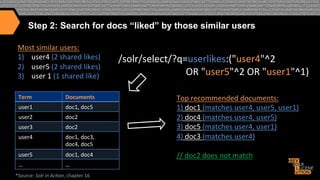
Step 2: Search for docs “liked” by those similar users


Most	
  similar	
  users:	
  
1) 	


  ser4	
  	
  	
  2	
  	
  s	
  hared	
  	
  l	
  ikes)	


  /solr/select/?q=userlikes:("user4"^2	


  u 	


  ( 	


2)  	
  user5	
  (2	
  shared	
  likes)	


  (1	


   ike)	
  
3)  	
  user	
  1	


  shared	
  	
  l	


  OR	
  "user5"^2	
  OR	
  "user1"^1)	
  
Term	
  

Documents	
  

user1	
  

doc1,	
  doc5	
  

user2	
  

doc2	
  

user3	
  

doc2	
  

user4	
  

doc1,	
  doc3,	
  	
  
doc4,	
  doc5	
  

user5	
  

doc1,	
  doc4	
  

…	
  

…	
  

*Source:	
  Solr	
  in	
  Ac*on,	
  chapter	
  16	
  

Top	
  recommended	
  documents:	
  
1)	
  doc1	
  (matches	
  user4,	
  user5,	
  user1)	
  
2)	
  doc4	
  (matches	
  user4,	
  user5)	
  
3)	
  doc5	
  (matches	
  user4,	
  user1)	
  
4)	
  doc3	
  (matches	
  user4)	


//	
  doc2	
  does	
  not	
  match	
  
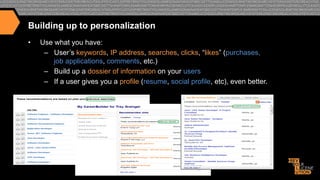
Building up to personalization
• 

Use what you have:
–  User’s keywords, IP address, searches, clicks, “likes” (purchases,
job applications, comments, etc.)
–  Build up a dossier of information on your users
–  If a user gives you a profile (resume, social profile, etc), even better.
For full coverage of building a recommendation engine in Solr…
• 

See my talk from Lucene Revolution 2012 (Boston):
Personalized Search
• 

Why limit yourself to JUST explicit search or JUST automated recommendations?

• 

By augmenting your user’s explicit queries with information you know about them, you
can personalize their search results.

• 

Examples:
–  A known software engineer runs a blank job search in New York…
•  Why not show software engineering higher in the results?
–  A new user runs a keyword-only search for nurse
•  Why not use the user’s IP address to boost documents geographically closer?
Seman>c	
  Search	
  
Not going to talk about…
•  Using the SynonymFilter
•  Automatic language detection
•  Stemming/lemmatization/multi-lingual search
•  Stopwords
(For all of the above, see the Solr Wiki, Reference Guide, or read Solr in Action)
• 

Instead, we’re going to cover:
–  Mining user behavior to discover synonyms/related queries
–  Discovering related concepts using document clustering in Solr
–  Future work: Latent Semantic Indexing
–  Document to Document searching using More Like This
–  Foreground/Background corpus analysis
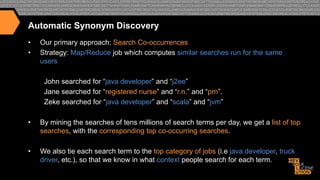
Automatic Synonym Discovery
• 
• 

Our primary approach: Search Co-occurrences
Strategy: Map/Reduce job which computes similar searches run for the same
users
John searched for “java developer” and “j2ee”
Jane searched for “registered nurse” and “r.n.” and “prn”.
Zeke searched for “java developer” and “scala” and “jvm”

• 

By mining the searches of tens millions of search terms per day, we get a list of top
searches, with the corresponding top co-occurring searches.

• 

We also tie each search term to the top category of jobs (i.e java developer, truck
driver, etc.), so that we know in what context people search for each term.
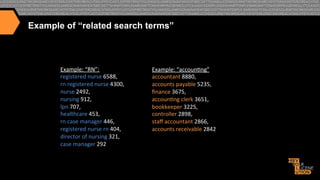
Example of “related search terms”

Example:	
  “RN”:	
  
registered	
  nurse	
  6588,	
  
rn	
  registered	
  nurse	
  4300,	
  
nurse	
  2492,	
  
nursing	
  912,	
  
lpn	
  707,	
  
healthcare	
  453,	
  
rn	
  case	
  manager	
  446,	
  
registered	
  nurse	
  rn	
  404,	
  
director	
  of	
  nursing	
  321,	
  
case	
  manager	
  292	
  

Example:	
  “accoun>ng”	
  
accountant	
  8880,	
  
accounts	
  payable	
  5235,	
  
finance	
  3675,	
  
accoun>ng	
  clerk	
  3651,	
  
bookkeeper	
  3225,	
  
controller	
  2898,	
  
staff	
  accountant	
  2866,	
  
accounts	
  receivable	
  2842	
  
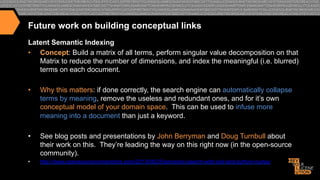
Future work on building conceptual links
Latent Semantic Indexing
•  Concept: Build a matrix of all terms, perform singular value decomposition on that
Matrix to reduce the number of dimensions, and index the meaningful (i.e. blurred)
terms on each document.
• 

Why this matters: if done correctly, the search engine can automatically collapse
terms by meaning, remove the useless and redundant ones, and for it’s own
conceptual model of your domain space. This can be used to infuse more
meaning into a document than just a keyword.

• 

See blog posts and presentations by John Berryman and Doug Turnbull about
their work on this. They’re leading the way on this right now (in the open-source
community).

• 

http://www.opensourceconnections.com/2013/08/25/semantic-search-with-solr-and-python-numpy
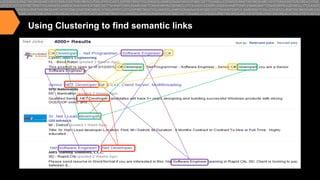
Using Clustering to find semantic links
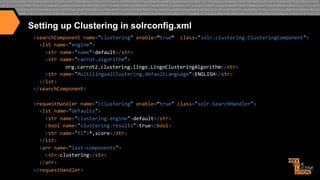
Setting up Clustering in solrconfig.xml
<searchComponent	
  name="clustering"	
  enable=“true“	
  	
  class="solr.clustering.ClusteringComponent">	


  <lst	
  name="engine">	


  <str	
  name="name">default</str>	


  <str	
  name="carrot.algorithm">	
  
	
  org.carrot2.clustering.lingo.LingoClusteringAlgorithm</str>	


  <str	
  name="MultilingualClustering.defaultLanguage">ENGLISH</str>	


  </lst>	
  
</searchComponent>	


<requestHandler	
  name="/clustering"	
  enable=“true"	
  class="solr.SearchHandler">	


  <lst	
  name="defaults">	


  <str	
  name="clustering.engine">default</str>	


  <bool	
  name="clustering.results">true</bool>	


  <str	
  name="fl">*,score</str>	


  </lst>	


  <arr	
  name="last-­‐components">	


  <str>clustering</str>	


  </arr>	
  
</requestHandler>	
  
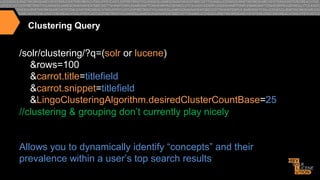
Clustering Query

/solr/clustering/?q=(solr or lucene)
&rows=100
&carrot.title=titlefield
&carrot.snippet=titlefield
&LingoClusteringAlgorithm.desiredClusterCountBase=25
//clustering & grouping don’t currently play nicely
Allows you to dynamically identify “concepts” and their
prevalence within a user’s top search results
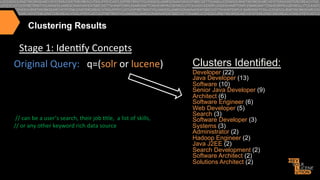
Clustering Results

Stage	
  1:	
  Iden>fy	
  Concepts	
  
Original	
  Query:	
  	
  	
  q=(solr	
  or	
  lucene)	


  //	
  can	
  be	
  a	
  user’s	
  search,	
  their	
  job	
  >tle,	
  	
  a	
  list	
  of	
  skills,	
  
//	
  or	
  any	
  other	
  keyword	
  rich	
  data	
  source	
  

Clusters Identified:


Developer (22)
Java Developer (13)
Software (10)
Senior Java Developer (9)
Architect (6)
Software Engineer (6)
Web Developer (5)
Search (3)


Software Developer (3)
Systems (3)
Administrator (2)
Hadoop Engineer (2)
Java J2EE (2)
Search Development (2)
Software Architect (2)
Solutions Architect (2)
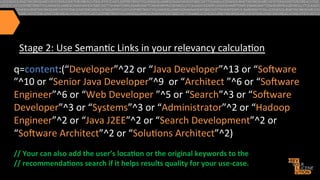
Stage	
  2:	
  Use	
  Seman>c	
  Links	
  in	
  your	
  relevancy	
  calcula>on	
  
q=content:(“Developer”^22	
  or	
  “Java	
  Developer”^13	
  or	
  “Somware	
  
”^10	
  or	
  “Senior	
  Java	
  Developer”^9	
  	
  or	
  “Architect	
  ”^6	
  or	
  “Somware	
  
Engineer”^6	
  or	
  “Web	
  Developer	
  ”^5	
  or	
  “Search”^3	
  or	
  “Somware	
  
Developer”^3	
  or	
  “Systems”^3	
  or	
  “Administrator”^2	
  or	
  “Hadoop	
  
Engineer”^2	
  or	
  “Java	
  J2EE”^2	
  or	
  “Search	
  Development”^2	
  or	
  
“Somware	
  Architect”^2	
  or	
  “Solu>ons	
  Architect”^2)	


//	
  Your	
  can	
  also	
  add	
  the	
  user’s	
  loca[on	
  or	
  the	
  original	
  keywords	
  to	
  the	
  	
  
//	
  recommenda[ons	
  search	
  if	
  it	
  helps	
  results	
  quality	
  for	
  your	
  use-­‐case.	
  
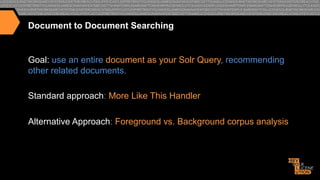
Document to Document Searching

Goal: use an entire document as your Solr Query, recommending
other related documents.
Standard approach: More Like This Handler
Alternative Approach: Foreground vs. Background corpus analysis
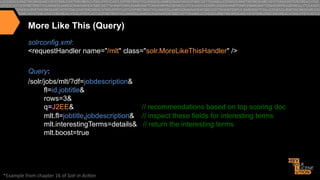
More Like This (Query)
solrconfig.xml:
<requestHandler name="/mlt" class="solr.MoreLikeThisHandler" />
Query:
/solr/jobs/mlt/?df=jobdescription&
fl=id,jobtitle&
rows=3&
q=J2EE&
// recommendations based on top scoring doc
mlt.fl=jobtitle,jobdescription& // inspect these fields for interesting terms
mlt.interestingTerms=details& // return the interesting terms
mlt.boost=true

*Example	
  from	
  chapter	
  16	
  of	
  Solr	
  in	
  Ac*on	
  
More Like This (Results)
{"match":{"numFound":122,"start":0,"docs":[
{"id":"fc57931d42a7ccce3552c04f3db40af8dabc99dc",
"jobtitle":"Senior

Java / J2EE Developer"}]

},
"response":{"numFound":2225,"start":0,"docs":[
{"id":"0e953179408d710679e5ddbd15ab0dfae52ffa6c",
"jobtitle":"Sr

Core Java Developer"},

{"id":"5ce796c758ee30ed1b3da1fc52b0595c023de2db",
"jobtitle":"Applications

Developer"},

{"id":"1e46dd6be1750fc50c18578b7791ad2378b90bdd",
"jobtitle":"Java Architect/

Lead Java Developer WJAV Java - Java in Pittsburgh PA"},]},

	
  "interes>ngTerms":[	


  "jobdescrip>on:j2ee",1.0,	


  "jobdescrip>on:java",0.68131137,	


  "jobdescrip>on:senior",0.52161527,	


  "job>tle:developer",0.44706684,	


  "jobdescrip>on:source",0.2417754,	


  "jobdescrip>on:code",0.17976432,	


  "jobdescrip>on:is",0.17765637,	


  "jobdescrip>on:client",0.17331646,	


  "jobdescrip>on:our",0.11985878,	


  "jobdescrip>on:for",0.07928475,	


  "jobdescrip>on:a",0.07875194,	


  "jobdescrip>on:to",0.07741922,	


  "jobdescrip>on:and",0.07479082]}}	
  
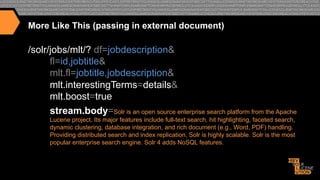
More Like This (passing in external document)

/solr/jobs/mlt/? df=jobdescription&
fl=id,jobtitle&
mlt.fl=jobtitle,jobdescription&
mlt.interestingTerms=details&
mlt.boost=true
stream.body=Solr is an open source enterprise search platform from the Apache
Lucene project. Its major features include full-text search, hit highlighting, faceted search,
dynamic clustering, database integration, and rich document (e.g., Word, PDF) handling.
Providing distributed search and index replication, Solr is highly scalable. Solr is the most
popular enterprise search engine. Solr 4 adds NoSQL features.
More Like This (Results)
{"response":{"numFound":2221,"start":0,"docs":[
{"id":"eff5ac098d056a7ea6b1306986c3ae511f2d0d89 ",
• 

"jobtitle":"Enterprise

Search Architect…"},

{"id":"37abb52b6fe63d601e5457641d2cf5ae83fdc799 ",
"jobtitle":"Sr.

Java Developer"},

{"id":"349091293478dfd3319472e920cf65657276bda4 ",
"jobtitle":"Java

Lucene Software Engineer"},]},

	
  "interes>ngTerms":[	


  "jobdescrip>on:search",1.0,	


  "jobdescrip>on:solr",0.9155779,	


  "jobdescrip>on:features",0.36472517,	


  "jobdescrip>on:enterprise",0.30173126,	


  "jobdescrip>on:is",0.17626463,	


  "jobdescrip>on:the",0.102924034,	


  "jobdescrip>on:and",0.098939896]}	
  }	
  
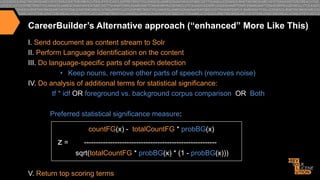
CareerBuilder’s Alternative approach (“enhanced” More Like This)
I. Send document as content stream to Solr
II. Perform Language Identification on the content
III. Do language-specific parts of speech detection
•  Keep nouns, remove other parts of speech (removes noise)
IV. Do analysis of additional terms for statistical significance:
tf * idf OR foreground vs. background corpus comparison OR Both
Preferred statistical significance measure:
countFG(x) - totalCountFG * probBG(x)

z=

-------------------------------------------------------sqrt(totalCountFG * probBG(x) * (1 - probBG(x)))

V. Return top scoring terms
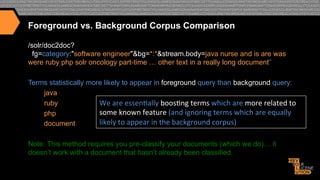
Foreground vs. Background Corpus Comparison
/solr/doc2doc?
fg=category:"software engineer"&bg=*:*&stream.body=java nurse and is are was
were ruby php solr oncology part-time … other text in a really long document”
Terms statistically more likely to appear in foreground query than background query:
java
ruby
We	
  are	
  essen>ally	
  boos>ng	
  terms	
  which	
  are	
  more	
  related	
  to	
  
some	
  known	
  feature	
  (and	
  ignoring	
  terms	
  which	
  are	
  equally	
  
php
likely	
  to	
  appear	
  in	
  the	
  background	
  corpus)	
  
document
Note: This method requires you pre-classify your documents (which we do)… it
doesn’t work with a document that hasn’t already been classified.
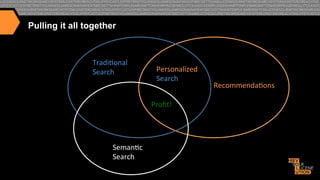
Pulling it all together

Tradi>onal	
  
Search	
  

Personalized	
  
Search	
  
Profit!	
  

Seman>c	
  
Search	
  

Recommenda>ons	
  
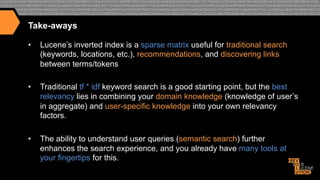
Take-aways
• 

Lucene’s inverted index is a sparse matrix useful for traditional search
(keywords, locations, etc.), recommendations, and discovering links
between terms/tokens

• 

Traditional tf * idf keyword search is a good starting point, but the best
relevancy lies in combining your domain knowledge (knowledge of user’s
in aggregate) and user-specific knowledge into your own relevancy
factors.

• 

The ability to understand user queries (semantic search) further
enhances the search experience, and you already have many tools at
your fingertips for this.
Questions?

§  Trey	
  Grainger	
  
trey.grainger@careerbuilder.com	
  
@treygrainger	


Other	
  presenta[ons:	


  h_p://www.treygrainger.com	
  

htp://solrinac>on.com	
  

Enhancing relevancy through personalization & semantic search

  • 1.
    Dublin, IE 2013.11.07 Trey Grainger ENHANCINGRELEVANCY THROUGH PERSONALIZATION & SEMANTIC SEARCH Search Technology Development Manager @  
  • 2.
    My Background Trey  Grainger   Search  Technology  Development  Manager      @CareerBuilder.com     Relevant  Background   •  Search  &  Recommenda>ons   •  High-­‐volume,  Distributed  Systems   •  NLP,  Relevancy  Tuning,  User  Group  Tes>ng,  &  Machine  Learning                                                          Other  Projects   •  Co-­‐author:    Solr  in  Ac*on   •  Founder  and  Chief  Engineer  @                                                    .com  
  • 3.
    Roadmap •  •  •  I. How weuse Solr @ CareerBuilder II. Traditional Relevancy Scoring III. Advanced Relevancy through functions –  Factors as a linear function –  Context-aware relevancy parameter weighting •  III. Personalization & Recommendations –  Profile and Behavior-based –  Solr as a recommendation engine –  Collaborative Filtering •  IV. Semantic Search –  –  –  –  –  Mining user-behavior for synonyms Uncovering meaning through clustering Latent Semantic Indexing overview Document-based searching Foreground vs. Background analysis
  • 4.
    How  we  use  Solr  @  CareerBuilder  
  • 5.
    Search Scale @ •  •  •  •  •  •  Over  2.5  million  new  jobs  each  month     Over  60  million  ac>vely  searchable  resumes   ~300  globally  distributed  search  servers     Thousands  of  unique,  dynamically  generated  indexes   Over  1  Billion  ac>vely  searchable  documents   Over  1  million  searches  an  hour  
  • 6.
  • 7.
  • 8.
  • 9.
  • 10.
    Data Analytics (laborpressure: supply/demand)
  • 11.
    Data Analytics (hiringcomparison per market)
  • 12.
  • 13.
  • 14.
  • 15.
    Default Lucene RelevancyAlgorithm (DefaultSimilarity) Score(q,d)  =                  ∑    (  -(t  in  d)  ·∙    idf(t)2  ·∙  t.getBoost()  ·∙  norm(t,  d)  )  ·∙  coord(q,  d)  ·∙  queryNorm(q)          t  in  q             Where:      t  =  term;  d  =  document;  q  =  query;  f  =  field                    -(t  in  d)    =    numTermOccurrencesInDocument  ½                    idf(t)  =    1  +  log  (numDocs  /  (docFreq  +  1))                    coord(q,  d)  =  numTermsInDocumentFromQuery  /  numTermsInQuery                    queryNorm(q)  =  1  /  (sumOfSquaredWeights  ½  )                    sumOfSquaredWeights  =  q.getBoost()2  ·∙  ∑  (  idf(t)  ·∙  t.getBoost()  )2                                                                                                                                                                                                                                                                                                                                                                                  t  in  q                    norm(t,  d)      =      d.getBoost()    ·∙    lengthNorm(f)    ·∙      f.getBoost()   *Source:  Solr  in  Ac*on,  chapter  3    
  • 16.
    TF * IDF •  TermFrequency: “How well a term describes a document?” –  Measure: how often a term occurs per document •  Inverse Document Frequency: “How important is a term overall?” –  Measure: how rare the term is across all documents
  • 17.
    Boosting documents andfields •  Certain fields may be more important than other fields: –  The Job Title and Skills may be more relevant than other aspects of the job: /select?qf=jobtitle^10 skills^5 jobrequirements^2 jobdescription^1 •  It’s possible to boost documents and fields at both index time and query time •  If you need more fine-grained control (such as per-term index-time boosting), you can make use of payloads
  • 18.
    Custom scoring withPayloads •  In addition to boosting search terms and fields, content within Fields can also be boosted differently using Payloads (requires a custom scoring implementation): design [1] / engineer [1] / really [ ] / great [ ] / job [ ] / ten[3] / years[3] / experience[3] / careerbuilder [2] / design [2], … jobtitle: bucket=[1] boost=10; company: bucket=[2] boost=4; jobdescription: bucket=[ ] weight=1; experience: bucket=[3] weight=1.5 We can pass in a parameter to solr at query time specifying the boost to apply to each bucket i.e. …&bucketWeights=1:10;2:4;3:1.5;default:1; •  This allows us to map many relevancy buckets to search terms at index time and adjust the weighting at query time without having to search across hundreds of fields. •  By making all scoring parameters overridable at query time, we are able to do A / B testing to consistently improve our relevancy model
  • 19.
    That’s great, butwhat about domain-specific knowledge? •  •  •  •  •  News search: popularity and freshness drive relevance Restaurant search: geographical proximity and price range are critical Ecommerce: likelihood of a purchase is key Movie search: More popular titles are generally more relevant Job search: category of job, salary range, and geographical proximity matter TF * IDF of keywords can’t hold it’s own against good domain-specific relevance factors!
  • 20.
  • 21.
    Example of domain-specificrelevancy calculation News website: /select? fq=$myQuery& 25%   q=_query_:"{!func}scale(query($myQuery),0,100)" AND _query_:"{!func}div(100,map(geodist(),0,1,1))" 25%   AND _query_:"{!func}recip(rord(publicationDate),0,100,100)" 25%   AND _query_:"{!func}scale(popularity,0,100)"& myQuery="street festival"& 25%   sfield=location& pt=33.748,-84.391 *Example  from  chapter  16  of  Solr  in  Ac*on  
  • 22.
    Fancy boosting functions •  Separating“relevancy” and “filtering” from the query: q=_val_:"$keywords"&fq={!cache=false v=$keywords}&keywords=solr •  Keywords (50%) + distance (25%) + category (25%) q=_val_:"scale(mul(query($keywords),1),0,50)" AND _val_:"scale(sum($radiusInKm,mul(query($distance),-1)),0,25)” AND _val_:"scale(mul(query($category),1),0,25)" &keywords=solr &radiusInKm=48.28 &distance=_val_:"geodist(latitudelongitude.latlon_is,33.77402,-84.29659)” &category=jobtitle:"java developer" &fq={!cache=false v=$keywords}
  • 23.
    Context aware relevancy Example:Willingness to relocate for a job 2,500   2,000   1,500   1,000   500   0   So>ware  engineers   Food  service  workers   1%   5%   10%   20%   25%   30%   40%   50%   60%   70%   75%   80%   90%   95%  
  • 24.
    Willingness to relocate Somware  engineers  in  Chicago  want  jobs  in  these  loca>ons:  
  • 25.
    Willingness to relocate Food  service  workers  in  Chicago  want  jobs  in  these  loca>ons:  
  • 26.
  • 27.
    Beyond domain knowledge…consider per-user knowledge •  John lives in Boston but wants to move to New York or possibly another big city. He is currently a sales manager but wants to move towards business development. •  Irene is a bartender in Dublin and is only interested in jobs within 10KM of her location in the food service industry. •  Irfan is a software engineer in Atlanta and is interested in software engineering jobs at a Big Data company. He is happy to move across the U.S. for the right job. •  Jane is a nurse educator in Boston seeking between $40K and $60K working in the healthcare industry
  • 28.
    Query for Jane Janeis a nurse educator in Boston seeking between $40K and $60K working in the healthcare industry http://localhost:8983/solr/jobs/select/? fl=jobtitle,city,state,salary& q=( jobtitle:"nurse educator"^25 OR jobtitle:(nurse educator)^10 ) AND ( (city:"Boston" AND state:"MA")^15 OR state:"MA”) AND _val_:"map(salary, 40000, 60000,10, 0)” *Example from chapter 16 of Solr in Action
  • 29.
    Search Results forJane { ... "response":{"numFound":22,"start":0,"docs":[ {"jobtitle":"Clinical Educator (New England/ Boston)", "city":"Boston", "state":"MA", "salary":41503}, {"jobtitle":"Nurse Educator", "city":"Braintree", "state":"MA", "salary":56183}, {"jobtitle":"Nurse Educator", "city":"Brighton", "state":"MA", "salary":71359} …]}} *Example documents available @ http://github.com/treygrainger/solr-in-action/  
  • 30.
    What did wejust do? •  We built a recommendation engine! •  What is a recommendation engine? –  A system that uses known information (or derived information from that known information) to automatically suggest relevant content •  Our example was just an attribute based recommendation… we’ll see that behavioral-based (i.e. collaborative filtering) is also possible.
  • 31.
    Redefining “Search Engine” • “Lucene is a high-performance, full-featured text search engine library…” Yes,  but  really…   •   Lucene  is  a  high-­‐performance,  fully-­‐featured   token  matching  and  scoring  library…  which   can  perform  full-­‐text  searching.  
  • 32.
    Redefining “Search Engine” or,  in  machine  learning  speak:   •  A  Lucene  index  is  mul>-­‐dimensional     sparse  matrix…  with  very  fast  and  powerful  lookup   capabili>es.   •  Think  of  each  field  as  a  matrix  containing  each  term   mapped  to  each  document  
  • 33.
    The Lucene InvertedIndex (traditional text example) What  you  SEND  to  Lucene/Solr:   How  the  content  is  INDEXED  into   Lucene/Solr  (conceptually):   Document   Content  Field   Term   Documents   doc1     once  upon  a  >me,  in  a  land  far,  far   away   a   doc1  [2x]   brown   doc2   the  cow  jumped  over  the  moon.   doc3  [1x]  ,  doc5  [1x]   cat   doc4  [1x]   doc3     the  quick  brown  fox  jumped  over   the  lazy  dog.   cow   doc2  [1x]  ,  doc5  [1x]   …   ...   doc4   the  cat  in  the  hat   once   doc1  [1x],  doc5  [1x]   doc5   The  brown  cow  said  “moo”  once.   over   doc2  [1x],  doc3  [1x]   the   …   …   doc2  [2x],  doc3  [2x],   doc4[2x],  doc5  [1x]   …   …  
  • 34.
    Matching text queriesto text fields /solr/select/?q=jobcontent:“software engineer” Job  Content  Field   Documents   …   …   engineer   doc1,  doc3,  doc4,  doc5   engineer   doc5   somware  engineer   …   mechanical   doc2,  doc4,  doc6   …   …   somware   doc1,  doc3,  doc4,  doc7,   doc8   …   …   doc1          doc3                      doc4   somware   doc7          doc8  
  • 35.
    Beyond Text Searching • Lucene/Solr  is  a  search  matching  engine   •  When  Lucene/Solr  search  text,  they  are  matching   tokens  in  the  query  with  tokens  in  index   •  Anything  that  can  be  searched  upon  can  form  the   basis  of  matching  and  scoring:   –  text,  atributes,  loca>ons,  results  of  func>ons,  user   behavior,  classifica>ons,  etc.    
  • 36.
    Approaches to Recommendations •  Content-based – Attribute based i.e. income level, hobbies, location, experience –  Hierarchical i.e. “medical//nursing//oncology”, “animal//dog//terrier” –  Textual Similarity i.e. Solr’s MoreLikeThis Request Handler & Search Handler –  Concept Based i.e. Solr => “software engineer”, “java”, “search”, “open source” •  Collaborative Filtering “Users who liked that also liked this…” •  Hybrid Approaches
  • 37.
    Collaborative Filtering What  you  SEND  to  Lucene/Solr:   Document   “Users  who  bought  this  product”  field   doc1     How  the  content  is  INDEXED  into   Lucene/Solr  (conceptually):   Term   Documents   user1,  user4,  user5   user1   doc1,  doc5   doc2   user2,  user3   user2   doc2   doc3     user4   user3   doc2   doc4   user4,  user5   user4   doc5   user4,  user1   doc1,  doc3,     doc4,  doc5   …   …   user5   doc1,  doc4   …   …  
  • 38.
    Step 1: Findsimilar users who like the same documents q=documen>d:  ("doc1"  OR  "doc4")   Document   “Users  who  bought  this  product”  field   doc1     user1,  user4,  user5   doc2   user2,  user3   doc3     user4   doc4   user4,  user5   doc5   user4,  user1   …   …   *Source:  Solr  in  Ac*on,  chapter  16   doc1   user1          user4                              user5   doc4        user4          user5   Top-­‐scoring  results  (most  similar  users):   1)   user4  (2  shared  likes)   2)   user5  (2  shared  likes)   3)   user  1  (1  shared  like)  
  • 39.
      Step 2: Searchfor docs “liked” by those similar users       Most  similar  users:   1)               ser4      2    s  hared    l  ikes)                    /solr/select/?q=userlikes:("user4"^2              u                (                                               2)   user5  (2  shared  likes)        (1                     ike)   3)   user  1          shared    l                                                                                  OR  "user5"^2  OR  "user1"^1)   Term   Documents   user1   doc1,  doc5   user2   doc2   user3   doc2   user4   doc1,  doc3,     doc4,  doc5   user5   doc1,  doc4   …   …   *Source:  Solr  in  Ac*on,  chapter  16   Top  recommended  documents:   1)  doc1  (matches  user4,  user5,  user1)   2)  doc4  (matches  user4,  user5)   3)  doc5  (matches  user4,  user1)   4)  doc3  (matches  user4)     //  doc2  does  not  match  
  • 40.
    Building up topersonalization •  Use what you have: –  User’s keywords, IP address, searches, clicks, “likes” (purchases, job applications, comments, etc.) –  Build up a dossier of information on your users –  If a user gives you a profile (resume, social profile, etc), even better.
  • 41.
    For full coverageof building a recommendation engine in Solr… •  See my talk from Lucene Revolution 2012 (Boston):
  • 42.
    Personalized Search •  Why limityourself to JUST explicit search or JUST automated recommendations? •  By augmenting your user’s explicit queries with information you know about them, you can personalize their search results. •  Examples: –  A known software engineer runs a blank job search in New York… •  Why not show software engineering higher in the results? –  A new user runs a keyword-only search for nurse •  Why not use the user’s IP address to boost documents geographically closer?
  • 43.
  • 44.
    Not going totalk about… •  Using the SynonymFilter •  Automatic language detection •  Stemming/lemmatization/multi-lingual search •  Stopwords (For all of the above, see the Solr Wiki, Reference Guide, or read Solr in Action) •  Instead, we’re going to cover: –  Mining user behavior to discover synonyms/related queries –  Discovering related concepts using document clustering in Solr –  Future work: Latent Semantic Indexing –  Document to Document searching using More Like This –  Foreground/Background corpus analysis
  • 45.
    Automatic Synonym Discovery •  •  Ourprimary approach: Search Co-occurrences Strategy: Map/Reduce job which computes similar searches run for the same users John searched for “java developer” and “j2ee” Jane searched for “registered nurse” and “r.n.” and “prn”. Zeke searched for “java developer” and “scala” and “jvm” •  By mining the searches of tens millions of search terms per day, we get a list of top searches, with the corresponding top co-occurring searches. •  We also tie each search term to the top category of jobs (i.e java developer, truck driver, etc.), so that we know in what context people search for each term.
  • 46.
    Example of “relatedsearch terms” Example:  “RN”:   registered  nurse  6588,   rn  registered  nurse  4300,   nurse  2492,   nursing  912,   lpn  707,   healthcare  453,   rn  case  manager  446,   registered  nurse  rn  404,   director  of  nursing  321,   case  manager  292   Example:  “accoun>ng”   accountant  8880,   accounts  payable  5235,   finance  3675,   accoun>ng  clerk  3651,   bookkeeper  3225,   controller  2898,   staff  accountant  2866,   accounts  receivable  2842  
  • 47.
    Future work onbuilding conceptual links Latent Semantic Indexing •  Concept: Build a matrix of all terms, perform singular value decomposition on that Matrix to reduce the number of dimensions, and index the meaningful (i.e. blurred) terms on each document. •  Why this matters: if done correctly, the search engine can automatically collapse terms by meaning, remove the useless and redundant ones, and for it’s own conceptual model of your domain space. This can be used to infuse more meaning into a document than just a keyword. •  See blog posts and presentations by John Berryman and Doug Turnbull about their work on this. They’re leading the way on this right now (in the open-source community). •  http://www.opensourceconnections.com/2013/08/25/semantic-search-with-solr-and-python-numpy
  • 48.
    Using Clustering tofind semantic links
  • 49.
    Setting up Clusteringin solrconfig.xml <searchComponent  name="clustering"  enable=“true“    class="solr.clustering.ClusteringComponent">      <lst  name="engine">          <str  name="name">default</str>          <str  name="carrot.algorithm">    org.carrot2.clustering.lingo.LingoClusteringAlgorithm</str>          <str  name="MultilingualClustering.defaultLanguage">ENGLISH</str>      </lst>   </searchComponent>       <requestHandler  name="/clustering"  enable=“true"  class="solr.SearchHandler">      <lst  name="defaults">          <str  name="clustering.engine">default</str>          <bool  name="clustering.results">true</bool>          <str  name="fl">*,score</str>      </lst>      <arr  name="last-­‐components">          <str>clustering</str>      </arr>   </requestHandler>  
  • 50.
    Clustering Query /solr/clustering/?q=(solr orlucene) &rows=100 &carrot.title=titlefield &carrot.snippet=titlefield &LingoClusteringAlgorithm.desiredClusterCountBase=25 //clustering & grouping don’t currently play nicely Allows you to dynamically identify “concepts” and their prevalence within a user’s top search results
  • 51.
    Clustering Results Stage  1:  Iden>fy  Concepts   Original  Query:      q=(solr  or  lucene)                      //  can  be  a  user’s  search,  their  job  >tle,    a  list  of  skills,   //  or  any  other  keyword  rich  data  source   Clusters Identified:   Developer (22) Java Developer (13) Software (10) Senior Java Developer (9) Architect (6) Software Engineer (6) Web Developer (5) Search (3)                                             Software Developer (3) Systems (3) Administrator (2) Hadoop Engineer (2) Java J2EE (2) Search Development (2) Software Architect (2) Solutions Architect (2)
  • 52.
    Stage  2:  Use  Seman>c  Links  in  your  relevancy  calcula>on   q=content:(“Developer”^22  or  “Java  Developer”^13  or  “Somware   ”^10  or  “Senior  Java  Developer”^9    or  “Architect  ”^6  or  “Somware   Engineer”^6  or  “Web  Developer  ”^5  or  “Search”^3  or  “Somware   Developer”^3  or  “Systems”^3  or  “Administrator”^2  or  “Hadoop   Engineer”^2  or  “Java  J2EE”^2  or  “Search  Development”^2  or   “Somware  Architect”^2  or  “Solu>ons  Architect”^2)     //  Your  can  also  add  the  user’s  loca[on  or  the  original  keywords  to  the     //  recommenda[ons  search  if  it  helps  results  quality  for  your  use-­‐case.  
  • 53.
    Document to DocumentSearching Goal: use an entire document as your Solr Query, recommending other related documents. Standard approach: More Like This Handler Alternative Approach: Foreground vs. Background corpus analysis
  • 54.
    More Like This(Query) solrconfig.xml: <requestHandler name="/mlt" class="solr.MoreLikeThisHandler" /> Query: /solr/jobs/mlt/?df=jobdescription& fl=id,jobtitle& rows=3& q=J2EE& // recommendations based on top scoring doc mlt.fl=jobtitle,jobdescription& // inspect these fields for interesting terms mlt.interestingTerms=details& // return the interesting terms mlt.boost=true *Example  from  chapter  16  of  Solr  in  Ac*on  
  • 55.
    More Like This(Results) {"match":{"numFound":122,"start":0,"docs":[ {"id":"fc57931d42a7ccce3552c04f3db40af8dabc99dc", "jobtitle":"Senior Java / J2EE Developer"}] }, "response":{"numFound":2225,"start":0,"docs":[ {"id":"0e953179408d710679e5ddbd15ab0dfae52ffa6c", "jobtitle":"Sr Core Java Developer"}, {"id":"5ce796c758ee30ed1b3da1fc52b0595c023de2db", "jobtitle":"Applications Developer"}, {"id":"1e46dd6be1750fc50c18578b7791ad2378b90bdd", "jobtitle":"Java Architect/ Lead Java Developer WJAV Java - Java in Pittsburgh PA"},]},  "interes>ngTerms":[                                "jobdescrip>on:j2ee",1.0,            "jobdescrip>on:java",0.68131137,            "jobdescrip>on:senior",0.52161527,            "job>tle:developer",0.44706684,            "jobdescrip>on:source",0.2417754,            "jobdescrip>on:code",0.17976432,            "jobdescrip>on:is",0.17765637,            "jobdescrip>on:client",0.17331646,            "jobdescrip>on:our",0.11985878,            "jobdescrip>on:for",0.07928475,            "jobdescrip>on:a",0.07875194,            "jobdescrip>on:to",0.07741922,            "jobdescrip>on:and",0.07479082]}}  
  • 56.
    More Like This(passing in external document) /solr/jobs/mlt/? df=jobdescription& fl=id,jobtitle& mlt.fl=jobtitle,jobdescription& mlt.interestingTerms=details& mlt.boost=true stream.body=Solr is an open source enterprise search platform from the Apache Lucene project. Its major features include full-text search, hit highlighting, faceted search, dynamic clustering, database integration, and rich document (e.g., Word, PDF) handling. Providing distributed search and index replication, Solr is highly scalable. Solr is the most popular enterprise search engine. Solr 4 adds NoSQL features.
  • 57.
    More Like This(Results) {"response":{"numFound":2221,"start":0,"docs":[ {"id":"eff5ac098d056a7ea6b1306986c3ae511f2d0d89 ", •  "jobtitle":"Enterprise Search Architect…"}, {"id":"37abb52b6fe63d601e5457641d2cf5ae83fdc799 ", "jobtitle":"Sr. Java Developer"}, {"id":"349091293478dfd3319472e920cf65657276bda4 ", "jobtitle":"Java Lucene Software Engineer"},]},  "interes>ngTerms":[            "jobdescrip>on:search",1.0,            "jobdescrip>on:solr",0.9155779,            "jobdescrip>on:features",0.36472517,            "jobdescrip>on:enterprise",0.30173126,            "jobdescrip>on:is",0.17626463,            "jobdescrip>on:the",0.102924034,            "jobdescrip>on:and",0.098939896]}  }  
  • 58.
    CareerBuilder’s Alternative approach(“enhanced” More Like This) I. Send document as content stream to Solr II. Perform Language Identification on the content III. Do language-specific parts of speech detection •  Keep nouns, remove other parts of speech (removes noise) IV. Do analysis of additional terms for statistical significance: tf * idf OR foreground vs. background corpus comparison OR Both Preferred statistical significance measure: countFG(x) - totalCountFG * probBG(x) z= -------------------------------------------------------sqrt(totalCountFG * probBG(x) * (1 - probBG(x))) V. Return top scoring terms
  • 59.
    Foreground vs. BackgroundCorpus Comparison /solr/doc2doc? fg=category:"software engineer"&bg=*:*&stream.body=java nurse and is are was were ruby php solr oncology part-time … other text in a really long document” Terms statistically more likely to appear in foreground query than background query: java ruby We  are  essen>ally  boos>ng  terms  which  are  more  related  to   some  known  feature  (and  ignoring  terms  which  are  equally   php likely  to  appear  in  the  background  corpus)   document Note: This method requires you pre-classify your documents (which we do)… it doesn’t work with a document that hasn’t already been classified.
  • 60.
    Pulling it alltogether Tradi>onal   Search   Personalized   Search   Profit!   Seman>c   Search   Recommenda>ons  
  • 61.
    Take-aways •  Lucene’s inverted indexis a sparse matrix useful for traditional search (keywords, locations, etc.), recommendations, and discovering links between terms/tokens •  Traditional tf * idf keyword search is a good starting point, but the best relevancy lies in combining your domain knowledge (knowledge of user’s in aggregate) and user-specific knowledge into your own relevancy factors. •  The ability to understand user queries (semantic search) further enhances the search experience, and you already have many tools at your fingertips for this.
  • 62.
    Questions? §  Trey  Grainger   trey.grainger@careerbuilder.com   @treygrainger           Other  presenta[ons:                h_p://www.treygrainger.com   htp://solrinac>on.com