Danairat T., 2013, danairat@gmail.comBig Data Hadoop – Hands On Workshop 1
Big Data Analytics
Using Hadoop Cluster
On Amazon EMR
February 2015
Dr.Thanachart Numnonda
IMC Institute
thanachart@imcinstitute.com
Modifiy from Original Version by Danairat T.
Certified Java Programmer, TOGAF – Silver
danairat@gmail.com
hanachart Numnonda, thanachart@imcinstitute.com Feb 2015Big Data Hadoop on Amazon EMR – Hands On Workshop
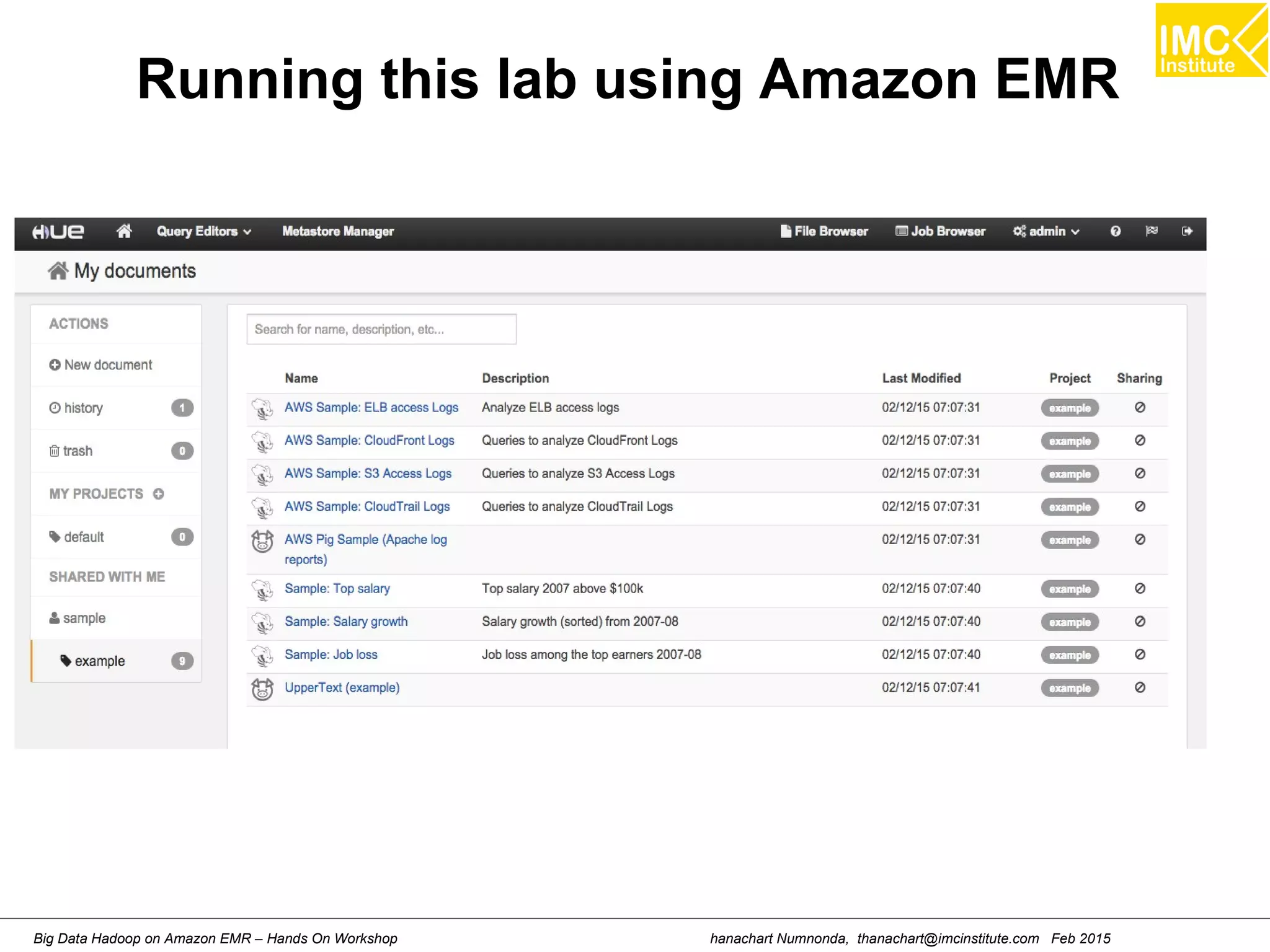
Running this lab using Amazon EMR
hanachart Numnonda, thanachart@imcinstitute.com Feb 2015Big Data Hadoop on Amazon EMR – Hands On Workshop
Hands-On: Create an EMR cluster
hanachart Numnonda, thanachart@imcinstitute.com Feb 2015Big Data Hadoop on Amazon EMR – Hands On Workshop
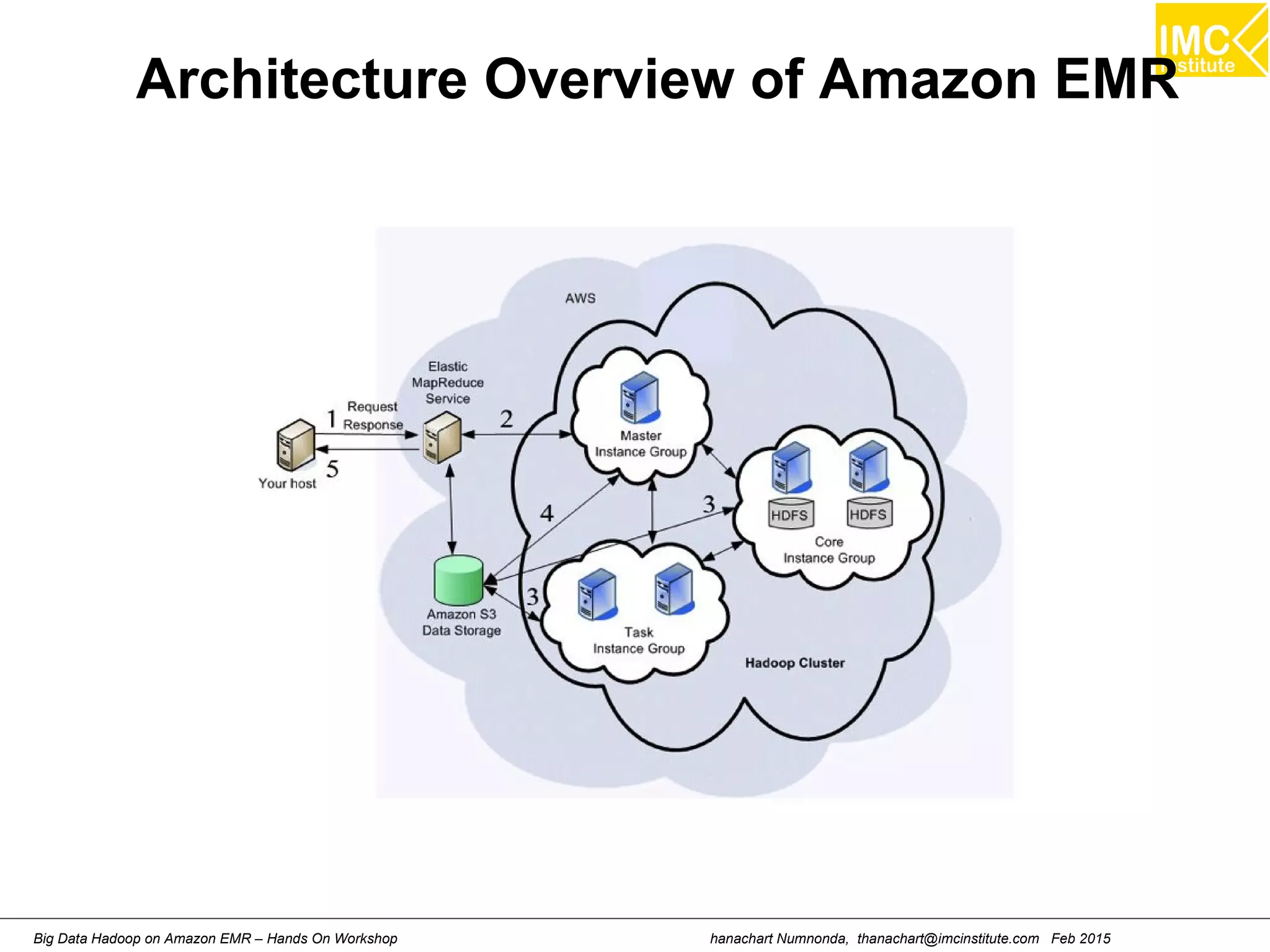
Architecture Overview of Amazon EMR
hanachart Numnonda, thanachart@imcinstitute.com Feb 2015Big Data Hadoop on Amazon EMR – Hands On Workshop
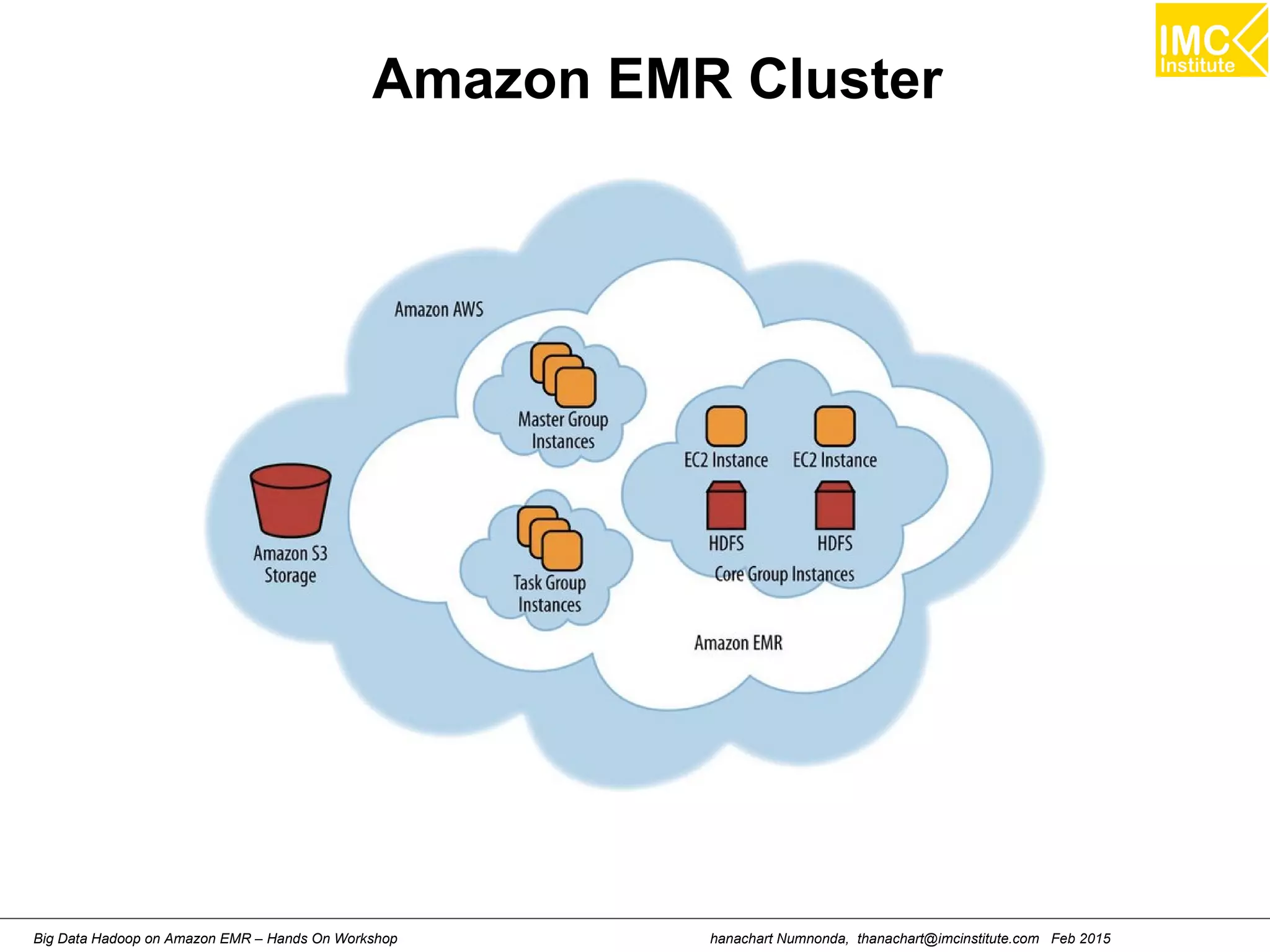
Amazon EMR Cluster
hanachart Numnonda, thanachart@imcinstitute.com Feb 2015Big Data Hadoop on Amazon EMR – Hands On Workshop
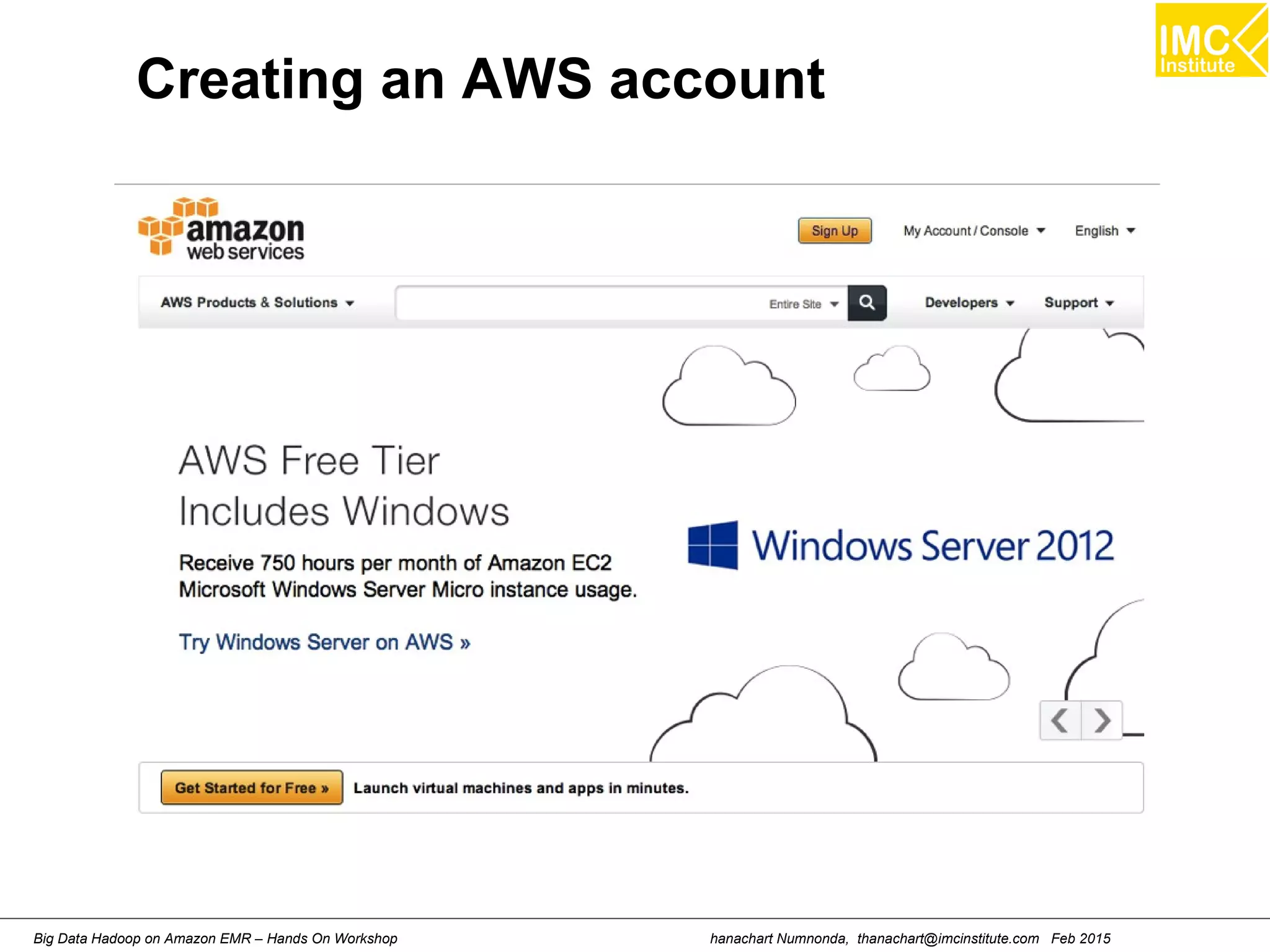
Creating an AWS account
hanachart Numnonda, thanachart@imcinstitute.com Feb 2015Big Data Hadoop on Amazon EMR – Hands On Workshop
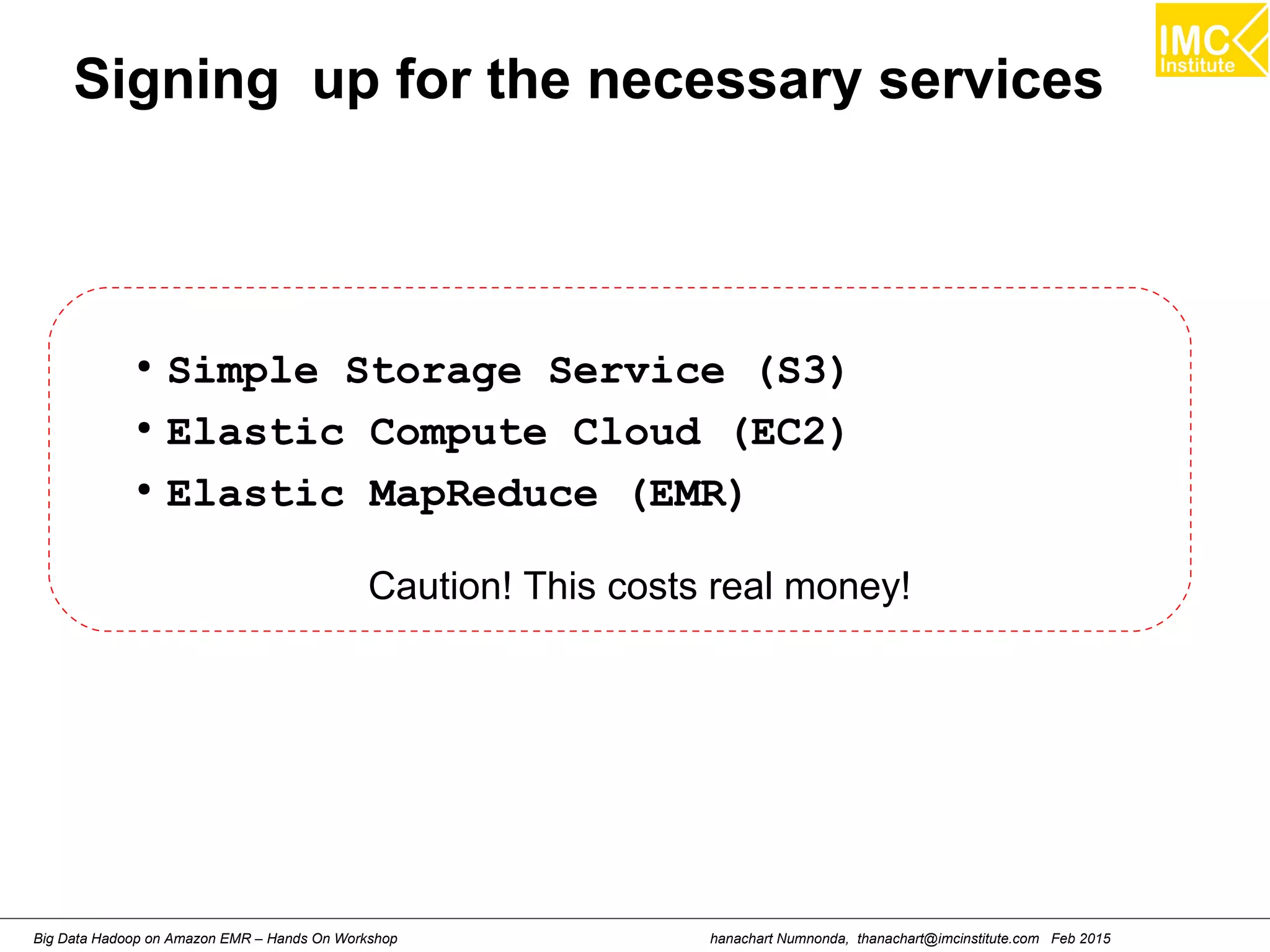
Signing up for the necessary services
●
Simple Storage Service (S3)
●
Elastic Compute Cloud (EC2)
●
Elastic MapReduce (EMR)
Caution! This costs real money!
hanachart Numnonda, thanachart@imcinstitute.com Feb 2015Big Data Hadoop on Amazon EMR – Hands On Workshop
Creating Amazon S3 bucket
hanachart Numnonda, thanachart@imcinstitute.com Feb 2015Big Data Hadoop on Amazon EMR – Hands On Workshop
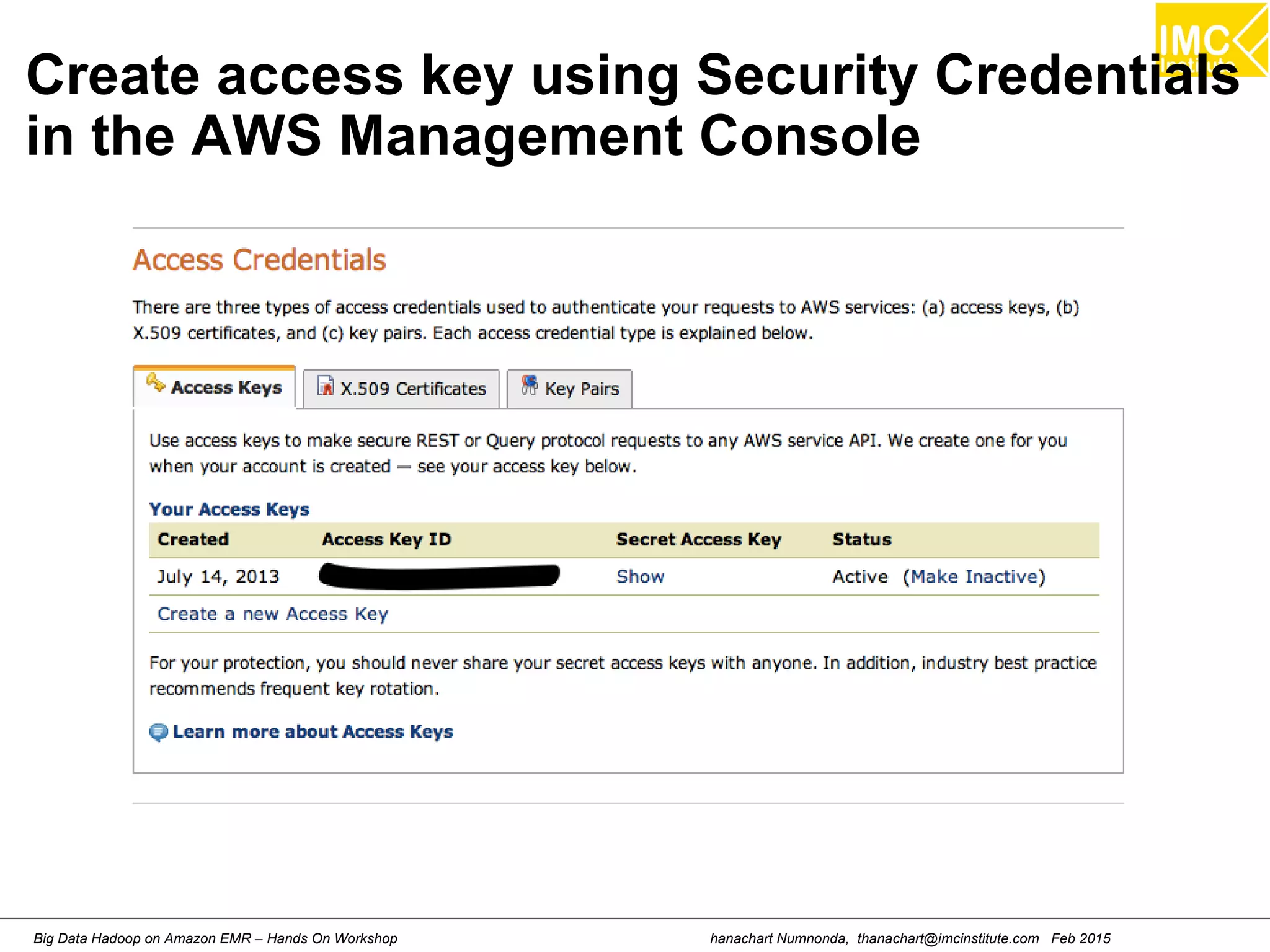
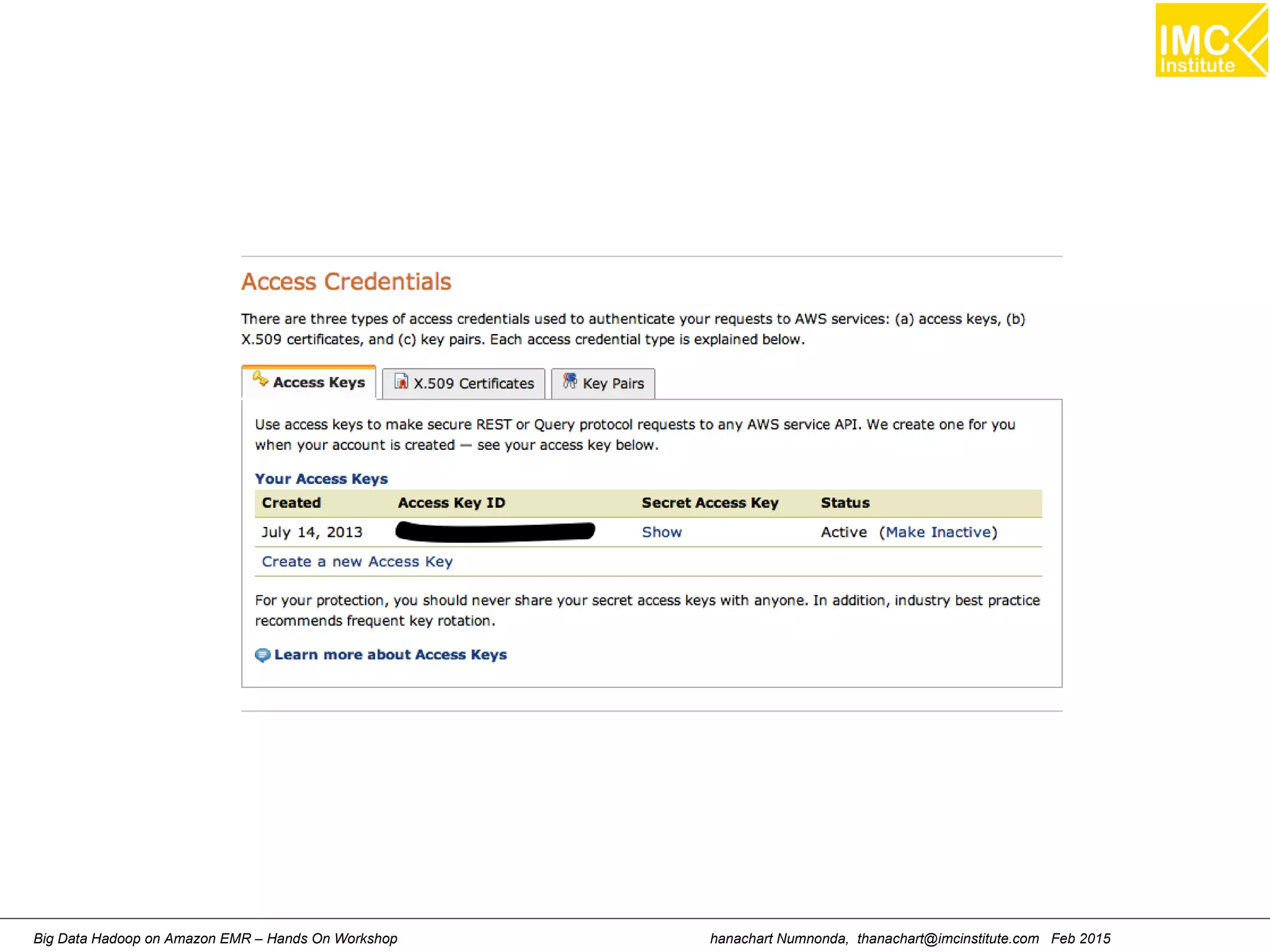
Create access key using Security Credentials
in the AWS Management Console
hanachart Numnonda, thanachart@imcinstitute.com Feb 2015Big Data Hadoop on Amazon EMR – Hands On Workshop
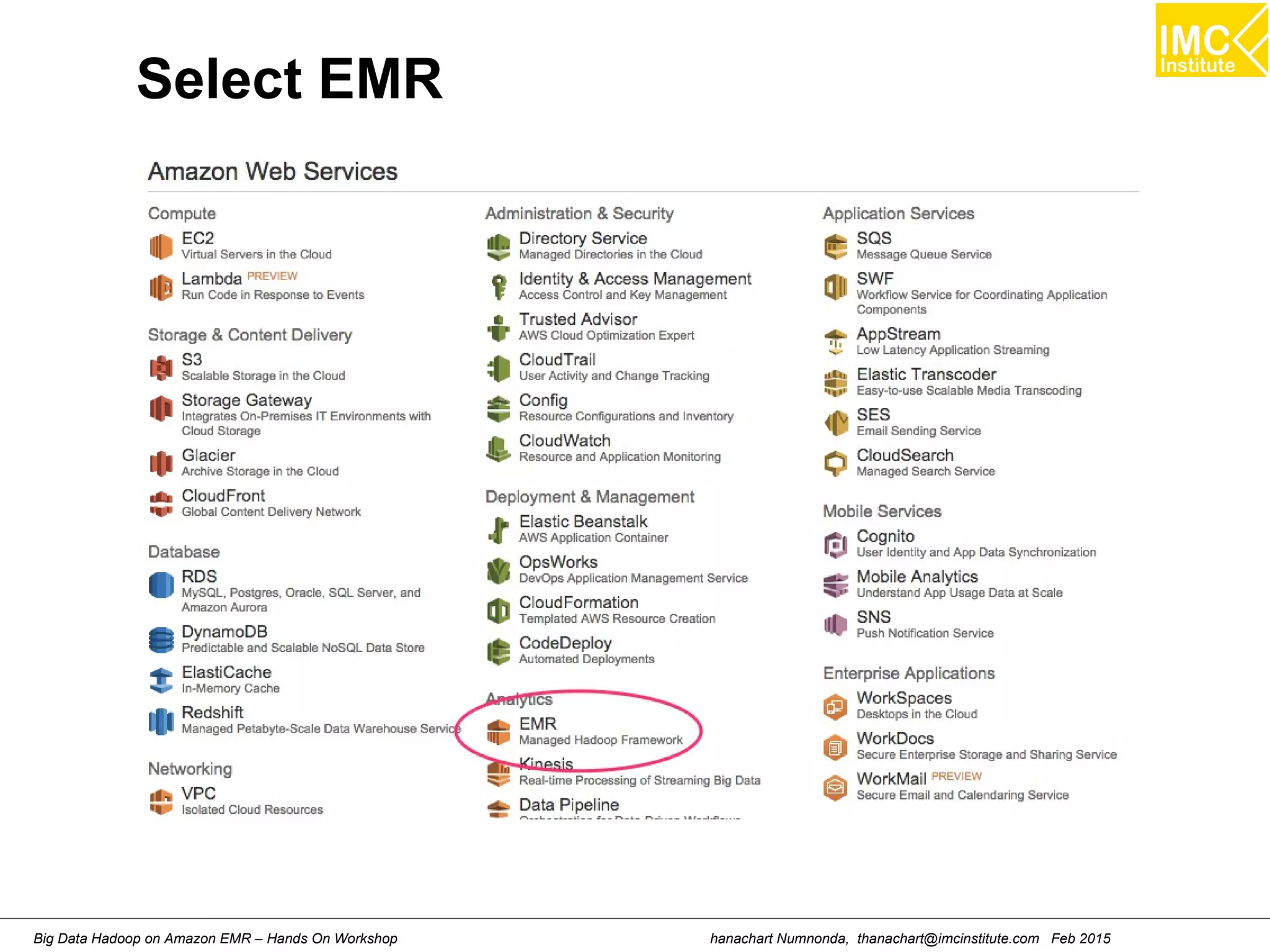
Select EMR
hanachart Numnonda, thanachart@imcinstitute.com Feb 2015Big Data Hadoop on Amazon EMR – Hands On Workshop
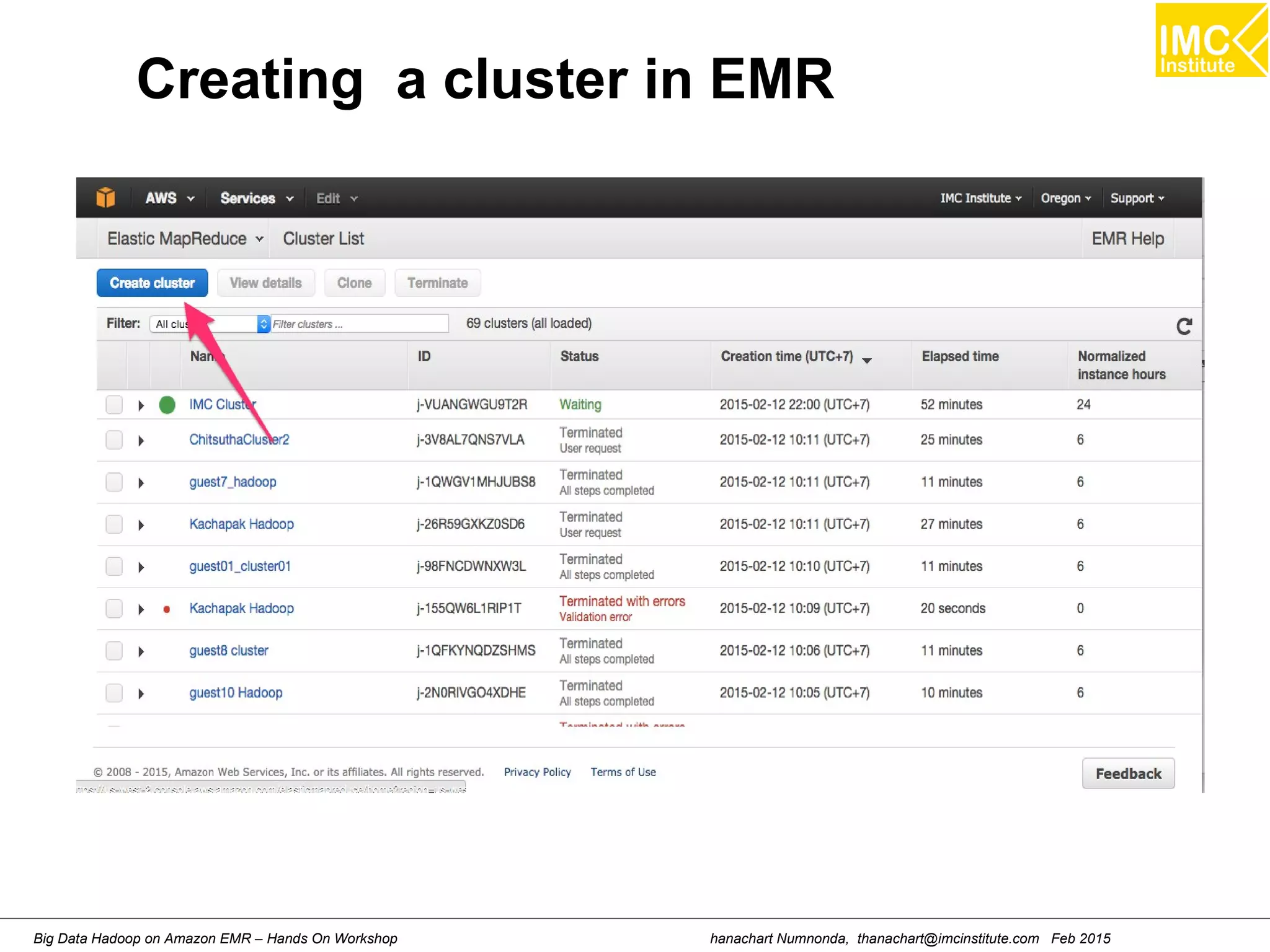
Creating a cluster in EMR
hanachart Numnonda, thanachart@imcinstitute.com Feb 2015Big Data Hadoop on Amazon EMR – Hands On Workshop
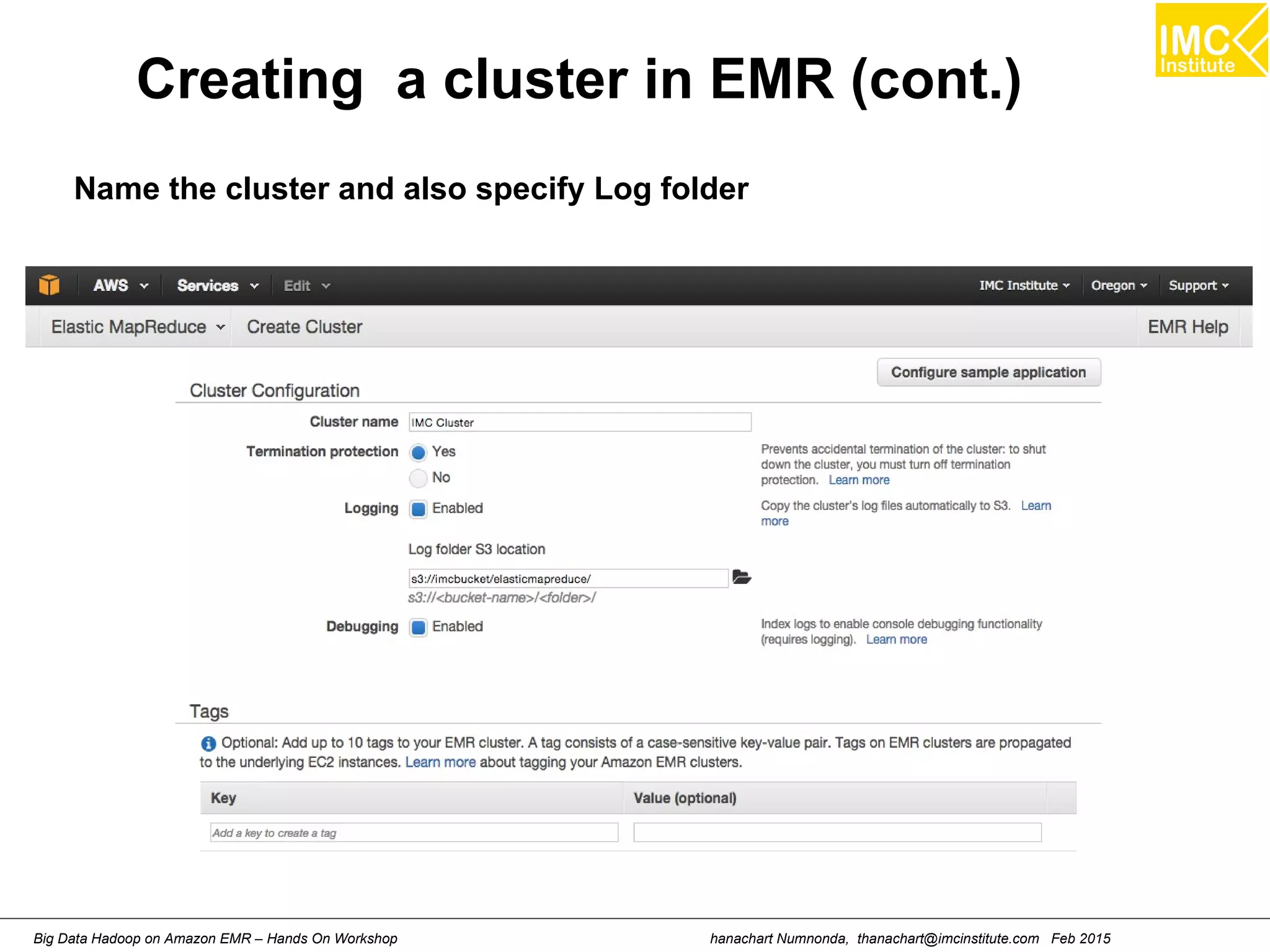
Creating a cluster in EMR (cont.)
Name the cluster and also specify Log folder
hanachart Numnonda, thanachart@imcinstitute.com Feb 2015Big Data Hadoop on Amazon EMR – Hands On Workshop
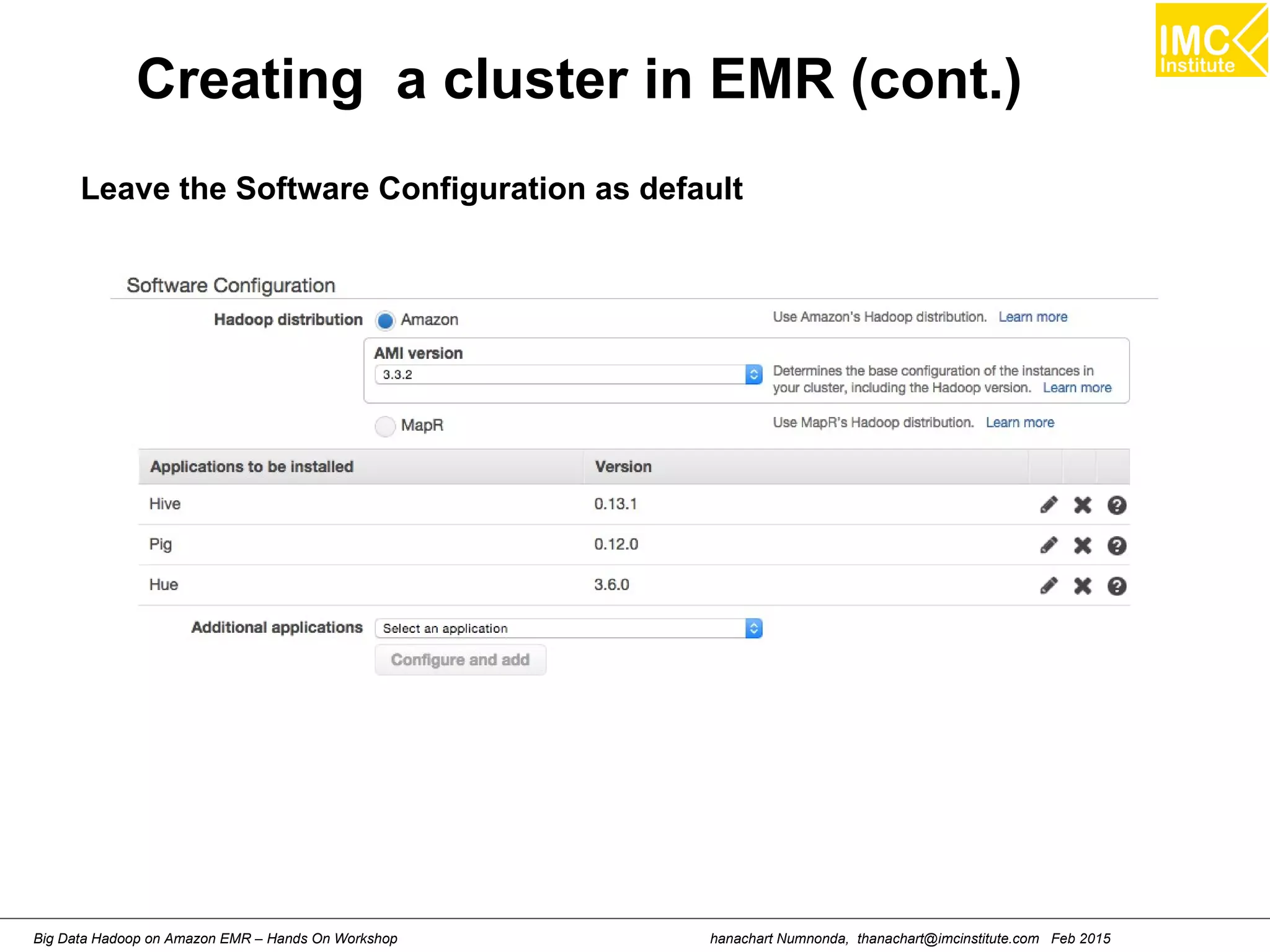
Creating a cluster in EMR (cont.)
Leave the Software Configuration as default
hanachart Numnonda, thanachart@imcinstitute.com Feb 2015Big Data Hadoop on Amazon EMR – Hands On Workshop
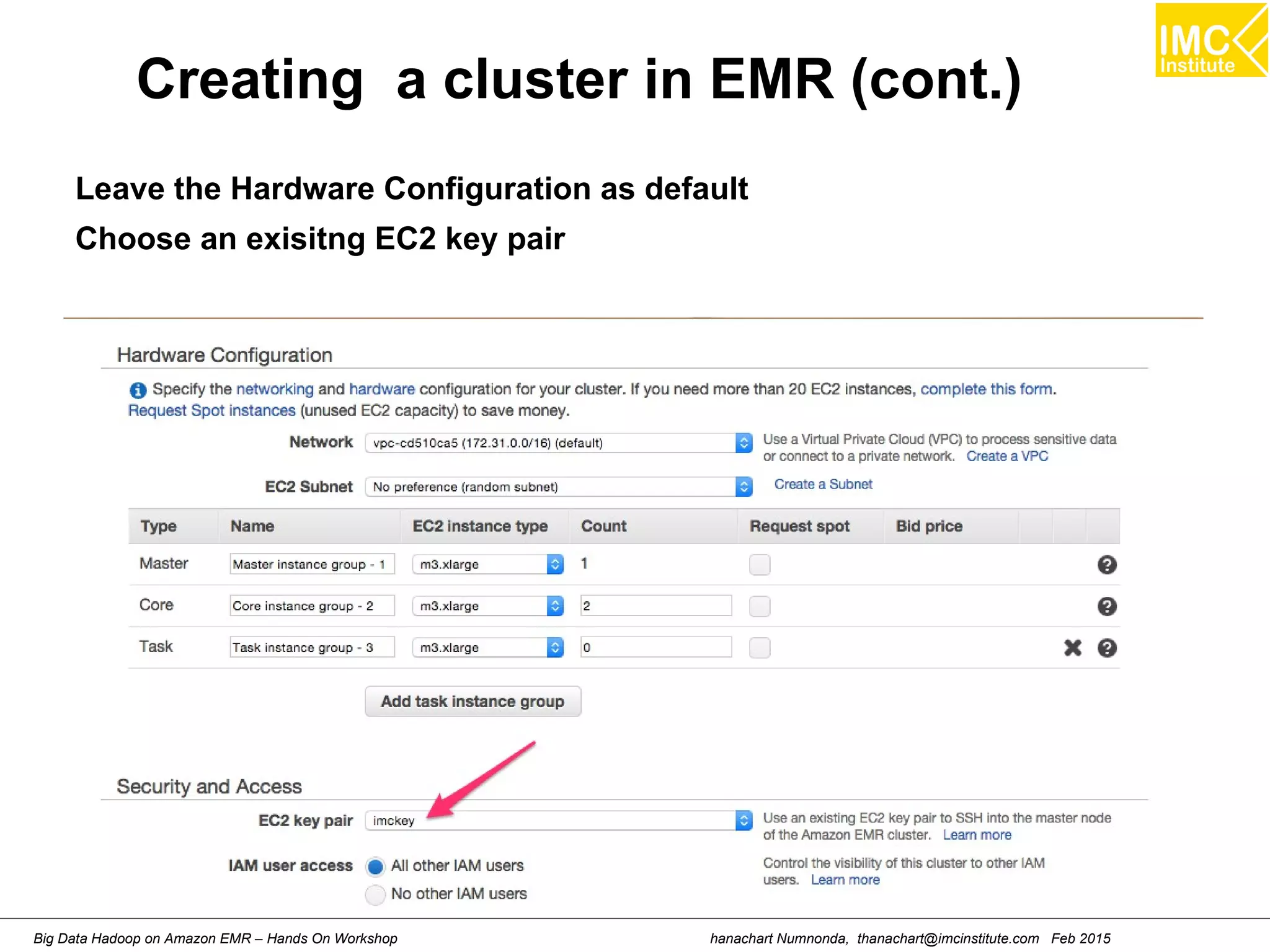
Creating a cluster in EMR (cont.)
Leave the Hardware Configuration as default
Choose an exisitng EC2 key pair
hanachart Numnonda, thanachart@imcinstitute.com Feb 2015Big Data Hadoop on Amazon EMR – Hands On Workshop
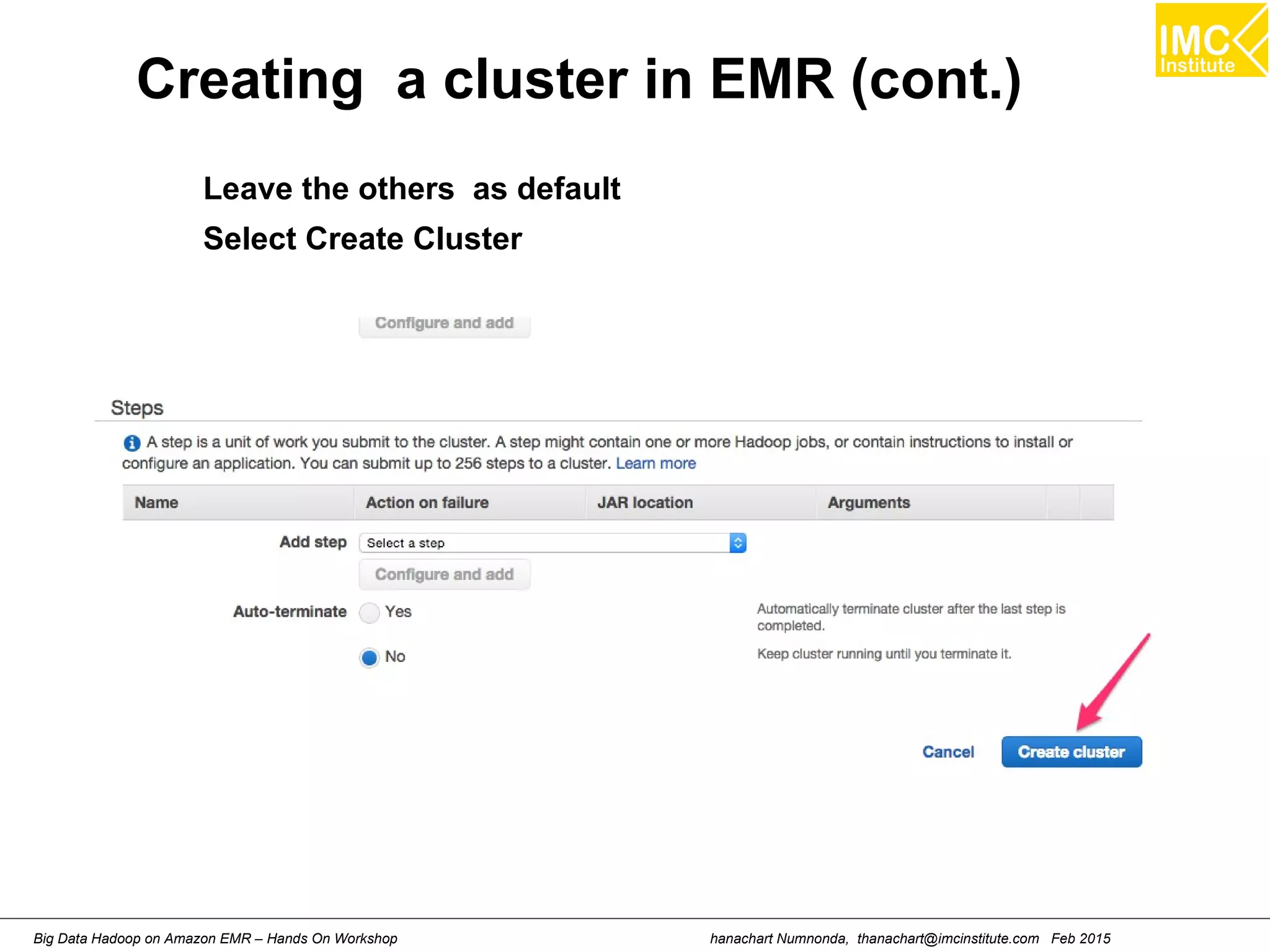
Creating a cluster in EMR (cont.)
Leave the others as default
Select Create Cluster
hanachart Numnonda, thanachart@imcinstitute.com Feb 2015Big Data Hadoop on Amazon EMR – Hands On Workshop
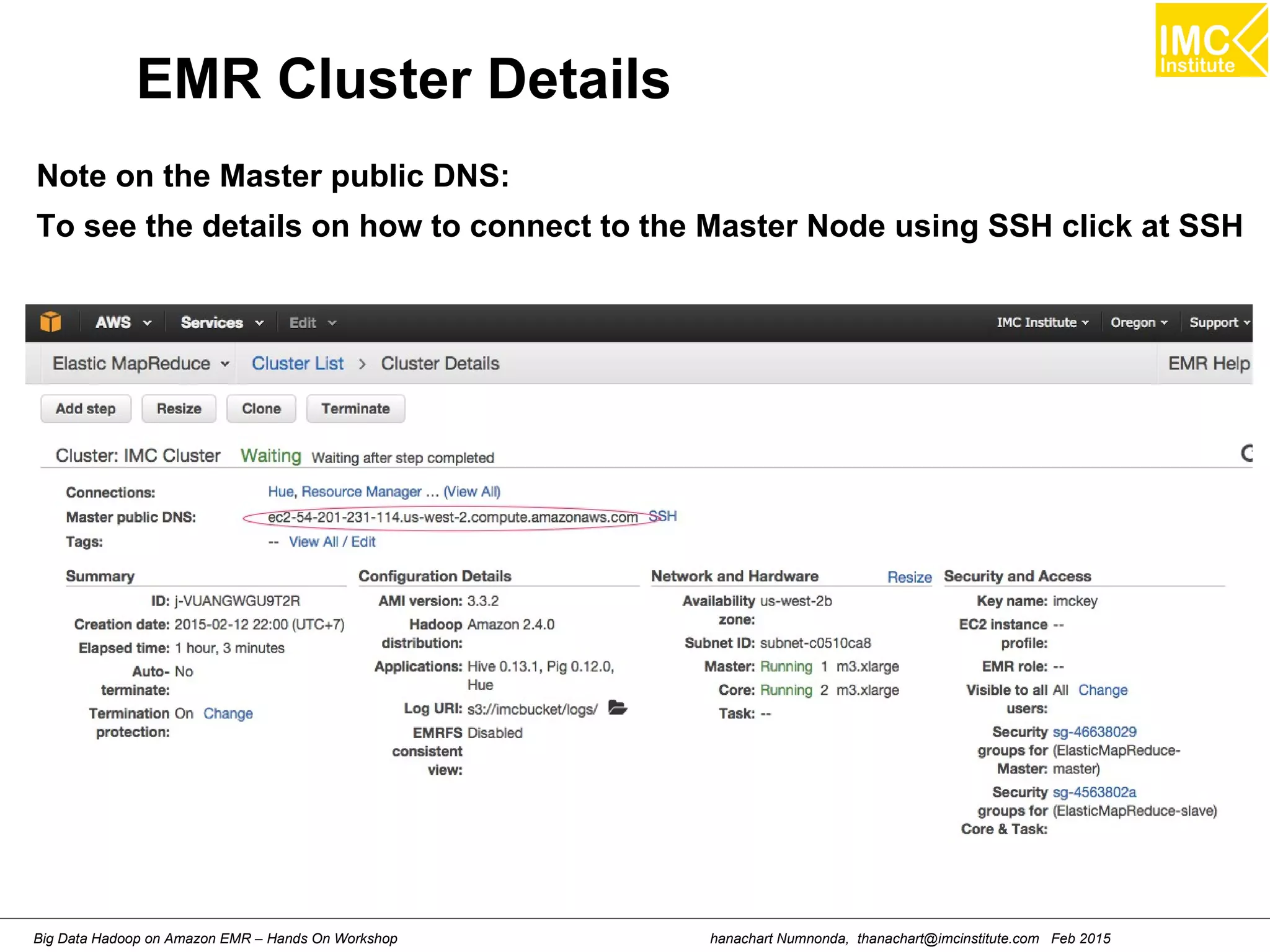
EMR Cluster Details
Note on the Master public DNS:
To see the details on how to connect to the Master Node using SSH click at SSH
hanachart Numnonda, thanachart@imcinstitute.com Feb 2015Big Data Hadoop on Amazon EMR – Hands On Workshop
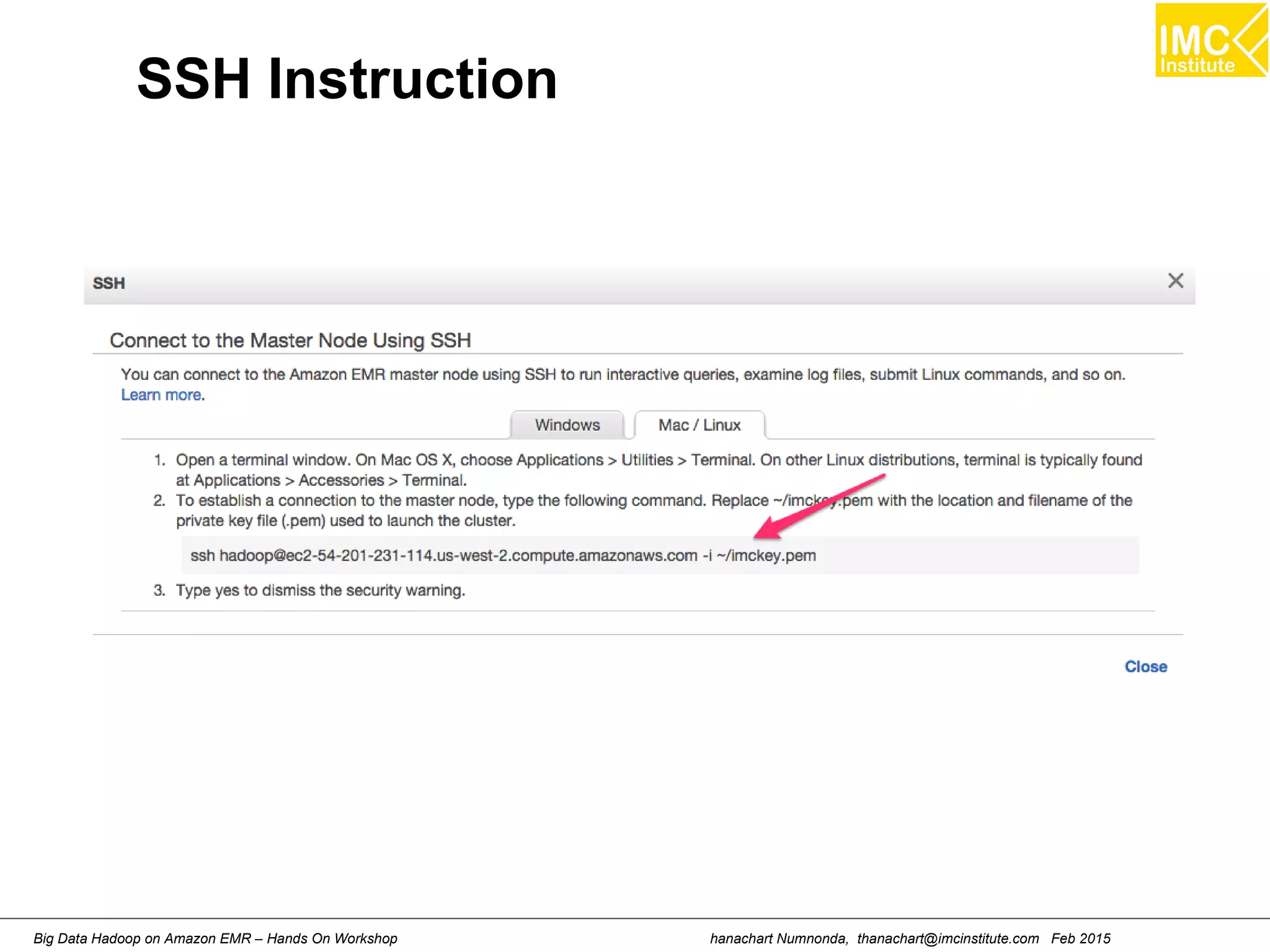
SSH Instruction
hanachart Numnonda, thanachart@imcinstitute.com Feb 2015Big Data Hadoop on Amazon EMR – Hands On Workshop
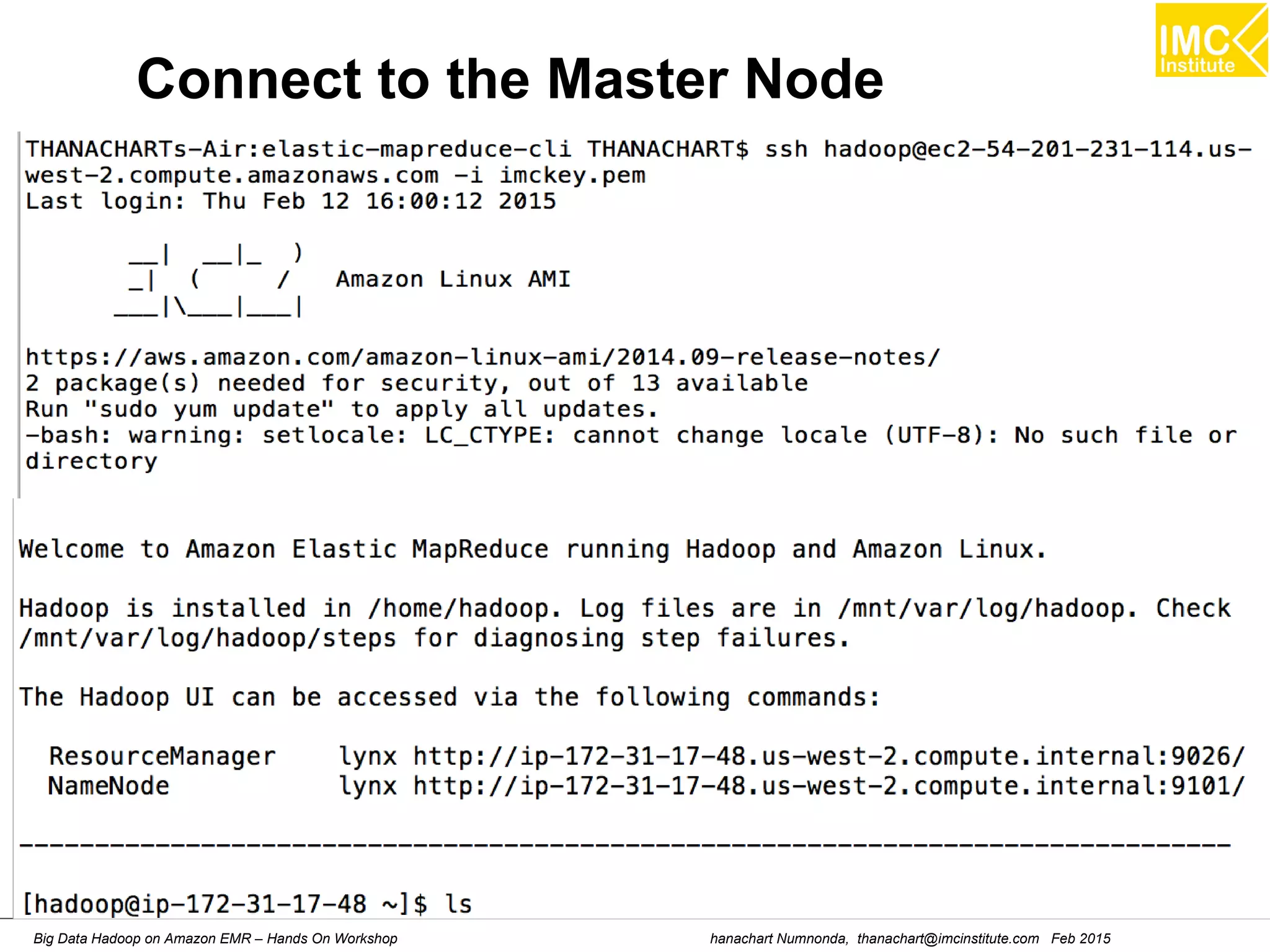
Connect to the Master Node
hanachart Numnonda, thanachart@imcinstitute.com Feb 2015Big Data Hadoop on Amazon EMR – Hands On Workshop
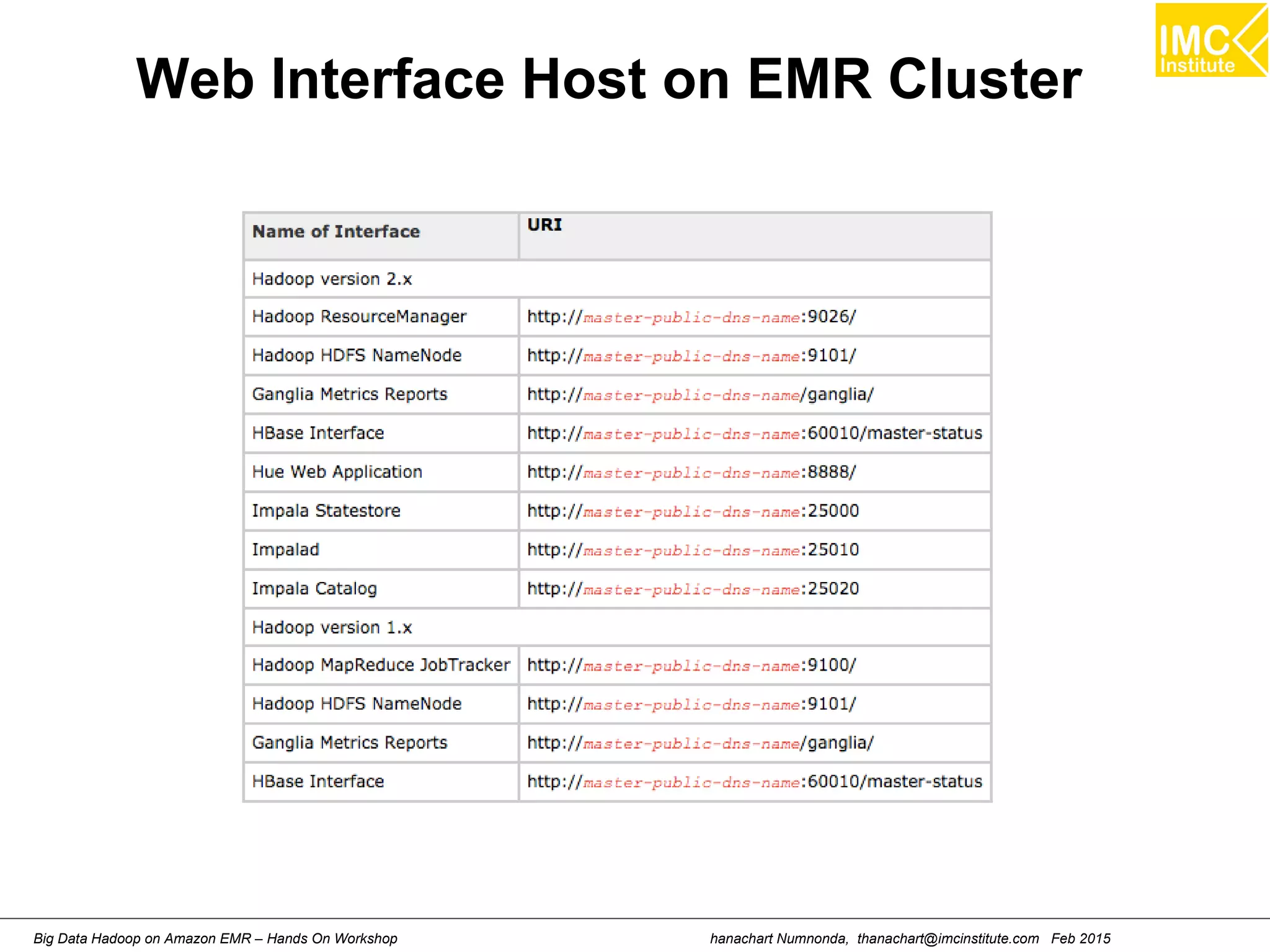
Web Interface Host on EMR Cluster
Danairat T., 2013, danairat@gmail.comBig Data Hadoop – Hands On Workshop 21
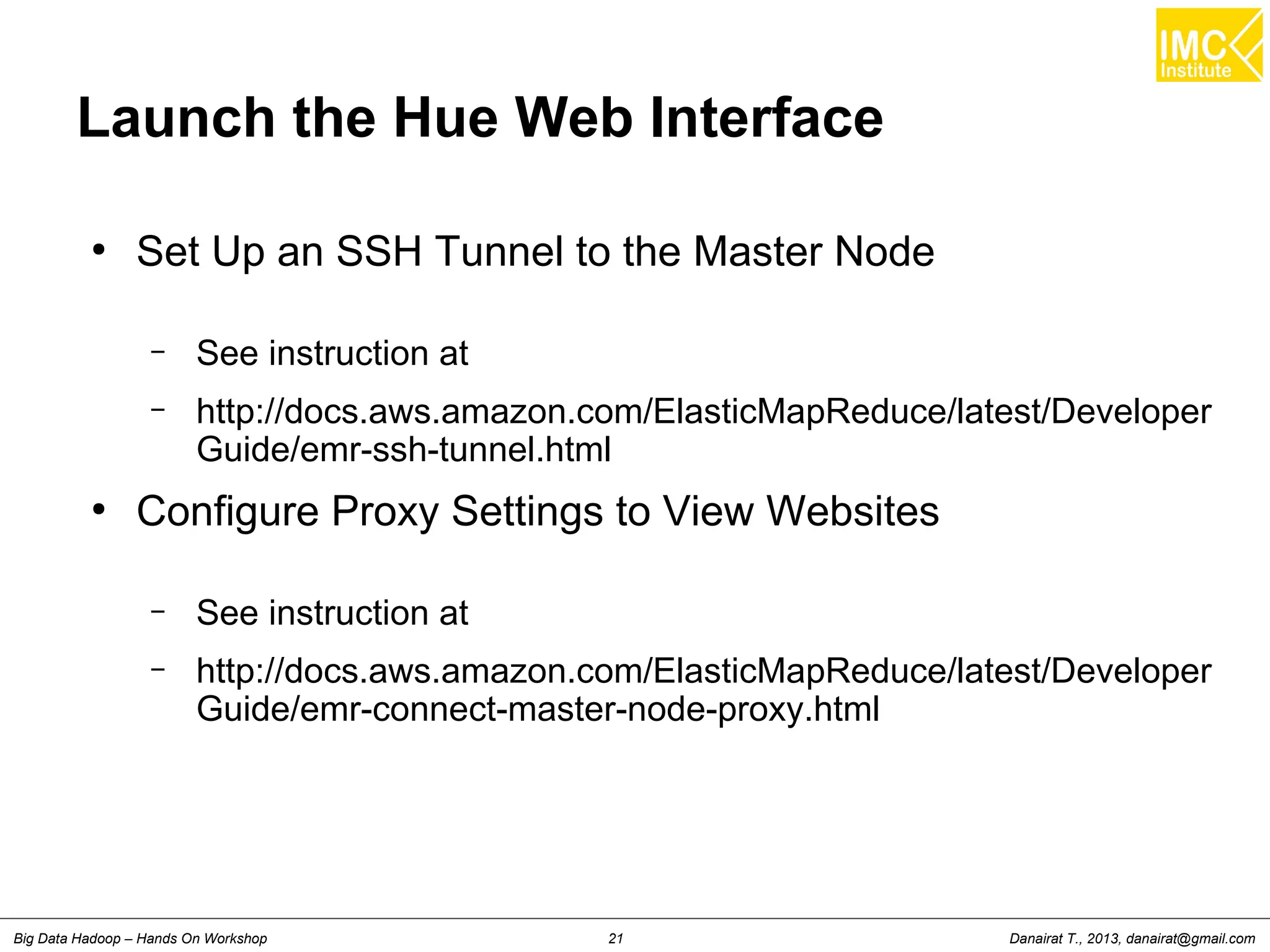
Launch the Hue Web Interface
●
Set Up an SSH Tunnel to the Master Node
– See instruction at
– http://docs.aws.amazon.com/ElasticMapReduce/latest/Developer
Guide/emr-ssh-tunnel.html
●
Configure Proxy Settings to View Websites
– See instruction at
– http://docs.aws.amazon.com/ElasticMapReduce/latest/Developer
Guide/emr-connect-master-node-proxy.html
Danairat T., 2013, danairat@gmail.comBig Data Hadoop – Hands On Workshop 22
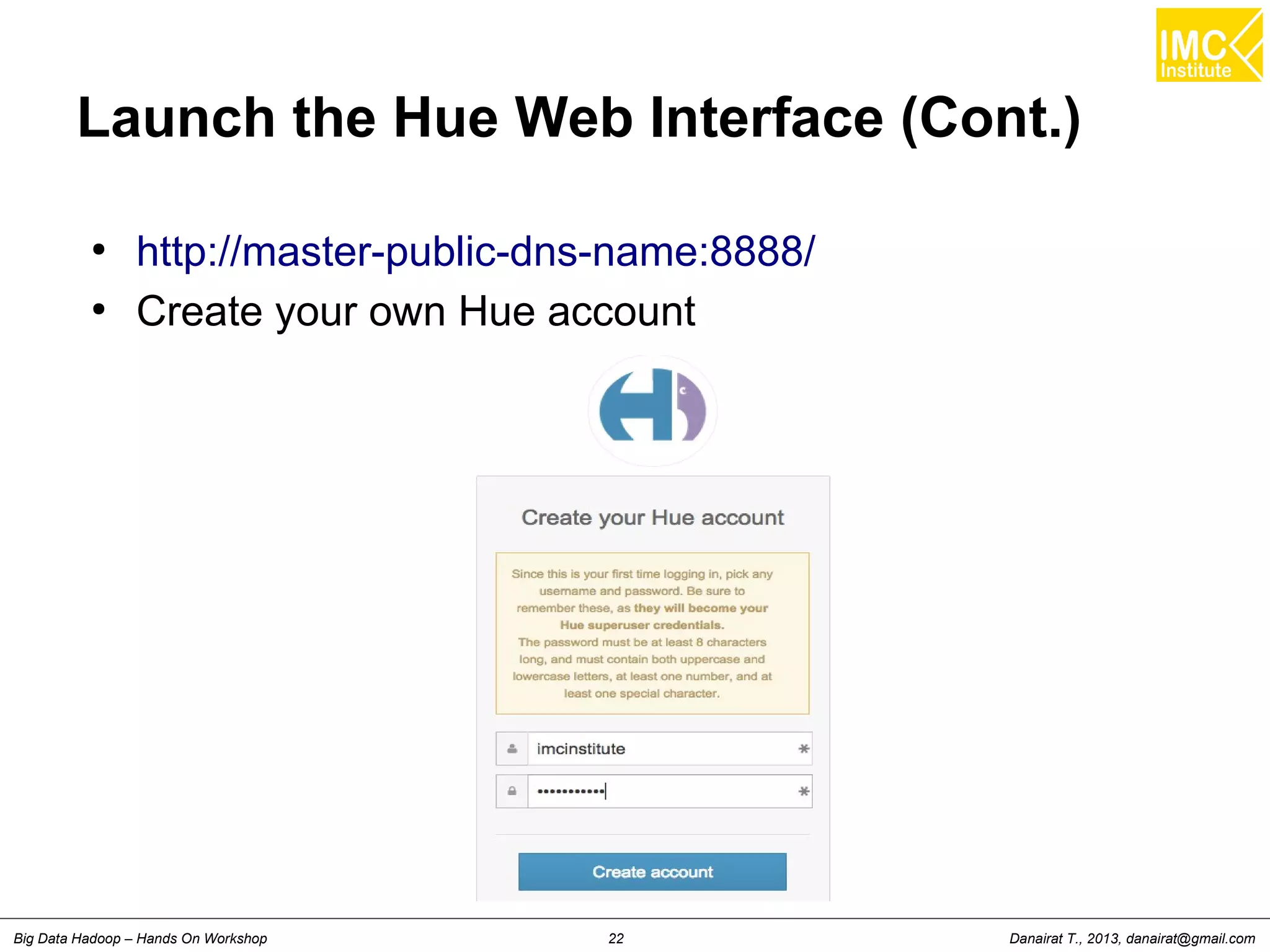
Launch the Hue Web Interface (Cont.)
●
http://master-public-dns-name:8888/
●
Create your own Hue account
Danairat T., 2013, danairat@gmail.comBig Data Hadoop – Hands On Workshop 23
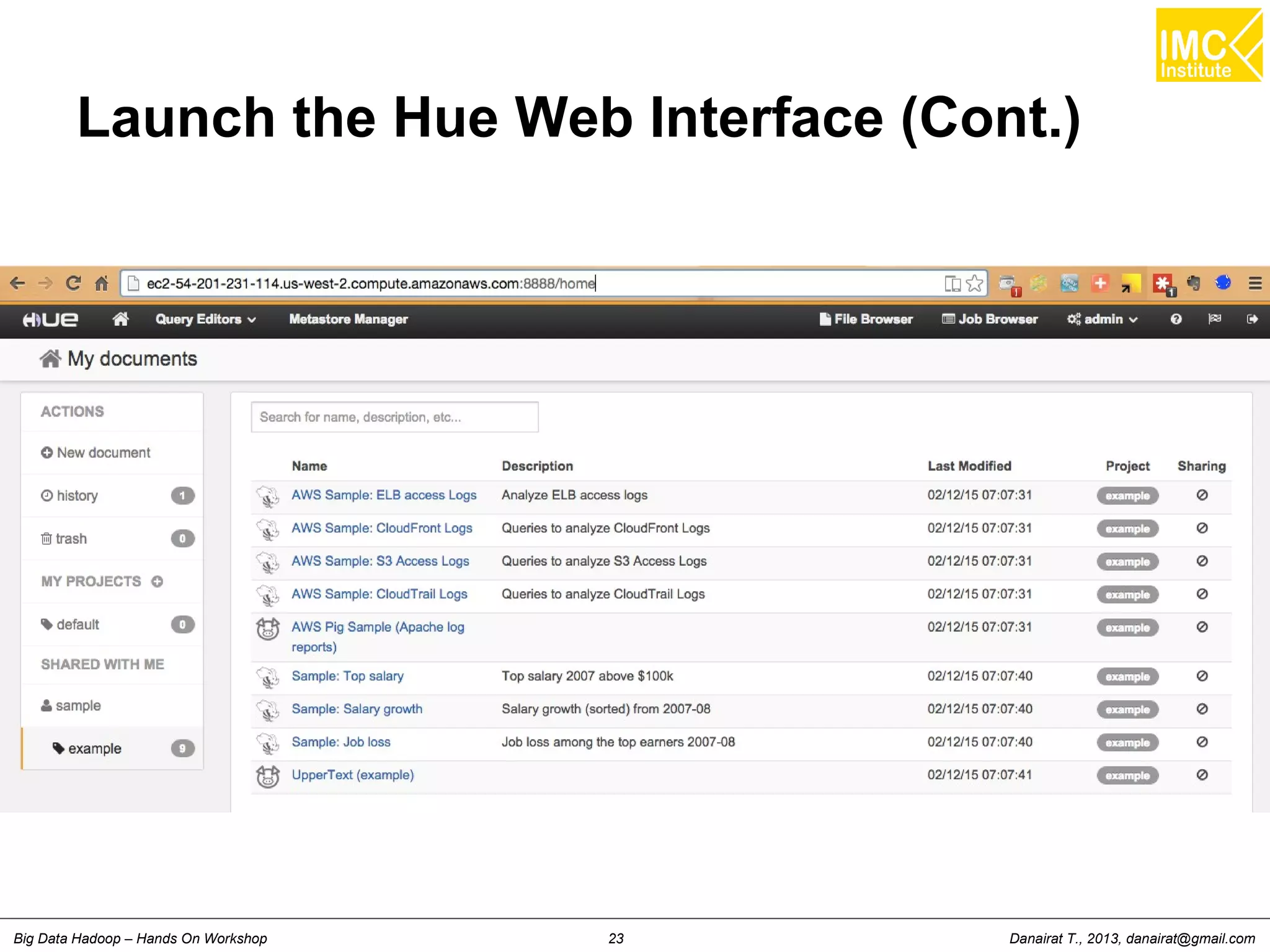
Launch the Hue Web Interface (Cont.)
hanachart Numnonda, thanachart@imcinstitute.com Feb 2015Big Data Hadoop on Amazon EMR – Hands On Workshop
Hands-On: Importing/Exporting
Data to HDFS
hanachart Numnonda, thanachart@imcinstitute.com Feb 2015Big Data Hadoop on Amazon EMR – Hands On Workshop
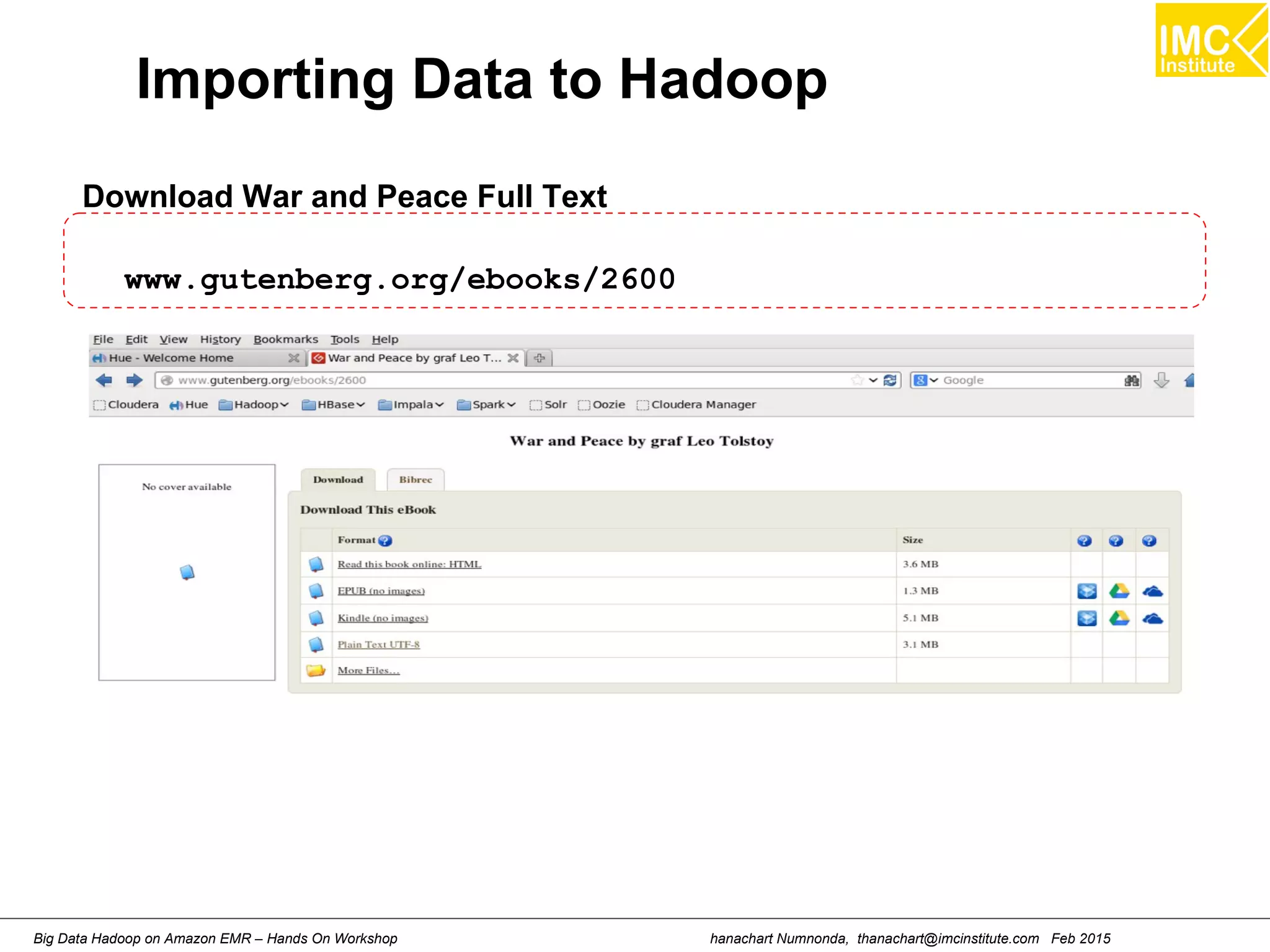
Importing Data to Hadoop
Download War and Peace Full Text
www.gutenberg.org/ebooks/2600
hanachart Numnonda, thanachart@imcinstitute.com Feb 2015Big Data Hadoop on Amazon EMR – Hands On Workshop
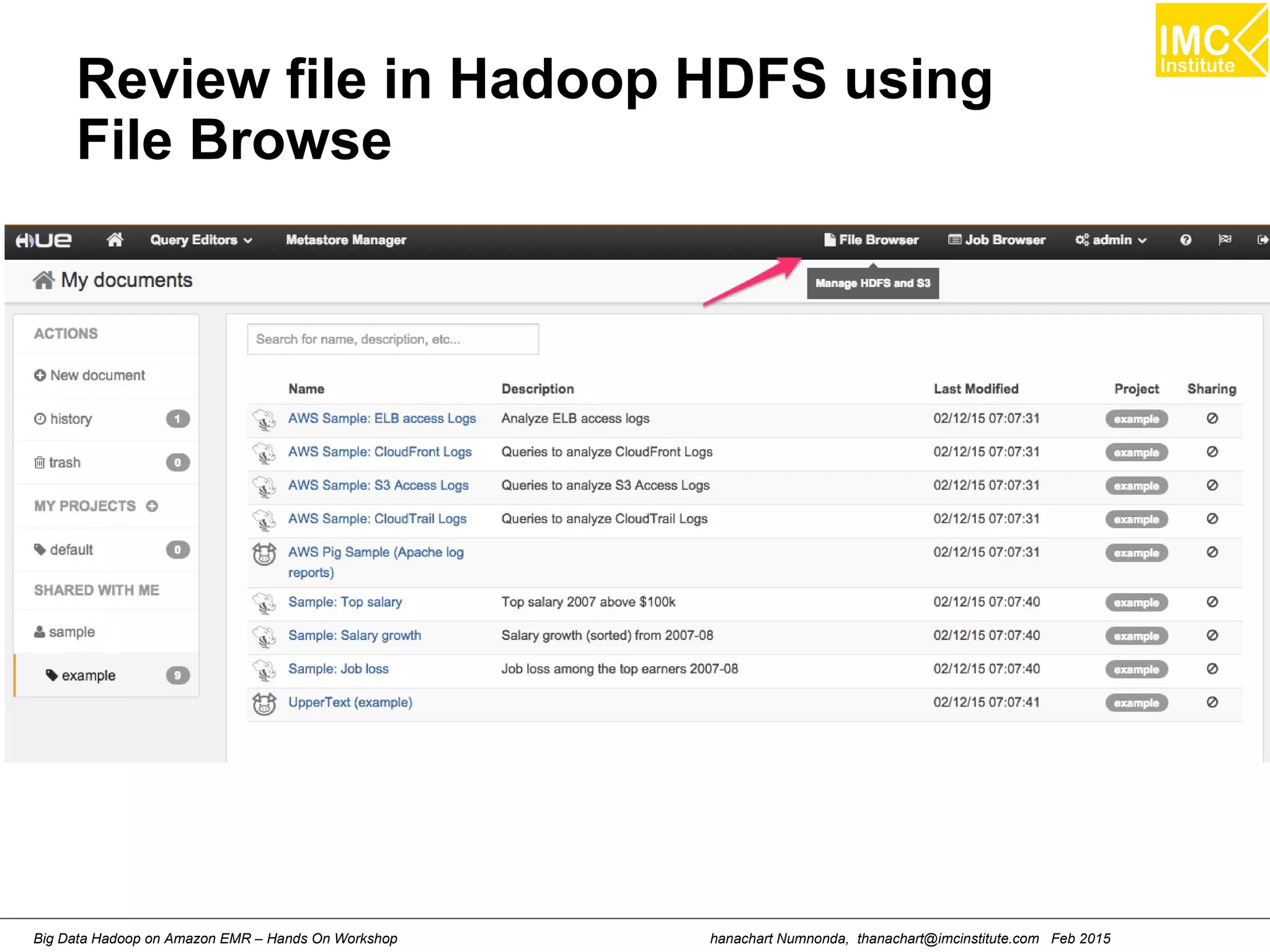
Review file in Hadoop HDFS using
File Browse
hanachart Numnonda, thanachart@imcinstitute.com Feb 2015Big Data Hadoop on Amazon EMR – Hands On Workshop
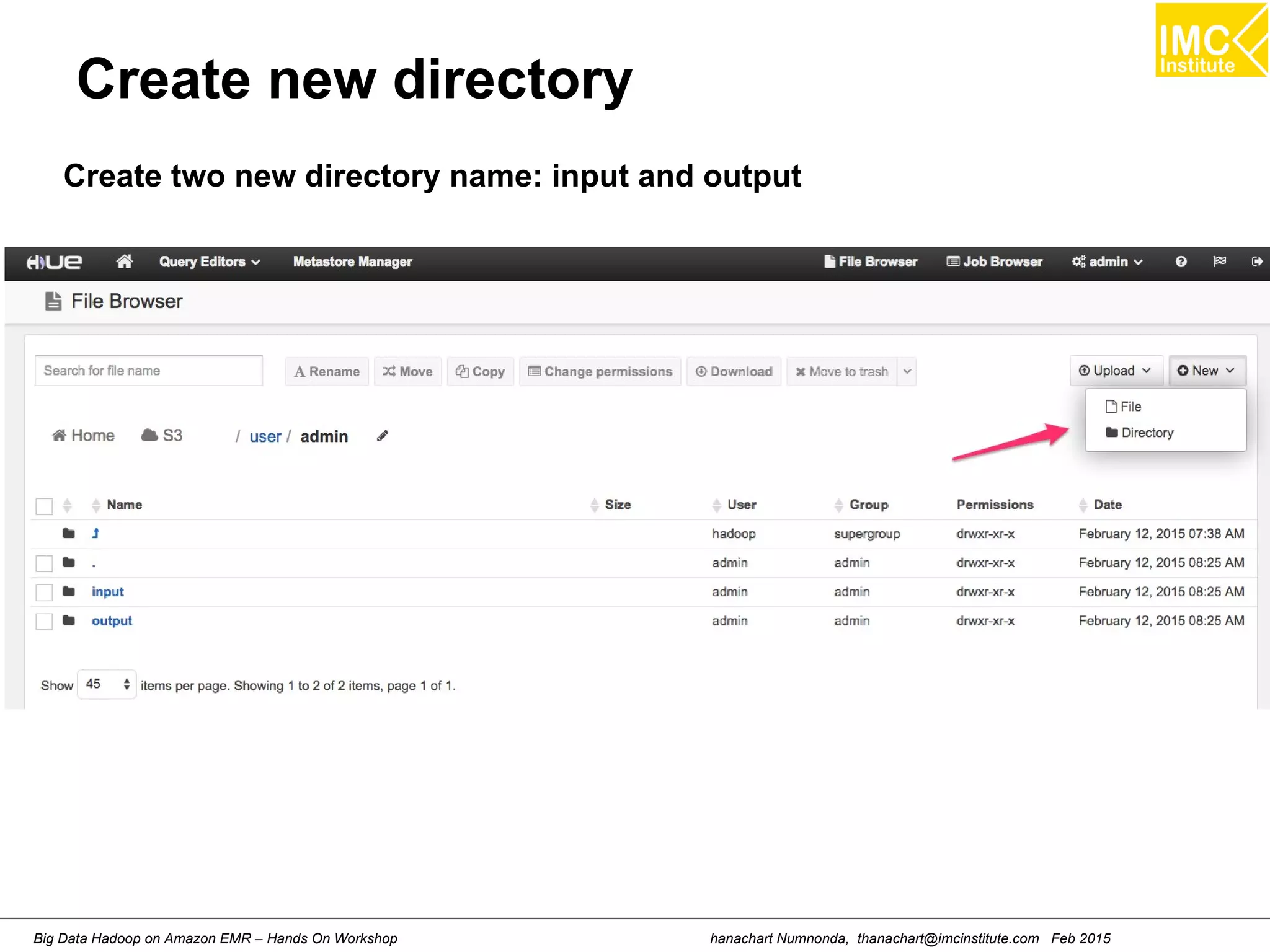
Create new directory
Create two new directory name: input and output
hanachart Numnonda, thanachart@imcinstitute.com Feb 2015Big Data Hadoop on Amazon EMR – Hands On Workshop
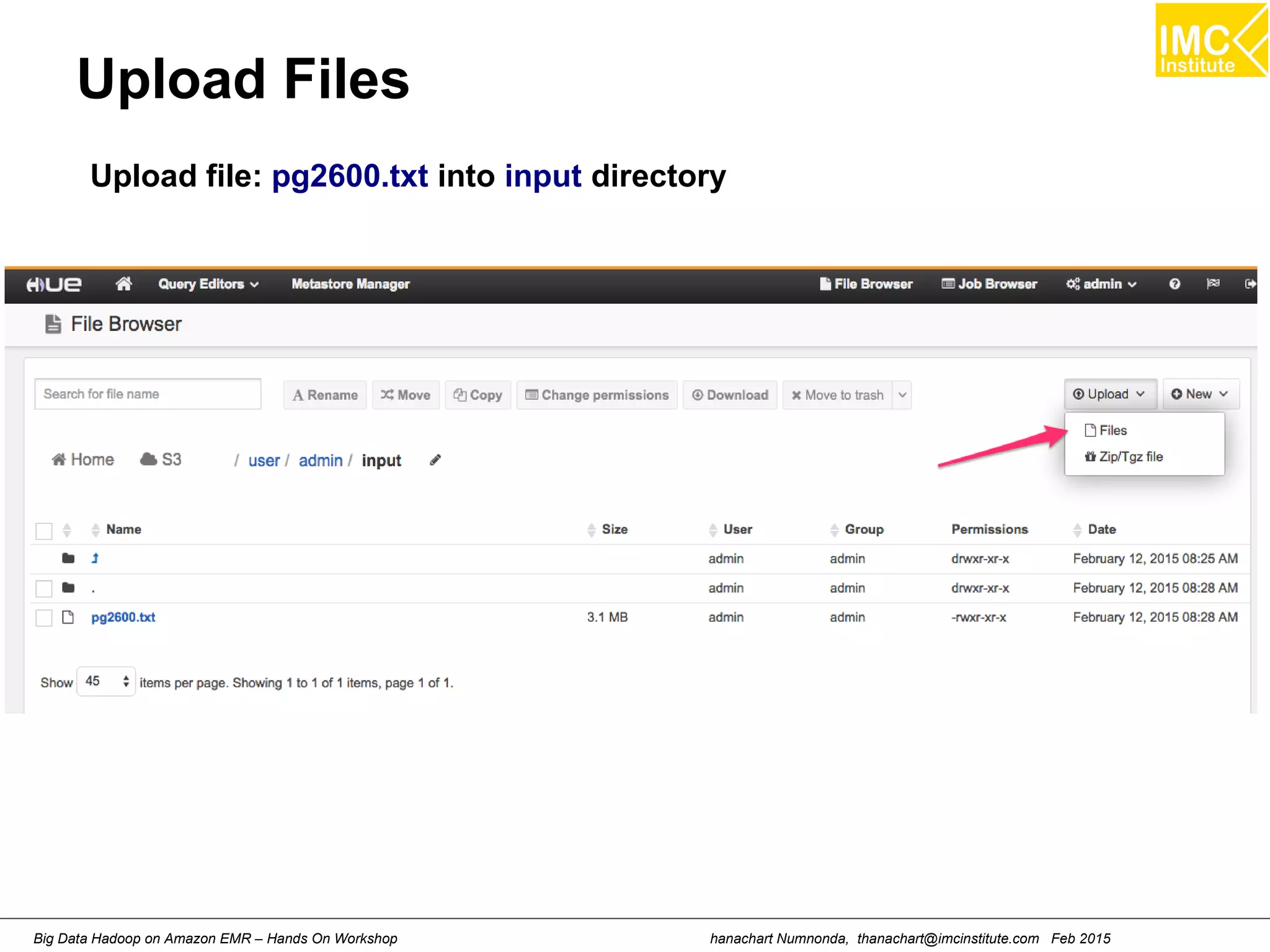
Upload Files
Upload file: pg2600.txt into input directory
hanachart Numnonda, thanachart@imcinstitute.com Feb 2015Big Data Hadoop on Amazon EMR – Hands On Workshop
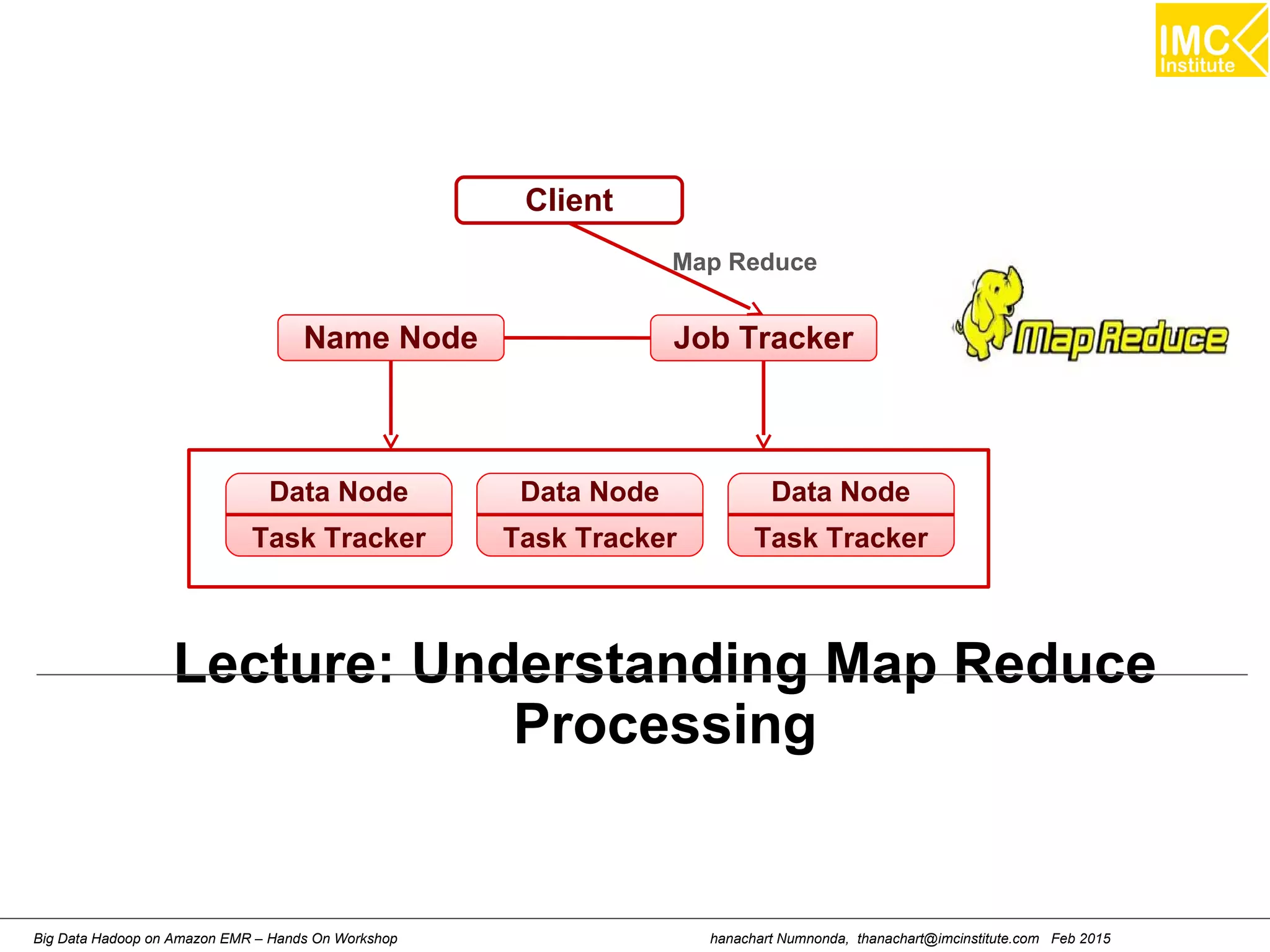
Lecture: Understanding Map Reduce
Processing
Client
Name Node Job Tracker
Data Node
Task Tracker
Data Node
Task Tracker
Data Node
Task Tracker
Map Reduce
hanachart Numnonda, thanachart@imcinstitute.com Feb 2015Big Data Hadoop on Amazon EMR – Hands On Workshop
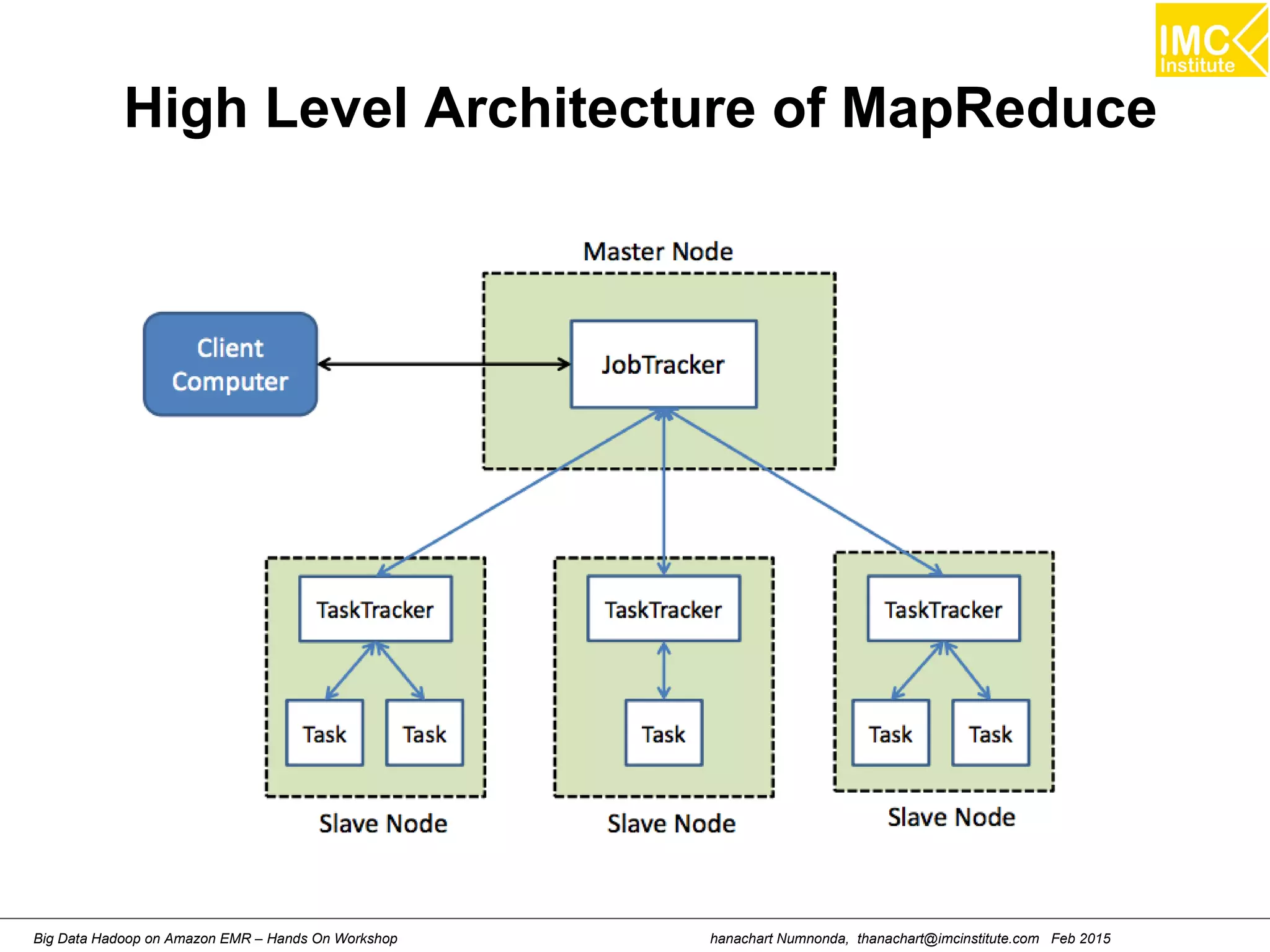
High Level Architecture of MapReduce
hanachart Numnonda, thanachart@imcinstitute.com Feb 2015Big Data Hadoop on Amazon EMR – Hands On Workshop
Hands-On: Writing you own Map
Reduce Program
hanachart Numnonda, thanachart@imcinstitute.com Feb 2015Big Data Hadoop on Amazon EMR – Hands On Workshop
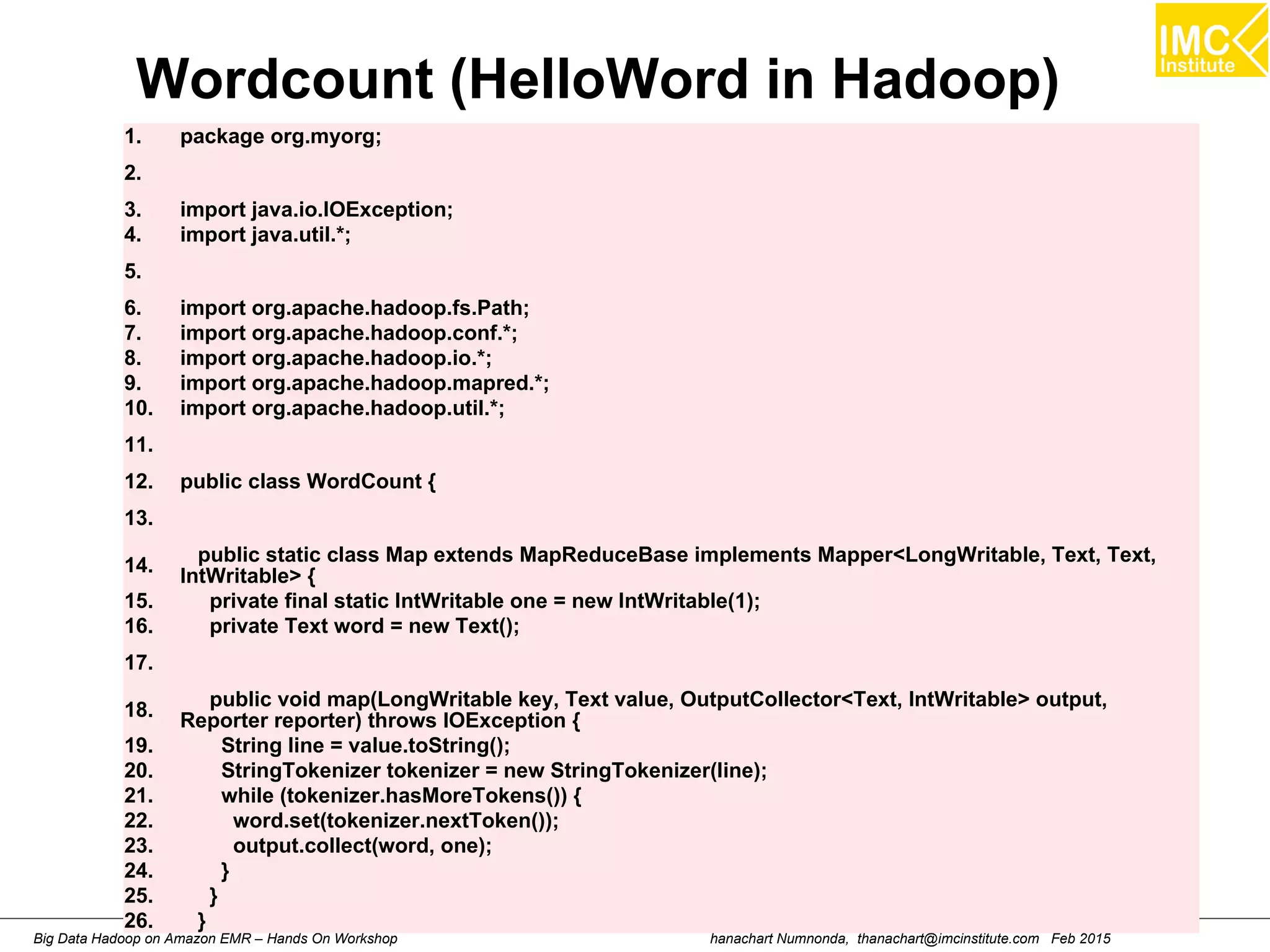
Wordcount (HelloWord in Hadoop)
1. package org.myorg;
2.
3. import java.io.IOException;
4. import java.util.*;
5.
6. import org.apache.hadoop.fs.Path;
7. import org.apache.hadoop.conf.*;
8. import org.apache.hadoop.io.*;
9. import org.apache.hadoop.mapred.*;
10. import org.apache.hadoop.util.*;
11.
12. public class WordCount {
13.
14.
public static class Map extends MapReduceBase implements Mapper<LongWritable, Text, Text,
IntWritable> {
15. private final static IntWritable one = new IntWritable(1);
16. private Text word = new Text();
17.
18.
public void map(LongWritable key, Text value, OutputCollector<Text, IntWritable> output,
Reporter reporter) throws IOException {
19. String line = value.toString();
20. StringTokenizer tokenizer = new StringTokenizer(line);
21. while (tokenizer.hasMoreTokens()) {
22. word.set(tokenizer.nextToken());
23. output.collect(word, one);
24. }
25. }
26. }
hanachart Numnonda, thanachart@imcinstitute.com Feb 2015Big Data Hadoop on Amazon EMR – Hands On Workshop
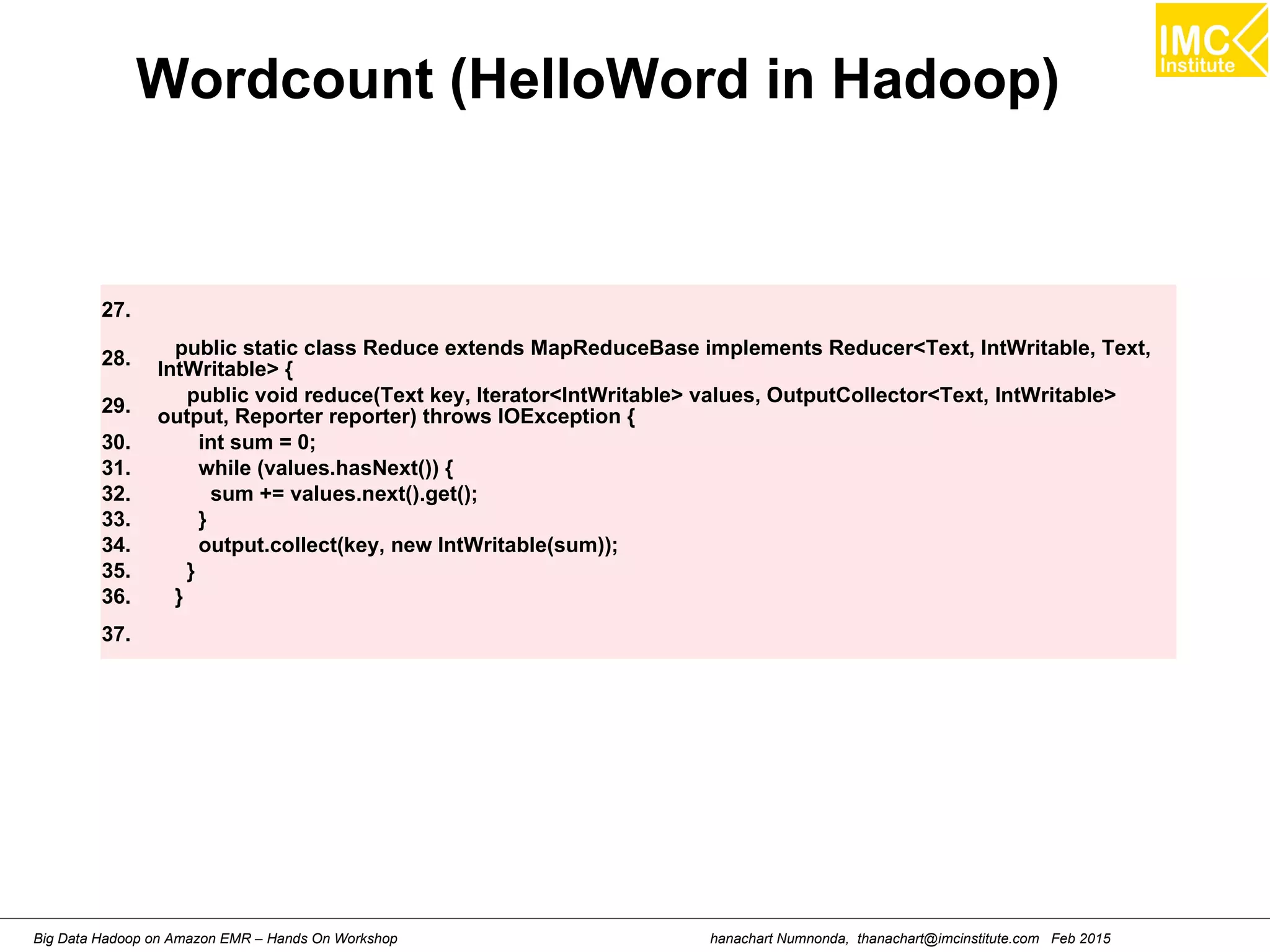
Wordcount (HelloWord in Hadoop)
27.
28. public static class Reduce extends MapReduceBase implements Reducer<Text, IntWritable, Text,
IntWritable> {
29.
public void reduce(Text key, Iterator<IntWritable> values, OutputCollector<Text, IntWritable>
output, Reporter reporter) throws IOException {
30. int sum = 0;
31. while (values.hasNext()) {
32. sum += values.next().get();
33. }
34. output.collect(key, new IntWritable(sum));
35. }
36. }
37.
hanachart Numnonda, thanachart@imcinstitute.com Feb 2015Big Data Hadoop on Amazon EMR – Hands On Workshop
Wordcount (HelloWord in Hadoop)
38. public static void main(String[] args) throws Exception {
39. JobConf conf = new JobConf(WordCount.class);
40. conf.setJobName("wordcount");
41.
42. conf.setOutputKeyClass(Text.class);
43. conf.setOutputValueClass(IntWritable.class);
44.
45. conf.setMapperClass(Map.class);
46.
47. conf.setReducerClass(Reduce.class);
48.
49. conf.setInputFormat(TextInputFormat.class);
50. conf.setOutputFormat(TextOutputFormat.class);
51.
52. FileInputFormat.setInputPaths(conf, new Path(args[1]));
53. FileOutputFormat.setOutputPath(conf, new Path(args[2]));
54.
55. JobClient.runJob(conf);
57. }
58. }
59.
hanachart Numnonda, thanachart@imcinstitute.com Feb 2015Big Data Hadoop on Amazon EMR – Hands On Workshop
Hands-On: Writing Map/Reduce
Program on Eclipse
hanachart Numnonda, thanachart@imcinstitute.com Feb 2015Big Data Hadoop on Amazon EMR – Hands On Workshop
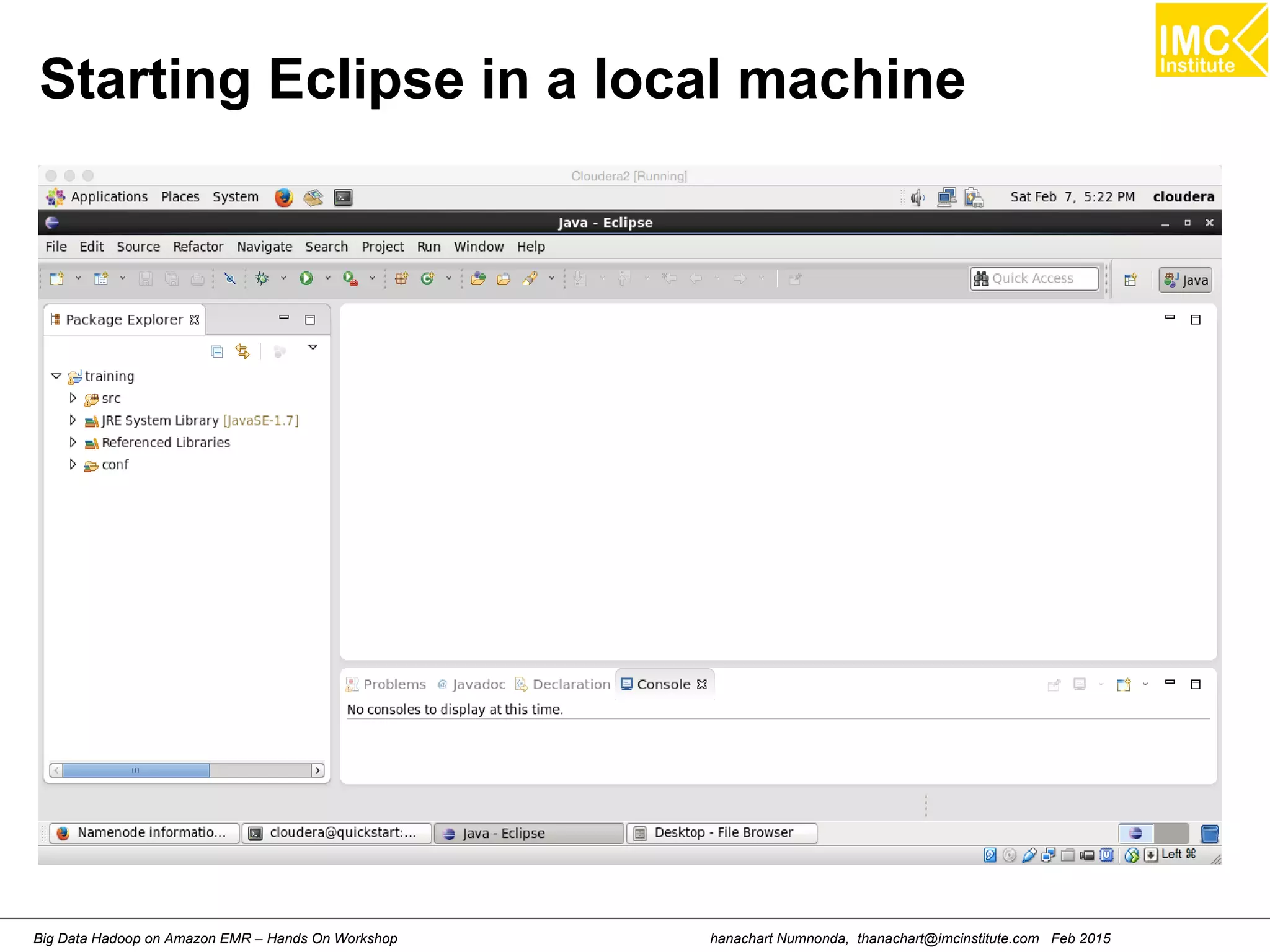
Starting Eclipse in a local machine
hanachart Numnonda, thanachart@imcinstitute.com Feb 2015Big Data Hadoop on Amazon EMR – Hands On Workshop
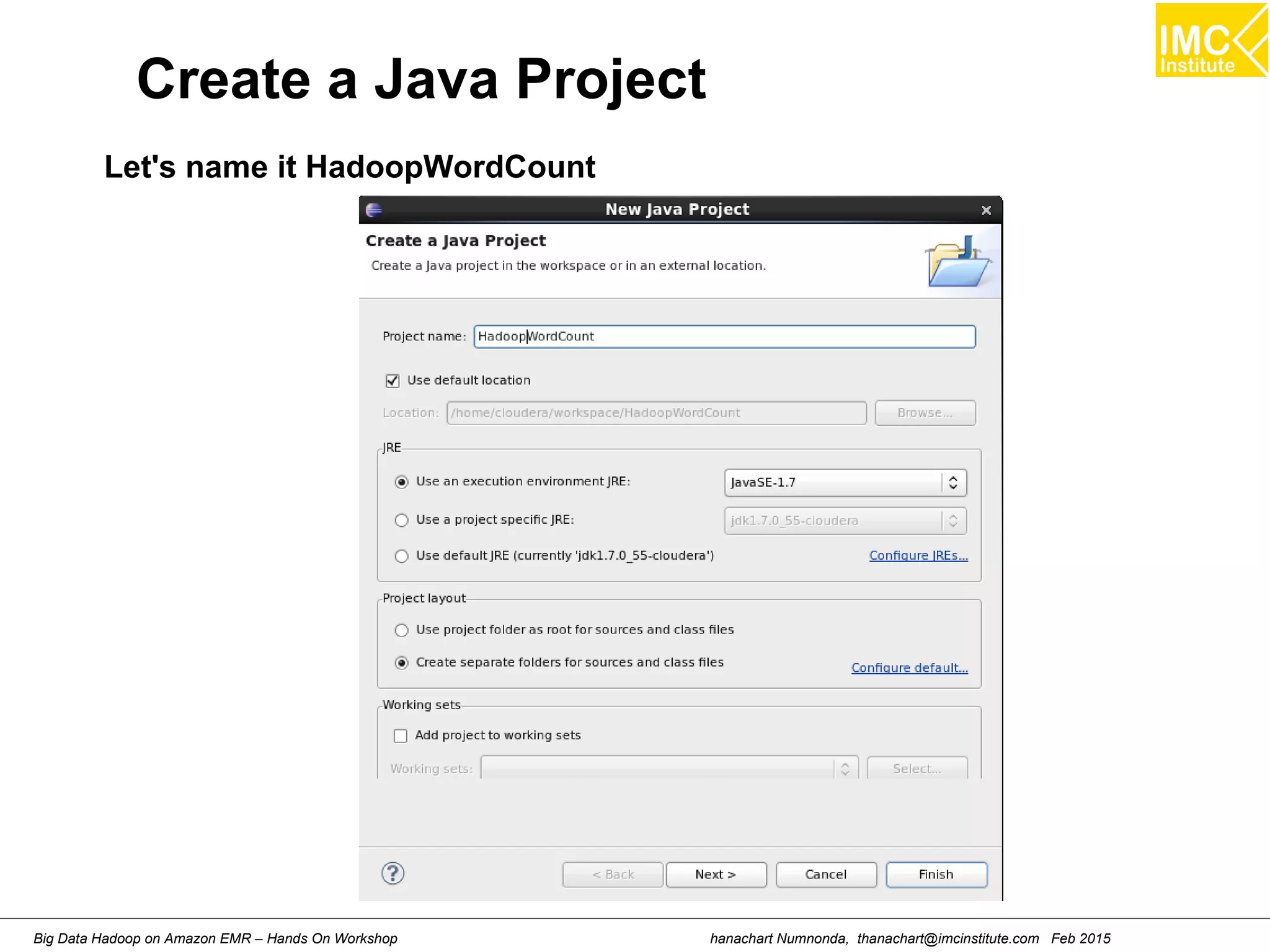
Create a Java Project
Let's name it HadoopWordCount
Danairat T., 2013, danairat@gmail.comBig Data Hadoop – Hands On Workshop 38
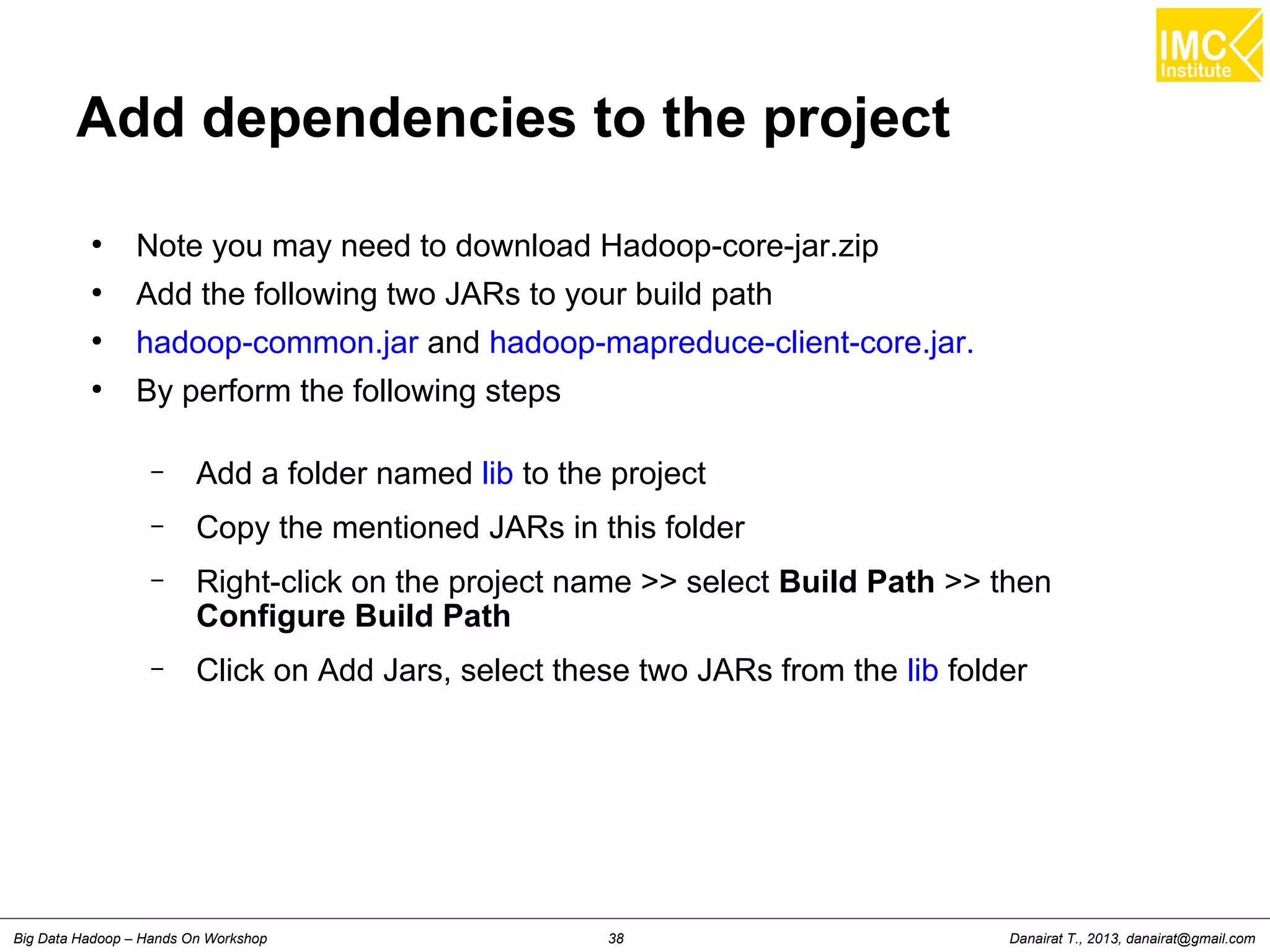
Add dependencies to the project
●
Note you may need to download Hadoop-core-jar.zip
●
Add the following two JARs to your build path
●
hadoop-common.jar and hadoop-mapreduce-client-core.jar.
●
By perform the following steps
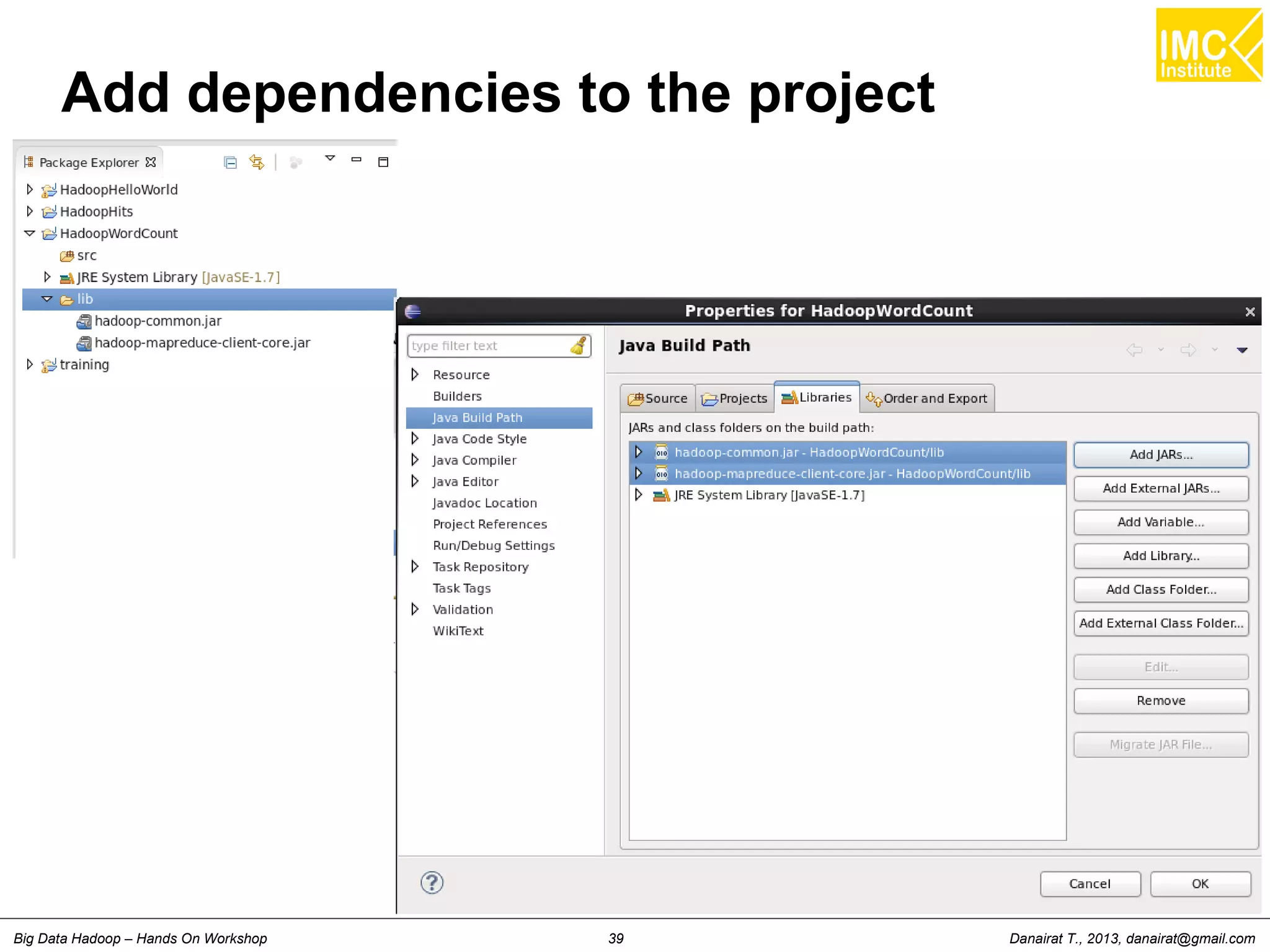
– Add a folder named lib to the project
– Copy the mentioned JARs in this folder
– Right-click on the project name >> select Build Path >> then
Configure Build Path
– Click on Add Jars, select these two JARs from the lib folder
Danairat T., 2013, danairat@gmail.comBig Data Hadoop – Hands On Workshop 39
Add dependencies to the project
Danairat T., 2013, danairat@gmail.comBig Data Hadoop – Hands On Workshop 40
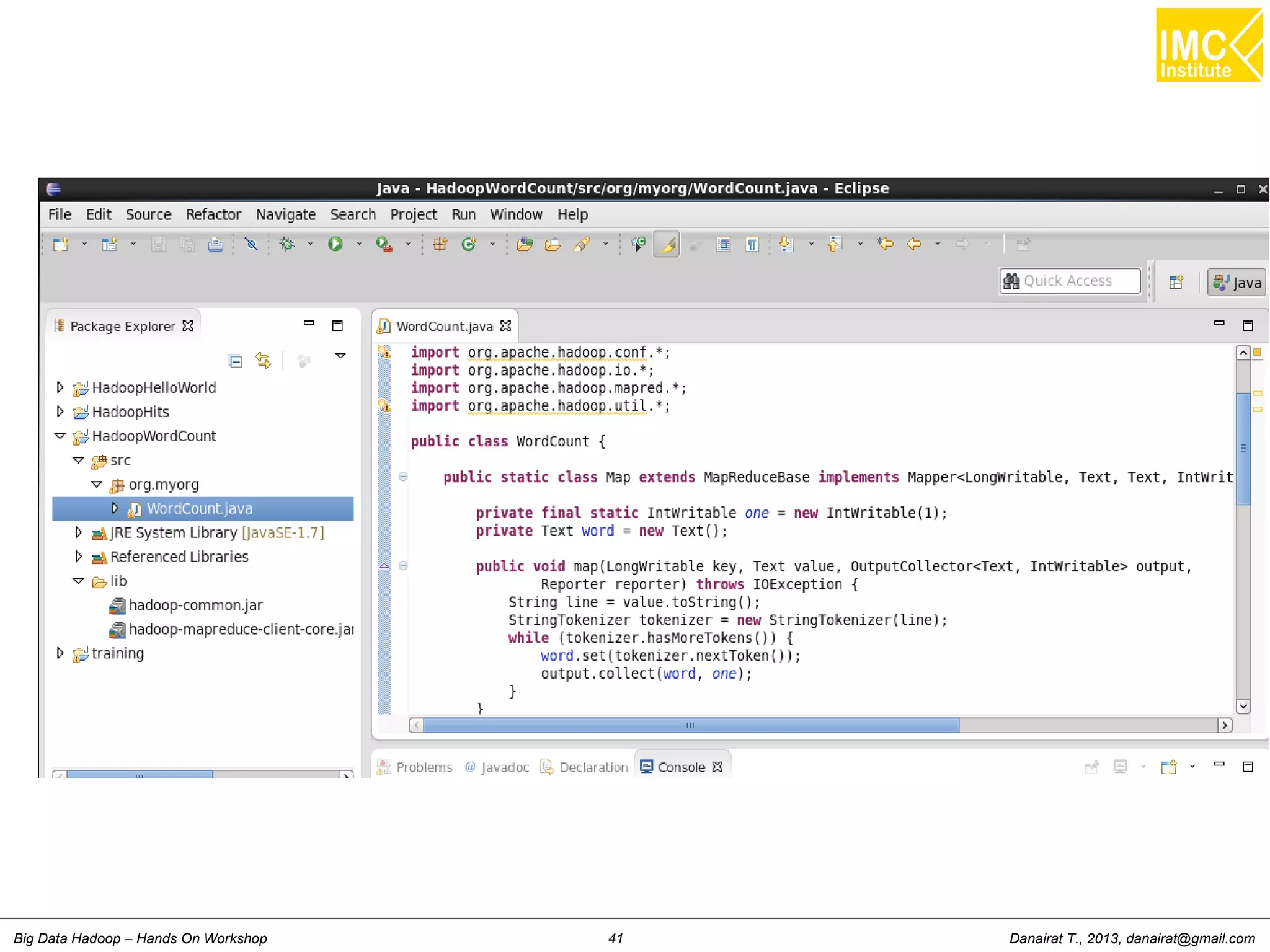
Writing a source code
●
Right click the project, the select New >> Package
●
Name the package as org.myorg
●
Right click at org.myorg, the select New >> Class
●
Name the package as WordCount
●
Writing a source code as shown in previoud slides
Danairat T., 2013, danairat@gmail.comBig Data Hadoop – Hands On Workshop 41
Danairat T., 2013, danairat@gmail.comBig Data Hadoop – Hands On Workshop 42
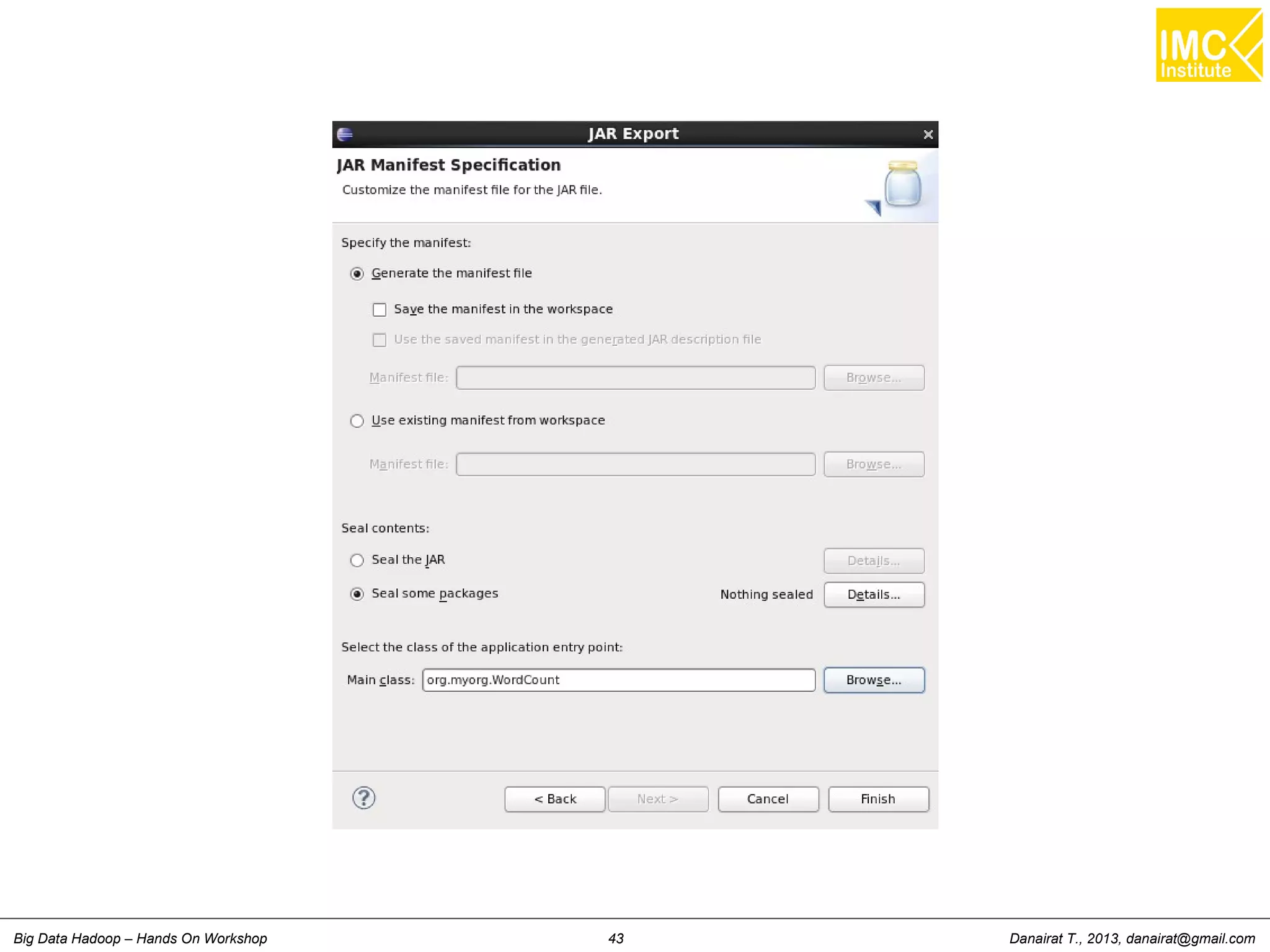
Building a Jar file
●
Right click the project, the select Export
●
Select Java and then JAR file
●
Provide the JAR name, as wordcount.jar
●
Leave the JAR package options as default
●
In the JAR Manifest Specification section, in the botton, specify the Main
class
●
In this case, select WordCount
●
Click on Finish
●
The JAR file will be build and will be located at cloudera/workspace
Note: you may need to re-size the dialog font size by select
Windows >> Preferences >> Appearance >> Colors and Fonts
Danairat T., 2013, danairat@gmail.comBig Data Hadoop – Hands On Workshop 43
hanachart Numnonda, thanachart@imcinstitute.com Feb 2015Big Data Hadoop on Amazon EMR – Hands On Workshop
Hands-On: Running Map Reduce and
Deploying to Hadoop Runtime
Environment
Danairat T., 2013, danairat@gmail.comBig Data Hadoop – Hands On Workshop 45
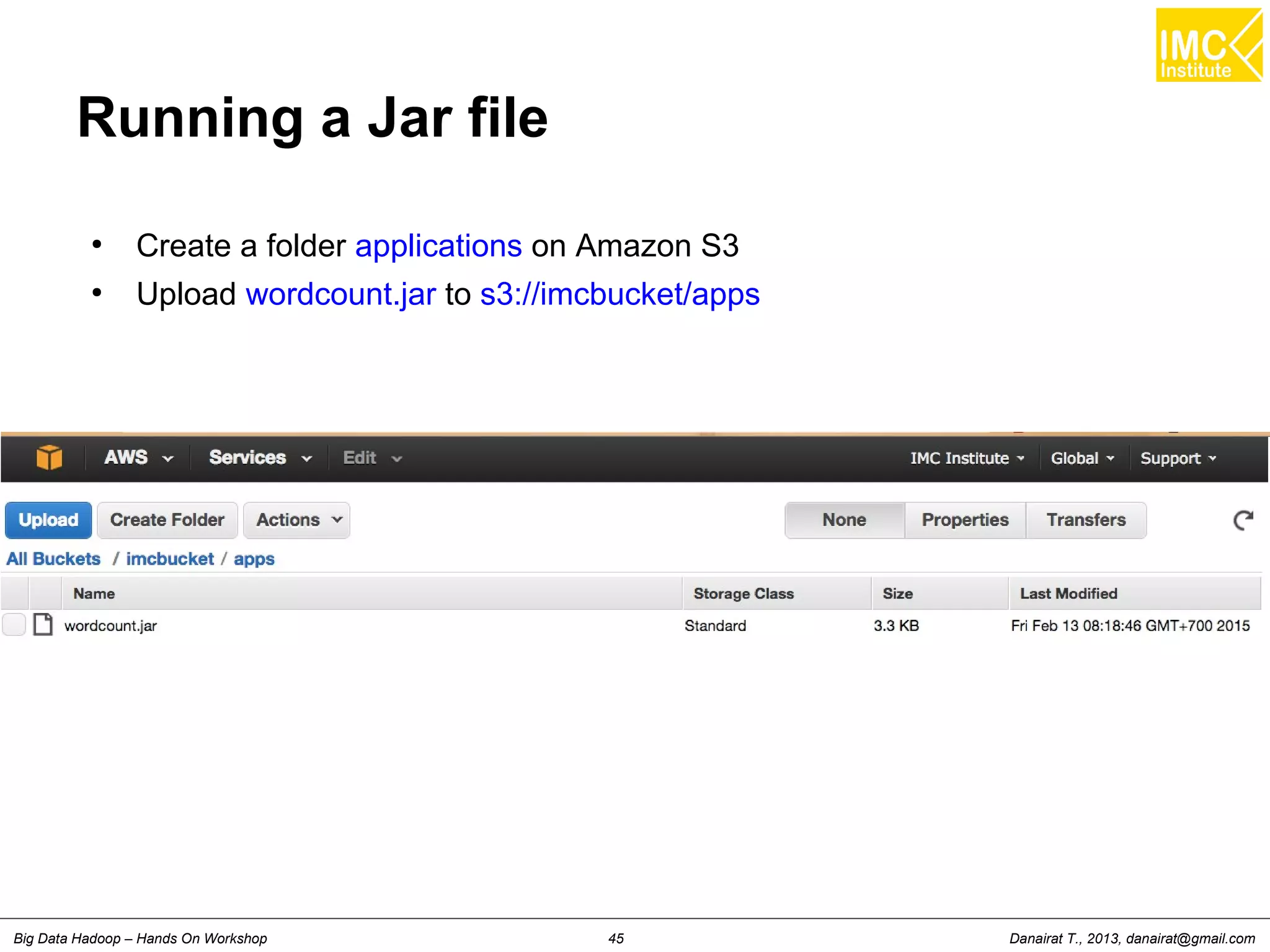
Running a Jar file
●
Create a folder applications on Amazon S3
●
Upload wordcount.jar to s3://imcbucket/apps
Danairat T., 2013, danairat@gmail.comBig Data Hadoop – Hands On Workshop 46
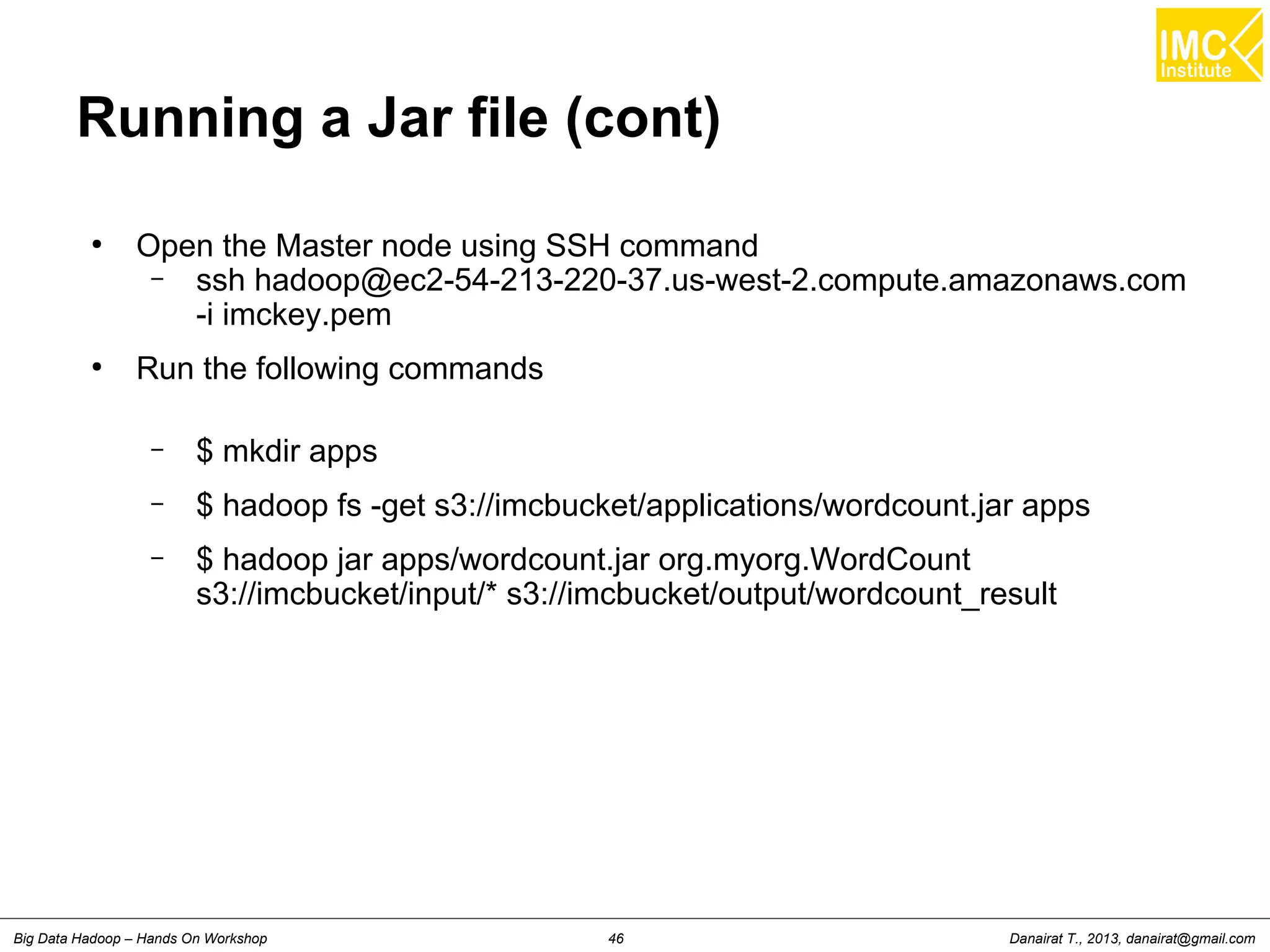
Running a Jar file (cont)
●
Open the Master node using SSH command
– ssh hadoop@ec2-54-213-220-37.us-west-2.compute.amazonaws.com
-i imckey.pem
●
Run the following commands
– $ mkdir apps
– $ hadoop fs -get s3://imcbucket/applications/wordcount.jar apps
– $ hadoop jar apps/wordcount.jar org.myorg.WordCount
s3://imcbucket/input/* s3://imcbucket/output/wordcount_result
hanachart Numnonda, thanachart@imcinstitute.com Feb 2015Big Data Hadoop on Amazon EMR – Hands On Workshop
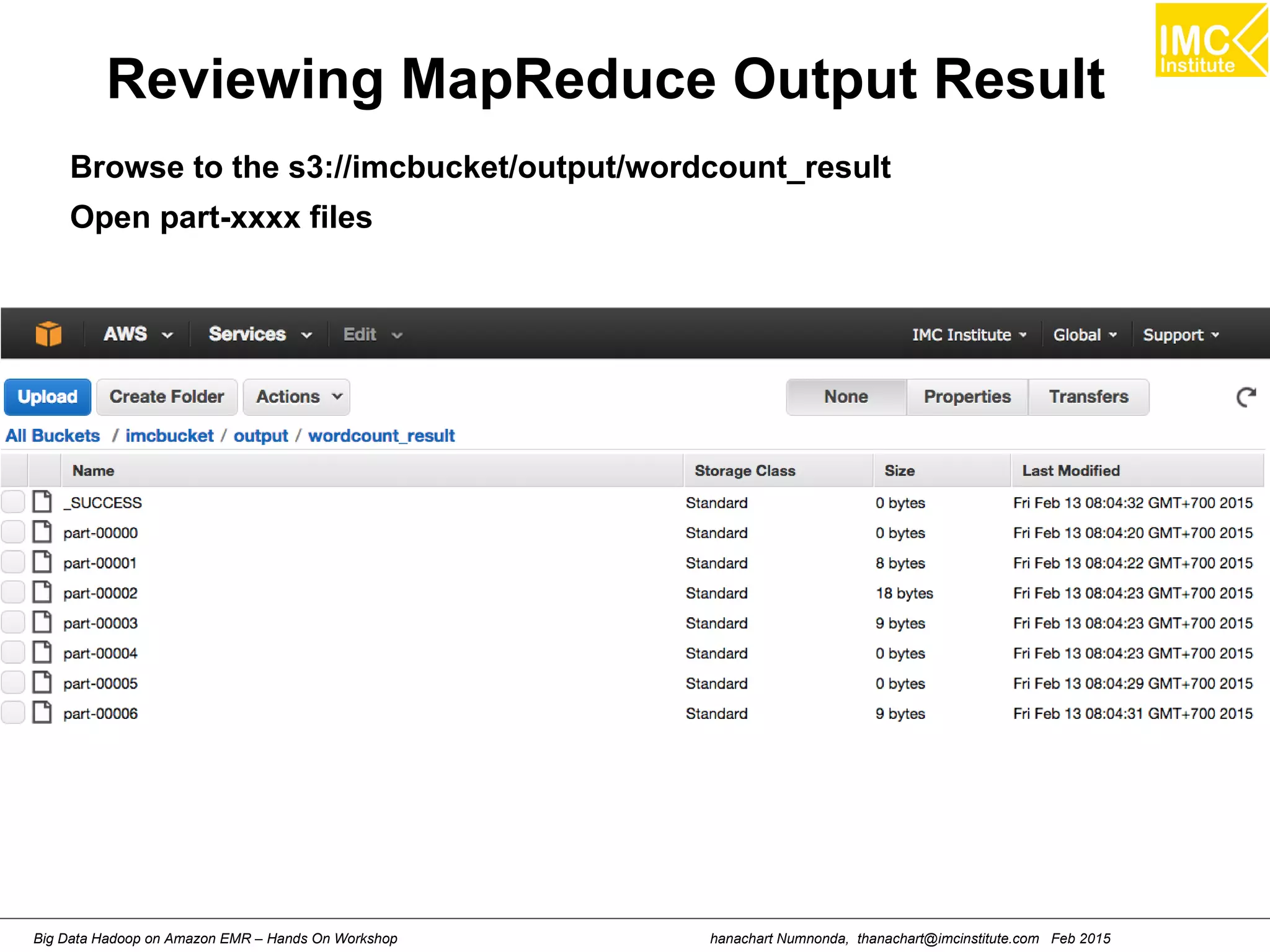
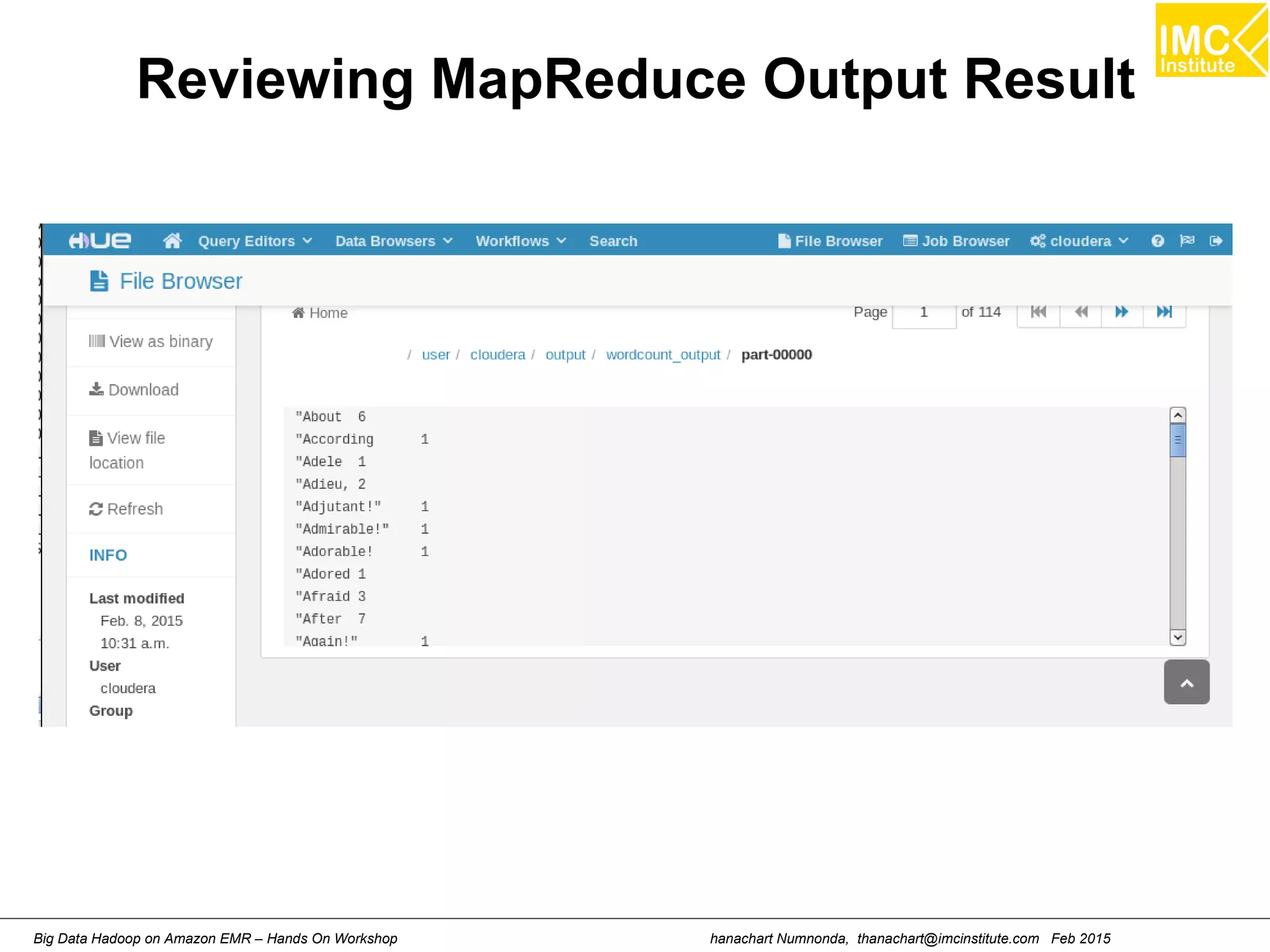
Reviewing MapReduce Output Result
Browse to the s3://imcbucket/output/wordcount_result
Open part-xxxx files
hanachart Numnonda, thanachart@imcinstitute.com Feb 2015Big Data Hadoop on Amazon EMR – Hands On Workshop
Reviewing MapReduce Output Result
hanachart Numnonda, thanachart@imcinstitute.com Feb 2015Big Data Hadoop on Amazon EMR – Hands On Workshop
Lecture
Understanding Hive
hanachart Numnonda, thanachart@imcinstitute.com Feb 2015Big Data Hadoop on Amazon EMR – Hands On Workshop
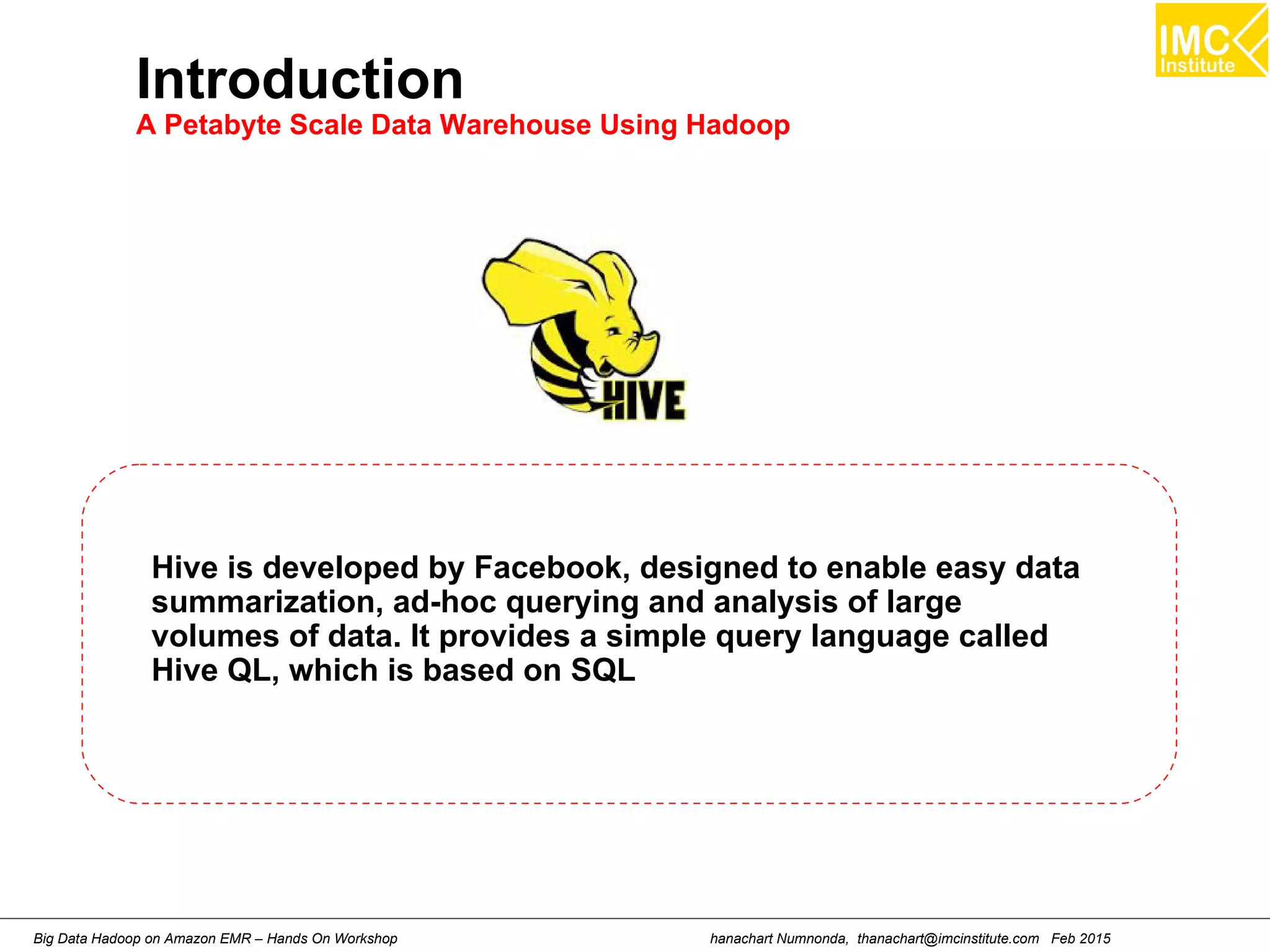
Introduction
A Petabyte Scale Data Warehouse Using Hadoop
Hive is developed by Facebook, designed to enable easy data
summarization, ad-hoc querying and analysis of large
volumes of data. It provides a simple query language called
Hive QL, which is based on SQL
hanachart Numnonda, thanachart@imcinstitute.com Feb 2015Big Data Hadoop on Amazon EMR – Hands On Workshop
Hands-On: Creating Table and
Retrieving Data using Hive
hanachart Numnonda, thanachart@imcinstitute.com Feb 2015Big Data Hadoop on Amazon EMR – Hands On Workshop
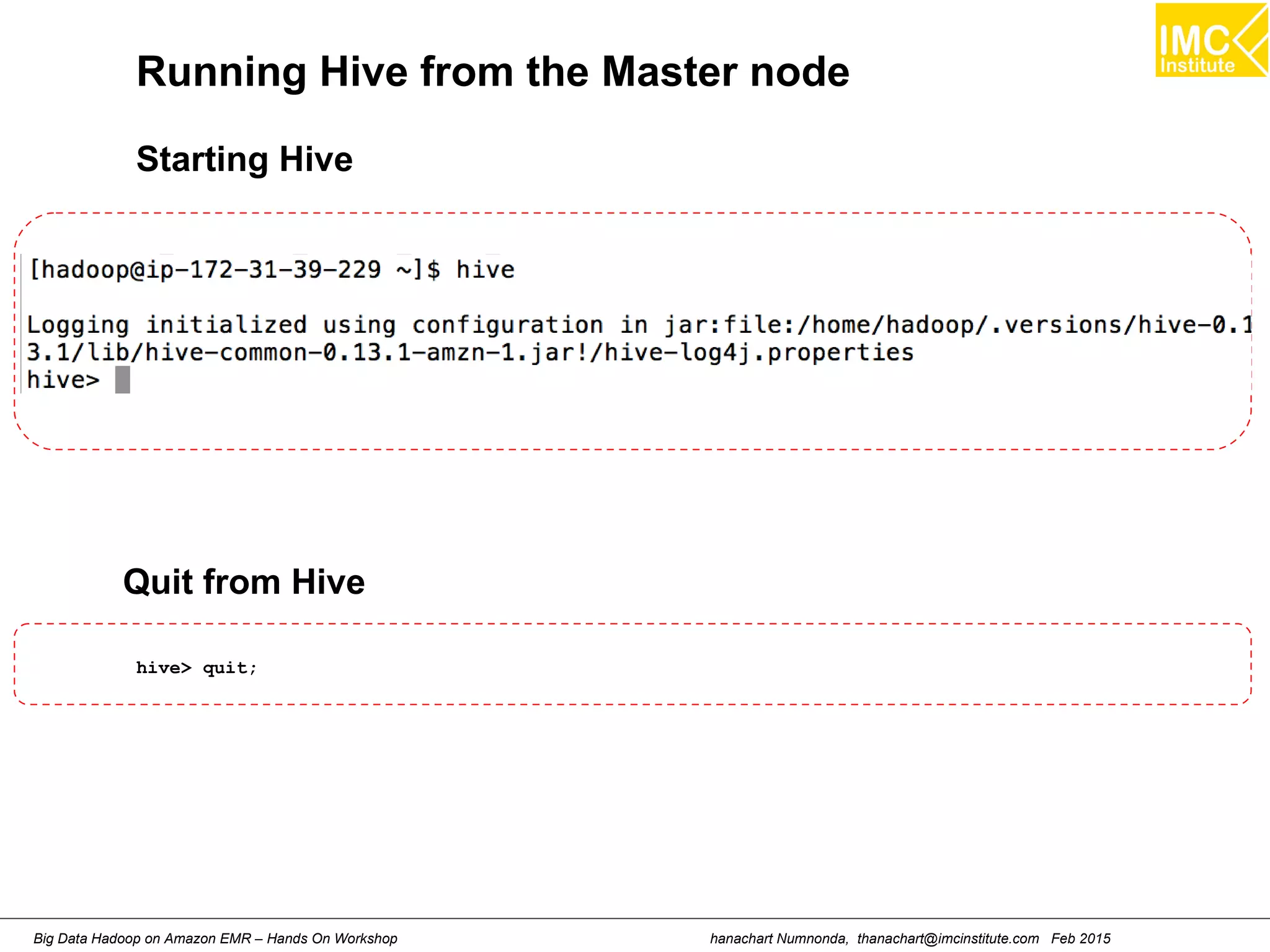
Running Hive from the Master node
Starting Hive
hive> quit;
Quit from Hive
hanachart Numnonda, thanachart@imcinstitute.com Feb 2015Big Data Hadoop on Amazon EMR – Hands On Workshop
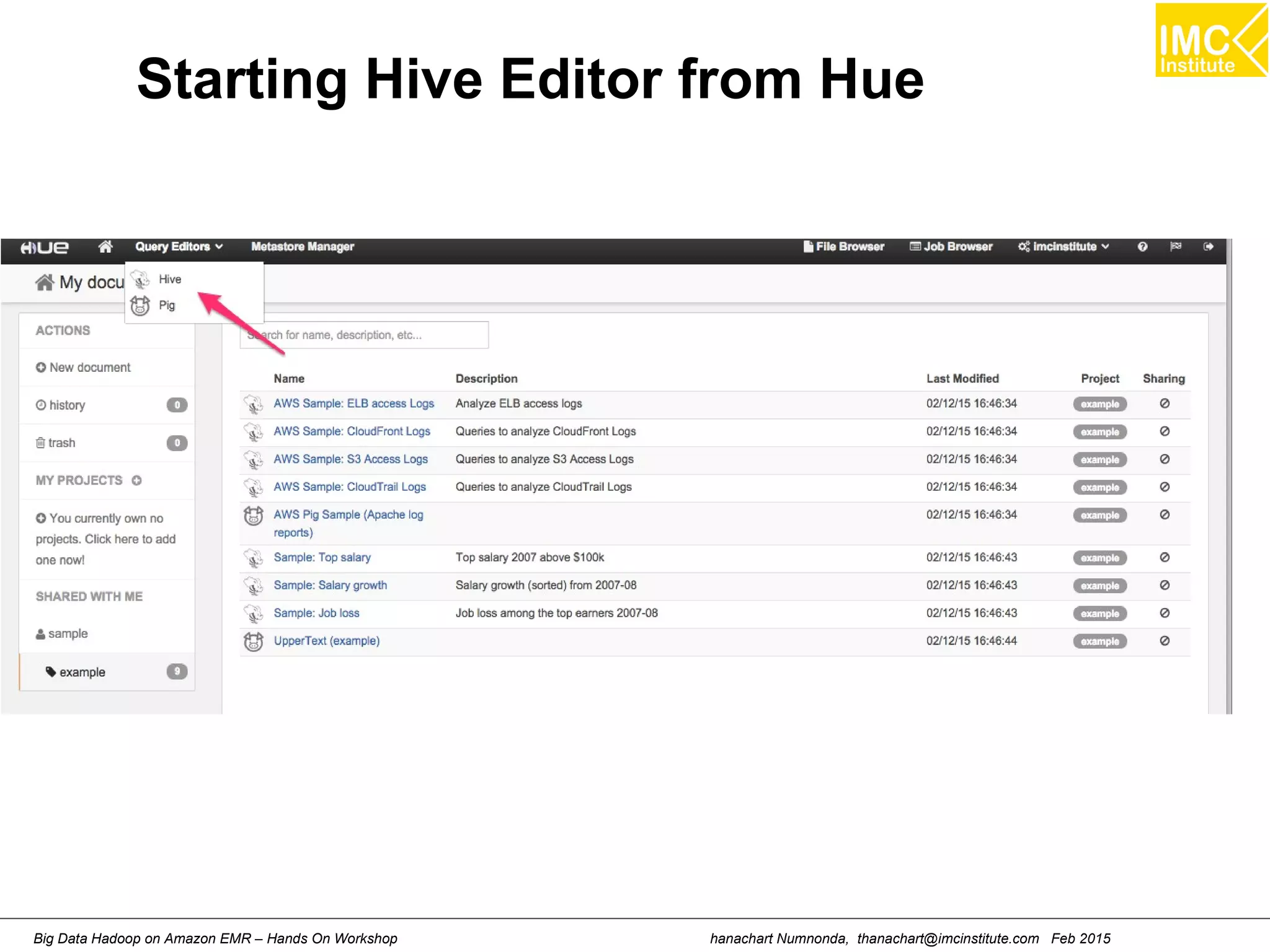
Starting Hive Editor from Hue
hanachart Numnonda, thanachart@imcinstitute.com Feb 2015Big Data Hadoop on Amazon EMR – Hands On Workshop
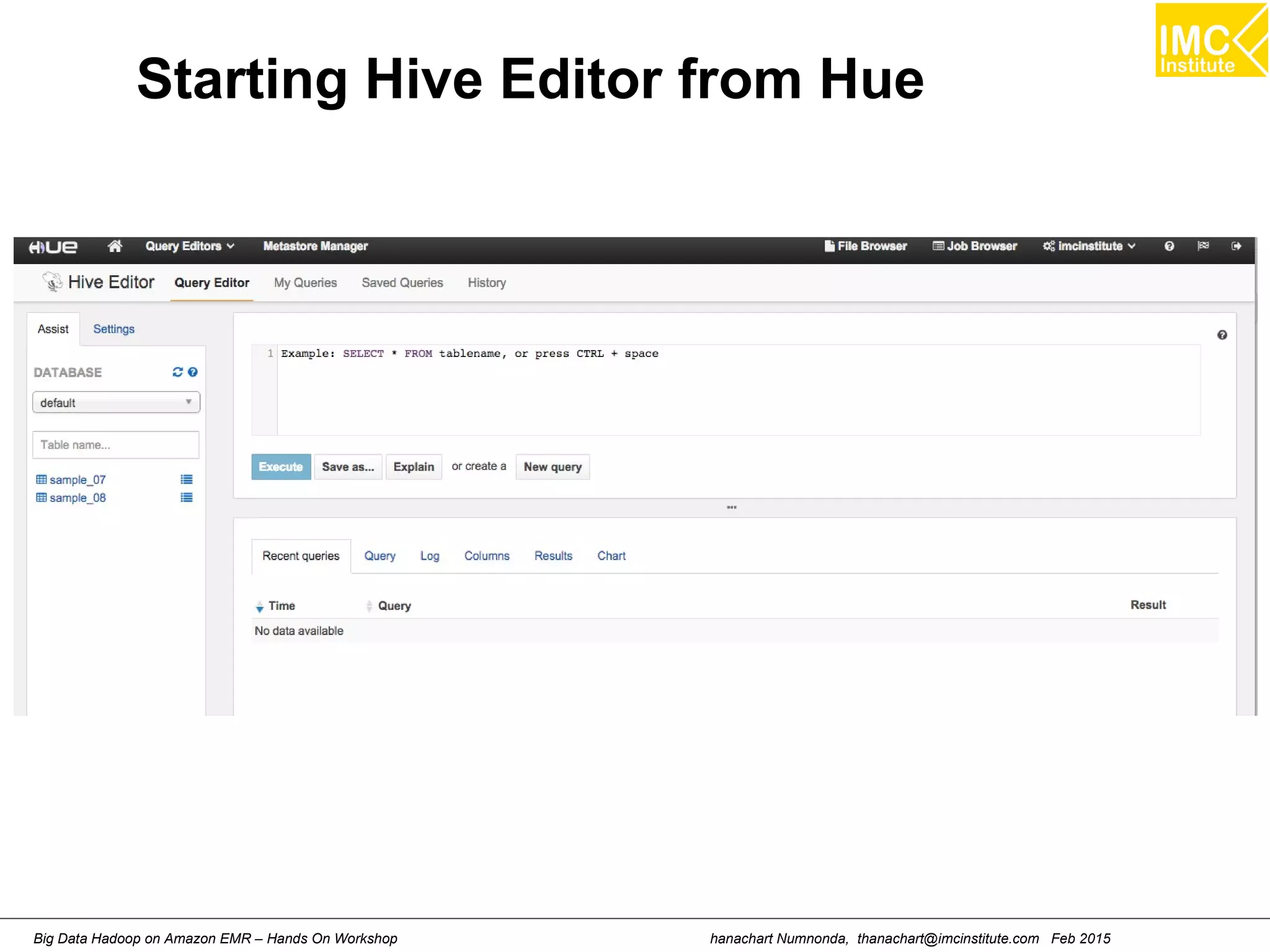
Starting Hive Editor from Hue
hanachart Numnonda, thanachart@imcinstitute.com Feb 2015Big Data Hadoop on Amazon EMR – Hands On Workshop
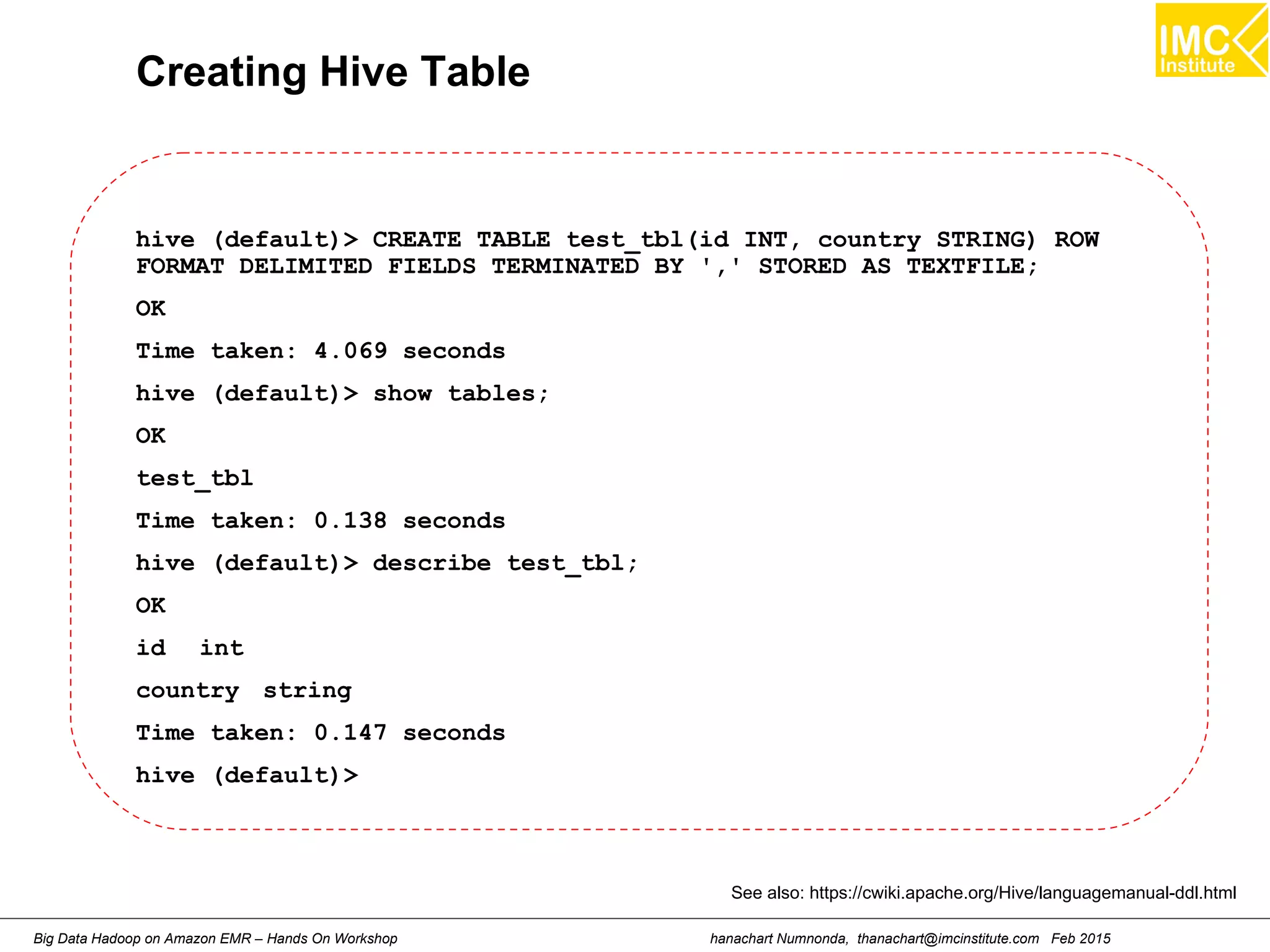
Creating Hive Table
hive (default)> CREATE TABLE test_tbl(id INT, country STRING) ROW
FORMAT DELIMITED FIELDS TERMINATED BY ',' STORED AS TEXTFILE;
OK
Time taken: 4.069 seconds
hive (default)> show tables;
OK
test_tbl
Time taken: 0.138 seconds
hive (default)> describe test_tbl;
OK
id int
country string
Time taken: 0.147 seconds
hive (default)>
See also: https://cwiki.apache.org/Hive/languagemanual-ddl.html
hanachart Numnonda, thanachart@imcinstitute.com Feb 2015Big Data Hadoop on Amazon EMR – Hands On Workshop
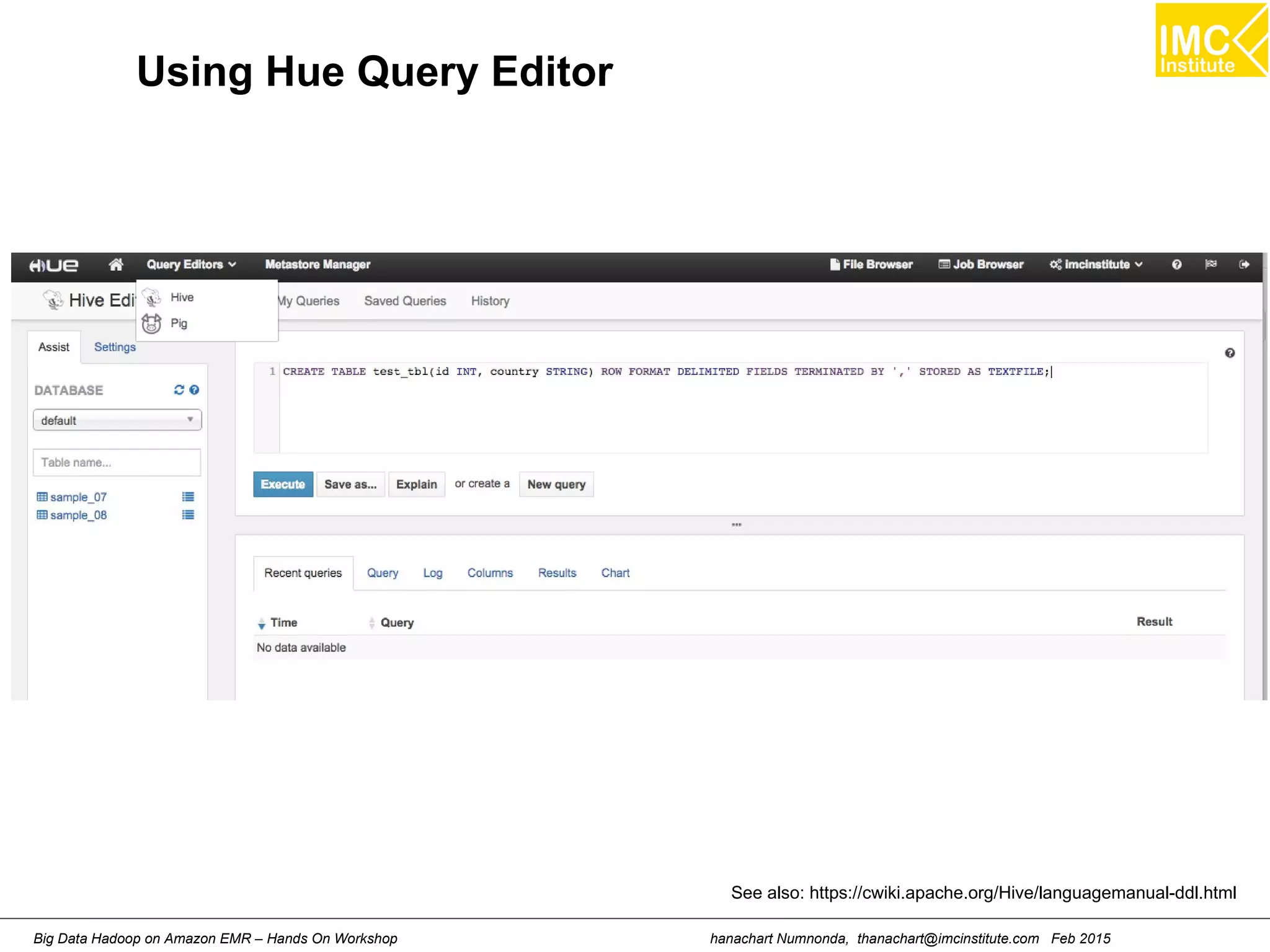
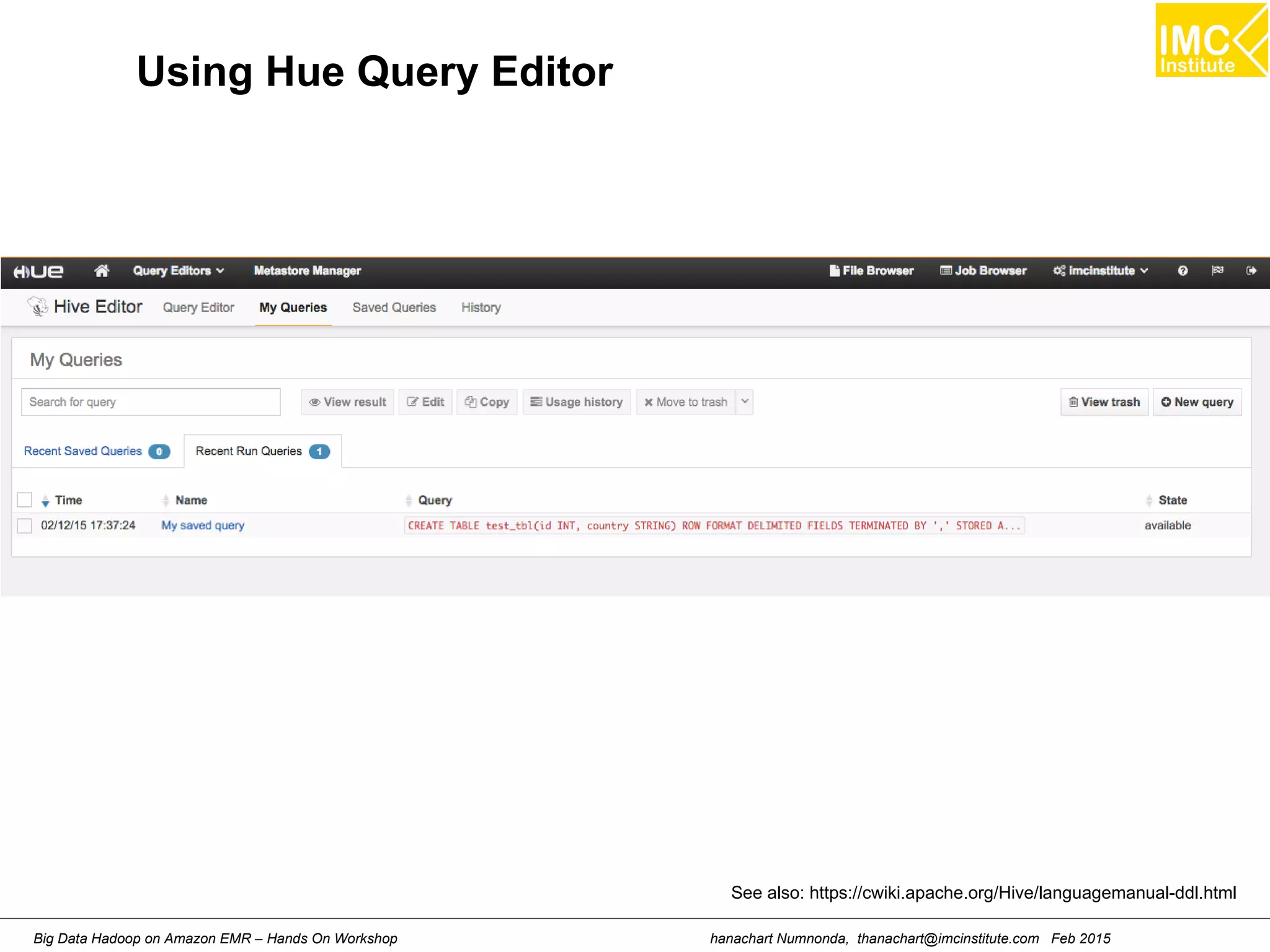
Using Hue Query Editor
See also: https://cwiki.apache.org/Hive/languagemanual-ddl.html
hanachart Numnonda, thanachart@imcinstitute.com Feb 2015Big Data Hadoop on Amazon EMR – Hands On Workshop
Using Hue Query Editor
See also: https://cwiki.apache.org/Hive/languagemanual-ddl.html
hanachart Numnonda, thanachart@imcinstitute.com Feb 2015Big Data Hadoop on Amazon EMR – Hands On Workshop
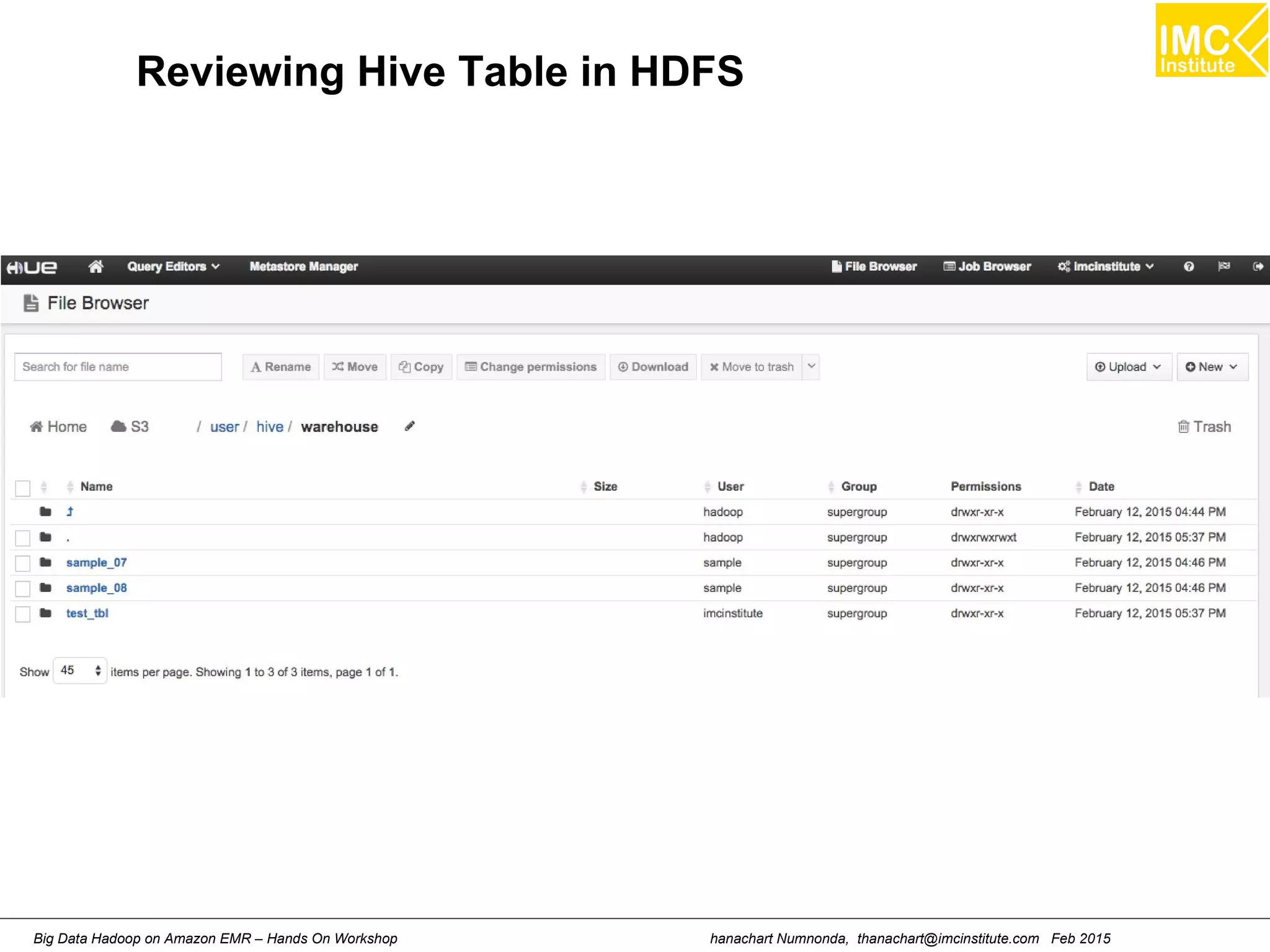
Reviewing Hive Table in HDFS
hanachart Numnonda, thanachart@imcinstitute.com Feb 2015Big Data Hadoop on Amazon EMR – Hands On Workshop
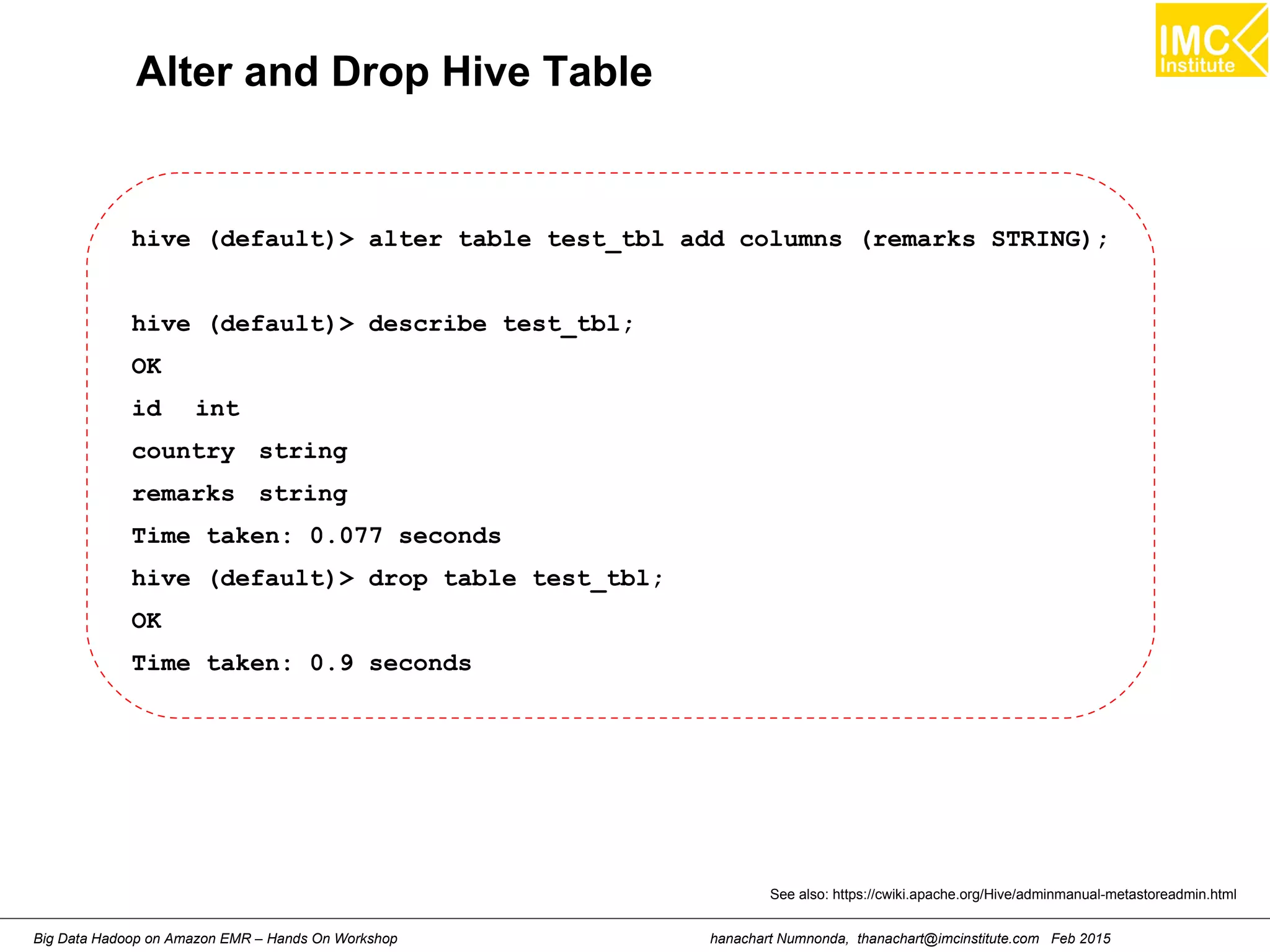
Alter and Drop Hive Table
hive (default)> alter table test_tbl add columns (remarks STRING);
hive (default)> describe test_tbl;
OK
id int
country string
remarks string
Time taken: 0.077 seconds
hive (default)> drop table test_tbl;
OK
Time taken: 0.9 seconds
See also: https://cwiki.apache.org/Hive/adminmanual-metastoreadmin.html
hanachart Numnonda, thanachart@imcinstitute.com Feb 2015Big Data Hadoop on Amazon EMR – Hands On Workshop
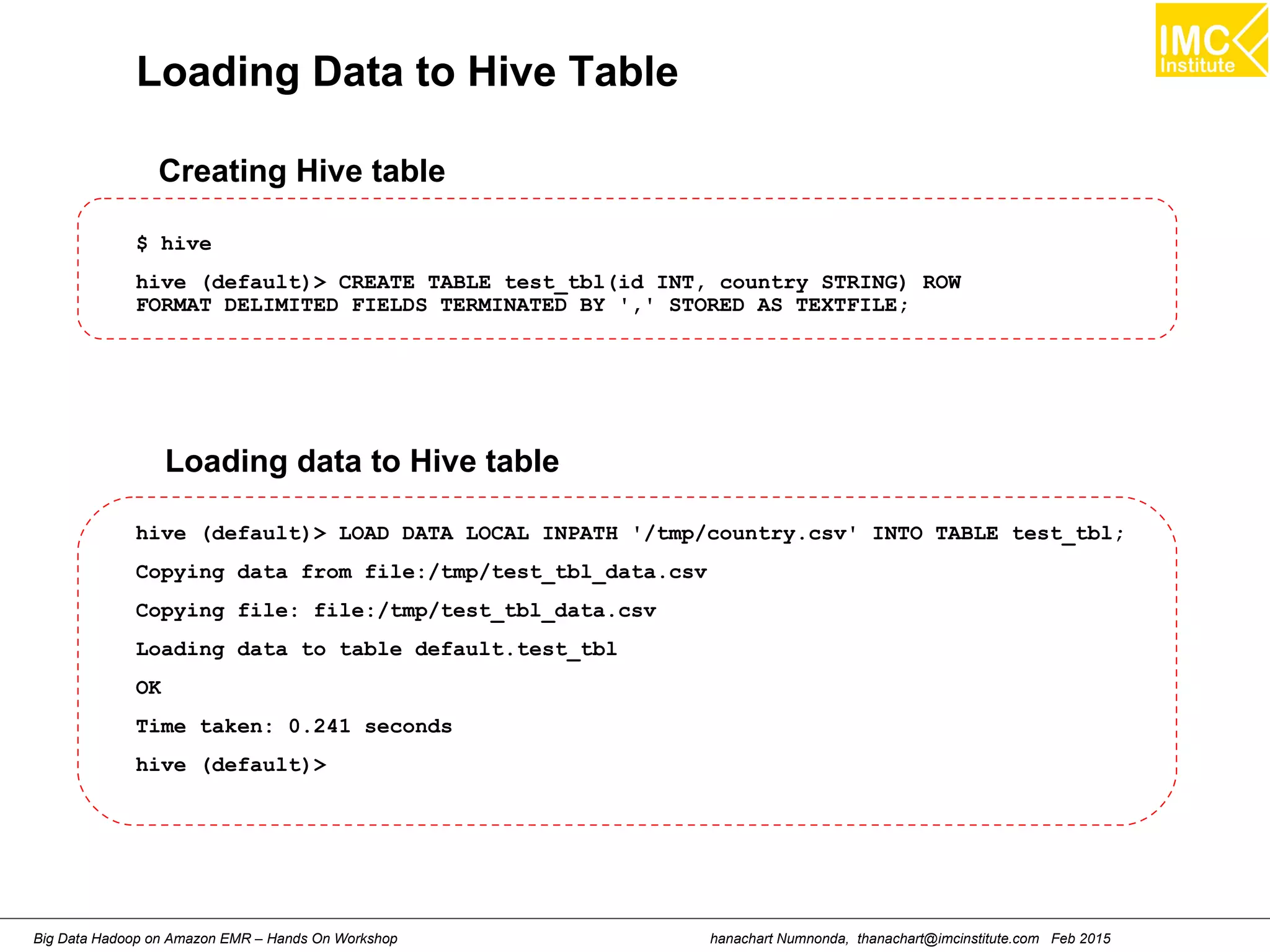
Loading Data to Hive Table
$ hive
hive (default)> CREATE TABLE test_tbl(id INT, country STRING) ROW
FORMAT DELIMITED FIELDS TERMINATED BY ',' STORED AS TEXTFILE;
Creating Hive table
hive (default)> LOAD DATA LOCAL INPATH '/tmp/country.csv' INTO TABLE test_tbl;
Copying data from file:/tmp/test_tbl_data.csv
Copying file: file:/tmp/test_tbl_data.csv
Loading data to table default.test_tbl
OK
Time taken: 0.241 seconds
hive (default)>
Loading data to Hive table
hanachart Numnonda, thanachart@imcinstitute.com Feb 2015Big Data Hadoop on Amazon EMR – Hands On Workshop
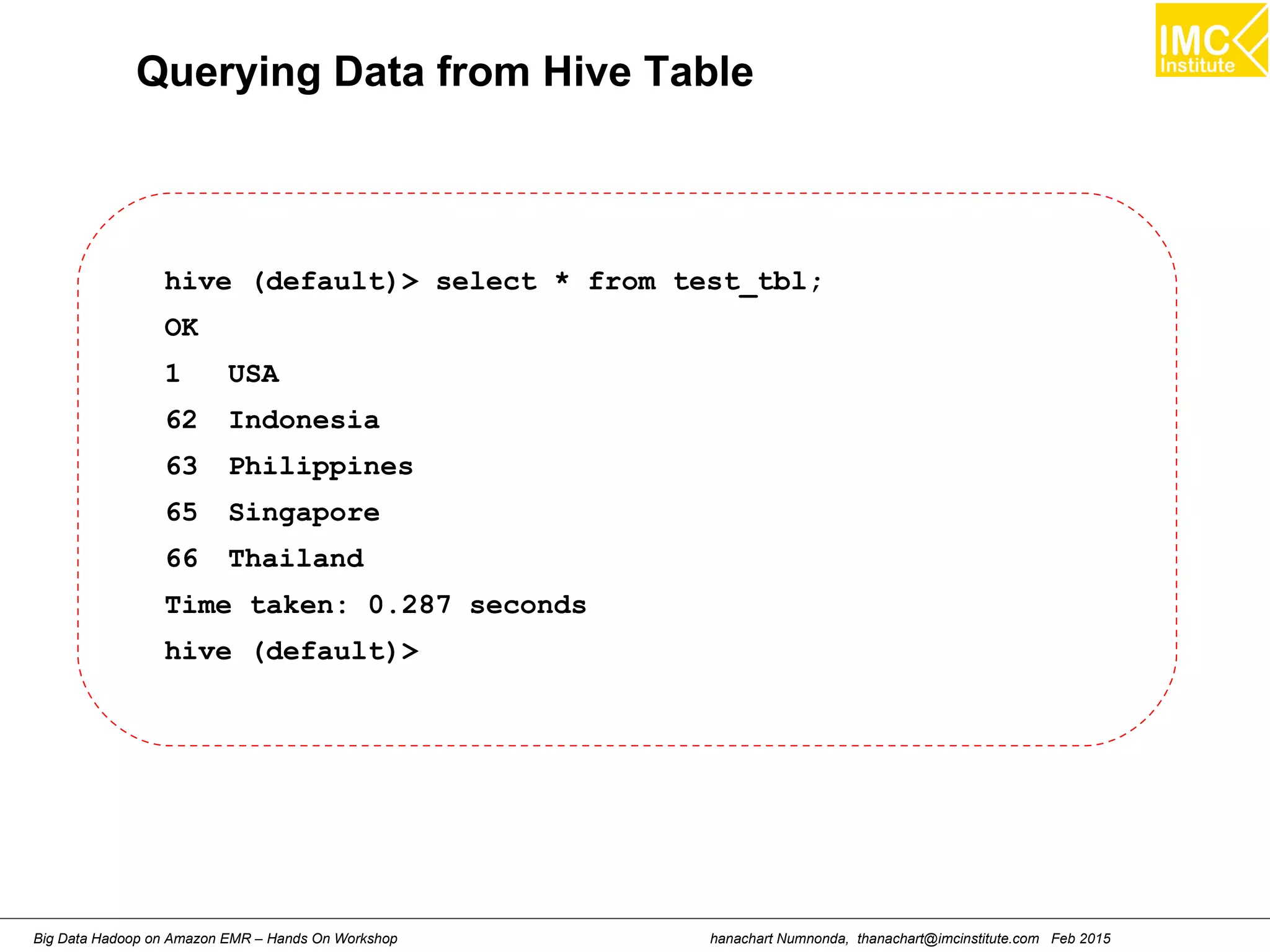
Querying Data from Hive Table
hive (default)> select * from test_tbl;
OK
1 USA
62 Indonesia
63 Philippines
65 Singapore
66 Thailand
Time taken: 0.287 seconds
hive (default)>
hanachart Numnonda, thanachart@imcinstitute.com Feb 2015Big Data Hadoop on Amazon EMR – Hands On Workshop
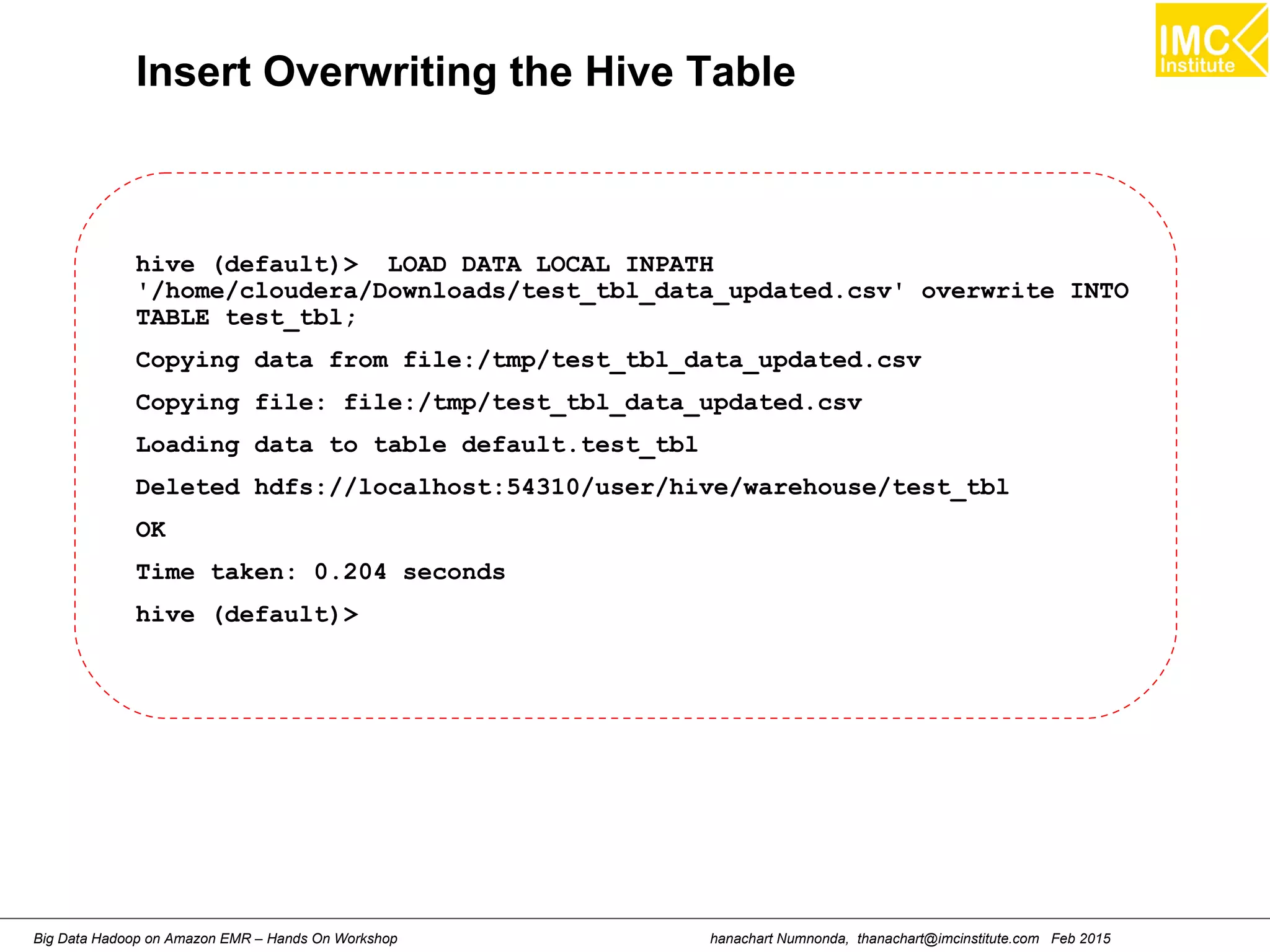
Insert Overwriting the Hive Table
hive (default)> LOAD DATA LOCAL INPATH
'/home/cloudera/Downloads/test_tbl_data_updated.csv' overwrite INTO
TABLE test_tbl;
Copying data from file:/tmp/test_tbl_data_updated.csv
Copying file: file:/tmp/test_tbl_data_updated.csv
Loading data to table default.test_tbl
Deleted hdfs://localhost:54310/user/hive/warehouse/test_tbl
OK
Time taken: 0.204 seconds
hive (default)>
hanachart Numnonda, thanachart@imcinstitute.com Feb 2015Big Data Hadoop on Amazon EMR – Hands On Workshop
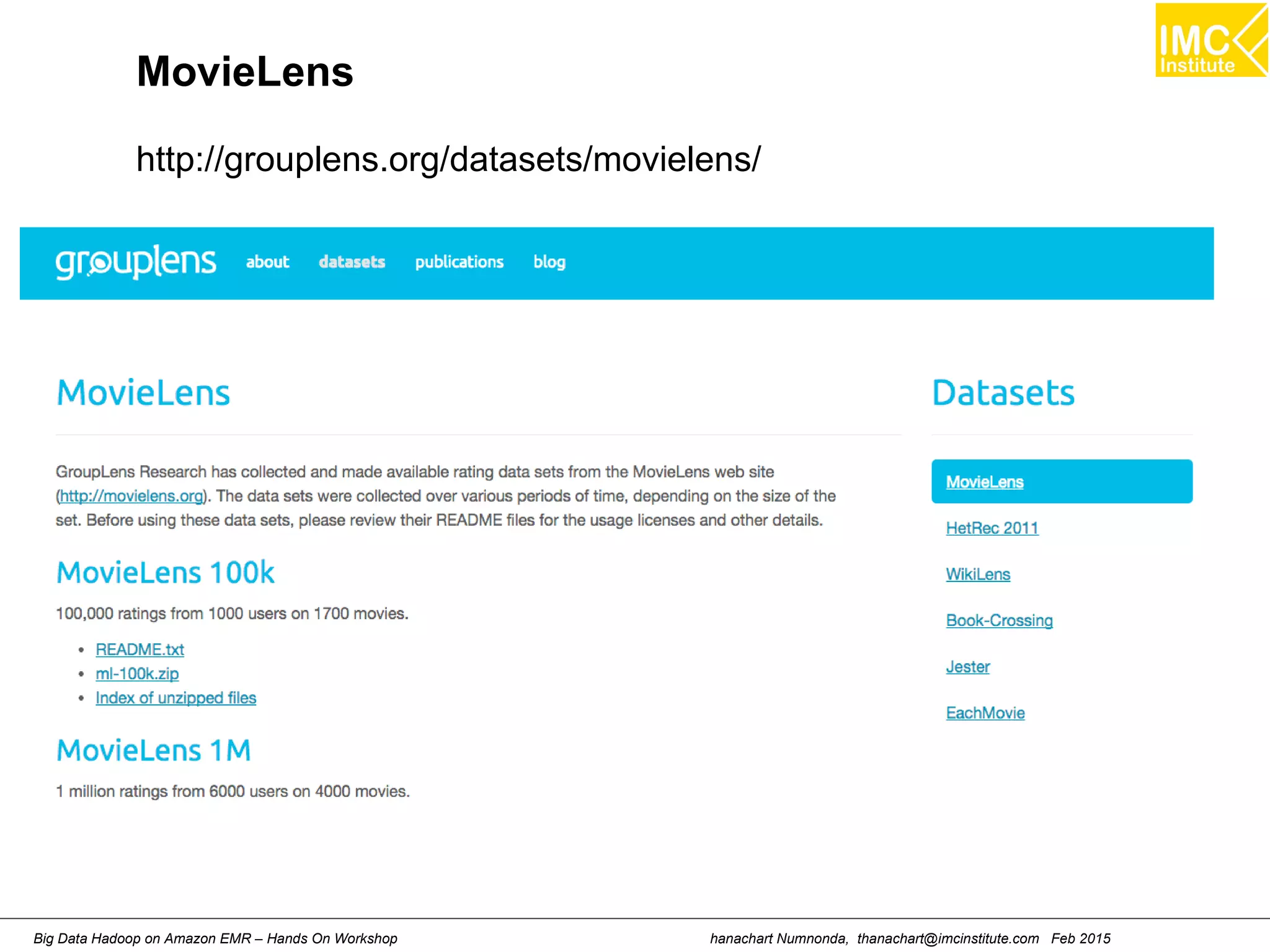
MovieLens
http://grouplens.org/datasets/movielens/
hanachart Numnonda, thanachart@imcinstitute.com Feb 2015Big Data Hadoop on Amazon EMR – Hands On Workshop
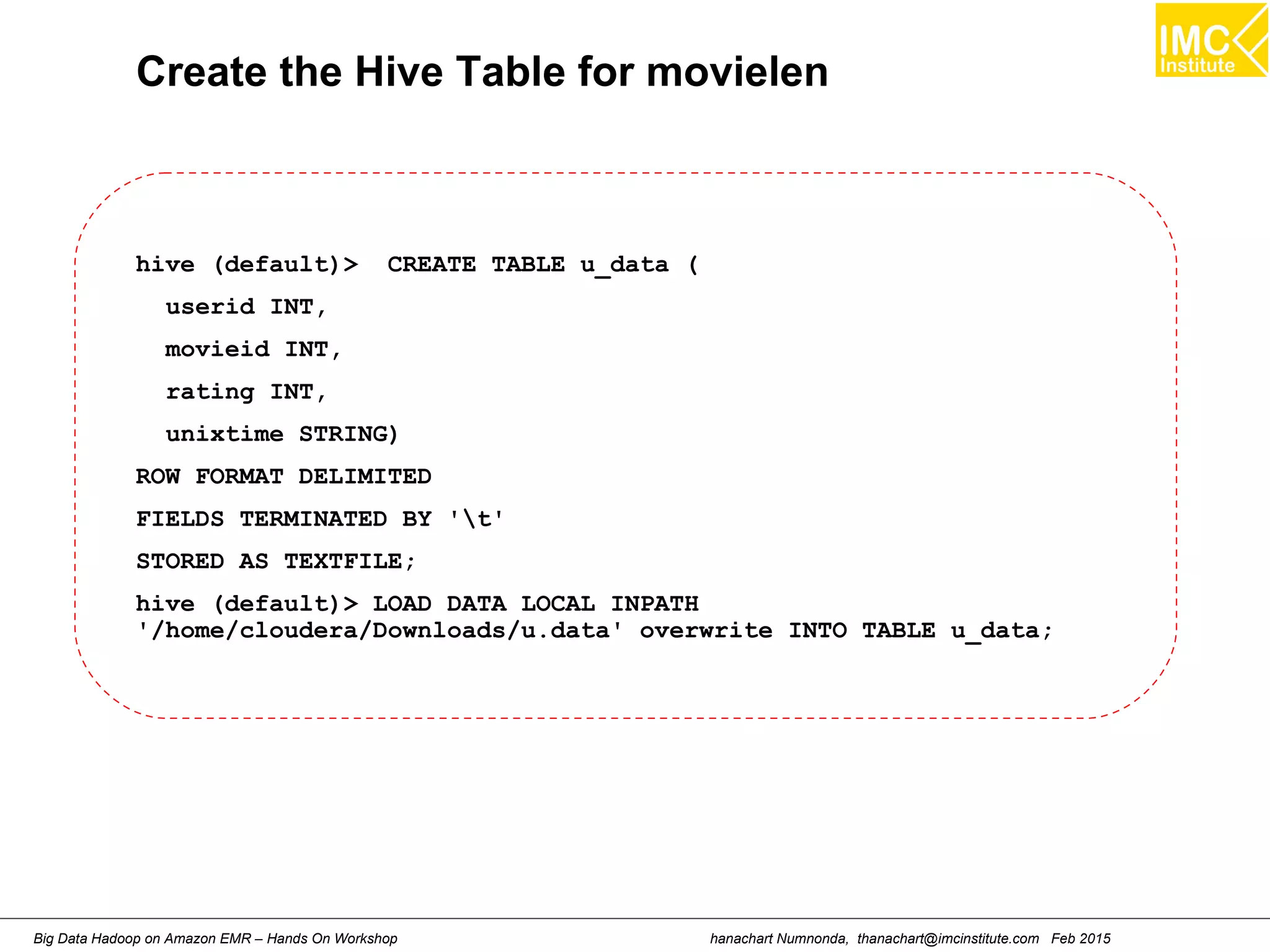
Create the Hive Table for movielen
hive (default)> CREATE TABLE u_data (
userid INT,
movieid INT,
rating INT,
unixtime STRING)
ROW FORMAT DELIMITED
FIELDS TERMINATED BY 't'
STORED AS TEXTFILE;
hive (default)> LOAD DATA LOCAL INPATH
'/home/cloudera/Downloads/u.data' overwrite INTO TABLE u_data;
hanachart Numnonda, thanachart@imcinstitute.com Feb 2015Big Data Hadoop on Amazon EMR – Hands On Workshop
Create the Hive Table for Apache LOf
hive (default)> CREATE TABLE apachelog (
host STRING,
identity STRING,
user STRING,
time STRING,
request STRING,
status STRING,
size STRING,
referer STRING,
agent STRING)
ROW FORMAT SERDE 'org.apache.hadoop.hive.serde2.RegexSerDe'
WITH SERDEPROPERTIES (
"input.regex" = "([^]*) ([^]*) ([^]*) (-|[^]*])
([^ "]*|"[^"]*") (-|[0-9]*) (-|[0-9]*)(?: ([^ "]*|".*")
([^ "]*|".*"))?"
)
STORED AS TEXTFILE;
hanachart Numnonda, thanachart@imcinstitute.com Feb 2015Big Data Hadoop on Amazon EMR – Hands On Workshop
Lecture
Understanding Pig
hanachart Numnonda, thanachart@imcinstitute.com Feb 2015Big Data Hadoop on Amazon EMR – Hands On Workshop
Introduction
A high-level platform for creating MapReduce programs Using Hadoop
Pig is a platform for analyzing large data sets that consists of
a high-level language for expressing data analysis programs,
coupled with infrastructure for evaluating these programs.
The salient property of Pig programs is that their structure is
amenable to substantial parallelization, which in turns enables
them to handle very large data sets.
hanachart Numnonda, thanachart@imcinstitute.com Feb 2015Big Data Hadoop on Amazon EMR – Hands On Workshop
Hands-On: Running a Pig script
hanachart Numnonda, thanachart@imcinstitute.com Feb 2015Big Data Hadoop on Amazon EMR – Hands On Workshop
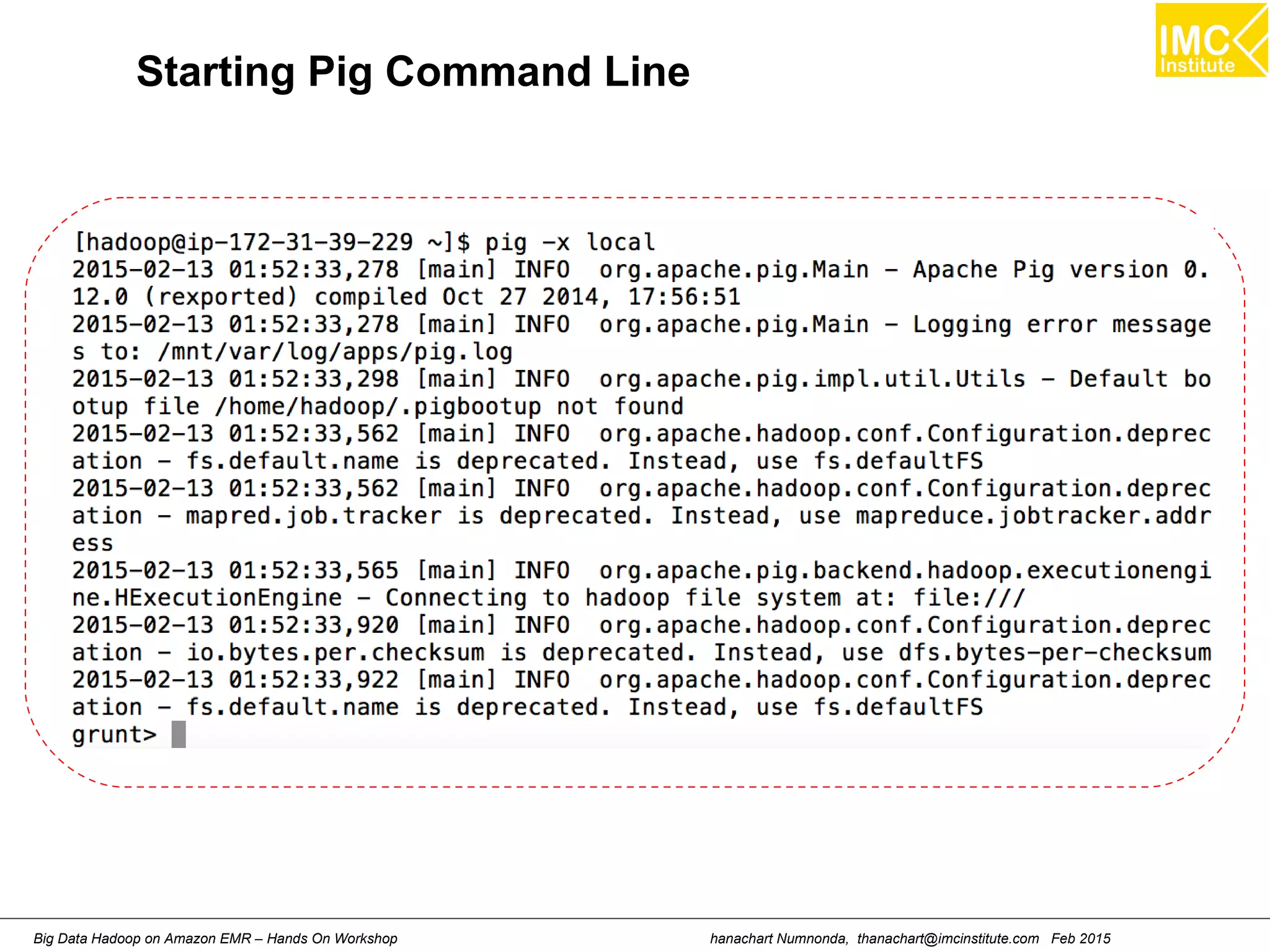
Starting Pig Command Line
hanachart Numnonda, thanachart@imcinstitute.com Feb 2015Big Data Hadoop on Amazon EMR – Hands On Workshop
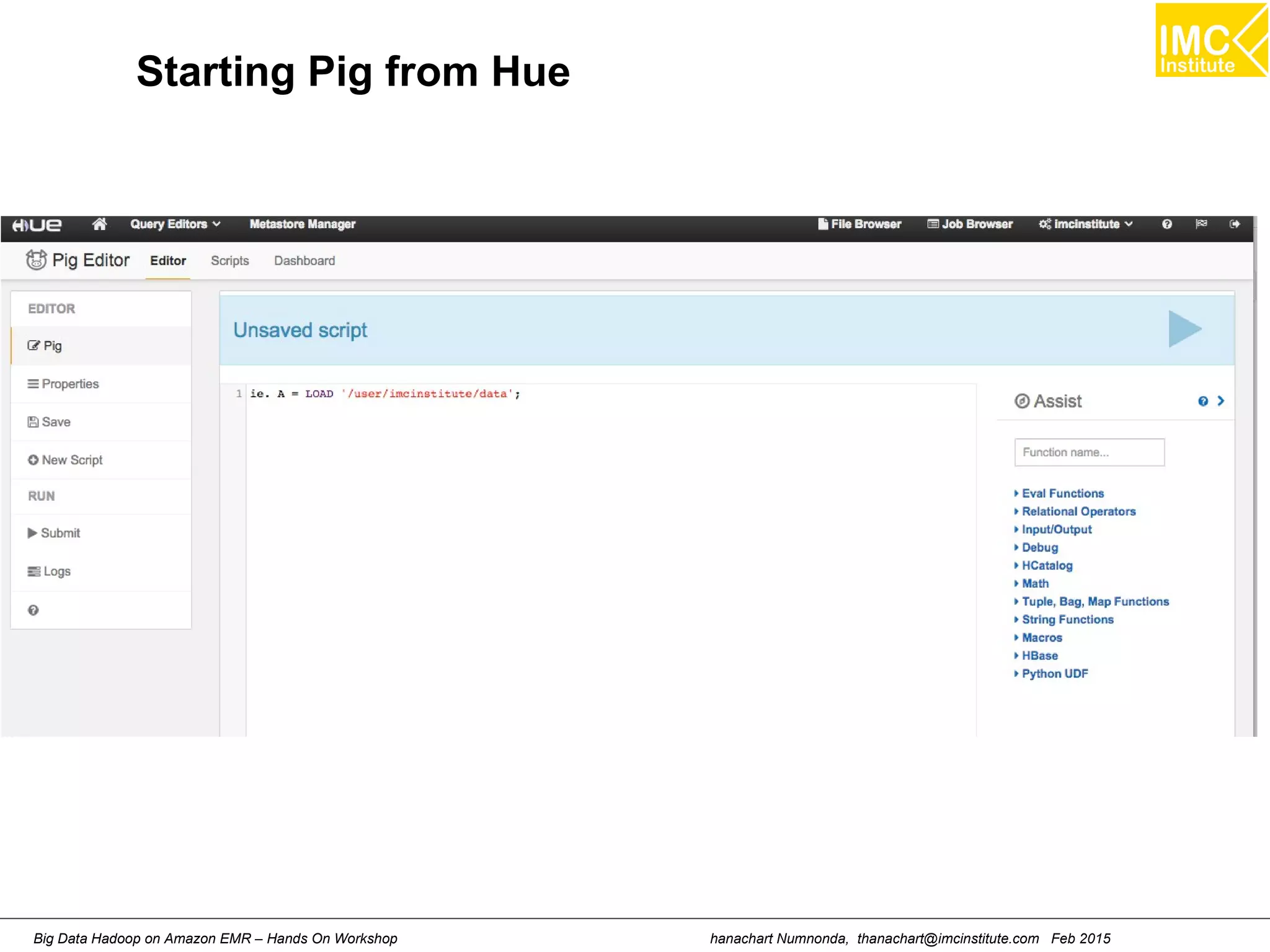
Starting Pig from Hue
hanachart Numnonda, thanachart@imcinstitute.com Feb 2015Big Data Hadoop on Amazon EMR – Hands On Workshop
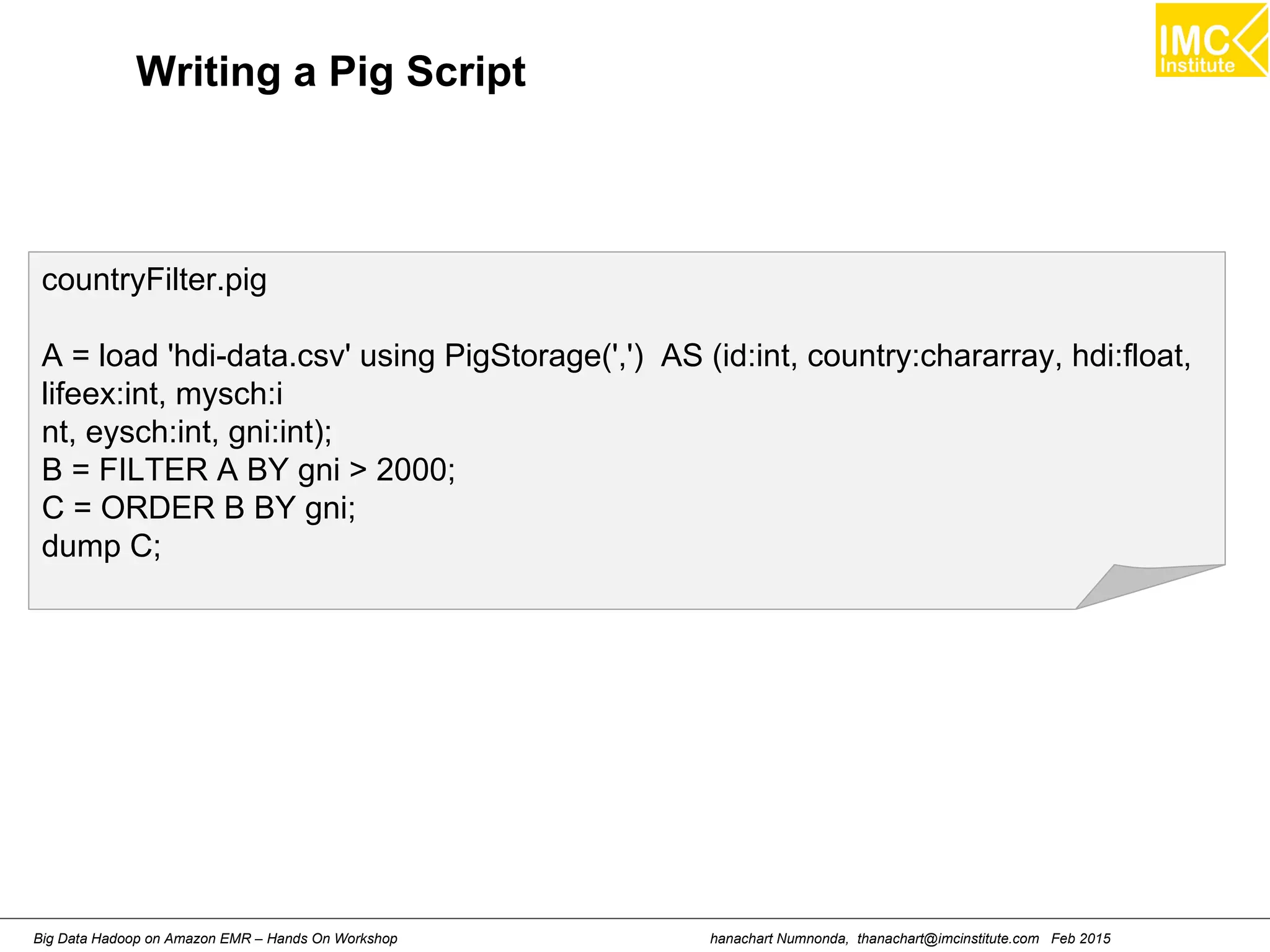
countryFilter.pig
A = load 'hdi-data.csv' using PigStorage(',') AS (id:int, country:chararray, hdi:float,
lifeex:int, mysch:i
nt, eysch:int, gni:int);
B = FILTER A BY gni > 2000;
C = ORDER B BY gni;
dump C;
Writing a Pig Script
hanachart Numnonda, thanachart@imcinstitute.com Feb 2015Big Data Hadoop on Amazon EMR – Hands On Workshop
[hdadmin@localhost ~]$ cd Downloads
[hdadmin@localhost ~]$ pig -x local
grunt > run countryFilter.pig
....
(150,Cameroon,0.482,51,5,10,2031)
(126,Kyrgyzstan,0.615,67,9,12,2036)
(156,Nigeria,0.459,51,5,8,2069)
(154,Yemen,0.462,65,2,8,2213)
(138,Lao People's Democratic Republic,0.524,67,4,9,2242)
(153,Papua New Guinea,0.466,62,4,5,2271)
(165,Djibouti,0.43,57,3,5,2335)
(129,Nicaragua,0.589,74,5,10,2430)
(145,Pakistan,0.504,65,4,6,2550)
Running a Pig Script
hanachart Numnonda, thanachart@imcinstitute.com Feb 2015Big Data Hadoop on Amazon EMR – Hands On Workshop
Thank you
www.imcinstitute.com
www.facebook.com/imcinstitute

Big Data Analytics Using Hadoop Cluster On Amazon EMR

  • 1.
    Danairat T., 2013,danairat@gmail.comBig Data Hadoop – Hands On Workshop 1 Big Data Analytics Using Hadoop Cluster On Amazon EMR February 2015 Dr.Thanachart Numnonda IMC Institute thanachart@imcinstitute.com Modifiy from Original Version by Danairat T. Certified Java Programmer, TOGAF – Silver danairat@gmail.com
  • 2.
    hanachart Numnonda, thanachart@imcinstitute.comFeb 2015Big Data Hadoop on Amazon EMR – Hands On Workshop Running this lab using Amazon EMR
  • 3.
    hanachart Numnonda, thanachart@imcinstitute.comFeb 2015Big Data Hadoop on Amazon EMR – Hands On Workshop Hands-On: Create an EMR cluster
  • 4.
    hanachart Numnonda, thanachart@imcinstitute.comFeb 2015Big Data Hadoop on Amazon EMR – Hands On Workshop Architecture Overview of Amazon EMR
  • 5.
    hanachart Numnonda, thanachart@imcinstitute.comFeb 2015Big Data Hadoop on Amazon EMR – Hands On Workshop Amazon EMR Cluster
  • 6.
    hanachart Numnonda, thanachart@imcinstitute.comFeb 2015Big Data Hadoop on Amazon EMR – Hands On Workshop Creating an AWS account
  • 7.
    hanachart Numnonda, thanachart@imcinstitute.comFeb 2015Big Data Hadoop on Amazon EMR – Hands On Workshop Signing up for the necessary services ● Simple Storage Service (S3) ● Elastic Compute Cloud (EC2) ● Elastic MapReduce (EMR) Caution! This costs real money!
  • 8.
    hanachart Numnonda, thanachart@imcinstitute.comFeb 2015Big Data Hadoop on Amazon EMR – Hands On Workshop Creating Amazon S3 bucket
  • 9.
    hanachart Numnonda, thanachart@imcinstitute.comFeb 2015Big Data Hadoop on Amazon EMR – Hands On Workshop Create access key using Security Credentials in the AWS Management Console
  • 10.
    hanachart Numnonda, thanachart@imcinstitute.comFeb 2015Big Data Hadoop on Amazon EMR – Hands On Workshop
  • 11.
    hanachart Numnonda, thanachart@imcinstitute.comFeb 2015Big Data Hadoop on Amazon EMR – Hands On Workshop Select EMR
  • 12.
    hanachart Numnonda, thanachart@imcinstitute.comFeb 2015Big Data Hadoop on Amazon EMR – Hands On Workshop Creating a cluster in EMR
  • 13.
    hanachart Numnonda, thanachart@imcinstitute.comFeb 2015Big Data Hadoop on Amazon EMR – Hands On Workshop Creating a cluster in EMR (cont.) Name the cluster and also specify Log folder
  • 14.
    hanachart Numnonda, thanachart@imcinstitute.comFeb 2015Big Data Hadoop on Amazon EMR – Hands On Workshop Creating a cluster in EMR (cont.) Leave the Software Configuration as default
  • 15.
    hanachart Numnonda, thanachart@imcinstitute.comFeb 2015Big Data Hadoop on Amazon EMR – Hands On Workshop Creating a cluster in EMR (cont.) Leave the Hardware Configuration as default Choose an exisitng EC2 key pair
  • 16.
    hanachart Numnonda, thanachart@imcinstitute.comFeb 2015Big Data Hadoop on Amazon EMR – Hands On Workshop Creating a cluster in EMR (cont.) Leave the others as default Select Create Cluster
  • 17.
    hanachart Numnonda, thanachart@imcinstitute.comFeb 2015Big Data Hadoop on Amazon EMR – Hands On Workshop EMR Cluster Details Note on the Master public DNS: To see the details on how to connect to the Master Node using SSH click at SSH
  • 18.
    hanachart Numnonda, thanachart@imcinstitute.comFeb 2015Big Data Hadoop on Amazon EMR – Hands On Workshop SSH Instruction
  • 19.
    hanachart Numnonda, thanachart@imcinstitute.comFeb 2015Big Data Hadoop on Amazon EMR – Hands On Workshop Connect to the Master Node
  • 20.
    hanachart Numnonda, thanachart@imcinstitute.comFeb 2015Big Data Hadoop on Amazon EMR – Hands On Workshop Web Interface Host on EMR Cluster
  • 21.
    Danairat T., 2013,danairat@gmail.comBig Data Hadoop – Hands On Workshop 21 Launch the Hue Web Interface ● Set Up an SSH Tunnel to the Master Node – See instruction at – http://docs.aws.amazon.com/ElasticMapReduce/latest/Developer Guide/emr-ssh-tunnel.html ● Configure Proxy Settings to View Websites – See instruction at – http://docs.aws.amazon.com/ElasticMapReduce/latest/Developer Guide/emr-connect-master-node-proxy.html
  • 22.
    Danairat T., 2013,danairat@gmail.comBig Data Hadoop – Hands On Workshop 22 Launch the Hue Web Interface (Cont.) ● http://master-public-dns-name:8888/ ● Create your own Hue account
  • 23.
    Danairat T., 2013,danairat@gmail.comBig Data Hadoop – Hands On Workshop 23 Launch the Hue Web Interface (Cont.)
  • 24.
    hanachart Numnonda, thanachart@imcinstitute.comFeb 2015Big Data Hadoop on Amazon EMR – Hands On Workshop Hands-On: Importing/Exporting Data to HDFS
  • 25.
    hanachart Numnonda, thanachart@imcinstitute.comFeb 2015Big Data Hadoop on Amazon EMR – Hands On Workshop Importing Data to Hadoop Download War and Peace Full Text www.gutenberg.org/ebooks/2600
  • 26.
    hanachart Numnonda, thanachart@imcinstitute.comFeb 2015Big Data Hadoop on Amazon EMR – Hands On Workshop Review file in Hadoop HDFS using File Browse
  • 27.
    hanachart Numnonda, thanachart@imcinstitute.comFeb 2015Big Data Hadoop on Amazon EMR – Hands On Workshop Create new directory Create two new directory name: input and output
  • 28.
    hanachart Numnonda, thanachart@imcinstitute.comFeb 2015Big Data Hadoop on Amazon EMR – Hands On Workshop Upload Files Upload file: pg2600.txt into input directory
  • 29.
    hanachart Numnonda, thanachart@imcinstitute.comFeb 2015Big Data Hadoop on Amazon EMR – Hands On Workshop Lecture: Understanding Map Reduce Processing Client Name Node Job Tracker Data Node Task Tracker Data Node Task Tracker Data Node Task Tracker Map Reduce
  • 30.
    hanachart Numnonda, thanachart@imcinstitute.comFeb 2015Big Data Hadoop on Amazon EMR – Hands On Workshop High Level Architecture of MapReduce
  • 31.
    hanachart Numnonda, thanachart@imcinstitute.comFeb 2015Big Data Hadoop on Amazon EMR – Hands On Workshop Hands-On: Writing you own Map Reduce Program
  • 32.
    hanachart Numnonda, thanachart@imcinstitute.comFeb 2015Big Data Hadoop on Amazon EMR – Hands On Workshop Wordcount (HelloWord in Hadoop) 1. package org.myorg; 2. 3. import java.io.IOException; 4. import java.util.*; 5. 6. import org.apache.hadoop.fs.Path; 7. import org.apache.hadoop.conf.*; 8. import org.apache.hadoop.io.*; 9. import org.apache.hadoop.mapred.*; 10. import org.apache.hadoop.util.*; 11. 12. public class WordCount { 13. 14. public static class Map extends MapReduceBase implements Mapper<LongWritable, Text, Text, IntWritable> { 15. private final static IntWritable one = new IntWritable(1); 16. private Text word = new Text(); 17. 18. public void map(LongWritable key, Text value, OutputCollector<Text, IntWritable> output, Reporter reporter) throws IOException { 19. String line = value.toString(); 20. StringTokenizer tokenizer = new StringTokenizer(line); 21. while (tokenizer.hasMoreTokens()) { 22. word.set(tokenizer.nextToken()); 23. output.collect(word, one); 24. } 25. } 26. }
  • 33.
    hanachart Numnonda, thanachart@imcinstitute.comFeb 2015Big Data Hadoop on Amazon EMR – Hands On Workshop Wordcount (HelloWord in Hadoop) 27. 28. public static class Reduce extends MapReduceBase implements Reducer<Text, IntWritable, Text, IntWritable> { 29. public void reduce(Text key, Iterator<IntWritable> values, OutputCollector<Text, IntWritable> output, Reporter reporter) throws IOException { 30. int sum = 0; 31. while (values.hasNext()) { 32. sum += values.next().get(); 33. } 34. output.collect(key, new IntWritable(sum)); 35. } 36. } 37.
  • 34.
    hanachart Numnonda, thanachart@imcinstitute.comFeb 2015Big Data Hadoop on Amazon EMR – Hands On Workshop Wordcount (HelloWord in Hadoop) 38. public static void main(String[] args) throws Exception { 39. JobConf conf = new JobConf(WordCount.class); 40. conf.setJobName("wordcount"); 41. 42. conf.setOutputKeyClass(Text.class); 43. conf.setOutputValueClass(IntWritable.class); 44. 45. conf.setMapperClass(Map.class); 46. 47. conf.setReducerClass(Reduce.class); 48. 49. conf.setInputFormat(TextInputFormat.class); 50. conf.setOutputFormat(TextOutputFormat.class); 51. 52. FileInputFormat.setInputPaths(conf, new Path(args[1])); 53. FileOutputFormat.setOutputPath(conf, new Path(args[2])); 54. 55. JobClient.runJob(conf); 57. } 58. } 59.
  • 35.
    hanachart Numnonda, thanachart@imcinstitute.comFeb 2015Big Data Hadoop on Amazon EMR – Hands On Workshop Hands-On: Writing Map/Reduce Program on Eclipse
  • 36.
    hanachart Numnonda, thanachart@imcinstitute.comFeb 2015Big Data Hadoop on Amazon EMR – Hands On Workshop Starting Eclipse in a local machine
  • 37.
    hanachart Numnonda, thanachart@imcinstitute.comFeb 2015Big Data Hadoop on Amazon EMR – Hands On Workshop Create a Java Project Let's name it HadoopWordCount
  • 38.
    Danairat T., 2013,danairat@gmail.comBig Data Hadoop – Hands On Workshop 38 Add dependencies to the project ● Note you may need to download Hadoop-core-jar.zip ● Add the following two JARs to your build path ● hadoop-common.jar and hadoop-mapreduce-client-core.jar. ● By perform the following steps – Add a folder named lib to the project – Copy the mentioned JARs in this folder – Right-click on the project name >> select Build Path >> then Configure Build Path – Click on Add Jars, select these two JARs from the lib folder
  • 39.
    Danairat T., 2013,danairat@gmail.comBig Data Hadoop – Hands On Workshop 39 Add dependencies to the project
  • 40.
    Danairat T., 2013,danairat@gmail.comBig Data Hadoop – Hands On Workshop 40 Writing a source code ● Right click the project, the select New >> Package ● Name the package as org.myorg ● Right click at org.myorg, the select New >> Class ● Name the package as WordCount ● Writing a source code as shown in previoud slides
  • 41.
    Danairat T., 2013,danairat@gmail.comBig Data Hadoop – Hands On Workshop 41
  • 42.
    Danairat T., 2013,danairat@gmail.comBig Data Hadoop – Hands On Workshop 42 Building a Jar file ● Right click the project, the select Export ● Select Java and then JAR file ● Provide the JAR name, as wordcount.jar ● Leave the JAR package options as default ● In the JAR Manifest Specification section, in the botton, specify the Main class ● In this case, select WordCount ● Click on Finish ● The JAR file will be build and will be located at cloudera/workspace Note: you may need to re-size the dialog font size by select Windows >> Preferences >> Appearance >> Colors and Fonts
  • 43.
    Danairat T., 2013,danairat@gmail.comBig Data Hadoop – Hands On Workshop 43
  • 44.
    hanachart Numnonda, thanachart@imcinstitute.comFeb 2015Big Data Hadoop on Amazon EMR – Hands On Workshop Hands-On: Running Map Reduce and Deploying to Hadoop Runtime Environment
  • 45.
    Danairat T., 2013,danairat@gmail.comBig Data Hadoop – Hands On Workshop 45 Running a Jar file ● Create a folder applications on Amazon S3 ● Upload wordcount.jar to s3://imcbucket/apps
  • 46.
    Danairat T., 2013,danairat@gmail.comBig Data Hadoop – Hands On Workshop 46 Running a Jar file (cont) ● Open the Master node using SSH command – ssh hadoop@ec2-54-213-220-37.us-west-2.compute.amazonaws.com -i imckey.pem ● Run the following commands – $ mkdir apps – $ hadoop fs -get s3://imcbucket/applications/wordcount.jar apps – $ hadoop jar apps/wordcount.jar org.myorg.WordCount s3://imcbucket/input/* s3://imcbucket/output/wordcount_result
  • 47.
    hanachart Numnonda, thanachart@imcinstitute.comFeb 2015Big Data Hadoop on Amazon EMR – Hands On Workshop Reviewing MapReduce Output Result Browse to the s3://imcbucket/output/wordcount_result Open part-xxxx files
  • 48.
    hanachart Numnonda, thanachart@imcinstitute.comFeb 2015Big Data Hadoop on Amazon EMR – Hands On Workshop Reviewing MapReduce Output Result
  • 49.
    hanachart Numnonda, thanachart@imcinstitute.comFeb 2015Big Data Hadoop on Amazon EMR – Hands On Workshop Lecture Understanding Hive
  • 50.
    hanachart Numnonda, thanachart@imcinstitute.comFeb 2015Big Data Hadoop on Amazon EMR – Hands On Workshop Introduction A Petabyte Scale Data Warehouse Using Hadoop Hive is developed by Facebook, designed to enable easy data summarization, ad-hoc querying and analysis of large volumes of data. It provides a simple query language called Hive QL, which is based on SQL
  • 51.
    hanachart Numnonda, thanachart@imcinstitute.comFeb 2015Big Data Hadoop on Amazon EMR – Hands On Workshop Hands-On: Creating Table and Retrieving Data using Hive
  • 52.
    hanachart Numnonda, thanachart@imcinstitute.comFeb 2015Big Data Hadoop on Amazon EMR – Hands On Workshop Running Hive from the Master node Starting Hive hive> quit; Quit from Hive
  • 53.
    hanachart Numnonda, thanachart@imcinstitute.comFeb 2015Big Data Hadoop on Amazon EMR – Hands On Workshop Starting Hive Editor from Hue
  • 54.
    hanachart Numnonda, thanachart@imcinstitute.comFeb 2015Big Data Hadoop on Amazon EMR – Hands On Workshop Starting Hive Editor from Hue
  • 55.
    hanachart Numnonda, thanachart@imcinstitute.comFeb 2015Big Data Hadoop on Amazon EMR – Hands On Workshop Creating Hive Table hive (default)> CREATE TABLE test_tbl(id INT, country STRING) ROW FORMAT DELIMITED FIELDS TERMINATED BY ',' STORED AS TEXTFILE; OK Time taken: 4.069 seconds hive (default)> show tables; OK test_tbl Time taken: 0.138 seconds hive (default)> describe test_tbl; OK id int country string Time taken: 0.147 seconds hive (default)> See also: https://cwiki.apache.org/Hive/languagemanual-ddl.html
  • 56.
    hanachart Numnonda, thanachart@imcinstitute.comFeb 2015Big Data Hadoop on Amazon EMR – Hands On Workshop Using Hue Query Editor See also: https://cwiki.apache.org/Hive/languagemanual-ddl.html
  • 57.
    hanachart Numnonda, thanachart@imcinstitute.comFeb 2015Big Data Hadoop on Amazon EMR – Hands On Workshop Using Hue Query Editor See also: https://cwiki.apache.org/Hive/languagemanual-ddl.html
  • 58.
    hanachart Numnonda, thanachart@imcinstitute.comFeb 2015Big Data Hadoop on Amazon EMR – Hands On Workshop Reviewing Hive Table in HDFS
  • 59.
    hanachart Numnonda, thanachart@imcinstitute.comFeb 2015Big Data Hadoop on Amazon EMR – Hands On Workshop Alter and Drop Hive Table hive (default)> alter table test_tbl add columns (remarks STRING); hive (default)> describe test_tbl; OK id int country string remarks string Time taken: 0.077 seconds hive (default)> drop table test_tbl; OK Time taken: 0.9 seconds See also: https://cwiki.apache.org/Hive/adminmanual-metastoreadmin.html
  • 60.
    hanachart Numnonda, thanachart@imcinstitute.comFeb 2015Big Data Hadoop on Amazon EMR – Hands On Workshop Loading Data to Hive Table $ hive hive (default)> CREATE TABLE test_tbl(id INT, country STRING) ROW FORMAT DELIMITED FIELDS TERMINATED BY ',' STORED AS TEXTFILE; Creating Hive table hive (default)> LOAD DATA LOCAL INPATH '/tmp/country.csv' INTO TABLE test_tbl; Copying data from file:/tmp/test_tbl_data.csv Copying file: file:/tmp/test_tbl_data.csv Loading data to table default.test_tbl OK Time taken: 0.241 seconds hive (default)> Loading data to Hive table
  • 61.
    hanachart Numnonda, thanachart@imcinstitute.comFeb 2015Big Data Hadoop on Amazon EMR – Hands On Workshop Querying Data from Hive Table hive (default)> select * from test_tbl; OK 1 USA 62 Indonesia 63 Philippines 65 Singapore 66 Thailand Time taken: 0.287 seconds hive (default)>
  • 62.
    hanachart Numnonda, thanachart@imcinstitute.comFeb 2015Big Data Hadoop on Amazon EMR – Hands On Workshop Insert Overwriting the Hive Table hive (default)> LOAD DATA LOCAL INPATH '/home/cloudera/Downloads/test_tbl_data_updated.csv' overwrite INTO TABLE test_tbl; Copying data from file:/tmp/test_tbl_data_updated.csv Copying file: file:/tmp/test_tbl_data_updated.csv Loading data to table default.test_tbl Deleted hdfs://localhost:54310/user/hive/warehouse/test_tbl OK Time taken: 0.204 seconds hive (default)>
  • 63.
    hanachart Numnonda, thanachart@imcinstitute.comFeb 2015Big Data Hadoop on Amazon EMR – Hands On Workshop MovieLens http://grouplens.org/datasets/movielens/
  • 64.
    hanachart Numnonda, thanachart@imcinstitute.comFeb 2015Big Data Hadoop on Amazon EMR – Hands On Workshop Create the Hive Table for movielen hive (default)> CREATE TABLE u_data ( userid INT, movieid INT, rating INT, unixtime STRING) ROW FORMAT DELIMITED FIELDS TERMINATED BY 't' STORED AS TEXTFILE; hive (default)> LOAD DATA LOCAL INPATH '/home/cloudera/Downloads/u.data' overwrite INTO TABLE u_data;
  • 65.
    hanachart Numnonda, thanachart@imcinstitute.comFeb 2015Big Data Hadoop on Amazon EMR – Hands On Workshop Create the Hive Table for Apache LOf hive (default)> CREATE TABLE apachelog ( host STRING, identity STRING, user STRING, time STRING, request STRING, status STRING, size STRING, referer STRING, agent STRING) ROW FORMAT SERDE 'org.apache.hadoop.hive.serde2.RegexSerDe' WITH SERDEPROPERTIES ( "input.regex" = "([^]*) ([^]*) ([^]*) (-|[^]*]) ([^ "]*|"[^"]*") (-|[0-9]*) (-|[0-9]*)(?: ([^ "]*|".*") ([^ "]*|".*"))?" ) STORED AS TEXTFILE;
  • 66.
    hanachart Numnonda, thanachart@imcinstitute.comFeb 2015Big Data Hadoop on Amazon EMR – Hands On Workshop Lecture Understanding Pig
  • 67.
    hanachart Numnonda, thanachart@imcinstitute.comFeb 2015Big Data Hadoop on Amazon EMR – Hands On Workshop Introduction A high-level platform for creating MapReduce programs Using Hadoop Pig is a platform for analyzing large data sets that consists of a high-level language for expressing data analysis programs, coupled with infrastructure for evaluating these programs. The salient property of Pig programs is that their structure is amenable to substantial parallelization, which in turns enables them to handle very large data sets.
  • 68.
    hanachart Numnonda, thanachart@imcinstitute.comFeb 2015Big Data Hadoop on Amazon EMR – Hands On Workshop Hands-On: Running a Pig script
  • 69.
    hanachart Numnonda, thanachart@imcinstitute.comFeb 2015Big Data Hadoop on Amazon EMR – Hands On Workshop Starting Pig Command Line
  • 70.
    hanachart Numnonda, thanachart@imcinstitute.comFeb 2015Big Data Hadoop on Amazon EMR – Hands On Workshop Starting Pig from Hue
  • 71.
    hanachart Numnonda, thanachart@imcinstitute.comFeb 2015Big Data Hadoop on Amazon EMR – Hands On Workshop countryFilter.pig A = load 'hdi-data.csv' using PigStorage(',') AS (id:int, country:chararray, hdi:float, lifeex:int, mysch:i nt, eysch:int, gni:int); B = FILTER A BY gni > 2000; C = ORDER B BY gni; dump C; Writing a Pig Script
  • 72.
    hanachart Numnonda, thanachart@imcinstitute.comFeb 2015Big Data Hadoop on Amazon EMR – Hands On Workshop [hdadmin@localhost ~]$ cd Downloads [hdadmin@localhost ~]$ pig -x local grunt > run countryFilter.pig .... (150,Cameroon,0.482,51,5,10,2031) (126,Kyrgyzstan,0.615,67,9,12,2036) (156,Nigeria,0.459,51,5,8,2069) (154,Yemen,0.462,65,2,8,2213) (138,Lao People's Democratic Republic,0.524,67,4,9,2242) (153,Papua New Guinea,0.466,62,4,5,2271) (165,Djibouti,0.43,57,3,5,2335) (129,Nicaragua,0.589,74,5,10,2430) (145,Pakistan,0.504,65,4,6,2550) Running a Pig Script
  • 73.
    hanachart Numnonda, thanachart@imcinstitute.comFeb 2015Big Data Hadoop on Amazon EMR – Hands On Workshop
  • 74.
    hanachart Numnonda, thanachart@imcinstitute.comFeb 2015Big Data Hadoop on Amazon EMR – Hands On Workshop Thank you www.imcinstitute.com www.facebook.com/imcinstitute