


















Masterclass
ianmas@amazon.com
@IanMmmm
Ian Massingham — Technical Evangelist
Amazon
Elastic MapReduce
Masterclass
Intended to educate you on how to get the best from AWS services
Show you how things work and how to get things done
A technical deep dive that goes beyond the basics
1
2
3
Amazon Elastic MapReduce
Provides a managed Hadoop framework
Quickly & cost-effectively process vast amounts of data
Makes it easy, fast & cost-effective for you to process data

Run other popular distributed frameworks such as Spark
Elastic
Amazon EMR
Easy to Use
ReliableFlexible
Low Cost
Secure
Amazon EMR: Example Use Cases
Amazon EMR can be used
to process vast amounts of
genomic data and other
large scientific data sets
quickly and efficiently.
Researchers can access
genomic data hosted for
free on AWS.
Genomics
Amazon EMR can be used
to analyze click stream data
in order to segment users
and understand user
preferences. Advertisers
can also analyze click
streams and advertising
impression logs to deliver
more effective ads.
Clickstream Analysis
Amazon EMR can be used
to process logs generated
by web and mobile
applications. Amazon EMR
helps customers turn
petabytes of un-structured
or semi-structured data into
useful insights about their
applications or users.
Log Processing
Agenda
Hadoop Fundamentals
Core Features of Amazon EMR
How to Get Started with Amazon EMR
Supported Hadoop Tools
Additional EMR Features
Third Party Tools
Resources where you can learn more
HADOOP FUNDAMENTALS
Very large
clickstream
logging data
(e.g TBs)
Lots of actions by
John Smith
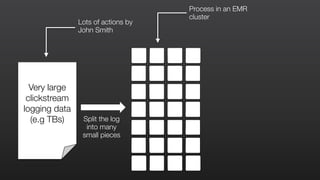
Very large
clickstream
logging data
(e.g TBs)
Lots of actions by
John Smith
Split the log
into many
small pieces
Very large
clickstream
logging data
(e.g TBs)
Lots of actions by
John Smith
Split the log
into many
small pieces
Process in an EMR
cluster
Very large
clickstream
logging data
(e.g TBs)
Lots of actions by
John Smith
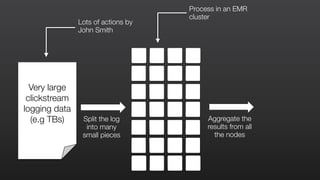
Split the log
into many
small pieces
Process in an EMR
cluster
Aggregate the
results from all
the nodes
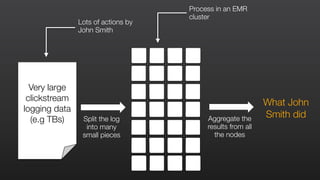
Very large
clickstream
logging data
(e.g TBs)
Lots of actions by
John Smith
Split the log
into many
small pieces
Process in an EMR
cluster
Aggregate the
results from all
the nodes
Very large
clickstream
logging data
(e.g TBs)
What John
Smith did
Insight in a fraction of the time
Very large
clickstream
logging data
(e.g TBs)
What John
Smith did
CORE FEATURES OF AMAZON EMR
ELASTIC
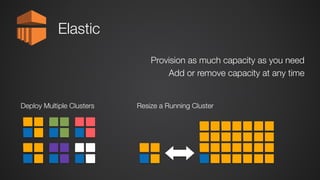
Elastic
Provision as much capacity as you need
Add or remove capacity at any time
Deploy Multiple Clusters Resize a Running Cluster
LOW COST
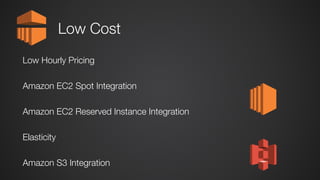
Low Cost
Low Hourly Pricing
Amazon EC2 Spot Integration
Amazon EC2 Reserved Instance Integration
Elasticity
Amazon S3 Integration
Where to deploy your Hadoop clusters?
Executive Summary
Accenture Technology Labs
Low Cost
http://www.accenture.com/SiteCollectionDocuments/PDF/Accenture-Technology-Labs-Where-To-Deploy-Your-Hadoop-CLusters-Executive-Summary.pdf
Accenture Hadoop Study:
Amazon EMR ‘offers better price-performance’
FLEXIBLE DATA STORES
Amazon
EMR
Amazon
S3
Amazon
DynamoDB
DW1
Amazon
Redshift
Amazon
Glacier
Amazon Relational
Database Service
Hadoop Distributed
File System
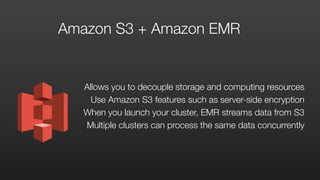
Allows you to decouple storage and computing resources
Use Amazon S3 features such as server-side encryption
When you launch your cluster, EMR streams data from S3
Multiple clusters can process the same data concurrently
Amazon S3 + Amazon EMR
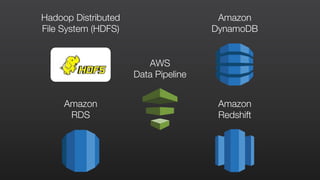
Amazon
RDS
Hadoop Distributed
File System (HDFS)
Amazon
DynamoDB
Amazon
Redshift
AWS
Data Pipeline
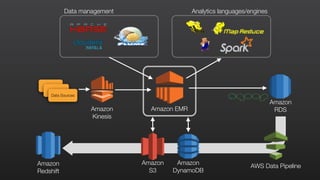
Analytics languages/enginesData management
Amazon
Redshift
AWS Data Pipeline
Amazon
Kinesis
Amazon
S3
Amazon
DynamoDB
Amazon
RDSAmazon EMR
Data Sources
GETTING STARTED WITH
AMAZON ELASTIC MAPREDUCE
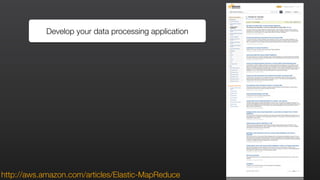
Develop your data processing application
http://aws.amazon.com/articles/Elastic-MapReduce
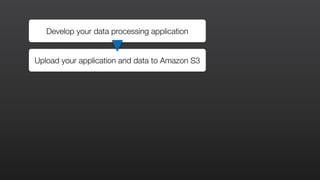
Develop your data processing application
Upload your application and data to Amazon S3
Develop your data processing application
Upload your application and data to Amazon S3
Develop your data processing application
Upload your application and data to Amazon S3
Develop your data processing application
Upload your application and data to Amazon S3
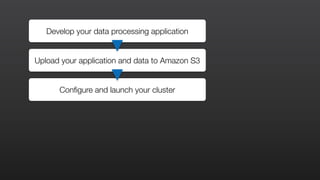
Develop your data processing application
Upload your application and data to Amazon S3
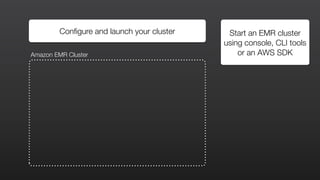
Configure and launch your cluster
Configure and launch your cluster Start an EMR cluster
using console, CLI tools
or an AWS SDKAmazon EMR Cluster
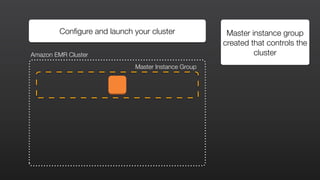
Configure and launch your cluster Master instance group
created that controls the
clusterAmazon EMR Cluster
Master Instance Group
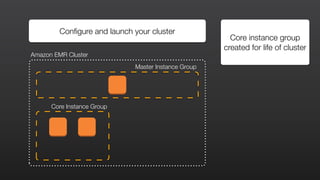
Configure and launch your cluster
Core instance group
created for life of cluster
Amazon EMR Cluster
Master Instance Group
Core Instance Group
HDFS HDFS
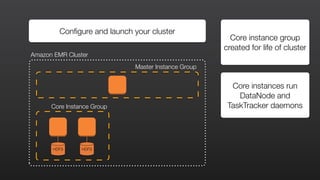
Configure and launch your cluster
Core instance group
created for life of cluster
Amazon EMR Cluster
Master Instance Group
Core Instance Group
Core instances run
DataNode and
TaskTracker daemons
HDFS HDFS
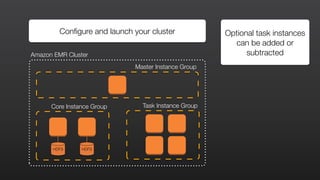
Configure and launch your cluster Optional task instances
can be added or
subtractedAmazon EMR Cluster
Master Instance Group
Core Instance Group Task Instance Group
HDFS HDFS
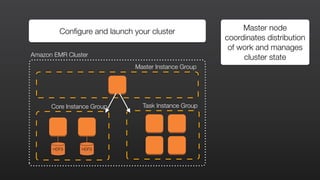
Configure and launch your cluster Master node
coordinates distribution
of work and manages
cluster stateAmazon EMR Cluster
Master Instance Group
Core Instance Group Task Instance Group
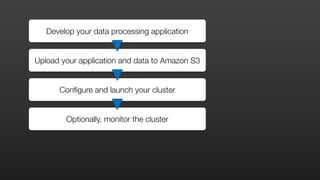
Develop your data processing application
Upload your application and data to Amazon S3
Configure and launch your cluster
Optionally, monitor the cluster
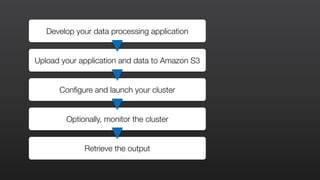
Develop your data processing application
Upload your application and data to Amazon S3
Configure and launch your cluster
Optionally, monitor the cluster
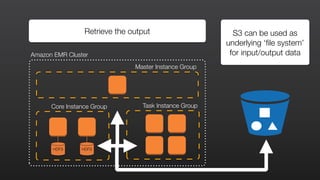
Retrieve the output
HDFS HDFS
S3 can be used as
underlying ‘file system’
for input/output dataAmazon EMR Cluster
Master Instance Group
Core Instance Group Task Instance Group
Retrieve the output
DEMO:
GETTING STARTED WITH
AMAZON EMR USING A SAMPLE
HADOOP STREAMING APPLICATION
Utility that comes with the Hadoop distribution
Allows you to create and run Map/Reduce jobs with any executable or
script as the mapper and/or the reducer
Reads the input from standard input and the reducer outputs data
through standard output
By default, each line of input/output represents a record with tab
separated key/value
Hadoop Streaming
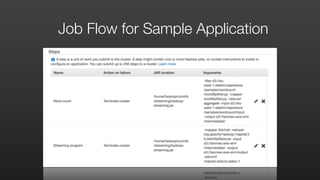
Job Flow for Sample Application
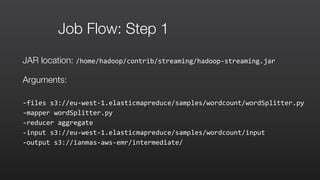
Job Flow: Step 1
JAR location: /home/hadoop/contrib/streaming/hadoop-­‐streaming.jar	
  
Arguments:
-­‐files	
  s3://eu-­‐west-­‐1.elasticmapreduce/samples/wordcount/wordSplitter.py	
  	
  
-­‐mapper	
  wordSplitter.py	
  	
  
-­‐reducer	
  aggregate	
  	
  
-­‐input	
  s3://eu-­‐west-­‐1.elasticmapreduce/samples/wordcount/input	
  	
  
-­‐output	
  s3://ianmas-­‐aws-­‐emr/intermediate/
Step 1: mapper: wordSplitter.py
#!/usr/bin/python	
  
import	
  sys	
  	
  
import	
  re	
  	
  
def	
  main(argv):	


  pattern	
  =	
  re.compile("[a-­‐zA-­‐Z][a-­‐zA-­‐Z0-­‐9]*")	


  for	
  line	
  in	
  sys.stdin:	


  for	
  word	
  in	
  pattern.findall(line):	


  print	
  "LongValueSum:"	
  +	
  word.lower()	
  +	
  "t"	
  +	
  "1"	
  	
  
if	
  __name__	
  ==	
  "__main__":	


  main(sys.argv)	
  
Step 1: mapper: wordSplitter.py
#!/usr/bin/python	
  
import	
  sys	
  	
  
import	
  re	
  	
  
def	
  main(argv):	


  pattern	
  =	
  re.compile("[a-­‐zA-­‐Z][a-­‐zA-­‐Z0-­‐9]*")	


  for	
  line	
  in	
  sys.stdin:	


  for	
  word	
  in	
  pattern.findall(line):	


  print	
  "LongValueSum:"	
  +	
  word.lower()	
  +	
  "t"	
  +	
  "1"	
  	
  
if	
  __name__	
  ==	
  "__main__":	


  main(sys.argv)	
  
Read words from StdIn line by line
Step 1: mapper: wordSplitter.py
#!/usr/bin/python	
  
import	
  sys	
  	
  
import	
  re	
  	
  
def	
  main(argv):	


  pattern	
  =	
  re.compile("[a-­‐zA-­‐Z][a-­‐zA-­‐Z0-­‐9]*")	


  for	
  line	
  in	
  sys.stdin:	


  for	
  word	
  in	
  pattern.findall(line):	


  print	
  "LongValueSum:"	
  +	
  word.lower()	
  +	
  "t"	
  +	
  "1"	
  	
  
if	
  __name__	
  ==	
  "__main__":	


  main(sys.argv)	
  
Output to StdOut tab delimited records
in the format “LongValueSum:abacus 1”
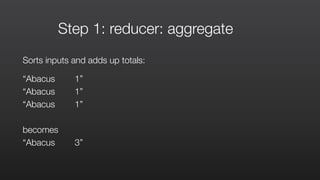
Step 1: reducer: aggregate
Sorts inputs and adds up totals:
“Abacus 1”
“Abacus 1”
“Abacus 1”
becomes
“Abacus 3”
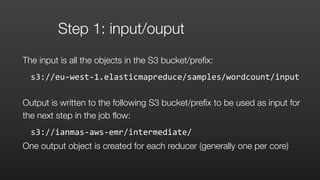
Step 1: input/ouput
The input is all the objects in the S3 bucket/prefix:
s3://eu-­‐west-­‐1.elasticmapreduce/samples/wordcount/input	
  	
  
Output is written to the following S3 bucket/prefix to be used as input for
the next step in the job flow:
s3://ianmas-­‐aws-­‐emr/intermediate/	
  
One output object is created for each reducer (generally one per core)
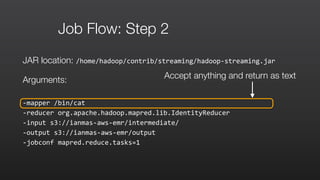
Job Flow: Step 2
JAR location: /home/hadoop/contrib/streaming/hadoop-­‐streaming.jar	
  
Arguments:
-­‐mapper	
  /bin/cat	
  	
  
-­‐reducer	
  org.apache.hadoop.mapred.lib.IdentityReducer	
  	
  
-­‐input	
  s3://ianmas-­‐aws-­‐emr/intermediate/	
  	
  
-­‐output	
  s3://ianmas-­‐aws-­‐emr/output	
  	
  
-­‐jobconf	
  mapred.reduce.tasks=1
Accept anything and return as text
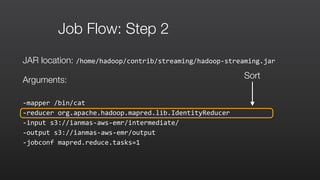
Job Flow: Step 2
JAR location: /home/hadoop/contrib/streaming/hadoop-­‐streaming.jar	
  
Arguments:
-­‐mapper	
  /bin/cat	
  	
  
-­‐reducer	
  org.apache.hadoop.mapred.lib.IdentityReducer	
  	
  
-­‐input	
  s3://ianmas-­‐aws-­‐emr/intermediate/	
  	
  
-­‐output	
  s3://ianmas-­‐aws-­‐emr/output	
  	
  
-­‐jobconf	
  mapred.reduce.tasks=1
Sort
Job Flow: Step 2
JAR location: /home/hadoop/contrib/streaming/hadoop-­‐streaming.jar	
  
Arguments:
-­‐mapper	
  /bin/cat	
  	
  
-­‐reducer	
  org.apache.hadoop.mapred.lib.IdentityReducer	
  	
  
-­‐input	
  s3://ianmas-­‐aws-­‐emr/intermediate/	
  	
  
-­‐output	
  s3://ianmas-­‐aws-­‐emr/output	
  	
  
-­‐jobconf	
  mapred.reduce.tasks=1
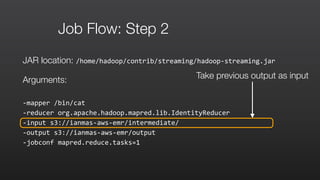
Take previous output as input
Job Flow: Step 2
JAR location: /home/hadoop/contrib/streaming/hadoop-­‐streaming.jar	
  
Arguments:
-­‐mapper	
  /bin/cat	
  	
  
-­‐reducer	
  org.apache.hadoop.mapred.lib.IdentityReducer	
  	
  
-­‐input	
  s3://ianmas-­‐aws-­‐emr/intermediate/	
  	
  
-­‐output	
  s3://ianmas-­‐aws-­‐emr/output	
  	
  
-­‐jobconf	
  mapred.reduce.tasks=1
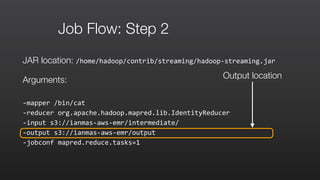
Output location
Job Flow: Step 2
JAR location: /home/hadoop/contrib/streaming/hadoop-­‐streaming.jar	
  
Arguments:
-­‐mapper	
  /bin/cat	
  	
  
-­‐reducer	
  org.apache.hadoop.mapred.lib.IdentityReducer	
  	
  
-­‐input	
  s3://ianmas-­‐aws-­‐emr/intermediate/	
  	
  
-­‐output	
  s3://ianmas-­‐aws-­‐emr/output	
  	
  
-­‐jobconf	
  mapred.reduce.tasks=1
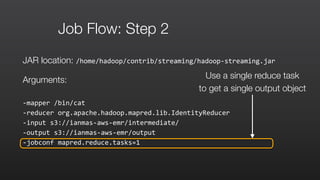
Use a single reduce task
to get a single output object
SUPPORTED HADOOP TOOLS
Supported Hadoop Tools
An open source analytics
package that runs on top of
Hadoop. Pig is operated by Pig
Latin, a SQL-like language
which allows users to structure,
summarize, and query data.
Allows processing of complex
and unstructured data sources
such as text documents and log
files.
Pig
An open source data warehouse
& analytics package the runs on
top of Hadoop. Operated by
Hive QL, a SQL-based language
which allows users to structure,
summarize, and query data
Hive
Provides you an efficient way of
storing large quantities of sparse
data using column-based
storage. HBase provides fast
lookup of data because data is
stored in-memory instead of on
disk. Optimized for sequential
write operations, and it is highly
efficient for batch inserts,
updates, and deletes.
HBase
Supported Hadoop Tools
An open source distributed SQL
query engine for running
interactive analytic queries
against data sources of all sizes
ranging from gigabytes to
petabytes.
Presto
A tool in the Hadoop ecosystem
for interactive, ad hoc querying
using SQL syntax.It uses a
massively parallel processing
(MPP) engine similar to that
found in a traditional RDBMS.
This lends Impala to interactive,
low-latency analytics. You can
connect to BI tools through
ODBC and JDBC drivers.
Impala
An open source user interface
for Hadoop that makes it easier
to run and develop Hive queries,
manage files in HDFS, run and
develop Pig scripts, and
manage tables.
Hue
New
DEMO:
APACHE HUE ON EMR
aws.amazon.com/blogs/aws/new-apache-spark-on-amazon-emr/
New
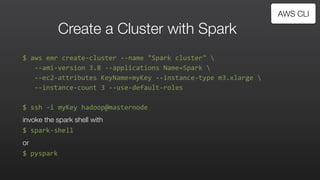
Create a Cluster with Spark
$	
  aws	
  emr	
  create-­‐cluster	
  -­‐-­‐name	
  "Spark	
  cluster"	


  -­‐-­‐ami-­‐version	
  3.8	
  -­‐-­‐applications	
  Name=Spark	


  -­‐-­‐ec2-­‐attributes	
  KeyName=myKey	
  -­‐-­‐instance-­‐type	
  m3.xlarge	


  -­‐-­‐instance-­‐count	
  3	
  -­‐-­‐use-­‐default-­‐roles	
  
$	
  ssh	
  -­‐i	
  myKey	
  hadoop@masternode	
  
invoke the spark shell with
$	
  spark-­‐shell	
  
or	
  
$	
  pyspark	
  
AWS CLI
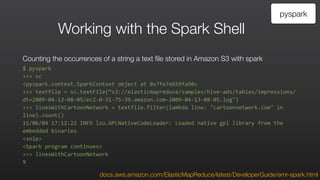
Working with the Spark Shell
Counting the occurrences of a string a text file stored in Amazon S3 with spark
$	
  pyspark	
  
>>>	
  sc	
  
<pyspark.context.SparkContext	
  object	
  at	
  0x7fe7e659fa50>	
  
>>>	
  textfile	
  =	
  sc.textFile(“s3://elasticmapreduce/samples/hive-­‐ads/tables/impressions/
dt=2009-­‐04-­‐13-­‐08-­‐05/ec2-­‐0-­‐51-­‐75-­‐39.amazon.com-­‐2009-­‐04-­‐13-­‐08-­‐05.log")	
  
>>>	
  linesWithCartoonNetwork	
  =	
  textfile.filter(lambda	
  line:	
  "cartoonnetwork.com"	
  in	
  
line).count()	
  
15/06/04	
  17:12:22	
  INFO	
  lzo.GPLNativeCodeLoader:	
  Loaded	
  native	
  gpl	
  library	
  from	
  the	
  
embedded	
  binaries	
  
<snip>	
  
<Spark	
  program	
  continues>	
  
>>>	
  linesWithCartoonNetwork	
  
9
pyspark
docs.aws.amazon.com/ElasticMapReduce/latest/DeveloperGuide/emr-spark.html
ADDITIONAL EMR FEATURES
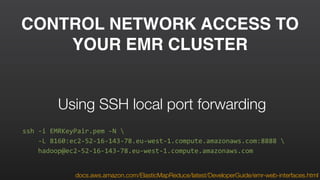
CONTROL NETWORK ACCESS TO
YOUR EMR CLUSTER
ssh	
  -­‐i	
  EMRKeyPair.pem	
  -­‐N	


  -­‐L	
  8160:ec2-­‐52-­‐16-­‐143-­‐78.eu-­‐west-­‐1.compute.amazonaws.com:8888	


  hadoop@ec2-­‐52-­‐16-­‐143-­‐78.eu-­‐west-­‐1.compute.amazonaws.com
Using SSH local port forwarding
docs.aws.amazon.com/ElasticMapReduce/latest/DeveloperGuide/emr-web-interfaces.html
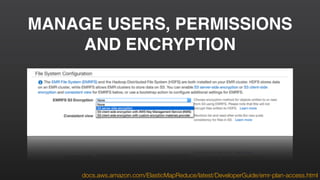
MANAGE USERS, PERMISSIONS
AND ENCRYPTION
docs.aws.amazon.com/ElasticMapReduce/latest/DeveloperGuide/emr-plan-access.html
INSTALL ADDITIONAL SOFTWARE
WITH BOOTSTRAP ACTIONS
docs.aws.amazon.com/ElasticMapReduce/latest/DeveloperGuide/emr-plan-bootstrap.html
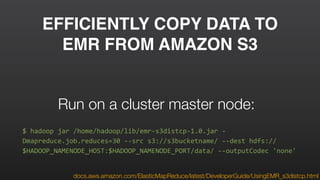
EFFICIENTLY COPY DATA TO
EMR FROM AMAZON S3
docs.aws.amazon.com/ElasticMapReduce/latest/DeveloperGuide/UsingEMR_s3distcp.html
$	
  hadoop	
  jar	
  /home/hadoop/lib/emr-­‐s3distcp-­‐1.0.jar	
  -­‐
Dmapreduce.job.reduces=30	
  -­‐-­‐src	
  s3://s3bucketname/	
  -­‐-­‐dest	
  hdfs://
$HADOOP_NAMENODE_HOST:$HADOOP_NAMENODE_PORT/data/	
  -­‐-­‐outputCodec	
  'none'
Run on a cluster master node:
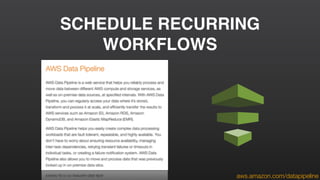
SCHEDULE RECURRING
WORKFLOWS
aws.amazon.com/datapipeline
MONITOR YOUR CLUSTER
docs.aws.amazon.com/ElasticMapReduce/latest/DeveloperGuide/UsingEMR_ViewingMetrics.html
DEBUG YOUR APPLICATIONS
docs.aws.amazon.com/ElasticMapReduce/latest/DeveloperGuide/emr-plan-debugging.html
Log files generated by EMR Clusters include:
	 •	 Step logs
	 •	 Hadoop logs
	 •	 Bootstrap action logs
	 •	 Instance state logs
USE THE MAPR DISTRIBUTION
aws.amazon.com/elasticmapreduce/mapr/
TUNE YOUR CLUSTER FOR
COST & PERFORMANCE
Supported EC2 instance types
	 •	 General Purpose
	 •	 Compute Optimized
	 •	 Memory Optimized
	 •	 Storage Optimized - D2 instance family
D2 instances are available in four sizes with 6TB, 12TB, 24TB, and 48TB storage options.
	 •	 GPU Instances
New
TUNE YOUR CLUSTER FOR
COST & PERFORMANCE
Job Flow
Duration:
Scenario #1
Duration:
Scenario #2
Cost without Spot
4 instances *14 hrs * $0.50
Total = $28
Cost with Spot
4 instances *7 hrs * $0.50 = $14 +
5 instances * 7 hrs * $0.25 = $8.75
Total = $22.75
Time Savings: 50%
Cost Savings: ~22%
Job Flow
Allocate
4 on demand
instances
Add
5 additional
spot instances
14 hours 7 hours
THIRD PARTY TOOLS
RESOURCES YOU CAN USE
TO LEARN MORE
aws.amazon.com/emr
Getting Started with Amazon EMR Tutorial guide:
docs.aws.amazon.com/ElasticMapReduce/latest/DeveloperGuide/emr-get-started.html

Customer Case Studies for Big Data Use-Cases
aws.amazon.com/solutions/case-studies/big-data/

Amazon EMR Documentation:
aws.amazon.com/documentation/emr/
Certification
aws.amazon.com/certification
Self-Paced Labs
aws.amazon.com/training/

self-paced-labs
Try products, gain new skills, and
get hands-on practice working
with AWS technologies
aws.amazon.com/training
Training
Validate your proven skills and
expertise with the AWS platform
Build technical expertise to
design and operate scalable,
efficient applications on AWS
AWS Training & Certification
Follow
us
for m
ore
events
&
w
ebinars
@AWScloud for Global AWS News & Announcements
@AWS_UKI for local AWS events & news
@IanMmmm
Ian Massingham — Technical Evangelist

Amazon EMR Masterclass

  • 1.
    Masterclass ianmas@amazon.com @IanMmmm Ian Massingham —Technical Evangelist Amazon Elastic MapReduce
  • 2.
    Masterclass Intended to educateyou on how to get the best from AWS services Show you how things work and how to get things done A technical deep dive that goes beyond the basics 1 2 3
  • 3.
    Amazon Elastic MapReduce Providesa managed Hadoop framework Quickly & cost-effectively process vast amounts of data Makes it easy, fast & cost-effective for you to process data
 Run other popular distributed frameworks such as Spark
  • 4.
    Elastic Amazon EMR Easy toUse ReliableFlexible Low Cost Secure
  • 5.
    Amazon EMR: ExampleUse Cases Amazon EMR can be used to process vast amounts of genomic data and other large scientific data sets quickly and efficiently. Researchers can access genomic data hosted for free on AWS. Genomics Amazon EMR can be used to analyze click stream data in order to segment users and understand user preferences. Advertisers can also analyze click streams and advertising impression logs to deliver more effective ads. Clickstream Analysis Amazon EMR can be used to process logs generated by web and mobile applications. Amazon EMR helps customers turn petabytes of un-structured or semi-structured data into useful insights about their applications or users. Log Processing
  • 6.
    Agenda Hadoop Fundamentals Core Featuresof Amazon EMR How to Get Started with Amazon EMR Supported Hadoop Tools Additional EMR Features Third Party Tools Resources where you can learn more
  • 7.
  • 8.
  • 9.
    Lots of actionsby John Smith Very large clickstream logging data (e.g TBs)
  • 10.
    Lots of actionsby John Smith Split the log into many small pieces Very large clickstream logging data (e.g TBs)
  • 11.
    Lots of actionsby John Smith Split the log into many small pieces Process in an EMR cluster Very large clickstream logging data (e.g TBs)
  • 12.
    Lots of actionsby John Smith Split the log into many small pieces Process in an EMR cluster Aggregate the results from all the nodes Very large clickstream logging data (e.g TBs)
  • 13.
    Lots of actionsby John Smith Split the log into many small pieces Process in an EMR cluster Aggregate the results from all the nodes Very large clickstream logging data (e.g TBs) What John Smith did
  • 14.
    Insight in afraction of the time Very large clickstream logging data (e.g TBs) What John Smith did
  • 15.
    CORE FEATURES OFAMAZON EMR
  • 16.
  • 17.
    Elastic Provision as muchcapacity as you need Add or remove capacity at any time Deploy Multiple Clusters Resize a Running Cluster
  • 18.
  • 19.
    Low Cost Low HourlyPricing Amazon EC2 Spot Integration Amazon EC2 Reserved Instance Integration Elasticity Amazon S3 Integration
  • 20.
    Where to deployyour Hadoop clusters? Executive Summary Accenture Technology Labs Low Cost http://www.accenture.com/SiteCollectionDocuments/PDF/Accenture-Technology-Labs-Where-To-Deploy-Your-Hadoop-CLusters-Executive-Summary.pdf Accenture Hadoop Study: Amazon EMR ‘offers better price-performance’
  • 21.
  • 22.
  • 23.
    Allows you todecouple storage and computing resources Use Amazon S3 features such as server-side encryption When you launch your cluster, EMR streams data from S3 Multiple clusters can process the same data concurrently Amazon S3 + Amazon EMR
  • 24.
    Amazon RDS Hadoop Distributed File System(HDFS) Amazon DynamoDB Amazon Redshift AWS Data Pipeline
  • 25.
    Analytics languages/enginesData management Amazon Redshift AWSData Pipeline Amazon Kinesis Amazon S3 Amazon DynamoDB Amazon RDSAmazon EMR Data Sources
  • 26.
    GETTING STARTED WITH AMAZONELASTIC MAPREDUCE
  • 27.
    Develop your dataprocessing application http://aws.amazon.com/articles/Elastic-MapReduce
  • 28.
    Develop your dataprocessing application Upload your application and data to Amazon S3
  • 29.
    Develop your dataprocessing application Upload your application and data to Amazon S3
  • 30.
    Develop your dataprocessing application Upload your application and data to Amazon S3
  • 31.
    Develop your dataprocessing application Upload your application and data to Amazon S3
  • 32.
    Develop your dataprocessing application Upload your application and data to Amazon S3 Configure and launch your cluster
  • 33.
    Configure and launchyour cluster Start an EMR cluster using console, CLI tools or an AWS SDKAmazon EMR Cluster
  • 34.
    Configure and launchyour cluster Master instance group created that controls the clusterAmazon EMR Cluster Master Instance Group
  • 35.
    Configure and launchyour cluster Core instance group created for life of cluster Amazon EMR Cluster Master Instance Group Core Instance Group
  • 36.
    HDFS HDFS Configure andlaunch your cluster Core instance group created for life of cluster Amazon EMR Cluster Master Instance Group Core Instance Group Core instances run DataNode and TaskTracker daemons
  • 37.
    HDFS HDFS Configure andlaunch your cluster Optional task instances can be added or subtractedAmazon EMR Cluster Master Instance Group Core Instance Group Task Instance Group
  • 38.
    HDFS HDFS Configure andlaunch your cluster Master node coordinates distribution of work and manages cluster stateAmazon EMR Cluster Master Instance Group Core Instance Group Task Instance Group
  • 39.
    Develop your dataprocessing application Upload your application and data to Amazon S3 Configure and launch your cluster Optionally, monitor the cluster
  • 40.
    Develop your dataprocessing application Upload your application and data to Amazon S3 Configure and launch your cluster Optionally, monitor the cluster Retrieve the output
  • 41.
    HDFS HDFS S3 canbe used as underlying ‘file system’ for input/output dataAmazon EMR Cluster Master Instance Group Core Instance Group Task Instance Group Retrieve the output
  • 42.
    DEMO: GETTING STARTED WITH AMAZONEMR USING A SAMPLE HADOOP STREAMING APPLICATION
  • 43.
    Utility that comeswith the Hadoop distribution Allows you to create and run Map/Reduce jobs with any executable or script as the mapper and/or the reducer Reads the input from standard input and the reducer outputs data through standard output By default, each line of input/output represents a record with tab separated key/value Hadoop Streaming
  • 44.
    Job Flow forSample Application
  • 45.
    Job Flow: Step1 JAR location: /home/hadoop/contrib/streaming/hadoop-­‐streaming.jar   Arguments: -­‐files  s3://eu-­‐west-­‐1.elasticmapreduce/samples/wordcount/wordSplitter.py     -­‐mapper  wordSplitter.py     -­‐reducer  aggregate     -­‐input  s3://eu-­‐west-­‐1.elasticmapreduce/samples/wordcount/input     -­‐output  s3://ianmas-­‐aws-­‐emr/intermediate/
  • 46.
    Step 1: mapper:wordSplitter.py #!/usr/bin/python   import  sys     import  re     def  main(argv):            pattern  =  re.compile("[a-­‐zA-­‐Z][a-­‐zA-­‐Z0-­‐9]*")            for  line  in  sys.stdin:                    for  word  in  pattern.findall(line):                            print  "LongValueSum:"  +  word.lower()  +  "t"  +  "1"     if  __name__  ==  "__main__":            main(sys.argv)  
  • 47.
    Step 1: mapper:wordSplitter.py #!/usr/bin/python   import  sys     import  re     def  main(argv):            pattern  =  re.compile("[a-­‐zA-­‐Z][a-­‐zA-­‐Z0-­‐9]*")            for  line  in  sys.stdin:                    for  word  in  pattern.findall(line):                            print  "LongValueSum:"  +  word.lower()  +  "t"  +  "1"     if  __name__  ==  "__main__":            main(sys.argv)   Read words from StdIn line by line
  • 48.
    Step 1: mapper:wordSplitter.py #!/usr/bin/python   import  sys     import  re     def  main(argv):            pattern  =  re.compile("[a-­‐zA-­‐Z][a-­‐zA-­‐Z0-­‐9]*")            for  line  in  sys.stdin:                    for  word  in  pattern.findall(line):                            print  "LongValueSum:"  +  word.lower()  +  "t"  +  "1"     if  __name__  ==  "__main__":            main(sys.argv)   Output to StdOut tab delimited records in the format “LongValueSum:abacus 1”
  • 49.
    Step 1: reducer:aggregate Sorts inputs and adds up totals: “Abacus 1” “Abacus 1” “Abacus 1” becomes “Abacus 3”
  • 50.
    Step 1: input/ouput Theinput is all the objects in the S3 bucket/prefix: s3://eu-­‐west-­‐1.elasticmapreduce/samples/wordcount/input     Output is written to the following S3 bucket/prefix to be used as input for the next step in the job flow: s3://ianmas-­‐aws-­‐emr/intermediate/   One output object is created for each reducer (generally one per core)
  • 51.
    Job Flow: Step2 JAR location: /home/hadoop/contrib/streaming/hadoop-­‐streaming.jar   Arguments: -­‐mapper  /bin/cat     -­‐reducer  org.apache.hadoop.mapred.lib.IdentityReducer     -­‐input  s3://ianmas-­‐aws-­‐emr/intermediate/     -­‐output  s3://ianmas-­‐aws-­‐emr/output     -­‐jobconf  mapred.reduce.tasks=1 Accept anything and return as text
  • 52.
    Job Flow: Step2 JAR location: /home/hadoop/contrib/streaming/hadoop-­‐streaming.jar   Arguments: -­‐mapper  /bin/cat     -­‐reducer  org.apache.hadoop.mapred.lib.IdentityReducer     -­‐input  s3://ianmas-­‐aws-­‐emr/intermediate/     -­‐output  s3://ianmas-­‐aws-­‐emr/output     -­‐jobconf  mapred.reduce.tasks=1 Sort
  • 53.
    Job Flow: Step2 JAR location: /home/hadoop/contrib/streaming/hadoop-­‐streaming.jar   Arguments: -­‐mapper  /bin/cat     -­‐reducer  org.apache.hadoop.mapred.lib.IdentityReducer     -­‐input  s3://ianmas-­‐aws-­‐emr/intermediate/     -­‐output  s3://ianmas-­‐aws-­‐emr/output     -­‐jobconf  mapred.reduce.tasks=1 Take previous output as input
  • 54.
    Job Flow: Step2 JAR location: /home/hadoop/contrib/streaming/hadoop-­‐streaming.jar   Arguments: -­‐mapper  /bin/cat     -­‐reducer  org.apache.hadoop.mapred.lib.IdentityReducer     -­‐input  s3://ianmas-­‐aws-­‐emr/intermediate/     -­‐output  s3://ianmas-­‐aws-­‐emr/output     -­‐jobconf  mapred.reduce.tasks=1 Output location
  • 55.
    Job Flow: Step2 JAR location: /home/hadoop/contrib/streaming/hadoop-­‐streaming.jar   Arguments: -­‐mapper  /bin/cat     -­‐reducer  org.apache.hadoop.mapred.lib.IdentityReducer     -­‐input  s3://ianmas-­‐aws-­‐emr/intermediate/     -­‐output  s3://ianmas-­‐aws-­‐emr/output     -­‐jobconf  mapred.reduce.tasks=1 Use a single reduce task to get a single output object
  • 56.
  • 57.
    Supported Hadoop Tools Anopen source analytics package that runs on top of Hadoop. Pig is operated by Pig Latin, a SQL-like language which allows users to structure, summarize, and query data. Allows processing of complex and unstructured data sources such as text documents and log files. Pig An open source data warehouse & analytics package the runs on top of Hadoop. Operated by Hive QL, a SQL-based language which allows users to structure, summarize, and query data Hive Provides you an efficient way of storing large quantities of sparse data using column-based storage. HBase provides fast lookup of data because data is stored in-memory instead of on disk. Optimized for sequential write operations, and it is highly efficient for batch inserts, updates, and deletes. HBase
  • 58.
    Supported Hadoop Tools Anopen source distributed SQL query engine for running interactive analytic queries against data sources of all sizes ranging from gigabytes to petabytes. Presto A tool in the Hadoop ecosystem for interactive, ad hoc querying using SQL syntax.It uses a massively parallel processing (MPP) engine similar to that found in a traditional RDBMS. This lends Impala to interactive, low-latency analytics. You can connect to BI tools through ODBC and JDBC drivers. Impala An open source user interface for Hadoop that makes it easier to run and develop Hive queries, manage files in HDFS, run and develop Pig scripts, and manage tables. Hue New
  • 59.
  • 60.
  • 61.
    Create a Clusterwith Spark $  aws  emr  create-­‐cluster  -­‐-­‐name  "Spark  cluster"          -­‐-­‐ami-­‐version  3.8  -­‐-­‐applications  Name=Spark          -­‐-­‐ec2-­‐attributes  KeyName=myKey  -­‐-­‐instance-­‐type  m3.xlarge            -­‐-­‐instance-­‐count  3  -­‐-­‐use-­‐default-­‐roles   $  ssh  -­‐i  myKey  hadoop@masternode   invoke the spark shell with $  spark-­‐shell   or   $  pyspark   AWS CLI
  • 62.
    Working with theSpark Shell Counting the occurrences of a string a text file stored in Amazon S3 with spark $  pyspark   >>>  sc   <pyspark.context.SparkContext  object  at  0x7fe7e659fa50>   >>>  textfile  =  sc.textFile(“s3://elasticmapreduce/samples/hive-­‐ads/tables/impressions/ dt=2009-­‐04-­‐13-­‐08-­‐05/ec2-­‐0-­‐51-­‐75-­‐39.amazon.com-­‐2009-­‐04-­‐13-­‐08-­‐05.log")   >>>  linesWithCartoonNetwork  =  textfile.filter(lambda  line:  "cartoonnetwork.com"  in   line).count()   15/06/04  17:12:22  INFO  lzo.GPLNativeCodeLoader:  Loaded  native  gpl  library  from  the   embedded  binaries   <snip>   <Spark  program  continues>   >>>  linesWithCartoonNetwork   9 pyspark docs.aws.amazon.com/ElasticMapReduce/latest/DeveloperGuide/emr-spark.html
  • 63.
  • 64.
    CONTROL NETWORK ACCESSTO YOUR EMR CLUSTER ssh  -­‐i  EMRKeyPair.pem  -­‐N            -­‐L  8160:ec2-­‐52-­‐16-­‐143-­‐78.eu-­‐west-­‐1.compute.amazonaws.com:8888            hadoop@ec2-­‐52-­‐16-­‐143-­‐78.eu-­‐west-­‐1.compute.amazonaws.com Using SSH local port forwarding docs.aws.amazon.com/ElasticMapReduce/latest/DeveloperGuide/emr-web-interfaces.html
  • 65.
    MANAGE USERS, PERMISSIONS ANDENCRYPTION docs.aws.amazon.com/ElasticMapReduce/latest/DeveloperGuide/emr-plan-access.html
  • 66.
    INSTALL ADDITIONAL SOFTWARE WITHBOOTSTRAP ACTIONS docs.aws.amazon.com/ElasticMapReduce/latest/DeveloperGuide/emr-plan-bootstrap.html
  • 67.
    EFFICIENTLY COPY DATATO EMR FROM AMAZON S3 docs.aws.amazon.com/ElasticMapReduce/latest/DeveloperGuide/UsingEMR_s3distcp.html $  hadoop  jar  /home/hadoop/lib/emr-­‐s3distcp-­‐1.0.jar  -­‐ Dmapreduce.job.reduces=30  -­‐-­‐src  s3://s3bucketname/  -­‐-­‐dest  hdfs:// $HADOOP_NAMENODE_HOST:$HADOOP_NAMENODE_PORT/data/  -­‐-­‐outputCodec  'none' Run on a cluster master node:
  • 68.
  • 69.
  • 70.
    DEBUG YOUR APPLICATIONS docs.aws.amazon.com/ElasticMapReduce/latest/DeveloperGuide/emr-plan-debugging.html Logfiles generated by EMR Clusters include: • Step logs • Hadoop logs • Bootstrap action logs • Instance state logs
  • 71.
    USE THE MAPRDISTRIBUTION aws.amazon.com/elasticmapreduce/mapr/
  • 72.
    TUNE YOUR CLUSTERFOR COST & PERFORMANCE Supported EC2 instance types • General Purpose • Compute Optimized • Memory Optimized • Storage Optimized - D2 instance family D2 instances are available in four sizes with 6TB, 12TB, 24TB, and 48TB storage options. • GPU Instances New
  • 73.
    TUNE YOUR CLUSTERFOR COST & PERFORMANCE Job Flow Duration: Scenario #1 Duration: Scenario #2 Cost without Spot 4 instances *14 hrs * $0.50 Total = $28 Cost with Spot 4 instances *7 hrs * $0.50 = $14 + 5 instances * 7 hrs * $0.25 = $8.75 Total = $22.75 Time Savings: 50% Cost Savings: ~22% Job Flow Allocate 4 on demand instances Add 5 additional spot instances 14 hours 7 hours
  • 74.
  • 76.
    RESOURCES YOU CANUSE TO LEARN MORE
  • 77.
  • 78.
    Getting Started withAmazon EMR Tutorial guide: docs.aws.amazon.com/ElasticMapReduce/latest/DeveloperGuide/emr-get-started.html Customer Case Studies for Big Data Use-Cases aws.amazon.com/solutions/case-studies/big-data/ Amazon EMR Documentation: aws.amazon.com/documentation/emr/
  • 79.
    Certification aws.amazon.com/certification Self-Paced Labs aws.amazon.com/training/
 self-paced-labs Try products,gain new skills, and get hands-on practice working with AWS technologies aws.amazon.com/training Training Validate your proven skills and expertise with the AWS platform Build technical expertise to design and operate scalable, efficient applications on AWS AWS Training & Certification
  • 80.
    Follow us for m ore events & w ebinars @AWScloud forGlobal AWS News & Announcements @AWS_UKI for local AWS events & news @IanMmmm Ian Massingham — Technical Evangelist