thanachart@imcinstitute.com1
Big Data: Train the trainer
Apache Spark & Hadoop
27 June – 1 July 2016
Dr.Thanachart Numnonda
IMC Institute
thanachart@imcinstitute.com
Thanachart Numnonda, thanachart@imcinstitute.com June 2016Apache Spark : Train the trainer
Outline
●
Launch Azure Instance
●
Install Docker on Ubuntu
●
Pull Cloudera QuickStart to the docker
●
HDFS
●
HBase
●
Hive
●
Spark
●
Spark SQL
●
Spark Streaming
●
Spark Mllib
●
Kafka
Hive.apache.org
Thanachart Numnonda, thanachart@imcinstitute.com June 2016Apache Spark : Train the trainer
Cloudera Quickstart
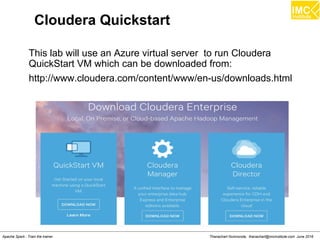
This lab will use an Azure virtual server to run Cloudera
QuickStart VM which can be downloaded from:
http://www.cloudera.com/content/www/en-us/downloads.html
Thanachart Numnonda, thanachart@imcinstitute.com June 2016Apache Spark : Train the trainer
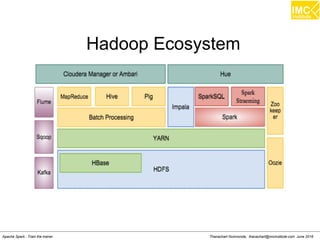
Hadoop Ecosystem
Thanachart Numnonda, thanachart@imcinstitute.com June 2016Apache Spark : Train the trainer
Hands-On: Launch a virtual server
on Microsoft Azure
(Note: You can skip this session if you use your own
computer or another cloud service)
Thanachart Numnonda, thanachart@imcinstitute.com June 2016Apache Spark : Train the trainer
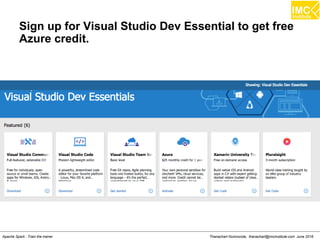
Sign up for Visual Studio Dev Essential to get free
Azure credit.
Thanachart Numnonda, thanachart@imcinstitute.com June 2016Apache Spark : Train the trainer
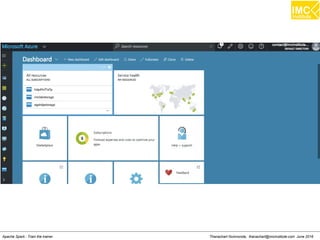
Sign in to Azure Portal
Thanachart Numnonda, thanachart@imcinstitute.com June 2016Apache Spark : Train the trainer
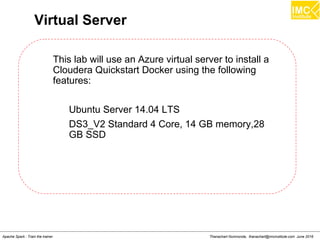
Virtual Server
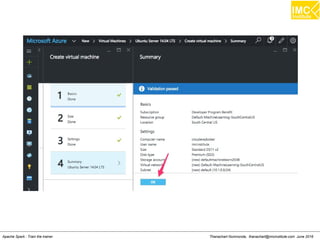
This lab will use an Azure virtual server to install a
Cloudera Quickstart Docker using the following
features:
Ubuntu Server 14.04 LTS
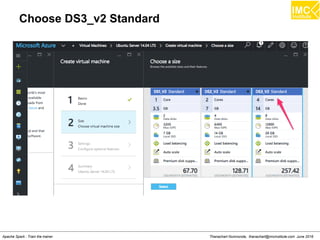
DS3_V2 Standard 4 Core, 14 GB memory,28
GB SSD
Thanachart Numnonda, thanachart@imcinstitute.com June 2016Apache Spark : Train the trainer
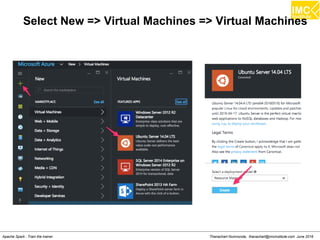
Select New => Virtual Machines => Virtual Machines
Thanachart Numnonda, thanachart@imcinstitute.com June 2016Apache Spark : Train the trainer
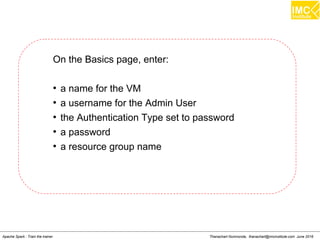
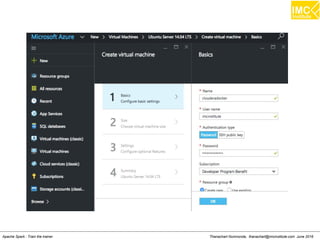
On the Basics page, enter:
●
a name for the VM
●
a username for the Admin User
●
the Authentication Type set to password
●
a password
●
a resource group name
Thanachart Numnonda, thanachart@imcinstitute.com June 2016Apache Spark : Train the trainer
Choose DS3_v2 Standard
Thanachart Numnonda, thanachart@imcinstitute.com June 2016Apache Spark : Train the trainer
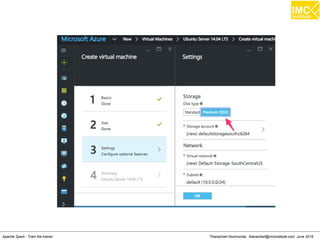
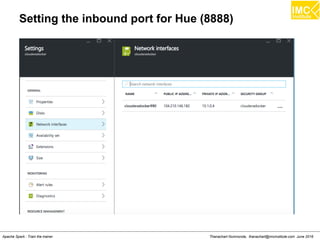
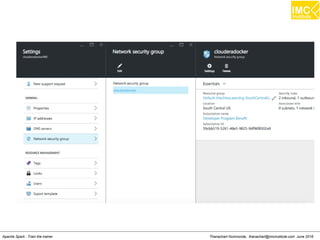
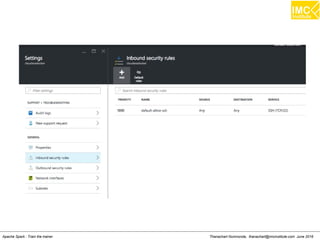
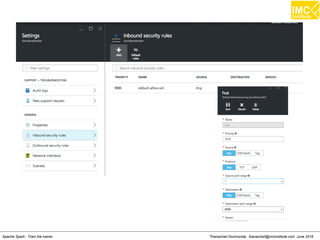
Setting the inbound port for Hue (8888)
Thanachart Numnonda, thanachart@imcinstitute.com June 2016Apache Spark : Train the trainer
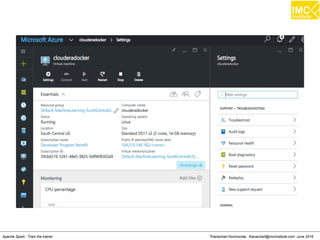
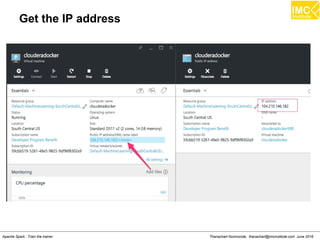
Get the IP address
Thanachart Numnonda, thanachart@imcinstitute.com June 2016Apache Spark : Train the trainer
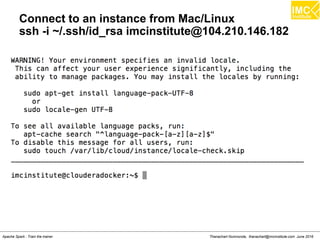
Connect to an instance from Mac/Linux
ssh -i ~/.ssh/id_rsa imcinstitute@104.210.146.182
Thanachart Numnonda, thanachart@imcinstitute.com June 2016Apache Spark : Train the trainer
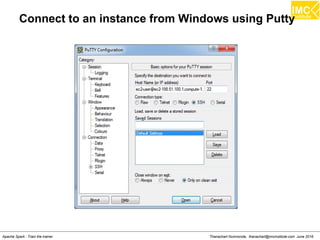
Connect to an instance from Windows using Putty
Thanachart Numnonda, thanachart@imcinstitute.com June 2016Apache Spark : Train the trainer
Hands-On: Installing Cloudera
Quickstart on Docker Container
Thanachart Numnonda, thanachart@imcinstitute.com June 2016Apache Spark : Train the trainer
Installation Steps
●
Update OS
●
Install Docker
●
Pull Cloudera Quickstart
●
Run Cloudera Quickstart
●
Run Cloudera Manager
Hive.apache.org
Thanachart Numnonda, thanachart@imcinstitute.com June 2016Apache Spark : Train the trainer
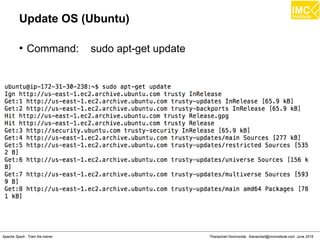
Update OS (Ubuntu)
●
Command: sudo apt-get update
Thanachart Numnonda, thanachart@imcinstitute.com June 2016Apache Spark : Train the trainer
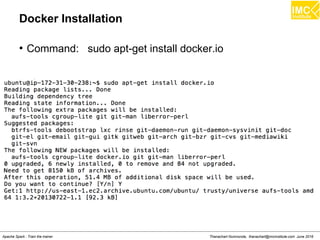
Docker Installation
●
Command: sudo apt-get install docker.io
Thanachart Numnonda, thanachart@imcinstitute.com June 2016Apache Spark : Train the trainer
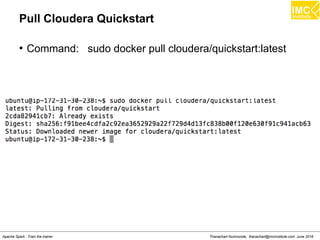
Pull Cloudera Quickstart
●
Command: sudo docker pull cloudera/quickstart:latest
Thanachart Numnonda, thanachart@imcinstitute.com June 2016Apache Spark : Train the trainer
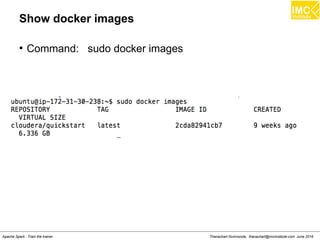
Show docker images
●
Command: sudo docker images
Thanachart Numnonda, thanachart@imcinstitute.com June 2016Apache Spark : Train the trainer
Run Cloudera quickstart
●
Command: sudo docker run
--hostname=quickstart.cloudera --privileged=true -t -i
[OPTIONS] [IMAGE] /usr/bin/docker-quickstart
Example: sudo docker run
--hostname=quickstart.cloudera --privileged=true -t -i -p
8888:8888 cloudera/quickstart /usr/bin/docker-quickstart
Thanachart Numnonda, thanachart@imcinstitute.com June 2016Apache Spark : Train the trainer
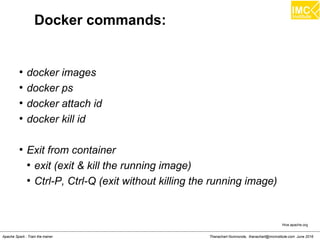
Docker commands:
●
docker images
●
docker ps
●
docker attach id
●
docker kill id
●
Exit from container
●
exit (exit & kill the running image)
●
Ctrl-P, Ctrl-Q (exit without killing the running image)
Hive.apache.org
Thanachart Numnonda, thanachart@imcinstitute.com June 2016Apache Spark : Train the trainer
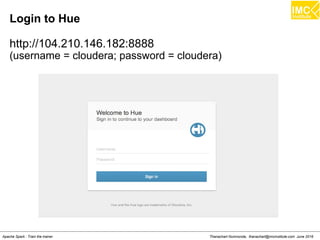
Login to Hue
http://104.210.146.182:8888
(username = cloudera; password = cloudera)
Thanachart Numnonda, thanachart@imcinstitute.com June 2016Apache Spark : Train the trainer
Hands-On: Importing/Exporting
Data to HDFS
Thanachart Numnonda, thanachart@imcinstitute.com June 2016Apache Spark : Train the trainer
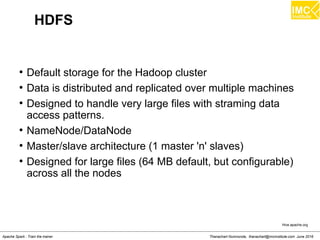
HDFS
●
Default storage for the Hadoop cluster
●
Data is distributed and replicated over multiple machines
●
Designed to handle very large files with straming data
access patterns.
●
NameNode/DataNode
●
Master/slave architecture (1 master 'n' slaves)
●
Designed for large files (64 MB default, but configurable)
across all the nodes
Hive.apache.org
Thanachart Numnonda, thanachart@imcinstitute.com June 2016Apache Spark : Train the trainer
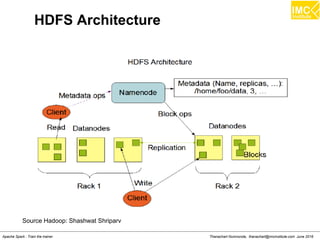
HDFS Architecture
Source Hadoop: Shashwat Shriparv
Thanachart Numnonda, thanachart@imcinstitute.com June 2016Apache Spark : Train the trainer
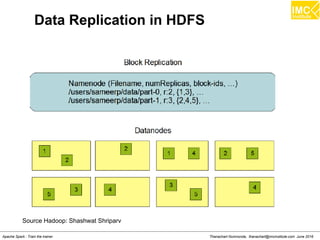
Data Replication in HDFS
Source Hadoop: Shashwat Shriparv
Thanachart Numnonda, thanachart@imcinstitute.com June 2016Apache Spark : Train the trainer
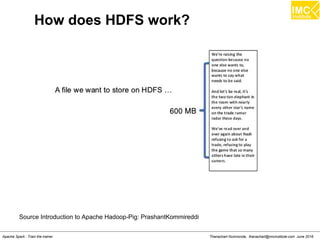
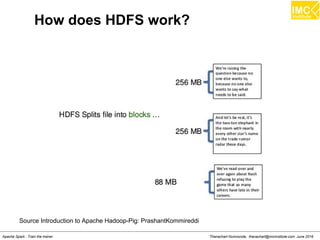
How does HDFS work?
Source Introduction to Apache Hadoop-Pig: PrashantKommireddi
Thanachart Numnonda, thanachart@imcinstitute.com June 2016Apache Spark : Train the trainer
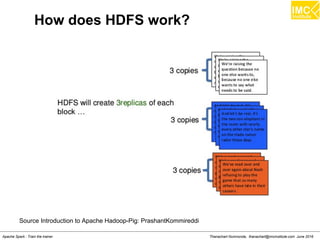
How does HDFS work?
Source Introduction to Apache Hadoop-Pig: PrashantKommireddi
Thanachart Numnonda, thanachart@imcinstitute.com June 2016Apache Spark : Train the trainer
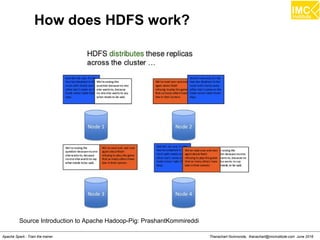
How does HDFS work?
Source Introduction to Apache Hadoop-Pig: PrashantKommireddi
Thanachart Numnonda, thanachart@imcinstitute.com June 2016Apache Spark : Train the trainer
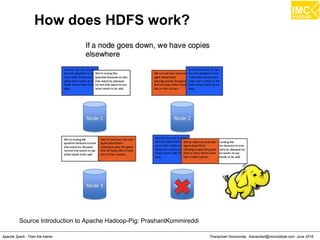
How does HDFS work?
Source Introduction to Apache Hadoop-Pig: PrashantKommireddi
Thanachart Numnonda, thanachart@imcinstitute.com June 2016Apache Spark : Train the trainer
How does HDFS work?
Source Introduction to Apache Hadoop-Pig: PrashantKommireddi
Thanachart Numnonda, thanachart@imcinstitute.com June 2016Apache Spark : Train the trainer
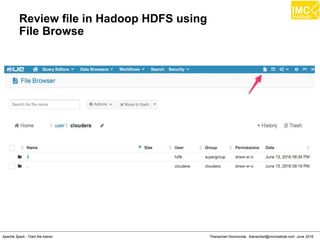
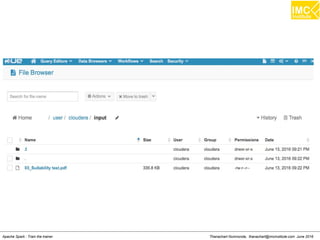
Review file in Hadoop HDFS using
File Browse
Thanachart Numnonda, thanachart@imcinstitute.com June 2016Apache Spark : Train the trainer
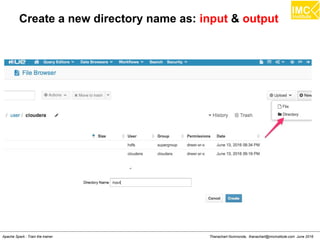
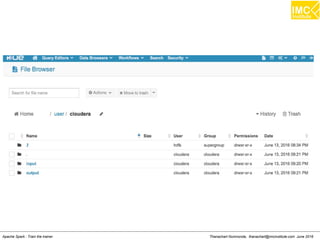
Create a new directory name as: input & output
Thanachart Numnonda, thanachart@imcinstitute.com June 2016Apache Spark : Train the trainer
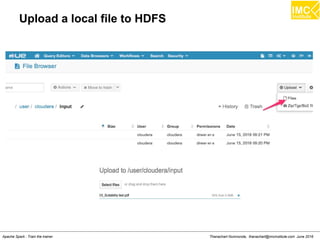
Upload a local file to HDFS
Thanachart Numnonda, thanachart@imcinstitute.com June 2016Apache Spark : Train the trainer
Hands-On: Connect to a master node
via SSH
Thanachart Numnonda, thanachart@imcinstitute.com June 2016Apache Spark : Train the trainer
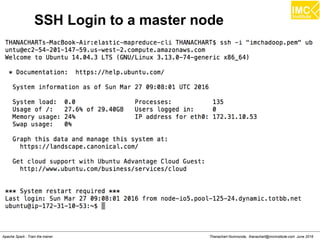
SSH Login to a master node
Thanachart Numnonda, thanachart@imcinstitute.com June 2016Apache Spark : Train the trainer
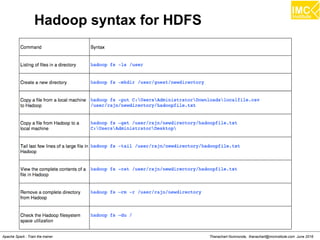
Hadoop syntax for HDFS
Thanachart Numnonda, thanachart@imcinstitute.com June 2016Apache Spark : Train the trainer
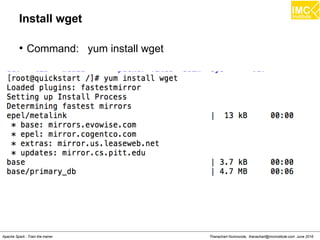
Install wget
●
Command: yum install wget
Thanachart Numnonda, thanachart@imcinstitute.com June 2016Apache Spark : Train the trainer
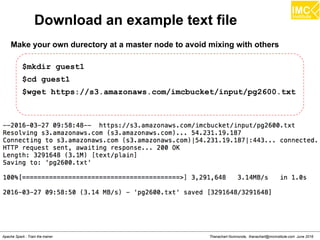
Download an example text file
Make your own durectory at a master node to avoid mixing with others
$mkdir guest1
$cd guest1
$wget https://s3.amazonaws.com/imcbucket/input/pg2600.txt
Thanachart Numnonda, thanachart@imcinstitute.com June 2016Apache Spark : Train the trainer
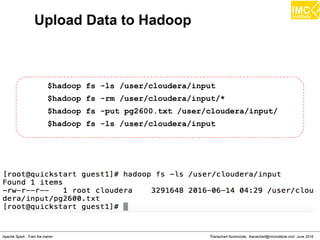
Upload Data to Hadoop
$hadoop fs -ls /user/cloudera/input
$hadoop fs -rm /user/cloudera/input/*
$hadoop fs -put pg2600.txt /user/cloudera/input/
$hadoop fs -ls /user/cloudera/input
Thanachart Numnonda, thanachart@imcinstitute.com June 2016Apache Spark : Train the trainer
Lecture
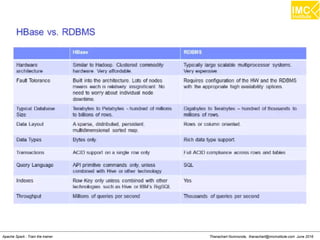
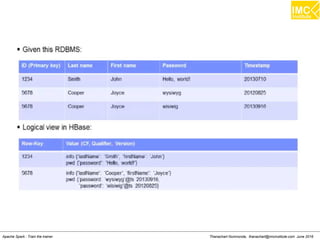
Understanding HBase
Thanachart Numnonda, thanachart@imcinstitute.com June 2016Apache Spark : Train the trainer
Introduction
An open source, non-relational, distributed database
HBase is an open source, non-relational, distributed database
modeled after Google's BigTable and is written in Java. It is
developed as part of Apache Software Foundation's Apache
Hadoop project and runs on top of HDFS (, providing
BigTable-like capabilities for Hadoop. That is, it provides a
fault-tolerant way of storing large quantities of sparse data.
Thanachart Numnonda, thanachart@imcinstitute.com June 2016Apache Spark : Train the trainer
HBase Features
●
Hadoop database modelled after Google's Bigtable
●
Column oriented data store, known as Hadoop Database
●
Support random realtime CRUD operations (unlike
HDFS)
●
No SQL Database
●
Opensource, written in Java
●
Run on a cluster of commodity hardware
Hive.apache.org
Thanachart Numnonda, thanachart@imcinstitute.com June 2016Apache Spark : Train the trainer
When to use HBase?
●
When you need high volume data to be stored
●
Un-structured data
●
Sparse data
●
Column-oriented data
●
Versioned data (same data template, captured at various
time, time-elapse data)
●
When you need high scalability
Hive.apache.org
Thanachart Numnonda, thanachart@imcinstitute.com June 2016Apache Spark : Train the trainer
Which one to use?
●
HDFS
●
Only append dataset (no random write)
●
Read the whole dataset (no random read)
●
HBase
●
Need random write and/or read
●
Has thousands of operation per second on TB+ of data
●
RDBMS
●
Data fits on one big node
●
Need full transaction support
●
Need real-time query capabilities
Hive.apache.org
Thanachart Numnonda, thanachart@imcinstitute.com June 2016Apache Spark : Train the trainer
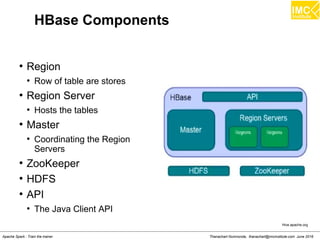
HBase Components
Hive.apache.org
●
Region
●
Row of table are stores
●
Region Server
●
Hosts the tables
●
Master
●
Coordinating the Region
Servers
●
ZooKeeper
●
HDFS
●
API
●
The Java Client API
Thanachart Numnonda, thanachart@imcinstitute.com June 2016Apache Spark : Train the trainer
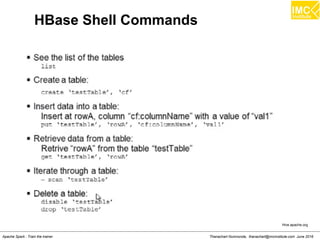
HBase Shell Commands
Hive.apache.org
Thanachart Numnonda, thanachart@imcinstitute.com June 2016Apache Spark : Train the trainer
Hands-On: Running HBase
Thanachart Numnonda, thanachart@imcinstitute.com June 2016Apache Spark : Train the trainer
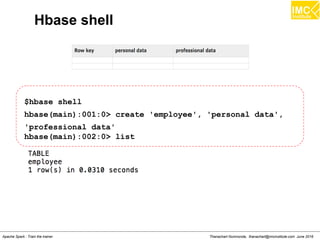
Hbase shell
$hbase shell
hbase(main):001:0> create 'employee', 'personal data',
'professional data'
hbase(main):002:0> list
Thanachart Numnonda, thanachart@imcinstitute.com June 2016Apache Spark : Train the trainer
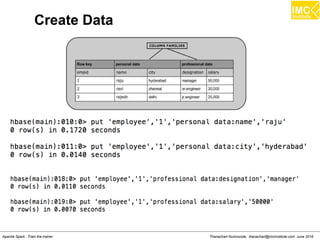
Create Data
Thanachart Numnonda, thanachart@imcinstitute.com June 2016Apache Spark : Train the trainer
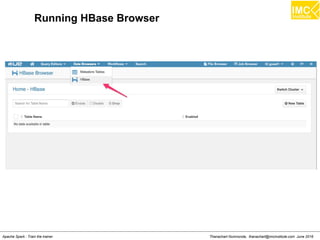
Running HBase Browser
Thanachart Numnonda, thanachart@imcinstitute.com June 2016Apache Spark : Train the trainer
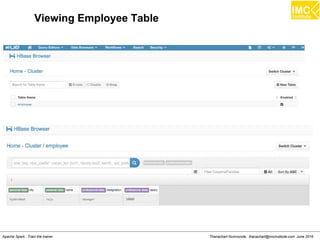
Viewing Employee Table
Thanachart Numnonda, thanachart@imcinstitute.com June 2016Apache Spark : Train the trainer
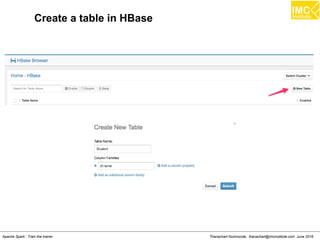
Create a table in HBase
Thanachart Numnonda, thanachart@imcinstitute.com June 2016Apache Spark : Train the trainer
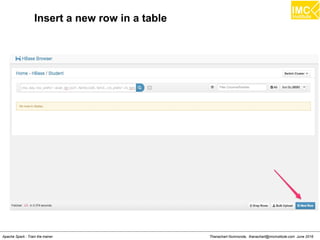
Insert a new row in a table
Thanachart Numnonda, thanachart@imcinstitute.com June 2016Apache Spark : Train the trainer
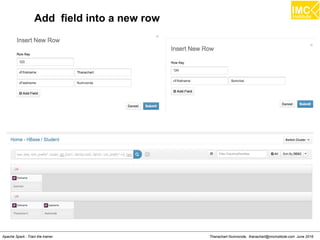
Add field into a new row
Thanachart Numnonda, thanachart@imcinstitute.com June 2016Apache Spark : Train the trainer
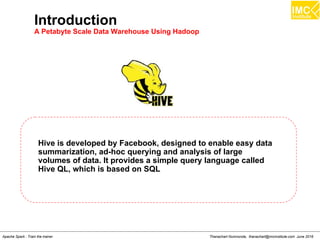
Introduction
A Petabyte Scale Data Warehouse Using Hadoop
Hive is developed by Facebook, designed to enable easy data
summarization, ad-hoc querying and analysis of large
volumes of data. It provides a simple query language called
Hive QL, which is based on SQL
Danairat T., danairat@gmail.com: Thanachart N., thanachart@imcinstitute.com April 2015Big Data Hadoop Workshop
What Hive is NOT
Hive is not designed for online transaction processing and
does not offer real-time queries and row level updates. It is
best used for batch jobs over large sets of immutable data
(like web logs, etc.).
Danairat T., danairat@gmail.com: Thanachart N., thanachart@imcinstitute.com April 2015Big Data Hadoop Workshop
Sample HiveQL
The Query compiler uses the information stored in the metastore to
convert SQL queries into a sequence of map/reduce jobs, e.g. the
following query
SELECT * FROM t where t.c = 'xyz'
SELECT t1.c2 FROM t1 JOIN t2 ON (t1.c1 = t2.c1)
SELECT t1.c1, count(1) from t1 group by t1.c1
Hive.apache.or
g
Danairat T., danairat@gmail.com: Thanachart N., thanachart@imcinstitute.com April 2015Big Data Hadoop Workshop
Sample HiveQL
The Query compiler uses the information stored in the metastore to
convert SQL queries into a sequence of map/reduce jobs, e.g. the
following query
SELECT * FROM t where t.c = 'xyz'
SELECT t1.c2 FROM t1 JOIN t2 ON (t1.c1 = t2.c1)
SELECT t1.c1, count(1) from t1 group by t1.c1
Hive.apache.or
g
Danairat T., danairat@gmail.com: Thanachart N., thanachart@imcinstitute.com April 2015Big Data Hadoop Workshop
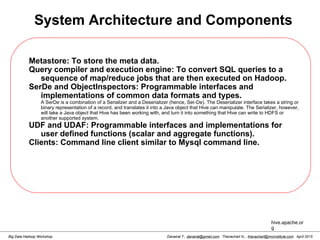
System Architecture and Components
Metastore: To store the meta data.
Query compiler and execution engine: To convert SQL queries to a
sequence of map/reduce jobs that are then executed on Hadoop.
SerDe and ObjectInspectors: Programmable interfaces and
implementations of common data formats and types.
A SerDe is a combination of a Serializer and a Deserializer (hence, Ser-De). The Deserializer interface takes a string or
binary representation of a record, and translates it into a Java object that Hive can manipulate. The Serializer, however,
will take a Java object that Hive has been working with, and turn it into something that Hive can write to HDFS or
another supported system.
UDF and UDAF: Programmable interfaces and implementations for
user defined functions (scalar and aggregate functions).
Clients: Command line client similar to Mysql command line.
hive.apache.or
g
Danairat T., danairat@gmail.com: Thanachart N., thanachart@imcinstitute.com April 2015Big Data Hadoop Workshop
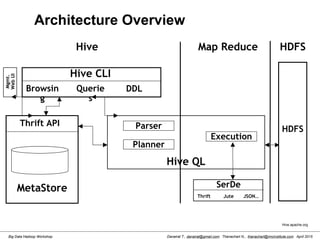
Architecture Overview
HDFS
Hive CLI
Querie
s
Browsin
g
Map Reduce
MetaStore
Thrift API
SerDe
Thrift Jute JSON..
Execution
Hive QL
Parser
Planner
Mgmt.
WebUI
HDFS
DDL
Hive
Hive.apache.org
Danairat T., danairat@gmail.com: Thanachart N., thanachart@imcinstitute.com April 2015Big Data Hadoop Workshop
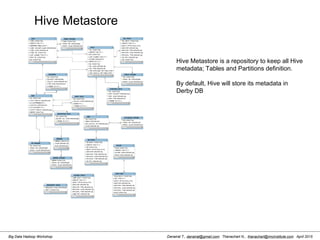
Hive Metastore
Hive Metastore is a repository to keep all Hive
metadata; Tables and Partitions definition.
By default, Hive will store its metadata in
Derby DB
Danairat T., danairat@gmail.com: Thanachart N., thanachart@imcinstitute.com April 2015Big Data Hadoop Workshop
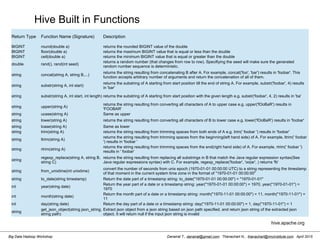
Hive Built in Functions
Return Type Function Name (Signature) Description
BIGINT round(double a) returns the rounded BIGINT value of the double
BIGINT floor(double a) returns the maximum BIGINT value that is equal or less than the double
BIGINT ceil(double a) returns the minimum BIGINT value that is equal or greater than the double
double rand(), rand(int seed)
returns a random number (that changes from row to row). Specifiying the seed will make sure the generated
random number sequence is deterministic.
string concat(string A, string B,...)
returns the string resulting from concatenating B after A. For example, concat('foo', 'bar') results in 'foobar'. This
function accepts arbitrary number of arguments and return the concatenation of all of them.
string substr(string A, int start)
returns the substring of A starting from start position till the end of string A. For example, substr('foobar', 4) results
in 'bar'
string substr(string A, int start, int length) returns the substring of A starting from start position with the given length e.g. substr('foobar', 4, 2) results in 'ba'
string upper(string A)
returns the string resulting from converting all characters of A to upper case e.g. upper('fOoBaR') results in
'FOOBAR'
string ucase(string A) Same as upper
string lower(string A) returns the string resulting from converting all characters of B to lower case e.g. lower('fOoBaR') results in 'foobar'
string lcase(string A) Same as lower
string trim(string A) returns the string resulting from trimming spaces from both ends of A e.g. trim(' foobar ') results in 'foobar'
string ltrim(string A)
returns the string resulting from trimming spaces from the beginning(left hand side) of A. For example, ltrim(' foobar
') results in 'foobar '
string rtrim(string A)
returns the string resulting from trimming spaces from the end(right hand side) of A. For example, rtrim(' foobar ')
results in ' foobar'
string
regexp_replace(string A, string B,
string C)
returns the string resulting from replacing all substrings in B that match the Java regular expression syntax(See
Java regular expressions syntax) with C. For example, regexp_replace('foobar', 'oo|ar', ) returns 'fb'
string from_unixtime(int unixtime)
convert the number of seconds from unix epoch (1970-01-01 00:00:00 UTC) to a string representing the timestamp
of that moment in the current system time zone in the format of "1970-01-01 00:00:00"
string to_date(string timestamp) Return the date part of a timestamp string: to_date("1970-01-01 00:00:00") = "1970-01-01"
int year(string date)
Return the year part of a date or a timestamp string: year("1970-01-01 00:00:00") = 1970, year("1970-01-01") =
1970
int month(string date)
Return the month part of a date or a timestamp string: month("1970-11-01 00:00:00") = 11, month("1970-11-01") =
11
int day(string date) Return the day part of a date or a timestamp string: day("1970-11-01 00:00:00") = 1, day("1970-11-01") = 1
string
get_json_object(string json_string,
string path)
Extract json object from a json string based on json path specified, and return json string of the extracted json
object. It will return null if the input json string is invalid
hive.apache.org
Danairat T., danairat@gmail.com: Thanachart N., thanachart@imcinstitute.com April 2015Big Data Hadoop Workshop
Hive Aggregate Functions
Return Type
Aggregation Function Name
(Signature)
Description
BIGINT
count(*), count(expr),
count(DISTINCT expr[,
expr_.])
count(*) - Returns the total number of retrieved rows,
including rows containing NULL values; count(expr) - Returns
the number of rows for which the supplied expression is non-
NULL; count(DISTINCT expr[, expr]) - Returns the number of
rows for which the supplied expression(s) are unique and
non-NULL.
DOUBLE
sum(col), sum(DISTINCT
col)
returns the sum of the elements in the group or the sum of
the distinct values of the column in the group
DOUBLE avg(col), avg(DISTINCT col)
returns the average of the elements in the group or the
average of the distinct values of the column in the group
DOUBLE min(col) returns the minimum value of the column in the group
DOUBLE max(col) returns the maximum value of the column in the group
hive.apache.org
Danairat T., danairat@gmail.com: Thanachart N., thanachart@imcinstitute.com April 2015Big Data Hadoop Workshop
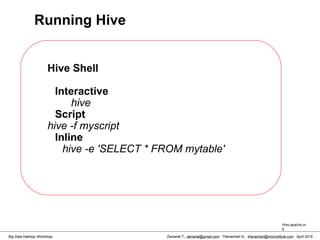
Running Hive
Hive Shell
Interactive
hive
Script
hive -f myscript
Inline
hive -e 'SELECT * FROM mytable'
Hive.apache.or
g
Danairat T., danairat@gmail.com: Thanachart N., thanachart@imcinstitute.com April 2015Big Data Hadoop Workshop
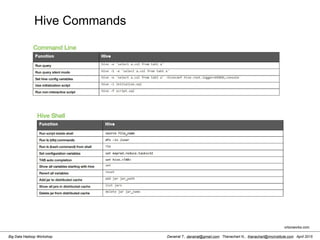
Hive Commands
ortonworks.com
: Thanachart N., thanachart@imcinstitute.com April 2015Big Data Hadoop Workshop
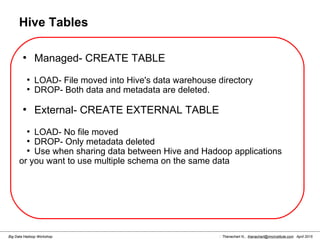
Hive Tables
●
Managed- CREATE TABLE
●
LOAD- File moved into Hive's data warehouse directory
●
DROP- Both data and metadata are deleted.
●
External- CREATE EXTERNAL TABLE
●
LOAD- No file moved
●
DROP- Only metadata deleted
●
Use when sharing data between Hive and Hadoop applications
or you want to use multiple schema on the same data
Danairat T., danairat@gmail.com: Thanachart N., thanachart@imcinstitute.com April 2015Big Data Hadoop Workshop
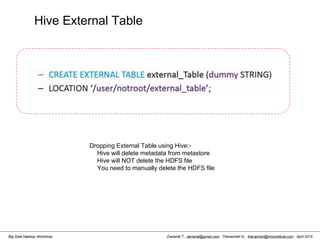
Hive External Table
Dropping External Table using Hive:-
Hive will delete metadata from metastore
Hive will NOT delete the HDFS file
You need to manually delete the HDFS file
Danairat T., danairat@gmail.com: Thanachart N., thanachart@imcinstitute.com April 2015Big Data Hadoop Workshop
Java JDBC for Hive
import java.sql.SQLException;
import java.sql.Connection;
import java.sql.ResultSet;
import java.sql.Statement;
import java.sql.DriverManager;
 
public class HiveJdbcClient {
  private static String driverName = "org.apache.hadoop.hive.jdbc.HiveDriver";
 
  public static void main(String[] args) throws SQLException {
    try {
      Class.forName(driverName);
    } catch (ClassNotFoundException e) {
      // TODO Auto-generated catch block
      e.printStackTrace();
      System.exit(1);
    }
    Connection con = DriverManager.getConnection("jdbc:hive://localhost:10000/default", "", "");
    Statement stmt = con.createStatement();
    String tableName = "testHiveDriverTable";
    stmt.executeQuery("drop table " + tableName);
    ResultSet res = stmt.executeQuery("create table " + tableName + " (key int, value string)");
    // show tables
    String sql = "show tables '" + tableName + "'";
    System.out.println("Running: " + sql);
    res = stmt.executeQuery(sql);
    if (res.next()) {
      System.out.println(res.getString(1));
    }
    // describe table
    sql = "describe " + tableName;
    System.out.println("Running: " + sql);
    res = stmt.executeQuery(sql);
    while (res.next()) {
      System.out.println(res.getString(1) + "t" + res.getString(2));
    }
 
Danairat T., danairat@gmail.com: Thanachart N., thanachart@imcinstitute.com April 2015Big Data Hadoop Workshop
Java JDBC for Hive
import java.sql.SQLException;
import java.sql.Connection;
import java.sql.ResultSet;
import java.sql.Statement;
import java.sql.DriverManager;
 
public class HiveJdbcClient {
  private static String driverName = "org.apache.hadoop.hive.jdbc.HiveDriver";
 
  public static void main(String[] args) throws SQLException {
    try {
      Class.forName(driverName);
    } catch (ClassNotFoundException e) {
      // TODO Auto-generated catch block
      e.printStackTrace();
      System.exit(1);
    }
    Connection con = DriverManager.getConnection("jdbc:hive://localhost:10000/default", "", "");
    Statement stmt = con.createStatement();
    String tableName = "testHiveDriverTable";
    stmt.executeQuery("drop table " + tableName);
    ResultSet res = stmt.executeQuery("create table " + tableName + " (key int, value string)");
    // show tables
    String sql = "show tables '" + tableName + "'";
    System.out.println("Running: " + sql);
    res = stmt.executeQuery(sql);
    if (res.next()) {
      System.out.println(res.getString(1));
    }
    // describe table
    sql = "describe " + tableName;
    System.out.println("Running: " + sql);
    res = stmt.executeQuery(sql);
    while (res.next()) {
      System.out.println(res.getString(1) + "t" + res.getString(2));
    }
 
Danairat T., danairat@gmail.com: Thanachart N., thanachart@imcinstitute.com April 2015Big Data Hadoop Workshop
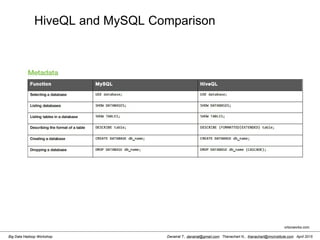
HiveQL and MySQL Comparison
ortonworks.com
Danairat T., danairat@gmail.com: Thanachart N., thanachart@imcinstitute.com April 2015Big Data Hadoop Workshop
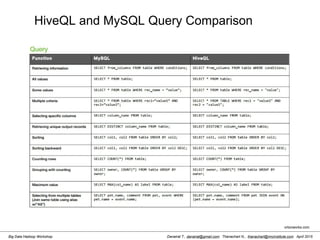
HiveQL and MySQL Query Comparison
ortonworks.com
Thanachart Numnonda, thanachart@imcinstitute.com June 2016Apache Spark : Train the trainer
Hands-On: Loading Data using Hive
Thanachart Numnonda, thanachart@imcinstitute.com June 2016Apache Spark : Train the trainer
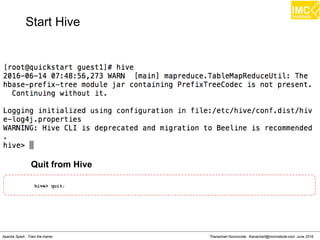
hive> quit;
Quit from Hive
Start Hive
Thanachart Numnonda, thanachart@imcinstitute.com June 2016Apache Spark : Train the trainer
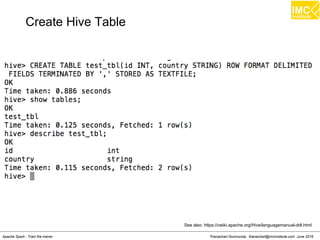
See also: https://cwiki.apache.org/Hive/languagemanual-ddl.html
Create Hive Table
Thanachart Numnonda, thanachart@imcinstitute.com June 2016Apache Spark : Train the trainer
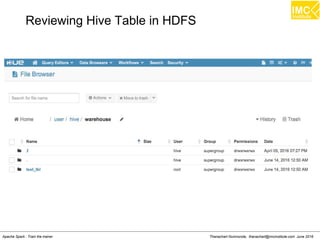
Reviewing Hive Table in HDFS
Thanachart Numnonda, thanachart@imcinstitute.com June 2016Apache Spark : Train the trainer
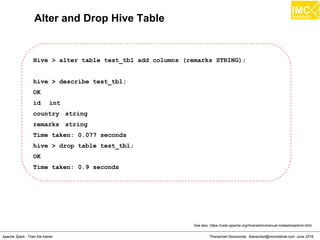
Alter and Drop Hive Table
Hive > alter table test_tbl add columns (remarks STRING);
hive > describe test_tbl;
OK
id int
country string
remarks string
Time taken: 0.077 seconds
hive > drop table test_tbl;
OK
Time taken: 0.9 seconds
See also: https://cwiki.apache.org/Hive/adminmanual-metastoreadmin.html
Thanachart Numnonda, thanachart@imcinstitute.com June 2016Apache Spark : Train the trainer
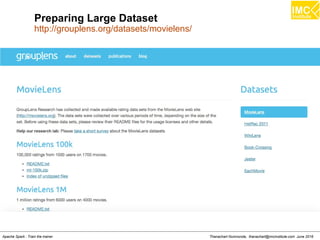
Preparing Large Dataset
http://grouplens.org/datasets/movielens/
Thanachart Numnonda, thanachart@imcinstitute.com June 2016Apache Spark : Train the trainer
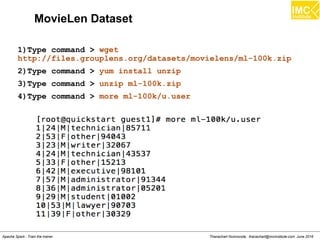
MovieLen Dataset
1)Type command > wget
http://files.grouplens.org/datasets/movielens/ml-100k.zip
2)Type command > yum install unzip
3)Type command > unzip ml-100k.zip
4)Type command > more ml-100k/u.user
Thanachart Numnonda, thanachart@imcinstitute.com June 2016Apache Spark : Train the trainer
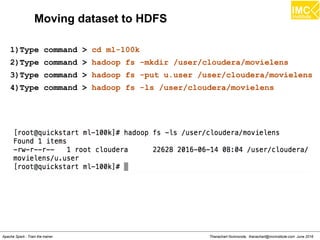
Moving dataset to HDFS
1)Type command > cd ml-100k
2)Type command > hadoop fs -mkdir /user/cloudera/movielens
3)Type command > hadoop fs -put u.user /user/cloudera/movielens
4)Type command > hadoop fs -ls /user/cloudera/movielens
Thanachart Numnonda, thanachart@imcinstitute.com June 2016Apache Spark : Train the trainer
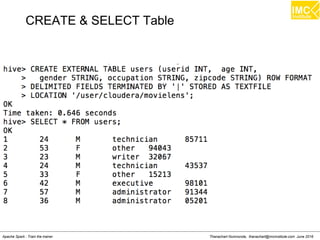
CREATE & SELECT Table
Thanachart Numnonda, thanachart@imcinstitute.com June 2016Apache Spark : Train the trainer
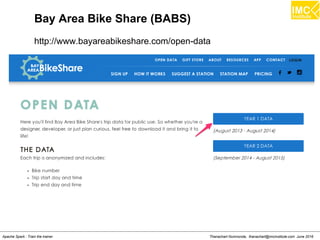
Bay Area Bike Share (BABS)
http://www.bayareabikeshare.com/open-data
Thanachart Numnonda, thanachart@imcinstitute.com June 2016Apache Spark : Train the trainer
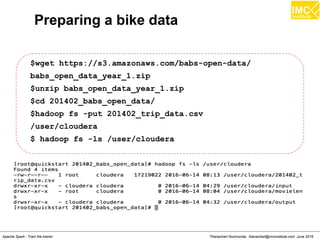
Preparing a bike data
$wget https://s3.amazonaws.com/babs-open-data/
babs_open_data_year_1.zip
$unzip babs_open_data_year_1.zip
$cd 201402_babs_open_data/
$hadoop fs -put 201402_trip_data.csv
/user/cloudera
$ hadoop fs -ls /user/cloudera
Thanachart Numnonda, thanachart@imcinstitute.com June 2016Apache Spark : Train the trainer
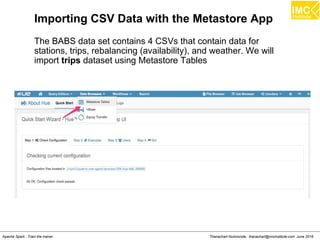
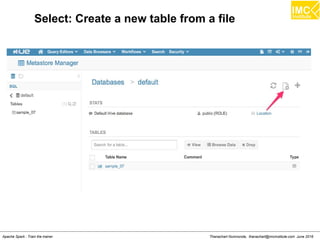
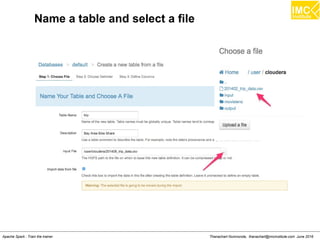
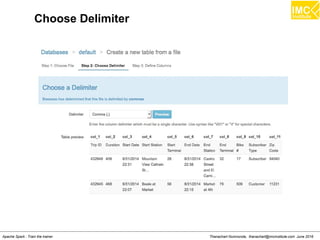
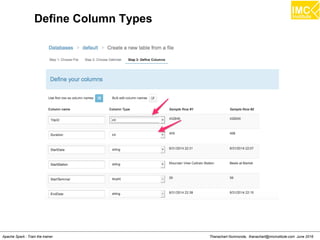
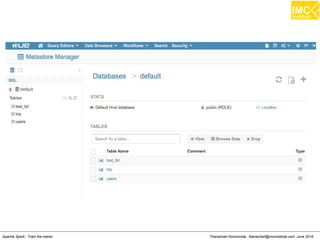
Importing CSV Data with the Metastore App
The BABS data set contains 4 CSVs that contain data for
stations, trips, rebalancing (availability), and weather. We will
import trips dataset using Metastore Tables
Thanachart Numnonda, thanachart@imcinstitute.com June 2016Apache Spark : Train the trainer
Select: Create a new table from a file
Thanachart Numnonda, thanachart@imcinstitute.com June 2016Apache Spark : Train the trainer
Name a table and select a file
Thanachart Numnonda, thanachart@imcinstitute.com June 2016Apache Spark : Train the trainer
Choose Delimiter
Thanachart Numnonda, thanachart@imcinstitute.com June 2016Apache Spark : Train the trainer
Define Column Types
Thanachart Numnonda, thanachart@imcinstitute.com June 2016Apache Spark : Train the trainer
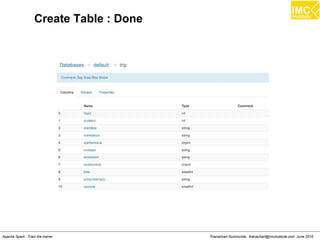
Create Table : Done
Thanachart Numnonda, thanachart@imcinstitute.com June 2016Apache Spark : Train the trainer
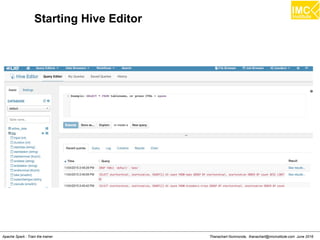
Starting Hive Editor
Thanachart Numnonda, thanachart@imcinstitute.com June 2016Apache Spark : Train the trainer
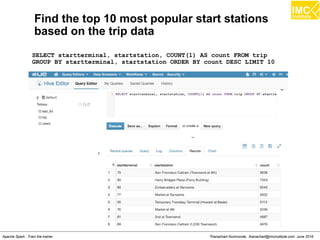
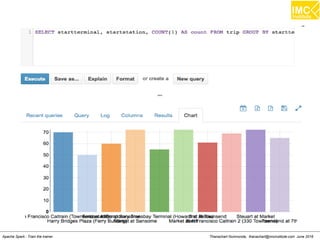
Find the top 10 most popular start stations
based on the trip data
SELECT startterminal, startstation, COUNT(1) AS count FROM trip
GROUP BY startterminal, startstation ORDER BY count DESC LIMIT 10
Thanachart Numnonda, thanachart@imcinstitute.com June 2016Apache Spark : Train the trainer
Find the total number of trips and average duration
(in minutes) of those trips, grouped by hour
SELECT
hour,
COUNT(1) AS trips,
ROUND(AVG(duration) / 60) AS avg_duration
FROM (
SELECT
CAST(SPLIT(SPLIT(t.startdate, ' ')[1], ':')[0] AS INT) AS
hour,
t.duration AS duration
FROM 'trip' t
WHERE
t.startterminal = 70
AND
t.duration IS NOT NULL
) r
GROUP BY hour
ORDER BY hour ASC;
Thanachart Numnonda, thanachart@imcinstitute.com June 2016Apache Spark : Train the trainer
Lecture
Understanding Spark
Thanachart Numnonda, thanachart@imcinstitute.com June 2016Apache Spark : Train the trainer
Introduction
A fast and general engine for large scale data processing
An open source big data processing framework built around
speed, ease of use, and sophisticated analytics. Spark
enables applications in Hadoop clusters to run up to 100
times faster in memory and 10 times faster even when running
on disk.
Thanachart Numnonda, thanachart@imcinstitute.com June 2016Apache Spark : Train the trainer
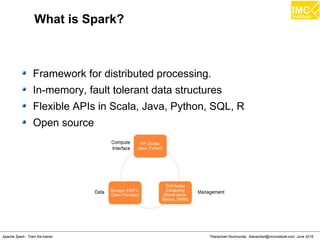
What is Spark?
Framework for distributed processing.
In-memory, fault tolerant data structures
Flexible APIs in Scala, Java, Python, SQL, R
Open source
Thanachart Numnonda, thanachart@imcinstitute.com June 2016Apache Spark : Train the trainer
Why Spark?
Handle Petabytes of data
Significant faster than MapReduce
Simple and intutive APIs
General framework
– Runs anywhere
– Handles (most) any I/O
– Interoperable libraries for specific use-cases
Thanachart Numnonda, thanachart@imcinstitute.com June 2016Apache Spark : Train the trainer
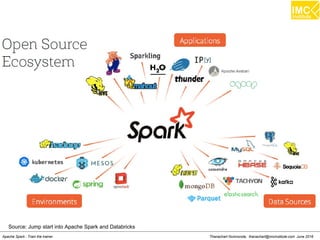
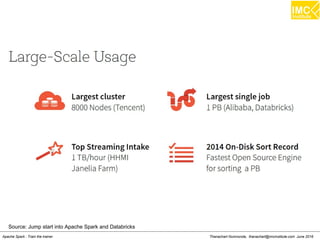
Source: Jump start into Apache Spark and Databricks
Thanachart Numnonda, thanachart@imcinstitute.com June 2016Apache Spark : Train the trainer
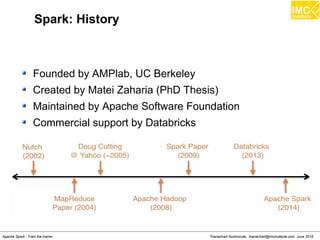
Spark: History
Founded by AMPlab, UC Berkeley
Created by Matei Zaharia (PhD Thesis)
Maintained by Apache Software Foundation
Commercial support by Databricks
Thanachart Numnonda, thanachart@imcinstitute.com June 2016Apache Spark : Train the trainer
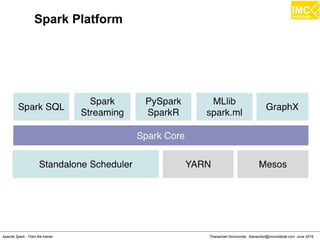
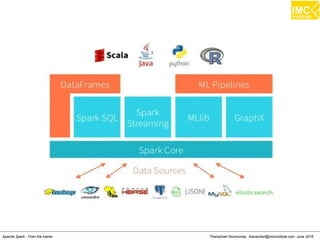
Spark Platform
Thanachart Numnonda, thanachart@imcinstitute.com June 2016Apache Spark : Train the trainer
thanachart@imcinstitute.com119
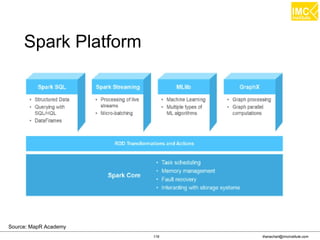
Spark Platform
Source: MapR Academy
thanachart@imcinstitute.com120
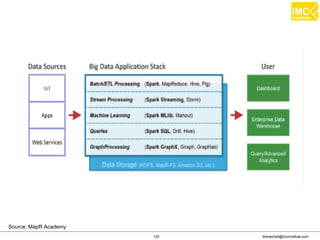
Source: MapR Academy
thanachart@imcinstitute.com121
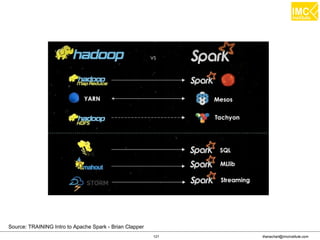
Source: TRAINING Intro to Apache Spark - Brian Clapper
Thanachart Numnonda, thanachart@imcinstitute.com June 2016Apache Spark : Train the trainer
Source: Jump start into Apache Spark and Databricks
Thanachart Numnonda, thanachart@imcinstitute.com June 2016Apache Spark : Train the trainer
Source: Jump start into Apache Spark and Databricks
Thanachart Numnonda, thanachart@imcinstitute.com June 2016Apache Spark : Train the trainer
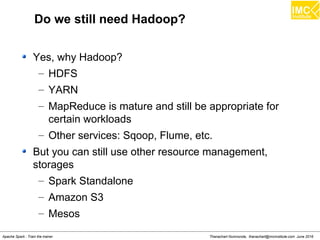
Do we still need Hadoop?
Yes, why Hadoop?
– HDFS
– YARN
– MapReduce is mature and still be appropriate for
certain workloads
– Other services: Sqoop, Flume, etc.
But you can still use other resource management,
storages
– Spark Standalone
– Amazon S3
– Mesos
Thanachart Numnonda, thanachart@imcinstitute.com June 2016Apache Spark : Train the trainer
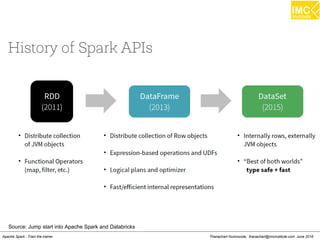
Source: Jump start into Apache Spark and Databricks
Thanachart Numnonda, thanachart@imcinstitute.com June 2016Apache Spark : Train the trainer
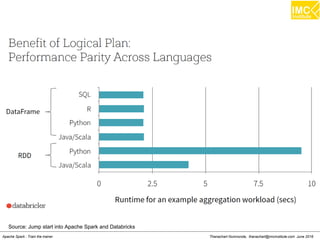
Source: Jump start into Apache Spark and Databricks
Thanachart Numnonda, thanachart@imcinstitute.com June 2016Apache Spark : Train the trainer
What is a RDD?
Resilient: if the data in memory (or on a node) is lost, it
can be recreated.
Distributed: data is chucked into partitions and stored in
memory acress the custer.
Dataset: initial data can come from a table or be created
programmatically
Thanachart Numnonda, thanachart@imcinstitute.com June 2016Apache Spark : Train the trainer
RDD:
Fault tollerant
Immutable
Three methods for creating RDD:
– Parallelizing an existing correction
– Referencing a dataset
– Transformation from an existing RDD
Types of files supported:
– Text files
– SequenceFiles
– Hadoop InputFormat
Thanachart Numnonda, thanachart@imcinstitute.com June 2016Apache Spark : Train the trainer
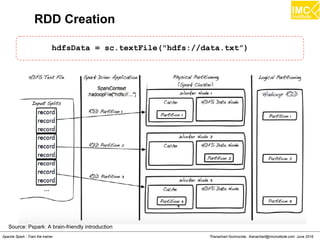
RDD Creation
hdfsData = sc.textFile("hdfs://data.txt”)
Source: Pspark: A brain-friendly introduction
Thanachart Numnonda, thanachart@imcinstitute.com June 2016Apache Spark : Train the trainer
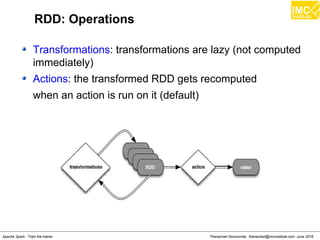
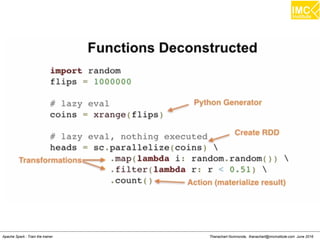
RDD: Operations
Transformations: transformations are lazy (not computed
immediately)
Actions: the transformed RDD gets recomputed
when an action is run on it (default)
Thanachart Numnonda, thanachart@imcinstitute.com June 2016Apache Spark : Train the trainer
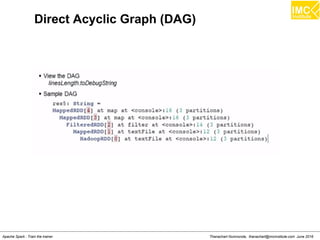
Direct Acyclic Graph (DAG)
Thanachart Numnonda, thanachart@imcinstitute.com June 2016Apache Spark : Train the trainer
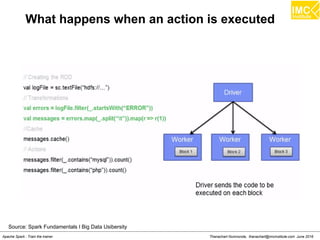
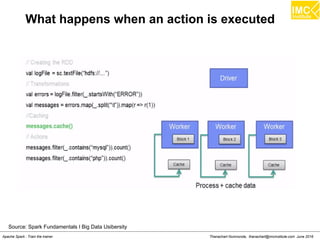
What happens when an action is executed
Source: Spark Fundamentals I Big Data Usibersity
Thanachart Numnonda, thanachart@imcinstitute.com June 2016Apache Spark : Train the trainer
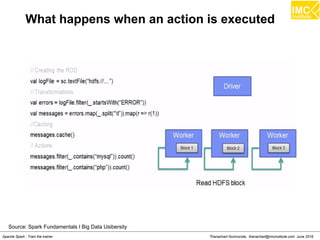
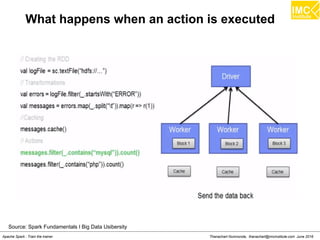
What happens when an action is executed
Source: Spark Fundamentals I Big Data Usibersity
Thanachart Numnonda, thanachart@imcinstitute.com June 2016Apache Spark : Train the trainer
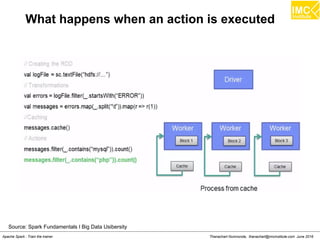
What happens when an action is executed
Source: Spark Fundamentals I Big Data Usibersity
Thanachart Numnonda, thanachart@imcinstitute.com June 2016Apache Spark : Train the trainer
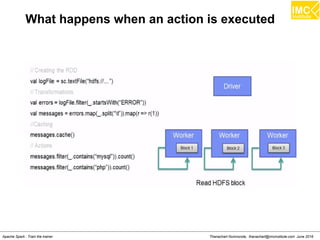
What happens when an action is executed
Source: Spark Fundamentals I Big Data Usibersity
Thanachart Numnonda, thanachart@imcinstitute.com June 2016Apache Spark : Train the trainer
What happens when an action is executed
Source: Spark Fundamentals I Big Data Usibersity
Thanachart Numnonda, thanachart@imcinstitute.com June 2016Apache Spark : Train the trainer
What happens when an action is executed
Thanachart Numnonda, thanachart@imcinstitute.com June 2016Apache Spark : Train the trainer
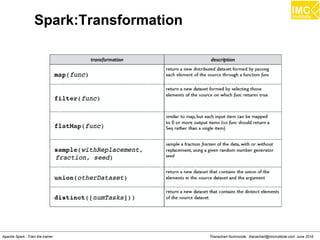
Spark:Transformation
Thanachart Numnonda, thanachart@imcinstitute.com June 2016Apache Spark : Train the trainer
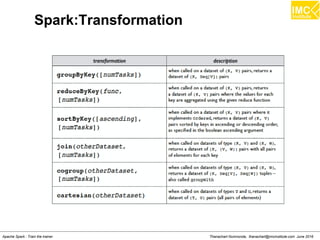
Spark:Transformation
Thanachart Numnonda, thanachart@imcinstitute.com June 2016Apache Spark : Train the trainer
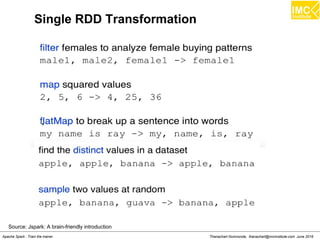
Single RDD Transformation
Source: Jspark: A brain-friendly introduction
Thanachart Numnonda, thanachart@imcinstitute.com June 2016Apache Spark : Train the trainer
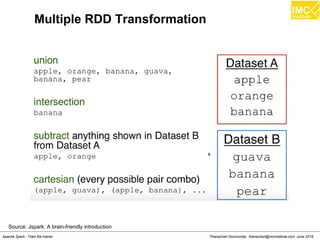
Multiple RDD Transformation
Source: Jspark: A brain-friendly introduction
Thanachart Numnonda, thanachart@imcinstitute.com June 2016Apache Spark : Train the trainer
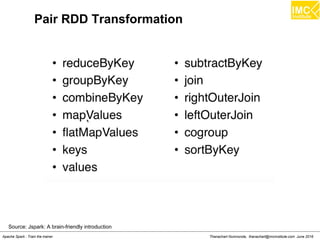
Pair RDD Transformation
Source: Jspark: A brain-friendly introduction
Thanachart Numnonda, thanachart@imcinstitute.com June 2016Apache Spark : Train the trainer
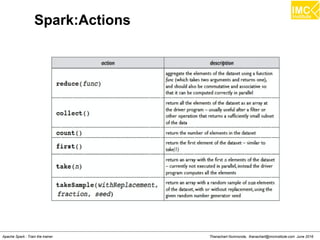
Spark:Actions
Thanachart Numnonda, thanachart@imcinstitute.com June 2016Apache Spark : Train the trainer
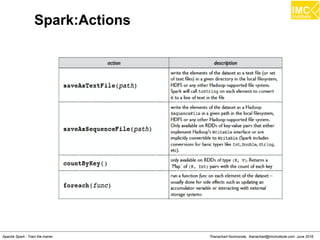
Spark:Actions
Thanachart Numnonda, thanachart@imcinstitute.com June 2016Apache Spark : Train the trainer
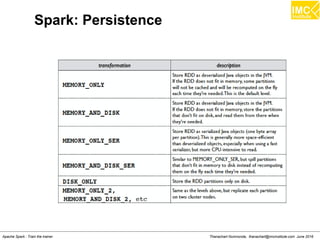
Spark: Persistence
Thanachart Numnonda, thanachart@imcinstitute.com June 2016Apache Spark : Train the trainer
Accumulators
Similar to a MapReduce “Counter”
A global variable to track metrics about your Spark
program for debugging.
Reasoning: Excutors do not communicate with each
other.
Sent back to driver
Thanachart Numnonda, thanachart@imcinstitute.com June 2016Apache Spark : Train the trainer
Broadcast Variables
Similar to a MapReduce “Distributed Cache”
Sends read-only values to worker nodes.
Great for lookup tables, dictionaries, etc.
Thanachart Numnonda, thanachart@imcinstitute.com June 2016Apache Spark : Train the trainer
Hands-On: Spark Programming
Thanachart Numnonda, thanachart@imcinstitute.com June 2016Apache Spark : Train the trainer
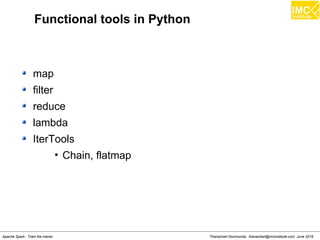
Functional tools in Python
map
filter
reduce
lambda
IterTools
â€Ē Chain, flatmap
Thanachart Numnonda, thanachart@imcinstitute.com June 2016Apache Spark : Train the trainer
Map
>>> a= [1,2,3]
>>> def add1(x) : return x+1
>>> map(add1, a)
Result: [2,3,4]
Thanachart Numnonda, thanachart@imcinstitute.com June 2016Apache Spark : Train the trainer
Filter
>>> a= [1,2,3,4]
>>> def isOdd(x) : return x%2==1
>>> filter(isOdd, a)
Result: [1,3]
Thanachart Numnonda, thanachart@imcinstitute.com June 2016Apache Spark : Train the trainer
Reduce
>>> a= [1,2,3,4]
>>> def add(x,y) : return x+y
>>> reduce(add, a)
Result: 10
Thanachart Numnonda, thanachart@imcinstitute.com June 2016Apache Spark : Train the trainer
lambda
>>> (lambda x: x + 1)(3)
Result: 4
>>> map((lambda x: x + 1), [1,2,3])
Result: [2,3,4]
Thanachart Numnonda, thanachart@imcinstitute.com June 2016Apache Spark : Train the trainer
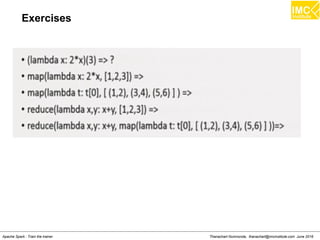
Exercises
Thanachart Numnonda, thanachart@imcinstitute.com June 2016Apache Spark : Train the trainer
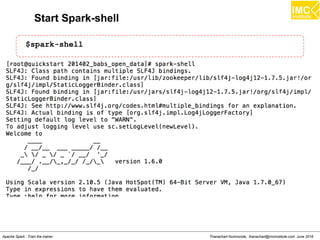
Start Spark-shell
$spark-shell
Thanachart Numnonda, thanachart@imcinstitute.com June 2016Apache Spark : Train the trainer
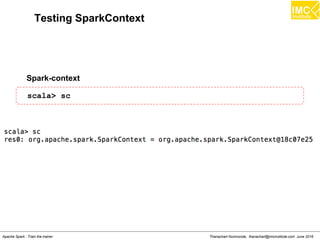
Testing SparkContext
Spark-context
scala> sc
Thanachart Numnonda, thanachart@imcinstitute.com June 2016Apache Spark : Train the trainer
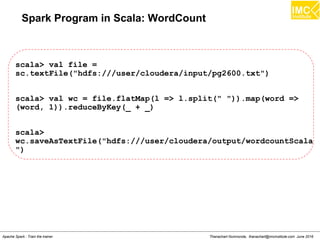
Spark Program in Scala: WordCount
scala> val file =
sc.textFile("hdfs:///user/cloudera/input/pg2600.txt")
scala> val wc = file.flatMap(l => l.split(" ")).map(word =>
(word, 1)).reduceByKey(_ + _)
scala>
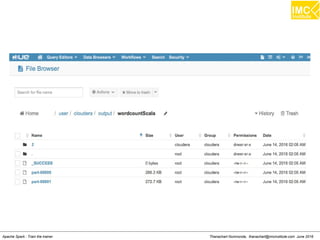
wc.saveAsTextFile("hdfs:///user/cloudera/output/wordcountScala
")
Thanachart Numnonda, thanachart@imcinstitute.com June 2016Apache Spark : Train the trainer
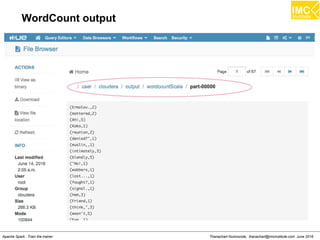
WordCount output
Thanachart Numnonda, thanachart@imcinstitute.com June 2016Apache Spark : Train the trainer
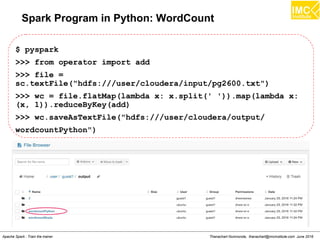
Spark Program in Python: WordCount
$ pyspark
>>> from operator import add
>>> file =
sc.textFile("hdfs:///user/cloudera/input/pg2600.txt")
>>> wc = file.flatMap(lambda x: x.split(' ')).map(lambda x:
(x, 1)).reduceByKey(add)
>>> wc.saveAsTextFile("hdfs:///user/cloudera/output/
wordcountPython")
Thanachart Numnonda, thanachart@imcinstitute.com June 2016Apache Spark : Train the trainer
Transformations
>>> nums = sc.parallelize([1,2,3])
>>> squared = nums.map(lambda x : x*x)
>>> even = squared.filter(lambda x: x%2 == 0)
>>> evens = nums.flatMap(lambda x: range(x))
Thanachart Numnonda, thanachart@imcinstitute.com June 2016Apache Spark : Train the trainer
Actions
>>> nums = sc.parallelize([1,2,3])
>>> nums.collect()
>>> nums.take(2)
>>> nums.count()
>>> nums.reduce(lambda:x, y:x+y)
>>> nums.saveAsTextFile("hdfs:///user/cloudera/output/test”)
Thanachart Numnonda, thanachart@imcinstitute.com June 2016Apache Spark : Train the trainer
Key-Value Operations
>>> pet = sc.parallelize([("cat",1),("dog",1),("cat",2)])
>>> pet2 = pet.reduceByKey(lambda x, y:x+y)
>>> pet3 = pet.groupByKey()
>>> pet4 = pet.sortByKey()
Thanachart Numnonda, thanachart@imcinstitute.com June 2016Apache Spark : Train the trainer
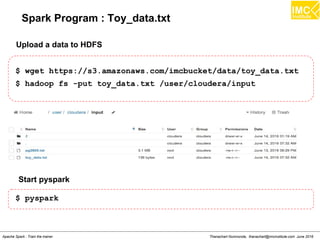
Spark Program : Toy_data.txt
$ wget https://s3.amazonaws.com/imcbucket/data/toy_data.txt
$ hadoop fs -put toy_data.txt /user/cloudera/input
Upload a data to HDFS
Start pyspark
$ pyspark
Thanachart Numnonda, thanachart@imcinstitute.com June 2016Apache Spark : Train the trainer
Spark Program : Find Big Spenders
>>> file_rdd =
sc.textFile("hdfs:///user/cloudera/input/toy_data.txt")
>>> import json
>>> json_rdd = file_rdd.map(lambda x: json.loads(x))
>>> big_spenders = json_rdd.map(lambda x: tuple((x.keys()
[0],int(x.values()[0]))))
>>> big_spenders.reduceByKey(lambda x,y: x + y).filter(lambda
x: x[1] > 5).collect()
Thanachart Numnonda, thanachart@imcinstitute.com June 2016Apache Spark : Train the trainer
Hands-on:
Loading data from MySQL
Thanachart Numnonda, thanachart@imcinstitute.com June 2016Apache Spark : Train the trainer
MySQL RDS Server on AWS
A RDS Server is running on AWS with the following
configuration
> database: imc_db
> username: admin
> password: imcinstitute
>addr: imcdb.cmw65obdqfnx.us-west-2.rds.amazonaws.com
[This address may change]
Thanachart Numnonda, thanachart@imcinstitute.com June 2016Apache Spark : Train the trainer
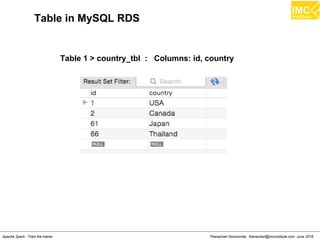
Table in MySQL RDS
Table 1 > country_tbl : Columns: id, country
Thanachart Numnonda, thanachart@imcinstitute.com June 2016Apache Spark : Train the trainer
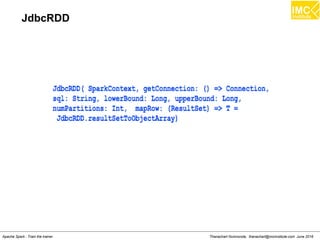
JdbcRDD
Thanachart Numnonda, thanachart@imcinstitute.com June 2016Apache Spark : Train the trainer
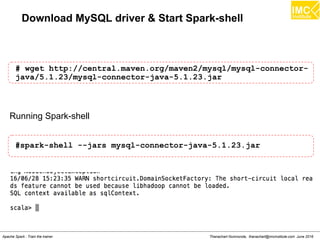
Download MySQL driver & Start Spark-shell
# wget http://central.maven.org/maven2/mysql/mysql-connector-
java/5.1.23/mysql-connector-java-5.1.23.jar
#spark-shell --jars mysql-connector-java-5.1.23.jar
Running Spark-shell
Thanachart Numnonda, thanachart@imcinstitute.com June 2016Apache Spark : Train the trainer
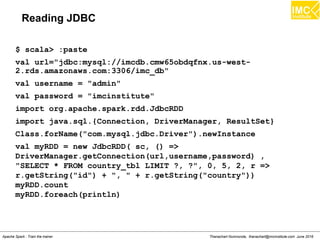
Reading JDBC
$ scala> :paste
val url="jdbc:mysql://imcdb.cmw65obdqfnx.us-west-
2.rds.amazonaws.com:3306/imc_db"
val username = "admin"
val password = "imcinstitute"
import org.apache.spark.rdd.JdbcRDD
import java.sql.{Connection, DriverManager, ResultSet}
Class.forName("com.mysql.jdbc.Driver").newInstance
val myRDD = new JdbcRDD( sc, () =>
DriverManager.getConnection(url,username,password) ,
"SELECT * FROM country_tbl LIMIT ?, ?", 0, 5, 2, r =>
r.getString("id") + ", " + r.getString("country"))
myRDD.count
myRDD.foreach(println)
Thanachart Numnonda, thanachart@imcinstitute.com June 2016Apache Spark : Train the trainer
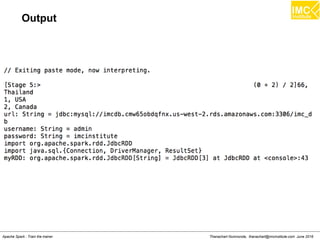
Output
Thanachart Numnonda, thanachart@imcinstitute.com June 2016Apache Spark : Train the trainer
Project: Flight
Thanachart Numnonda, thanachart@imcinstitute.com June 2016Apache Spark : Train the trainer
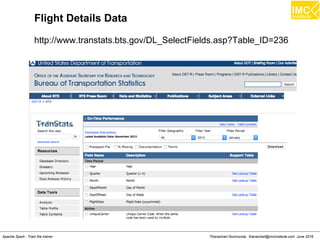
Flight Details Data
http://www.transtats.bts.gov/DL_SelectFields.asp?Table_ID=236
Thanachart Numnonda, thanachart@imcinstitute.com June 2016Apache Spark : Train the trainer
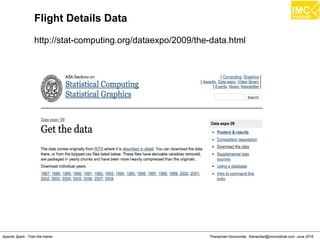
Flight Details Data
http://stat-computing.org/dataexpo/2009/the-data.html
Thanachart Numnonda, thanachart@imcinstitute.com June 2016Apache Spark : Train the trainer
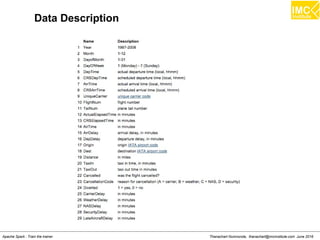
Data Description
Thanachart Numnonda, thanachart@imcinstitute.com June 2016Apache Spark : Train the trainer
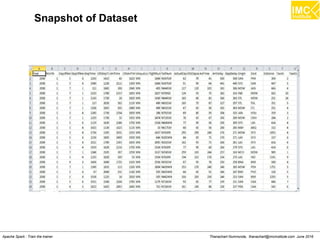
Snapshot of Dataset
Thanachart Numnonda, thanachart@imcinstitute.com June 2016Apache Spark : Train the trainer
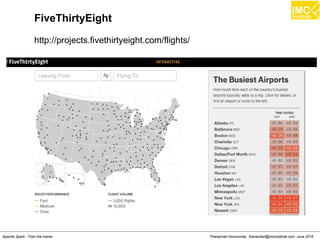
FiveThirtyEight
http://projects.fivethirtyeight.com/flights/
Thanachart Numnonda, thanachart@imcinstitute.com June 2016Apache Spark : Train the trainer
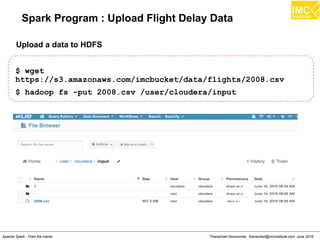
Spark Program : Upload Flight Delay Data
$ wget
https://s3.amazonaws.com/imcbucket/data/flights/2008.csv
$ hadoop fs -put 2008.csv /user/cloudera/input
Upload a data to HDFS
Thanachart Numnonda, thanachart@imcinstitute.com June 2016Apache Spark : Train the trainer
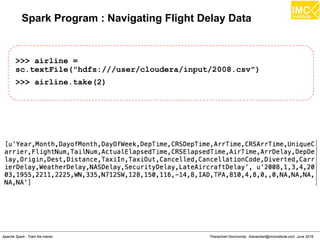
Spark Program : Navigating Flight Delay Data
>>> airline =
sc.textFile("hdfs:///user/cloudera/input/2008.csv")
>>> airline.take(2)
Thanachart Numnonda, thanachart@imcinstitute.com June 2016Apache Spark : Train the trainer
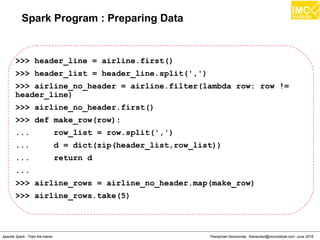
Spark Program : Preparing Data
>>> header_line = airline.first()
>>> header_list = header_line.split(',')
>>> airline_no_header = airline.filter(lambda row: row !=
header_line)
>>> airline_no_header.first()
>>> def make_row(row):
... row_list = row.split(',')
... d = dict(zip(header_list,row_list))
... return d
...
>>> airline_rows = airline_no_header.map(make_row)
>>> airline_rows.take(5)
Thanachart Numnonda, thanachart@imcinstitute.com June 2016Apache Spark : Train the trainer
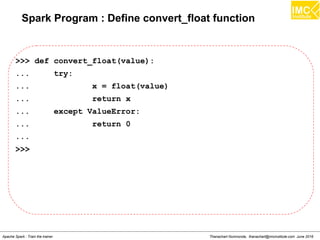
Spark Program : Define convert_float function
>>> def convert_float(value):
... try:
... x = float(value)
... return x
... except ValueError:
... return 0
...
>>>
Thanachart Numnonda, thanachart@imcinstitute.com June 2016Apache Spark : Train the trainer
Spark Program : Finding best/worst airline
>>> carrier_rdd = airline_rows.map(lambda row:
(row['UniqueCarrier'],convert_float(row['ArrDelay'])))
>>> carrier_rdd.take(2)
Thanachart Numnonda, thanachart@imcinstitute.com June 2016Apache Spark : Train the trainer
Spark Program : Finding best/worst airlines
>>> mean_delays_dest =
carrier_rdd.groupByKey().mapValues(lambda delays:
sum(delays.data)/len(delays.data))
>>> mean_delays_dest.sortBy(lambda t:t[1],
ascending=True).take(10)
>>> mean_delays_dest.sortBy(lambda t:t[1],
ascending=False).take(10)
Thanachart Numnonda, thanachart@imcinstitute.com June 2016Apache Spark : Train the trainer
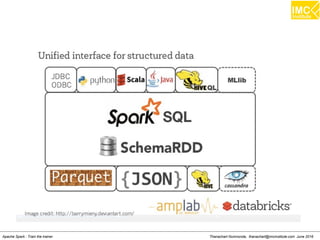
Spark SQL
thanachart@imcinstitute.com187
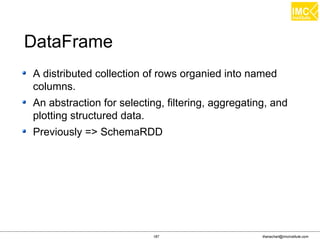
A distributed collection of rows organied into named
columns.
An abstraction for selecting, filtering, aggregating, and
plotting structured data.
Previously => SchemaRDD
DataFrame
thanachart@imcinstitute.com188
Creating and running Spark program faster
– Write less code
– Read less data
– Let the optimizer do the hard work
SparkSQL
thanachart@imcinstitute.com189
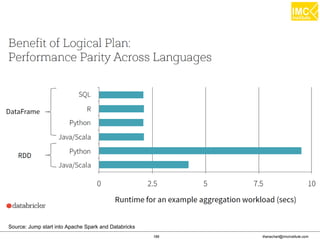
Source: Jump start into Apache Spark and Databricks
thanachart@imcinstitute.com190
Hive Metastore can also be leveraged by a wide
array of applications
– Spark
– Hive
– Impala
Available from HiveContext
SparkSQL can leverage the Hive
metastore
Thanachart Numnonda, thanachart@imcinstitute.com June 2016Apache Spark : Train the trainer
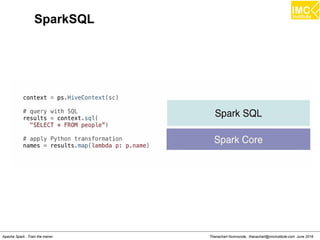
SparkSQL
Thanachart Numnonda, thanachart@imcinstitute.com June 2016Apache Spark : Train the trainer
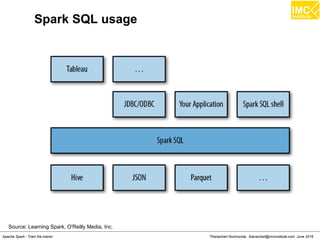
Spark SQL usage
Source: Learning Spark, O'Reilly Media, Inc.
Thanachart Numnonda, thanachart@imcinstitute.com June 2016Apache Spark : Train the trainer
Hands-on: Spark SQL
Thanachart Numnonda, thanachart@imcinstitute.com June 2016Apache Spark : Train the trainer
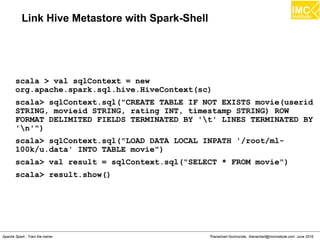
Link Hive Metastore with Spark-Shell
scala > val sqlContext = new
org.apache.spark.sql.hive.HiveContext(sc)
scala> sqlContext.sql("CREATE TABLE IF NOT EXISTS movie(userid
STRING, movieid STRING, rating INT, timestamp STRING) ROW
FORMAT DELIMITED FIELDS TERMINATED BY 't' LINES TERMINATED BY
'n'")
scala> sqlContext.sql("LOAD DATA LOCAL INPATH '/root/ml-
100k/u.data' INTO TABLE movie")
scala> val result = sqlContext.sql("SELECT * FROM movie")
scala> result.show()
Thanachart Numnonda, thanachart@imcinstitute.com June 2016Apache Spark : Train the trainer
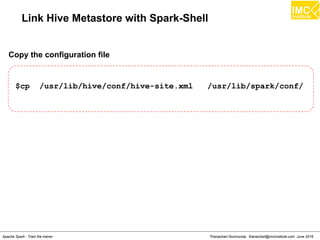
Link Hive Metastore with Spark-Shell
$cp /usr/lib/hive/conf/hive-site.xml /usr/lib/spark/conf/
Copy the configuration file
$spark-shell
Running Spark
Thanachart Numnonda, thanachart@imcinstitute.com June 2016Apache Spark : Train the trainer
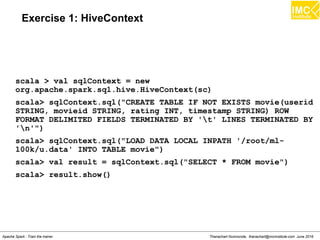
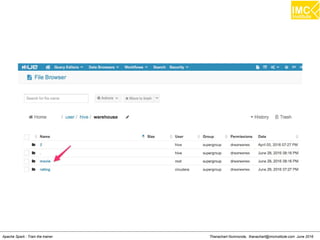
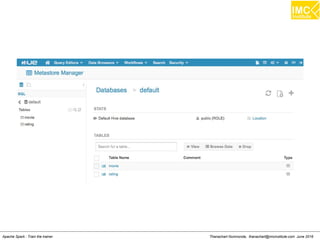
Exercise 1: HiveContext
scala > val sqlContext = new
org.apache.spark.sql.hive.HiveContext(sc)
scala> sqlContext.sql("CREATE TABLE IF NOT EXISTS movie(userid
STRING, movieid STRING, rating INT, timestamp STRING) ROW
FORMAT DELIMITED FIELDS TERMINATED BY 't' LINES TERMINATED BY
'n'")
scala> sqlContext.sql("LOAD DATA LOCAL INPATH '/root/ml-
100k/u.data' INTO TABLE movie")
scala> val result = sqlContext.sql("SELECT * FROM movie")
scala> result.show()
Thanachart Numnonda, thanachart@imcinstitute.com June 2016Apache Spark : Train the trainer
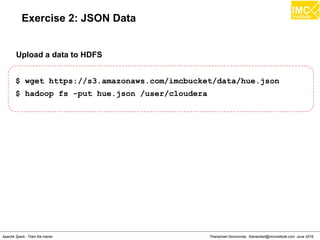
Exercise 2: JSON Data
$ wget https://s3.amazonaws.com/imcbucket/data/hue.json
$ hadoop fs -put hue.json /user/cloudera
Upload a data to HDFS
Thanachart Numnonda, thanachart@imcinstitute.com June 2016Apache Spark : Train the trainer
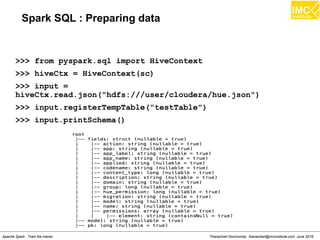
Spark SQL : Preparing data
>>> from pyspark.sql import HiveContext
>>> hiveCtx = HiveContext(sc)
>>> input =
hiveCtx.read.json("hdfs:///user/cloudera/hue.json")
>>> input.registerTempTable("testTable")
>>> input.printSchema()
Thanachart Numnonda, thanachart@imcinstitute.com June 2016Apache Spark : Train the trainer
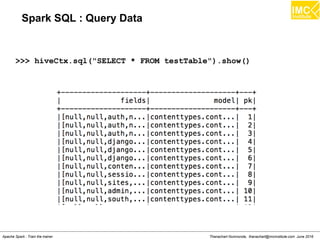
Spark SQL : Query Data
>>> hiveCtx.sql("SELECT * FROM testTable").show()
Thanachart Numnonda, thanachart@imcinstitute.com June 2016Apache Spark : Train the trainer
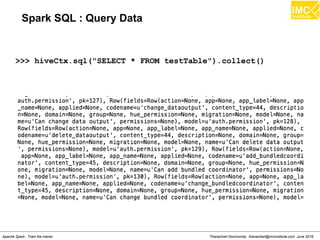
Spark SQL : Query Data
>>> hiveCtx.sql("SELECT * FROM testTable").collect()
Thanachart Numnonda, thanachart@imcinstitute.com June 2016Apache Spark : Train the trainer
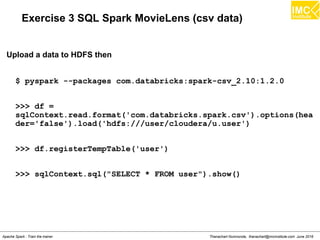
Exercise 3 SQL Spark MovieLens (csv data)
$ pyspark --packages com.databricks:spark-csv_2.10:1.2.0
>>> df =
sqlContext.read.format('com.databricks.spark.csv').options(hea
der='false').load('hdfs:///user/cloudera/u.user')
>>> df.registerTempTable('user')
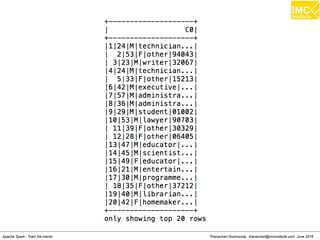
>>> sqlContext.sql("SELECT * FROM user").show()
Upload a data to HDFS then
Thanachart Numnonda, thanachart@imcinstitute.com June 2016Apache Spark : Train the trainer
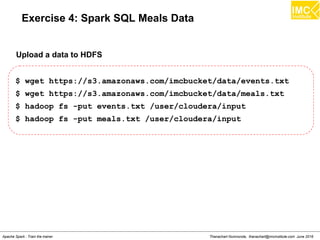
Exercise 4: Spark SQL Meals Data
$ wget https://s3.amazonaws.com/imcbucket/data/events.txt
$ wget https://s3.amazonaws.com/imcbucket/data/meals.txt
$ hadoop fs -put events.txt /user/cloudera/input
$ hadoop fs -put meals.txt /user/cloudera/input
Upload a data to HDFS
Thanachart Numnonda, thanachart@imcinstitute.com June 2016Apache Spark : Train the trainer
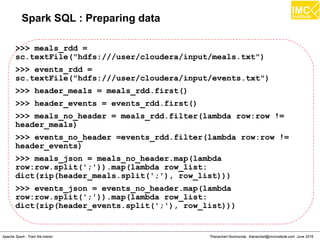
Spark SQL : Preparing data
>>> meals_rdd =
sc.textFile("hdfs:///user/cloudera/input/meals.txt")
>>> events_rdd =
sc.textFile("hdfs:///user/cloudera/input/events.txt")
>>> header_meals = meals_rdd.first()
>>> header_events = events_rdd.first()
>>> meals_no_header = meals_rdd.filter(lambda row:row !=
header_meals)
>>> events_no_header =events_rdd.filter(lambda row:row !=
header_events)
>>> meals_json = meals_no_header.map(lambda
row:row.split(';')).map(lambda row_list:
dict(zip(header_meals.split(';'), row_list)))
>>> events_json = events_no_header.map(lambda
row:row.split(';')).map(lambda row_list:
dict(zip(header_events.split(';'), row_list)))
Thanachart Numnonda, thanachart@imcinstitute.com June 2016Apache Spark : Train the trainer
Spark SQL : Preparing data
>>> import json
>>> def type_conversion(d, columns) :
... for c in columns:
... d[c] = int(d[c])
... return d
...
>>> meal_typed = meals_json.map(lambda
j:json.dumps(type_conversion(j, ['meal_id','price'])))
>>> event_typed = events_json.map(lambda
j:json.dumps(type_conversion(j, ['meal_id','userid']))
Thanachart Numnonda, thanachart@imcinstitute.com June 2016Apache Spark : Train the trainer
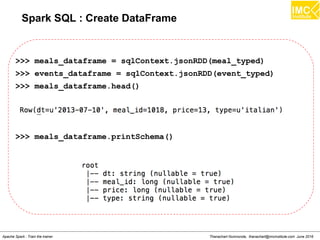
Spark SQL : Create DataFrame
>>> meals_dataframe = sqlContext.jsonRDD(meal_typed)
>>> events_dataframe = sqlContext.jsonRDD(event_typed)
>>> meals_dataframe.head()
>>> meals_dataframe.printSchema()
Thanachart Numnonda, thanachart@imcinstitute.com June 2016Apache Spark : Train the trainer
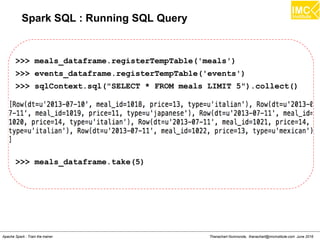
Spark SQL : Running SQL Query
>>> meals_dataframe.registerTempTable('meals')
>>> events_dataframe.registerTempTable('events')
>>> sqlContext.sql("SELECT * FROM meals LIMIT 5").collect()
>>> meals_dataframe.take(5)
Thanachart Numnonda, thanachart@imcinstitute.com June 2016Apache Spark : Train the trainer
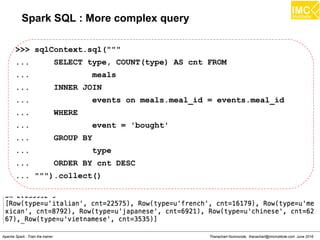
Spark SQL : More complex query
>>> sqlContext.sql("""
... SELECT type, COUNT(type) AS cnt FROM
... meals
... INNER JOIN
... events on meals.meal_id = events.meal_id
... WHERE
... event = 'bought'
... GROUP BY
... type
... ORDER BY cnt DESC
... """).collect()
Thanachart Numnonda, thanachart@imcinstitute.com June 2016Apache Spark : Train the trainer
Spark Streaming
thanachart@imcinstitute.com213
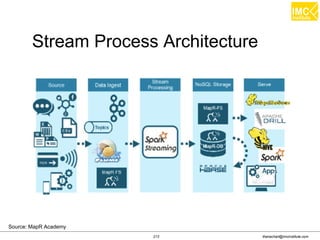
Stream Process Architecture
Source: MapR Academy
thanachart@imcinstitute.com214
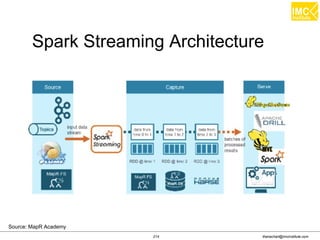
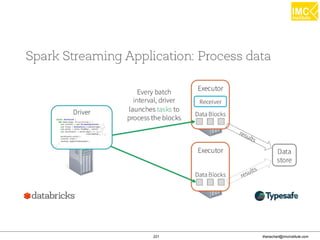
Spark Streaming Architecture
Source: MapR Academy
thanachart@imcinstitute.com215
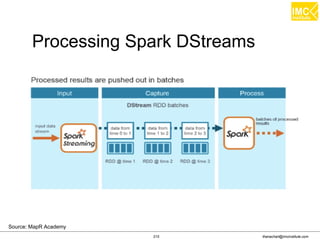
Processing Spark DStreams
Source: MapR Academy
thanachart@imcinstitute.com216
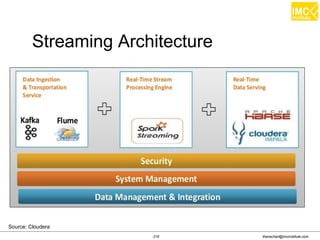
Streaming Architecture
Source: Cloudera
thanachart@imcinstitute.com217
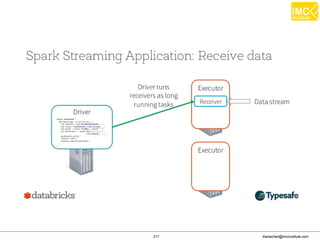
thanachart@imcinstitute.com218
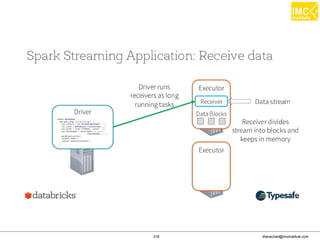
thanachart@imcinstitute.com219
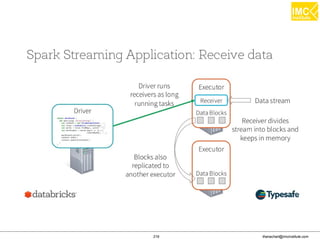
thanachart@imcinstitute.com220
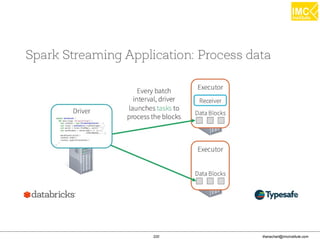
thanachart@imcinstitute.com221
thanachart@imcinstitute.com222
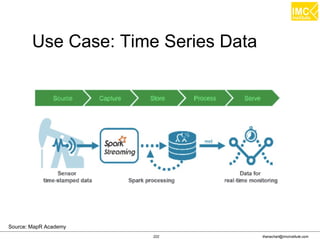
Use Case: Time Series Data
Source: MapR Academy
thanachart@imcinstitute.com223
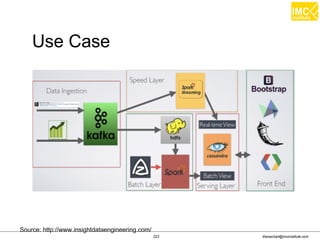
Use Case
Source: http://www.insightdataengineering.com/
thanachart@imcinstitute.com224
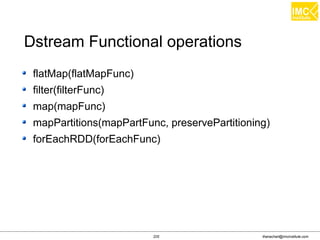
flatMap(flatMapFunc)
filter(filterFunc)
map(mapFunc)
mapPartitions(mapPartFunc, preservePartitioning)
forEachRDD(forEachFunc)
DStream Functional operations
thanachart@imcinstitute.com225
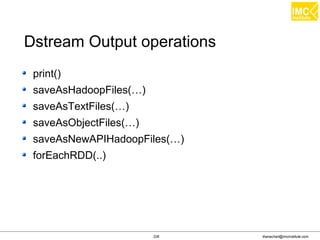
print()
saveAsHadoopFiles(â€Ķ)
saveAsTextFiles(â€Ķ)
saveAsObjectFiles(â€Ķ)
saveAsNewAPIHadoopFiles(â€Ķ)
forEachRDD(..)
DStream Output operations
Thanachart Numnonda, thanachart@imcinstitute.com June 2016Apache Spark : Train the trainer
Hands-on: Spark Streaming
Thanachart Numnonda, thanachart@imcinstitute.com June 2016Apache Spark : Train the trainer
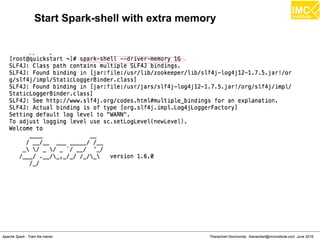
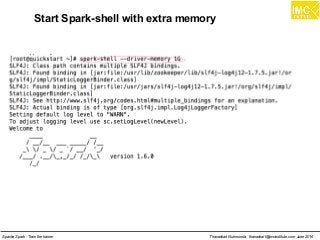
Start Spark-shell with extra memory
Thanachart Numnonda, thanachart@imcinstitute.com June 2016Apache Spark : Train the trainer
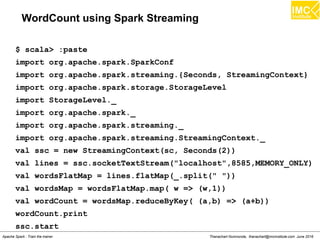
WordCount using Spark Streaming
$ scala> :paste
import org.apache.spark.SparkConf
import org.apache.spark.streaming.{Seconds, StreamingContext}
import org.apache.spark.storage.StorageLevel
import StorageLevel._
import org.apache.spark._
import org.apache.spark.streaming._
import org.apache.spark.streaming.StreamingContext._
val ssc = new StreamingContext(sc, Seconds(2))
val lines = ssc.socketTextStream("localhost",8585,MEMORY_ONLY)
val wordsFlatMap = lines.flatMap(_.split(" "))
val wordsMap = wordsFlatMap.map( w => (w,1))
val wordCount = wordsMap.reduceByKey( (a,b) => (a+b))
wordCount.print
ssc.start
Thanachart Numnonda, thanachart@imcinstitute.com June 2016Apache Spark : Train the trainer
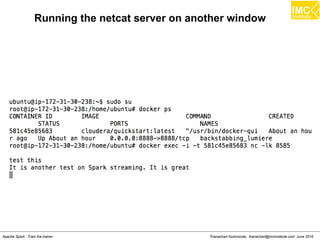
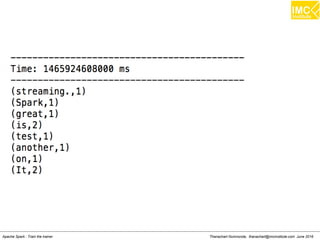
Running the netcat server on another window
Thanachart Numnonda, thanachart@imcinstitute.com June 2016Apache Spark : Train the trainer
Hands-On: Streaming Twitter data
Thanachart Numnonda, thanachart@imcinstitute.com June 2016Apache Spark : Train the trainer
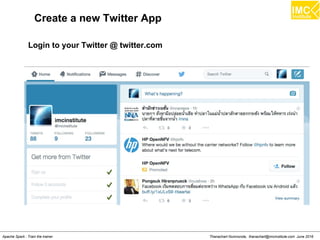
Create a new Twitter App
Login to your Twitter @ twitter.com
Thanachart Numnonda, thanachart@imcinstitute.com June 2016Apache Spark : Train the trainer
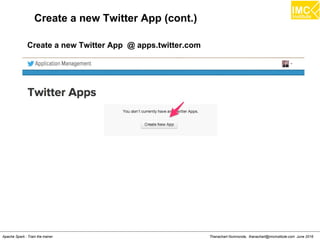
Create a new Twitter App (cont.)
Create a new Twitter App @ apps.twitter.com
Thanachart Numnonda, thanachart@imcinstitute.com June 2016Apache Spark : Train the trainer
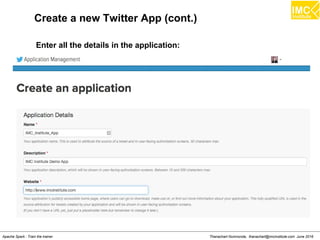
Create a new Twitter App (cont.)
Enter all the details in the application:
Thanachart Numnonda, thanachart@imcinstitute.com June 2016Apache Spark : Train the trainer
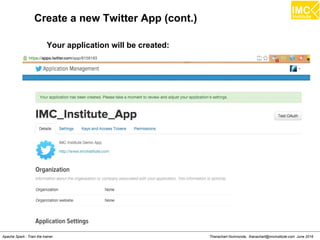
Create a new Twitter App (cont.)
Your application will be created:
Thanachart Numnonda, thanachart@imcinstitute.com June 2016Apache Spark : Train the trainer
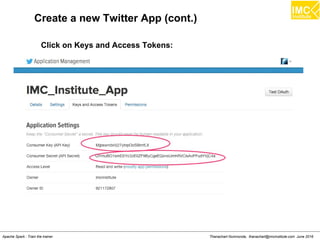
Create a new Twitter App (cont.)
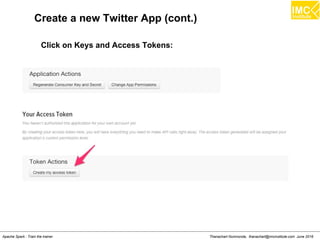
Click on Keys and Access Tokens:
Thanachart Numnonda, thanachart@imcinstitute.com June 2016Apache Spark : Train the trainer
Create a new Twitter App (cont.)
Click on Keys and Access Tokens:
Thanachart Numnonda, thanachart@imcinstitute.com June 2016Apache Spark : Train the trainer
Create a new Twitter App (cont.)
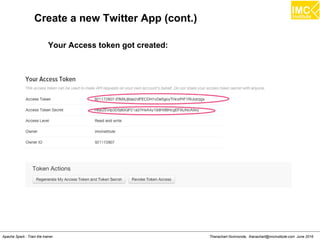
Your Access token got created:
Thanachart Numnonda, thanachart@imcinstitute.com June 2016Apache Spark : Train the trainer
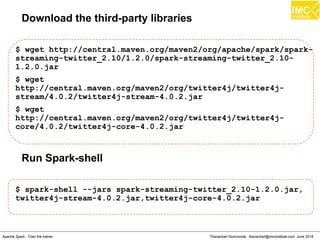
Download the third-party libraries
$ wget http://central.maven.org/maven2/org/apache/spark/spark-
streaming-twitter_2.10/1.2.0/spark-streaming-twitter_2.10-
1.2.0.jar
$ wget
http://central.maven.org/maven2/org/twitter4j/twitter4j-
stream/4.0.2/twitter4j-stream-4.0.2.jar
$ wget
http://central.maven.org/maven2/org/twitter4j/twitter4j-
core/4.0.2/twitter4j-core-4.0.2.jar
Run Spark-shell
$ spark-shell --jars spark-streaming-twitter_2.10-1.2.0.jar,
twitter4j-stream-4.0.2.jar,twitter4j-core-4.0.2.jar
Thanachart Numnonda, thanachart@imcinstitute.com June 2016Apache Spark : Train the trainer
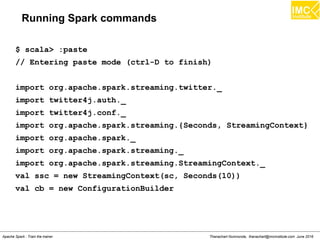
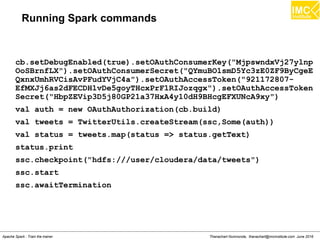
Running Spark commands
$ scala> :paste
// Entering paste mode (ctrl-D to finish)
import org.apache.spark.streaming.twitter._
import twitter4j.auth._
import twitter4j.conf._
import org.apache.spark.streaming.{Seconds, StreamingContext}
import org.apache.spark._
import org.apache.spark.streaming._
import org.apache.spark.streaming.StreamingContext._
val ssc = new StreamingContext(sc, Seconds(10))
val cb = new ConfigurationBuilder
Thanachart Numnonda, thanachart@imcinstitute.com June 2016Apache Spark : Train the trainer
Running Spark commands
cb.setDebugEnabled(true).setOAuthConsumerKey("MjpswndxVj27ylnp
OoSBrnfLX").setOAuthConsumerSecret("QYmuBO1smD5Yc3zE0ZF9ByCgeE
QxnxUmhRVCisAvPFudYVjC4a").setOAuthAccessToken("921172807-
EfMXJj6as2dFECDH1vDe5goyTHcxPrF1RIJozqgx").setOAuthAccessToken
Secret("HbpZEVip3D5j80GP21a37HxA4y10dH9BHcgEFXUNcA9xy")
val auth = new OAuthAuthorization(cb.build)
val tweets = TwitterUtils.createStream(ssc,Some(auth))
val status = tweets.map(status => status.getText)
status.print
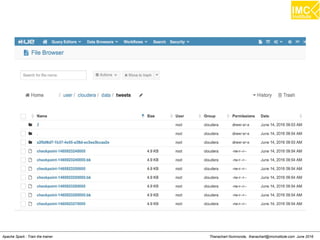
ssc.checkpoint("hdfs:///user/cloudera/data/tweets")
ssc.start
ssc.awaitTermination
Thanachart Numnonda, thanachart@imcinstitute.com June 2016Apache Spark : Train the trainer
Lecture
Understanding Kafka
Thanachart Numnonda, thanachart@imcinstitute.com June 2016Apache Spark : Train the trainer
Introduction
Open-source message broker project
An open-source message broker project developed by the
Apache Software Foundation written in Scala. The project
aims to provide a unified, high-throughput, low-latency
platform for handling real-time data feeds. It is, in its essence,
a "massively scalable pub/sub message queue architected as
a distributed transaction log", making it highly valuable for
enterprise infrastructures.
Thanachart Numnonda, thanachart@imcinstitute.com June 2016Apache Spark : Train the trainer
What is Kafka?
An apache project initially developed at LinkedIn
Distributed publish-subscribe messaging system
Designed for processing of real time activity stream data
e.g. logs, metrics collections
Written in Scala
Does not follow JMS Standards, neither uses JMS APIs
Thanachart Numnonda, thanachart@imcinstitute.com June 2016Apache Spark : Train the trainer
Kafka: Features
Persistent messaging
High-throughput
Supports both queue and topic semantics
Uses Zookeeper for forming a cluster of nodes
(producer/consumer/broker)
and many moreâ€Ķ
Thanachart Numnonda, thanachart@imcinstitute.com June 2016Apache Spark : Train the trainer
Why Kafka?
Built with speed and scalability in mind.
Enabled near real-time access to any data source
Empowered hadoop jobs
Allowed us to build real-time analytics
Vastly improved our site monitoring and alerting
capability
Enabled us to visualize and track our call graphs.
Thanachart Numnonda, thanachart@imcinstitute.com June 2016Apache Spark : Train the trainer
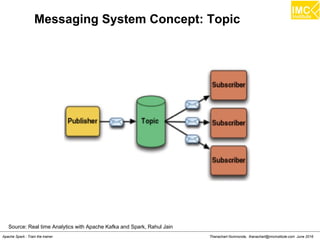
Messaging System Concept: Topic
Source: Real time Analytics with Apache Kafka and Spark, Rahul Jain
Thanachart Numnonda, thanachart@imcinstitute.com June 2016Apache Spark : Train the trainer
Terminology
Kafka maintains feeds of messages in categories called
topics.
Processes that publish messages to a Kafka topic are
called producers.
Processes that subscribe to topics and process the feed
of published messages are called consumers.
Kafka is run as a cluster comprised of one or more
servers each of which is called a broker.
Thanachart Numnonda, thanachart@imcinstitute.com June 2016Apache Spark : Train the trainer
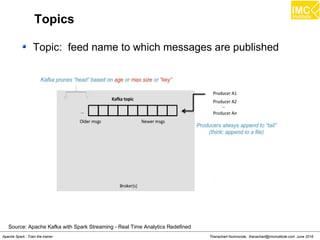
Topics
Topic: feed name to which messages are published
Source: Apache Kafka with Spark Streaming - Real Time Analytics Redefined
Thanachart Numnonda, thanachart@imcinstitute.com June 2016Apache Spark : Train the trainer
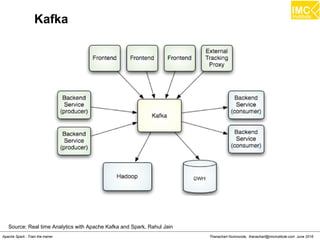
Kafka
Source: Real time Analytics with Apache Kafka and Spark, Rahul Jain
Thanachart Numnonda, thanachart@imcinstitute.com June 2016Apache Spark : Train the trainer
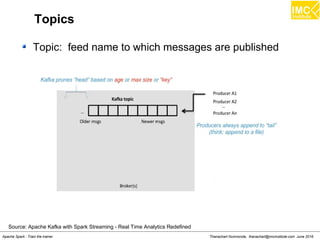
Topics
Topic: feed name to which messages are published
Source: Apache Kafka with Spark Streaming - Real Time Analytics Redefined
Thanachart Numnonda, thanachart@imcinstitute.com June 2016Apache Spark : Train the trainer
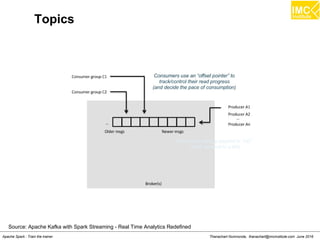
Topics
Source: Apache Kafka with Spark Streaming - Real Time Analytics Redefined
Thanachart Numnonda, thanachart@imcinstitute.com June 2016Apache Spark : Train the trainer
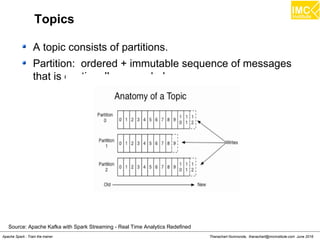
Topics
A topic consists of partitions.
Partition: ordered + immutable sequence of messages
that is continually appended
Source: Apache Kafka with Spark Streaming - Real Time Analytics Redefined
Thanachart Numnonda, thanachart@imcinstitute.com June 2016Apache Spark : Train the trainer
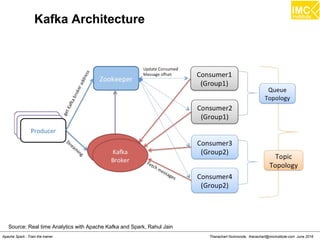
Kafka Architecture
Source: Real time Analytics with Apache Kafka and Spark, Rahul Jain
Thanachart Numnonda, thanachart@imcinstitute.com June 2016Apache Spark : Train the trainer
Hands-on
SparkStreaming from Kafka
Thanachart Numnonda, thanachart@imcinstitute.com June 2016Apache Spark : Train the trainer
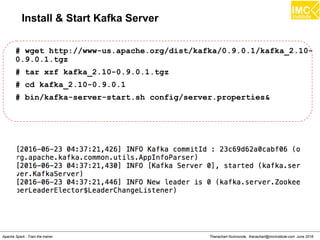
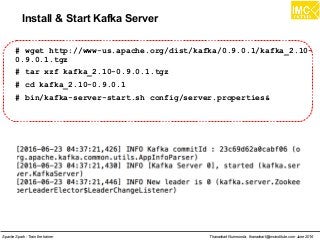
Install & Start Kafka Server
# wget http://www-us.apache.org/dist/kafka/0.9.0.1/kafka_2.10-
0.9.0.1.tgz
# tar xzf kafka_2.10-0.9.0.1.tgz
# cd kafka_2.10-0.9.0.1
# bin/kafka-server-start.sh config/server.properties&
Thanachart Numnonda, thanachart@imcinstitute.com June 2016Apache Spark : Train the trainer
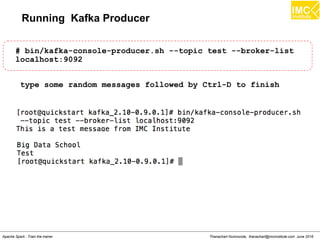
Running Kafka Producer
# bin/kafka-console-producer.sh --topic test --broker-list
localhost:9092
type some random messages followed by Ctrl-D to finish
Thanachart Numnonda, thanachart@imcinstitute.com June 2016Apache Spark : Train the trainer
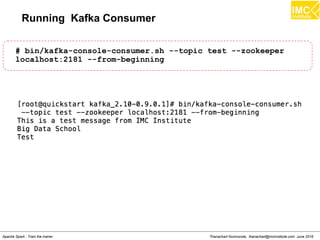
Running Kafka Consumer
# bin/kafka-console-consumer.sh --topic test --zookeeper
localhost:2181 --from-beginning
Thanachart Numnonda, thanachart@imcinstitute.com June 2016Apache Spark : Train the trainer
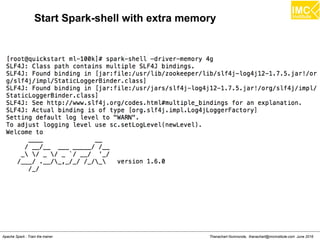
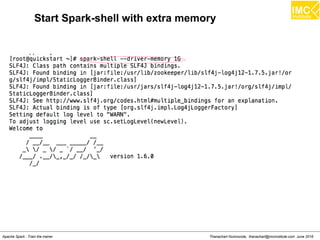
Start Spark-shell with extra memory
Thanachart Numnonda, thanachart@imcinstitute.com June 2016Apache Spark : Train the trainer
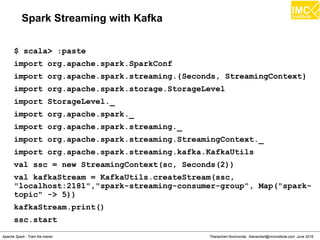
Spark Streaming with Kafka
$ scala> :paste
import org.apache.spark.SparkConf
import org.apache.spark.streaming.{Seconds, StreamingContext}
import org.apache.spark.storage.StorageLevel
import StorageLevel._
import org.apache.spark._
import org.apache.spark.streaming._
import org.apache.spark.streaming.StreamingContext._
import org.apache.spark.streaming.kafka.KafkaUtils
val ssc = new StreamingContext(sc, Seconds(2))
val kafkaStream = KafkaUtils.createStream(ssc,
"localhost:2181","spark-streaming-consumer-group", Map("spark-
topic" -> 5))
kafkaStream.print()
ssc.start
Thanachart Numnonda, thanachart@imcinstitute.com June 2016Apache Spark : Train the trainer
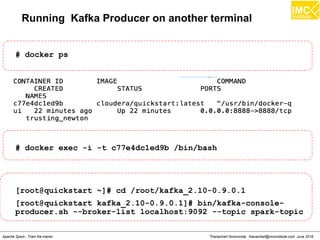
Running Kafka Producer on another terminal
# docker ps
# docker exec -i -t c77e4dc1ed9b /bin/bash
[root@quickstart ~]# cd /root/kafka_2.10-0.9.0.1
[root@quickstart kafka_2.10-0.9.0.1]# bin/kafka-console-
producer.sh --broker-list localhost:9092 --topic spark-topic
Thanachart Numnonda, thanachart@imcinstitute.com June 2016Apache Spark : Train the trainer
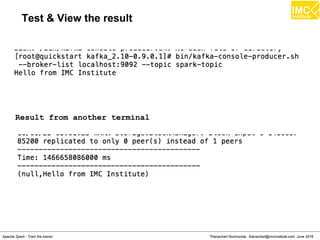
Test & View the result
Result from another terminal
Thanachart Numnonda, thanachart@imcinstitute.com June 2016Apache Spark : Train the trainer
Hands-on
Realtime analytics with Kafka
Thanachart Numnonda, thanachart@imcinstitute.com June 2016Apache Spark : Train the trainer
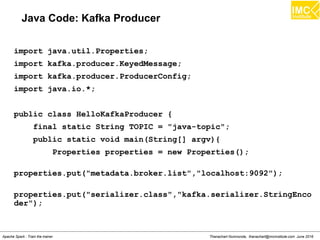
Java Code: Kafka Producer
import java.util.Properties;
import kafka.producer.KeyedMessage;
import kafka.producer.ProducerConfig;
import java.io.*;
public class HelloKafkaProducer {
final static String TOPIC = "java-topic";
public static void main(String[] argv){
Properties properties = new Properties();
properties.put("metadata.broker.list","localhost:9092");
properties.put("serializer.class","kafka.serializer.StringEnco
der");
Thanachart Numnonda, thanachart@imcinstitute.com June 2016Apache Spark : Train the trainer
Java Code: Kafka Producer (cont.)
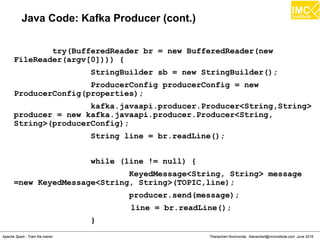
try(BufferedReader br = new BufferedReader(new
FileReader(argv[0]))) {
StringBuilder sb = new StringBuilder();
ProducerConfig producerConfig = new
ProducerConfig(properties);
kafka.javaapi.producer.Producer<String,String>
producer = new kafka.javaapi.producer.Producer<String,
String>(producerConfig);
String line = br.readLine();
while (line != null) {
KeyedMessage<String, String> message
=new KeyedMessage<String, String>(TOPIC,line);
producer.send(message);
line = br.readLine();
}
Thanachart Numnonda, thanachart@imcinstitute.com June 2016Apache Spark : Train the trainer
Java Code: Kafka Producer (cont.)
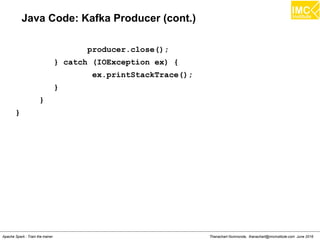
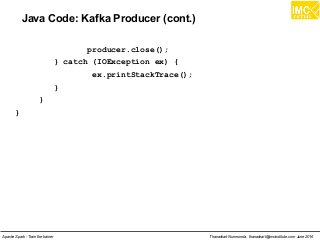
producer.close();
} catch (IOException ex) {
ex.printStackTrace();
}
}
}
Thanachart Numnonda, thanachart@imcinstitute.com June 2016Apache Spark : Train the trainer
Compile & Run the program
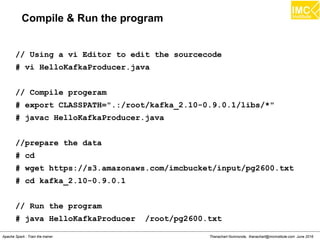
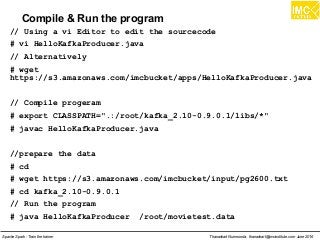
// Using a vi Editor to edit the sourcecode
# vi HelloKafkaProducer.java
// Alternatively
# wget
https://s3.amazonaws.com/imcbucket/apps/HelloKafkaProducer.java
// Compile progeram
# export CLASSPATH=".:/root/kafka_2.10-0.9.0.1/libs/*"
# javac HelloKafkaProducer.java
//prepare the data
# cd
# wget https://s3.amazonaws.com/imcbucket/input/pg2600.txt
# cd kafka_2.10-0.9.0.1
// Run the program
# java HelloKafkaProducer /root/pg2600.txt
Thanachart Numnonda, thanachart@imcinstitute.com June 2016Apache Spark : Train the trainer
Spark Streaming with Kafka : Wordcount
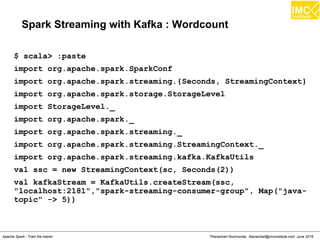
$ scala> :paste
import org.apache.spark.SparkConf
import org.apache.spark.streaming.{Seconds, StreamingContext}
import org.apache.spark.storage.StorageLevel
import StorageLevel._
import org.apache.spark._
import org.apache.spark.streaming._
import org.apache.spark.streaming.StreamingContext._
import org.apache.spark.streaming.kafka.KafkaUtils
val ssc = new StreamingContext(sc, Seconds(2))
val kafkaStream = KafkaUtils.createStream(ssc,
"localhost:2181","spark-streaming-consumer-group", Map("java-
topic" -> 5))
Thanachart Numnonda, thanachart@imcinstitute.com June 2016Apache Spark : Train the trainer
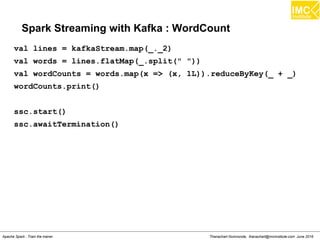
Spark Streaming with Kafka : WordCount
val lines = kafkaStream.map(_._2)
val words = lines.flatMap(_.split(" "))
val wordCounts = words.map(x => (x, 1L)).reduceByKey(_ + _)
wordCounts.print()
ssc.start()
ssc.awaitTermination()
Thanachart Numnonda, thanachart@imcinstitute.com June 2016Apache Spark : Train the trainer
Output
Thanachart Numnonda, thanachart@imcinstitute.com June 2016Apache Spark : Train the trainer
Spark MLlib
thanachart@imcinstitute.com273
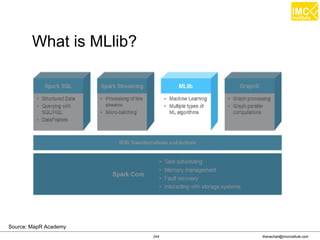
What is MLlib?
Source: MapR Academy
thanachart@imcinstitute.com274
MLlib is a Spark subproject providing machine
learning primitives:
– initial contribution from AMPLab, UC Berkeley
– shipped with Spark since version 0.8
– 33 contributors
What is MLlib?
thanachart@imcinstitute.com275
Classification: logistic regression, linear support vector
machine(SVM), naive Bayes
Regression: generalized linear regression (GLM)
Collaborative filtering: alternating least squares (ALS)
Clustering: k-means
Decomposition: singular value decomposition (SVD),
principal component analysis (PCA)
Mllib Algorithms
thanachart@imcinstitute.com276
What is in MLlib?
Source: Mllib:Spark's Machine Learning Library, A. Talwalkar
thanachart@imcinstitute.com277
Part of Spark
Scalable
Support: Python, Scala, Java
Broad coverage of applications & algorithms
Rapid developments in speed & robustness
MLlib: Benefits
Thanachart Numnonda, thanachart@imcinstitute.com June 2016Apache Spark : Train the trainer
Machine Learning
Machine learning is a scientific discipline that
explores the construction and study of algorithms
that can learn from data.
[Wikipedia]
thanachart@imcinstitute.com279
A point is just a set of numbers. This set of numbers or
coordinates defines the point's position in space.
Points and vectors are same thing.
Dimensions in vectors are called features
Hyperspace is a space with more than three dimensions.
Example: A person has the following dimensions:
– Weight
– Height
– Age
Thus, the interpretation of point (160,69,24) would be
160 lb weight, 69 inches height, and 24 years age.
Vectors
Source:Spark Cookbook
thanachart@imcinstitute.com280
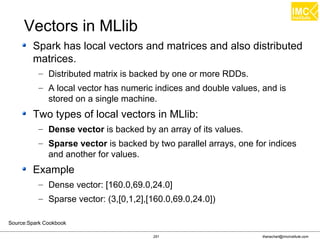
Spark has local vectors and matrices and also distributed
matrices.
– Distributed matrix is backed by one or more RDDs.
– A local vector has numeric indices and double values, and is
stored on a single machine.
Two types of local vectors in MLlib:
– Dense vector is backed by an array of its values.
– Sparse vector is backed by two parallel arrays, one for indices
and another for values.
Example
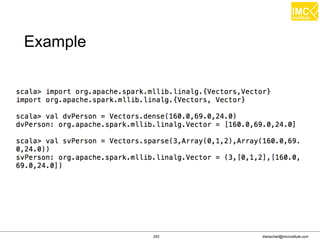
– Dense vector: [160.0,69.0,24.0]
– Sparse vector: (3,[0,1,2],[160.0,69.0,24.0])
Vectors in MLlib
Source:Spark Cookbook
thanachart@imcinstitute.com281
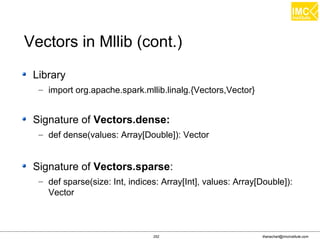
Library
– import org.apache.spark.mllib.linalg.{Vectors,Vector}
Signature of Vectors.dense:
– def dense(values: Array[Double]): Vector
Signature of Vectors.sparse:
– def sparse(size: Int, indices: Array[Int], values: Array[Double]):
Vector
Vectors in Mllib (cont.)
thanachart@imcinstitute.com282
Example
thanachart@imcinstitute.com283
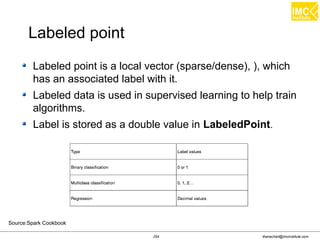
Labeled point is a local vector (sparse/dense), ), which
has an associated label with it.
Labeled data is used in supervised learning to help train
algorithms.
Label is stored as a double value in LabeledPoint.
Labeled point
Source:Spark Cookbook
Thanachart Numnonda, thanachart@imcinstitute.com June 2016Apache Spark : Train the trainer
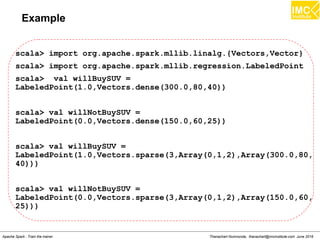
Example
scala> import org.apache.spark.mllib.linalg.{Vectors,Vector}
scala> import org.apache.spark.mllib.regression.LabeledPoint
scala> val willBuySUV =
LabeledPoint(1.0,Vectors.dense(300.0,80,40))
scala> val willNotBuySUV =
LabeledPoint(0.0,Vectors.dense(150.0,60,25))
scala> val willBuySUV =
LabeledPoint(1.0,Vectors.sparse(3,Array(0,1,2),Array(300.0,80,
40)))
scala> val willNotBuySUV =
LabeledPoint(0.0,Vectors.sparse(3,Array(0,1,2),Array(150.0,60,
25)))
Thanachart Numnonda, thanachart@imcinstitute.com June 2016Apache Spark : Train the trainer
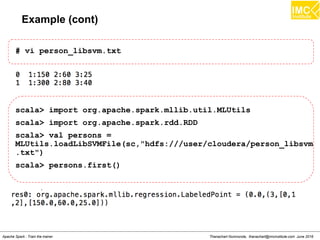
Example (cont)
# vi person_libsvm.txt
scala> import org.apache.spark.mllib.util.MLUtils
scala> import org.apache.spark.rdd.RDD
scala> val persons =
MLUtils.loadLibSVMFile(sc,"hdfs:///user/cloudera/person_libsvm
.txt")
scala> persons.first()
thanachart@imcinstitute.com286
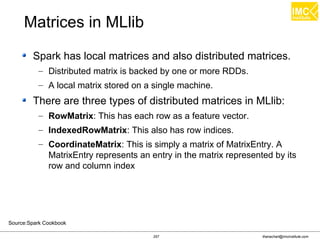
Spark has local matrices and also distributed matrices.
– Distributed matrix is backed by one or more RDDs.
– A local matrix stored on a single machine.
There are three types of distributed matrices in MLlib:
– RowMatrix: This has each row as a feature vector.
– IndexedRowMatrix: This also has row indices.
– CoordinateMatrix: This is simply a matrix of MatrixEntry. A
MatrixEntry represents an entry in the matrix represented by its
row and column index
Matrices in MLlib
Source:Spark Cookbook
Thanachart Numnonda, thanachart@imcinstitute.com June 2016Apache Spark : Train the trainer
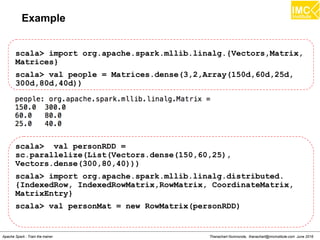
Example
scala> import org.apache.spark.mllib.linalg.{Vectors,Matrix,
Matrices}
scala> val people = Matrices.dense(3,2,Array(150d,60d,25d,
300d,80d,40d))
scala> val personRDD =
sc.parallelize(List(Vectors.dense(150,60,25),
Vectors.dense(300,80,40)))
scala> import org.apache.spark.mllib.linalg.distributed.
{IndexedRow, IndexedRowMatrix,RowMatrix, CoordinateMatrix,
MatrixEntry}
scala> val personMat = new RowMatrix(personRDD)
Thanachart Numnonda, thanachart@imcinstitute.com June 2016Apache Spark : Train the trainer
Example
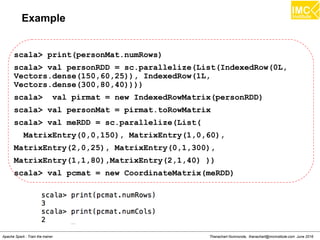
scala> print(personMat.numRows)
scala> val personRDD = sc.parallelize(List(IndexedRow(0L,
Vectors.dense(150,60,25)), IndexedRow(1L,
Vectors.dense(300,80,40))))
scala> val pirmat = new IndexedRowMatrix(personRDD)
scala> val personMat = pirmat.toRowMatrix
scala> val meRDD = sc.parallelize(List(
MatrixEntry(0,0,150), MatrixEntry(1,0,60),
MatrixEntry(2,0,25), MatrixEntry(0,1,300),
MatrixEntry(1,1,80),MatrixEntry(2,1,40) ))
scala> val pcmat = new CoordinateMatrix(meRDD)
thanachart@imcinstitute.com289
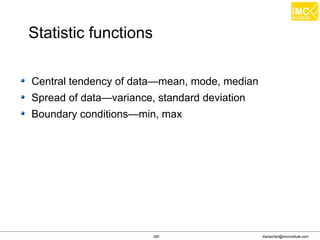
Central tendency of data—mean, mode, median
Spread of data—variance, standard deviation
Boundary conditions—min, max
Statistic functions
Thanachart Numnonda, thanachart@imcinstitute.com June 2016Apache Spark : Train the trainer
Example
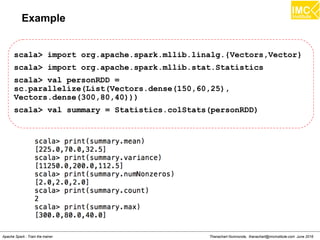
scala> import org.apache.spark.mllib.linalg.{Vectors,Vector}
scala> import org.apache.spark.mllib.stat.Statistics
scala> val personRDD =
sc.parallelize(List(Vectors.dense(150,60,25),
Vectors.dense(300,80,40)))
scala> val summary = Statistics.colStats(personRDD)
Thanachart Numnonda, thanachart@imcinstitute.com June 2016Apache Spark : Train the trainer
Hands-on
Movie Recommendation
thanachart@imcinstitute.com292
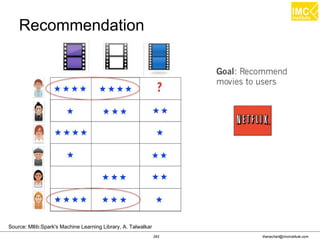
Source: Mllib:Spark's Machine Learning Library, A. Talwalkar
Recommendation
thanachart@imcinstitute.com293
Source: Mllib:Spark's Machine Learning Library, A. Talwalkar
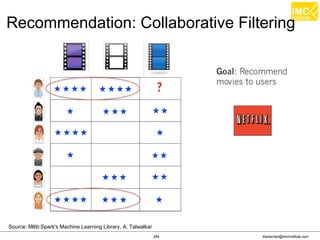
Recommendation: Collaborative Filtering
thanachart@imcinstitute.com294
Source: Mllib:Spark's Machine Learning Library, A. Talwalkar
Recommendation
thanachart@imcinstitute.com295
Source: Mllib:Spark's Machine Learning Library, A. Talwalkar
Recommendation: ALS
thanachart@imcinstitute.com296
Source: MLlib: Scalable Machine Learning on Spark, X. Meng
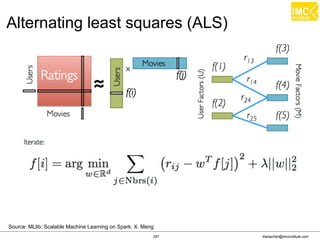
Alternating least squares (ALS)
thanachart@imcinstitute.com297
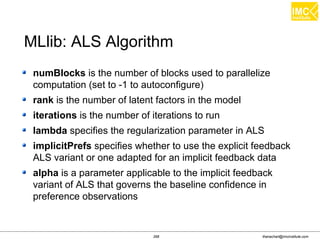
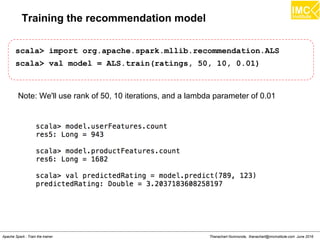
numBlocks is the number of blocks used to parallelize
computation (set to -1 to autoconfigure)
rank is the number of latent factors in the model
iterations is the number of iterations to run
lambda specifies the regularization parameter in ALS
implicitPrefs specifies whether to use the explicit feedback
ALS variant or one adapted for an implicit feedback data
alpha is a parameter applicable to the implicit feedback
variant of ALS that governs the baseline confidence in
preference observations
MLlib: ALS Algorithm
Thanachart Numnonda, thanachart@imcinstitute.com June 2016Apache Spark : Train the trainer
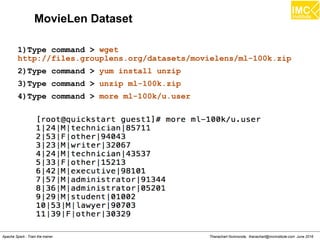
MovieLen Dataset
1)Type command > wget
http://files.grouplens.org/datasets/movielens/ml-100k.zip
2)Type command > yum install unzip
3)Type command > unzip ml-100k.zip
4)Type command > more ml-100k/u.user
Thanachart Numnonda, thanachart@imcinstitute.com June 2016Apache Spark : Train the trainer
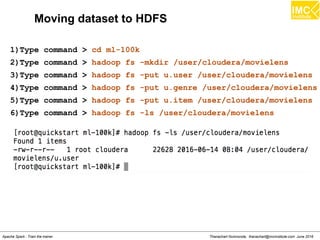
Moving dataset to HDFS
1)Type command > cd ml-100k
2)Type command > hadoop fs -mkdir /user/cloudera/movielens
3)Type command > hadoop fs -put u.user /user/cloudera/movielens
4)Type command > hadoop fs -put u.data /user/cloudera/movielens
4)Type command > hadoop fs -put u.genre /user/cloudera/movielens
5)Type command > hadoop fs -put u.item /user/cloudera/movielens
6)Type command > hadoop fs -ls /user/cloudera/movielens
Thanachart Numnonda, thanachart@imcinstitute.com June 2016Apache Spark : Train the trainer
Start Spark-shell with extra memory
Thanachart Numnonda, thanachart@imcinstitute.com June 2016Apache Spark : Train the trainer
Extracting features from the MovieLens dataset
scala> val rawData =
sc.textFile("hdfs:///user/cloudera/movielens/u.data")
scala> rawData.first()
scala> val rawRatings = rawData.map(_.split("t").take(3))
scala> rawRatings.first()
scala> import org.apache.spark.mllib.recommendation.Rating
scala> val ratings = rawRatings.map { case Array(user, movie,
rating) =>Rating(user.toInt, movie.toInt, rating.toDouble) }
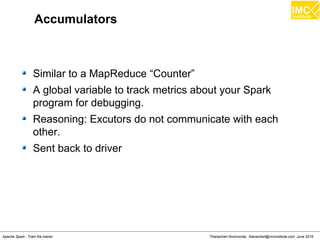
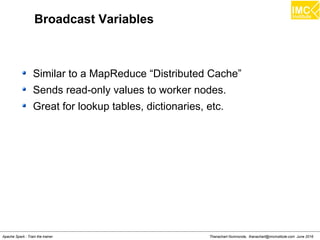
scala> ratings.first()
Thanachart Numnonda, thanachart@imcinstitute.com June 2016Apache Spark : Train the trainer
Training the recommendation model
scala> import org.apache.spark.mllib.recommendation.ALS
scala> val model = ALS.train(ratings, 50, 10, 0.01)
Note: We'll use rank of 50, 10 iterations, and a lambda parameter of 0.01
Thanachart Numnonda, thanachart@imcinstitute.com June 2016Apache Spark : Train the trainer
Inspecting the recommendations
scala> val movies =
sc.textFile("hdfs:///user/cloudera/movielens/u.item")
scala> val titles = movies.map(line =>
line.split("|").take(2)).map(array
=>(array(0).toInt,array(1))).collectAsMap()
Thanachart Numnonda, thanachart@imcinstitute.com June 2016Apache Spark : Train the trainer
Inspecting the recommendations (cont.)
scala> val moviesForUser = ratings.keyBy(_.user).lookup(789)
scala> moviesForUser.sortBy(-_.rating).take(10).map(rating =>
(titles(rating.product), rating.rating)).foreach(println)
Thanachart Numnonda, thanachart@imcinstitute.com June 2016Apache Spark : Train the trainer
Top 10 Recommendation for userid 789
scala> val topKRecs = model.recommendProducts(789,10)
scala> topKRecs.map(rating => (titles(rating.product),
rating.rating)).foreach(println)
Thanachart Numnonda, thanachart@imcinstitute.com June 2016Apache Spark : Train the trainer
Evaluating Performance: Mean Squared Error
scala> val actualRating = moviesForUser.take(1)(0)
scala> val predictedRating = model.predict(789,
actualRating.product)
scala> val squaredError = math.pow(predictedRating -
actualRating.rating, 2.0)
Thanachart Numnonda, thanachart@imcinstitute.com June 2016Apache Spark : Train the trainer
Overall Mean Squared Error
scala> val usersProducts = ratings.map{ case Rating(user,
product, rating) => (user, product)}
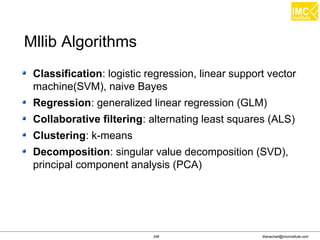
scala> val predictions = model.predict(usersProducts).map{
case Rating(user, product, rating) => ((user, product),
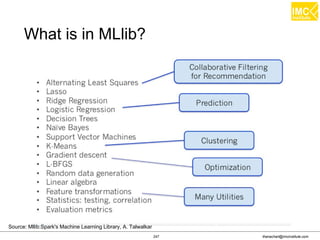
rating)}
scala> val ratingsAndPredictions = ratings.map{
case Rating(user, product, rating) => ((user, product),
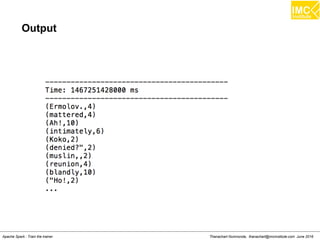
rating)
}.join(predictions)
scala> val MSE = ratingsAndPredictions.map{
case ((user, product), (actual, predicted)) =>
math.pow((actual - predicted), 2)
}.reduce(_ + _) / ratingsAndPredictions.count
Thanachart Numnonda, thanachart@imcinstitute.com June 2016Apache Spark : Train the trainer
Clustering using K-Means
thanachart@imcinstitute.com309
Market segmentation
Social network analysis: Finding a coherent group of
people in the social network for ad targeting
Data center computing clusters
Real estate: Identifying neighborhoods based on similar
features
Text analysis: Dividing text documents, such as novels or
essays, into genres
Clustering use cases
thanachart@imcinstitute.com310Source: Mahout in Action
thanachart@imcinstitute.com311Source: Mahout in Action
Sample Data
thanachart@imcinstitute.com312
Distance Measures
Source www.edureka.in/data-science
thanachart@imcinstitute.com313
Euclidean distance measure
Squared Euclidean distance measure
Manhattan distance measure
Cosine distance measure
Distance Measures
thanachart@imcinstitute.com314
Distance Measures
thanachart@imcinstitute.com315
K-Means Clustering
Source: www.edureka.in/data-science
thanachart@imcinstitute.com316
Example of K-Means Clustering
thanachart@imcinstitute.com317
http://stanford.edu/class/ee103/visualizations/kmeans/kmeans.html
thanachart@imcinstitute.com318
K-Means with different distance measures
Source: Mahout in Action
thanachart@imcinstitute.com319
Choosing number of clusters
thanachart@imcinstitute.com320
Dimensionality reduction
Process of reducing the number of dimensions or
features.
Dimensionality reduction serves several purposes
– Data compression
– Visualization
The most popular algorithm: Principal component
analysis (PCA).
thanachart@imcinstitute.com321
Dimensionality reduction
Source: Spark Cookbook
thanachart@imcinstitute.com322
Dimensionality reduction with SVD
Singular Value Decomposition (SVD): is based on a
theorem from linear algebra that a rectangular matrix A
can be broken down into a product of three matrices
thanachart@imcinstitute.com323
Dimensionality reduction with SVD
The basic idea behind SVD
– Take a high dimension, a highly variable set of data
points
– Reduce it to a lower dimensional space that exposes
the structure of the original data more clearly and
orders it from the most variation to the least.
So we can simply ignore variation below a certain
threshold to massively reduce the original data, making
sure that the original relationship interests are retained.
Thanachart Numnonda, thanachart@imcinstitute.com June 2016Apache Spark : Train the trainer
Hands-on
Clustering on MovieLens Dataset
Thanachart Numnonda, thanachart@imcinstitute.com June 2016Apache Spark : Train the trainer
Extracting features from the MovieLens dataset
scala> val rawData =
sc.textFile("hdfs:///user/cloudera/movielens/u.item")
scala> println(movies.first)
scala> val genres =
sc.textFile("hdfs:///user/cloudera/movielens/u.genre")
scala> genres.take(5).foreach(println)
Thanachart Numnonda, thanachart@imcinstitute.com June 2016Apache Spark : Train the trainer
Extracting features from the MovieLens dataset (cont.)
scala> val genreMap = genres.filter(!_.isEmpty).map(line =>
line.split("|")).map(array=> (array(1),
array(0))).collectAsMap
Thanachart Numnonda, thanachart@imcinstitute.com June 2016Apache Spark : Train the trainer
Extracting features from the MovieLens dataset (cont.)
scala> val titlesAndGenres = movies.map(_.split("|")).map
{ array =>
val genres = array.toSeq.slice(5, array.size)
val genresAssigned = genres.zipWithIndex.filter { case (g,
idx) =>
g == "1"
}.map { case (g, idx) =>
genreMap(idx.toString)
}
(array(0).toInt, (array(1), genresAssigned))
}
Thanachart Numnonda, thanachart@imcinstitute.com June 2016Apache Spark : Train the trainer
Training the recommendation model
scala> :paste
import org.apache.spark.mllib.recommendation.ALS
import org.apache.spark.mllib.recommendation.Rating
val rawData =
sc.textFile("hdfs:///user/cloudera/movielens/u.data")
val rawRatings = rawData.map(_.split("t").take(3))
val ratings = rawRatings.map{ case Array(user, movie,
rating) => Rating(user.toInt, movie.toInt,
rating.toDouble) }
ratings.cache
val alsModel = ALS.train(ratings, 50, 10, 0.1)
import org.apache.spark.mllib.linalg.Vectors
val movieFactors = alsModel.productFeatures.map { case (id,
factor) => (id, Vectors.dense(factor)) }
val movieVectors = movieFactors.map(_._2)
val userFactors = alsModel.userFeatures.map { case (id,
factor) => (id, Vectors.dense(factor)) }
val userVectors = userFactors.map(_._2)
Thanachart Numnonda, thanachart@imcinstitute.com June 2016Apache Spark : Train the trainer
Normalization
scala> :paste
import org.apache.spark.mllib.linalg.distributed.RowMatrix
val movieMatrix = new RowMatrix(movieVectors)
val movieMatrixSummary =
movieMatrix.computeColumnSummaryStatistics()
val userMatrix = new RowMatrix(userVectors)
val userMatrixSummary =
userMatrix.computeColumnSummaryStatistics()
println("Movie factors mean: " + movieMatrixSummary.mean)
println("Movie factors variance: " +
movieMatrixSummary.variance)
println("User factors mean: " + userMatrixSummary.mean)
println("User factors variance: " +
userMatrixSummary.variance)
Thanachart Numnonda, thanachart@imcinstitute.com June 2016Apache Spark : Train the trainer
Output from Normalization
Thanachart Numnonda, thanachart@imcinstitute.com June 2016Apache Spark : Train the trainer
Training a clustering model
scala> import org.apache.spark.mllib.clustering.KMeans
scala> val numClusters = 5
scala> val numIterations = 10
scala> val numRuns = 3
scala> val movieClusterModel = KMeans.train(movieVectors,
numClusters, numIterations, numRuns)
Thanachart Numnonda, thanachart@imcinstitute.com June 2016Apache Spark : Train the trainer
Making predictions using a clustering model
scala> val movie1 = movieVectors.first
scala> val movieCluster = movieClusterModel.predict(movie1)
scala> val predictions =
movieClusterModel.predict(movieVectors)
Thanachart Numnonda, thanachart@imcinstitute.com June 2016Apache Spark : Train the trainer
Interpreting cluster predictions
scala> :paste
import breeze.linalg._
import breeze.numerics.pow
def computeDistance(v1: DenseVector[Double], v2:
DenseVector[Double]) = pow(v1 - v2, 2).sum
val titlesWithFactors = titlesAndGenres.join(movieFactors)
val moviesAssigned = titlesWithFactors.map { case (id,
((title, genres), vector)) =>
val pred = movieClusterModel.predict(vector)
val clusterCentre = movieClusterModel.clusterCenters(pred)
val dist =
computeDistance(DenseVector(clusterCentre.toArray),
DenseVector(vector.toArray))
(id, title, genres.mkString(" "), pred, dist)
}
Thanachart Numnonda, thanachart@imcinstitute.com June 2016Apache Spark : Train the trainer
Interpreting cluster predictions (cont.)
val clusterAssignments = moviesAssigned.groupBy { case (id,
title, genres, cluster, dist) => cluster }.collectAsMap
for ( (k, v) <- clusterAssignments.toSeq.sortBy(_._1)) {
println(s"Cluster $k:")
val m = v.toSeq.sortBy(_._5)
println(m.take(20).map { case (_, title, genres, _, d) =>
(title, genres, d) }.mkString("n"))
println("=====n")
}
Thanachart Numnonda, thanachart@imcinstitute.com June 2016Apache Spark : Train the trainer
Real-time Machine Learning
using Streaming K-Means
thanachart@imcinstitute.com337
Online learning with Spark Streaming
Streaming regression
– trainOn: This takes DStream[LabeledPoint] as its
argument.
– predictOn: This also takes DStream[LabeledPoint].
Streaming KMeans
– An extension of the mini-batch K-means algorithm
thanachart@imcinstitute.com338
Streaming K-Means Program
Thanachart Numnonda, thanachart@imcinstitute.com June 2016Apache Spark : Train the trainer
MovieLen Training Dataset
●
The rows of the training text files must be vector data
in the form
[x1,x2,x3,...,xn]
1)Type command > wget
https://s3.amazonaws.com/imcbucket/data/movietest.data
2)Type command > more movietest.data
Thanachart Numnonda, thanachart@imcinstitute.com June 2016Apache Spark : Train the trainer
Install & Start Kafka Server
# wget http://www-us.apache.org/dist/kafka/0.9.0.1/kafka_2.10-
0.9.0.1.tgz
# tar xzf kafka_2.10-0.9.0.1.tgz
# cd kafka_2.10-0.9.0.1
# bin/kafka-server-start.sh config/server.properties&
Thanachart Numnonda, thanachart@imcinstitute.com June 2016Apache Spark : Train the trainer
Start Spark-shell with extra memory
Thanachart Numnonda, thanachart@imcinstitute.com June 2016Apache Spark : Train the trainer
Streaming K-Means
$ scala> :paste
import org.apache.spark.mllib.linalg.Vectors
import org.apache.spark.mllib.regression.LabeledPoint
import org.apache.spark.mllib.clustering.StreamingKMeans
import org.apache.spark.SparkConf
import org.apache.spark.streaming.{Seconds, StreamingContext}
import org.apache.spark.storage.StorageLevel
import StorageLevel._
import org.apache.spark._
import org.apache.spark.streaming._
import org.apache.spark.streaming.StreamingContext._
import org.apache.spark.streaming.kafka.KafkaUtils
val ssc = new StreamingContext(sc, Seconds(2))
Thanachart Numnonda, thanachart@imcinstitute.com June 2016Apache Spark : Train the trainer
val kafkaStream = KafkaUtils.createStream(ssc,
"localhost:2181","spark-streaming-consumer-group", Map("java-
topic" -> 5))
val lines = kafkaStream.map(_._2)
val ratings = lines.map(Vectors.parse)
val numDimensions = 3
val numClusters = 5
val model = new StreamingKMeans()
.setK(numClusters)
.setDecayFactor(1.0)
.setRandomCenters(numDimensions, 0.0)
model.trainOn(ratings)
model.predictOn(ratings).print()
ssc.start()
ssc.awaitTermination()
Thanachart Numnonda, thanachart@imcinstitute.com June 2016Apache Spark : Train the trainer
Running HelloKafkaProducer on another windows
●
Open a new ssh windows
Thanachart Numnonda, thanachart@imcinstitute.com June 2016Apache Spark : Train the trainer
Java Code: Kafka Producer
import java.util.Properties;
import kafka.producer.KeyedMessage;
import kafka.producer.ProducerConfig;
import java.io.*;
public class HelloKafkaProducer {
final static String TOPIC = "java-topic";
public static void main(String[] argv){
Properties properties = new Properties();
properties.put("metadata.broker.list","localhost:9092");
properties.put("serializer.class","kafka.serializer.StringEnco
der");
Thanachart Numnonda, thanachart@imcinstitute.com June 2016Apache Spark : Train the trainer
Java Code: Kafka Producer (cont.)
try(BufferedReader br = new BufferedReader(new
FileReader(argv[0]))) {
StringBuilder sb = new StringBuilder();
ProducerConfig producerConfig = new
ProducerConfig(properties);
kafka.javaapi.producer.Producer<String,String>
producer = new kafka.javaapi.producer.Producer<String,
String>(producerConfig);
String line = br.readLine();
while (line != null) {
KeyedMessage<String, String> message
=new KeyedMessage<String, String>(TOPIC,line);
producer.send(message);
line = br.readLine();
}
Thanachart Numnonda, thanachart@imcinstitute.com June 2016Apache Spark : Train the trainer
Java Code: Kafka Producer (cont.)
producer.close();
} catch (IOException ex) {
ex.printStackTrace();
}
}
}
Thanachart Numnonda, thanachart@imcinstitute.com June 2016Apache Spark : Train the trainer
Compile & Run the program
// Using a vi Editor to edit the sourcecode
# vi HelloKafkaProducer.java
// Alternatively
# wget
https://s3.amazonaws.com/imcbucket/apps/HelloKafkaProducer.java
// Compile progeram
# export CLASSPATH=".:/root/kafka_2.10-0.9.0.1/libs/*"
# javac HelloKafkaProducer.java
//prepare the data
# cd
# wget https://s3.amazonaws.com/imcbucket/input/pg2600.txt
# cd kafka_2.10-0.9.0.1
// Run the program
# java HelloKafkaProducer /root/movietest.data
Thanachart Numnonda, thanachart@imcinstitute.com June 2016Apache Spark : Train the trainer
Example Result
Thanachart Numnonda, thanachart@imcinstitute.com June 2016Apache Spark : Train the trainer
Project:
Machine Learning using
NYC Taxi Trip Data
thanachart@imcinstitute.com351
NYC’s Taxi Trip Data
http://www.andresmh.com/nyctaxitrips/
thanachart@imcinstitute.com352
NYC Taxi : A Day in Life
http://nyctaxi.herokuapp.com/
thanachart@imcinstitute.com353
Temporal Data with JodaTime and NScalaTime
import com.github.nscala_time.time.Imports._
val dt1 = new DateTime(2014, 9, 4, 9, 0)
val dt2 = new DateTime(2014, 10, 31, 15, 0)
dt1 < dt2
val dt3 = dt1 + 60.days
dt3 > dt2
import java.text.SimpleDateFormat
val format = new SimpleDateFormat("yyyy-MM-dd HH:mm:ss")
val date = format.parse("2014-10-12 10:30:44")
val datetime = new DateTime(date)
thanachart@imcinstitute.com354
Temporal Data with JodaTime and NScalaTime
val d = new Duration(dt1, dt2)
d.getMillis
d.getStandardHours
d.getStandardDays
thanachart@imcinstitute.com355
Exploring the Esri Geometry API
import com.esri.core.geometry.Geometry
import com.esri.core.geometry.GeometryEngine
import com.esri.core.geometry.SpatialReference
class RichGeometry(val geometry: Geometry,
val spatialReference: SpatialReference =
SpatialReference.create(4326)) {
def area2D() = geometry.calculateArea2D()
def contains(other: Geometry): Boolean = {
GeometryEngine.contains(geometry, other,
spatialReference)
}
def distance(other: Geometry): Double = {
GeometryEngine.distance(geometry, other,
spatialReference)
}
}
thanachart@imcinstitute.com356
Exploring the Esri Geometry API (cont.)
object RichGeometry {
implicit def wrapRichGeo(g: Geometry) = {
new RichGeometry(g)
}
}
import RichGeometry._
thanachart@imcinstitute.com357
Intro to GeoJSON
$ wget https://nycdatastables.s3.amazonaws.com/
/2013-08-19T18:15:35.172Z/nyc-borough-boundaries-
polygon.geojson
$ mv nyc-borough-boundaries-polygon.geojson nyc-
boroughs.geojson
import spray.json.JsValue
case class Feature(
val id: Option[JsValue],
val properties: Map[String, JsValue],
val geometry: RichGeometry) {
def apply(property: String) = properties(property)
def get(property: String) = properties.get(property)
}
thanachart@imcinstitute.com358
Intro to GeoJSON (cont.)
case class FeatureCollection(features: Array[Feature])
extends IndexedSeq[Feature] {
def apply(index: Int) = features(index)
def length = features.length
}
implicit object FeatureJsonFormat extends
RootJsonFormat[Feature] {
def write(f: Feature) = {
val buf = scala.collection.mutable.ArrayBuffer(
"type" -> JsString("Feature"),
"properties" -> JsObject(f.properties),
"geometry" -> f.geometry.toJson)
f.id.foreach(v => { buf += "id" -> v})
JsObject(buf.toMap)
}
thanachart@imcinstitute.com359
Intro to GeoJSON (cont.)
def read(value: JsValue) = {
val jso = value.asJsObject
val id = jso.fields.get("id")
val properties =
jso.fields("properties").asJsObject.fields
val geometry =
jso.fields("geometry").convertTo[RichGeometry]
Feature(id, properties, geometry)
}
}
thanachart@imcinstitute.com360
Preparing the New York City Taxi Trip Data
$ hadoop fs -mkdir taxidata
$ hadoop fs -put trip_data_1.csv taxidata/
$ mvn package
$ spark-shell --jars target/ch08-geotime-1.0.0.jar
val taxiRaw = sc.textFile("taxidata")
val taxiHead = taxiRaw.take(10)
taxiHead.foreach(println)
thanachart@imcinstitute.com361
Preparing the New York City Taxi Trip Data (cont.)
import com.esri.core.geometry.Point
import com.github.nscala_time.time.Imports._
case class Trip(
pickupTime: DateTime,
dropoffTime: DateTime,
pickupLoc: Point,
dropoffLoc: Point)
val formatter = new SimpleDateFormat(
"yyyy-MM-dd HH:mm:ss")
def point(longitude: String, latitude: String): Point = {
new Point(longitude.toDouble, latitude.toDouble)
}
thanachart@imcinstitute.com362
Preparing the New York City Taxi Trip Data (cont.)
def parse(line: String): (String, Trip) = {
val fields = line.split(',')
val license = fields(1)
val pickupTime = new DateTime(formatter.parse(fields(5)))
val dropoffTime = new DateTime(formatter.parse(fields(6)))
val pickupLoc = point(fields(10), fields(11))
val dropoffLoc = point(fields(12), fields(13))
val trip = Trip(pickupTime, dropoffTime, pickupLoc,
dropoffLoc)
(license, trip)
}
thanachart@imcinstitute.com363
Handling Invalid Records at Scale
def safe[S, T](f: S => T): S => Either[T, (S, Exception)] =
{
new Function[S, Either[T, (S, Exception)]] with
Serializable {
def apply(s: S): Either[T, (S, Exception)] = {
try {
Left(f(s))
} catch {
case e: Exception => Right((s, e))
}
}
}
}
thanachart@imcinstitute.com364
Handling Invalid Records at Scale (cont.)
val safeParse = safe(parse)
val taxiParsed = taxiRaw.map(safeParse)
taxiParsed.cache()
taxiParsed.map(_.isLeft).
countByValue().
foreach(println)
...
val taxiBad = taxiParsed.
filter(_.isRight).
map(_.right.get)
thanachart@imcinstitute.com365
Recommended Books
thanachart@imcinstitute.com366
Thanachart Numnonda, thanachart@imcinstitute.com June 2016Apache Spark : Train the trainer
Thank you
www.imcinstitute.com
www.facebook.com/imcinstitute

Apache Spark & Hadoop : Train-the-trainer

  • 1.
    thanachart@imcinstitute.com1 Big Data: Trainthe trainer Apache Spark & Hadoop 27 June – 1 July 2016 Dr.Thanachart Numnonda IMC Institute thanachart@imcinstitute.com
  • 2.
    Thanachart Numnonda, thanachart@imcinstitute.comJune 2016Apache Spark : Train the trainer Outline ● Launch Azure Instance ● Install Docker on Ubuntu ● Pull Cloudera QuickStart to the docker ● HDFS ● HBase ● Hive ● Spark ● Spark SQL ● Spark Streaming ● Spark Mllib ● Kafka Hive.apache.org
  • 3.
    Thanachart Numnonda, thanachart@imcinstitute.comJune 2016Apache Spark : Train the trainer Cloudera Quickstart This lab will use an Azure virtual server to run Cloudera QuickStart VM which can be downloaded from: http://www.cloudera.com/content/www/en-us/downloads.html
  • 4.
    Thanachart Numnonda, thanachart@imcinstitute.comJune 2016Apache Spark : Train the trainer Hadoop Ecosystem
  • 5.
    Thanachart Numnonda, thanachart@imcinstitute.comJune 2016Apache Spark : Train the trainer Hands-On: Launch a virtual server on Microsoft Azure (Note: You can skip this session if you use your own computer or another cloud service)
  • 6.
    Thanachart Numnonda, thanachart@imcinstitute.comJune 2016Apache Spark : Train the trainer Sign up for Visual Studio Dev Essential to get free Azure credit.
  • 7.
    Thanachart Numnonda, thanachart@imcinstitute.comJune 2016Apache Spark : Train the trainer Sign in to Azure Portal
  • 8.
    Thanachart Numnonda, thanachart@imcinstitute.comJune 2016Apache Spark : Train the trainer
  • 9.
    Thanachart Numnonda, thanachart@imcinstitute.comJune 2016Apache Spark : Train the trainer Virtual Server This lab will use an Azure virtual server to install a Cloudera Quickstart Docker using the following features: Ubuntu Server 14.04 LTS DS3_V2 Standard 4 Core, 14 GB memory,28 GB SSD
  • 10.
    Thanachart Numnonda, thanachart@imcinstitute.comJune 2016Apache Spark : Train the trainer Select New => Virtual Machines => Virtual Machines
  • 11.
    Thanachart Numnonda, thanachart@imcinstitute.comJune 2016Apache Spark : Train the trainer On the Basics page, enter: ● a name for the VM ● a username for the Admin User ● the Authentication Type set to password ● a password ● a resource group name
  • 12.
    Thanachart Numnonda, thanachart@imcinstitute.comJune 2016Apache Spark : Train the trainer
  • 13.
    Thanachart Numnonda, thanachart@imcinstitute.comJune 2016Apache Spark : Train the trainer Choose DS3_v2 Standard
  • 14.
    Thanachart Numnonda, thanachart@imcinstitute.comJune 2016Apache Spark : Train the trainer
  • 15.
    Thanachart Numnonda, thanachart@imcinstitute.comJune 2016Apache Spark : Train the trainer
  • 16.
    Thanachart Numnonda, thanachart@imcinstitute.comJune 2016Apache Spark : Train the trainer
  • 17.
    Thanachart Numnonda, thanachart@imcinstitute.comJune 2016Apache Spark : Train the trainer Setting the inbound port for Hue (8888)
  • 18.
    Thanachart Numnonda, thanachart@imcinstitute.comJune 2016Apache Spark : Train the trainer
  • 19.
    Thanachart Numnonda, thanachart@imcinstitute.comJune 2016Apache Spark : Train the trainer
  • 20.
    Thanachart Numnonda, thanachart@imcinstitute.comJune 2016Apache Spark : Train the trainer
  • 21.
    Thanachart Numnonda, thanachart@imcinstitute.comJune 2016Apache Spark : Train the trainer Get the IP address
  • 22.
    Thanachart Numnonda, thanachart@imcinstitute.comJune 2016Apache Spark : Train the trainer Connect to an instance from Mac/Linux ssh -i ~/.ssh/id_rsa imcinstitute@104.210.146.182
  • 23.
    Thanachart Numnonda, thanachart@imcinstitute.comJune 2016Apache Spark : Train the trainer Connect to an instance from Windows using Putty
  • 24.
    Thanachart Numnonda, thanachart@imcinstitute.comJune 2016Apache Spark : Train the trainer Hands-On: Installing Cloudera Quickstart on Docker Container
  • 25.
    Thanachart Numnonda, thanachart@imcinstitute.comJune 2016Apache Spark : Train the trainer Installation Steps ● Update OS ● Install Docker ● Pull Cloudera Quickstart ● Run Cloudera Quickstart ● Run Cloudera Manager Hive.apache.org
  • 26.
    Thanachart Numnonda, thanachart@imcinstitute.comJune 2016Apache Spark : Train the trainer Update OS (Ubuntu) ● Command: sudo apt-get update
  • 27.
    Thanachart Numnonda, thanachart@imcinstitute.comJune 2016Apache Spark : Train the trainer Docker Installation ● Command: sudo apt-get install docker.io
  • 28.
    Thanachart Numnonda, thanachart@imcinstitute.comJune 2016Apache Spark : Train the trainer Pull Cloudera Quickstart ● Command: sudo docker pull cloudera/quickstart:latest
  • 29.
    Thanachart Numnonda, thanachart@imcinstitute.comJune 2016Apache Spark : Train the trainer Show docker images ● Command: sudo docker images
  • 30.
    Thanachart Numnonda, thanachart@imcinstitute.comJune 2016Apache Spark : Train the trainer Run Cloudera quickstart ● Command: sudo docker run --hostname=quickstart.cloudera --privileged=true -t -i [OPTIONS] [IMAGE] /usr/bin/docker-quickstart Example: sudo docker run --hostname=quickstart.cloudera --privileged=true -t -i -p 8888:8888 cloudera/quickstart /usr/bin/docker-quickstart
  • 31.
    Thanachart Numnonda, thanachart@imcinstitute.comJune 2016Apache Spark : Train the trainer Docker commands: ● docker images ● docker ps ● docker attach id ● docker kill id ● Exit from container ● exit (exit & kill the running image) ● Ctrl-P, Ctrl-Q (exit without killing the running image) Hive.apache.org
  • 32.
    Thanachart Numnonda, thanachart@imcinstitute.comJune 2016Apache Spark : Train the trainer Login to Hue http://104.210.146.182:8888 (username = cloudera; password = cloudera)
  • 33.
    Thanachart Numnonda, thanachart@imcinstitute.comJune 2016Apache Spark : Train the trainer
  • 34.
    Thanachart Numnonda, thanachart@imcinstitute.comJune 2016Apache Spark : Train the trainer Hands-On: Importing/Exporting Data to HDFS
  • 35.
    Thanachart Numnonda, thanachart@imcinstitute.comJune 2016Apache Spark : Train the trainer HDFS ● Default storage for the Hadoop cluster ● Data is distributed and replicated over multiple machines ● Designed to handle very large files with straming data access patterns. ● NameNode/DataNode ● Master/slave architecture (1 master 'n' slaves) ● Designed for large files (64 MB default, but configurable) across all the nodes Hive.apache.org
  • 36.
    Thanachart Numnonda, thanachart@imcinstitute.comJune 2016Apache Spark : Train the trainer HDFS Architecture Source Hadoop: Shashwat Shriparv
  • 37.
    Thanachart Numnonda, thanachart@imcinstitute.comJune 2016Apache Spark : Train the trainer Data Replication in HDFS Source Hadoop: Shashwat Shriparv
  • 38.
    Thanachart Numnonda, thanachart@imcinstitute.comJune 2016Apache Spark : Train the trainer How does HDFS work? Source Introduction to Apache Hadoop-Pig: PrashantKommireddi
  • 39.
    Thanachart Numnonda, thanachart@imcinstitute.comJune 2016Apache Spark : Train the trainer How does HDFS work? Source Introduction to Apache Hadoop-Pig: PrashantKommireddi
  • 40.
    Thanachart Numnonda, thanachart@imcinstitute.comJune 2016Apache Spark : Train the trainer How does HDFS work? Source Introduction to Apache Hadoop-Pig: PrashantKommireddi
  • 41.
    Thanachart Numnonda, thanachart@imcinstitute.comJune 2016Apache Spark : Train the trainer How does HDFS work? Source Introduction to Apache Hadoop-Pig: PrashantKommireddi
  • 42.
    Thanachart Numnonda, thanachart@imcinstitute.comJune 2016Apache Spark : Train the trainer How does HDFS work? Source Introduction to Apache Hadoop-Pig: PrashantKommireddi
  • 43.
    Thanachart Numnonda, thanachart@imcinstitute.comJune 2016Apache Spark : Train the trainer Review file in Hadoop HDFS using File Browse
  • 44.
    Thanachart Numnonda, thanachart@imcinstitute.comJune 2016Apache Spark : Train the trainer Create a new directory name as: input & output
  • 45.
    Thanachart Numnonda, thanachart@imcinstitute.comJune 2016Apache Spark : Train the trainer
  • 46.
    Thanachart Numnonda, thanachart@imcinstitute.comJune 2016Apache Spark : Train the trainer Upload a local file to HDFS
  • 47.
    Thanachart Numnonda, thanachart@imcinstitute.comJune 2016Apache Spark : Train the trainer
  • 48.
    Thanachart Numnonda, thanachart@imcinstitute.comJune 2016Apache Spark : Train the trainer Hands-On: Connect to a master node via SSH
  • 49.
    Thanachart Numnonda, thanachart@imcinstitute.comJune 2016Apache Spark : Train the trainer SSH Login to a master node
  • 50.
    Thanachart Numnonda, thanachart@imcinstitute.comJune 2016Apache Spark : Train the trainer Hadoop syntax for HDFS
  • 51.
    Thanachart Numnonda, thanachart@imcinstitute.comJune 2016Apache Spark : Train the trainer Install wget ● Command: yum install wget
  • 52.
    Thanachart Numnonda, thanachart@imcinstitute.comJune 2016Apache Spark : Train the trainer Download an example text file Make your own durectory at a master node to avoid mixing with others $mkdir guest1 $cd guest1 $wget https://s3.amazonaws.com/imcbucket/input/pg2600.txt
  • 53.
    Thanachart Numnonda, thanachart@imcinstitute.comJune 2016Apache Spark : Train the trainer Upload Data to Hadoop $hadoop fs -ls /user/cloudera/input $hadoop fs -rm /user/cloudera/input/* $hadoop fs -put pg2600.txt /user/cloudera/input/ $hadoop fs -ls /user/cloudera/input
  • 54.
    Thanachart Numnonda, thanachart@imcinstitute.comJune 2016Apache Spark : Train the trainer Lecture Understanding HBase
  • 55.
    Thanachart Numnonda, thanachart@imcinstitute.comJune 2016Apache Spark : Train the trainer Introduction An open source, non-relational, distributed database HBase is an open source, non-relational, distributed database modeled after Google's BigTable and is written in Java. It is developed as part of Apache Software Foundation's Apache Hadoop project and runs on top of HDFS (, providing BigTable-like capabilities for Hadoop. That is, it provides a fault-tolerant way of storing large quantities of sparse data.
  • 56.
    Thanachart Numnonda, thanachart@imcinstitute.comJune 2016Apache Spark : Train the trainer HBase Features ● Hadoop database modelled after Google's Bigtable ● Column oriented data store, known as Hadoop Database ● Support random realtime CRUD operations (unlike HDFS) ● No SQL Database ● Opensource, written in Java ● Run on a cluster of commodity hardware Hive.apache.org
  • 57.
    Thanachart Numnonda, thanachart@imcinstitute.comJune 2016Apache Spark : Train the trainer When to use HBase? ● When you need high volume data to be stored ● Un-structured data ● Sparse data ● Column-oriented data ● Versioned data (same data template, captured at various time, time-elapse data) ● When you need high scalability Hive.apache.org
  • 58.
    Thanachart Numnonda, thanachart@imcinstitute.comJune 2016Apache Spark : Train the trainer Which one to use? ● HDFS ● Only append dataset (no random write) ● Read the whole dataset (no random read) ● HBase ● Need random write and/or read ● Has thousands of operation per second on TB+ of data ● RDBMS ● Data fits on one big node ● Need full transaction support ● Need real-time query capabilities Hive.apache.org
  • 59.
    Thanachart Numnonda, thanachart@imcinstitute.comJune 2016Apache Spark : Train the trainer
  • 60.
    Thanachart Numnonda, thanachart@imcinstitute.comJune 2016Apache Spark : Train the trainer
  • 61.
    Thanachart Numnonda, thanachart@imcinstitute.comJune 2016Apache Spark : Train the trainer HBase Components Hive.apache.org ● Region ● Row of table are stores ● Region Server ● Hosts the tables ● Master ● Coordinating the Region Servers ● ZooKeeper ● HDFS ● API ● The Java Client API
  • 62.
    Thanachart Numnonda, thanachart@imcinstitute.comJune 2016Apache Spark : Train the trainer HBase Shell Commands Hive.apache.org
  • 63.
    Thanachart Numnonda, thanachart@imcinstitute.comJune 2016Apache Spark : Train the trainer Hands-On: Running HBase
  • 64.
    Thanachart Numnonda, thanachart@imcinstitute.comJune 2016Apache Spark : Train the trainer Hbase shell $hbase shell hbase(main):001:0> create 'employee', 'personal data', 'professional data' hbase(main):002:0> list
  • 65.
    Thanachart Numnonda, thanachart@imcinstitute.comJune 2016Apache Spark : Train the trainer Create Data
  • 66.
    Thanachart Numnonda, thanachart@imcinstitute.comJune 2016Apache Spark : Train the trainer Running HBase Browser
  • 67.
    Thanachart Numnonda, thanachart@imcinstitute.comJune 2016Apache Spark : Train the trainer Viewing Employee Table
  • 68.
    Thanachart Numnonda, thanachart@imcinstitute.comJune 2016Apache Spark : Train the trainer Create a table in HBase
  • 69.
    Thanachart Numnonda, thanachart@imcinstitute.comJune 2016Apache Spark : Train the trainer Insert a new row in a table
  • 70.
    Thanachart Numnonda, thanachart@imcinstitute.comJune 2016Apache Spark : Train the trainer Add field into a new row
  • 71.
    Thanachart Numnonda, thanachart@imcinstitute.comJune 2016Apache Spark : Train the trainer Introduction A Petabyte Scale Data Warehouse Using Hadoop Hive is developed by Facebook, designed to enable easy data summarization, ad-hoc querying and analysis of large volumes of data. It provides a simple query language called Hive QL, which is based on SQL
  • 72.
    Danairat T., danairat@gmail.com:Thanachart N., thanachart@imcinstitute.com April 2015Big Data Hadoop Workshop What Hive is NOT Hive is not designed for online transaction processing and does not offer real-time queries and row level updates. It is best used for batch jobs over large sets of immutable data (like web logs, etc.).
  • 73.
    Danairat T., danairat@gmail.com:Thanachart N., thanachart@imcinstitute.com April 2015Big Data Hadoop Workshop Sample HiveQL The Query compiler uses the information stored in the metastore to convert SQL queries into a sequence of map/reduce jobs, e.g. the following query SELECT * FROM t where t.c = 'xyz' SELECT t1.c2 FROM t1 JOIN t2 ON (t1.c1 = t2.c1) SELECT t1.c1, count(1) from t1 group by t1.c1 Hive.apache.or g
  • 74.
    Danairat T., danairat@gmail.com:Thanachart N., thanachart@imcinstitute.com April 2015Big Data Hadoop Workshop Sample HiveQL The Query compiler uses the information stored in the metastore to convert SQL queries into a sequence of map/reduce jobs, e.g. the following query SELECT * FROM t where t.c = 'xyz' SELECT t1.c2 FROM t1 JOIN t2 ON (t1.c1 = t2.c1) SELECT t1.c1, count(1) from t1 group by t1.c1 Hive.apache.or g
  • 75.
    Danairat T., danairat@gmail.com:Thanachart N., thanachart@imcinstitute.com April 2015Big Data Hadoop Workshop System Architecture and Components Metastore: To store the meta data. Query compiler and execution engine: To convert SQL queries to a sequence of map/reduce jobs that are then executed on Hadoop. SerDe and ObjectInspectors: Programmable interfaces and implementations of common data formats and types. A SerDe is a combination of a Serializer and a Deserializer (hence, Ser-De). The Deserializer interface takes a string or binary representation of a record, and translates it into a Java object that Hive can manipulate. The Serializer, however, will take a Java object that Hive has been working with, and turn it into something that Hive can write to HDFS or another supported system. UDF and UDAF: Programmable interfaces and implementations for user defined functions (scalar and aggregate functions). Clients: Command line client similar to Mysql command line. hive.apache.or g
  • 76.
    Danairat T., danairat@gmail.com:Thanachart N., thanachart@imcinstitute.com April 2015Big Data Hadoop Workshop Architecture Overview HDFS Hive CLI Querie s Browsin g Map Reduce MetaStore Thrift API SerDe Thrift Jute JSON.. Execution Hive QL Parser Planner Mgmt. WebUI HDFS DDL Hive Hive.apache.org
  • 77.
    Danairat T., danairat@gmail.com:Thanachart N., thanachart@imcinstitute.com April 2015Big Data Hadoop Workshop Hive Metastore Hive Metastore is a repository to keep all Hive metadata; Tables and Partitions definition. By default, Hive will store its metadata in Derby DB
  • 78.
    Danairat T., danairat@gmail.com:Thanachart N., thanachart@imcinstitute.com April 2015Big Data Hadoop Workshop Hive Built in Functions Return Type Function Name (Signature) Description BIGINT round(double a) returns the rounded BIGINT value of the double BIGINT floor(double a) returns the maximum BIGINT value that is equal or less than the double BIGINT ceil(double a) returns the minimum BIGINT value that is equal or greater than the double double rand(), rand(int seed) returns a random number (that changes from row to row). Specifiying the seed will make sure the generated random number sequence is deterministic. string concat(string A, string B,...) returns the string resulting from concatenating B after A. For example, concat('foo', 'bar') results in 'foobar'. This function accepts arbitrary number of arguments and return the concatenation of all of them. string substr(string A, int start) returns the substring of A starting from start position till the end of string A. For example, substr('foobar', 4) results in 'bar' string substr(string A, int start, int length) returns the substring of A starting from start position with the given length e.g. substr('foobar', 4, 2) results in 'ba' string upper(string A) returns the string resulting from converting all characters of A to upper case e.g. upper('fOoBaR') results in 'FOOBAR' string ucase(string A) Same as upper string lower(string A) returns the string resulting from converting all characters of B to lower case e.g. lower('fOoBaR') results in 'foobar' string lcase(string A) Same as lower string trim(string A) returns the string resulting from trimming spaces from both ends of A e.g. trim(' foobar ') results in 'foobar' string ltrim(string A) returns the string resulting from trimming spaces from the beginning(left hand side) of A. For example, ltrim(' foobar ') results in 'foobar ' string rtrim(string A) returns the string resulting from trimming spaces from the end(right hand side) of A. For example, rtrim(' foobar ') results in ' foobar' string regexp_replace(string A, string B, string C) returns the string resulting from replacing all substrings in B that match the Java regular expression syntax(See Java regular expressions syntax) with C. For example, regexp_replace('foobar', 'oo|ar', ) returns 'fb' string from_unixtime(int unixtime) convert the number of seconds from unix epoch (1970-01-01 00:00:00 UTC) to a string representing the timestamp of that moment in the current system time zone in the format of "1970-01-01 00:00:00" string to_date(string timestamp) Return the date part of a timestamp string: to_date("1970-01-01 00:00:00") = "1970-01-01" int year(string date) Return the year part of a date or a timestamp string: year("1970-01-01 00:00:00") = 1970, year("1970-01-01") = 1970 int month(string date) Return the month part of a date or a timestamp string: month("1970-11-01 00:00:00") = 11, month("1970-11-01") = 11 int day(string date) Return the day part of a date or a timestamp string: day("1970-11-01 00:00:00") = 1, day("1970-11-01") = 1 string get_json_object(string json_string, string path) Extract json object from a json string based on json path specified, and return json string of the extracted json object. It will return null if the input json string is invalid hive.apache.org
  • 79.
    Danairat T., danairat@gmail.com:Thanachart N., thanachart@imcinstitute.com April 2015Big Data Hadoop Workshop Hive Aggregate Functions Return Type Aggregation Function Name (Signature) Description BIGINT count(*), count(expr), count(DISTINCT expr[, expr_.]) count(*) - Returns the total number of retrieved rows, including rows containing NULL values; count(expr) - Returns the number of rows for which the supplied expression is non- NULL; count(DISTINCT expr[, expr]) - Returns the number of rows for which the supplied expression(s) are unique and non-NULL. DOUBLE sum(col), sum(DISTINCT col) returns the sum of the elements in the group or the sum of the distinct values of the column in the group DOUBLE avg(col), avg(DISTINCT col) returns the average of the elements in the group or the average of the distinct values of the column in the group DOUBLE min(col) returns the minimum value of the column in the group DOUBLE max(col) returns the maximum value of the column in the group hive.apache.org
  • 80.
    Danairat T., danairat@gmail.com:Thanachart N., thanachart@imcinstitute.com April 2015Big Data Hadoop Workshop Running Hive Hive Shell Interactive hive Script hive -f myscript Inline hive -e 'SELECT * FROM mytable' Hive.apache.or g
  • 81.
    Danairat T., danairat@gmail.com:Thanachart N., thanachart@imcinstitute.com April 2015Big Data Hadoop Workshop Hive Commands ortonworks.com
  • 82.
    : Thanachart N.,thanachart@imcinstitute.com April 2015Big Data Hadoop Workshop Hive Tables ● Managed- CREATE TABLE ● LOAD- File moved into Hive's data warehouse directory ● DROP- Both data and metadata are deleted. ● External- CREATE EXTERNAL TABLE ● LOAD- No file moved ● DROP- Only metadata deleted ● Use when sharing data between Hive and Hadoop applications or you want to use multiple schema on the same data
  • 83.
    Danairat T., danairat@gmail.com:Thanachart N., thanachart@imcinstitute.com April 2015Big Data Hadoop Workshop Hive External Table Dropping External Table using Hive:- Hive will delete metadata from metastore Hive will NOT delete the HDFS file You need to manually delete the HDFS file
  • 84.
    Danairat T., danairat@gmail.com:Thanachart N., thanachart@imcinstitute.com April 2015Big Data Hadoop Workshop Java JDBC for Hive import java.sql.SQLException; import java.sql.Connection; import java.sql.ResultSet; import java.sql.Statement; import java.sql.DriverManager;   public class HiveJdbcClient {   private static String driverName = "org.apache.hadoop.hive.jdbc.HiveDriver";     public static void main(String[] args) throws SQLException {     try {       Class.forName(driverName);     } catch (ClassNotFoundException e) {       // TODO Auto-generated catch block       e.printStackTrace();       System.exit(1);     }     Connection con = DriverManager.getConnection("jdbc:hive://localhost:10000/default", "", "");     Statement stmt = con.createStatement();     String tableName = "testHiveDriverTable";     stmt.executeQuery("drop table " + tableName);     ResultSet res = stmt.executeQuery("create table " + tableName + " (key int, value string)");     // show tables     String sql = "show tables '" + tableName + "'";     System.out.println("Running: " + sql);     res = stmt.executeQuery(sql);     if (res.next()) {       System.out.println(res.getString(1));     }     // describe table     sql = "describe " + tableName;     System.out.println("Running: " + sql);     res = stmt.executeQuery(sql);     while (res.next()) {       System.out.println(res.getString(1) + "t" + res.getString(2));     }  
  • 85.
    Danairat T., danairat@gmail.com:Thanachart N., thanachart@imcinstitute.com April 2015Big Data Hadoop Workshop Java JDBC for Hive import java.sql.SQLException; import java.sql.Connection; import java.sql.ResultSet; import java.sql.Statement; import java.sql.DriverManager;   public class HiveJdbcClient {   private static String driverName = "org.apache.hadoop.hive.jdbc.HiveDriver";     public static void main(String[] args) throws SQLException {     try {       Class.forName(driverName);     } catch (ClassNotFoundException e) {       // TODO Auto-generated catch block       e.printStackTrace();       System.exit(1);     }     Connection con = DriverManager.getConnection("jdbc:hive://localhost:10000/default", "", "");     Statement stmt = con.createStatement();     String tableName = "testHiveDriverTable";     stmt.executeQuery("drop table " + tableName);     ResultSet res = stmt.executeQuery("create table " + tableName + " (key int, value string)");     // show tables     String sql = "show tables '" + tableName + "'";     System.out.println("Running: " + sql);     res = stmt.executeQuery(sql);     if (res.next()) {       System.out.println(res.getString(1));     }     // describe table     sql = "describe " + tableName;     System.out.println("Running: " + sql);     res = stmt.executeQuery(sql);     while (res.next()) {       System.out.println(res.getString(1) + "t" + res.getString(2));     }  
  • 86.
    Danairat T., danairat@gmail.com:Thanachart N., thanachart@imcinstitute.com April 2015Big Data Hadoop Workshop HiveQL and MySQL Comparison ortonworks.com
  • 87.
    Danairat T., danairat@gmail.com:Thanachart N., thanachart@imcinstitute.com April 2015Big Data Hadoop Workshop HiveQL and MySQL Query Comparison ortonworks.com
  • 88.
    Thanachart Numnonda, thanachart@imcinstitute.comJune 2016Apache Spark : Train the trainer Hands-On: Loading Data using Hive
  • 89.
    Thanachart Numnonda, thanachart@imcinstitute.comJune 2016Apache Spark : Train the trainer hive> quit; Quit from Hive Start Hive
  • 90.
    Thanachart Numnonda, thanachart@imcinstitute.comJune 2016Apache Spark : Train the trainer See also: https://cwiki.apache.org/Hive/languagemanual-ddl.html Create Hive Table
  • 91.
    Thanachart Numnonda, thanachart@imcinstitute.comJune 2016Apache Spark : Train the trainer Reviewing Hive Table in HDFS
  • 92.
    Thanachart Numnonda, thanachart@imcinstitute.comJune 2016Apache Spark : Train the trainer Alter and Drop Hive Table Hive > alter table test_tbl add columns (remarks STRING); hive > describe test_tbl; OK id int country string remarks string Time taken: 0.077 seconds hive > drop table test_tbl; OK Time taken: 0.9 seconds See also: https://cwiki.apache.org/Hive/adminmanual-metastoreadmin.html
  • 93.
    Thanachart Numnonda, thanachart@imcinstitute.comJune 2016Apache Spark : Train the trainer Preparing Large Dataset http://grouplens.org/datasets/movielens/
  • 94.
    Thanachart Numnonda, thanachart@imcinstitute.comJune 2016Apache Spark : Train the trainer MovieLen Dataset 1)Type command > wget http://files.grouplens.org/datasets/movielens/ml-100k.zip 2)Type command > yum install unzip 3)Type command > unzip ml-100k.zip 4)Type command > more ml-100k/u.user
  • 95.
    Thanachart Numnonda, thanachart@imcinstitute.comJune 2016Apache Spark : Train the trainer Moving dataset to HDFS 1)Type command > cd ml-100k 2)Type command > hadoop fs -mkdir /user/cloudera/movielens 3)Type command > hadoop fs -put u.user /user/cloudera/movielens 4)Type command > hadoop fs -ls /user/cloudera/movielens
  • 96.
    Thanachart Numnonda, thanachart@imcinstitute.comJune 2016Apache Spark : Train the trainer CREATE & SELECT Table
  • 97.
    Thanachart Numnonda, thanachart@imcinstitute.comJune 2016Apache Spark : Train the trainer Bay Area Bike Share (BABS) http://www.bayareabikeshare.com/open-data
  • 98.
    Thanachart Numnonda, thanachart@imcinstitute.comJune 2016Apache Spark : Train the trainer Preparing a bike data $wget https://s3.amazonaws.com/babs-open-data/ babs_open_data_year_1.zip $unzip babs_open_data_year_1.zip $cd 201402_babs_open_data/ $hadoop fs -put 201402_trip_data.csv /user/cloudera $ hadoop fs -ls /user/cloudera
  • 99.
    Thanachart Numnonda, thanachart@imcinstitute.comJune 2016Apache Spark : Train the trainer Importing CSV Data with the Metastore App The BABS data set contains 4 CSVs that contain data for stations, trips, rebalancing (availability), and weather. We will import trips dataset using Metastore Tables
  • 100.
    Thanachart Numnonda, thanachart@imcinstitute.comJune 2016Apache Spark : Train the trainer Select: Create a new table from a file
  • 101.
    Thanachart Numnonda, thanachart@imcinstitute.comJune 2016Apache Spark : Train the trainer Name a table and select a file
  • 102.
    Thanachart Numnonda, thanachart@imcinstitute.comJune 2016Apache Spark : Train the trainer Choose Delimiter
  • 103.
    Thanachart Numnonda, thanachart@imcinstitute.comJune 2016Apache Spark : Train the trainer Define Column Types
  • 104.
    Thanachart Numnonda, thanachart@imcinstitute.comJune 2016Apache Spark : Train the trainer Create Table : Done
  • 105.
    Thanachart Numnonda, thanachart@imcinstitute.comJune 2016Apache Spark : Train the trainer
  • 106.
    Thanachart Numnonda, thanachart@imcinstitute.comJune 2016Apache Spark : Train the trainer Starting Hive Editor
  • 107.
    Thanachart Numnonda, thanachart@imcinstitute.comJune 2016Apache Spark : Train the trainer Find the top 10 most popular start stations based on the trip data SELECT startterminal, startstation, COUNT(1) AS count FROM trip GROUP BY startterminal, startstation ORDER BY count DESC LIMIT 10
  • 108.
    Thanachart Numnonda, thanachart@imcinstitute.comJune 2016Apache Spark : Train the trainer
  • 109.
    Thanachart Numnonda, thanachart@imcinstitute.comJune 2016Apache Spark : Train the trainer Find the total number of trips and average duration (in minutes) of those trips, grouped by hour SELECT hour, COUNT(1) AS trips, ROUND(AVG(duration) / 60) AS avg_duration FROM ( SELECT CAST(SPLIT(SPLIT(t.startdate, ' ')[1], ':')[0] AS INT) AS hour, t.duration AS duration FROM 'trip' t WHERE t.startterminal = 70 AND t.duration IS NOT NULL ) r GROUP BY hour ORDER BY hour ASC;
  • 110.
    Thanachart Numnonda, thanachart@imcinstitute.comJune 2016Apache Spark : Train the trainer Lecture Understanding Spark
  • 111.
    Thanachart Numnonda, thanachart@imcinstitute.comJune 2016Apache Spark : Train the trainer Introduction A fast and general engine for large scale data processing An open source big data processing framework built around speed, ease of use, and sophisticated analytics. Spark enables applications in Hadoop clusters to run up to 100 times faster in memory and 10 times faster even when running on disk.
  • 112.
    Thanachart Numnonda, thanachart@imcinstitute.comJune 2016Apache Spark : Train the trainer What is Spark? Framework for distributed processing. In-memory, fault tolerant data structures Flexible APIs in Scala, Java, Python, SQL, R Open source
  • 113.
    Thanachart Numnonda, thanachart@imcinstitute.comJune 2016Apache Spark : Train the trainer Why Spark? Handle Petabytes of data Significant faster than MapReduce Simple and intutive APIs General framework – Runs anywhere – Handles (most) any I/O – Interoperable libraries for specific use-cases
  • 114.
    Thanachart Numnonda, thanachart@imcinstitute.comJune 2016Apache Spark : Train the trainer Source: Jump start into Apache Spark and Databricks
  • 115.
    Thanachart Numnonda, thanachart@imcinstitute.comJune 2016Apache Spark : Train the trainer Spark: History Founded by AMPlab, UC Berkeley Created by Matei Zaharia (PhD Thesis) Maintained by Apache Software Foundation Commercial support by Databricks
  • 116.
    Thanachart Numnonda, thanachart@imcinstitute.comJune 2016Apache Spark : Train the trainer
  • 117.
    Thanachart Numnonda, thanachart@imcinstitute.comJune 2016Apache Spark : Train the trainer Spark Platform
  • 118.
    Thanachart Numnonda, thanachart@imcinstitute.comJune 2016Apache Spark : Train the trainer
  • 119.
  • 120.
  • 121.
  • 122.
    Thanachart Numnonda, thanachart@imcinstitute.comJune 2016Apache Spark : Train the trainer Source: Jump start into Apache Spark and Databricks
  • 123.
    Thanachart Numnonda, thanachart@imcinstitute.comJune 2016Apache Spark : Train the trainer Source: Jump start into Apache Spark and Databricks
  • 124.
    Thanachart Numnonda, thanachart@imcinstitute.comJune 2016Apache Spark : Train the trainer Do we still need Hadoop? Yes, why Hadoop? – HDFS – YARN – MapReduce is mature and still be appropriate for certain workloads – Other services: Sqoop, Flume, etc. But you can still use other resource management, storages – Spark Standalone – Amazon S3 – Mesos
  • 125.
    Thanachart Numnonda, thanachart@imcinstitute.comJune 2016Apache Spark : Train the trainer Source: Jump start into Apache Spark and Databricks
  • 126.
    Thanachart Numnonda, thanachart@imcinstitute.comJune 2016Apache Spark : Train the trainer Source: Jump start into Apache Spark and Databricks
  • 127.
    Thanachart Numnonda, thanachart@imcinstitute.comJune 2016Apache Spark : Train the trainer What is a RDD? Resilient: if the data in memory (or on a node) is lost, it can be recreated. Distributed: data is chucked into partitions and stored in memory acress the custer. Dataset: initial data can come from a table or be created programmatically
  • 128.
    Thanachart Numnonda, thanachart@imcinstitute.comJune 2016Apache Spark : Train the trainer RDD: Fault tollerant Immutable Three methods for creating RDD: – Parallelizing an existing correction – Referencing a dataset – Transformation from an existing RDD Types of files supported: – Text files – SequenceFiles – Hadoop InputFormat
  • 129.
    Thanachart Numnonda, thanachart@imcinstitute.comJune 2016Apache Spark : Train the trainer RDD Creation hdfsData = sc.textFile("hdfs://data.txt”) Source: Pspark: A brain-friendly introduction
  • 130.
    Thanachart Numnonda, thanachart@imcinstitute.comJune 2016Apache Spark : Train the trainer RDD: Operations Transformations: transformations are lazy (not computed immediately) Actions: the transformed RDD gets recomputed when an action is run on it (default)
  • 131.
    Thanachart Numnonda, thanachart@imcinstitute.comJune 2016Apache Spark : Train the trainer Direct Acyclic Graph (DAG)
  • 132.
    Thanachart Numnonda, thanachart@imcinstitute.comJune 2016Apache Spark : Train the trainer
  • 133.
    Thanachart Numnonda, thanachart@imcinstitute.comJune 2016Apache Spark : Train the trainer What happens when an action is executed Source: Spark Fundamentals I Big Data Usibersity
  • 134.
    Thanachart Numnonda, thanachart@imcinstitute.comJune 2016Apache Spark : Train the trainer What happens when an action is executed Source: Spark Fundamentals I Big Data Usibersity
  • 135.
    Thanachart Numnonda, thanachart@imcinstitute.comJune 2016Apache Spark : Train the trainer What happens when an action is executed Source: Spark Fundamentals I Big Data Usibersity
  • 136.
    Thanachart Numnonda, thanachart@imcinstitute.comJune 2016Apache Spark : Train the trainer What happens when an action is executed Source: Spark Fundamentals I Big Data Usibersity
  • 137.
    Thanachart Numnonda, thanachart@imcinstitute.comJune 2016Apache Spark : Train the trainer What happens when an action is executed Source: Spark Fundamentals I Big Data Usibersity
  • 138.
    Thanachart Numnonda, thanachart@imcinstitute.comJune 2016Apache Spark : Train the trainer What happens when an action is executed
  • 139.
    Thanachart Numnonda, thanachart@imcinstitute.comJune 2016Apache Spark : Train the trainer Spark:Transformation
  • 140.
    Thanachart Numnonda, thanachart@imcinstitute.comJune 2016Apache Spark : Train the trainer Spark:Transformation
  • 141.
    Thanachart Numnonda, thanachart@imcinstitute.comJune 2016Apache Spark : Train the trainer Single RDD Transformation Source: Jspark: A brain-friendly introduction
  • 142.
    Thanachart Numnonda, thanachart@imcinstitute.comJune 2016Apache Spark : Train the trainer Multiple RDD Transformation Source: Jspark: A brain-friendly introduction
  • 143.
    Thanachart Numnonda, thanachart@imcinstitute.comJune 2016Apache Spark : Train the trainer Pair RDD Transformation Source: Jspark: A brain-friendly introduction
  • 144.
    Thanachart Numnonda, thanachart@imcinstitute.comJune 2016Apache Spark : Train the trainer Spark:Actions
  • 145.
    Thanachart Numnonda, thanachart@imcinstitute.comJune 2016Apache Spark : Train the trainer Spark:Actions
  • 146.
    Thanachart Numnonda, thanachart@imcinstitute.comJune 2016Apache Spark : Train the trainer Spark: Persistence
  • 147.
    Thanachart Numnonda, thanachart@imcinstitute.comJune 2016Apache Spark : Train the trainer Accumulators Similar to a MapReduce “Counter” A global variable to track metrics about your Spark program for debugging. Reasoning: Excutors do not communicate with each other. Sent back to driver
  • 148.
    Thanachart Numnonda, thanachart@imcinstitute.comJune 2016Apache Spark : Train the trainer Broadcast Variables Similar to a MapReduce “Distributed Cache” Sends read-only values to worker nodes. Great for lookup tables, dictionaries, etc.
  • 149.
    Thanachart Numnonda, thanachart@imcinstitute.comJune 2016Apache Spark : Train the trainer Hands-On: Spark Programming
  • 150.
    Thanachart Numnonda, thanachart@imcinstitute.comJune 2016Apache Spark : Train the trainer Functional tools in Python map filter reduce lambda IterTools â€Ē Chain, flatmap
  • 151.
    Thanachart Numnonda, thanachart@imcinstitute.comJune 2016Apache Spark : Train the trainer Map >>> a= [1,2,3] >>> def add1(x) : return x+1 >>> map(add1, a) Result: [2,3,4]
  • 152.
    Thanachart Numnonda, thanachart@imcinstitute.comJune 2016Apache Spark : Train the trainer Filter >>> a= [1,2,3,4] >>> def isOdd(x) : return x%2==1 >>> filter(isOdd, a) Result: [1,3]
  • 153.
    Thanachart Numnonda, thanachart@imcinstitute.comJune 2016Apache Spark : Train the trainer Reduce >>> a= [1,2,3,4] >>> def add(x,y) : return x+y >>> reduce(add, a) Result: 10
  • 154.
    Thanachart Numnonda, thanachart@imcinstitute.comJune 2016Apache Spark : Train the trainer lambda >>> (lambda x: x + 1)(3) Result: 4 >>> map((lambda x: x + 1), [1,2,3]) Result: [2,3,4]
  • 155.
    Thanachart Numnonda, thanachart@imcinstitute.comJune 2016Apache Spark : Train the trainer Exercises
  • 156.
    Thanachart Numnonda, thanachart@imcinstitute.comJune 2016Apache Spark : Train the trainer Start Spark-shell $spark-shell
  • 157.
    Thanachart Numnonda, thanachart@imcinstitute.comJune 2016Apache Spark : Train the trainer Testing SparkContext Spark-context scala> sc
  • 158.
    Thanachart Numnonda, thanachart@imcinstitute.comJune 2016Apache Spark : Train the trainer Spark Program in Scala: WordCount scala> val file = sc.textFile("hdfs:///user/cloudera/input/pg2600.txt") scala> val wc = file.flatMap(l => l.split(" ")).map(word => (word, 1)).reduceByKey(_ + _) scala> wc.saveAsTextFile("hdfs:///user/cloudera/output/wordcountScala ")
  • 159.
    Thanachart Numnonda, thanachart@imcinstitute.comJune 2016Apache Spark : Train the trainer
  • 160.
    Thanachart Numnonda, thanachart@imcinstitute.comJune 2016Apache Spark : Train the trainer WordCount output
  • 161.
    Thanachart Numnonda, thanachart@imcinstitute.comJune 2016Apache Spark : Train the trainer Spark Program in Python: WordCount $ pyspark >>> from operator import add >>> file = sc.textFile("hdfs:///user/cloudera/input/pg2600.txt") >>> wc = file.flatMap(lambda x: x.split(' ')).map(lambda x: (x, 1)).reduceByKey(add) >>> wc.saveAsTextFile("hdfs:///user/cloudera/output/ wordcountPython")
  • 162.
    Thanachart Numnonda, thanachart@imcinstitute.comJune 2016Apache Spark : Train the trainer Transformations >>> nums = sc.parallelize([1,2,3]) >>> squared = nums.map(lambda x : x*x) >>> even = squared.filter(lambda x: x%2 == 0) >>> evens = nums.flatMap(lambda x: range(x))
  • 163.
    Thanachart Numnonda, thanachart@imcinstitute.comJune 2016Apache Spark : Train the trainer Actions >>> nums = sc.parallelize([1,2,3]) >>> nums.collect() >>> nums.take(2) >>> nums.count() >>> nums.reduce(lambda:x, y:x+y) >>> nums.saveAsTextFile("hdfs:///user/cloudera/output/test”)
  • 164.
    Thanachart Numnonda, thanachart@imcinstitute.comJune 2016Apache Spark : Train the trainer Key-Value Operations >>> pet = sc.parallelize([("cat",1),("dog",1),("cat",2)]) >>> pet2 = pet.reduceByKey(lambda x, y:x+y) >>> pet3 = pet.groupByKey() >>> pet4 = pet.sortByKey()
  • 165.
    Thanachart Numnonda, thanachart@imcinstitute.comJune 2016Apache Spark : Train the trainer Spark Program : Toy_data.txt $ wget https://s3.amazonaws.com/imcbucket/data/toy_data.txt $ hadoop fs -put toy_data.txt /user/cloudera/input Upload a data to HDFS Start pyspark $ pyspark
  • 166.
    Thanachart Numnonda, thanachart@imcinstitute.comJune 2016Apache Spark : Train the trainer Spark Program : Find Big Spenders >>> file_rdd = sc.textFile("hdfs:///user/cloudera/input/toy_data.txt") >>> import json >>> json_rdd = file_rdd.map(lambda x: json.loads(x)) >>> big_spenders = json_rdd.map(lambda x: tuple((x.keys() [0],int(x.values()[0])))) >>> big_spenders.reduceByKey(lambda x,y: x + y).filter(lambda x: x[1] > 5).collect()
  • 167.
    Thanachart Numnonda, thanachart@imcinstitute.comJune 2016Apache Spark : Train the trainer Hands-on: Loading data from MySQL
  • 168.
    Thanachart Numnonda, thanachart@imcinstitute.comJune 2016Apache Spark : Train the trainer MySQL RDS Server on AWS A RDS Server is running on AWS with the following configuration > database: imc_db > username: admin > password: imcinstitute >addr: imcdb.cmw65obdqfnx.us-west-2.rds.amazonaws.com [This address may change]
  • 169.
    Thanachart Numnonda, thanachart@imcinstitute.comJune 2016Apache Spark : Train the trainer Table in MySQL RDS Table 1 > country_tbl : Columns: id, country
  • 170.
    Thanachart Numnonda, thanachart@imcinstitute.comJune 2016Apache Spark : Train the trainer JdbcRDD
  • 171.
    Thanachart Numnonda, thanachart@imcinstitute.comJune 2016Apache Spark : Train the trainer Download MySQL driver & Start Spark-shell # wget http://central.maven.org/maven2/mysql/mysql-connector- java/5.1.23/mysql-connector-java-5.1.23.jar #spark-shell --jars mysql-connector-java-5.1.23.jar Running Spark-shell
  • 172.
    Thanachart Numnonda, thanachart@imcinstitute.comJune 2016Apache Spark : Train the trainer Reading JDBC $ scala> :paste val url="jdbc:mysql://imcdb.cmw65obdqfnx.us-west- 2.rds.amazonaws.com:3306/imc_db" val username = "admin" val password = "imcinstitute" import org.apache.spark.rdd.JdbcRDD import java.sql.{Connection, DriverManager, ResultSet} Class.forName("com.mysql.jdbc.Driver").newInstance val myRDD = new JdbcRDD( sc, () => DriverManager.getConnection(url,username,password) , "SELECT * FROM country_tbl LIMIT ?, ?", 0, 5, 2, r => r.getString("id") + ", " + r.getString("country")) myRDD.count myRDD.foreach(println)
  • 173.
    Thanachart Numnonda, thanachart@imcinstitute.comJune 2016Apache Spark : Train the trainer Output
  • 174.
    Thanachart Numnonda, thanachart@imcinstitute.comJune 2016Apache Spark : Train the trainer Project: Flight
  • 175.
    Thanachart Numnonda, thanachart@imcinstitute.comJune 2016Apache Spark : Train the trainer Flight Details Data http://www.transtats.bts.gov/DL_SelectFields.asp?Table_ID=236
  • 176.
    Thanachart Numnonda, thanachart@imcinstitute.comJune 2016Apache Spark : Train the trainer Flight Details Data http://stat-computing.org/dataexpo/2009/the-data.html
  • 177.
    Thanachart Numnonda, thanachart@imcinstitute.comJune 2016Apache Spark : Train the trainer Data Description
  • 178.
    Thanachart Numnonda, thanachart@imcinstitute.comJune 2016Apache Spark : Train the trainer Snapshot of Dataset
  • 179.
    Thanachart Numnonda, thanachart@imcinstitute.comJune 2016Apache Spark : Train the trainer FiveThirtyEight http://projects.fivethirtyeight.com/flights/
  • 180.
    Thanachart Numnonda, thanachart@imcinstitute.comJune 2016Apache Spark : Train the trainer Spark Program : Upload Flight Delay Data $ wget https://s3.amazonaws.com/imcbucket/data/flights/2008.csv $ hadoop fs -put 2008.csv /user/cloudera/input Upload a data to HDFS
  • 181.
    Thanachart Numnonda, thanachart@imcinstitute.comJune 2016Apache Spark : Train the trainer Spark Program : Navigating Flight Delay Data >>> airline = sc.textFile("hdfs:///user/cloudera/input/2008.csv") >>> airline.take(2)
  • 182.
    Thanachart Numnonda, thanachart@imcinstitute.comJune 2016Apache Spark : Train the trainer Spark Program : Preparing Data >>> header_line = airline.first() >>> header_list = header_line.split(',') >>> airline_no_header = airline.filter(lambda row: row != header_line) >>> airline_no_header.first() >>> def make_row(row): ... row_list = row.split(',') ... d = dict(zip(header_list,row_list)) ... return d ... >>> airline_rows = airline_no_header.map(make_row) >>> airline_rows.take(5)
  • 183.
    Thanachart Numnonda, thanachart@imcinstitute.comJune 2016Apache Spark : Train the trainer Spark Program : Define convert_float function >>> def convert_float(value): ... try: ... x = float(value) ... return x ... except ValueError: ... return 0 ... >>>
  • 184.
    Thanachart Numnonda, thanachart@imcinstitute.comJune 2016Apache Spark : Train the trainer Spark Program : Finding best/worst airline >>> carrier_rdd = airline_rows.map(lambda row: (row['UniqueCarrier'],convert_float(row['ArrDelay']))) >>> carrier_rdd.take(2)
  • 185.
    Thanachart Numnonda, thanachart@imcinstitute.comJune 2016Apache Spark : Train the trainer Spark Program : Finding best/worst airlines >>> mean_delays_dest = carrier_rdd.groupByKey().mapValues(lambda delays: sum(delays.data)/len(delays.data)) >>> mean_delays_dest.sortBy(lambda t:t[1], ascending=True).take(10) >>> mean_delays_dest.sortBy(lambda t:t[1], ascending=False).take(10)
  • 186.
    Thanachart Numnonda, thanachart@imcinstitute.comJune 2016Apache Spark : Train the trainer Spark SQL
  • 187.
    thanachart@imcinstitute.com187 A distributed collectionof rows organied into named columns. An abstraction for selecting, filtering, aggregating, and plotting structured data. Previously => SchemaRDD DataFrame
  • 188.
    thanachart@imcinstitute.com188 Creating and runningSpark program faster – Write less code – Read less data – Let the optimizer do the hard work SparkSQL
  • 189.
    thanachart@imcinstitute.com189 Source: Jump startinto Apache Spark and Databricks
  • 190.
    thanachart@imcinstitute.com190 Hive Metastore canalso be leveraged by a wide array of applications – Spark – Hive – Impala Available from HiveContext SparkSQL can leverage the Hive metastore
  • 191.
    Thanachart Numnonda, thanachart@imcinstitute.comJune 2016Apache Spark : Train the trainer SparkSQL
  • 192.
    Thanachart Numnonda, thanachart@imcinstitute.comJune 2016Apache Spark : Train the trainer
  • 193.
    Thanachart Numnonda, thanachart@imcinstitute.comJune 2016Apache Spark : Train the trainer Spark SQL usage Source: Learning Spark, O'Reilly Media, Inc.
  • 194.
    Thanachart Numnonda, thanachart@imcinstitute.comJune 2016Apache Spark : Train the trainer Hands-on: Spark SQL
  • 195.
    Thanachart Numnonda, thanachart@imcinstitute.comJune 2016Apache Spark : Train the trainer Link Hive Metastore with Spark-Shell scala > val sqlContext = new org.apache.spark.sql.hive.HiveContext(sc) scala> sqlContext.sql("CREATE TABLE IF NOT EXISTS movie(userid STRING, movieid STRING, rating INT, timestamp STRING) ROW FORMAT DELIMITED FIELDS TERMINATED BY 't' LINES TERMINATED BY 'n'") scala> sqlContext.sql("LOAD DATA LOCAL INPATH '/root/ml- 100k/u.data' INTO TABLE movie") scala> val result = sqlContext.sql("SELECT * FROM movie") scala> result.show()
  • 196.
    Thanachart Numnonda, thanachart@imcinstitute.comJune 2016Apache Spark : Train the trainer Link Hive Metastore with Spark-Shell $cp /usr/lib/hive/conf/hive-site.xml /usr/lib/spark/conf/ Copy the configuration file $spark-shell Running Spark
  • 197.
    Thanachart Numnonda, thanachart@imcinstitute.comJune 2016Apache Spark : Train the trainer Exercise 1: HiveContext scala > val sqlContext = new org.apache.spark.sql.hive.HiveContext(sc) scala> sqlContext.sql("CREATE TABLE IF NOT EXISTS movie(userid STRING, movieid STRING, rating INT, timestamp STRING) ROW FORMAT DELIMITED FIELDS TERMINATED BY 't' LINES TERMINATED BY 'n'") scala> sqlContext.sql("LOAD DATA LOCAL INPATH '/root/ml- 100k/u.data' INTO TABLE movie") scala> val result = sqlContext.sql("SELECT * FROM movie") scala> result.show()
  • 198.
    Thanachart Numnonda, thanachart@imcinstitute.comJune 2016Apache Spark : Train the trainer
  • 199.
    Thanachart Numnonda, thanachart@imcinstitute.comJune 2016Apache Spark : Train the trainer
  • 200.
    Thanachart Numnonda, thanachart@imcinstitute.comJune 2016Apache Spark : Train the trainer Exercise 2: JSON Data $ wget https://s3.amazonaws.com/imcbucket/data/hue.json $ hadoop fs -put hue.json /user/cloudera Upload a data to HDFS
  • 201.
    Thanachart Numnonda, thanachart@imcinstitute.comJune 2016Apache Spark : Train the trainer Spark SQL : Preparing data >>> from pyspark.sql import HiveContext >>> hiveCtx = HiveContext(sc) >>> input = hiveCtx.read.json("hdfs:///user/cloudera/hue.json") >>> input.registerTempTable("testTable") >>> input.printSchema()
  • 202.
    Thanachart Numnonda, thanachart@imcinstitute.comJune 2016Apache Spark : Train the trainer Spark SQL : Query Data >>> hiveCtx.sql("SELECT * FROM testTable").show()
  • 203.
    Thanachart Numnonda, thanachart@imcinstitute.comJune 2016Apache Spark : Train the trainer Spark SQL : Query Data >>> hiveCtx.sql("SELECT * FROM testTable").collect()
  • 204.
    Thanachart Numnonda, thanachart@imcinstitute.comJune 2016Apache Spark : Train the trainer Exercise 3 SQL Spark MovieLens (csv data) $ pyspark --packages com.databricks:spark-csv_2.10:1.2.0 >>> df = sqlContext.read.format('com.databricks.spark.csv').options(hea der='false').load('hdfs:///user/cloudera/u.user') >>> df.registerTempTable('user') >>> sqlContext.sql("SELECT * FROM user").show() Upload a data to HDFS then
  • 205.
    Thanachart Numnonda, thanachart@imcinstitute.comJune 2016Apache Spark : Train the trainer
  • 206.
    Thanachart Numnonda, thanachart@imcinstitute.comJune 2016Apache Spark : Train the trainer Exercise 4: Spark SQL Meals Data $ wget https://s3.amazonaws.com/imcbucket/data/events.txt $ wget https://s3.amazonaws.com/imcbucket/data/meals.txt $ hadoop fs -put events.txt /user/cloudera/input $ hadoop fs -put meals.txt /user/cloudera/input Upload a data to HDFS
  • 207.
    Thanachart Numnonda, thanachart@imcinstitute.comJune 2016Apache Spark : Train the trainer Spark SQL : Preparing data >>> meals_rdd = sc.textFile("hdfs:///user/cloudera/input/meals.txt") >>> events_rdd = sc.textFile("hdfs:///user/cloudera/input/events.txt") >>> header_meals = meals_rdd.first() >>> header_events = events_rdd.first() >>> meals_no_header = meals_rdd.filter(lambda row:row != header_meals) >>> events_no_header =events_rdd.filter(lambda row:row != header_events) >>> meals_json = meals_no_header.map(lambda row:row.split(';')).map(lambda row_list: dict(zip(header_meals.split(';'), row_list))) >>> events_json = events_no_header.map(lambda row:row.split(';')).map(lambda row_list: dict(zip(header_events.split(';'), row_list)))
  • 208.
    Thanachart Numnonda, thanachart@imcinstitute.comJune 2016Apache Spark : Train the trainer Spark SQL : Preparing data >>> import json >>> def type_conversion(d, columns) : ... for c in columns: ... d[c] = int(d[c]) ... return d ... >>> meal_typed = meals_json.map(lambda j:json.dumps(type_conversion(j, ['meal_id','price']))) >>> event_typed = events_json.map(lambda j:json.dumps(type_conversion(j, ['meal_id','userid']))
  • 209.
    Thanachart Numnonda, thanachart@imcinstitute.comJune 2016Apache Spark : Train the trainer Spark SQL : Create DataFrame >>> meals_dataframe = sqlContext.jsonRDD(meal_typed) >>> events_dataframe = sqlContext.jsonRDD(event_typed) >>> meals_dataframe.head() >>> meals_dataframe.printSchema()
  • 210.
    Thanachart Numnonda, thanachart@imcinstitute.comJune 2016Apache Spark : Train the trainer Spark SQL : Running SQL Query >>> meals_dataframe.registerTempTable('meals') >>> events_dataframe.registerTempTable('events') >>> sqlContext.sql("SELECT * FROM meals LIMIT 5").collect() >>> meals_dataframe.take(5)
  • 211.
    Thanachart Numnonda, thanachart@imcinstitute.comJune 2016Apache Spark : Train the trainer Spark SQL : More complex query >>> sqlContext.sql(""" ... SELECT type, COUNT(type) AS cnt FROM ... meals ... INNER JOIN ... events on meals.meal_id = events.meal_id ... WHERE ... event = 'bought' ... GROUP BY ... type ... ORDER BY cnt DESC ... """).collect()
  • 212.
    Thanachart Numnonda, thanachart@imcinstitute.comJune 2016Apache Spark : Train the trainer Spark Streaming
  • 213.
  • 214.
  • 215.
  • 216.
  • 217.
  • 218.
  • 219.
  • 220.
  • 221.
  • 222.
    thanachart@imcinstitute.com222 Use Case: TimeSeries Data Source: MapR Academy
  • 223.
  • 224.
  • 225.
  • 226.
    Thanachart Numnonda, thanachart@imcinstitute.comJune 2016Apache Spark : Train the trainer Hands-on: Spark Streaming
  • 227.
    Thanachart Numnonda, thanachart@imcinstitute.comJune 2016Apache Spark : Train the trainer Start Spark-shell with extra memory
  • 228.
    Thanachart Numnonda, thanachart@imcinstitute.comJune 2016Apache Spark : Train the trainer WordCount using Spark Streaming $ scala> :paste import org.apache.spark.SparkConf import org.apache.spark.streaming.{Seconds, StreamingContext} import org.apache.spark.storage.StorageLevel import StorageLevel._ import org.apache.spark._ import org.apache.spark.streaming._ import org.apache.spark.streaming.StreamingContext._ val ssc = new StreamingContext(sc, Seconds(2)) val lines = ssc.socketTextStream("localhost",8585,MEMORY_ONLY) val wordsFlatMap = lines.flatMap(_.split(" ")) val wordsMap = wordsFlatMap.map( w => (w,1)) val wordCount = wordsMap.reduceByKey( (a,b) => (a+b)) wordCount.print ssc.start
  • 229.
    Thanachart Numnonda, thanachart@imcinstitute.comJune 2016Apache Spark : Train the trainer Running the netcat server on another window
  • 230.
    Thanachart Numnonda, thanachart@imcinstitute.comJune 2016Apache Spark : Train the trainer
  • 231.
    Thanachart Numnonda, thanachart@imcinstitute.comJune 2016Apache Spark : Train the trainer Hands-On: Streaming Twitter data
  • 232.
    Thanachart Numnonda, thanachart@imcinstitute.comJune 2016Apache Spark : Train the trainer Create a new Twitter App Login to your Twitter @ twitter.com
  • 233.
    Thanachart Numnonda, thanachart@imcinstitute.comJune 2016Apache Spark : Train the trainer Create a new Twitter App (cont.) Create a new Twitter App @ apps.twitter.com
  • 234.
    Thanachart Numnonda, thanachart@imcinstitute.comJune 2016Apache Spark : Train the trainer Create a new Twitter App (cont.) Enter all the details in the application:
  • 235.
    Thanachart Numnonda, thanachart@imcinstitute.comJune 2016Apache Spark : Train the trainer Create a new Twitter App (cont.) Your application will be created:
  • 236.
    Thanachart Numnonda, thanachart@imcinstitute.comJune 2016Apache Spark : Train the trainer Create a new Twitter App (cont.) Click on Keys and Access Tokens:
  • 237.
    Thanachart Numnonda, thanachart@imcinstitute.comJune 2016Apache Spark : Train the trainer Create a new Twitter App (cont.) Click on Keys and Access Tokens:
  • 238.
    Thanachart Numnonda, thanachart@imcinstitute.comJune 2016Apache Spark : Train the trainer Create a new Twitter App (cont.) Your Access token got created:
  • 239.
    Thanachart Numnonda, thanachart@imcinstitute.comJune 2016Apache Spark : Train the trainer Download the third-party libraries $ wget http://central.maven.org/maven2/org/apache/spark/spark- streaming-twitter_2.10/1.2.0/spark-streaming-twitter_2.10- 1.2.0.jar $ wget http://central.maven.org/maven2/org/twitter4j/twitter4j- stream/4.0.2/twitter4j-stream-4.0.2.jar $ wget http://central.maven.org/maven2/org/twitter4j/twitter4j- core/4.0.2/twitter4j-core-4.0.2.jar Run Spark-shell $ spark-shell --jars spark-streaming-twitter_2.10-1.2.0.jar, twitter4j-stream-4.0.2.jar,twitter4j-core-4.0.2.jar
  • 240.
    Thanachart Numnonda, thanachart@imcinstitute.comJune 2016Apache Spark : Train the trainer Running Spark commands $ scala> :paste // Entering paste mode (ctrl-D to finish) import org.apache.spark.streaming.twitter._ import twitter4j.auth._ import twitter4j.conf._ import org.apache.spark.streaming.{Seconds, StreamingContext} import org.apache.spark._ import org.apache.spark.streaming._ import org.apache.spark.streaming.StreamingContext._ val ssc = new StreamingContext(sc, Seconds(10)) val cb = new ConfigurationBuilder
  • 241.
    Thanachart Numnonda, thanachart@imcinstitute.comJune 2016Apache Spark : Train the trainer Running Spark commands cb.setDebugEnabled(true).setOAuthConsumerKey("MjpswndxVj27ylnp OoSBrnfLX").setOAuthConsumerSecret("QYmuBO1smD5Yc3zE0ZF9ByCgeE QxnxUmhRVCisAvPFudYVjC4a").setOAuthAccessToken("921172807- EfMXJj6as2dFECDH1vDe5goyTHcxPrF1RIJozqgx").setOAuthAccessToken Secret("HbpZEVip3D5j80GP21a37HxA4y10dH9BHcgEFXUNcA9xy") val auth = new OAuthAuthorization(cb.build) val tweets = TwitterUtils.createStream(ssc,Some(auth)) val status = tweets.map(status => status.getText) status.print ssc.checkpoint("hdfs:///user/cloudera/data/tweets") ssc.start ssc.awaitTermination
  • 242.
    Thanachart Numnonda, thanachart@imcinstitute.comJune 2016Apache Spark : Train the trainer
  • 243.
    Thanachart Numnonda, thanachart@imcinstitute.comJune 2016Apache Spark : Train the trainer Lecture Understanding Kafka
  • 244.
    Thanachart Numnonda, thanachart@imcinstitute.comJune 2016Apache Spark : Train the trainer Introduction Open-source message broker project An open-source message broker project developed by the Apache Software Foundation written in Scala. The project aims to provide a unified, high-throughput, low-latency platform for handling real-time data feeds. It is, in its essence, a "massively scalable pub/sub message queue architected as a distributed transaction log", making it highly valuable for enterprise infrastructures.
  • 245.
    Thanachart Numnonda, thanachart@imcinstitute.comJune 2016Apache Spark : Train the trainer What is Kafka? An apache project initially developed at LinkedIn Distributed publish-subscribe messaging system Designed for processing of real time activity stream data e.g. logs, metrics collections Written in Scala Does not follow JMS Standards, neither uses JMS APIs
  • 246.
    Thanachart Numnonda, thanachart@imcinstitute.comJune 2016Apache Spark : Train the trainer Kafka: Features Persistent messaging High-throughput Supports both queue and topic semantics Uses Zookeeper for forming a cluster of nodes (producer/consumer/broker) and many moreâ€Ķ
  • 247.
    Thanachart Numnonda, thanachart@imcinstitute.comJune 2016Apache Spark : Train the trainer Why Kafka? Built with speed and scalability in mind. Enabled near real-time access to any data source Empowered hadoop jobs Allowed us to build real-time analytics Vastly improved our site monitoring and alerting capability Enabled us to visualize and track our call graphs.
  • 248.
    Thanachart Numnonda, thanachart@imcinstitute.comJune 2016Apache Spark : Train the trainer Messaging System Concept: Topic Source: Real time Analytics with Apache Kafka and Spark, Rahul Jain
  • 249.
    Thanachart Numnonda, thanachart@imcinstitute.comJune 2016Apache Spark : Train the trainer Terminology Kafka maintains feeds of messages in categories called topics. Processes that publish messages to a Kafka topic are called producers. Processes that subscribe to topics and process the feed of published messages are called consumers. Kafka is run as a cluster comprised of one or more servers each of which is called a broker.
  • 250.
    Thanachart Numnonda, thanachart@imcinstitute.comJune 2016Apache Spark : Train the trainer Topics Topic: feed name to which messages are published Source: Apache Kafka with Spark Streaming - Real Time Analytics Redefined
  • 251.
    Thanachart Numnonda, thanachart@imcinstitute.comJune 2016Apache Spark : Train the trainer Kafka Source: Real time Analytics with Apache Kafka and Spark, Rahul Jain
  • 252.
    Thanachart Numnonda, thanachart@imcinstitute.comJune 2016Apache Spark : Train the trainer Topics Topic: feed name to which messages are published Source: Apache Kafka with Spark Streaming - Real Time Analytics Redefined
  • 253.
    Thanachart Numnonda, thanachart@imcinstitute.comJune 2016Apache Spark : Train the trainer Topics Source: Apache Kafka with Spark Streaming - Real Time Analytics Redefined
  • 254.
    Thanachart Numnonda, thanachart@imcinstitute.comJune 2016Apache Spark : Train the trainer Topics A topic consists of partitions. Partition: ordered + immutable sequence of messages that is continually appended Source: Apache Kafka with Spark Streaming - Real Time Analytics Redefined
  • 255.
    Thanachart Numnonda, thanachart@imcinstitute.comJune 2016Apache Spark : Train the trainer Kafka Architecture Source: Real time Analytics with Apache Kafka and Spark, Rahul Jain
  • 256.
    Thanachart Numnonda, thanachart@imcinstitute.comJune 2016Apache Spark : Train the trainer Hands-on SparkStreaming from Kafka
  • 257.
    Thanachart Numnonda, thanachart@imcinstitute.comJune 2016Apache Spark : Train the trainer Install & Start Kafka Server # wget http://www-us.apache.org/dist/kafka/0.9.0.1/kafka_2.10- 0.9.0.1.tgz # tar xzf kafka_2.10-0.9.0.1.tgz # cd kafka_2.10-0.9.0.1 # bin/kafka-server-start.sh config/server.properties&
  • 258.
    Thanachart Numnonda, thanachart@imcinstitute.comJune 2016Apache Spark : Train the trainer Running Kafka Producer # bin/kafka-console-producer.sh --topic test --broker-list localhost:9092 type some random messages followed by Ctrl-D to finish
  • 259.
    Thanachart Numnonda, thanachart@imcinstitute.comJune 2016Apache Spark : Train the trainer Running Kafka Consumer # bin/kafka-console-consumer.sh --topic test --zookeeper localhost:2181 --from-beginning
  • 260.
    Thanachart Numnonda, thanachart@imcinstitute.comJune 2016Apache Spark : Train the trainer Start Spark-shell with extra memory
  • 261.
    Thanachart Numnonda, thanachart@imcinstitute.comJune 2016Apache Spark : Train the trainer Spark Streaming with Kafka $ scala> :paste import org.apache.spark.SparkConf import org.apache.spark.streaming.{Seconds, StreamingContext} import org.apache.spark.storage.StorageLevel import StorageLevel._ import org.apache.spark._ import org.apache.spark.streaming._ import org.apache.spark.streaming.StreamingContext._ import org.apache.spark.streaming.kafka.KafkaUtils val ssc = new StreamingContext(sc, Seconds(2)) val kafkaStream = KafkaUtils.createStream(ssc, "localhost:2181","spark-streaming-consumer-group", Map("spark- topic" -> 5)) kafkaStream.print() ssc.start
  • 262.
    Thanachart Numnonda, thanachart@imcinstitute.comJune 2016Apache Spark : Train the trainer Running Kafka Producer on another terminal # docker ps # docker exec -i -t c77e4dc1ed9b /bin/bash [root@quickstart ~]# cd /root/kafka_2.10-0.9.0.1 [root@quickstart kafka_2.10-0.9.0.1]# bin/kafka-console- producer.sh --broker-list localhost:9092 --topic spark-topic
  • 263.
    Thanachart Numnonda, thanachart@imcinstitute.comJune 2016Apache Spark : Train the trainer Test & View the result Result from another terminal
  • 264.
    Thanachart Numnonda, thanachart@imcinstitute.comJune 2016Apache Spark : Train the trainer Hands-on Realtime analytics with Kafka
  • 265.
    Thanachart Numnonda, thanachart@imcinstitute.comJune 2016Apache Spark : Train the trainer Java Code: Kafka Producer import java.util.Properties; import kafka.producer.KeyedMessage; import kafka.producer.ProducerConfig; import java.io.*; public class HelloKafkaProducer { final static String TOPIC = "java-topic"; public static void main(String[] argv){ Properties properties = new Properties(); properties.put("metadata.broker.list","localhost:9092"); properties.put("serializer.class","kafka.serializer.StringEnco der");
  • 266.
    Thanachart Numnonda, thanachart@imcinstitute.comJune 2016Apache Spark : Train the trainer Java Code: Kafka Producer (cont.) try(BufferedReader br = new BufferedReader(new FileReader(argv[0]))) { StringBuilder sb = new StringBuilder(); ProducerConfig producerConfig = new ProducerConfig(properties); kafka.javaapi.producer.Producer<String,String> producer = new kafka.javaapi.producer.Producer<String, String>(producerConfig); String line = br.readLine(); while (line != null) { KeyedMessage<String, String> message =new KeyedMessage<String, String>(TOPIC,line); producer.send(message); line = br.readLine(); }
  • 267.
    Thanachart Numnonda, thanachart@imcinstitute.comJune 2016Apache Spark : Train the trainer Java Code: Kafka Producer (cont.) producer.close(); } catch (IOException ex) { ex.printStackTrace(); } } }
  • 268.
    Thanachart Numnonda, thanachart@imcinstitute.comJune 2016Apache Spark : Train the trainer Compile & Run the program // Using a vi Editor to edit the sourcecode # vi HelloKafkaProducer.java // Alternatively # wget https://s3.amazonaws.com/imcbucket/apps/HelloKafkaProducer.java // Compile progeram # export CLASSPATH=".:/root/kafka_2.10-0.9.0.1/libs/*" # javac HelloKafkaProducer.java //prepare the data # cd # wget https://s3.amazonaws.com/imcbucket/input/pg2600.txt # cd kafka_2.10-0.9.0.1 // Run the program # java HelloKafkaProducer /root/pg2600.txt
  • 269.
    Thanachart Numnonda, thanachart@imcinstitute.comJune 2016Apache Spark : Train the trainer Spark Streaming with Kafka : Wordcount $ scala> :paste import org.apache.spark.SparkConf import org.apache.spark.streaming.{Seconds, StreamingContext} import org.apache.spark.storage.StorageLevel import StorageLevel._ import org.apache.spark._ import org.apache.spark.streaming._ import org.apache.spark.streaming.StreamingContext._ import org.apache.spark.streaming.kafka.KafkaUtils val ssc = new StreamingContext(sc, Seconds(2)) val kafkaStream = KafkaUtils.createStream(ssc, "localhost:2181","spark-streaming-consumer-group", Map("java- topic" -> 5))
  • 270.
    Thanachart Numnonda, thanachart@imcinstitute.comJune 2016Apache Spark : Train the trainer Spark Streaming with Kafka : WordCount val lines = kafkaStream.map(_._2) val words = lines.flatMap(_.split(" ")) val wordCounts = words.map(x => (x, 1L)).reduceByKey(_ + _) wordCounts.print() ssc.start() ssc.awaitTermination()
  • 271.
    Thanachart Numnonda, thanachart@imcinstitute.comJune 2016Apache Spark : Train the trainer Output
  • 272.
    Thanachart Numnonda, thanachart@imcinstitute.comJune 2016Apache Spark : Train the trainer Spark MLlib
  • 273.
  • 274.
    thanachart@imcinstitute.com274 MLlib is aSpark subproject providing machine learning primitives: – initial contribution from AMPLab, UC Berkeley – shipped with Spark since version 0.8 – 33 contributors What is MLlib?
  • 275.
    thanachart@imcinstitute.com275 Classification: logistic regression,linear support vector machine(SVM), naive Bayes Regression: generalized linear regression (GLM) Collaborative filtering: alternating least squares (ALS) Clustering: k-means Decomposition: singular value decomposition (SVD), principal component analysis (PCA) Mllib Algorithms
  • 276.
    thanachart@imcinstitute.com276 What is inMLlib? Source: Mllib:Spark's Machine Learning Library, A. Talwalkar
  • 277.
    thanachart@imcinstitute.com277 Part of Spark Scalable Support:Python, Scala, Java Broad coverage of applications & algorithms Rapid developments in speed & robustness MLlib: Benefits
  • 278.
    Thanachart Numnonda, thanachart@imcinstitute.comJune 2016Apache Spark : Train the trainer Machine Learning Machine learning is a scientific discipline that explores the construction and study of algorithms that can learn from data. [Wikipedia]
  • 279.
    thanachart@imcinstitute.com279 A point isjust a set of numbers. This set of numbers or coordinates defines the point's position in space. Points and vectors are same thing. Dimensions in vectors are called features Hyperspace is a space with more than three dimensions. Example: A person has the following dimensions: – Weight – Height – Age Thus, the interpretation of point (160,69,24) would be 160 lb weight, 69 inches height, and 24 years age. Vectors Source:Spark Cookbook
  • 280.
    thanachart@imcinstitute.com280 Spark has localvectors and matrices and also distributed matrices. – Distributed matrix is backed by one or more RDDs. – A local vector has numeric indices and double values, and is stored on a single machine. Two types of local vectors in MLlib: – Dense vector is backed by an array of its values. – Sparse vector is backed by two parallel arrays, one for indices and another for values. Example – Dense vector: [160.0,69.0,24.0] – Sparse vector: (3,[0,1,2],[160.0,69.0,24.0]) Vectors in MLlib Source:Spark Cookbook
  • 281.
    thanachart@imcinstitute.com281 Library – import org.apache.spark.mllib.linalg.{Vectors,Vector} Signatureof Vectors.dense: – def dense(values: Array[Double]): Vector Signature of Vectors.sparse: – def sparse(size: Int, indices: Array[Int], values: Array[Double]): Vector Vectors in Mllib (cont.)
  • 282.
  • 283.
    thanachart@imcinstitute.com283 Labeled point isa local vector (sparse/dense), ), which has an associated label with it. Labeled data is used in supervised learning to help train algorithms. Label is stored as a double value in LabeledPoint. Labeled point Source:Spark Cookbook
  • 284.
    Thanachart Numnonda, thanachart@imcinstitute.comJune 2016Apache Spark : Train the trainer Example scala> import org.apache.spark.mllib.linalg.{Vectors,Vector} scala> import org.apache.spark.mllib.regression.LabeledPoint scala> val willBuySUV = LabeledPoint(1.0,Vectors.dense(300.0,80,40)) scala> val willNotBuySUV = LabeledPoint(0.0,Vectors.dense(150.0,60,25)) scala> val willBuySUV = LabeledPoint(1.0,Vectors.sparse(3,Array(0,1,2),Array(300.0,80, 40))) scala> val willNotBuySUV = LabeledPoint(0.0,Vectors.sparse(3,Array(0,1,2),Array(150.0,60, 25)))
  • 285.
    Thanachart Numnonda, thanachart@imcinstitute.comJune 2016Apache Spark : Train the trainer Example (cont) # vi person_libsvm.txt scala> import org.apache.spark.mllib.util.MLUtils scala> import org.apache.spark.rdd.RDD scala> val persons = MLUtils.loadLibSVMFile(sc,"hdfs:///user/cloudera/person_libsvm .txt") scala> persons.first()
  • 286.
    thanachart@imcinstitute.com286 Spark has localmatrices and also distributed matrices. – Distributed matrix is backed by one or more RDDs. – A local matrix stored on a single machine. There are three types of distributed matrices in MLlib: – RowMatrix: This has each row as a feature vector. – IndexedRowMatrix: This also has row indices. – CoordinateMatrix: This is simply a matrix of MatrixEntry. A MatrixEntry represents an entry in the matrix represented by its row and column index Matrices in MLlib Source:Spark Cookbook
  • 287.
    Thanachart Numnonda, thanachart@imcinstitute.comJune 2016Apache Spark : Train the trainer Example scala> import org.apache.spark.mllib.linalg.{Vectors,Matrix, Matrices} scala> val people = Matrices.dense(3,2,Array(150d,60d,25d, 300d,80d,40d)) scala> val personRDD = sc.parallelize(List(Vectors.dense(150,60,25), Vectors.dense(300,80,40))) scala> import org.apache.spark.mllib.linalg.distributed. {IndexedRow, IndexedRowMatrix,RowMatrix, CoordinateMatrix, MatrixEntry} scala> val personMat = new RowMatrix(personRDD)
  • 288.
    Thanachart Numnonda, thanachart@imcinstitute.comJune 2016Apache Spark : Train the trainer Example scala> print(personMat.numRows) scala> val personRDD = sc.parallelize(List(IndexedRow(0L, Vectors.dense(150,60,25)), IndexedRow(1L, Vectors.dense(300,80,40)))) scala> val pirmat = new IndexedRowMatrix(personRDD) scala> val personMat = pirmat.toRowMatrix scala> val meRDD = sc.parallelize(List( MatrixEntry(0,0,150), MatrixEntry(1,0,60), MatrixEntry(2,0,25), MatrixEntry(0,1,300), MatrixEntry(1,1,80),MatrixEntry(2,1,40) )) scala> val pcmat = new CoordinateMatrix(meRDD)
  • 289.
    thanachart@imcinstitute.com289 Central tendency ofdata—mean, mode, median Spread of data—variance, standard deviation Boundary conditions—min, max Statistic functions
  • 290.
    Thanachart Numnonda, thanachart@imcinstitute.comJune 2016Apache Spark : Train the trainer Example scala> import org.apache.spark.mllib.linalg.{Vectors,Vector} scala> import org.apache.spark.mllib.stat.Statistics scala> val personRDD = sc.parallelize(List(Vectors.dense(150,60,25), Vectors.dense(300,80,40))) scala> val summary = Statistics.colStats(personRDD)
  • 291.
    Thanachart Numnonda, thanachart@imcinstitute.comJune 2016Apache Spark : Train the trainer Hands-on Movie Recommendation
  • 292.
    thanachart@imcinstitute.com292 Source: Mllib:Spark's MachineLearning Library, A. Talwalkar Recommendation
  • 293.
    thanachart@imcinstitute.com293 Source: Mllib:Spark's MachineLearning Library, A. Talwalkar Recommendation: Collaborative Filtering
  • 294.
    thanachart@imcinstitute.com294 Source: Mllib:Spark's MachineLearning Library, A. Talwalkar Recommendation
  • 295.
    thanachart@imcinstitute.com295 Source: Mllib:Spark's MachineLearning Library, A. Talwalkar Recommendation: ALS
  • 296.
    thanachart@imcinstitute.com296 Source: MLlib: ScalableMachine Learning on Spark, X. Meng Alternating least squares (ALS)
  • 297.
    thanachart@imcinstitute.com297 numBlocks is thenumber of blocks used to parallelize computation (set to -1 to autoconfigure) rank is the number of latent factors in the model iterations is the number of iterations to run lambda specifies the regularization parameter in ALS implicitPrefs specifies whether to use the explicit feedback ALS variant or one adapted for an implicit feedback data alpha is a parameter applicable to the implicit feedback variant of ALS that governs the baseline confidence in preference observations MLlib: ALS Algorithm
  • 298.
    Thanachart Numnonda, thanachart@imcinstitute.comJune 2016Apache Spark : Train the trainer MovieLen Dataset 1)Type command > wget http://files.grouplens.org/datasets/movielens/ml-100k.zip 2)Type command > yum install unzip 3)Type command > unzip ml-100k.zip 4)Type command > more ml-100k/u.user
  • 299.
    Thanachart Numnonda, thanachart@imcinstitute.comJune 2016Apache Spark : Train the trainer Moving dataset to HDFS 1)Type command > cd ml-100k 2)Type command > hadoop fs -mkdir /user/cloudera/movielens 3)Type command > hadoop fs -put u.user /user/cloudera/movielens 4)Type command > hadoop fs -put u.data /user/cloudera/movielens 4)Type command > hadoop fs -put u.genre /user/cloudera/movielens 5)Type command > hadoop fs -put u.item /user/cloudera/movielens 6)Type command > hadoop fs -ls /user/cloudera/movielens
  • 300.
    Thanachart Numnonda, thanachart@imcinstitute.comJune 2016Apache Spark : Train the trainer Start Spark-shell with extra memory
  • 301.
    Thanachart Numnonda, thanachart@imcinstitute.comJune 2016Apache Spark : Train the trainer Extracting features from the MovieLens dataset scala> val rawData = sc.textFile("hdfs:///user/cloudera/movielens/u.data") scala> rawData.first() scala> val rawRatings = rawData.map(_.split("t").take(3)) scala> rawRatings.first() scala> import org.apache.spark.mllib.recommendation.Rating scala> val ratings = rawRatings.map { case Array(user, movie, rating) =>Rating(user.toInt, movie.toInt, rating.toDouble) } scala> ratings.first()
  • 302.
    Thanachart Numnonda, thanachart@imcinstitute.comJune 2016Apache Spark : Train the trainer Training the recommendation model scala> import org.apache.spark.mllib.recommendation.ALS scala> val model = ALS.train(ratings, 50, 10, 0.01) Note: We'll use rank of 50, 10 iterations, and a lambda parameter of 0.01
  • 303.
    Thanachart Numnonda, thanachart@imcinstitute.comJune 2016Apache Spark : Train the trainer Inspecting the recommendations scala> val movies = sc.textFile("hdfs:///user/cloudera/movielens/u.item") scala> val titles = movies.map(line => line.split("|").take(2)).map(array =>(array(0).toInt,array(1))).collectAsMap()
  • 304.
    Thanachart Numnonda, thanachart@imcinstitute.comJune 2016Apache Spark : Train the trainer Inspecting the recommendations (cont.) scala> val moviesForUser = ratings.keyBy(_.user).lookup(789) scala> moviesForUser.sortBy(-_.rating).take(10).map(rating => (titles(rating.product), rating.rating)).foreach(println)
  • 305.
    Thanachart Numnonda, thanachart@imcinstitute.comJune 2016Apache Spark : Train the trainer Top 10 Recommendation for userid 789 scala> val topKRecs = model.recommendProducts(789,10) scala> topKRecs.map(rating => (titles(rating.product), rating.rating)).foreach(println)
  • 306.
    Thanachart Numnonda, thanachart@imcinstitute.comJune 2016Apache Spark : Train the trainer Evaluating Performance: Mean Squared Error scala> val actualRating = moviesForUser.take(1)(0) scala> val predictedRating = model.predict(789, actualRating.product) scala> val squaredError = math.pow(predictedRating - actualRating.rating, 2.0)
  • 307.
    Thanachart Numnonda, thanachart@imcinstitute.comJune 2016Apache Spark : Train the trainer Overall Mean Squared Error scala> val usersProducts = ratings.map{ case Rating(user, product, rating) => (user, product)} scala> val predictions = model.predict(usersProducts).map{ case Rating(user, product, rating) => ((user, product), rating)} scala> val ratingsAndPredictions = ratings.map{ case Rating(user, product, rating) => ((user, product), rating) }.join(predictions) scala> val MSE = ratingsAndPredictions.map{ case ((user, product), (actual, predicted)) => math.pow((actual - predicted), 2) }.reduce(_ + _) / ratingsAndPredictions.count
  • 308.
    Thanachart Numnonda, thanachart@imcinstitute.comJune 2016Apache Spark : Train the trainer Clustering using K-Means
  • 309.
    thanachart@imcinstitute.com309 Market segmentation Social networkanalysis: Finding a coherent group of people in the social network for ad targeting Data center computing clusters Real estate: Identifying neighborhoods based on similar features Text analysis: Dividing text documents, such as novels or essays, into genres Clustering use cases
  • 310.
  • 311.
  • 312.
  • 313.
    thanachart@imcinstitute.com313 Euclidean distance measure SquaredEuclidean distance measure Manhattan distance measure Cosine distance measure Distance Measures
  • 314.
  • 315.
  • 316.
  • 317.
  • 318.
    thanachart@imcinstitute.com318 K-Means with differentdistance measures Source: Mahout in Action
  • 319.
  • 320.
    thanachart@imcinstitute.com320 Dimensionality reduction Process ofreducing the number of dimensions or features. Dimensionality reduction serves several purposes – Data compression – Visualization The most popular algorithm: Principal component analysis (PCA).
  • 321.
  • 322.
    thanachart@imcinstitute.com322 Dimensionality reduction withSVD Singular Value Decomposition (SVD): is based on a theorem from linear algebra that a rectangular matrix A can be broken down into a product of three matrices
  • 323.
    thanachart@imcinstitute.com323 Dimensionality reduction withSVD The basic idea behind SVD – Take a high dimension, a highly variable set of data points – Reduce it to a lower dimensional space that exposes the structure of the original data more clearly and orders it from the most variation to the least. So we can simply ignore variation below a certain threshold to massively reduce the original data, making sure that the original relationship interests are retained.
  • 324.
    Thanachart Numnonda, thanachart@imcinstitute.comJune 2016Apache Spark : Train the trainer Hands-on Clustering on MovieLens Dataset
  • 325.
    Thanachart Numnonda, thanachart@imcinstitute.comJune 2016Apache Spark : Train the trainer Extracting features from the MovieLens dataset scala> val rawData = sc.textFile("hdfs:///user/cloudera/movielens/u.item") scala> println(movies.first) scala> val genres = sc.textFile("hdfs:///user/cloudera/movielens/u.genre") scala> genres.take(5).foreach(println)
  • 326.
    Thanachart Numnonda, thanachart@imcinstitute.comJune 2016Apache Spark : Train the trainer Extracting features from the MovieLens dataset (cont.) scala> val genreMap = genres.filter(!_.isEmpty).map(line => line.split("|")).map(array=> (array(1), array(0))).collectAsMap
  • 327.
    Thanachart Numnonda, thanachart@imcinstitute.comJune 2016Apache Spark : Train the trainer Extracting features from the MovieLens dataset (cont.) scala> val titlesAndGenres = movies.map(_.split("|")).map { array => val genres = array.toSeq.slice(5, array.size) val genresAssigned = genres.zipWithIndex.filter { case (g, idx) => g == "1" }.map { case (g, idx) => genreMap(idx.toString) } (array(0).toInt, (array(1), genresAssigned)) }
  • 328.
    Thanachart Numnonda, thanachart@imcinstitute.comJune 2016Apache Spark : Train the trainer Training the recommendation model scala> :paste import org.apache.spark.mllib.recommendation.ALS import org.apache.spark.mllib.recommendation.Rating val rawData = sc.textFile("hdfs:///user/cloudera/movielens/u.data") val rawRatings = rawData.map(_.split("t").take(3)) val ratings = rawRatings.map{ case Array(user, movie, rating) => Rating(user.toInt, movie.toInt, rating.toDouble) } ratings.cache val alsModel = ALS.train(ratings, 50, 10, 0.1) import org.apache.spark.mllib.linalg.Vectors val movieFactors = alsModel.productFeatures.map { case (id, factor) => (id, Vectors.dense(factor)) } val movieVectors = movieFactors.map(_._2) val userFactors = alsModel.userFeatures.map { case (id, factor) => (id, Vectors.dense(factor)) } val userVectors = userFactors.map(_._2)
  • 329.
    Thanachart Numnonda, thanachart@imcinstitute.comJune 2016Apache Spark : Train the trainer Normalization scala> :paste import org.apache.spark.mllib.linalg.distributed.RowMatrix val movieMatrix = new RowMatrix(movieVectors) val movieMatrixSummary = movieMatrix.computeColumnSummaryStatistics() val userMatrix = new RowMatrix(userVectors) val userMatrixSummary = userMatrix.computeColumnSummaryStatistics() println("Movie factors mean: " + movieMatrixSummary.mean) println("Movie factors variance: " + movieMatrixSummary.variance) println("User factors mean: " + userMatrixSummary.mean) println("User factors variance: " + userMatrixSummary.variance)
  • 330.
    Thanachart Numnonda, thanachart@imcinstitute.comJune 2016Apache Spark : Train the trainer Output from Normalization
  • 331.
    Thanachart Numnonda, thanachart@imcinstitute.comJune 2016Apache Spark : Train the trainer Training a clustering model scala> import org.apache.spark.mllib.clustering.KMeans scala> val numClusters = 5 scala> val numIterations = 10 scala> val numRuns = 3 scala> val movieClusterModel = KMeans.train(movieVectors, numClusters, numIterations, numRuns)
  • 332.
    Thanachart Numnonda, thanachart@imcinstitute.comJune 2016Apache Spark : Train the trainer Making predictions using a clustering model scala> val movie1 = movieVectors.first scala> val movieCluster = movieClusterModel.predict(movie1) scala> val predictions = movieClusterModel.predict(movieVectors)
  • 333.
    Thanachart Numnonda, thanachart@imcinstitute.comJune 2016Apache Spark : Train the trainer Interpreting cluster predictions scala> :paste import breeze.linalg._ import breeze.numerics.pow def computeDistance(v1: DenseVector[Double], v2: DenseVector[Double]) = pow(v1 - v2, 2).sum val titlesWithFactors = titlesAndGenres.join(movieFactors) val moviesAssigned = titlesWithFactors.map { case (id, ((title, genres), vector)) => val pred = movieClusterModel.predict(vector) val clusterCentre = movieClusterModel.clusterCenters(pred) val dist = computeDistance(DenseVector(clusterCentre.toArray), DenseVector(vector.toArray)) (id, title, genres.mkString(" "), pred, dist) }
  • 334.
    Thanachart Numnonda, thanachart@imcinstitute.comJune 2016Apache Spark : Train the trainer Interpreting cluster predictions (cont.) val clusterAssignments = moviesAssigned.groupBy { case (id, title, genres, cluster, dist) => cluster }.collectAsMap for ( (k, v) <- clusterAssignments.toSeq.sortBy(_._1)) { println(s"Cluster $k:") val m = v.toSeq.sortBy(_._5) println(m.take(20).map { case (_, title, genres, _, d) => (title, genres, d) }.mkString("n")) println("=====n") }
  • 335.
    Thanachart Numnonda, thanachart@imcinstitute.comJune 2016Apache Spark : Train the trainer
  • 336.
    Thanachart Numnonda, thanachart@imcinstitute.comJune 2016Apache Spark : Train the trainer Real-time Machine Learning using Streaming K-Means
  • 337.
    thanachart@imcinstitute.com337 Online learning withSpark Streaming Streaming regression – trainOn: This takes DStream[LabeledPoint] as its argument. – predictOn: This also takes DStream[LabeledPoint]. Streaming KMeans – An extension of the mini-batch K-means algorithm
  • 338.
  • 339.
    Thanachart Numnonda, thanachart@imcinstitute.comJune 2016Apache Spark : Train the trainer MovieLen Training Dataset ● The rows of the training text files must be vector data in the form [x1,x2,x3,...,xn] 1)Type command > wget https://s3.amazonaws.com/imcbucket/data/movietest.data 2)Type command > more movietest.data
  • 340.
    Thanachart Numnonda, thanachart@imcinstitute.comJune 2016Apache Spark : Train the trainer Install & Start Kafka Server # wget http://www-us.apache.org/dist/kafka/0.9.0.1/kafka_2.10- 0.9.0.1.tgz # tar xzf kafka_2.10-0.9.0.1.tgz # cd kafka_2.10-0.9.0.1 # bin/kafka-server-start.sh config/server.properties&
  • 341.
    Thanachart Numnonda, thanachart@imcinstitute.comJune 2016Apache Spark : Train the trainer Start Spark-shell with extra memory
  • 342.
    Thanachart Numnonda, thanachart@imcinstitute.comJune 2016Apache Spark : Train the trainer Streaming K-Means $ scala> :paste import org.apache.spark.mllib.linalg.Vectors import org.apache.spark.mllib.regression.LabeledPoint import org.apache.spark.mllib.clustering.StreamingKMeans import org.apache.spark.SparkConf import org.apache.spark.streaming.{Seconds, StreamingContext} import org.apache.spark.storage.StorageLevel import StorageLevel._ import org.apache.spark._ import org.apache.spark.streaming._ import org.apache.spark.streaming.StreamingContext._ import org.apache.spark.streaming.kafka.KafkaUtils val ssc = new StreamingContext(sc, Seconds(2))
  • 343.
    Thanachart Numnonda, thanachart@imcinstitute.comJune 2016Apache Spark : Train the trainer val kafkaStream = KafkaUtils.createStream(ssc, "localhost:2181","spark-streaming-consumer-group", Map("java- topic" -> 5)) val lines = kafkaStream.map(_._2) val ratings = lines.map(Vectors.parse) val numDimensions = 3 val numClusters = 5 val model = new StreamingKMeans() .setK(numClusters) .setDecayFactor(1.0) .setRandomCenters(numDimensions, 0.0) model.trainOn(ratings) model.predictOn(ratings).print() ssc.start() ssc.awaitTermination()
  • 344.
    Thanachart Numnonda, thanachart@imcinstitute.comJune 2016Apache Spark : Train the trainer Running HelloKafkaProducer on another windows ● Open a new ssh windows
  • 345.
    Thanachart Numnonda, thanachart@imcinstitute.comJune 2016Apache Spark : Train the trainer Java Code: Kafka Producer import java.util.Properties; import kafka.producer.KeyedMessage; import kafka.producer.ProducerConfig; import java.io.*; public class HelloKafkaProducer { final static String TOPIC = "java-topic"; public static void main(String[] argv){ Properties properties = new Properties(); properties.put("metadata.broker.list","localhost:9092"); properties.put("serializer.class","kafka.serializer.StringEnco der");
  • 346.
    Thanachart Numnonda, thanachart@imcinstitute.comJune 2016Apache Spark : Train the trainer Java Code: Kafka Producer (cont.) try(BufferedReader br = new BufferedReader(new FileReader(argv[0]))) { StringBuilder sb = new StringBuilder(); ProducerConfig producerConfig = new ProducerConfig(properties); kafka.javaapi.producer.Producer<String,String> producer = new kafka.javaapi.producer.Producer<String, String>(producerConfig); String line = br.readLine(); while (line != null) { KeyedMessage<String, String> message =new KeyedMessage<String, String>(TOPIC,line); producer.send(message); line = br.readLine(); }
  • 347.
    Thanachart Numnonda, thanachart@imcinstitute.comJune 2016Apache Spark : Train the trainer Java Code: Kafka Producer (cont.) producer.close(); } catch (IOException ex) { ex.printStackTrace(); } } }
  • 348.
    Thanachart Numnonda, thanachart@imcinstitute.comJune 2016Apache Spark : Train the trainer Compile & Run the program // Using a vi Editor to edit the sourcecode # vi HelloKafkaProducer.java // Alternatively # wget https://s3.amazonaws.com/imcbucket/apps/HelloKafkaProducer.java // Compile progeram # export CLASSPATH=".:/root/kafka_2.10-0.9.0.1/libs/*" # javac HelloKafkaProducer.java //prepare the data # cd # wget https://s3.amazonaws.com/imcbucket/input/pg2600.txt # cd kafka_2.10-0.9.0.1 // Run the program # java HelloKafkaProducer /root/movietest.data
  • 349.
    Thanachart Numnonda, thanachart@imcinstitute.comJune 2016Apache Spark : Train the trainer Example Result
  • 350.
    Thanachart Numnonda, thanachart@imcinstitute.comJune 2016Apache Spark : Train the trainer Project: Machine Learning using NYC Taxi Trip Data
  • 351.
    thanachart@imcinstitute.com351 NYC’s Taxi TripData http://www.andresmh.com/nyctaxitrips/
  • 352.
    thanachart@imcinstitute.com352 NYC Taxi :A Day in Life http://nyctaxi.herokuapp.com/
  • 353.
    thanachart@imcinstitute.com353 Temporal Data withJodaTime and NScalaTime import com.github.nscala_time.time.Imports._ val dt1 = new DateTime(2014, 9, 4, 9, 0) val dt2 = new DateTime(2014, 10, 31, 15, 0) dt1 < dt2 val dt3 = dt1 + 60.days dt3 > dt2 import java.text.SimpleDateFormat val format = new SimpleDateFormat("yyyy-MM-dd HH:mm:ss") val date = format.parse("2014-10-12 10:30:44") val datetime = new DateTime(date)
  • 354.
    thanachart@imcinstitute.com354 Temporal Data withJodaTime and NScalaTime val d = new Duration(dt1, dt2) d.getMillis d.getStandardHours d.getStandardDays
  • 355.
    thanachart@imcinstitute.com355 Exploring the EsriGeometry API import com.esri.core.geometry.Geometry import com.esri.core.geometry.GeometryEngine import com.esri.core.geometry.SpatialReference class RichGeometry(val geometry: Geometry, val spatialReference: SpatialReference = SpatialReference.create(4326)) { def area2D() = geometry.calculateArea2D() def contains(other: Geometry): Boolean = { GeometryEngine.contains(geometry, other, spatialReference) } def distance(other: Geometry): Double = { GeometryEngine.distance(geometry, other, spatialReference) } }
  • 356.
    thanachart@imcinstitute.com356 Exploring the EsriGeometry API (cont.) object RichGeometry { implicit def wrapRichGeo(g: Geometry) = { new RichGeometry(g) } } import RichGeometry._
  • 357.
    thanachart@imcinstitute.com357 Intro to GeoJSON $wget https://nycdatastables.s3.amazonaws.com/ /2013-08-19T18:15:35.172Z/nyc-borough-boundaries- polygon.geojson $ mv nyc-borough-boundaries-polygon.geojson nyc- boroughs.geojson import spray.json.JsValue case class Feature( val id: Option[JsValue], val properties: Map[String, JsValue], val geometry: RichGeometry) { def apply(property: String) = properties(property) def get(property: String) = properties.get(property) }
  • 358.
    thanachart@imcinstitute.com358 Intro to GeoJSON(cont.) case class FeatureCollection(features: Array[Feature]) extends IndexedSeq[Feature] { def apply(index: Int) = features(index) def length = features.length } implicit object FeatureJsonFormat extends RootJsonFormat[Feature] { def write(f: Feature) = { val buf = scala.collection.mutable.ArrayBuffer( "type" -> JsString("Feature"), "properties" -> JsObject(f.properties), "geometry" -> f.geometry.toJson) f.id.foreach(v => { buf += "id" -> v}) JsObject(buf.toMap) }
  • 359.
    thanachart@imcinstitute.com359 Intro to GeoJSON(cont.) def read(value: JsValue) = { val jso = value.asJsObject val id = jso.fields.get("id") val properties = jso.fields("properties").asJsObject.fields val geometry = jso.fields("geometry").convertTo[RichGeometry] Feature(id, properties, geometry) } }
  • 360.
    thanachart@imcinstitute.com360 Preparing the NewYork City Taxi Trip Data $ hadoop fs -mkdir taxidata $ hadoop fs -put trip_data_1.csv taxidata/ $ mvn package $ spark-shell --jars target/ch08-geotime-1.0.0.jar val taxiRaw = sc.textFile("taxidata") val taxiHead = taxiRaw.take(10) taxiHead.foreach(println)
  • 361.
    thanachart@imcinstitute.com361 Preparing the NewYork City Taxi Trip Data (cont.) import com.esri.core.geometry.Point import com.github.nscala_time.time.Imports._ case class Trip( pickupTime: DateTime, dropoffTime: DateTime, pickupLoc: Point, dropoffLoc: Point) val formatter = new SimpleDateFormat( "yyyy-MM-dd HH:mm:ss") def point(longitude: String, latitude: String): Point = { new Point(longitude.toDouble, latitude.toDouble) }
  • 362.
    thanachart@imcinstitute.com362 Preparing the NewYork City Taxi Trip Data (cont.) def parse(line: String): (String, Trip) = { val fields = line.split(',') val license = fields(1) val pickupTime = new DateTime(formatter.parse(fields(5))) val dropoffTime = new DateTime(formatter.parse(fields(6))) val pickupLoc = point(fields(10), fields(11)) val dropoffLoc = point(fields(12), fields(13)) val trip = Trip(pickupTime, dropoffTime, pickupLoc, dropoffLoc) (license, trip) }
  • 363.
    thanachart@imcinstitute.com363 Handling Invalid Recordsat Scale def safe[S, T](f: S => T): S => Either[T, (S, Exception)] = { new Function[S, Either[T, (S, Exception)]] with Serializable { def apply(s: S): Either[T, (S, Exception)] = { try { Left(f(s)) } catch { case e: Exception => Right((s, e)) } } } }
  • 364.
    thanachart@imcinstitute.com364 Handling Invalid Recordsat Scale (cont.) val safeParse = safe(parse) val taxiParsed = taxiRaw.map(safeParse) taxiParsed.cache() taxiParsed.map(_.isLeft). countByValue(). foreach(println) ... val taxiBad = taxiParsed. filter(_.isRight). map(_.right.get)
  • 365.
  • 366.
  • 367.
    Thanachart Numnonda, thanachart@imcinstitute.comJune 2016Apache Spark : Train the trainer Thank you www.imcinstitute.com www.facebook.com/imcinstitute