Overview
Presented by
Perfect Resources
Organization Management
For more training on SAP HCM, visit our website
www.perfectresource.net
Perfect Resources
SAP HCM made easy
Topics
 Organizational Plan
 Plan Versions
 Object Types
 Organization Units
 Jobs
 Position
 Cost Center
 Persons
 Object Relationship
 Object Infotypes
Topics
 Object validity dates
 Time Constraints
 OM integration
 Delimit and Delete function
 Display Object
 Maintain Object
 OM Actions
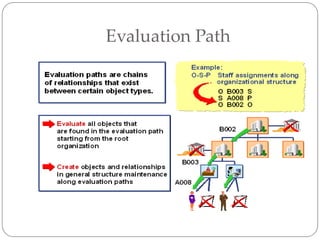
 Evaluation Path
 OM Object ID
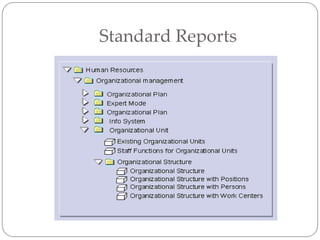
 Standard Reports
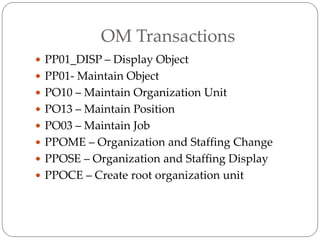
 OM Transactions
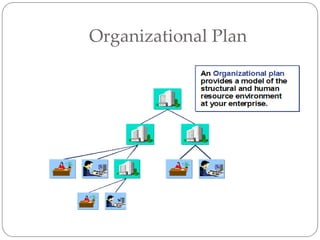
Organizational Plan
Plan Version
• You can maintain any number of plan versions.
Plan versions allow you to create several
organizational plans in the system at the same
time. You can simulate and compare various
scenarios using plan versions.
• One of these plan versions represents the active
organizational plan, and is flagged as the active
integration plan version.
• Plan versions exist independently of each other.
They can be created as copies of the original plan,
which you then change and re-evaluate without
modifying the valid plan.
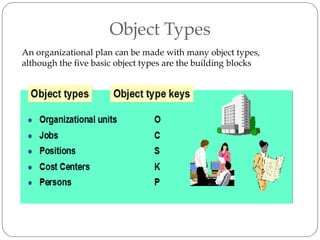
Object Types
An organizational plan can be made with many object types,
although the five basic object types are the building blocks
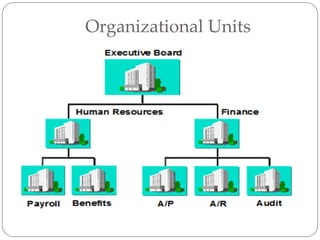
Organizational Units
• Organizational Unit: Object type 'O ’
• Organizational units are units of your company
that perform a function. According to how tasks
are allocated in your company, these can be
departments, groups or project teams, for
example.
• You create the organizational structure of your
company by relating organizational units to one
another.
Jobs
Jobs
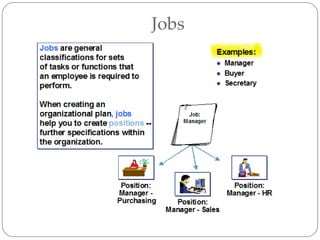
• Job: Object type 'C ' (Classification)
• Jobs are assigned tasks and characteristics, which are
then inherited by positions. In this way, they help you
to create positions.
• If you create a new position (Manager of US sales
office, for example), this must be related to the
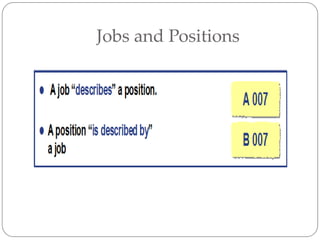
corresponding job. A job describes a position.
Through this relationship, the position automatically
inherits the tasks and characteristics assigned to the
job. This significantly reduces data entry time, as
tasks and characteristics do not have to be assigned to
each position separately.
Positions
Positions
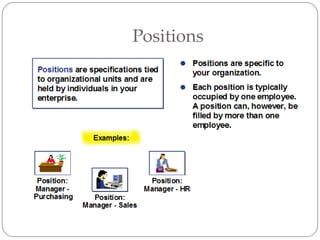
• Position: Object type 'S' (Specification)
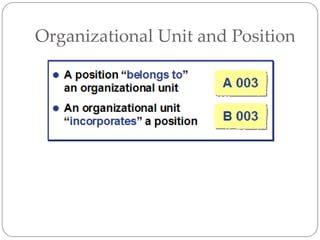
• Positions are concrete and are occupied by holders
(employees or R/3 users). Positions differ from jobs in
that they are a more specific entity and are usually
attached to organizational units. A job describes a
position but it exists as a general unattached entity. A
typical job in an enterprise is a “manager”. However,
when this job is used to create a position, it can
become a Marketing manager, Sales manager,
Human Resources manager etc.
• Positions can be 100% filled, partially filled or vacant.
• One position may also be shared by several
employees, each working less than full time. For
example, two employees can hold 60% and 40% of
one position.
Cost Center
Cost Center
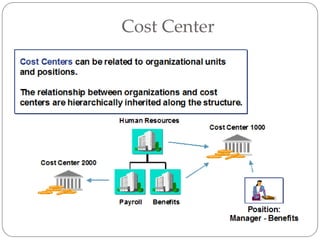
 Cost Center: Object type 'K '
 Cost centers are maintained in Financial
Accounting and can be linked to either
Organizational Units or Positions.
 Cost Center assignments are inherited along the
organizational unit structure.
Persons
Persons
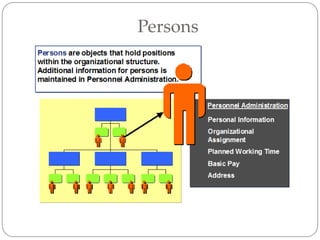
• Person: Object type 'P '
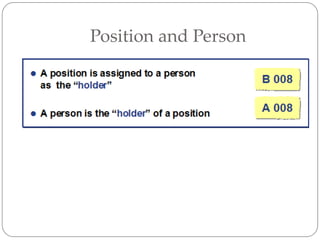
• Persons generally represent employees in your
company and hold positions in Organizational
Management.
• Person characteristics are maintained in Personnel
Administration and are linked to a organizational
plan through their position assignment.
• Infotype 0001 (Organizational Assignment) in
Personnel Administration contains the position
assignment and, if integration is active between
Organizational Management and Personnel
Administration, the defining Job and Organizational
Unit and Cost Center assignment.
Object Relationships
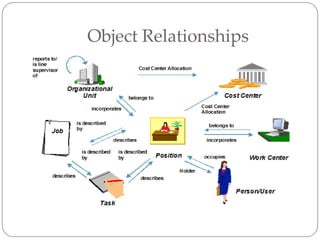
• The relationships between basic object types are defined in
the standard system and should not be changed.
• Each standard relationship has a three-digit code.
• You can define your own relationships. The range AAA to
ZZZ is reserved for relationships created by the customer.
• Relationships between objects are reciprocal. If a job
describes a position, then the position, in turn, will be
described by the job. These relationships are distinguished
by the identification A or B.
• It is therefore, only necessary to create a relationship
(through maintenance) in one direction. The inverse
relationship will automatically be created by the system.
• A relationship may also be one-sided. Relationships to
objects of an external object type (cost center in
Controlling, for example), are one-sided, that is, they only
go in one direction.
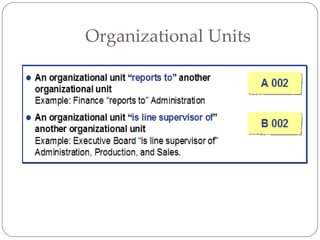
Organizational Units
Jobs and Positions
Organizational Unit and Position
Positions
Position and Person
Object Infotypes
• You can define particular characteristics for an
object in each infotype.
• Some infotypes can be maintained for all object
types, the object and relationship infotypes, for
example, others are only relevant for particular
object types. The vacancy infotype is only
relevant for positions, for example.
• Not all infotypes are absolutely necessary.
However, they can provide important
information on objects.
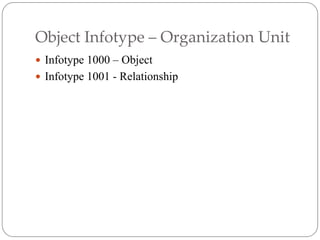
Object Infotype – Organization Unit
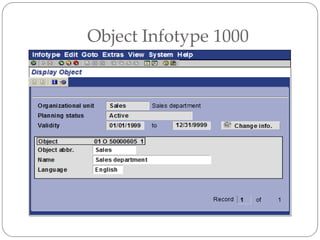
 Infotype 1000 – Object
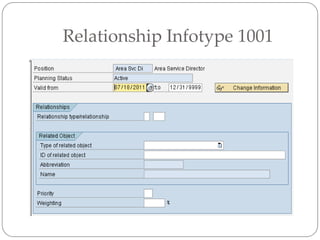
 Infotype 1001 - Relationship
Object Infotype 1000
Relationship Infotype 1001
Object Infotype - Positions
 Infotype 1000 – Object
 Infotype 1001 - Relationship
 Infotype 1002 – Description
 Infotype 1007 – Vacancy
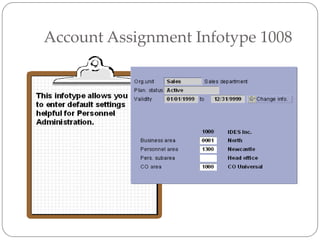
 Infotype 1008 – Account Assignment
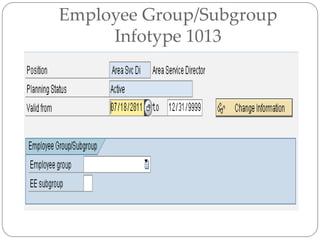
 Infotype 1013 – Employee Group/Subgroup
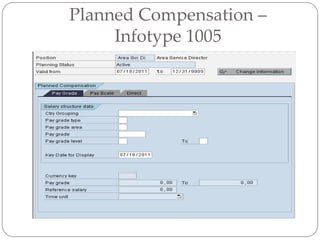
 Infotype 1005 – Planned Compensation
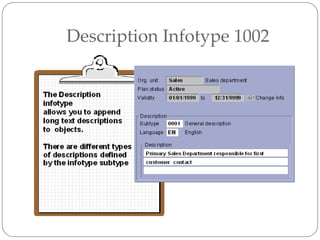
Description Infotype 1002
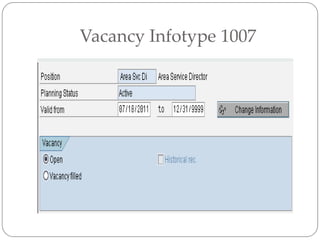
Vacancy Infotype 1007
 The Vacancy infotype lets you flag a position as
vacant, by which we mean that it should be
reoccupied.
 The Vacancy infotype can be created for a position
that is occupied or unoccupied. You can flag an
occupied position as vacant if you know that the
position holder will be leaving the position at some
point in the future (as a result of a promotion or
transfer, for example).
 It is not mandatory to maintain the Vacancy
infotype. If your company does not distinguish
between occupied and unoccupied positions, that
is, you consider all unoccupied positions to be
vacant, you can make the necessary settings in
Customizing. If you want to activate integration
with Recruitment, you need to maintain vacancies
using infotype 1007.
Account Assignment Infotype 1008
Employee Group/Subgroup
Infotype 1013
Planned Compensation –
Infotype 1005
Object Infotype – Job
 Infotype 1000 – Object
 Infotype 1001 - Relationship
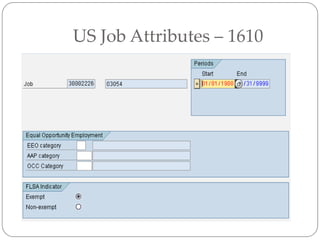
 Infotype 1610 – US Job Attributes
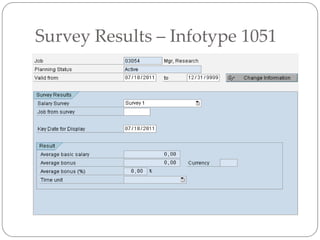
 Infotype 1051 – Survey Results
US Job Attributes – 1610
Survey Results – Infotype 1051
Object ID
• Every object must be allocated an object ID.
• Object IDs are numeric. They may not be
alphanumeric.
• There are two types of number assignment:
• Internal assignment - the system automatically
allocates the object an object ID from the
corresponding number range.
• External assignment - the user enters the object
ID.
• SAP recommends the use of the internal number
assignment.
Object Validity Dates
• Validity dates determine the life-span of an object.
• You must assign a validity period to every object and
every infotype record that you create. By doing this,
you can depict all changes that take place in your
company. In this way, you obtain a dynamic view of
your enterprise.
• The validity of an object’s relationships and attributes
can only exist within the life-span of the object which
is defined in the Object infotype (1000). If an object is
delimited, all of the object’s relationships and
attributes are automatically delimited.
Time Constraints
• Time Constraint 1:
An object must have a short name stored for it.
This information must exist uninterrupted, but
can be changed.
• Time Constraint 2:
A position can have a number of Vacancy infotype
records assigned for different periods.
• Time Constraint 3:
The Sales department can be related with a
number of positions simultaneously.
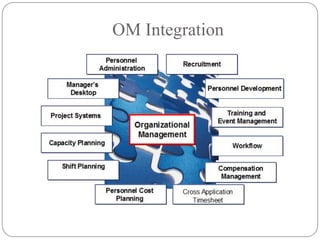
OM Integration
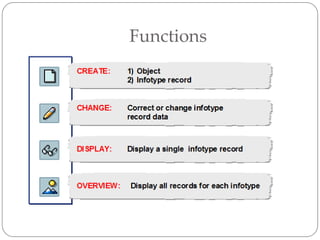
Functions
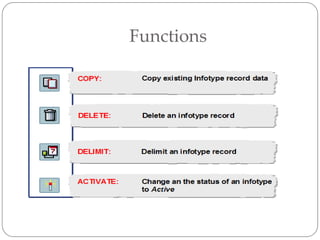
Functions
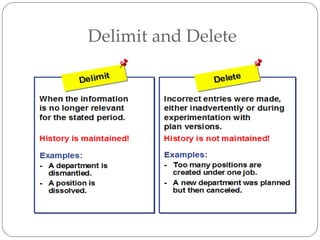
Delimit and Delete
Display Object
 You can display an object using transaction
PP01_DISP
 When you display an object, you will not be able
to change or maintain the infotype data
Maintain Object
 You can change data in a infotype by using the below
transactions:
 PO10 – Maintain Organization Unit
 PO13 – Maintain Position
 PO03 – Maintain Job
You can also use transaction PP01 to maintain a
object.
Actions
You can create objects using actions. An action is a series of
infotypes
that are presented for editing in a specific order or sequence. You
determine the infotypes and the sequence in Customizing.
Example
• The action for creating a position consists of the following
infotypes:
• Object (IT 1000)
• Relationship to organizational unit, subtype A 003 (IT 1001)
• Relationship to describing job B007 (IT 1001)
• Description ( IT 1002 )
• Department/Staff (IT 1003)
• Authorities/Resources(IT 1010 )
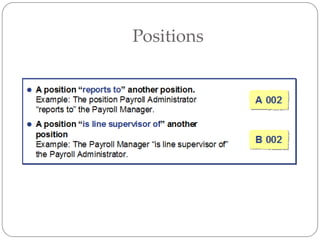
• Relationship to superior position A002 (IT 1001)
Evaluation Path
Standard Reports
OM Transactions
 PP01_DISP – Display Object
 PP01- Maintain Object
 PO10 – Maintain Organization Unit
 PO13 – Maintain Position
 PO03 – Maintain Job
 PPOME – Organization and Staffing Change
 PPOSE – Organization and Staffing Display
 PPOCE – Create root organization unit
Reading Material
 To get more information on the Organization
Management module, visit www.help.sap.com,
then click on SAP R/3 and R/3 Enterprise, then
click on English, then click on SAP R/3 Enterprise
Application Components, Human Resources and
Personnel Management (PA) , then
Organizational Management .
SAP HCM - Organization Management end user presentation

SAP HCM - Organization Management end user presentation

  • 1.
  • 2.
    For more trainingon SAP HCM, visit our website www.perfectresource.net Perfect Resources SAP HCM made easy
  • 3.
    Topics  Organizational Plan Plan Versions  Object Types  Organization Units  Jobs  Position  Cost Center  Persons  Object Relationship  Object Infotypes
  • 4.
    Topics  Object validitydates  Time Constraints  OM integration  Delimit and Delete function  Display Object  Maintain Object  OM Actions  Evaluation Path  OM Object ID  Standard Reports  OM Transactions
  • 5.
  • 6.
    Plan Version • Youcan maintain any number of plan versions. Plan versions allow you to create several organizational plans in the system at the same time. You can simulate and compare various scenarios using plan versions. • One of these plan versions represents the active organizational plan, and is flagged as the active integration plan version. • Plan versions exist independently of each other. They can be created as copies of the original plan, which you then change and re-evaluate without modifying the valid plan.
  • 7.
    Object Types An organizationalplan can be made with many object types, although the five basic object types are the building blocks
  • 8.
  • 9.
    Organizational Units • OrganizationalUnit: Object type 'O ’ • Organizational units are units of your company that perform a function. According to how tasks are allocated in your company, these can be departments, groups or project teams, for example. • You create the organizational structure of your company by relating organizational units to one another.
  • 10.
  • 11.
    Jobs • Job: Objecttype 'C ' (Classification) • Jobs are assigned tasks and characteristics, which are then inherited by positions. In this way, they help you to create positions. • If you create a new position (Manager of US sales office, for example), this must be related to the corresponding job. A job describes a position. Through this relationship, the position automatically inherits the tasks and characteristics assigned to the job. This significantly reduces data entry time, as tasks and characteristics do not have to be assigned to each position separately.
  • 12.
  • 13.
    Positions • Position: Objecttype 'S' (Specification) • Positions are concrete and are occupied by holders (employees or R/3 users). Positions differ from jobs in that they are a more specific entity and are usually attached to organizational units. A job describes a position but it exists as a general unattached entity. A typical job in an enterprise is a “manager”. However, when this job is used to create a position, it can become a Marketing manager, Sales manager, Human Resources manager etc. • Positions can be 100% filled, partially filled or vacant. • One position may also be shared by several employees, each working less than full time. For example, two employees can hold 60% and 40% of one position.
  • 14.
  • 15.
    Cost Center  CostCenter: Object type 'K '  Cost centers are maintained in Financial Accounting and can be linked to either Organizational Units or Positions.  Cost Center assignments are inherited along the organizational unit structure.
  • 16.
  • 17.
    Persons • Person: Objecttype 'P ' • Persons generally represent employees in your company and hold positions in Organizational Management. • Person characteristics are maintained in Personnel Administration and are linked to a organizational plan through their position assignment. • Infotype 0001 (Organizational Assignment) in Personnel Administration contains the position assignment and, if integration is active between Organizational Management and Personnel Administration, the defining Job and Organizational Unit and Cost Center assignment.
  • 18.
  • 19.
    Object Relationships • Therelationships between basic object types are defined in the standard system and should not be changed. • Each standard relationship has a three-digit code. • You can define your own relationships. The range AAA to ZZZ is reserved for relationships created by the customer. • Relationships between objects are reciprocal. If a job describes a position, then the position, in turn, will be described by the job. These relationships are distinguished by the identification A or B. • It is therefore, only necessary to create a relationship (through maintenance) in one direction. The inverse relationship will automatically be created by the system. • A relationship may also be one-sided. Relationships to objects of an external object type (cost center in Controlling, for example), are one-sided, that is, they only go in one direction.
  • 20.
  • 21.
  • 22.
  • 23.
  • 24.
  • 25.
    Object Infotypes • Youcan define particular characteristics for an object in each infotype. • Some infotypes can be maintained for all object types, the object and relationship infotypes, for example, others are only relevant for particular object types. The vacancy infotype is only relevant for positions, for example. • Not all infotypes are absolutely necessary. However, they can provide important information on objects.
  • 26.
    Object Infotype –Organization Unit  Infotype 1000 – Object  Infotype 1001 - Relationship
  • 27.
  • 28.
  • 29.
    Object Infotype -Positions  Infotype 1000 – Object  Infotype 1001 - Relationship  Infotype 1002 – Description  Infotype 1007 – Vacancy  Infotype 1008 – Account Assignment  Infotype 1013 – Employee Group/Subgroup  Infotype 1005 – Planned Compensation
  • 30.
  • 31.
  • 32.
    Vacancy Infotype 1007 The Vacancy infotype lets you flag a position as vacant, by which we mean that it should be reoccupied.  The Vacancy infotype can be created for a position that is occupied or unoccupied. You can flag an occupied position as vacant if you know that the position holder will be leaving the position at some point in the future (as a result of a promotion or transfer, for example).  It is not mandatory to maintain the Vacancy infotype. If your company does not distinguish between occupied and unoccupied positions, that is, you consider all unoccupied positions to be vacant, you can make the necessary settings in Customizing. If you want to activate integration with Recruitment, you need to maintain vacancies using infotype 1007.
  • 33.
  • 34.
  • 35.
  • 36.
    Object Infotype –Job  Infotype 1000 – Object  Infotype 1001 - Relationship  Infotype 1610 – US Job Attributes  Infotype 1051 – Survey Results
  • 37.
  • 38.
    Survey Results –Infotype 1051
  • 39.
    Object ID • Everyobject must be allocated an object ID. • Object IDs are numeric. They may not be alphanumeric. • There are two types of number assignment: • Internal assignment - the system automatically allocates the object an object ID from the corresponding number range. • External assignment - the user enters the object ID. • SAP recommends the use of the internal number assignment.
  • 40.
    Object Validity Dates •Validity dates determine the life-span of an object. • You must assign a validity period to every object and every infotype record that you create. By doing this, you can depict all changes that take place in your company. In this way, you obtain a dynamic view of your enterprise. • The validity of an object’s relationships and attributes can only exist within the life-span of the object which is defined in the Object infotype (1000). If an object is delimited, all of the object’s relationships and attributes are automatically delimited.
  • 41.
    Time Constraints • TimeConstraint 1: An object must have a short name stored for it. This information must exist uninterrupted, but can be changed. • Time Constraint 2: A position can have a number of Vacancy infotype records assigned for different periods. • Time Constraint 3: The Sales department can be related with a number of positions simultaneously.
  • 42.
  • 43.
  • 44.
  • 45.
  • 46.
    Display Object  Youcan display an object using transaction PP01_DISP  When you display an object, you will not be able to change or maintain the infotype data
  • 47.
    Maintain Object  Youcan change data in a infotype by using the below transactions:  PO10 – Maintain Organization Unit  PO13 – Maintain Position  PO03 – Maintain Job You can also use transaction PP01 to maintain a object.
  • 48.
    Actions You can createobjects using actions. An action is a series of infotypes that are presented for editing in a specific order or sequence. You determine the infotypes and the sequence in Customizing. Example • The action for creating a position consists of the following infotypes: • Object (IT 1000) • Relationship to organizational unit, subtype A 003 (IT 1001) • Relationship to describing job B007 (IT 1001) • Description ( IT 1002 ) • Department/Staff (IT 1003) • Authorities/Resources(IT 1010 ) • Relationship to superior position A002 (IT 1001)
  • 49.
  • 50.
  • 51.
    OM Transactions  PP01_DISP– Display Object  PP01- Maintain Object  PO10 – Maintain Organization Unit  PO13 – Maintain Position  PO03 – Maintain Job  PPOME – Organization and Staffing Change  PPOSE – Organization and Staffing Display  PPOCE – Create root organization unit
  • 52.
    Reading Material  Toget more information on the Organization Management module, visit www.help.sap.com, then click on SAP R/3 and R/3 Enterprise, then click on English, then click on SAP R/3 Enterprise Application Components, Human Resources and Personnel Management (PA) , then Organizational Management .