PAYROLL - INDIA
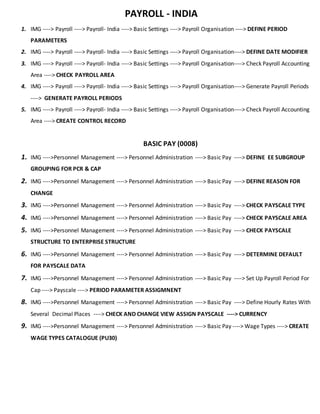
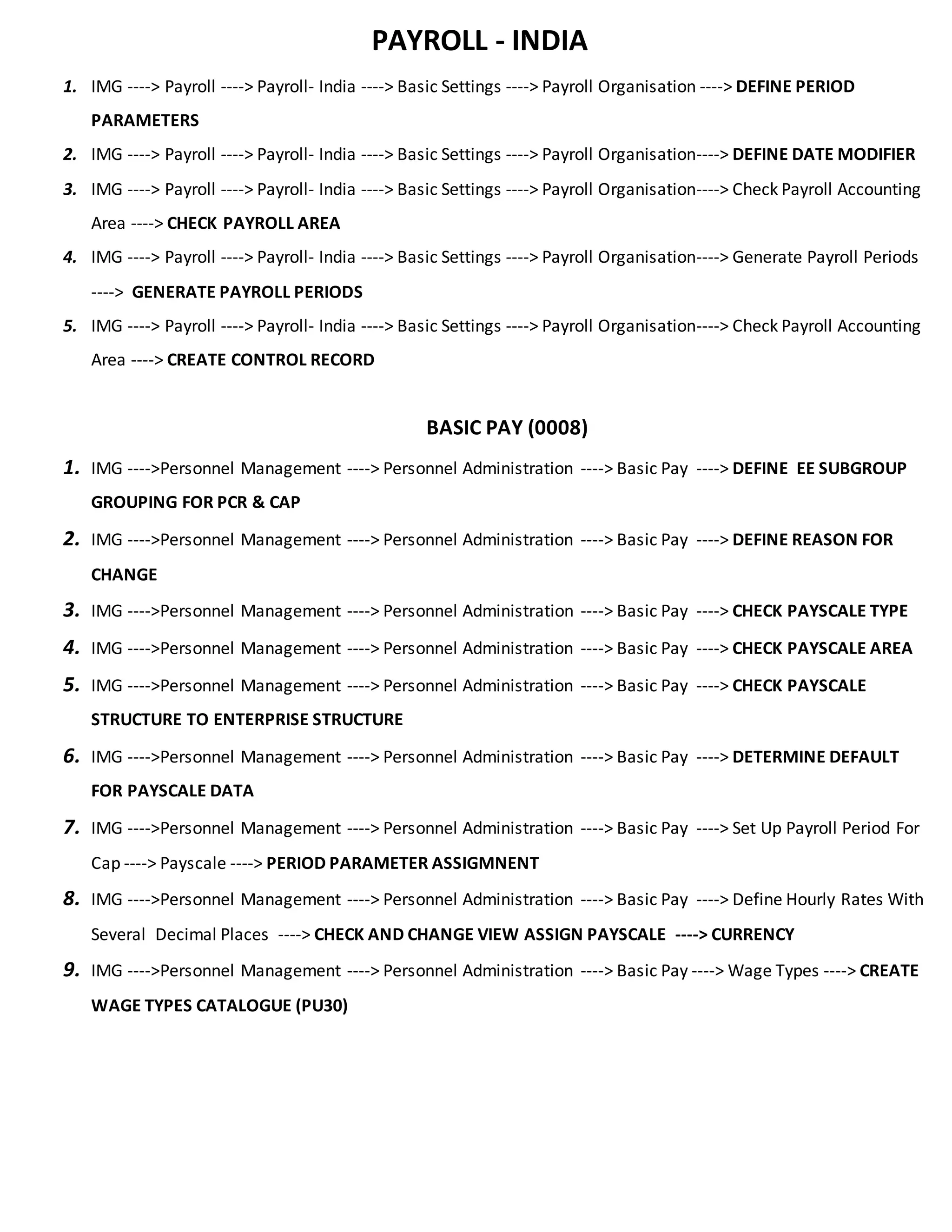
1. IMG ----> Payroll ----> Payroll- India ----> Basic Settings ----> Payroll Organisation ----> DEFINE PERIOD
PARAMETERS
2. IMG ----> Payroll ----> Payroll- India ----> Basic Settings ----> Payroll Organisation----> DEFINE DATE MODIFIER
3. IMG ----> Payroll ----> Payroll- India ----> Basic Settings ----> Payroll Organisation----> Check Payroll Accounting
Area ----> CHECK PAYROLL AREA
4. IMG ----> Payroll ----> Payroll- India ----> Basic Settings ----> Payroll Organisation----> Generate Payroll Periods
----> GENERATE PAYROLL PERIODS
5. IMG ----> Payroll ----> Payroll- India ----> Basic Settings ----> Payroll Organisation----> Check Payroll Accounting
Area ----> CREATE CONTROL RECORD
BASIC PAY (0008)
1. IMG ---->Personnel Management ----> Personnel Administration ----> Basic Pay ----> DEFINE EE SUBGROUP
GROUPING FOR PCR & CAP
2. IMG ---->Personnel Management ----> Personnel Administration ----> Basic Pay ----> DEFINE REASON FOR
CHANGE
3. IMG ---->Personnel Management ----> Personnel Administration ----> Basic Pay ----> CHECK PAYSCALE TYPE
4. IMG ---->Personnel Management ----> Personnel Administration ----> Basic Pay ----> CHECK PAYSCALE AREA
5. IMG ---->Personnel Management ----> Personnel Administration ----> Basic Pay ----> CHECK PAYSCALE
STRUCTURE TO ENTERPRISE STRUCTURE
6. IMG ---->Personnel Management ----> Personnel Administration ----> Basic Pay ----> DETERMINE DEFAULT
FOR PAYSCALE DATA
7. IMG ---->Personnel Management ----> Personnel Administration ----> Basic Pay ----> Set Up Payroll Period For
Cap ----> Payscale ----> PERIOD PARAMETER ASSIGMNENT
8. IMG ---->Personnel Management ----> Personnel Administration ----> Basic Pay ----> Define Hourly Rates With
Several Decimal Places ----> CHECK AND CHANGE VIEW ASSIGN PAYSCALE ----> CURRENCY
9. IMG ---->Personnel Management ----> Personnel Administration ----> Basic Pay ----> Wage Types ----> CREATE
WAGE TYPES CATALOGUE (PU30)
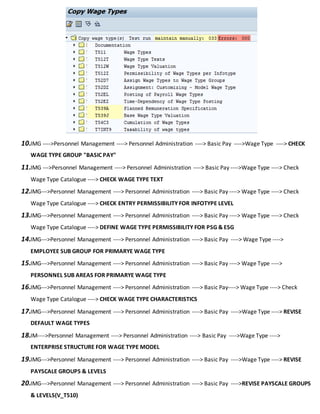
10.IMG ---->Personnel Management ----> Personnel Administration ----> Basic Pay ---->Wage Type ----> CHECK
WAGE TYPE GROUP "BASIC PAY"
11.IMG --->Personnel Management ----> Personnel Administration ----> Basic Pay ---->Wage Type ----> Check
Wage Type Catalogue ----> CHECK WAGE TYPE TEXT
12.IMG--->Personnel Management ----> Personnel Administration ----> Basic Pay ----> Wage Type ----> Check
Wage Type Catalogue ----> CHECK ENTRY PERMISSIBILITY FOR INFOTYPE LEVEL
13.IMG--->Personnel Management ----> Personnel Administration ----> Basic Pay ----> Wage Type ----> Check
Wage Type Catalogue ----> DEFINE WAGE TYPE PERMISSIBILITY FOR PSG & ESG
14.IMG--->Personnel Management ----> Personnel Administration ----> Basic Pay ----> Wage Type ---->
EMPLOYEE SUB GROUP FOR PRIMARYE WAGE TYPE
15.IMG--->Personnel Management ----> Personnel Administration ----> Basic Pay ----> Wage Type ---->
PERSONNEL SUB AREAS FOR PRIMARYE WAGE TYPE
16.IMG--->Personnel Management ----> Personnel Administration ----> Basic Pay----> Wage Type ----> Check
Wage Type Catalogue ----> CHECK WAGE TYPE CHARACTERISTICS
17.IMG--->Personnel Management ----> Personnel Administration ----> Basic Pay ---->Wage Type ----> REVISE
DEFAULT WAGE TYPES
18.IM---->Personnel Management ----> Personnel Administration ----> Basic Pay ---->Wage Type ---->
ENTERPRISE STRUCTURE FOR WAGE TYPE MODEL
19.IMG--->Personnel Management ----> Personnel Administration ----> Basic Pay ---->Wage Type ----> REVISE
PAYSCALE GROUPS & LEVELS
20.IMG--->Personnel Management ----> Personnel Administration ----> Basic Pay ---->REVISE PAYSCALE GROUPS
& LEVELS(V_T510)
RECURRING PAYMENTS & DEDUCTIONS(0014)
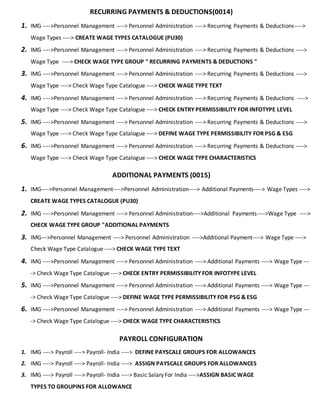
1. IMG ---->Personnel Management ----> Personnel Administration ----> Recurring Payments & Deductions---->
Wage Types ----> CREATE WAGE TYPES CATALOGUE (PU30)
2. IMG ---->Personnel Management ----> Personnel Administration ----> Recurring Payments & Deductions ---->
Wage Type ----> CHECK WAGE TYPE GROUP " RECURRING PAYMENTS & DEDUCTIONS "
3. IMG ---->Personnel Management ----> Personnel Administration ----> Recurring Payments & Deductions ---->
Wage Type ----> Check Wage Type Catalogue ----> CHECK WAGE TYPE TEXT
4. IMG ---->Personnel Management ----> Personnel Administration ----> Recurring Payments & Deductions ---->
Wage Type ----> Check Wage Type Catalogue ----> CHECK ENTRY PERMISSIBILITY FOR INFOTYPE LEVEL
5. IMG ---->Personnel Management ----> Personnel Administration ----> Recurring Payments & Deductions ---->
Wage Type ----> Check Wage Type Catalogue ----> DEFINE WAGE TYPE PERMISSIBILITY FOR PSG & ESG
6. IMG ---->Personnel Management ----> Personnel Administration ----> Recurring Payments & Deductions ---->
Wage Type ----> Check Wage Type Catalogue ----> CHECK WAGE TYPE CHARACTERISTICS
ADDITIONAL PAYMENTS (0015)
1. IMG---->Personnel Management---->Personnel Administration----> Additional Payments----> Wage Types ---->
CREATE WAGE TYPES CATALOGUE (PU30)
2. IMG ---->Personnel Management ----> Personnel Administration---->Additional Payments---->Wage Type ---->
CHECK WAGE TYPE GROUP "ADDITIONAL PAYMENTS
3. IMG--->Personnel Management ----> Personnel Administration ---->Additional Payment----> Wage Type ---->
Check Wage Type Catalogue ----> CHECK WAGE TYPE TEXT
4. IMG ---->Personnel Management ----> Personnel Administration ----> Additional Payments ----> Wage Type ---
-> Check Wage Type Catalogue ----> CHECK ENTRY PERMISSIBILITY FOR INFOTYPE LEVEL
5. IMG ---->Personnel Management ----> Personnel Administration ----> Additional Payments ----> Wage Type ---
-> Check Wage Type Catalogue ----> DEFINE WAGE TYPE PERMISSIBILITY FOR PSG & ESG
6. IMG ---->Personnel Management ----> Personnel Administration ----> Additional Payments ----> Wage Type ---
-> Check Wage Type Catalogue ----> CHECK WAGE TYPE CHARACTERISTICS
PAYROLL CONFIGURATION
1. IMG ----> Payroll ----> Payroll- India ----> DEFINE PAYSCALE GROUPS FOR ALLOWANCES
2. IMG ----> Payroll ----> Payroll- India ----> ASSIGN PAYSCALE GROUPS FOR ALLOWANCES
3. IMG ----> Payroll ----> Payroll- India ----> Basic Salary For India ---->ASSIGN BASIC WAGE
TYPES TO GROUPINS FOR ALLOWANCE
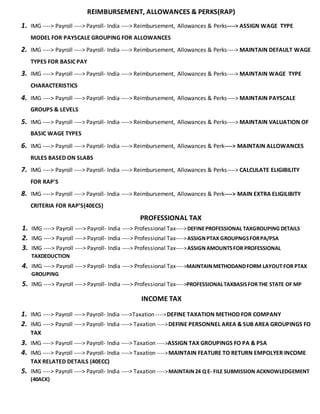
REIMBURSEMENT, ALLOWANCES & PERKS(RAP)
1. IMG ----> Payroll ----> Payroll- India ----> Reimbursement, Allowances & Perks----> ASSIGN WAGE TYPE
MODEL FOR PAYSCALE GROUPING FOR ALLOWANCES
2. IMG ----> Payroll ----> Payroll- India ----> Reimbursement, Allowances & Perks----> MAINTAIN DEFAULT WAGE
TYPES FOR BASIC PAY
3. IMG ----> Payroll ----> Payroll- India ----> Reimbursement, Allowances & Perks----> MAINTAIN WAGE TYPE
CHARACTERISTICS
4. IMG ----> Payroll ----> Payroll- India ----> Reimbursement, Allowances & Perks----> MAINTAIN PAYSCALE
GROUPS & LEVELS
5. IMG ----> Payroll ----> Payroll- India ----> Reimbursement, Allowances & Perks----> MAINTAIN VALUATION OF
BASIC WAGE TYPES
6. IMG ----> Payroll ----> Payroll- India ----> Reimbursement, Allowances & Perk----> MAINTAIN ALLOWANCES
RULES BASED ON SLABS
7. IMG ----> Payroll ----> Payroll- India ----> Reimbursement, Allowances & Perks----> CALCULATE ELIGIBILITY
FOR RAP'S
8. IMG ----> Payroll ----> Payroll- India ----> Reimbursement, Allowances & Perk----> MAIN EXTRA ELIGILIBITY
CRITERIA FOR RAP’S(40ECS)
PROFESSIONAL TAX
1. IMG ----> Payroll ----> Payroll- India ----> Professional Tax---->DEFINEPROFESSIONAL TAXGROUPING DETAILS
2. IMG ----> Payroll ----> Payroll- India ----> Professional Tax---->ASSIGNPTAX GROUPNGSFORPA/PSA
3. IMG ----> Payroll ----> Payroll- India ----> Professional Tax---->ASSIGNAMOUNTSFOR PROFESSIONAL
TAXDEDUCTION
4. IMG ----> Payroll ----> Payroll- India ----> Professional Tax---->MAINTAINMETHODANDFORM LAYOUT FOR PTAX
GROUPING
5. IMG ----> Payroll ----> Payroll- India ----> Professional Tax---->PROFESSIONALTAXBASISFOR THE STATE OF MP
INCOME TAX
1. IMG ----> Payroll ----> Payroll- India ---->Taxation ---->DEFINE TAXATION METHOD FOR COMPANY
2. IMG ----> Payroll ----> Payroll- India ----> Taxation ---->DEFINE PERSONNEL AREA & SUB AREA GROUPINGS FO
TAX
3. IMG ----> Payroll ----> Payroll- India ----> Taxation ---->ASSIGN TAX GROUPINGS FO PA & PSA
4. IMG ----> Payroll ----> Payroll- India ----> Taxation ---->MAINTAIN FEATURE TO RETURN EMPOLYER INCOME
TAX RELATED DETAILS (40ECC)
5. IMG ----> Payroll ----> Payroll- India ----> Taxation ---->MAINTAIN24 Q E- FILE SUBMISSION ACKNOWLEDGEMENT
(40ACK)
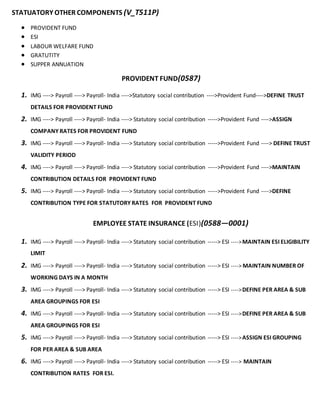
STATUATORY OTHER COMPONENTS (V_T511P)
 PROVIDENT FUND
 ESI
 LABOUR WELFARE FUND
 GRATUTITY
 SUPPER ANNUATION
PROVIDENT FUND(0587)
1. IMG ----> Payroll ----> Payroll- India ---->Statutory social contribution ---->Provident Fund---->DEFINE TRUST
DETAILS FOR PROVIDENT FUND
2. IMG ----> Payroll ----> Payroll- India ----> Statutory social contribution ----->Provident Fund ---->ASSIGN
COMPANY RATES FOR PROVIDENT FUND
3. IMG ----> Payroll ----> Payroll- India ----> Statutory social contribution ----->Provident Fund ----> DEFINE TRUST
VALIDITY PERIOD
4. IMG ----> Payroll ----> Payroll- India ----> Statutory social contribution ----->Provident Fund ---->MAINTAIN
CONTRIBUTION DETAILS FOR PROVIDENT FUND
5. IMG ----> Payroll ----> Payroll- India ----> Statutory social contribution ----->Provident Fund ---->DEFINE
CONTRIBUTION TYPE FOR STATUTORY RATES FOR PROVIDENT FUND
EMPLOYEE STATE INSURANCE (ESI)(0588—0001)
1. IMG ----> Payroll ----> Payroll- India ----> Statutory social contribution -----> ESI ---->MAINTAIN ESI ELIGIBILITY
LIMIT
2. IMG ----> Payroll ----> Payroll- India ----> Statutory social contribution -----> ESI ----> MAINTAIN NUMBER OF
WORKING DAYS IN A MONTH
3. IMG ----> Payroll ----> Payroll- India ----> Statutory social contribution -----> ESI ---->DEFINE PER AREA & SUB
AREA GROUPINGS FOR ESI
4. IMG ----> Payroll ----> Payroll- India ----> Statutory social contribution -----> ESI ---->DEFINE PER AREA & SUB
AREA GROUPINGS FOR ESI
5. IMG ----> Payroll ----> Payroll- India ----> Statutory social contribution -----> ESI ---->ASSIGN ESI GROUPING
FOR PER AREA & SUB AREA
6. IMG ----> Payroll ----> Payroll- India ----> Statutory social contribution -----> ESI ----> MAINTAIN
CONTRIBUTION RATES FOR ESI.
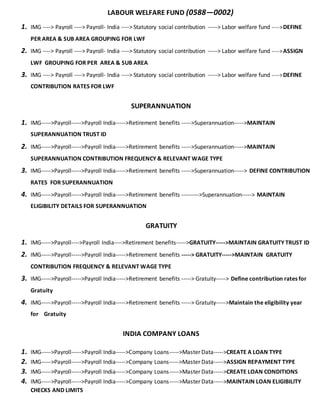
LABOUR WELFARE FUND (0588—0002)
1. IMG ----> Payroll ----> Payroll- India ----> Statutory social contribution -----> Labor welfare fund ---->DEFINE
PER AREA & SUB AREA GROUPING FOR LWF
2. IMG ----> Payroll ----> Payroll- India ----> Statutory social contribution -----> Labor welfare fund ---->ASSIGN
LWF GROUPING FOR PER AREA & SUB AREA
3. IMG ----> Payroll ----> Payroll- India ----> Statutory social contribution -----> Labor welfare fund ---->DEFINE
CONTRIBUTION RATES FOR LWF
SUPERANNUATION
1. IMG----->Payroll----->Payroll India----->Retirement benefits ----->Superannuation----->MAINTAIN
SUPERANNUATION TRUST ID
2. IMG----->Payroll----->Payroll India----->Retirement benefits ----->Superannuation----->MAINTAIN
SUPERANNUATION CONTRIBUTION FREQUENCY & RELEVANT WAGE TYPE
3. IMG----->Payroll----->Payroll India----->Retirement benefits ----->Superannuation-----> DEFINE CONTRIBUTION
RATES FOR SUPERANNUATION
4. IMG----->Payroll----->Payroll India----->Retirement benefits --------->Superannuation-----> MAINTAIN
ELIGIBILITY DETAILS FOR SUPERANNUATION
GRATUITY
1. IMG----->Payroll---->Payroll India---->Retirement benefits----->GRATUITY----->MAINTAIN GRATUITY TRUST ID
2. IMG----->Payroll----->Payroll India----->Retirement benefits -----> GRATUITY----->MAINTAIN GRATUITY
CONTRIBUTION FREQUENCY & RELEVANT WAGE TYPE
3. IMG----->Payroll----->Payroll India----->Retirement benefits -----> Gratuity-----> Define contribution rates for
Gratuity
4. IMG----->Payroll----->Payroll India----->Retirement benefits -----> Gratuity----->Maintain the eligibility year
for Gratuity
INDIA COMPANY LOANS
1. IMG----->Payroll----->Payroll India----->Company Loans----->Master Data----->CREATE A LOAN TYPE
2. IMG----->Payroll----->Payroll India----->Company Loans----->Master Data----->ASSIGN REPAYMENT TYPE
3. IMG----->Payroll----->Payroll India----->Company Loans----->Master Data----->CREATE LOAN CONDITIONS
4. IMG----->Payroll----->Payroll India----->Company Loans----->Master Data----->MAINTAIN LOAN ELIGIBILITY
CHECKS AND LIMITS
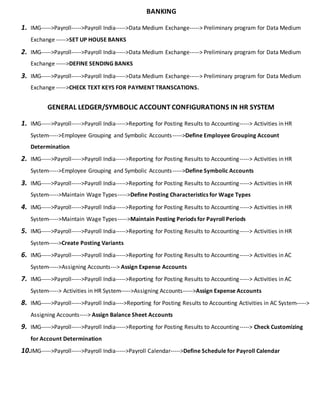
BANKING
1. IMG----->Payroll----->Payroll India----->Data Medium Exchange-----> Preliminary program for Data Medium
Exchange ----->SET UP HOUSE BANKS
2. IMG----->Payroll----->Payroll India----->Data Medium Exchange-----> Preliminary program for Data Medium
Exchange ----->DEFINE SENDING BANKS
3. IMG----->Payroll----->Payroll India----->Data Medium Exchange-----> Preliminary program for Data Medium
Exchange ----->CHECK TEXT KEYS FOR PAYMENT TRANSCATIONS.
GENERAL LEDGER/SYMBOLIC ACCOUNT CONFIGURATIONS IN HR SYSTEM
1. IMG----->Payroll----->Payroll India----->Reporting for Posting Results to Accounting-----> Activities in HR
System----->Employee Grouping and Symbolic Accounts----->Define Employee Grouping Account
Determination
2. IMG----->Payroll----->Payroll India----->Reporting for Posting Results to Accounting-----> Activities in HR
System----->Employee Grouping and Symbolic Accounts----->Define Symbolic Accounts
3. IMG----->Payroll----->Payroll India----->Reporting for Posting Results to Accounting-----> Activities in HR
System----->Maintain Wage Types----->Define Posting Characteristics for Wage Types
4. IMG----->Payroll----->Payroll India----->Reporting for Posting Results to Accounting-----> Activities in HR
System----->Maintain Wage Types----->Maintain Posting Periods for Payroll Periods
5. IMG----->Payroll----->Payroll India----->Reporting for Posting Results to Accounting-----> Activities in HR
System----->Create Posting Variants
6. IMG----->Payroll----->Payroll India----->Reporting for Posting Results to Accounting-----> Activities in AC
System----->Assigning Accounts---> Assign Expense Accounts
7. IMG----->Payroll----->Payroll India----->Reporting for Posting Results to Accounting-----> Activities in AC
System-----> Activities in HR System----->Assigning Accounts----->Assign Expense Accounts
8. IMG----->Payroll----->Payroll India---->Reporting for Posting Results to Accounting Activities in AC System----->
Assigning Accounts----> Assign Balance Sheet Accounts
9. IMG----->Payroll----->Payroll India----->Reporting for Posting Results to Accounting-----> Check Customizing
for Account Determination
10.IMG----->Payroll----->Payroll India----->Payroll Calendar----->Define Schedule for Payroll Calendar
BANK TRANSFER (0009)
Data Medium Exchange Process (DME)
 FBZP T.code for Payment methods for bank details (0009)
 F501 T.code for Bank Details
 F110 T. code for Automatic Payment Status
 FEATURE (PE03) ZLSCH - Default value for payment method
DTAKT - Default Emp Account Number
1. Pre DME Program PC00_M40_DTA / HINDTAQ (SE38)
2. DME PPRAGRAM PC00_M40_FFOM / RFFOM100
PAYSLIP (PE51)
1. Easy Access -----> PE51-----> country grouping -----> Form Name (IN01) -----> click on copy as custom Form
name
2. Target ------> Country groping ------> form name -----> click on copy
3. Subjects------> Attributes------> Click on change (Change the Payslip Mame)
4. Background ------> Click on change ------>Headline of Payslip
5. Single Field-----> Click on change ------>Select the preferable (double Click) ------>Additional Information ------>
identifier 1559 --------> Bank Transfer (Save)
6. Window ------> Click on change ------> S.no. W1 doble Click @ window 1 ------> Group (01) & Double click it --
-----> Insert “+” (earnings) wage types
7. Window --------> Click on change -----> S.no. W2 doble Click @ window 2 -----> Group (02) & Double click it --
-----> Insert “—“ (Deductions) wage types
8. Cumulaton ID’s -----> ID Last Text Text (Select the IN01) -----> Doble Click on IN01 -----> Add All
out Custom Wage types ( + Earnings & “—“ Deductions)
REMUARATION STATEMENT VARIENT
1. Easy Access -----> PE01-----> IN00 copy custom Schemaas ZN00
2. Easy Access -----> SE38 ----->HINCEDT -----> Click @ (Menu bar) Varients
3. Program HINCEDT0
Varient RL Slip (Click Here) & Create
4. Selection
Payroll Area A1
Form Name ZZIN (Enter)
5. Attributes -----> Varient Name RL Payslip
Meaning Reliance Paysilp
click ON Protect Varient (Save)
6. Easy Access-----> FI01 -----> Bank Country IN
Bank Key 123456
OFF CYCLE PAYROLL
1. 2 Types
 Regular Payroll Drive - PC00_M40_CALC / HINCALC (Run for Multiple Employees)
 T.Code for Payroll PUOC_40 (Off cycle work Bench)
At a time single employee
History of employee off cycle payroll
2. Reasons of off cycle
 Bonus payment
 Salary corrections (Retroactive Account)
 Regular payroll (on demand)
 Advance Payment
7. IMG ---->Personnel Management ----> Personnel Administration ----> Additional Payments - Off Cycle---->
Wage Types ----> CREATE WAGE TYPES CATALOGUE (PU30)
8. IMG ---->Personnel Management ----> Personnel Administration ----> Additional Payments - Off Cycle ---->
Wage Type ----> CHECK WAGE TYPE GROUP " ADDITIONAL PAYMENTS - OFF CYCLE "
9. IMG ---->Personnel Management ----> Personnel Administration ----> Additional Payments - Off Cycle ---->
Wage Type ----> Check Wage Type Catalogue ----> CHECK WAGE TYPE TEXT
10.IMG ---->Personnel Management ----> Personnel Administration ----> Additional Payments - Off Cycle ---->
Wage Type ----> Check Wage Type Catalogue ----> CHECK ENTRY PERMISSIBILITY FOR INFOTYPE LEVEL
11.IMG ---->Personnel Management ----> Personnel Administration ----> Additional Payments - Off Cycle ---->
Wage Type ----> Check Wage Type Catalogue ----> DEFINE WAGE TYPE PERMISSIBILITY FOR PSG & ESG
12.IMG ---->Personnel Management ----> Personnel Administration ----> Additional Payments - Off Cycle ---->
Wage Type ----> Check Wage Type Catalogue ----> CHECK WAGE TYPE CHARACTERISTICS
13.IMG----->Payroll----->Payroll India----->
14.IMG----->Payroll----->Payroll India----->
15.IMG----->Payroll----->Payroll India----->
16.IMG----->Payroll----->Payroll India----->
17.IMG----->Payroll----->Payroll India----->
PAYROLL DRIVER
Easy Access -----> Human Resources-----> Payroll -----> Asia / Pacific -----> India-----> Payroll Accounting
 Simulation
 Release payroll
 Start payroll
 Check payroll
 Corrections
 Exit payroll
 Remuneration statement
PAYROLL SCHEMA
1. Initialization : - Check payroll status PA03 (Pyroll Driver data base update)
2. Read Basic Data: - Read all relavant dat work center, basic pay,(0001, 0007, 0008, 0027)
3. Read last payroll results: Previous Period payresults
4. Time data processing
5. Red payments / deductions
6. Prorate & cumulate gross
7. Process deductions & benefits
8. Calculate taxes
9. Calculate net
10.Process retroactive accounting
11.Net processing
12.Final processing

Payroll configuration

  • 1.
    PAYROLL - INDIA 1.IMG ----> Payroll ----> Payroll- India ----> Basic Settings ----> Payroll Organisation ----> DEFINE PERIOD PARAMETERS 2. IMG ----> Payroll ----> Payroll- India ----> Basic Settings ----> Payroll Organisation----> DEFINE DATE MODIFIER 3. IMG ----> Payroll ----> Payroll- India ----> Basic Settings ----> Payroll Organisation----> Check Payroll Accounting Area ----> CHECK PAYROLL AREA 4. IMG ----> Payroll ----> Payroll- India ----> Basic Settings ----> Payroll Organisation----> Generate Payroll Periods ----> GENERATE PAYROLL PERIODS 5. IMG ----> Payroll ----> Payroll- India ----> Basic Settings ----> Payroll Organisation----> Check Payroll Accounting Area ----> CREATE CONTROL RECORD BASIC PAY (0008) 1. IMG ---->Personnel Management ----> Personnel Administration ----> Basic Pay ----> DEFINE EE SUBGROUP GROUPING FOR PCR & CAP 2. IMG ---->Personnel Management ----> Personnel Administration ----> Basic Pay ----> DEFINE REASON FOR CHANGE 3. IMG ---->Personnel Management ----> Personnel Administration ----> Basic Pay ----> CHECK PAYSCALE TYPE 4. IMG ---->Personnel Management ----> Personnel Administration ----> Basic Pay ----> CHECK PAYSCALE AREA 5. IMG ---->Personnel Management ----> Personnel Administration ----> Basic Pay ----> CHECK PAYSCALE STRUCTURE TO ENTERPRISE STRUCTURE 6. IMG ---->Personnel Management ----> Personnel Administration ----> Basic Pay ----> DETERMINE DEFAULT FOR PAYSCALE DATA 7. IMG ---->Personnel Management ----> Personnel Administration ----> Basic Pay ----> Set Up Payroll Period For Cap ----> Payscale ----> PERIOD PARAMETER ASSIGMNENT 8. IMG ---->Personnel Management ----> Personnel Administration ----> Basic Pay ----> Define Hourly Rates With Several Decimal Places ----> CHECK AND CHANGE VIEW ASSIGN PAYSCALE ----> CURRENCY 9. IMG ---->Personnel Management ----> Personnel Administration ----> Basic Pay ----> Wage Types ----> CREATE WAGE TYPES CATALOGUE (PU30)
  • 2.
    10.IMG ---->Personnel Management----> Personnel Administration ----> Basic Pay ---->Wage Type ----> CHECK WAGE TYPE GROUP "BASIC PAY" 11.IMG --->Personnel Management ----> Personnel Administration ----> Basic Pay ---->Wage Type ----> Check Wage Type Catalogue ----> CHECK WAGE TYPE TEXT 12.IMG--->Personnel Management ----> Personnel Administration ----> Basic Pay ----> Wage Type ----> Check Wage Type Catalogue ----> CHECK ENTRY PERMISSIBILITY FOR INFOTYPE LEVEL 13.IMG--->Personnel Management ----> Personnel Administration ----> Basic Pay ----> Wage Type ----> Check Wage Type Catalogue ----> DEFINE WAGE TYPE PERMISSIBILITY FOR PSG & ESG 14.IMG--->Personnel Management ----> Personnel Administration ----> Basic Pay ----> Wage Type ----> EMPLOYEE SUB GROUP FOR PRIMARYE WAGE TYPE 15.IMG--->Personnel Management ----> Personnel Administration ----> Basic Pay ----> Wage Type ----> PERSONNEL SUB AREAS FOR PRIMARYE WAGE TYPE 16.IMG--->Personnel Management ----> Personnel Administration ----> Basic Pay----> Wage Type ----> Check Wage Type Catalogue ----> CHECK WAGE TYPE CHARACTERISTICS 17.IMG--->Personnel Management ----> Personnel Administration ----> Basic Pay ---->Wage Type ----> REVISE DEFAULT WAGE TYPES 18.IM---->Personnel Management ----> Personnel Administration ----> Basic Pay ---->Wage Type ----> ENTERPRISE STRUCTURE FOR WAGE TYPE MODEL 19.IMG--->Personnel Management ----> Personnel Administration ----> Basic Pay ---->Wage Type ----> REVISE PAYSCALE GROUPS & LEVELS 20.IMG--->Personnel Management ----> Personnel Administration ----> Basic Pay ---->REVISE PAYSCALE GROUPS & LEVELS(V_T510)
  • 3.
    RECURRING PAYMENTS &DEDUCTIONS(0014) 1. IMG ---->Personnel Management ----> Personnel Administration ----> Recurring Payments & Deductions----> Wage Types ----> CREATE WAGE TYPES CATALOGUE (PU30) 2. IMG ---->Personnel Management ----> Personnel Administration ----> Recurring Payments & Deductions ----> Wage Type ----> CHECK WAGE TYPE GROUP " RECURRING PAYMENTS & DEDUCTIONS " 3. IMG ---->Personnel Management ----> Personnel Administration ----> Recurring Payments & Deductions ----> Wage Type ----> Check Wage Type Catalogue ----> CHECK WAGE TYPE TEXT 4. IMG ---->Personnel Management ----> Personnel Administration ----> Recurring Payments & Deductions ----> Wage Type ----> Check Wage Type Catalogue ----> CHECK ENTRY PERMISSIBILITY FOR INFOTYPE LEVEL 5. IMG ---->Personnel Management ----> Personnel Administration ----> Recurring Payments & Deductions ----> Wage Type ----> Check Wage Type Catalogue ----> DEFINE WAGE TYPE PERMISSIBILITY FOR PSG & ESG 6. IMG ---->Personnel Management ----> Personnel Administration ----> Recurring Payments & Deductions ----> Wage Type ----> Check Wage Type Catalogue ----> CHECK WAGE TYPE CHARACTERISTICS ADDITIONAL PAYMENTS (0015) 1. IMG---->Personnel Management---->Personnel Administration----> Additional Payments----> Wage Types ----> CREATE WAGE TYPES CATALOGUE (PU30) 2. IMG ---->Personnel Management ----> Personnel Administration---->Additional Payments---->Wage Type ----> CHECK WAGE TYPE GROUP "ADDITIONAL PAYMENTS 3. IMG--->Personnel Management ----> Personnel Administration ---->Additional Payment----> Wage Type ----> Check Wage Type Catalogue ----> CHECK WAGE TYPE TEXT 4. IMG ---->Personnel Management ----> Personnel Administration ----> Additional Payments ----> Wage Type --- -> Check Wage Type Catalogue ----> CHECK ENTRY PERMISSIBILITY FOR INFOTYPE LEVEL 5. IMG ---->Personnel Management ----> Personnel Administration ----> Additional Payments ----> Wage Type --- -> Check Wage Type Catalogue ----> DEFINE WAGE TYPE PERMISSIBILITY FOR PSG & ESG 6. IMG ---->Personnel Management ----> Personnel Administration ----> Additional Payments ----> Wage Type --- -> Check Wage Type Catalogue ----> CHECK WAGE TYPE CHARACTERISTICS PAYROLL CONFIGURATION 1. IMG ----> Payroll ----> Payroll- India ----> DEFINE PAYSCALE GROUPS FOR ALLOWANCES 2. IMG ----> Payroll ----> Payroll- India ----> ASSIGN PAYSCALE GROUPS FOR ALLOWANCES 3. IMG ----> Payroll ----> Payroll- India ----> Basic Salary For India ---->ASSIGN BASIC WAGE TYPES TO GROUPINS FOR ALLOWANCE
  • 4.
    REIMBURSEMENT, ALLOWANCES &PERKS(RAP) 1. IMG ----> Payroll ----> Payroll- India ----> Reimbursement, Allowances & Perks----> ASSIGN WAGE TYPE MODEL FOR PAYSCALE GROUPING FOR ALLOWANCES 2. IMG ----> Payroll ----> Payroll- India ----> Reimbursement, Allowances & Perks----> MAINTAIN DEFAULT WAGE TYPES FOR BASIC PAY 3. IMG ----> Payroll ----> Payroll- India ----> Reimbursement, Allowances & Perks----> MAINTAIN WAGE TYPE CHARACTERISTICS 4. IMG ----> Payroll ----> Payroll- India ----> Reimbursement, Allowances & Perks----> MAINTAIN PAYSCALE GROUPS & LEVELS 5. IMG ----> Payroll ----> Payroll- India ----> Reimbursement, Allowances & Perks----> MAINTAIN VALUATION OF BASIC WAGE TYPES 6. IMG ----> Payroll ----> Payroll- India ----> Reimbursement, Allowances & Perk----> MAINTAIN ALLOWANCES RULES BASED ON SLABS 7. IMG ----> Payroll ----> Payroll- India ----> Reimbursement, Allowances & Perks----> CALCULATE ELIGIBILITY FOR RAP'S 8. IMG ----> Payroll ----> Payroll- India ----> Reimbursement, Allowances & Perk----> MAIN EXTRA ELIGILIBITY CRITERIA FOR RAP’S(40ECS) PROFESSIONAL TAX 1. IMG ----> Payroll ----> Payroll- India ----> Professional Tax---->DEFINEPROFESSIONAL TAXGROUPING DETAILS 2. IMG ----> Payroll ----> Payroll- India ----> Professional Tax---->ASSIGNPTAX GROUPNGSFORPA/PSA 3. IMG ----> Payroll ----> Payroll- India ----> Professional Tax---->ASSIGNAMOUNTSFOR PROFESSIONAL TAXDEDUCTION 4. IMG ----> Payroll ----> Payroll- India ----> Professional Tax---->MAINTAINMETHODANDFORM LAYOUT FOR PTAX GROUPING 5. IMG ----> Payroll ----> Payroll- India ----> Professional Tax---->PROFESSIONALTAXBASISFOR THE STATE OF MP INCOME TAX 1. IMG ----> Payroll ----> Payroll- India ---->Taxation ---->DEFINE TAXATION METHOD FOR COMPANY 2. IMG ----> Payroll ----> Payroll- India ----> Taxation ---->DEFINE PERSONNEL AREA & SUB AREA GROUPINGS FO TAX 3. IMG ----> Payroll ----> Payroll- India ----> Taxation ---->ASSIGN TAX GROUPINGS FO PA & PSA 4. IMG ----> Payroll ----> Payroll- India ----> Taxation ---->MAINTAIN FEATURE TO RETURN EMPOLYER INCOME TAX RELATED DETAILS (40ECC) 5. IMG ----> Payroll ----> Payroll- India ----> Taxation ---->MAINTAIN24 Q E- FILE SUBMISSION ACKNOWLEDGEMENT (40ACK)
  • 5.
    STATUATORY OTHER COMPONENTS(V_T511P)  PROVIDENT FUND  ESI  LABOUR WELFARE FUND  GRATUTITY  SUPPER ANNUATION PROVIDENT FUND(0587) 1. IMG ----> Payroll ----> Payroll- India ---->Statutory social contribution ---->Provident Fund---->DEFINE TRUST DETAILS FOR PROVIDENT FUND 2. IMG ----> Payroll ----> Payroll- India ----> Statutory social contribution ----->Provident Fund ---->ASSIGN COMPANY RATES FOR PROVIDENT FUND 3. IMG ----> Payroll ----> Payroll- India ----> Statutory social contribution ----->Provident Fund ----> DEFINE TRUST VALIDITY PERIOD 4. IMG ----> Payroll ----> Payroll- India ----> Statutory social contribution ----->Provident Fund ---->MAINTAIN CONTRIBUTION DETAILS FOR PROVIDENT FUND 5. IMG ----> Payroll ----> Payroll- India ----> Statutory social contribution ----->Provident Fund ---->DEFINE CONTRIBUTION TYPE FOR STATUTORY RATES FOR PROVIDENT FUND EMPLOYEE STATE INSURANCE (ESI)(0588—0001) 1. IMG ----> Payroll ----> Payroll- India ----> Statutory social contribution -----> ESI ---->MAINTAIN ESI ELIGIBILITY LIMIT 2. IMG ----> Payroll ----> Payroll- India ----> Statutory social contribution -----> ESI ----> MAINTAIN NUMBER OF WORKING DAYS IN A MONTH 3. IMG ----> Payroll ----> Payroll- India ----> Statutory social contribution -----> ESI ---->DEFINE PER AREA & SUB AREA GROUPINGS FOR ESI 4. IMG ----> Payroll ----> Payroll- India ----> Statutory social contribution -----> ESI ---->DEFINE PER AREA & SUB AREA GROUPINGS FOR ESI 5. IMG ----> Payroll ----> Payroll- India ----> Statutory social contribution -----> ESI ---->ASSIGN ESI GROUPING FOR PER AREA & SUB AREA 6. IMG ----> Payroll ----> Payroll- India ----> Statutory social contribution -----> ESI ----> MAINTAIN CONTRIBUTION RATES FOR ESI.
  • 6.
    LABOUR WELFARE FUND(0588—0002) 1. IMG ----> Payroll ----> Payroll- India ----> Statutory social contribution -----> Labor welfare fund ---->DEFINE PER AREA & SUB AREA GROUPING FOR LWF 2. IMG ----> Payroll ----> Payroll- India ----> Statutory social contribution -----> Labor welfare fund ---->ASSIGN LWF GROUPING FOR PER AREA & SUB AREA 3. IMG ----> Payroll ----> Payroll- India ----> Statutory social contribution -----> Labor welfare fund ---->DEFINE CONTRIBUTION RATES FOR LWF SUPERANNUATION 1. IMG----->Payroll----->Payroll India----->Retirement benefits ----->Superannuation----->MAINTAIN SUPERANNUATION TRUST ID 2. IMG----->Payroll----->Payroll India----->Retirement benefits ----->Superannuation----->MAINTAIN SUPERANNUATION CONTRIBUTION FREQUENCY & RELEVANT WAGE TYPE 3. IMG----->Payroll----->Payroll India----->Retirement benefits ----->Superannuation-----> DEFINE CONTRIBUTION RATES FOR SUPERANNUATION 4. IMG----->Payroll----->Payroll India----->Retirement benefits --------->Superannuation-----> MAINTAIN ELIGIBILITY DETAILS FOR SUPERANNUATION GRATUITY 1. IMG----->Payroll---->Payroll India---->Retirement benefits----->GRATUITY----->MAINTAIN GRATUITY TRUST ID 2. IMG----->Payroll----->Payroll India----->Retirement benefits -----> GRATUITY----->MAINTAIN GRATUITY CONTRIBUTION FREQUENCY & RELEVANT WAGE TYPE 3. IMG----->Payroll----->Payroll India----->Retirement benefits -----> Gratuity-----> Define contribution rates for Gratuity 4. IMG----->Payroll----->Payroll India----->Retirement benefits -----> Gratuity----->Maintain the eligibility year for Gratuity INDIA COMPANY LOANS 1. IMG----->Payroll----->Payroll India----->Company Loans----->Master Data----->CREATE A LOAN TYPE 2. IMG----->Payroll----->Payroll India----->Company Loans----->Master Data----->ASSIGN REPAYMENT TYPE 3. IMG----->Payroll----->Payroll India----->Company Loans----->Master Data----->CREATE LOAN CONDITIONS 4. IMG----->Payroll----->Payroll India----->Company Loans----->Master Data----->MAINTAIN LOAN ELIGIBILITY CHECKS AND LIMITS
  • 7.
    BANKING 1. IMG----->Payroll----->Payroll India----->DataMedium Exchange-----> Preliminary program for Data Medium Exchange ----->SET UP HOUSE BANKS 2. IMG----->Payroll----->Payroll India----->Data Medium Exchange-----> Preliminary program for Data Medium Exchange ----->DEFINE SENDING BANKS 3. IMG----->Payroll----->Payroll India----->Data Medium Exchange-----> Preliminary program for Data Medium Exchange ----->CHECK TEXT KEYS FOR PAYMENT TRANSCATIONS. GENERAL LEDGER/SYMBOLIC ACCOUNT CONFIGURATIONS IN HR SYSTEM 1. IMG----->Payroll----->Payroll India----->Reporting for Posting Results to Accounting-----> Activities in HR System----->Employee Grouping and Symbolic Accounts----->Define Employee Grouping Account Determination 2. IMG----->Payroll----->Payroll India----->Reporting for Posting Results to Accounting-----> Activities in HR System----->Employee Grouping and Symbolic Accounts----->Define Symbolic Accounts 3. IMG----->Payroll----->Payroll India----->Reporting for Posting Results to Accounting-----> Activities in HR System----->Maintain Wage Types----->Define Posting Characteristics for Wage Types 4. IMG----->Payroll----->Payroll India----->Reporting for Posting Results to Accounting-----> Activities in HR System----->Maintain Wage Types----->Maintain Posting Periods for Payroll Periods 5. IMG----->Payroll----->Payroll India----->Reporting for Posting Results to Accounting-----> Activities in HR System----->Create Posting Variants 6. IMG----->Payroll----->Payroll India----->Reporting for Posting Results to Accounting-----> Activities in AC System----->Assigning Accounts---> Assign Expense Accounts 7. IMG----->Payroll----->Payroll India----->Reporting for Posting Results to Accounting-----> Activities in AC System-----> Activities in HR System----->Assigning Accounts----->Assign Expense Accounts 8. IMG----->Payroll----->Payroll India---->Reporting for Posting Results to Accounting Activities in AC System-----> Assigning Accounts----> Assign Balance Sheet Accounts 9. IMG----->Payroll----->Payroll India----->Reporting for Posting Results to Accounting-----> Check Customizing for Account Determination 10.IMG----->Payroll----->Payroll India----->Payroll Calendar----->Define Schedule for Payroll Calendar
  • 8.
    BANK TRANSFER (0009) DataMedium Exchange Process (DME)  FBZP T.code for Payment methods for bank details (0009)  F501 T.code for Bank Details  F110 T. code for Automatic Payment Status  FEATURE (PE03) ZLSCH - Default value for payment method DTAKT - Default Emp Account Number 1. Pre DME Program PC00_M40_DTA / HINDTAQ (SE38) 2. DME PPRAGRAM PC00_M40_FFOM / RFFOM100 PAYSLIP (PE51) 1. Easy Access -----> PE51-----> country grouping -----> Form Name (IN01) -----> click on copy as custom Form name 2. Target ------> Country groping ------> form name -----> click on copy 3. Subjects------> Attributes------> Click on change (Change the Payslip Mame) 4. Background ------> Click on change ------>Headline of Payslip 5. Single Field-----> Click on change ------>Select the preferable (double Click) ------>Additional Information ------> identifier 1559 --------> Bank Transfer (Save) 6. Window ------> Click on change ------> S.no. W1 doble Click @ window 1 ------> Group (01) & Double click it -- -----> Insert “+” (earnings) wage types 7. Window --------> Click on change -----> S.no. W2 doble Click @ window 2 -----> Group (02) & Double click it -- -----> Insert “—“ (Deductions) wage types 8. Cumulaton ID’s -----> ID Last Text Text (Select the IN01) -----> Doble Click on IN01 -----> Add All out Custom Wage types ( + Earnings & “—“ Deductions)
  • 9.
    REMUARATION STATEMENT VARIENT 1.Easy Access -----> PE01-----> IN00 copy custom Schemaas ZN00 2. Easy Access -----> SE38 ----->HINCEDT -----> Click @ (Menu bar) Varients 3. Program HINCEDT0 Varient RL Slip (Click Here) & Create 4. Selection Payroll Area A1 Form Name ZZIN (Enter) 5. Attributes -----> Varient Name RL Payslip Meaning Reliance Paysilp click ON Protect Varient (Save) 6. Easy Access-----> FI01 -----> Bank Country IN Bank Key 123456 OFF CYCLE PAYROLL 1. 2 Types  Regular Payroll Drive - PC00_M40_CALC / HINCALC (Run for Multiple Employees)  T.Code for Payroll PUOC_40 (Off cycle work Bench) At a time single employee History of employee off cycle payroll 2. Reasons of off cycle  Bonus payment  Salary corrections (Retroactive Account)  Regular payroll (on demand)  Advance Payment 7. IMG ---->Personnel Management ----> Personnel Administration ----> Additional Payments - Off Cycle----> Wage Types ----> CREATE WAGE TYPES CATALOGUE (PU30) 8. IMG ---->Personnel Management ----> Personnel Administration ----> Additional Payments - Off Cycle ----> Wage Type ----> CHECK WAGE TYPE GROUP " ADDITIONAL PAYMENTS - OFF CYCLE " 9. IMG ---->Personnel Management ----> Personnel Administration ----> Additional Payments - Off Cycle ----> Wage Type ----> Check Wage Type Catalogue ----> CHECK WAGE TYPE TEXT 10.IMG ---->Personnel Management ----> Personnel Administration ----> Additional Payments - Off Cycle ----> Wage Type ----> Check Wage Type Catalogue ----> CHECK ENTRY PERMISSIBILITY FOR INFOTYPE LEVEL 11.IMG ---->Personnel Management ----> Personnel Administration ----> Additional Payments - Off Cycle ----> Wage Type ----> Check Wage Type Catalogue ----> DEFINE WAGE TYPE PERMISSIBILITY FOR PSG & ESG
  • 10.
    12.IMG ---->Personnel Management----> Personnel Administration ----> Additional Payments - Off Cycle ----> Wage Type ----> Check Wage Type Catalogue ----> CHECK WAGE TYPE CHARACTERISTICS 13.IMG----->Payroll----->Payroll India-----> 14.IMG----->Payroll----->Payroll India-----> 15.IMG----->Payroll----->Payroll India-----> 16.IMG----->Payroll----->Payroll India-----> 17.IMG----->Payroll----->Payroll India-----> PAYROLL DRIVER Easy Access -----> Human Resources-----> Payroll -----> Asia / Pacific -----> India-----> Payroll Accounting  Simulation  Release payroll  Start payroll  Check payroll  Corrections  Exit payroll  Remuneration statement PAYROLL SCHEMA 1. Initialization : - Check payroll status PA03 (Pyroll Driver data base update) 2. Read Basic Data: - Read all relavant dat work center, basic pay,(0001, 0007, 0008, 0027) 3. Read last payroll results: Previous Period payresults 4. Time data processing 5. Red payments / deductions 6. Prorate & cumulate gross 7. Process deductions & benefits 8. Calculate taxes 9. Calculate net 10.Process retroactive accounting 11.Net processing 12.Final processing