SAP Human Resources HR HR
Agenda  :  Project Start Up ... Introduction Welcome Agenda HR Overview Application Components Questions & Answers
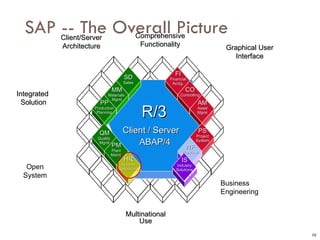
SAP -- The Overall Picture 03 Graphical User Interface Open System Integrated  Solution Client/Server Architecture Multinational Use Comprehensive Functionality Business Engineering ABAP/4 R/3 Client / Server FI Financial Acctg. CO Controlling AM Asset Mgmt PS Project System WF Workflow MM Materials  Mgmt HR Human Resources SD Sales PP Production Planning QM Quality  Mgmt PM Plant Maint. IS Industry Solutions
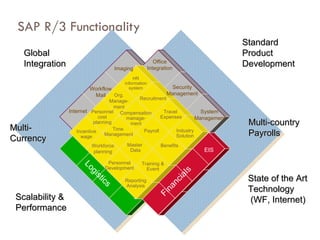
SAP R/3 Functionality Global  Integration Scalability & Performance State of the Art Technology (WF, Internet) Standard  Product Development Multi- Currency Multi-country Payrolls Internet Logistics FinanciaIs EIS Office Integration Security Management Workflow Mail Imaging System  Management Payroll Time  Management Travel  Expenses Master  Data Compensation manage- ment Personnel cost planning Org. Manage- ment Recruitment Workforce planning Benefits Reporting Analysis Personnel Development Incentive wage Training & Event Industry Solution HR information system
HR - Functionality Reporting (PA)  Personnel Administration (PD)  Personnel Planning & Development Personnel Cost Planning Training & Events  Management Organization and Position Planning Career &  Succession Plan  Shift Planning Qualifications &  Requirements Compensation Management  Accounting Logistics HR Recruitment Travel Management Payroll Time Management Master Data Benefits
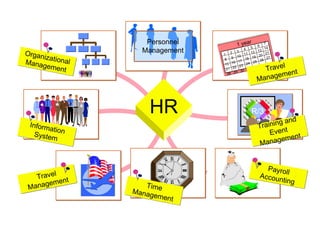
Organizational Management Information System Travel Management Payroll Accounting R/3 Training and Event Management 1 8 15 21 28 2 9 16 22 29 3 10 17 23 30 4 11 18 24 31 5 12 19 25 6 13 20 26 7 14 21 27 1 year Travel Management Personnel Management HR Time Management
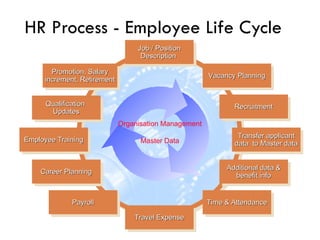
HR Process - Employee Life Cycle Job / Position Description  Travel Expense Qualification  Updates Employee Training Career Planning Payroll Recruitment Transfer applicant data  to Master data Time & Attendance Promotion, Salary increment, Retirement Vacancy Planning Additional data & benefit info Organisation Management Master Data
Personnel  Administration &    Planning & Development
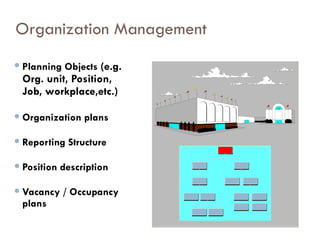
Organization Management Planning Objects  (e.g. Org. unit, Position, Job, workplace,etc.) Organization plans Reporting Structure Position description Vacancy / Occupancy plans
Organization Structure Management Managing Information on Departments/ Org Units Tracking of Positions in various departments Maintaining Jobs Generating Graphical Reports of organization structure Reporting relationships, who reports to whom? Multiple reporting !!  Vacancy related reports
Maintaining PD Master Data PD Organizational Management Creating Organization unit Creating jobs and positions Assigning Cost Centers Assigning persons to positions Detailed maintenance of objects - creating additional relationships Graphical maintenance and reporting
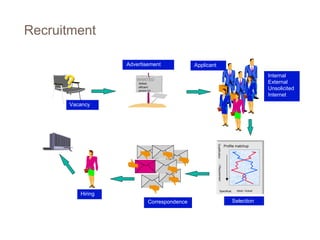
Advertisement Profile matchup Qualification / Requirement Specificat. Ideal / Actual Vacancy Applicant Correspondence Selection Recruitment Internal External Unsolicited Internet WANTED WANTED Skilled,  efficient person for . . .  Hiring
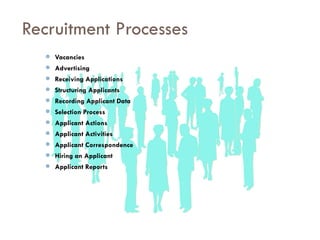
Recruitment Processes Vacancies Advertising Receiving Applications Structuring Applicants Recording Applicant Data Selection Process Applicant Actions Applicant Activities Applicant Correspondence Hiring an Applicant Applicant Reports
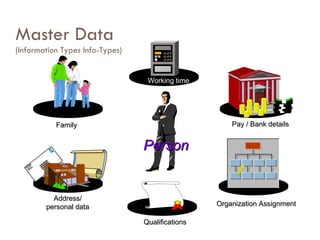
Master Data (Information Types Info-Types) Family Pay / Bank details Address/ personal data Organization Assignment Person BANK Qualifications Working time
Personnel Administration  - Personal Data Bio-data/ Resume Leave Administration Compensation & Benefits Payroll & Time Data Work Schedule Planning Data Salary Administration Appraisal Many more …...
Maintaining PA Master Data Individual Infotype maintenance: Contract Elements Monitoring of Dates Family/Related Person  Education  Other/Previous ERs  Cost Distribution  Internal Medical Service
Maintaining PA Master Data (Contd.) Internal Control  Corporate Function  Objects on Loan  Time Recording Info.  Wage Maintenance  Company Pension  Membership fees Communication PA Reporting through PD Graphical reporting
Electronic Personnel File Management Manage Employee progression in the company Details of employment outside company Family related Information Education details Leave Management Other information like Medical history, equipment provided by company etc.
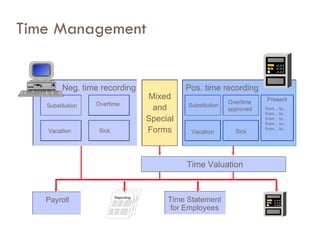
Time Management Substitution Neg. time recording Vacation Sick Overtime Mixed and Special Forms Time Valuation Payroll Positiv-Erfassung Substitution Overtime  approved Vacation Sick Present Time Statement for Employees Pos. time recording from... to... from... to... from... to... from... to... from... to...
Time Management Holiday Calendar Personal Work Schedule Monthly Work Schedule Attendances & Absences Attendance Check Graphical Attendance / Absence Overview Leave Overview / Leave Reporting Attendance and Absence Quotas Activity Allocation
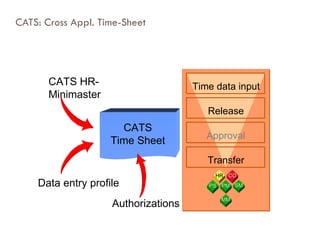
CATS: Cross Appl. Time-Sheet CATS Time Sheet CATS HR- Minimaster Authorizations Data entry profile Transfer Approval Time data input Release CO HR PS PM SM MM
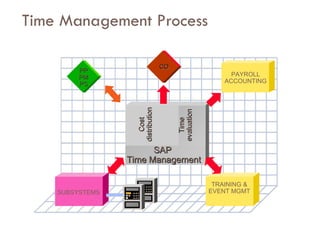
Time Management Process TRAINING & EVENT MGMT SUBSYSTEMS PAYROLL ACCOUNTING Cost distribution Time evaluation SAP Time Management PP PM PS CO
Time Management Process Interface with Punching/Swipe Card system Generate attendance reports by individuals, BAU/Department wise or by user specific requirement Leave record management Leave accrual calculation Deductions Maintaining Plant Holiday Calendar Subsequently integrate with Payroll
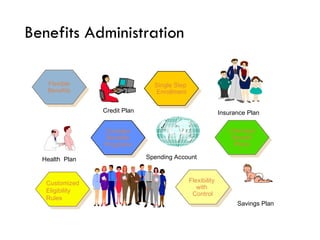
Benefits Administration Savings Plan Insurance Plan  Complex Benefits Programs Flexible Benefits Single Step  Enrollment Flexibility  with  Control Unlimited Benefit Plans Health  Plan Credit Plan  Spending Account  Customized Eligibility Rules
SAP Benefits   Overview Open enrollment New hire enrollment Life event changes (benefit adjustments) Status changes (benefit adjustments) Participation monitoring Insurability monitor Plan termination COBRA processing Benefits forms processing
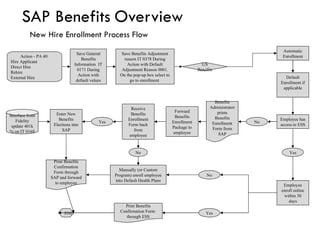
SAP Benefits   Overview New Hire Enrollment Process Flow Action - PA 40  Hire Applicant Direct Hire  Rehire External Hire US Benefits Default Enrollment if applicable Automatic Enrollment Save General Benefits Information  IT 0171 During Action with default values Save Benefits Adjustment reason IT 0378 During Action with Default Adjustment Reason 0001. On the pop-up box select to go to enrollment  Benefits Administrator prints Benefits Enrollment Form from SAP Forward Benefits Enrollment Package to employee Receive Benefits Enrollment Form back from employee No Yes Enter New Benefits Elections into SAP Manually (or Custom Program) enroll employee into Default Health Plans Print Benefits Confirmation Form through SAP and forward to employee No Yes Employee enroll online within 30 days No Yes Print Benefits Confirmation Form  through ESS END Employee has access to ESS Interface from Fidelity update 401k % on IT 0169
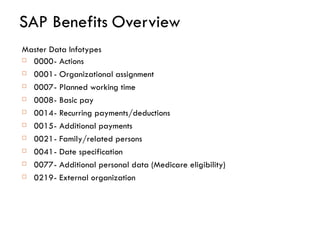
SAP Benefits   Overview Master Data Infotypes 0000 - Actions 0001 - Organizational assignment 0007 - Planned working time 0008 - Basic pay  0014 - Recurring payments/deductions 0015 - Additional payments 0021 - Family/related persons  0041 - Date specification 0077 - Additional personal data (Medicare eligibility) 0219 - External organization
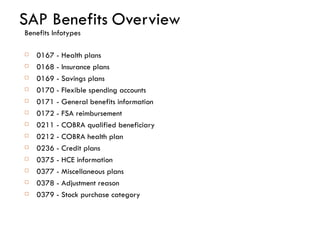
SAP Benefits   Overview Benefits Infotypes 0167 - Health plans 0168 - Insurance plans 0169 - Savings plans 0170 - Flexible spending accounts  0171 - General benefits information 0172 - FSA reimbursement 0211 - COBRA qualified beneficiary 0212 - COBRA health plan 0236 - Credit plans 0375 - HCE information 0377 - Miscellaneous plans 0378 - Adjustment reason 0379 - Stock purchase category
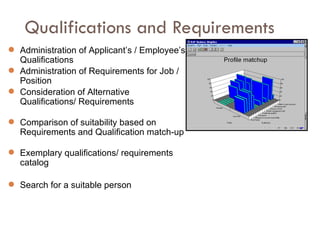
Qualifications and Requirements Administration of Applicant’s / Employee’s Qualifications  Administration of Requirements for Job / Position Consideration of Alternative Qualifications/ Requirements Comparison of suitability based on Requirements and Qualification match-up Exemplary qualifications/ requirements catalog Search for a suitable person
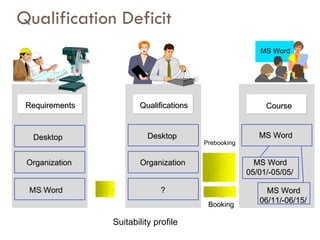
Qualification Deficit MS Word Organization Organization Word MS Word Requirements Requirements Desktop Desktop Organization Organization ? ? Qualifications Qualifications MS Word MS Word MS Word MS Word 05/01/-05/05/ 05/01/-05/05/ MS Word MS Word 06/11/-06/15/ 06/11/-06/15/ Prebooking Booking Booking Desktop Desktop Course Course Suitability profile
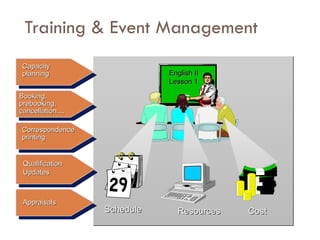
Training & Event Management English II Lesson 1 Schedule Resources Capacity planning Booking,  prebooking, cancellation.... Qualification Updates Correspondence printing Cost Appraisals
Training and Development process support A comprehensive model for T&D process Update the qualifications acquired at the end of training program automatically to attendees Manage training programs Manage resources like OHP / Video Projector, Room facilities, handouts etc. Track information on external resources Automate correspondence generation
Training & Event Management Maintaining Training Needs Maintaining Training Calendar Creating Business Event groups and types Creating resource types, resources Planning & Scheduling a business event Cost Allocation for a business event Booking attendees (pre-book, firm-book, cancel, waitlist, re-book) Maintaining Procedures infotype for Business events Follow-up of business events Appraisal of business events
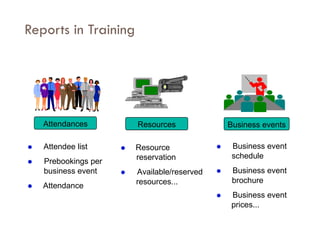
Reports in Training  Attendee list  Prebookings per business event  Attendance Attendances Resources Business events  Resource reservation  Available/reserved resources...  Business event schedule  Business event brochure  Business event prices...
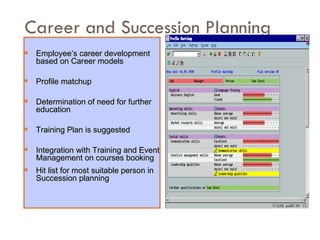
Career and Succession Planning Employee’s career development based on Career models Profile matchup Determination of need for further education Training Plan is suggested  Integration with Training and Event Management on courses booking Hit list for most suitable person in Succession planning
Payroll Accounting Gross payroll accounting with  automatic  wage calculation Automatic  special payments  computation Full gross/net  retroactive  accounting Freely definable  payroll form Data exchange  with banks, social insurance agencies, etc. Direct  integration  to FI and CO Online or batch  processing
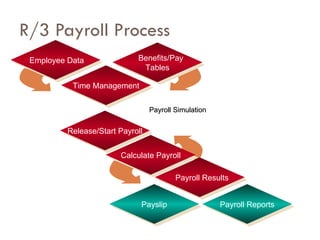
R/3 Payroll Process Payroll Simulation Employee Data Benefits/Pay Tables Time Management Calculate Payroll Payslip Payroll Results Payroll Reports Release/Start Payroll
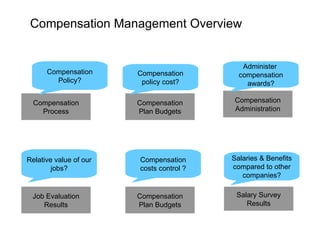
Compensation Process Compensation Plan Budgets Compensation Administration Job Evaluation Results Compensation Plan Budgets Salary Survey Results Compensation Policy? Compensation policy cost? Administer  compensation awards? Relative value of our jobs? Compensation costs control ? Salaries & Benefits compared to other companies? Compensation Management Overview
Link to a job or a position Job evaluation results (Infotype) Subtypes for multiple evaluation systems Points determine relative worth of each job/position Link to salary structure through Planned compensation Infotype Benchmark job indicator Reporting available Job Evaluation Results
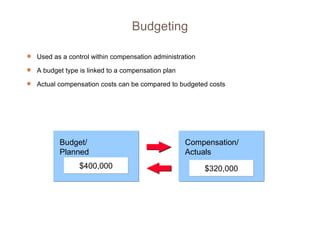
Used as a control within compensation administration A budget type is linked to a compensation plan Actual compensation costs can be compared to budgeted costs Budgeting Budget/ Planned Compensation/ Actuals $400,000 $320,000
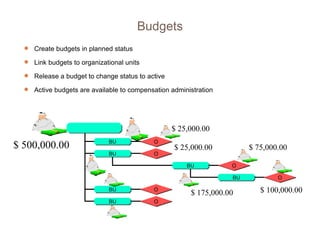
Create budgets in planned status Link budgets to organizational units Release a budget to change status to active Active budgets are available to compensation administration $ 500,000.00 $ 100,000.00 $ 75,000.00 $ 25,000.00 $ 25,000.00 $ 175,000.00 Budgets BU BU O O BU O BU O BU BU O O
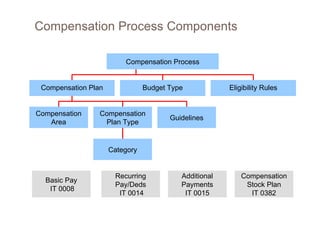
Compensation Plan Eligibility Rules Compensation Plan Type Guidelines Category Compensation Process Budget Type Compensation Area Compensation Process Components Basic Pay IT 0008 Recurring Pay/Deds  IT 0014 Additional Payments IT 0015 Compensation Stock Plan IT 0382
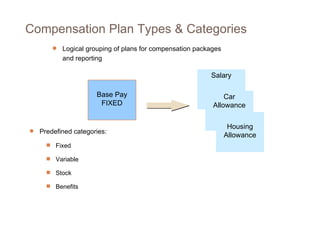
Salary Car Allowance Housing Allowance Base Pay FIXED Logical grouping of plans for compensation packages and reporting Predefined categories: Fixed Variable Stock Benefits  Compensation Plan Types & Categories
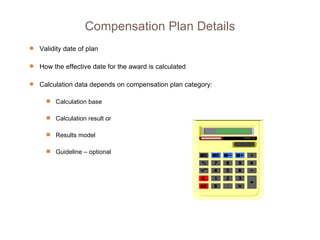
Validity date of plan How the effective date for the award is calculated  Calculation data depends on compensation plan category: Calculation base Calculation result or Results model Guideline – optional Compensation Plan Details
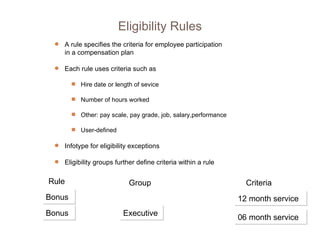
A rule specifies the criteria for employee participation in a compensation plan Each rule uses criteria such as Hire date or length of sevice Number of hours worked Other: pay scale, pay grade, job, salary,performance User-defined Infotype for eligibility exceptions Eligibility groups further define criteria within a rule Bonus Rule Bonus Group Executive Criteria 06 month service 12 month service Eligibility Rules
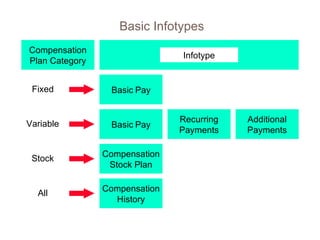
Basic Infotypes Compensation Plan Category Infotype Fixed Basic   Pay Basic   Pay Compensation Stock Plan Compensation History Variable Stock All Recurring Payments Additional Payments
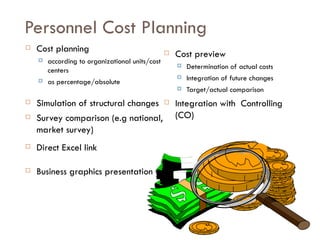
Personnel Cost Planning Cost planning according to organizational units/cost centers as percentage/absolute Simulation of structural changes  Survey comparison (e.g national, market survey) Direct Excel link Business graphics presentation Cost preview Determination of actual costs Integration of future changes Target/actual comparison Integration with  Controlling (CO)
Travel Management Entry of trip data Calculation of Meal Allowance (per diem) Maintain Receipts claim Advance Payment  Allowances for stopovers Representation of internal company rules Trip-specific account assignment Nature of applications and authorizations Simulation of statement (to determine refund or reimbursement amount) Integration to Payroll and/or FI/CO
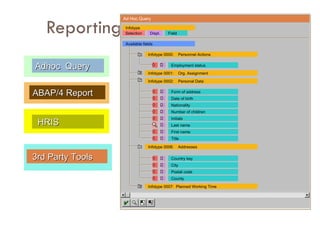
Reporting Adhoc  Query ABAP/4 Report 3rd Party Tools HRIS Ad Hoc Query Available fields Infotype Selection Displ. Field Employment status Infotype 0000: Personnel Actions Infotype 0001: Org. Assignment Infotype 0002: Personal Data Form of address Date of birth Nationality Number of children Initials Last name First name Title Country key City Postal code County Infotype 0007:  Planned Working Time Infotype 0006: Addresses
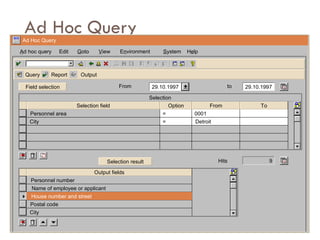
Ad Hoc Query Ad Hoc Query A d hoc query Edit G oto V iew S ystem H e lp E n vironment Query Report Output Field selection From 29.10.1997 to 29.10.1997 Selection Selection field Personnel area City Option From To = = 0001 Detroit Selection result Hits 9 Output fields Personnel number Name of employee or applicant Postal code City House number and street
Thank you

Sap Hr Presentation 08052002

  • 1.
  • 2.
    Agenda : Project Start Up ... Introduction Welcome Agenda HR Overview Application Components Questions & Answers
  • 3.
    SAP -- TheOverall Picture 03 Graphical User Interface Open System Integrated Solution Client/Server Architecture Multinational Use Comprehensive Functionality Business Engineering ABAP/4 R/3 Client / Server FI Financial Acctg. CO Controlling AM Asset Mgmt PS Project System WF Workflow MM Materials Mgmt HR Human Resources SD Sales PP Production Planning QM Quality Mgmt PM Plant Maint. IS Industry Solutions
  • 4.
    SAP R/3 FunctionalityGlobal Integration Scalability & Performance State of the Art Technology (WF, Internet) Standard Product Development Multi- Currency Multi-country Payrolls Internet Logistics FinanciaIs EIS Office Integration Security Management Workflow Mail Imaging System Management Payroll Time Management Travel Expenses Master Data Compensation manage- ment Personnel cost planning Org. Manage- ment Recruitment Workforce planning Benefits Reporting Analysis Personnel Development Incentive wage Training & Event Industry Solution HR information system
  • 5.
    HR - FunctionalityReporting (PA) Personnel Administration (PD) Personnel Planning & Development Personnel Cost Planning Training & Events Management Organization and Position Planning Career & Succession Plan Shift Planning Qualifications & Requirements Compensation Management Accounting Logistics HR Recruitment Travel Management Payroll Time Management Master Data Benefits
  • 6.
    Organizational Management InformationSystem Travel Management Payroll Accounting R/3 Training and Event Management 1 8 15 21 28 2 9 16 22 29 3 10 17 23 30 4 11 18 24 31 5 12 19 25 6 13 20 26 7 14 21 27 1 year Travel Management Personnel Management HR Time Management
  • 7.
    HR Process -Employee Life Cycle Job / Position Description Travel Expense Qualification Updates Employee Training Career Planning Payroll Recruitment Transfer applicant data to Master data Time & Attendance Promotion, Salary increment, Retirement Vacancy Planning Additional data & benefit info Organisation Management Master Data
  • 8.
    Personnel Administration& Planning & Development
  • 9.
    Organization Management PlanningObjects (e.g. Org. unit, Position, Job, workplace,etc.) Organization plans Reporting Structure Position description Vacancy / Occupancy plans
  • 10.
    Organization Structure ManagementManaging Information on Departments/ Org Units Tracking of Positions in various departments Maintaining Jobs Generating Graphical Reports of organization structure Reporting relationships, who reports to whom? Multiple reporting !! Vacancy related reports
  • 11.
    Maintaining PD MasterData PD Organizational Management Creating Organization unit Creating jobs and positions Assigning Cost Centers Assigning persons to positions Detailed maintenance of objects - creating additional relationships Graphical maintenance and reporting
  • 12.
    Advertisement Profile matchupQualification / Requirement Specificat. Ideal / Actual Vacancy Applicant Correspondence Selection Recruitment Internal External Unsolicited Internet WANTED WANTED Skilled, efficient person for . . . Hiring
  • 13.
    Recruitment Processes VacanciesAdvertising Receiving Applications Structuring Applicants Recording Applicant Data Selection Process Applicant Actions Applicant Activities Applicant Correspondence Hiring an Applicant Applicant Reports
  • 14.
    Master Data (InformationTypes Info-Types) Family Pay / Bank details Address/ personal data Organization Assignment Person BANK Qualifications Working time
  • 15.
    Personnel Administration - Personal Data Bio-data/ Resume Leave Administration Compensation & Benefits Payroll & Time Data Work Schedule Planning Data Salary Administration Appraisal Many more …...
  • 16.
    Maintaining PA MasterData Individual Infotype maintenance: Contract Elements Monitoring of Dates Family/Related Person Education Other/Previous ERs Cost Distribution Internal Medical Service
  • 17.
    Maintaining PA MasterData (Contd.) Internal Control Corporate Function Objects on Loan Time Recording Info. Wage Maintenance Company Pension Membership fees Communication PA Reporting through PD Graphical reporting
  • 18.
    Electronic Personnel FileManagement Manage Employee progression in the company Details of employment outside company Family related Information Education details Leave Management Other information like Medical history, equipment provided by company etc.
  • 19.
    Time Management SubstitutionNeg. time recording Vacation Sick Overtime Mixed and Special Forms Time Valuation Payroll Positiv-Erfassung Substitution Overtime approved Vacation Sick Present Time Statement for Employees Pos. time recording from... to... from... to... from... to... from... to... from... to...
  • 20.
    Time Management HolidayCalendar Personal Work Schedule Monthly Work Schedule Attendances & Absences Attendance Check Graphical Attendance / Absence Overview Leave Overview / Leave Reporting Attendance and Absence Quotas Activity Allocation
  • 21.
    CATS: Cross Appl.Time-Sheet CATS Time Sheet CATS HR- Minimaster Authorizations Data entry profile Transfer Approval Time data input Release CO HR PS PM SM MM
  • 22.
    Time Management ProcessTRAINING & EVENT MGMT SUBSYSTEMS PAYROLL ACCOUNTING Cost distribution Time evaluation SAP Time Management PP PM PS CO
  • 23.
    Time Management ProcessInterface with Punching/Swipe Card system Generate attendance reports by individuals, BAU/Department wise or by user specific requirement Leave record management Leave accrual calculation Deductions Maintaining Plant Holiday Calendar Subsequently integrate with Payroll
  • 24.
    Benefits Administration SavingsPlan Insurance Plan Complex Benefits Programs Flexible Benefits Single Step Enrollment Flexibility with Control Unlimited Benefit Plans Health Plan Credit Plan Spending Account Customized Eligibility Rules
  • 25.
    SAP Benefits Overview Open enrollment New hire enrollment Life event changes (benefit adjustments) Status changes (benefit adjustments) Participation monitoring Insurability monitor Plan termination COBRA processing Benefits forms processing
  • 26.
    SAP Benefits Overview New Hire Enrollment Process Flow Action - PA 40 Hire Applicant Direct Hire Rehire External Hire US Benefits Default Enrollment if applicable Automatic Enrollment Save General Benefits Information IT 0171 During Action with default values Save Benefits Adjustment reason IT 0378 During Action with Default Adjustment Reason 0001. On the pop-up box select to go to enrollment Benefits Administrator prints Benefits Enrollment Form from SAP Forward Benefits Enrollment Package to employee Receive Benefits Enrollment Form back from employee No Yes Enter New Benefits Elections into SAP Manually (or Custom Program) enroll employee into Default Health Plans Print Benefits Confirmation Form through SAP and forward to employee No Yes Employee enroll online within 30 days No Yes Print Benefits Confirmation Form through ESS END Employee has access to ESS Interface from Fidelity update 401k % on IT 0169
  • 27.
    SAP Benefits Overview Master Data Infotypes 0000 - Actions 0001 - Organizational assignment 0007 - Planned working time 0008 - Basic pay 0014 - Recurring payments/deductions 0015 - Additional payments 0021 - Family/related persons 0041 - Date specification 0077 - Additional personal data (Medicare eligibility) 0219 - External organization
  • 28.
    SAP Benefits Overview Benefits Infotypes 0167 - Health plans 0168 - Insurance plans 0169 - Savings plans 0170 - Flexible spending accounts 0171 - General benefits information 0172 - FSA reimbursement 0211 - COBRA qualified beneficiary 0212 - COBRA health plan 0236 - Credit plans 0375 - HCE information 0377 - Miscellaneous plans 0378 - Adjustment reason 0379 - Stock purchase category
  • 29.
    Qualifications and RequirementsAdministration of Applicant’s / Employee’s Qualifications Administration of Requirements for Job / Position Consideration of Alternative Qualifications/ Requirements Comparison of suitability based on Requirements and Qualification match-up Exemplary qualifications/ requirements catalog Search for a suitable person
  • 30.
    Qualification Deficit MSWord Organization Organization Word MS Word Requirements Requirements Desktop Desktop Organization Organization ? ? Qualifications Qualifications MS Word MS Word MS Word MS Word 05/01/-05/05/ 05/01/-05/05/ MS Word MS Word 06/11/-06/15/ 06/11/-06/15/ Prebooking Booking Booking Desktop Desktop Course Course Suitability profile
  • 31.
    Training & EventManagement English II Lesson 1 Schedule Resources Capacity planning Booking, prebooking, cancellation.... Qualification Updates Correspondence printing Cost Appraisals
  • 32.
    Training and Developmentprocess support A comprehensive model for T&D process Update the qualifications acquired at the end of training program automatically to attendees Manage training programs Manage resources like OHP / Video Projector, Room facilities, handouts etc. Track information on external resources Automate correspondence generation
  • 33.
    Training & EventManagement Maintaining Training Needs Maintaining Training Calendar Creating Business Event groups and types Creating resource types, resources Planning & Scheduling a business event Cost Allocation for a business event Booking attendees (pre-book, firm-book, cancel, waitlist, re-book) Maintaining Procedures infotype for Business events Follow-up of business events Appraisal of business events
  • 34.
    Reports in Training Attendee list  Prebookings per business event  Attendance Attendances Resources Business events  Resource reservation  Available/reserved resources...  Business event schedule  Business event brochure  Business event prices...
  • 35.
    Career and SuccessionPlanning Employee’s career development based on Career models Profile matchup Determination of need for further education Training Plan is suggested Integration with Training and Event Management on courses booking Hit list for most suitable person in Succession planning
  • 36.
    Payroll Accounting Grosspayroll accounting with automatic wage calculation Automatic special payments computation Full gross/net retroactive accounting Freely definable payroll form Data exchange with banks, social insurance agencies, etc. Direct integration to FI and CO Online or batch processing
  • 37.
    R/3 Payroll ProcessPayroll Simulation Employee Data Benefits/Pay Tables Time Management Calculate Payroll Payslip Payroll Results Payroll Reports Release/Start Payroll
  • 38.
    Compensation Process CompensationPlan Budgets Compensation Administration Job Evaluation Results Compensation Plan Budgets Salary Survey Results Compensation Policy? Compensation policy cost? Administer compensation awards? Relative value of our jobs? Compensation costs control ? Salaries & Benefits compared to other companies? Compensation Management Overview
  • 39.
    Link to ajob or a position Job evaluation results (Infotype) Subtypes for multiple evaluation systems Points determine relative worth of each job/position Link to salary structure through Planned compensation Infotype Benchmark job indicator Reporting available Job Evaluation Results
  • 40.
    Used as acontrol within compensation administration A budget type is linked to a compensation plan Actual compensation costs can be compared to budgeted costs Budgeting Budget/ Planned Compensation/ Actuals $400,000 $320,000
  • 41.
    Create budgets inplanned status Link budgets to organizational units Release a budget to change status to active Active budgets are available to compensation administration $ 500,000.00 $ 100,000.00 $ 75,000.00 $ 25,000.00 $ 25,000.00 $ 175,000.00 Budgets BU BU O O BU O BU O BU BU O O
  • 42.
    Compensation Plan EligibilityRules Compensation Plan Type Guidelines Category Compensation Process Budget Type Compensation Area Compensation Process Components Basic Pay IT 0008 Recurring Pay/Deds IT 0014 Additional Payments IT 0015 Compensation Stock Plan IT 0382
  • 43.
    Salary Car AllowanceHousing Allowance Base Pay FIXED Logical grouping of plans for compensation packages and reporting Predefined categories: Fixed Variable Stock Benefits Compensation Plan Types & Categories
  • 44.
    Validity date ofplan How the effective date for the award is calculated Calculation data depends on compensation plan category: Calculation base Calculation result or Results model Guideline – optional Compensation Plan Details
  • 45.
    A rule specifiesthe criteria for employee participation in a compensation plan Each rule uses criteria such as Hire date or length of sevice Number of hours worked Other: pay scale, pay grade, job, salary,performance User-defined Infotype for eligibility exceptions Eligibility groups further define criteria within a rule Bonus Rule Bonus Group Executive Criteria 06 month service 12 month service Eligibility Rules
  • 46.
    Basic Infotypes CompensationPlan Category Infotype Fixed Basic Pay Basic Pay Compensation Stock Plan Compensation History Variable Stock All Recurring Payments Additional Payments
  • 47.
    Personnel Cost PlanningCost planning according to organizational units/cost centers as percentage/absolute Simulation of structural changes Survey comparison (e.g national, market survey) Direct Excel link Business graphics presentation Cost preview Determination of actual costs Integration of future changes Target/actual comparison Integration with Controlling (CO)
  • 48.
    Travel Management Entryof trip data Calculation of Meal Allowance (per diem) Maintain Receipts claim Advance Payment Allowances for stopovers Representation of internal company rules Trip-specific account assignment Nature of applications and authorizations Simulation of statement (to determine refund or reimbursement amount) Integration to Payroll and/or FI/CO
  • 49.
    Reporting Adhoc Query ABAP/4 Report 3rd Party Tools HRIS Ad Hoc Query Available fields Infotype Selection Displ. Field Employment status Infotype 0000: Personnel Actions Infotype 0001: Org. Assignment Infotype 0002: Personal Data Form of address Date of birth Nationality Number of children Initials Last name First name Title Country key City Postal code County Infotype 0007: Planned Working Time Infotype 0006: Addresses
  • 50.
    Ad Hoc QueryAd Hoc Query A d hoc query Edit G oto V iew S ystem H e lp E n vironment Query Report Output Field selection From 29.10.1997 to 29.10.1997 Selection Selection field Personnel area City Option From To = = 0001 Detroit Selection result Hits 9 Output fields Personnel number Name of employee or applicant Postal code City House number and street
  • 51.