Front End Workshops
React Native Part III:
The Native Side
Alberto Irurueta
Enrique Oriol
airurueta@visual-engin.com
eoriol@naradarobotics.com
React Native short Recap
React Native: is a library to generate
native apps for iOS and Android mobile devices capable,
programmed in javascript.
React Native uses the actual native components of each
platform (currently iOS and Android).
Useful Native APIs
React Native Part I
The Native Side
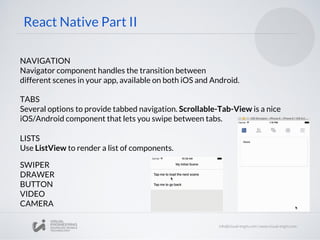
NAVIGATION
Navigator component handles the transition between
different scenes in your app, available on both iOS and Android.
React Native Part II
TABS
Several options to provide tabbed navigation. Scrollable-Tab-View is a nice
iOS/Android component that lets you swipe between tabs.
LISTS
Use ListView to render a list of components.
DRAWER
BUTTON
VIDEO
CAMERA
SWIPER
NAVIGATION
Navigator component handles the transition between
different scenes in your app, available on both iOS and Android.
React Native Part II
TABS
Several options to provide tabbed navigation. Scrollable-Tab-View is a nice
iOS/Android component that lets you swipe between tabs.
LISTS
Use ListView to render a list of components.
DRAWER
BUTTON
VIDEO
CAMERA
SWIPER
The Native Side
We have been playing on the JS side, but how does it work
on the native side?
The Native Side
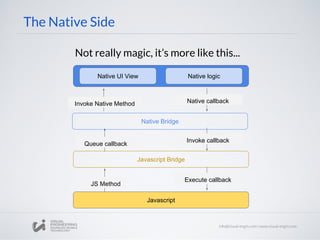
Not really magic, it’s more like this...
Native UI View Native logic
Native Bridge
Javascript Bridge
Javascript
JS Method
Invoke Native Method
Queue callback
Native callback
Invoke callback
Execute callback
Building Native Modules
What is this?
A native module
can be thought as a
library
running in the
native side
Native Modules
iOS
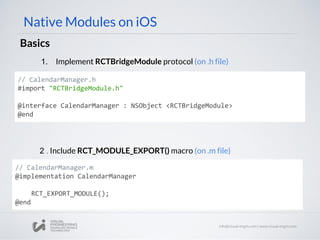
Basics
Native Modules on iOS
// CalendarManager.m
@implementation CalendarManager
RCT_EXPORT_MODULE();
@end
2 . Include RCT_MODULE_EXPORT() macro (on .m file)
// CalendarManager.h
#import "RCTBridgeModule.h"
@interface CalendarManager : NSObject <RCTBridgeModule>
@end
1. Implement RCTBridgeModule protocol (on .h file)
Native Modules on iOS
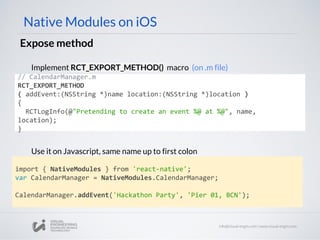
Expose method
// CalendarManager.m
RCT_EXPORT_METHOD
( addEvent:(NSString *)name location:(NSString *)location )
{
RCTLogInfo(@"Pretending to create an event %@ at %@", name,
location);
}
Implement RCT_EXPORT_METHOD() macro (on .m file)
import { NativeModules } from 'react-native';
var CalendarManager = NativeModules.CalendarManager;
CalendarManager.addEvent('Hackathon Party', 'Pier 01, BCN');
Use it on Javascript, same name up to first colon
Native Modules on iOS
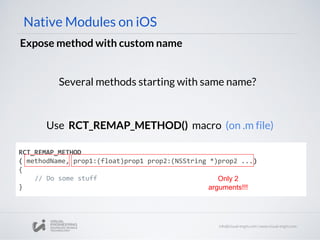
Expose method with custom name
Several methods starting with same name?
RCT_REMAP_METHOD
( methodName, prop1:(float)prop1 prop2:(NSString *)prop2 ...)
{
// Do some stuff
}
Use RCT_REMAP_METHOD() macro (on .m file)
Only 2
arguments!!!
Native Modules on iOS
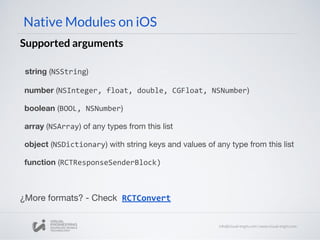
Supported arguments
string (NSString)
number (NSInteger, float, double, CGFloat, NSNumber)
boolean (BOOL, NSNumber)
array (NSArray) of any types from this list
object (NSDictionary) with string keys and values of any type from this list
function (RCTResponseSenderBlock)
¿More formats? - Check RCTConvert
Native Modules on iOS
Example with NSDictionary
// CalendarManager.m
RCT_EXPORT_METHOD
( addEvent:(NSString *)name details:(NSDictionary *)details ){
NSString *location = [RCTConvert NSString:details[@"location"]];
NSDate *time = [RCTConvert NSDate:details[@"time"]];
...
}
//JS
CalendarManager.addEvent('Birthday Party',
{
location: '4 Privet Drive, Surrey',
time: date.getTime(),
description: '...'
})
Getting data on iOS
Sending data from JS
Native Modules on iOS
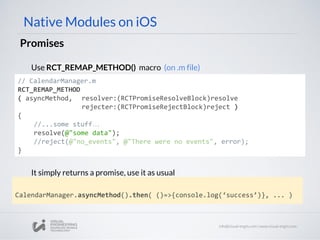
Promises
// CalendarManager.m
RCT_REMAP_METHOD
( asyncMethod, resolver:(RCTPromiseResolveBlock)resolve
rejecter:(RCTPromiseRejectBlock)reject )
{
//...some stuff…
resolve(@"some data");
//reject(@"no_events", @"There were no events", error);
}
Use RCT_REMAP_METHOD() macro (on .m file)
CalendarManager.asyncMethod().then( ()=>{console.log(‘success’)}, ... )
It simply returns a promise, use it as usual
Native Modules on iOS
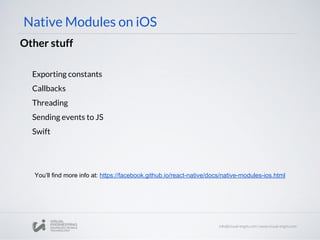
Other stuff
Exporting constants
Callbacks
Threading
Sending events to JS
Swift
You’ll find more info at: https://facebook.github.io/react-native/docs/native-modules-ios.html
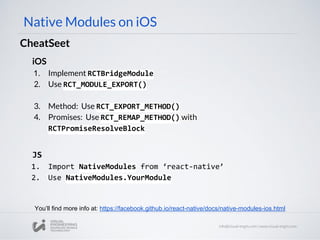
iOS
1. Implement RCTBridgeModule
2. Use RCT_MODULE_EXPORT()
3. Method: Use RCT_EXPORT_METHOD()
4. Promises: Use RCT_REMAP_METHOD() with
RCTPromiseResolveBlock
Native Modules on iOS
CheatSeet
You’ll find more info at: https://facebook.github.io/react-native/docs/native-modules-ios.html
JS
1. Import NativeModules from ‘react-native’
2. Use NativeModules.YourModule
Android
Native Modules on Android
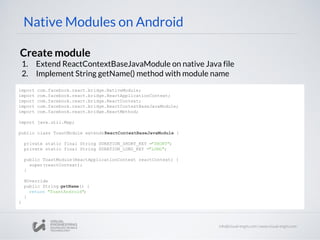
Create module
1. Extend ReactContextBaseJavaModule on native Java file
2. Implement String getName() method with module name
import com.facebook.react.bridge.NativeModule;
import com.facebook.react.bridge.ReactApplicationContext;
import com.facebook.react.bridge.ReactContext;
import com.facebook.react.bridge.ReactContextBaseJavaModule;
import com.facebook.react.bridge.ReactMethod;
import java.util.Map;
public class ToastModule extendsReactContextBaseJavaModule {
private static final String DURATION_SHORT_KEY ="SHORT";
private static final String DURATION_LONG_KEY ="LONG";
public ToastModule(ReactApplicationContext reactContext) {
super(reactContext);
}
@Override
public String getName() {
return "ToastAndroid";
}
}
Native Modules on Android
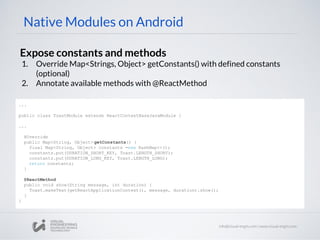
Expose constants and methods
1. Override Map<Strings, Object> getConstants() with defined constants
(optional)
2. Annotate available methods with @ReactMethod
...
public class ToastModule extends ReactContextBaseJavaModule {
...
@Override
public Map<String, Object> getConstants() {
final Map<String, Object> constants =new HashMap<>();
constants.put(DURATION_SHORT_KEY, Toast.LENGTH_SHORT);
constants.put(DURATION_LONG_KEY, Toast.LENGTH_LONG);
return constants;
}
@ReactMethod
public void show(String message, int duration) {
Toast.makeText(getReactApplicationContext(), message, duration).show();
}
}
Native Modules on Android
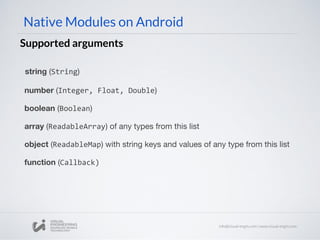
Supported arguments
string (String)
number (Integer, Float, Double)
boolean (Boolean)
array (ReadableArray) of any types from this list
object (ReadableMap) with string keys and values of any type from this list
function (Callback)
Native Modules on Android
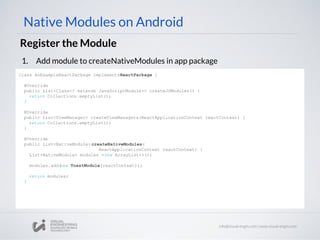
Register the Module
1. Add module to createNativeModules in app package
class AnExampleReactPackage implementsReactPackage {
@Override
public List<Class<? extends JavaScriptModule>> createJSModules() {
return Collections.emptyList();
}
@Override
public List<ViewManager> createViewManagers(ReactApplicationContext reactContext) {
return Collections.emptyList();
}
@Override
public List<NativeModule> createNativeModules(
ReactApplicationContext reactContext) {
List<NativeModule> modules =new ArrayList<>();
modules.add(new ToastModule(reactContext));
return modules;
}
Native Modules on Android
Register the Module
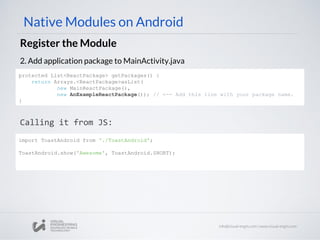
2. Add application package to MainActivity.java
Calling it from JS:
protected List<ReactPackage> getPackages() {
return Arrays.<ReactPackage>asList(
new MainReactPackage(),
new AnExampleReactPackage()); // <-- Add this line with your package name.
}
import ToastAndroid from './ToastAndroid';
ToastAndroid.show('Awesome', ToastAndroid.SHORT);
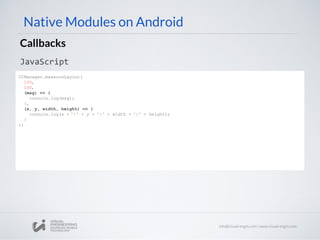
Native Modules on Android
Callbacks
Java
public class UIManagerModule extends ReactContextBaseJavaModule {
...
@ReactMethod
public void measureLayout(
int tag,
int ancestorTag,
Callback errorCallback,
Callback successCallback) {
try {
measureLayout(tag, ancestorTag, mMeasureBuffer);
float relativeX = PixelUtil.toDIPFromPixel(mMeasureBuffer[0]);
float relativeY = PixelUtil.toDIPFromPixel(mMeasureBuffer[1]);
float width = PixelUtil.toDIPFromPixel(mMeasureBuffer[2]);
float height = PixelUtil.toDIPFromPixel(mMeasureBuffer[3]);
successCallback.invoke(relativeX, relativeY, width, height);
} catch (IllegalViewOperationException e) {
errorCallback.invoke(e.getMessage());
}
}
...
Native Modules on Android
Callbacks
JavaScript
UIManager.measureLayout(
100,
100,
(msg) => {
console.log(msg);
},
(x, y, width, height) => {
console.log(x + ':' + y + ':' + width + ':' + height);
}
);
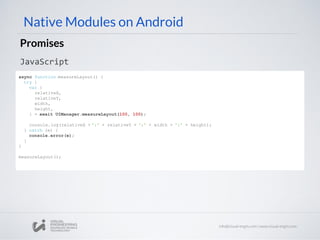
Native Modules on Android
Promises
Java
public class UIManagerModule extends ReactContextBaseJavaModule {
...
@ReactMethod
public void measureLayout(
int tag,
int ancestorTag,
Promise promise) {
try {
measureLayout(tag, ancestorTag, mMeasureBuffer);
WritableMap map = Arguments.createMap();
map.putDouble("relativeX", PixelUtil.toDIPFromPixel(mMeasureBuffer[0]));
map.putDouble("relativeY", PixelUtil.toDIPFromPixel(mMeasureBuffer[1]));
map.putDouble("width", PixelUtil.toDIPFromPixel(mMeasureBuffer[2]));
map.putDouble("height", PixelUtil.toDIPFromPixel(mMeasureBuffer[3]));
promise.resolve(map);
} catch (IllegalViewOperationException e) {
promise.reject(e);
}
}
...
Native Modules on Android
Promises
JavaScript
async function measureLayout() {
try {
var {
relativeX,
relativeY,
width,
height,
} = await UIManager.measureLayout(100, 100);
console.log(relativeX + ':' + relativeY + ':' + width + ':' + height);
} catch (e) {
console.error(e);
}
}
measureLayout();
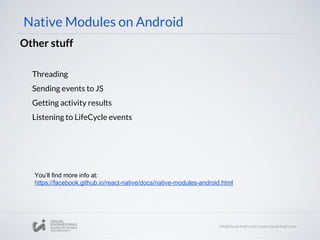
Native Modules on Android
Other stuff
Threading
Sending events to JS
Getting activity results
Listening to LifeCycle events
You’ll find more info at:
https://facebook.github.io/react-native/docs/native-modules-android.html
Building Native Components
iOS
// MyViewManager.h
#import "MyView.h"
#import "RCTViewManager.h"
@interface RCTMapManager :
RCTViewManager
@end
Basics
Native Components on iOS
- (UIView *)view
{
return [[MyView alloc] init];
}
2 . Implement method - (UIView *) view in MyViewManager.m
1. Subclass RCTViewManager and export it with RCT_EXPORT_METHOD()
Consider we already have an iOS custom view, for example, MyView
// MyViewManager.m
#import
"MyViewManager.h"
@implementation RCTMapManager
RCT_EXPORT_MODULE()
@end
Native Components on iOS
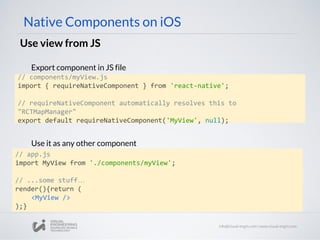
Use view from JS
// components/myView.js
import { requireNativeComponent } from 'react-native';
// requireNativeComponent automatically resolves this to
"RCTMapManager"
export default requireNativeComponent('MyView', null);
Export component in JS file
// app.js
import MyView from './components/myView';
// ...some stuff…
render(){return (
<MyView />
);}
Use it as any other component
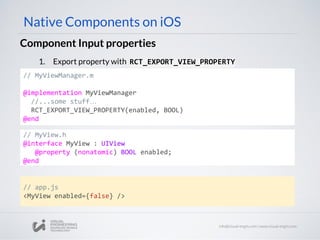
// MyViewManager.m
@implementation MyViewManager
//...some stuff…
RCT_EXPORT_VIEW_PROPERTY(enabled, BOOL)
@end
Component Input properties
Native Components on iOS
1. Export property with RCT_EXPORT_VIEW_PROPERTY
// app.js
<MyView enabled={false} />
// MyView.h
@interface MyView : UIView
@property (nonatomic) BOOL enabled;
@end
Component Input properties
Native Components on iOS
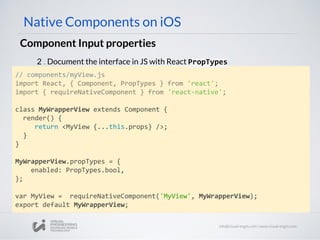
// components/myView.js
import React, { Component, PropTypes } from 'react';
import { requireNativeComponent } from 'react-native';
class MyWrapperView extends Component {
render() {
return <MyView {...this.props} />;
}
}
MyWrapperView.propTypes = {
enabled: PropTypes.bool,
};
var MyView = requireNativeComponent('MyView', MyWrapperView);
export default MyWrapperView;
2 . Document the interface in JS with React PropTypes
Component Input properties
Native Components on iOS
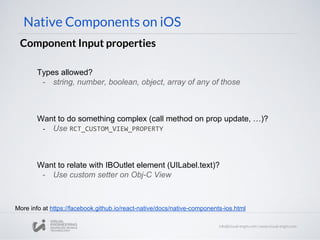
Want to do something complex (call method on prop update, …)?
- Use RCT_CUSTOM_VIEW_PROPERTY
Want to relate with IBOutlet element (UILabel.text)?
- Use custom setter on Obj-C View
Types allowed?
- string, number, boolean, object, array of any of those
More info at https://facebook.github.io/react-native/docs/native-components-ios.html
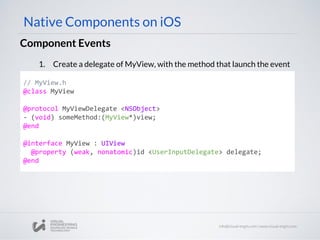
Component Events
// MyView.h
@class MyView
@protocol MyViewDelegate <NSObject>
- (void) someMethod:(MyView*)view;
@end
@interface MyView : UIView
@property (weak, nonatomic)id <UserInputDelegate> delegate;
@end
Native Components on iOS
1. Create a delegate of MyView, with the method that launch the event
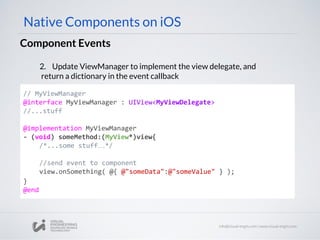
Component Events
Native Components on iOS
// MyViewManager
@interface MyViewManager : UIView<MyViewDelegate>
//...stuff
@implementation MyViewManager
- (void) someMethod:(MyView*)view{
/*...some stuff…*/
//send event to component
view.onSomething( @{ @"someData":@"someValue" } );
}
@end
2. Update ViewManager to implement the view delegate, and
return a dictionary in the event callback
Component Events
// MyViewManager
- (UIView *)view
{
MyView* view = [[MyView alloc] init];
view.delegate = self;
Return view;
}
Native Components on iOS
3. Update ViewManager (UIView*) view method to assign delegate
4. Export RCTBubblingEventBlock property on ViewManager
// MyViewManager
@implementation MyViewManager
//...stuff...
RCT_EXPORT_VIEW_PROPERTY(onSomething, RCTBubblingEventBlock)
@end
// MyView.h
@property(nonatomic, copy) RCTBubblingEventBlock onSomething;
Component Events
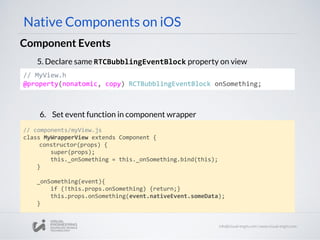
Native Components on iOS
5. Declare same RTCBubblingEventBlock property on view
6. Set event function in component wrapper
// components/myView.js
class MyWrapperView extends Component {
constructor(props) {
super(props);
this._onSomething = this._onSomething.bind(this);
}
_onSomething(event){
if (!this.props.onSomething) {return;}
this.props.onSomething(event.nativeEvent.someData);
}
Component Events
Native Components on iOS
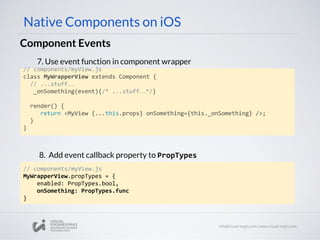
7. Use event function in component wrapper
// components/myView.js
class MyWrapperView extends Component {
// ...stuff…
_onSomething(event){/* ...stuff…*/}
render() {
return <MyView {...this.props} onSomething={this._onSomething} />;
}
}
8. Add event callback property to PropTypes
// components/myView.js
MyWrapperView.propTypes = {
enabled: PropTypes.bool,
onSomething: PropTypes.func
}
Component Events
Native Components on iOS
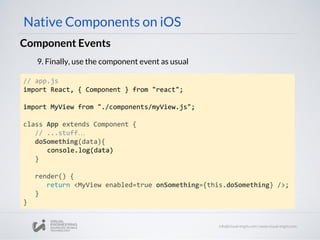
9. Finally, use the component event as usual
// app.js
import React, { Component } from "react";
import MyView from "./components/myView.js";
class App extends Component {
// ...stuff…
doSomething(data){
console.log(data)
}
render() {
return <MyView enabled=true onSomething={this.doSomething} />;
}
}
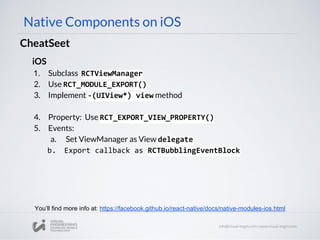
iOS
1. Subclass RCTViewManager
2. Use RCT_MODULE_EXPORT()
3. Implement -(UIView*) view method
4. Property: Use RCT_EXPORT_VIEW_PROPERTY()
5. Events:
a. Set ViewManager as View delegate
b. Export callback as RCTBubblingEventBlock
Native Components on iOS
CheatSeet
You’ll find more info at: https://facebook.github.io/react-native/docs/native-modules-ios.html
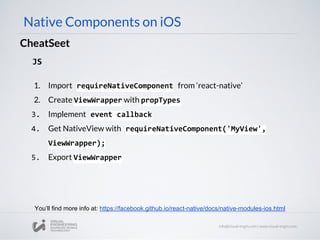
Native Components on iOS
CheatSeet
JS
1. Import requireNativeComponent from ‘react-native’
2. Create ViewWrapper with propTypes
3. Implement event callback
4. Get NativeView with requireNativeComponent('MyView',
ViewWrapper);
5. Export ViewWrapper
You’ll find more info at: https://facebook.github.io/react-native/docs/native-modules-ios.html
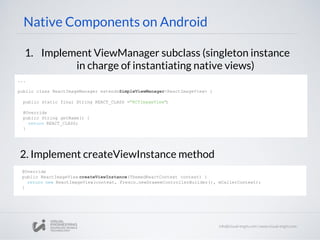
Android
Native Components on Android
1. Implement ViewManager subclass (singleton instance
in charge of instantiating native views)
2. Implement createViewInstance method
...
public class ReactImageManager extendsSimpleViewManager<ReactImageView> {
public static final String REACT_CLASS ="RCTImageView";
@Override
public String getName() {
return REACT_CLASS;
}
@Override
public ReactImageView createViewInstance(ThemedReactContext context) {
return new ReactImageView(context, Fresco.newDraweeControllerBuilder(), mCallerContext);
}
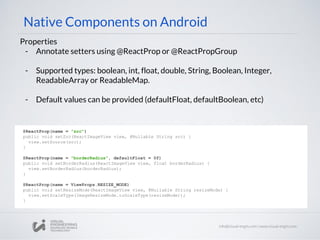
Native Components on Android
Properties
- Annotate setters using @ReactProp or @ReactPropGroup
- Supported types: boolean, int, float, double, String, Boolean, Integer,
ReadableArray or ReadableMap.
- Default values can be provided (defaultFloat, defaultBoolean, etc)
@ReactProp(name = "src")
public void setSrc(ReactImageView view, @Nullable String src) {
view.setSource(src);
}
@ReactProp(name = "borderRadius", defaultFloat = 0f)
public void setBorderRadius(ReactImageView view, float borderRadius) {
view.setBorderRadius(borderRadius);
}
@ReactProp(name = ViewProps.RESIZE_MODE)
public void setResizeMode(ReactImageView view, @Nullable String resizeMode) {
view.setScaleType(ImageResizeMode.toScaleType(resizeMode));
}
Native Components on Android
3. Register the ViewManager
Calling it from JS
@Override
public List<ViewManager> createViewManagers(
ReactApplicationContext reactContext) {
return Arrays.<ViewManager>asList(
new ReactImageManager()
);
}
// ImageView.js
import { PropTypes } from 'react';
import { requireNativeComponent, View } from'react-native';
var iface = {
name: 'ImageView',
propTypes: {
src: PropTypes.string,
borderRadius: PropTypes.number,
resizeMode: PropTypes.oneOf(['cover', 'contain', 'stretch']),
...View.propTypes // include the default view properties
},
};
module.exports = requireNativeComponent('RCTImageView', iface);
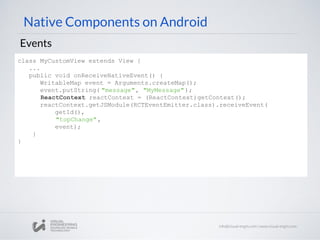
Native Components on Android
Events
class MyCustomView extends View {
...
public void onReceiveNativeEvent() {
WritableMap event = Arguments.createMap();
event.putString( "message", "MyMessage");
ReactContext reactContext = (ReactContext)getContext();
reactContext.getJSModule(RCTEventEmitter.class).receiveEvent(
getId(),
"topChange",
event);
}
}
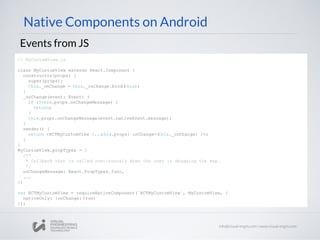
Native Components on Android
Events from JS
// MyCustomView.js
class MyCustomView extends React.Component {
constructor(props) {
super(props);
this._onChange = this._onChange.bind(this);
}
_onChange(event: Event) {
if (!this.props.onChangeMessage) {
return;
}
this.props.onChangeMessage(event.nativeEvent.message);
}
render() {
return <RCTMyCustomView {...this.props} onChange={this._onChange} />;
}
}
MyCustomView.propTypes = {
/**
* Callback that is called continuously when the user is dragging the map.
*/
onChangeMessage: React.PropTypes.func,
...
};
var RCTMyCustomView = requireNativeComponent(`RCTMyCustomView`, MyCustomView, {
nativeOnly: {onChange: true}
});
Hands on mode
Hands on mode
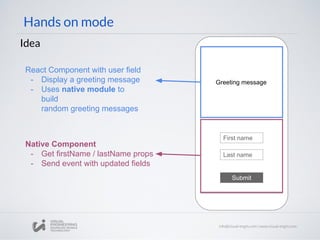
Idea
Greeting message
First name
Last name
Submit
React Component with user field
- Display a greeting message
- Uses native module to
build
random greeting messages
Native Component
- Get firstName / lastName props
- Send event with updated fields
Workshop 26: React Native - The Native Side

Workshop 26: React Native - The Native Side

  • 1.
    Front End Workshops ReactNative Part III: The Native Side Alberto Irurueta Enrique Oriol airurueta@visual-engin.com eoriol@naradarobotics.com
  • 2.
  • 3.
    React Native: isa library to generate native apps for iOS and Android mobile devices capable, programmed in javascript. React Native uses the actual native components of each platform (currently iOS and Android). Useful Native APIs React Native Part I
  • 4.
  • 5.
    NAVIGATION Navigator component handlesthe transition between different scenes in your app, available on both iOS and Android. React Native Part II TABS Several options to provide tabbed navigation. Scrollable-Tab-View is a nice iOS/Android component that lets you swipe between tabs. LISTS Use ListView to render a list of components. DRAWER BUTTON VIDEO CAMERA SWIPER
  • 6.
    NAVIGATION Navigator component handlesthe transition between different scenes in your app, available on both iOS and Android. React Native Part II TABS Several options to provide tabbed navigation. Scrollable-Tab-View is a nice iOS/Android component that lets you swipe between tabs. LISTS Use ListView to render a list of components. DRAWER BUTTON VIDEO CAMERA SWIPER
  • 7.
    The Native Side Wehave been playing on the JS side, but how does it work on the native side?
  • 8.
    The Native Side Notreally magic, it’s more like this... Native UI View Native logic Native Bridge Javascript Bridge Javascript JS Method Invoke Native Method Queue callback Native callback Invoke callback Execute callback
  • 9.
  • 10.
    What is this? Anative module can be thought as a library running in the native side Native Modules
  • 11.
  • 12.
    Basics Native Modules oniOS // CalendarManager.m @implementation CalendarManager RCT_EXPORT_MODULE(); @end 2 . Include RCT_MODULE_EXPORT() macro (on .m file) // CalendarManager.h #import "RCTBridgeModule.h" @interface CalendarManager : NSObject <RCTBridgeModule> @end 1. Implement RCTBridgeModule protocol (on .h file)
  • 13.
    Native Modules oniOS Expose method // CalendarManager.m RCT_EXPORT_METHOD ( addEvent:(NSString *)name location:(NSString *)location ) { RCTLogInfo(@"Pretending to create an event %@ at %@", name, location); } Implement RCT_EXPORT_METHOD() macro (on .m file) import { NativeModules } from 'react-native'; var CalendarManager = NativeModules.CalendarManager; CalendarManager.addEvent('Hackathon Party', 'Pier 01, BCN'); Use it on Javascript, same name up to first colon
  • 14.
    Native Modules oniOS Expose method with custom name Several methods starting with same name? RCT_REMAP_METHOD ( methodName, prop1:(float)prop1 prop2:(NSString *)prop2 ...) { // Do some stuff } Use RCT_REMAP_METHOD() macro (on .m file) Only 2 arguments!!!
  • 15.
    Native Modules oniOS Supported arguments string (NSString) number (NSInteger, float, double, CGFloat, NSNumber) boolean (BOOL, NSNumber) array (NSArray) of any types from this list object (NSDictionary) with string keys and values of any type from this list function (RCTResponseSenderBlock) ¿More formats? - Check RCTConvert
  • 16.
    Native Modules oniOS Example with NSDictionary // CalendarManager.m RCT_EXPORT_METHOD ( addEvent:(NSString *)name details:(NSDictionary *)details ){ NSString *location = [RCTConvert NSString:details[@"location"]]; NSDate *time = [RCTConvert NSDate:details[@"time"]]; ... } //JS CalendarManager.addEvent('Birthday Party', { location: '4 Privet Drive, Surrey', time: date.getTime(), description: '...' }) Getting data on iOS Sending data from JS
  • 17.
    Native Modules oniOS Promises // CalendarManager.m RCT_REMAP_METHOD ( asyncMethod, resolver:(RCTPromiseResolveBlock)resolve rejecter:(RCTPromiseRejectBlock)reject ) { //...some stuff… resolve(@"some data"); //reject(@"no_events", @"There were no events", error); } Use RCT_REMAP_METHOD() macro (on .m file) CalendarManager.asyncMethod().then( ()=>{console.log(‘success’)}, ... ) It simply returns a promise, use it as usual
  • 18.
    Native Modules oniOS Other stuff Exporting constants Callbacks Threading Sending events to JS Swift You’ll find more info at: https://facebook.github.io/react-native/docs/native-modules-ios.html
  • 19.
    iOS 1. Implement RCTBridgeModule 2.Use RCT_MODULE_EXPORT() 3. Method: Use RCT_EXPORT_METHOD() 4. Promises: Use RCT_REMAP_METHOD() with RCTPromiseResolveBlock Native Modules on iOS CheatSeet You’ll find more info at: https://facebook.github.io/react-native/docs/native-modules-ios.html JS 1. Import NativeModules from ‘react-native’ 2. Use NativeModules.YourModule
  • 20.
  • 21.
    Native Modules onAndroid Create module 1. Extend ReactContextBaseJavaModule on native Java file 2. Implement String getName() method with module name import com.facebook.react.bridge.NativeModule; import com.facebook.react.bridge.ReactApplicationContext; import com.facebook.react.bridge.ReactContext; import com.facebook.react.bridge.ReactContextBaseJavaModule; import com.facebook.react.bridge.ReactMethod; import java.util.Map; public class ToastModule extendsReactContextBaseJavaModule { private static final String DURATION_SHORT_KEY ="SHORT"; private static final String DURATION_LONG_KEY ="LONG"; public ToastModule(ReactApplicationContext reactContext) { super(reactContext); } @Override public String getName() { return "ToastAndroid"; } }
  • 22.
    Native Modules onAndroid Expose constants and methods 1. Override Map<Strings, Object> getConstants() with defined constants (optional) 2. Annotate available methods with @ReactMethod ... public class ToastModule extends ReactContextBaseJavaModule { ... @Override public Map<String, Object> getConstants() { final Map<String, Object> constants =new HashMap<>(); constants.put(DURATION_SHORT_KEY, Toast.LENGTH_SHORT); constants.put(DURATION_LONG_KEY, Toast.LENGTH_LONG); return constants; } @ReactMethod public void show(String message, int duration) { Toast.makeText(getReactApplicationContext(), message, duration).show(); } }
  • 23.
    Native Modules onAndroid Supported arguments string (String) number (Integer, Float, Double) boolean (Boolean) array (ReadableArray) of any types from this list object (ReadableMap) with string keys and values of any type from this list function (Callback)
  • 24.
    Native Modules onAndroid Register the Module 1. Add module to createNativeModules in app package class AnExampleReactPackage implementsReactPackage { @Override public List<Class<? extends JavaScriptModule>> createJSModules() { return Collections.emptyList(); } @Override public List<ViewManager> createViewManagers(ReactApplicationContext reactContext) { return Collections.emptyList(); } @Override public List<NativeModule> createNativeModules( ReactApplicationContext reactContext) { List<NativeModule> modules =new ArrayList<>(); modules.add(new ToastModule(reactContext)); return modules; }
  • 25.
    Native Modules onAndroid Register the Module 2. Add application package to MainActivity.java Calling it from JS: protected List<ReactPackage> getPackages() { return Arrays.<ReactPackage>asList( new MainReactPackage(), new AnExampleReactPackage()); // <-- Add this line with your package name. } import ToastAndroid from './ToastAndroid'; ToastAndroid.show('Awesome', ToastAndroid.SHORT);
  • 26.
    Native Modules onAndroid Callbacks Java public class UIManagerModule extends ReactContextBaseJavaModule { ... @ReactMethod public void measureLayout( int tag, int ancestorTag, Callback errorCallback, Callback successCallback) { try { measureLayout(tag, ancestorTag, mMeasureBuffer); float relativeX = PixelUtil.toDIPFromPixel(mMeasureBuffer[0]); float relativeY = PixelUtil.toDIPFromPixel(mMeasureBuffer[1]); float width = PixelUtil.toDIPFromPixel(mMeasureBuffer[2]); float height = PixelUtil.toDIPFromPixel(mMeasureBuffer[3]); successCallback.invoke(relativeX, relativeY, width, height); } catch (IllegalViewOperationException e) { errorCallback.invoke(e.getMessage()); } } ...
  • 27.
    Native Modules onAndroid Callbacks JavaScript UIManager.measureLayout( 100, 100, (msg) => { console.log(msg); }, (x, y, width, height) => { console.log(x + ':' + y + ':' + width + ':' + height); } );
  • 28.
    Native Modules onAndroid Promises Java public class UIManagerModule extends ReactContextBaseJavaModule { ... @ReactMethod public void measureLayout( int tag, int ancestorTag, Promise promise) { try { measureLayout(tag, ancestorTag, mMeasureBuffer); WritableMap map = Arguments.createMap(); map.putDouble("relativeX", PixelUtil.toDIPFromPixel(mMeasureBuffer[0])); map.putDouble("relativeY", PixelUtil.toDIPFromPixel(mMeasureBuffer[1])); map.putDouble("width", PixelUtil.toDIPFromPixel(mMeasureBuffer[2])); map.putDouble("height", PixelUtil.toDIPFromPixel(mMeasureBuffer[3])); promise.resolve(map); } catch (IllegalViewOperationException e) { promise.reject(e); } } ...
  • 29.
    Native Modules onAndroid Promises JavaScript async function measureLayout() { try { var { relativeX, relativeY, width, height, } = await UIManager.measureLayout(100, 100); console.log(relativeX + ':' + relativeY + ':' + width + ':' + height); } catch (e) { console.error(e); } } measureLayout();
  • 30.
    Native Modules onAndroid Other stuff Threading Sending events to JS Getting activity results Listening to LifeCycle events You’ll find more info at: https://facebook.github.io/react-native/docs/native-modules-android.html
  • 31.
  • 32.
  • 33.
    // MyViewManager.h #import "MyView.h" #import"RCTViewManager.h" @interface RCTMapManager : RCTViewManager @end Basics Native Components on iOS - (UIView *)view { return [[MyView alloc] init]; } 2 . Implement method - (UIView *) view in MyViewManager.m 1. Subclass RCTViewManager and export it with RCT_EXPORT_METHOD() Consider we already have an iOS custom view, for example, MyView // MyViewManager.m #import "MyViewManager.h" @implementation RCTMapManager RCT_EXPORT_MODULE() @end
  • 34.
    Native Components oniOS Use view from JS // components/myView.js import { requireNativeComponent } from 'react-native'; // requireNativeComponent automatically resolves this to "RCTMapManager" export default requireNativeComponent('MyView', null); Export component in JS file // app.js import MyView from './components/myView'; // ...some stuff… render(){return ( <MyView /> );} Use it as any other component
  • 35.
    // MyViewManager.m @implementation MyViewManager //...somestuff… RCT_EXPORT_VIEW_PROPERTY(enabled, BOOL) @end Component Input properties Native Components on iOS 1. Export property with RCT_EXPORT_VIEW_PROPERTY // app.js <MyView enabled={false} /> // MyView.h @interface MyView : UIView @property (nonatomic) BOOL enabled; @end
  • 36.
    Component Input properties NativeComponents on iOS // components/myView.js import React, { Component, PropTypes } from 'react'; import { requireNativeComponent } from 'react-native'; class MyWrapperView extends Component { render() { return <MyView {...this.props} />; } } MyWrapperView.propTypes = { enabled: PropTypes.bool, }; var MyView = requireNativeComponent('MyView', MyWrapperView); export default MyWrapperView; 2 . Document the interface in JS with React PropTypes
  • 37.
    Component Input properties NativeComponents on iOS Want to do something complex (call method on prop update, …)? - Use RCT_CUSTOM_VIEW_PROPERTY Want to relate with IBOutlet element (UILabel.text)? - Use custom setter on Obj-C View Types allowed? - string, number, boolean, object, array of any of those More info at https://facebook.github.io/react-native/docs/native-components-ios.html
  • 38.
    Component Events // MyView.h @classMyView @protocol MyViewDelegate <NSObject> - (void) someMethod:(MyView*)view; @end @interface MyView : UIView @property (weak, nonatomic)id <UserInputDelegate> delegate; @end Native Components on iOS 1. Create a delegate of MyView, with the method that launch the event
  • 39.
    Component Events Native Componentson iOS // MyViewManager @interface MyViewManager : UIView<MyViewDelegate> //...stuff @implementation MyViewManager - (void) someMethod:(MyView*)view{ /*...some stuff…*/ //send event to component view.onSomething( @{ @"someData":@"someValue" } ); } @end 2. Update ViewManager to implement the view delegate, and return a dictionary in the event callback
  • 40.
    Component Events // MyViewManager -(UIView *)view { MyView* view = [[MyView alloc] init]; view.delegate = self; Return view; } Native Components on iOS 3. Update ViewManager (UIView*) view method to assign delegate 4. Export RCTBubblingEventBlock property on ViewManager // MyViewManager @implementation MyViewManager //...stuff... RCT_EXPORT_VIEW_PROPERTY(onSomething, RCTBubblingEventBlock) @end
  • 41.
    // MyView.h @property(nonatomic, copy)RCTBubblingEventBlock onSomething; Component Events Native Components on iOS 5. Declare same RTCBubblingEventBlock property on view 6. Set event function in component wrapper // components/myView.js class MyWrapperView extends Component { constructor(props) { super(props); this._onSomething = this._onSomething.bind(this); } _onSomething(event){ if (!this.props.onSomething) {return;} this.props.onSomething(event.nativeEvent.someData); }
  • 42.
    Component Events Native Componentson iOS 7. Use event function in component wrapper // components/myView.js class MyWrapperView extends Component { // ...stuff… _onSomething(event){/* ...stuff…*/} render() { return <MyView {...this.props} onSomething={this._onSomething} />; } } 8. Add event callback property to PropTypes // components/myView.js MyWrapperView.propTypes = { enabled: PropTypes.bool, onSomething: PropTypes.func }
  • 43.
    Component Events Native Componentson iOS 9. Finally, use the component event as usual // app.js import React, { Component } from "react"; import MyView from "./components/myView.js"; class App extends Component { // ...stuff… doSomething(data){ console.log(data) } render() { return <MyView enabled=true onSomething={this.doSomething} />; } }
  • 44.
    iOS 1. Subclass RCTViewManager 2.Use RCT_MODULE_EXPORT() 3. Implement -(UIView*) view method 4. Property: Use RCT_EXPORT_VIEW_PROPERTY() 5. Events: a. Set ViewManager as View delegate b. Export callback as RCTBubblingEventBlock Native Components on iOS CheatSeet You’ll find more info at: https://facebook.github.io/react-native/docs/native-modules-ios.html
  • 45.
    Native Components oniOS CheatSeet JS 1. Import requireNativeComponent from ‘react-native’ 2. Create ViewWrapper with propTypes 3. Implement event callback 4. Get NativeView with requireNativeComponent('MyView', ViewWrapper); 5. Export ViewWrapper You’ll find more info at: https://facebook.github.io/react-native/docs/native-modules-ios.html
  • 46.
  • 47.
    Native Components onAndroid 1. Implement ViewManager subclass (singleton instance in charge of instantiating native views) 2. Implement createViewInstance method ... public class ReactImageManager extendsSimpleViewManager<ReactImageView> { public static final String REACT_CLASS ="RCTImageView"; @Override public String getName() { return REACT_CLASS; } @Override public ReactImageView createViewInstance(ThemedReactContext context) { return new ReactImageView(context, Fresco.newDraweeControllerBuilder(), mCallerContext); }
  • 48.
    Native Components onAndroid Properties - Annotate setters using @ReactProp or @ReactPropGroup - Supported types: boolean, int, float, double, String, Boolean, Integer, ReadableArray or ReadableMap. - Default values can be provided (defaultFloat, defaultBoolean, etc) @ReactProp(name = "src") public void setSrc(ReactImageView view, @Nullable String src) { view.setSource(src); } @ReactProp(name = "borderRadius", defaultFloat = 0f) public void setBorderRadius(ReactImageView view, float borderRadius) { view.setBorderRadius(borderRadius); } @ReactProp(name = ViewProps.RESIZE_MODE) public void setResizeMode(ReactImageView view, @Nullable String resizeMode) { view.setScaleType(ImageResizeMode.toScaleType(resizeMode)); }
  • 49.
    Native Components onAndroid 3. Register the ViewManager Calling it from JS @Override public List<ViewManager> createViewManagers( ReactApplicationContext reactContext) { return Arrays.<ViewManager>asList( new ReactImageManager() ); } // ImageView.js import { PropTypes } from 'react'; import { requireNativeComponent, View } from'react-native'; var iface = { name: 'ImageView', propTypes: { src: PropTypes.string, borderRadius: PropTypes.number, resizeMode: PropTypes.oneOf(['cover', 'contain', 'stretch']), ...View.propTypes // include the default view properties }, }; module.exports = requireNativeComponent('RCTImageView', iface);
  • 50.
    Native Components onAndroid Events class MyCustomView extends View { ... public void onReceiveNativeEvent() { WritableMap event = Arguments.createMap(); event.putString( "message", "MyMessage"); ReactContext reactContext = (ReactContext)getContext(); reactContext.getJSModule(RCTEventEmitter.class).receiveEvent( getId(), "topChange", event); } }
  • 51.
    Native Components onAndroid Events from JS // MyCustomView.js class MyCustomView extends React.Component { constructor(props) { super(props); this._onChange = this._onChange.bind(this); } _onChange(event: Event) { if (!this.props.onChangeMessage) { return; } this.props.onChangeMessage(event.nativeEvent.message); } render() { return <RCTMyCustomView {...this.props} onChange={this._onChange} />; } } MyCustomView.propTypes = { /** * Callback that is called continuously when the user is dragging the map. */ onChangeMessage: React.PropTypes.func, ... }; var RCTMyCustomView = requireNativeComponent(`RCTMyCustomView`, MyCustomView, { nativeOnly: {onChange: true} });
  • 52.
  • 53.
    Hands on mode Idea Greetingmessage First name Last name Submit React Component with user field - Display a greeting message - Uses native module to build random greeting messages Native Component - Get firstName / lastName props - Send event with updated fields