React-Native
for multi-platform mobile applications
Matteo Manchi
Full stack web developer
CEO at Impronta Advance
Twitter: @matteomanchi
Agenda
From React to React Native
Technologies behind RN
Multi-platform compatibility
iOS and Android native modules
Let's start from the
beginning...
What is React.js?
React is a JavaScript library for building user interfaces.
Just the UI
One-way data flow
Virtual DOM
From Facebook
Some keywords
Component: Everything is a component
Props: some data passed to child component
State: some internal data of a component
JSX: XML-like syntax helps to define component's
structure
Virtual DOM: tree of custom objects representing a port
of the DOM.
Component definition
import React, {Component, PropTypes} from 'react';
class CountDown extends Component {
static propTypes = {
seconds: PropTypes.number.isRequired
};
constructor(props) {
super(props);
this.state = {
seconds: props.seconds
};
}
// ...
}
Component definition - Pt.2
class CountDown extends Component {
// ...
componentDidMount() {
setInterval(() => this.setState({
seconds: this.state.seconds-1
}), 1000);
}
render() {
return (
<span>Time left: {this.state.seconds}</span>
);
}
}
// Invoking
< CountDown seconds="10" />
With or without you JSX
// JSX
render() {
return (
<span>Time left: {this.state.seconds}</span>
);
}
// plain js
return React.createElement(
"span",
null,
"Time left: ",
this.state.seconds
);
Let's talk back about mobile
applications
What are common troubles developing (multi-platform)
mobile application?
Know how
Use native APIs
Performance
React Native
A framework for building native apps using React.
Yeah, the same React.js of web developers
Learn once, write anywhere
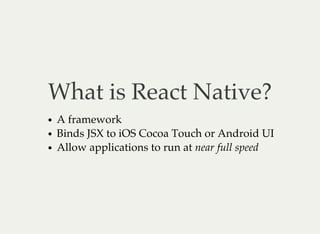
What is React Native?
A framework
Binds JSX to iOS Cocoa Touch or Android UI
Allow applications to run at near full speed
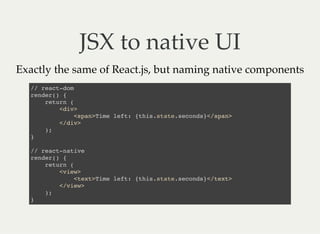
JSX to native UI
Exactly the same of React.js, but naming native components
// react-dom
render() {
return (
<div>
<span>Time left: {this.state.seconds}</span>
</div>
);
}
// react-native
render() {
return (
<view>
<text>Time left: {this.state.seconds}</text>
</view>
);
}
What do you mean with
near full speed?
Yes, like Titanium.
A lot of components
ActivityIndicatorIOS
DatePickerIOS
DrawerLayoutAndroid
Image
ListView
MapView
Modal
Navigator
NavigatorIOS
PickerIOS
ProgressBarAndroid
ProgressViewIOS
PullToRefreshViewAndroid
RefreshControl
ScrollView
SegmentedControlIOS
SliderIOS
Switch
TabBarIOS
TabBarIOS.Item
Text
TextInput
ToolbarAndroid
TouchableHighlight
TouchableNativeFeedback
TouchableOpacity
TouchableWithoutFeedback
View
ViewPagerAndroid
WebView
A lot of APIs
ActionSheetIOS
Alert
AlertIOS
Animated
AppRegistry
AppStateIOS
AsyncStorage
BackAndroid
CameraRoll
Dimensions
IntentAndroid
InteractionManager
LayoutAnimation
LinkingIOS
NativeMethodsMixin
NetInfo
PanResponder
PixelRatio
PushNotificationIOS
StatusBarIOS
StyleSheet
ToastAndroid
VibrationIOS
Requirements for
React Native
Node.js 4.0 or newer.
Xcode 7.0 or higher is required for iOS apps
Android SDK + gradle + AVD/Genymotion for Android
apps
Getting Started
$ npm install -g react-native-cli
$ react-native init AwesomeProject
$ cd AwesomeProject
// To run iOS app
$ open ios/AwesomeProject.xcodeproj
// To run Android app
$ react-native run-android
Technologies behind
React Native
React, JSX and Virtual DOM :)
Webpack loads all dependencies required by index.ios.js
and index.android.js and bundle them together
ES6 compatibility allows devs to use modern syntax and
features
NPM as module manager
Chrome Debugger as powerful debugger
Flow as type checker - optionally
All JavaScript's modules
Every module there are not DOM-depending can be used in
React Native. Like a browser, there are some polyfills that
allow to use modules you have skill with.
Flexbox
Geolocation
Network (fetch, ajax, etc)
Timers (timeout, interval, etc)
Inline CSS-like styles
Custom CSS implementation, easy to learn 'cause it's very
similar to browser's CSS.
With Flexbox.
In JavaScript.
https://facebook.github.io/react-native/docs/style.html
import {StyleSheet} from 'react-native';
const styles = StyleSheet.create({
base: {
width: 38,
height: 38,
},
background: {
backgroundColor: LIGHT_GRAY,
},
active: {
borderWidth: 4/2,
borderColor: '#00ff00',
},
});
<View style={[styles.base, styles.background]} />
What about
multi-platforms?
React Native actually supports iOS and Android. It
provides a lot of components and APIs ready to use in both
platforms.
A lot of components
ActivityIndicatorIOS
DatePickerIOS
DrawerLayoutAndroid
Image
ListView
MapView
Modal
Navigator
NavigatorIOS
PickerIOS
ProgressBarAndroid
ProgressViewIOS
PullToRefreshViewAndroid
RefreshControl
ScrollView
SegmentedControlIOS
SliderIOS
Switch
TabBarIOS
TabBarIOS.Item
Text
TextInput
ToolbarAndroid
TouchableHighlight
TouchableNativeFeedback
TouchableOpacity
TouchableWithoutFeedback
View
ViewPagerAndroid
WebView
Native Modules
React Native is madly growing up! Each release (almost
once per month) adds new features for both platforms
thanks to over 500 contributors.
Despite the big community around the project, can happen
that the native view you're looking for isn't supported by
the framework. In this case you have to wait for someone
else, or make your native module (or binding native API)
iOS Module - Pt. 1
// ShareManager.h
#import < UIKit/UIKit.h >
#import "RCTBridgeModule.h"
@interface RNShare : NSObject < RCTBridgeModule >
@end
iOS Module - Pt. 2
// ShareManager.m
@implementation ShareManager
RCT_EXPORT_MODULE();
RCT_EXPORT_METHOD(share:(NSString *)text url:(NSString *)url) {
NSURL *cardUrl = [NSURL URLWithString:url];
NSArray *itemsToShare = @[text, url, cardUrl];
UIActivityViewController *activityVC =
[[UIActivityViewController alloc]
initWithActivityItems:itemsToShare
applicationActivities:nil];
UIViewController *root =
[[[[UIApplication sharedApplication] delegate]
window] rootViewController];
[root presentViewController:activityVC animated:YES completion:nil];
}
@end
iOS Module - Pt. 3
var ShareManager = require('react-native').NativeModules.ShareManager;
ShareManager.share('Hi from RomaJS!', 'http://www.romajs.org');
http://facebook.github.io/react-native/docs/native-modules-ios.html
Android Module - Pt. 1
// ShareModule.java
// package + imports
public class ShareModule extends ReactContextBaseJavaModule {
// ...
public ShareModule(ReactApplicationContext reactContext) {
super(reactContext);
this.reactContext = reactContext;
}
@Override
public String getName() {
return "ShareManager";
}
// continue
}
Android Module - Pt. 2
// ShareModule.java
public class ShareModule extends ReactContextBaseJavaModule {
// ...
@ReactMethod
public void share(String text, String url) {
Intent sharingIntent =
new Intent(android.content.Intent.ACTION_SEND);
sharingIntent.setType("text/plain");
sharingIntent.putExtra(android.content.Intent.EXTRA_SUBJECT, text);
sharingIntent.putExtra(android.content.Intent.EXTRA_TEXT, url);
Intent chooser = Intent.createChooser(sharingIntent, "Share");
chooser.setFlags(Intent.FLAG_ACTIVITY_NEW_TASK);
this.reactContext.startActivity(chooser);
}
}
Android Module - Pt. 3
// SharePackage.java
// package + imports
public class SharePackage implements ReactPackage {
@Override
public List< NativeModule >
createNativeModules(ReactApplicationContext reactContext) {
List< NativeModule > modules = new ArrayList<>();
modules.add(new ShareModule(reactContext));
return modules;
}
// ...
}
Android Module - Pt. 4
// MainActivity.java
// ...
mReactInstanceManager = ReactInstanceManager.builder()
.setApplication(getApplication())
.setBundleAssetName("index.android.bundle")
.setJSMainModuleName("index.android")
.addPackage(new MainReactPackage())
.addPackage(new SharePackage())
.setUseDeveloperSupport(BuildConfig.DEBUG)
.setInitialLifecycleState(LifecycleState.RESUMED)
.build();
// ...
Android Module - Pt. 5
var ShareManager = require('react-native').NativeModules.ShareManager;
ShareManager.share('Hi from RomaJS!', 'http://www.romajs.org');
http://facebook.github.io/react-native/docs/native-modules-android.html
Different platform,
different behavior
Take some actions depending to platform
Method 1: if/else
import {Platform} from 'react-native';
const styles = StyleSheet.create({
myView: {
backgroundColor: Platform.OS === 'ios' ? 'red' : 'lime'
}
});
Method 2: file extension
by webpack-based packager
// MyStyle.ios.js
export default const styles = StyleSheet.create({
myView: {
backgroundColor: 'red'
}
});
// MyStyle.android.js
export default const styles = StyleSheet.create({
myView: {
backgroundColor: 'lime'
}
});
Woah! Woah!
Questions?
Native Haters
What about competitors?
Cordova/Phonegap
Ionic
Xamarin
Titanium
Thank you

React Native for multi-platform mobile applications

  • 1.
  • 2.
    Matteo Manchi Full stackweb developer CEO at Impronta Advance Twitter: @matteomanchi
  • 3.
    Agenda From React toReact Native Technologies behind RN Multi-platform compatibility iOS and Android native modules
  • 4.
    Let's start fromthe beginning...
  • 5.
    What is React.js? Reactis a JavaScript library for building user interfaces. Just the UI One-way data flow Virtual DOM From Facebook
  • 6.
    Some keywords Component: Everythingis a component Props: some data passed to child component State: some internal data of a component JSX: XML-like syntax helps to define component's structure Virtual DOM: tree of custom objects representing a port of the DOM.
  • 7.
    Component definition import React,{Component, PropTypes} from 'react'; class CountDown extends Component { static propTypes = { seconds: PropTypes.number.isRequired }; constructor(props) { super(props); this.state = { seconds: props.seconds }; } // ... }
  • 8.
    Component definition -Pt.2 class CountDown extends Component { // ... componentDidMount() { setInterval(() => this.setState({ seconds: this.state.seconds-1 }), 1000); } render() { return ( <span>Time left: {this.state.seconds}</span> ); } } // Invoking < CountDown seconds="10" />
  • 9.
    With or withoutyou JSX // JSX render() { return ( <span>Time left: {this.state.seconds}</span> ); } // plain js return React.createElement( "span", null, "Time left: ", this.state.seconds );
  • 10.
    Let's talk backabout mobile applications What are common troubles developing (multi-platform) mobile application? Know how Use native APIs Performance
  • 11.
    React Native A frameworkfor building native apps using React. Yeah, the same React.js of web developers Learn once, write anywhere
  • 12.
    What is ReactNative? A framework Binds JSX to iOS Cocoa Touch or Android UI Allow applications to run at near full speed
  • 13.
    JSX to nativeUI Exactly the same of React.js, but naming native components // react-dom render() { return ( <div> <span>Time left: {this.state.seconds}</span> </div> ); } // react-native render() { return ( <view> <text>Time left: {this.state.seconds}</text> </view> ); }
  • 14.
    What do youmean with near full speed? Yes, like Titanium.
  • 15.
    A lot ofcomponents ActivityIndicatorIOS DatePickerIOS DrawerLayoutAndroid Image ListView MapView Modal Navigator NavigatorIOS PickerIOS ProgressBarAndroid ProgressViewIOS PullToRefreshViewAndroid RefreshControl ScrollView SegmentedControlIOS SliderIOS Switch TabBarIOS TabBarIOS.Item Text TextInput ToolbarAndroid TouchableHighlight TouchableNativeFeedback TouchableOpacity TouchableWithoutFeedback View ViewPagerAndroid WebView
  • 16.
    A lot ofAPIs ActionSheetIOS Alert AlertIOS Animated AppRegistry AppStateIOS AsyncStorage BackAndroid CameraRoll Dimensions IntentAndroid InteractionManager LayoutAnimation LinkingIOS NativeMethodsMixin NetInfo PanResponder PixelRatio PushNotificationIOS StatusBarIOS StyleSheet ToastAndroid VibrationIOS
  • 17.
    Requirements for React Native Node.js4.0 or newer. Xcode 7.0 or higher is required for iOS apps Android SDK + gradle + AVD/Genymotion for Android apps
  • 18.
    Getting Started $ npminstall -g react-native-cli $ react-native init AwesomeProject $ cd AwesomeProject // To run iOS app $ open ios/AwesomeProject.xcodeproj // To run Android app $ react-native run-android
  • 19.
    Technologies behind React Native React,JSX and Virtual DOM :) Webpack loads all dependencies required by index.ios.js and index.android.js and bundle them together ES6 compatibility allows devs to use modern syntax and features NPM as module manager Chrome Debugger as powerful debugger Flow as type checker - optionally
  • 20.
    All JavaScript's modules Everymodule there are not DOM-depending can be used in React Native. Like a browser, there are some polyfills that allow to use modules you have skill with. Flexbox Geolocation Network (fetch, ajax, etc) Timers (timeout, interval, etc)
  • 21.
    Inline CSS-like styles CustomCSS implementation, easy to learn 'cause it's very similar to browser's CSS. With Flexbox. In JavaScript. https://facebook.github.io/react-native/docs/style.html
  • 22.
    import {StyleSheet} from'react-native'; const styles = StyleSheet.create({ base: { width: 38, height: 38, }, background: { backgroundColor: LIGHT_GRAY, }, active: { borderWidth: 4/2, borderColor: '#00ff00', }, }); <View style={[styles.base, styles.background]} />
  • 23.
    What about multi-platforms? React Nativeactually supports iOS and Android. It provides a lot of components and APIs ready to use in both platforms.
  • 24.
    A lot ofcomponents ActivityIndicatorIOS DatePickerIOS DrawerLayoutAndroid Image ListView MapView Modal Navigator NavigatorIOS PickerIOS ProgressBarAndroid ProgressViewIOS PullToRefreshViewAndroid RefreshControl ScrollView SegmentedControlIOS SliderIOS Switch TabBarIOS TabBarIOS.Item Text TextInput ToolbarAndroid TouchableHighlight TouchableNativeFeedback TouchableOpacity TouchableWithoutFeedback View ViewPagerAndroid WebView
  • 25.
    Native Modules React Nativeis madly growing up! Each release (almost once per month) adds new features for both platforms thanks to over 500 contributors. Despite the big community around the project, can happen that the native view you're looking for isn't supported by the framework. In this case you have to wait for someone else, or make your native module (or binding native API)
  • 26.
    iOS Module -Pt. 1 // ShareManager.h #import < UIKit/UIKit.h > #import "RCTBridgeModule.h" @interface RNShare : NSObject < RCTBridgeModule > @end
  • 27.
    iOS Module -Pt. 2 // ShareManager.m @implementation ShareManager RCT_EXPORT_MODULE(); RCT_EXPORT_METHOD(share:(NSString *)text url:(NSString *)url) { NSURL *cardUrl = [NSURL URLWithString:url]; NSArray *itemsToShare = @[text, url, cardUrl]; UIActivityViewController *activityVC = [[UIActivityViewController alloc] initWithActivityItems:itemsToShare applicationActivities:nil]; UIViewController *root = [[[[UIApplication sharedApplication] delegate] window] rootViewController]; [root presentViewController:activityVC animated:YES completion:nil]; } @end
  • 28.
    iOS Module -Pt. 3 var ShareManager = require('react-native').NativeModules.ShareManager; ShareManager.share('Hi from RomaJS!', 'http://www.romajs.org'); http://facebook.github.io/react-native/docs/native-modules-ios.html
  • 29.
    Android Module -Pt. 1 // ShareModule.java // package + imports public class ShareModule extends ReactContextBaseJavaModule { // ... public ShareModule(ReactApplicationContext reactContext) { super(reactContext); this.reactContext = reactContext; } @Override public String getName() { return "ShareManager"; } // continue }
  • 30.
    Android Module -Pt. 2 // ShareModule.java public class ShareModule extends ReactContextBaseJavaModule { // ... @ReactMethod public void share(String text, String url) { Intent sharingIntent = new Intent(android.content.Intent.ACTION_SEND); sharingIntent.setType("text/plain"); sharingIntent.putExtra(android.content.Intent.EXTRA_SUBJECT, text); sharingIntent.putExtra(android.content.Intent.EXTRA_TEXT, url); Intent chooser = Intent.createChooser(sharingIntent, "Share"); chooser.setFlags(Intent.FLAG_ACTIVITY_NEW_TASK); this.reactContext.startActivity(chooser); } }
  • 31.
    Android Module -Pt. 3 // SharePackage.java // package + imports public class SharePackage implements ReactPackage { @Override public List< NativeModule > createNativeModules(ReactApplicationContext reactContext) { List< NativeModule > modules = new ArrayList<>(); modules.add(new ShareModule(reactContext)); return modules; } // ... }
  • 32.
    Android Module -Pt. 4 // MainActivity.java // ... mReactInstanceManager = ReactInstanceManager.builder() .setApplication(getApplication()) .setBundleAssetName("index.android.bundle") .setJSMainModuleName("index.android") .addPackage(new MainReactPackage()) .addPackage(new SharePackage()) .setUseDeveloperSupport(BuildConfig.DEBUG) .setInitialLifecycleState(LifecycleState.RESUMED) .build(); // ...
  • 33.
    Android Module -Pt. 5 var ShareManager = require('react-native').NativeModules.ShareManager; ShareManager.share('Hi from RomaJS!', 'http://www.romajs.org'); http://facebook.github.io/react-native/docs/native-modules-android.html
  • 34.
    Different platform, different behavior Takesome actions depending to platform
  • 35.
    Method 1: if/else import{Platform} from 'react-native'; const styles = StyleSheet.create({ myView: { backgroundColor: Platform.OS === 'ios' ? 'red' : 'lime' } });
  • 36.
    Method 2: fileextension by webpack-based packager // MyStyle.ios.js export default const styles = StyleSheet.create({ myView: { backgroundColor: 'red' } }); // MyStyle.android.js export default const styles = StyleSheet.create({ myView: { backgroundColor: 'lime' } });
  • 37.
  • 38.
    Native Haters What aboutcompetitors? Cordova/Phonegap Ionic Xamarin Titanium
  • 39.