ITS485 Lecture 1: 

React Native Introduction
Dr. Kobkrit Viriyayudhakorn
iApp Technology Limited

http://www.kobkrit.com
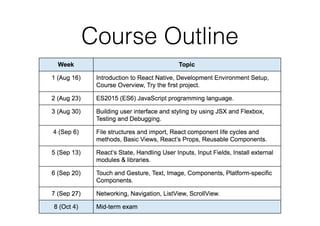
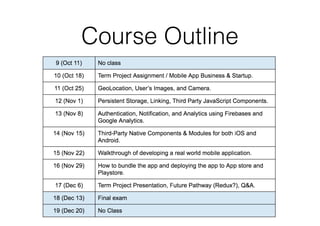
Course Outline
Course Outline
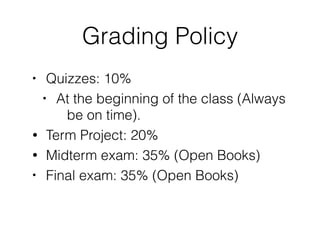
Grading Policy
• Quizzes: 10%
• At the beginning of the class (Always
be on time).
• Term Project: 20%
• Midterm exam: 35% (Open Books)
• Final exam: 35% (Open Books)

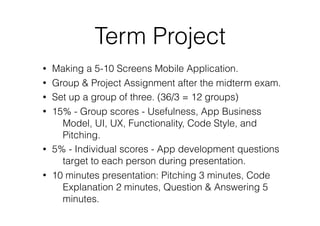
Term Project
• Making a 5-10 Screens Mobile Application.
• Group & Project Assignment after the midterm exam.
• Set up a group of three. (36/3 = 12 groups)
• 15% - Group scores - Usefulness, App Business
Model, UI, UX, Functionality, Code Style, and
Pitching.
• 5% - Individual scores - App development questions
target to each person during presentation.
• 10 minutes presentation: Pitching 3 minutes, Code
Explanation 2 minutes, Question & Answering 5
minutes.
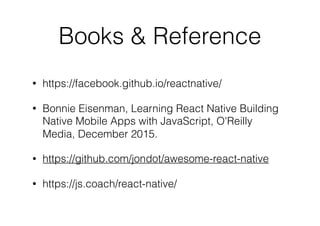
Books & Reference
• https://facebook.github.io/reactnative/
• Bonnie Eisenman, Learning React Native Building
Native Mobile Apps with JavaScript, O'Reilly
Media, December 2015.
• https://github.com/jondot/awesome-react-native
• https://js.coach/react-native/
What is React Native?
• JavaScript framework for building iOS and Android
mobile apps.
• Based on popular JavaScript Web framework called
React.
• Created by Facebook. Firstly release iOS version on
March 2015 and Android version on September
2015
• Writing the app by using JavaScript and XML-esque
markup (JSX)
• React-Native bridges and invokes the Native
rendering API in Objective-C (iOS) and Java
(Android)
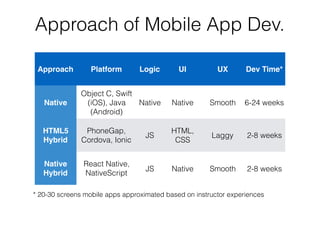
Approach of Mobile App Dev.
Approach Platform Logic UI UX Dev Time*
Native
Object C, Swift
(iOS), Java
(Android)
Native Native Smooth 6-24 weeks
HTML5
Hybrid
PhoneGap,
Cordova, Ionic
JS
HTML,

CSS
Laggy 2-8 weeks
Native
Hybrid
React Native,

NativeScript
JS Native Smooth 2-8 weeks
* 20-30 screens mobile apps approximated based on instructor experiences
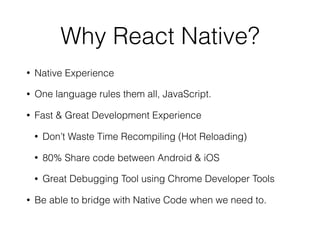
Why React Native?
• Native Experience
• One language rules them all, JavaScript.
• Fast & Great Development Experience
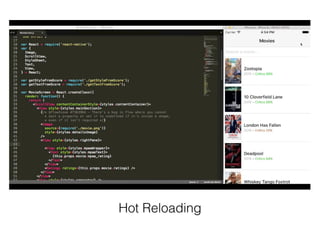
• Don’t Waste Time Recompiling (Hot Reloading)
• 80% Share code between Android & iOS
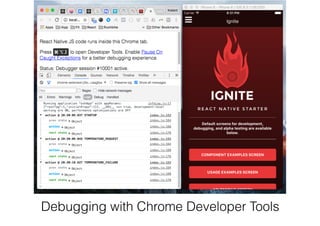
• Great Debugging Tool using Chrome Developer Tools
• Be able to bridge with Native Code when we need to.
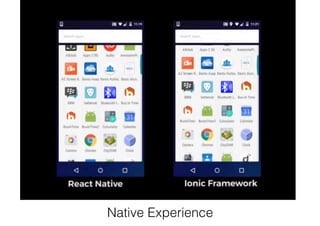
Native Experience
Hot Reloading
Debugging with Chrome Developer Tools
Why not React Native?
• React-Native is still relatively young compared with
Native iOS and Android Communities (Released on
2015)
• Some of Native API still are not supported. (But you
can use the native libraries through)
• Add one additional layer to mobile app project.
What is React?
• Declarative, Efficient,
and Flexible
JavaScript Library that
Building User
Interface on Website.
• React Native is rooted
from React.
• React treats every
thing as a Component.
A React Component
How React Native Works?
• Q: How a Web framework (React) can be improved and
become a Native Mobile Development Platform?
• A: Flexibility of React’s Virtual DOM
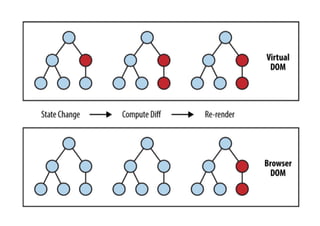
• React aimed to make Web application fast as much as
possible.
• DOM Changing (Changing the content of webpage)
dynamically is expensive step. Re-rendering DOM is
significant impact on performance.
• Rather than directly render change DOM in the page, React
compute the only diff that need to be render in memory by
Virtual DOM and re-renders the minimal amount necessary.
Virtual Dom, Technique of React => Root of React Native
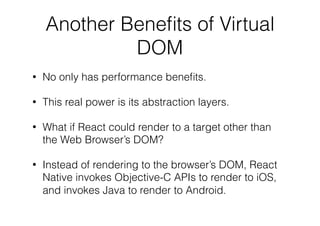
Another Benefits of Virtual
DOM
• Performance benefits.
• Abstraction layers.
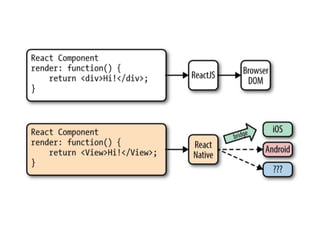
• FB Engineer: What if React could render to a target
other than the Web Browser’s DOM?
• Instead of rendering HTML/CSS to the browser’s
DOM. Why can’t we rendering mobile app by using
Objective-C APIs to render to iOS, and invokes
Java to render to Android.
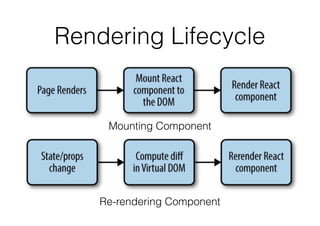
Rendering Lifecycle
Mounting Component
Re-rendering Component
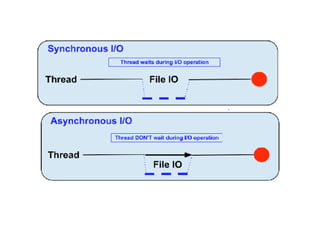
Async Rules
• Good benefits of JavaScript is their asynchronous
natures.
• React-Native is running on separated thread using
JavaScript asynchronous call via the event bridge
to invokes the host native platform’s underlying APIs
and UI elements. (Objective-C, Java)
• Since, React-Native don’t run on the main UI
rendering thread, it can do asynchronous call without
impact user’s experience (such as delay).
Android

Native

UI
Event Bridge
JS World Android World
Thread 1 Main Thread
AsyncCall
(Non-Blocking)
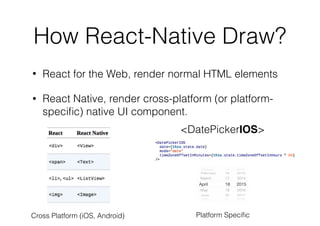
How React-Native Draw?
• React for the Web, render normal HTML elements
• React Native, render cross-platform (or platform-
specific) native UI component.
Cross Platform (iOS, Android) Platform Specific
<DatePickerIOS>
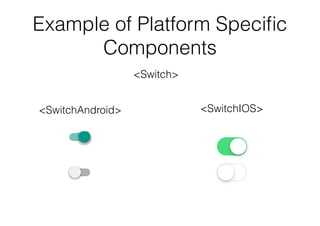
Example of Platform Specific
Components
<Switch>
<SwitchIOS><SwitchAndroid>
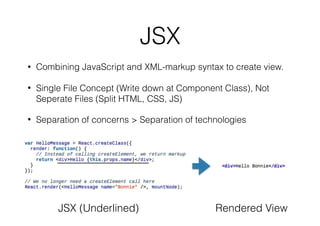
JSX
• Combining JavaScript and XML-markup syntax to create view.
• Single File Concept (Write down at Component Class), Not
Seperate Files (Split HTML, CSS, JS)
• Separation of concerns > Separation of technologies
JSX (Underlined) Rendered View
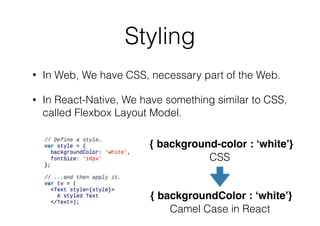
Styling
• In Web, We have CSS, necessary part of the Web.
• In React-Native, We have something similar to CSS,
called Flexbox Layout Model.
{ background-color : ‘white’}
{ backgroundColor : ‘white’}
CSS
Camel Case in React
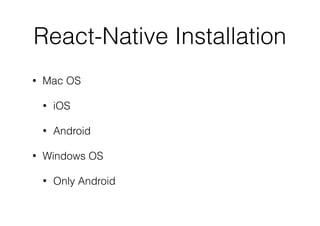
React-Native Support
• Mac OS can develop
• iOS
• Android
• Windows OS can develop
• Only Android
HomeBrew Installation
• Open Terminal (Click on Find icon on the top right
of the screen)
• Type “Terminal”
• Enter $ /usr/bin/ruby -e "$(curl -fsSL https://
raw.githubusercontent.com/Homebrew/install/
master/install)"
Install React-Native in Mac
for iOS Development.
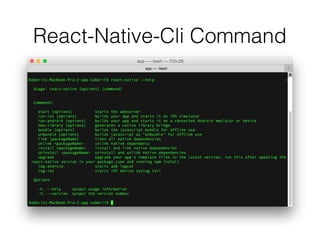
React-Native-Cli Command
Try
• $ react-native init sampleProject
• $ cd sampleProject
• $ react-native run-ios
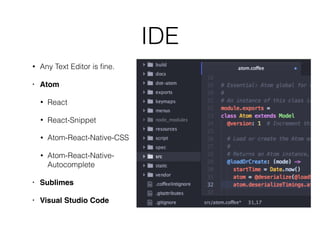
IDE
• Any Text Editor is fine.
• Atom
• React
• React-Snippet
• Atom-React-Native-CSS
• Atom-React-Native-
Autocomplete
• Sublimes
• Visual Studio Code
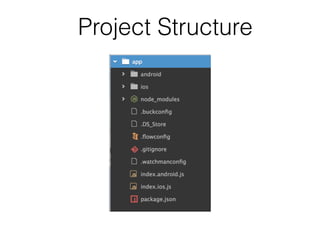
Project Structure
Download Lecture Note
After Class & Video
http://www.kobkrit.com

React Native Introduction: Making Real iOS and Android Mobile App By JavaScript

  • 1.
    ITS485 Lecture 1:
 React Native Introduction Dr. Kobkrit Viriyayudhakorn iApp Technology Limited
 http://www.kobkrit.com
  • 3.
  • 4.
  • 5.
    Grading Policy • Quizzes:10% • At the beginning of the class (Always be on time). • Term Project: 20% • Midterm exam: 35% (Open Books) • Final exam: 35% (Open Books)

  • 6.
    Term Project • Makinga 5-10 Screens Mobile Application. • Group & Project Assignment after the midterm exam. • Set up a group of three. (36/3 = 12 groups) • 15% - Group scores - Usefulness, App Business Model, UI, UX, Functionality, Code Style, and Pitching. • 5% - Individual scores - App development questions target to each person during presentation. • 10 minutes presentation: Pitching 3 minutes, Code Explanation 2 minutes, Question & Answering 5 minutes.
  • 7.
    Books & Reference •https://facebook.github.io/reactnative/ • Bonnie Eisenman, Learning React Native Building Native Mobile Apps with JavaScript, O'Reilly Media, December 2015. • https://github.com/jondot/awesome-react-native • https://js.coach/react-native/
  • 9.
    What is ReactNative? • JavaScript framework for building iOS and Android mobile apps. • Based on popular JavaScript Web framework called React. • Created by Facebook. Firstly release iOS version on March 2015 and Android version on September 2015 • Writing the app by using JavaScript and XML-esque markup (JSX) • React-Native bridges and invokes the Native rendering API in Objective-C (iOS) and Java (Android)
  • 10.
    Approach of MobileApp Dev. Approach Platform Logic UI UX Dev Time* Native Object C, Swift (iOS), Java (Android) Native Native Smooth 6-24 weeks HTML5 Hybrid PhoneGap, Cordova, Ionic JS HTML,
 CSS Laggy 2-8 weeks Native Hybrid React Native,
 NativeScript JS Native Smooth 2-8 weeks * 20-30 screens mobile apps approximated based on instructor experiences
  • 11.
    Why React Native? •Native Experience • One language rules them all, JavaScript. • Fast & Great Development Experience • Don’t Waste Time Recompiling (Hot Reloading) • 80% Share code between Android & iOS • Great Debugging Tool using Chrome Developer Tools • Be able to bridge with Native Code when we need to.
  • 12.
  • 13.
  • 14.
    Debugging with ChromeDeveloper Tools
  • 15.
    Why not ReactNative? • React-Native is still relatively young compared with Native iOS and Android Communities (Released on 2015) • Some of Native API still are not supported. (But you can use the native libraries through) • Add one additional layer to mobile app project.
  • 16.
    What is React? •Declarative, Efficient, and Flexible JavaScript Library that Building User Interface on Website. • React Native is rooted from React. • React treats every thing as a Component. A React Component
  • 17.
    How React NativeWorks? • Q: How a Web framework (React) can be improved and become a Native Mobile Development Platform? • A: Flexibility of React’s Virtual DOM • React aimed to make Web application fast as much as possible. • DOM Changing (Changing the content of webpage) dynamically is expensive step. Re-rendering DOM is significant impact on performance. • Rather than directly render change DOM in the page, React compute the only diff that need to be render in memory by Virtual DOM and re-renders the minimal amount necessary.
  • 18.
    Virtual Dom, Techniqueof React => Root of React Native
  • 19.
    Another Benefits ofVirtual DOM • Performance benefits. • Abstraction layers. • FB Engineer: What if React could render to a target other than the Web Browser’s DOM? • Instead of rendering HTML/CSS to the browser’s DOM. Why can’t we rendering mobile app by using Objective-C APIs to render to iOS, and invokes Java to render to Android.
  • 21.
  • 22.
    Async Rules • Goodbenefits of JavaScript is their asynchronous natures. • React-Native is running on separated thread using JavaScript asynchronous call via the event bridge to invokes the host native platform’s underlying APIs and UI elements. (Objective-C, Java) • Since, React-Native don’t run on the main UI rendering thread, it can do asynchronous call without impact user’s experience (such as delay).
  • 23.
    Android
 Native
 UI Event Bridge JS WorldAndroid World Thread 1 Main Thread AsyncCall (Non-Blocking)
  • 24.
    How React-Native Draw? •React for the Web, render normal HTML elements • React Native, render cross-platform (or platform- specific) native UI component. Cross Platform (iOS, Android) Platform Specific <DatePickerIOS>
  • 25.
    Example of PlatformSpecific Components <Switch> <SwitchIOS><SwitchAndroid>
  • 26.
    JSX • Combining JavaScriptand XML-markup syntax to create view. • Single File Concept (Write down at Component Class), Not Seperate Files (Split HTML, CSS, JS) • Separation of concerns > Separation of technologies JSX (Underlined) Rendered View
  • 27.
    Styling • In Web,We have CSS, necessary part of the Web. • In React-Native, We have something similar to CSS, called Flexbox Layout Model. { background-color : ‘white’} { backgroundColor : ‘white’} CSS Camel Case in React
  • 29.
    React-Native Support • MacOS can develop • iOS • Android • Windows OS can develop • Only Android
  • 30.
    HomeBrew Installation • OpenTerminal (Click on Find icon on the top right of the screen) • Type “Terminal” • Enter $ /usr/bin/ruby -e "$(curl -fsSL https:// raw.githubusercontent.com/Homebrew/install/ master/install)"
  • 31.
    Install React-Native inMac for iOS Development.
  • 32.
  • 33.
    Try • $ react-nativeinit sampleProject • $ cd sampleProject • $ react-native run-ios
  • 34.
    IDE • Any TextEditor is fine. • Atom • React • React-Snippet • Atom-React-Native-CSS • Atom-React-Native- Autocomplete • Sublimes • Visual Studio Code

  • 35.
  • 36.
    Download Lecture Note AfterClass & Video http://www.kobkrit.com