WHO AM I ?
OTSIMO
OTSIMO CHILD
OTSIMO FAMILY
REACT NATIVE ON OTSIMO
V
What is Swift ?
Apple’s new programming language
Created by Chris Lattner, who wrote LLVM
First appeared in June 2, 2014
Easy
Android
Why Swift ?
iOS
Safe
SCADE
A Framework for building native apps using React
Started as Facebook’s internal hackathon project, in the
summer of 2013
The first public preview was in January of 2015 at React.js
Conference
What is React Native ?
Web Developer friendly
Multi-Platform Support
Live reload (vs Compile&Wait)
Why React Native ?
Some Keywords
Component
Props
State
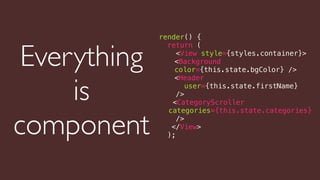
What is component ?
render() {
return (
<View style={styles.container}>
<Background
color={this.state.bgColor} />
<Header
user={this.state.firstName}
/>
<CategoryScroller
categories={this.state.categories}
/>
</View>
);
Everything
is
component
Props is data passed to child
component
<Header
user={this.state.firstName}
/>
<Text>
{this.getWelcomeText(this.props.user)}
</Text>
in header.jsin dashboard.js
State is internal data
of a component
state = {
email: '',
password: '',
valid: false,
};
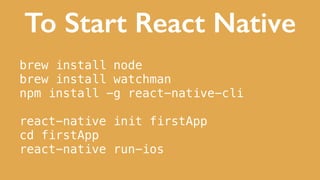
To Start React Native
brew install node
brew install watchman
npm install -g react-native-cli
react-native init firstApp
cd firstApp
react-native run-ios
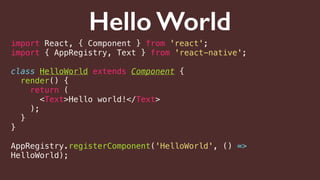
Hello World
import React, { Component } from 'react';
import { AppRegistry, Text } from 'react-native';
class HelloWorld extends Component {
render() {
return (
<Text>Hello world!</Text>
);
}
}
AppRegistry.registerComponent('HelloWorld', () =>
HelloWorld);
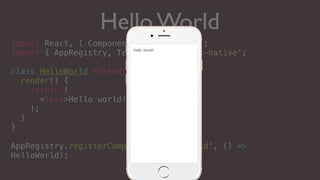
Hello World
import React, { Component } from 'react';
import { AppRegistry, Text } from 'react-native';
class HelloWorld extends Component {
render() {
return (
<Text>Hello world!</Text>
);
}
}
AppRegistry.registerComponent('HelloWorld', () =>
HelloWorld);
Hello world!
Let's use Swift and React
Native together
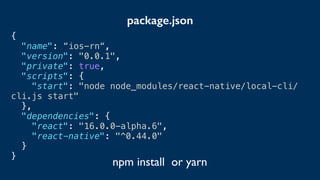
{
"name": “ios-rn“,
"version": "0.0.1",
"private": true,
"scripts": {
"start": "node node_modules/react-native/local-cli/
cli.js start"
},
"dependencies": {
"react": "16.0.0-alpha.6",
"react-native": "^0.44.0"
}
}
package.json
npm install or yarn
What our
application is
doing ?
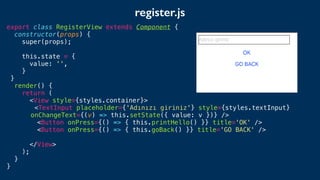
export class RegisterView extends Component {
constructor(props) {
super(props);
this.state = {
value: '',
}
}
render() {
return (
<View style={styles.container}>
<TextInput placeholder={'Adınızı giriniz'} style={styles.textInput}
onChangeText={(v) => this.setState({ value: v })} />
<Button onPress={() => { this.printHello() }} title='OK' />
<Button onPress={() => { this.goBack() }} title='GO BACK' />
</View>
);
}
}
register.js
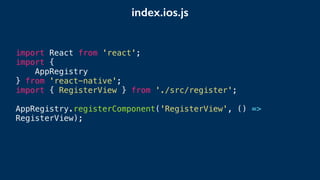
import React from 'react';
import {
AppRegistry
} from 'react-native';
import { RegisterView } from './src/register';
AppRegistry.registerComponent('RegisterView', () =>
RegisterView);
index.ios.js
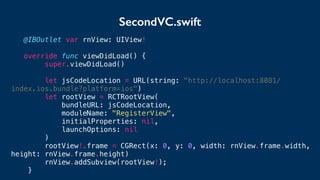
SecondVC.swift
@IBOutlet var rnView: UIView!
override func viewDidLoad() {
super.viewDidLoad()
let jsCodeLocation = URL(string: "http://localhost:8081/
index.ios.bundle?platform=ios")
let rootView = RCTRootView(
bundleURL: jsCodeLocation,
moduleName: "RegisterView",
initialProperties: nil,
launchOptions: nil
)
rootView!.frame = CGRect(x: 0, y: 0, width: rnView.frame.width,
height: rnView.frame.height)
rnView.addSubview(rootView!);
}
DEMO
Let's run the Swift function
in React Native
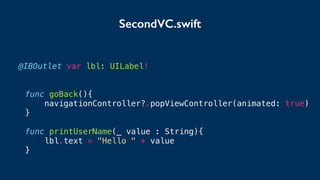
@IBOutlet var lbl: UILabel!
func goBack(){
navigationController?.popViewController(animated: true)
}
func printUserName(_ value : String){
lbl.text = "Hello " + value
}
SecondVC.swift
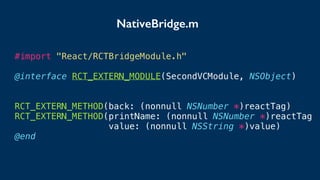
#import "React/RCTBridgeModule.h"
@interface RCT_EXTERN_MODULE(SecondVCModule, NSObject)
RCT_EXTERN_METHOD(back: (nonnull NSNumber *)reactTag)
RCT_EXTERN_METHOD(printName: (nonnull NSNumber *)reactTag
value: (nonnull NSString *)value)
@end
NativeBridge.m
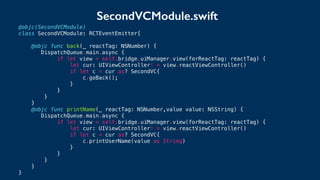
@objc(SecondVCModule)
class SecondVCModule: RCTEventEmitter{
@objc func back(_ reactTag: NSNumber) {
DispatchQueue.main.async {
if let view = self.bridge.uiManager.view(forReactTag: reactTag) {
let cur: UIViewController! = view.reactViewController()
if let c = cur as? SecondVC{
c.goBack();
}
}
}
}
@objc func printName(_ reactTag: NSNumber,value value: NSString) {
DispatchQueue.main.async {
if let view = self.bridge.uiManager.view(forReactTag: reactTag) {
let cur: UIViewController! = view.reactViewController()
if let c = cur as? SecondVC{
c.printUserName(value as String)
}
}
}
}
}
SecondVCModule.swift
DEMO
Send data from Swift to
React Native
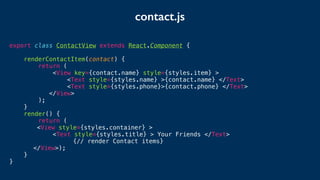
contact.js
export class ContactView extends React.Component {
renderContactItem(contact) {
return (
<View key={contact.name} style={styles.item} >
<Text style={styles.name} >{contact.name} </Text>
<Text style={styles.phone}>{contact.phone} </Text>
</View>
);
}
render() {
return (
<View style={styles.container} >
<Text style={styles.title} > Your Friends </Text>
{// render Contact items}
</View>);
}
}
ContactVC.swift
let mockData:NSDictionary = ["contacts":
[
["name":"Alex", "phone":"+90 648 274 26 19"],
["name":"Joel", "phone":"+90 342 452 45 64"]
]
]
let rootView = RCTRootView(
bundleURL: jsCodeLocation,
moduleName: "ContactView",
initialProperties: mockData as [NSObject : AnyObject],
launchOptions: nil
)
let rootView = RCTRootView(
bundleURL: jsCodeLocation,
moduleName: "RegisterView",
initialProperties: nil,
launchOptions: nil
)
before
contact.js
export class ContactView extends React.Component {
renderContactItem(contact) {
return (
<View key={contact.name} style={styles.item} >
<Text style={styles.name} >{contact.name} </Text>
<Text style={styles.phone}>{contact.phone} </Text>
</View>
);
}
render() {
return (
<View style={styles.container} >
<Text style={styles.title} > Your Friends </Text>
{this.props["contacts"].map(contact => this.renderContactItem(contact))}
</View>);
}
}
SecondVCModule.swift
export class ContactView extends React.Component {
renderContactItem(contact) {
return (
<View key={contact.name} style={{
height: 50,
flexDirection: 'row', margin: 8, padding: 8,
justifyContent: 'space-between', alignItems: 'center'
}} >
<Text style={{ fontSize: 30 }} >{contact.name} </Text>
<Text style={{ fontSize: 20 }}>{contact.phone} </Text>
</View>
);
}
render() {
return (<View style={{ flex: 1, justifyContent: 'center' }} >
<Text style={{ fontSize: 50,fontWeight:'bold' }} > Your Friends</Text>
{
this.props["contacts"].map(contact => this.renderContactItem(contact))
}
</View>);
}
}
Hello world!
DEMO
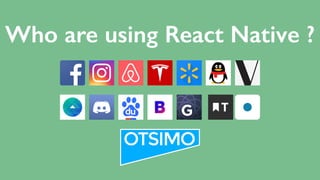
Who are using React Native ?
THANK YOU
ANY QUESTION ?
@muhammetdemirci
muhammed@otsimo.com

JSAnkara Swift v React Native

  • 1.
  • 2.
  • 3.
  • 4.
  • 5.
  • 6.
  • 7.
    What is Swift? Apple’s new programming language Created by Chris Lattner, who wrote LLVM First appeared in June 2, 2014
  • 8.
  • 9.
  • 11.
    A Framework forbuilding native apps using React Started as Facebook’s internal hackathon project, in the summer of 2013 The first public preview was in January of 2015 at React.js Conference What is React Native ?
  • 12.
    Web Developer friendly Multi-PlatformSupport Live reload (vs Compile&Wait) Why React Native ?
  • 13.
  • 14.
  • 15.
    render() { return ( <Viewstyle={styles.container}> <Background color={this.state.bgColor} /> <Header user={this.state.firstName} /> <CategoryScroller categories={this.state.categories} /> </View> ); Everything is component
  • 16.
    Props is datapassed to child component <Header user={this.state.firstName} /> <Text> {this.getWelcomeText(this.props.user)} </Text> in header.jsin dashboard.js
  • 17.
    State is internaldata of a component state = { email: '', password: '', valid: false, };
  • 18.
    To Start ReactNative brew install node brew install watchman npm install -g react-native-cli react-native init firstApp cd firstApp react-native run-ios
  • 19.
    Hello World import React,{ Component } from 'react'; import { AppRegistry, Text } from 'react-native'; class HelloWorld extends Component { render() { return ( <Text>Hello world!</Text> ); } } AppRegistry.registerComponent('HelloWorld', () => HelloWorld);
  • 20.
    Hello World import React,{ Component } from 'react'; import { AppRegistry, Text } from 'react-native'; class HelloWorld extends Component { render() { return ( <Text>Hello world!</Text> ); } } AppRegistry.registerComponent('HelloWorld', () => HelloWorld); Hello world!
  • 21.
    Let's use Swiftand React Native together
  • 22.
    { "name": “ios-rn“, "version": "0.0.1", "private":true, "scripts": { "start": "node node_modules/react-native/local-cli/ cli.js start" }, "dependencies": { "react": "16.0.0-alpha.6", "react-native": "^0.44.0" } } package.json npm install or yarn
  • 23.
  • 25.
    export class RegisterViewextends Component { constructor(props) { super(props); this.state = { value: '', } } render() { return ( <View style={styles.container}> <TextInput placeholder={'Adınızı giriniz'} style={styles.textInput} onChangeText={(v) => this.setState({ value: v })} /> <Button onPress={() => { this.printHello() }} title='OK' /> <Button onPress={() => { this.goBack() }} title='GO BACK' /> </View> ); } } register.js
  • 26.
    import React from'react'; import { AppRegistry } from 'react-native'; import { RegisterView } from './src/register'; AppRegistry.registerComponent('RegisterView', () => RegisterView); index.ios.js
  • 27.
    SecondVC.swift @IBOutlet var rnView:UIView! override func viewDidLoad() { super.viewDidLoad() let jsCodeLocation = URL(string: "http://localhost:8081/ index.ios.bundle?platform=ios") let rootView = RCTRootView( bundleURL: jsCodeLocation, moduleName: "RegisterView", initialProperties: nil, launchOptions: nil ) rootView!.frame = CGRect(x: 0, y: 0, width: rnView.frame.width, height: rnView.frame.height) rnView.addSubview(rootView!); }
  • 28.
  • 29.
    Let's run theSwift function in React Native
  • 30.
    @IBOutlet var lbl:UILabel! func goBack(){ navigationController?.popViewController(animated: true) } func printUserName(_ value : String){ lbl.text = "Hello " + value } SecondVC.swift
  • 31.
    #import "React/RCTBridgeModule.h" @interface RCT_EXTERN_MODULE(SecondVCModule,NSObject) RCT_EXTERN_METHOD(back: (nonnull NSNumber *)reactTag) RCT_EXTERN_METHOD(printName: (nonnull NSNumber *)reactTag value: (nonnull NSString *)value) @end NativeBridge.m
  • 32.
    @objc(SecondVCModule) class SecondVCModule: RCTEventEmitter{ @objcfunc back(_ reactTag: NSNumber) { DispatchQueue.main.async { if let view = self.bridge.uiManager.view(forReactTag: reactTag) { let cur: UIViewController! = view.reactViewController() if let c = cur as? SecondVC{ c.goBack(); } } } } @objc func printName(_ reactTag: NSNumber,value value: NSString) { DispatchQueue.main.async { if let view = self.bridge.uiManager.view(forReactTag: reactTag) { let cur: UIViewController! = view.reactViewController() if let c = cur as? SecondVC{ c.printUserName(value as String) } } } } } SecondVCModule.swift
  • 33.
  • 34.
    Send data fromSwift to React Native
  • 35.
    contact.js export class ContactViewextends React.Component { renderContactItem(contact) { return ( <View key={contact.name} style={styles.item} > <Text style={styles.name} >{contact.name} </Text> <Text style={styles.phone}>{contact.phone} </Text> </View> ); } render() { return ( <View style={styles.container} > <Text style={styles.title} > Your Friends </Text> {// render Contact items} </View>); } }
  • 36.
    ContactVC.swift let mockData:NSDictionary =["contacts": [ ["name":"Alex", "phone":"+90 648 274 26 19"], ["name":"Joel", "phone":"+90 342 452 45 64"] ] ] let rootView = RCTRootView( bundleURL: jsCodeLocation, moduleName: "ContactView", initialProperties: mockData as [NSObject : AnyObject], launchOptions: nil ) let rootView = RCTRootView( bundleURL: jsCodeLocation, moduleName: "RegisterView", initialProperties: nil, launchOptions: nil ) before
  • 37.
    contact.js export class ContactViewextends React.Component { renderContactItem(contact) { return ( <View key={contact.name} style={styles.item} > <Text style={styles.name} >{contact.name} </Text> <Text style={styles.phone}>{contact.phone} </Text> </View> ); } render() { return ( <View style={styles.container} > <Text style={styles.title} > Your Friends </Text> {this.props["contacts"].map(contact => this.renderContactItem(contact))} </View>); } }
  • 38.
    SecondVCModule.swift export class ContactViewextends React.Component { renderContactItem(contact) { return ( <View key={contact.name} style={{ height: 50, flexDirection: 'row', margin: 8, padding: 8, justifyContent: 'space-between', alignItems: 'center' }} > <Text style={{ fontSize: 30 }} >{contact.name} </Text> <Text style={{ fontSize: 20 }}>{contact.phone} </Text> </View> ); } render() { return (<View style={{ flex: 1, justifyContent: 'center' }} > <Text style={{ fontSize: 50,fontWeight:'bold' }} > Your Friends</Text> { this.props["contacts"].map(contact => this.renderContactItem(contact)) } </View>); } } Hello world!
  • 39.
  • 40.
    Who are usingReact Native ?
  • 41.
    THANK YOU ANY QUESTION? @muhammetdemirci muhammed@otsimo.com