Hicron /// Technical Supremacy
Change Document Display
Hicron /// Technical Supremacy
Change Document Display
Note that:
• Selection is not narrowed
• At the root tree is „Unassigned Attribute”
• Item ID’s are a set of numbers
• There’s no label of documents on output list
Hicron /// Technical Supremacy
Change Documents Display: Customizing
Configuration allows to display object keys (and more) in the user-friendly way
Customizing (SM34):
• Basic Definition
VC_TBANK_CD_LP (IMG act. _GTF_CHD_RANGE_ATTR)
• Change Document Tool: Settings by the Application Developer
VC_TBANK_CD_DV (IMG act. _GTF_CHD_DEFINE_OBJ)
IMG activities:
• Contain documentation
• Can be used in own customizing tree
Hicron /// Technical Supremacy
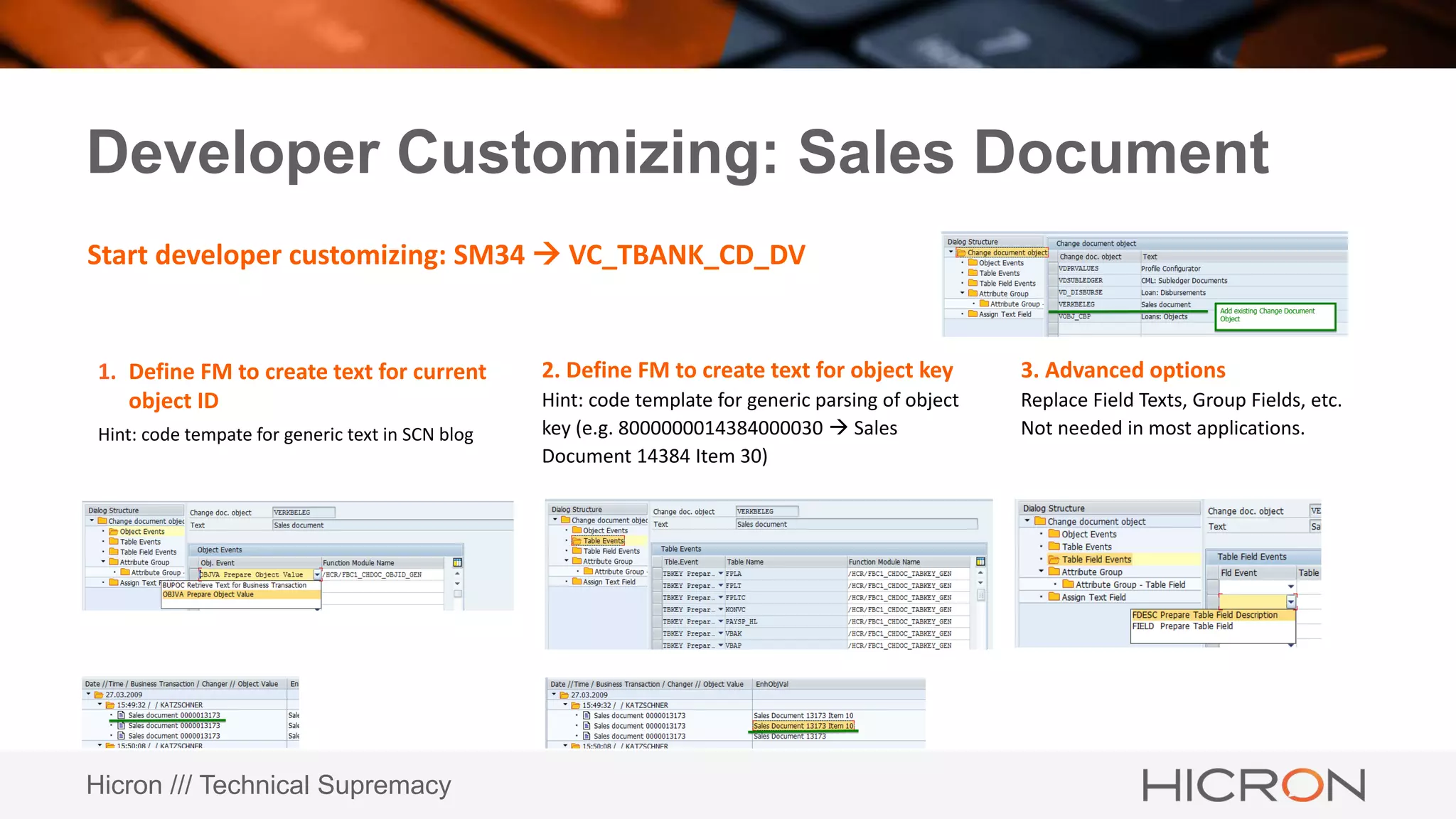
Developer Customizing: Sales Document
1. Define FM to create text for current
object ID
Hint: code tempate for generic text in SCN blog
Start developer customizing: SM34  VC_TBANK_CD_DV
2. Define FM to create text for object key
Hint: code template for generic parsing of object
key (e.g. 8000000014384000030  Sales
Document 14384 Item 30)
3. Advanced options
Replace Field Texts, Group Fields, etc.
Not needed in most applications.
Hicron /// Technical Supremacy
Example: How to use
To run Change Document Display:
CALL FUNCTION 'BANK_API_CHDOC_DISPLAY'
EXPORTING
i_tab_objectid = lt_objectid
i_applicationid = sy-repid
EXCEPTIONS
not_qualified = 1
no_change_document_found = 2
internal_error = 3
system_error = 4
OTHERS = 5
.
IF sy-subrc <> 0.
* Handle exception
ENDIF.
And… that’s all
APPEND INITIAL LINE TO lt_objectid ASSIGNING <ls_objectid>.
<ls_objectid>-objectclas = 'VERKBELEG'.
<ls_objectid>-objectid = <lv_vbeln>.
Hicron /// Technical Supremacy
Thank you
Radosław Gref
Radoslaw.gref@hicron.com

Change document display

  • 1.
    Hicron /// TechnicalSupremacy Change Document Display
  • 2.
    Hicron /// TechnicalSupremacy Change Document Display Note that: • Selection is not narrowed • At the root tree is „Unassigned Attribute” • Item ID’s are a set of numbers • There’s no label of documents on output list
  • 3.
    Hicron /// TechnicalSupremacy Change Documents Display: Customizing Configuration allows to display object keys (and more) in the user-friendly way Customizing (SM34): • Basic Definition VC_TBANK_CD_LP (IMG act. _GTF_CHD_RANGE_ATTR) • Change Document Tool: Settings by the Application Developer VC_TBANK_CD_DV (IMG act. _GTF_CHD_DEFINE_OBJ) IMG activities: • Contain documentation • Can be used in own customizing tree
  • 4.
    Hicron /// TechnicalSupremacy Developer Customizing: Sales Document 1. Define FM to create text for current object ID Hint: code tempate for generic text in SCN blog Start developer customizing: SM34  VC_TBANK_CD_DV 2. Define FM to create text for object key Hint: code template for generic parsing of object key (e.g. 8000000014384000030  Sales Document 14384 Item 30) 3. Advanced options Replace Field Texts, Group Fields, etc. Not needed in most applications.
  • 5.
    Hicron /// TechnicalSupremacy Example: How to use To run Change Document Display: CALL FUNCTION 'BANK_API_CHDOC_DISPLAY' EXPORTING i_tab_objectid = lt_objectid i_applicationid = sy-repid EXCEPTIONS not_qualified = 1 no_change_document_found = 2 internal_error = 3 system_error = 4 OTHERS = 5 . IF sy-subrc <> 0. * Handle exception ENDIF. And… that’s all APPEND INITIAL LINE TO lt_objectid ASSIGNING <ls_objectid>. <ls_objectid>-objectclas = 'VERKBELEG'. <ls_objectid>-objectid = <lv_vbeln>.
  • 6.
    Hicron /// TechnicalSupremacy Thank you Radosław Gref Radoslaw.gref@hicron.com

Editor's Notes

  • #3 Anforderungen bedarf
  • #4 Anforderungen bedarf
  • #5 Interface of FM is fixed: I_OBJECTCLAS TYPE CDOBJECTCL I_OBJECTKEYSTRUC TYPE TABNAME I_OBJECTID TYPE CDOBJECTV
  • #6 Just pass the number