Front End Workshops
VIII.Single Page Applications
Àlex Adrià Cuadripani
aadria@visual-engin.com
Templating: Dust, Handlebars
Templating Systems
Javascript Templating offers...
● Cleaner, more legible and more maintainable code.
● Presentation level desacoplation.
● More elegant way to create dynamic DOM elements.
<div class="entry">
<h1>{{title}}</h1>
<div class="body">
{{body}}
</div>
</div>
Handlebars.js is a javascript library for building clean logicless
templates based on the Mustache Templating Language.
Handlebars expressions
<h1>{{title}}</h1>
<h1>{{article.title}}</h1>
{{#each articles.[10].[#comments]}}
<h1>{{subject}}</h1>
<div>
{{body}}
</div>
{{/each}}
articles[10]['#comments']
=
Handlebars expressions can be simple identifiers or dot-
separated paths. To reference a property that is not a valid
identifier, you can use segment-literal notation.
Helpers
They are logic expressions and logic blocks that provide the
necessary logic for templates on the HTML page. You can add
complex functionality with your own custom helpers.
{{{link "See more..." story.url}}}
Handlebars.registerHelper('link', function(text, url) {
url = Handlebars.escapeExpression(url);
text = Handlebars.escapeExpression(text);
return new Handlebars.SafeString(
"<a href='" + url + "'>" + text + "</a>"
);
});
Built-in Helpers
{allFruits: ["Tangerine", "Mango", "Banana"]}
{{#each allFruits}}​
<li>{{this}}</li>​
{{/each}}
<li> Tangerine </li>​
​<li> Mango </li>​
​<li> Banana </li>
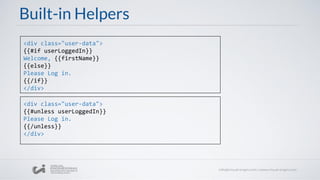
Built-in Helpers
<div class="user-data">​
{{#if userLoggedIn}}​
Welcome, {{firstName}}
{{else}}
Please Log in.
{{/if}}
</div>
<div class="user-data">​
{{#unless userLoggedIn}}​
Please Log in.
{{/unless}}
</div>
Handlebars example
<script type="text/x-handlebars-template" id="template">
<ul>
{{# each beers}}
<li>Name: {{name}}</li>
<li>Style: {{style}}</li>
{{/each}}
</ul>
</script>
var data = {};
data.beers = [{"name":"Estrella","style":"Euro Lager"},
{"name":"Voll Damm","style":"Bock"},
{"name":"Devil's","style":"Indian Pale Ale"}];
var beerTemplate = Handlebars.compile($("#template").html());
var html = beerTemplate(data);
$("#content").append(html);
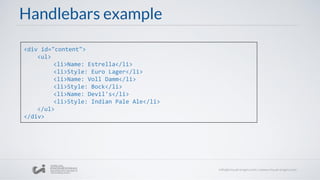
Handlebars example
<div id="content">
<ul>
<li>Name: Estrella</li>
<li>Style: Euro Lager</li>
<li>Name: Voll Damm</li>
<li>Style: Bock</li>
<li>Name: Devil's</li>
<li>Style: Indian Pale Ale</li>
</ul>
</div>
<div class="entry">
<h1>{title}</h1>
<div class="body">
{body}
</div>
</div>
Dust is a JavaScript templating engine designed to provide a clean
separation between presentation and logic without sacrificing ease
of use.
DustJS expressions
<h1>{title}</h1>
<h1>{article.title}</h1>
<h1>{.title}</h1>
<li>{.}</li>
DustJS conditionalexpressions
JSON:
{"isSelected": true}
TEMPLATE:
<input type="checkbox"{?isSelected} selected{/isSelected}>
OUTPUT:
<input type="checkbox" selected>
TEMPLATE:
<input type="checkbox"{^isSelected} selected{/isSelected}>
OUTPUT:
<input type="checkbox">
Dust can include content conditionally with ? (exists) and ^
(not exists).
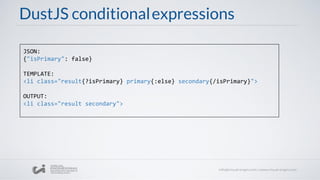
DustJS conditionalexpressions
JSON:
{"isPrimary": false}
TEMPLATE:
<li class="result{?isPrimary} primary{:else} secondary{/isPrimary}">
OUTPUT:
<li class="result secondary">
DustJS sections
Sections are a useful alternative to the dot-notation. A
section is used to switch the references context.
JSON:
{"name": "John","nickname": "Jingleheimer Schmidt","friend": {"name":
"Jacob"}}
TEMPLATE:
<span>Hello, {name}, {#friend}{name}{/friend}.</span>
OUTPUT:
<span>Hello, John, Jacob.</span>
Hello, {name}, {friend.name}
=
DustJS looping
Inside a loop, you can use {.} to reference the current item
and the special references {$idx} and {$len} to show the index
of the current item and the length of the array.
JSON:
{"languages": ["HTML","CSS","JavaScript","Dust"]}
TEMPLATE:
<ul>
{#languages}<li>{@math key=$idx method="add" operand="1"/}. {.}</li>{/languages}
</ul>
OUTPUT:
<ul><li>1. HTML</li><li>2. CSS</li><li>3. JavaScript</li><li>4. Dust</li></ul>
DustJS Helpers
Logic: {@eq}, {@ne}, {@gt}, {@lt}, {@gte}, {@lte}
Separator: {@sep}, {@first}, {@last}
Select Helper: {@select}, {@eq}, {@any}, {@none}
Math Helper: {@math}
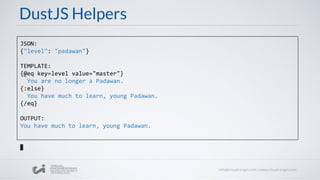
DustJS Helpers
JSON:
{"level": "padawan"}
TEMPLATE:
{@eq key=level value="master"}
You are no longer a Padawan.
{:else}
You have much to learn, young Padawan.
{/eq}
OUTPUT:
You have much to learn, young Padawan.
DustJS Helpers
JSON:
{"guests": ["Alice", "Bob", "Charlie"]}
TEMPLATE:
{#guests}
{@first}Hello {/first}
{@last}and {/last}
{.}{@sep}, {/sep}
{@last}!{/last}
{/guests}
OUTPUT:
Hello Alice, Bob, and Charlie!
DustJS Helpers
JSON:
{"progress": 70}
TEMPLATE:
There is {@math key=100 method="subtract" operand=progress/}% left to do.
OUTPUT:
There is 30% left to do.
DustJS Partials
Templates can include other templates by using partials. A
partial relies on the JSON context of the parent template
invoking it. Partials also accept parameters that add extra
references.
{>"header" mode="classic"/}
DustJS Partials
JSON:
{"isGreeting": true,
"parks": [{"name": "Disneyland","qualifier": "Happiest"},"name": "Disney World
Magic Kingdom", "qualifier": "Most Magical"}]}
DISNEY-PARK TEMPLATE:
{?isGreeting}Greetings{:else}Goodbye{/isGreeting} from {parkName}, The {qualifier}
Place on Earth!
DISNEY TEMPLATE:
{#parks}
{>"disney-park" parkName=name qualifier=qualifier/}{~n}
{/parks}
OUTPUT:
Greetings from Disneyland, The Happiest Place on Earth!
Greetings from Disney World Magic Kingdom, The Most Magical Place on Earth!
DustJS Example
<script type="text/x-template" id="building-item-template">
<li buildingId="{id}" class="building-list-item">
<div class="building-name">{name}</div>
</li>
</script>
var buildingTemplate = dust.compile($("#building-item-template").html(),"tpl");
dust.loadSource(buildingTemplate);
var templateFunction = function(building) {
var result;
dust.render("buildingTemplate", building, function(err, res) {
result = res;
});
return result;
};
DustJS Example
var building = {
id: 1,
name: "Empire State Building"
};
$("#content").append(templateFunction(building));
<div id="content">
<li buildingId="1" class="building-list-item">
<div class="building-name">Empire State Building</div>
</li>
</div>
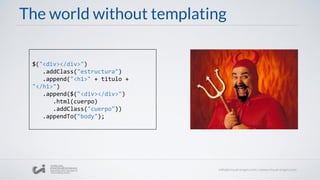
The world without templating
$("<div></div>")
.addClass("estructura")
.append("<h1>" + titulo +
"</h1>")
.append($("<div></div>")
.html(cuerpo)
.addClass("cuerpo"))
.appendTo("body");
More information in...
● http://handlebarsjs.com/
● http://javascriptissexy.com/handlebars-js-tutorial-learn-everything-
about-handlebars-js-javascript-templating/
● http://www.dustjs.com/guides/getting-started/
● http://akdubya.github.io/dustjs/
● http://www.remwebdevelopment.com/blog/javascript/learning-about-
dustjs-47.html
THANKS FOR YOUR ATTENTION!
Give your questions on the comments section
Workshop 8: Templating: Handlebars, DustJS

Workshop 8: Templating: Handlebars, DustJS

  • 1.
    Front End Workshops VIII.SinglePage Applications Àlex Adrià Cuadripani aadria@visual-engin.com Templating: Dust, Handlebars
  • 2.
  • 3.
    Javascript Templating offers... ●Cleaner, more legible and more maintainable code. ● Presentation level desacoplation. ● More elegant way to create dynamic DOM elements.
  • 4.
    <div class="entry"> <h1>{{title}}</h1> <div class="body"> {{body}} </div> </div> Handlebars.jsis a javascript library for building clean logicless templates based on the Mustache Templating Language.
  • 5.
    Handlebars expressions <h1>{{title}}</h1> <h1>{{article.title}}</h1> {{#each articles.[10].[#comments]}} <h1>{{subject}}</h1> <div> {{body}} </div> {{/each}} articles[10]['#comments'] = Handlebarsexpressions can be simple identifiers or dot- separated paths. To reference a property that is not a valid identifier, you can use segment-literal notation.
  • 6.
    Helpers They are logicexpressions and logic blocks that provide the necessary logic for templates on the HTML page. You can add complex functionality with your own custom helpers. {{{link "See more..." story.url}}} Handlebars.registerHelper('link', function(text, url) { url = Handlebars.escapeExpression(url); text = Handlebars.escapeExpression(text); return new Handlebars.SafeString( "<a href='" + url + "'>" + text + "</a>" ); });
  • 7.
    Built-in Helpers {allFruits: ["Tangerine","Mango", "Banana"]} {{#each allFruits}}​ <li>{{this}}</li>​ {{/each}} <li> Tangerine </li>​ ​<li> Mango </li>​ ​<li> Banana </li>
  • 8.
    Built-in Helpers <div class="user-data">​ {{#ifuserLoggedIn}}​ Welcome, {{firstName}} {{else}} Please Log in. {{/if}} </div> <div class="user-data">​ {{#unless userLoggedIn}}​ Please Log in. {{/unless}} </div>
  • 9.
    Handlebars example <script type="text/x-handlebars-template"id="template"> <ul> {{# each beers}} <li>Name: {{name}}</li> <li>Style: {{style}}</li> {{/each}} </ul> </script> var data = {}; data.beers = [{"name":"Estrella","style":"Euro Lager"}, {"name":"Voll Damm","style":"Bock"}, {"name":"Devil's","style":"Indian Pale Ale"}]; var beerTemplate = Handlebars.compile($("#template").html()); var html = beerTemplate(data); $("#content").append(html);
  • 10.
    Handlebars example <div id="content"> <ul> <li>Name:Estrella</li> <li>Style: Euro Lager</li> <li>Name: Voll Damm</li> <li>Style: Bock</li> <li>Name: Devil's</li> <li>Style: Indian Pale Ale</li> </ul> </div>
  • 11.
    <div class="entry"> <h1>{title}</h1> <div class="body"> {body} </div> </div> Dustis a JavaScript templating engine designed to provide a clean separation between presentation and logic without sacrificing ease of use.
  • 12.
  • 13.
    DustJS conditionalexpressions JSON: {"isSelected": true} TEMPLATE: <inputtype="checkbox"{?isSelected} selected{/isSelected}> OUTPUT: <input type="checkbox" selected> TEMPLATE: <input type="checkbox"{^isSelected} selected{/isSelected}> OUTPUT: <input type="checkbox"> Dust can include content conditionally with ? (exists) and ^ (not exists).
  • 14.
    DustJS conditionalexpressions JSON: {"isPrimary": false} TEMPLATE: <liclass="result{?isPrimary} primary{:else} secondary{/isPrimary}"> OUTPUT: <li class="result secondary">
  • 15.
    DustJS sections Sections area useful alternative to the dot-notation. A section is used to switch the references context. JSON: {"name": "John","nickname": "Jingleheimer Schmidt","friend": {"name": "Jacob"}} TEMPLATE: <span>Hello, {name}, {#friend}{name}{/friend}.</span> OUTPUT: <span>Hello, John, Jacob.</span> Hello, {name}, {friend.name} =
  • 16.
    DustJS looping Inside aloop, you can use {.} to reference the current item and the special references {$idx} and {$len} to show the index of the current item and the length of the array. JSON: {"languages": ["HTML","CSS","JavaScript","Dust"]} TEMPLATE: <ul> {#languages}<li>{@math key=$idx method="add" operand="1"/}. {.}</li>{/languages} </ul> OUTPUT: <ul><li>1. HTML</li><li>2. CSS</li><li>3. JavaScript</li><li>4. Dust</li></ul>
  • 17.
    DustJS Helpers Logic: {@eq},{@ne}, {@gt}, {@lt}, {@gte}, {@lte} Separator: {@sep}, {@first}, {@last} Select Helper: {@select}, {@eq}, {@any}, {@none} Math Helper: {@math}
  • 18.
    DustJS Helpers JSON: {"level": "padawan"} TEMPLATE: {@eqkey=level value="master"} You are no longer a Padawan. {:else} You have much to learn, young Padawan. {/eq} OUTPUT: You have much to learn, young Padawan.
  • 19.
    DustJS Helpers JSON: {"guests": ["Alice","Bob", "Charlie"]} TEMPLATE: {#guests} {@first}Hello {/first} {@last}and {/last} {.}{@sep}, {/sep} {@last}!{/last} {/guests} OUTPUT: Hello Alice, Bob, and Charlie!
  • 20.
    DustJS Helpers JSON: {"progress": 70} TEMPLATE: Thereis {@math key=100 method="subtract" operand=progress/}% left to do. OUTPUT: There is 30% left to do.
  • 21.
    DustJS Partials Templates caninclude other templates by using partials. A partial relies on the JSON context of the parent template invoking it. Partials also accept parameters that add extra references. {>"header" mode="classic"/}
  • 22.
    DustJS Partials JSON: {"isGreeting": true, "parks":[{"name": "Disneyland","qualifier": "Happiest"},"name": "Disney World Magic Kingdom", "qualifier": "Most Magical"}]} DISNEY-PARK TEMPLATE: {?isGreeting}Greetings{:else}Goodbye{/isGreeting} from {parkName}, The {qualifier} Place on Earth! DISNEY TEMPLATE: {#parks} {>"disney-park" parkName=name qualifier=qualifier/}{~n} {/parks} OUTPUT: Greetings from Disneyland, The Happiest Place on Earth! Greetings from Disney World Magic Kingdom, The Most Magical Place on Earth!
  • 23.
    DustJS Example <script type="text/x-template"id="building-item-template"> <li buildingId="{id}" class="building-list-item"> <div class="building-name">{name}</div> </li> </script> var buildingTemplate = dust.compile($("#building-item-template").html(),"tpl"); dust.loadSource(buildingTemplate); var templateFunction = function(building) { var result; dust.render("buildingTemplate", building, function(err, res) { result = res; }); return result; };
  • 24.
    DustJS Example var building= { id: 1, name: "Empire State Building" }; $("#content").append(templateFunction(building)); <div id="content"> <li buildingId="1" class="building-list-item"> <div class="building-name">Empire State Building</div> </li> </div>
  • 25.
    The world withouttemplating $("<div></div>") .addClass("estructura") .append("<h1>" + titulo + "</h1>") .append($("<div></div>") .html(cuerpo) .addClass("cuerpo")) .appendTo("body");
  • 26.
    More information in... ●http://handlebarsjs.com/ ● http://javascriptissexy.com/handlebars-js-tutorial-learn-everything- about-handlebars-js-javascript-templating/ ● http://www.dustjs.com/guides/getting-started/ ● http://akdubya.github.io/dustjs/ ● http://www.remwebdevelopment.com/blog/javascript/learning-about- dustjs-47.html
  • 27.
    THANKS FOR YOURATTENTION! Give your questions on the comments section