with shared code
React Native
using
on and
Building
(Building framework with shared code on Android and iOS using React Native)
Oleksandr Yefremov
Mobile Architect at ProSiebenSat1.Digital GmbH, Munich, Germany
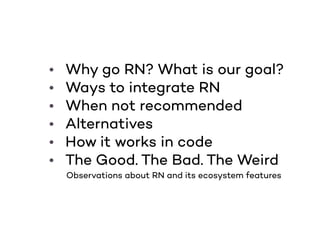
• Why go RN? What is our goal?
• Ways to integrate RN
• When not recommended
• Alternatives
• How it works in code
• The Good. The Bad. The Weird
Observations about RN and its ecosystem features
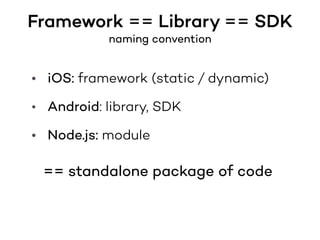
Framework == Library == SDK
naming convention
• iOS: framework (static / dynamic)
• Android: library, SDK
• Node.js: module
== standalone package of code
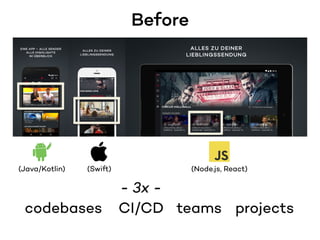
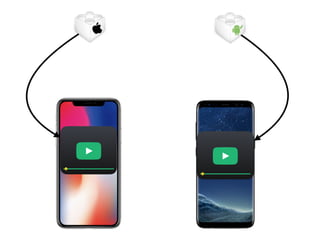
Before
(Java/Kotlin) (Swift) (Node.js, React)
codebases
- 3x -
CI/CD teams projects
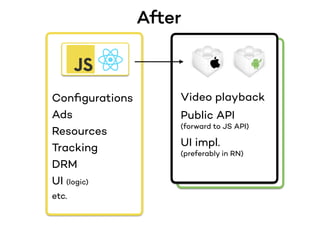
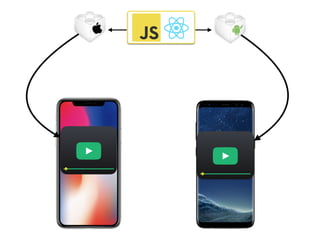
After
Configurations
Ads
Resources
Tracking
DRM
UI (logic)
etc.
Video playback
Public API
(forward to JS API)
UI impl.
(preferably in RN)
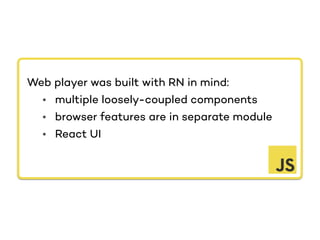
Web player was built with RN in mind:
• multiple loosely-coupled components
• browser features are in separate module
• React UI
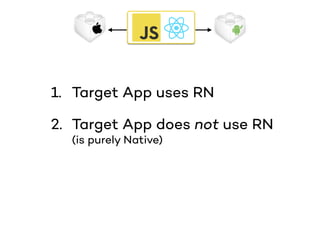
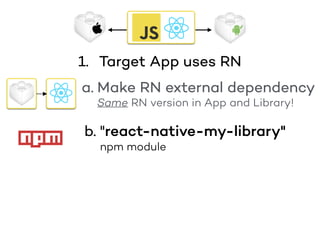
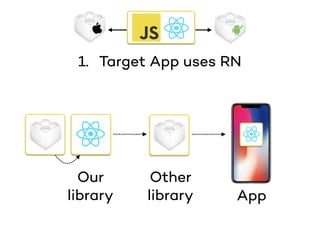
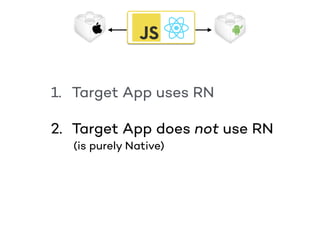
1. Target App uses RN
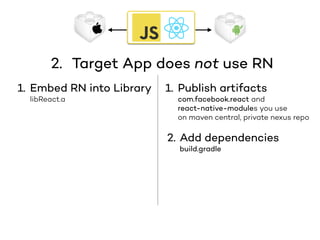
2. Target App does not use RN
(is purely Native)
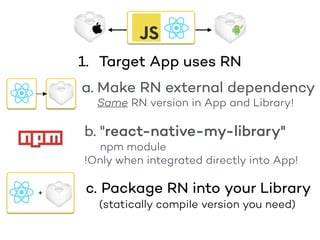
a. Make RN external dependency
Same RN version in App and Library!
"React Native version mismatch
JavaScript version: 0.50.1

Native version: 0.49.3"
> build.gradle
compile "com.facebook.react:react-native:0.50.1"
> Podfile
pod 'ReactNative', '0.50.1'
1. Target App uses RN
b. "react-native-my-library"
npm module
a. Make RN external dependency
Same RN version in App and Library!
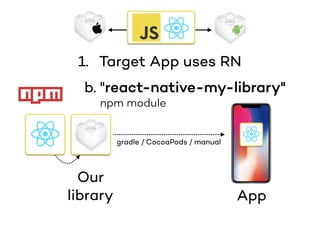
1. Target App uses RN
b. "react-native-my-library"
npm module
Our
library App
gradle / CocoaPods / manual
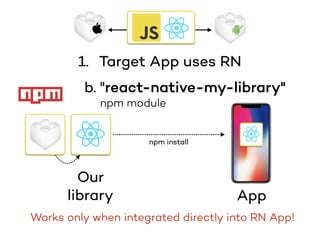
1. Target App uses RN
Works only when integrated directly into RN App!
Our
library App
npm install
1. Target App uses RN
b. "react-native-my-library"
npm module
Our
library
Other
library App
1. Target App uses RN
c. Package RN into your Library
b. "react-native-my-library"
npm module
!Only when integrated directly into App!
+
a. Make RN external dependency
Same RN version in App and Library!
(statically compile version you need)
1. Target App uses RN
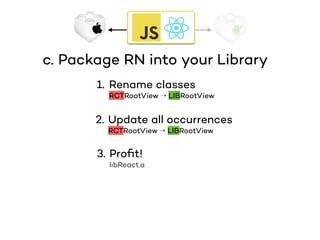
1. Rename classes
RCTRootView → LIBRootView
2. Update all occurrences
RCTRootView → LIBRootView
3. Profit!
libReact.a
c. Package RN into your Library
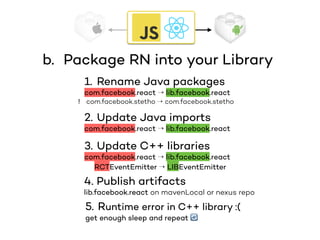
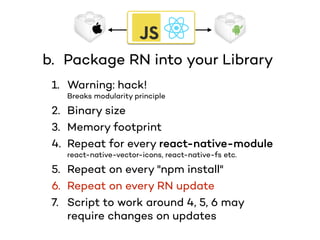
b. Package RN into your Library
1. Rename Java packages
com.facebook.react → lib.facebook.react
com.facebook.stetho → com.facebook.stetho
2. Update Java imports
com.facebook.react → lib.facebook.react
3. Update C++ libraries
com.facebook.react → lib.facebook.react
RCTEventEmitter → LIBEventEmitter
4. Publish artifacts
lib.facebook.react on mavenLocal or nexus repo
5. Runtime error in C++ library :(
get enough sleep and repeat 🔄
!
1. Warning: hack!
Breaks modularity principle
2. Binary size
3. Memory footprint
4. Repeat for every react-native-module
react-native-vector-icons, react-native-fs etc.
5. Repeat on every "npm install"
6. Repeat on every RN update
7. Script to work around 4, 5, 6 may
require changes on updates
b. Package RN into your Library
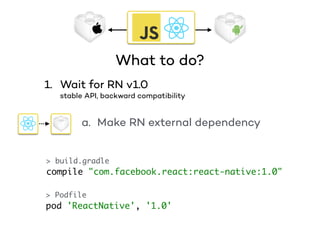
What to do?
1. Wait for RN v1.0
stable API, backward compatibility
> build.gradle
compile "com.facebook.react:react-native:1.0"
> Podfile
pod 'ReactNative', '1.0'
a. Make RN external dependency
1. Target App uses RN
(is purely Native)
2. Target App does not use RN
1. Embed RN into Library
libReact.a
1. Publish artifacts
com.facebook.react and
react-native-modules you use
on maven central, private nexus repo
2. Add dependencies
build.gradle
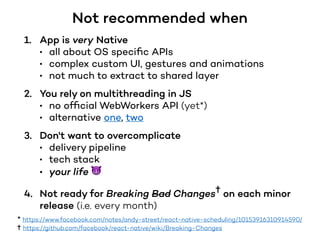
1. App is very Native
• all about OS specific APIs
• complex custom UI, gestures and animations
• not much to extract to shared layer
2. You rely on multithreading in JS
• no official WebWorkers API (yet*)
• alternative one, two
3. Don't want to overcomplicate
• delivery pipeline
• tech stack
• your life 😈
4. Not ready for Breaking Bad Changes✝ on each minor
release (i.e. every month)
Not recommended when
* https://www.facebook.com/notes/andy-street/react-native-scheduling/10153916310914590/
✝ https://github.com/facebook/react-native/wiki/Breaking-Changes
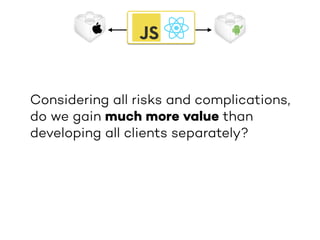
Considering all risks and complications,
do we gain much more value than
developing all clients separately?
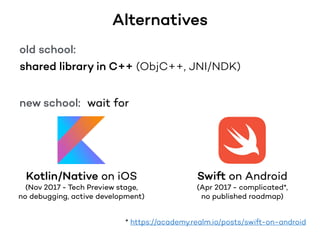
Alternatives
old school:
shared library in C++ (ObjC++, JNI/NDK)
new school: wait for
Kotlin/Native on iOS
(Nov 2017 - Tech Preview stage,
no debugging, active development)
Swift on Android
(Apr 2017 - complicated*,
no published roadmap)
* https://academy.realm.io/posts/swift-on-android
How it works
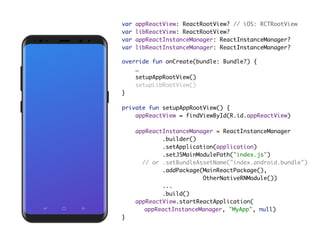
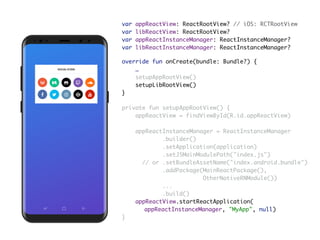
override fun onCreate(bundle: Bundle?) {

…

setupAppRootView()

setupLibRootView()

}
private fun setupAppRootView() {

appReactView = findViewById(R.id.appReactView)

appReactInstanceManager = ReactInstanceManager
.builder()

.setApplication(application)

.setJSMainModulePath("index.js")
// or .setBundleAssetName("index.android.bundle")

.addPackage(MainReactPackage(),
OtherNativeRNModule())

...

.build()

appReactView.startReactApplication(
appReactInstanceManager, "MyApp", null)
}
var appReactView: ReactRootView? // iOS: RCTRootView

var libReactView: ReactRootView?

var appReactInstanceManager: ReactInstanceManager?

var libReactInstanceManager: ReactInstanceManager?
override fun onCreate(bundle: Bundle?) {

…

setupAppRootView()

setupLibRootView()

}
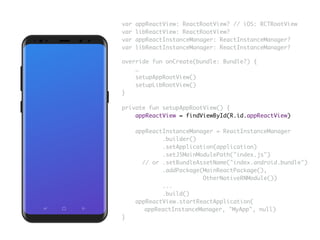
private fun setupAppRootView() {

appReactView = findViewById(R.id.appReactView)

appReactInstanceManager = ReactInstanceManager
.builder()

.setApplication(application)

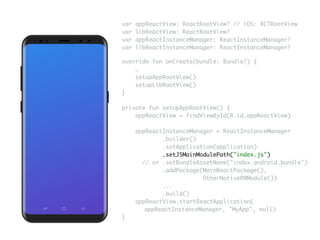
.setJSMainModulePath("index.js")
// or .setBundleAssetName("index.android.bundle")

.addPackage(MainReactPackage(),
OtherNativeRNModule())

...

.build()

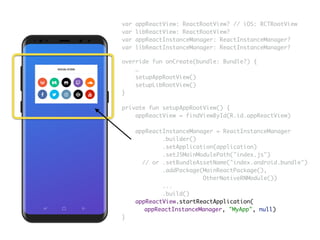
appReactView.startReactApplication(
appReactInstanceManager, "MyApp", null)
}
var appReactView: ReactRootView? // iOS: RCTRootView

var libReactView: ReactRootView?

var appReactInstanceManager: ReactInstanceManager?

var libReactInstanceManager: ReactInstanceManager?
override fun onCreate(bundle: Bundle?) {

…

setupAppRootView()

setupLibRootView()

}
private fun setupAppRootView() {

appReactView = findViewById(R.id.appReactView)

appReactInstanceManager = ReactInstanceManager
.builder()

.setApplication(application)

.setJSMainModulePath("index.js")
// or .setBundleAssetName("index.android.bundle")

.addPackage(MainReactPackage(),
OtherNativeRNModule())

...

.build()

appReactView.startReactApplication(
appReactInstanceManager, "MyApp", null)
}
var appReactView: ReactRootView? // iOS: RCTRootView

var libReactView: ReactRootView?

var appReactInstanceManager: ReactInstanceManager?

var libReactInstanceManager: ReactInstanceManager?
override fun onCreate(bundle: Bundle?) {

…

setupAppRootView()

setupLibRootView()

}
private fun setupAppRootView() {

appReactView = findViewById(R.id.appReactView)

appReactInstanceManager = ReactInstanceManager
.builder()

.setApplication(application)

.setJSMainModulePath("index.js")
// or .setBundleAssetName("index.android.bundle")

.addPackage(MainReactPackage(),
OtherNativeRNModule())

...

.build()

appReactView.startReactApplication(
appReactInstanceManager, "MyApp", null)
}
var appReactView: ReactRootView? // iOS: RCTRootView

var libReactView: ReactRootView?

var appReactInstanceManager: ReactInstanceManager?

var libReactInstanceManager: ReactInstanceManager?
override fun onCreate(bundle: Bundle?) {

…

setupAppRootView()

setupLibRootView()

}
var appReactView: ReactRootView? // iOS: RCTRootView

var libReactView: ReactRootView?

var appReactInstanceManager: ReactInstanceManager?

var libReactInstanceManager: ReactInstanceManager?
private fun setupAppRootView() {

appReactView = findViewById(R.id.appReactView)

appReactInstanceManager = ReactInstanceManager
.builder()

.setApplication(application)

.setJSMainModulePath("index.js")
// or .setBundleAssetName("index.android.bundle")

.addPackage(MainReactPackage(),
OtherNativeRNModule())

...

.build()

appReactView.startReactApplication(
appReactInstanceManager, "MyApp", null)
}
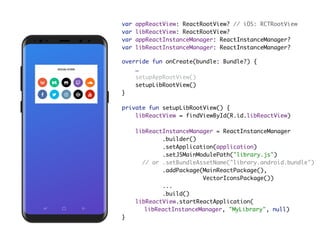
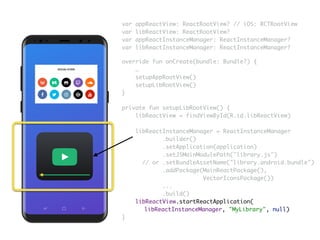
private fun setupLibRootView() {

libReactView = findViewById(R.id.libReactView)

libReactInstanceManager = ReactInstanceManager
.builder()

.setApplication(application)

.setJSMainModulePath("library.js")
// or .setBundleAssetName("library.android.bundle")

.addPackage(MainReactPackage(),
VectorIconsPackage())

...

.build()

libReactView.startReactApplication(
libReactInstanceManager, "MyLibrary", null)
}
override fun onCreate(bundle: Bundle?) {

…

setupAppRootView()

setupLibRootView()

}
var appReactView: ReactRootView? // iOS: RCTRootView

var libReactView: ReactRootView?

var appReactInstanceManager: ReactInstanceManager?

var libReactInstanceManager: ReactInstanceManager?
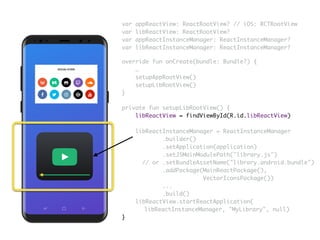
private fun setupLibRootView() {

libReactView = findViewById(R.id.libReactView)

libReactInstanceManager = ReactInstanceManager
.builder()

.setApplication(application)

.setJSMainModulePath("library.js")
// or .setBundleAssetName("library.android.bundle")

.addPackage(MainReactPackage(),
VectorIconsPackage())

...

.build()

libReactView.startReactApplication(
libReactInstanceManager, "MyLibrary", null)
}
override fun onCreate(bundle: Bundle?) {

…

setupAppRootView()

setupLibRootView()

}
var appReactView: ReactRootView? // iOS: RCTRootView

var libReactView: ReactRootView?

var appReactInstanceManager: ReactInstanceManager?

var libReactInstanceManager: ReactInstanceManager?
override fun onCreate(bundle: Bundle?) {

…

setupAppRootView()

setupLibRootView()

}
var appReactView: ReactRootView? // iOS: RCTRootView

var libReactView: ReactRootView?

var appReactInstanceManager: ReactInstanceManager?

var libReactInstanceManager: ReactInstanceManager?
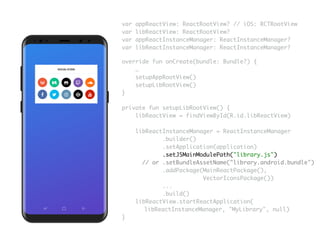
private fun setupLibRootView() {

libReactView = findViewById(R.id.libReactView)

libReactInstanceManager = ReactInstanceManager
.builder()

.setApplication(application)

.setJSMainModulePath("library.js")
// or .setBundleAssetName("library.android.bundle")

.addPackage(MainReactPackage(),
VectorIconsPackage())

...

.build()

libReactView.startReactApplication(
libReactInstanceManager, "MyLibrary", null)
}
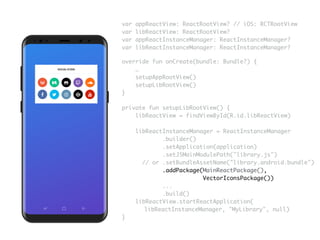
private fun setupLibRootView() {

libReactView = findViewById(R.id.libReactView)

libReactInstanceManager = ReactInstanceManager
.builder()

.setApplication(application)

.setJSMainModulePath("library.js")
// or .setBundleAssetName("library.android.bundle")

.addPackage(MainReactPackage(),
VectorIconsPackage())

...

.build()

libReactView.startReactApplication(
libReactInstanceManager, "MyLibrary", null)
}
override fun onCreate(bundle: Bundle?) {

…

setupAppRootView()

setupLibRootView()

}
var appReactView: ReactRootView? // iOS: RCTRootView

var libReactView: ReactRootView?

var appReactInstanceManager: ReactInstanceManager?

var libReactInstanceManager: ReactInstanceManager?
private fun setupLibRootView() {

libReactView = findViewById(R.id.libReactView)

libReactInstanceManager = ReactInstanceManager
.builder()

.setApplication(application)

.setJSMainModulePath("library.js")
// or .setBundleAssetName("library.android.bundle")

.addPackage(MainReactPackage(),
VectorIconsPackage())

...

.build()

libReactView.startReactApplication(
libReactInstanceManager, "MyLibrary", null)
}
override fun onCreate(bundle: Bundle?) {

…

setupAppRootView()

setupLibRootView()

}
var appReactView: ReactRootView? // iOS: RCTRootView

var libReactView: ReactRootView?

var appReactInstanceManager: ReactInstanceManager?

var libReactInstanceManager: ReactInstanceManager?
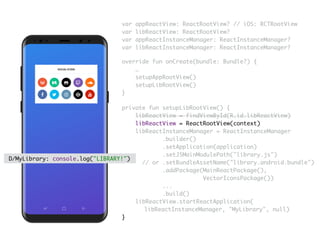
private fun setupLibRootView() {

libReactView = findViewById(R.id.libReactView)

libReactView = ReactRootView(context)
libReactInstanceManager = ReactInstanceManager
.builder()

.setApplication(application)

.setJSMainModulePath("library.js")
// or .setBundleAssetName("library.android.bundle")

.addPackage(MainReactPackage(),
VectorIconsPackage())

...

.build()

libReactView.startReactApplication(
libReactInstanceManager, "MyLibrary", null)
}
override fun onCreate(bundle: Bundle?) {

…

setupAppRootView()

setupLibRootView()

}
var appReactView: ReactRootView? // iOS: RCTRootView

var libReactView: ReactRootView?

var appReactInstanceManager: ReactInstanceManager?

var libReactInstanceManager: ReactInstanceManager?
D/MyLibrary: console.log("LIBRARY!")
The Good
The Bad
The Weird
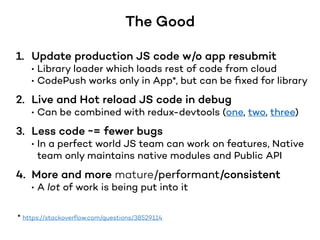
The Good
1. Update production JS code w/o app resubmit
• Library loader which loads rest of code from cloud
• CodePush works only in App*, but can be fixed for library
2. Live and Hot reload JS code in debug
• Can be combined with redux-devtools (one, two, three)
3. Less code ~= fewer bugs
• In a perfect world JS team can work on features, Native
team only maintains native modules and Public API
4. More and more mature/performant/consistent
• A lot of work is being put into it
* https://stackoverflow.com/questions/38529114
The Bad
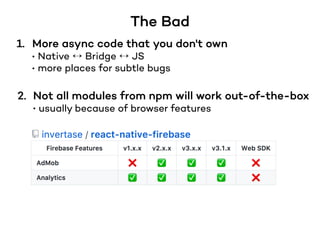
1. More async code that you don't own
• Native ↔ Bridge ↔ JS
• more places for subtle bugs
2. Not all modules from npm will work out-of-the-box
• usually because of browser features
The Bad
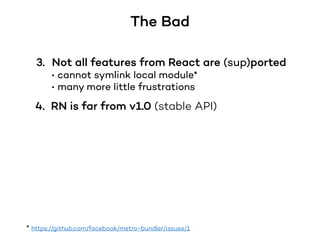
3. Not all features from React are (sup)ported
• cannot symlink local module*
• many more little frustrations
* https://github.com/facebook/metro-bundler/issues/1
4. RN is far from v1.0 (stable API)
The Weird
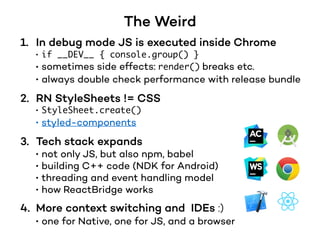
1. In debug mode JS is executed inside Chrome
• if __DEV__ { console.group() }
• sometimes side effects: render() breaks etc.
• always double check performance with release bundle
2. RN StyleSheets != CSS
• StyleSheet.create()
• styled-components
3. Tech stack expands
• not only JS, but also npm, babel
• building C++ code (NDK for Android)
• threading and event handling model
• how ReactBridge works
4. More context switching and IDEs :)
• one for Native, one for JS, and a browser
To be continued…
Q&A
Icons, logos and images may be registered trademarks of their owners.
Samsung S8 sketch mockup file is originally created by ranjithalingal.
Thank you!
https://medium.com/@oleksandr.yefremov
https://github.com/oleksandr-yefremov

Building framework with shared code on Android and iOS using React Native. UA Mobile 2017.

  • 1.
    with shared code ReactNative using on and Building (Building framework with shared code on Android and iOS using React Native) Oleksandr Yefremov Mobile Architect at ProSiebenSat1.Digital GmbH, Munich, Germany
  • 2.
    • Why goRN? What is our goal? • Ways to integrate RN • When not recommended • Alternatives • How it works in code • The Good. The Bad. The Weird Observations about RN and its ecosystem features
  • 3.
    Framework == Library== SDK naming convention • iOS: framework (static / dynamic) • Android: library, SDK • Node.js: module == standalone package of code
  • 4.
    Before (Java/Kotlin) (Swift) (Node.js,React) codebases - 3x - CI/CD teams projects
  • 5.
  • 6.
    Web player wasbuilt with RN in mind: • multiple loosely-coupled components • browser features are in separate module • React UI
  • 9.
    1. Target Appuses RN 2. Target App does not use RN (is purely Native)
  • 10.
    a. Make RNexternal dependency Same RN version in App and Library! "React Native version mismatch JavaScript version: 0.50.1
 Native version: 0.49.3" > build.gradle compile "com.facebook.react:react-native:0.50.1" > Podfile pod 'ReactNative', '0.50.1' 1. Target App uses RN
  • 11.
    b. "react-native-my-library" npm module a.Make RN external dependency Same RN version in App and Library! 1. Target App uses RN
  • 12.
    b. "react-native-my-library" npm module Our libraryApp gradle / CocoaPods / manual 1. Target App uses RN
  • 13.
    Works only whenintegrated directly into RN App! Our library App npm install 1. Target App uses RN b. "react-native-my-library" npm module
  • 14.
  • 15.
    c. Package RNinto your Library b. "react-native-my-library" npm module !Only when integrated directly into App! + a. Make RN external dependency Same RN version in App and Library! (statically compile version you need) 1. Target App uses RN
  • 16.
    1. Rename classes RCTRootView→ LIBRootView 2. Update all occurrences RCTRootView → LIBRootView 3. Profit! libReact.a c. Package RN into your Library
  • 17.
    b. Package RNinto your Library 1. Rename Java packages com.facebook.react → lib.facebook.react com.facebook.stetho → com.facebook.stetho 2. Update Java imports com.facebook.react → lib.facebook.react 3. Update C++ libraries com.facebook.react → lib.facebook.react RCTEventEmitter → LIBEventEmitter 4. Publish artifacts lib.facebook.react on mavenLocal or nexus repo 5. Runtime error in C++ library :( get enough sleep and repeat 🔄 !
  • 18.
    1. Warning: hack! Breaksmodularity principle 2. Binary size 3. Memory footprint 4. Repeat for every react-native-module react-native-vector-icons, react-native-fs etc. 5. Repeat on every "npm install" 6. Repeat on every RN update 7. Script to work around 4, 5, 6 may require changes on updates b. Package RN into your Library
  • 19.
    What to do? 1.Wait for RN v1.0 stable API, backward compatibility > build.gradle compile "com.facebook.react:react-native:1.0" > Podfile pod 'ReactNative', '1.0' a. Make RN external dependency
  • 20.
    1. Target Appuses RN (is purely Native) 2. Target App does not use RN
  • 21.
    2. Target Appdoes not use RN 1. Embed RN into Library libReact.a 1. Publish artifacts com.facebook.react and react-native-modules you use on maven central, private nexus repo 2. Add dependencies build.gradle
  • 22.
    1. App isvery Native • all about OS specific APIs • complex custom UI, gestures and animations • not much to extract to shared layer 2. You rely on multithreading in JS • no official WebWorkers API (yet*) • alternative one, two 3. Don't want to overcomplicate • delivery pipeline • tech stack • your life 😈 4. Not ready for Breaking Bad Changes✝ on each minor release (i.e. every month) Not recommended when * https://www.facebook.com/notes/andy-street/react-native-scheduling/10153916310914590/ ✝ https://github.com/facebook/react-native/wiki/Breaking-Changes
  • 23.
    Considering all risksand complications, do we gain much more value than developing all clients separately?
  • 24.
    Alternatives old school: shared libraryin C++ (ObjC++, JNI/NDK) new school: wait for Kotlin/Native on iOS (Nov 2017 - Tech Preview stage, no debugging, active development) Swift on Android (Apr 2017 - complicated*, no published roadmap) * https://academy.realm.io/posts/swift-on-android
  • 25.
  • 26.
    override fun onCreate(bundle:Bundle?) {
 …
 setupAppRootView()
 setupLibRootView()
 } private fun setupAppRootView() {
 appReactView = findViewById(R.id.appReactView)
 appReactInstanceManager = ReactInstanceManager .builder()
 .setApplication(application)
 .setJSMainModulePath("index.js") // or .setBundleAssetName("index.android.bundle")
 .addPackage(MainReactPackage(), OtherNativeRNModule())
 ...
 .build()
 appReactView.startReactApplication( appReactInstanceManager, "MyApp", null) } var appReactView: ReactRootView? // iOS: RCTRootView
 var libReactView: ReactRootView?
 var appReactInstanceManager: ReactInstanceManager?
 var libReactInstanceManager: ReactInstanceManager?
  • 27.
    override fun onCreate(bundle:Bundle?) {
 …
 setupAppRootView()
 setupLibRootView()
 } private fun setupAppRootView() {
 appReactView = findViewById(R.id.appReactView)
 appReactInstanceManager = ReactInstanceManager .builder()
 .setApplication(application)
 .setJSMainModulePath("index.js") // or .setBundleAssetName("index.android.bundle")
 .addPackage(MainReactPackage(), OtherNativeRNModule())
 ...
 .build()
 appReactView.startReactApplication( appReactInstanceManager, "MyApp", null) } var appReactView: ReactRootView? // iOS: RCTRootView
 var libReactView: ReactRootView?
 var appReactInstanceManager: ReactInstanceManager?
 var libReactInstanceManager: ReactInstanceManager?
  • 28.
    override fun onCreate(bundle:Bundle?) {
 …
 setupAppRootView()
 setupLibRootView()
 } private fun setupAppRootView() {
 appReactView = findViewById(R.id.appReactView)
 appReactInstanceManager = ReactInstanceManager .builder()
 .setApplication(application)
 .setJSMainModulePath("index.js") // or .setBundleAssetName("index.android.bundle")
 .addPackage(MainReactPackage(), OtherNativeRNModule())
 ...
 .build()
 appReactView.startReactApplication( appReactInstanceManager, "MyApp", null) } var appReactView: ReactRootView? // iOS: RCTRootView
 var libReactView: ReactRootView?
 var appReactInstanceManager: ReactInstanceManager?
 var libReactInstanceManager: ReactInstanceManager?
  • 29.
    override fun onCreate(bundle:Bundle?) {
 …
 setupAppRootView()
 setupLibRootView()
 } private fun setupAppRootView() {
 appReactView = findViewById(R.id.appReactView)
 appReactInstanceManager = ReactInstanceManager .builder()
 .setApplication(application)
 .setJSMainModulePath("index.js") // or .setBundleAssetName("index.android.bundle")
 .addPackage(MainReactPackage(), OtherNativeRNModule())
 ...
 .build()
 appReactView.startReactApplication( appReactInstanceManager, "MyApp", null) } var appReactView: ReactRootView? // iOS: RCTRootView
 var libReactView: ReactRootView?
 var appReactInstanceManager: ReactInstanceManager?
 var libReactInstanceManager: ReactInstanceManager?
  • 30.
    override fun onCreate(bundle:Bundle?) {
 …
 setupAppRootView()
 setupLibRootView()
 } var appReactView: ReactRootView? // iOS: RCTRootView
 var libReactView: ReactRootView?
 var appReactInstanceManager: ReactInstanceManager?
 var libReactInstanceManager: ReactInstanceManager? private fun setupAppRootView() {
 appReactView = findViewById(R.id.appReactView)
 appReactInstanceManager = ReactInstanceManager .builder()
 .setApplication(application)
 .setJSMainModulePath("index.js") // or .setBundleAssetName("index.android.bundle")
 .addPackage(MainReactPackage(), OtherNativeRNModule())
 ...
 .build()
 appReactView.startReactApplication( appReactInstanceManager, "MyApp", null) }
  • 31.
    private fun setupLibRootView(){
 libReactView = findViewById(R.id.libReactView)
 libReactInstanceManager = ReactInstanceManager .builder()
 .setApplication(application)
 .setJSMainModulePath("library.js") // or .setBundleAssetName("library.android.bundle")
 .addPackage(MainReactPackage(), VectorIconsPackage())
 ...
 .build()
 libReactView.startReactApplication( libReactInstanceManager, "MyLibrary", null) } override fun onCreate(bundle: Bundle?) {
 …
 setupAppRootView()
 setupLibRootView()
 } var appReactView: ReactRootView? // iOS: RCTRootView
 var libReactView: ReactRootView?
 var appReactInstanceManager: ReactInstanceManager?
 var libReactInstanceManager: ReactInstanceManager?
  • 32.
    private fun setupLibRootView(){
 libReactView = findViewById(R.id.libReactView)
 libReactInstanceManager = ReactInstanceManager .builder()
 .setApplication(application)
 .setJSMainModulePath("library.js") // or .setBundleAssetName("library.android.bundle")
 .addPackage(MainReactPackage(), VectorIconsPackage())
 ...
 .build()
 libReactView.startReactApplication( libReactInstanceManager, "MyLibrary", null) } override fun onCreate(bundle: Bundle?) {
 …
 setupAppRootView()
 setupLibRootView()
 } var appReactView: ReactRootView? // iOS: RCTRootView
 var libReactView: ReactRootView?
 var appReactInstanceManager: ReactInstanceManager?
 var libReactInstanceManager: ReactInstanceManager?
  • 33.
    override fun onCreate(bundle:Bundle?) {
 …
 setupAppRootView()
 setupLibRootView()
 } var appReactView: ReactRootView? // iOS: RCTRootView
 var libReactView: ReactRootView?
 var appReactInstanceManager: ReactInstanceManager?
 var libReactInstanceManager: ReactInstanceManager? private fun setupLibRootView() {
 libReactView = findViewById(R.id.libReactView)
 libReactInstanceManager = ReactInstanceManager .builder()
 .setApplication(application)
 .setJSMainModulePath("library.js") // or .setBundleAssetName("library.android.bundle")
 .addPackage(MainReactPackage(), VectorIconsPackage())
 ...
 .build()
 libReactView.startReactApplication( libReactInstanceManager, "MyLibrary", null) }
  • 34.
    private fun setupLibRootView(){
 libReactView = findViewById(R.id.libReactView)
 libReactInstanceManager = ReactInstanceManager .builder()
 .setApplication(application)
 .setJSMainModulePath("library.js") // or .setBundleAssetName("library.android.bundle")
 .addPackage(MainReactPackage(), VectorIconsPackage())
 ...
 .build()
 libReactView.startReactApplication( libReactInstanceManager, "MyLibrary", null) } override fun onCreate(bundle: Bundle?) {
 …
 setupAppRootView()
 setupLibRootView()
 } var appReactView: ReactRootView? // iOS: RCTRootView
 var libReactView: ReactRootView?
 var appReactInstanceManager: ReactInstanceManager?
 var libReactInstanceManager: ReactInstanceManager?
  • 35.
    private fun setupLibRootView(){
 libReactView = findViewById(R.id.libReactView)
 libReactInstanceManager = ReactInstanceManager .builder()
 .setApplication(application)
 .setJSMainModulePath("library.js") // or .setBundleAssetName("library.android.bundle")
 .addPackage(MainReactPackage(), VectorIconsPackage())
 ...
 .build()
 libReactView.startReactApplication( libReactInstanceManager, "MyLibrary", null) } override fun onCreate(bundle: Bundle?) {
 …
 setupAppRootView()
 setupLibRootView()
 } var appReactView: ReactRootView? // iOS: RCTRootView
 var libReactView: ReactRootView?
 var appReactInstanceManager: ReactInstanceManager?
 var libReactInstanceManager: ReactInstanceManager?
  • 36.
    private fun setupLibRootView(){
 libReactView = findViewById(R.id.libReactView)
 libReactView = ReactRootView(context) libReactInstanceManager = ReactInstanceManager .builder()
 .setApplication(application)
 .setJSMainModulePath("library.js") // or .setBundleAssetName("library.android.bundle")
 .addPackage(MainReactPackage(), VectorIconsPackage())
 ...
 .build()
 libReactView.startReactApplication( libReactInstanceManager, "MyLibrary", null) } override fun onCreate(bundle: Bundle?) {
 …
 setupAppRootView()
 setupLibRootView()
 } var appReactView: ReactRootView? // iOS: RCTRootView
 var libReactView: ReactRootView?
 var appReactInstanceManager: ReactInstanceManager?
 var libReactInstanceManager: ReactInstanceManager? D/MyLibrary: console.log("LIBRARY!")
  • 37.
  • 38.
    The Good 1. Updateproduction JS code w/o app resubmit • Library loader which loads rest of code from cloud • CodePush works only in App*, but can be fixed for library 2. Live and Hot reload JS code in debug • Can be combined with redux-devtools (one, two, three) 3. Less code ~= fewer bugs • In a perfect world JS team can work on features, Native team only maintains native modules and Public API 4. More and more mature/performant/consistent • A lot of work is being put into it * https://stackoverflow.com/questions/38529114
  • 39.
    The Bad 1. Moreasync code that you don't own • Native ↔ Bridge ↔ JS • more places for subtle bugs 2. Not all modules from npm will work out-of-the-box • usually because of browser features
  • 40.
    The Bad 3. Notall features from React are (sup)ported • cannot symlink local module* • many more little frustrations * https://github.com/facebook/metro-bundler/issues/1 4. RN is far from v1.0 (stable API)
  • 41.
    The Weird 1. Indebug mode JS is executed inside Chrome • if __DEV__ { console.group() } • sometimes side effects: render() breaks etc. • always double check performance with release bundle 2. RN StyleSheets != CSS • StyleSheet.create() • styled-components 3. Tech stack expands • not only JS, but also npm, babel • building C++ code (NDK for Android) • threading and event handling model • how ReactBridge works 4. More context switching and IDEs :) • one for Native, one for JS, and a browser
  • 42.
  • 43.
    Q&A Icons, logos andimages may be registered trademarks of their owners. Samsung S8 sketch mockup file is originally created by ranjithalingal. Thank you! https://medium.com/@oleksandr.yefremov https://github.com/oleksandr-yefremov