
Precise Selection Techniques for Multi-Touch Screens By: IQxplorer
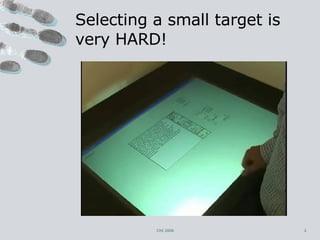
Selecting a small target is very HARD! CHI 2006
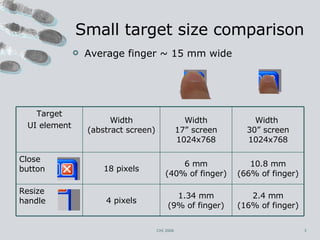
Small target size comparison Average finger ~ 15 mm wide CHI 2006 Target UI element Width (abstract screen) Width 17” screen 1024x768 Width  30” screen 1024x768 Close  button 18 pixels 6 mm (40% of finger) 10.8 mm (66% of finger) Resize  handle 4 pixels 1.34 mm (9% of finger) 2.4 mm (16% of finger)
Touchscreen Issues Finger >>> Target Finger occludes the target Fingers/hands shake and jitter Tracking can be noisy (e.g. video)  No hover state (hover == drag)  CHI 2006
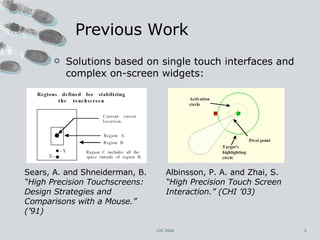
Previous Work Solutions based on single touch interfaces and complex on-screen widgets:  Albinsson, P. A. and Zhai, S.  “High Precision Touch Screen Interaction.” (CHI ’03) CHI 2006 Sears, A. and Shneiderman, B.  “High Precision Touchscreens: Design Strategies and Comparisons with a Mouse.” (’91)
Dual Finger Selections Multi-touch techniques Single fluid interaction  no lifting/repositioning of fingers Design guidelines: Keep simple things simple. Provide an offset to the cursor when so desired. Enable user controlled control-display ratio. CHI 2006
Simulating Hover State Extension of the “area==pressure” idea (MacKenzie and Oniszczak, CHI 1998) Problem: LARGE  area difference     reliable  clicking SMALL  movement (i.e. SMALL area difference)     precise and accurate  clicking CHI 2006
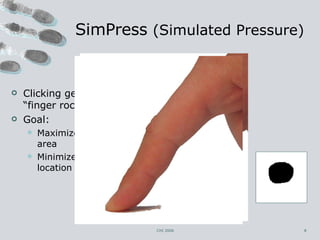
SimPress  (Simulated Pressure) Clicking gesture – “finger rocking” Goal: Maximize ∆ touch area Minimize ∆ cursor location CHI 2006
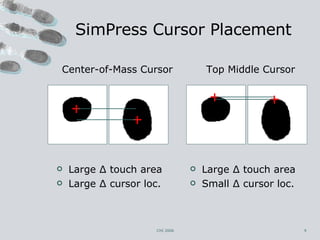
Top Middle Cursor Large ∆ touch area Small ∆ cursor loc.  Center-of-Mass Cursor Large ∆ touch area Large ∆ cursor loc. SimPress Cursor Placement CHI 2006
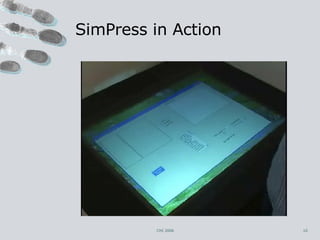
SimPress in Action CHI 2006
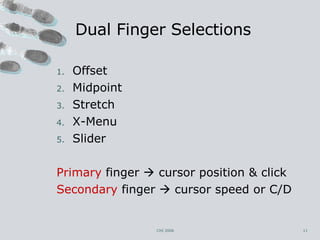
Dual Finger Selections Offset Midpoint Stretch X-Menu Slider Primary  finger    cursor position & click Secondary  finger    cursor speed or C/D CHI 2006
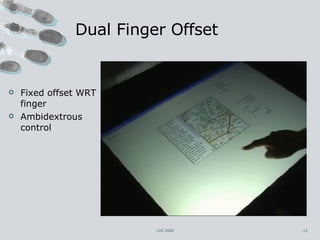
Dual Finger Offset CHI 2006 Fixed offset WRT finger Ambidextrous control
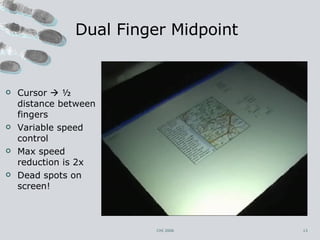
Dual Finger Midpoint CHI 2006 Cursor    ½ distance between fingers Variable speed control Max speed reduction is 2x Dead spots on screen!
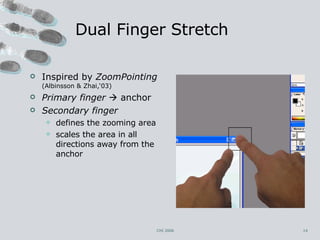
Dual Finger Stretch Inspired by  ZoomPointing  (Albinsson & Zhai,‘03) Primary finger     anchor Secondary finger defines the zooming area scales the area in all directions away from the anchor CHI 2006
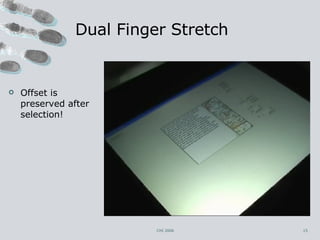
Dual Finger Stretch CHI 2006 Offset is preserved after selection!
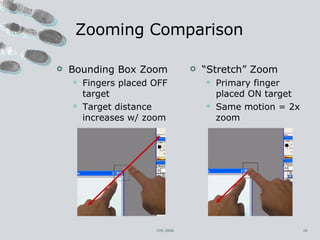
Zooming Comparison Bounding Box Zoom Fingers placed OFF target Target distance increases w/ zoom “ Stretch” Zoom Primary finger placed ON target Same motion = 2x zoom CHI 2006
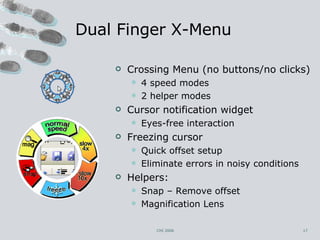
Dual Finger X-Menu Crossing Menu (no buttons/no clicks) 4 speed modes 2 helper modes Cursor notification widget Eyes-free interaction Freezing cursor Quick offset setup Eliminate errors in noisy conditions Helpers: Snap – Remove offset Magnification Lens CHI 2006
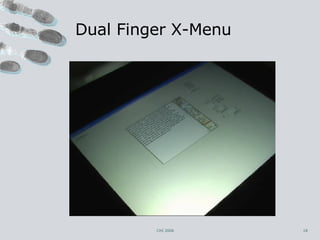
Dual Finger X-Menu CHI 2006
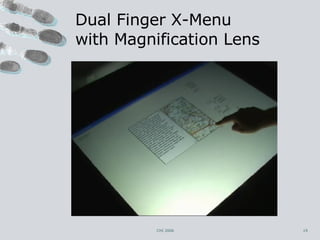
Dual Finger X-Menu  with Magnification Lens CHI 2006
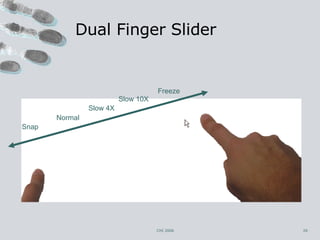
Dual Finger Slider CHI 2006 Normal Slow 4X Slow 10X Freeze Snap
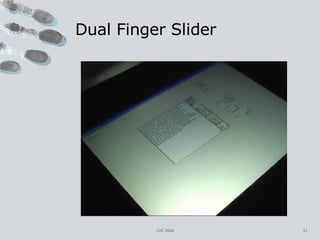
Dual Finger Slider CHI 2006
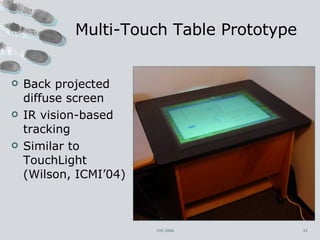
Multi-Touch Table Prototype Back projected diffuse screen IR vision-based tracking Similar to TouchLight (Wilson, ICMI’04) CHI 2006
User Experiments Measure the impact of a particular technique on the reduction of error rate while clicking 2 parts: Evaluation of SimPress clicking Comparison of Four Dual Finger Techniques Task: Reciprocal target selection Varying the square target width  Fixed distance (100 pixels) 12 paid participants (9 male,3 female, ages 20–40), frequent computer users, various levels of touchscreen use CHI 2006
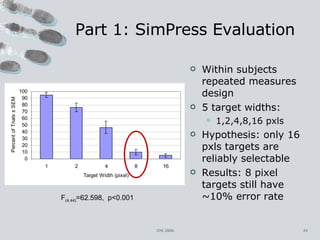
Part 1: SimPress Evaluation Within subjects repeated measures design 5 target widths:  1,2,4,8,16 pxls Hypothesis: only 16 pxls targets are reliably selectable  Results: 8 pixel targets still have ~10% error rate  CHI 2006 F (4,44) =62.598,  p<0.001
Part 2: Comparison of 4 Dual Finger Selection Techniques Compare: Offset, Stretch, X-Menu, Slider Varying noise conditions Inserted Gaussian noise:  σ =0, 0.5,   2 Within subjects repeated measures design:  3 noise levels x 4 techniques x 4 target widths (1,2,4,8 pxls)  6 repetitions    288 trials per user Hypotheses: Techniques that control the C/D will reduce the impact of noise Slider should outperform X-Menu CHI 2006
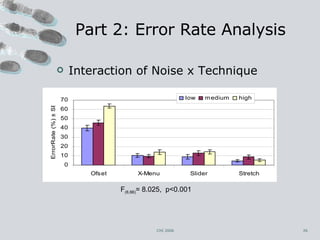
Part 2: Error Rate Analysis Interaction of Noise x Technique CHI 2006 F (6,66) = 8.025,  p<0.001
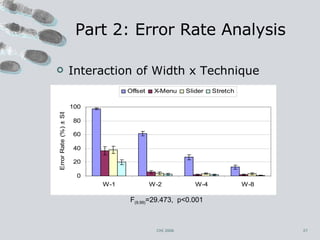
Part 2: Error Rate Analysis CHI 2006 Interaction of Width x Technique F (9,99) =29.473,  p<0.001
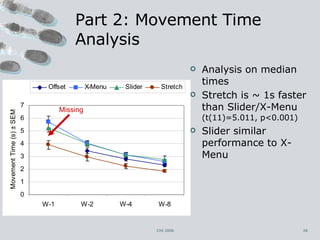
Part 2: Movement Time Analysis Analysis on median times Stretch is ~ 1s faster than Slider/X-Menu  (t(11)=5.011, p<0.001) Slider similar performance to X-Menu CHI 2006 Missing
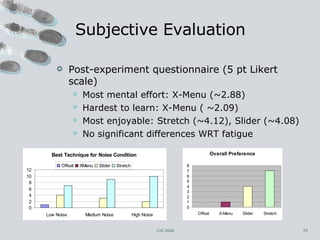
Subjective Evaluation Post-experiment questionnaire (5 pt Likert scale) Most mental effort: X-Menu (~2.88) Hardest to learn: X-Menu ( ~2.09) Most enjoyable: Stretch (~4.12), Slider (~4.08) No significant differences WRT fatigue CHI 2006
Conclusions and Future Work  Top performer & most preferred: Stretch Slider/X-Menu  Comparable error rates to Stretch No distortion of user interface Cost: ~1s extra Freezing the cursor (positive feedback) Like “are you sure?” dialog for clicking… Possible future SimPress extensions: Detect user position/orientation Stabilization of the cursor CHI 2006
Questions
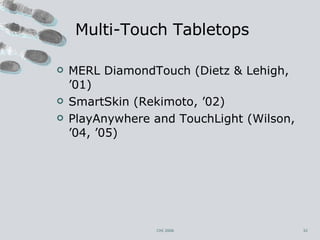
Multi-Touch Tabletops MERL DiamondTouch (Dietz & Lehigh, ’01) SmartSkin (Rekimoto, ’02) PlayAnywhere and TouchLight (Wilson, ’04, ’05) CHI 2006
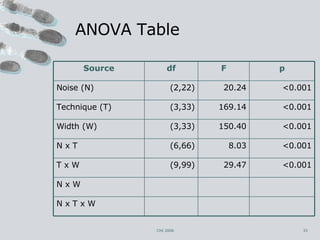
ANOVA Table CHI 2006 Source df F p Noise (N) (2,22) 20.24 <0.001 Technique (T) (3,33) 169.14 <0.001 Width (W) (3,33) 150.40 <0.001 N x T (6,66) 8.03 <0.001 T x W (9,99) 29.47 <0.001 N x W N x T x W

Touch Screens

  • 1.
    Precise Selection Techniquesfor Multi-Touch Screens By: IQxplorer
  • 2.
    Selecting a smalltarget is very HARD! CHI 2006
  • 3.
    Small target sizecomparison Average finger ~ 15 mm wide CHI 2006 Target UI element Width (abstract screen) Width 17” screen 1024x768 Width 30” screen 1024x768 Close button 18 pixels 6 mm (40% of finger) 10.8 mm (66% of finger) Resize handle 4 pixels 1.34 mm (9% of finger) 2.4 mm (16% of finger)
  • 4.
    Touchscreen Issues Finger>>> Target Finger occludes the target Fingers/hands shake and jitter Tracking can be noisy (e.g. video) No hover state (hover == drag) CHI 2006
  • 5.
    Previous Work Solutionsbased on single touch interfaces and complex on-screen widgets: Albinsson, P. A. and Zhai, S. “High Precision Touch Screen Interaction.” (CHI ’03) CHI 2006 Sears, A. and Shneiderman, B. “High Precision Touchscreens: Design Strategies and Comparisons with a Mouse.” (’91)
  • 6.
    Dual Finger SelectionsMulti-touch techniques Single fluid interaction no lifting/repositioning of fingers Design guidelines: Keep simple things simple. Provide an offset to the cursor when so desired. Enable user controlled control-display ratio. CHI 2006
  • 7.
    Simulating Hover StateExtension of the “area==pressure” idea (MacKenzie and Oniszczak, CHI 1998) Problem: LARGE area difference  reliable clicking SMALL movement (i.e. SMALL area difference)  precise and accurate clicking CHI 2006
  • 8.
    SimPress (SimulatedPressure) Clicking gesture – “finger rocking” Goal: Maximize ∆ touch area Minimize ∆ cursor location CHI 2006
  • 9.
    Top Middle CursorLarge ∆ touch area Small ∆ cursor loc. Center-of-Mass Cursor Large ∆ touch area Large ∆ cursor loc. SimPress Cursor Placement CHI 2006
  • 10.
  • 11.
    Dual Finger SelectionsOffset Midpoint Stretch X-Menu Slider Primary finger  cursor position & click Secondary finger  cursor speed or C/D CHI 2006
  • 12.
    Dual Finger OffsetCHI 2006 Fixed offset WRT finger Ambidextrous control
  • 13.
    Dual Finger MidpointCHI 2006 Cursor  ½ distance between fingers Variable speed control Max speed reduction is 2x Dead spots on screen!
  • 14.
    Dual Finger StretchInspired by ZoomPointing (Albinsson & Zhai,‘03) Primary finger  anchor Secondary finger defines the zooming area scales the area in all directions away from the anchor CHI 2006
  • 15.
    Dual Finger StretchCHI 2006 Offset is preserved after selection!
  • 16.
    Zooming Comparison BoundingBox Zoom Fingers placed OFF target Target distance increases w/ zoom “ Stretch” Zoom Primary finger placed ON target Same motion = 2x zoom CHI 2006
  • 17.
    Dual Finger X-MenuCrossing Menu (no buttons/no clicks) 4 speed modes 2 helper modes Cursor notification widget Eyes-free interaction Freezing cursor Quick offset setup Eliminate errors in noisy conditions Helpers: Snap – Remove offset Magnification Lens CHI 2006
  • 18.
  • 19.
    Dual Finger X-Menu with Magnification Lens CHI 2006
  • 20.
    Dual Finger SliderCHI 2006 Normal Slow 4X Slow 10X Freeze Snap
  • 21.
  • 22.
    Multi-Touch Table PrototypeBack projected diffuse screen IR vision-based tracking Similar to TouchLight (Wilson, ICMI’04) CHI 2006
  • 23.
    User Experiments Measurethe impact of a particular technique on the reduction of error rate while clicking 2 parts: Evaluation of SimPress clicking Comparison of Four Dual Finger Techniques Task: Reciprocal target selection Varying the square target width Fixed distance (100 pixels) 12 paid participants (9 male,3 female, ages 20–40), frequent computer users, various levels of touchscreen use CHI 2006
  • 24.
    Part 1: SimPressEvaluation Within subjects repeated measures design 5 target widths: 1,2,4,8,16 pxls Hypothesis: only 16 pxls targets are reliably selectable Results: 8 pixel targets still have ~10% error rate CHI 2006 F (4,44) =62.598, p<0.001
  • 25.
    Part 2: Comparisonof 4 Dual Finger Selection Techniques Compare: Offset, Stretch, X-Menu, Slider Varying noise conditions Inserted Gaussian noise: σ =0, 0.5, 2 Within subjects repeated measures design: 3 noise levels x 4 techniques x 4 target widths (1,2,4,8 pxls) 6 repetitions  288 trials per user Hypotheses: Techniques that control the C/D will reduce the impact of noise Slider should outperform X-Menu CHI 2006
  • 26.
    Part 2: ErrorRate Analysis Interaction of Noise x Technique CHI 2006 F (6,66) = 8.025, p<0.001
  • 27.
    Part 2: ErrorRate Analysis CHI 2006 Interaction of Width x Technique F (9,99) =29.473, p<0.001
  • 28.
    Part 2: MovementTime Analysis Analysis on median times Stretch is ~ 1s faster than Slider/X-Menu (t(11)=5.011, p<0.001) Slider similar performance to X-Menu CHI 2006 Missing
  • 29.
    Subjective Evaluation Post-experimentquestionnaire (5 pt Likert scale) Most mental effort: X-Menu (~2.88) Hardest to learn: X-Menu ( ~2.09) Most enjoyable: Stretch (~4.12), Slider (~4.08) No significant differences WRT fatigue CHI 2006
  • 30.
    Conclusions and FutureWork Top performer & most preferred: Stretch Slider/X-Menu Comparable error rates to Stretch No distortion of user interface Cost: ~1s extra Freezing the cursor (positive feedback) Like “are you sure?” dialog for clicking… Possible future SimPress extensions: Detect user position/orientation Stabilization of the cursor CHI 2006
  • 31.
  • 32.
    Multi-Touch Tabletops MERLDiamondTouch (Dietz & Lehigh, ’01) SmartSkin (Rekimoto, ’02) PlayAnywhere and TouchLight (Wilson, ’04, ’05) CHI 2006
  • 33.
    ANOVA Table CHI2006 Source df F p Noise (N) (2,22) 20.24 <0.001 Technique (T) (3,33) 169.14 <0.001 Width (W) (3,33) 150.40 <0.001 N x T (6,66) 8.03 <0.001 T x W (9,99) 29.47 <0.001 N x W N x T x W