WORD PROCESSOR IN THE
CLASSROOM
Presented By :
Group 2
Ardian 201112500308
Liawati 201112500372
Rini Sulistyowati 201112500384
Ramdini 201112500376
WHY USED WORD PROCESSOR ?
 Word processor programmes are popular,easy to
use and do not require sophisticated hardware.
 For the teachers: can prepare ,create,store,and
share materials for their classes by using word
processor program.
 For the learners : can used word processor
program both in and outside the classroom,to
practice writing skills,grammar and other language
points as well as to present their work.
WORD PROCESSOR FOR TEACHER :
CREATING MATERIALS
As a teacher,you may already use a word processing program to
prepare worksheet and materials for your learners.
 Inserting images and links
 Clik the “ insert menu”
 Select “ picture”
 Finally “ from file …( in your computer)
To grab an images from internet :
- Find a page with the image,right klick on it
- Choose “ copy” from the menu
- Return to your word processor and paste it into your document
where you want it to be.
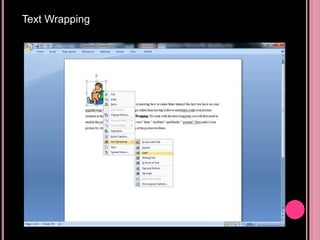
Text Wrapping
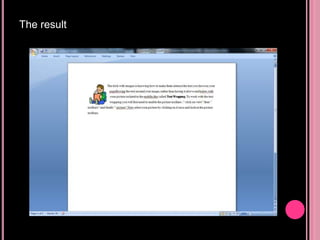
The result
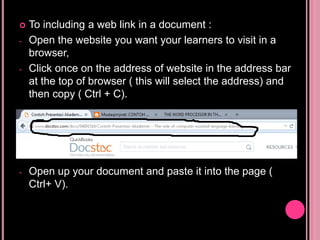
 To including a web link in a document :
- Open the website you want your learners to visit in a
browser,
- Click once on the address of website in the address bar
at the top of browser ( this will select the address) and
then copy ( Ctrl + C).
- Open up your document and paste it into the page (
Ctrl+ V).
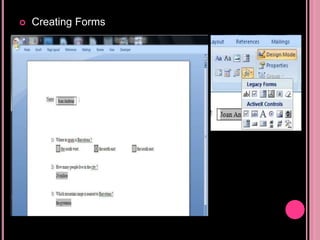
 Creating Forms
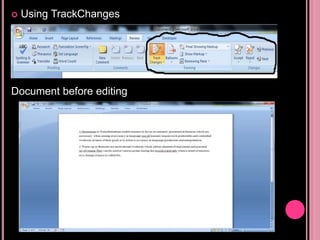
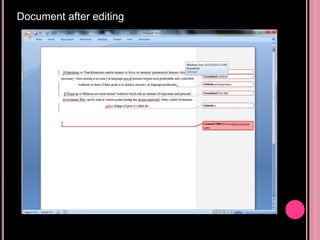
 Using TrackChanges
Document before editing
Document after editing
 Using Markin
a series of tools for marking up grammer
mistakes,spelling errors,word order and other common
errors,using a series of abbreviations which will be
familiar for most teachers and different colours different
type of error in helping the correction of word processed
work from learners.
WORD PROCESSING ACTIVITIES FOR
LEARNER
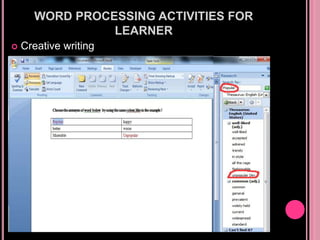
 Creative writing
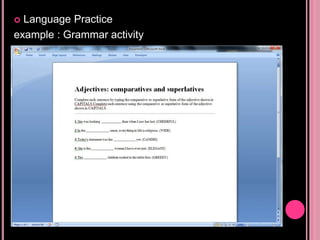
 Language Practice
example : Grammar activity
 Further activities
a. Dictation
b.Noticing Activities
c. Collaborative writing activity
 Presenting work
One final of use word processors to consider is that
of encouraging learners to put their word processed
document into a presentation package,possibly as
part an eportfolio of their work
USING WORD PROCESSOR :
CONSIDERATION
 Mixed tehnology skills
 Patient
 Simple >>> complex activity
 For more ideas for exploiting word processors in
the classroom can be found at the following
addresses :
http://edvista.com/claire/wp.html
http://www.geocities.com/vance_stevens/wordproc.
ht
CONCLUSIONS
 Considered why we should use word processor in
our teaching.
 Looked at how teachers can work with word
processors for material creation.
 Examined spesific word processing tool such as
inserting images and links,creating forms and using
trackchanges.
 Looked at how learners can work with word
processors,for creative writing,language work and
presentations of work.
 Considered some sample word processing
activities.

Word processor in the classroom

  • 1.
    WORD PROCESSOR INTHE CLASSROOM Presented By : Group 2 Ardian 201112500308 Liawati 201112500372 Rini Sulistyowati 201112500384 Ramdini 201112500376
  • 2.
    WHY USED WORDPROCESSOR ?  Word processor programmes are popular,easy to use and do not require sophisticated hardware.  For the teachers: can prepare ,create,store,and share materials for their classes by using word processor program.  For the learners : can used word processor program both in and outside the classroom,to practice writing skills,grammar and other language points as well as to present their work.
  • 3.
    WORD PROCESSOR FORTEACHER : CREATING MATERIALS As a teacher,you may already use a word processing program to prepare worksheet and materials for your learners.  Inserting images and links  Clik the “ insert menu”  Select “ picture”  Finally “ from file …( in your computer) To grab an images from internet : - Find a page with the image,right klick on it - Choose “ copy” from the menu - Return to your word processor and paste it into your document where you want it to be.
  • 4.
  • 5.
  • 6.
     To includinga web link in a document : - Open the website you want your learners to visit in a browser, - Click once on the address of website in the address bar at the top of browser ( this will select the address) and then copy ( Ctrl + C). - Open up your document and paste it into the page ( Ctrl+ V).
  • 7.
  • 8.
  • 9.
  • 10.
     Using Markin aseries of tools for marking up grammer mistakes,spelling errors,word order and other common errors,using a series of abbreviations which will be familiar for most teachers and different colours different type of error in helping the correction of word processed work from learners.
  • 11.
    WORD PROCESSING ACTIVITIESFOR LEARNER  Creative writing
  • 12.
  • 13.
     Further activities a.Dictation b.Noticing Activities c. Collaborative writing activity  Presenting work One final of use word processors to consider is that of encouraging learners to put their word processed document into a presentation package,possibly as part an eportfolio of their work
  • 14.
    USING WORD PROCESSOR: CONSIDERATION  Mixed tehnology skills  Patient  Simple >>> complex activity  For more ideas for exploiting word processors in the classroom can be found at the following addresses : http://edvista.com/claire/wp.html http://www.geocities.com/vance_stevens/wordproc. ht
  • 15.
    CONCLUSIONS  Considered whywe should use word processor in our teaching.  Looked at how teachers can work with word processors for material creation.  Examined spesific word processing tool such as inserting images and links,creating forms and using trackchanges.  Looked at how learners can work with word processors,for creative writing,language work and presentations of work.  Considered some sample word processing activities.