Computers inComputers in
LanguageLanguage
TeachingTeaching
By: Maggie
Sokolik
Reporter: Joy Marie D. Blasco
Software and Hardware
run out of style but it is the
aim of education to teach
strategies that never runs
out of style.
Preliminary to Clear vision of
the future: Historical Overview
Writers such as
Bush foresaw a
future to which
communication
and science
would be
enhanced with
hyperlinked
systems of
information.
Memex
A device in which an individual
stores all his books , records and
communications, and which is
mechanized so that it may be
consulted with exceeding speed
and flexibility.
1940s
Microfilm
phonographic recordings punch card-style
computing machines
1970s and 1980s1950s and 1960s
most powerful computers
occupied entire rooms Microchip and miniaturization
What will happen is that in the university of the year
2000, students will be given a computer on their first day.
Over the years that they spend at the university, a fixed
cost will be assessed each term. This cost will pay for
the computer, tuition , access to myriad of database
services and online textbooks. (Young et al, 1988,
p.259).
WHAT COMPUTERS
CAN’T DO
Five major areas into which computers and technology have not yet made
significant inroads
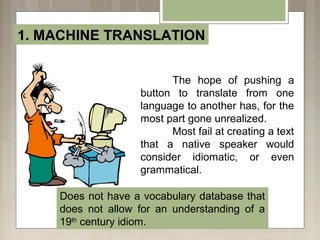
1. MACHINE TRANSLATION
The hope of pushing a
button to translate from one
language to another has, for the
most part gone unrealized.
Most fail at creating a text
that a native speaker would
consider idiomatic, or even
grammatical.
Does not have a vocabulary database that
does not allow for an understanding of a
19th
century idiom.
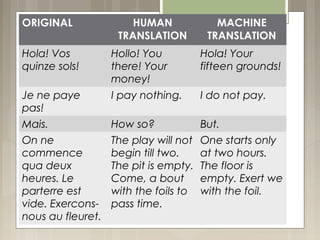
ORIGINAL HUMAN
TRANSLATION
MACHINE
TRANSLATION
Hola! Vos
quinze sols!
Hollo! You
there! Your
money!
Hola! Your
fifteen grounds!
Je ne paye
pas!
I pay nothing. I do not pay.
Mais. How so? But.
On ne
commence
qua deux
heures. Le
parterre est
vide. Exercons-
nous au fleuret.
The play will not
begin till two.
The pit is empty.
Come, a bout
with the foils to
pass time.
One starts only
at two hours.
The floor is
empty. Exert we
with the foil.
2. PROVIDING APPROPRIATE
FEEDBACK TO LEARNERS
Mechanized systems do not
have the capability to customize
feedback with the same
sensitivity that a human
instructor does.
3. VOICE RECOGNITION
Voice recognition
refers to the capability of a
computer or software
program to accept and
interpret spoken dictation,
or to understand and carry
out voice commands.
4. GRAMMAR CHECKING
Software is not sensitive to context or conventions of use,
such as the difference between academic English written
for the humanities versus written for the sciences.
5. ESSAY MARKING
There is no software that
can “read” a text and write
relevant comments on it.
Although the software can
be trained to look for
structures that show certain
rhetorical moves, it does
not assess whether the
writer has in fact addressed
the essay topic.
Though e-rater….
WHAT COMPUTERS CAN DO
REVIEW
5. ESSAY MARKING
1. MACHINE TRANSLATION
2. PROVIDING APPROPRIATE
FEEDBACK TO LEARNERS
3. VOICE RECOGNITION
4. GRAMMAR CHECKING
WHAT COMPUTERS
CAN DO
There are many arenas in which computers equal, or surpass human
performance.
1. DRILLS
Unlike humans who may grow
weary of repeating a word for a learner, a
computer will repeat a word a hundred
times if the user wishes.
2. ADAPTIVE TESTING
As test takers respond to test items in CAT, the
test adapts itself to each user by choosing subsequent
test items based on test taker’s performance on
preceding items.
3. CORPORA AND CONCORDANCING
A concordance
is a type of index that
searches for
occurrences of a
word or combinations
of words, parts of
words, punctuation,
affixes, phrases, or
structures within
corpus, and can show
immediate context.
CHOCOLA7TE
1. *milk*
2. *cake
3. Hot *
4. White *
5. *cream
6. *bar
7. Dark *
8. *mousse
9. * bar
10. Melted *
4. COMPUTER MEDIATED COMMUNICATION
A tool of communication for users.
Has the informal
feeling of a conversation.
For immediate response
and immediate feedback
rather that the time lag
involved with e-mail.
Multi-user domains, MUDs or multi-
user domains object-oriented, MOOs, are
both synchronous and asynchronous.
5. MULTIMEDIA PRODUCTION
Digital Video
Requires that learners bring a story to life
with voice, images, a soundtrack or sound effects,
and a sense of movement, through cuts and
transitions.
Hypertext/Web-based stories
Create a medium on the web through
which learners can explore issues of nonlinearity.
More accessible that digital video, the Web is an
environment in which learners can imagine and
produce stories.
WHAT COMPUTERS
CAN DO
REVIEW
1. DRILLS 2. ADAPTIVE TESTING
3. CORPORA AND CONCORDANCING
4. COMPUTER MEDIATED COMMUNICATION
5. MULTIMEDIA PRODUCTION
Creating and
Evaluating
Computer-
Based
Activities
Appearance
Colors should be chosen carefully.
Avoid colors that cause problems to the eyes.
Ex: Red and green for colorblind
Fonts should be simple and without serifs.
• Viewable screen should not extend to the right of the
viewing space of an average computer monitor.
•
• Graphics should be kept small for faster loading over
slow internet connection.
• Limit the amount of text in one page.
• Minimum downward scrolling.
Feedback
• Should anticipate possible wrong answers and give
explanations.
• Correct answers should be explained in case learner
chooses randomly.
• Links to review materials should be provided.
• Should be interactive.
Value
Should address a need in the planned curriculum
 
The advent of Internet has changed
the way we look at Computer Assisted
Language Learning (CALL). Machines are
now used as tools for communication rather
than simply as ways of delivering
automated drills or exercises.
Teach
something
that never
runs out of
style…

Computers in Language Teaching

  • 1.
    Computers inComputers in LanguageLanguage TeachingTeaching By:Maggie Sokolik Reporter: Joy Marie D. Blasco
  • 2.
    Software and Hardware runout of style but it is the aim of education to teach strategies that never runs out of style.
  • 3.
    Preliminary to Clearvision of the future: Historical Overview Writers such as Bush foresaw a future to which communication and science would be enhanced with hyperlinked systems of information. Memex A device in which an individual stores all his books , records and communications, and which is mechanized so that it may be consulted with exceeding speed and flexibility.
  • 4.
    1940s Microfilm phonographic recordings punchcard-style computing machines
  • 5.
    1970s and 1980s1950sand 1960s most powerful computers occupied entire rooms Microchip and miniaturization
  • 6.
    What will happenis that in the university of the year 2000, students will be given a computer on their first day. Over the years that they spend at the university, a fixed cost will be assessed each term. This cost will pay for the computer, tuition , access to myriad of database services and online textbooks. (Young et al, 1988, p.259).
  • 7.
    WHAT COMPUTERS CAN’T DO Fivemajor areas into which computers and technology have not yet made significant inroads
  • 8.
    1. MACHINE TRANSLATION Thehope of pushing a button to translate from one language to another has, for the most part gone unrealized. Most fail at creating a text that a native speaker would consider idiomatic, or even grammatical. Does not have a vocabulary database that does not allow for an understanding of a 19th century idiom.
  • 9.
    ORIGINAL HUMAN TRANSLATION MACHINE TRANSLATION Hola! Vos quinzesols! Hollo! You there! Your money! Hola! Your fifteen grounds! Je ne paye pas! I pay nothing. I do not pay. Mais. How so? But. On ne commence qua deux heures. Le parterre est vide. Exercons- nous au fleuret. The play will not begin till two. The pit is empty. Come, a bout with the foils to pass time. One starts only at two hours. The floor is empty. Exert we with the foil.
  • 10.
    2. PROVIDING APPROPRIATE FEEDBACKTO LEARNERS Mechanized systems do not have the capability to customize feedback with the same sensitivity that a human instructor does.
  • 12.
    3. VOICE RECOGNITION Voicerecognition refers to the capability of a computer or software program to accept and interpret spoken dictation, or to understand and carry out voice commands.
  • 13.
    4. GRAMMAR CHECKING Softwareis not sensitive to context or conventions of use, such as the difference between academic English written for the humanities versus written for the sciences.
  • 15.
    5. ESSAY MARKING Thereis no software that can “read” a text and write relevant comments on it. Although the software can be trained to look for structures that show certain rhetorical moves, it does not assess whether the writer has in fact addressed the essay topic.
  • 16.
  • 17.
    WHAT COMPUTERS CANDO REVIEW 5. ESSAY MARKING 1. MACHINE TRANSLATION 2. PROVIDING APPROPRIATE FEEDBACK TO LEARNERS 3. VOICE RECOGNITION 4. GRAMMAR CHECKING
  • 18.
    WHAT COMPUTERS CAN DO Thereare many arenas in which computers equal, or surpass human performance.
  • 19.
    1. DRILLS Unlike humanswho may grow weary of repeating a word for a learner, a computer will repeat a word a hundred times if the user wishes.
  • 20.
    2. ADAPTIVE TESTING Astest takers respond to test items in CAT, the test adapts itself to each user by choosing subsequent test items based on test taker’s performance on preceding items.
  • 21.
    3. CORPORA ANDCONCORDANCING A concordance is a type of index that searches for occurrences of a word or combinations of words, parts of words, punctuation, affixes, phrases, or structures within corpus, and can show immediate context. CHOCOLA7TE 1. *milk* 2. *cake 3. Hot * 4. White * 5. *cream 6. *bar 7. Dark * 8. *mousse 9. * bar 10. Melted *
  • 22.
    4. COMPUTER MEDIATEDCOMMUNICATION A tool of communication for users. Has the informal feeling of a conversation. For immediate response and immediate feedback rather that the time lag involved with e-mail. Multi-user domains, MUDs or multi- user domains object-oriented, MOOs, are both synchronous and asynchronous.
  • 24.
    5. MULTIMEDIA PRODUCTION DigitalVideo Requires that learners bring a story to life with voice, images, a soundtrack or sound effects, and a sense of movement, through cuts and transitions. Hypertext/Web-based stories Create a medium on the web through which learners can explore issues of nonlinearity. More accessible that digital video, the Web is an environment in which learners can imagine and produce stories.
  • 25.
    WHAT COMPUTERS CAN DO REVIEW 1.DRILLS 2. ADAPTIVE TESTING 3. CORPORA AND CONCORDANCING 4. COMPUTER MEDIATED COMMUNICATION 5. MULTIMEDIA PRODUCTION
  • 26.
  • 27.
    Appearance Colors should bechosen carefully. Avoid colors that cause problems to the eyes. Ex: Red and green for colorblind Fonts should be simple and without serifs.
  • 28.
    • Viewable screenshould not extend to the right of the viewing space of an average computer monitor. • • Graphics should be kept small for faster loading over slow internet connection. • Limit the amount of text in one page. • Minimum downward scrolling.
  • 29.
    Feedback • Should anticipatepossible wrong answers and give explanations. • Correct answers should be explained in case learner chooses randomly. • Links to review materials should be provided. • Should be interactive. Value Should address a need in the planned curriculum
  • 30.
      The advent ofInternet has changed the way we look at Computer Assisted Language Learning (CALL). Machines are now used as tools for communication rather than simply as ways of delivering automated drills or exercises.
  • 31.