Jay Kaushik
Nokia
6/17/2019
1
 Introduction
 What is Wi-Fi?
 Wi-Fi standards
 Hotspots
 Wi-Fi hotspot location
 Elements of Wi-Fi network
 How a Wi-Fi Network Works
 Advantages and Limitations of Wi-Fi
 Wi-Fi Security
 Conclusion
6/17/2019 2
WI-FI?
 Wi-Fi is wireless fidelity
 Wi-Fi allows computers and other devices to communicate over a wireless
network.
 Wi-Fi network components are based on the one of the 802.11 standards developed
by the IEEE and adopted by Wi-Fi alliance.
 You can use Wi-Fi to create a hotspot within the range of 20 meters (66 feet).
6/17/2019 3
 In 1997, the Institute of Electrical and Electronic Engineers (IEEE) drafted the
802.11 standard for wireless local area networking.
 Wi-Fi networks use radio technologies to transmit & receive data at high speed.
 IEEE 802.11b
 IEEE 802.11a
 IEEE 802.11g
 IEEE 802.11n
6/17/2019 4
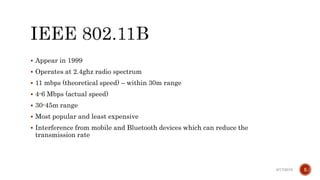
 Appear in 1999
 Operates at 2.4ghz radio spectrum
 11 mbps (theoretical speed) – within 30m range
 4-6 Mbps (actual speed)
 30-45m range
 Most popular and least expensive
 Interference from mobile and Bluetooth devices which can reduce the
transmission rate
6/17/2019 5
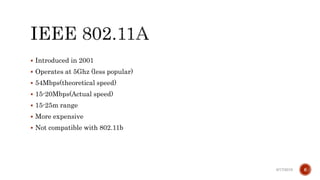
 Introduced in 2001
 Operates at 5Ghz (less popular)
 54Mbps(theoretical speed)
 15-20Mbps(Actual speed)
 15-25m range
 More expensive
 Not compatible with 802.11b
6/17/2019 6
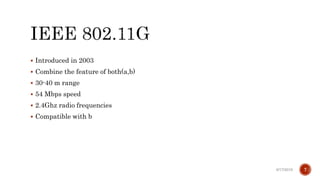
 Introduced in 2003
 Combine the feature of both(a,b)
 30-40 m range
 54 Mbps speed
 2.4Ghz radio frequencies
 Compatible with b
6/17/2019 7
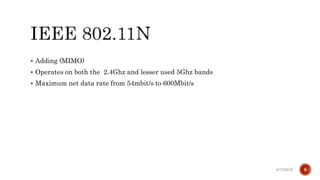
 Adding (MIMO)
 Operates on both the 2.4Ghz and lesser used 5Ghz bands
 Maximum net data rate from 54mbit/s to 600Mbit/s
6/17/2019 8
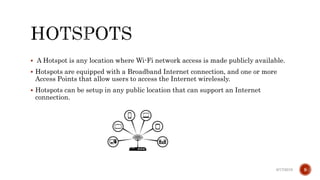
 A Hotspot is any location where Wi-Fi network access is made publicly available.
 Hotspots are equipped with a Broadband Internet connection, and one or more
Access Points that allow users to access the Internet wirelessly.
 Hotspots can be setup in any public location that can support an Internet
connection.
6/17/2019 9
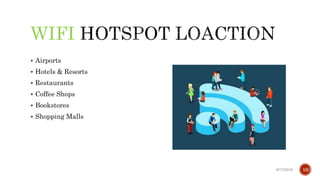
WIFI
 Airports
 Hotels & Resorts
 Restaurants
 Coffee Shops
 Bookstores
 Shopping Malls
6/17/2019 10
WI-FI
 Access Point (AP) - The AP is a wireless LAN transceiver or “base station” that
can connect one or many wireless devices in the same time to the Internet
 Safeguards - Firewalls and anti-virus software protect networks from uninvited
users and keep information secure
 Wi-Fi cards (Adapters) - They accept the wireless signal and relay information.
They can be internal and external.
6/17/2019 11
WI-FI
 A Wi-Fi connection works through a transmitting antenna, which is usually
connected to a DSL or cable Internet connection. The antenna on the router will
then beam radio signals through a specific range. Another antenna, which is on
the laptop or personal computer, receives the signal.
6/17/2019 12
ADVANTAGES WI-FI
 No Wires - A truly wireless networking solution
 No Waiting - Fast, easy deployments.
 No Worries - A wireless networking system that is secure, easy to manage, and
built to grow with you.
 Ease of Installation - Quick, easy setup
 Fast data transfer rates
6/17/2019 13
WI-FI
 Limited range
 Data security risks :a huge challenge for Wi-Fi networks.
 Interference from other devices : such as telephones, microwave ovens
 High power consumption :making battery life and heat a concern .
6/17/2019 14
WI-FI
 WEP(Wired Equivalent Privacy) : The original encryption technique specified by
the IEEE 802.11 standard.
 WPA(Wi-Fi Protected Access ): A new standard that provides improved encryption
security over WEP.
 WPA2 : is an improved version of WPA that uses Advanced Encryption Standard
(AES) technology.
6/17/2019 15
 Wi-Fi is a simple, cost-effective way to connect to the Internet, without the need to
physically connecting wires
 Hotspot is a geographic area setup in any public location, and has a readily
accessible wireless network.
 Security is a huge challenge for Wi-Fi Networks, many Security Techniques are
used to improve it.
 Wi-Fi Networks have a several limitations that should be concerned.
6/17/2019 16
Thank you
6/17/2019 17

Wifi

  • 1.
  • 2.
     Introduction  Whatis Wi-Fi?  Wi-Fi standards  Hotspots  Wi-Fi hotspot location  Elements of Wi-Fi network  How a Wi-Fi Network Works  Advantages and Limitations of Wi-Fi  Wi-Fi Security  Conclusion 6/17/2019 2
  • 3.
    WI-FI?  Wi-Fi iswireless fidelity  Wi-Fi allows computers and other devices to communicate over a wireless network.  Wi-Fi network components are based on the one of the 802.11 standards developed by the IEEE and adopted by Wi-Fi alliance.  You can use Wi-Fi to create a hotspot within the range of 20 meters (66 feet). 6/17/2019 3
  • 4.
     In 1997,the Institute of Electrical and Electronic Engineers (IEEE) drafted the 802.11 standard for wireless local area networking.  Wi-Fi networks use radio technologies to transmit & receive data at high speed.  IEEE 802.11b  IEEE 802.11a  IEEE 802.11g  IEEE 802.11n 6/17/2019 4
  • 5.
     Appear in1999  Operates at 2.4ghz radio spectrum  11 mbps (theoretical speed) – within 30m range  4-6 Mbps (actual speed)  30-45m range  Most popular and least expensive  Interference from mobile and Bluetooth devices which can reduce the transmission rate 6/17/2019 5
  • 6.
     Introduced in2001  Operates at 5Ghz (less popular)  54Mbps(theoretical speed)  15-20Mbps(Actual speed)  15-25m range  More expensive  Not compatible with 802.11b 6/17/2019 6
  • 7.
     Introduced in2003  Combine the feature of both(a,b)  30-40 m range  54 Mbps speed  2.4Ghz radio frequencies  Compatible with b 6/17/2019 7
  • 8.
     Adding (MIMO) Operates on both the 2.4Ghz and lesser used 5Ghz bands  Maximum net data rate from 54mbit/s to 600Mbit/s 6/17/2019 8
  • 9.
     A Hotspotis any location where Wi-Fi network access is made publicly available.  Hotspots are equipped with a Broadband Internet connection, and one or more Access Points that allow users to access the Internet wirelessly.  Hotspots can be setup in any public location that can support an Internet connection. 6/17/2019 9
  • 10.
    WIFI  Airports  Hotels& Resorts  Restaurants  Coffee Shops  Bookstores  Shopping Malls 6/17/2019 10
  • 11.
    WI-FI  Access Point(AP) - The AP is a wireless LAN transceiver or “base station” that can connect one or many wireless devices in the same time to the Internet  Safeguards - Firewalls and anti-virus software protect networks from uninvited users and keep information secure  Wi-Fi cards (Adapters) - They accept the wireless signal and relay information. They can be internal and external. 6/17/2019 11
  • 12.
    WI-FI  A Wi-Ficonnection works through a transmitting antenna, which is usually connected to a DSL or cable Internet connection. The antenna on the router will then beam radio signals through a specific range. Another antenna, which is on the laptop or personal computer, receives the signal. 6/17/2019 12
  • 13.
    ADVANTAGES WI-FI  NoWires - A truly wireless networking solution  No Waiting - Fast, easy deployments.  No Worries - A wireless networking system that is secure, easy to manage, and built to grow with you.  Ease of Installation - Quick, easy setup  Fast data transfer rates 6/17/2019 13
  • 14.
    WI-FI  Limited range Data security risks :a huge challenge for Wi-Fi networks.  Interference from other devices : such as telephones, microwave ovens  High power consumption :making battery life and heat a concern . 6/17/2019 14
  • 15.
    WI-FI  WEP(Wired EquivalentPrivacy) : The original encryption technique specified by the IEEE 802.11 standard.  WPA(Wi-Fi Protected Access ): A new standard that provides improved encryption security over WEP.  WPA2 : is an improved version of WPA that uses Advanced Encryption Standard (AES) technology. 6/17/2019 15
  • 16.
     Wi-Fi isa simple, cost-effective way to connect to the Internet, without the need to physically connecting wires  Hotspot is a geographic area setup in any public location, and has a readily accessible wireless network.  Security is a huge challenge for Wi-Fi Networks, many Security Techniques are used to improve it.  Wi-Fi Networks have a several limitations that should be concerned. 6/17/2019 16
  • 17.