Eliminating Malware, Inappropriate Software, and Most IT Problems with AppLocker Greg Shields, MVP, vExpert Head Geek, Concentrated Technology www.ConcentratedTech.com
This slide deck was used in one of our many conference presentations. We hope you enjoy it, and invite you to use it within your own organization however you like. For more information on our company, including information on private classes and upcoming conference appearances, please visit our Web site,  www.ConcentratedTech.com .  For links to newly-posted decks, follow us on Twitter: @concentrateddon or @concentratdgreg This work is copyright ©Concentrated Technology, LLC
Agenda Part I:  Today ’s IT is All Backwards.  AppLocker Puts the Horse Before the Cart. Discuss:  What security tools are you using today? Discuss:  How then could you protect yourself against something you know nothing about? Discuss:  So, was this guy crazy, or brilliant? Part II:  Implementing AppLocker (without Completely Screwing Up Your Network!)
DISCUSS:  What Security Tools are You Using Today? What types of products do you use today to keep your systems secure? Do they work? When do they fail?
Part I:  Today ’s IT Security is All Backwards.  AppLocker Puts the  Horse  Before the  Cart .
Anti-Virus, Anti-Malware, Anti-Oh My! We in IT are always looking for the  “anti-” solution for protecting our computers. Anti-virus  “protects” us against viruses. Anti-malware  “protects” us against malware. Firewalls  “protect” us against incoming worms. These have been great solutions for years, and are used by nearly 100% of environments. But, in a way, they ’re all  backwards .
Anti-Virus, Anti-Malware, Anti-Oh My! Browser-based attacks, worms, viruses, there ’s a common thread in virtually all forms of malware… Their code has to be  processed  if it is to run! This begs the question: “ If virtually all malware requires processing to be dangerous, could I protect myself by simply  preventing that processing from occurring in the first place ?”
The Dreaded Zero-Day Let ’s look at this a different way: “ POSIT:  You cannot protect yourself  against the dreaded zero-day attack.”
The Dreaded Zero-Day Let ’s look at this a different way: “ POSIT:  You cannot protect yourself  against the dreaded zero-day attack.” Reasons for this include: A zero-day means that the attack arrives before the protection from that attack arrives. Signature- and even heuristic-based solutions require…well…signatures and heuristics. The time distance between vulnerability and attack must be exceptionally short. Secrecy is critically important.  Yet  “no-algorithm-secrecy” is also one of the tenets of cryptography.  Bad.
DISCUSS:  So How Then Could You Protect Yourself Against Something You Know Nothing About? What are the protections against the zero-day? You can ’t write a signature… You can ’t define a heuristic… Are your security vendors really just  taking your money ?
AppLocker Changes the Mindset With AppLocker, you no longer care about signatures or heuristics. You care about what you ’ve specifically allowed to run. … and you don ’t care about everything else. AppLocker creates an environment of  “approved execution” for many types of code. Executable files (.exe and .com) Scripts (.js, .ps1, .vbs, .cmd, and .bat) Windows Installer files (.msi and .msp) DLL files (.dll and .ocx)
Blacklisting, the  “Old” Way Most anti-Anything solutions are examples of blacklisting. “ I don’t want the following code to execute on my system.”
Blacklisting, the  “Old” Way Most anti-Anything solutions are examples of blacklisting. “ I don’t want the following code to execute on my system.” With blacklisting solutions, you must constantly  update the blacklist  with those applications which shouldn ’t run. Viruses shouldn ’t run Malware shouldn ’t run Browser Helper Objects shouldn ’t run Bad applications shouldn ’t run
Blacklisting, the  “Old” Way Anti-Anything solutions are examples of blacklisting. “ I don’t want the following code to execute on my system.” With blacklisting solutions, you must constantly  update the blacklist  with those applications which shouldn ’t run. Viruses shouldn ’t run Malware shouldn ’t run Browser Helper Objects shouldn ’t run … but the problem arrives when someone writes a piece of code that you haven ’t seen before. Now, you have to figure out what it is and what it does so you can prevent it.
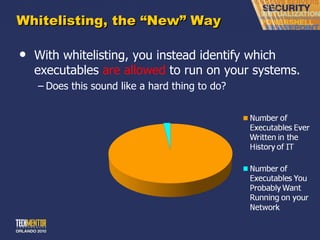
Whitelisting, the  “New” Way With whitelisting, you instead identify which executables  are allowed  to run on your systems. Does this sound like a hard thing to do?
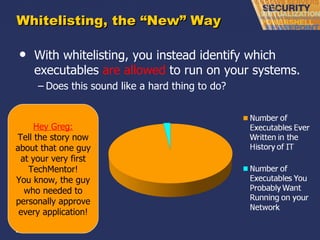
Whitelisting, the  “New” Way With whitelisting, you instead identify which executables  are allowed  to run on your systems. Does this sound like a hard thing to do? Hey Greg: Tell the story now about that one guy at your very first TechMentor! You know, the guy who needed to personally approve every application!
DISCUSS:  So, was this guy crazy, or brilliant? This fellow IT Professional at my first TechMentor, the one who needed to approve each application… … was this draconian…? … or early brilliance…?
Whitelisting, the  “New” Way With whitelisting, you will specify the executables and scripts which you ’ve tested and approved. Windows Installer and DLLs are also possible, but very, very challenging (and a performance hit). New malware will likely never get executed in your environment,  because it can ’t . Interestingly enough: AppLocker ’s older brother “Software Restriction Policies” highlighted both blacklisting and whitelisting. With Applocker, focus on  the white .
Whitelisting, the  “New” Way Also good for… “ Not-quite-malware” .  You know, those stupid apps that users install that invariably self-destruct their system. License assurance .  You won ’t get hit with a license violation for software you didn’t approve, because it can’t run. Version assurance .  Versions that you haven ’t specifically approved won’t run.  Thus, users who can’t or won’t upgrade (or accept WSUS updates) can’t run software until they do. Some will argue that these are even more exciting than anti-malware!
DEMO:  Timeout for a Quick “Where is AppLocker” Demo. Let ’s take a quick spin through AppLocker. So you can get familiarized with it before moving on.
Part II:  Implementing AppLocker (Without Completely Screwing Up Your Network!)
What you Need AppLocker has high-end requirements Windows 7 Ultimate Windows 7 Enterprise Windows Server 2008 R2 Standard Windows Server 2008 R2 Enterprise Windows Server 2008 R2 Datacenter Group Policy to deploy rules. RSAT (GPMC) to create rules. A plan. (I love it when a plan comes together…)
The Plan. #1: Determine how to implement AppLocker #2: Create a list of applications #3: Select the types of rules to create #4: Define the Group Policy structure and rule enforcement #5: Create a process for managing rules #6: Document your AppLocker plan
#1:  Determine How to Implement AppLocker Determine whether interoperability with Software Restriction Policy is needed. Necessary for down-level clients, those not at Windows 7 U or E Determine and document where to use AppLocker. AppLocker might not be useful for all machines. Local administrators can change settings.  Change policy for administrators? Select whether to use  “allow” actions only or “allow” and “deny”.
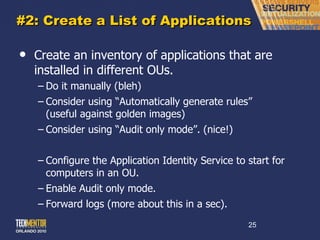
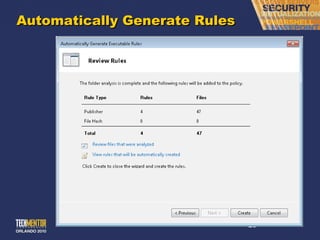
#2: Create a List of Applications Create an inventory of applications that are installed in different OUs. Do it manually (bleh) Consider using  “Automatically generate rules” (useful against golden images) Consider using  “Audit only mode”. (nice!) Configure the Application Identity Service to start for computers in an OU. Enable Audit only mode. Forward logs (more about this in a sec).
Automatically Generate Rules
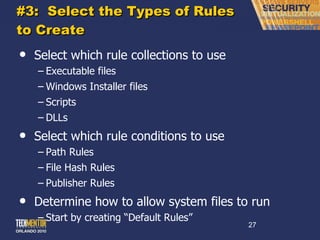
#3:  Select the Types of Rules to Create Select which rule collections to use Executable files Windows Installer files Scripts DLLs Select which rule conditions to use Path Rules File Hash Rules Publisher Rules Determine how to allow system files to run Start by creating  “Default Rules”
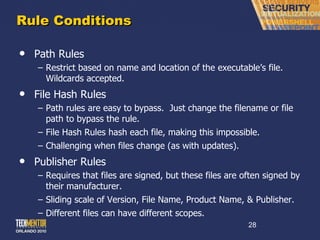
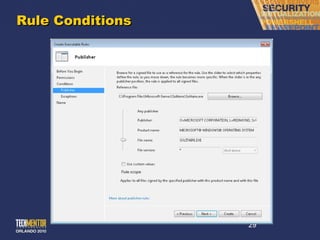
Rule Conditions Path Rules Restrict based on name and location of the executable ’s file.  Wildcards accepted. File Hash Rules Path rules are easy to bypass.  Just change the filename or file path to bypass the rule. File Hash Rules hash each file, making this impossible. Challenging when files change (as with updates). Publisher Rules Requires that files are signed, but these files are often signed by their manufacturer. Sliding scale of Version, File Name, Product Name, & Publisher. Different files can have different scopes.
Rule Conditions
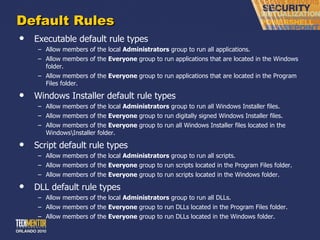
Default Rules Executable default rule types Allow members of the local  Administrators  group to run all applications. Allow members of the  Everyone  group to run applications that are located in the Windows folder. Allow members of the  Everyone  group to run applications that are located in the Program Files folder. Windows Installer default rule types Allow members of the local  Administrators  group to run all Windows Installer files. Allow members of the  Everyone  group to run digitally signed Windows Installer files. Allow members of the  Everyone  group to run all Windows Installer files located in the Windows\Installer folder. Script default rule types Allow members of the local  Administrators  group to run all scripts. Allow members of the  Everyone  group to run scripts located in the Program Files folder. Allow members of the  Everyone  group to run scripts located in the Windows folder. DLL default rule types Allow members of the local  Administrators  group to run all DLLs. Allow members of the  Everyone  group to run DLLs located in the Program Files folder. Allow members of the  Everyone  group to run DLLs located in the Windows folder.
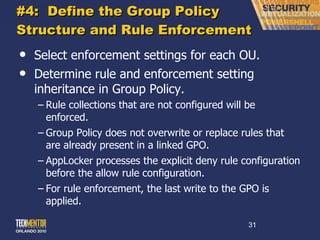
#4:  Define the Group Policy Structure and Rule Enforcement Select enforcement settings for each OU. Determine rule and enforcement setting inheritance in Group Policy. Rule collections that are not configured will be enforced. Group Policy does not overwrite or replace rules that are already present in a linked GPO. AppLocker processes the explicit deny rule configuration before the allow rule configuration. For rule enforcement, the last write to the GPO is applied.
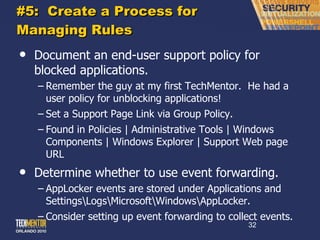
#5:  Create a Process for Managing Rules Document an end-user support policy for blocked applications. Remember the guy at my first TechMentor.  He had a user policy for unblocking applications! Set a Support Page Link via Group Policy. Found in Policies | Administrative Tools | Windows Components | Windows Explorer | Support Web page URL Determine whether to use event forwarding. AppLocker events are stored under Applications and Settings\Logs\Microsoft\Windows\AppLocker. Consider setting up event forwarding to collect events.
#6:  Document the Plan I know, I know, we all hate to document. But with something as powerful as this, wouldn ’t you want an offline copy…? Document your AppLocker plan to use when deploying AppLocker and for future reference.
What if you DO Screw Up? Advice:  Don ’t. AppLocker does not provide a way to undo an action.  However, there is a slight delay in the application of policies, so you can change your rules  if you still have the AppLocker snap-in open . The policy will take some time to propagate to a client computer that is joined to a domain So you might be able delete the erroneous rules and create the correct ones before the policy is applied.
 
This slide deck was used in one of our many conference presentations. We hope you enjoy it, and invite you to use it within your own organization however you like. For more information on our company, including information on private classes and upcoming conference appearances, please visit our Web site,  www.ConcentratedTech.com .  For links to newly-posted decks, follow us on Twitter: @concentrateddon or @concentratdgreg This work is copyright ©Concentrated Technology, LLC

App locker

  • 1.
    Eliminating Malware, InappropriateSoftware, and Most IT Problems with AppLocker Greg Shields, MVP, vExpert Head Geek, Concentrated Technology www.ConcentratedTech.com
  • 2.
    This slide deckwas used in one of our many conference presentations. We hope you enjoy it, and invite you to use it within your own organization however you like. For more information on our company, including information on private classes and upcoming conference appearances, please visit our Web site, www.ConcentratedTech.com . For links to newly-posted decks, follow us on Twitter: @concentrateddon or @concentratdgreg This work is copyright ©Concentrated Technology, LLC
  • 3.
    Agenda Part I: Today ’s IT is All Backwards. AppLocker Puts the Horse Before the Cart. Discuss: What security tools are you using today? Discuss: How then could you protect yourself against something you know nothing about? Discuss: So, was this guy crazy, or brilliant? Part II: Implementing AppLocker (without Completely Screwing Up Your Network!)
  • 4.
    DISCUSS: WhatSecurity Tools are You Using Today? What types of products do you use today to keep your systems secure? Do they work? When do they fail?
  • 5.
    Part I: Today ’s IT Security is All Backwards. AppLocker Puts the Horse Before the Cart .
  • 6.
    Anti-Virus, Anti-Malware, Anti-OhMy! We in IT are always looking for the “anti-” solution for protecting our computers. Anti-virus “protects” us against viruses. Anti-malware “protects” us against malware. Firewalls “protect” us against incoming worms. These have been great solutions for years, and are used by nearly 100% of environments. But, in a way, they ’re all backwards .
  • 7.
    Anti-Virus, Anti-Malware, Anti-OhMy! Browser-based attacks, worms, viruses, there ’s a common thread in virtually all forms of malware… Their code has to be processed if it is to run! This begs the question: “ If virtually all malware requires processing to be dangerous, could I protect myself by simply preventing that processing from occurring in the first place ?”
  • 8.
    The Dreaded Zero-DayLet ’s look at this a different way: “ POSIT: You cannot protect yourself against the dreaded zero-day attack.”
  • 9.
    The Dreaded Zero-DayLet ’s look at this a different way: “ POSIT: You cannot protect yourself against the dreaded zero-day attack.” Reasons for this include: A zero-day means that the attack arrives before the protection from that attack arrives. Signature- and even heuristic-based solutions require…well…signatures and heuristics. The time distance between vulnerability and attack must be exceptionally short. Secrecy is critically important. Yet “no-algorithm-secrecy” is also one of the tenets of cryptography. Bad.
  • 10.
    DISCUSS: SoHow Then Could You Protect Yourself Against Something You Know Nothing About? What are the protections against the zero-day? You can ’t write a signature… You can ’t define a heuristic… Are your security vendors really just taking your money ?
  • 11.
    AppLocker Changes theMindset With AppLocker, you no longer care about signatures or heuristics. You care about what you ’ve specifically allowed to run. … and you don ’t care about everything else. AppLocker creates an environment of “approved execution” for many types of code. Executable files (.exe and .com) Scripts (.js, .ps1, .vbs, .cmd, and .bat) Windows Installer files (.msi and .msp) DLL files (.dll and .ocx)
  • 12.
    Blacklisting, the “Old” Way Most anti-Anything solutions are examples of blacklisting. “ I don’t want the following code to execute on my system.”
  • 13.
    Blacklisting, the “Old” Way Most anti-Anything solutions are examples of blacklisting. “ I don’t want the following code to execute on my system.” With blacklisting solutions, you must constantly update the blacklist with those applications which shouldn ’t run. Viruses shouldn ’t run Malware shouldn ’t run Browser Helper Objects shouldn ’t run Bad applications shouldn ’t run
  • 14.
    Blacklisting, the “Old” Way Anti-Anything solutions are examples of blacklisting. “ I don’t want the following code to execute on my system.” With blacklisting solutions, you must constantly update the blacklist with those applications which shouldn ’t run. Viruses shouldn ’t run Malware shouldn ’t run Browser Helper Objects shouldn ’t run … but the problem arrives when someone writes a piece of code that you haven ’t seen before. Now, you have to figure out what it is and what it does so you can prevent it.
  • 15.
    Whitelisting, the “New” Way With whitelisting, you instead identify which executables are allowed to run on your systems. Does this sound like a hard thing to do?
  • 16.
    Whitelisting, the “New” Way With whitelisting, you instead identify which executables are allowed to run on your systems. Does this sound like a hard thing to do? Hey Greg: Tell the story now about that one guy at your very first TechMentor! You know, the guy who needed to personally approve every application!
  • 17.
    DISCUSS: So,was this guy crazy, or brilliant? This fellow IT Professional at my first TechMentor, the one who needed to approve each application… … was this draconian…? … or early brilliance…?
  • 18.
    Whitelisting, the “New” Way With whitelisting, you will specify the executables and scripts which you ’ve tested and approved. Windows Installer and DLLs are also possible, but very, very challenging (and a performance hit). New malware will likely never get executed in your environment, because it can ’t . Interestingly enough: AppLocker ’s older brother “Software Restriction Policies” highlighted both blacklisting and whitelisting. With Applocker, focus on the white .
  • 19.
    Whitelisting, the “New” Way Also good for… “ Not-quite-malware” . You know, those stupid apps that users install that invariably self-destruct their system. License assurance . You won ’t get hit with a license violation for software you didn’t approve, because it can’t run. Version assurance . Versions that you haven ’t specifically approved won’t run. Thus, users who can’t or won’t upgrade (or accept WSUS updates) can’t run software until they do. Some will argue that these are even more exciting than anti-malware!
  • 20.
    DEMO: Timeoutfor a Quick “Where is AppLocker” Demo. Let ’s take a quick spin through AppLocker. So you can get familiarized with it before moving on.
  • 21.
    Part II: Implementing AppLocker (Without Completely Screwing Up Your Network!)
  • 22.
    What you NeedAppLocker has high-end requirements Windows 7 Ultimate Windows 7 Enterprise Windows Server 2008 R2 Standard Windows Server 2008 R2 Enterprise Windows Server 2008 R2 Datacenter Group Policy to deploy rules. RSAT (GPMC) to create rules. A plan. (I love it when a plan comes together…)
  • 23.
    The Plan. #1:Determine how to implement AppLocker #2: Create a list of applications #3: Select the types of rules to create #4: Define the Group Policy structure and rule enforcement #5: Create a process for managing rules #6: Document your AppLocker plan
  • 24.
    #1: DetermineHow to Implement AppLocker Determine whether interoperability with Software Restriction Policy is needed. Necessary for down-level clients, those not at Windows 7 U or E Determine and document where to use AppLocker. AppLocker might not be useful for all machines. Local administrators can change settings. Change policy for administrators? Select whether to use “allow” actions only or “allow” and “deny”.
  • 25.
    #2: Create aList of Applications Create an inventory of applications that are installed in different OUs. Do it manually (bleh) Consider using “Automatically generate rules” (useful against golden images) Consider using “Audit only mode”. (nice!) Configure the Application Identity Service to start for computers in an OU. Enable Audit only mode. Forward logs (more about this in a sec).
  • 26.
  • 27.
    #3: Selectthe Types of Rules to Create Select which rule collections to use Executable files Windows Installer files Scripts DLLs Select which rule conditions to use Path Rules File Hash Rules Publisher Rules Determine how to allow system files to run Start by creating “Default Rules”
  • 28.
    Rule Conditions PathRules Restrict based on name and location of the executable ’s file. Wildcards accepted. File Hash Rules Path rules are easy to bypass. Just change the filename or file path to bypass the rule. File Hash Rules hash each file, making this impossible. Challenging when files change (as with updates). Publisher Rules Requires that files are signed, but these files are often signed by their manufacturer. Sliding scale of Version, File Name, Product Name, & Publisher. Different files can have different scopes.
  • 29.
  • 30.
    Default Rules Executabledefault rule types Allow members of the local Administrators group to run all applications. Allow members of the Everyone group to run applications that are located in the Windows folder. Allow members of the Everyone group to run applications that are located in the Program Files folder. Windows Installer default rule types Allow members of the local Administrators group to run all Windows Installer files. Allow members of the Everyone group to run digitally signed Windows Installer files. Allow members of the Everyone group to run all Windows Installer files located in the Windows\Installer folder. Script default rule types Allow members of the local Administrators group to run all scripts. Allow members of the Everyone group to run scripts located in the Program Files folder. Allow members of the Everyone group to run scripts located in the Windows folder. DLL default rule types Allow members of the local Administrators group to run all DLLs. Allow members of the Everyone group to run DLLs located in the Program Files folder. Allow members of the Everyone group to run DLLs located in the Windows folder.
  • 31.
    #4: Definethe Group Policy Structure and Rule Enforcement Select enforcement settings for each OU. Determine rule and enforcement setting inheritance in Group Policy. Rule collections that are not configured will be enforced. Group Policy does not overwrite or replace rules that are already present in a linked GPO. AppLocker processes the explicit deny rule configuration before the allow rule configuration. For rule enforcement, the last write to the GPO is applied.
  • 32.
    #5: Createa Process for Managing Rules Document an end-user support policy for blocked applications. Remember the guy at my first TechMentor. He had a user policy for unblocking applications! Set a Support Page Link via Group Policy. Found in Policies | Administrative Tools | Windows Components | Windows Explorer | Support Web page URL Determine whether to use event forwarding. AppLocker events are stored under Applications and Settings\Logs\Microsoft\Windows\AppLocker. Consider setting up event forwarding to collect events.
  • 33.
    #6: Documentthe Plan I know, I know, we all hate to document. But with something as powerful as this, wouldn ’t you want an offline copy…? Document your AppLocker plan to use when deploying AppLocker and for future reference.
  • 34.
    What if youDO Screw Up? Advice: Don ’t. AppLocker does not provide a way to undo an action. However, there is a slight delay in the application of policies, so you can change your rules if you still have the AppLocker snap-in open . The policy will take some time to propagate to a client computer that is joined to a domain So you might be able delete the erroneous rules and create the correct ones before the policy is applied.
  • 35.
  • 36.
    This slide deckwas used in one of our many conference presentations. We hope you enjoy it, and invite you to use it within your own organization however you like. For more information on our company, including information on private classes and upcoming conference appearances, please visit our Web site, www.ConcentratedTech.com . For links to newly-posted decks, follow us on Twitter: @concentrateddon or @concentratdgreg This work is copyright ©Concentrated Technology, LLC

Editor's Notes